Google chrome
Keyboard Shortcuts
Brought to you by www.SiryMedia.in
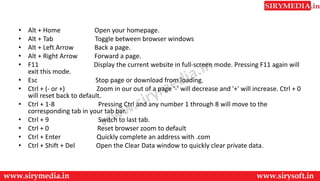
• Alt + Home Open your homepage.
• Alt + Tab Toggle between browser windows
• Alt + Left Arrow Back a page.
• Alt + Right Arrow Forward a page.
• F11 Display the current website in full-screen mode. Pressing F11 again will
exit this mode.
• Esc Stop page or download from loading.
• Ctrl + (- or +) Zoom in our out of a page '-' will decrease and '+' will increase. Ctrl + 0
will reset back to default.
• Ctrl + 1-8 Pressing Ctrl and any number 1 through 8 will move to the
corresponding tab in your tab bar.
• Ctrl + 9 Switch to last tab.
• Ctrl + 0 Reset browser zoom to default
• Ctrl + Enter Quickly complete an address with .com
• Ctrl + Shift + Del Open the Clear Data window to quickly clear private data.
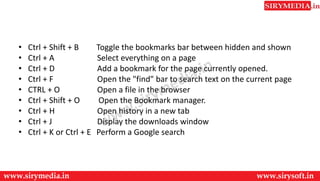
• Ctrl + Shift + B Toggle the bookmarks bar between hidden and shown
• Ctrl + A Select everything on a page
• Ctrl + D Add a bookmark for the page currently opened.
• Ctrl + F Open the "find" bar to search text on the current page
• CTRL + O Open a file in the browser
• Ctrl + Shift + O Open the Bookmark manager.
• Ctrl + H Open history in a new tab
• Ctrl + J Display the downloads window
• Ctrl + K or Ctrl + E Perform a Google search
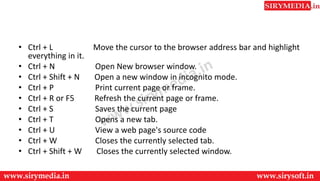
• Ctrl + L Move the cursor to the browser address bar and highlight
everything in it.
• Ctrl + N Open New browser window.
• Ctrl + Shift + N Open a new window in incognito mode.
• Ctrl + P Print current page or frame.
• Ctrl + R or F5 Refresh the current page or frame.
• Ctrl + S Saves the current page
• Ctrl + T Opens a new tab.
• Ctrl + U View a web page's source code
• Ctrl + W Closes the currently selected tab.
• Ctrl + Shift + W Closes the currently selected window.
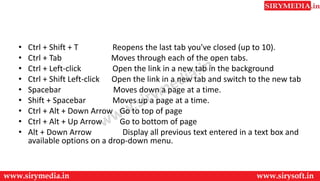
• Ctrl + Shift + T Reopens the last tab you've closed (up to 10).
• Ctrl + Tab Moves through each of the open tabs.
• Ctrl + Left-click Open the link in a new tab in the background
• Ctrl + Shift Left-click Open the link in a new tab and switch to the new tab
• Spacebar Moves down a page at a time.
• Shift + Spacebar Moves up a page at a time.
• Ctrl + Alt + Down Arrow Go to top of page
• Ctrl + Alt + Up Arrow Go to bottom of page
• Alt + Down Arrow Display all previous text entered in a text box and
available options on a drop-down menu.
Thank You
For more updates subscribe to our YouTube channel
SiryMedia
To watch more videos visit our website
www.sirymedia.in

google chrome keyboard shortcut

  • 1.
    Google chrome Keyboard Shortcuts Broughtto you by www.SiryMedia.in
  • 2.
    • Alt +Home Open your homepage. • Alt + Tab Toggle between browser windows • Alt + Left Arrow Back a page. • Alt + Right Arrow Forward a page. • F11 Display the current website in full-screen mode. Pressing F11 again will exit this mode. • Esc Stop page or download from loading. • Ctrl + (- or +) Zoom in our out of a page '-' will decrease and '+' will increase. Ctrl + 0 will reset back to default. • Ctrl + 1-8 Pressing Ctrl and any number 1 through 8 will move to the corresponding tab in your tab bar. • Ctrl + 9 Switch to last tab. • Ctrl + 0 Reset browser zoom to default • Ctrl + Enter Quickly complete an address with .com • Ctrl + Shift + Del Open the Clear Data window to quickly clear private data.
  • 3.
    • Ctrl +Shift + B Toggle the bookmarks bar between hidden and shown • Ctrl + A Select everything on a page • Ctrl + D Add a bookmark for the page currently opened. • Ctrl + F Open the "find" bar to search text on the current page • CTRL + O Open a file in the browser • Ctrl + Shift + O Open the Bookmark manager. • Ctrl + H Open history in a new tab • Ctrl + J Display the downloads window • Ctrl + K or Ctrl + E Perform a Google search
  • 4.
    • Ctrl +L Move the cursor to the browser address bar and highlight everything in it. • Ctrl + N Open New browser window. • Ctrl + Shift + N Open a new window in incognito mode. • Ctrl + P Print current page or frame. • Ctrl + R or F5 Refresh the current page or frame. • Ctrl + S Saves the current page • Ctrl + T Opens a new tab. • Ctrl + U View a web page's source code • Ctrl + W Closes the currently selected tab. • Ctrl + Shift + W Closes the currently selected window.
  • 5.
    • Ctrl +Shift + T Reopens the last tab you've closed (up to 10). • Ctrl + Tab Moves through each of the open tabs. • Ctrl + Left-click Open the link in a new tab in the background • Ctrl + Shift Left-click Open the link in a new tab and switch to the new tab • Spacebar Moves down a page at a time. • Shift + Spacebar Moves up a page at a time. • Ctrl + Alt + Down Arrow Go to top of page • Ctrl + Alt + Up Arrow Go to bottom of page • Alt + Down Arrow Display all previous text entered in a text box and available options on a drop-down menu.
  • 6.
    Thank You For moreupdates subscribe to our YouTube channel SiryMedia To watch more videos visit our website www.sirymedia.in