INTRODUCTION TO UCT LIBRARIES
Presented by Jen Eidelman
E-mail: jen.eidelman@uct.ac.za
Telephone: 021 650 2773
This work is licensed under a Creative Commons Attribution-
NonCommercial-ShareAlike 3.0 Unported License.
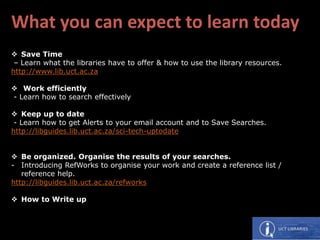
What you can expect to learn today
 Save Time
– Learn what the libraries have to offer & how to use the library resources.
http://www.lib.uct.ac.za
 Work efficiently
- Learn how to search effectively
 Keep up to date
- Learn how to get Alerts to your email account and to Save Searches.
http://libguides.lib.uct.ac.za/sci-tech-uptodate
 Be organized. Organise the results of your searches.
- Introducing RefWorks to organise your work and create a reference list /
reference help.
http://libguides.lib.uct.ac.za/refworks
 How to Write up
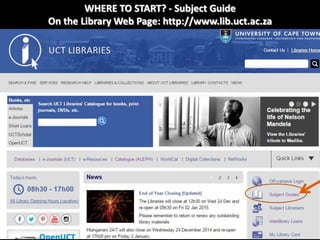
WHERE TO START? - Subject Guide
On the Library Web Page: http://www.lib.uct.ac.za
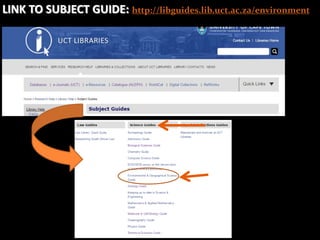
LINK TO SUBJECT GUIDE: http://libguides.lib.uct.ac.za/environment
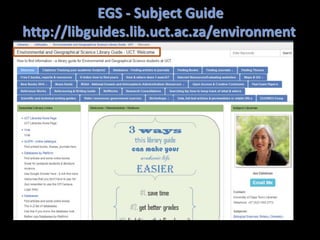
EGS - Subject Guide
http://libguides.lib.uct.ac.za/environment
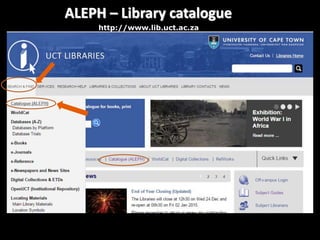
ALEPH – Library catalogue
http://www.lib.uct.ac.za
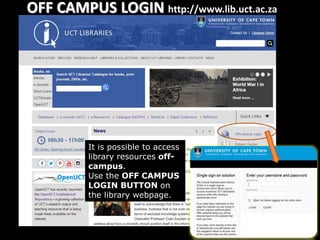
OFF CAMPUS LOGIN http://www.lib.uct.ac.za
It is possible to access
library resources off-
campus.
Use the OFF CAMPUS
LOGIN BUTTON on
the library webpage.
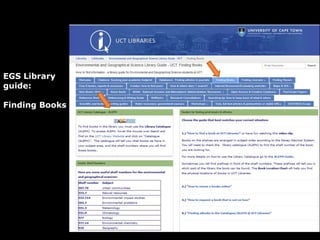
EGS Library
guide:
Finding Books
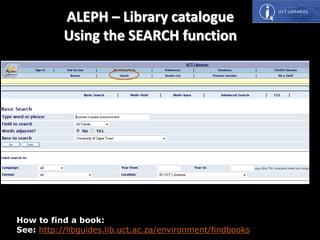
How to find a book:
See: http://libguides.lib.uct.ac.za/environment/findbooks
ALEPH – Library catalogue
Using the SEARCH function
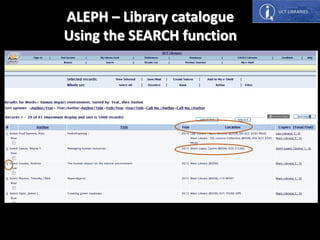
ALEPH – Library catalogue
Using the SEARCH function
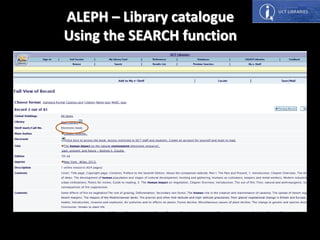
ALEPH – Library catalogue
Using the SEARCH function
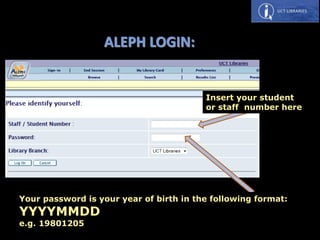
ALEPH LOGIN:
Insert your student
or staff number here
Your password is your year of birth in the following format:
YYYYMMDD
e.g. 19801205
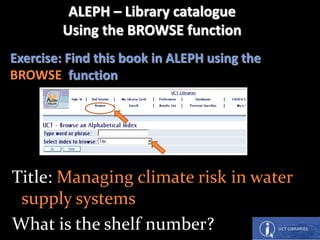
Exercise: Find this book in ALEPH using the
BROWSE function
Title: Managing climate risk in water
supply systems
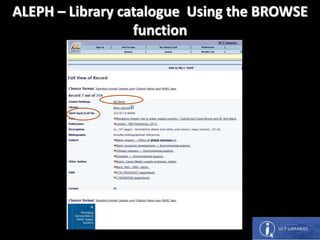
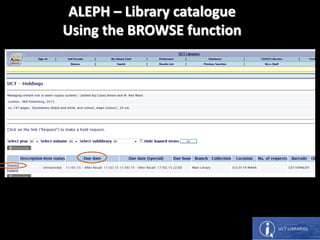
What is the shelf number?
ALEPH – Library catalogue
Using the BROWSE function
ALEPH – Library catalogue Using the BROWSE
function
ALEPH – Library catalogue
Using the BROWSE function
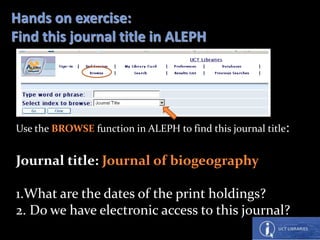
Hands on exercise:
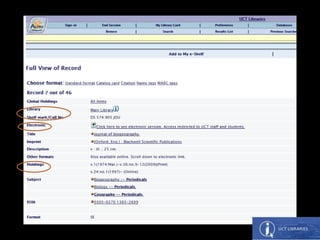
Find this journal title in ALEPH
Use the BROWSE function in ALEPH to find this journal title:
Journal title: Journal of biogeography
1.What are the dates of the print holdings?
2. Do we have electronic access to this journal?
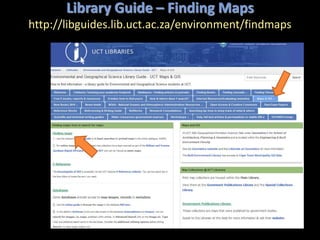
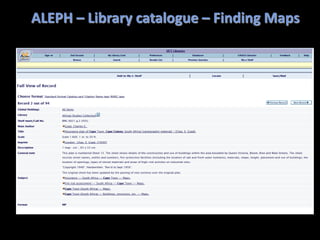
Library Guide – Finding Maps
http://libguides.lib.uct.ac.za/environment/findmaps
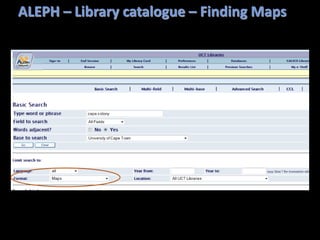
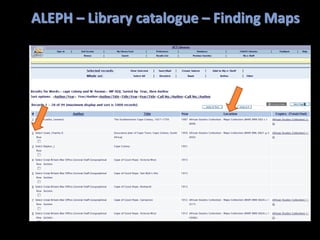
ALEPH – Library catalogue – Finding Maps
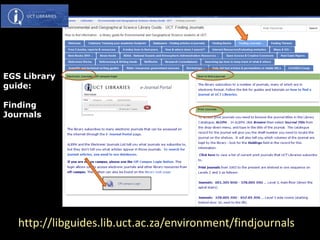
EGS Library
guide:
Finding
Journals
http://libguides.lib.uct.ac.za/environment/findjournals
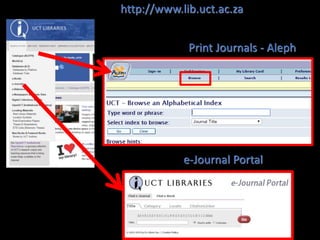
Print Journals - Aleph
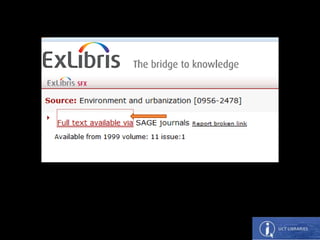
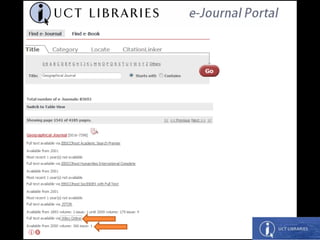
e-Journal Portal
http://www.lib.uct.ac.za
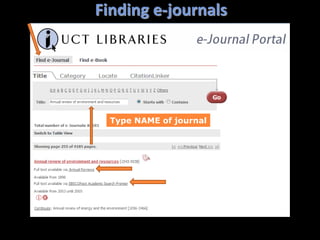
Type NAME of journal
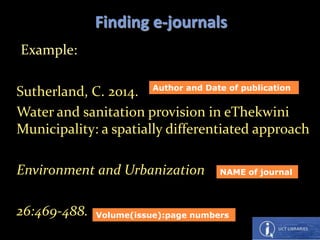
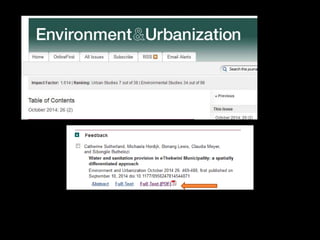
Finding e-journals
Example:
Sutherland, C. 2014.
Water and sanitation provision in eThekwini
Municipality: a spatially differentiated approach
Environment and Urbanization
26:469-488.
Finding e-journals
NAME of journal
Volume(issue):page numbers
Author and Date of publication
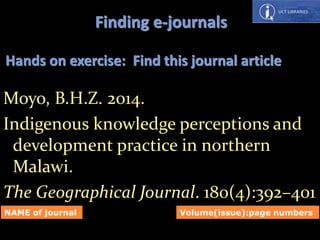
Moyo, B.H.Z. 2014.
Indigenous knowledge perceptions and
development practice in northern
Malawi.
The Geographical Journal. 180(4):392–401
Hands on exercise: Find this journal article
Finding e-journals
NAME of journal Volume(issue):page numbers
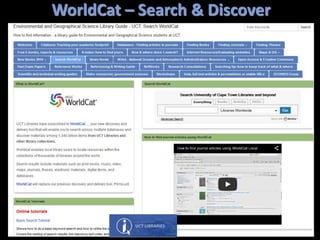
WorldCat – Search & Discover
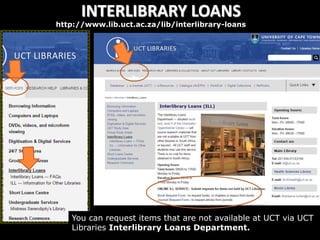
INTERLIBRARY LOANS
http://www.lib.uct.ac.za/lib/interlibrary-loans
You can request items that are not available at UCT via UCT
Libraries Interlibrary Loans Department.
Let’s
have a
break!
Photo by Jen Eidelman
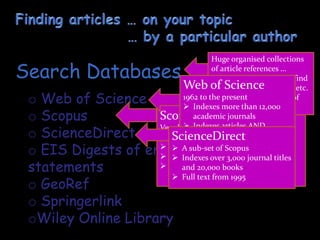
o Web of Science
o Scopus
o ScienceDirect
o EIS Digests of environmental impact
statements
o GeoRef
o Springerlink
oWiley Online Library
Search Databases
Scopus
Very large multidisciplinary database
with articles dating from 1823
 About 50 million records
 Indexes over 21,000 journal titles
 More than 5.5 million conference
papers
Huge organised collections
of article references …
indexed so that you can find
articles by topic, author, etc.
Some store the full text of
the articles.
Web of Science
1962 to the present
 Indexes more than 12,000
academic journals
 Indexes articles AND
citations
 Most highly-cited journals
 DHET accredited list
ScienceDirect
 A sub-set of Scopus
 Indexes over 3,000 journal titles
and 20,000 books
 Full text from 1995
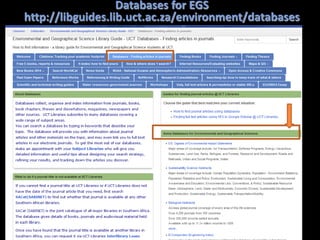
 Library’s home page
 EGS Subject Guide
Menu: Search & Find / Databases
Databases – finding articles in journals
tab
Databases for EGS
http://libguides.lib.uct.ac.za/environment/databases
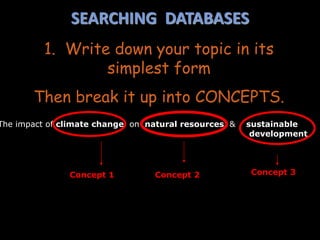
SEARCHING DATABASES
1. Write down your topic in its
simplest form
Then break it up into CONCEPTS.
The impact of climate change on natural resources & sustainable
development
Concept 1 Concept 2 Concept 3
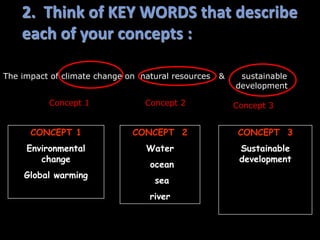
2. Think of KEY WORDS that describe
each of your concepts :
CONCEPT 1
Environmental
change
Global warming
CONCEPT 2
Water
ocean
sea
river
CONCEPT 3
Sustainable
development
The impact of climate change on natural resources & sustainable
development
Concept 1 Concept 3Concept 2
3. Construct your search strategy
 Boolean logic provides the language you use
to structure your keyword search … the
search engine needs to know how your search
terms relate to each other
 In Boolean searching, you make use of
the three Boolean operators:
AND OR NOT
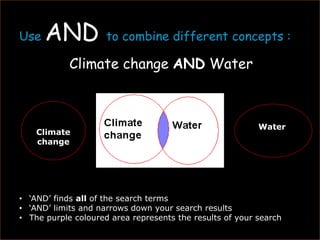
Use AND to combine different concepts :
Climate change AND Water
Climate
change
Water
• ‘AND’ finds all of the search terms
• ‘AND’ limits and narrows down your search results
• The purple coloured area represents the results of your search
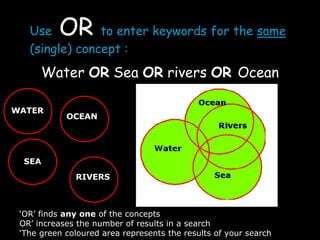
Use OR to enter keywords for the same
(single) concept :
Water OR Sea OR rivers OR Ocean
WATER
RIVERS
SEA
OCEAN
‘OR’ finds any one of the concepts
OR’ increases the number of results in a search
‘The green coloured area represents the results of your search
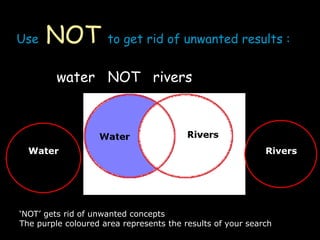
Use NOT to get rid of unwanted results :
water NOT rivers
Water Rivers
‘NOT’ gets rid of unwanted concepts
The purple coloured area represents the results of your search
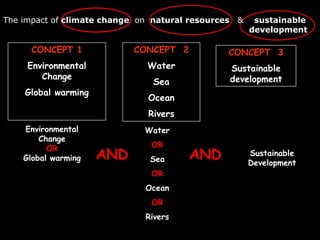
Environmental
Change
OR
Global warming
Water
OR
Sea
OR
Ocean
OR
Rivers
Sustainable
Development
AND
CONCEPT 1
Environmental
Change
Global warming
CONCEPT 2
Water
Sea
Ocean
Rivers
CONCEPT 3
Sustainable
development
AND
The impact of climate change on natural resources & sustainable
development
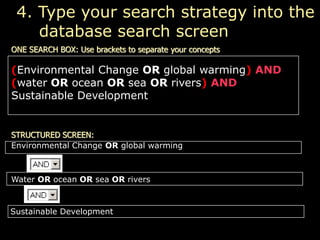
ONE SEARCH BOX: Use brackets to separate your concepts
STRUCTURED SCREEN:
(Environmental Change OR global warming) AND
(water OR ocean OR sea OR rivers) AND
Sustainable Development
4. Type your search strategy into the
database search screen
Environmental Change OR global warming
Water OR ocean OR sea OR rivers
Sustainable Development
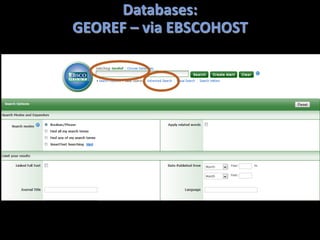
Databases:
GEOREF – via EBSCOHOST
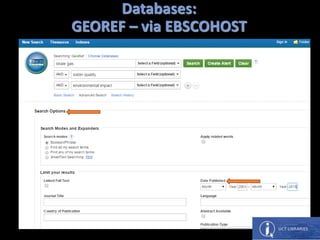
Databases:
GEOREF – via EBSCOHOST
Databases:
GEOREF – via EBSCOHOST
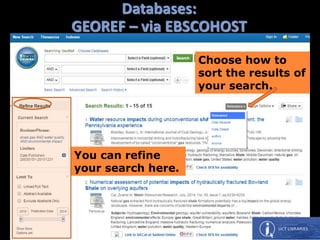
You can refine
your search here.
Choose how to
sort the results of
your search.
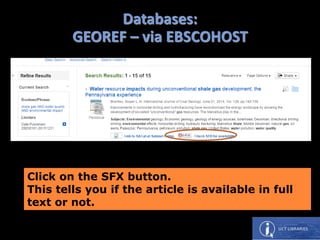
Click on the SFX button.
This tells you if the article is available in full
text or not.
Databases:
GEOREF – via EBSCOHOST
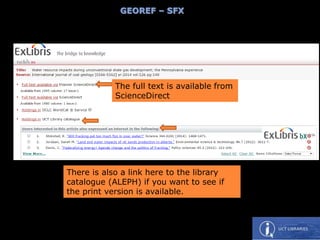
The full text is available from
ScienceDirect
There is also a link here to the library
catalogue (ALEPH) if you want to see if
the print version is available.
GEOREF – SFX
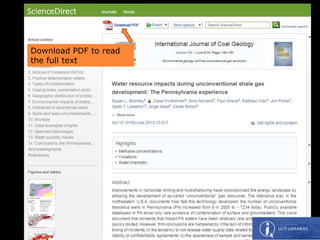
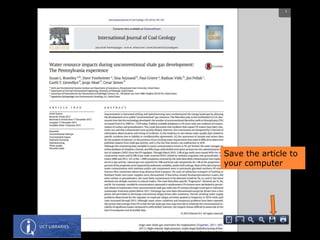
Download PDF to read
the full text
Save the article to
your computer
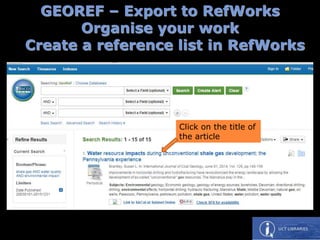
GEOREF – Export to RefWorks
Organise your work
Create a reference list in RefWorks
Click on the title of
the article
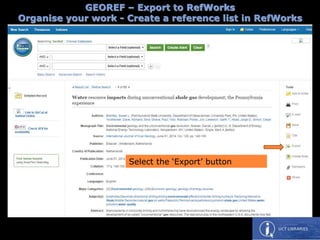
GEOREF – Export to RefWorks
Organise your work - Create a reference list in RefWorks
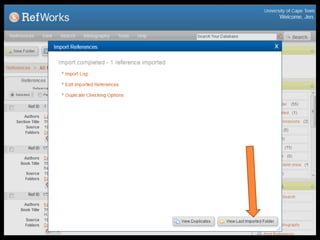
Select the ‘Export’ button
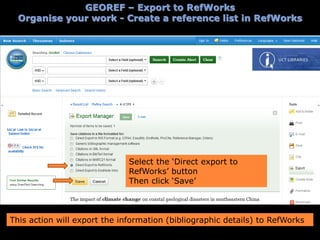
Select the ‘Direct export to
RefWorks’ button
Then click ‘Save’
This action will export the information (bibliographic details) to RefWorks
GEOREF – Export to RefWorks
Organise your work - Create a reference list in RefWorks
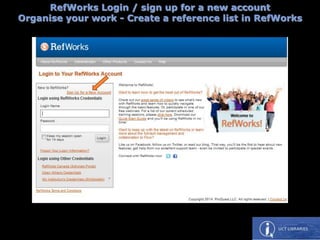
RefWorks Login / sign up for a new account
Organise your work - Create a reference list in RefWorks
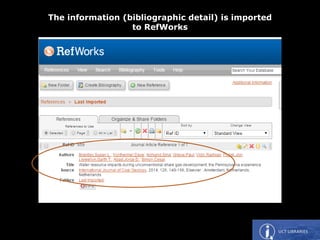
The information (bibliographic detail) is imported
to RefWorks
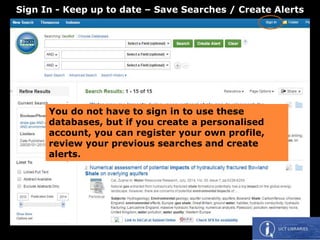
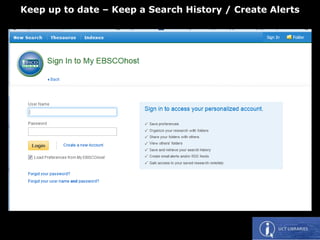
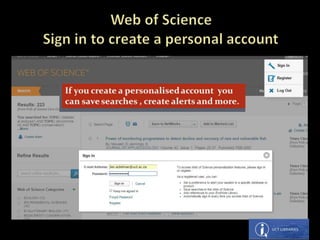
You do not have to sign in to use these
databases, but if you create a personalised
account, you can register your own profile,
review your previous searches and create
alerts.
Sign In - Keep up to date – Save Searches / Create Alerts
Keep up to date – Keep a Search History / Create Alerts
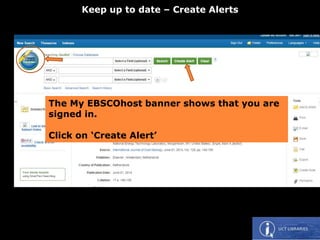
The My EBSCOhost banner shows that you are
signed in.
Click on ‘Create Alert’
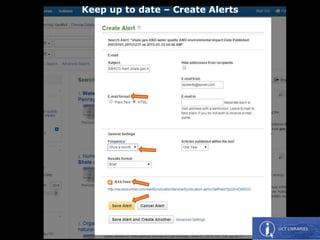
Keep up to date – Create Alerts
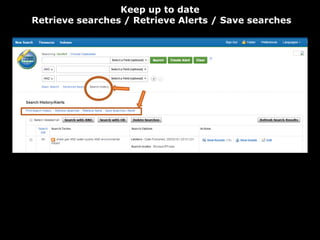
Keep up to date
Retrieve searches / Retrieve Alerts / Save searches
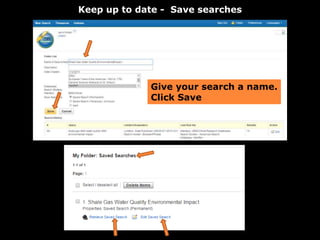
Keep up to date - Save searches
Give your search a name.
Click Save
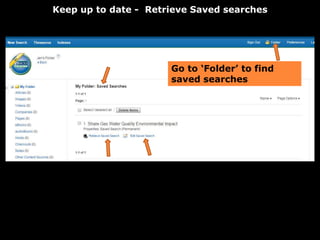
Keep up to date - Retrieve Saved searches
Go to ‘Folder’ to find
saved searches
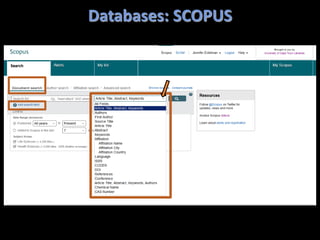
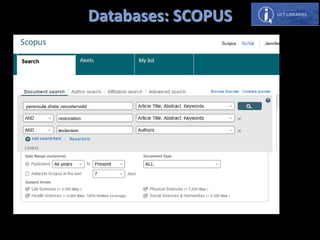
Databases: SCOPUS
Exercise
Find an article in SCOPUS using the search terms
Peninsula shale renosterveld
AND
restoration
AND
Anderson (author name)
QUESTIONS:
What is the date of the article?
Is the full text available online?
Databases: SCOPUS
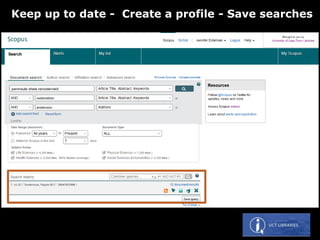
Keep up to date - Create a profile - Save searches
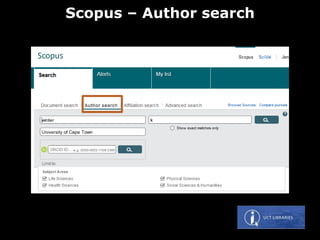
Scopus – Author search
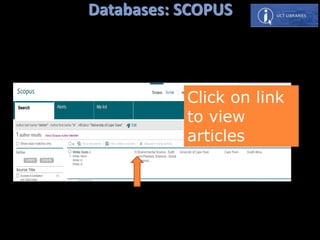
Databases: SCOPUS
Click on link
to view
articles
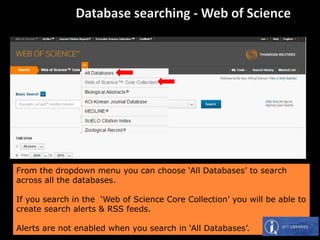
From the dropdown menu you can choose ‘All Databases’ to search
across all the databases.
If you search in the ‘Web of Science Core Collection’ you will be able to
create search alerts & RSS feeds.
Alerts are not enabled when you search in ‘All Databases’.
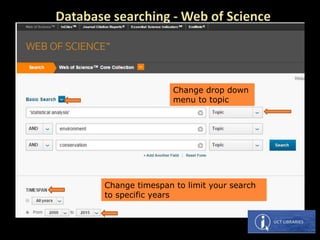
Change drop down
menu to topic
Change timespan to limit your search
to specific years
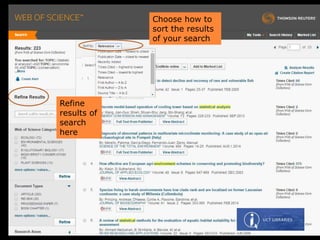
Refine
results of
search
here
Choose how to
sort the results
of your search
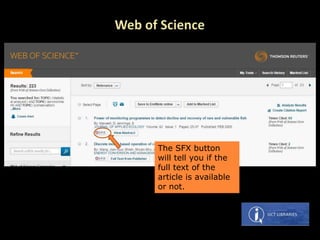
The SFX button
will tell you if the
full text of the
article is available
or not.
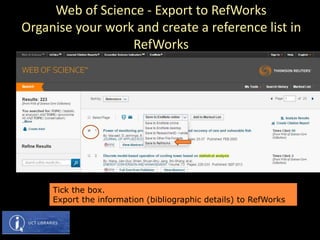
Tick the box.
Export the information (bibliographic details) to RefWorks
Web of Science - Export to RefWorks
Organise your work and create a reference list in
RefWorks
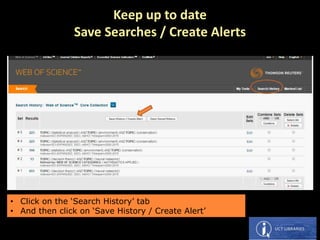
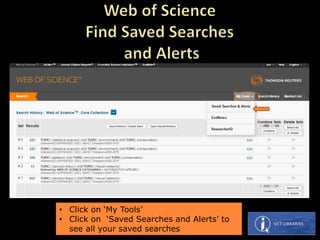
• Click on the ‘Search History’ tab
• And then click on ‘Save History / Create Alert’
Keep up to date
Save Searches / Create Alerts
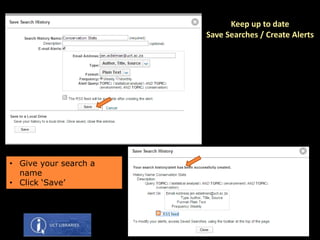
• Give your search a
name
• Click ‘Save’
Keep up to date
Save Searches / Create Alerts
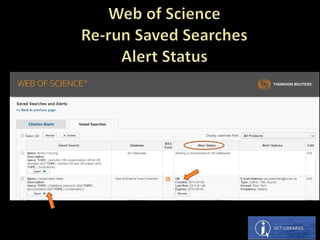
• Click on ‘My Tools’
• Click on ‘Saved Searches and Alerts’ to
see all your saved searches
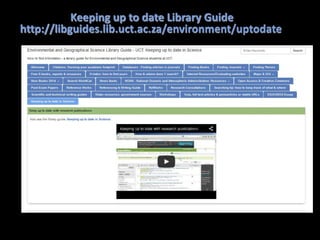
Keeping up to date Library Guide
http://libguides.lib.uct.ac.za/environment/uptodate
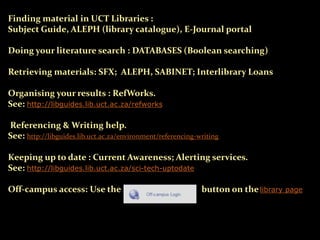
Finding material in UCT Libraries :
Subject Guide, ALEPH (library catalogue), E-Journal portal
Doing your literature search : DATABASES (Boolean searching)
Retrieving materials: SFX; ALEPH, SABINET; Interlibrary Loans
Organising your results : RefWorks.
See: http://libguides.lib.uct.ac.za/refworks
Referencing & Writing help.
See: http://libguides.lib.uct.ac.za/environment/referencing-writing
Keeping up to date : Current Awareness; Alerting services.
See: http://libguides.lib.uct.ac.za/sci-tech-uptodate
Off-campus access: Use the button on thelibrary page
THANK YOU!
This presentation is available at:
http://libguides.lib.uct.ac.za/environment/workshop-msc&phd

Environmental & Geographical Sciences 2015

  • 1.
    INTRODUCTION TO UCTLIBRARIES Presented by Jen Eidelman E-mail: jen.eidelman@uct.ac.za Telephone: 021 650 2773 This work is licensed under a Creative Commons Attribution- NonCommercial-ShareAlike 3.0 Unported License.
  • 2.
    What you canexpect to learn today  Save Time – Learn what the libraries have to offer & how to use the library resources. http://www.lib.uct.ac.za  Work efficiently - Learn how to search effectively  Keep up to date - Learn how to get Alerts to your email account and to Save Searches. http://libguides.lib.uct.ac.za/sci-tech-uptodate  Be organized. Organise the results of your searches. - Introducing RefWorks to organise your work and create a reference list / reference help. http://libguides.lib.uct.ac.za/refworks  How to Write up
  • 3.
    WHERE TO START?- Subject Guide On the Library Web Page: http://www.lib.uct.ac.za
  • 4.
    LINK TO SUBJECTGUIDE: http://libguides.lib.uct.ac.za/environment
  • 5.
    EGS - SubjectGuide http://libguides.lib.uct.ac.za/environment
  • 6.
    ALEPH – Librarycatalogue http://www.lib.uct.ac.za
  • 7.
    OFF CAMPUS LOGINhttp://www.lib.uct.ac.za It is possible to access library resources off- campus. Use the OFF CAMPUS LOGIN BUTTON on the library webpage.
  • 8.
  • 9.
    How to finda book: See: http://libguides.lib.uct.ac.za/environment/findbooks ALEPH – Library catalogue Using the SEARCH function
  • 10.
    ALEPH – Librarycatalogue Using the SEARCH function
  • 11.
    ALEPH – Librarycatalogue Using the SEARCH function
  • 12.
    ALEPH LOGIN: Insert yourstudent or staff number here Your password is your year of birth in the following format: YYYYMMDD e.g. 19801205
  • 13.
    Exercise: Find thisbook in ALEPH using the BROWSE function Title: Managing climate risk in water supply systems What is the shelf number? ALEPH – Library catalogue Using the BROWSE function
  • 14.
    ALEPH – Librarycatalogue Using the BROWSE function
  • 15.
    ALEPH – Librarycatalogue Using the BROWSE function
  • 16.
    Hands on exercise: Findthis journal title in ALEPH Use the BROWSE function in ALEPH to find this journal title: Journal title: Journal of biogeography 1.What are the dates of the print holdings? 2. Do we have electronic access to this journal?
  • 18.
    Library Guide –Finding Maps http://libguides.lib.uct.ac.za/environment/findmaps
  • 19.
    ALEPH – Librarycatalogue – Finding Maps
  • 20.
    ALEPH – Librarycatalogue – Finding Maps
  • 21.
    ALEPH – Librarycatalogue – Finding Maps
  • 22.
  • 23.
    Print Journals -Aleph e-Journal Portal http://www.lib.uct.ac.za
  • 24.
    Type NAME ofjournal Finding e-journals
  • 25.
    Example: Sutherland, C. 2014. Waterand sanitation provision in eThekwini Municipality: a spatially differentiated approach Environment and Urbanization 26:469-488. Finding e-journals NAME of journal Volume(issue):page numbers Author and Date of publication
  • 28.
    Moyo, B.H.Z. 2014. Indigenousknowledge perceptions and development practice in northern Malawi. The Geographical Journal. 180(4):392–401 Hands on exercise: Find this journal article Finding e-journals NAME of journal Volume(issue):page numbers
  • 30.
  • 31.
    INTERLIBRARY LOANS http://www.lib.uct.ac.za/lib/interlibrary-loans You canrequest items that are not available at UCT via UCT Libraries Interlibrary Loans Department.
  • 32.
  • 33.
    o Web ofScience o Scopus o ScienceDirect o EIS Digests of environmental impact statements o GeoRef o Springerlink oWiley Online Library Search Databases Scopus Very large multidisciplinary database with articles dating from 1823  About 50 million records  Indexes over 21,000 journal titles  More than 5.5 million conference papers Huge organised collections of article references … indexed so that you can find articles by topic, author, etc. Some store the full text of the articles. Web of Science 1962 to the present  Indexes more than 12,000 academic journals  Indexes articles AND citations  Most highly-cited journals  DHET accredited list ScienceDirect  A sub-set of Scopus  Indexes over 3,000 journal titles and 20,000 books  Full text from 1995
  • 34.
     Library’s homepage  EGS Subject Guide Menu: Search & Find / Databases Databases – finding articles in journals tab
  • 35.
  • 36.
    SEARCHING DATABASES 1. Writedown your topic in its simplest form Then break it up into CONCEPTS. The impact of climate change on natural resources & sustainable development Concept 1 Concept 2 Concept 3
  • 37.
    2. Think ofKEY WORDS that describe each of your concepts : CONCEPT 1 Environmental change Global warming CONCEPT 2 Water ocean sea river CONCEPT 3 Sustainable development The impact of climate change on natural resources & sustainable development Concept 1 Concept 3Concept 2
  • 38.
    3. Construct yoursearch strategy  Boolean logic provides the language you use to structure your keyword search … the search engine needs to know how your search terms relate to each other  In Boolean searching, you make use of the three Boolean operators: AND OR NOT
  • 39.
    Use AND tocombine different concepts : Climate change AND Water Climate change Water • ‘AND’ finds all of the search terms • ‘AND’ limits and narrows down your search results • The purple coloured area represents the results of your search
  • 40.
    Use OR toenter keywords for the same (single) concept : Water OR Sea OR rivers OR Ocean WATER RIVERS SEA OCEAN ‘OR’ finds any one of the concepts OR’ increases the number of results in a search ‘The green coloured area represents the results of your search
  • 41.
    Use NOT toget rid of unwanted results : water NOT rivers Water Rivers ‘NOT’ gets rid of unwanted concepts The purple coloured area represents the results of your search
  • 42.
    Environmental Change OR Global warming Water OR Sea OR Ocean OR Rivers Sustainable Development AND CONCEPT 1 Environmental Change Globalwarming CONCEPT 2 Water Sea Ocean Rivers CONCEPT 3 Sustainable development AND The impact of climate change on natural resources & sustainable development
  • 43.
    ONE SEARCH BOX:Use brackets to separate your concepts STRUCTURED SCREEN: (Environmental Change OR global warming) AND (water OR ocean OR sea OR rivers) AND Sustainable Development 4. Type your search strategy into the database search screen Environmental Change OR global warming Water OR ocean OR sea OR rivers Sustainable Development
  • 44.
  • 45.
  • 46.
    Databases: GEOREF – viaEBSCOHOST You can refine your search here. Choose how to sort the results of your search.
  • 47.
    Click on theSFX button. This tells you if the article is available in full text or not. Databases: GEOREF – via EBSCOHOST
  • 48.
    The full textis available from ScienceDirect There is also a link here to the library catalogue (ALEPH) if you want to see if the print version is available. GEOREF – SFX
  • 49.
    Download PDF toread the full text
  • 50.
    Save the articleto your computer
  • 51.
    GEOREF – Exportto RefWorks Organise your work Create a reference list in RefWorks Click on the title of the article
  • 52.
    GEOREF – Exportto RefWorks Organise your work - Create a reference list in RefWorks Select the ‘Export’ button
  • 53.
    Select the ‘Directexport to RefWorks’ button Then click ‘Save’ This action will export the information (bibliographic details) to RefWorks GEOREF – Export to RefWorks Organise your work - Create a reference list in RefWorks
  • 54.
    RefWorks Login /sign up for a new account Organise your work - Create a reference list in RefWorks
  • 56.
    The information (bibliographicdetail) is imported to RefWorks
  • 57.
    You do nothave to sign in to use these databases, but if you create a personalised account, you can register your own profile, review your previous searches and create alerts. Sign In - Keep up to date – Save Searches / Create Alerts
  • 58.
    Keep up todate – Keep a Search History / Create Alerts
  • 59.
    The My EBSCOhostbanner shows that you are signed in. Click on ‘Create Alert’ Keep up to date – Create Alerts
  • 60.
    Keep up todate – Create Alerts
  • 61.
    Keep up todate Retrieve searches / Retrieve Alerts / Save searches
  • 62.
    Keep up todate - Save searches Give your search a name. Click Save
  • 63.
    Keep up todate - Retrieve Saved searches Go to ‘Folder’ to find saved searches
  • 64.
  • 65.
    Exercise Find an articlein SCOPUS using the search terms Peninsula shale renosterveld AND restoration AND Anderson (author name) QUESTIONS: What is the date of the article? Is the full text available online?
  • 66.
  • 67.
    Keep up todate - Create a profile - Save searches
  • 68.
  • 69.
    Databases: SCOPUS Click onlink to view articles
  • 70.
    From the dropdownmenu you can choose ‘All Databases’ to search across all the databases. If you search in the ‘Web of Science Core Collection’ you will be able to create search alerts & RSS feeds. Alerts are not enabled when you search in ‘All Databases’.
  • 71.
    Change drop down menuto topic Change timespan to limit your search to specific years
  • 72.
    Refine results of search here Choose howto sort the results of your search
  • 73.
    The SFX button willtell you if the full text of the article is available or not.
  • 74.
    Tick the box. Exportthe information (bibliographic details) to RefWorks Web of Science - Export to RefWorks Organise your work and create a reference list in RefWorks
  • 76.
    • Click onthe ‘Search History’ tab • And then click on ‘Save History / Create Alert’ Keep up to date Save Searches / Create Alerts
  • 77.
    • Give yoursearch a name • Click ‘Save’ Keep up to date Save Searches / Create Alerts
  • 78.
    • Click on‘My Tools’ • Click on ‘Saved Searches and Alerts’ to see all your saved searches
  • 80.
    Keeping up todate Library Guide http://libguides.lib.uct.ac.za/environment/uptodate
  • 81.
    Finding material inUCT Libraries : Subject Guide, ALEPH (library catalogue), E-Journal portal Doing your literature search : DATABASES (Boolean searching) Retrieving materials: SFX; ALEPH, SABINET; Interlibrary Loans Organising your results : RefWorks. See: http://libguides.lib.uct.ac.za/refworks Referencing & Writing help. See: http://libguides.lib.uct.ac.za/environment/referencing-writing Keeping up to date : Current Awareness; Alerting services. See: http://libguides.lib.uct.ac.za/sci-tech-uptodate Off-campus access: Use the button on thelibrary page
  • 82.
    THANK YOU! This presentationis available at: http://libguides.lib.uct.ac.za/environment/workshop-msc&phd