INTRODUCTION TO UCT LIBRARIES
PRESENTED BY JEN EIDELMAN
2014
E-mail: jen.eidelman@uct.ac.za
Telephone: 021 650 2773
This work is licensed under a
Creative Commons Attribution-NonCommercial-ShareAlike 3.0 Unported License
.
What you can expect to learn today
 Save Time
– Learn what the libraries have to offer & how to use the library resources.
http://www.lib.uct.ac.za
 Work efficiently
- Learn how to search effectively
http://libguides.lib.uct.ac.za/biological-science-databases
 Keep up to date
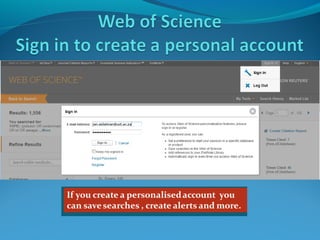
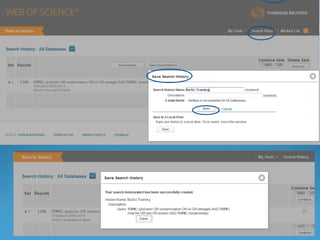
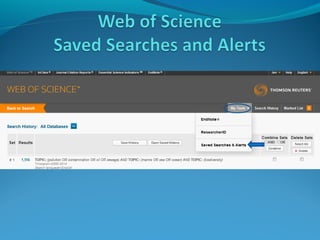
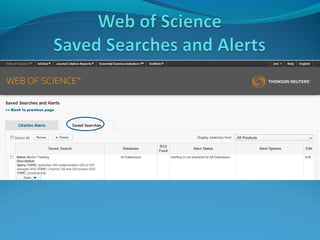
- Learn how to get Alerts to your email account and to Save Searches.
http://libguides.lib.uct.ac.za/sci-tech-uptodate
 Be organized. Organise the results of your searches.
- Introducing RefWorks to organise your work and create a reference list /
reference help.
http://libguides.lib.uct.ac.za/refworks
http://libguides.lib.uct.ac.za/biological-science-referencing
 How to Write up
http://libguides.lib.uct.ac.za/biological-science-writing
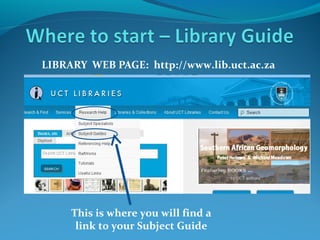
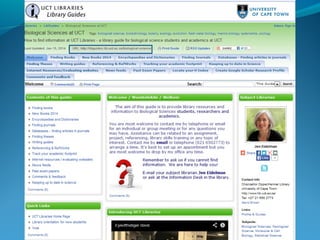
LIBRARY WEB PAGE: http://www.lib.uct.ac.za

This is where you will find a
link to your Subject Guide
LINK TO SUBJECT GUIDE

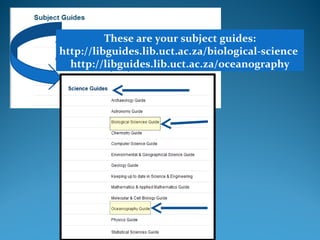
These are your subject guides:
http://libguides.lib.uct.ac.za/biological-science
http://libguides.lib.uct.ac.za/oceanography
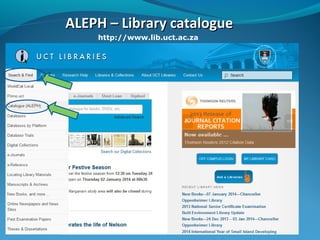
ALEPH – Library catalogue
http://www.lib.uct.ac.za
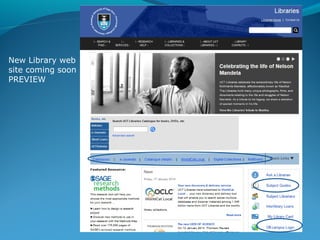
New Library web
site coming soon
PREVIEW
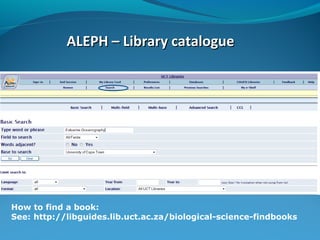
ALEPH – Library catalogue

How to find a book:
See: http://libguides.lib.uct.ac.za/biological-science-findbooks
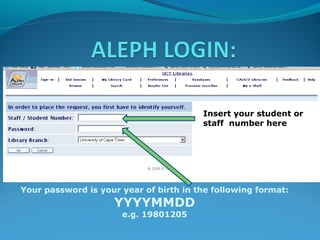
Insert your student or
staff number here

Your password is your year of birth in the following format:

YYYYMMDD
e.g. 19801205
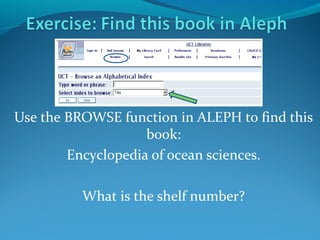
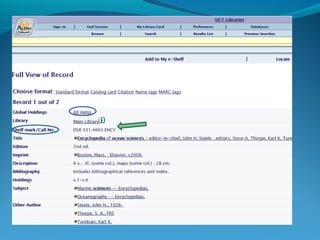
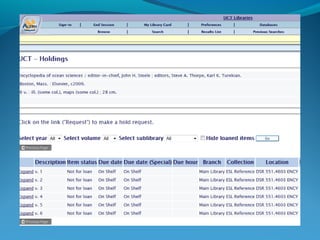
Use the BROWSE function in ALEPH to find this
book:
Encyclopedia of ocean sciences.
What is the shelf number?
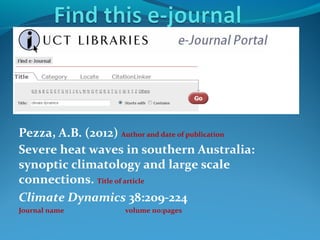
Pezza, A.B. (2012) Author and date of publication
Severe heat waves in southern Australia:
synoptic climatology and large scale
connections. Title of article
Climate Dynamics 38:209-224
Journal name

volume no:pages
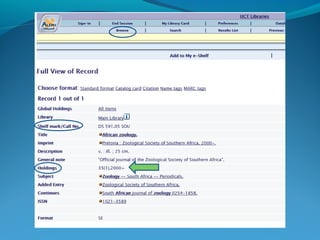
Griffiths, C.L. 2009.
A brief history of marine bio-invasions in
South Africa.
African zoology 44(2):241-247.
Is it available in print at UCT Libraries?
Is it available online?
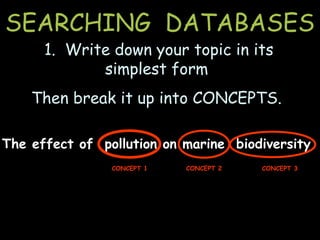
SEARCHING DATABASES
1. Write down your topic in its
simplest form

Then break it up into CONCEPTS.
The effect of pollution on marine biodiversity
CONCEPT 1

CONCEPT 2

CONCEPT 3
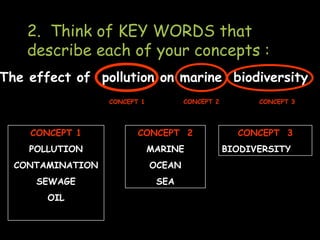
2. Think of KEY WORDS that
describe each of your concepts :
The effect of pollution on marine biodiversity
CONCEPT 2

CONCEPT 1

CONCEPT 1

CONCEPT 2

POLLUTION

MARINE

CONTAMINATION

OCEAN

SEWAGE

SEA

OIL

CONCEPT 3

CONCEPT 3
BIODIVERSITY
3. Construct your search strategy

 Boolean logic provides the language you use to
structure your keyword search … the search
engine needs to know how your search terms
relate to each other

 In Boolean searching, you make use of
the three Boolean operators:

AND

OR

NOT
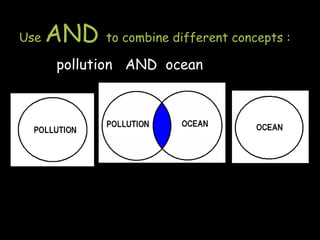
Use

AND

to combine different concepts :

pollution AND ocean
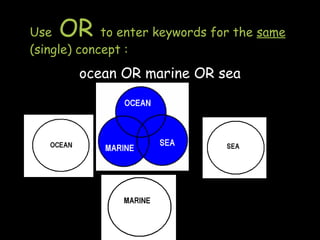
OR

Use
to enter keywords for the same
(single) concept :

ocean OR marine OR sea
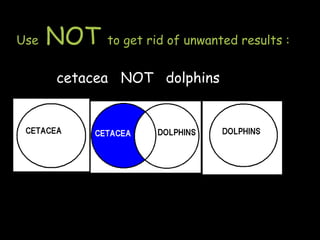
Use

NOT

to get rid of unwanted results :

cetacea NOT dolphins
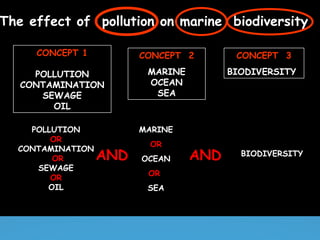
The effect of pollution on marine biodiversity
CONCEPT 1

CONCEPT 2

CONCEPT 3

POLLUTION
CONTAMINATION
SEWAGE
OIL

MARINE
OCEAN
SEA

BIODIVERSITY

POLLUTION
OR
CONTAMINATION
OR
SEWAGE
OR
OIL

MARINE

AND

OR
OCEAN
OR
SEA

AND

BIODIVERSITY
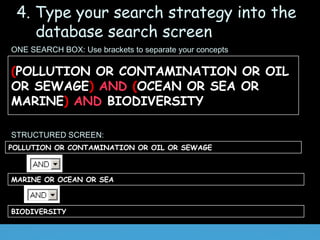
4. Type your search strategy into the
database search screen
ONE SEARCH BOX: Use brackets to separate your concepts

(POLLUTION OR CONTAMINATION OR OIL
OR SEWAGE) AND (OCEAN OR SEA OR
MARINE) AND BIODIVERSITY
STRUCTURED SCREEN:
POLLUTION OR CONTAMINATION OR OIL OR SEWAGE

MARINE OR OCEAN OR SEA

BIODIVERSITY
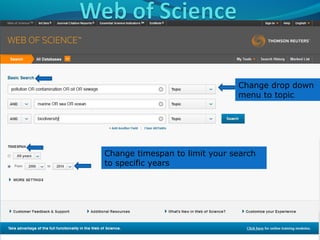
Change drop down
menu to topic

Change timespan to limit your search
to specific years
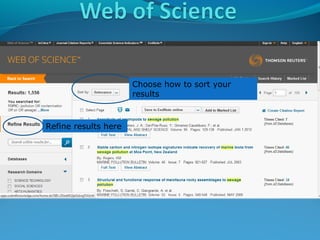
Choose how to sort your
results

Refine results here
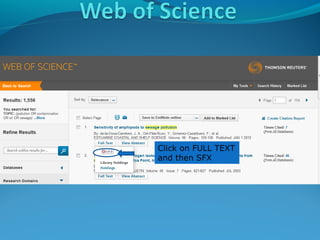
Click on FULL TEXT
and then SFX
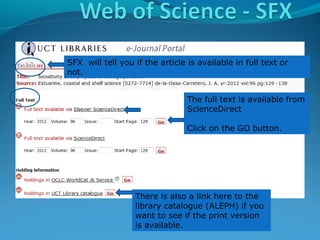
SFX will tell you if the article is available in full text or
not.
The full text is available from
ScienceDirect
Click on the GO button.

There is also a link here to the
library catalogue (ALEPH) if you
want to see if the print version
is available.
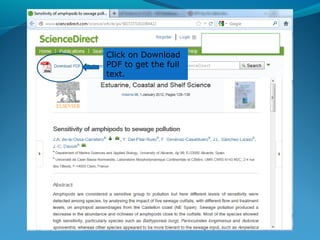
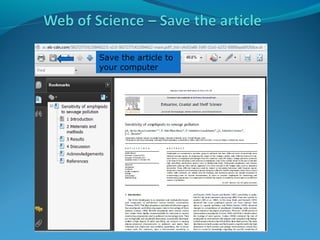
Click on Download
PDF to get the full
text.
Save the article to
your computer
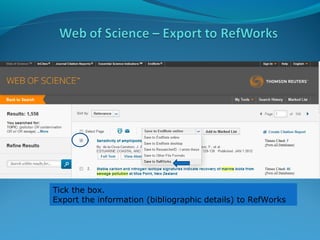
Tick the box.
Export the information (bibliographic details) to RefWorks
ARE
YOU
STILL
WITH
ME?

Photo by Jen Eidelman
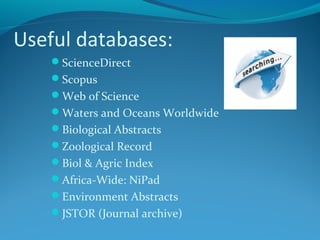
Useful databases:
ScienceDirect
Scopus
Web of Science
Waters and Oceans Worldwide
Biological Abstracts
Zoological Record
Biol & Agric Index
Africa-Wide: NiPad
Environment Abstracts
JSTOR (Journal archive)
If you’re
off campus
you can still
access UCT
Libraries Catalogue,
Databases, RefWorks
and other resources
from the library page
http://ezproxy.uct.ac.za
Photo by Jen Eidelman
Finding material in UCT Libraries :
ALEPH (library catalogue), E-Journal portal, Subject Guides
Doing your literature search : DATABASES (Boolean searching)
Retrieving materials: SFX; ALEPH, SABINET; Interlibrary Loans
Organising your results : RefWorks.
See: http://libguides.lib.uct.ac.za/refworks
Writing help :
See: http://libguides.lib.uct.ac.za/biological-science-writing
Referencing help.
See: http://libguides.lib.uct.ac.za/biological-science-referencing
Keeping up to date : Current Awareness; Alerting services.
See: http://libguides.lib.uct.ac.za/sci-tech-uptodate
Off-campus access: Use the
.

button on the library page
Thank you!

Applied marine science 2014 University of Cape Town Library Workshop

  • 1.
    INTRODUCTION TO UCTLIBRARIES PRESENTED BY JEN EIDELMAN 2014 E-mail: jen.eidelman@uct.ac.za Telephone: 021 650 2773 This work is licensed under a Creative Commons Attribution-NonCommercial-ShareAlike 3.0 Unported License .
  • 2.
    What you canexpect to learn today  Save Time – Learn what the libraries have to offer & how to use the library resources. http://www.lib.uct.ac.za  Work efficiently - Learn how to search effectively http://libguides.lib.uct.ac.za/biological-science-databases  Keep up to date - Learn how to get Alerts to your email account and to Save Searches. http://libguides.lib.uct.ac.za/sci-tech-uptodate  Be organized. Organise the results of your searches. - Introducing RefWorks to organise your work and create a reference list / reference help. http://libguides.lib.uct.ac.za/refworks http://libguides.lib.uct.ac.za/biological-science-referencing  How to Write up http://libguides.lib.uct.ac.za/biological-science-writing
  • 3.
    LIBRARY WEB PAGE:http://www.lib.uct.ac.za This is where you will find a link to your Subject Guide
  • 4.
    LINK TO SUBJECTGUIDE These are your subject guides: http://libguides.lib.uct.ac.za/biological-science http://libguides.lib.uct.ac.za/oceanography
  • 6.
    ALEPH – Librarycatalogue http://www.lib.uct.ac.za
  • 7.
    New Library web sitecoming soon PREVIEW
  • 8.
    ALEPH – Librarycatalogue How to find a book: See: http://libguides.lib.uct.ac.za/biological-science-findbooks
  • 9.
    Insert your studentor staff number here Your password is your year of birth in the following format: YYYYMMDD e.g. 19801205
  • 10.
    Use the BROWSEfunction in ALEPH to find this book: Encyclopedia of ocean sciences. What is the shelf number?
  • 13.
    Pezza, A.B. (2012)Author and date of publication Severe heat waves in southern Australia: synoptic climatology and large scale connections. Title of article Climate Dynamics 38:209-224 Journal name volume no:pages
  • 14.
    Griffiths, C.L. 2009. Abrief history of marine bio-invasions in South Africa. African zoology 44(2):241-247. Is it available in print at UCT Libraries? Is it available online?
  • 17.
    SEARCHING DATABASES 1. Writedown your topic in its simplest form Then break it up into CONCEPTS. The effect of pollution on marine biodiversity CONCEPT 1 CONCEPT 2 CONCEPT 3
  • 18.
    2. Think ofKEY WORDS that describe each of your concepts : The effect of pollution on marine biodiversity CONCEPT 2 CONCEPT 1 CONCEPT 1 CONCEPT 2 POLLUTION MARINE CONTAMINATION OCEAN SEWAGE SEA OIL CONCEPT 3 CONCEPT 3 BIODIVERSITY
  • 19.
    3. Construct yoursearch strategy  Boolean logic provides the language you use to structure your keyword search … the search engine needs to know how your search terms relate to each other  In Boolean searching, you make use of the three Boolean operators: AND OR NOT
  • 20.
    Use AND to combine differentconcepts : pollution AND ocean
  • 21.
    OR Use to enter keywordsfor the same (single) concept : ocean OR marine OR sea
  • 22.
    Use NOT to get ridof unwanted results : cetacea NOT dolphins
  • 23.
    The effect ofpollution on marine biodiversity CONCEPT 1 CONCEPT 2 CONCEPT 3 POLLUTION CONTAMINATION SEWAGE OIL MARINE OCEAN SEA BIODIVERSITY POLLUTION OR CONTAMINATION OR SEWAGE OR OIL MARINE AND OR OCEAN OR SEA AND BIODIVERSITY
  • 24.
    4. Type yoursearch strategy into the database search screen ONE SEARCH BOX: Use brackets to separate your concepts (POLLUTION OR CONTAMINATION OR OIL OR SEWAGE) AND (OCEAN OR SEA OR MARINE) AND BIODIVERSITY STRUCTURED SCREEN: POLLUTION OR CONTAMINATION OR OIL OR SEWAGE MARINE OR OCEAN OR SEA BIODIVERSITY
  • 25.
    Change drop down menuto topic Change timespan to limit your search to specific years
  • 26.
    Choose how tosort your results Refine results here
  • 27.
    Click on FULLTEXT and then SFX
  • 28.
    SFX will tellyou if the article is available in full text or not. The full text is available from ScienceDirect Click on the GO button. There is also a link here to the library catalogue (ALEPH) if you want to see if the print version is available.
  • 29.
    Click on Download PDFto get the full text.
  • 30.
    Save the articleto your computer
  • 31.
    Tick the box. Exportthe information (bibliographic details) to RefWorks
  • 36.
  • 37.
    Useful databases: ScienceDirect Scopus Web ofScience Waters and Oceans Worldwide Biological Abstracts Zoological Record Biol & Agric Index Africa-Wide: NiPad Environment Abstracts JSTOR (Journal archive)
  • 38.
    If you’re off campus youcan still access UCT Libraries Catalogue, Databases, RefWorks and other resources from the library page http://ezproxy.uct.ac.za Photo by Jen Eidelman
  • 39.
    Finding material inUCT Libraries : ALEPH (library catalogue), E-Journal portal, Subject Guides Doing your literature search : DATABASES (Boolean searching) Retrieving materials: SFX; ALEPH, SABINET; Interlibrary Loans Organising your results : RefWorks. See: http://libguides.lib.uct.ac.za/refworks Writing help : See: http://libguides.lib.uct.ac.za/biological-science-writing Referencing help. See: http://libguides.lib.uct.ac.za/biological-science-referencing Keeping up to date : Current Awareness; Alerting services. See: http://libguides.lib.uct.ac.za/sci-tech-uptodate Off-campus access: Use the . button on the library page
  • 40.

Editor's Notes

  • #18 Browsing allows you to search the database under ONE subject, author name, title, etc. KEYWORD SEARCHING: allows you to do more complex searches involving more than one subject or concept. We need to learn some techniques before we can do keyword searching. Let’s go through the steps you should follow in a keyword search What does RURAL mean ?…in the country (not cities or towns), agricultural or farming area
  • #19 Browsing allows you to search the database under ONE subject, author name, title, etc. KEYWORD SEARCHING: allows you to do more complex searches involving more than one subject or concept. We need to learn some techniques before we can do keyword searching. Let’s go through the steps you should follow in a keyword search What does RURAL mean ?…in the country (not cities or towns), agricultural or farming area
  • #20 Browsing allows you to search the database under ONE subject, author name, title, etc. KEYWORD SEARCHING: allows you to do more complex searches involving more than one subject or concept. We need to learn some techniques before we can do keyword searching. Let’s go through the steps you should follow in a keyword search What does RURAL mean ?…in the country (not cities or towns), agricultural or farming area
  • #23 Browsing allows you to search the database under ONE subject, author name, title, etc. KEYWORD SEARCHING: allows you to do more complex searches involving more than one subject or concept. We need to learn some techniques before we can do keyword searching. Let’s go through the steps you should follow in a keyword search What does RURAL mean ?…in the country (not cities or towns), agricultural or farming area
  • #24 Now let’s translate our table of keywords into the language of Boolean logic : Use OR when putting in words in the SAME CONCEPT Use brackets to keep words in the same concept together Use AND to tell the computer to COMBINE the different concepts