Gitflow
Note by me...
Bui Huu Phuoc,
Ho Chi Minh city, 17/07/2020
Contents
- Version Control Software
- Git
- Gitflow by Vincent Driessen
- GitHub Flow
- Combine GitHub and Gitflow
- “Linh tinh”
- References
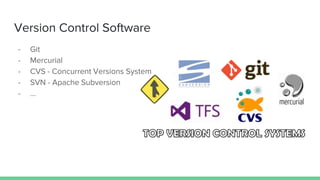
Version Control Software
- Git
- Mercurial
- CVS - Concurrent Versions System
- SVN - Apache Subversion
- ...
Git
- Git is a free and open source distributed
version control system.
- Git was created by Linus Torvalds in
2005.
- Written in C, Shell, Perl, TCL (Tool
Command Language), and Python.
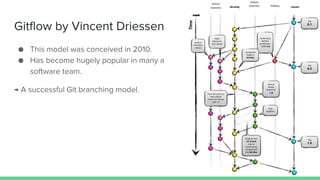
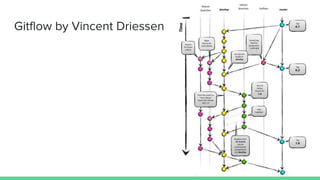
Gitflow by Vincent Driessen
● This model was conceived in 2010.
● Has become hugely popular in many a
software team.
→ A successful Git branching model.
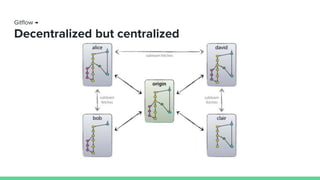
Gitflow →
Decentralized but centralized
Gitflow →
Branches
- Main branches:
- master
- develop
- Supporting branches:
- Feature branches
- Release branches
- Hotfix branches
Gitflow → Branches →
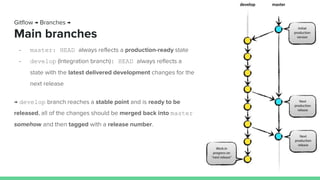
Main branches
- master: HEAD always reflects a production-ready state
- develop (Integration branch): HEAD always reflects a
state with the latest delivered development changes for the
next release
→ develop branch reaches a stable point and is ready to be
released, all of the changes should be merged back into master
somehow and then tagged with a release number.
Gitflow → Branches →
Supporting branches
- Feature branches
- Release branches
- Hotfix branches
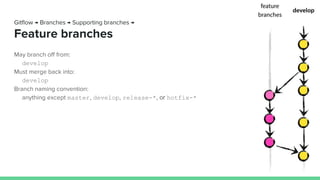
May branch off from:
develop
Must merge back into:
develop
Branch naming convention:
anything except master, develop, release-*, or hotfix-*
Gitflow → Branches → Supporting branches →
Feature branches
Creating a feature branch
$ git checkout -b myfeature develop
Switched to a new branch "myfeature"
Incorporating a finished feature on develop
$ git checkout develop
Switched to branch 'develop'
$ git merge --no-ff myfeature
Updating ea1b82a..05e9557
(Summary of changes)
$ git branch -d myfeature
Deleted branch myfeature (was 05e9557).
$ git push origin develop
Gitflow → Branches → Supporting branches →
Feature branches
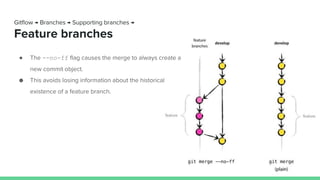
● The --no-ff flag causes the merge to always create a
new commit object.
● This avoids losing information about the historical
existence of a feature branch.
Gitflow → Branches → Supporting branches →
Feature branches
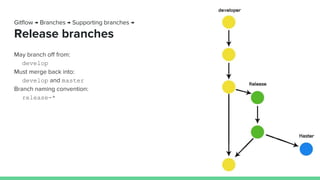
May branch off from:
develop
Must merge back into:
develop and master
Branch naming convention:
release-*
Gitflow → Branches → Supporting branches →
Release branches
Creating a release branch
$ git checkout -b release-1.2 develop
Switched to a new branch "release-1.2"
$ ./bump-version.sh 1.2
Files modified successfully, version bumped to 1.2.
$ git commit -a -m "Bumped version number to 1.2"
[release-1.2 74d9424] Bumped version number to 1.2
1 files changed, 1 insertions(+), 1 deletions(-)
Gitflow → Branches → Supporting branches →
Release branches
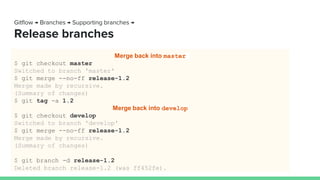
Merge back into master
$ git checkout master
Switched to branch 'master'
$ git merge --no-ff release-1.2
Merge made by recursive.
(Summary of changes)
$ git tag -a 1.2
Merge back into develop
$ git checkout develop
Switched to branch 'develop'
$ git merge --no-ff release-1.2
Merge made by recursive.
(Summary of changes)
$ git branch -d release-1.2
Deleted branch release-1.2 (was ff452fe).
Gitflow → Branches → Supporting branches →
Release branches
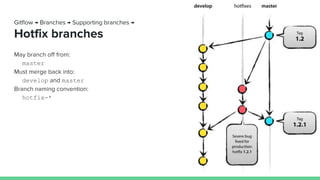
May branch off from:
master
Must merge back into:
develop and master
Branch naming convention:
hotfix-*
Gitflow → Branches → Supporting branches →
Hotfix branches
Creating a hotfix branch
$ git checkout -b hotfix-1.2.1 master
Switched to a new branch "hotfix-1.2.1"
$ ./bump-version.sh 1.2.1
Files modified successfully, version bumped to 1.2.1.
$ git commit -m "Bumped version number to 1.2.1"
[hotfix-1.2.1 41e61bb] Bumped version number to 1.2.1
1 files changed, 1 insertions(+), 1 deletions(-)
$ git commit -m "Fixed severe production problem"
[hotfix-1.2.1 abbe5d6] Fixed severe production problem
5 files changed, 32 insertions(+), 17 deletions(-)
Gitflow → Branches → Supporting branches →
Hotfix branches
Merge back into master
$ git checkout master
Switched to branch 'master'
$ git merge --no-ff hotfix-1.2.1
Merge made by recursive.
(Summary of changes)
$ git tag -a 1.2.1
Merge back into develop
$ git checkout develop
Switched to branch 'develop'
$ git merge --no-ff hotfix-1.2.1
Merge made by recursive.
(Summary of changes)
$ git branch -d hotfix-1.2.1
Deleted branch hotfix-1.2.1 (was abbe5d6).
Gitflow → Branches → Supporting branches →
Hotfix branches
Gitflow by Vincent Driessen
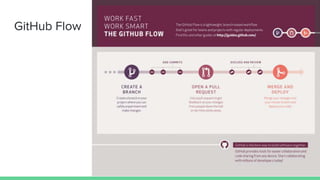
GitHub Flow
Combine Github and Gitflow
- Prepare
- Procedure
- Conflict code
Combine GitHub and Gitflow →
Prepare
1. On GitHub (or Bitbucket) fork the central repository to your account.
1. Clone your forked repository
$ git clone [Forked repository URL]
1. Go to your folder cloned
$ cd [Your folder cloned]
1. Add your central remote
$ git remote add [upstream] [Your central repo URL]
Combine GitHub and Gitflow →
Procedure
1. Checkout to develop branch
$ git checkout develop
1. Sync local’s develop with upstream
$ git pull upstream develop
1. Create a new branch to make a new feature.
$ git checkout -b your_feature
1. Implement your feature, and commit something after finished
$ git add -A
$ git commit -m “This is my first commit”
Combine GitHub and Gitflow →
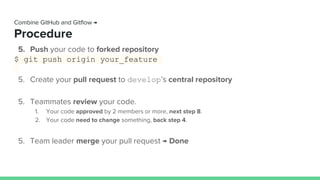
Procedure
5. Push your code to forked repository
$ git push origin your_feature
5. Create your pull request to develop’s central repository
5. Teammates review your code.
1. Your code approved by 2 members or more, next step 8.
2. Your code need to change something, back step 4.
5. Team leader merge your pull request → Done
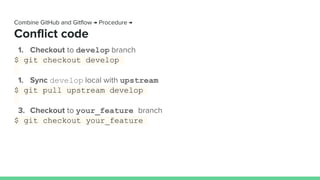
1. Checkout to develop branch
$ git checkout develop
1. Sync develop local with upstream
$ git pull upstream develop
3. Checkout to your_feature branch
$ git checkout your_feature
Combine GitHub and Gitflow → Procedure →
Conflict code
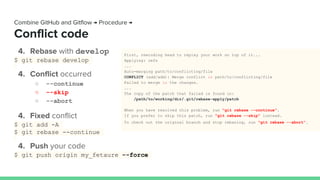
Combine GitHub and Gitflow → Procedure →
Conflict code
4. Rebase with develop
$ git rebase develop
4. Conflict occurred
○ --continue
○ --skip
○ --abort
4. Fixed conflict
$ git add -A
$ git rebase --continue
4. Push your code
$ git push origin my_fetaure --force
First, rewinding head to replay your work on top of it...
Applying: refs
...
Auto-merging path/to/conflicting/file
CONFLICT (add/add): Merge conflict in path/to/conflicting/file
Failed to merge in the changes.
...
The copy of the patch that failed is found in:
/path/to/working/dir/.git/rebase-apply/patch
When you have resolved this problem, run "git rebase --continue".
If you prefer to skip this patch, run "git rebase --skip" instead.
To check out the original branch and stop rebasing, run "git rebase --abort".
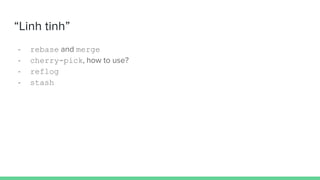
“Linh tinh”
- rebase and merge
- cherry-pick, how to use?
- reflog
- stash
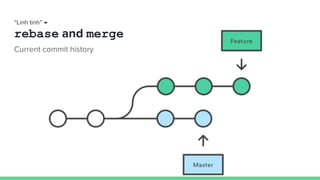
“Linh tinh” →
rebase and merge
Current commit history
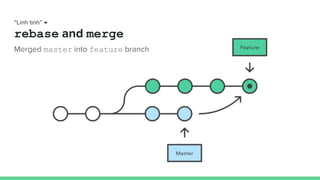
Merged master into feature branch
“Linh tinh” →
rebase and merge
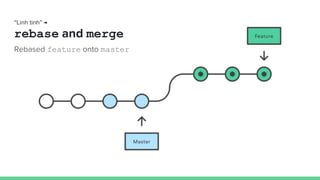
Rebased feature onto master
“Linh tinh” →
rebase and merge
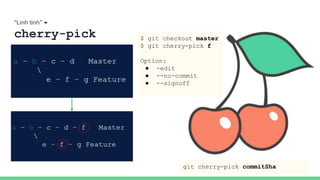
“Linh tinh” →
cherry-pick
git cherry-pick commitSha
$ git checkout master
$ git cherry-pick f
Option:
● -edit
● --no-commit
● --signoff
“Linh tinh” →
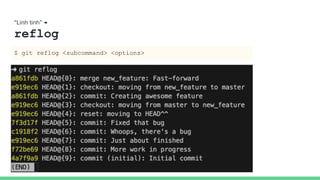
reflog
$ git reflog <subcommand> <options>
“Linh tinh” →
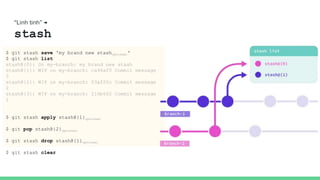
stash
$ git stash save 'my brand new stashoptional'
$ git stash list
stash@{0}: On my-branch: my brand new stash
stash@{1}: WIP on my-branch: ca96af0 Commit message
3
stash@{2}: WIP on my-branch: 03af20c Commit message
2
stash@{3}: WIP on my-branch: 216b662 Commit message
1
$ git stash apply stash@{1}optional
$ git pop stash@{2}optional
$ git stash drop stash@{1}optional
$ git stash clear
References
1. A successful Git branching model
2. Git SCM
3. Version Control Software Comparison
4. Git Wikipedia
5. Understanding the GitHub flow
6. Framgia Gitflow
7. Cherry Pick
8. How Git Stash Can Help You Juggle Multiple Branches
Gitflow

Gitflow

  • 1.
    Gitflow Note by me... BuiHuu Phuoc, Ho Chi Minh city, 17/07/2020
  • 2.
    Contents - Version ControlSoftware - Git - Gitflow by Vincent Driessen - GitHub Flow - Combine GitHub and Gitflow - “Linh tinh” - References
  • 3.
    Version Control Software -Git - Mercurial - CVS - Concurrent Versions System - SVN - Apache Subversion - ...
  • 4.
    Git - Git isa free and open source distributed version control system. - Git was created by Linus Torvalds in 2005. - Written in C, Shell, Perl, TCL (Tool Command Language), and Python.
  • 5.
    Gitflow by VincentDriessen ● This model was conceived in 2010. ● Has become hugely popular in many a software team. → A successful Git branching model.
  • 6.
  • 7.
    Gitflow → Branches - Mainbranches: - master - develop - Supporting branches: - Feature branches - Release branches - Hotfix branches
  • 8.
    Gitflow → Branches→ Main branches - master: HEAD always reflects a production-ready state - develop (Integration branch): HEAD always reflects a state with the latest delivered development changes for the next release → develop branch reaches a stable point and is ready to be released, all of the changes should be merged back into master somehow and then tagged with a release number.
  • 9.
    Gitflow → Branches→ Supporting branches - Feature branches - Release branches - Hotfix branches
  • 10.
    May branch offfrom: develop Must merge back into: develop Branch naming convention: anything except master, develop, release-*, or hotfix-* Gitflow → Branches → Supporting branches → Feature branches
  • 11.
    Creating a featurebranch $ git checkout -b myfeature develop Switched to a new branch "myfeature" Incorporating a finished feature on develop $ git checkout develop Switched to branch 'develop' $ git merge --no-ff myfeature Updating ea1b82a..05e9557 (Summary of changes) $ git branch -d myfeature Deleted branch myfeature (was 05e9557). $ git push origin develop Gitflow → Branches → Supporting branches → Feature branches
  • 12.
    ● The --no-ffflag causes the merge to always create a new commit object. ● This avoids losing information about the historical existence of a feature branch. Gitflow → Branches → Supporting branches → Feature branches
  • 13.
    May branch offfrom: develop Must merge back into: develop and master Branch naming convention: release-* Gitflow → Branches → Supporting branches → Release branches
  • 14.
    Creating a releasebranch $ git checkout -b release-1.2 develop Switched to a new branch "release-1.2" $ ./bump-version.sh 1.2 Files modified successfully, version bumped to 1.2. $ git commit -a -m "Bumped version number to 1.2" [release-1.2 74d9424] Bumped version number to 1.2 1 files changed, 1 insertions(+), 1 deletions(-) Gitflow → Branches → Supporting branches → Release branches
  • 15.
    Merge back intomaster $ git checkout master Switched to branch 'master' $ git merge --no-ff release-1.2 Merge made by recursive. (Summary of changes) $ git tag -a 1.2 Merge back into develop $ git checkout develop Switched to branch 'develop' $ git merge --no-ff release-1.2 Merge made by recursive. (Summary of changes) $ git branch -d release-1.2 Deleted branch release-1.2 (was ff452fe). Gitflow → Branches → Supporting branches → Release branches
  • 16.
    May branch offfrom: master Must merge back into: develop and master Branch naming convention: hotfix-* Gitflow → Branches → Supporting branches → Hotfix branches
  • 17.
    Creating a hotfixbranch $ git checkout -b hotfix-1.2.1 master Switched to a new branch "hotfix-1.2.1" $ ./bump-version.sh 1.2.1 Files modified successfully, version bumped to 1.2.1. $ git commit -m "Bumped version number to 1.2.1" [hotfix-1.2.1 41e61bb] Bumped version number to 1.2.1 1 files changed, 1 insertions(+), 1 deletions(-) $ git commit -m "Fixed severe production problem" [hotfix-1.2.1 abbe5d6] Fixed severe production problem 5 files changed, 32 insertions(+), 17 deletions(-) Gitflow → Branches → Supporting branches → Hotfix branches
  • 18.
    Merge back intomaster $ git checkout master Switched to branch 'master' $ git merge --no-ff hotfix-1.2.1 Merge made by recursive. (Summary of changes) $ git tag -a 1.2.1 Merge back into develop $ git checkout develop Switched to branch 'develop' $ git merge --no-ff hotfix-1.2.1 Merge made by recursive. (Summary of changes) $ git branch -d hotfix-1.2.1 Deleted branch hotfix-1.2.1 (was abbe5d6). Gitflow → Branches → Supporting branches → Hotfix branches
  • 19.
  • 20.
  • 21.
    Combine Github andGitflow - Prepare - Procedure - Conflict code
  • 22.
    Combine GitHub andGitflow → Prepare 1. On GitHub (or Bitbucket) fork the central repository to your account. 1. Clone your forked repository $ git clone [Forked repository URL] 1. Go to your folder cloned $ cd [Your folder cloned] 1. Add your central remote $ git remote add [upstream] [Your central repo URL]
  • 23.
    Combine GitHub andGitflow → Procedure 1. Checkout to develop branch $ git checkout develop 1. Sync local’s develop with upstream $ git pull upstream develop 1. Create a new branch to make a new feature. $ git checkout -b your_feature 1. Implement your feature, and commit something after finished $ git add -A $ git commit -m “This is my first commit”
  • 24.
    Combine GitHub andGitflow → Procedure 5. Push your code to forked repository $ git push origin your_feature 5. Create your pull request to develop’s central repository 5. Teammates review your code. 1. Your code approved by 2 members or more, next step 8. 2. Your code need to change something, back step 4. 5. Team leader merge your pull request → Done
  • 25.
    1. Checkout todevelop branch $ git checkout develop 1. Sync develop local with upstream $ git pull upstream develop 3. Checkout to your_feature branch $ git checkout your_feature Combine GitHub and Gitflow → Procedure → Conflict code
  • 26.
    Combine GitHub andGitflow → Procedure → Conflict code 4. Rebase with develop $ git rebase develop 4. Conflict occurred ○ --continue ○ --skip ○ --abort 4. Fixed conflict $ git add -A $ git rebase --continue 4. Push your code $ git push origin my_fetaure --force First, rewinding head to replay your work on top of it... Applying: refs ... Auto-merging path/to/conflicting/file CONFLICT (add/add): Merge conflict in path/to/conflicting/file Failed to merge in the changes. ... The copy of the patch that failed is found in: /path/to/working/dir/.git/rebase-apply/patch When you have resolved this problem, run "git rebase --continue". If you prefer to skip this patch, run "git rebase --skip" instead. To check out the original branch and stop rebasing, run "git rebase --abort".
  • 27.
    “Linh tinh” - rebaseand merge - cherry-pick, how to use? - reflog - stash
  • 28.
    “Linh tinh” → rebaseand merge Current commit history
  • 29.
    Merged master intofeature branch “Linh tinh” → rebase and merge
  • 30.
    Rebased feature ontomaster “Linh tinh” → rebase and merge
  • 31.
    “Linh tinh” → cherry-pick gitcherry-pick commitSha $ git checkout master $ git cherry-pick f Option: ● -edit ● --no-commit ● --signoff
  • 32.
    “Linh tinh” → reflog $git reflog <subcommand> <options>
  • 33.
    “Linh tinh” → stash $git stash save 'my brand new stashoptional' $ git stash list stash@{0}: On my-branch: my brand new stash stash@{1}: WIP on my-branch: ca96af0 Commit message 3 stash@{2}: WIP on my-branch: 03af20c Commit message 2 stash@{3}: WIP on my-branch: 216b662 Commit message 1 $ git stash apply stash@{1}optional $ git pop stash@{2}optional $ git stash drop stash@{1}optional $ git stash clear
  • 34.
    References 1. A successfulGit branching model 2. Git SCM 3. Version Control Software Comparison 4. Git Wikipedia 5. Understanding the GitHub flow 6. Framgia Gitflow 7. Cherry Pick 8. How Git Stash Can Help You Juggle Multiple Branches

Editor's Notes

  • #4 Having a distributed architecture, Git is an example of a DVCS (hence Distributed Version Control System). Rather than have only one single place for the full version history of the software as is common in once-popular version control systems like CVS or Subversion (also known as SVN), in Git, every developer's working copy of the code is also a repository that can contain the full history of all changes.
  • #5 Linus Torvalds, the famous creator of the Linux operating system kernel.