Devaamo ry

sli
d

es

up

da
te
d1

Otto Kekäläinen
Uusi Tehdas / New Factory
Tampere 29.11.2012

.1 2
.

Git training with Devaamo
Outline
1. The story of Git
2. Basic commands
3. Git internals
4. Doing it with Github
5. Advanced commands
6. Git everywhere
1. Story of Git
Git /ɡɪt/

”A silly, incompetent, stupid,
annoying or childish person.”
http://en.wiktionary.org/wiki/git
"I'm an egotistical bastard, so I
name all my projects after myself.
First Linux, now Git”
Linus Torvalds, PC World. 2012-07-14
Linus needed a new source code revision manager for
Linux, and none of the available open source options at
the time where good enough, so he wrote his own in
April 2005.
Kernel 2.6.12 was the first release managed by Git and
version 1.0 of Git was released in December 2005.
Design goals of Git:
●
distributed revision management
●
protection against corruption,
both accidental and hostile
●
speed
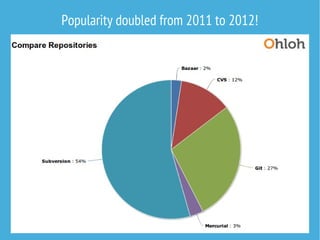
Popularity doubled from 2011 to 2012!
...but adoption would be faster if it was
not so difficult to use.
Originally Linus did not intend end users to use Git
directly, instead he tried to delegate to somebody
else the task of making the actual command line
interface. We are still waiting for it...
Luckily Git has been simplified and documentation
has improved over time, but some Git commands
still refer to Git internals that are difficult to grasp.
E.g. git-push: Update remote refs along with
associated objects.
2. Basic commands
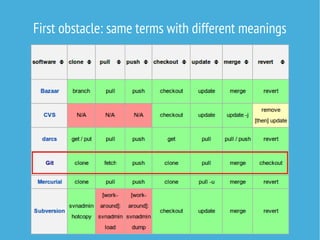
First obstacle: same terms with different meanings
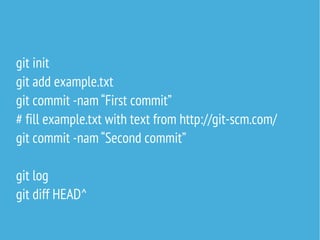
git init
git add example.txt
git commit -nam “First commit”
# fill example.txt with text from http://git-scm.com/
git commit -nam “Second commit”
git log
git diff HEAD^
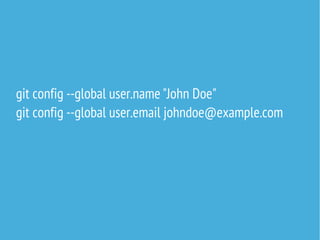
git config --global user.name "John Doe"
git config --global user.email johndoe@example.com
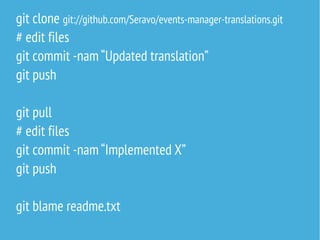
git clone git://github.com/Seravo/events-manager-translations.git
# edit files
git commit -nam “Updated translation”
git push
git pull
# edit files
git commit -nam “Implemented X”
git push
git blame readme.txt
3. Git internals
Folder /.git contains everything,
your / is just the working copy.
Folder /.git contains everything,
your / is just the working copy.
When you commit a 2 MB file /example.png,
your / will grow to 4 MB...
When you add a file,
it goes to the staging area.
The file does not go into the
actual history tree until the stage
is committed.
Push and pull and many other commands
are short cuts that act with both
your local repository and the remote repositories.
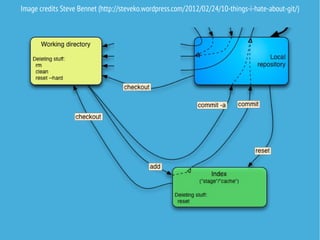
Image credits Steve Bennet (http://steveko.wordpress.com/2012/02/24/10-things-i-hate-about-git/)
Git tracks content, not files!
SHA-1 everywhere, if you need to
change something in the history,
you have to rebase and build a new history.
4. Doing it with Github
Visit http://try.github.com/
After making your first repository, set up SSH key
for convenient authentication:
https://help.github.com/articles/generating-ssh-keys
Note: Github is not the only Git hosting site,
Gitorious and Bitbucket are popular too.
Exercise:
- go to https://github.com/ottok/git-training and fork it
- look at the fork under your own Github account and
clone it to your laptop
- edit names.txt and add yours
- push changes back to Github
- in Github, do a merge request back to me
Want to put a simple shared repository on any SSH
capable server? Create a bare .git with no working files:
git init --bare
Want to have notifications when somebody commits?
Put a shell script at .git/hooks/post-receive
5. Advanced commands
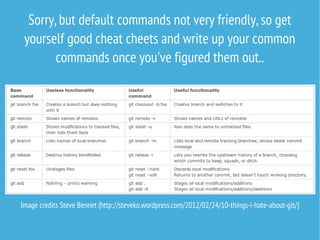
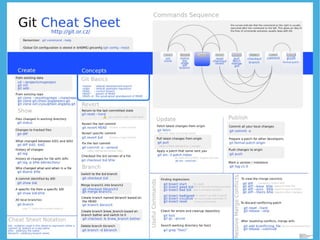
Sorry, but default commands not very friendly, so get
yourself good cheat cheets and write up your common
commands once you've figured them out..

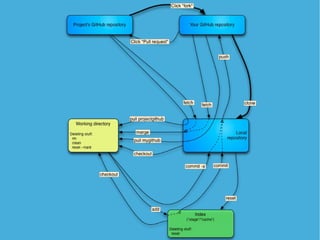
Image credits Steve Bennet (http://steveko.wordpress.com/2012/02/24/10-things-i-hate-about-git/)
5. Git everywhere
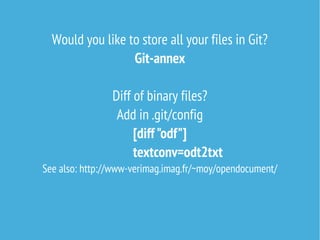
Would you like to store all your files in Git?
Git-annex
Diff of binary files?
Add in .git/config
[diff "odf"]
textconv=odt2txt

See also: http://www-verimag.imag.fr/~moy/opendocument/
Backup entire file systems with Git?
Bup
https://github.com/apenwarr/bup

Bug tracker and wiki contents in Git?
trac+git
Publish to the web with one commit?
gitblog
https://github.com/rsms/gitblog

Open source alternative to Dropbox based on Git?
http://sparkleshare.org/
Publish to the web with one commit?
gitblog
https://github.com/rsms/gitblog

Open source alternative to Dropbox based on Git?
http://sparkleshare.org/
Would you like others to
contribute to your software?
Provide easy forking (git clone),
easy way to develop new feature (git branch),
and an easy way to send them back (merge request).
Will Git credits replace developers CV's?
Is there anything we can't store and track in Git?
Recommended next reading:
Pro Git for $25 on Amazon
Also online at
http://git-scm.com/book
This presentation will be available at seravo.fi/blog
Contact Seravo Oy:n if you need
Linux natives to develop and administer
your Linux systems
About the company: seravo.fi
About the technologies: seravo.fi/blog

Git training with Devaamo

  • 1.
    Devaamo ry sli d es up da te d1 Otto Kekäläinen UusiTehdas / New Factory Tampere 29.11.2012 .1 2 . Git training with Devaamo
  • 2.
    Outline 1. The storyof Git 2. Basic commands 3. Git internals 4. Doing it with Github 5. Advanced commands 6. Git everywhere
  • 3.
  • 4.
    Git /ɡɪt/ ”A silly,incompetent, stupid, annoying or childish person.” http://en.wiktionary.org/wiki/git
  • 5.
    "I'm an egotisticalbastard, so I name all my projects after myself. First Linux, now Git” Linus Torvalds, PC World. 2012-07-14
  • 6.
    Linus needed anew source code revision manager for Linux, and none of the available open source options at the time where good enough, so he wrote his own in April 2005. Kernel 2.6.12 was the first release managed by Git and version 1.0 of Git was released in December 2005.
  • 7.
    Design goals ofGit: ● distributed revision management ● protection against corruption, both accidental and hostile ● speed
  • 8.
  • 9.
    ...but adoption wouldbe faster if it was not so difficult to use. Originally Linus did not intend end users to use Git directly, instead he tried to delegate to somebody else the task of making the actual command line interface. We are still waiting for it... Luckily Git has been simplified and documentation has improved over time, but some Git commands still refer to Git internals that are difficult to grasp. E.g. git-push: Update remote refs along with associated objects.
  • 10.
  • 11.
    First obstacle: sameterms with different meanings
  • 12.
    git init git addexample.txt git commit -nam “First commit” # fill example.txt with text from http://git-scm.com/ git commit -nam “Second commit” git log git diff HEAD^
  • 13.
    git config --globaluser.name "John Doe" git config --global user.email johndoe@example.com
  • 14.
    git clone git://github.com/Seravo/events-manager-translations.git #edit files git commit -nam “Updated translation” git push git pull # edit files git commit -nam “Implemented X” git push git blame readme.txt
  • 15.
  • 16.
    Folder /.git containseverything, your / is just the working copy.
  • 17.
    Folder /.git containseverything, your / is just the working copy. When you commit a 2 MB file /example.png, your / will grow to 4 MB...
  • 18.
    When you adda file, it goes to the staging area. The file does not go into the actual history tree until the stage is committed.
  • 19.
    Push and pulland many other commands are short cuts that act with both your local repository and the remote repositories.
  • 20.
    Image credits SteveBennet (http://steveko.wordpress.com/2012/02/24/10-things-i-hate-about-git/)
  • 22.
    Git tracks content,not files! SHA-1 everywhere, if you need to change something in the history, you have to rebase and build a new history.
  • 23.
    4. Doing itwith Github
  • 24.
    Visit http://try.github.com/ After makingyour first repository, set up SSH key for convenient authentication: https://help.github.com/articles/generating-ssh-keys Note: Github is not the only Git hosting site, Gitorious and Bitbucket are popular too.
  • 25.
    Exercise: - go tohttps://github.com/ottok/git-training and fork it - look at the fork under your own Github account and clone it to your laptop - edit names.txt and add yours - push changes back to Github - in Github, do a merge request back to me
  • 26.
    Want to puta simple shared repository on any SSH capable server? Create a bare .git with no working files: git init --bare Want to have notifications when somebody commits? Put a shell script at .git/hooks/post-receive
  • 27.
  • 28.
    Sorry, but defaultcommands not very friendly, so get yourself good cheat cheets and write up your common commands once you've figured them out.. Image credits Steve Bennet (http://steveko.wordpress.com/2012/02/24/10-things-i-hate-about-git/)
  • 30.
  • 31.
    Would you liketo store all your files in Git? Git-annex Diff of binary files? Add in .git/config [diff "odf"] textconv=odt2txt See also: http://www-verimag.imag.fr/~moy/opendocument/
  • 32.
    Backup entire filesystems with Git? Bup https://github.com/apenwarr/bup Bug tracker and wiki contents in Git? trac+git
  • 33.
    Publish to theweb with one commit? gitblog https://github.com/rsms/gitblog Open source alternative to Dropbox based on Git? http://sparkleshare.org/
  • 34.
    Publish to theweb with one commit? gitblog https://github.com/rsms/gitblog Open source alternative to Dropbox based on Git? http://sparkleshare.org/
  • 35.
    Would you likeothers to contribute to your software? Provide easy forking (git clone), easy way to develop new feature (git branch), and an easy way to send them back (merge request).
  • 36.
    Will Git creditsreplace developers CV's?
  • 37.
    Is there anythingwe can't store and track in Git?
  • 38.
    Recommended next reading: ProGit for $25 on Amazon Also online at http://git-scm.com/book This presentation will be available at seravo.fi/blog
  • 39.
    Contact Seravo Oy:nif you need Linux natives to develop and administer your Linux systems About the company: seravo.fi About the technologies: seravo.fi/blog