Helios in Action
                                                                   Git and Eclipse
                                                                          http://eclipse.org/egit


                                                        Chris Aniszczyk (Red Hat)
                                                                                        zx@redhat.com
                                                                                    http://aniszczyk.org


Understanding and Using Git at Eclipse | © 2010 by C. Aniszczyk, S. Pearce, R. Rosenberg and M. Sohn
Git at Eclipse
 Git is a Distributed Version Control System (DVCS, GPL)

 EGit is an Eclipse Team provider for Git (EPL).

 JGit is a lightweight Java library implementing Git (EDL).

 Technology sub projects (incubation)
  • http://www.eclipse.org/egit
  • http://www.eclipse.org/jgit

 The goal is to build a community around Git at Eclipse

 Eclipse is moving to Git as its SCM (ETA end of 2010)


        Understanding and Using Git at Eclipse | © 2010 by C. Aniszczyk, S. Pearce, R. Rosenberg and M. Sohn
EGit and JGit Diverse Committership

 •   Chris Aniszczyk (Red Hat)
 •   Christian Halstrick (SAP)
 •   Mik Kersten (Tasktop)
 •   Mathias Kinzler (SAP)
 •   Stefan Lay (SAP)
 •   Mykola Nikishov (Independent)
 •   Shawn Pearce (Google)
 •   Robin Rosenberg (Dewire)
 •   Matthias Sohn (SAP)
 •   Remy Suen (IBM)
 •   Gunnar Wagenknecht (Ageto)


         Understanding and Using Git at Eclipse | © 2010 by C. Aniszczyk, S. Pearce, R. Rosenberg and M. Sohn
History
 2005   Linus Torvalds starts Git
 2006   Proof-of-concept, quite unusable
 2007   Index reader, quickdiff
 2008   Add history view, commit, push/fetch
 2009   Eclipse decides on Git; moved to Eclipse.org

 3/2010 Released 0.7
        Diff/Merge Algorithms, Automatic IP Logs

 6/2010 Released 0.8 (Helios)
        Usability Improvements, Git Repositories View, Tagging

 9/2010 Planned 0.9 (Helios SR1)
        Merge, Synchronize View, Stashing, Staging

 12/2010 Planned 1.0

        Understanding and Using Git at Eclipse | © 2010 by C. Aniszczyk, S. Pearce, R. Rosenberg and M. Sohn
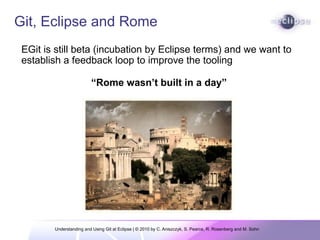
Git, Eclipse and Rome
 EGit is still beta (incubation by Eclipse terms) and we want to
 establish a feedback loop to improve the tooling

                         “Rome wasn’t built in a day”


        Understanding and Using Git at Eclipse | © 2010 by C. Aniszczyk, S. Pearce, R. Rosenberg and M. Sohn
No Free Lunch


           The best way to learn Git is to use Git

                       “Rome wasn’t built in a day”


     Understanding and Using Git at Eclipse | © 2010 by C. Aniszczyk, S. Pearce, R. Rosenberg and M. Sohn
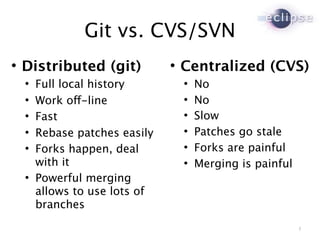
Git vs. CVS/SVN

    Distributed (git)           
                                    Centralized (CVS)
       Full local history             No
       Work off-line                  No
       Fast                           Slow
       Rebase patches easily          Patches go stale
       Forks happen, deal             Forks are painful
        with it                        Merging is painful
       Powerful merging
        allows to use lots of
        branches

                                                             5
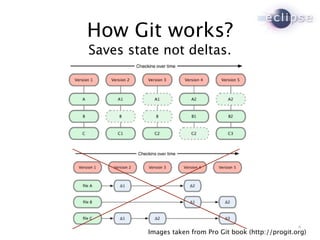
How Git works?
Saves state not deltas.


                                                        6
         Images taken from Pro Git book (http://progit.org)
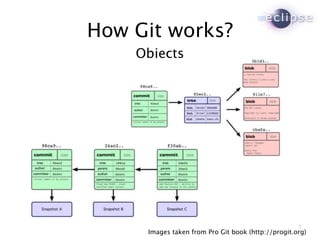
How Git works?
    Objects


                                                    7
     Images taken from Pro Git book (http://progit.org)
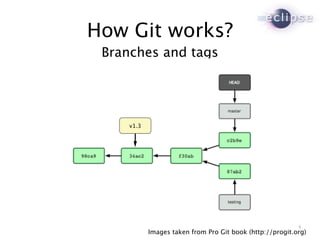
How Git works?
 Branches and tags


     v1.3


                                                           8
            Images taken from Pro Git book (http://progit.org)
Merging
Merges are just the weaving together of two (or more)
local branches into one

However, unlike CVCS, you don't have to specify
anything about where you're merging from and to; the
trees automatically know what their split point was in the
past, and can work it out from there.

Merging is much easier in a DVCS like Git


       Understanding and Using Git at Eclipse | © 2010 by C. Aniszczyk, S. Pearce, R. Rosenberg and M. Sohn
Demo
Do we love Git yet?
Conclusion
 DVCS like Git are powerful

 Git supports convenient branching and merging

 Git is very fast and scales well

 Gerrit enables a nice code review workflow

 Git is the future SCM of Eclipse


        Understanding and Using Git at Eclipse | © 2010 by C. Aniszczyk, S. Pearce, R. Rosenberg and M. Sohn
Resources
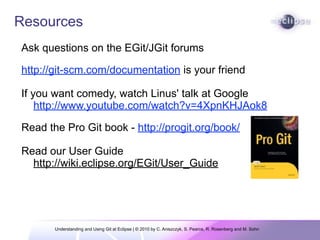
Ask questions on the EGit/JGit forums

http://git-scm.com/documentation is your friend

If you want comedy, watch Linus' talk at Google
    http://www.youtube.com/watch?v=4XpnKHJAok8

Read the Pro Git book - http://progit.org/book/

Read our User Guide
  http://wiki.eclipse.org/EGit/User_Guide


       Understanding and Using Git at Eclipse | © 2010 by C. Aniszczyk, S. Pearce, R. Rosenberg and M. Sohn
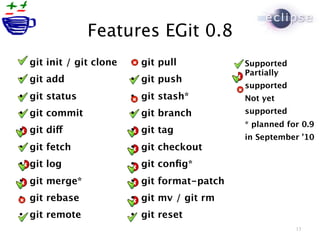
Features EGit 0.8
   git init / git clone      git pull           Supported
                                                  Partially
   git add                   git push
                                                  supported
   git status                git stash*         Not yet
   git commit                git branch         supported
                                                  * planned for 0.9
   git diff                  git tag
                                                  in September ’10
   git fetch                 git checkout
   git log                   git config*
   git merge*                git format-patch
   git rebase                git mv / git rm
   git remote                git reset
                                                              13
Backup
I guess we have more
   time to chat, eh?
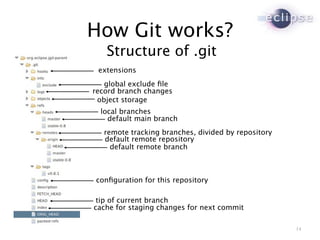
How Git works?
   Structure of .git
 extensions
   global exclude file
record branch changes
 object storage
  local branches
    default main branch
   remote tracking branches, divided by repository
   default remote repository
     default remote branch


configuration for this repository

 tip of current branch
cache for staging changes for next commit

                                                     14

Helios in Action: Git at Eclipse

  • 1.
    Helios in Action Git and Eclipse http://eclipse.org/egit Chris Aniszczyk (Red Hat) zx@redhat.com http://aniszczyk.org Understanding and Using Git at Eclipse | © 2010 by C. Aniszczyk, S. Pearce, R. Rosenberg and M. Sohn
  • 2.
    Git at Eclipse Git is a Distributed Version Control System (DVCS, GPL) EGit is an Eclipse Team provider for Git (EPL). JGit is a lightweight Java library implementing Git (EDL). Technology sub projects (incubation) • http://www.eclipse.org/egit • http://www.eclipse.org/jgit The goal is to build a community around Git at Eclipse Eclipse is moving to Git as its SCM (ETA end of 2010) Understanding and Using Git at Eclipse | © 2010 by C. Aniszczyk, S. Pearce, R. Rosenberg and M. Sohn
  • 3.
    EGit and JGitDiverse Committership • Chris Aniszczyk (Red Hat) • Christian Halstrick (SAP) • Mik Kersten (Tasktop) • Mathias Kinzler (SAP) • Stefan Lay (SAP) • Mykola Nikishov (Independent) • Shawn Pearce (Google) • Robin Rosenberg (Dewire) • Matthias Sohn (SAP) • Remy Suen (IBM) • Gunnar Wagenknecht (Ageto) Understanding and Using Git at Eclipse | © 2010 by C. Aniszczyk, S. Pearce, R. Rosenberg and M. Sohn
  • 4.
    History 2005 Linus Torvalds starts Git 2006 Proof-of-concept, quite unusable 2007 Index reader, quickdiff 2008 Add history view, commit, push/fetch 2009 Eclipse decides on Git; moved to Eclipse.org 3/2010 Released 0.7 Diff/Merge Algorithms, Automatic IP Logs 6/2010 Released 0.8 (Helios) Usability Improvements, Git Repositories View, Tagging 9/2010 Planned 0.9 (Helios SR1) Merge, Synchronize View, Stashing, Staging 12/2010 Planned 1.0 Understanding and Using Git at Eclipse | © 2010 by C. Aniszczyk, S. Pearce, R. Rosenberg and M. Sohn
  • 5.
    Git, Eclipse andRome EGit is still beta (incubation by Eclipse terms) and we want to establish a feedback loop to improve the tooling “Rome wasn’t built in a day” Understanding and Using Git at Eclipse | © 2010 by C. Aniszczyk, S. Pearce, R. Rosenberg and M. Sohn
  • 6.
    No Free Lunch The best way to learn Git is to use Git “Rome wasn’t built in a day” Understanding and Using Git at Eclipse | © 2010 by C. Aniszczyk, S. Pearce, R. Rosenberg and M. Sohn
  • 7.
    Git vs. CVS/SVN  Distributed (git)  Centralized (CVS)  Full local history  No  Work off-line  No  Fast  Slow  Rebase patches easily  Patches go stale  Forks happen, deal  Forks are painful with it  Merging is painful  Powerful merging allows to use lots of branches 5
  • 8.
    How Git works? Savesstate not deltas. 6 Images taken from Pro Git book (http://progit.org)
  • 9.
    How Git works? Objects 7 Images taken from Pro Git book (http://progit.org)
  • 10.
    How Git works? Branches and tags v1.3 8 Images taken from Pro Git book (http://progit.org)
  • 11.
    Merging Merges are justthe weaving together of two (or more) local branches into one However, unlike CVCS, you don't have to specify anything about where you're merging from and to; the trees automatically know what their split point was in the past, and can work it out from there. Merging is much easier in a DVCS like Git Understanding and Using Git at Eclipse | © 2010 by C. Aniszczyk, S. Pearce, R. Rosenberg and M. Sohn
  • 12.
  • 13.
    Conclusion DVCS likeGit are powerful Git supports convenient branching and merging Git is very fast and scales well Gerrit enables a nice code review workflow Git is the future SCM of Eclipse Understanding and Using Git at Eclipse | © 2010 by C. Aniszczyk, S. Pearce, R. Rosenberg and M. Sohn
  • 14.
    Resources Ask questions onthe EGit/JGit forums http://git-scm.com/documentation is your friend If you want comedy, watch Linus' talk at Google http://www.youtube.com/watch?v=4XpnKHJAok8 Read the Pro Git book - http://progit.org/book/ Read our User Guide http://wiki.eclipse.org/EGit/User_Guide Understanding and Using Git at Eclipse | © 2010 by C. Aniszczyk, S. Pearce, R. Rosenberg and M. Sohn
  • 15.
    Features EGit 0.8  git init / git clone  git pull Supported Partially  git add  git push supported  git status  git stash* Not yet  git commit  git branch supported * planned for 0.9  git diff  git tag in September ’10  git fetch  git checkout  git log  git config*  git merge*  git format-patch  git rebase  git mv / git rm  git remote  git reset 13
  • 16.
    Backup I guess wehave more time to chat, eh?
  • 17.
    How Git works? Structure of .git extensions global exclude file record branch changes object storage local branches default main branch remote tracking branches, divided by repository default remote repository default remote branch configuration for this repository tip of current branch cache for staging changes for next commit 14