Git Real
@dylanninin
• What is Git
• Internals
• Play with Git
• Workflow
• Q&A
What is Git
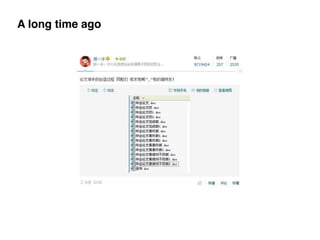
A long time ago
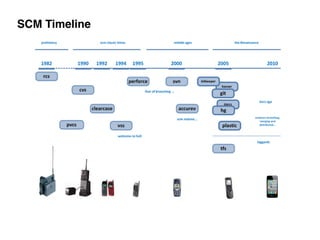
SCM Timeline
Git != Subversion + Magic!
- Git is a stupid content tracker.

- It is simply used as an SCM, not really designed as one. 

- In many ways you can just see git as a file system
“In many ways you can just see git as a file system — it’s content- addressable,
and it has a notion of versioning, but I really really designed it coming at the
problem from the viewpoint of a file system person (hey, kernels is what I do),
and I actually have absolutely zero interest in creating a traditional SCM
system.”
– Linus (http://marc.info/?l=linux-kernel&m=111314792424707)
Git Design
• Non-Linear Development
• Distributed Development
• Efficiency
Git Internals
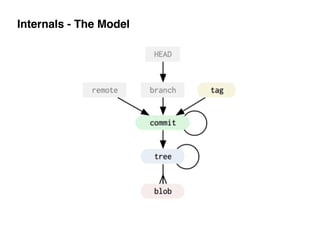
Internals - The Model
Internals - Git Objects
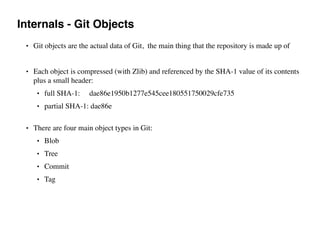
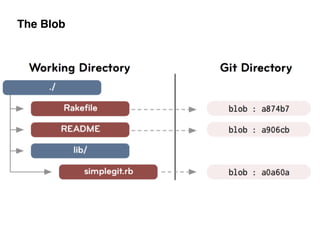
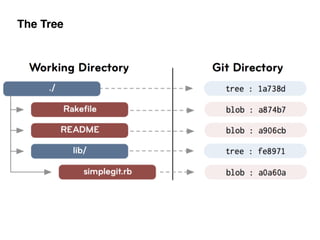
• Git objects are the actual data of Git, the main thing that the repository is made up of
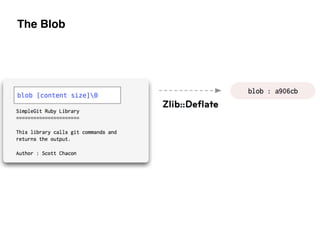
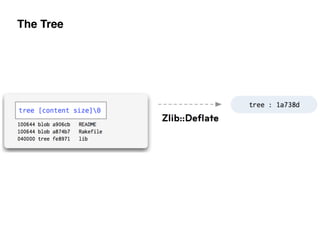
• Each object is compressed (with Zlib) and referenced by the SHA-1 value of its contents
plus a small header:
• full SHA-1: dae86e1950b1277e545cee180551750029cfe735
• partial SHA-1: dae86e 

• There are four main object types in Git:
• Blob
• Tree
• Commit
• Tag
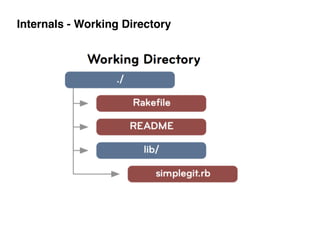
Internals - Working Directory
The Blob
The Blob
The Tree
The Tree
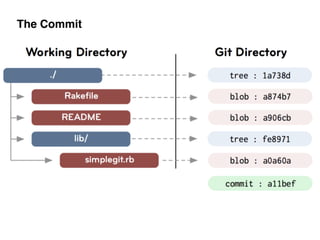
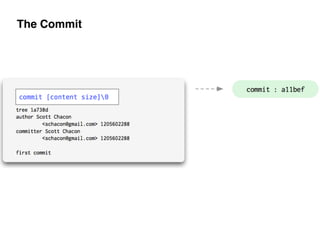
The Commit
The Commit
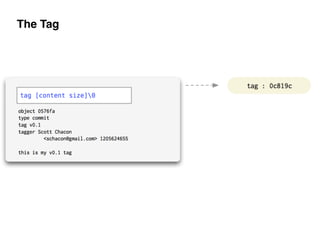
The Tag
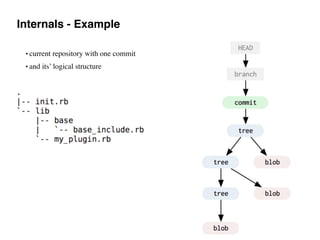
Internals - Example
• current repository with one commit
• and its’ logical structure
Internals - Example
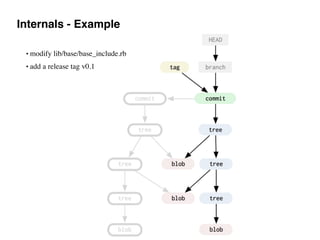
• modify lib/base/base_include.rb
• add a release tag v0.1
Internals - Example
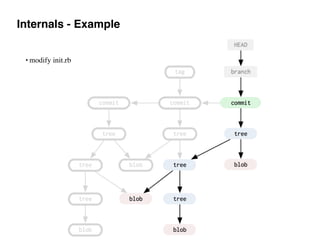
• modify init.rb
Internals - Example
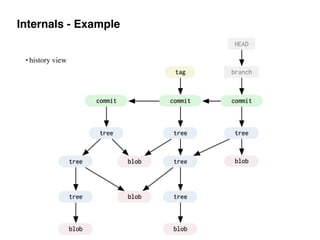
• history view
Internals - Example
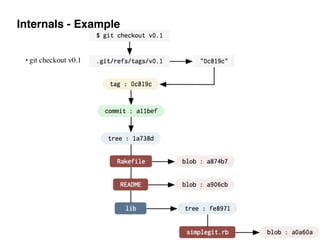
• git checkout v0.1
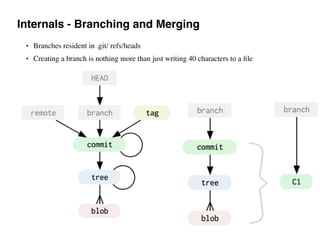
Internals - Branching and Merging
• Branches resident in .git/ refs/heads
• Creating a branch is nothing more than just writing 40 characters to a file
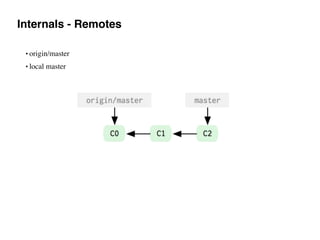
Internals - Remotes
• origin/master
• local master
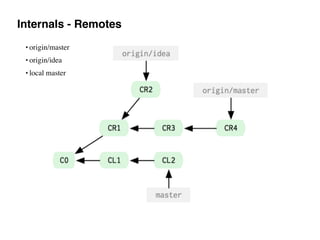
Internals - Remotes
• origin/master
• origin/idea
• local master
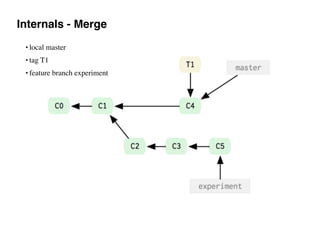
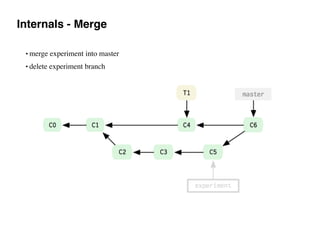
Internals - Merge
• local master
• tag T1
• feature branch experiment
Internals - Merge
• merge experiment into master
• delete experiment branch
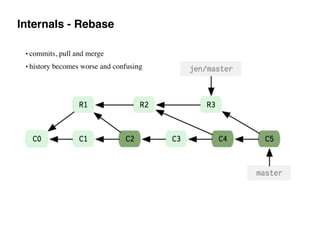
Internals - Rebase
• commits, pull and merge
• history becomes worse and confusing
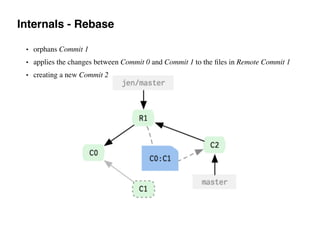
Internals - Rebase
• orphans Commit 1
• applies the changes between Commit 0 and Commit 1 to the files in Remote Commit 1
• creating a new Commit 2
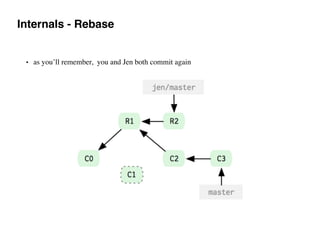
Internals - Rebase
• as you’ll remember, you and Jen both commit again
Internals - Rebase
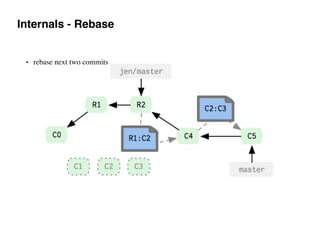
• rebase next two commits
Internals - Rebase
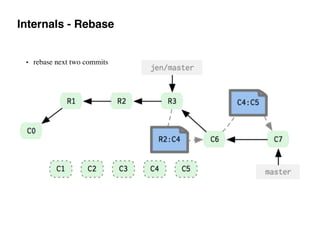
• rebase next two commits
Internals - Rebase
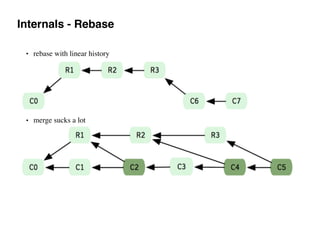
• rebase with linear history
• merge sucks a lot
Play with Git
Play with Git - config
• git config —global user.name “Dylan”
• git config —global user.email “dylanninin@gmail.com
Or
[user]
name = Dylan
email = dylanninin@gmail.com
[core]
excludesfile = ~/.gitignore
editor = vim
[alias]
co = checkout
[log]
date = relative
More such example
• https://gist.github.com/pksunkara/988716
• ~/.gitconfig
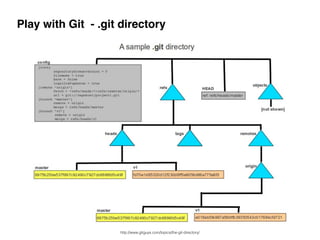
Play with Git - .git directory
http://www.gitguys.com/topics/the-git-directory/
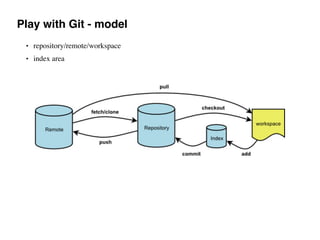
Play with Git - model
• repository/remote/workspace
• index area
Play with Git - work hard
http://www.gitguys.com/topics/the-git-directory/
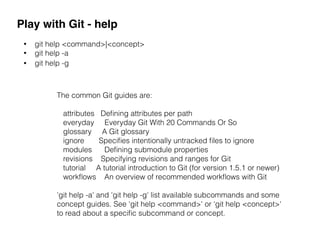
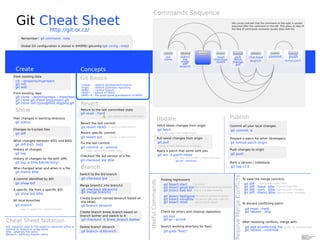
Play with Git - help
• git help <command>|<concept>
• git help -a
• git help -g
The common Git guides are:
attributes Defining attributes per path
everyday Everyday Git With 20 Commands Or So
glossary A Git glossary
ignore Specifies intentionally untracked files to ignore
modules Defining submodule properties
revisions Specifying revisions and ranges for Git
tutorial A tutorial introduction to Git (for version 1.5.1 or newer)
workflows An overview of recommended workflows with Git
'git help -a' and 'git help -g' list available subcommands and some
concept guides. See 'git help <command>' or 'git help <concept>'
to read about a specific subcommand or concept.
Workflow
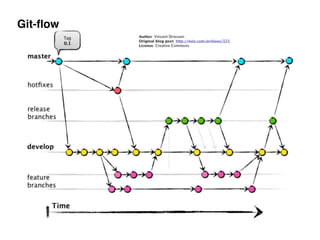
Git-flow
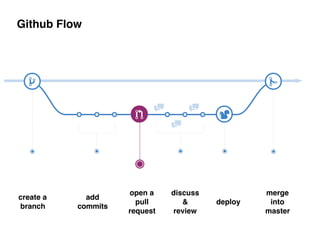
Github Flow
create a

branch
add 

commits
open a

pull
request
discuss
&

review
deploy
merge

into

master
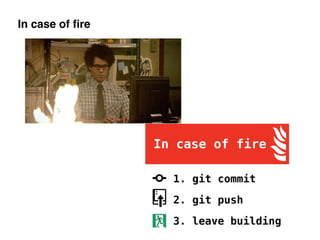
In case of fire
Q & A
Reference
• Git: https://en.wikipedia.org/wiki/Git_(software)
• Linus on Git: https://www.youtube.com/watch?v=4XpnKHJAok8
• Pro Git: http://git-scm.com/book
• Git Internals: http://git-scm.com/book/en/v1/Git-Internals
• Peepcode Git Internals: https://github.com/pluralsight/git-internals-pdf
• SHA-1: https://en.wikipedia.org/wiki/SHA-1
• Facebook’s git repo is 54GB: https://news.ycombinator.com/item?id=7648237
• Git Branching model: http://nvie.com/posts/a-successful-git-branching-model/
• Github Flow: 

- http://scottchacon.com/2011/08/31/github-flow.html

- https://guides.github.com/introduction/flow/

Git Real

  • 1.
  • 2.
    • What isGit • Internals • Play with Git • Workflow • Q&A
  • 3.
  • 4.
  • 5.
  • 6.
  • 7.
    Git != Subversion+ Magic! - Git is a stupid content tracker.
 - It is simply used as an SCM, not really designed as one. 
 - In many ways you can just see git as a file system “In many ways you can just see git as a file system — it’s content- addressable, and it has a notion of versioning, but I really really designed it coming at the problem from the viewpoint of a file system person (hey, kernels is what I do), and I actually have absolutely zero interest in creating a traditional SCM system.” – Linus (http://marc.info/?l=linux-kernel&m=111314792424707)
  • 8.
    Git Design • Non-LinearDevelopment • Distributed Development • Efficiency
  • 9.
  • 10.
  • 11.
    Internals - GitObjects • Git objects are the actual data of Git, the main thing that the repository is made up of • Each object is compressed (with Zlib) and referenced by the SHA-1 value of its contents plus a small header: • full SHA-1: dae86e1950b1277e545cee180551750029cfe735 • partial SHA-1: dae86e 
 • There are four main object types in Git: • Blob • Tree • Commit • Tag
  • 12.
  • 13.
  • 14.
  • 15.
  • 16.
  • 17.
  • 18.
  • 19.
  • 20.
    Internals - Example •current repository with one commit • and its’ logical structure
  • 21.
    Internals - Example •modify lib/base/base_include.rb • add a release tag v0.1
  • 22.
  • 23.
  • 24.
    Internals - Example •git checkout v0.1
  • 25.
    Internals - Branchingand Merging • Branches resident in .git/ refs/heads • Creating a branch is nothing more than just writing 40 characters to a file
  • 26.
    Internals - Remotes •origin/master • local master
  • 27.
    Internals - Remotes •origin/master • origin/idea • local master
  • 28.
    Internals - Merge •local master • tag T1 • feature branch experiment
  • 29.
    Internals - Merge •merge experiment into master • delete experiment branch
  • 30.
    Internals - Rebase •commits, pull and merge • history becomes worse and confusing
  • 31.
    Internals - Rebase •orphans Commit 1 • applies the changes between Commit 0 and Commit 1 to the files in Remote Commit 1 • creating a new Commit 2
  • 32.
    Internals - Rebase •as you’ll remember, you and Jen both commit again
  • 33.
    Internals - Rebase •rebase next two commits
  • 34.
    Internals - Rebase •rebase next two commits
  • 35.
    Internals - Rebase •rebase with linear history • merge sucks a lot
  • 36.
  • 37.
    Play with Git- config • git config —global user.name “Dylan” • git config —global user.email “dylanninin@gmail.com Or [user] name = Dylan email = dylanninin@gmail.com [core] excludesfile = ~/.gitignore editor = vim [alias] co = checkout [log] date = relative More such example • https://gist.github.com/pksunkara/988716 • ~/.gitconfig
  • 38.
    Play with Git- .git directory http://www.gitguys.com/topics/the-git-directory/
  • 39.
    Play with Git- model • repository/remote/workspace • index area
  • 40.
    Play with Git- work hard http://www.gitguys.com/topics/the-git-directory/
  • 41.
    Play with Git- help • git help <command>|<concept> • git help -a • git help -g The common Git guides are: attributes Defining attributes per path everyday Everyday Git With 20 Commands Or So glossary A Git glossary ignore Specifies intentionally untracked files to ignore modules Defining submodule properties revisions Specifying revisions and ranges for Git tutorial A tutorial introduction to Git (for version 1.5.1 or newer) workflows An overview of recommended workflows with Git 'git help -a' and 'git help -g' list available subcommands and some concept guides. See 'git help <command>' or 'git help <concept>' to read about a specific subcommand or concept.
  • 43.
  • 44.
  • 45.
    Github Flow create a
 branch add
 commits open a
 pull request discuss &
 review deploy merge
 into
 master
  • 46.
  • 47.
  • 48.
    Reference • Git: https://en.wikipedia.org/wiki/Git_(software) •Linus on Git: https://www.youtube.com/watch?v=4XpnKHJAok8 • Pro Git: http://git-scm.com/book • Git Internals: http://git-scm.com/book/en/v1/Git-Internals • Peepcode Git Internals: https://github.com/pluralsight/git-internals-pdf • SHA-1: https://en.wikipedia.org/wiki/SHA-1 • Facebook’s git repo is 54GB: https://news.ycombinator.com/item?id=7648237 • Git Branching model: http://nvie.com/posts/a-successful-git-branching-model/ • Github Flow: 
 - http://scottchacon.com/2011/08/31/github-flow.html
 - https://guides.github.com/introduction/flow/