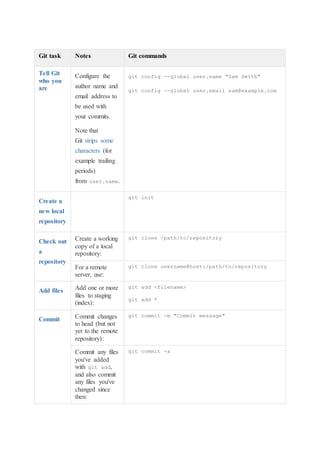
Git task Notes Git commands
Tell Git
who you
are
Configure the
author name and
email address to
be used with
your commits.
Note that
Git strips some
characters (for
example trailing
periods)
from user.name.
git config --global user.name "Sam Smith"
git config --global user.email sam@example.com
Create a
new local
repository
git init
Check out
a
repository
Create a working
copy of a local
repository:
git clone /path/to/repository
For a remote
server, use:
git clone username@host:/path/to/repository
Add files Add one or more
files to staging
(index):
git add <filename>
git add *
Commit Commit changes
to head (but not
yet to the remote
repository):
git commit -m "Commit message"
Commit any files
you've added
with git add,
and also commit
any files you've
changed since
then:
git commit -a
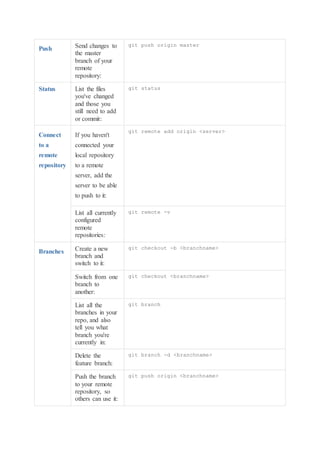
Push Send changes to
the master
branch of your
remote
repository:
git push origin master
Status List the files
you've changed
and those you
still need to add
or commit:
git status
Connect
to a
remote
repository
If you haven't
connected your
local repository
to a remote
server, add the
server to be able
to push to it:
git remote add origin <server>
List all currently
configured
remote
repositories:
git remote -v
Branches Create a new
branch and
switch to it:
git checkout -b <branchname>
Switch from one
branch to
another:
git checkout <branchname>
List all the
branches in your
repo, and also
tell you what
branch you're
currently in:
git branch
Delete the
feature branch:
git branch -d <branchname>
Push the branch
to your remote
repository, so
others can use it:
git push origin <branchname>
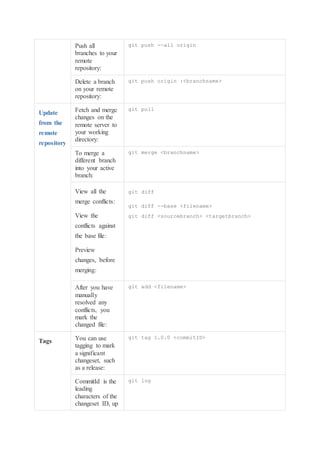
Push all
branches to your
remote
repository:
git push --all origin
Delete a branch
on your remote
repository:
git push origin :<branchname>
Update
from the
remote
repository
Fetch and merge
changes on the
remote server to
your working
directory:
git pull
To merge a
different branch
into your active
branch:
git merge <branchname>
View all the
merge conflicts:
View the
conflicts against
the base file:
Preview
changes, before
merging:
git diff
git diff --base <filename>
git diff <sourcebranch> <targetbranch>
After you have
manually
resolved any
conflicts, you
mark the
changed file:
git add <filename>
Tags You can use
tagging to mark
a significant
changeset, such
as a release:
git tag 1.0.0 <commitID>
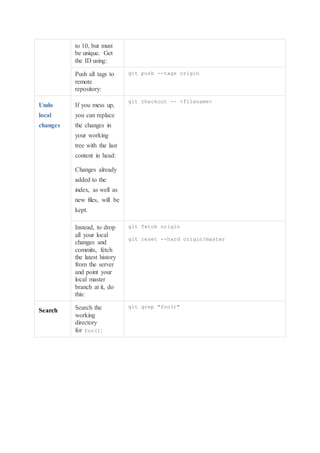
CommitId is the
leading
characters of the
changeset ID, up
git log
to 10, but must
be unique. Get
the ID using:
Push all tags to
remote
repository:
git push --tags origin
Undo
local
changes
If you mess up,
you can replace
the changes in
your working
tree with the last
content in head:
Changes already
added to the
index, as well as
new files, will be
kept.
git checkout -- <filename>
Instead, to drop
all your local
changes and
commits, fetch
the latest history
from the server
and point your
local master
branch at it, do
this:
git fetch origin
git reset --hard origin/master
Search Search the
working
directory
for foo():
git grep "foo()"

Git cheatsheet

  • 1.
    Git task NotesGit commands Tell Git who you are Configure the author name and email address to be used with your commits. Note that Git strips some characters (for example trailing periods) from user.name. git config --global user.name "Sam Smith" git config --global user.email sam@example.com Create a new local repository git init Check out a repository Create a working copy of a local repository: git clone /path/to/repository For a remote server, use: git clone username@host:/path/to/repository Add files Add one or more files to staging (index): git add <filename> git add * Commit Commit changes to head (but not yet to the remote repository): git commit -m "Commit message" Commit any files you've added with git add, and also commit any files you've changed since then: git commit -a
  • 2.
    Push Send changesto the master branch of your remote repository: git push origin master Status List the files you've changed and those you still need to add or commit: git status Connect to a remote repository If you haven't connected your local repository to a remote server, add the server to be able to push to it: git remote add origin <server> List all currently configured remote repositories: git remote -v Branches Create a new branch and switch to it: git checkout -b <branchname> Switch from one branch to another: git checkout <branchname> List all the branches in your repo, and also tell you what branch you're currently in: git branch Delete the feature branch: git branch -d <branchname> Push the branch to your remote repository, so others can use it: git push origin <branchname>
  • 3.
    Push all branches toyour remote repository: git push --all origin Delete a branch on your remote repository: git push origin :<branchname> Update from the remote repository Fetch and merge changes on the remote server to your working directory: git pull To merge a different branch into your active branch: git merge <branchname> View all the merge conflicts: View the conflicts against the base file: Preview changes, before merging: git diff git diff --base <filename> git diff <sourcebranch> <targetbranch> After you have manually resolved any conflicts, you mark the changed file: git add <filename> Tags You can use tagging to mark a significant changeset, such as a release: git tag 1.0.0 <commitID> CommitId is the leading characters of the changeset ID, up git log
  • 4.
    to 10, butmust be unique. Get the ID using: Push all tags to remote repository: git push --tags origin Undo local changes If you mess up, you can replace the changes in your working tree with the last content in head: Changes already added to the index, as well as new files, will be kept. git checkout -- <filename> Instead, to drop all your local changes and commits, fetch the latest history from the server and point your local master branch at it, do this: git fetch origin git reset --hard origin/master Search Search the working directory for foo(): git grep "foo()"