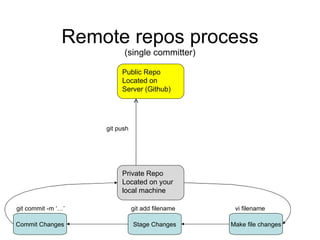
Remote repos process (single committer) Public Repo Located on Server (Github) Private Repo Located on your local machine git push  Make file changes Stage Changes Commit Changes git add filename git commit -m ‘…’ vi filename
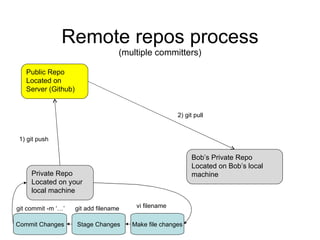
Remote repos process (multiple committers) Public Repo Located on Server (Github) Private Repo Located on your local machine 1) git push  Make file changes Stage Changes Commit Changes git add filename git commit -m ‘…’ vi filename Bob’s Private Repo Located on Bob’s local machine 2) git pull
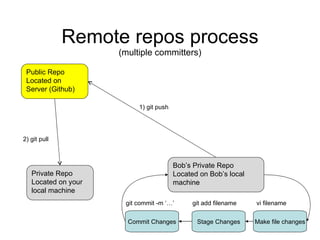
Remote repos process (multiple committers) Public Repo Located on Server (Github) Private Repo Located on your local machine 2) git pull  Bob’s Private Repo Located on Bob’s local machine Make file changes Stage Changes Commit Changes git add filename git commit -m ‘…’ vi filename 1) git push
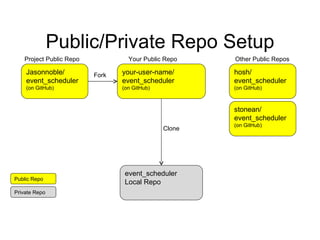
Public/Private Repo Setup Jasonnoble/ event_scheduler (on GitHub) your-user-name/ event_scheduler (on GitHub) hosh/ event_scheduler (on GitHub) Fork Other Public Repos event_scheduler  Local Repo Clone Your Public Repo Project Public Repo stonean/ event_scheduler (on GitHub) Public Repo Private Repo
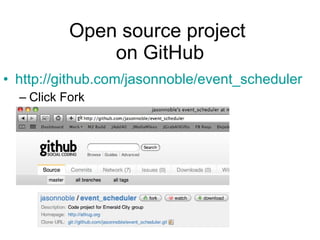
Open source project  on GitHub http://github.com/jasonnoble/event_scheduler Click Fork
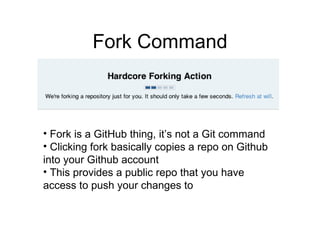
Fork Command Fork is a GitHub thing, it’s not a Git command Clicking fork basically copies a repo on Github into your Github account This provides a public repo that you have access to push your changes to
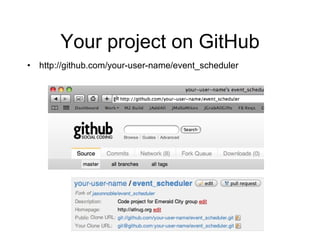
Your project on GitHub http://github.com/your-user-name/event_scheduler
Clone your Repo git clone  git@github.com:your-user-name/event_scheduler.git cd event_scheduler git pull Should say “Already up-to-date” This clone command adds a remote repo “origin”  (explained in detail later) A clone is the entire history of the Git Repo History of all changes Log messages
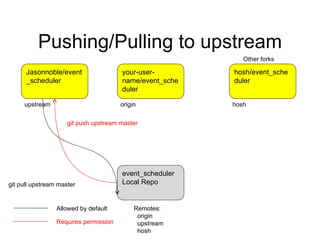
Pushing/Pulling to upstream Jasonnoble/event_scheduler your-user-name/event_scheduler hosh/event_scheduler Other forks event_scheduler  Local Repo upstream origin hosh Allowed by default Requires permission git push upstream master git pull upstream master Remotes: origin upstream hosh
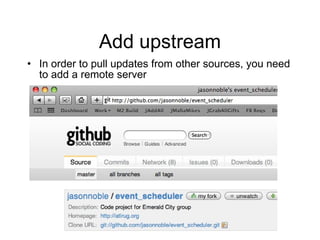
Add upstream In order to pull updates from other sources, you need to add a remote server
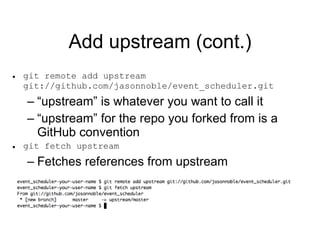
Add upstream (cont.) git remote add upstream  git://github.com/jasonnoble/event_scheduler.git “ upstream” is whatever you want to call it “ upstream” for the repo you forked from is a GitHub convention git fetch upstream Fetches references from upstream
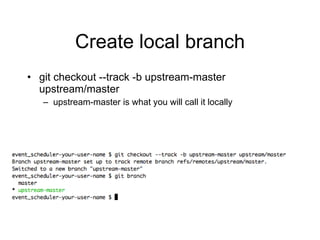
Create local branch git checkout --track -b upstream-master upstream/master upstream-master is what you will call it locally
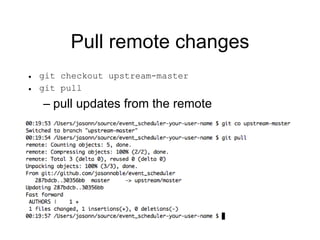
Pull remote changes git checkout upstream-master git pull pull updates from the remote
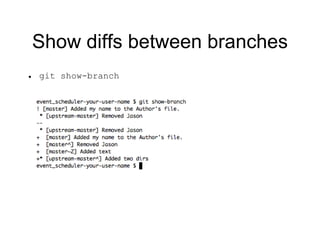
Show diffs between branches git show-branch
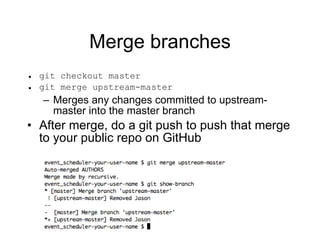
Merge branches git checkout master git merge upstream-master Merges any changes committed to upstream-master into the master branch After merge, do a git push to push that merge to your public repo on GitHub
Pulling from Upstream Lab I will commit a change to my public repo (upstream) You add upstream as a remote repo Pull from the repo to get the changes
Modify a file vi (or your favorite editor) AUTHORS Add your name Save the file Commit the change
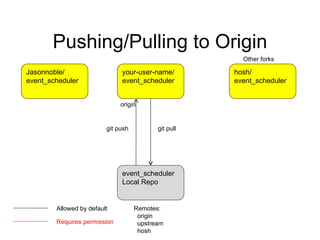
Pushing/Pulling to Origin Jasonnoble/ event_scheduler your-user-name/ event_scheduler hosh/ event_scheduler Other forks event_scheduler Local Repo git pull  origin git push  Allowed by default Requires permission Remotes: origin upstream hosh
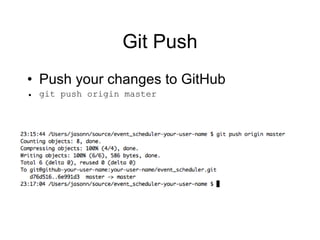
Git Push Push your changes to GitHub git push origin master
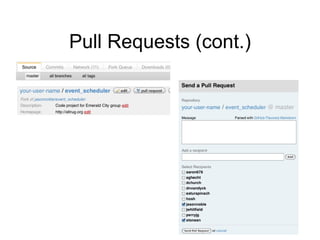
Pull Requests After you push new code to your forked repo, you can request others pull your requests http://github.com/your-user-name/event_scheduler Click Pull Request Enter a quick message about what you changed Enter receipients All users who have forked upstream are listed Check users as requested
Pull Requests (cont.)

Git Atlrug

  • 1.
  • 2.
    Remote repos process(single committer) Public Repo Located on Server (Github) Private Repo Located on your local machine git push Make file changes Stage Changes Commit Changes git add filename git commit -m ‘…’ vi filename
  • 3.
    Remote repos process(multiple committers) Public Repo Located on Server (Github) Private Repo Located on your local machine 1) git push Make file changes Stage Changes Commit Changes git add filename git commit -m ‘…’ vi filename Bob’s Private Repo Located on Bob’s local machine 2) git pull
  • 4.
    Remote repos process(multiple committers) Public Repo Located on Server (Github) Private Repo Located on your local machine 2) git pull Bob’s Private Repo Located on Bob’s local machine Make file changes Stage Changes Commit Changes git add filename git commit -m ‘…’ vi filename 1) git push
  • 5.
    Public/Private Repo SetupJasonnoble/ event_scheduler (on GitHub) your-user-name/ event_scheduler (on GitHub) hosh/ event_scheduler (on GitHub) Fork Other Public Repos event_scheduler Local Repo Clone Your Public Repo Project Public Repo stonean/ event_scheduler (on GitHub) Public Repo Private Repo
  • 6.
    Open source project on GitHub http://github.com/jasonnoble/event_scheduler Click Fork
  • 7.
    Fork Command Forkis a GitHub thing, it’s not a Git command Clicking fork basically copies a repo on Github into your Github account This provides a public repo that you have access to push your changes to
  • 8.
    Your project onGitHub http://github.com/your-user-name/event_scheduler
  • 9.
    Clone your Repogit clone git@github.com:your-user-name/event_scheduler.git cd event_scheduler git pull Should say “Already up-to-date” This clone command adds a remote repo “origin” (explained in detail later) A clone is the entire history of the Git Repo History of all changes Log messages
  • 10.
    Pushing/Pulling to upstreamJasonnoble/event_scheduler your-user-name/event_scheduler hosh/event_scheduler Other forks event_scheduler Local Repo upstream origin hosh Allowed by default Requires permission git push upstream master git pull upstream master Remotes: origin upstream hosh
  • 11.
    Add upstream Inorder to pull updates from other sources, you need to add a remote server
  • 12.
    Add upstream (cont.)git remote add upstream git://github.com/jasonnoble/event_scheduler.git “ upstream” is whatever you want to call it “ upstream” for the repo you forked from is a GitHub convention git fetch upstream Fetches references from upstream
  • 13.
    Create local branchgit checkout --track -b upstream-master upstream/master upstream-master is what you will call it locally
  • 14.
    Pull remote changesgit checkout upstream-master git pull pull updates from the remote
  • 15.
    Show diffs betweenbranches git show-branch
  • 16.
    Merge branches gitcheckout master git merge upstream-master Merges any changes committed to upstream-master into the master branch After merge, do a git push to push that merge to your public repo on GitHub
  • 17.
    Pulling from UpstreamLab I will commit a change to my public repo (upstream) You add upstream as a remote repo Pull from the repo to get the changes
  • 18.
    Modify a filevi (or your favorite editor) AUTHORS Add your name Save the file Commit the change
  • 19.
    Pushing/Pulling to OriginJasonnoble/ event_scheduler your-user-name/ event_scheduler hosh/ event_scheduler Other forks event_scheduler Local Repo git pull origin git push Allowed by default Requires permission Remotes: origin upstream hosh
  • 20.
    Git Push Pushyour changes to GitHub git push origin master
  • 21.
    Pull Requests Afteryou push new code to your forked repo, you can request others pull your requests http://github.com/your-user-name/event_scheduler Click Pull Request Enter a quick message about what you changed Enter receipients All users who have forked upstream are listed Check users as requested
  • 22.

Editor's Notes

  • #3 The bottom commit loop happens frequently. Pushing the the remote happens “occasionally”
  • #4 You commit a change and push to your public repo Bob can then “pull” your change to his repo
  • #5 Bob commits a change and pushes to your public repo You can then “pull” his change to your local repo
  • #14 I like to do this so I have a local branch of the upstream updates.