Programming and 
Computational thinking 
KS1 
http://www.theslate.org
“A high-quality computing education equips 
pupils to use computational thinking and 
creativity to understand and change the world.” 
– Purpose of study, computing programmes of study
“The core of computing is computer science, in 
which pupils are taught the principles of 
information and computation, how digital 
systems work, and how to put this knowledge to 
use through programming.” 
– Purpose of study, computing programmes of study
“Computational thinking is the thought processes 
involved in formulating problems and their 
solutions so that the solutions are represented in 
a form that can effectively be carried out by an 
information-processing agent.” 
– Jan Cuny, Larry Snyder, and Jeannette Wing
“Computational thinking enables you to bend 
computation to your needs. It is becoming the 
new literacy of the 21st century.” 
– Jan Cuny, Larry Snyder, and Jeannette Wing
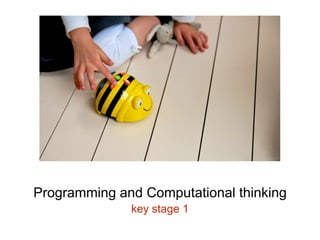
Programming and Computational thinking 
key stage 1
Subject content for KS1 
Pupils should be taught to: 
• understand what algorithms are; how they are 
implemented as programs on digital devices; and 
that programs execute by following precise and 
unambiguous instructions 
• create and debug simple programs 
• use logical reasoning to predict the behaviour of 
simple programs
Algorithms 
“understand what algorithms are; how they are 
implemented as programs on digital devices; and that 
programs execute by following precise and 
unambiguous instructions” - Subject content KS1 
An algorithm is a sequence of precise and 
unambiguous instructions that are followed in order to 
achieve a specific outcome.
Activity #1 Jam Sandwich Robot 
In pairs, write an algorithm to program a robot to make 
a jam sandwich. 
Try to ensure your instructions are precise and 
unambiguous. 
https://www.youtube.com/watch?v=leBEFaVHllE
Activity #2 Program a partner 
One child ‘programs’ another child (who could be 
blindfolded) to safely navigate an obstacle course. 
This encourages the children to use precise, 
unambiguous instructions.
Debugging 
“create and debug simple programs” - Subject content 
KS1 
Debugging is the process of finding and correcting 
errors in a computer program.
Logical reasoning 
“use logical reasoning to predict the behaviour of 
simple programs” - Subject content KS1 
“Logical reasoning: a systematic approach to solving 
problems or deducing information using a set of 
universally applicable and totally reliable rules.”
Activity #3 A Simple Program 
Program Roamer to draw a T shape. Plan the 
sequence of instructions first using your cards. When 
you’re happy with your instructions, try them out on 
Roamer. 
If it isn’t right first time, debug your program by using 
logical reasoning. 
Extension: Can you program Roamer to draw an N?
Activity #4 Which program? 
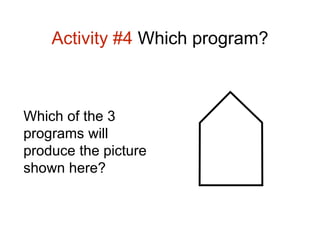
Which of the 3 
programs will 
produce the picture 
shown here?
Activity #5 Using Repetition 
What is the most efficient program that you can write 
that will produce a rectangle? Use your cards to plan 
your sequence and then test it out. 
Tip: You need to use a repeat command
Subject content for KS1 
Pupils should be taught to: 
• understand what algorithms are; how they are 
implemented as programs on digital devices; and 
that programs execute by following precise and 
unambiguous instructions 
• create and debug simple programs 
• use logical reasoning to predict the behaviour of 
simple programs
Follow up from today: 
Berry, M (2014) Computing in the national curriculum: A 
guide for primary teachers. Available http://goo.gl/GH95V7 
Turvey K. et al. (2014) ‘Programming and computational 
thinking’ in Primary Computing and ICT, Knowledge, 
Understanding and Practice, London: Sage. 
Before the next session: 
Alexander, A (2010) Ch8 ‘Children, diversity and equity’

Getting started with programming KS1

  • 1.
    Programming and Computationalthinking KS1 http://www.theslate.org
  • 2.
    “A high-quality computingeducation equips pupils to use computational thinking and creativity to understand and change the world.” – Purpose of study, computing programmes of study
  • 3.
    “The core ofcomputing is computer science, in which pupils are taught the principles of information and computation, how digital systems work, and how to put this knowledge to use through programming.” – Purpose of study, computing programmes of study
  • 4.
    “Computational thinking isthe thought processes involved in formulating problems and their solutions so that the solutions are represented in a form that can effectively be carried out by an information-processing agent.” – Jan Cuny, Larry Snyder, and Jeannette Wing
  • 5.
    “Computational thinking enablesyou to bend computation to your needs. It is becoming the new literacy of the 21st century.” – Jan Cuny, Larry Snyder, and Jeannette Wing
  • 6.
    Programming and Computationalthinking key stage 1
  • 7.
    Subject content forKS1 Pupils should be taught to: • understand what algorithms are; how they are implemented as programs on digital devices; and that programs execute by following precise and unambiguous instructions • create and debug simple programs • use logical reasoning to predict the behaviour of simple programs
  • 8.
    Algorithms “understand whatalgorithms are; how they are implemented as programs on digital devices; and that programs execute by following precise and unambiguous instructions” - Subject content KS1 An algorithm is a sequence of precise and unambiguous instructions that are followed in order to achieve a specific outcome.
  • 9.
    Activity #1 JamSandwich Robot In pairs, write an algorithm to program a robot to make a jam sandwich. Try to ensure your instructions are precise and unambiguous. https://www.youtube.com/watch?v=leBEFaVHllE
  • 10.
    Activity #2 Programa partner One child ‘programs’ another child (who could be blindfolded) to safely navigate an obstacle course. This encourages the children to use precise, unambiguous instructions.
  • 11.
    Debugging “create anddebug simple programs” - Subject content KS1 Debugging is the process of finding and correcting errors in a computer program.
  • 12.
    Logical reasoning “uselogical reasoning to predict the behaviour of simple programs” - Subject content KS1 “Logical reasoning: a systematic approach to solving problems or deducing information using a set of universally applicable and totally reliable rules.”
  • 13.
    Activity #3 ASimple Program Program Roamer to draw a T shape. Plan the sequence of instructions first using your cards. When you’re happy with your instructions, try them out on Roamer. If it isn’t right first time, debug your program by using logical reasoning. Extension: Can you program Roamer to draw an N?
  • 14.
    Activity #4 Whichprogram? Which of the 3 programs will produce the picture shown here?
  • 15.
    Activity #5 UsingRepetition What is the most efficient program that you can write that will produce a rectangle? Use your cards to plan your sequence and then test it out. Tip: You need to use a repeat command
  • 16.
    Subject content forKS1 Pupils should be taught to: • understand what algorithms are; how they are implemented as programs on digital devices; and that programs execute by following precise and unambiguous instructions • create and debug simple programs • use logical reasoning to predict the behaviour of simple programs
  • 17.
    Follow up fromtoday: Berry, M (2014) Computing in the national curriculum: A guide for primary teachers. Available http://goo.gl/GH95V7 Turvey K. et al. (2014) ‘Programming and computational thinking’ in Primary Computing and ICT, Knowledge, Understanding and Practice, London: Sage. Before the next session: Alexander, A (2010) Ch8 ‘Children, diversity and equity’

Editor's Notes

  • #2 Today we are hoping to demystify key computing terms and the PoS for KS1 for computing. But firstly, I’d like to get a sense of how confident you feel about the new Computing Curriculum. What are your experiences? Have you seen anything in school?
  • #3 If you are not sure what computational thinking is all about, that is what we are going to explore as part of this session.
  • #4 Did you know that before we had computers- the word ‘computer’ was originally a job title: it was used to describe those human beings (predominantly women) whose job it was to perform the repetitive calculations required to compute such things as navigational tables, tide charts, and planetary positions for astronomical almanacs. A computer – could process a sequence of instructions. It is interesting to note this in the light of the NC and the focus on Computational Thinking.
  • #5 Computational thinking – its what we do as human beings. We turn problems into a form where computer systems can help us to solve them Computational thinking is a term that brings together a number of thinking skills that support: defining problems designing developing testing solutions to exploit the power of computers.
  • #6 Take problems that might be something like climate change and how we use computing to help model the problem, predict patterns, collect and analyse data and tackle other problems. We apply the technology in order to understand or solve the problem. In order to do this we need know the affordances and limitations of what is available and apply these effectively. This has been referred to as ICT capability or digital literacy and we can see the very beginning of this in the EYFS ELG 15 which says … They select and use technology for particular purpose Exceeding They select appropriate applications that support an identified need – for example in deciding how best to make a record of a special event in their lives, such as a journey on a steam train. So if you are good at computer science, you can exploit the power of computing to solve problems. There are wider benefits here then than just being a programmer- there are transferable skills that computing offers
  • #7 I want to start here by looking at the PoS for KS1
  • #8 The notion of computational thinking is highlighted right from the beginning of KS1 and I would argue has foundations laid in the EYFS Read though the above and pull out the key words Algorithms An algorithm is a sequence of instructions which must be followed in a particular order. If that does not make sense then think of a recipe- it is a step-by-step process However this analogy does break down a little when you think, and I am reminded of the technical challenge in Bake off, that we could all follow the same instruction but come out with a different outcome. AA route map – a list of instruction to get from a to b EYFS Getting dressed in the morning Brushing teeth Any more
  • #9 Recipe is a good example of the difference of giving instructions to a human, who applies what they know, refines and predicts as they go along, rather than to a computer
  • #10 You can see the need here for precise and unambiguous instructions.
  • #11 One of you will need to wear a blindfold. Some of you are probably thinking that this is nothing new- that we have been doing this for years to support directional language, trust building games, estimation distance, mathematical thinking. This is true. But now we are introducing key terms. Debugging – finding errors as you go along Barrier games- Dressing up game Grid on the floor