6
QuickStart Computing
How do we think
about problems
so that computers
can help?
Computers are incredible devices: they extend
what we can do with our brains. With them, we can
do things faster, keep track of vast amounts of
information and share our ideas with other people.
Getting computers to help us to solve problems is a
two-step process:
1.	 First, we think about the steps needed to solve a
problem.
2.	 Then, we use our technical skills to get the
computer working on the problem.
Take something as simple as using a calculator to
solve a word problem in maths. First, you have to
understand and interpret the problem before the
calculator can help out with the arithmetic bit.
Similarly, if you’re going to make an animation, you
need to start by planning the story and how you’ll
shoot it before you can use computer hardware and
software to help you get the work done.
In both of these examples, the thinking that is
undertaken before starting work on a computer is
known as computational thinking.
Computational thinking describes the processes
and approaches we draw on when thinking about
problems or systems in such a way that a computer
can help us with these.
Computational thinking is not thinking about
computers or like computers. Computers don’t think
for themselves. Not yet, at least!
Computational thinking is about looking at a problem
in a way that a computer can help us to solve it.
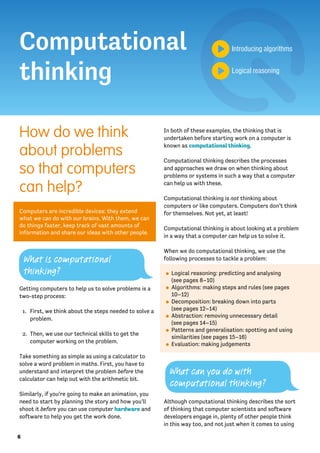
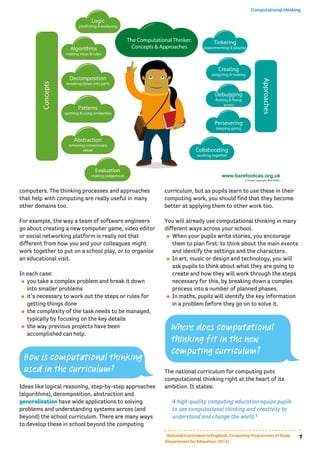
When we do computational thinking, we use the
following processes to tackle a problem:
⚫⚫ Logical reasoning: predicting and analysing
(see pages 8–10)
⚫⚫ Algorithms: making steps and rules (see pages
10–12)
⚫⚫ Decomposition: breaking down into parts
(see pages 12–14)
⚫⚫ Abstraction: removing unnecessary detail
(see pages 14–15)
⚫⚫ Patterns and generalisation: spotting and using
similarities (see pages 15–16)
⚫⚫ Evaluation: making judgements
Although computational thinking describes the sort
of thinking that computer scientists and software
developers engage in, plenty of other people think
in this way too, and not just when it comes to using
Computational
thinking
Introducing algorithms
Logical reasoning
What is computational
thinking?
What can you do with
computational thinking?
7
Computational thinking
computers. The thinking processes and approaches
that help with computing are really useful in many
other domains too.
For example, the way a team of software engineers
go about creating a new computer game, video editor
or social networking platform is really not that
different from how you and your colleagues might
work together to put on a school play, or to organise
an educational visit.
In each case:
⚫⚫ you take a complex problem and break it down
into smaller problems
⚫⚫ it’s necessary to work out the steps or rules for
getting things done
⚫⚫ the complexity of the task needs to be managed,
typically by focusing on the key details
⚫⚫ the way previous projects have been
accomplished can help.
Ideas like logical reasoning, step-by-step approaches
(algorithms), decomposition, abstraction and
generalisation have wide applications to solving
problems and understanding systems across (and
beyond) the school curriculum. There are many ways
to develop these in school beyond the computing
curriculum, but as pupils learn to use these in their
computing work, you should find that they become
better at applying them to other work too.
You will already use computational thinking in many
different ways across your school.
⚫⚫ When your pupils write stories, you encourage
them to plan first: to think about the main events
and identify the settings and the characters.
⚫⚫ In art, music or design and technology, you will
ask pupils to think about what they are going to
create and how they will work through the steps
necessary for this, by breaking down a complex
process into a number of planned phases.
⚫⚫ In maths, pupils will identify the key information
in a problem before they go on to solve it.
The national curriculum for computing puts
computational thinking right at the heart of its
ambition. It states:
A high-quality computing education equips pupils
to use computational thinking and creativity to
understand and change the world.1
How is computational thinking
used in the curriculum?
Where does computational
thinking fit in the new
computing curriculum?
1
National Curriculum in England, Computing Programmes of Study
(Department for Education, 2013).
8
QuickStart Computing
Whilst programming (see pages 18–29) is an important
part of the new curriculum, it would be wrong to
see this as an end in itself. Rather, it’s through the
practical experience of programming that the insights of
computational thinking can best be developed.
Computational thinking shouldn’t be seen as just a
new name for ‘problem-solving skills’. It does help to
solve problems and it has wide applications across
other disciplines, but it’s most obviously apparent, and
probably most effectively learned, through the rigorous,
creative processes of writing code – as discussed in the
next section.
Classroom activity ideas
⚫⚫ Ask your pupils to write a recipe for a sandwich,
thinking carefully about each step that needs
to be carried out. Point out that the step-by-
step sequence of instructions is an algorithm.
Ask them to share each other’s recipes and spot
patterns in them (this is called generalisation).
Read a range of recipes and discuss the layers
of simplification (abstraction) present in even
relatively simple recipes, such as for pizza.
⚫⚫ Plan a traditional ‘design, make and evaluate’
project for design and technology, drawing out
the parallels with computational thinking. For
example, plan the process for making a musical
instrument. Tell the pupils to break this complex
problem down into smaller stages, such as:
»» planning their design (an abstraction – a simplified
version – capturing the key elements of this)
»» sourcing their materials (using decomposition
to identify the different components)
»» assembling the materials to create the
instrument (a systematic, step-by-step
approach – an algorithm)
»» evaluating (testing) the instrument.
⚫⚫ Challenge older pupils to work individually or
collaboratively on more complex projects, for
example researching and writing up aspects of a
curriculum topic such as the Viking invasion, or
putting together an assembly or a class play. In
each case ask them to note down the individual
steps needed for the task and to think about what
they have left out to make the subject fit their brief.
Further resources
⚫⚫ Barefoot Computing, ‘Computational Thinking’,
available at: http://barefootcas.org.uk/barefoot-
primary-computing-resources/concepts/
computational-thinking/ (free, but registration
required).
⚫⚫ Berry, M., ‘Computational Thinking in Primary
Schools’ (2014), available at: http://milesberry.
net/2014/03/computational-thinking-in-primary-
schools/.
⚫⚫ Computer Science Teachers Association,
‘CSTA Computational Thinking Task Force’ and
‘Computational Thinking Resources’, available
at: http://csta.acm.org/Curriculum/sub/
CompThinking.html.
⚫⚫ Computing At School, ‘Computational
Thinking’, available at: http://community.
computingatschool.org.uk/resources/252.
⚫⚫ Curzon, P., Dorling, M., Ng, T., Selby, C. and
Woollard, J., ‘Developing Computational Thinking
in the Classroom: A Framework’ (Computing At
School, 2014), available at: http://community.
computingatschool.org.uk/files/3517/original.pdf.
⚫⚫ Google for Education, ‘Exploring Computational
Thinking’, available at: www.google.com/edu/
computational-thinking/index.html.
⚫⚫ Wing, J., ‘Computational Thinking and Thinking
about Computing’ (The Royal Society, 2008),
available at: http://rsta.royalsocietypublishing.
org/content/366/1881/3717.full.pdf+html.
Logical reasoning
If you set up two computers in the same way, give them
the same instructions (the program) and the same
input, you can pretty much guarantee the same output.
Computers don’t make things up as they go along
or work differently depending on how they happen
to be feeling at the time. This means that they
are predictable. Because of this we can use logical
reasoning to work out exactly what a program or
computer system will do.
Children quickly pick this up for themselves: the
experience of watching others and experimenting
Can you explain why
something happens?
9
Computational thinking
for themselves allows even very young children to
develop a mental model of how technology works. A
child learns that clicking the big round button brings
up a list of different games to play, or that tapping
here or stroking there on the screen produces a
reliably predictable response.
This process of using existing knowledge of a
system to make reliable predictions about its future
behaviour is one part of logical reasoning. At its
heart, logical reasoning is about being able to explain
why something is the way it is. It’s also a way to
work out why something isn’t quite as it should be.
Logic is fundamental to how computers work: deep
inside the computer’s central processing unit (CPU),
every operation the computer performs is reduced to
logical operations carried out using electrical signals.
It’s because everything a computer does is
controlled by logic that we can use logic to reason
about program behaviour.
Software engineers use logical reasoning all the
time in their work. They draw on their internal
mental models of how computer hardware, the
operating system (such as Windows 8, OS X) and
the programming language they’re using all work,
in order to develop new code that will work as they
intend. They’ll also rely on logical reasoning when
testing new software and when searching for and
fixing the ‘bugs’ (mistakes) in their thinking (known
as debugging – see page 17) or their coding when
these tests fail.
There are many ways that children will already use
logical reasoning in their computing lessons and
across the wider curriculum.
⚫⚫ In English, pupils might explain what they think
a character will do next in a novel, or explain the
character’s actions in the story so far.
⚫⚫ In science, pupils should explain how they have
arrived at their conclusions from the results of
their experiments.
⚫⚫ In history, pupils should discuss the logical
connections between cause and effect; they
should understand how historical knowledge is
constructed from a variety of sources.
In the computing curriculum, key stage 1 pupils are
expected to use logical reasoning to predict the
behaviour of simple programs. This can include the
ones they themselves write, perhaps with a floor
turtle, or simple movement commands on screen
in a program like Scratch, but it might also include
predicting what happens when they play a computer
game, or use a painting program.
At key stage 2, pupils are expected to ‘use logical
reasoning to explain how some simple algorithms
work and to detect and correct errors in algorithms
and programs’.2
Classroom activity ideas
⚫⚫ Provide pupils with floor turtles and ask them to
make predictions of where the robot will end up
when the go button is pressed. Then ask them
to explain why they think that. Being able to give
a reason for their thinking is what using logical
reasoning is all about.
⚫⚫ In their own coding, logical reasoning is key to
debugging (finding and fixing the mistakes in
their programs). Ask the pupils to look at one
another’s Scratch or Kodu programs and spot
bugs. Encourage them to test the programs to
see if they can isolate exactly which bit of code
is causing a problem. If pupils’ programs fail to
work, get them to explain their code to a friend
or even an inanimate object (e.g. a rubber duck).
⚫⚫ Give pupils a program of your own or from the
Scratch or Kodu community sites and ask them to
work backwards from the code to work out what
it will do.
⚫⚫ Ask pupils to think carefully about some school
rules, for example those in the school’s computer
How is logical reasoning used
across the curriculum?
How is logical reasoning
used in computing?
Where does logical
reasoning fit in the new
computing curriculum?
2
National Curriculum in England, Computing Programmes of Study
(Department for Education, 2013).
10
QuickStart Computing
Acceptable Use Policy. Can they use logical
reasoning to explain why the rules are as they are?
⚫⚫ There are many games, both computer-based
and more traditional, that draw directly on the
ability to make logical predictions. Organise for
the pupils to play noughts and crosses using
pencil and paper. As they are playing, ask them
to predict their opponent’s next move. Let them
play computer games such as Minesweeper,
Angry Birds or SimCity, as appropriate. Ask them
to pause at certain points and tell you what they
think will happen when they move next. Consider
starting a chess club if your school doesn’t
already have one.
Further resources
⚫⚫ Barefoot Computing, ‘Logic: Predicting and
Analysing’, available at: http://barefootcas.org.
uk/barefoot-primary-computing-resources/
concepts/logic/ (free, registration required).
⚫⚫ Computer Science for Fun, ‘The Magic of
Computer Science’, available at: www.cs4fn.org/
magic/.
⚫⚫ Computer Science Unplugged, ‘Databases
Unplugged’, available at: http://csunplugged.org/
databases.
⚫⚫ McOwan, P. and Curzon, P. (Queen Mary University
of London), with support from EPSRC and Google,
‘Computer Science Activities With a Sense of Fun’,
available at: www.cs4fn.org/teachers/activities/
braininabag/braininabag.pdf.
⚫⚫ The P4C Co-operative, a co-operative providing
resources and advice on philosophy for children,
available at: www.p4c.com/.
⚫⚫ PhiloComp.net, website highlighting the strong
links between philosophy and computing, available
at www.philocomp.net/.
Algorithms
An algorithm is a sequence of instructions or a set of
rules to get something done.
You probably know the fastest route from school
to home, for example, turn left, drive for five miles,
turn right. You can think of this as an ‘algorithm’
– as a sequence of instructions to get you to your
chosen destination. There are plenty of algorithms
(i.e. routes) that will accomplish the same goal; in
this case, there are even algorithms (such as in your
satnav) for working out the shortest or fastest
route.
Search engines such as Bing or Google use
algorithms to put a set of search results into order,
so that more often than not, the result we’re looking
for is at the top of the front page.
Your Facebook news feed is derived from your
friends’ status updates and other activity, but it only
shows that activity which the algorithm (EdgeRank)
thinks you’ll be most interested in seeing. The
recommendations you get from Amazon, Netflix and
eBay are algorithmically generated, based in part on
what other people are interested in.
Given the extent to which so much of their lives is
affected by algorithms, it’s worth pupils having some
grasp of what an algorithm is.
Helping pupils to get an idea of what an algorithm
is needn’t be confined to computing lessons. You
and your pupils will already use algorithms in many
different ways across the school.
⚫⚫ A lesson plan can be regarded as an algorithm for
teaching a lesson.
⚫⚫ There will be a sequence of steps pupils follow for
many activities, such as getting ready for lunch or
going to PE.
⚫⚫ In cookery, we can think of a recipe as an
algorithm.
⚫⚫ In English, we can think of instructional writing as
a form of algorithm.
⚫⚫ In science, we might talk about the method of an
experiment as an algorithm.
⚫⚫ In maths, your approach to mental arithmetic (or
many computer-based educational games) might
be an implementation of a simple algorithm.
How are algorithms used
in the real world?
How are algorithms used
across the curriculum?
What’s the best way to
solve a problem?
11
Computational thinking
Where do algorithms fit
in the new computing
curriculum?
An example of this might be:
»» repeat ten times:
»» ask a question
»» wait for a response
»» provide feedback on whether the response
was right or wrong.
The computing curriculum expects pupils in key
stage 1 to have an understanding of what algorithms
are, and how they are used in programs on digital
devices.
There can be many algorithms to solve the same
problem, and each of these can be implemented
using different programming languages on different
computer systems: it can be useful for pupils to
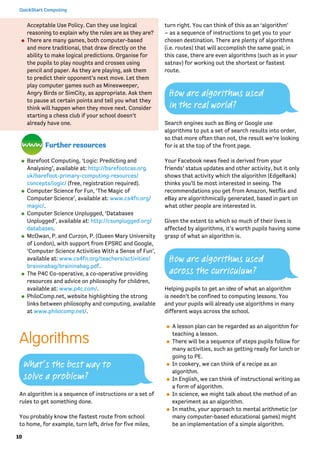
compare how they draw a square with a floor turtle
and how they would do this on screen in Logo or
ScratchJr.
Scratch Jnr programming for drawing a square.
Key stage 2 builds on this: pupils are expected to
design programs with particular goals in mind, which
will draw on their being able to think algorithmically,
as well as using logical reasoning (see pages 8–10)
to explain algorithms and to detect and correct
errors in them. To practise this, encourage pupils to
carry out the steps for an algorithm: to follow the
instructions themselves rather than writing these
as code for the computer. Errors and inconsistencies
should become apparent!
Whilst programming languages like Scratch and Kodu
(see pages 21–22) can make it seem unnecessary to
go through the planning stage of writing a program,
it is good practice for pupils to write down the
algorithm for a program, perhaps as rough jottings,
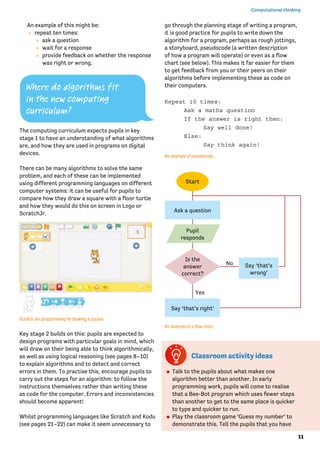
a storyboard, pseudocode (a written description
of how a program will operate) or even as a flow
chart (see below). This makes it far easier for them
to get feedback from you or their peers on their
algorithms before implementing these as code on
their computers.
Repeat 10 times:
	 Ask a maths question
	 If the answer is right then:
		 Say well done!
	Else:
		 Say think again!
An example of pseudocode.
An example of a flow chart.
Classroom activity ideas
⚫⚫ Talk to the pupils about what makes one
algorithm better than another. In early
programming work, pupils will come to realise
that a Bee-Bot program which uses fewer steps
than another to get to the same place is quicker
to type and quicker to run.
⚫⚫ Play the classroom game ‘Guess my number’ to
demonstrate this. Tell the pupils that you have
Ask a question
Say ‘that’s right’
Say ‘that’s
wrong’
No
Yes
Pupil
responds
Start
Is the
answer
correct?
12
QuickStart Computing
chosen a number between 1 and 100 and they are
to guess what it is. Tell them that they can ask
you questions about the number but that you can
only answer ‘yes’ or ‘no’, and that they can only
ask you one question per pupil.
»» For the first go, ask the pupils to guess
numbers randomly.
»» Next, using a new number, ask the pupils to
guess the number sequentially from one, e.g. ‘Is
the number one?’ and so on. Explain that this
is called a linear search. Allow them to have as
many goes as needed to guess the number.
»» Finally, using a new number again, explain how
to use a binary search. Explain to the learners
that they already know the number is less than
100, so suggest they ask, ‘Is it less that 50?’
then, ‘Is it less than 25?’ or ‘Is it less than 75?’
depending on the answer. Tell the pupils to
keep halving the section they are searching in
until the number is found.
»» Afterwards, talk about which approach found
the number quicker. When they are familiar
with using a binary search method, replay the
game using a number between 1 and 1000.
⚫⚫ Organise the pupils to sort a set of unknown
weights into weight order using a simple pan
balance, thinking carefully about the algorithm
they’re following to do this, and then to think of a
quicker way to accomplish the same activity. See
http://csunplugged.org/sorting-algorithms for a
demonstration of this.
⚫⚫ Explain to the pupils that not all algorithms are
made of sequences of instructions: some are rule
based. Introduce rule-based algorithms by writing a
number sequence on the board, e.g. 3, 6, 9, 12 or
2, 4, 8, 16. Ask the pupils to work out the rule for the
sequence (adding 3, or doubling the number) and to
predict the next number. Explain that the rule for the
sequence is the algorithm and the process by which
they worked it out was logical reasoning.
Further resources
⚫⚫ Bagge, P., ‘Flow Charts in Primary Computing
Science’, available at: http://philbagge.blogspot.
co.uk/2014/04/flow-charts-in-primary-
computing-science.html.
⚫⚫ Barefoot Computing, ‘KS2 Logical Number
Sequences Activity’, available at: http://
barefootcas.org.uk/programme-of-study/use-
logical-reasoning-explain-simple-algorithms-
work/ks2-logical-number-sequences-activity/
(free, but registration required).
⚫⚫ Cormen, T., ‘Algorithms Unlocked’ (MIT Press,
2013).
⚫⚫ Peyton Jones, S. and Goldberg, A. (Microsoft
Research), ‘Getting from A to B: Fast Route-
Finding Using Slow Computers’, available at: www.
ukuug.org/events/agm2010/ShortestPath.pdf.
⚫⚫ Slavin, K., ‘How Algorithms Shape Our World’,
available at: www.ted.com/talks/kevin_slavin_
how_algorithms_shape_our_world?language=en.
⚫⚫ Steiner, C., ‘Automate This: How Algorithms Came
to Rule Our World’ (Portfolio Penguin, 2013).
Decomposition
The process of breaking down a problem into smaller
manageable parts is known as decomposition.
Decomposition helps us solve complex problems and
manage large projects.
This approach has many advantages. It makes the
process a manageable and achievable one – large
problems are daunting, but a set of smaller, related
tasks are much easier to take on. It also means that
the task can be tackled by a team working together,
each bringing their own insights, experience and
skills to the task.
Decomposing problems into their smaller parts is
not unique to computing: it’s pretty standard in
engineering, design and project management.
Software development is a complex process, and
so being able to break down a large project into
its component parts is essential – think of all the
different elements that need to be combined to
produce a program, like PowerPoint.
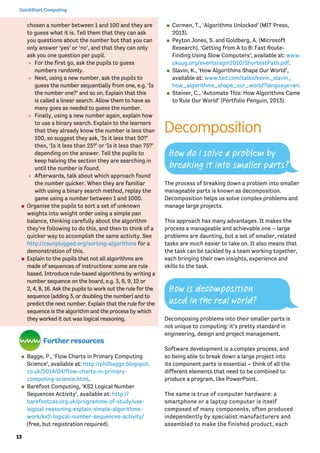
The same is true of computer hardware: a
smartphone or a laptop computer is itself
composed of many components, often produced
independently by specialist manufacturers and
assembled to make the finished product, each
How do I solve a problem by
breaking it into smaller parts?
How is decomposition
used in the real world?
13
Computational thinking
under the control of the operating system and
applications.
A tablet can be broken down (decomposed) into smaller components.
With thanks to iFixit.com
You’ll have used decomposition to tackle big projects
at school, just as programmers do in the software
industry.
⚫⚫ Delivering your school’s curriculum: typically
this would be decomposed as years and subjects,
further decomposed into terms, units of work
and individual lessons or activities. Notice how
the project is tackled by a team working together
(your colleagues), and how important it is for the
parts to integrate properly.
⚫⚫ Putting on a school play, organising a school trip
or arranging a school fair.
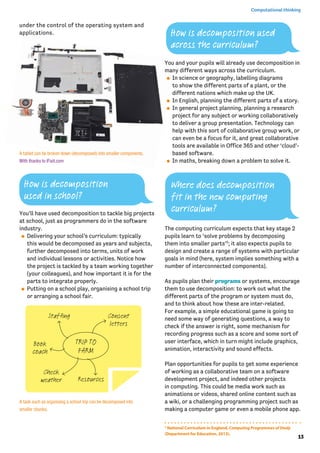
A task such as organising a school trip can be decomposed into
smaller chunks.
You and your pupils will already use decomposition in
many different ways across the curriculum.
⚫⚫ In science or geography, labelling diagrams
to show the different parts of a plant, or the
different nations which make up the UK.
⚫⚫ In English, planning the different parts of a story.
⚫⚫ In general project planning, planning a research
project for any subject or working collaboratively
to deliver a group presentation. Technology can
help with this sort of collaborative group work, or
can even be a focus for it, and great collaborative
tools are available in Office 365 and other ‘cloud’-
based software.
⚫⚫ In maths, breaking down a problem to solve it.
The computing curriculum expects that key stage 2
pupils learn to ‘solve problems by decomposing
them into smaller parts’3
; it also expects pupils to
design and create a range of systems with particular
goals in mind (here, system implies something with a
number of interconnected components).
As pupils plan their programs or systems, encourage
them to use decomposition: to work out what the
different parts of the program or system must do,
and to think about how these are inter-related.
For example, a simple educational game is going to
need some way of generating questions, a way to
check if the answer is right, some mechanism for
recording progress such as a score and some sort of
user interface, which in turn might include graphics,
animation, interactivity and sound effects.
Plan opportunities for pupils to get some experience
of working as a collaborative team on a software
development project, and indeed other projects
in computing. This could be media work such as
animations or videos, shared online content such as
a wiki, or a challenging programming project such as
making a computer game or even a mobile phone app.
How is decomposition
used in school?
How is decomposition used
across the curriculum?
Consent
letters
Staffing
Book
coach
Check
weather Resources
TRIP TO
FARM
3
National Curriculum in England, Computing Programmes of Study
(Department for Education, 2013).
Where does decomposition
fit in the new computing
curriculum?
14
QuickStart Computing
Classroom activity ideas
⚫⚫ Organise for the pupils to tackle a large-
scale programming project, such as making a
computer game, through decomposition. Even
for a relatively simple game the project would
typically be decomposed as follows: planning,
design, algorithms, coding, animation, graphics,
sound, debugging and sharing. A project like this
would lend itself to a collaborative, team-based
approach, with development planned over a
number of weeks.
⚫⚫ Take the case off an old desktop computer and
show the pupils how computers are made from
systems of smaller components connected
together. Depending on the components involved,
some of these can be disassembled further
still, although it’s likely to be better to look at
illustrations of the internal architecture of such
components.
⚫⚫ Organise for the pupils to carry out a
collaborative project online, for example through
developing a multi-page wiki site. For example,
pupils could take the broad topic of e-safety,
decompose this into smaller parts and then work
collaboratively to develop pages for their wiki,
exploring each individual topic. The process of
writing these pages can be further decomposed,
through planning, research, drafting, reviewing
and publishing phases.
Further resources
⚫⚫ Apps for Good, available at: www.appsforgood.
org/.
⚫⚫ Barefoot Computing, ‘Decomposition’, available
at: http://barefootcas.org.uk/sample-resources/
decomposition/ (free, but registration required).
⚫⚫ Basecamp (professional project management
software) can be used by teachers with their
class (free), available at: https://basecamp.com/
teachers.
⚫⚫ Gadget Teardowns, available at: www.ifixit.com/
Teardown.
⚫⚫ NRICH, ‘Planning a School Trip’, available at:
http://nrich.maths.org/6969.
⚫⚫ Project Management Institute Educational
Foundation, ‘Project Management Toolkit for
Youth’, available at: http://pmief.org/learning-
resources/learning-resources-library/project-
management-toolkit-for-youth.
Abstraction
For American computer scientist Jeanette Wing,
credited with coining the term, abstraction lies at
the heart of computational thinking:
The abstraction process – deciding what details
we need to highlight and what details we can
ignore – underlies computational thinking.4
Abstraction is about simplifying things; identifying
what is important without worrying too much
about the detail. Abstraction allows us to manage
complexity.
We use abstractions to manage the complexity of
life in schools. For example, the school timetable is
an abstraction of what happens in a typical week: it
captures key information such as who is taught what
subject where and by whom, but leaves to one side
further layers of complexity, such as the learning
objectives and activities planned in any individual lesson.
Abstraction is such a powerful way of thinking
about systems and problems that it seems worth
introducing pupils to this whilst they’re still at
primary school. This doesn’t have to be just in
computing lessons.
⚫⚫ In maths, working with ‘word problems’ often
involves a process of identifying the key
information and establishing how to represent
the problem in the more abstract language of
arithmetic, algebra or geometry.
⚫⚫ In geography, pupils can be helped to see a
map as an abstraction of the complexity of the
environment, with maps of different scales
providing some sense of the layered nature of
abstraction in computing.
⚫⚫ In history, pupils are taught world history
or national history as an abstraction of the
detail present in local histories and individual
biographies, which are themselves abstractions
of actual events.
How do you manage
complexity?
How is abstraction used
across the curriculum?
4
‘Computational thinking and thinking about computing’
(The Royal Society, 2008).
15
Computational thinking
⚫⚫ In music, the piano score of a pop song might be
thought of as an abstraction for that piece of
music.
The national curriculum for computing leaves
abstraction until key stage 3, although it is part of
the overarching aims of the subject, which seeks to
ensure that all pupils:
can understand and apply the fundamental
principles and concepts of computer science,
including abstraction, logic, algorithms and data
representation.5
In computing lessons, pupils can learn about the
process of abstraction from playing computer games,
particularly those that involve interactive simulations
of real world systems (see Classroom activity ideas).
Encourage pupils’ curiosity about how things work,
helping them to think about what happens inside the
computer or on the internet as they use software or
browse the web.
When pupils put together a presentation or video
on a topic they know about, they’ll need to focus on
the key information, and think about how this can be
represented, whilst leaving to one side much of the
detail of the subject: this too involves abstraction.
Classroom activity ideas
⚫⚫ Encourage pupils who are learning to program
to create their own games. If these are based on
real world systems then they’ll need to use some
abstraction to manage the complexity of that
system in their game. In a simple table tennis
game, e.g. Pong, the simulation includes the ball’s
motion in two dimensions and how it bounces
off the bat, but it ignores factors such as air
resistance, spin or even gravity. Ask your pupils
to think really carefully about what detail they
need to include, and what can be left out when
programming a similar game.
Further resources
⚫⚫ Barefoot Computing, ‘Abstraction’, available at:
http://barefootcas.org.uk/barefoot-primary-
computing-resources/concepts/abstraction/
(free, but registration required).
⚫⚫ BBC Bitesize, ‘Abstraction’, available at: www.
bbc.co.uk/education/guides/zttrcdm/revision.
⚫⚫ BBC Cracking the Code, ‘Simulating the
Experience of F1 Racing Through Realistic
Computer Models’, available at: www.bbc.co.uk/
programmes/p016612j.
⚫⚫ Google for Education, ‘Solving Problems at Google
Using Computational Thinking’, available at: www.
youtube.com/watch?v=SVVB5RQfYxk.
⚫⚫ ‘The Art of Abstraction – Computerphile’,
available at: www.youtube.com/
watch?v=p7nGcY73epw.
Patterns and
generalisation
In computing, the method of looking for a general
approach to a class of problems is called generalisation.
By identifying patterns we can make predictions, create
rules and solve more general problems. For example,
in learning about area, pupils could find the area of a
particular rectangle by counting the centimetre squares
on the grid on which it’s drawn. But a better solution
would be to multiply the length by the width: not only
is this quicker, it’s also a method that will work on all
rectangles, including really small ones and really large
ones. Although it takes a while for pupils to understand
this formula, once they do it’s so much faster than
counting squares.
Pupils are likely to encounter the idea of generalising
patterns in many areas of the primary curriculum.5
National Curriculum in England, Computing Programmes of Study
(Department for Education, 2013).
Where does abstraction
fit in the new computing
curriculum?
How can you make things
easier for yourself?
How are patterns and
generalisation used in the
national curriculum?
16
QuickStart Computing
⚫⚫ From an early age, they’ll become familiar
with repeated phrases in nursery rhymes and
stories; later on they’ll notice repeated narrative
structures in traditional tales or other genres.
⚫⚫ In music, children will learn to recognise repeating
melodies or bass lines in many musical forms.
⚫⚫ In maths, pupils typically undertake investigations
in which they spot patterns and deduce
generalised results.
⚫⚫ In English, pupils might notice common rules for
spellings, and their exceptions.
Classroom activity ideas
⚫⚫ In computing, encourage pupils to always look
for simpler or quicker ways to solve a problem or
achieve a result. Ask pupils to explore geometric
patterns using turtle graphics commands in
languages like Scratch, Logo or TouchDevelop
to create ‘crystal flowers’ (see pages 26–27).
Emphasise how the use of repeating blocks
of code is much more efficient than writing
each command separately, and allow pupils to
experiment with how changing one or two of
the numbers used in their program can produce
different shapes.
⚫⚫ Organise for the pupils to use graphics software
to create tessellating patterns to cover the
screen. As they do this, ask them to find quicker
ways of completing the pattern, typically by
copying and pasting groups of individual shapes.
⚫⚫ Help the pupils to create rhythmic and effective
music compositions using simple sequencing
software in which patterns of beats are repeated.
⚫⚫ Ask the pupils to experiment with number
patterns and sequences using Scratch or other
programming languages. Can they work out a
general program which they could use to generate
any linear number sequence?
Further resources
⚫⚫ Barefoot Computing, ‘Patterns’, available at:
http://barefootcas.org.uk/barefoot-primary-
computing-resources/concepts/patterns/
(free, but registration required).
⚫⚫ Isle of Tune app, available at: http://isleoftune.com.
⚫⚫ Laurillard, D., Teaching as a Design Science: Building
Pedagogical Patterns for Learning and Technology
(Routledge, 2012).
⚫⚫ Pattern in Islamic art, available at:
www.patterninislamicart.com.
⚫⚫ M. C. Escher website, available at:
www.mcescher.com.
How does software
get written?
As well as the above processes, there are also a
number of approaches that characterise computational
thinking. If pupils are to start thinking computationally,
then it’s worth helping them to develop these
approaches to their work, so they can be more effective
in putting their thoughts into action.
Tinkering
There is often a willingness to experiment and
explore in computer scientists’ work. Some elements
of learning a new programming language or exploring
a new system look quite similar to the sort of
purposeful play that’s seen as such an effective
approach to learning in the best nursery and
reception classrooms.
Open source software makes it easy to take
someone else’s code, look at how it’s been made
and then adapt it to your own particular project
or purpose. Platforms such as Scratch and
TouchDevelop positively encourage users to look at
other programmers’ work and use this as a basis for
their own creative coding.
In class, encourage pupils to play with a new piece of
software, sharing what they discover about it with
one another, rather than you explaining exactly how
it works. Also, look for ways in which pupils can use
others’ code, from you, their peers, or online, as a
starting point for their own programming projects.
Creating
Programming is a creative process. Creative work
involves both originality and making something of
value: typically something that is useful or at least
fit for the purpose intended.
Encourage pupils to approach tasks with a creative
spirit, and look for programming tasks that allow
some scope for creative expression rather than
merely arriving at the right answer.
Encourage pupils to reflect on the quality of the
work they produce, critiquing their own and others’
projects. The process of always looking for ways to
17
Computational thinking
improve on a software project is becoming common
practice in software development. Look for projects
in which artistic creativity is emphasised, such as
working with digital music, images, animation, virtual
environments or even 3D printing.
Debugging
Because of its complexity, the code programmers
write often doesn’t work as it’s intended.
Getting pupils to take responsibility for thinking
through their algorithms and code, to identify and
fix errors is an important part of learning to think,
and work, like a programmer. It’s also something to
encourage across the curriculum: get pupils to check
through their working in maths, or to proofread their
stories in English. Ask pupils to debug one another’s
code (or indeed proofread one another’s work),
looking for mistakes and suggesting improvements.
There’s evidence that learning from mistakes is a
particularly effective approach, and the process of
pupils debugging their own or others’ code is one way
to do this. Keep an eye on the bugs that your pupils do
encounter, as these can sometimes reveal particular
misconceptions that you may need to address (see
pages 28–29).
Persevering
Computer programming is hard. This is part of
its appeal – writing elegant and effective code
is an intellectual challenge requiring not only
an understanding of the ideas of the algorithms
being coded and the programming language you’re
working in, but also a willingness to persevere with
something that’s often quite difficult and sometimes
very frustrating. Carol Dweck’s work on ‘growth
mind-sets’ suggests that hard work and a willingness
to persevere in the face of difficulties can be key
factors in educational outcomes. Encourage pupils
to look for strategies they can use when they do
encounter difficulties with their programming work,
such as working out exactly what the problem is,
searching for the solution on Bing or Google (with
the safe search mode locked), KidRex or Swiggle, or
asking a friend for help.
Collaborating
Software is developed by teams of programmers and
others working together on a shared project. Look
for ways to provide pupils with this experience in
computing lessons too. Collaborative group work has
long had a place in primary education, and computing
should be no different.
Many see ‘pair programming’ as a particularly
effective development method, with two
programmers sharing a screen and a keyboard,
working together to write software. Typically one
programmer acts as the driver, dealing with the
detail of the programming, whilst the other takes
on a navigator role, looking at the bigger picture.
The two programmers regularly swap roles, so both
have a grasp of both detail and big picture. Working
in a larger group develops a number of additional
skills, with each pupil contributing some of their own
particular talents to a shared project. However, it’s
important to remember that all pupils should develop
their understanding of each part of the process,
so some sharing of roles or peer-tutoring ought
normally to be incorporated into such activities.
Further resources
⚫⚫ Barefoot Computing, ‘Computational Thinking
Approaches’, available at: http://barefootcas.
org.uk/barefoot-primary-computing-resources/
computational-thinking-approaches/ (free, but
registration required).
⚫⚫ Briggs, J., ‘Programming with Scratch Software:
The Benefits for Year Six Learners’ (Bath Spa
MA dissertation, 2013), available at: https://
slp.somerset.gov.uk/cypd/elim/somersetict/
Computing_Curriculum_Primary/Planning/MA_
JBriggs_Oct2013.pdf.
⚫⚫ DevArt: Art Made with Code, available at: https://
devart.withgoogle.com/.
⚫⚫ Dweck, C., ‘Mindset: How You Can Fulfil Your
Potential’ (Robinson, 2012).
⚫⚫ Education Endowment Foundation toolkit,
available at: http://
educationendowmentfoundation.org.uk/toolkit/.
⚫⚫ Papert, S. and Harel, I., ‘Situating
Constructionism’ (Ablex Publishing Corporation,
1991), available at: www.papert.org/articles/
SituatingConstructionism.html.

Comp thinking

  • 1.
    6 QuickStart Computing How dowe think about problems so that computers can help? Computers are incredible devices: they extend what we can do with our brains. With them, we can do things faster, keep track of vast amounts of information and share our ideas with other people. Getting computers to help us to solve problems is a two-step process: 1. First, we think about the steps needed to solve a problem. 2. Then, we use our technical skills to get the computer working on the problem. Take something as simple as using a calculator to solve a word problem in maths. First, you have to understand and interpret the problem before the calculator can help out with the arithmetic bit. Similarly, if you’re going to make an animation, you need to start by planning the story and how you’ll shoot it before you can use computer hardware and software to help you get the work done. In both of these examples, the thinking that is undertaken before starting work on a computer is known as computational thinking. Computational thinking describes the processes and approaches we draw on when thinking about problems or systems in such a way that a computer can help us with these. Computational thinking is not thinking about computers or like computers. Computers don’t think for themselves. Not yet, at least! Computational thinking is about looking at a problem in a way that a computer can help us to solve it. When we do computational thinking, we use the following processes to tackle a problem: ⚫⚫ Logical reasoning: predicting and analysing (see pages 8–10) ⚫⚫ Algorithms: making steps and rules (see pages 10–12) ⚫⚫ Decomposition: breaking down into parts (see pages 12–14) ⚫⚫ Abstraction: removing unnecessary detail (see pages 14–15) ⚫⚫ Patterns and generalisation: spotting and using similarities (see pages 15–16) ⚫⚫ Evaluation: making judgements Although computational thinking describes the sort of thinking that computer scientists and software developers engage in, plenty of other people think in this way too, and not just when it comes to using Computational thinking Introducing algorithms Logical reasoning What is computational thinking? What can you do with computational thinking?
  • 2.
    7 Computational thinking computers. Thethinking processes and approaches that help with computing are really useful in many other domains too. For example, the way a team of software engineers go about creating a new computer game, video editor or social networking platform is really not that different from how you and your colleagues might work together to put on a school play, or to organise an educational visit. In each case: ⚫⚫ you take a complex problem and break it down into smaller problems ⚫⚫ it’s necessary to work out the steps or rules for getting things done ⚫⚫ the complexity of the task needs to be managed, typically by focusing on the key details ⚫⚫ the way previous projects have been accomplished can help. Ideas like logical reasoning, step-by-step approaches (algorithms), decomposition, abstraction and generalisation have wide applications to solving problems and understanding systems across (and beyond) the school curriculum. There are many ways to develop these in school beyond the computing curriculum, but as pupils learn to use these in their computing work, you should find that they become better at applying them to other work too. You will already use computational thinking in many different ways across your school. ⚫⚫ When your pupils write stories, you encourage them to plan first: to think about the main events and identify the settings and the characters. ⚫⚫ In art, music or design and technology, you will ask pupils to think about what they are going to create and how they will work through the steps necessary for this, by breaking down a complex process into a number of planned phases. ⚫⚫ In maths, pupils will identify the key information in a problem before they go on to solve it. The national curriculum for computing puts computational thinking right at the heart of its ambition. It states: A high-quality computing education equips pupils to use computational thinking and creativity to understand and change the world.1 How is computational thinking used in the curriculum? Where does computational thinking fit in the new computing curriculum? 1 National Curriculum in England, Computing Programmes of Study (Department for Education, 2013).
  • 3.
    8 QuickStart Computing Whilst programming(see pages 18–29) is an important part of the new curriculum, it would be wrong to see this as an end in itself. Rather, it’s through the practical experience of programming that the insights of computational thinking can best be developed. Computational thinking shouldn’t be seen as just a new name for ‘problem-solving skills’. It does help to solve problems and it has wide applications across other disciplines, but it’s most obviously apparent, and probably most effectively learned, through the rigorous, creative processes of writing code – as discussed in the next section. Classroom activity ideas ⚫⚫ Ask your pupils to write a recipe for a sandwich, thinking carefully about each step that needs to be carried out. Point out that the step-by- step sequence of instructions is an algorithm. Ask them to share each other’s recipes and spot patterns in them (this is called generalisation). Read a range of recipes and discuss the layers of simplification (abstraction) present in even relatively simple recipes, such as for pizza. ⚫⚫ Plan a traditional ‘design, make and evaluate’ project for design and technology, drawing out the parallels with computational thinking. For example, plan the process for making a musical instrument. Tell the pupils to break this complex problem down into smaller stages, such as: »» planning their design (an abstraction – a simplified version – capturing the key elements of this) »» sourcing their materials (using decomposition to identify the different components) »» assembling the materials to create the instrument (a systematic, step-by-step approach – an algorithm) »» evaluating (testing) the instrument. ⚫⚫ Challenge older pupils to work individually or collaboratively on more complex projects, for example researching and writing up aspects of a curriculum topic such as the Viking invasion, or putting together an assembly or a class play. In each case ask them to note down the individual steps needed for the task and to think about what they have left out to make the subject fit their brief. Further resources ⚫⚫ Barefoot Computing, ‘Computational Thinking’, available at: http://barefootcas.org.uk/barefoot- primary-computing-resources/concepts/ computational-thinking/ (free, but registration required). ⚫⚫ Berry, M., ‘Computational Thinking in Primary Schools’ (2014), available at: http://milesberry. net/2014/03/computational-thinking-in-primary- schools/. ⚫⚫ Computer Science Teachers Association, ‘CSTA Computational Thinking Task Force’ and ‘Computational Thinking Resources’, available at: http://csta.acm.org/Curriculum/sub/ CompThinking.html. ⚫⚫ Computing At School, ‘Computational Thinking’, available at: http://community. computingatschool.org.uk/resources/252. ⚫⚫ Curzon, P., Dorling, M., Ng, T., Selby, C. and Woollard, J., ‘Developing Computational Thinking in the Classroom: A Framework’ (Computing At School, 2014), available at: http://community. computingatschool.org.uk/files/3517/original.pdf. ⚫⚫ Google for Education, ‘Exploring Computational Thinking’, available at: www.google.com/edu/ computational-thinking/index.html. ⚫⚫ Wing, J., ‘Computational Thinking and Thinking about Computing’ (The Royal Society, 2008), available at: http://rsta.royalsocietypublishing. org/content/366/1881/3717.full.pdf+html. Logical reasoning If you set up two computers in the same way, give them the same instructions (the program) and the same input, you can pretty much guarantee the same output. Computers don’t make things up as they go along or work differently depending on how they happen to be feeling at the time. This means that they are predictable. Because of this we can use logical reasoning to work out exactly what a program or computer system will do. Children quickly pick this up for themselves: the experience of watching others and experimenting Can you explain why something happens?
  • 4.
    9 Computational thinking for themselvesallows even very young children to develop a mental model of how technology works. A child learns that clicking the big round button brings up a list of different games to play, or that tapping here or stroking there on the screen produces a reliably predictable response. This process of using existing knowledge of a system to make reliable predictions about its future behaviour is one part of logical reasoning. At its heart, logical reasoning is about being able to explain why something is the way it is. It’s also a way to work out why something isn’t quite as it should be. Logic is fundamental to how computers work: deep inside the computer’s central processing unit (CPU), every operation the computer performs is reduced to logical operations carried out using electrical signals. It’s because everything a computer does is controlled by logic that we can use logic to reason about program behaviour. Software engineers use logical reasoning all the time in their work. They draw on their internal mental models of how computer hardware, the operating system (such as Windows 8, OS X) and the programming language they’re using all work, in order to develop new code that will work as they intend. They’ll also rely on logical reasoning when testing new software and when searching for and fixing the ‘bugs’ (mistakes) in their thinking (known as debugging – see page 17) or their coding when these tests fail. There are many ways that children will already use logical reasoning in their computing lessons and across the wider curriculum. ⚫⚫ In English, pupils might explain what they think a character will do next in a novel, or explain the character’s actions in the story so far. ⚫⚫ In science, pupils should explain how they have arrived at their conclusions from the results of their experiments. ⚫⚫ In history, pupils should discuss the logical connections between cause and effect; they should understand how historical knowledge is constructed from a variety of sources. In the computing curriculum, key stage 1 pupils are expected to use logical reasoning to predict the behaviour of simple programs. This can include the ones they themselves write, perhaps with a floor turtle, or simple movement commands on screen in a program like Scratch, but it might also include predicting what happens when they play a computer game, or use a painting program. At key stage 2, pupils are expected to ‘use logical reasoning to explain how some simple algorithms work and to detect and correct errors in algorithms and programs’.2 Classroom activity ideas ⚫⚫ Provide pupils with floor turtles and ask them to make predictions of where the robot will end up when the go button is pressed. Then ask them to explain why they think that. Being able to give a reason for their thinking is what using logical reasoning is all about. ⚫⚫ In their own coding, logical reasoning is key to debugging (finding and fixing the mistakes in their programs). Ask the pupils to look at one another’s Scratch or Kodu programs and spot bugs. Encourage them to test the programs to see if they can isolate exactly which bit of code is causing a problem. If pupils’ programs fail to work, get them to explain their code to a friend or even an inanimate object (e.g. a rubber duck). ⚫⚫ Give pupils a program of your own or from the Scratch or Kodu community sites and ask them to work backwards from the code to work out what it will do. ⚫⚫ Ask pupils to think carefully about some school rules, for example those in the school’s computer How is logical reasoning used across the curriculum? How is logical reasoning used in computing? Where does logical reasoning fit in the new computing curriculum? 2 National Curriculum in England, Computing Programmes of Study (Department for Education, 2013).
  • 5.
    10 QuickStart Computing Acceptable UsePolicy. Can they use logical reasoning to explain why the rules are as they are? ⚫⚫ There are many games, both computer-based and more traditional, that draw directly on the ability to make logical predictions. Organise for the pupils to play noughts and crosses using pencil and paper. As they are playing, ask them to predict their opponent’s next move. Let them play computer games such as Minesweeper, Angry Birds or SimCity, as appropriate. Ask them to pause at certain points and tell you what they think will happen when they move next. Consider starting a chess club if your school doesn’t already have one. Further resources ⚫⚫ Barefoot Computing, ‘Logic: Predicting and Analysing’, available at: http://barefootcas.org. uk/barefoot-primary-computing-resources/ concepts/logic/ (free, registration required). ⚫⚫ Computer Science for Fun, ‘The Magic of Computer Science’, available at: www.cs4fn.org/ magic/. ⚫⚫ Computer Science Unplugged, ‘Databases Unplugged’, available at: http://csunplugged.org/ databases. ⚫⚫ McOwan, P. and Curzon, P. (Queen Mary University of London), with support from EPSRC and Google, ‘Computer Science Activities With a Sense of Fun’, available at: www.cs4fn.org/teachers/activities/ braininabag/braininabag.pdf. ⚫⚫ The P4C Co-operative, a co-operative providing resources and advice on philosophy for children, available at: www.p4c.com/. ⚫⚫ PhiloComp.net, website highlighting the strong links between philosophy and computing, available at www.philocomp.net/. Algorithms An algorithm is a sequence of instructions or a set of rules to get something done. You probably know the fastest route from school to home, for example, turn left, drive for five miles, turn right. You can think of this as an ‘algorithm’ – as a sequence of instructions to get you to your chosen destination. There are plenty of algorithms (i.e. routes) that will accomplish the same goal; in this case, there are even algorithms (such as in your satnav) for working out the shortest or fastest route. Search engines such as Bing or Google use algorithms to put a set of search results into order, so that more often than not, the result we’re looking for is at the top of the front page. Your Facebook news feed is derived from your friends’ status updates and other activity, but it only shows that activity which the algorithm (EdgeRank) thinks you’ll be most interested in seeing. The recommendations you get from Amazon, Netflix and eBay are algorithmically generated, based in part on what other people are interested in. Given the extent to which so much of their lives is affected by algorithms, it’s worth pupils having some grasp of what an algorithm is. Helping pupils to get an idea of what an algorithm is needn’t be confined to computing lessons. You and your pupils will already use algorithms in many different ways across the school. ⚫⚫ A lesson plan can be regarded as an algorithm for teaching a lesson. ⚫⚫ There will be a sequence of steps pupils follow for many activities, such as getting ready for lunch or going to PE. ⚫⚫ In cookery, we can think of a recipe as an algorithm. ⚫⚫ In English, we can think of instructional writing as a form of algorithm. ⚫⚫ In science, we might talk about the method of an experiment as an algorithm. ⚫⚫ In maths, your approach to mental arithmetic (or many computer-based educational games) might be an implementation of a simple algorithm. How are algorithms used in the real world? How are algorithms used across the curriculum? What’s the best way to solve a problem?
  • 6.
    11 Computational thinking Where doalgorithms fit in the new computing curriculum? An example of this might be: »» repeat ten times: »» ask a question »» wait for a response »» provide feedback on whether the response was right or wrong. The computing curriculum expects pupils in key stage 1 to have an understanding of what algorithms are, and how they are used in programs on digital devices. There can be many algorithms to solve the same problem, and each of these can be implemented using different programming languages on different computer systems: it can be useful for pupils to compare how they draw a square with a floor turtle and how they would do this on screen in Logo or ScratchJr. Scratch Jnr programming for drawing a square. Key stage 2 builds on this: pupils are expected to design programs with particular goals in mind, which will draw on their being able to think algorithmically, as well as using logical reasoning (see pages 8–10) to explain algorithms and to detect and correct errors in them. To practise this, encourage pupils to carry out the steps for an algorithm: to follow the instructions themselves rather than writing these as code for the computer. Errors and inconsistencies should become apparent! Whilst programming languages like Scratch and Kodu (see pages 21–22) can make it seem unnecessary to go through the planning stage of writing a program, it is good practice for pupils to write down the algorithm for a program, perhaps as rough jottings, a storyboard, pseudocode (a written description of how a program will operate) or even as a flow chart (see below). This makes it far easier for them to get feedback from you or their peers on their algorithms before implementing these as code on their computers. Repeat 10 times: Ask a maths question If the answer is right then: Say well done! Else: Say think again! An example of pseudocode. An example of a flow chart. Classroom activity ideas ⚫⚫ Talk to the pupils about what makes one algorithm better than another. In early programming work, pupils will come to realise that a Bee-Bot program which uses fewer steps than another to get to the same place is quicker to type and quicker to run. ⚫⚫ Play the classroom game ‘Guess my number’ to demonstrate this. Tell the pupils that you have Ask a question Say ‘that’s right’ Say ‘that’s wrong’ No Yes Pupil responds Start Is the answer correct?
  • 7.
    12 QuickStart Computing chosen anumber between 1 and 100 and they are to guess what it is. Tell them that they can ask you questions about the number but that you can only answer ‘yes’ or ‘no’, and that they can only ask you one question per pupil. »» For the first go, ask the pupils to guess numbers randomly. »» Next, using a new number, ask the pupils to guess the number sequentially from one, e.g. ‘Is the number one?’ and so on. Explain that this is called a linear search. Allow them to have as many goes as needed to guess the number. »» Finally, using a new number again, explain how to use a binary search. Explain to the learners that they already know the number is less than 100, so suggest they ask, ‘Is it less that 50?’ then, ‘Is it less than 25?’ or ‘Is it less than 75?’ depending on the answer. Tell the pupils to keep halving the section they are searching in until the number is found. »» Afterwards, talk about which approach found the number quicker. When they are familiar with using a binary search method, replay the game using a number between 1 and 1000. ⚫⚫ Organise the pupils to sort a set of unknown weights into weight order using a simple pan balance, thinking carefully about the algorithm they’re following to do this, and then to think of a quicker way to accomplish the same activity. See http://csunplugged.org/sorting-algorithms for a demonstration of this. ⚫⚫ Explain to the pupils that not all algorithms are made of sequences of instructions: some are rule based. Introduce rule-based algorithms by writing a number sequence on the board, e.g. 3, 6, 9, 12 or 2, 4, 8, 16. Ask the pupils to work out the rule for the sequence (adding 3, or doubling the number) and to predict the next number. Explain that the rule for the sequence is the algorithm and the process by which they worked it out was logical reasoning. Further resources ⚫⚫ Bagge, P., ‘Flow Charts in Primary Computing Science’, available at: http://philbagge.blogspot. co.uk/2014/04/flow-charts-in-primary- computing-science.html. ⚫⚫ Barefoot Computing, ‘KS2 Logical Number Sequences Activity’, available at: http:// barefootcas.org.uk/programme-of-study/use- logical-reasoning-explain-simple-algorithms- work/ks2-logical-number-sequences-activity/ (free, but registration required). ⚫⚫ Cormen, T., ‘Algorithms Unlocked’ (MIT Press, 2013). ⚫⚫ Peyton Jones, S. and Goldberg, A. (Microsoft Research), ‘Getting from A to B: Fast Route- Finding Using Slow Computers’, available at: www. ukuug.org/events/agm2010/ShortestPath.pdf. ⚫⚫ Slavin, K., ‘How Algorithms Shape Our World’, available at: www.ted.com/talks/kevin_slavin_ how_algorithms_shape_our_world?language=en. ⚫⚫ Steiner, C., ‘Automate This: How Algorithms Came to Rule Our World’ (Portfolio Penguin, 2013). Decomposition The process of breaking down a problem into smaller manageable parts is known as decomposition. Decomposition helps us solve complex problems and manage large projects. This approach has many advantages. It makes the process a manageable and achievable one – large problems are daunting, but a set of smaller, related tasks are much easier to take on. It also means that the task can be tackled by a team working together, each bringing their own insights, experience and skills to the task. Decomposing problems into their smaller parts is not unique to computing: it’s pretty standard in engineering, design and project management. Software development is a complex process, and so being able to break down a large project into its component parts is essential – think of all the different elements that need to be combined to produce a program, like PowerPoint. The same is true of computer hardware: a smartphone or a laptop computer is itself composed of many components, often produced independently by specialist manufacturers and assembled to make the finished product, each How do I solve a problem by breaking it into smaller parts? How is decomposition used in the real world?
  • 8.
    13 Computational thinking under thecontrol of the operating system and applications. A tablet can be broken down (decomposed) into smaller components. With thanks to iFixit.com You’ll have used decomposition to tackle big projects at school, just as programmers do in the software industry. ⚫⚫ Delivering your school’s curriculum: typically this would be decomposed as years and subjects, further decomposed into terms, units of work and individual lessons or activities. Notice how the project is tackled by a team working together (your colleagues), and how important it is for the parts to integrate properly. ⚫⚫ Putting on a school play, organising a school trip or arranging a school fair. A task such as organising a school trip can be decomposed into smaller chunks. You and your pupils will already use decomposition in many different ways across the curriculum. ⚫⚫ In science or geography, labelling diagrams to show the different parts of a plant, or the different nations which make up the UK. ⚫⚫ In English, planning the different parts of a story. ⚫⚫ In general project planning, planning a research project for any subject or working collaboratively to deliver a group presentation. Technology can help with this sort of collaborative group work, or can even be a focus for it, and great collaborative tools are available in Office 365 and other ‘cloud’- based software. ⚫⚫ In maths, breaking down a problem to solve it. The computing curriculum expects that key stage 2 pupils learn to ‘solve problems by decomposing them into smaller parts’3 ; it also expects pupils to design and create a range of systems with particular goals in mind (here, system implies something with a number of interconnected components). As pupils plan their programs or systems, encourage them to use decomposition: to work out what the different parts of the program or system must do, and to think about how these are inter-related. For example, a simple educational game is going to need some way of generating questions, a way to check if the answer is right, some mechanism for recording progress such as a score and some sort of user interface, which in turn might include graphics, animation, interactivity and sound effects. Plan opportunities for pupils to get some experience of working as a collaborative team on a software development project, and indeed other projects in computing. This could be media work such as animations or videos, shared online content such as a wiki, or a challenging programming project such as making a computer game or even a mobile phone app. How is decomposition used in school? How is decomposition used across the curriculum? Consent letters Staffing Book coach Check weather Resources TRIP TO FARM 3 National Curriculum in England, Computing Programmes of Study (Department for Education, 2013). Where does decomposition fit in the new computing curriculum?
  • 9.
    14 QuickStart Computing Classroom activityideas ⚫⚫ Organise for the pupils to tackle a large- scale programming project, such as making a computer game, through decomposition. Even for a relatively simple game the project would typically be decomposed as follows: planning, design, algorithms, coding, animation, graphics, sound, debugging and sharing. A project like this would lend itself to a collaborative, team-based approach, with development planned over a number of weeks. ⚫⚫ Take the case off an old desktop computer and show the pupils how computers are made from systems of smaller components connected together. Depending on the components involved, some of these can be disassembled further still, although it’s likely to be better to look at illustrations of the internal architecture of such components. ⚫⚫ Organise for the pupils to carry out a collaborative project online, for example through developing a multi-page wiki site. For example, pupils could take the broad topic of e-safety, decompose this into smaller parts and then work collaboratively to develop pages for their wiki, exploring each individual topic. The process of writing these pages can be further decomposed, through planning, research, drafting, reviewing and publishing phases. Further resources ⚫⚫ Apps for Good, available at: www.appsforgood. org/. ⚫⚫ Barefoot Computing, ‘Decomposition’, available at: http://barefootcas.org.uk/sample-resources/ decomposition/ (free, but registration required). ⚫⚫ Basecamp (professional project management software) can be used by teachers with their class (free), available at: https://basecamp.com/ teachers. ⚫⚫ Gadget Teardowns, available at: www.ifixit.com/ Teardown. ⚫⚫ NRICH, ‘Planning a School Trip’, available at: http://nrich.maths.org/6969. ⚫⚫ Project Management Institute Educational Foundation, ‘Project Management Toolkit for Youth’, available at: http://pmief.org/learning- resources/learning-resources-library/project- management-toolkit-for-youth. Abstraction For American computer scientist Jeanette Wing, credited with coining the term, abstraction lies at the heart of computational thinking: The abstraction process – deciding what details we need to highlight and what details we can ignore – underlies computational thinking.4 Abstraction is about simplifying things; identifying what is important without worrying too much about the detail. Abstraction allows us to manage complexity. We use abstractions to manage the complexity of life in schools. For example, the school timetable is an abstraction of what happens in a typical week: it captures key information such as who is taught what subject where and by whom, but leaves to one side further layers of complexity, such as the learning objectives and activities planned in any individual lesson. Abstraction is such a powerful way of thinking about systems and problems that it seems worth introducing pupils to this whilst they’re still at primary school. This doesn’t have to be just in computing lessons. ⚫⚫ In maths, working with ‘word problems’ often involves a process of identifying the key information and establishing how to represent the problem in the more abstract language of arithmetic, algebra or geometry. ⚫⚫ In geography, pupils can be helped to see a map as an abstraction of the complexity of the environment, with maps of different scales providing some sense of the layered nature of abstraction in computing. ⚫⚫ In history, pupils are taught world history or national history as an abstraction of the detail present in local histories and individual biographies, which are themselves abstractions of actual events. How do you manage complexity? How is abstraction used across the curriculum? 4 ‘Computational thinking and thinking about computing’ (The Royal Society, 2008).
  • 10.
    15 Computational thinking ⚫⚫ Inmusic, the piano score of a pop song might be thought of as an abstraction for that piece of music. The national curriculum for computing leaves abstraction until key stage 3, although it is part of the overarching aims of the subject, which seeks to ensure that all pupils: can understand and apply the fundamental principles and concepts of computer science, including abstraction, logic, algorithms and data representation.5 In computing lessons, pupils can learn about the process of abstraction from playing computer games, particularly those that involve interactive simulations of real world systems (see Classroom activity ideas). Encourage pupils’ curiosity about how things work, helping them to think about what happens inside the computer or on the internet as they use software or browse the web. When pupils put together a presentation or video on a topic they know about, they’ll need to focus on the key information, and think about how this can be represented, whilst leaving to one side much of the detail of the subject: this too involves abstraction. Classroom activity ideas ⚫⚫ Encourage pupils who are learning to program to create their own games. If these are based on real world systems then they’ll need to use some abstraction to manage the complexity of that system in their game. In a simple table tennis game, e.g. Pong, the simulation includes the ball’s motion in two dimensions and how it bounces off the bat, but it ignores factors such as air resistance, spin or even gravity. Ask your pupils to think really carefully about what detail they need to include, and what can be left out when programming a similar game. Further resources ⚫⚫ Barefoot Computing, ‘Abstraction’, available at: http://barefootcas.org.uk/barefoot-primary- computing-resources/concepts/abstraction/ (free, but registration required). ⚫⚫ BBC Bitesize, ‘Abstraction’, available at: www. bbc.co.uk/education/guides/zttrcdm/revision. ⚫⚫ BBC Cracking the Code, ‘Simulating the Experience of F1 Racing Through Realistic Computer Models’, available at: www.bbc.co.uk/ programmes/p016612j. ⚫⚫ Google for Education, ‘Solving Problems at Google Using Computational Thinking’, available at: www. youtube.com/watch?v=SVVB5RQfYxk. ⚫⚫ ‘The Art of Abstraction – Computerphile’, available at: www.youtube.com/ watch?v=p7nGcY73epw. Patterns and generalisation In computing, the method of looking for a general approach to a class of problems is called generalisation. By identifying patterns we can make predictions, create rules and solve more general problems. For example, in learning about area, pupils could find the area of a particular rectangle by counting the centimetre squares on the grid on which it’s drawn. But a better solution would be to multiply the length by the width: not only is this quicker, it’s also a method that will work on all rectangles, including really small ones and really large ones. Although it takes a while for pupils to understand this formula, once they do it’s so much faster than counting squares. Pupils are likely to encounter the idea of generalising patterns in many areas of the primary curriculum.5 National Curriculum in England, Computing Programmes of Study (Department for Education, 2013). Where does abstraction fit in the new computing curriculum? How can you make things easier for yourself? How are patterns and generalisation used in the national curriculum?
  • 11.
    16 QuickStart Computing ⚫⚫ Froman early age, they’ll become familiar with repeated phrases in nursery rhymes and stories; later on they’ll notice repeated narrative structures in traditional tales or other genres. ⚫⚫ In music, children will learn to recognise repeating melodies or bass lines in many musical forms. ⚫⚫ In maths, pupils typically undertake investigations in which they spot patterns and deduce generalised results. ⚫⚫ In English, pupils might notice common rules for spellings, and their exceptions. Classroom activity ideas ⚫⚫ In computing, encourage pupils to always look for simpler or quicker ways to solve a problem or achieve a result. Ask pupils to explore geometric patterns using turtle graphics commands in languages like Scratch, Logo or TouchDevelop to create ‘crystal flowers’ (see pages 26–27). Emphasise how the use of repeating blocks of code is much more efficient than writing each command separately, and allow pupils to experiment with how changing one or two of the numbers used in their program can produce different shapes. ⚫⚫ Organise for the pupils to use graphics software to create tessellating patterns to cover the screen. As they do this, ask them to find quicker ways of completing the pattern, typically by copying and pasting groups of individual shapes. ⚫⚫ Help the pupils to create rhythmic and effective music compositions using simple sequencing software in which patterns of beats are repeated. ⚫⚫ Ask the pupils to experiment with number patterns and sequences using Scratch or other programming languages. Can they work out a general program which they could use to generate any linear number sequence? Further resources ⚫⚫ Barefoot Computing, ‘Patterns’, available at: http://barefootcas.org.uk/barefoot-primary- computing-resources/concepts/patterns/ (free, but registration required). ⚫⚫ Isle of Tune app, available at: http://isleoftune.com. ⚫⚫ Laurillard, D., Teaching as a Design Science: Building Pedagogical Patterns for Learning and Technology (Routledge, 2012). ⚫⚫ Pattern in Islamic art, available at: www.patterninislamicart.com. ⚫⚫ M. C. Escher website, available at: www.mcescher.com. How does software get written? As well as the above processes, there are also a number of approaches that characterise computational thinking. If pupils are to start thinking computationally, then it’s worth helping them to develop these approaches to their work, so they can be more effective in putting their thoughts into action. Tinkering There is often a willingness to experiment and explore in computer scientists’ work. Some elements of learning a new programming language or exploring a new system look quite similar to the sort of purposeful play that’s seen as such an effective approach to learning in the best nursery and reception classrooms. Open source software makes it easy to take someone else’s code, look at how it’s been made and then adapt it to your own particular project or purpose. Platforms such as Scratch and TouchDevelop positively encourage users to look at other programmers’ work and use this as a basis for their own creative coding. In class, encourage pupils to play with a new piece of software, sharing what they discover about it with one another, rather than you explaining exactly how it works. Also, look for ways in which pupils can use others’ code, from you, their peers, or online, as a starting point for their own programming projects. Creating Programming is a creative process. Creative work involves both originality and making something of value: typically something that is useful or at least fit for the purpose intended. Encourage pupils to approach tasks with a creative spirit, and look for programming tasks that allow some scope for creative expression rather than merely arriving at the right answer. Encourage pupils to reflect on the quality of the work they produce, critiquing their own and others’ projects. The process of always looking for ways to
  • 12.
    17 Computational thinking improve ona software project is becoming common practice in software development. Look for projects in which artistic creativity is emphasised, such as working with digital music, images, animation, virtual environments or even 3D printing. Debugging Because of its complexity, the code programmers write often doesn’t work as it’s intended. Getting pupils to take responsibility for thinking through their algorithms and code, to identify and fix errors is an important part of learning to think, and work, like a programmer. It’s also something to encourage across the curriculum: get pupils to check through their working in maths, or to proofread their stories in English. Ask pupils to debug one another’s code (or indeed proofread one another’s work), looking for mistakes and suggesting improvements. There’s evidence that learning from mistakes is a particularly effective approach, and the process of pupils debugging their own or others’ code is one way to do this. Keep an eye on the bugs that your pupils do encounter, as these can sometimes reveal particular misconceptions that you may need to address (see pages 28–29). Persevering Computer programming is hard. This is part of its appeal – writing elegant and effective code is an intellectual challenge requiring not only an understanding of the ideas of the algorithms being coded and the programming language you’re working in, but also a willingness to persevere with something that’s often quite difficult and sometimes very frustrating. Carol Dweck’s work on ‘growth mind-sets’ suggests that hard work and a willingness to persevere in the face of difficulties can be key factors in educational outcomes. Encourage pupils to look for strategies they can use when they do encounter difficulties with their programming work, such as working out exactly what the problem is, searching for the solution on Bing or Google (with the safe search mode locked), KidRex or Swiggle, or asking a friend for help. Collaborating Software is developed by teams of programmers and others working together on a shared project. Look for ways to provide pupils with this experience in computing lessons too. Collaborative group work has long had a place in primary education, and computing should be no different. Many see ‘pair programming’ as a particularly effective development method, with two programmers sharing a screen and a keyboard, working together to write software. Typically one programmer acts as the driver, dealing with the detail of the programming, whilst the other takes on a navigator role, looking at the bigger picture. The two programmers regularly swap roles, so both have a grasp of both detail and big picture. Working in a larger group develops a number of additional skills, with each pupil contributing some of their own particular talents to a shared project. However, it’s important to remember that all pupils should develop their understanding of each part of the process, so some sharing of roles or peer-tutoring ought normally to be incorporated into such activities. Further resources ⚫⚫ Barefoot Computing, ‘Computational Thinking Approaches’, available at: http://barefootcas. org.uk/barefoot-primary-computing-resources/ computational-thinking-approaches/ (free, but registration required). ⚫⚫ Briggs, J., ‘Programming with Scratch Software: The Benefits for Year Six Learners’ (Bath Spa MA dissertation, 2013), available at: https:// slp.somerset.gov.uk/cypd/elim/somersetict/ Computing_Curriculum_Primary/Planning/MA_ JBriggs_Oct2013.pdf. ⚫⚫ DevArt: Art Made with Code, available at: https:// devart.withgoogle.com/. ⚫⚫ Dweck, C., ‘Mindset: How You Can Fulfil Your Potential’ (Robinson, 2012). ⚫⚫ Education Endowment Foundation toolkit, available at: http:// educationendowmentfoundation.org.uk/toolkit/. ⚫⚫ Papert, S. and Harel, I., ‘Situating Constructionism’ (Ablex Publishing Corporation, 1991), available at: www.papert.org/articles/ SituatingConstructionism.html.