




Cloud computing
-Wikipedia Definition
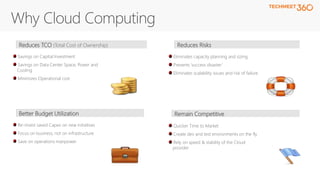
Eliminates capacity planning and sizing
Prevents ‘success disaster’
Eliminates scalability issues and risk of failure
Savings on Capital Investment
Savings on Data Center Space, Power and
Cooling
Minimizes Operational cost
Reduces TCO (Total Cost of Ownership) Reduces Risks
Re-invest saved Capex on new initiatives
Focus on business, not on infrastructure
Save on operations manpower
Better Budget Utilization
Quicker Time to Market
Create dev and test environments on the fly
Rely on speed & stability of the Cloud
provider
Remain Competitive
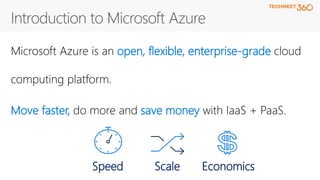
open, flexible, enterprise-grade
Move faster, save money
Speed EconomicsScale
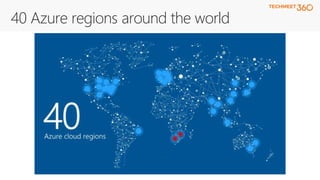
40 Azure regions around the world
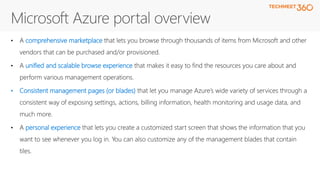
comprehensive marketplace
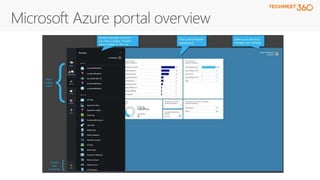
unified and scalable browse experience
• Consistent management pages (or blades)
personal experience
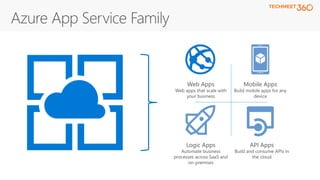
Web Apps
Web apps that scale with
your business
Mobile Apps
Build mobile apps for any
device
Logic Apps
Automate business
processes across SaaS and
on-premises
API Apps
Build and consume APIs in
the cloud
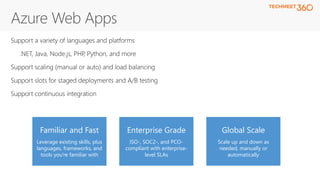
Global Scale
Scale up and down as
needed, manually or
automatically
Enterprise Grade
ISO-, SOC2-, and PCO-
compliant with enterprise-
level SLAs
Familiar and Fast
Leverage existing skills, plus
languages, frameworks, and
tools you're familiar with
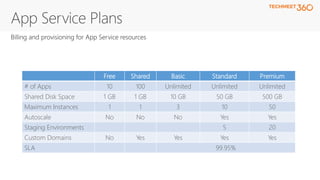
Free Shared Basic Standard Premium
# of Apps 10 100 Unlimited Unlimited Unlimited
Shared Disk Space 1 GB 1 GB 10 GB 50 GB 500 GB
Maximum Instances 1 1 3 10 50
Autoscale No No No Yes Yes
Staging Environments 5 20
Custom Domains No Yes Yes Yes Yes
SLA 99.95%
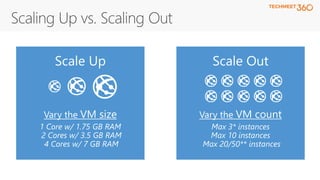
Scale Up
Vary the VM size
1 Core w/ 1.75 GB RAM
2 Cores w/ 3.5 GB RAM
4 Cores w/ 7 GB RAM
Scale Out
Vary the VM count
Max 3* instances
Max 10 instances
Max 20/50** instances
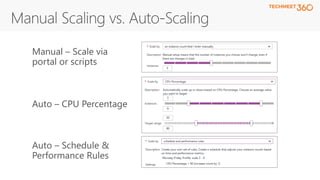
Auto – Schedule &
Performance Rules
Manual – Scale via
portal or scripts
Auto – CPU Percentage
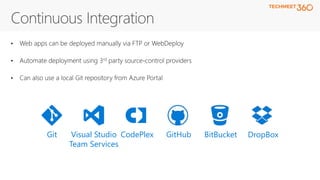
DropBoxBitBucketGitHubCodePlexVisual Studio
Team Services
Git
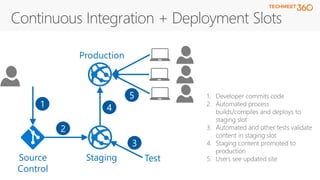
1. Developer commits code
2. Automated process
builds/compiles and deploys to
staging slot
3. Automated and other tests validate
content in staging slot
4. Staging content promoted to
production
5. Users see updated siteStaging
Production
TestSource
Control
1
2
3
4
5
Getting started with Azure – Part 1 | TechMeet360

Getting started with Azure – Part 1 | TechMeet360

  • 3.
  • 5.
    Eliminates capacity planningand sizing Prevents ‘success disaster’ Eliminates scalability issues and risk of failure Savings on Capital Investment Savings on Data Center Space, Power and Cooling Minimizes Operational cost Reduces TCO (Total Cost of Ownership) Reduces Risks Re-invest saved Capex on new initiatives Focus on business, not on infrastructure Save on operations manpower Better Budget Utilization Quicker Time to Market Create dev and test environments on the fly Rely on speed & stability of the Cloud provider Remain Competitive
  • 6.
    open, flexible, enterprise-grade Movefaster, save money Speed EconomicsScale
  • 8.
    40 Azure regionsaround the world
  • 10.
    comprehensive marketplace unified andscalable browse experience • Consistent management pages (or blades) personal experience
  • 13.
    Web Apps Web appsthat scale with your business Mobile Apps Build mobile apps for any device Logic Apps Automate business processes across SaaS and on-premises API Apps Build and consume APIs in the cloud
  • 14.
    Global Scale Scale upand down as needed, manually or automatically Enterprise Grade ISO-, SOC2-, and PCO- compliant with enterprise- level SLAs Familiar and Fast Leverage existing skills, plus languages, frameworks, and tools you're familiar with
  • 16.
    Free Shared BasicStandard Premium # of Apps 10 100 Unlimited Unlimited Unlimited Shared Disk Space 1 GB 1 GB 10 GB 50 GB 500 GB Maximum Instances 1 1 3 10 50 Autoscale No No No Yes Yes Staging Environments 5 20 Custom Domains No Yes Yes Yes Yes SLA 99.95%
  • 19.
    Scale Up Vary theVM size 1 Core w/ 1.75 GB RAM 2 Cores w/ 3.5 GB RAM 4 Cores w/ 7 GB RAM Scale Out Vary the VM count Max 3* instances Max 10 instances Max 20/50** instances
  • 20.
    Auto – Schedule& Performance Rules Manual – Scale via portal or scripts Auto – CPU Percentage
  • 25.
  • 26.
    1. Developer commitscode 2. Automated process builds/compiles and deploys to staging slot 3. Automated and other tests validate content in staging slot 4. Staging content promoted to production 5. Users see updated siteStaging Production TestSource Control 1 2 3 4 5