Getting Started on LinkedIn
Dr. Don Roy
September 20, 2016
What We’ll Cover
1. Why LinkedIn is important to your
professional brand
2. Building out the most important marketing
asset: Your profile
3. General LinkedIn etiquette
LinkedIn: More than
“Facebook for Business”
• More than 450 million users (>100M in US)
• 1 out every 20 profiles belongs to someone in
a recruiting role in their organization
• 40% of users log in to LinkedIn daily
• Removes geographical barriers to networking
Anatomy of a LinkedIn Profile
• Headline
• Photo
• Summary
• Experience
• Honors and Awards
• Skills
• Endorsements
• Recommendations
Headline
• 120 characters maximum
• Writing an effective headline:
Avoid “fluff” words (“guru” or “expert”)
Don’t be boring (Avoid “Student” or simple job
title)
Don’t sound desperate (even if you are!)
• 10 headline examples that break the mold
Photo
• Minimum size = 200 x 200 pixels
• Maximum size = 500 x 500 pixels
• Dress in attire appropriate for your industry
• Use a professional-looking headshot
• Use a photo of you… and only you
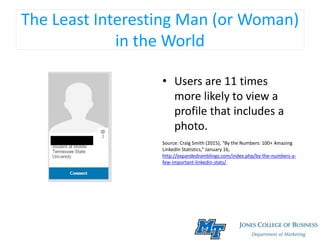
The Least Interesting Man (or Woman)
in the World
• Users are 11 times
more likely to view a
profile that includes a
photo.
Source: Craig Smith (2015), “By the Numbers: 100+ Amazing
LinkedIn Statistics,” January 16,
http://expandedramblings.com/index.php/by-the-numbers-a-
few-important-linkedin-stats/.
Summary
• 2,000 characters
maximum
• Your autobiography-
Communicate the
value you have to
offer
• 3 Questions to Ask:
 What do I want to
communicate (to what
audience, what should
they learn about me, how
should they feel)
 What content will tell
story of my values,
accomplishments?
 What multimedia content
could enhance visual
quality (video, photos,
documents)
Experience
• Tell your story using the PARS method:
P – What is a problem you addressed?
A – What actions did you take to solve problem?
R – What were the results?
S – What skills did you develop or strengthen to solve
problem?
• Include relevant work and volunteer experience in
your list
Skills
• You can list up to 50, but start with a “top 10
list”
• List should match your capabilities (greatest
strength listed first)
• Employers review Skills list to screen
prospective candidates for match
• Can be validated by others via endorsement
Endorsements
• Acknowledgement of your skills by others
• “Give” to increase chances that you will “get”
• Not obligated to keep endorsements received
on profile
• Viewed skeptically by many because of low
effort level required to endorse
Recommendations
• “Permanent” references provided by others
• Quality more important than quantity
• Only ask connections who know you well to
write recommendation on your behalf
• Give to get
LinkedIn Etiquette
1. Do not use LinkedIn’s template for making
connection requests- tailor request to the
person
2. Do not connect with people you do not know
3. Do not use LinkedIn’s template for requesting
a recommendation
4. Sharing, liking, and commenting on others’
content are ways to build influence
The Next Steps
• How to Customize Your LinkedIn Public Profile
URL
• 12 Resources to Improve Your LinkedIn Profile
• How to Write a LinkedIn Summary
• 7 Tips for Writing a Great LinkedIn Invitation
• Requesting an Introduction
Questions?
• Email (Don.Roy@mtsu.edu)
• Phone (615-904-8564)
• Office (BAS N459)
• LinkedIn
(https://www.linkedin.com/in/donroy)
• Slide Share (Search “Don Roy”)

Getting Started on LinkedIn

  • 1.
    Getting Started onLinkedIn Dr. Don Roy September 20, 2016
  • 2.
    What We’ll Cover 1.Why LinkedIn is important to your professional brand 2. Building out the most important marketing asset: Your profile 3. General LinkedIn etiquette
  • 3.
    LinkedIn: More than “Facebookfor Business” • More than 450 million users (>100M in US) • 1 out every 20 profiles belongs to someone in a recruiting role in their organization • 40% of users log in to LinkedIn daily • Removes geographical barriers to networking
  • 4.
    Anatomy of aLinkedIn Profile • Headline • Photo • Summary • Experience • Honors and Awards • Skills • Endorsements • Recommendations
  • 5.
    Headline • 120 charactersmaximum • Writing an effective headline: Avoid “fluff” words (“guru” or “expert”) Don’t be boring (Avoid “Student” or simple job title) Don’t sound desperate (even if you are!) • 10 headline examples that break the mold
  • 6.
    Photo • Minimum size= 200 x 200 pixels • Maximum size = 500 x 500 pixels • Dress in attire appropriate for your industry • Use a professional-looking headshot • Use a photo of you… and only you
  • 7.
    The Least InterestingMan (or Woman) in the World • Users are 11 times more likely to view a profile that includes a photo. Source: Craig Smith (2015), “By the Numbers: 100+ Amazing LinkedIn Statistics,” January 16, http://expandedramblings.com/index.php/by-the-numbers-a- few-important-linkedin-stats/.
  • 8.
    Summary • 2,000 characters maximum •Your autobiography- Communicate the value you have to offer • 3 Questions to Ask:  What do I want to communicate (to what audience, what should they learn about me, how should they feel)  What content will tell story of my values, accomplishments?  What multimedia content could enhance visual quality (video, photos, documents)
  • 9.
    Experience • Tell yourstory using the PARS method: P – What is a problem you addressed? A – What actions did you take to solve problem? R – What were the results? S – What skills did you develop or strengthen to solve problem? • Include relevant work and volunteer experience in your list
  • 10.
    Skills • You canlist up to 50, but start with a “top 10 list” • List should match your capabilities (greatest strength listed first) • Employers review Skills list to screen prospective candidates for match • Can be validated by others via endorsement
  • 11.
    Endorsements • Acknowledgement ofyour skills by others • “Give” to increase chances that you will “get” • Not obligated to keep endorsements received on profile • Viewed skeptically by many because of low effort level required to endorse
  • 12.
    Recommendations • “Permanent” referencesprovided by others • Quality more important than quantity • Only ask connections who know you well to write recommendation on your behalf • Give to get
  • 13.
    LinkedIn Etiquette 1. Donot use LinkedIn’s template for making connection requests- tailor request to the person 2. Do not connect with people you do not know 3. Do not use LinkedIn’s template for requesting a recommendation 4. Sharing, liking, and commenting on others’ content are ways to build influence
  • 14.
    The Next Steps •How to Customize Your LinkedIn Public Profile URL • 12 Resources to Improve Your LinkedIn Profile • How to Write a LinkedIn Summary • 7 Tips for Writing a Great LinkedIn Invitation • Requesting an Introduction
  • 15.
    Questions? • Email (Don.Roy@mtsu.edu) •Phone (615-904-8564) • Office (BAS N459) • LinkedIn (https://www.linkedin.com/in/donroy) • Slide Share (Search “Don Roy”)