A Data Driven Digital Agency
We let Numbers and Science speak
Our solutions are always backed by data.
They’re not just personal opinions.
“They brought value into each stage of the project lifecycle…to
drive user engagement and sales.”
Tania Aidrus
Country Manager – Emerging Markets Google
A few Key Clients
Todays Speakers
Niroshan Samuel
Manager – Web Analytics
& Optimization
Malinda Senanayake
Senior Associate –
Digital Marketing
Duminda Sanjeewa
Senior Web Analyst
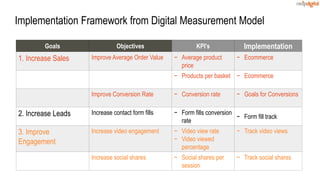
Implementation Framework from Digital Measurement Model
Goals Objectives KPI’s Implementation
1. Increase Sales Improve Average Order Value − Average product
price
− Ecommerce
− Products per basket − Ecommerce
Improve Conversion Rate − Conversion rate − Goals for Conversions
2. Increase Leads Increase contact form fills − Form fills conversion
rate
− Form fill track
3. Improve
Engagement
Increase video engagement − Video view rate
− Video viewed
percentage
− Track video views
Increase social shares − Social shares per
session
− Track social shares
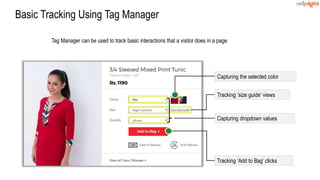
Basic Tracking Using Tag Manager
Tag Manager can be used to track basic interactions that a visitor does in a page
Tracking ‘Add to Bag’ clicks
Capturing dropdown values
Capturing the selected color
Tracking ‘size guide’ views
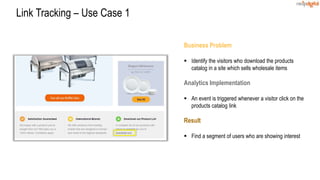
Business Problem
 Identify the visitors who download the products
catalog in a site which sells wholesale items
Analytics Implementation
 An event is triggered whenever a visitor click on the
products catalog link
Result
 Find a segment of users who are showing interest
Link Tracking – Use Case 1
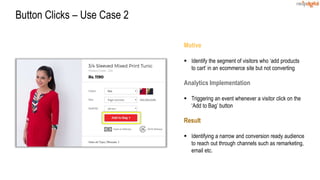
Motive
 Identify the segment of visitors who ‘add products
to cart’ in an ecommerce site but not converting
Analytics Implementation
 Triggering an event whenever a visitor click on the
‘Add to Bag’ button
Result
 Identifying a narrow and conversion ready audience
to reach out through channels such as remarketing,
email etc.
Button Clicks – Use Case 2
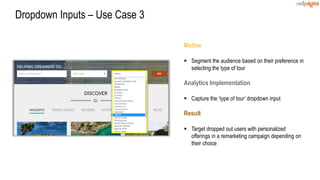
Motive
 Segment the audience based on their preference in
selecting the type of tour
Analytics Implementation
 Capture the ‘type of tour’ dropdown input
Result
 Target dropped out users with personalized
offerings in a remarketing campaign depending on
their choice
Dropdown Inputs – Use Case 3
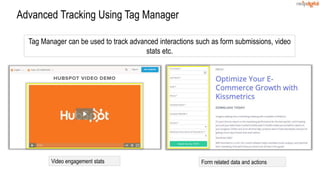
Advanced Tracking Using Tag Manager
Tag Manager can be used to track advanced interactions such as form submissions, video
stats etc.
Form related data and actionsVideo engagement stats
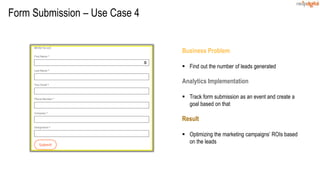
Business Problem
 Find out the number of leads generated
Analytics Implementation
 Track form submission as an event and create a
goal based on that
Result
 Optimizing the marketing campaigns’ ROIs based
on the leads
Form Submission – Use Case 4
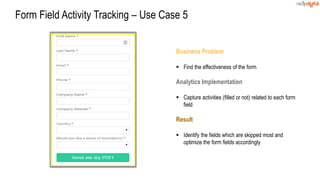
Business Problem
 Find the effectiveness of the form
Analytics Implementation
 Capture activities (filled or not) related to each form
field
Result
 Identify the fields which are skipped most and
optimize the form fields accordingly
Form Field Activity Tracking – Use Case 5
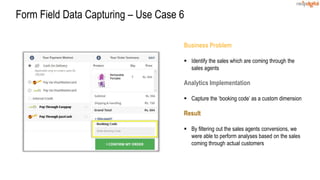
Business Problem
 Identify the sales which are coming through the
sales agents
Analytics Implementation
 Capture the ‘booking code’ as a custom dimension
Result
 By filtering out the sales agents conversions, we
were able to perform analyses based on the sales
coming through actual customers
Form Field Data Capturing – Use Case 6
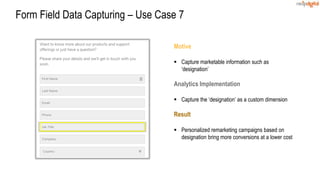
Motive
 Capture marketable information such as
‘designation’
Analytics Implementation
 Capture the ‘designation’ as a custom dimension
Result
 Personalized remarketing campaigns based on
designation bring more conversions at a lower cost
Form Field Data Capturing – Use Case 7
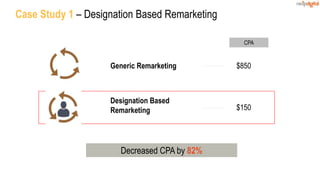
Case Study 1 – Designation Based Remarketing
Decreased CPA by 82%
Designation Based
Remarketing $150
Generic Remarketing $850
CPA
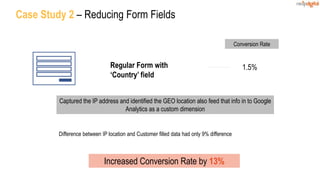
Case Study 2 – Reducing Form Fields
Increased Conversion Rate by 13%
Regular Form with
‘Country’ field
1.5%
Conversion Rate
Captured the IP address and identified the GEO location also feed that info in to Google
Analytics as a custom dimension
Difference between IP location and Customer filled data had only 9% difference
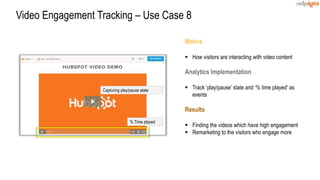
Motive
 How visitors are interacting with video content
Analytics Implementation
 Track ‘play/pause’ state and ‘% time played’ as
events
Results
 Finding the videos which have high engagement
 Remarketing to the visitors who engage more
Video Engagement Tracking – Use Case 8
Capturing play/pause state
% Time played
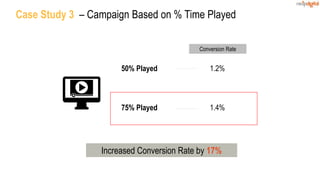
Case Study 3 – Campaign Based on % Time Played
50% Played
75% Played
1.2%
1.4%
Conversion Rate
Increased Conversion Rate by 17%
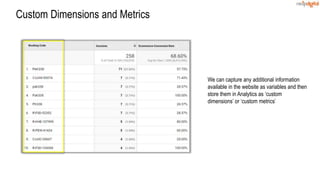
Custom Dimensions and Metrics
We can capture any additional information
available in the website as variables and then
store them in Analytics as ‘custom
dimensions’ or ‘custom metrics’
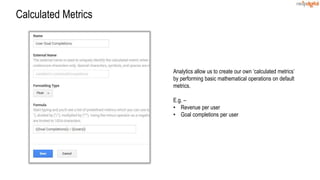
Calculated Metrics
Analytics allow us to create our own ‘calculated metrics’
by performing basic mathematical operations on default
metrics.
E.g. –
• Revenue per user
• Goal completions per user
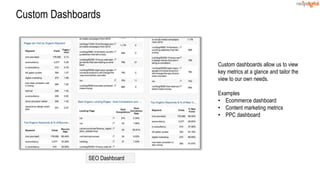
Custom Dashboards
Custom dashboards allow us to view
key metrics at a glance and tailor the
view to our own needs.
Examples
• Ecommerce dashboard
• Content marketing metrics
• PPC dashboard
SEO Dashboard
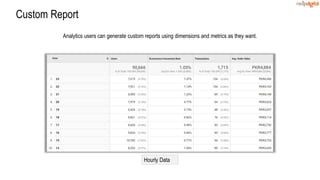
Custom Report
Hourly Data
Analytics users can generate custom reports using dimensions and metrics as they want.
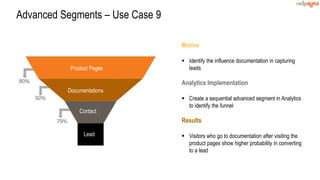
Motive
 Identify the influence documentation in capturing
leads
Analytics Implementation
 Create a sequential advanced segment in Analytics
to identify the funnel
Results
 Visitors who go to documentation after visiting the
product pages show higher probability in converting
to a lead
Advanced Segments – Use Case 9
Product Pages
Documentations
Contact
Lead
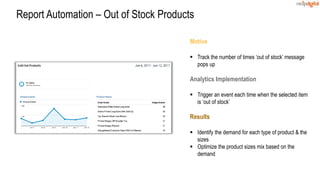
Motive
 Track the number of times ‘out of stock’ message
pops up
Analytics Implementation
 Trigger an event each time when the selected item
is ‘out of stock’
Results
 Identify the demand for each type of product & the
sizes
 Optimize the product sizes mix based on the
demand
Report Automation – Out of Stock Products
Motive
 Identify the pages which give ‘404’ error
Analytics Implementation
 Send the URLs of the pages which give 404 errors
when someone visit
Results
 Take corrective actions to minimize the error pages
easily as the URLs get recorded in Analytics
Alerts – Tracking 404 Error Pages
Google Analytics Stats Across 20 Shopping Websites
(Last 30 Days – Sri Lanka)
1.5M sessions
9M page views
Data Is Useless Without the Skills to
Analyze It - HBR
Two Successful Methods to Find
Insights
1. Segmentation
2. Find Commonalties
1. Segmentation
Find profitable segments Find unprofitable segments
30
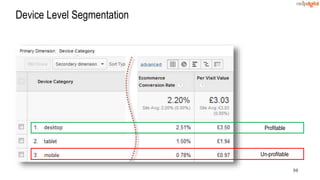
Device Level Segmentation
Profitable
Un-profitable
31
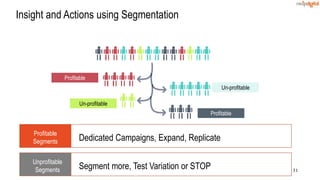
Profitable
Un-profitable
Un-profitable
Profitable
Insight and Actions using Segmentation
Profitable
Segments Dedicated Campaigns, Expand, Replicate
Unprofitable
Segments Segment more, Test Variation or STOP
32
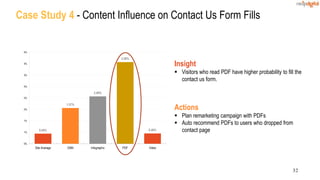
Case Study 4 - Content Influence on Contact Us Form Fills
0.45%
1.57%
2.08%
3.58%
0.46%
0%
1%
1%
2%
2%
3%
3%
4%
4%
Site Average GNN Infographic PDF Video
Insight
 Visitors who read PDF have higher probability to fill the
contact us form.
Actions
 Plan remarketing campaign with PDFs
 Auto recommend PDFs to users who dropped from
contact page
33
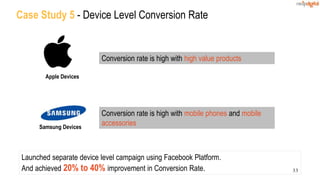
Case Study 5 - Device Level Conversion Rate
Apple Devices
Conversion rate is high with high value products
Samsung Devices
Conversion rate is high with mobile phones and mobile
accessories
Launched separate device level campaign using Facebook Platform.
And achieved 20% to 40% improvement in Conversion Rate.
Two Successful Methods to Find
Insights
1. Segmentation
2. Find Commonalties
35
We have weight and food consumption data for
each GoT Character
We need to find insight to lose our weight using commonalties
36
Ideal Weight Over Weight
Common Characteristic?
37
38
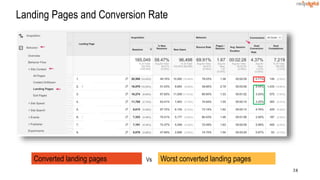
Landing Pages and Conversion Rate
Converted landing pages Worst converted landing pagesVs
39
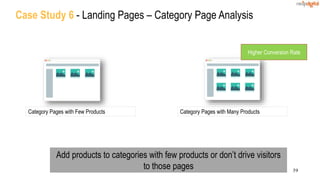
Case Study 6 - Landing Pages – Category Page Analysis
Category Pages with Few Products Category Pages with Many Products
Higher Conversion Rate
Add products to categories with few products or don’t drive visitors
to those pages
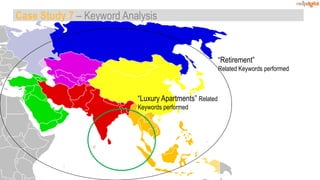
“Luxury Apartments” Related
Keywords performed
“Retirement”
Related Keywords performed
Case Study 7 – Keyword Analysis
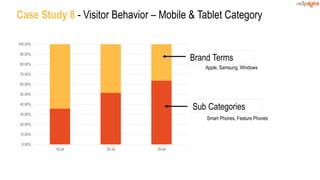
Case Study 8 - Visitor Behavior – Mobile & Tablet Category
0.00%
10.00%
20.00%
30.00%
40.00%
50.00%
60.00%
70.00%
80.00%
90.00%
100.00%
18-24 25-34 35-44
Sub Categories
Brand Terms
Apple, Samsung, Windows
Smart Phones, Feature Phones
42
Improve room nights per customer
Vs
Properties with low room nights per customer Properties with high room nights per customer
43
Properties with high no of Room nights per customer had Quality
Images
44
With Google Analytics
46
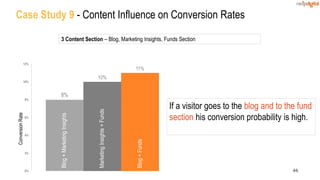
Case Study 9 - Content Influence on Conversion Rates
8%
10%
11%
0%
2%
4%
6%
8%
10%
12%
ConversionRate
Blog+MarketingInsights
MarketingInsights+Funds
Blog+Funds
3 Content Section – Blog, Marketing Insights, Funds Section
If a visitor goes to the blog and to the fund
section his conversion probability is high.
47
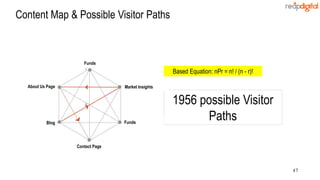
Content Map & Possible Visitor Paths
Based Equation: nPr = n! / (n - r)!
1956 possible Visitor
PathsBlog
Market InsightsAbout Us Page
Contact Page
Funds
Funds
48
You Need Help From…
49
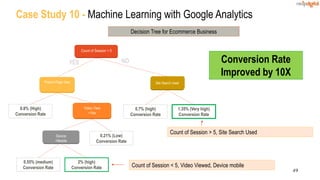
Case Study 10 - Machine Learning with Google Analytics

Count of Session < 5
Product Page View
Video View
=Yes
Device
=Mobile
Site Search Used
0.8% (High)
Conversion Rate
0.7% (high)
Conversion Rate
1.35% (Very high)
Conversion Rate
0.21% (Low)
Conversion Rate
0.55% (medium)
Conversion Rate
2% (high)
Conversion Rate
YES NO
Count of Session < 5, Video Viewed, Device mobile
Count of Session > 5, Site Search Used
Decision Tree for Ecommerce Business
Conversion Rate
Improved by 10X
50
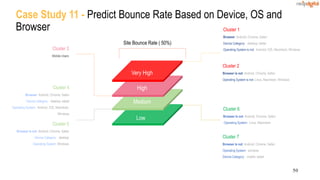
Cluster 3
Mobile Users
Case Study 11 - Predict Bounce Rate Based on Device, OS and
Browser
Site Bounce Rate ( 50%)
Low
Medium
High
Very High
Cluster 4
Browser: Android, Chrome, Safari
Device Category: desktop, tablet
Operating System: Android, IOS, Macintosh,
Windows
Cluster 5
Browser is not: Android, Chrome, Safari
Device Category: desktop
Operating System: Windows
Cluster 1
Browser: Android, Chrome, Safari
Device Category: desktop, tablet
Operating System is not: Android, IOS, Macintosh, Windows
Cluster 2
Browser is not: Android, Chrome, Safari
Operating System is not: Linux, Macintosh, Windows
Cluster 6
Browser is not: Android, Chrome, Safari
:Operating System: Linux, Macintosh
Cluster 7
Browser is not: Android, Chrome, Safari
Operating System: windows
Device Category: mobile, tablet
Control Experiment
Control Experiments
Control Experiments
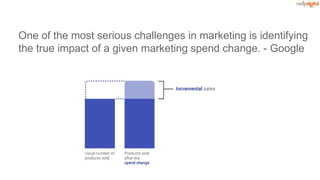
One of the most serious challenges in marketing is identifying

the true impact of a given marketing spend change. - Google
Adwords shows tons of View-Though conversions. Does that
matter?
Experiment Results so far
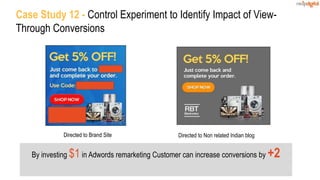
Directed to Non related Indian blog
By investing $1 in Adwords remarketing Customer can increase conversions by +2
Case Study 12 - Control Experiment to Identify Impact of View-
Through Conversions
Directed to Brand Site
Action in the Insights
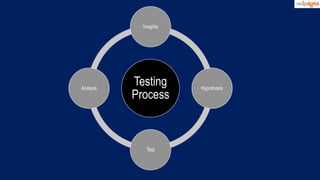
Testing
Process
Insights
Hypothesis
Test
Analyze
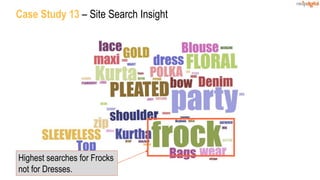
Case Study 13 – Site Search Insight
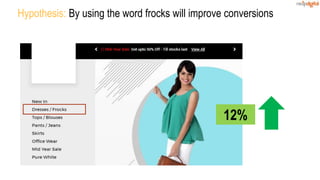
Highest searches for Frocks
not for Dresses.
12%
Hypothesis: By using the word frocks will improve conversions
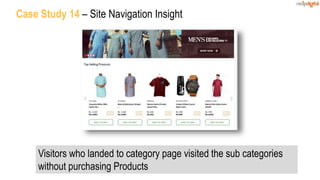
Sub Category - Men's Fashion
Case Study 14 – Site Navigation Insight
Visitors who landed to category page visited the sub categories
without purchasing Products
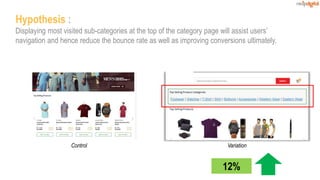
Control & Variations
Control Variation
Hypothesis :
Displaying most visited sub-categories at the top of the category page will assist users’
navigation and hence reduce the bounce rate as well as improving conversions ultimately.
12%
Test
A/B Test
Multi Variate Test
Redirect Test
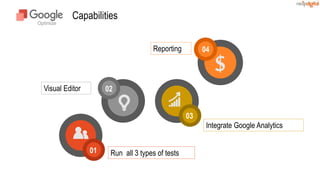
Capabilities
01
02
03
04
Integrate Google Analytics
Reporting
Visual Editor
Run all 3 types of tests
The most value metric you are not measuring
Retention
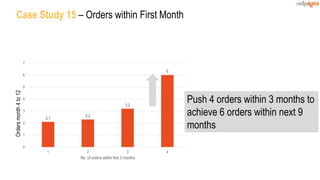
2.1
2.3
3.2
6
0
1
2
3
4
5
6
7
1 2 3 4
No. of orders within first 3 months
Case Study 15 – Orders within First MonthOrdersmonth4to12
Push 4 orders within 3 months to
achieve 6 orders within next 9
months
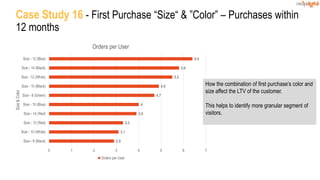
Case Study 16 - First Purchase “Size“ & ”Color” – Purchases within
12 months
2.9
3.1
3.3
3.9
4
4.7
4.9
5.5
5.8
6.4
0 1 2 3 4 5 6 7
Size - 8 (Black)
Size - 10 (White)
Size - 12 (Red)
Size - 14 (Red)
Size - 10 (Blue)
Size - 8 (Green)
Size - 10 (Black)
Size - 12 (White)
Size - 14 (Black)
Size - 12 (Blue)
Size&Color
Orders per User
Orders per User
How the combination of first purchase’s color and
size affect the LTV of the customer.
This helps to identify more granular segment of
visitors.
Conclusion
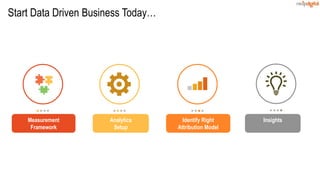
Start Data Driven Business Today…
Analytics
Setup
Identify Right
Attribution Model
Measurement
Framework
Insights
Getting Actionable Insights with Google Analytics - Webinar

Getting Actionable Insights with Google Analytics - Webinar

  • 2.
    A Data DrivenDigital Agency We let Numbers and Science speak Our solutions are always backed by data. They’re not just personal opinions. “They brought value into each stage of the project lifecycle…to drive user engagement and sales.” Tania Aidrus Country Manager – Emerging Markets Google
  • 3.
    A few KeyClients
  • 4.
    Todays Speakers Niroshan Samuel Manager– Web Analytics & Optimization Malinda Senanayake Senior Associate – Digital Marketing Duminda Sanjeewa Senior Web Analyst
  • 5.
    Implementation Framework fromDigital Measurement Model Goals Objectives KPI’s Implementation 1. Increase Sales Improve Average Order Value − Average product price − Ecommerce − Products per basket − Ecommerce Improve Conversion Rate − Conversion rate − Goals for Conversions 2. Increase Leads Increase contact form fills − Form fills conversion rate − Form fill track 3. Improve Engagement Increase video engagement − Video view rate − Video viewed percentage − Track video views Increase social shares − Social shares per session − Track social shares
  • 6.
    Basic Tracking UsingTag Manager Tag Manager can be used to track basic interactions that a visitor does in a page Tracking ‘Add to Bag’ clicks Capturing dropdown values Capturing the selected color Tracking ‘size guide’ views
  • 7.
    Business Problem  Identifythe visitors who download the products catalog in a site which sells wholesale items Analytics Implementation  An event is triggered whenever a visitor click on the products catalog link Result  Find a segment of users who are showing interest Link Tracking – Use Case 1
  • 8.
    Motive  Identify thesegment of visitors who ‘add products to cart’ in an ecommerce site but not converting Analytics Implementation  Triggering an event whenever a visitor click on the ‘Add to Bag’ button Result  Identifying a narrow and conversion ready audience to reach out through channels such as remarketing, email etc. Button Clicks – Use Case 2
  • 9.
    Motive  Segment theaudience based on their preference in selecting the type of tour Analytics Implementation  Capture the ‘type of tour’ dropdown input Result  Target dropped out users with personalized offerings in a remarketing campaign depending on their choice Dropdown Inputs – Use Case 3
  • 10.
    Advanced Tracking UsingTag Manager Tag Manager can be used to track advanced interactions such as form submissions, video stats etc. Form related data and actionsVideo engagement stats
  • 11.
    Business Problem  Findout the number of leads generated Analytics Implementation  Track form submission as an event and create a goal based on that Result  Optimizing the marketing campaigns’ ROIs based on the leads Form Submission – Use Case 4
  • 12.
    Business Problem  Findthe effectiveness of the form Analytics Implementation  Capture activities (filled or not) related to each form field Result  Identify the fields which are skipped most and optimize the form fields accordingly Form Field Activity Tracking – Use Case 5
  • 13.
    Business Problem  Identifythe sales which are coming through the sales agents Analytics Implementation  Capture the ‘booking code’ as a custom dimension Result  By filtering out the sales agents conversions, we were able to perform analyses based on the sales coming through actual customers Form Field Data Capturing – Use Case 6
  • 14.
    Motive  Capture marketableinformation such as ‘designation’ Analytics Implementation  Capture the ‘designation’ as a custom dimension Result  Personalized remarketing campaigns based on designation bring more conversions at a lower cost Form Field Data Capturing – Use Case 7
  • 15.
    Case Study 1– Designation Based Remarketing Decreased CPA by 82% Designation Based Remarketing $150 Generic Remarketing $850 CPA
  • 16.
    Case Study 2– Reducing Form Fields Increased Conversion Rate by 13% Regular Form with ‘Country’ field 1.5% Conversion Rate Captured the IP address and identified the GEO location also feed that info in to Google Analytics as a custom dimension Difference between IP location and Customer filled data had only 9% difference
  • 17.
    Motive  How visitorsare interacting with video content Analytics Implementation  Track ‘play/pause’ state and ‘% time played’ as events Results  Finding the videos which have high engagement  Remarketing to the visitors who engage more Video Engagement Tracking – Use Case 8 Capturing play/pause state % Time played
  • 18.
    Case Study 3– Campaign Based on % Time Played 50% Played 75% Played 1.2% 1.4% Conversion Rate Increased Conversion Rate by 17%
  • 19.
    Custom Dimensions andMetrics We can capture any additional information available in the website as variables and then store them in Analytics as ‘custom dimensions’ or ‘custom metrics’
  • 20.
    Calculated Metrics Analytics allowus to create our own ‘calculated metrics’ by performing basic mathematical operations on default metrics. E.g. – • Revenue per user • Goal completions per user
  • 21.
    Custom Dashboards Custom dashboardsallow us to view key metrics at a glance and tailor the view to our own needs. Examples • Ecommerce dashboard • Content marketing metrics • PPC dashboard SEO Dashboard
  • 22.
    Custom Report Hourly Data Analyticsusers can generate custom reports using dimensions and metrics as they want.
  • 23.
    Motive  Identify theinfluence documentation in capturing leads Analytics Implementation  Create a sequential advanced segment in Analytics to identify the funnel Results  Visitors who go to documentation after visiting the product pages show higher probability in converting to a lead Advanced Segments – Use Case 9 Product Pages Documentations Contact Lead
  • 24.
    Motive  Track thenumber of times ‘out of stock’ message pops up Analytics Implementation  Trigger an event each time when the selected item is ‘out of stock’ Results  Identify the demand for each type of product & the sizes  Optimize the product sizes mix based on the demand Report Automation – Out of Stock Products
  • 25.
    Motive  Identify thepages which give ‘404’ error Analytics Implementation  Send the URLs of the pages which give 404 errors when someone visit Results  Take corrective actions to minimize the error pages easily as the URLs get recorded in Analytics Alerts – Tracking 404 Error Pages
  • 26.
    Google Analytics StatsAcross 20 Shopping Websites (Last 30 Days – Sri Lanka) 1.5M sessions 9M page views
  • 27.
    Data Is UselessWithout the Skills to Analyze It - HBR
  • 28.
    Two Successful Methodsto Find Insights 1. Segmentation 2. Find Commonalties
  • 29.
    1. Segmentation Find profitablesegments Find unprofitable segments
  • 30.
  • 31.
    31 Profitable Un-profitable Un-profitable Profitable Insight and Actionsusing Segmentation Profitable Segments Dedicated Campaigns, Expand, Replicate Unprofitable Segments Segment more, Test Variation or STOP
  • 32.
    32 Case Study 4- Content Influence on Contact Us Form Fills 0.45% 1.57% 2.08% 3.58% 0.46% 0% 1% 1% 2% 2% 3% 3% 4% 4% Site Average GNN Infographic PDF Video Insight  Visitors who read PDF have higher probability to fill the contact us form. Actions  Plan remarketing campaign with PDFs  Auto recommend PDFs to users who dropped from contact page
  • 33.
    33 Case Study 5- Device Level Conversion Rate Apple Devices Conversion rate is high with high value products Samsung Devices Conversion rate is high with mobile phones and mobile accessories Launched separate device level campaign using Facebook Platform. And achieved 20% to 40% improvement in Conversion Rate.
  • 34.
    Two Successful Methodsto Find Insights 1. Segmentation 2. Find Commonalties
  • 35.
    35 We have weightand food consumption data for each GoT Character We need to find insight to lose our weight using commonalties
  • 36.
    36 Ideal Weight OverWeight Common Characteristic?
  • 37.
  • 38.
    38 Landing Pages andConversion Rate Converted landing pages Worst converted landing pagesVs
  • 39.
    39 Case Study 6- Landing Pages – Category Page Analysis Category Pages with Few Products Category Pages with Many Products Higher Conversion Rate Add products to categories with few products or don’t drive visitors to those pages
  • 40.
    “Luxury Apartments” Related Keywordsperformed “Retirement” Related Keywords performed Case Study 7 – Keyword Analysis
  • 41.
    Case Study 8- Visitor Behavior – Mobile & Tablet Category 0.00% 10.00% 20.00% 30.00% 40.00% 50.00% 60.00% 70.00% 80.00% 90.00% 100.00% 18-24 25-34 35-44 Sub Categories Brand Terms Apple, Samsung, Windows Smart Phones, Feature Phones
  • 42.
    42 Improve room nightsper customer Vs Properties with low room nights per customer Properties with high room nights per customer
  • 43.
    43 Properties with highno of Room nights per customer had Quality Images
  • 44.
  • 45.
  • 46.
    46 Case Study 9- Content Influence on Conversion Rates 8% 10% 11% 0% 2% 4% 6% 8% 10% 12% ConversionRate Blog+MarketingInsights MarketingInsights+Funds Blog+Funds 3 Content Section – Blog, Marketing Insights, Funds Section If a visitor goes to the blog and to the fund section his conversion probability is high.
  • 47.
    47 Content Map &Possible Visitor Paths Based Equation: nPr = n! / (n - r)! 1956 possible Visitor PathsBlog Market InsightsAbout Us Page Contact Page Funds Funds
  • 48.
  • 49.
    49 Case Study 10- Machine Learning with Google Analytics Count of Session < 5 Product Page View Video View =Yes Device =Mobile Site Search Used 0.8% (High) Conversion Rate 0.7% (high) Conversion Rate 1.35% (Very high) Conversion Rate 0.21% (Low) Conversion Rate 0.55% (medium) Conversion Rate 2% (high) Conversion Rate YES NO Count of Session < 5, Video Viewed, Device mobile Count of Session > 5, Site Search Used Decision Tree for Ecommerce Business Conversion Rate Improved by 10X
  • 50.
    50 Cluster 3 Mobile Users CaseStudy 11 - Predict Bounce Rate Based on Device, OS and Browser Site Bounce Rate ( 50%) Low Medium High Very High Cluster 4 Browser: Android, Chrome, Safari Device Category: desktop, tablet Operating System: Android, IOS, Macintosh, Windows Cluster 5 Browser is not: Android, Chrome, Safari Device Category: desktop Operating System: Windows Cluster 1 Browser: Android, Chrome, Safari Device Category: desktop, tablet Operating System is not: Android, IOS, Macintosh, Windows Cluster 2 Browser is not: Android, Chrome, Safari Operating System is not: Linux, Macintosh, Windows Cluster 6 Browser is not: Android, Chrome, Safari :Operating System: Linux, Macintosh Cluster 7 Browser is not: Android, Chrome, Safari Operating System: windows Device Category: mobile, tablet
  • 51.
  • 52.
    Control Experiments One ofthe most serious challenges in marketing is identifying the true impact of a given marketing spend change. - Google
  • 53.
    Adwords shows tonsof View-Though conversions. Does that matter?
  • 54.
    Experiment Results sofar Directed to Non related Indian blog By investing $1 in Adwords remarketing Customer can increase conversions by +2 Case Study 12 - Control Experiment to Identify Impact of View- Through Conversions Directed to Brand Site
  • 55.
    Action in theInsights
  • 56.
  • 57.
    Case Study 13– Site Search Insight Highest searches for Frocks not for Dresses.
  • 58.
    12% Hypothesis: By usingthe word frocks will improve conversions
  • 59.
    Sub Category -Men's Fashion Case Study 14 – Site Navigation Insight Visitors who landed to category page visited the sub categories without purchasing Products
  • 60.
    Control & Variations ControlVariation Hypothesis : Displaying most visited sub-categories at the top of the category page will assist users’ navigation and hence reduce the bounce rate as well as improving conversions ultimately. 12%
  • 61.
  • 62.
  • 63.
  • 64.
  • 65.
  • 66.
    The most valuemetric you are not measuring Retention
  • 67.
    2.1 2.3 3.2 6 0 1 2 3 4 5 6 7 1 2 34 No. of orders within first 3 months Case Study 15 – Orders within First MonthOrdersmonth4to12 Push 4 orders within 3 months to achieve 6 orders within next 9 months
  • 68.
    Case Study 16- First Purchase “Size“ & ”Color” – Purchases within 12 months 2.9 3.1 3.3 3.9 4 4.7 4.9 5.5 5.8 6.4 0 1 2 3 4 5 6 7 Size - 8 (Black) Size - 10 (White) Size - 12 (Red) Size - 14 (Red) Size - 10 (Blue) Size - 8 (Green) Size - 10 (Black) Size - 12 (White) Size - 14 (Black) Size - 12 (Blue) Size&Color Orders per User Orders per User How the combination of first purchase’s color and size affect the LTV of the customer. This helps to identify more granular segment of visitors.
  • 69.
  • 70.
    Start Data DrivenBusiness Today… Analytics Setup Identify Right Attribution Model Measurement Framework Insights