Get Your Business Online
google.com/grow
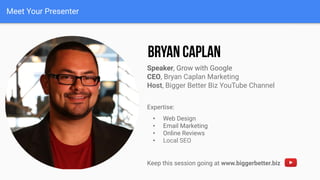
Meet Your Presenter
Speaker, Grow with Google
CEO, Bryan Caplan Marketing
Host, Bigger Better Biz YouTube Channel
Expertise:
• Web Design
• Email Marketing
• Online Reviews
• Local SEO
Keep this session going at www.biggerbetter.biz
4 Grow with Google
AGENDA
WHAT IS A BUSINESS PROFILE ON GOOGLE?
Manage business information with the Google My Business app
CREATE A BUSINESS PROFILE WITH GOOGLE MY BUSINESS
Claim or verify your business profile on Google
CREATE A WEBSITE WITH GOOGLE MY BUSINESS
Customize and publish a free website
5 Grow with Google
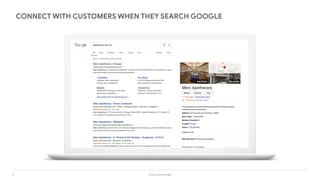
CONNECT WITH CUSTOMERS WHEN THEY SEARCH GOOGLE
6 Grow with Google
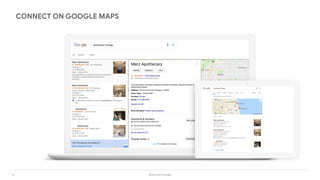
CONNECT ON GOOGLE MAPS
7 Grow with Google
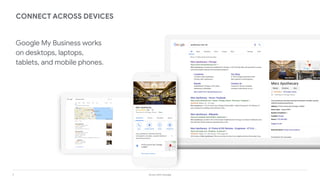
CONNECT ACROSS DEVICES
Google My Business works
on desktops, laptops,
tablets, and mobile phones.
8 Grow with Google
What is a Business
Profile on Google?
9 Grow with Google
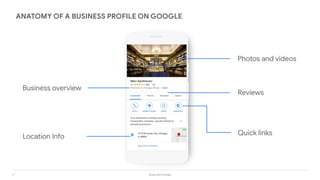
ANATOMY OF A BUSINESS PROFILE ON GOOGLE
Business overview
Location Info
Photos and videos
Quick links
Reviews
10 Grow with Google
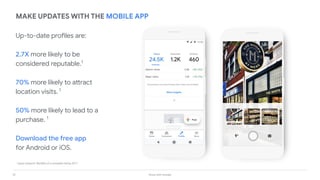
Up-to-date profiles are:
2.7X more likely to be
considered reputable.1
70% more likely to attract
location visits. 1
50% more likely to lead to a
purchase. 1
Download the free app
for Android or iOS.
MAKE UPDATES WITH THE MOBILE APP
1
Ipsos research: Benefits of a complete listing 2017
11 Grow with Google
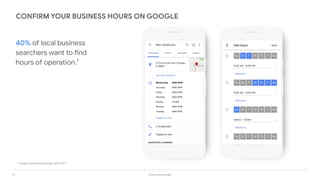
40% of local business
searchers want to find
hours of operation.1
CONFIRM YOUR BUSINESS HOURS ON GOOGLE
1.
Google Consumer Barometer, April 2017
12 Grow with Google
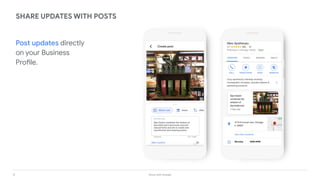
SHARE UPDATES WITH POSTS
Post updates directly
on your Business
Profile.
13 Grow with Google
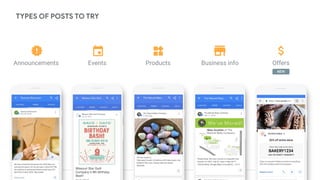
TYPES OF POSTS TO TRY
Products OffersAnnouncements Events Business info
NEW
14 Grow with Google
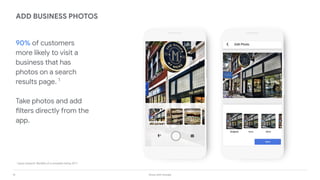
90% of customers
more likely to visit a
business that has
photos on a search
results page. 1
Take photos and add
filters directly from the
app.
ADD BUSINESS PHOTOS
1
Ipsos research: Benefits of a complete listing 2017
15 Grow with Google
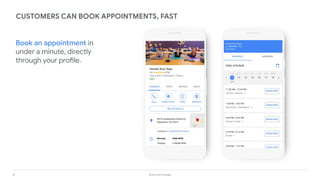
CUSTOMERS CAN BOOK APPOINTMENTS, FAST
Book an appointment in
under a minute, directly
through your profile.
16 Grow with Google
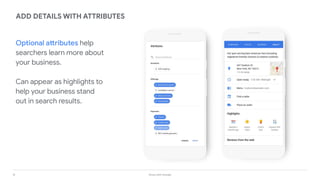
ADD DETAILS WITH ATTRIBUTES
Optional attributes help
searchers learn more about
your business.
Can appear as highlights to
help your business stand
out in search results.
17 Grow with Google
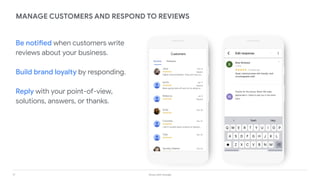
MANAGE CUSTOMERS AND RESPOND TO REVIEWS
Be notified when customers write
reviews about your business.
Build brand loyalty by responding.
Reply with your point-of-view,
solutions, answers, or thanks.
M
18 Grow with Google
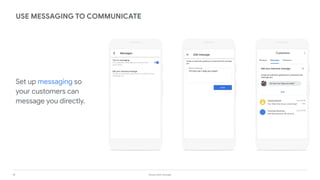
Set up messaging so
your customers can
message you directly.
USE MESSAGING TO COMMUNICATE
19 Grow with Google
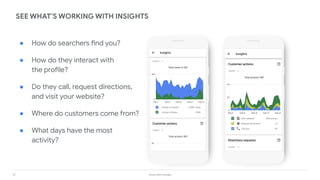
SEE WHAT’S WORKING WITH INSIGHTS
● How do searchers find you?
● How do they interact with
the profile?
● Do they call, request directions,
and visit your website?
● Where do customers come from?
● What days have the most
activity?
20 Grow with Google
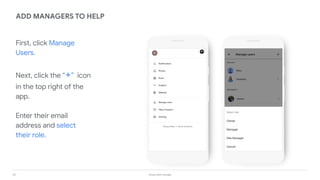
First, click Manage
Users.
Next, click the “+” icon
in the top right of the
app.
Enter their email
address and select
their role.
ADD MANAGERS TO HELP
21 Grow with Google
Create a Business Profile
with Google My Business
22 Grow with Google
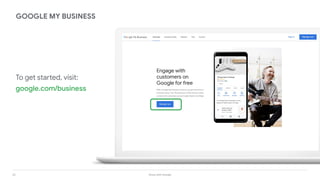
To get started, visit:
google.com/business
GOOGLE MY BUSINESS
23 Grow with Google
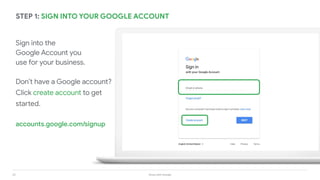
STEP 1: SIGN INTO YOUR GOOGLE ACCOUNT
Sign into the
Google Account you
use for your business.
Don’t have a Google account?
Click create account to get
started.
accounts.google.com/signup
24 Grow with Google
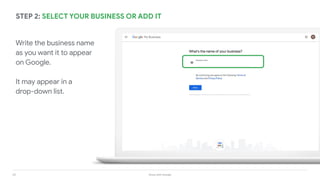
STEP 2: SELECT YOUR BUSINESS OR ADD IT
Write the business name
as you want it to appear
on Google.
It may appear in a
drop-down list.
25 Grow with Google
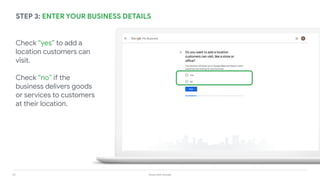
STEP 3: ENTER YOUR BUSINESS DETAILS
Check “yes” to add a
location customers can
visit.
Check “no” if the
business delivers goods
or services to customers
at their location.
26 Grow with Google
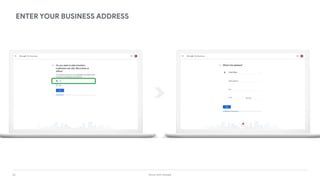
ENTER YOUR BUSINESS ADDRESS
27 Grow with Google
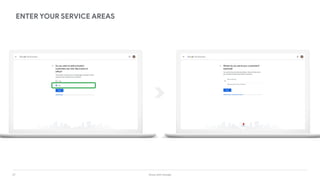
ENTER YOUR SERVICE AREAS
28 Grow with Google
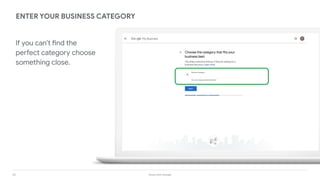
ENTER YOUR BUSINESS CATEGORY
If you can’t find the
perfect category choose
something close.
29 Grow with Google
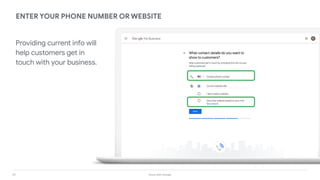
ENTER YOUR PHONE NUMBER OR WEBSITE
Providing current info will
help customers get in
touch with your business.
30 Grow with Google
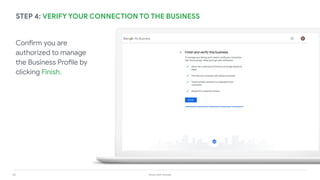
Confirm you are
authorized to manage
the Business Profile by
clicking Finish.
STEP 4: VERIFY YOUR CONNECTION TO THE BUSINESS
31 Grow with Google
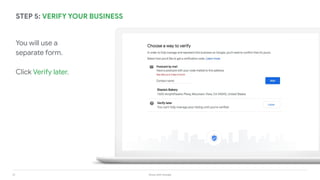
You will use a
separate form.
Click Verify later.
STEP 5: VERIFY YOUR BUSINESS
32 Grow with Google
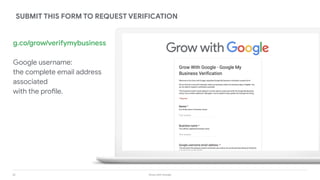
g.co/grow/verifymybusiness
Google username:
the complete email address
associated
with the profile.
SUBMIT THIS FORM TO REQUEST VERIFICATION
33 Grow with Google
Create a website with
Google My Business
34 Grow with Google
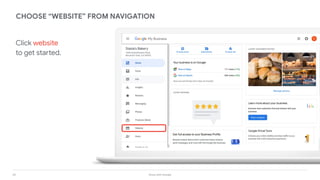
Click website
to get started.
CHOOSE “WEBSITE” FROM NAVIGATION
35 Grow with Google
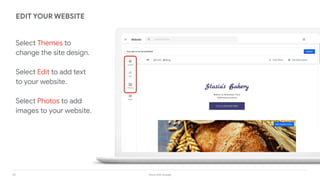
Select Themes to
change the site design.
Select Edit to add text
to your website.
Select Photos to add
images to your website.
EDIT YOUR WEBSITE
36 Grow with Google
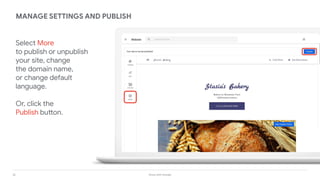
Select More
to publish or unpublish
your site, change
the domain name,
or change default
language.
Or, click the
Publish button.
MANAGE SETTINGS AND PUBLISH
37 Grow with Google
You have two options:
1. [your business name].business.site
2. Use a custom domain name
CHOOSE A WEBSITE ADDRESS
http://stasias-bakery.business.site
38 Grow with Google
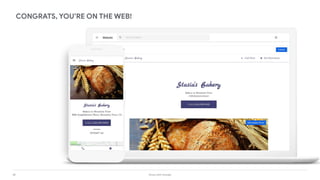
CONGRATS, YOU’RE ON THE WEB!
Questions?
Speaker, Grow with Google
CEO, Bryan Caplan Marketing
Host, Bigger Better Biz YouTube Channel
Keep this session going at www.biggerbetter.biz

Get Your Business Online with Google

  • 1.
    Get Your BusinessOnline google.com/grow
  • 2.
    Meet Your Presenter Speaker,Grow with Google CEO, Bryan Caplan Marketing Host, Bigger Better Biz YouTube Channel Expertise: • Web Design • Email Marketing • Online Reviews • Local SEO Keep this session going at www.biggerbetter.biz
  • 4.
    4 Grow withGoogle AGENDA WHAT IS A BUSINESS PROFILE ON GOOGLE? Manage business information with the Google My Business app CREATE A BUSINESS PROFILE WITH GOOGLE MY BUSINESS Claim or verify your business profile on Google CREATE A WEBSITE WITH GOOGLE MY BUSINESS Customize and publish a free website
  • 5.
    5 Grow withGoogle CONNECT WITH CUSTOMERS WHEN THEY SEARCH GOOGLE
  • 6.
    6 Grow withGoogle CONNECT ON GOOGLE MAPS
  • 7.
    7 Grow withGoogle CONNECT ACROSS DEVICES Google My Business works on desktops, laptops, tablets, and mobile phones.
  • 8.
    8 Grow withGoogle What is a Business Profile on Google?
  • 9.
    9 Grow withGoogle ANATOMY OF A BUSINESS PROFILE ON GOOGLE Business overview Location Info Photos and videos Quick links Reviews
  • 10.
    10 Grow withGoogle Up-to-date profiles are: 2.7X more likely to be considered reputable.1 70% more likely to attract location visits. 1 50% more likely to lead to a purchase. 1 Download the free app for Android or iOS. MAKE UPDATES WITH THE MOBILE APP 1 Ipsos research: Benefits of a complete listing 2017
  • 11.
    11 Grow withGoogle 40% of local business searchers want to find hours of operation.1 CONFIRM YOUR BUSINESS HOURS ON GOOGLE 1. Google Consumer Barometer, April 2017
  • 12.
    12 Grow withGoogle SHARE UPDATES WITH POSTS Post updates directly on your Business Profile.
  • 13.
    13 Grow withGoogle TYPES OF POSTS TO TRY Products OffersAnnouncements Events Business info NEW
  • 14.
    14 Grow withGoogle 90% of customers more likely to visit a business that has photos on a search results page. 1 Take photos and add filters directly from the app. ADD BUSINESS PHOTOS 1 Ipsos research: Benefits of a complete listing 2017
  • 15.
    15 Grow withGoogle CUSTOMERS CAN BOOK APPOINTMENTS, FAST Book an appointment in under a minute, directly through your profile.
  • 16.
    16 Grow withGoogle ADD DETAILS WITH ATTRIBUTES Optional attributes help searchers learn more about your business. Can appear as highlights to help your business stand out in search results.
  • 17.
    17 Grow withGoogle MANAGE CUSTOMERS AND RESPOND TO REVIEWS Be notified when customers write reviews about your business. Build brand loyalty by responding. Reply with your point-of-view, solutions, answers, or thanks. M
  • 18.
    18 Grow withGoogle Set up messaging so your customers can message you directly. USE MESSAGING TO COMMUNICATE
  • 19.
    19 Grow withGoogle SEE WHAT’S WORKING WITH INSIGHTS ● How do searchers find you? ● How do they interact with the profile? ● Do they call, request directions, and visit your website? ● Where do customers come from? ● What days have the most activity?
  • 20.
    20 Grow withGoogle First, click Manage Users. Next, click the “+” icon in the top right of the app. Enter their email address and select their role. ADD MANAGERS TO HELP
  • 21.
    21 Grow withGoogle Create a Business Profile with Google My Business
  • 22.
    22 Grow withGoogle To get started, visit: google.com/business GOOGLE MY BUSINESS
  • 23.
    23 Grow withGoogle STEP 1: SIGN INTO YOUR GOOGLE ACCOUNT Sign into the Google Account you use for your business. Don’t have a Google account? Click create account to get started. accounts.google.com/signup
  • 24.
    24 Grow withGoogle STEP 2: SELECT YOUR BUSINESS OR ADD IT Write the business name as you want it to appear on Google. It may appear in a drop-down list.
  • 25.
    25 Grow withGoogle STEP 3: ENTER YOUR BUSINESS DETAILS Check “yes” to add a location customers can visit. Check “no” if the business delivers goods or services to customers at their location.
  • 26.
    26 Grow withGoogle ENTER YOUR BUSINESS ADDRESS
  • 27.
    27 Grow withGoogle ENTER YOUR SERVICE AREAS
  • 28.
    28 Grow withGoogle ENTER YOUR BUSINESS CATEGORY If you can’t find the perfect category choose something close.
  • 29.
    29 Grow withGoogle ENTER YOUR PHONE NUMBER OR WEBSITE Providing current info will help customers get in touch with your business.
  • 30.
    30 Grow withGoogle Confirm you are authorized to manage the Business Profile by clicking Finish. STEP 4: VERIFY YOUR CONNECTION TO THE BUSINESS
  • 31.
    31 Grow withGoogle You will use a separate form. Click Verify later. STEP 5: VERIFY YOUR BUSINESS
  • 32.
    32 Grow withGoogle g.co/grow/verifymybusiness Google username: the complete email address associated with the profile. SUBMIT THIS FORM TO REQUEST VERIFICATION
  • 33.
    33 Grow withGoogle Create a website with Google My Business
  • 34.
    34 Grow withGoogle Click website to get started. CHOOSE “WEBSITE” FROM NAVIGATION
  • 35.
    35 Grow withGoogle Select Themes to change the site design. Select Edit to add text to your website. Select Photos to add images to your website. EDIT YOUR WEBSITE
  • 36.
    36 Grow withGoogle Select More to publish or unpublish your site, change the domain name, or change default language. Or, click the Publish button. MANAGE SETTINGS AND PUBLISH
  • 37.
    37 Grow withGoogle You have two options: 1. [your business name].business.site 2. Use a custom domain name CHOOSE A WEBSITE ADDRESS http://stasias-bakery.business.site
  • 38.
    38 Grow withGoogle CONGRATS, YOU’RE ON THE WEB!
  • 39.
    Questions? Speaker, Grow withGoogle CEO, Bryan Caplan Marketing Host, Bigger Better Biz YouTube Channel Keep this session going at www.biggerbetter.biz