Get set.. Introduction to Windows
Azure Development
Brian McKeiver, Kentico MVP & Partner/Senior Developer, BizStream
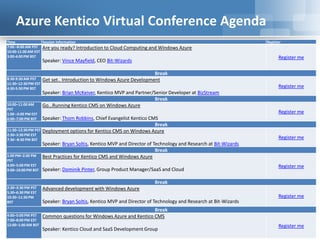
Azure Kentico Virtual Conference Agenda
Time Session Information Register
7:00 –8:00 AM PST
10:00-11:00 AM EST
3:00-4:00 PM BST
Are you ready? Introduction to Cloud Computing and Windows Azure
Speaker: Vince Mayfield, CEO Bit-Wizards
Register me
Break
8:30-9:30 AM PST
11:30–12:30 PM EST
4:30-5:30 PM BST
Get set.. Introduction to Windows Azure Development
Speaker: Brian McKeiver, Kentico MVP and Partner/Senior Developer at BizStream
Register me
Break
10:00–11:00 AM
PST
1:00 –2:00 PM EST
6:00–7:00 PM BST
Go…Running Kentico CMS on Windows Azure
Speaker: Thom Robbins, Chief Evangelist Kentico CMS
Register me
Break
11:30–12:30 PM PST
2:30–3:30 PM EST
7:30 –8:30 PM BST
Deployment options for Kentico CMS on Windows Azure
Speaker: Bryan Soltis, Kentico MVP and Director of Technology and Research at Bit-Wizards
Register me
Break
1:00 PM–2:00 PM
PST
4:00–5:00 PM EST
9:00–10:00 PM BST
Best Practices for Kentico CMS and Windows Azure
Speaker: Dominik Pinter, Group Product Manager/SaaS and Cloud
Register me
Break
2:30–3:30 PM PST
5:30–6:30 PM EST
10:30–11:30 PM
BST
Advanced development with Windows Azure
Speaker: Bryan Soltis, Kentico MVP and Director of Technology and Research at Bit-Wizards
Register me
Break
4:00–5:00 PM PST
7:00–8:00 PM EST
12:00–1:00 AM BST
Common questions for Windows Azure and Kentico CMS
Speaker: Kentico Cloud and SaaS Development Group
Register me
Goals
• Understand Compute / Storage / Roles
• Enable your machine for Windows Azure
development
• Build your first Windows Azure App
• Simple Deployment Example
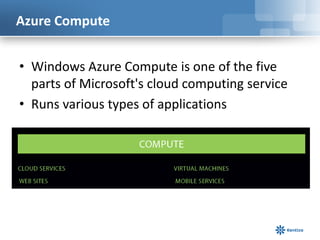
Azure Compute
• Windows Azure Compute is one of the five
parts of Microsoft's cloud computing service
• Runs various types of applications
Azure Storage
Windows Azure Drive allows applications to mount
a BLOB formatted as a single volume NTFS VM.
– You can move your VMs between private and public
clouds using Windows Azure Drive
Storage or Data
Management
• SQL Databases
• Blobs
• Tables
• VMs
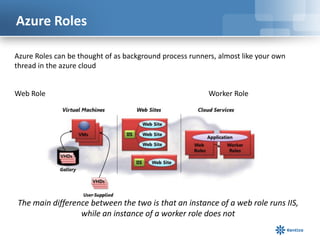
Azure Roles
The main difference between the two is that an instance of a web role runs IIS,
while an instance of a worker role does not
Web Role Worker Role
Azure Roles can be thought of as background process runners, almost like your own
thread in the azure cloud
Azure Roles in VS2012
Putting it all Together
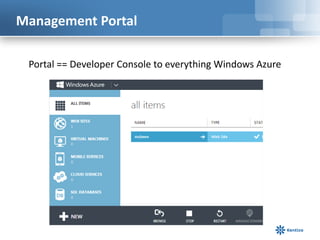
Management Portal
Portal == Developer Console to everything Windows Azure
Free Car !?!
• Activate your account through MSDN
– https://account.windowsazure.com/signup
• Benefits include up to $150 in credits
Sign Up
Create your
Subscription Account
Ready to Go to Portal
Click on Management Portal
Portal
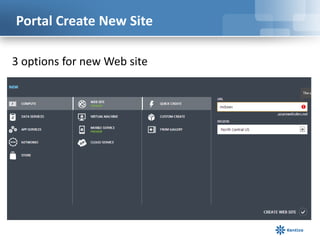
Portal Create New Site
3 options for new Web site
Portal Create New Service
Custom Create
SQL Server
Databases as
one example of
a Service
or
Import your
own
Azure Storage Account
• Since we are here, let’s create one
Storage Account Creation
• URL: How you access your objects in Storage
• Location: Use an Affinity Group to be in same data
center
Portal Networking
This is where you can link the Cloud and On-Premise
Portal Settings
- Powerful Diagnostics info available
- Enterprise Library 5.0 Integration Pack for Windows Azure
(Good Add-on Library)
msdn.microsoft.com/en-us/library/hh680918%28v=pandp.50%29.aspx
Questions on Azure Portal ?
Configure Visual Studio 2012
• Ensure the following first
– Visual Studio 2012 Update 2
• microsoft.com/en-
us/download/details.aspx?id=38188
– You can use VS2010 …but it is 2013
right ?
Azure SDK
• Windows Azure SDK 2.0 released May 2013
• 2 choices to get it
– Windows Azure site
• windowsazure.com/en-us/downloads/
or
– Web Platform Installer
• microsoft.com/web/downloads/platform.aspx
Web Platform Installer
NuGet Packages
New Project
Open up VS2012 and Create a new Project
Build
Make sure it works
Publish
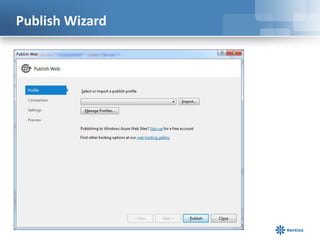
• Open the Publish Wizard
Publish Wizard
Import Profile from Subscription Account
.publishsettings file
Publish Wizard Profile
Click Validate Connection
Publish Wizard Settings
Publish Wizard Preview
Push It!
Source Control Reminder
I don’t care which one, just use one!
…ok maybe not Visual Source Safe though
What We Learned
• The different areas of Windows Azure
– Compute / Storage / Roles
• How to prep your machine for Windows Azure
development
• How to create a simple Azure web site
• How to publish from dev to the cloud in just a
few clicks
Questions ?
Thank You
Email:
bmckeiver@bizstream.com
Web:
http://www.bizstream.com
Blog:
http://www.mcbeev.com
Twitter:
@mcbeev
LinkedIn:
http://www.linkedin.com/in/brianmckeiver

Get set.. Introduction to Windows Azure Development

  • 1.
    Get set.. Introductionto Windows Azure Development Brian McKeiver, Kentico MVP & Partner/Senior Developer, BizStream
  • 2.
    Azure Kentico VirtualConference Agenda Time Session Information Register 7:00 –8:00 AM PST 10:00-11:00 AM EST 3:00-4:00 PM BST Are you ready? Introduction to Cloud Computing and Windows Azure Speaker: Vince Mayfield, CEO Bit-Wizards Register me Break 8:30-9:30 AM PST 11:30–12:30 PM EST 4:30-5:30 PM BST Get set.. Introduction to Windows Azure Development Speaker: Brian McKeiver, Kentico MVP and Partner/Senior Developer at BizStream Register me Break 10:00–11:00 AM PST 1:00 –2:00 PM EST 6:00–7:00 PM BST Go…Running Kentico CMS on Windows Azure Speaker: Thom Robbins, Chief Evangelist Kentico CMS Register me Break 11:30–12:30 PM PST 2:30–3:30 PM EST 7:30 –8:30 PM BST Deployment options for Kentico CMS on Windows Azure Speaker: Bryan Soltis, Kentico MVP and Director of Technology and Research at Bit-Wizards Register me Break 1:00 PM–2:00 PM PST 4:00–5:00 PM EST 9:00–10:00 PM BST Best Practices for Kentico CMS and Windows Azure Speaker: Dominik Pinter, Group Product Manager/SaaS and Cloud Register me Break 2:30–3:30 PM PST 5:30–6:30 PM EST 10:30–11:30 PM BST Advanced development with Windows Azure Speaker: Bryan Soltis, Kentico MVP and Director of Technology and Research at Bit-Wizards Register me Break 4:00–5:00 PM PST 7:00–8:00 PM EST 12:00–1:00 AM BST Common questions for Windows Azure and Kentico CMS Speaker: Kentico Cloud and SaaS Development Group Register me
  • 3.
    Goals • Understand Compute/ Storage / Roles • Enable your machine for Windows Azure development • Build your first Windows Azure App • Simple Deployment Example
  • 4.
    Azure Compute • WindowsAzure Compute is one of the five parts of Microsoft's cloud computing service • Runs various types of applications
  • 5.
    Azure Storage Windows AzureDrive allows applications to mount a BLOB formatted as a single volume NTFS VM. – You can move your VMs between private and public clouds using Windows Azure Drive Storage or Data Management • SQL Databases • Blobs • Tables • VMs
  • 6.
    Azure Roles The maindifference between the two is that an instance of a web role runs IIS, while an instance of a worker role does not Web Role Worker Role Azure Roles can be thought of as background process runners, almost like your own thread in the azure cloud
  • 7.
  • 8.
  • 9.
    Management Portal Portal ==Developer Console to everything Windows Azure
  • 10.
    Free Car !?! •Activate your account through MSDN – https://account.windowsazure.com/signup • Benefits include up to $150 in credits
  • 11.
  • 12.
    Ready to Goto Portal Click on Management Portal
  • 13.
  • 14.
    Portal Create NewSite 3 options for new Web site
  • 15.
    Portal Create NewService Custom Create SQL Server Databases as one example of a Service or Import your own
  • 16.
    Azure Storage Account •Since we are here, let’s create one
  • 17.
    Storage Account Creation •URL: How you access your objects in Storage • Location: Use an Affinity Group to be in same data center
  • 18.
    Portal Networking This iswhere you can link the Cloud and On-Premise
  • 19.
    Portal Settings - PowerfulDiagnostics info available - Enterprise Library 5.0 Integration Pack for Windows Azure (Good Add-on Library) msdn.microsoft.com/en-us/library/hh680918%28v=pandp.50%29.aspx
  • 20.
  • 21.
    Configure Visual Studio2012 • Ensure the following first – Visual Studio 2012 Update 2 • microsoft.com/en- us/download/details.aspx?id=38188 – You can use VS2010 …but it is 2013 right ?
  • 22.
    Azure SDK • WindowsAzure SDK 2.0 released May 2013 • 2 choices to get it – Windows Azure site • windowsazure.com/en-us/downloads/ or – Web Platform Installer • microsoft.com/web/downloads/platform.aspx
  • 23.
  • 24.
  • 25.
    New Project Open upVS2012 and Create a new Project
  • 26.
  • 27.
    Publish • Open thePublish Wizard
  • 28.
  • 29.
    Import Profile fromSubscription Account .publishsettings file
  • 30.
    Publish Wizard Profile ClickValidate Connection
  • 31.
  • 32.
  • 33.
  • 34.
    Source Control Reminder Idon’t care which one, just use one! …ok maybe not Visual Source Safe though
  • 35.
    What We Learned •The different areas of Windows Azure – Compute / Storage / Roles • How to prep your machine for Windows Azure development • How to create a simple Azure web site • How to publish from dev to the cloud in just a few clicks
  • 36.
  • 37.

Editor's Notes

  • #5 Web sites, cloud services, mobile services,vms, backup & recovery, BI
  • #17 Blob, Table, VM SQL Server, Hadoop
  • #18 URL needs to be unique similar to amazon S3 rules
  • #23 On the site it is not 100% evident where to go to get it
  • #24 Get ready to get some coffee, does take awhile on a clean machine
  • #30 After you click import, choose your Azure Site (mine was mcbeev).publishsettings file contains your credentials (unencoded). Security best practice for this file is to store it temporarily outside your source directories (for example in the Libraries\\Documents folder), and then delete it once the import has completed. A malicious user who gains access to the .publishsettings file can edit, create, and delete your Windows Azure services.