Azure From Scratch
Intro & Setting up cloud
mind-Set
girishkrao.portfoliobox.net
theazureguys.wordpress.com
twitter.com/TheAzureGuy007
facebook.com/TheAzureGuy007
https://github.com/TheAzureGuy007
https://www.linkedin.com/in/girish-kalamati-357a6398/
https://www.youtube.com/channel/UCd9z6-2mZdqjRnAHh3W_9Uw
Introduction
Get Your Own
Step 1: https://azure.microsoft.com/en-us/pricing/member-
offers/vs-dev-essentials/
Step 2: Click Join Now
Step 3: Enter your email Id and Subscribe
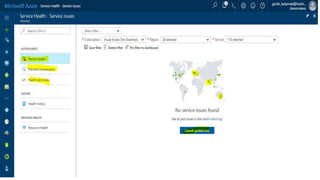
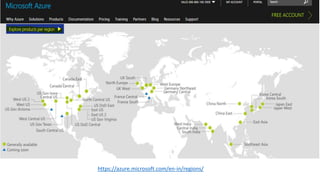
Azure DC'S & Service Health
https://azure.microsoft.com/en-in/regions/
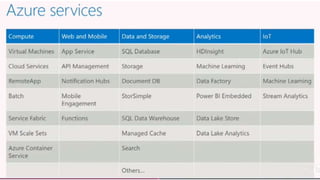
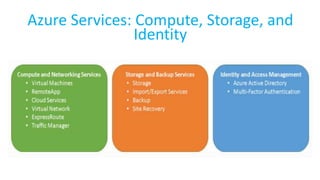
Azure Services: Compute, Storage, and
Identity
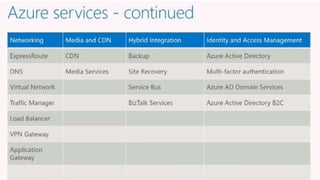
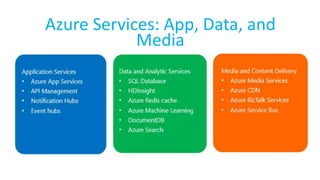
Azure Services: App, Data, and
Media
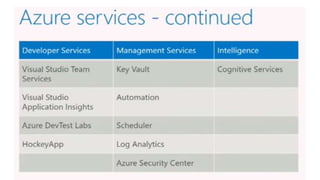
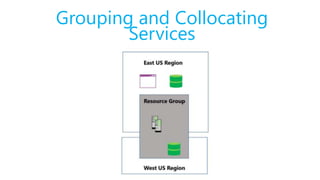
Grouping and Collocating
Services
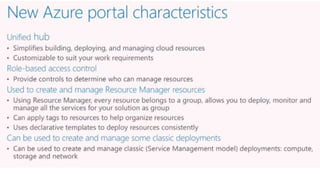
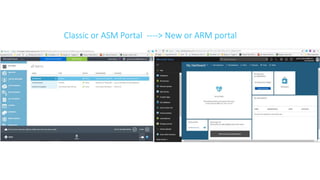
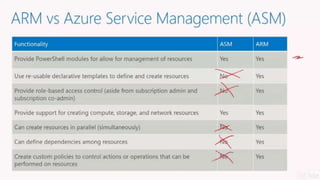
Classic or ASM Portal ----> New or ARM portal
Managing Azure Subscriptions
Estimating Subscription Costs
https://azure.microsoft.com/en-us/pricing/
https://azure.microsoft.com/en-us/pricing/calculator/ http://tco.microsoft.com/Home/Calculator
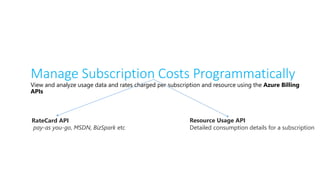
Manage Subscription Costs Programmatically
View and analyze usage data and rates charged per subscription and resource using the Azure Billing
APIs
RateCard API
pay-as you-go, MSDN, BizSpark etc
Resource Usage API
Detailed consumption details for a subscription
Demo: Azure Billing API [Console App]
https://github.com/TheAzureGuy007/Azure-From-Scratch
Demo: Azure Billing API [Powershell Script]
https://github.com/TheAzureGuy007/Azure-From-
Scratch/tree/master/Azure%20Powershell%20Scripts/Azure%20Usage%20API%20-%20Billing%20API's
Demo: Azure Billing API [Azure CLI or BASH]
Install Azure CLI : https://docs.microsoft.com/en-us/cli/azure/install-azure-cli
echo "deb [arch=amd64] https://packages.microsoft.com/repos/azure-cli/ wheezy main" | 
sudo tee /etc/apt/sources.list.d/azure-cli.list
sudo apt-key adv --keyserver packages.microsoft.com --recv-keys 417A0893
sudo apt-get install apt-transport-https
sudo apt-get update && sudo apt-get install azure-cli
https://github.com/TheAzureGuy007/Azure-From-Scratch
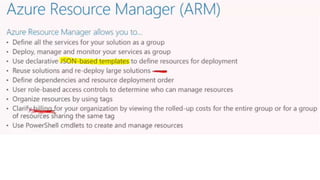
Azure Resource Manager
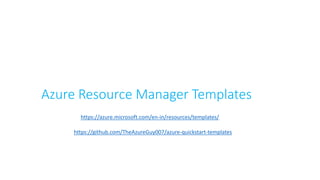
Azure Resource Manager Templates
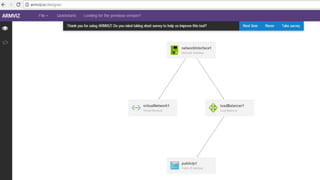
https://github.com/TheAzureGuy007/azure-quickstart-templates
https://azure.microsoft.com/en-in/resources/templates/
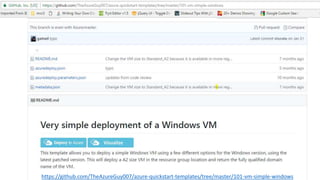
https://github.com/TheAzureGuy007/azure-quickstart-templates/tree/master/101-vm-simple-windows
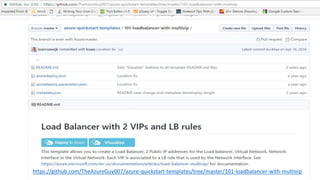
https://github.com/TheAzureGuy007/azure-quickstart-templates/tree/master/101-loadbalancer-with-multivip
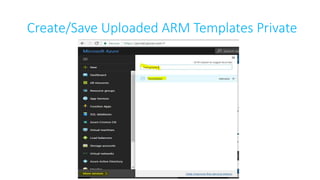
Create/Save Uploaded ARM Templates Private
Demo : Deploying Resources using Quick Start
Templates & Saving Private Templatse
https://github.com/TheAzureGuy007/azure-quickstart-templates/tree/master/101-storage-account-create
Azure REST APIs
https://azure.github.io/projects/apis/
Other Tools
https://github.com/swagger-api/swagger-ui
https://www.openapis.org/
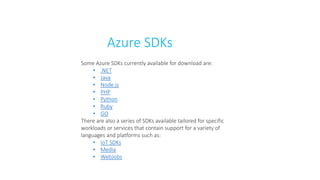
Azure SDKs
Some Azure SDKs currently available for download are:
• .NET
• Java
• Node.js
• PHP
• Python
• Ruby
• GO
There are also a series of SDKs available tailored for specific
workloads or services that contain support for a variety of
languages and platforms such as:
• IoT SDKs
• Media
• WebJobs
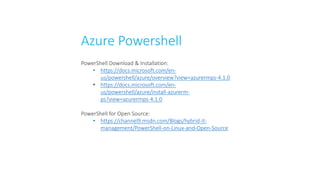
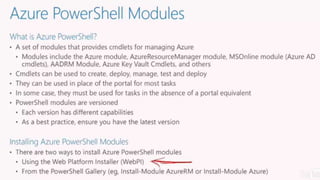
Azure Powershell
PowerShell Download & Installation:
• https://docs.microsoft.com/en-
us/powershell/azure/overview?view=azurermps-4.1.0
• https://docs.microsoft.com/en-
us/powershell/azure/install-azurerm-
ps?view=azurermps-4.1.0
PowerShell for Open Source:
• https://channel9.msdn.com/Blogs/hybrid-it-
management/PowerShell-on-Linux-and-Open-Source
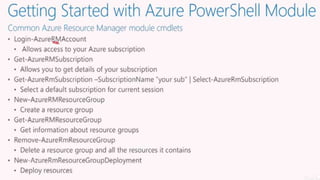
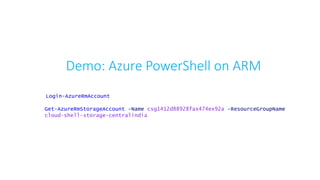
Demo: Azure PowerShell on ARM
Login-AzureRmAccount
Get-AzureRmStorageAccount -Name csg1412d88928fax474ex92a -ResourceGroupName
cloud-shell-storage-centralindia
Module 2
Azure Virtual Machines
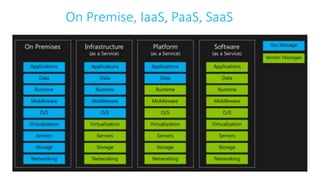
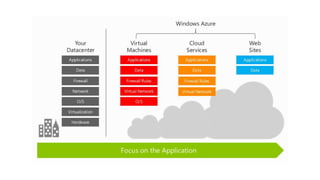
On Premise, IaaS, PaaS, SaaS
IaaS & Virtual Machines
https://www.linkedin.com/feed/update/urn:li:activity:6290599907720032256/
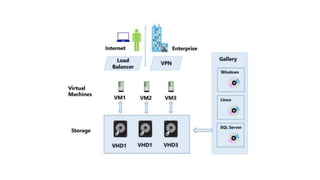
How VM’s are managed inside azure DC
Internal Architecture
East-West Traffic issues
Noisy Neighbor concept
Azure Service outages reason
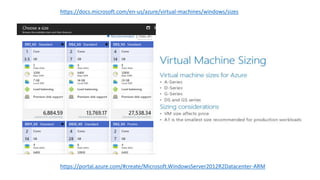
https://portal.azure.com/#create/Microsoft.WindowsServer2012R2Datacenter-ARM
https://docs.microsoft.com/en-us/azure/virtual-machines/windows/sizes
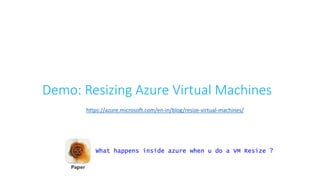
Demo: Resizing Azure Virtual Machines
https://azure.microsoft.com/en-in/blog/resize-virtual-machines/
What happens inside azure when u do a VM Resize ?
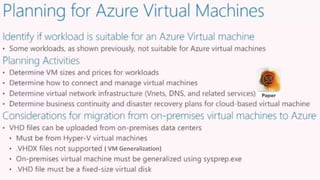
Planning Virtual Machines Deployment
( VM Generalization)
Virtual Machines Pricing Considerations
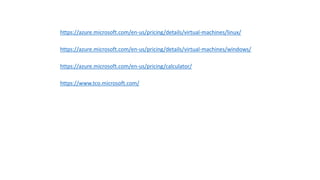
https://azure.microsoft.com/en-us/pricing/details/virtual-machines/linux/
https://azure.microsoft.com/en-us/pricing/details/virtual-machines/windows/
https://azure.microsoft.com/en-us/pricing/calculator/
https://www.tco.microsoft.com/
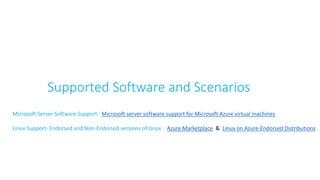
Supported Software and Scenarios
Microsoft Server Software Support : Microsoft server software support for Microsoft Azure virtual machines
Linux Support- Endorsed and Non-Endorsed versions of Linux : Azure Marketplace & Linux on Azure-Endorsed Distributions
Assess and Optimize Virtual Machines
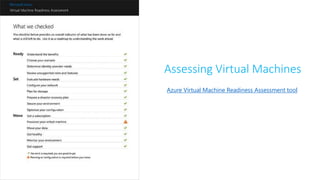
Azure Virtual Machine Readiness Assessment tool
Assessing Virtual Machines
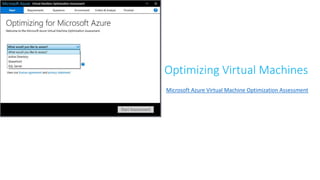
Microsoft Azure Virtual Machine Optimization Assessment
Optimizing Virtual Machines
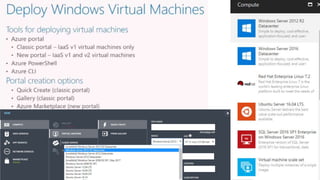
Demo: Creating Virtual Machines (Marketplace)
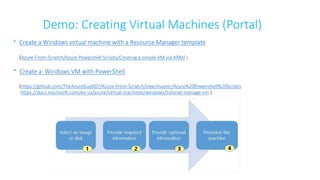
* Create a Windows virtual machine with a Resource Manager template
(Azure-From-Scratch/Azure Powershell Scripts/Creating a simple VM via ARM/ )
* Create a Windows VM with PowerShell
(https://github.com/TheAzureGuy007/Azure-From-Scratch/tree/master/Azure%20Powershell%20Scripts
https://docs.microsoft.com/en-us/azure/virtual-machines/windows/tutorial-manage-vm )
Demo: Creating Virtual Machines (Portal)
Demo: New Windows Virtual Machine (Portal)
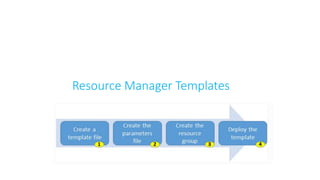
Resource Manager Templates
https://azure.microsoft.com/en-in/resources/templates/
https://github.com/TheAzureGuy007/Azure-From-
Scratch/blob/master/Azure%20Powershell%20Scripts/Deploy%20a%20Virtual%20Machine%20using%20an%20ARM%20T
emplate/Deploy%20a%20Virtual%20Machine%20using%20an%20ARM%20Template.ps1
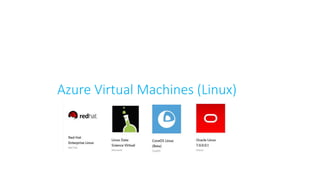
Azure Virtual Machines (Linux)
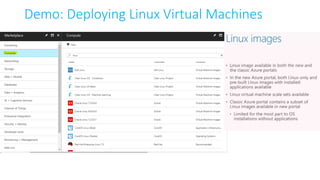
Demo: Deploying Linux Virtual Machines
Bash on Windows
https://www.windowscentral.com/how-install-bash-shell-command-line-windows-10
welcome123@GIRISHK-LP:~$ sudo su
sudo: unable to resolve host GIRISHK-LP
[sudo] password for welcome123:
root@GIRISHK-LP:/home/welcome123#Welcome@#123
welcome123@LinuxVM:~$ cd / (change directory)
welcome123@LinuxVM:/$ ls (List out directory)
bin boot dev etc home initrd.img lib lib64 lost+found media mnt opt
proc root run sbin snap srv sys tmp usr var vmlinuz
welcome123@LinuxVM:/$ sudo apt-get update
Hit:1 http://azure.archive.ubuntu.com/ubuntu xenial InRelease
Get:2 http://azure.archive.ubuntu.com/ubuntu xenial-updates InRelease [102 kB]
.
.
.
.
Get:31 http://security.ubuntu.com/ubuntu xenial-security/universe amd64 Packages
[145 kB]
Get:32 http://security.ubuntu.com/ubuntu xenial-security/universe Translation-en
[74.8 kB]
Get:33 http://security.ubuntu.com/ubuntu xenial-security/multiverse amd64
Packages [2,748 B]
Fetched 11.9 MB in 11s (1,039 kB/s)
Reading package lists... Done
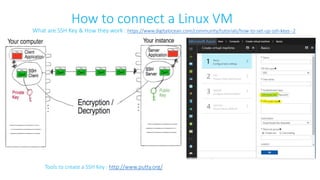
How to connect a Linux VM
Tools to create a SSH Key : http://www.putty.org/
What are SSH Key & How they work : https://www.digitalocean.com/community/tutorials/how-to-set-up-ssh-keys--2
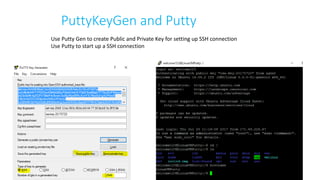
PuttyKeyGen and Putty
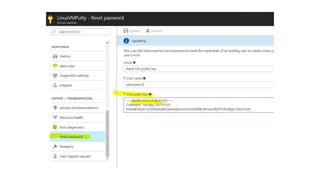
Use Putty Gen to create Public and Private Key for setting up SSH connection
Use Putty to start up a SSH connection
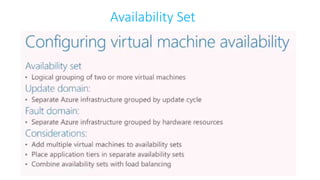
Availability Set
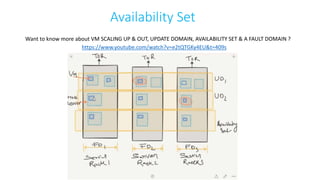
Availability Set
https://www.youtube.com/watch?v=e2tQTGKy4EU&t=409s
Want to know more about VM SCALING UP & OUT, UPDATE DOMAIN, AVAILABILITY SET & A FAULT DOMAIN ?
Availability Set
A service level agreement (SLA) is in place for availability sets.
• For all Virtual Machines that have two or more instances deployed in the same Availability Set,
Microsoft guarantees you will have Virtual Machine Connectivity to at least one instance at least
99.95% of the time.
• For any Single Instance Virtual Machine using premium storage for all disks, Microsoft guarantees
you will have Virtual Machine Connectivity of at least 99.9%.
In Case if you want more clarity on Microsoft guarantees Virtual Machine Connectivity of at least 99.9%. With premium disks
read my LinkedIn article : https://www.linkedin.com/feed/update/urn:li:activity:6290599907720032256
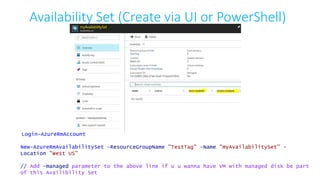
Availability Set (Create via UI or PowerShell)
Login-AzureRmAccount
New-AzureRmAvailabilitySet -ResourceGroupName "TestTag" -Name "myAvailabilitySet" -
Location "West US"
// Add -managed parameter to the above line if u u wanna have VM with managed disk be part
of this Availibility Set
Task’s : Try creating 2 or more VM’s under
Availability Set WebTier & DataTier and check
which UD or FD they are allocated
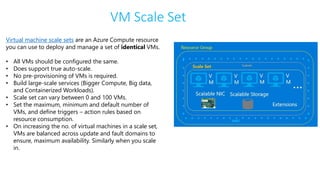
VM Scale Set
Virtual machine scale sets are an Azure Compute resource
you can use to deploy and manage a set of identical VMs.
• All VMs should be configured the same.
• Does support true auto-scale.
• No pre-provisioning of VMs is required.
• Build large-scale services (Bigger Compute, Big data,
and Containerized Workloads).
• Scale set can vary between 0 and 100 VMs.
• Set the maximum, minimum and default number of
VMs, and define triggers – action rules based on
resource consumption.
• On increasing the no. of virtual machines in a scale set,
VMs are balanced across update and fault domains to
ensure, maximum availability. Similarly when you scale
in.
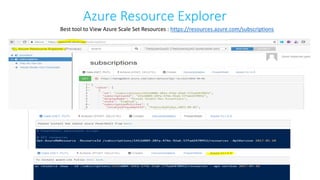
Azure Resource Explorer
Best tool to View Azure Scale Set Resources : https://resources.azure.com/subscriptions
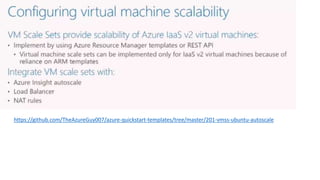
https://github.com/TheAzureGuy007/azure-quickstart-templates/tree/master/201-vmss-ubuntu-autoscale
Module 3: Azure Networking
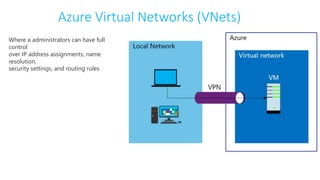
Azure Virtual Networks (VNets)
Where a administrators can have full
control
over IP address assignments, name
resolution,
security settings, and routing rules
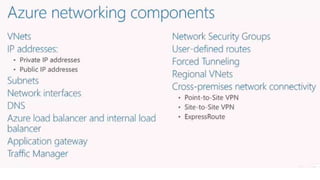
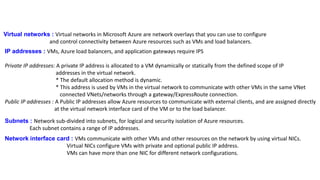
Virtual networks : Virtual networks in Microsoft Azure are network overlays that you can use to configure
and control connectivity between Azure resources such as VMs and load balancers.
IP addresses : VMs, Azure load balancers, and application gateways require IPS
Private IP addresses: A private IP address is allocated to a VM dynamically or statically from the defined scope of IP
addresses in the virtual network.
* The default allocation method is dynamic.
* This address is used by VMs in the virtual network to communicate with other VMs in the same VNet
connected VNets/networks through a gateway/ExpressRoute connection.
Public IP addresses : A Public IP addresses allow Azure resources to communicate with external clients, and are assigned directly
at the virtual network interface card of the VM or to the load balancer.
Subnets : Network sub-divided into subnets, for logical and security isolation of Azure resources.
Each subnet contains a range of IP addresses.
Network interface card : VMs communicate with other VMs and other resources on the network by using virtual NICs.
Virtual NICs configure VMs with private and optional public IP address.
VMs can have more than one NIC for different network configurations.
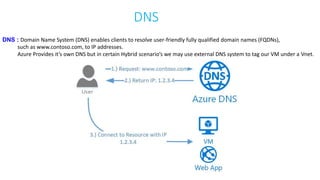
DNS
DNS : Domain Name System (DNS) enables clients to resolve user-friendly fully qualified domain names (FQDNs),
such as www.contoso.com, to IP addresses.
Azure Provides it’s own DNS but in certain Hybrid scenario’s we may use external DNS system to tag our VM under a Vnet.
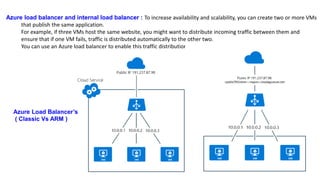
Azure load balancer and internal load balancer : To increase availability and scalability, you can create two or more VMs
that publish the same application.
For example, if three VMs host the same website, you might want to distribute incoming traffic between them and
ensure that if one VM fails, traffic is distributed automatically to the other two.
You can use an Azure load balancer to enable this traffic distribution between VMs.
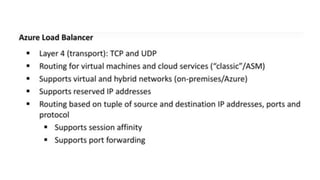
Azure Load Balancer’s
( Classic Vs ARM )
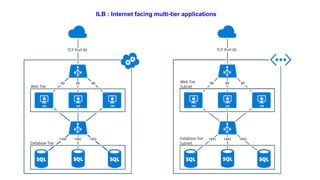
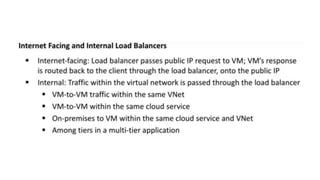
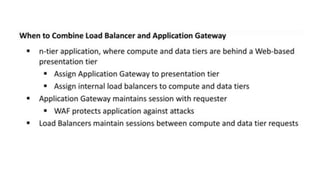
ILB : Internet facing multi-tier applications
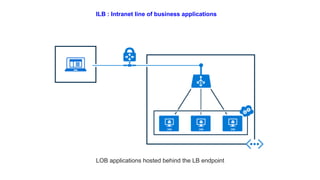
ILB : Intranet line of business applications
LOB applications hosted behind the LB endpoint
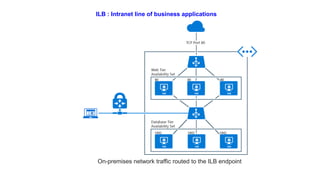
ILB : Intranet line of business applications
On-premises network traffic routed to the ILB endpoint
Demo
Note: Basic VM’s do not support Load Balancers sets
https://docs.microsoft.com/en-us/azure/load-balancer/load-balancer-get-started-internet-portal
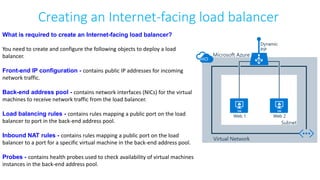
Creating an Internet-facing load balancer
What is required to create an Internet-facing load balancer?
You need to create and configure the following objects to deploy a load
balancer.
Front-end IP configuration - contains public IP addresses for incoming
network traffic.
Back-end address pool - contains network interfaces (NICs) for the virtual
machines to receive network traffic from the load balancer.
Load balancing rules - contains rules mapping a public port on the load
balancer to port in the back-end address pool.
Inbound NAT rules - contains rules mapping a public port on the load
balancer to a port for a specific virtual machine in the back-end address pool.
Probes - contains health probes used to check availability of virtual machines
instances in the back-end address pool.
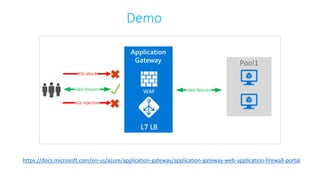
https://docs.microsoft.com/en-us/azure/application-gateway/application-gateway-web-application-firewall-portal
Demo
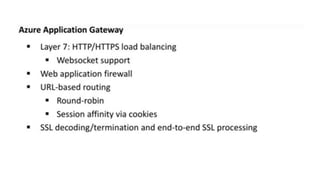
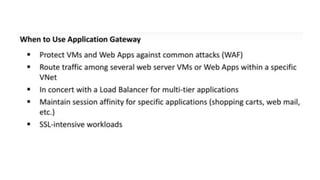
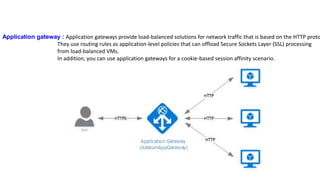
Application gateway : Application gateways provide load-balanced solutions for network traffic that is based on the HTTP proto
They use routing rules as application-level policies that can offload Secure Sockets Layer (SSL) processing
from load-balanced VMs.
In addition, you can use application gateways for a cookie-based session affinity scenario.
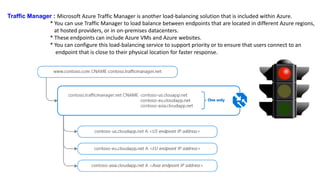
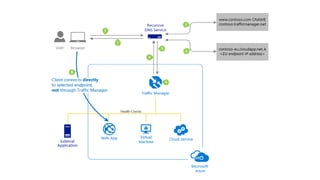
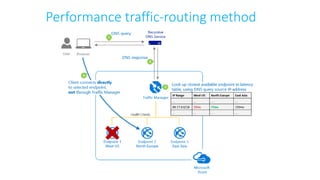
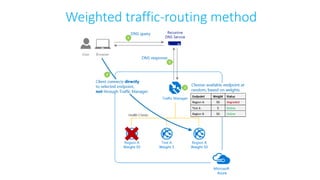
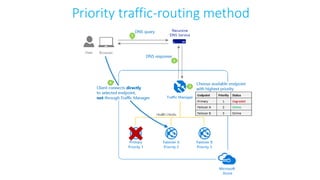
Traffic Manager : Microsoft Azure Traffic Manager is another load-balancing solution that is included within Azure.
* You can use Traffic Manager to load balance between endpoints that are located in different Azure regions,
at hosted providers, or in on-premises datacenters.
* These endpoints can include Azure VMs and Azure websites.
* You can configure this load-balancing service to support priority or to ensure that users connect to an
endpoint that is close to their physical location for faster response.
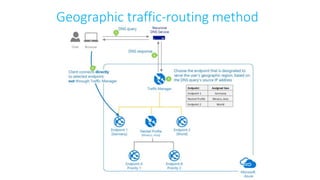
Traffic Manager routing methods
Geographic traffic-routing method
Performance traffic-routing method
Weighted traffic-routing method
Priority traffic-routing method
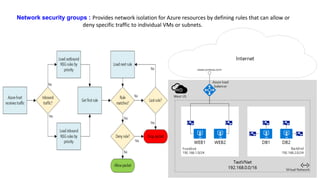
Network security groups : Provides network isolation for Azure resources by defining rules that can allow or
deny specific traffic to individual VMs or subnets.
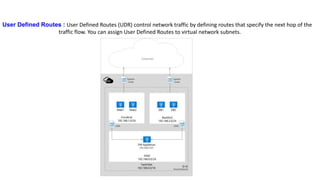
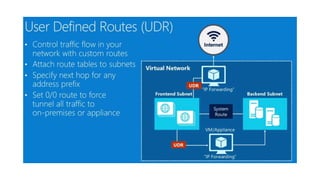
User Defined Routes : User Defined Routes (UDR) control network traffic by defining routes that specify the next hop of the
traffic flow. You can assign User Defined Routes to virtual network subnets.
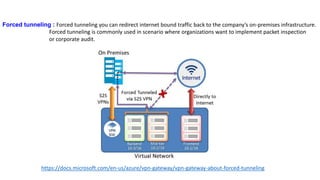
Forced tunneling : Forced tunneling you can redirect internet bound traffic back to the company’s on-premises infrastructure.
Forced tunneling is commonly used in scenario where organizations want to implement packet inspection
or corporate audit.
https://docs.microsoft.com/en-us/azure/vpn-gateway/vpn-gateway-about-forced-tunneling
Cross-premises network connectivity : Azure Virtual Network is bound to Azure subscriptions and it is not possible for multip
subscriptions to use the same Azure virtual network.
* If you need to provide communications between different Azure subscriptions,
you need to create separate Azure virtual networks in each subscription and then
use site-to-site virtual network connections or the Microsoft Azure service ExpressRoute,
to connect them.
* These new Networks are called as RVN.
Note: Previously this was limited to single Affinity Group , allowing you to co-locate virtual networks, storage accounts,
and services in the physical proximity to each other within the same area of a single datacenter.
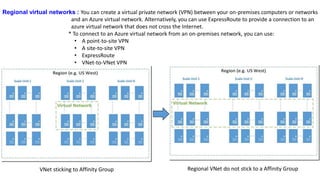
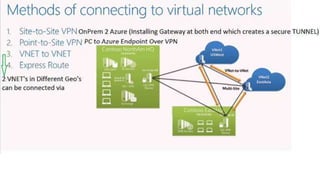
Regional virtual networks : You can create a virtual private network (VPN) between your on-premises computers or networks
and an Azure virtual network. Alternatively, you can use ExpressRoute to provide a connection to an
azure virtual network that does not cross the Internet.
* To connect to an Azure virtual network from an on-premises network, you can use:
• A point-to-site VPN
• A site-to-site VPN
• ExpressRoute
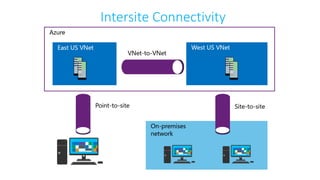
• VNet-to-VNet VPN
VNet sticking to Affinity Group Regional VNet do not stick to a Affinity Group
Deploying VNet’s using ARM Deployment Model : With Azure Resource Manager, you can benefit from:
* Faster configuration due to resources being grouped. Easier management.
* Customization and deployment based on JavaScript Object Notation (JSON) templates.
* Networking resources such as IP addresses, DNS settings, or NICs are managed independently and can be assigned
to VMs, Azure load balancers, or application gateways.
Demo
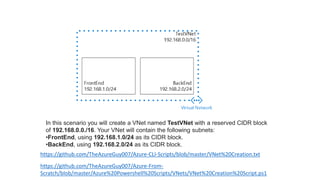
In this scenario you will create a VNet named TestVNet with a reserved CIDR block
of 192.168.0.0./16. Your VNet will contain the following subnets:
•FrontEnd, using 192.168.1.0/24 as its CIDR block.
•BackEnd, using 192.168.2.0/24 as its CIDR block.
https://github.com/TheAzureGuy007/Azure-CLI-Scripts/blob/master/VNet%20Creation.txt
https://github.com/TheAzureGuy007/Azure-From-
Scratch/blob/master/Azure%20Powershell%20Scripts/VNets/VNet%20Creation%20Script.ps1
Task: Try deploying a Virtual Machine into a Virtual
Network
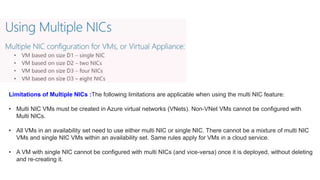
Multiple NICs in Virtual Machines
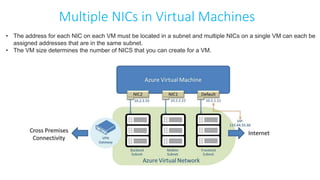
• The address for each NIC on each VM must be located in a subnet and multiple NICs on a single VM can each be
assigned addresses that are in the same subnet.
• The VM size determines the number of NICS that you can create for a VM.
Limitations of Multiple NICs :The following limitations are applicable when using the multi NIC feature:
• Multi NIC VMs must be created in Azure virtual networks (VNets). Non-VNet VMs cannot be configured with
Multi NICs.
• All VMs in an availability set need to use either multi NIC or single NIC. There cannot be a mixture of multi NIC
VMs and single NIC VMs within an availability set. Same rules apply for VMs in a cloud service.
• A VM with single NIC cannot be configured with multi NICs (and vice-versa) once it is deployed, without deleting
and re-creating it.
Demo
https://docs.microsoft.com/en-us/azure/virtual-machines/windows/multiple-nics
https://docs.microsoft.com/en-us/azure/virtual-network/virtual-network-deploy-multinic-arm-template
https://github.com/TheAzureGuy007/Azure-From-
Scratch/blob/master/Azure%20Powershell%20Scripts/VNets/Multi%20Nic%20VM%20creation.ps1
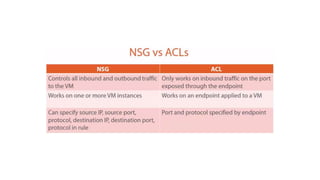
Access Control List
What are ACL ? How does they Work ?
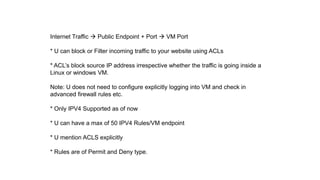
Internet Traffic  Public Endpoint + Port  VM Port
* U can block or Filter incoming traffic to your website using ACLs
* ACL’s block source IP address irrespective whether the traffic is going inside a
Linux or windows VM.
Note: U does not need to configure explicitly logging into VM and check in
advanced firewall rules etc.
* Only IPV4 Supported as of now
* U can have a max of 50 IPV4 Rules/VM endpoint
* U mention ACLS explicitly
* Rules are of Permit and Deny type.
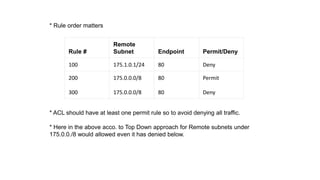
* Rule order matters
* ACL should have at least one permit rule so to avoid denying all traffic.
* Here in the above acco. to Top Down approach for Remote subnets under
175.0.0./8 would allowed even it has denied below.
Rule #
Remote
Subnet Endpoint Permit/Deny
100 175.1.0.1/24 80 Deny
200
300
175.0.0.0/8
175.0.0.0/8
80
80
Permit
Deny
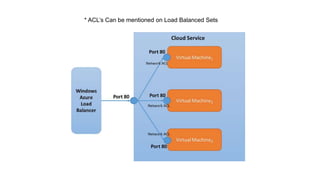
* ACL’s Can be mentioned on Load Balanced Sets
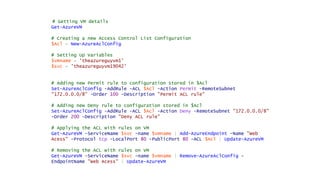
# Getting VM details
Get-AzureVM
# Creating a new Access Control List Configuration
$Acl = New-AzureAclConfig
# Setting Up Variables
$vmname = 'theazureguyvm1'
$svc = 'theazureguyvm19042'
# Adding new Permit rule to configuration stored in $Acl
Set-AzureAclConfig -AddRule -ACL $Acl -Action Permit -RemoteSubnet
"172.0.0.0/8" -Order 100 -Description "Permit ACL rule"
# Adding new Deny rule to configuration stored in $Acl
Set-AzureAclConfig -AddRule -ACL $Acl -Action Deny -RemoteSubnet "172.0.0.0/8"
-Order 200 -Description "Deny ACL rule"
# Applying the ACL with rules on VM
Get-AzureVM -ServiceName $svc -name $vmname | Add-AzureEndpoint -Name "Web
Acess" -Protocol tcp -LocalPort 80 -PublicPort 80 -ACL $Acl | Update-AzureVM
# Removing the ACL with rules on VM
Get-AzureVM -ServiceName $svc -name $vmname | Remove-AzureAclConfig -
EndpointName "Web Acess" | Update-AzureVM
https://github.com/TheAzureGuy007/The-Azure-Guy-Repo.git
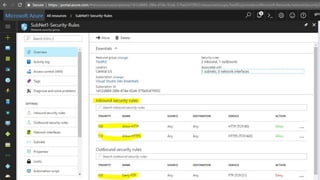
Network Security Group
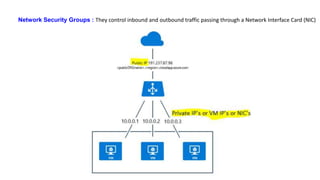
Network Security Groups : They control inbound and outbound traffic passing through a Network Interface Card (NIC)
Network Security Group Rules
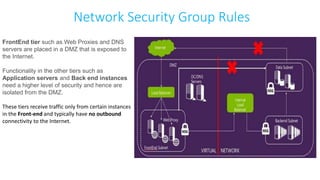
FrontEnd tier such as Web Proxies and DNS
servers are placed in a DMZ that is exposed to
the Internet.
Functionality in the other tiers such as
Application servers and Back end instances
need a higher level of security and hence are
isolated from the DMZ.
These tiers receive traffic only from certain instances
in the Front-end and typically have no outbound
connectivity to the Internet.
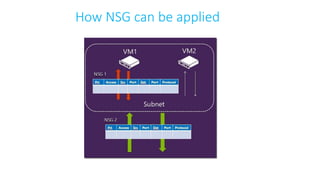
How NSG can be applied
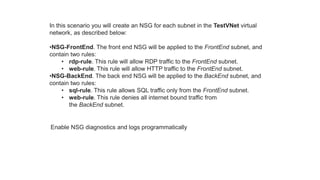
In this scenario you will create an NSG for each subnet in the TestVNet virtual
network, as described below:
•NSG-FrontEnd. The front end NSG will be applied to the FrontEnd subnet, and
contain two rules:
• rdp-rule. This rule will allow RDP traffic to the FrontEnd subnet.
• web-rule. This rule will allow HTTP traffic to the FrontEnd subnet.
•NSG-BackEnd. The back end NSG will be applied to the BackEnd subnet, and
contain two rules:
• sql-rule. This rule allows SQL traffic only from the FrontEnd subnet.
• web-rule. This rule denies all internet bound traffic from
the BackEnd subnet.
Enable NSG diagnostics and logs programmatically
https://github.com/TheAzureGuy007/The-Azure-Guy-Repo.git
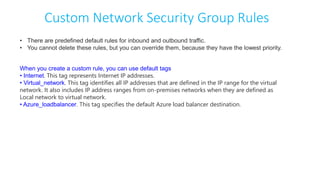
Custom Network Security Group Rules
• There are predefined default rules for inbound and outbound traffic.
• You cannot delete these rules, but you can override them, because they have the lowest priority.
When you create a custom rule, you can use default tags
• Internet. This tag represents Internet IP addresses.
• Virtual_network. This tag identifies all IP addresses that are defined in the IP range for the virtual
network. It also includes IP address ranges from on-premises networks when they are defined as
Local network to virtual network.
• Azure_loadbalancer. This tag specifies the default Azure load balancer destination.
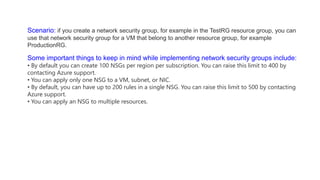
Scenario: if you create a network security group, for example in the TestRG resource group, you can
use that network security group for a VM that belong to another resource group, for example
ProductionRG.
Some important things to keep in mind while implementing network security groups include:
• By default you can create 100 NSGs per region per subscription. You can raise this limit to 400 by
contacting Azure support.
• You can apply only one NSG to a VM, subnet, or NIC.
• By default, you can have up to 200 rules in a single NSG. You can raise this limit to 500 by contacting
Azure support.
• You can apply an NSG to multiple resources.
Demo: Create a Vnet, SubNet’s and assign them to
a new NSG
eeeeeeeeeeee
Intersite Connectivity
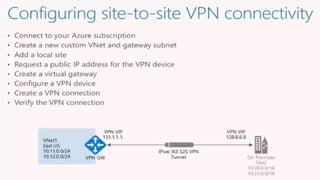
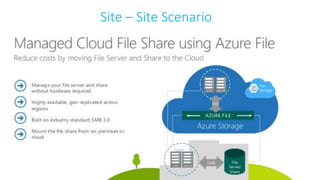
Site – Site Scenario
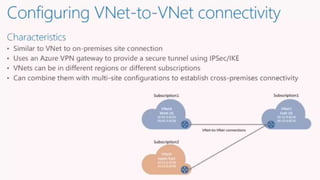
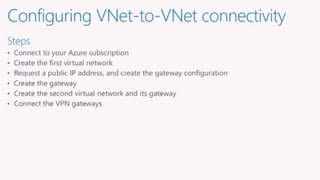
Demo: Setup a Vnet-VNet VPN connection
[Vpn’s, Subnet’s, VPNGwateway’s, VM Ping Test in 2
different Regions]
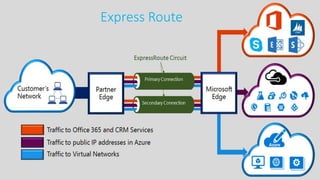
Express Route
Module 4 : Azure Storage
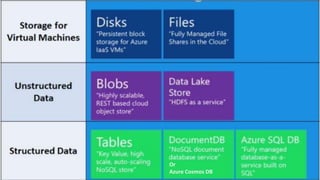
Or
Azure Cosmos DB
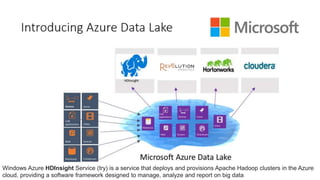
Windows Azure HDInsight Service (try) is a service that deploys and provisions Apache Hadoop clusters in the Azure
cloud, providing a software framework designed to manage, analyze and report on big data
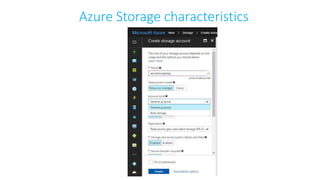
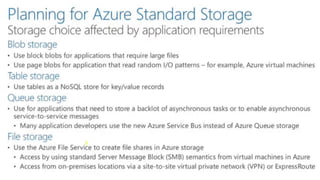
Azure Storage characteristics
A General-purpose storage account gives you access to Azure Storage services such as Tables, Queues, Files, Blobs
and Azure virtual machine disks under a single account.
This type of storage account has two performance tiers:
• A standard storage performance tier which allows you to store Tables, Queues, Files, Blobs and Azure virtual
machine disks.
• A premium storage performance tier which currently only supports Azure virtual machine disks.
A Blob storage account is a specialized storage account for storing your unstructured data as blobs (objects) in
Azure Storage.
Blob storage has two tiers:
• A Hot access tier which indicates that the objects in the storage account will be more frequently accessed. This
allows you to store data at a lower access cost.
• A Cool access tier which indicates that the objects in the storage account will be less frequently accessed. This
allows you to store data at a lower data storage cost.
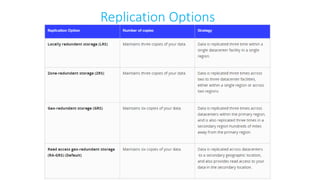
Replication Options
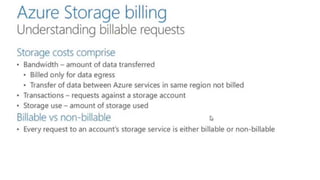
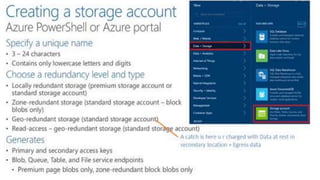
Demo: Creating a Storage Account
Storage Access Tools
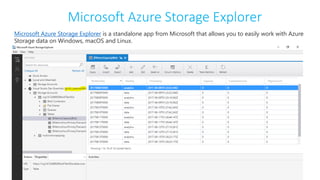
Microsoft Azure Storage Explorer
Microsoft Azure Storage Explorer is a standalone app from Microsoft that allows you to easily work with Azure
Storage data on Windows, macOS and Linux.
The Storage Explorer can be used to:
• Connect to an Azure subscription - Manage storage resources belonging to your Azure subscription.
• Work with local development storage - Manage local storage using the Azure Storage Emulator.
• Attach to external storage - Manage storage resources belonging to another Azure subscription using
the storage account's account name and key.
• Attach storage account using Shared Access Signature* (SAS) - Manage storage resources belonging
to another Azure subscription using a SAS.
• Attach a service using SAS - Manage a specific storage service (blob container, queue, or table)
belonging to another Azure subscription using a SAS.
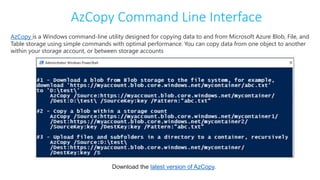
AzCopy Command Line Interface
AzCopy is a Windows command-line utility designed for copying data to and from Microsoft Azure Blob, File, and
Table storage using simple commands with optimal performance. You can copy data from one object to another
within your storage account, or between storage accounts
Download the latest version of AzCopy.
https://docs.microsoft.com/en-us/azure/storage/storage-explorers
Virtual Machine Disk’s
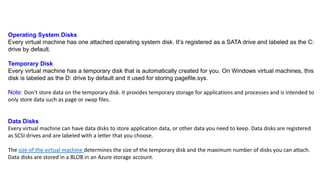
Operating System Disks
Every virtual machine has one attached operating system disk. It’s registered as a SATA drive and labeled as the C:
drive by default.
Temporary Disk
Every virtual machine has a temporary disk that is automatically created for you. On Windows virtual machines, this
disk is labeled as the D: drive by default and it used for storing pagefile.sys.
Note: Don’t store data on the temporary disk. It provides temporary storage for applications and processes and is intended to
only store data such as page or swap files.
Data Disks
Every virtual machine can have data disks to store application data, or other data you need to keep. Data disks are registered
as SCSI drives and are labeled with a letter that you choose.
The size of the virtual machine determines the size of the temporary disk and the maximum number of disks you can attach.
Data disks are stored in a BLOB in an Azure storage account.
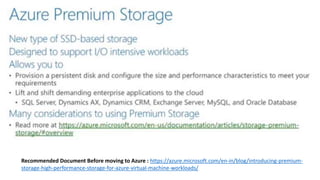
Recommended Document Before moving to Azure : https://azure.microsoft.com/en-in/blog/introducing-premium-
storage-high-performance-storage-for-azure-virtual-machine-workloads/
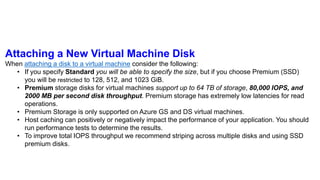
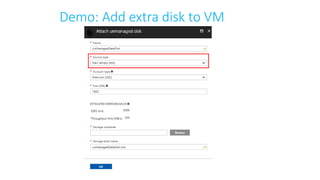
Attaching a New Virtual Machine Disk
When attaching a disk to a virtual machine consider the following:
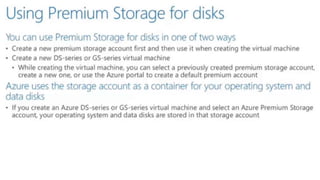
• If you specify Standard you will be able to specify the size, but if you choose Premium (SSD)
you will be restricted to 128, 512, and 1023 GiB.
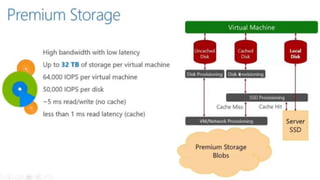
• Premium storage disks for virtual machines support up to 64 TB of storage, 80,000 IOPS, and
2000 MB per second disk throughput. Premium storage has extremely low latencies for read
operations.
• Premium Storage is only supported on Azure GS and DS virtual machines.
• Host caching can positively or negatively impact the performance of your application. You should
run performance tests to determine the results.
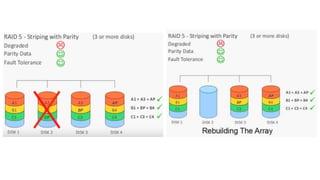
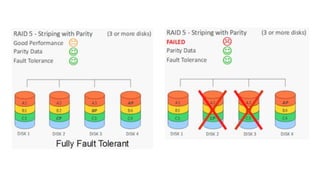
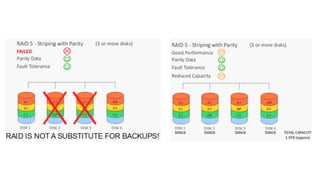
• To improve total IOPS throughput we recommend striping across multiple disks and using SSD
premium disks.
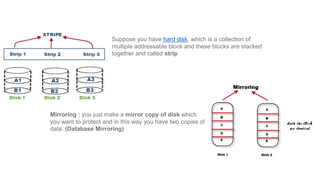
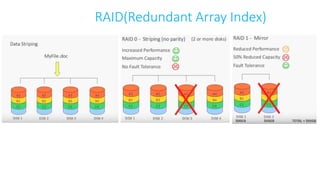
Suppose you have hard disk, which is a collection of
multiple addressable block and these blocks are stacked
together and called strip
Mirroring : you just make a mirror copy of disk which
you want to protect and in this way you have two copies of
data. (Database Mirroring)
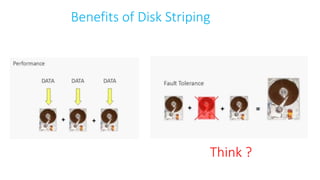
Benefits of Disk Striping
Think ?
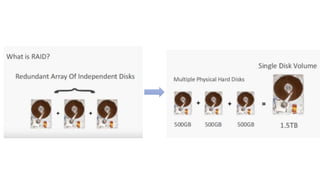
RAID(Redundant Array Index)
Demo: Add extra disk to VM
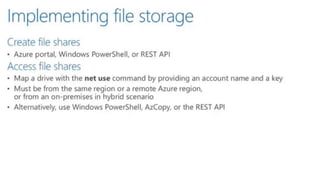
Azure Files
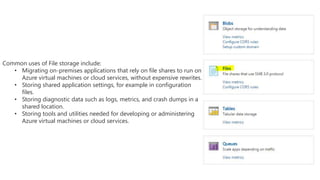
Common uses of File storage include:
• Migrating on-premises applications that rely on file shares to run on
Azure virtual machines or cloud services, without expensive rewrites.
• Storing shared application settings, for example in configuration
files.
• Storing diagnostic data such as logs, metrics, and crash dumps in a
shared location.
• Storing tools and utilities needed for developing or administering
Azure virtual machines or cloud services.
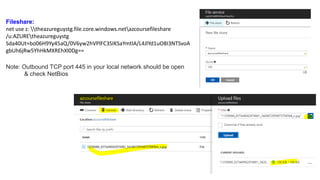
Fileshare:
net use z: theazureguystg.file.core.windows.netazcoursefileshare
/u:AZUREtheazureguystg
Sda40Ut+bo06H9Yy45aQ/0V6yw2hVPlFC3SIKSaYmtlA/L4JlYd1uO8I3NTSvoA
gbUh6jRw5YhHkMXREhXl0Dg==
Note: Outbound TCP port 445 in your local network should be open
& check NetBios
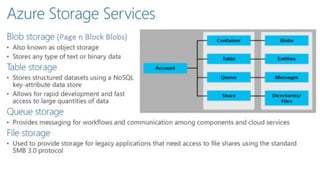
Blob Storage
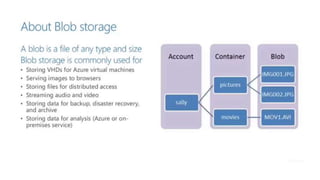
Azure Blob storage is a service that stores unstructured data in the cloud as objects/blobs. Blob storage can store
any type of text or binary data, such as a document, media file, or application installer. Blob storage is also referred
to as object storage.
Common uses of Blob storage include:
• Serving images or documents directly to a browser.
• Storing files for distributed access.
• Streaming video and audio.
• Storing data for backup and restore, disaster recovery, and archiving.
• Storing data for analysis by an on-premises or Azure-hosted service.
Blob Concepts
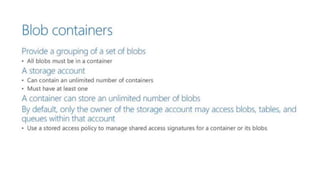
Container: A container provides a grouping of a set of blobs. All blobs must be in a container. An account
can contain an unlimited number of containers. A container can store an unlimited number of blobs. Note
that the container name must be lowercase.
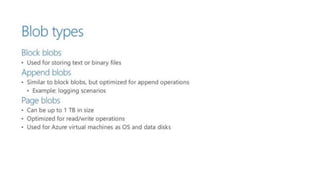
Blob: A file of any type and size. Azure Storage offers three types of blobs: block blobs, page blobs, and
append blobs.
• Block blobs are ideal for storing text or binary files, such as documents and media files.
• Append blobs are similar to block blobs in that they are made up of blocks, but they are optimized for
append operations, so they are useful for logging scenarios.
• Page blobs can be up to 1 TB in size, and are more efficient for frequent read/write operations. Azure
Virtual Machines use page blobs as OS and data disks.
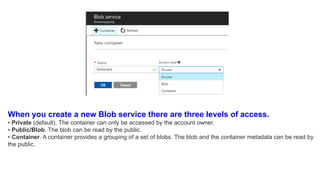
When you create a new Blob service there are three levels of access.
• Private (default). The container can only be accessed by the account owner.
• Public/Blob. The blob can be read by the public.
• Container. A container provides a grouping of a set of blobs. The blob and the container metadata can be read by
the public.
Import and Export Service
When it comes to transferring very large amounts of data to or from the cloud you will want to consider using
theAzure import and export service. The Azure Import/Export Service allows you to:
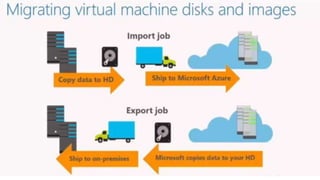
• Import. Securely transfer large amounts of data to Azure blob storage by shipping hard disk drives to an
Azure data center.
• Export. Transfer data from Azure blob storage to hard disk drives and ship to your on-premises site.
This service is suitable in situations where you want to transfer several TBs of data to or from Azure, but uploading or
downloading over the network is not feasible due to limited bandwidth or high network costs. Scenarios where this
would be useful include:
• Migrating data to the cloud. Move large amounts of data to Azure quickly and cost effectively.
• Content distribution. Quickly send data to your customer sites.
• Backup. Take backups of your on-premises data to store in Azure blob storage.
• Data recovery. Recover large amount of data stored in blob storage and have it delivered to your on-
premises location.
Securing Storage
We can think in terms of separating out the securing of storage into two components
Data Security:
We can secure our data in a number of ways
• Data in transit can be secured using client side encryption, HTTPS or SMB 3.0
• Data at rest can be secured using Storage service Encryption
• OS and Data disks for azure virtual machines can be encrypted using Azure Disk Encryption
Management Security:
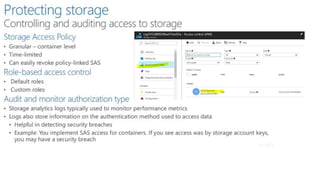
We can control and audit access to storage in a number of ways
• Storage Access Policy: can define policies that can be granular, time-limited and that are able to be
revoked.
• Role-Based access control: can use default and custom defined roles
• Audit and monitor authorization : we can use storage analytic logs to store information on access and
authentication
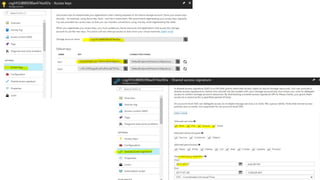
We can also use storage account access keys and Shared Access Signatures (SAS) to secure data access
End of Part 1 Slides

Azure from scratch Part 1 By Girish Kalamati

  • 1.
  • 2.
    Intro & Settingup cloud mind-Set girishkrao.portfoliobox.net theazureguys.wordpress.com twitter.com/TheAzureGuy007 facebook.com/TheAzureGuy007 https://github.com/TheAzureGuy007 https://www.linkedin.com/in/girish-kalamati-357a6398/ https://www.youtube.com/channel/UCd9z6-2mZdqjRnAHh3W_9Uw
  • 4.
  • 6.
    Get Your Own Step1: https://azure.microsoft.com/en-us/pricing/member- offers/vs-dev-essentials/ Step 2: Click Join Now Step 3: Enter your email Id and Subscribe
  • 10.
    Azure DC'S &Service Health
  • 15.
  • 16.
    Azure Services: Compute,Storage, and Identity
  • 17.
    Azure Services: App,Data, and Media
  • 18.
  • 20.
    Classic or ASMPortal ----> New or ARM portal
  • 21.
  • 22.
  • 23.
    Manage Subscription CostsProgrammatically View and analyze usage data and rates charged per subscription and resource using the Azure Billing APIs RateCard API pay-as you-go, MSDN, BizSpark etc Resource Usage API Detailed consumption details for a subscription
  • 24.
    Demo: Azure BillingAPI [Console App] https://github.com/TheAzureGuy007/Azure-From-Scratch
  • 25.
    Demo: Azure BillingAPI [Powershell Script] https://github.com/TheAzureGuy007/Azure-From- Scratch/tree/master/Azure%20Powershell%20Scripts/Azure%20Usage%20API%20-%20Billing%20API's
  • 26.
    Demo: Azure BillingAPI [Azure CLI or BASH] Install Azure CLI : https://docs.microsoft.com/en-us/cli/azure/install-azure-cli echo "deb [arch=amd64] https://packages.microsoft.com/repos/azure-cli/ wheezy main" | sudo tee /etc/apt/sources.list.d/azure-cli.list sudo apt-key adv --keyserver packages.microsoft.com --recv-keys 417A0893 sudo apt-get install apt-transport-https sudo apt-get update && sudo apt-get install azure-cli https://github.com/TheAzureGuy007/Azure-From-Scratch
  • 28.
  • 32.
    Azure Resource ManagerTemplates https://github.com/TheAzureGuy007/azure-quickstart-templates https://azure.microsoft.com/en-in/resources/templates/
  • 33.
  • 34.
  • 36.
    Create/Save Uploaded ARMTemplates Private
  • 37.
    Demo : DeployingResources using Quick Start Templates & Saving Private Templatse https://github.com/TheAzureGuy007/azure-quickstart-templates/tree/master/101-storage-account-create
  • 38.
    Azure REST APIs https://azure.github.io/projects/apis/ OtherTools https://github.com/swagger-api/swagger-ui https://www.openapis.org/
  • 39.
    Azure SDKs Some AzureSDKs currently available for download are: • .NET • Java • Node.js • PHP • Python • Ruby • GO There are also a series of SDKs available tailored for specific workloads or services that contain support for a variety of languages and platforms such as: • IoT SDKs • Media • WebJobs
  • 40.
    Azure Powershell PowerShell Download& Installation: • https://docs.microsoft.com/en- us/powershell/azure/overview?view=azurermps-4.1.0 • https://docs.microsoft.com/en- us/powershell/azure/install-azurerm- ps?view=azurermps-4.1.0 PowerShell for Open Source: • https://channel9.msdn.com/Blogs/hybrid-it- management/PowerShell-on-Linux-and-Open-Source
  • 43.
    Demo: Azure PowerShellon ARM Login-AzureRmAccount Get-AzureRmStorageAccount -Name csg1412d88928fax474ex92a -ResourceGroupName cloud-shell-storage-centralindia
  • 44.
  • 45.
  • 46.
  • 48.
    IaaS & VirtualMachines https://www.linkedin.com/feed/update/urn:li:activity:6290599907720032256/ How VM’s are managed inside azure DC Internal Architecture East-West Traffic issues Noisy Neighbor concept Azure Service outages reason
  • 52.
  • 53.
    Demo: Resizing AzureVirtual Machines https://azure.microsoft.com/en-in/blog/resize-virtual-machines/ What happens inside azure when u do a VM Resize ?
  • 54.
  • 55.
  • 57.
  • 58.
  • 59.
    Supported Software andScenarios Microsoft Server Software Support : Microsoft server software support for Microsoft Azure virtual machines Linux Support- Endorsed and Non-Endorsed versions of Linux : Azure Marketplace & Linux on Azure-Endorsed Distributions
  • 60.
    Assess and OptimizeVirtual Machines
  • 61.
    Azure Virtual MachineReadiness Assessment tool Assessing Virtual Machines
  • 62.
    Microsoft Azure VirtualMachine Optimization Assessment Optimizing Virtual Machines
  • 63.
    Demo: Creating VirtualMachines (Marketplace)
  • 64.
    * Create aWindows virtual machine with a Resource Manager template (Azure-From-Scratch/Azure Powershell Scripts/Creating a simple VM via ARM/ ) * Create a Windows VM with PowerShell (https://github.com/TheAzureGuy007/Azure-From-Scratch/tree/master/Azure%20Powershell%20Scripts https://docs.microsoft.com/en-us/azure/virtual-machines/windows/tutorial-manage-vm ) Demo: Creating Virtual Machines (Portal)
  • 65.
    Demo: New WindowsVirtual Machine (Portal)
  • 66.
  • 68.
  • 69.
  • 70.
    Demo: Deploying LinuxVirtual Machines
  • 71.
  • 73.
    welcome123@GIRISHK-LP:~$ sudo su sudo:unable to resolve host GIRISHK-LP [sudo] password for welcome123: root@GIRISHK-LP:/home/welcome123#Welcome@#123 welcome123@LinuxVM:~$ cd / (change directory) welcome123@LinuxVM:/$ ls (List out directory) bin boot dev etc home initrd.img lib lib64 lost+found media mnt opt proc root run sbin snap srv sys tmp usr var vmlinuz welcome123@LinuxVM:/$ sudo apt-get update Hit:1 http://azure.archive.ubuntu.com/ubuntu xenial InRelease Get:2 http://azure.archive.ubuntu.com/ubuntu xenial-updates InRelease [102 kB] . . . . Get:31 http://security.ubuntu.com/ubuntu xenial-security/universe amd64 Packages [145 kB] Get:32 http://security.ubuntu.com/ubuntu xenial-security/universe Translation-en [74.8 kB] Get:33 http://security.ubuntu.com/ubuntu xenial-security/multiverse amd64 Packages [2,748 B] Fetched 11.9 MB in 11s (1,039 kB/s) Reading package lists... Done
  • 74.
    How to connecta Linux VM Tools to create a SSH Key : http://www.putty.org/ What are SSH Key & How they work : https://www.digitalocean.com/community/tutorials/how-to-set-up-ssh-keys--2
  • 75.
    PuttyKeyGen and Putty UsePutty Gen to create Public and Private Key for setting up SSH connection Use Putty to start up a SSH connection
  • 77.
  • 78.
    Availability Set https://www.youtube.com/watch?v=e2tQTGKy4EU&t=409s Want toknow more about VM SCALING UP & OUT, UPDATE DOMAIN, AVAILABILITY SET & A FAULT DOMAIN ?
  • 79.
    Availability Set A servicelevel agreement (SLA) is in place for availability sets. • For all Virtual Machines that have two or more instances deployed in the same Availability Set, Microsoft guarantees you will have Virtual Machine Connectivity to at least one instance at least 99.95% of the time. • For any Single Instance Virtual Machine using premium storage for all disks, Microsoft guarantees you will have Virtual Machine Connectivity of at least 99.9%. In Case if you want more clarity on Microsoft guarantees Virtual Machine Connectivity of at least 99.9%. With premium disks read my LinkedIn article : https://www.linkedin.com/feed/update/urn:li:activity:6290599907720032256
  • 80.
    Availability Set (Createvia UI or PowerShell) Login-AzureRmAccount New-AzureRmAvailabilitySet -ResourceGroupName "TestTag" -Name "myAvailabilitySet" - Location "West US" // Add -managed parameter to the above line if u u wanna have VM with managed disk be part of this Availibility Set
  • 81.
    Task’s : Trycreating 2 or more VM’s under Availability Set WebTier & DataTier and check which UD or FD they are allocated
  • 82.
    VM Scale Set Virtualmachine scale sets are an Azure Compute resource you can use to deploy and manage a set of identical VMs. • All VMs should be configured the same. • Does support true auto-scale. • No pre-provisioning of VMs is required. • Build large-scale services (Bigger Compute, Big data, and Containerized Workloads). • Scale set can vary between 0 and 100 VMs. • Set the maximum, minimum and default number of VMs, and define triggers – action rules based on resource consumption. • On increasing the no. of virtual machines in a scale set, VMs are balanced across update and fault domains to ensure, maximum availability. Similarly when you scale in.
  • 83.
    Azure Resource Explorer Besttool to View Azure Scale Set Resources : https://resources.azure.com/subscriptions
  • 84.
  • 85.
    Module 3: AzureNetworking
  • 86.
    Azure Virtual Networks(VNets) Where a administrators can have full control over IP address assignments, name resolution, security settings, and routing rules
  • 88.
    Virtual networks :Virtual networks in Microsoft Azure are network overlays that you can use to configure and control connectivity between Azure resources such as VMs and load balancers. IP addresses : VMs, Azure load balancers, and application gateways require IPS Private IP addresses: A private IP address is allocated to a VM dynamically or statically from the defined scope of IP addresses in the virtual network. * The default allocation method is dynamic. * This address is used by VMs in the virtual network to communicate with other VMs in the same VNet connected VNets/networks through a gateway/ExpressRoute connection. Public IP addresses : A Public IP addresses allow Azure resources to communicate with external clients, and are assigned directly at the virtual network interface card of the VM or to the load balancer. Subnets : Network sub-divided into subnets, for logical and security isolation of Azure resources. Each subnet contains a range of IP addresses. Network interface card : VMs communicate with other VMs and other resources on the network by using virtual NICs. Virtual NICs configure VMs with private and optional public IP address. VMs can have more than one NIC for different network configurations.
  • 89.
    DNS DNS : DomainName System (DNS) enables clients to resolve user-friendly fully qualified domain names (FQDNs), such as www.contoso.com, to IP addresses. Azure Provides it’s own DNS but in certain Hybrid scenario’s we may use external DNS system to tag our VM under a Vnet.
  • 90.
    Azure load balancerand internal load balancer : To increase availability and scalability, you can create two or more VMs that publish the same application. For example, if three VMs host the same website, you might want to distribute incoming traffic between them and ensure that if one VM fails, traffic is distributed automatically to the other two. You can use an Azure load balancer to enable this traffic distribution between VMs. Azure Load Balancer’s ( Classic Vs ARM )
  • 91.
    ILB : Internetfacing multi-tier applications
  • 92.
    ILB : Intranetline of business applications LOB applications hosted behind the LB endpoint
  • 93.
    ILB : Intranetline of business applications On-premises network traffic routed to the ILB endpoint
  • 94.
    Demo Note: Basic VM’sdo not support Load Balancers sets https://docs.microsoft.com/en-us/azure/load-balancer/load-balancer-get-started-internet-portal
  • 95.
    Creating an Internet-facingload balancer What is required to create an Internet-facing load balancer? You need to create and configure the following objects to deploy a load balancer. Front-end IP configuration - contains public IP addresses for incoming network traffic. Back-end address pool - contains network interfaces (NICs) for the virtual machines to receive network traffic from the load balancer. Load balancing rules - contains rules mapping a public port on the load balancer to port in the back-end address pool. Inbound NAT rules - contains rules mapping a public port on the load balancer to a port for a specific virtual machine in the back-end address pool. Probes - contains health probes used to check availability of virtual machines instances in the back-end address pool.
  • 103.
  • 104.
    Application gateway :Application gateways provide load-balanced solutions for network traffic that is based on the HTTP proto They use routing rules as application-level policies that can offload Secure Sockets Layer (SSL) processing from load-balanced VMs. In addition, you can use application gateways for a cookie-based session affinity scenario.
  • 105.
    Traffic Manager :Microsoft Azure Traffic Manager is another load-balancing solution that is included within Azure. * You can use Traffic Manager to load balance between endpoints that are located in different Azure regions, at hosted providers, or in on-premises datacenters. * These endpoints can include Azure VMs and Azure websites. * You can configure this load-balancing service to support priority or to ensure that users connect to an endpoint that is close to their physical location for faster response.
  • 108.
  • 109.
  • 110.
  • 111.
  • 112.
  • 113.
    Network security groups: Provides network isolation for Azure resources by defining rules that can allow or deny specific traffic to individual VMs or subnets.
  • 114.
    User Defined Routes: User Defined Routes (UDR) control network traffic by defining routes that specify the next hop of the traffic flow. You can assign User Defined Routes to virtual network subnets.
  • 116.
    Forced tunneling :Forced tunneling you can redirect internet bound traffic back to the company’s on-premises infrastructure. Forced tunneling is commonly used in scenario where organizations want to implement packet inspection or corporate audit. https://docs.microsoft.com/en-us/azure/vpn-gateway/vpn-gateway-about-forced-tunneling
  • 117.
    Cross-premises network connectivity: Azure Virtual Network is bound to Azure subscriptions and it is not possible for multip subscriptions to use the same Azure virtual network. * If you need to provide communications between different Azure subscriptions, you need to create separate Azure virtual networks in each subscription and then use site-to-site virtual network connections or the Microsoft Azure service ExpressRoute, to connect them. * These new Networks are called as RVN. Note: Previously this was limited to single Affinity Group , allowing you to co-locate virtual networks, storage accounts, and services in the physical proximity to each other within the same area of a single datacenter.
  • 118.
    Regional virtual networks: You can create a virtual private network (VPN) between your on-premises computers or networks and an Azure virtual network. Alternatively, you can use ExpressRoute to provide a connection to an azure virtual network that does not cross the Internet. * To connect to an Azure virtual network from an on-premises network, you can use: • A point-to-site VPN • A site-to-site VPN • ExpressRoute • VNet-to-VNet VPN VNet sticking to Affinity Group Regional VNet do not stick to a Affinity Group
  • 119.
    Deploying VNet’s usingARM Deployment Model : With Azure Resource Manager, you can benefit from: * Faster configuration due to resources being grouped. Easier management. * Customization and deployment based on JavaScript Object Notation (JSON) templates. * Networking resources such as IP addresses, DNS settings, or NICs are managed independently and can be assigned to VMs, Azure load balancers, or application gateways.
  • 120.
  • 121.
    In this scenarioyou will create a VNet named TestVNet with a reserved CIDR block of 192.168.0.0./16. Your VNet will contain the following subnets: •FrontEnd, using 192.168.1.0/24 as its CIDR block. •BackEnd, using 192.168.2.0/24 as its CIDR block. https://github.com/TheAzureGuy007/Azure-CLI-Scripts/blob/master/VNet%20Creation.txt https://github.com/TheAzureGuy007/Azure-From- Scratch/blob/master/Azure%20Powershell%20Scripts/VNets/VNet%20Creation%20Script.ps1
  • 122.
    Task: Try deployinga Virtual Machine into a Virtual Network
  • 123.
    Multiple NICs inVirtual Machines • The address for each NIC on each VM must be located in a subnet and multiple NICs on a single VM can each be assigned addresses that are in the same subnet. • The VM size determines the number of NICS that you can create for a VM.
  • 124.
    Limitations of MultipleNICs :The following limitations are applicable when using the multi NIC feature: • Multi NIC VMs must be created in Azure virtual networks (VNets). Non-VNet VMs cannot be configured with Multi NICs. • All VMs in an availability set need to use either multi NIC or single NIC. There cannot be a mixture of multi NIC VMs and single NIC VMs within an availability set. Same rules apply for VMs in a cloud service. • A VM with single NIC cannot be configured with multi NICs (and vice-versa) once it is deployed, without deleting and re-creating it.
  • 125.
  • 126.
  • 127.
    What are ACL? How does they Work ?
  • 128.
    Internet Traffic Public Endpoint + Port  VM Port * U can block or Filter incoming traffic to your website using ACLs * ACL’s block source IP address irrespective whether the traffic is going inside a Linux or windows VM. Note: U does not need to configure explicitly logging into VM and check in advanced firewall rules etc. * Only IPV4 Supported as of now * U can have a max of 50 IPV4 Rules/VM endpoint * U mention ACLS explicitly * Rules are of Permit and Deny type.
  • 129.
    * Rule ordermatters * ACL should have at least one permit rule so to avoid denying all traffic. * Here in the above acco. to Top Down approach for Remote subnets under 175.0.0./8 would allowed even it has denied below. Rule # Remote Subnet Endpoint Permit/Deny 100 175.1.0.1/24 80 Deny 200 300 175.0.0.0/8 175.0.0.0/8 80 80 Permit Deny
  • 130.
    * ACL’s Canbe mentioned on Load Balanced Sets
  • 131.
    # Getting VMdetails Get-AzureVM # Creating a new Access Control List Configuration $Acl = New-AzureAclConfig # Setting Up Variables $vmname = 'theazureguyvm1' $svc = 'theazureguyvm19042' # Adding new Permit rule to configuration stored in $Acl Set-AzureAclConfig -AddRule -ACL $Acl -Action Permit -RemoteSubnet "172.0.0.0/8" -Order 100 -Description "Permit ACL rule" # Adding new Deny rule to configuration stored in $Acl Set-AzureAclConfig -AddRule -ACL $Acl -Action Deny -RemoteSubnet "172.0.0.0/8" -Order 200 -Description "Deny ACL rule" # Applying the ACL with rules on VM Get-AzureVM -ServiceName $svc -name $vmname | Add-AzureEndpoint -Name "Web Acess" -Protocol tcp -LocalPort 80 -PublicPort 80 -ACL $Acl | Update-AzureVM # Removing the ACL with rules on VM Get-AzureVM -ServiceName $svc -name $vmname | Remove-AzureAclConfig - EndpointName "Web Acess" | Update-AzureVM
  • 132.
  • 133.
  • 134.
    Network Security Groups: They control inbound and outbound traffic passing through a Network Interface Card (NIC)
  • 135.
    Network Security GroupRules FrontEnd tier such as Web Proxies and DNS servers are placed in a DMZ that is exposed to the Internet. Functionality in the other tiers such as Application servers and Back end instances need a higher level of security and hence are isolated from the DMZ. These tiers receive traffic only from certain instances in the Front-end and typically have no outbound connectivity to the Internet.
  • 136.
    How NSG canbe applied
  • 137.
    In this scenarioyou will create an NSG for each subnet in the TestVNet virtual network, as described below: •NSG-FrontEnd. The front end NSG will be applied to the FrontEnd subnet, and contain two rules: • rdp-rule. This rule will allow RDP traffic to the FrontEnd subnet. • web-rule. This rule will allow HTTP traffic to the FrontEnd subnet. •NSG-BackEnd. The back end NSG will be applied to the BackEnd subnet, and contain two rules: • sql-rule. This rule allows SQL traffic only from the FrontEnd subnet. • web-rule. This rule denies all internet bound traffic from the BackEnd subnet. Enable NSG diagnostics and logs programmatically
  • 139.
  • 140.
    Custom Network SecurityGroup Rules • There are predefined default rules for inbound and outbound traffic. • You cannot delete these rules, but you can override them, because they have the lowest priority. When you create a custom rule, you can use default tags • Internet. This tag represents Internet IP addresses. • Virtual_network. This tag identifies all IP addresses that are defined in the IP range for the virtual network. It also includes IP address ranges from on-premises networks when they are defined as Local network to virtual network. • Azure_loadbalancer. This tag specifies the default Azure load balancer destination.
  • 141.
    Scenario: if youcreate a network security group, for example in the TestRG resource group, you can use that network security group for a VM that belong to another resource group, for example ProductionRG. Some important things to keep in mind while implementing network security groups include: • By default you can create 100 NSGs per region per subscription. You can raise this limit to 400 by contacting Azure support. • You can apply only one NSG to a VM, subnet, or NIC. • By default, you can have up to 200 rules in a single NSG. You can raise this limit to 500 by contacting Azure support. • You can apply an NSG to multiple resources.
  • 142.
    Demo: Create aVnet, SubNet’s and assign them to a new NSG
  • 143.
  • 144.
  • 148.
    Site – SiteScenario
  • 149.
    Demo: Setup aVnet-VNet VPN connection [Vpn’s, Subnet’s, VPNGwateway’s, VM Ping Test in 2 different Regions]
  • 153.
  • 154.
    Module 4 :Azure Storage
  • 155.
  • 156.
    Windows Azure HDInsightService (try) is a service that deploys and provisions Apache Hadoop clusters in the Azure cloud, providing a software framework designed to manage, analyze and report on big data
  • 157.
  • 158.
    A General-purpose storageaccount gives you access to Azure Storage services such as Tables, Queues, Files, Blobs and Azure virtual machine disks under a single account. This type of storage account has two performance tiers: • A standard storage performance tier which allows you to store Tables, Queues, Files, Blobs and Azure virtual machine disks. • A premium storage performance tier which currently only supports Azure virtual machine disks. A Blob storage account is a specialized storage account for storing your unstructured data as blobs (objects) in Azure Storage. Blob storage has two tiers: • A Hot access tier which indicates that the objects in the storage account will be more frequently accessed. This allows you to store data at a lower access cost. • A Cool access tier which indicates that the objects in the storage account will be less frequently accessed. This allows you to store data at a lower data storage cost.
  • 161.
  • 164.
    Demo: Creating aStorage Account
  • 166.
  • 167.
    Microsoft Azure StorageExplorer Microsoft Azure Storage Explorer is a standalone app from Microsoft that allows you to easily work with Azure Storage data on Windows, macOS and Linux.
  • 168.
    The Storage Explorercan be used to: • Connect to an Azure subscription - Manage storage resources belonging to your Azure subscription. • Work with local development storage - Manage local storage using the Azure Storage Emulator. • Attach to external storage - Manage storage resources belonging to another Azure subscription using the storage account's account name and key. • Attach storage account using Shared Access Signature* (SAS) - Manage storage resources belonging to another Azure subscription using a SAS. • Attach a service using SAS - Manage a specific storage service (blob container, queue, or table) belonging to another Azure subscription using a SAS.
  • 169.
    AzCopy Command LineInterface AzCopy is a Windows command-line utility designed for copying data to and from Microsoft Azure Blob, File, and Table storage using simple commands with optimal performance. You can copy data from one object to another within your storage account, or between storage accounts Download the latest version of AzCopy.
  • 170.
  • 171.
  • 172.
    Operating System Disks Everyvirtual machine has one attached operating system disk. It’s registered as a SATA drive and labeled as the C: drive by default. Temporary Disk Every virtual machine has a temporary disk that is automatically created for you. On Windows virtual machines, this disk is labeled as the D: drive by default and it used for storing pagefile.sys. Note: Don’t store data on the temporary disk. It provides temporary storage for applications and processes and is intended to only store data such as page or swap files. Data Disks Every virtual machine can have data disks to store application data, or other data you need to keep. Data disks are registered as SCSI drives and are labeled with a letter that you choose. The size of the virtual machine determines the size of the temporary disk and the maximum number of disks you can attach. Data disks are stored in a BLOB in an Azure storage account.
  • 173.
    Recommended Document Beforemoving to Azure : https://azure.microsoft.com/en-in/blog/introducing-premium- storage-high-performance-storage-for-azure-virtual-machine-workloads/
  • 176.
    Attaching a NewVirtual Machine Disk When attaching a disk to a virtual machine consider the following: • If you specify Standard you will be able to specify the size, but if you choose Premium (SSD) you will be restricted to 128, 512, and 1023 GiB. • Premium storage disks for virtual machines support up to 64 TB of storage, 80,000 IOPS, and 2000 MB per second disk throughput. Premium storage has extremely low latencies for read operations. • Premium Storage is only supported on Azure GS and DS virtual machines. • Host caching can positively or negatively impact the performance of your application. You should run performance tests to determine the results. • To improve total IOPS throughput we recommend striping across multiple disks and using SSD premium disks.
  • 177.
    Suppose you havehard disk, which is a collection of multiple addressable block and these blocks are stacked together and called strip Mirroring : you just make a mirror copy of disk which you want to protect and in this way you have two copies of data. (Database Mirroring)
  • 179.
    Benefits of DiskStriping Think ?
  • 180.
  • 184.
    Demo: Add extradisk to VM
  • 185.
  • 186.
    Common uses ofFile storage include: • Migrating on-premises applications that rely on file shares to run on Azure virtual machines or cloud services, without expensive rewrites. • Storing shared application settings, for example in configuration files. • Storing diagnostic data such as logs, metrics, and crash dumps in a shared location. • Storing tools and utilities needed for developing or administering Azure virtual machines or cloud services.
  • 189.
    Fileshare: net use z:theazureguystg.file.core.windows.netazcoursefileshare /u:AZUREtheazureguystg Sda40Ut+bo06H9Yy45aQ/0V6yw2hVPlFC3SIKSaYmtlA/L4JlYd1uO8I3NTSvoA gbUh6jRw5YhHkMXREhXl0Dg== Note: Outbound TCP port 445 in your local network should be open & check NetBios
  • 190.
  • 191.
    Azure Blob storageis a service that stores unstructured data in the cloud as objects/blobs. Blob storage can store any type of text or binary data, such as a document, media file, or application installer. Blob storage is also referred to as object storage. Common uses of Blob storage include: • Serving images or documents directly to a browser. • Storing files for distributed access. • Streaming video and audio. • Storing data for backup and restore, disaster recovery, and archiving. • Storing data for analysis by an on-premises or Azure-hosted service. Blob Concepts Container: A container provides a grouping of a set of blobs. All blobs must be in a container. An account can contain an unlimited number of containers. A container can store an unlimited number of blobs. Note that the container name must be lowercase. Blob: A file of any type and size. Azure Storage offers three types of blobs: block blobs, page blobs, and append blobs. • Block blobs are ideal for storing text or binary files, such as documents and media files. • Append blobs are similar to block blobs in that they are made up of blocks, but they are optimized for append operations, so they are useful for logging scenarios. • Page blobs can be up to 1 TB in size, and are more efficient for frequent read/write operations. Azure Virtual Machines use page blobs as OS and data disks.
  • 192.
    When you createa new Blob service there are three levels of access. • Private (default). The container can only be accessed by the account owner. • Public/Blob. The blob can be read by the public. • Container. A container provides a grouping of a set of blobs. The blob and the container metadata can be read by the public.
  • 196.
    Import and ExportService When it comes to transferring very large amounts of data to or from the cloud you will want to consider using theAzure import and export service. The Azure Import/Export Service allows you to: • Import. Securely transfer large amounts of data to Azure blob storage by shipping hard disk drives to an Azure data center. • Export. Transfer data from Azure blob storage to hard disk drives and ship to your on-premises site. This service is suitable in situations where you want to transfer several TBs of data to or from Azure, but uploading or downloading over the network is not feasible due to limited bandwidth or high network costs. Scenarios where this would be useful include: • Migrating data to the cloud. Move large amounts of data to Azure quickly and cost effectively. • Content distribution. Quickly send data to your customer sites. • Backup. Take backups of your on-premises data to store in Azure blob storage. • Data recovery. Recover large amount of data stored in blob storage and have it delivered to your on- premises location.
  • 199.
    Securing Storage We canthink in terms of separating out the securing of storage into two components Data Security: We can secure our data in a number of ways • Data in transit can be secured using client side encryption, HTTPS or SMB 3.0 • Data at rest can be secured using Storage service Encryption • OS and Data disks for azure virtual machines can be encrypted using Azure Disk Encryption Management Security: We can control and audit access to storage in a number of ways • Storage Access Policy: can define policies that can be granular, time-limited and that are able to be revoked. • Role-Based access control: can use default and custom defined roles • Audit and monitor authorization : we can use storage analytic logs to store information on access and authentication We can also use storage account access keys and Shared Access Signatures (SAS) to secure data access
  • 202.
    End of Part1 Slides

Editor's Notes

  • #21 Compare and Create a VM in ARM Talk about RG