Go…Running Kentico CMS on Windows
Azure
Thomas Robbins, Chief Evangelist, Kentico CMS
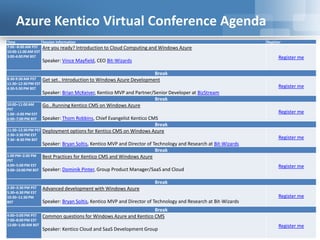
Azure Kentico Virtual Conference Agenda
Time Session Information Register
7:00 –8:00 AM PST
10:00-11:00 AM EST
3:00-4:00 PM BST
Are you ready? Introduction to Cloud Computing and Windows Azure
Speaker: Vince Mayfield, CEO Bit-Wizards
Register me
Break
8:30-9:30 AM PST
11:30–12:30 PM EST
4:30-5:30 PM BST
Get set.. Introduction to Windows Azure Development
Speaker: Brian McKeiver, Kentico MVP and Partner/Senior Developer at BizStream
Register me
Break
10:00–11:00 AM
PST
1:00 –2:00 PM EST
6:00–7:00 PM BST
Go…Running Kentico CMS on Windows Azure
Speaker: Thom Robbins, Chief Evangelist Kentico CMS
Register me
Break
11:30–12:30 PM PST
2:30–3:30 PM EST
7:30 –8:30 PM BST
Deployment options for Kentico CMS on Windows Azure
Speaker: Bryan Soltis, Kentico MVP and Director of Technology and Research at Bit-Wizards
Register me
Break
1:00 PM–2:00 PM
PST
4:00–5:00 PM EST
9:00–10:00 PM BST
Best Practices for Kentico CMS and Windows Azure
Speaker: Dominik Pinter, Group Product Manager/SaaS and Cloud
Register me
Break
2:30–3:30 PM PST
5:30–6:30 PM EST
10:30–11:30 PM
BST
Advanced development with Windows Azure
Speaker: Bryan Soltis, Kentico MVP and Director of Technology and Research at Bit-Wizards
Register me
Break
4:00–5:00 PM PST
7:00–8:00 PM EST
12:00–1:00 AM BST
Common questions for Windows Azure and Kentico CMS
Speaker: Kentico Cloud and SaaS Development Group
Register me
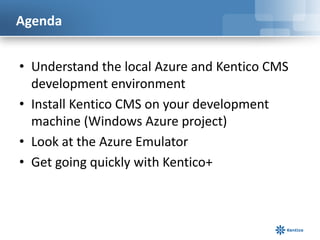
Agenda
• Understand the local Azure and Kentico CMS
development environment
• Install Kentico CMS on your development
machine (Windows Azure project)
• Look at the Azure Emulator
• Get going quickly with Kentico+
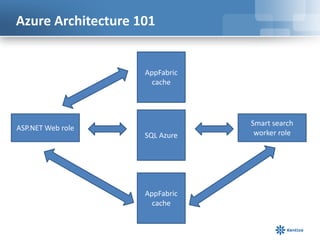
Azure Architecture 101
ASP.NET Web role
AppFabric
cache
SQL Azure
AppFabric
cache
Smart search
worker role
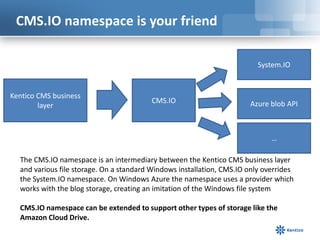
CMS.IO namespace is your friend
Kentico CMS business
layer
CMS.IO
System.IO
Azure blob API
…
The CMS.IO namespace is an intermediary between the Kentico CMS business layer
and various file storage. On a standard Windows installation, CMS.IO only overrides
the System.IO namespace. On Windows Azure the namespace uses a provider which
works with the blog storage, creating an imitation of the Windows file system
CMS.IO namespace can be extended to support other types of storage like the
Amazon Cloud Drive.
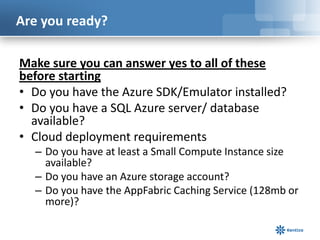
Are you ready?
Make sure you can answer yes to all of these
before starting
• Do you have the Azure SDK/Emulator installed?
• Do you have a SQL Azure server/ database
available?
• Cloud deployment requirements
– Do you have at least a Small Compute Instance size
available?
– Do you have an Azure storage account?
– Do you have the AppFabric Caching Service (128mb or
more)?
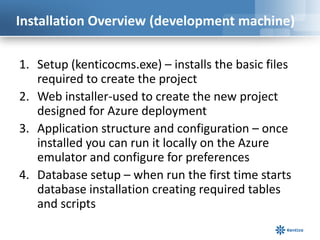
Installation Overview (development machine)
1. Setup (kenticocms.exe) – installs the basic files
required to create the project
2. Web installer-used to create the new project
designed for Azure deployment
3. Application structure and configuration – once
installed you can run it locally on the Azure
emulator and configure for preferences
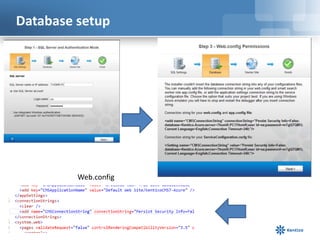
4. Database setup – when run the first time starts
database installation creating required tables
and scripts
Windows Azure SDK 2.0
• Web Sites: Visual Studio Tooling updates for Publishing,
Management, and for Diagnostics
• Cloud Services: Support for new high memory VM sizes, Faster
Cloud Service publishing & Visual Studio Tooling for configuring and
viewing diagnostics data
• Storage: Storage Client 2.0 is now included in new projects & Visual
Studio Server Explorer now supports working with Storage Tables
• Service Bus: Updated client library with message pump
programming model support, support for browsing messages, and
auto-deleting idle messaging entities
• PowerShell Automation: Updated support for PowerShell 3.0, and
lots of new PowerShell commands for automating Web Sites, Cloud
Services, VMs and more
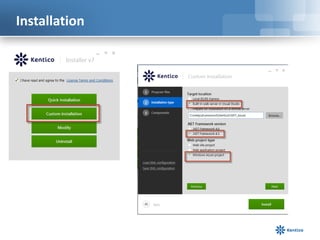
Installation
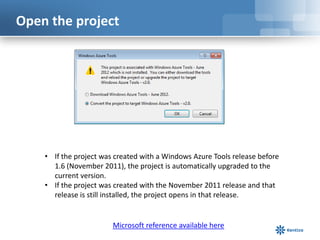
Open the project
• If the project was created with a Windows Azure Tools release before
1.6 (November 2011), the project is automatically upgraded to the
current version.
• If the project was created with the November 2011 release and that
release is still installed, the project opens in that release.
Microsoft reference available here
What happens when I upgrade
• The web.config file for web roles and the app.config file for worker roles are updated to reference the
newer version of Microsoft.WindowsAzure.Diagnostics.DiagnosticMonitoirTraceListener.dll.
• The Microsoft.WindowsAzure.StorageClient.dll, Microsoft.WindowsAzure.Diagnostics.dll, and
Microsoft.WindowsAzure.ServiceRuntime.dll assemblies are upgraded to the new versions.
• Publish profiles that were stored in the Azure project file (.ccproj) are moved to a separate file, with the
extension .azurePubXml, in the Publish subdirectory.
• Some properties in the publish profile are updated to support new and changed features. AllowUpgrade is
replaced by DeploymentReplacementMethod because you can update a deployed cloud service
simultaneously or incrementally.
• The property UseIISExpressByDefault is added and set to false so that the web server that’s used for
debugging won’t automatically change from Internet Information Services (IIS) to IIS Express. IIS Express is
the default web server for projects that are created with the newer releases of the tools.
• If Windows Azure Caching is hosted in one or more of your project’s roles, some properties in the service
configuration (.cscfg file) and service definition (.csdef file) are changed when a project is upgraded.
• If the project uses the Windows Azure Caching NuGet package, the project is upgraded to the most recent
version of the package. You should open the web.config file and verify that the client configuration was
maintained properly during the upgrade process. If you added the references to Windows Azure Caching
client assemblies without using the NuGet package, these assemblies won't be updated; you must
manually update these references to the new versions. For more information about how to upgrade
projects that use Windows Azure Caching, including instructions for verifying your web.config files.
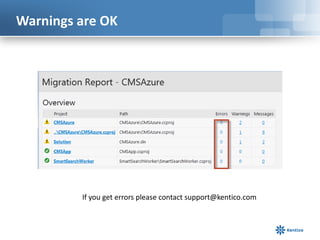
Warnings are OK
If you get errors please contact support@kentico.com
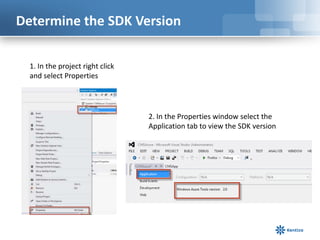
Determine the SDK Version
1. In the project right click
and select Properties
2. In the Properties window select the
Application tab to view the SDK version
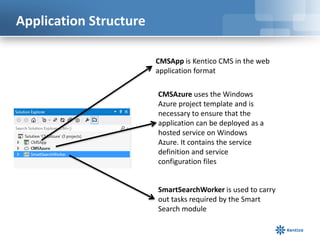
Application Structure
CMSApp is Kentico CMS in the web
application format
CMSAzure uses the Windows
Azure project template and is
necessary to ensure that the
application can be deployed as a
hosted service on Windows
Azure. It contains the service
definition and service
configuration files
SmartSearchWorker is used to carry
out tasks required by the Smart
Search module
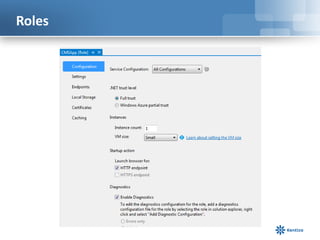
Roles
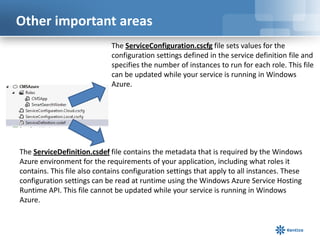
Other important areas
The ServiceDefinition.csdef file contains the metadata that is required by the Windows
Azure environment for the requirements of your application, including what roles it
contains. This file also contains configuration settings that apply to all instances. These
configuration settings can be read at runtime using the Windows Azure Service Hosting
Runtime API. This file cannot be updated while your service is running in Windows
Azure.
The ServiceConfiguration.cscfg file sets values for the
configuration settings defined in the service definition file and
specifies the number of instances to run for each role. This file
can be updated while your service is running in Windows
Azure.
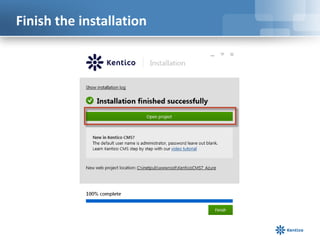
Finish the installation
Database setup
Web.config
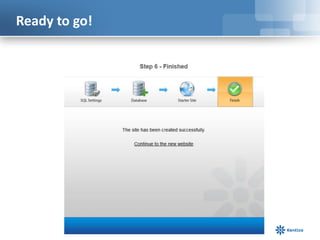
Ready to go!
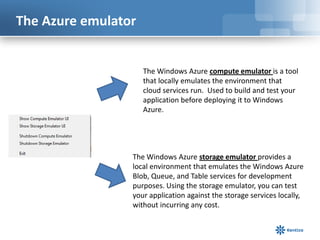
The Azure emulator
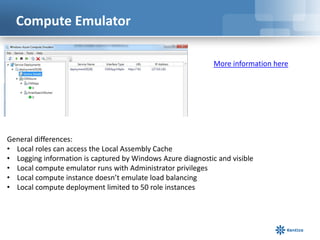
The Windows Azure compute emulator is a tool
that locally emulates the environment that
cloud services run. Used to build and test your
application before deploying it to Windows
Azure.
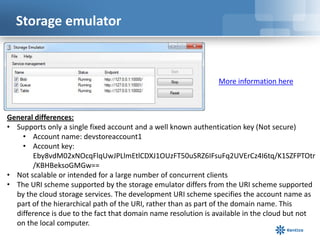
The Windows Azure storage emulator provides a
local environment that emulates the Windows Azure
Blob, Queue, and Table services for development
purposes. Using the storage emulator, you can test
your application against the storage services locally,
without incurring any cost.
Compute Emulator
General differences:
• Local roles can access the Local Assembly Cache
• Logging information is captured by Windows Azure diagnostic and visible
• Local compute emulator runs with Administrator privileges
• Local compute instance doesn’t emulate load balancing
• Local compute deployment limited to 50 role instances
More information here
Storage emulator
General differences:
• Supports only a single fixed account and a well known authentication key (Not secure)
• Account name: devstoreaccount1
• Account key:
Eby8vdM02xNOcqFlqUwJPLlmEtlCDXJ1OUzFT50uSRZ6IFsuFq2UVErCz4I6tq/K1SZFPTOtr
/KBHBeksoGMGw==
• Not scalable or intended for a large number of concurrent clients
• The URI scheme supported by the storage emulator differs from the URI scheme supported
by the cloud storage services. The development URI scheme specifies the account name as
part of the hierarchical path of the URI, rather than as part of the domain name. This
difference is due to the fact that domain name resolution is available in the cloud but not
on the local computer.
More information here
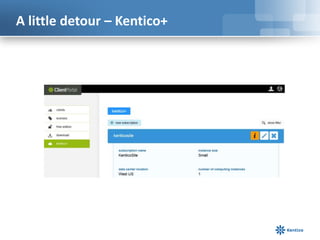
A little detour – Kentico+
Thanks! Still more to come!
Thomas Robbins
Chief Evangelist, Kentico CMS
@trobbins
thomasr@kentico.com
Who are we?
Kentico CMS is one of the
most powerful Customer
Experience Management
Systems and Content
Management Systems on
the planet. With over
16,000 web sites in 90
countries and backed by
over 1,200 partners. it is
used for everything from
simple web sites to
complex applications.
Kentico CMS is easy to
install, simple to manage
and reliable.

Go…Running Kentico CMS on Windows Azure

  • 1.
    Go…Running Kentico CMSon Windows Azure Thomas Robbins, Chief Evangelist, Kentico CMS
  • 2.
    Azure Kentico VirtualConference Agenda Time Session Information Register 7:00 –8:00 AM PST 10:00-11:00 AM EST 3:00-4:00 PM BST Are you ready? Introduction to Cloud Computing and Windows Azure Speaker: Vince Mayfield, CEO Bit-Wizards Register me Break 8:30-9:30 AM PST 11:30–12:30 PM EST 4:30-5:30 PM BST Get set.. Introduction to Windows Azure Development Speaker: Brian McKeiver, Kentico MVP and Partner/Senior Developer at BizStream Register me Break 10:00–11:00 AM PST 1:00 –2:00 PM EST 6:00–7:00 PM BST Go…Running Kentico CMS on Windows Azure Speaker: Thom Robbins, Chief Evangelist Kentico CMS Register me Break 11:30–12:30 PM PST 2:30–3:30 PM EST 7:30 –8:30 PM BST Deployment options for Kentico CMS on Windows Azure Speaker: Bryan Soltis, Kentico MVP and Director of Technology and Research at Bit-Wizards Register me Break 1:00 PM–2:00 PM PST 4:00–5:00 PM EST 9:00–10:00 PM BST Best Practices for Kentico CMS and Windows Azure Speaker: Dominik Pinter, Group Product Manager/SaaS and Cloud Register me Break 2:30–3:30 PM PST 5:30–6:30 PM EST 10:30–11:30 PM BST Advanced development with Windows Azure Speaker: Bryan Soltis, Kentico MVP and Director of Technology and Research at Bit-Wizards Register me Break 4:00–5:00 PM PST 7:00–8:00 PM EST 12:00–1:00 AM BST Common questions for Windows Azure and Kentico CMS Speaker: Kentico Cloud and SaaS Development Group Register me
  • 3.
    Agenda • Understand thelocal Azure and Kentico CMS development environment • Install Kentico CMS on your development machine (Windows Azure project) • Look at the Azure Emulator • Get going quickly with Kentico+
  • 4.
    Azure Architecture 101 ASP.NETWeb role AppFabric cache SQL Azure AppFabric cache Smart search worker role
  • 5.
    CMS.IO namespace isyour friend Kentico CMS business layer CMS.IO System.IO Azure blob API … The CMS.IO namespace is an intermediary between the Kentico CMS business layer and various file storage. On a standard Windows installation, CMS.IO only overrides the System.IO namespace. On Windows Azure the namespace uses a provider which works with the blog storage, creating an imitation of the Windows file system CMS.IO namespace can be extended to support other types of storage like the Amazon Cloud Drive.
  • 6.
    Are you ready? Makesure you can answer yes to all of these before starting • Do you have the Azure SDK/Emulator installed? • Do you have a SQL Azure server/ database available? • Cloud deployment requirements – Do you have at least a Small Compute Instance size available? – Do you have an Azure storage account? – Do you have the AppFabric Caching Service (128mb or more)?
  • 7.
    Installation Overview (developmentmachine) 1. Setup (kenticocms.exe) – installs the basic files required to create the project 2. Web installer-used to create the new project designed for Azure deployment 3. Application structure and configuration – once installed you can run it locally on the Azure emulator and configure for preferences 4. Database setup – when run the first time starts database installation creating required tables and scripts
  • 8.
    Windows Azure SDK2.0 • Web Sites: Visual Studio Tooling updates for Publishing, Management, and for Diagnostics • Cloud Services: Support for new high memory VM sizes, Faster Cloud Service publishing & Visual Studio Tooling for configuring and viewing diagnostics data • Storage: Storage Client 2.0 is now included in new projects & Visual Studio Server Explorer now supports working with Storage Tables • Service Bus: Updated client library with message pump programming model support, support for browsing messages, and auto-deleting idle messaging entities • PowerShell Automation: Updated support for PowerShell 3.0, and lots of new PowerShell commands for automating Web Sites, Cloud Services, VMs and more
  • 9.
  • 10.
    Open the project •If the project was created with a Windows Azure Tools release before 1.6 (November 2011), the project is automatically upgraded to the current version. • If the project was created with the November 2011 release and that release is still installed, the project opens in that release. Microsoft reference available here
  • 11.
    What happens whenI upgrade • The web.config file for web roles and the app.config file for worker roles are updated to reference the newer version of Microsoft.WindowsAzure.Diagnostics.DiagnosticMonitoirTraceListener.dll. • The Microsoft.WindowsAzure.StorageClient.dll, Microsoft.WindowsAzure.Diagnostics.dll, and Microsoft.WindowsAzure.ServiceRuntime.dll assemblies are upgraded to the new versions. • Publish profiles that were stored in the Azure project file (.ccproj) are moved to a separate file, with the extension .azurePubXml, in the Publish subdirectory. • Some properties in the publish profile are updated to support new and changed features. AllowUpgrade is replaced by DeploymentReplacementMethod because you can update a deployed cloud service simultaneously or incrementally. • The property UseIISExpressByDefault is added and set to false so that the web server that’s used for debugging won’t automatically change from Internet Information Services (IIS) to IIS Express. IIS Express is the default web server for projects that are created with the newer releases of the tools. • If Windows Azure Caching is hosted in one or more of your project’s roles, some properties in the service configuration (.cscfg file) and service definition (.csdef file) are changed when a project is upgraded. • If the project uses the Windows Azure Caching NuGet package, the project is upgraded to the most recent version of the package. You should open the web.config file and verify that the client configuration was maintained properly during the upgrade process. If you added the references to Windows Azure Caching client assemblies without using the NuGet package, these assemblies won't be updated; you must manually update these references to the new versions. For more information about how to upgrade projects that use Windows Azure Caching, including instructions for verifying your web.config files.
  • 12.
    Warnings are OK Ifyou get errors please contact support@kentico.com
  • 13.
    Determine the SDKVersion 1. In the project right click and select Properties 2. In the Properties window select the Application tab to view the SDK version
  • 14.
    Application Structure CMSApp isKentico CMS in the web application format CMSAzure uses the Windows Azure project template and is necessary to ensure that the application can be deployed as a hosted service on Windows Azure. It contains the service definition and service configuration files SmartSearchWorker is used to carry out tasks required by the Smart Search module
  • 15.
  • 16.
    Other important areas TheServiceDefinition.csdef file contains the metadata that is required by the Windows Azure environment for the requirements of your application, including what roles it contains. This file also contains configuration settings that apply to all instances. These configuration settings can be read at runtime using the Windows Azure Service Hosting Runtime API. This file cannot be updated while your service is running in Windows Azure. The ServiceConfiguration.cscfg file sets values for the configuration settings defined in the service definition file and specifies the number of instances to run for each role. This file can be updated while your service is running in Windows Azure.
  • 17.
  • 18.
  • 19.
  • 20.
    The Azure emulator TheWindows Azure compute emulator is a tool that locally emulates the environment that cloud services run. Used to build and test your application before deploying it to Windows Azure. The Windows Azure storage emulator provides a local environment that emulates the Windows Azure Blob, Queue, and Table services for development purposes. Using the storage emulator, you can test your application against the storage services locally, without incurring any cost.
  • 21.
    Compute Emulator General differences: •Local roles can access the Local Assembly Cache • Logging information is captured by Windows Azure diagnostic and visible • Local compute emulator runs with Administrator privileges • Local compute instance doesn’t emulate load balancing • Local compute deployment limited to 50 role instances More information here
  • 22.
    Storage emulator General differences: •Supports only a single fixed account and a well known authentication key (Not secure) • Account name: devstoreaccount1 • Account key: Eby8vdM02xNOcqFlqUwJPLlmEtlCDXJ1OUzFT50uSRZ6IFsuFq2UVErCz4I6tq/K1SZFPTOtr /KBHBeksoGMGw== • Not scalable or intended for a large number of concurrent clients • The URI scheme supported by the storage emulator differs from the URI scheme supported by the cloud storage services. The development URI scheme specifies the account name as part of the hierarchical path of the URI, rather than as part of the domain name. This difference is due to the fact that domain name resolution is available in the cloud but not on the local computer. More information here
  • 23.
    A little detour– Kentico+
  • 24.
    Thanks! Still moreto come! Thomas Robbins Chief Evangelist, Kentico CMS @trobbins thomasr@kentico.com
  • 25.
    Who are we? KenticoCMS is one of the most powerful Customer Experience Management Systems and Content Management Systems on the planet. With over 16,000 web sites in 90 countries and backed by over 1,200 partners. it is used for everything from simple web sites to complex applications. Kentico CMS is easy to install, simple to manage and reliable.

Editor's Notes

  • #2 Harnessing the content beast – Content marketing in the multiscreen worldDesktops, mobile phones, massive flat screens, TV’s, tablets, netbooks, mini-tablets… the list of devices your customers are using to consume your content keeps growing! Unfortunately, this doesn’t match your marketing budget. When it comes to serving content in today’s world it’s a myriad of screen sizes and effective calls to action. What are your choices? The landscape of consumerism has changed in a few short years allowing our customers more choices for reading, watching, communicating, socializing, shopping, and making purchase decisions. In this webinar we will look at the core concept and practical strategies for making effective and responsive content in the multi-screen world we live in. We will also look at possible frameworks available and how best to integrate this approach with your marketing plan. Attending this session you will learn: Practical strategies to determine the appropriate screen sizes for your content marketing materials.Building effective calls to action for multiple screens.Practical strategies to use when building your content marketing plan in today’s multi-screen world. Decision strategies for deploying content effectively.