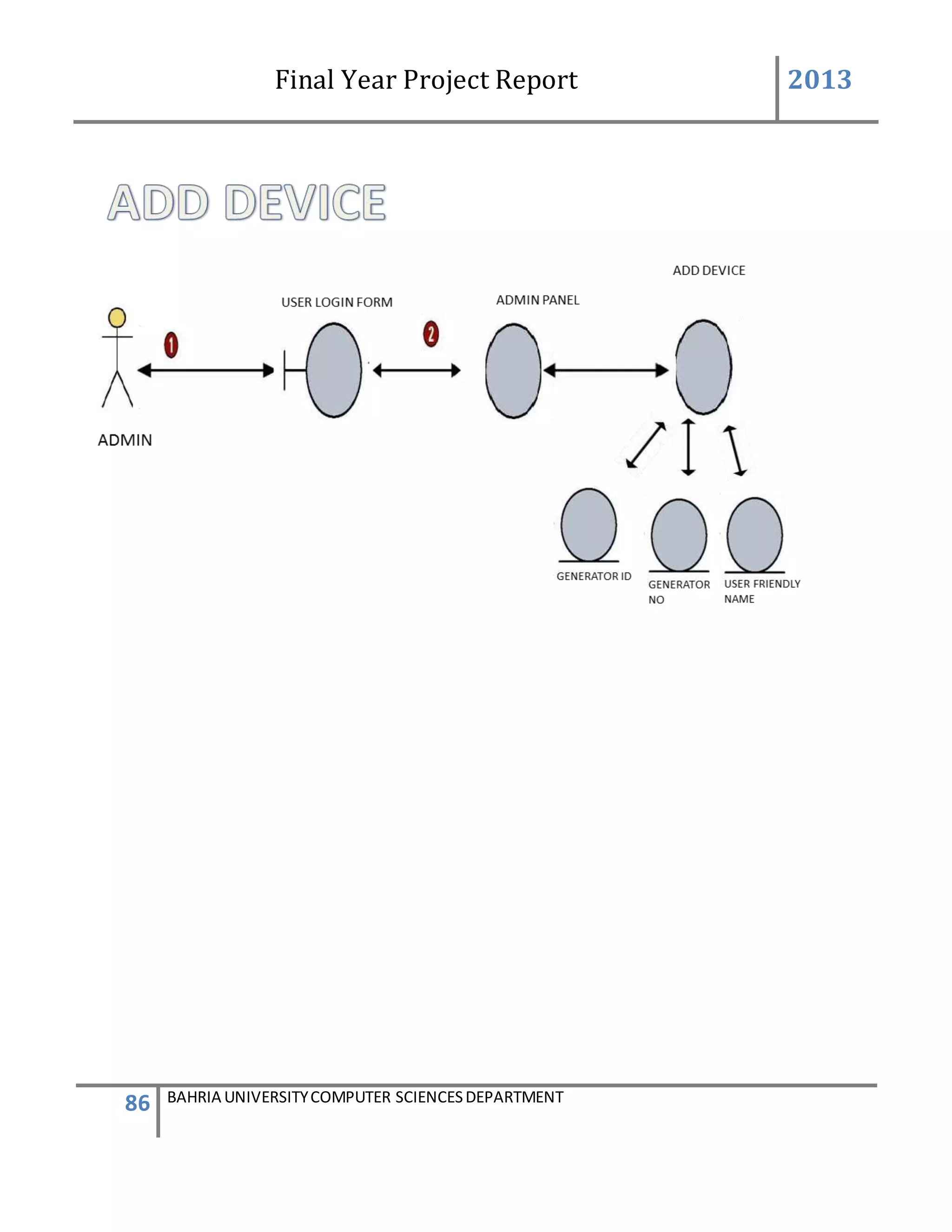
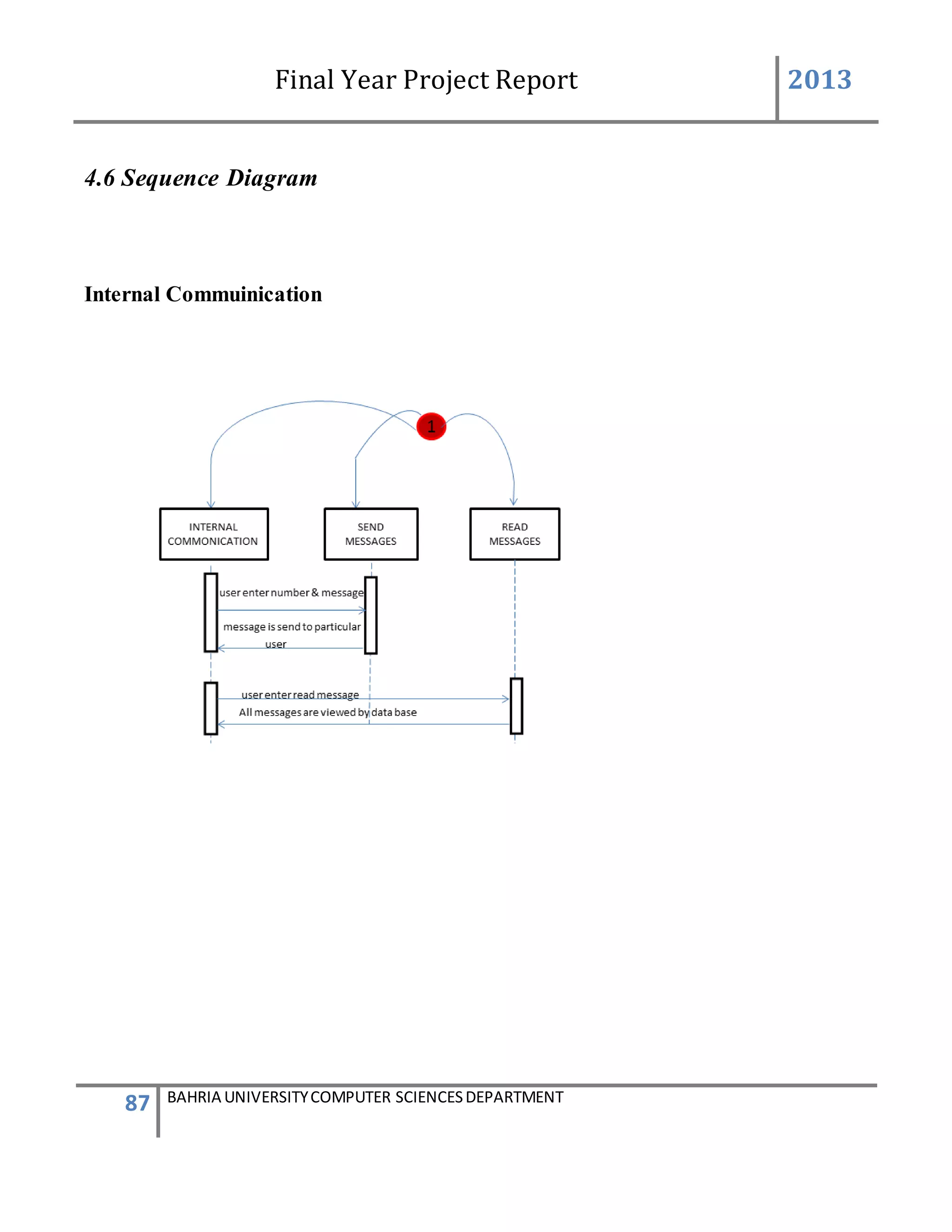
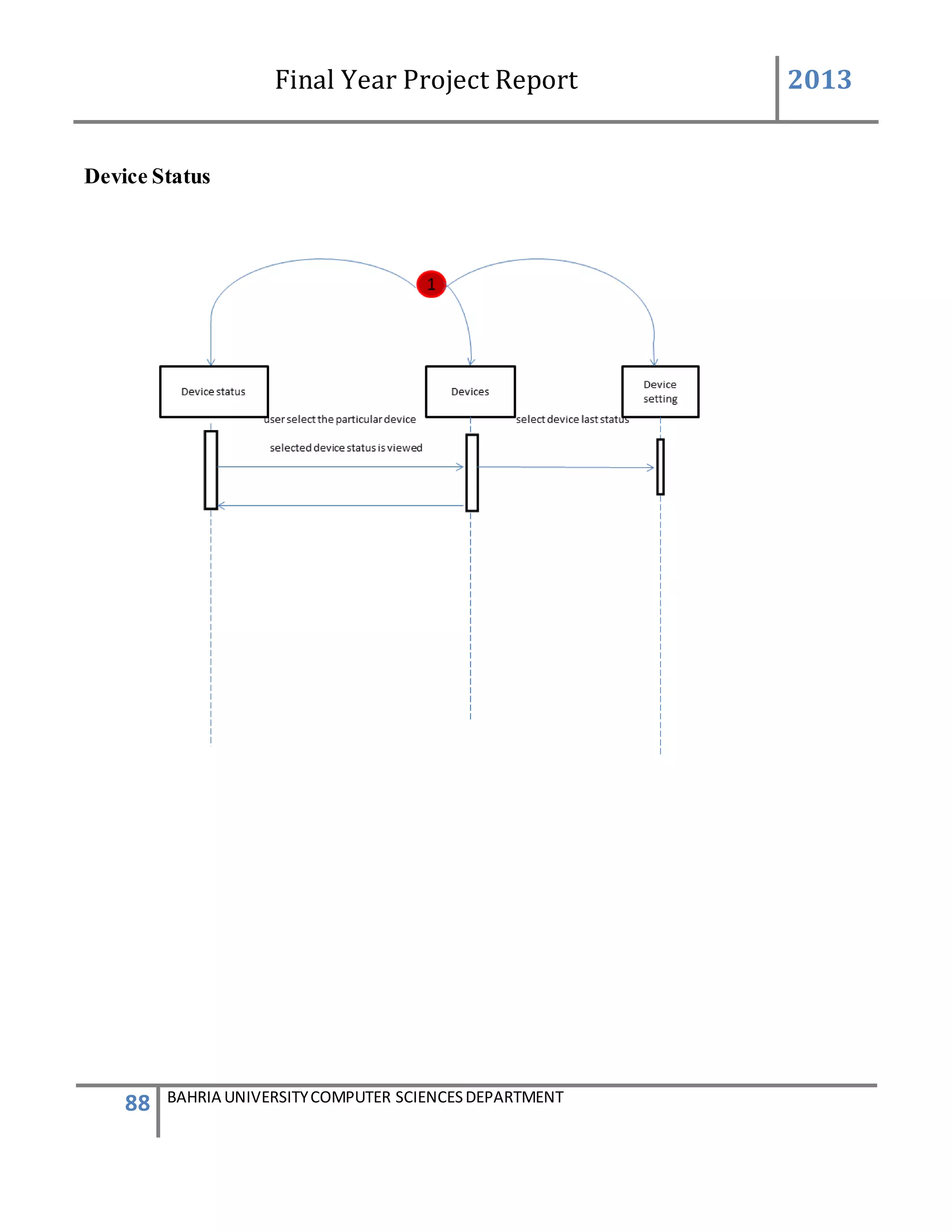
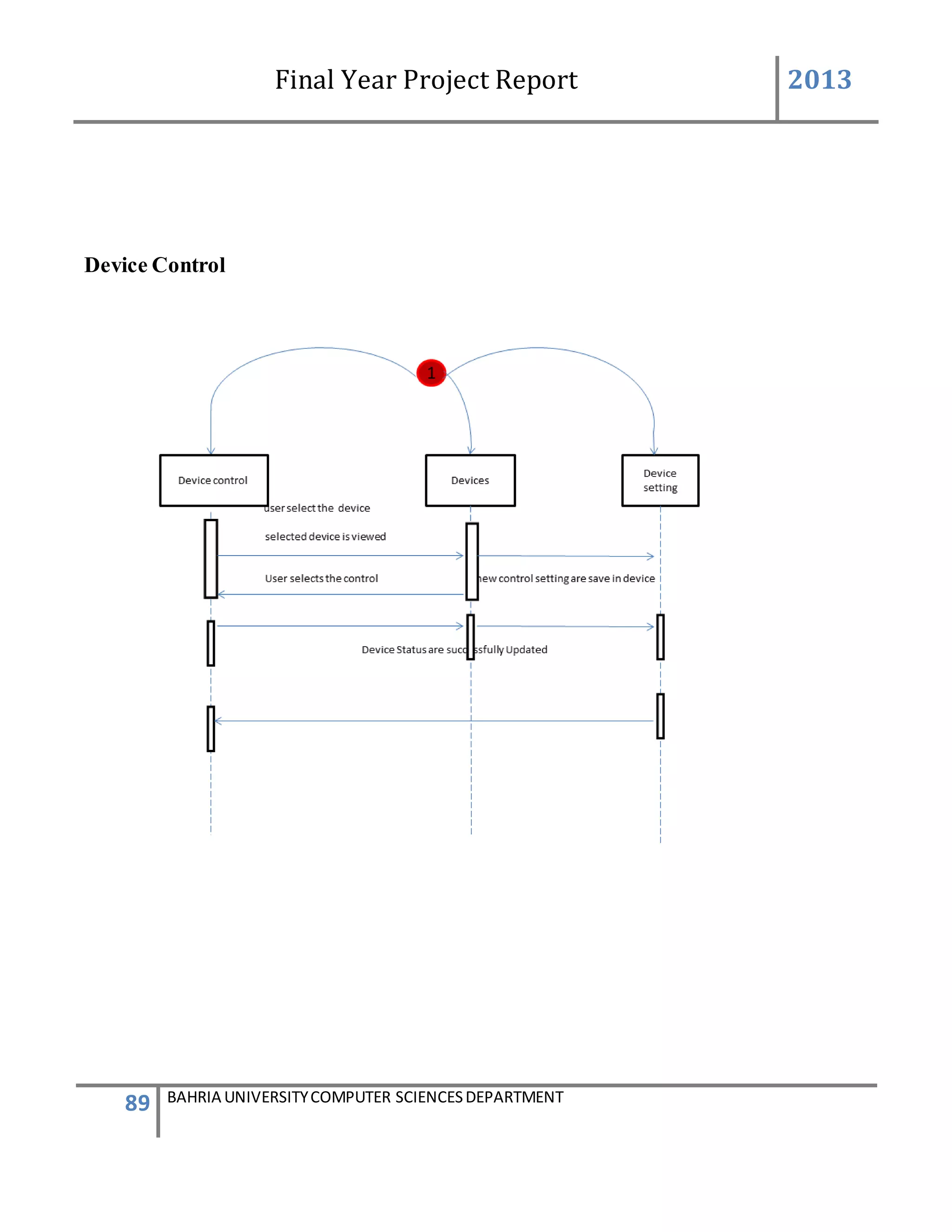
Final Year Project Report 2013
1 BAHRIA UNIVERSITYCOMPUTER SCIENCESDEPARTMENT
FINAL YEAR PROJECT REPORT
GENERATOR MONITORINGSYSTEM
By
Salman Ahmed (19393)
Faisal Khan (19386)
Supervised by:-
Sir Azmat khan
Bahria University (Karachi Campus)
2013
Final Year Project Report 2013
2 BAHRIA UNIVERSITYCOMPUTER SCIENCESDEPARTMENT
GENERATOR MONITORING SYSTEM
BY
Salman Ahmed 19393
Faisal Khan 19386
Submitted to: Sir Azmat Khan
In fulfillment of the requirement for the degree of
BS (Computer Science)
DEPARTMENT OF COMPUTER SCIENCE
BAHRIA UNIVERSITY 2013
Final Year Project Report 2013
3 BAHRIA UNIVERSITYCOMPUTER SCIENCESDEPARTMENT
DECLARATION OF AUTHENTICATION
We certify that the project presented in this report is to the best of our knowledge our own. All
sources used and any help received in the preparation of this dissertation have been
acknowledged. We hereby declare that none of us have submitted this material, either in whole
or in part, for any other degree at this or any other institution.
Names and Signatures of students Date
(1)…………………………….. ……………………..
(2)……………………………. …………………….
Name and Signature of Supervisor Date
…………………………. ……………………….
Final Year Project Report 2013
4 BAHRIA UNIVERSITYCOMPUTER SCIENCESDEPARTMENT
Acknowledgment
After completing our Final Year Project, We would like to take this chance to express our
sincere gratitude to our project supervisor who is Mr. Azmat Khan who has guided us a lot
throughout the project development. When we still doing nothing while project due date is
getting close, Mr. Azmat Khan give us some pressure to complete the system. Without him, we
think we can’t finish the system on time.
We would like to thanks Mr. Azmat Khan for one more time because he share his experience
with us so that we can get more logic understanding on how to develop a software which suitable
for achieving our scope.
Last but not at least, we would like to acknowledge our co-coordinator Mam.Asia Samreen as
she guided us through the project documentation. Problems occurred and she was always there to
help us out.
We would also like to thank our Head of Department Ms. Humera Farooq she help us through
the project and has assisted us in all the ways.
.
Final Year Project Report 2013
5 BAHRIA UNIVERSITYCOMPUTER SCIENCESDEPARTMENT
Abstract
This project describes the development of Generator monitoring application. It is a computerized
system that was developed to monitor generators without the need of somebody to monitor
devices manually on regular interval of time. This system will automatically monitor devices,
update status, change controls, generate reports and produce alerts for different conditions.
This system is mainly used by admin and system user. System user is able to change control,
view status and maintain the communication between the organizations by sending message to
company personnel and also reading messages from them.
Besides that it also allows user to view the alert, device last status, graphs and report module of
generators. On the other hand, other high level of user which is admin level is able to add new
system user and verify if he’s admin level user or just system user, add a new generator, add
generator control setting, add generator initial setting and delete the unwanted messages.
The methodology I use to develop the system is waterfall model. Thus the report’s chapter
included system planning, requirement analysis, system design, programing, system testing and
conclusion of the project. For the system planning, the outcomes are the project objectives and
project aims as well as to defined the project scope. Requirement analysis is a stage to gather the
user requirement such as functional requirement and Non-functional requirement. Next, the
system design is mainly used to design the user interface and database design. The next stage
after system design is programming stage. This is the stage for coding. After complete coding
part, we proceed to system testing to minimize the system bug.
Compare to the existing manual system, our developed system has much strength. In the future,
we can enhance the system by implementing this application on more devices like air-
conditioner; car tracking .we can also improve by adding a GPRS MODULE with the GSM
MODULE.
Final Year Project Report 2013
6 BAHRIA UNIVERSITYCOMPUTER SCIENCESDEPARTMENT
Table of contents
Chapters
1 INTRODUCTION............................................................................................................... 10
1.1 PURPOSE.......................................................................................................................... 10
1.2 PROBLEM ........................................................................................................................ 11
1.3 SOLUTION........................................................................................................................ 12
1.4 SCOPE OF THE PROJECT.................................................................................................... 13
2 BACKGROUND AND LITERATURE REVIEW .......................................................... 14
2.1 OVERVIEW ...................................................................................................................... 14
2.2 PROJECT REQUIREMENTS................................................................................................. 14
2.3 ISSUES TO BE CONSIDERED .............................................................................................. 15
2.4 WHITE PAPERSUMMARY.................................................................................................. 16
3 REQUIREMENTS.............................................................................................................. 20
3.1 FUNCTIONAL/NON FUNCTIONAL REQUIREMENTS............................................................ 20
3.2 STAKEHOLDERS............................................................................................................... 30
3.3 COSTING.......................................................................................................................... 31
3.4 SCHEDULING................................................................................................................... 34
3.5 FEASIBILITYREPORT ....................................................................................................... 36
4 METHODOLOGY AND DESIGN ................................................................................... 41
4.1 REQUIREMENTS PHASE USECASE ..................................................................................... 41
4.2 DESIGN PHASE USECASE .................................................................................................. 55
4.3 CONTEXT DIAGRAM......................................................................................................... 67
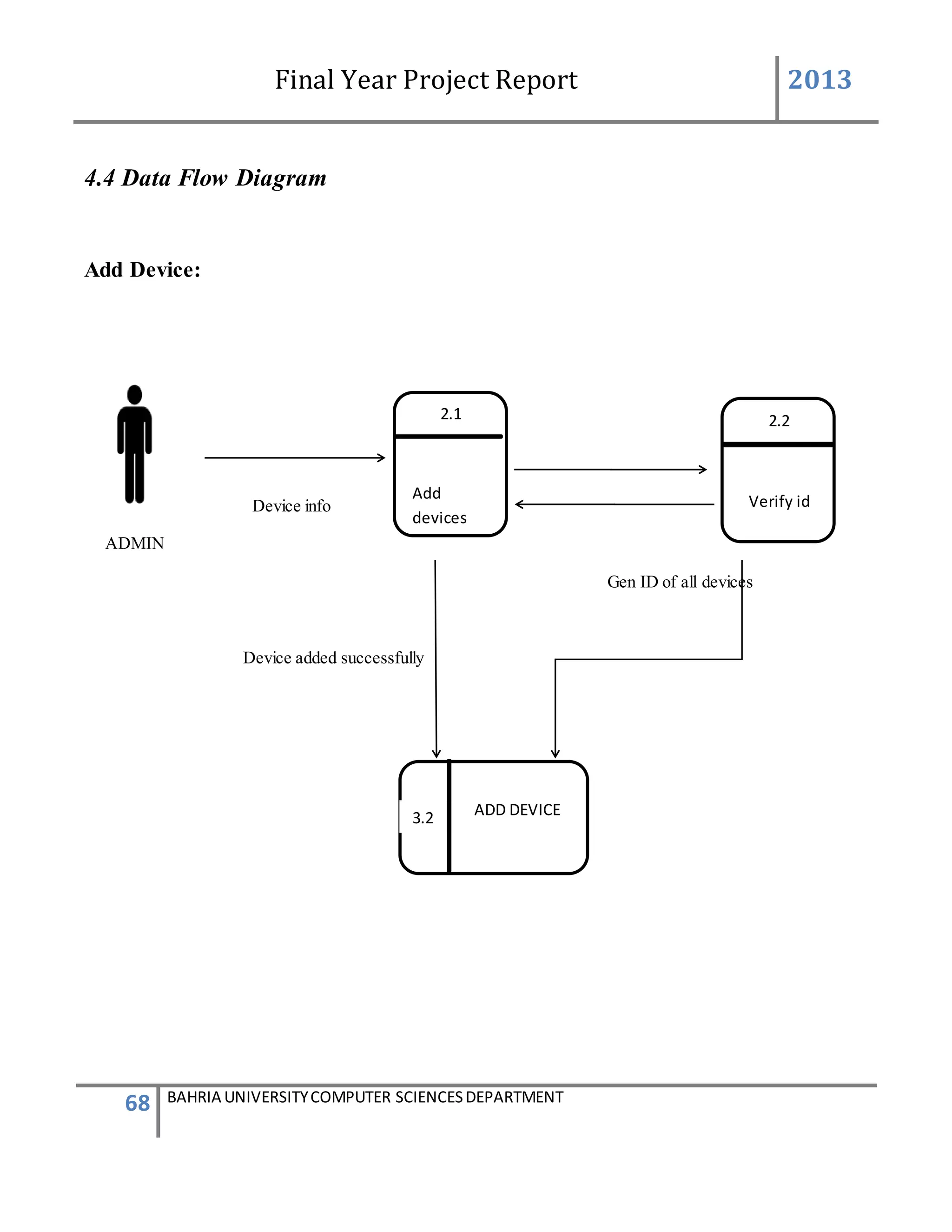
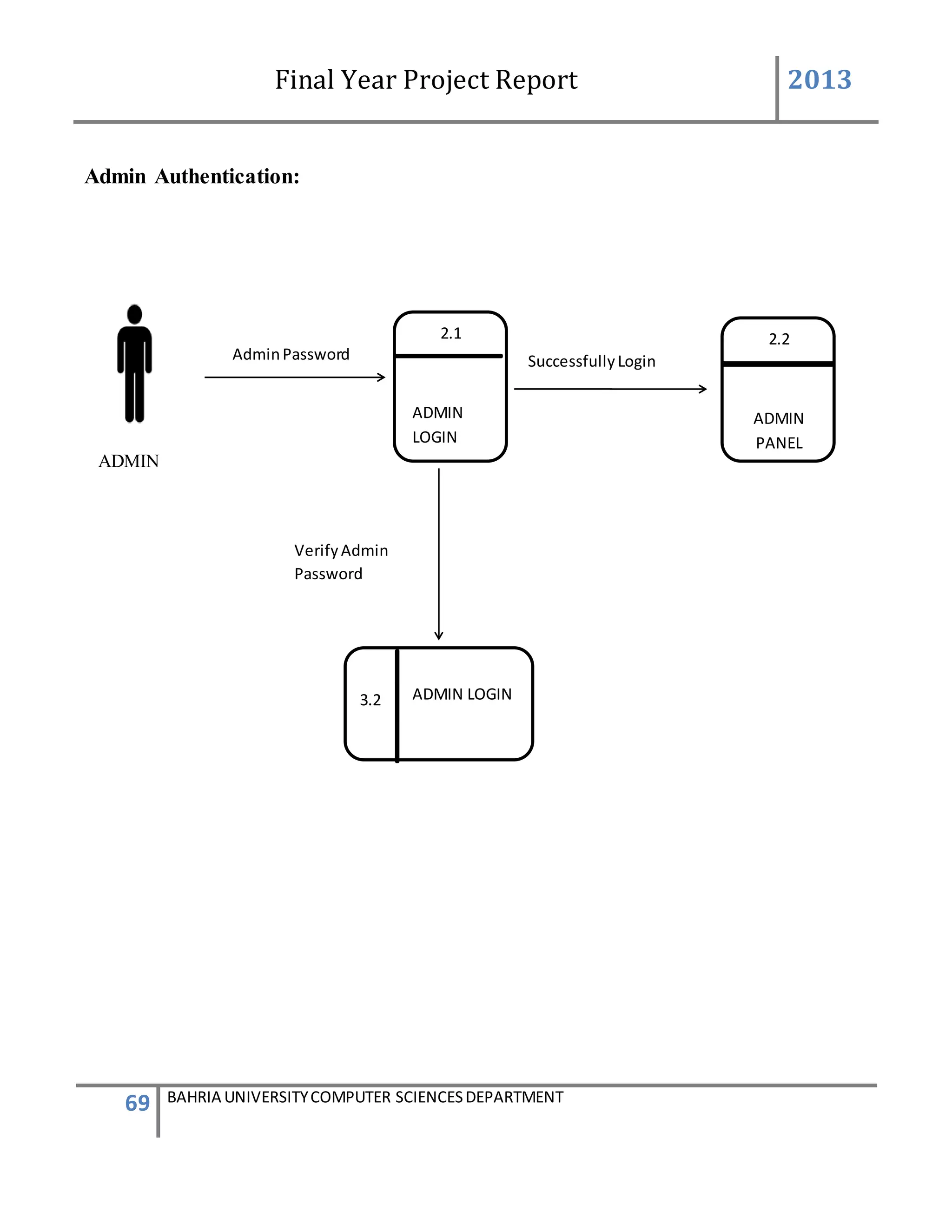
4.4 DATA FLOW DIAGRAM ..................................................................................................... 68
4.5 OBJECT DIAGRAM............................................................................................................ 77
4.6 SEQUENCE DIAGRAM....................................................................................................... 87
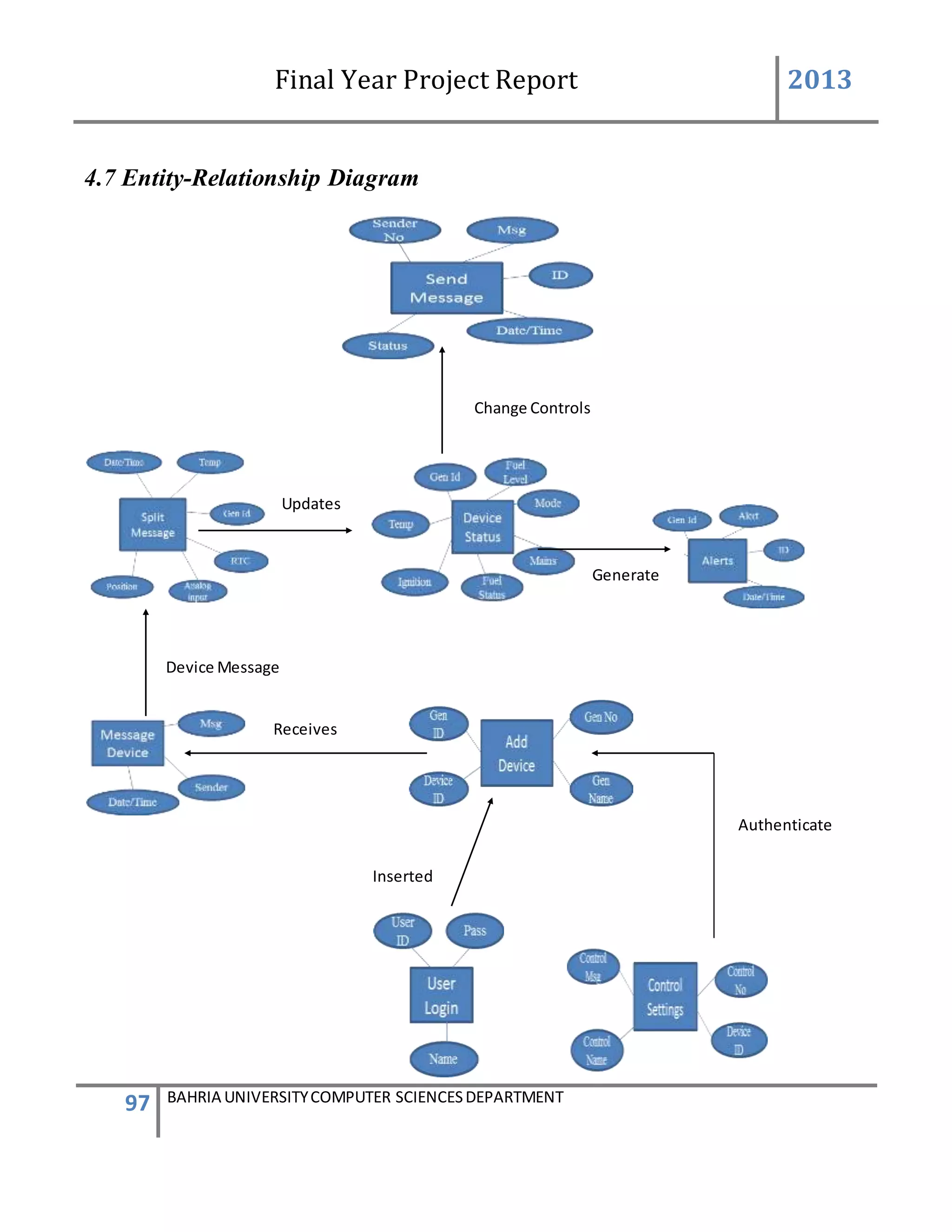
4.7 ENTITYRELATIONSHIP DIAGRAM..................................................................................... 97
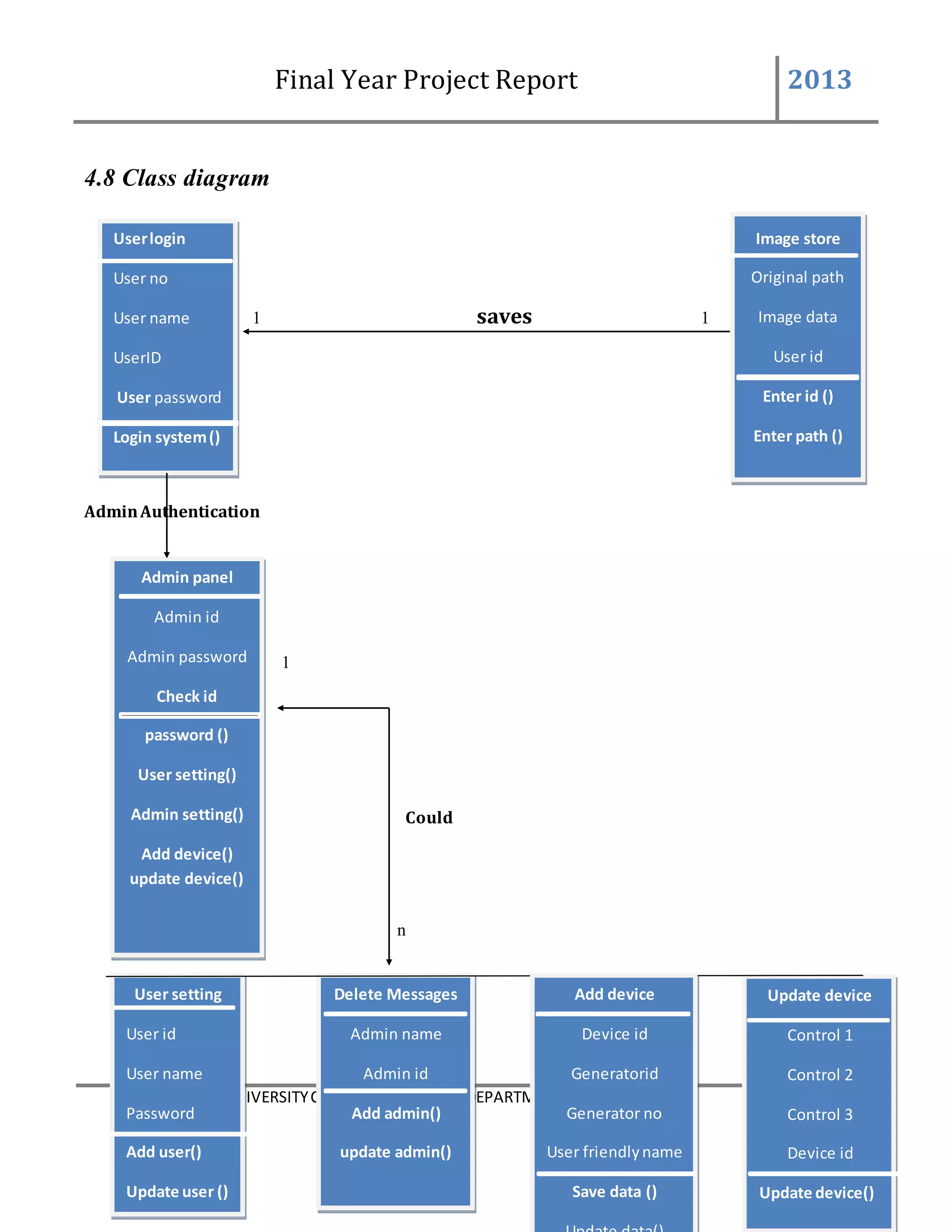
4.8 CLASS DIAGRAM.............................................................................................................. 98
4.9 GRAPHICAL USER INTERFACE ........................................................................................ 100
4.10 ACTIVITY DIAGRA,........................................................................................................ 109
Final Year Project Report 2013
7 BAHRIA UNIVERSITYCOMPUTER SCIENCESDEPARTMENT
5 IMPLEMENTATION ...................................................................................................... 113
5.1 DESCRIPTION................................................................................................................. 113
5.2 CODING......................................................................................................................... 115
6 TESTING & EVALUATION .......................................................................................... 119
6.1 TESTPLAN........................................................................................................................ 113
7 CONCLUSIONS & FUTURE WORK ......................................................................... 1123
7.1 INTRODUCTION................................................................................................................ 123
7.2 EVALUATION OF PROJECT OBJECTIVES ............................................................................ 123
7.3 EVALUATION OF PROJECT STRENGTHS ............................................................................. 124
7.4 SUGGESTION FOR FUTURE ENHANCEMENT ....................................................................... 124
7.5 PERSONAL REFLECTION ................................................................................................... 126
REFERENCES.......................................................................................................................... 128
APPENDICES ........................................................................................................................... 129
GLOSSARY...................................................................ERROR! BOOKMARK NOT DEFINED.
Final Year Project Report 2013
8 BAHRIA UNIVERSITYCOMPUTER SCIENCESDEPARTMENT
List of Figures
Figure 3.1: Gantt Chart .....................................................................................................................37
Figure 3.2: WBS...............................................................................................................................38
Figure 3.3: Network Model ...............................................................................................................39
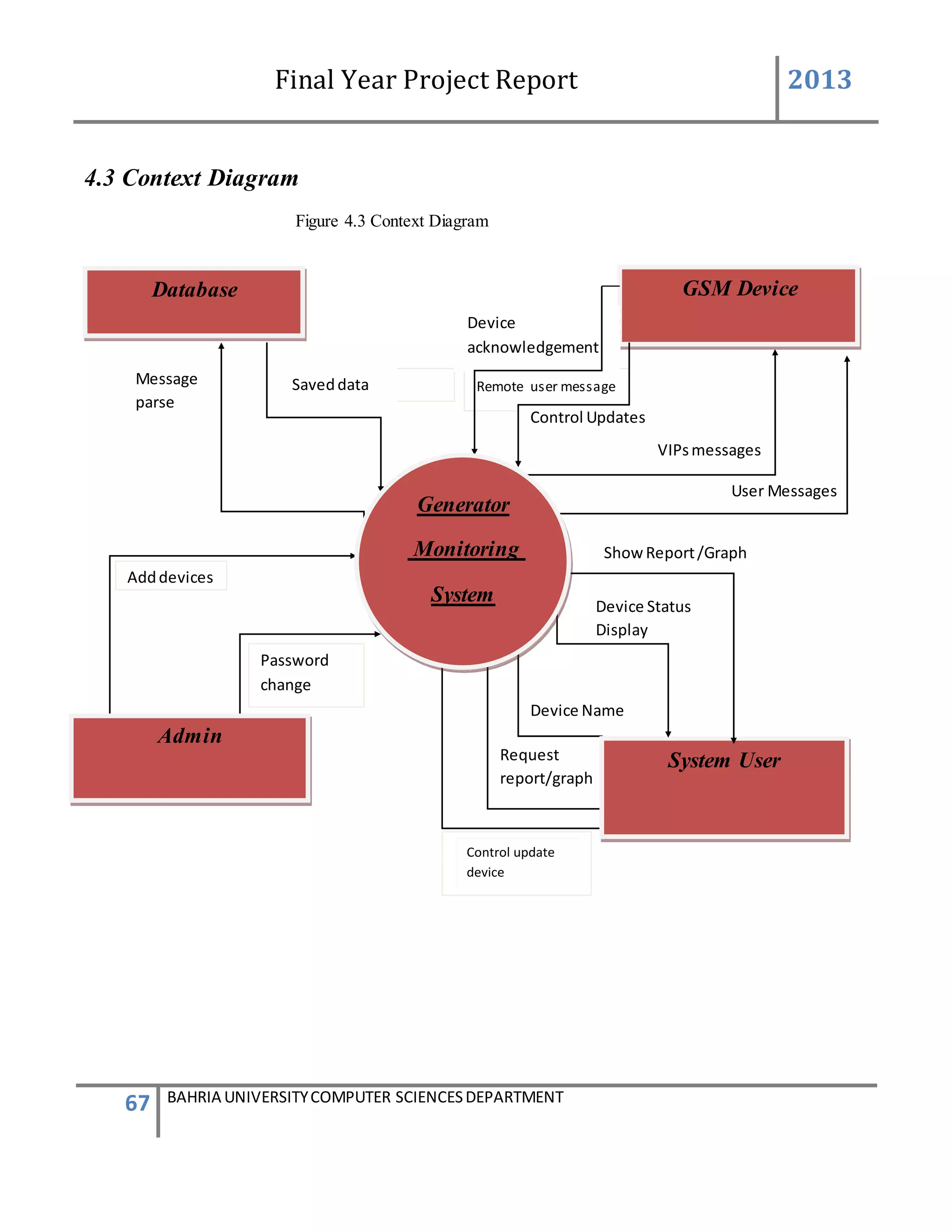
Figure 4.3: Context Diagram .............................................................................................................67
Figure 4.7: Entity Relationship Diagram ............................................................................................97
Figure 4.8: Class Diagram.................................................................................................................98
Final Year Project Report 2013
9 BAHRIA UNIVERSITYCOMPUTER SCIENCESDEPARTMENT
Table of Figures
Table 1: Basic COCOMO model.......................................................................................................31
Table 2: Value for list of factors ........................................................................................................32
Table 3: Evaluation project objectives.............................................................................................. 123
Final Year Project Report 2013
10 BAHRIA UNIVERSITYCOMPUTER SCIENCESDEPARTMENT
Chapter 1
Introduction of the Project
1 Introduction
The project aims and objectives that will be achieved after completion of the system were
carried out in this sub chapter. The succession of the system also will be evaluated through this
sub chapter.
1.1 Purpose
 To eliminate the paper-work in monitoring the generators
 To eliminate the verification of a person to go the field at regular interval of time to
check if the generators are working properly or is no need of more fuel,
temperature is right , the generator is working correctly.
 To implement GSM, device to integrate with our front end software application to
change controls and to inform about these controls. And to record all the alerts and status
change in the generators
 To design a user friendly graphical user interface which suit the users and also a
communication environment using the GSM device
 To produce admin level authority for add new users or admin to the system to allow
admin to add and update a generator settings and to delete messages if they are not
needed
 To complete the system according to project schedule
 To produce technical report that documents the phases, tasks and deliverables in the
Project
Final Year Project Report 2013
11 BAHRIA UNIVERSITYCOMPUTER SCIENCESDEPARTMENT
1.2 Problem
 Maintenance of generator statuses and it was difficult to know about different
alert that can create problems.
 Need a person to visit site where generator are present and growing number of
generators at far location lead more people, transport and wastes times.
 No higher authority was able to know about the generators records read by
workers are correct or not.
 No verification if the generator status written manually are correct or not
Final Year Project Report 2013
12 BAHRIA UNIVERSITYCOMPUTER SCIENCESDEPARTMENT
1.3 Solution
• The GSM SMS Controller allows you to monitor and control an alarm or remote stations
or equipments or machines by SMS. GENERATOR MONITORING SYSTEM. The
system in which every generator is connected with a device which will send message
through the SIM(present inside the device) to the GSM device which is connected with
the system and receiving the message which is useful for the status of the device and
updating the system by giving information about the device.
• We proposed this system to reduce the problems which is being faced by the companies
to maintain their generators.
• To maintain generator without going at each site.
• To avoid going far to look after each generator on weekly basis.
• To reduce the need of manually record the working of the generator.
• To maintain a system which is enables higher authorities to keep watch on their site
generators.
• To built a system which is much scalable to add growing number of generators in one
platform
Final Year Project Report 2013
13 BAHRIA UNIVERSITYCOMPUTER SCIENCESDEPARTMENT
1.4 Scope of the project
The system in which every generator is connected with a device which will send message
through the SIM(present inside the device) to the GSM device which is connected with the
system and receiving the message which is useful for the status of the device and updating the
system by giving information about the device.
 Create an internal communication.
 Automatically sending SMS.
 Receiving SMS.
 Remotely control generator status.
 Generate reports and graph.
 Handle multiple generators.
 Admin panel.
 User login setting.
 Admin login setting.
 Add device setting.
Final Year Project Report 2013
14 BAHRIA UNIVERSITYCOMPUTER SCIENCESDEPARTMENT
Chapter 2
Literature Review
2 Background and Literature Review
2.1 OVERVIEW
 To overcome the problem faced by the company to look after their generators placed at
different sites
 The customer of our project is lucky cement Pvt Ltd
 The deliver software could operate generators by giving signals through software
 It will cost two devices provided by the software house for one generator
 It will take 1 year approximately in competition
 The companies which are involved is ETS(Exponent Technological Solutions) which will
forward it to lucky cement
2.2 Projectgoals
Embedded system for monitoring generator status. Application will be connected with GSM
device to receive data through GSM and translate the data into human understandable form and
send acknowledgement through SMS. The application can received data via sms in digit format
which will then be converted to its specific values and store in the database and status will be
updated automatically the application can also generate graphs and reports logs on database
record in order to monitor the fuel consumption and cost
Organization
ETS (Exponent Technological Solutions)
The software would be implemented at Lucky Cement
Final Year Project Report 2013
15 BAHRIA UNIVERSITYCOMPUTER SCIENCESDEPARTMENT
Projectteam
Organization : name Availability Comment
Salman ahmed ,Faisal Khan Yes Good concept and useful in
learning real market work
2.3 Issues to be considered
One of the major difficulties the company was facing the supervision of manual work
 Maintenance of generator statuses and it was difficult to know about different
alert that can create problems.
 Need a person to visit site where generator are present and growing number of
generators at far location lead more people, transport and wastes times.
 No higher authority was able to know about the generators records read by
workers are correct or not.
 No verification if the generator status written manually are correct or not
2.4 Projectrequirements
A GSM based device for sending and receiving messages
AT commands for setting the GSM devices
Visual studio
Sql server
Research
Final Year Project Report 2013
16 BAHRIA UNIVERSITYCOMPUTER SCIENCESDEPARTMENT
2.5 WHITE PAPER SUMMARY
1. REAL TIME VEHICLE TRACKING SYSTEM
INTRODUCTION
The safety of private and public vehicles is a major concern nowadays so having GPS vehicle
tracking system ensure their safety while travelling. This vehicle tracking system can be found in
consumers vehicles as a theft prevention and retrieval device. Police can follow the signal
emitted by the tracking system to locate a stolen vehicle. Generally this system is meant to be
installed for the four wheelers but for country like India where majority of the people using two
wheelers, here is the cheapest source of an anti-theft tracking system. Vehicle tracking systems
are commonly used by fleet operators for fleet management functions such as routing, dispatch,
on-board information and security. Other applications include monitoring driving behavior, such
as an employer of an employee, or a parent with a teen driver. Vehicle tracking systems are also
popular in consumer vehicles as a theft prevention and retrieval device. Police can simply follow
the signal emitted by the tracking system and locate the stolen vehicle.
METHODODLGY
Real Time Vehicle Tracking System using GSM and GPS Technology- An Anti-theft Tracking
System and Equipment identity register (EIR) is another important database which holds crucial
information regarding mobile equipments.
II. The Base Station System (BSS): The base station system have very important role in mobile
communication.BSS are responsible for connecting subscribers (MS) to mobile networks. All the
communication is made in Radio transmission. The Base station System is further divided in two
systems. These two systems, they are BTS and BSC. BTS (Base Transceiver station) handles
communication using radio transmission with mobile station and BSC (Base station controller)
creates physical link between subscriber (MS) and BTS, then manage and controls functions of
it.
III. Mobile Station (Subscriber):
MS consist of a mobile unit and a smart card which is also referred as a subscriber Identity
Module (SIM) card. This card fitted with the GSM Modem and gives the user more personal
mobility. The equipment itself is identified by a unique number known as the International
Mobile Equipment Identity (IMEI).
DESIGN OF TRACKING SYSTEM
In this Paper it is proposed to design an embedded system which is used for tracking and
positioning of any vehicle by using Global Positioning System (GPS) and Global system for
mobile communication (GSM).The current design is an embedded application, which will
continuously monitor a moving Vehicle and report the status of the Vehicle on demand.. A GSM
modem is used to send the position (Latitude and Longitude) of the vehicle from a remote place..
When the request by user is sent to the number at the modem, the system automatically sends a
Final Year Project Report 2013
17 BAHRIA UNIVERSITYCOMPUTER SCIENCESDEPARTMENT
return reply to that mobile indicating the position of the vehicle in terms of latitude and
longitude. vehicle positioning and navigation system we can locate the vehicle around the globe
with micro controller, GPS receiver, GSM modem.
CONCLUSION
In this paper we have proposed an anti theft system which can be used to track a vehicle fitted
with the proposed device in it. It can also be used in wildlife tracking, asset tracking and in stolen
vehicle recovery. In the future we may integrate other related devices in a vehicle such as
sensors. We can create a server to see the vehicle route and other information on our computer
and we can save the trajectory of it. The sensors installed in our vehicle can report the vehicle
information to our server and it can form an intelligent tracking system. There are various
reasons why car owners and public vehicle operators prefer to have a GPS. You can determine
your location, whether you are travelling locally or in a foreign land, having a GPS is truly an
advantage. If you think you are lost, you can use your GPS receiver to know your exact location.
Vehicle tracking systems are commonly used by fleet operators for fleet management functions
such as routing, dispatch, on-board information and security. Other applications include
monitoring driving behavior, such as an employer of an employee, or a parent with a teen driver.
2. GSM BASED CONTROL SYSTEM
Introduction
The new age of technology has redefined communication. Most people nowadays have access to
mobile phones and thus the world indeed has become a global village. At any given moment, any
particular individual can be contacted with the mobile phone. But the application of mobile
phone cannot just be restricted to sending SMS or starting conversations. New innovations and
ideas can be generated from it that can further enhance its capabilities. Technologies such as
Infra-red, Bluetooth, etc which has developed in recent years goes to show the very fact that
improvements are in fact possible and these improvements have eased our life and the way we
live. Remote management of several home and office appliances is a subject of growing interest
and in recent years we have seen many systems providing such controls. These days, apart from
supporting voice calls a mobile phone can be used to send text messages as well as multimedia
messages (that may contain pictures, graphics, animations, etc)
Problem Statement
Technology has advanced so much in the last decade or two that it has made life more efficient
and comfortable. The comfort of being able to take control of devices from one particular
location has become imperative as it saves a lot of time and effort. Therefore there arises a need
to do so in a systematic manner which we have tried to implement with our system. The system
Final Year Project Report 2013
18 BAHRIA UNIVERSITYCOMPUTER SCIENCESDEPARTMENT
we have proposed is an extended approach to automating a control system. With the
advancement and breakthroughs in technology over the years, the lives of people have become
more complicated and thus they have become busier than before. With the adoption of our
system, we can gain control over certain things that required constant attention. The application
of our system comes in handy when people who forget to do simple things such as turn ON or
OFF devices at their home or in their office, they can now do so without their presence by the
transmission of a simple text message from their mobile phone. This development, we believe,
will ultimately save a lot of time especially when people don’t have to come back for simple
things such as to turn ON/OFF switches at their home or at their office once they set out for their
respective work.
The objective of this project is to develop a device that allows for a user to remotely control and
monitor multiple home/office appliances using a cellular phone. This system will be a powerful
and flexible tool that will offer this service at any time, and from anywhere with the constraints
of the technologies being applied. Possible target appliances include (but are not limited to)
climate control system, security systems, lights; anything with an electrical interface.The
proposed approach for designing this system is to implement a microcontroller-based control
module that receives its instructions and command from a cellular phone over the GSM network.
The microcontroller then will carry out the issued commands and then communicate the status of
a given appliance or device back to the cellular phone.
CONCLUSION
The extensive capabilities of this system are what make it so interesting. From the convenience
of a simple cell phone, a user is able to control and monitor virtually any electrical devices. This
makes it possible for users to rest assured that their belongings are secure and that the television
and other electrical appliances was not left running when they left the house to just list a few of
the many uses of this system. The end product will have a simplistic design making it easy for
users to interact with. This will be essential because of the wide range of technical knowledge
that homeowners have.
3. SMS REMOTE CONTROLLER
The goal of this project is to design an embedded device which can control up to 8devices by
sending a specific SMS message from a cell-phone. This controller is extremely handy at places
where we have to control the ON and OFF switching of the devices but no wired connection to
that place is available.
To implement this, a GSM modem is connected to a programmed microcontroller which would
receive the SMS from a reference cell phone. The control signal part of the received SMS is
extracted and is changed to microcontroller-preferred format. In regular intervals, the modem
would also send the local temperature We have selected GSM because the ubiquity of its
standard makes international roaming very common between mobile phone operators, enabling
Final Year Project Report 2013
19 BAHRIA UNIVERSITYCOMPUTER SCIENCESDEPARTMENT
subscribers to use their phones in many parts of the world. A PC which is connected to the
micro-controller using a serial communication through RS232 can be used for monitoring and
transmission of the control signals to the modem. The monitoring is also done by interfacing a
LCD to the microcontroller. AT commands were used for controlling the functionality of modem
PROBLEM STATEMENT
Initially the SMS is received from the person authorized to use this setup (destination)by the
GSM modem & is with the help of a chip. As per the AT commands given by the
microcontroller to the modem, the control signal from the SMS is extracted and is used to control
the devices connected to it. All this process is necessary to decode the message from SMS.
AT commands
The AT command set is the fundamental interface with the modem. An AT command is simply a
string of characters preceded by the AT prefix that is sent to the modem. The commands
typically instruct the modem to perform some action or set some characteristic within the
modem. The modem has two states: command state and on-line state. In command state, the
modem will accept and respond to AT commands. In the on-line state, the modem will transmit
data, but ignore AT commands. Typically the modem is in the on-line state after dialing. AT
commands has the following format: The command is prefixed with AT (Attention) the
command is terminated by a carriage return <CR> (except the A/ command and escape
sequence).
The commands can be entered in upper case or lower case. The AT prefix can be in upper case or
lower case, but both the A and the T must be the same case.
Characters that precede the AT prefix are ignored. Multiple commands can be strung together on
a single line and spaces may be included between commands but are not necessary. The
command line interpretation begins upon receipt of the carriage return. These commands are
used for request information about the current configuration or operational status of the mobile
phone/modem and test availability and request the range of valid parameters, when applicable,
for an AT command.
Conclusion
The experimental setup is able to read SMS from the SIM card (inside the modem GM28) andthe
modem checks for new SMS from the modem every 1second. The modem is able to send
ambient temperature (reading the thermistor value from SKP) as SMS to the user every 15
minutes. As part of security, the SKP first verifies the received number from SMS text and then
executes the control signal part of the SMS. The LEDs on the SKP indicate the status of the
present ongoing function by the microcontroller.
Final Year Project Report 2013
20 BAHRIA UNIVERSITYCOMPUTER SCIENCESDEPARTMENT
Chapter 3
Requirements Analysis
3 Requirements
In this chapter, we will discuss and analyse about the developing process of Generator
Monitoring System including Software Requirement Specification (SRS) and Data Flow
Diagram (DFD).The functional and non-functional requirements is included in SRS part to
provide complete description and overview of system requirement before the developing process
is carried out. Besides that, DFD provides a view of how the system or business flows that able
to increase the efficiency and effectiveness to achieve system objectives.
3.1 SoftwareRequirementSpecification
Generator monitoring application is a computerized system which can help user to monitor
generator without the need of somebody to monitor devices manually on regular interval of time.
This system will automatically monitor devices generate reports and produce alert for different
conditions.
3.2 Functional/Non Functionalrequirements
3.2.1 SystemObjectives
1 Improvement in control and performance:
The system was developed to overcome the current problems occurred in maintain the status for
devices. The system must be able to validate the user, store the record and view the record
anytime easily.
2 Proper Data compilation
The system is developed to overcome the current problem of incorrect and incomplete
information. The system will itself collect all the information. So the accuracy and completeness
of data problem is itself solved.
Final Year Project Report 2013
21 BAHRIA UNIVERSITYCOMPUTER SCIENCESDEPARTMENT
3 Save space
The system user is also able to view any record easily by pressing only few keys. Compared to
the present time before implementing the system., it can also save lots of time as all the data will
be received through GSM without need somebody to got the field where the generators are
located.
4 Save cost
After implement the generator monitoring application .the manager need to only hire one person
that knows how to use the software. There is no need for employee to go to the field where
generators are there and to get different statuses’ at regular intervals of time. With aids of
computerized system the manager can save the cost of hire employees and also save the paper
cost.
3.2.2 Nonfunctional requirements
Product requirements:
1) Efficiency requirements
With the generator monitoring application, the system user should be able to
process faster when there are different statuses generated by different generator
devices .In addition with the use of GSM device all the data will be received
automatically and all the working will be then take place more well-organized
and quickly rather than the present system working is not very efficient and
helpful. But the system implemented will work more proficiently.
2) Reliability requirements
The system must perform accurately towards system user needs. When the
system user changes any control of any device then that device change status
should be saved and recorded for any more decisions making ahead. Likewise
for any control change or any alert message will send to some specific people
upon that action take place to ensure that the correct action is being taken.
3) Usability requirements
Final Year Project Report 2013
22 BAHRIA UNIVERSITYCOMPUTER SCIENCESDEPARTMENT
The system developed should be trouble free and non complicated for the
system. The system working must be straight forward so that it can be used by a
non technical person also. The system designed must be user friendly and
simple to use by the user so that the user can perform their job nicely. It must
have clear instruction to guide user through the system besides that the
description of error message should be clear.
Organizational requirements:
1) Implementation requirements
In implementing the system, it uses the C#.net as the main programming
language and tools. Besides that, the SQL language will also be used to maintain
the information in the database. On the other hand SQL server 2005 needs to be
installed and the software is installed properly and working correctly is verified.
And it’s make sure no bugs is present.
2) Delivery requirements
The whole system is to be estimate to be down through 4 months time and
documentation will be done in 2 months. The full system will be delivers in a
soft copy method while the documentation will be delivering in hard copy.
External requirements:
1) Legislative requirements
The information that use must be acknowledge by the authorized people so that
it has no violating the law. This information is copyrighted and protected by the
law .Besides that, when visitors want to become the member of the generator
monitoring system, he or she must agree with the rules stated in the system.
2) Security Requirements
This system must be highly secure in the login part. It is because the significant
places can only view by admin level. Staff can perform most of the process
except device settings and changing user ID and password.
Final Year Project Report 2013
23 BAHRIA UNIVERSITYCOMPUTER SCIENCESDEPARTMENT
3.2.3 Functional requirements
1. Admin User
 Admin Login
Description of Feature
This feature used by the user (admin) to login into the more secured area.
They are required to key in the password only for entering the significant areas. The
password will be verified and invalid password is not allowed to enter these areas.
USER ACTION / SYSTEM RESPONSE sequences
USER ACTION : User selects AdminPanel on the system
SYSTEM RESP : System request for Admin password
USER ACTION : User enters Admin password at the textbox provided.
SYSTEM RES : System verifies the Admin password with the data inside
database. If the user Password not matches, message box will be
prompt out to notify the user. If valid, user successfully enter
the confined areas
Functional Requirements
 The system must only allow the Admin with password to enter the significant areas of the
system.
 The system must be able to perform authorization process. Which decides what the
user’s level can access to.
 The system must ask again for the password when the Admin logout after they completed
using the system.
 Add New Device
Final Year Project Report 2013
24 BAHRIA UNIVERSITYCOMPUTER SCIENCESDEPARTMENT
Description of Feature
This feature can be performing by only Admin to add new device.
USER ACTION / SYSTEM RESPONSE Sequences
USER ACTION : Admin press Add new Device
SYSTEM RES : System prompts Add Device form
USER ACTION : In the Add Device form Device ID is system generated .Admin
enters the user friendly name of the device, generator ID of the
device, add user friendly controls name and their defined VIP
numbers of person to which the message will be send and defined
messages which will be given to that VIP numbers.
SYSTEM RES : System will validate the information such as the number is in
correct format. If all the information was entered correctly.
system will add the device into [Device] table and
add[Device Info] table. After ,enter into database, system will
prompts a message box stated that the device was enter
successfully.
Functional Requirements
 System must be able to auto generate the Device ID
 System must not generate the same Device ID
 The system must be able to verify the information
 The repeated generator ID should not be allowed into the database.
 Device Maintenance
Description of Feature
This feature can be performing by only admin to edit information of the device or deactivate
a device.
USER ACTION / SYSTEM RESPONSE Sequences
Final Year Project Report 2013
25 BAHRIA UNIVERSITYCOMPUTER SCIENCESDEPARTMENT
USER ACTION : User press Edit Device on the Add device form
SYSTEM RES : System prompts Edit Device form
USER ACTION : In the Edit Device form User selects the device to be edited.
SYSTEM RES : System views the selected device to be edited by the user
USER ACTION : User can edit the User friendly name of the device, generator ID of
the device, user friendly controls name and their defined VIP
numbers of person to which the message will be send and defined
messages which will be given to that VIP numbers.
SYSTEM RES : System will validate the information such as the number is in correct
format . If all the information was entered correctly. System will
edit the device into [Device] table and add[Device Info] table. After
enter into database, system will prompts a message box stated that
the device edited information replaced successfully.
Functional Requirements
 The system must be able to verify the information
 System must enter the correct generator ID into the device specification information
 The repeated generator ID should not be allowed into the database
 Admin Password Setting
Description of Feature
This feature can be performing by user(Admin) to change password .
USER ACTION / SYSTEM RESPONSE Sequences
USER ACTION : User press settings in the Admin Panel
SYSTEM RES : System prompts password setting
USER ACTION : In the Password Setting user presses change Admin password
SYSTEM RES : System will ask for new password to be enter into the textbox
USER ACTION : User will enter new password.
Final Year Project Report 2013
26 BAHRIA UNIVERSITYCOMPUTER SCIENCESDEPARTMENT
SYSTEM RES : System will show message box that the Admin password is changed
successfully
Functional Requirements
 The system must be able to verify the information
 System must replace the admin password successfully
2. NORMAL USER
 User Login
Description of Feature
This feature used by the user (admin/normal ) to login into the system.
They are required to key in the user id and password before they are allows entering the
system. The user is and password will be verified and invalid id is not allowed to enter the
system.
USER ACTION / SYSTEM RESPONSE sequences
USER ACTION : User runs the system
SYSTEM RES : System request for user id and password
USER ACTION : User enters user id and password at the textbox provided.
SYSTEM RES : System verifies the user id and password with the data inside
database. If the user id is invalid or password not matches, message
box will be prompt out to notify the user. If valid, user successfully
login to the Generator Monitoring System.
Functional Requirements
 The system must only allow the user with valid id and password to enter the system.
 The system must be able to perform authorization process. Which decides what the
user’s level can access to.
 The user must able to logout after they finished using the system.
 Password Setting
Final Year Project Report 2013
27 BAHRIA UNIVERSITYCOMPUTER SCIENCESDEPARTMENT
Description of Feature
This feature can be performing by all users to change user id and password
USER ACTION / SYSTEM RESPONSE Sequences
USER ACTION : User press change ID and password
SYSTEM RES : System prompts PASSWORD setting
USER ACTION : In the Password Setting user presses change USER ID AND
PASSWORD
SYSTEM RES : System will give a selection of USER ID and PASSWORD
USER ACTION : User will select the ID for which editing is to be done.
SYSTEM RES : System will view the User ID and Password to be edited by the user
USER ACTION :User can change the ID which he wants to keep or the new password
can be replace of that particular selected ID.
SYSTEM RES : System will show message box that the User ID and Password is
changed successfully
Functional Requirements
 The system must be able to verify the information
 System must enter the correct generator ID into the device specification information
 The repeated generator ID should not be allowed into the database
 Password Recovery
Description of Feature
This feature used by the user (normal/Admin) whenever they forget their login password.
USER ACTION / SYSTEM RESPONSE Sequences
USER ACTION : User runs the system
SYSTEM RES : System request for user id and password.
USER ACTION : User forgets the password and press the “Forget Password”.
Final Year Project Report 2013
28 BAHRIA UNIVERSITYCOMPUTER SCIENCESDEPARTMENT
SYSTEM RES : System asks security question
USER ACTION : User enters the security question correct it will ask the user to enter
new password
SYSTEM RES : System will replace this password with the old one
Functional Requirements
 The system must be able to replace the new password with the old one
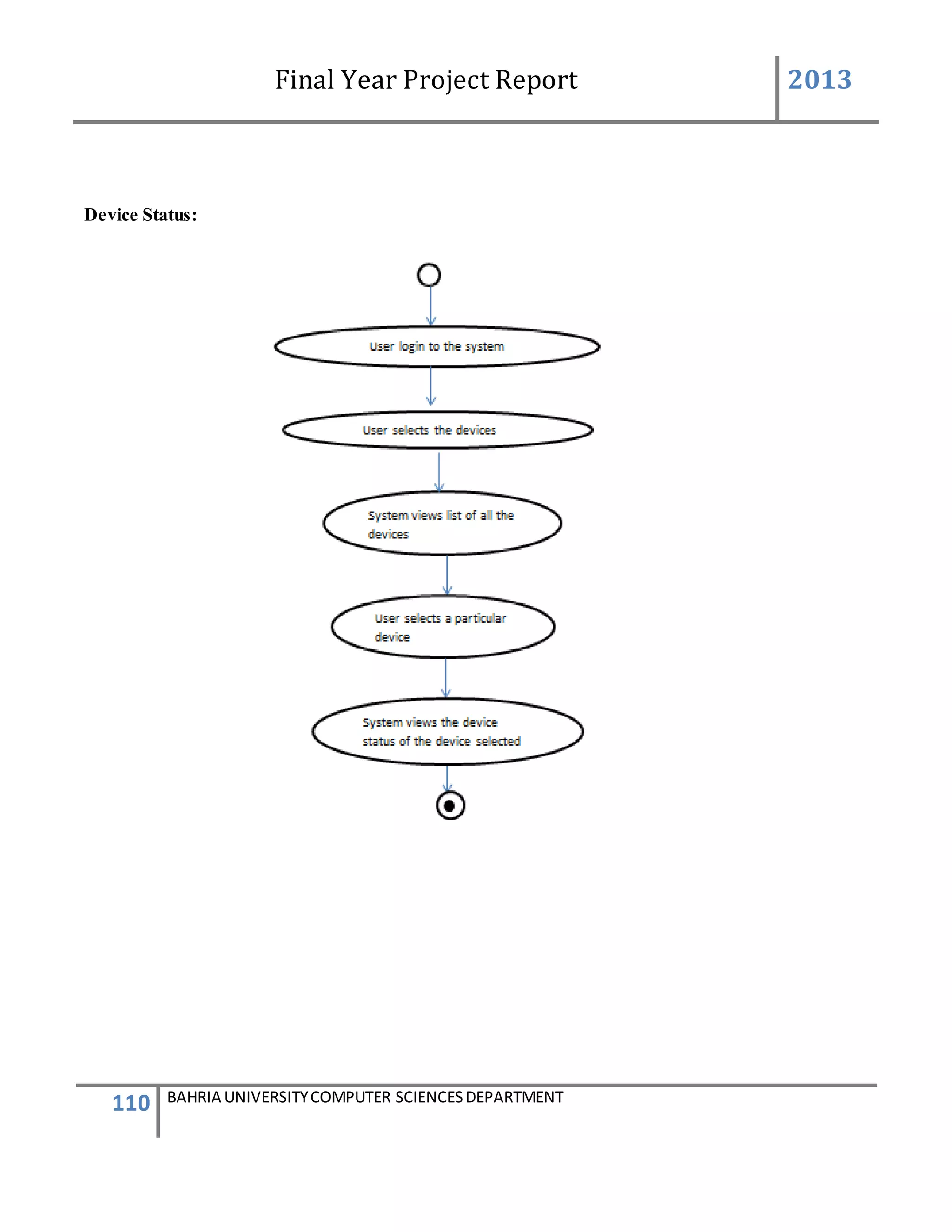
 Device Status
Description of Feature
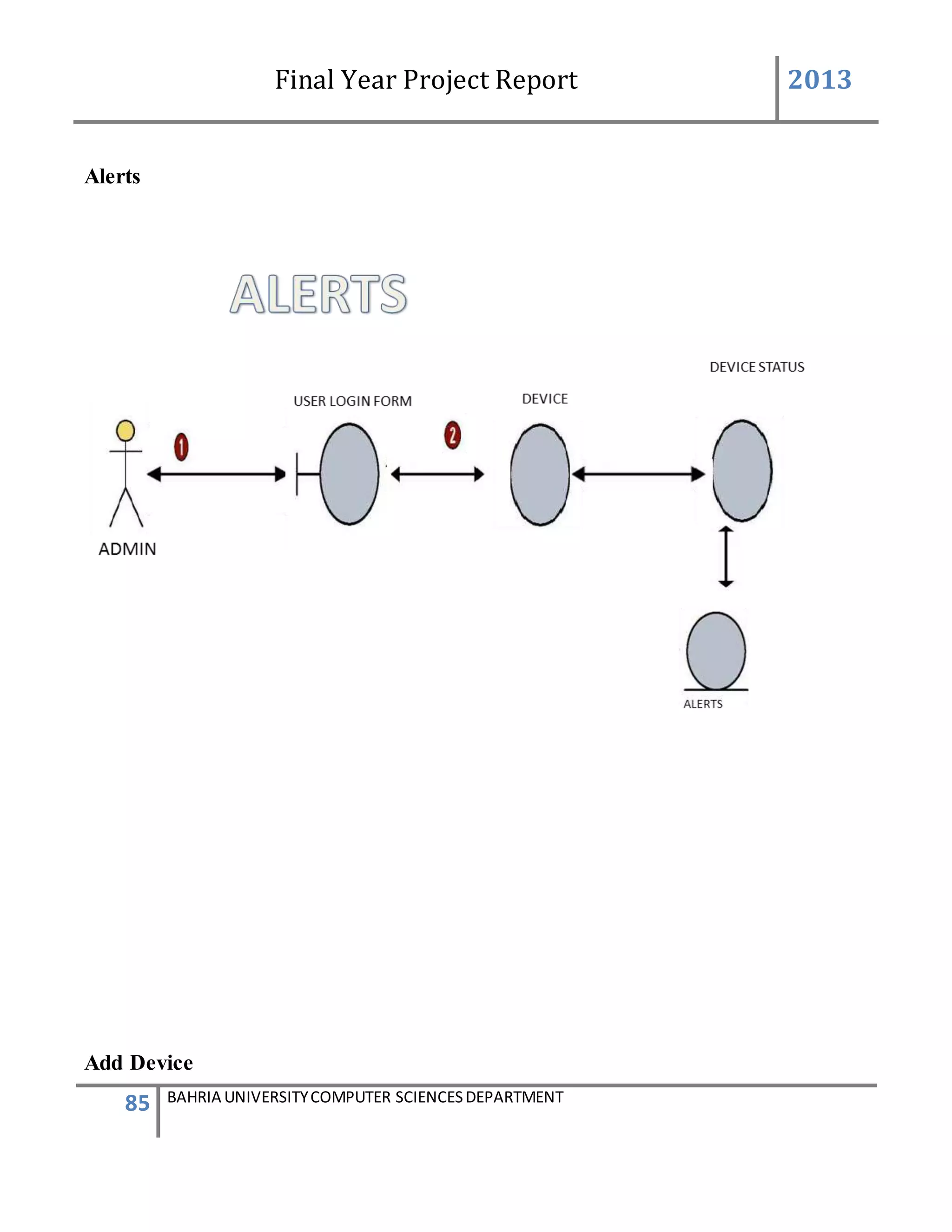
This feature allows the user to view the device last states updated.
USER ACTION / SYSTEM RESPONSE Sequences
USER ACTION : User selects devices
SYSTEM RES : System will prompt all the devices added in the database
USER ACTION : User selects the device of which the latest status updates need to be
seen
SYSTEM RES : System will search the latest statuses of the particular devices
USER ACTION : User can view all the latest status of that device
Functional Requirements
 The system must be able to show the correct information about the latest status of
particular device
 The device should appear only when the device is selected by that user
 System must show all the updates of the controls correctly
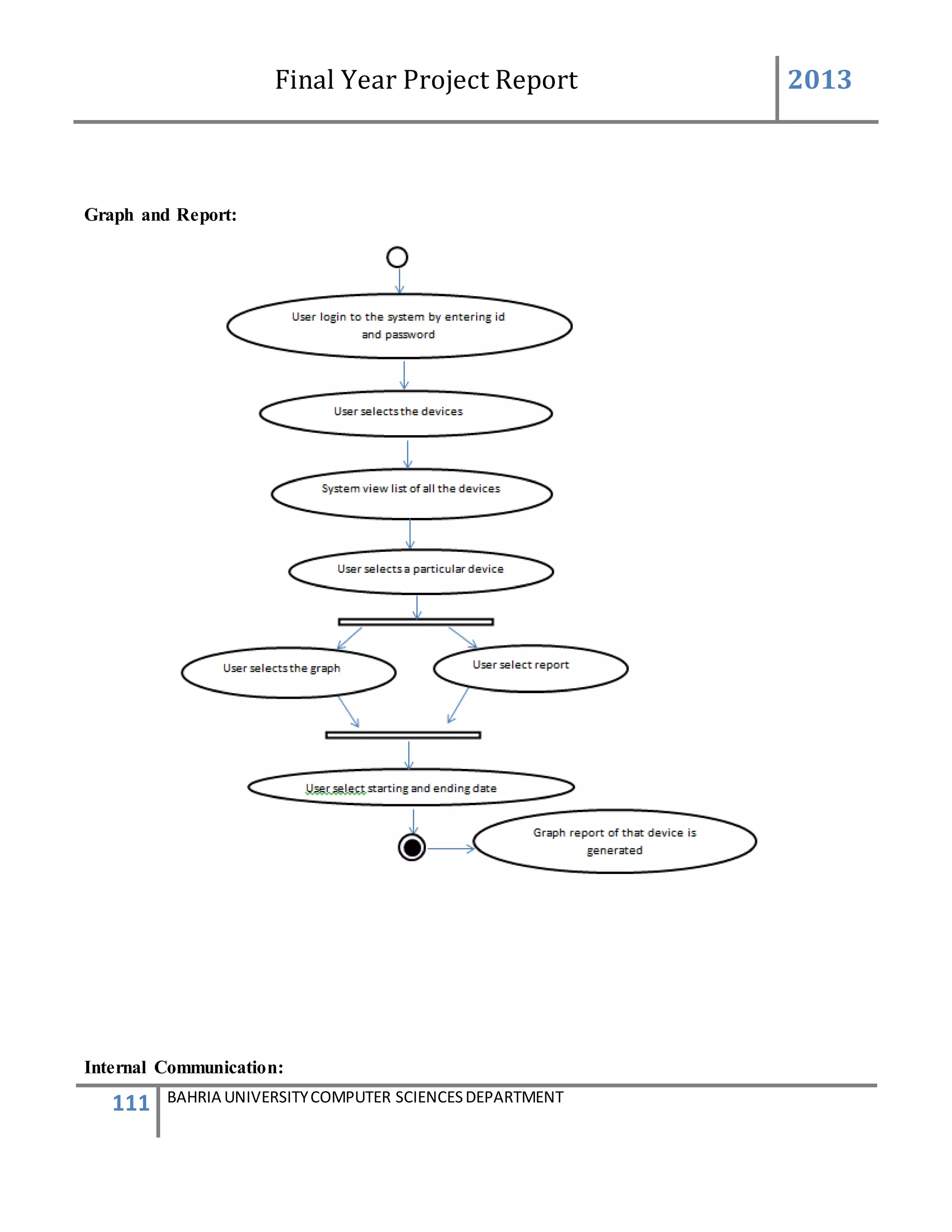
 History
Description of Feature
Final Year Project Report 2013
29 BAHRIA UNIVERSITYCOMPUTER SCIENCESDEPARTMENT
This feature allows the user to view the device control log report or graph on a particular day
or selected list of days
USER ACTION / SYSTEM RESPONSE Sequences
USER ACTION : User select a day from datetimePicker as the start date and selects and
end date as well as selects the parameter to be viewed. User can select
at most 3 parameters at a time and click to view the graph.
SYS RESPONSE : System will show graphical view for the user in binary graph.
USER ACTION : User can also select a day from datetimePicker as a start date and end
date. User will select the parameter to be viewed. Only one parameter
can be selected at a time and click view report.
SYS RESPONSE : System will search the device controls which happen on that interval of
Days
USER ACTION : User will view the generated report
SYS RESPONSE :System will allow the report to be printed and to be viewed in PDF or
excel format
USER ACTION : User can close the report or press ‘PRINT’ to generate the report.
SYS RESPONSE : System will show the print preview dialog for user
Functional Requirements
 The system must be able to show the correct graph
 System must view the correct log report
 The parameter and date selection should be validated by the system
 Controls
Description of Feature
This feature allows the user to change device controls and after changing the control. A
defined message is send to the defined number of that control of that particular device
Final Year Project Report 2013
30 BAHRIA UNIVERSITYCOMPUTER SCIENCESDEPARTMENT
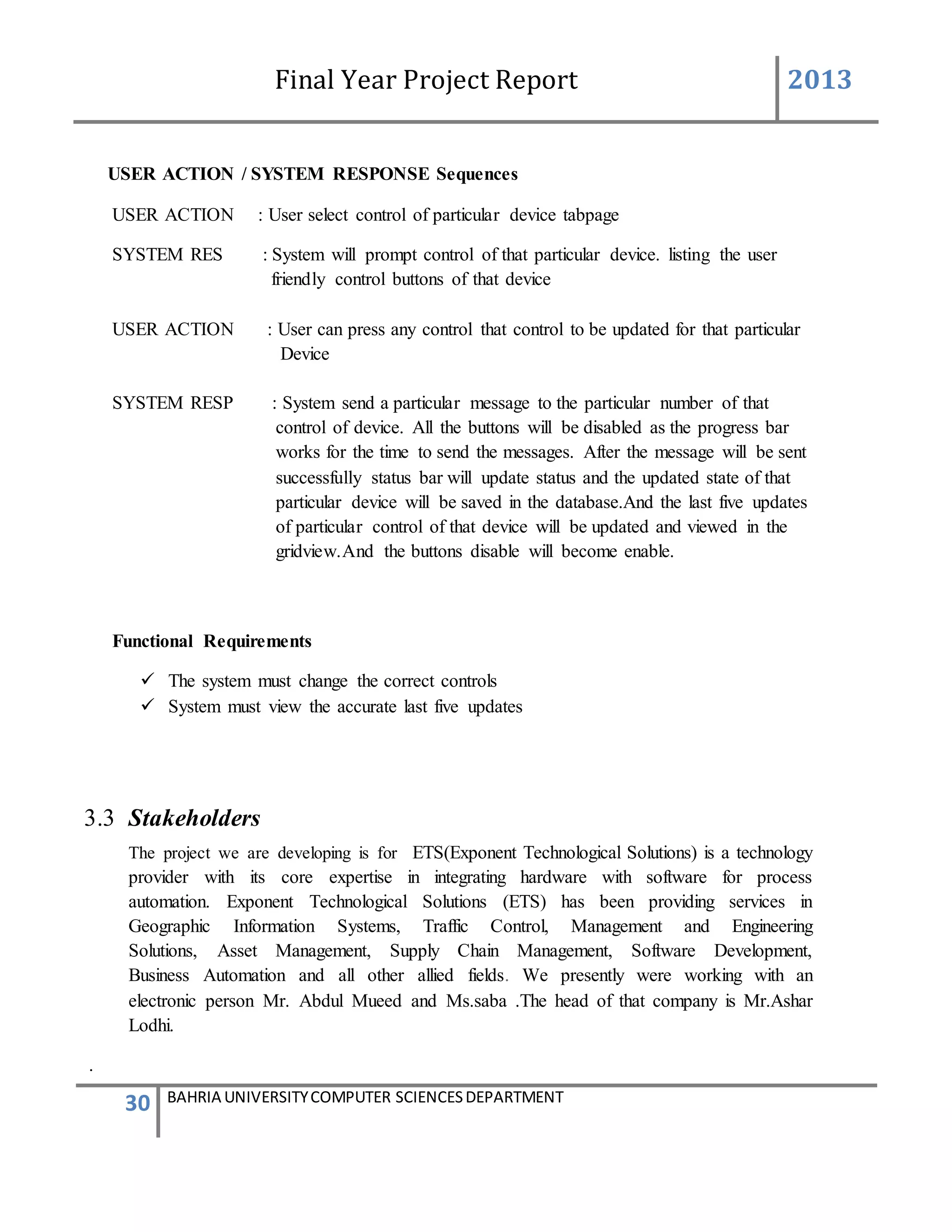
USER ACTION / SYSTEM RESPONSE Sequences
USER ACTION : User select control of particular device tabpage
SYSTEM RES : System will prompt control of that particular device. listing the user
friendly control buttons of that device
USER ACTION : User can press any control that control to be updated for that particular
Device
SYSTEM RESP : System send a particular message to the particular number of that
control of device. All the buttons will be disabled as the progress bar
works for the time to send the messages. After the message will be sent
successfully status bar will update status and the updated state of that
particular device will be saved in the database.And the last five updates
of particular control of that device will be updated and viewed in the
gridview.And the buttons disable will become enable.
Functional Requirements
 The system must change the correct controls
 System must view the accurate last five updates
3.3 Stakeholders
The project we are developing is for ETS(Exponent Technological Solutions) is a technology
provider with its core expertise in integrating hardware with software for process
automation. Exponent Technological Solutions (ETS) has been providing services in
Geographic Information Systems, Traffic Control, Management and Engineering
Solutions, Asset Management, Supply Chain Management, Software Development,
Business Automation and all other allied fields. We presently were working with an
electronic person Mr. Abdul Mueed and Ms.saba .The head of that company is Mr.Ashar
Lodhi.
.
Final Year Project Report 2013
31 BAHRIA UNIVERSITYCOMPUTER SCIENCESDEPARTMENT
3.4 Costing
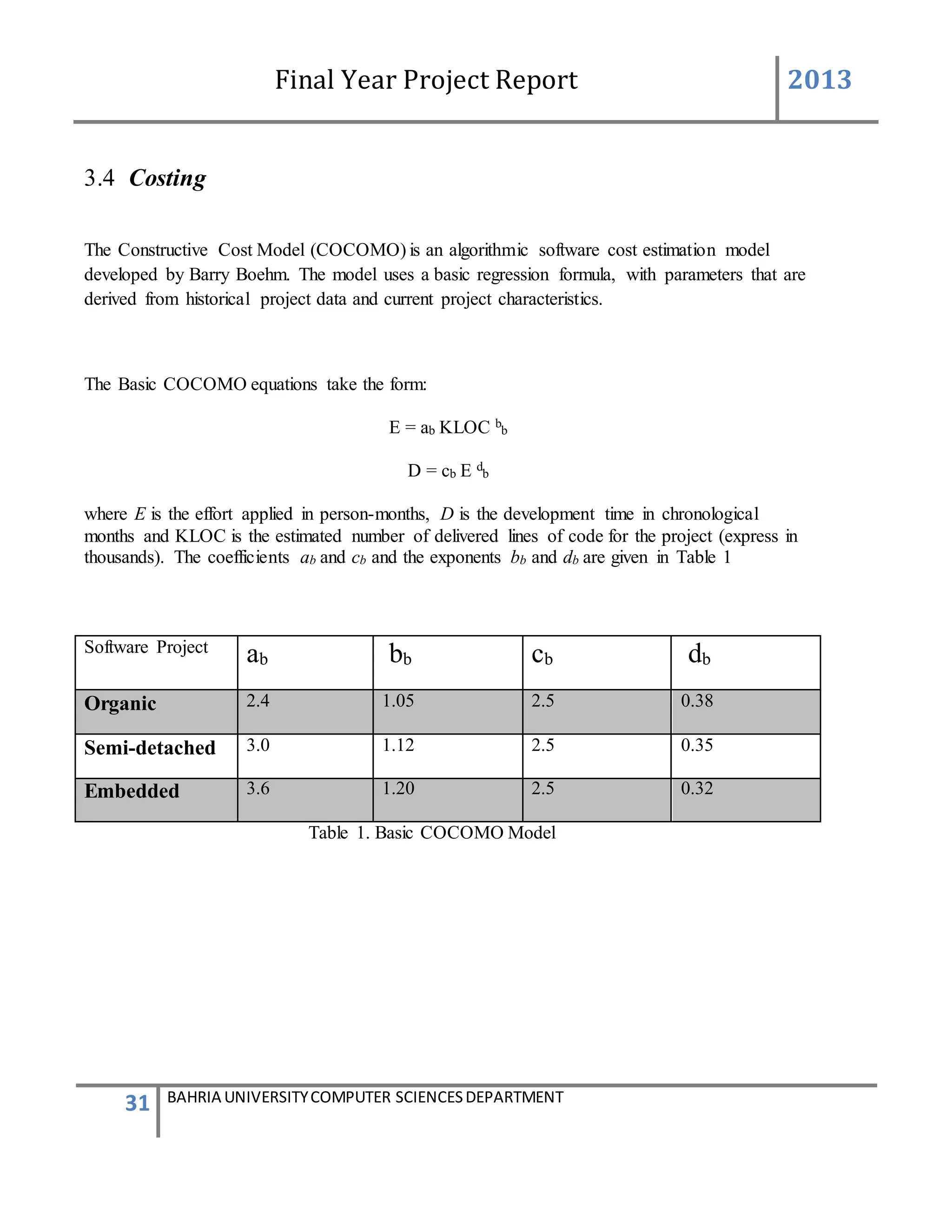
The Constructive Cost Model (COCOMO) is an algorithmic software cost estimation model
developed by Barry Boehm. The model uses a basic regression formula, with parameters that are
derived from historical project data and current project characteristics.
The Basic COCOMO equations take the form:
E = ab KLOC b
b
D = cb E d
b
where E is the effort applied in person-months, D is the development time in chronological
months and KLOC is the estimated number of delivered lines of code for the project (express in
thousands). The coefficients ab and cb and the exponents bb and db are given in Table 1
Software Project
ab bb cb db
Organic 2.4 1.05 2.5 0.38
Semi-detached 3.0 1.12 2.5 0.35
Embedded 3.6 1.20 2.5 0.32
Table 1. Basic COCOMO Model
Final Year Project Report 2013
32 BAHRIA UNIVERSITYCOMPUTER SCIENCESDEPARTMENT
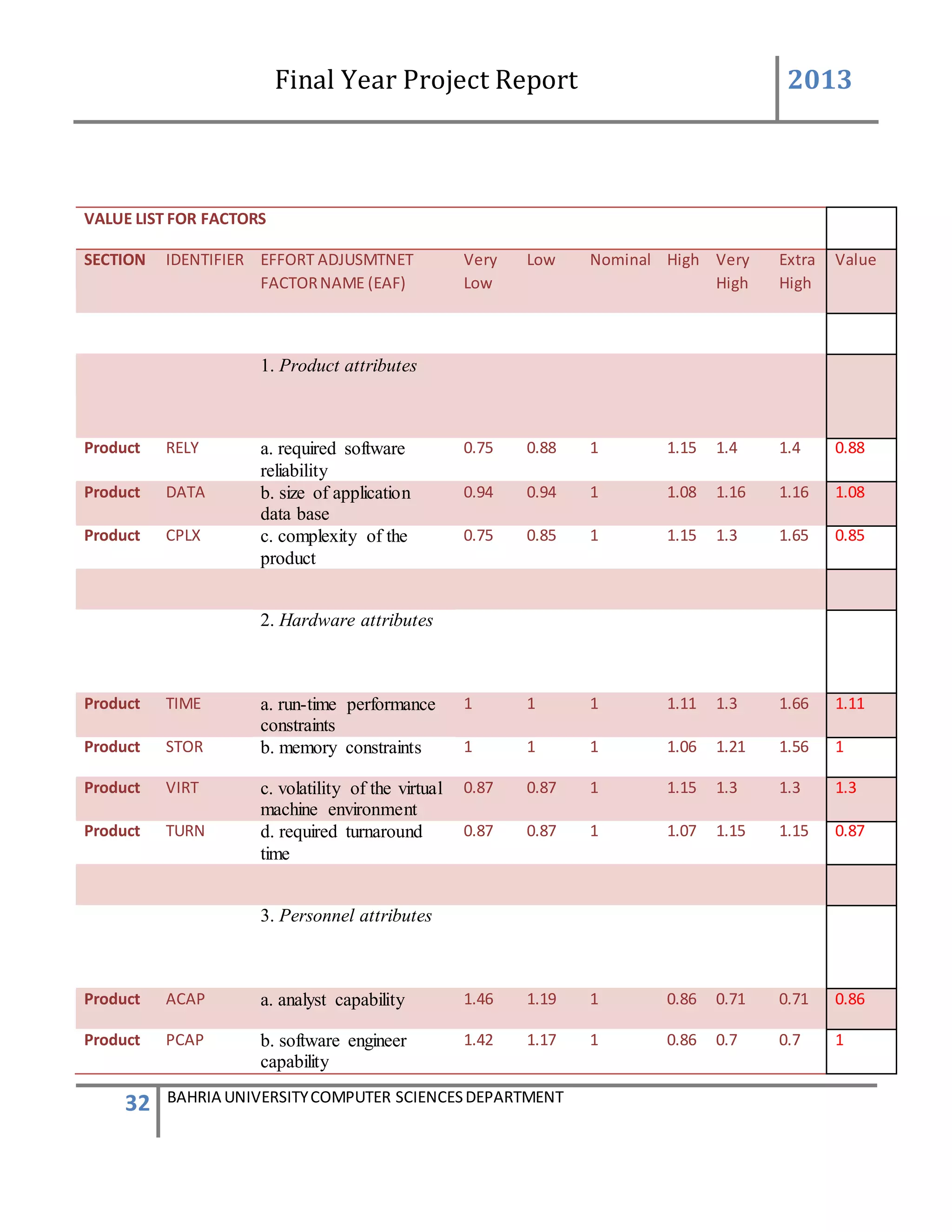
VALUE LIST FOR FACTORS
SECTION IDENTIFIER EFFORT ADJUSMTNET
FACTORNAME (EAF)
Very
Low
Low Nominal High Very
High
Extra
High
Value
1. Product attributes
Product RELY a. required software
reliability
0.75 0.88 1 1.15 1.4 1.4 0.88
Product DATA b. size of application
data base
0.94 0.94 1 1.08 1.16 1.16 1.08
Product CPLX c. complexity of the
product
0.75 0.85 1 1.15 1.3 1.65 0.85
2. Hardware attributes
Product TIME a. run-time performance
constraints
1 1 1 1.11 1.3 1.66 1.11
Product STOR b. memory constraints 1 1 1 1.06 1.21 1.56 1
Product VIRT c. volatility of the virtual
machine environment
0.87 0.87 1 1.15 1.3 1.3 1.3
Product TURN d. required turnaround
time
0.87 0.87 1 1.07 1.15 1.15 0.87
3. Personnel attributes
Product ACAP a. analyst capability 1.46 1.19 1 0.86 0.71 0.71 0.86
Product PCAP b. software engineer
capability
1.42 1.17 1 0.86 0.7 0.7 1
Final Year Project Report 2013
33 BAHRIA UNIVERSITYCOMPUTER SCIENCESDEPARTMENT
Product AEXP c. applications
experience
1.29 1.13 1 0.91 0.82 0.82 1.29
Product VEXP d. virtual machine
experience
1.21 1.1 1 0.9 0.9 0.9 1
Product LEXP e. programming
language experience
1.14 1.07 1 0.95 0.95 0.95 0.95
4. Project attributes
Product TOOL a. use of software tools 1.24 1.1 1 0.95 0.83 0.83 0.95
Product MODP b. application of
software engineering
methods
1.24 1.1 1 0.91 0.82 0.82 1.1
Product SCED c. requireddevelopment
schedule
1.23 1.08 1 1.04 1.04 1.1 1.04
Table 2. Value List for Factors
Each of the 15 attributes is rated on a 6 point scale that ranges from "very low" to "extra high"
(in importance or value and the product of all effort multipliers results is an effort adjustment
factor (EAF). Typical values for EAF range from 0.9 to 1.4.
The intermediate COCOMO model takes the form:
E = ai KLOC b
i x EAF
where E is the effort applied in person-months and KLOC is the estimated number of delivered
lines of code for the project.
Algorithmic models generally provide direct estimates of effort or duration. The main input is
usually a prediction of software size. Effort prediction models take the general form :
effort = p*S
(1/productivity rate)
Final Year Project Report 2013
34 BAHRIA UNIVERSITYCOMPUTER SCIENCESDEPARTMENT
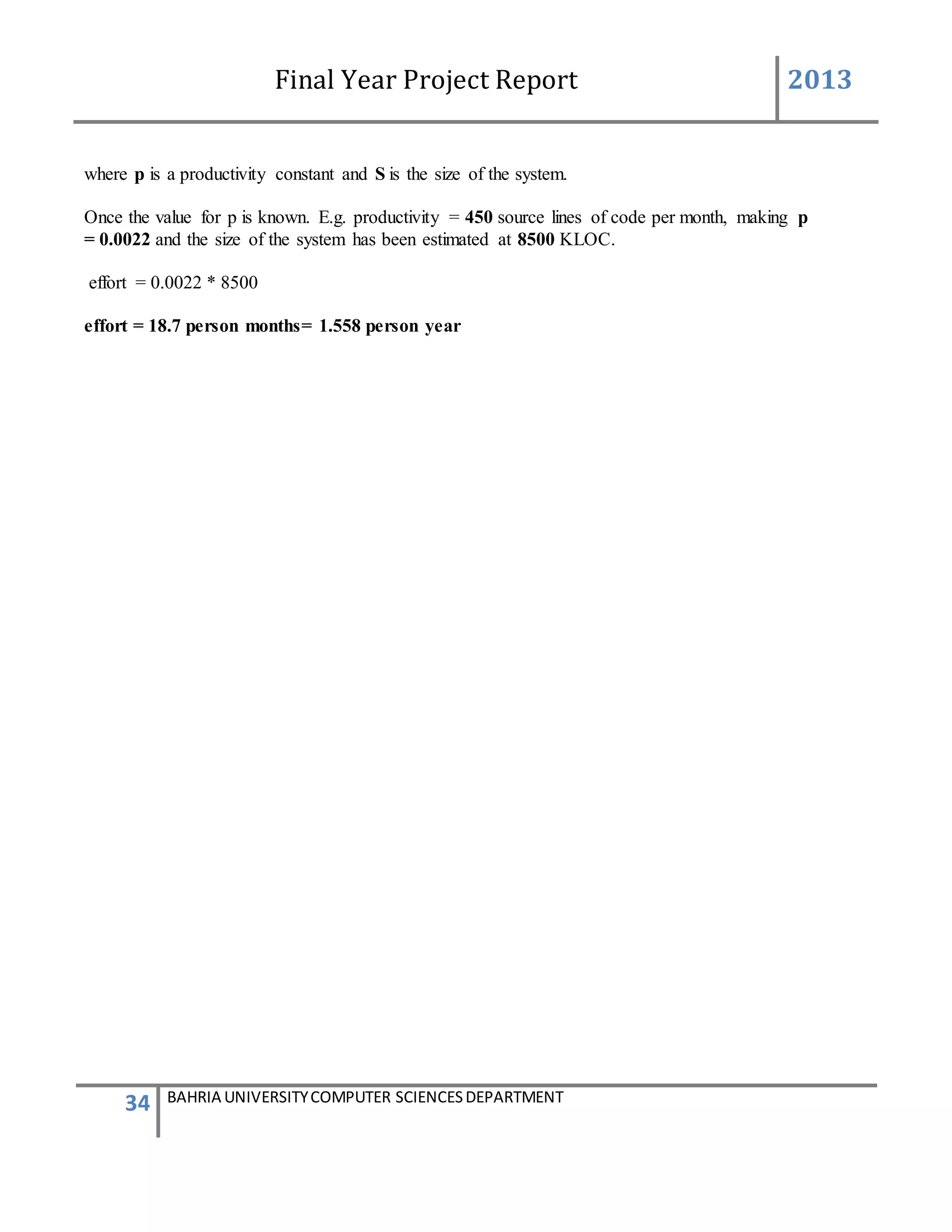
where p is a productivity constant and S is the size of the system.
Once the value for p is known. E.g. productivity = 450 source lines of code per month, making p
= 0.0022 and the size of the system has been estimated at 8500 KLOC.
effort = 0.0022 * 8500
effort = 18.7 person months= 1.558 person year
Final Year Project Report 2013
35 BAHRIA UNIVERSITYCOMPUTER SCIENCESDEPARTMENT
3.5 Feasibility Study
In feasibility study phase we had undergone through various
steps which are describe as under :
1. Identify the origin of the information at different level.
2. Identify the expectation of user from computerized system.
3. Analyze the drawback of existing system (manual) system.
WORKING OF PRESENT MANUAL SYSTEM
DRAWBACKS OF PRESENT SYSTEM
Some of the problems being faced in manual system are as follows:
 Maintenance of generator statuses and it was difficult to know about different alert that
can create problems.
 Need a person to visit site where generator are present and growing number of generators
at far location lead more people, transport and wastes times.
 No higher authority was able to know about the generators records read by workers are
correct or not.
 No verification if the generator status written manually are correct or not
Final Year Project Report 2013
36 BAHRIA UNIVERSITYCOMPUTER SCIENCESDEPARTMENT
PROPOSED SYSTEM
 To eliminate the paper-work in monitoring the generators
 To eliminate the verification of a person to go the field at regular interval of time to
check if the generators are working properly or is no need of more fuel,
temperature is right , the generator is working correctly.
 To implement GSM, device to integrate with our front end software application to
change controls and to inform about these controls. And to record all the alerts and status
change in the generators
 To design a user friendly graphical user interface which suit the users and also a
communication environment using the GSM device
 To produce admin level authority for add new users or admin to the system to allow
admin to add and update a generator settings and to delete messages if they are not
needed
 To complete the system according to project schedule
 To produce technical report that documents the phases, tasks and deliverables in the
Project
Final Year Project Report 2013
37 BAHRIA UNIVERSITYCOMPUTER SCIENCESDEPARTMENT
3.6 Scheduling
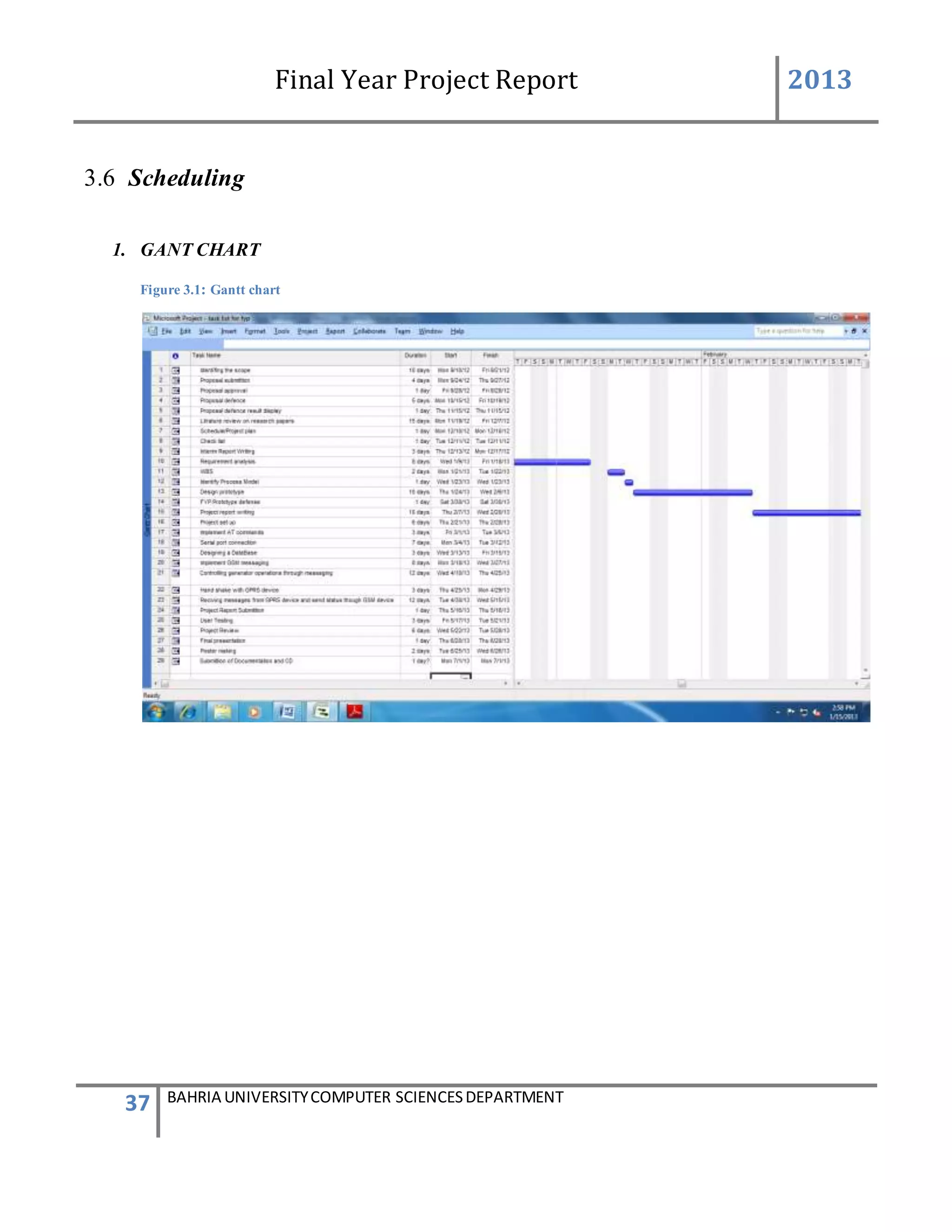
1. GANT CHART
Figure 3.1: Gantt chart
Final Year Project Report 2013
38 BAHRIA UNIVERSITYCOMPUTER SCIENCESDEPARTMENT
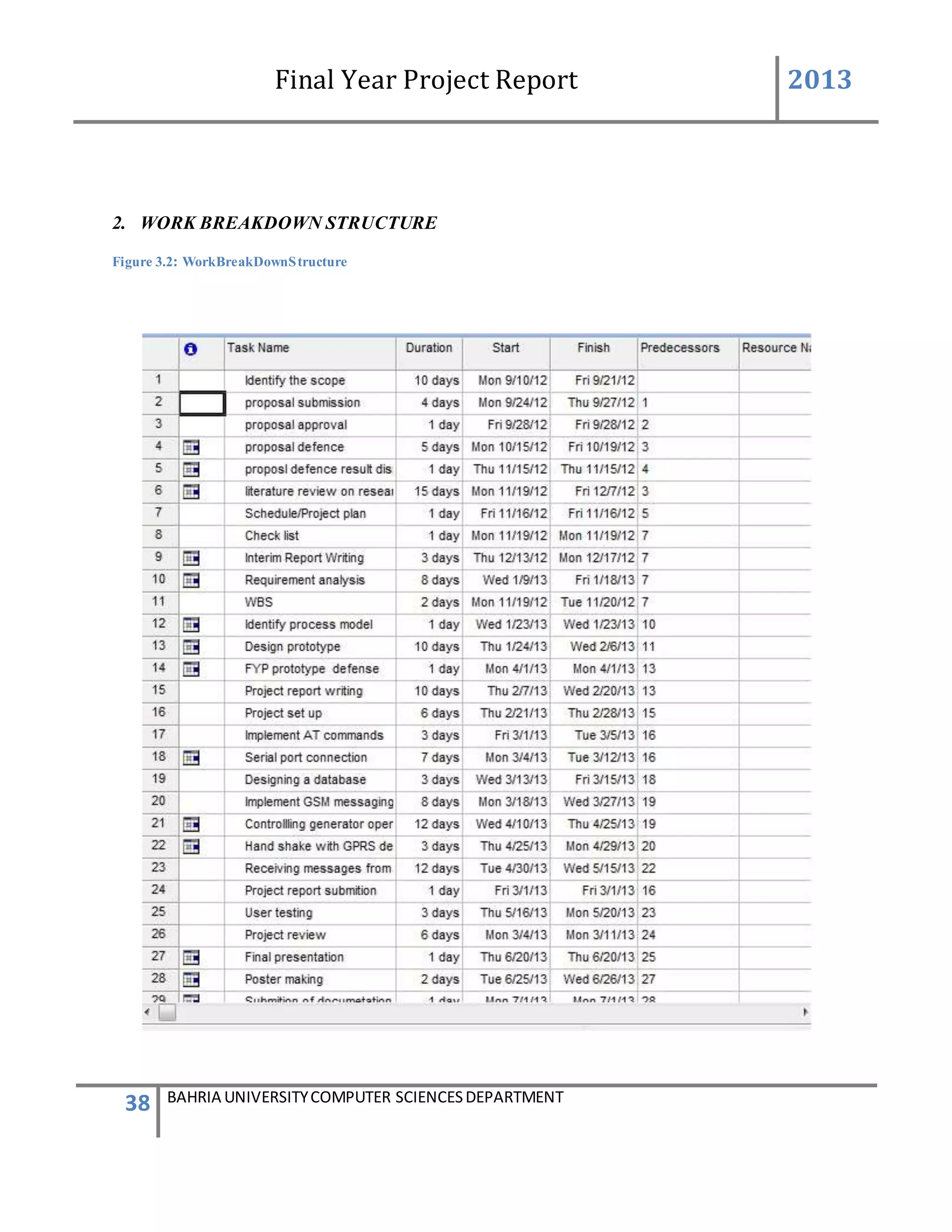
2. WORK BREAKDOWN STRUCTURE
Figure 3.2: WorkBreakDownStructure
Final Year Project Report 2013
39 BAHRIA UNIVERSITYCOMPUTER SCIENCESDEPARTMENT
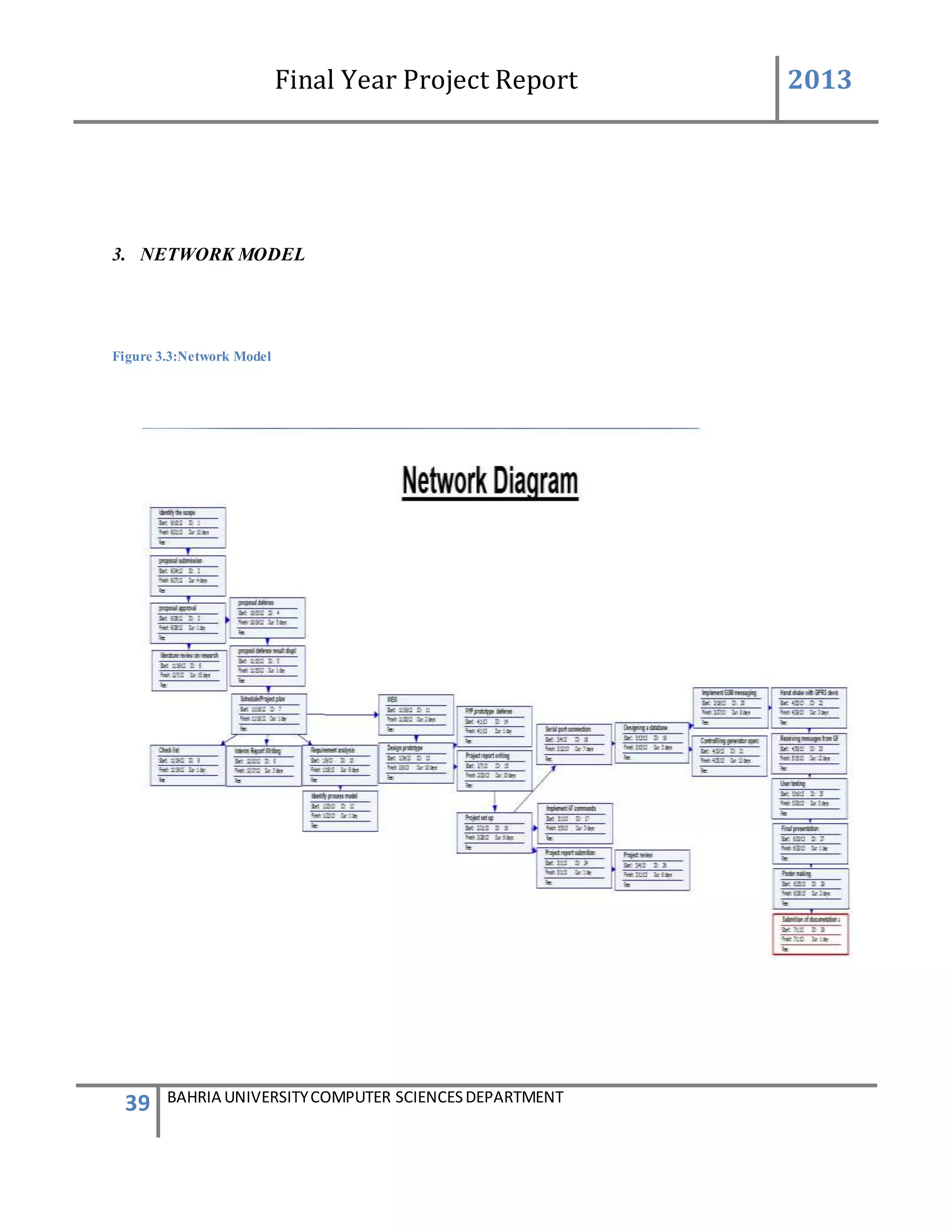
3. NETWORK MODEL
Figure 3.3:Network Model
Final Year Project Report 2013
40 BAHRIA UNIVERSITYCOMPUTER SCIENCESDEPARTMENT
Conclusion
In this document, I research about system objectives and system requirements. And how the
system must work to solve the present implemented physical system problem or to minimize
them.
I also got the understanding of how the system to be made is going to work and what necessary
operations will be in the system..This give me the complete idea about where to start from
making the software and which areas will be difficult and will need more time.
I understand my customer needs and how their problem will be solved by my product. By
communicating and meeting the stakeholders I gather all the requirements detailed, clear and
unambiguous.
Final Year Project Report 2013
41 BAHRIA UNIVERSITYCOMPUTER SCIENCESDEPARTMENT
Chapter 4
Design of the System
4 Methodology and Design
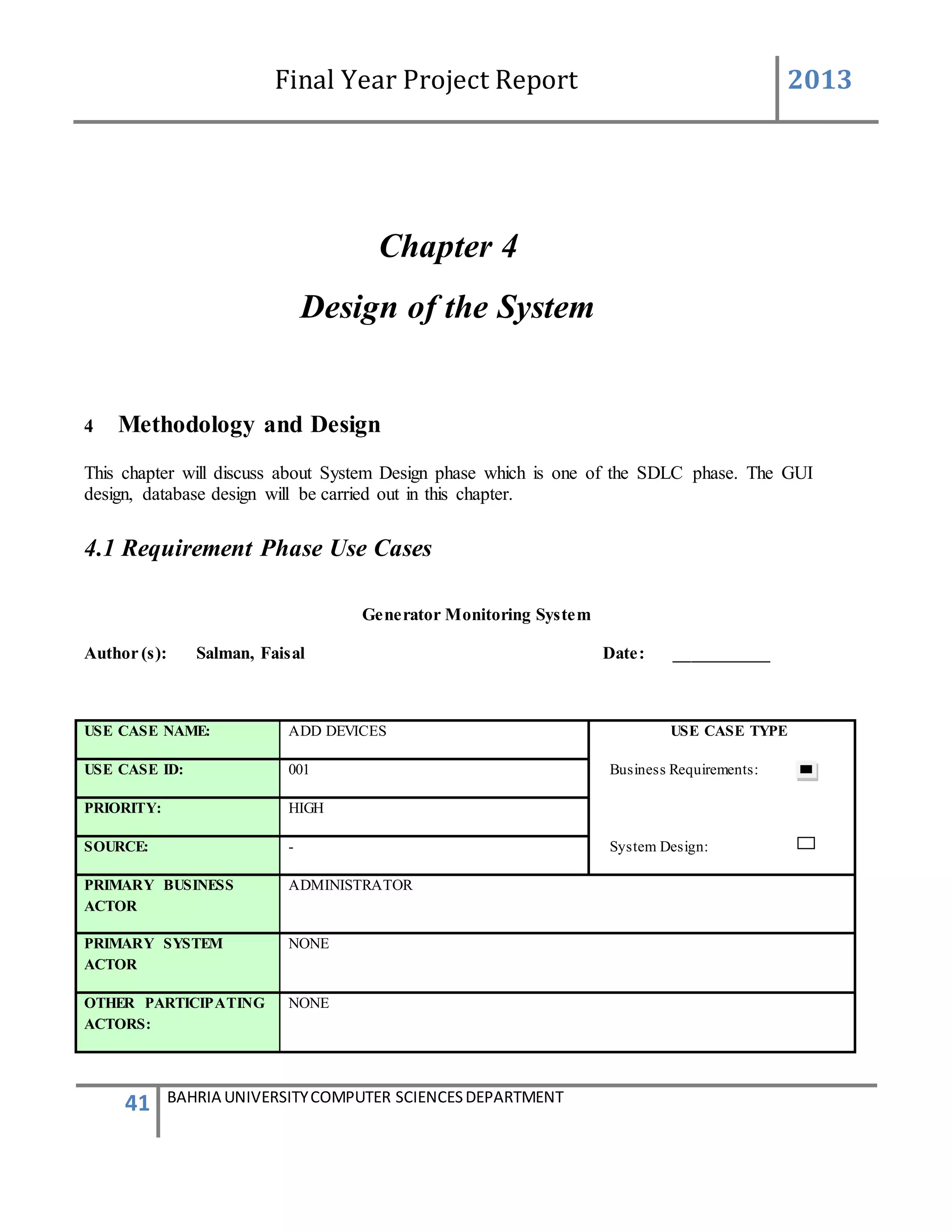
This chapter will discuss about System Design phase which is one of the SDLC phase. The GUI
design, database design will be carried out in this chapter.
4.1 Requirement Phase Use Cases
Generator Monitoring System
Author (s): Salman, Faisal Date: ___________
USE CASE NAME: ADD DEVICES USE CASE TYPE
USE CASE ID: 001 Business Requirements:
PRIORITY: HIGH
SOURCE: - System Design:
PRIMARY BUSINESS
ACTOR
ADMINISTRATOR
PRIMARY SYSTEM
ACTOR
NONE
OTHER PARTICIPATING
ACTORS:
NONE
Final Year Project Report 2013
42 BAHRIA UNIVERSITYCOMPUTER SCIENCESDEPARTMENT
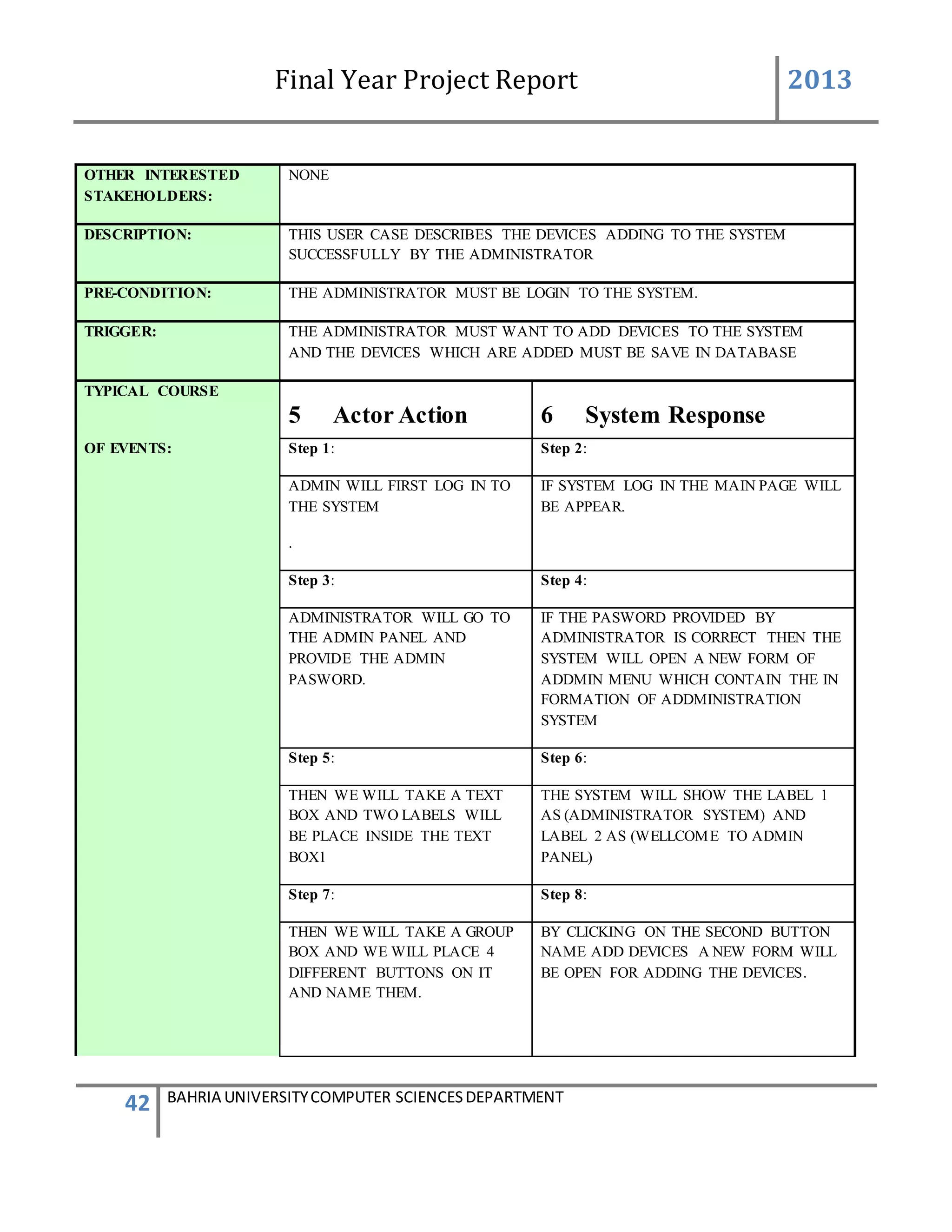
OTHER INTERESTED
STAKEHOLDERS:
NONE
DESCRIPTION: THIS USER CASE DESCRIBES THE DEVICES ADDING TO THE SYSTEM
SUCCESSFULLY BY THE ADMINISTRATOR
PRE-CONDITION: THE ADMINISTRATOR MUST BE LOGIN TO THE SYSTEM.
TRIGGER: THE ADMINISTRATOR MUST WANT TO ADD DEVICES TO THE SYSTEM
AND THE DEVICES WHICH ARE ADDED MUST BE SAVE IN DATABASE
TYPICAL COURSE
5 Actor Action 6 System Response
OF EVENTS: Step 1: Step 2:
ADMIN WILL FIRST LOG IN TO
THE SYSTEM
.
IF SYSTEM LOG IN THE MAIN PAGE WILL
BE APPEAR.
Step 3: Step 4:
ADMINISTRATOR WILL GO TO
THE ADMIN PANEL AND
PROVIDE THE ADMIN
PASWORD.
IF THE PASWORD PROVIDED BY
ADMINISTRATOR IS CORRECT THEN THE
SYSTEM WILL OPEN A NEW FORM OF
ADDMIN MENU WHICH CONTAIN THE IN
FORMATION OF ADDMINISTRATION
SYSTEM
Step 5: Step 6:
THEN WE WILL TAKE A TEXT
BOX AND TWO LABELS WILL
BE PLACE INSIDE THE TEXT
BOX1
THE SYSTEM WILL SHOW THE LABEL 1
AS (ADMINISTRATOR SYSTEM) AND
LABEL 2 AS (WELLCOME TO ADMIN
PANEL)
Step 7: Step 8:
THEN WE WILL TAKE A GROUP
BOX AND WE WILL PLACE 4
DIFFERENT BUTTONS ON IT
AND NAME THEM.
BY CLICKING ON THE SECOND BUTTON
NAME ADD DEVICES A NEW FORM WILL
BE OPEN FOR ADDING THE DEVICES.
Final Year Project Report 2013
43 BAHRIA UNIVERSITYCOMPUTER SCIENCESDEPARTMENT
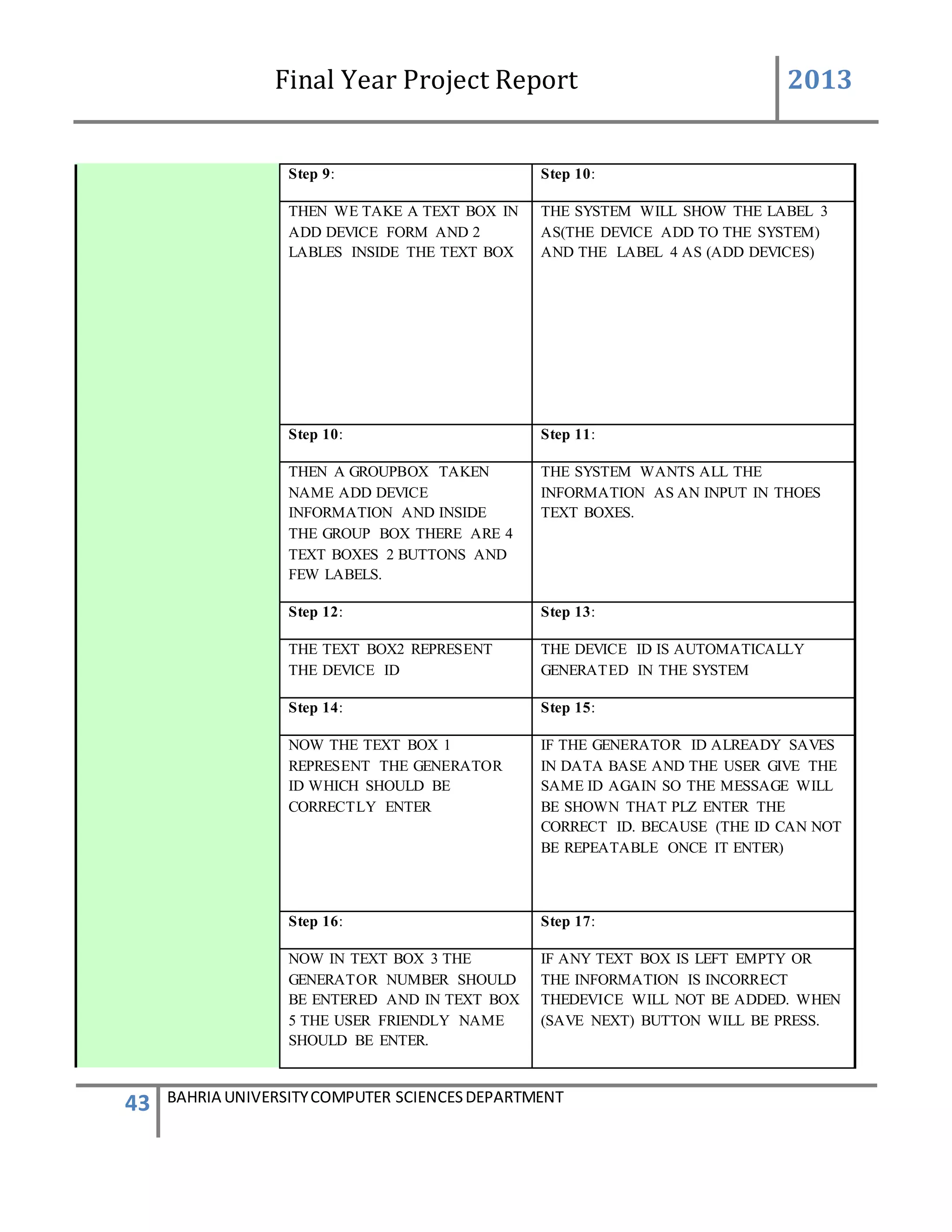
Step 9: Step 10:
THEN WE TAKE A TEXT BOX IN
ADD DEVICE FORM AND 2
LABLES INSIDE THE TEXT BOX
THE SYSTEM WILL SHOW THE LABEL 3
AS(THE DEVICE ADD TO THE SYSTEM)
AND THE LABEL 4 AS (ADD DEVICES)
Step 10: Step 11:
THEN A GROUPBOX TAKEN
NAME ADD DEVICE
INFORMATION AND INSIDE
THE GROUP BOX THERE ARE 4
TEXT BOXES 2 BUTTONS AND
FEW LABELS.
THE SYSTEM WANTS ALL THE
INFORMATION AS AN INPUT IN THOES
TEXT BOXES.
Step 12: Step 13:
THE TEXT BOX2 REPRESENT
THE DEVICE ID
THE DEVICE ID IS AUTOMATICALLY
GENERATED IN THE SYSTEM
Step 14: Step 15:
NOW THE TEXT BOX 1
REPRESENT THE GENERATOR
ID WHICH SHOULD BE
CORRECTLY ENTER
IF THE GENERATOR ID ALREADY SAVES
IN DATA BASE AND THE USER GIVE THE
SAME ID AGAIN SO THE MESSAGE WILL
BE SHOWN THAT PLZ ENTER THE
CORRECT ID. BECAUSE (THE ID CAN NOT
BE REPEATABLE ONCE IT ENTER)
Step 16: Step 17:
NOW IN TEXT BOX 3 THE
GENERATOR NUMBER SHOULD
BE ENTERED AND IN TEXT BOX
5 THE USER FRIENDLY NAME
SHOULD BE ENTER.
IF ANY TEXT BOX IS LEFT EMPTY OR
THE INFORMATION IS INCORRECT
THEDEVICE WILL NOT BE ADDED. WHEN
(SAVE NEXT) BUTTON WILL BE PRESS.
Final Year Project Report 2013
44 BAHRIA UNIVERSITYCOMPUTER SCIENCESDEPARTMENT
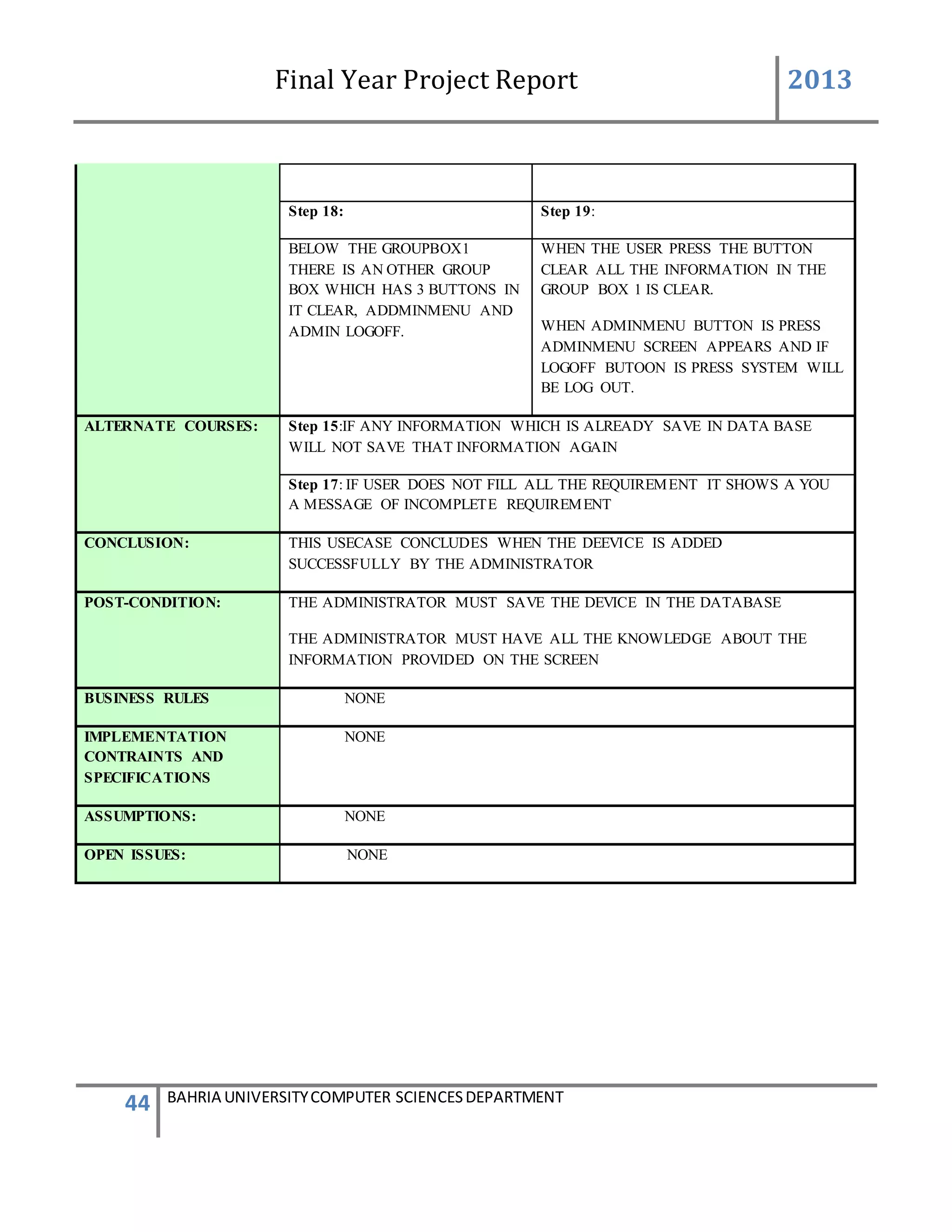
Step 18: Step 19:
BELOW THE GROUPBOX1
THERE IS AN OTHER GROUP
BOX WHICH HAS 3 BUTTONS IN
IT CLEAR, ADDMINMENU AND
ADMIN LOGOFF.
WHEN THE USER PRESS THE BUTTON
CLEAR ALL THE INFORMATION IN THE
GROUP BOX 1 IS CLEAR.
WHEN ADMINMENU BUTTON IS PRESS
ADMINMENU SCREEN APPEARS AND IF
LOGOFF BUTOON IS PRESS SYSTEM WILL
BE LOG OUT.
ALTERNATE COURSES: Step 15:IF ANY INFORMATION WHICH IS ALREADY SAVE IN DATA BASE
WILL NOT SAVE THAT INFORMATION AGAIN
Step 17: IF USER DOES NOT FILL ALL THE REQUIREMENT IT SHOWS A YOU
A MESSAGE OF INCOMPLETE REQUIREMENT
CONCLUSION: THIS USECASE CONCLUDES WHEN THE DEEVICE IS ADDED
SUCCESSFULLY BY THE ADMINISTRATOR
POST-CONDITION: THE ADMINISTRATOR MUST SAVE THE DEVICE IN THE DATABASE
THE ADMINISTRATOR MUST HAVE ALL THE KNOWLEDGE ABOUT THE
INFORMATION PROVIDED ON THE SCREEN
BUSINESS RULES NONE
IMPLEMENTATION
CONTRAINTS AND
SPECIFICATIONS
NONE
ASSUMPTIONS: NONE
OPEN ISSUES: NONE
Final Year Project Report 2013
45 BAHRIA UNIVERSITYCOMPUTER SCIENCESDEPARTMENT
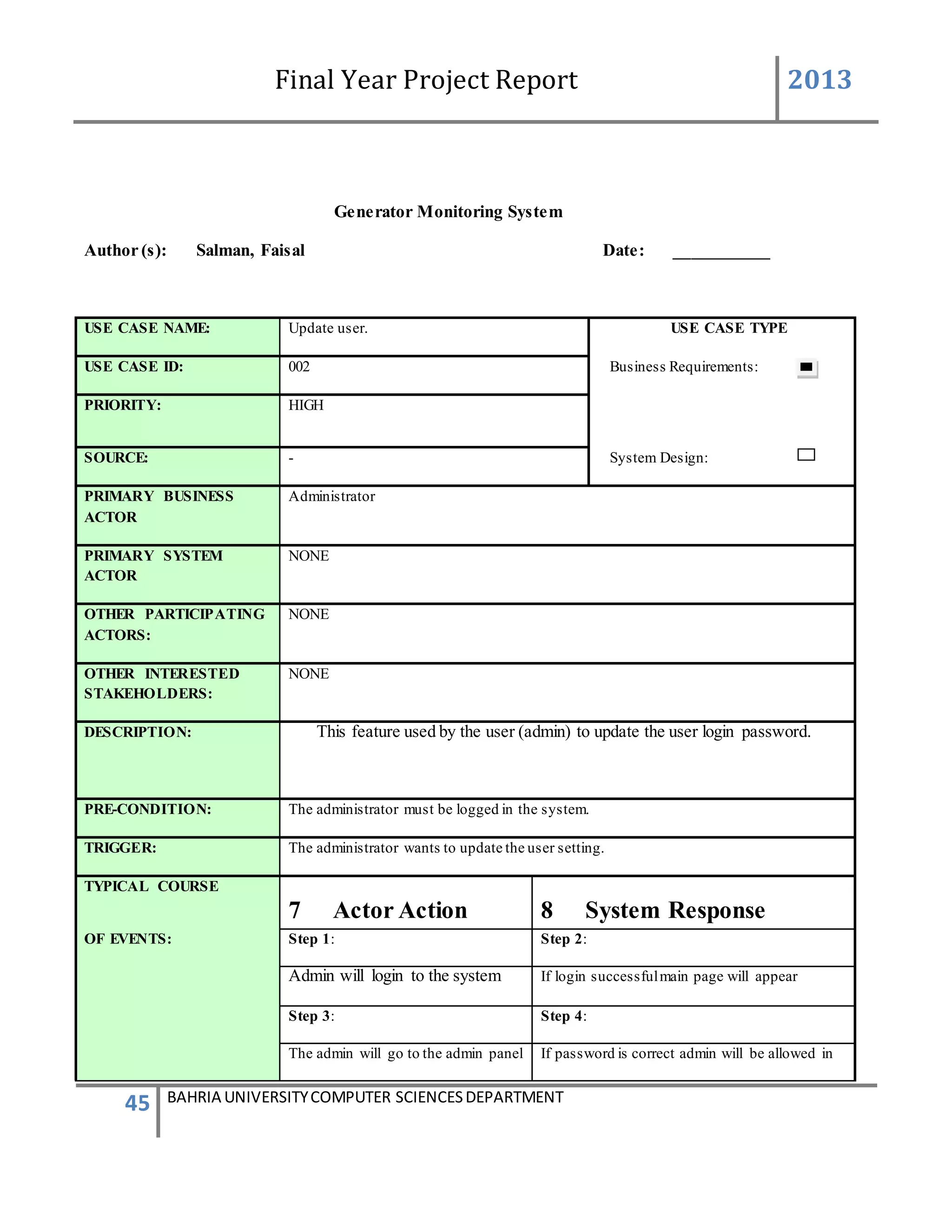
Generator Monitoring System
Author (s): Salman, Faisal Date: ___________
USE CASE NAME: Update user. USE CASE TYPE
USE CASE ID: 002 Business Requirements:
PRIORITY: HIGH
SOURCE: - System Design:
PRIMARY BUSINESS
ACTOR
Administrator
PRIMARY SYSTEM
ACTOR
NONE
OTHER PARTICIPATING
ACTORS:
NONE
OTHER INTERESTED
STAKEHOLDERS:
NONE
DESCRIPTION: This feature used by the user (admin) to update the user login password.
PRE-CONDITION: The administrator must be logged in the system.
TRIGGER: The administrator wants to update the user setting.
TYPICAL COURSE
7 Actor Action 8 System Response
OF EVENTS: Step 1: Step 2:
Admin will login to the system If login successfulmain page will appear
Step 3: Step 4:
The admin will go to the admin panel If password is correct admin will be allowed in
Final Year Project Report 2013
46 BAHRIA UNIVERSITYCOMPUTER SCIENCESDEPARTMENT
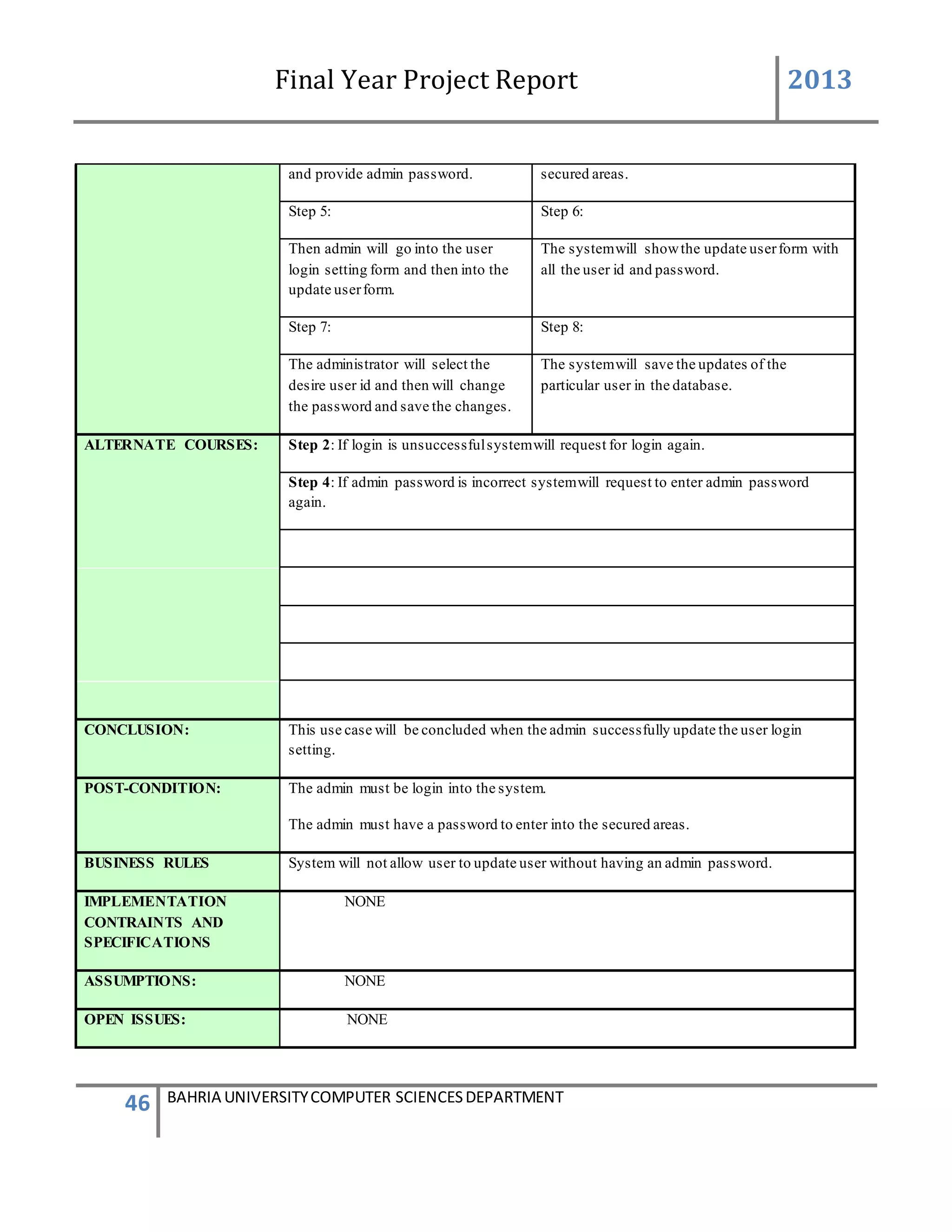
and provide admin password. secured areas.
Step 5: Step 6:
Then admin will go into the user
login setting form and then into the
update userform.
The systemwill showthe update userform with
all the user id and password.
Step 7: Step 8:
The administrator will select the
desire user id and then will change
the password and save the changes.
The systemwill save the updates of the
particular user in the database.
ALTERNATE COURSES: Step 2: If login is unsuccessfulsystemwill request for login again.
Step 4: If admin password is incorrect systemwill request to enter admin password
again.
CONCLUSION: This use case will be concluded when the admin successfully update the user login
setting.
POST-CONDITION: The admin must be login into the system.
The admin must have a password to enter into the secured areas.
BUSINESS RULES System will not allow user to update user without having an admin password.
IMPLEMENTATION
CONTRAINTS AND
SPECIFICATIONS
NONE
ASSUMPTIONS: NONE
OPEN ISSUES: NONE
Final Year Project Report 2013
47 BAHRIA UNIVERSITYCOMPUTER SCIENCESDEPARTMENT
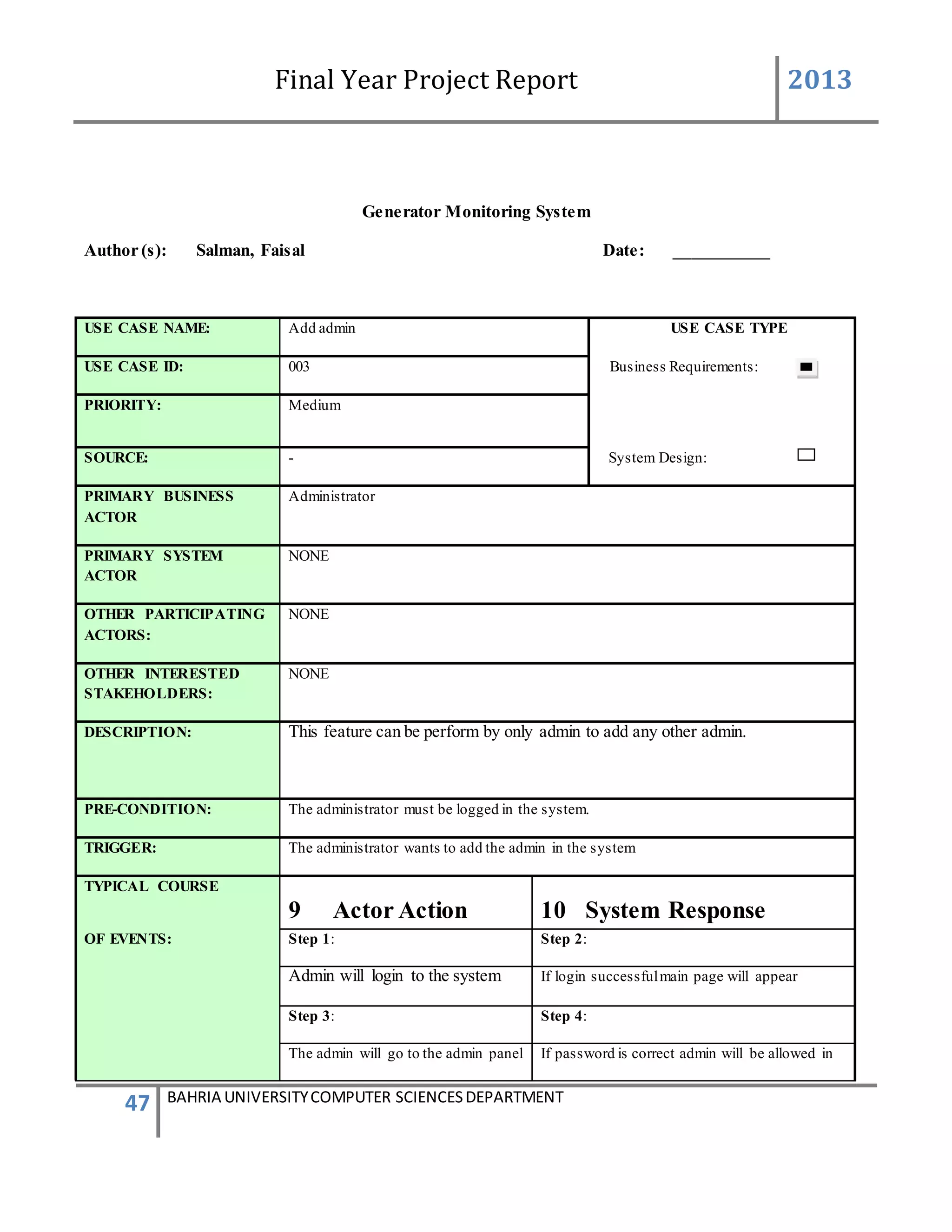
Generator Monitoring System
Author (s): Salman, Faisal Date: ___________
USE CASE NAME: Add admin USE CASE TYPE
USE CASE ID: 003 Business Requirements:
PRIORITY: Medium
SOURCE: - System Design:
PRIMARY BUSINESS
ACTOR
Administrator
PRIMARY SYSTEM
ACTOR
NONE
OTHER PARTICIPATING
ACTORS:
NONE
OTHER INTERESTED
STAKEHOLDERS:
NONE
DESCRIPTION: This feature can be perform by only admin to add any other admin.
PRE-CONDITION: The administrator must be logged in the system.
TRIGGER: The administrator wants to add the admin in the system
TYPICAL COURSE
9 Actor Action 10 System Response
OF EVENTS: Step 1: Step 2:
Admin will login to the system If login successfulmain page will appear
Step 3: Step 4:
The admin will go to the admin panel If password is correct admin will be allowed in
Final Year Project Report 2013
48 BAHRIA UNIVERSITYCOMPUTER SCIENCESDEPARTMENT
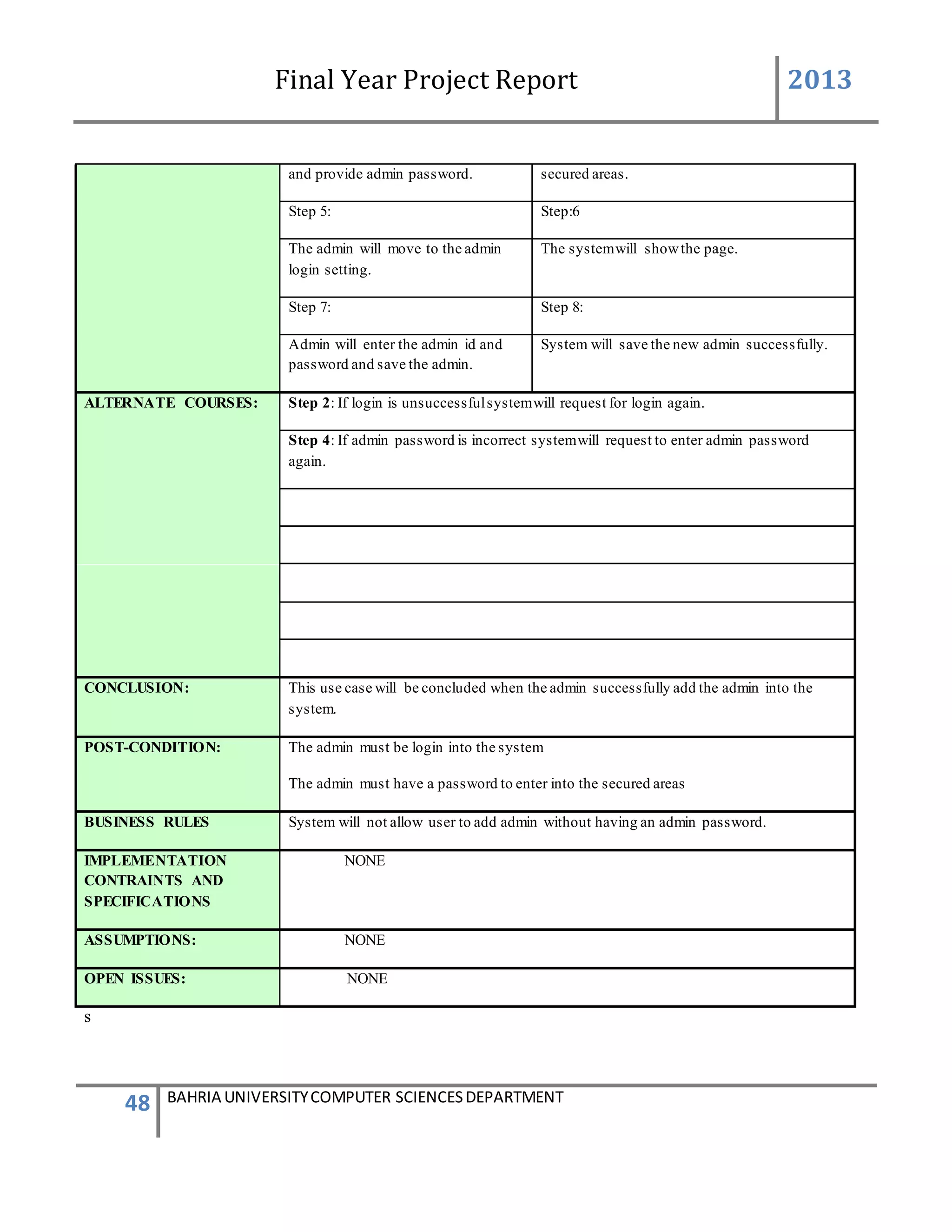
and provide admin password. secured areas.
Step 5: Step:6
The admin will move to the admin
login setting.
The systemwill showthe page.
Step 7: Step 8:
Admin will enter the admin id and
password and save the admin.
System will save the new admin successfully.
ALTERNATE COURSES: Step 2: If login is unsuccessfulsystemwill request for login again.
Step 4: If admin password is incorrect systemwill request to enter admin password
again.
CONCLUSION: This use case will be concluded when the admin successfully add the admin into the
system.
POST-CONDITION: The admin must be login into the system
The admin must have a password to enter into the secured areas
BUSINESS RULES System will not allow user to add admin without having an admin password.
IMPLEMENTATION
CONTRAINTS AND
SPECIFICATIONS
NONE
ASSUMPTIONS: NONE
OPEN ISSUES: NONE
s
Final Year Project Report 2013
49 BAHRIA UNIVERSITYCOMPUTER SCIENCESDEPARTMENT
Generator Monitoring System
Author (s): Salman, Faisal Date: ___________
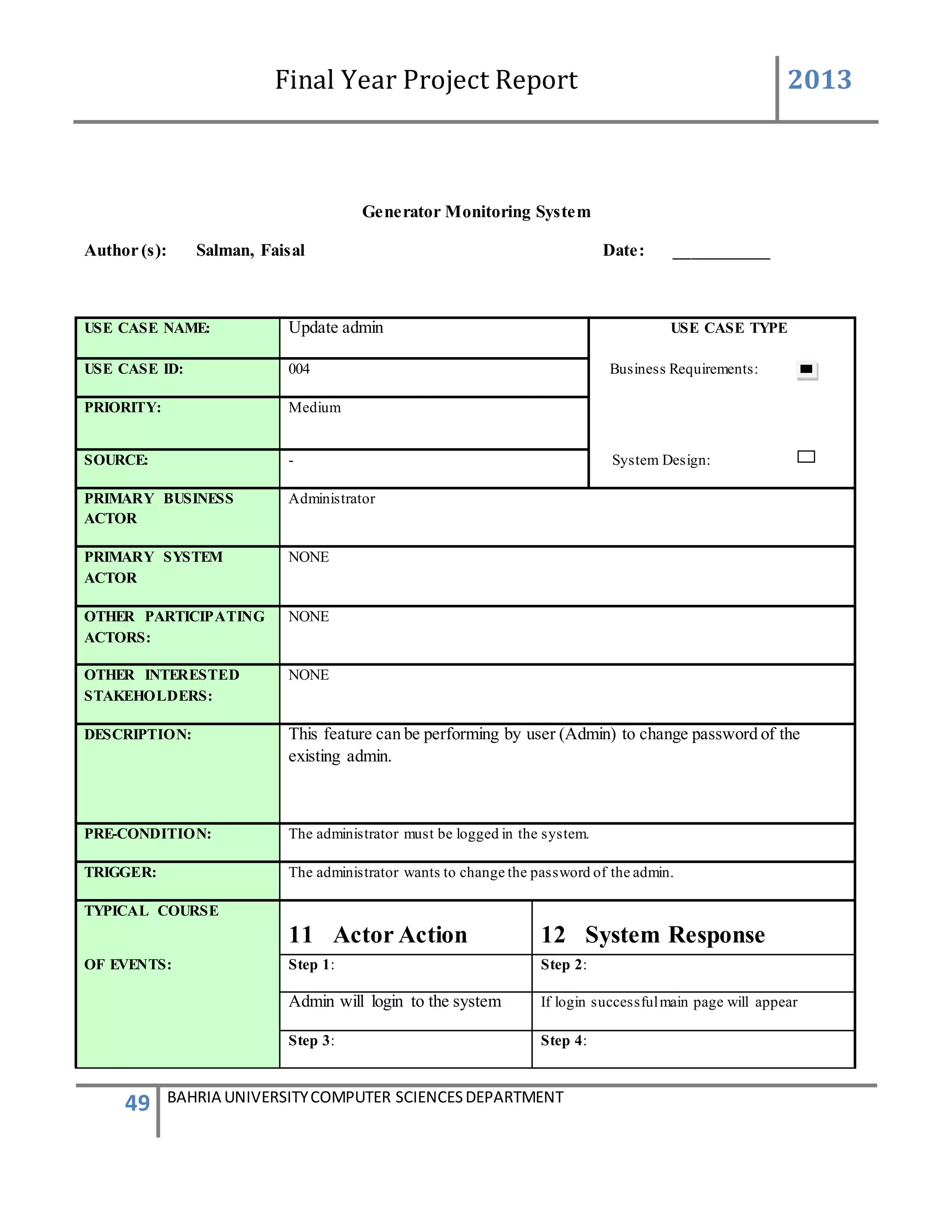
USE CASE NAME: Update admin USE CASE TYPE
USE CASE ID: 004 Business Requirements:
PRIORITY: Medium
SOURCE: - System Design:
PRIMARY BUSINESS
ACTOR
Administrator
PRIMARY SYSTEM
ACTOR
NONE
OTHER PARTICIPATING
ACTORS:
NONE
OTHER INTERESTED
STAKEHOLDERS:
NONE
DESCRIPTION: This feature can be performing by user (Admin) to change password of the
existing admin.
PRE-CONDITION: The administrator must be logged in the system.
TRIGGER: The administrator wants to change the password of the admin.
TYPICAL COURSE
11 Actor Action 12 System Response
OF EVENTS: Step 1: Step 2:
Admin will login to the system If login successfulmain page will appear
Step 3: Step 4:
Final Year Project Report 2013
50 BAHRIA UNIVERSITYCOMPUTER SCIENCESDEPARTMENT
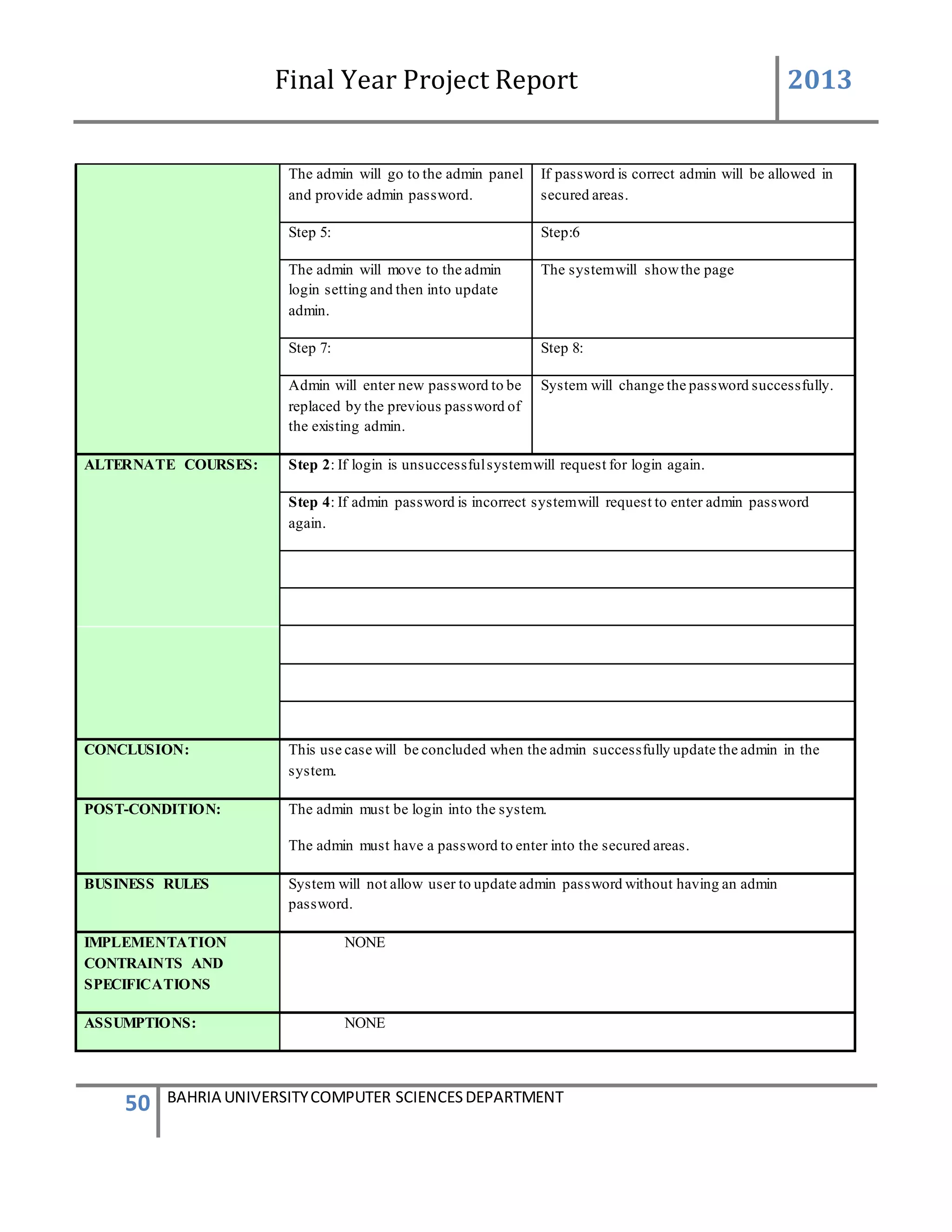
The admin will go to the admin panel
and provide admin password.
If password is correct admin will be allowed in
secured areas.
Step 5: Step:6
The admin will move to the admin
login setting and then into update
admin.
The systemwill showthe page
Step 7: Step 8:
Admin will enter new password to be
replaced by the previous password of
the existing admin.
System will change the password successfully.
ALTERNATE COURSES: Step 2: If login is unsuccessfulsystemwill request for login again.
Step 4: If admin password is incorrect systemwill request to enter admin password
again.
CONCLUSION: This use case will be concluded when the admin successfully update the admin in the
system.
POST-CONDITION: The admin must be login into the system.
The admin must have a password to enter into the secured areas.
BUSINESS RULES System will not allow user to update admin password without having an admin
password.
IMPLEMENTATION
CONTRAINTS AND
SPECIFICATIONS
NONE
ASSUMPTIONS: NONE
Final Year Project Report 2013
51 BAHRIA UNIVERSITYCOMPUTER SCIENCESDEPARTMENT
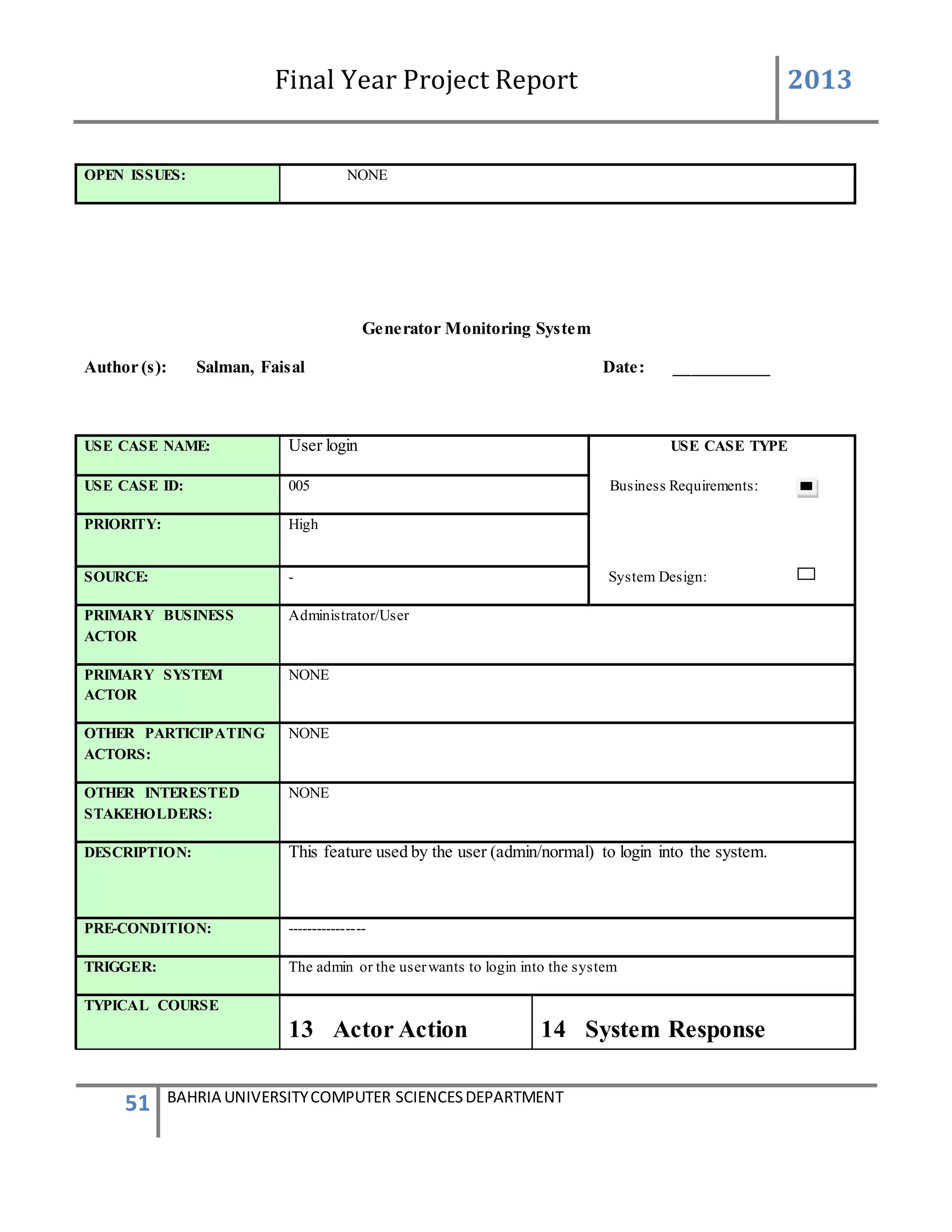
OPEN ISSUES: NONE
Generator Monitoring System
Author (s): Salman, Faisal Date: ___________
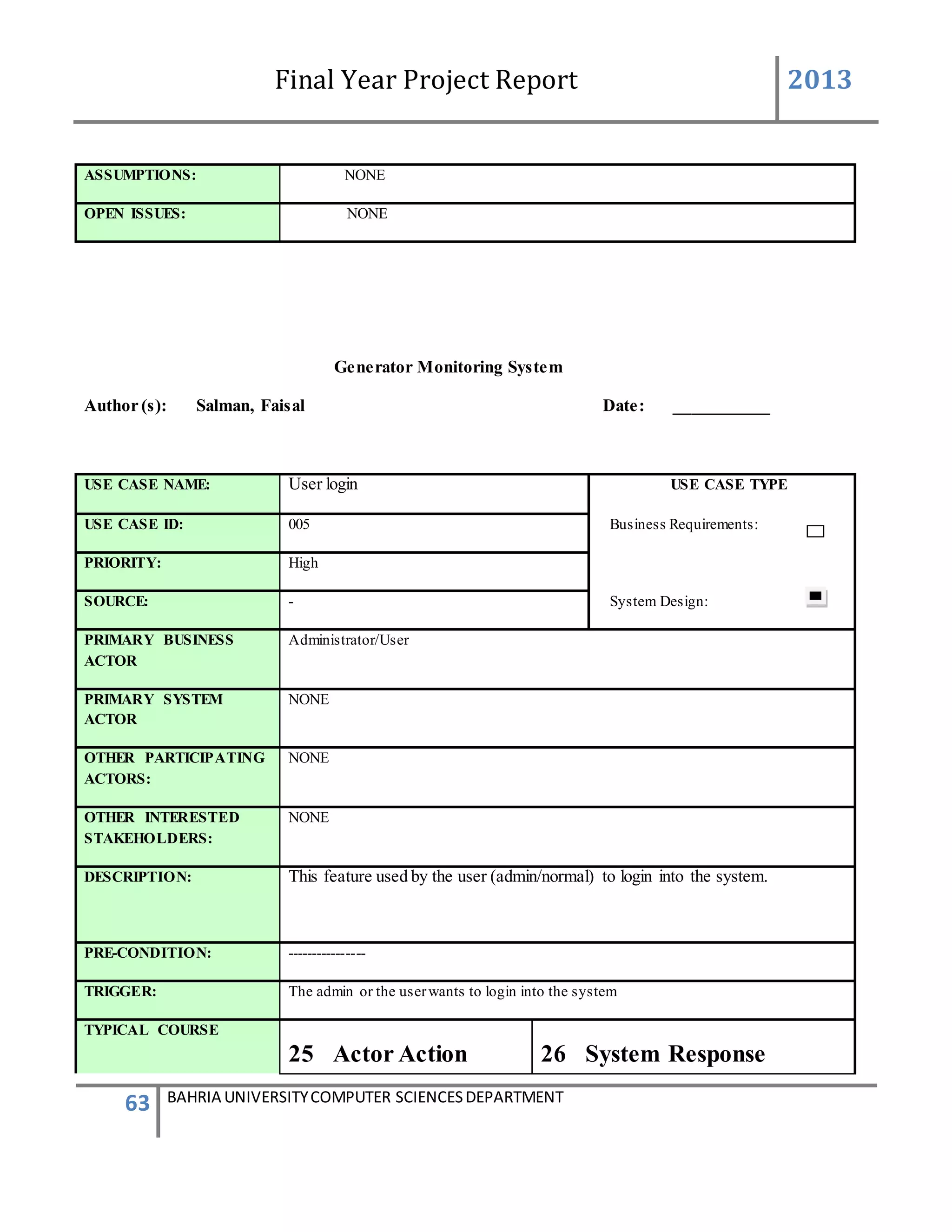
USE CASE NAME: User login USE CASE TYPE
USE CASE ID: 005 Business Requirements:
PRIORITY: High
SOURCE: - System Design:
PRIMARY BUSINESS
ACTOR
Administrator/User
PRIMARY SYSTEM
ACTOR
NONE
OTHER PARTICIPATING
ACTORS:
NONE
OTHER INTERESTED
STAKEHOLDERS:
NONE
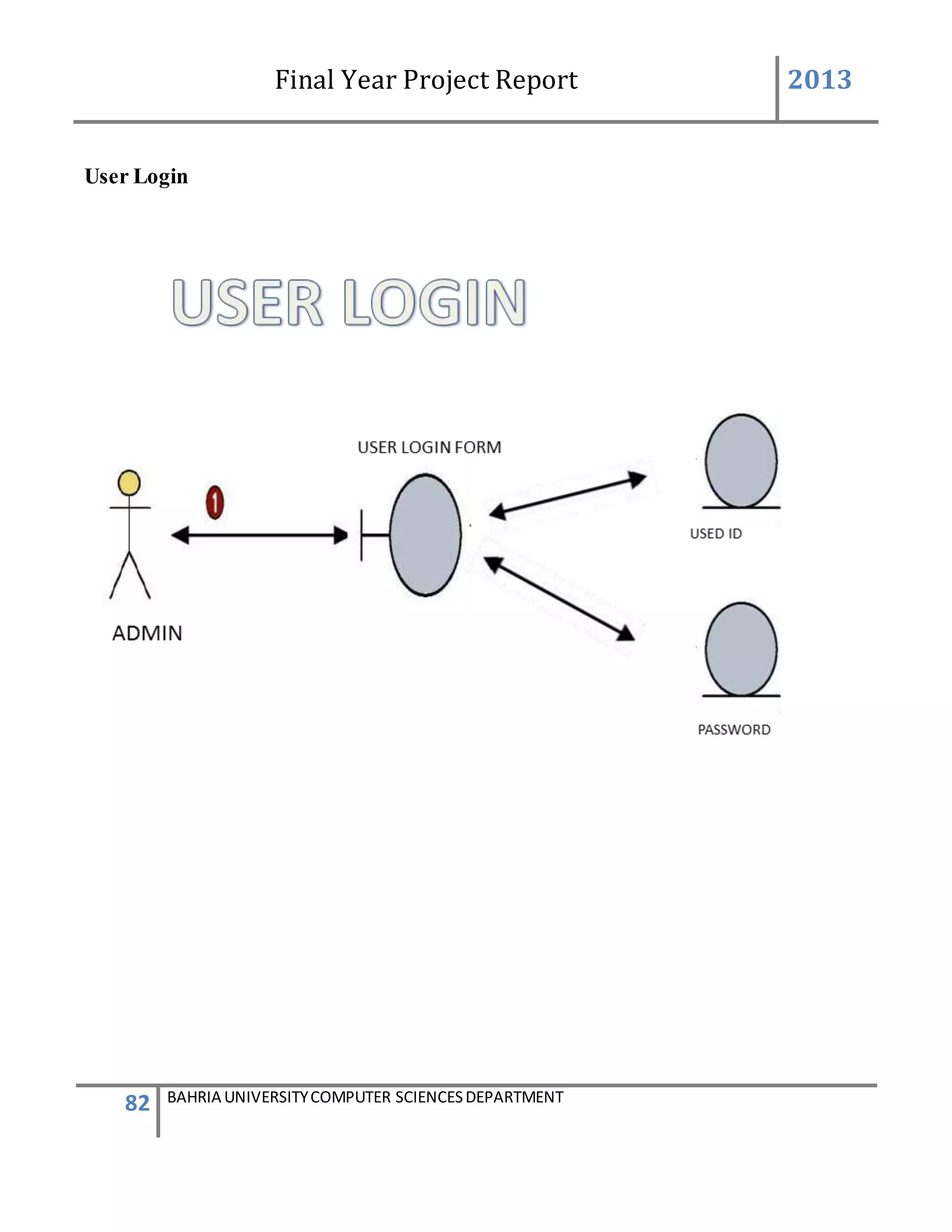
DESCRIPTION: This feature used by the user (admin/normal) to login into the system.
PRE-CONDITION: ----------------
TRIGGER: The admin or the userwants to login into the system
TYPICAL COURSE
13 Actor Action 14 System Response
Final Year Project Report 2013
52 BAHRIA UNIVERSITYCOMPUTER SCIENCESDEPARTMENT
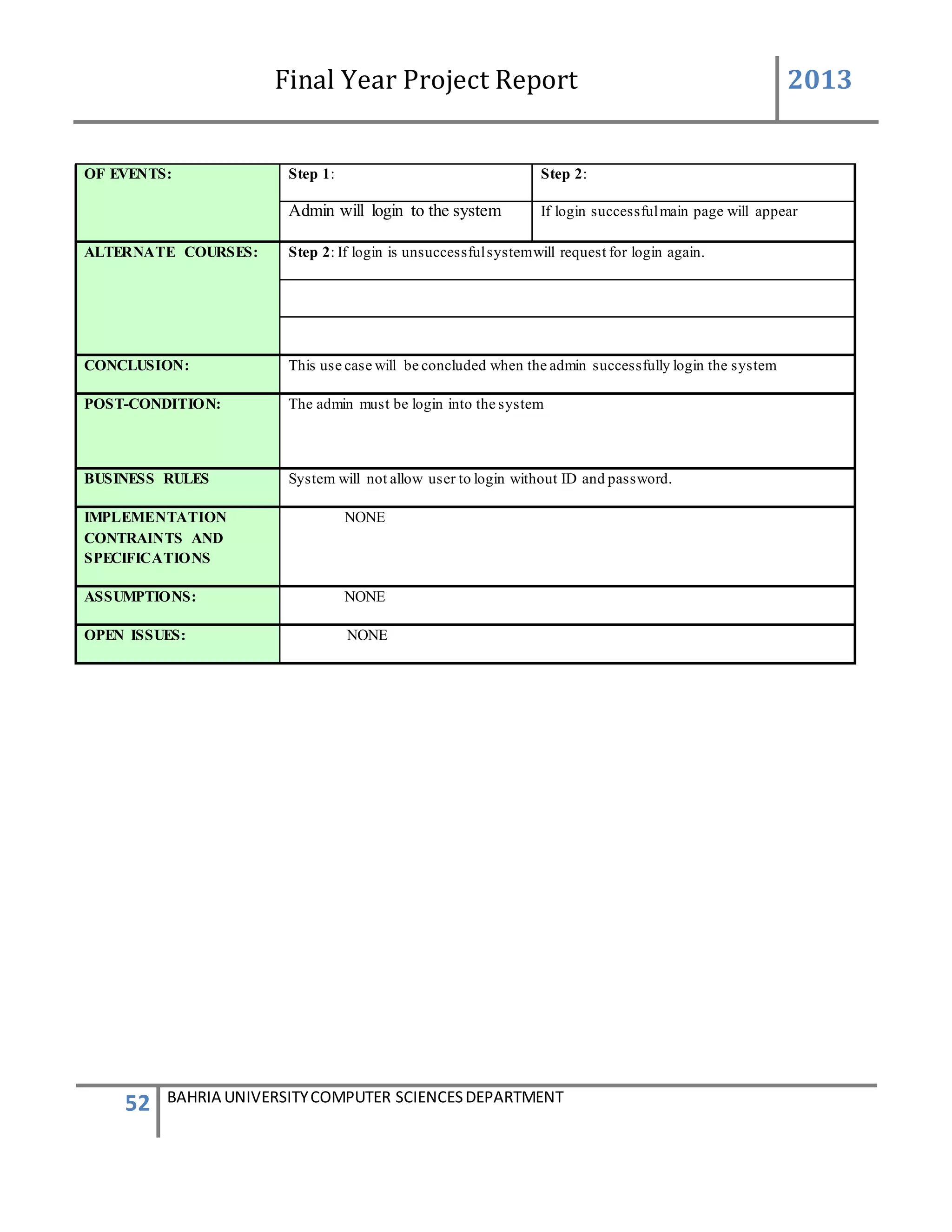
OF EVENTS: Step 1: Step 2:
Admin will login to the system If login successfulmain page will appear
ALTERNATE COURSES: Step 2: If login is unsuccessfulsystemwill request for login again.
CONCLUSION: This use case will be concluded when the admin successfully login the system
POST-CONDITION: The admin must be login into the system
BUSINESS RULES System will not allow user to login without ID and password.
IMPLEMENTATION
CONTRAINTS AND
SPECIFICATIONS
NONE
ASSUMPTIONS: NONE
OPEN ISSUES: NONE
Final Year Project Report 2013
53 BAHRIA UNIVERSITYCOMPUTER SCIENCESDEPARTMENT
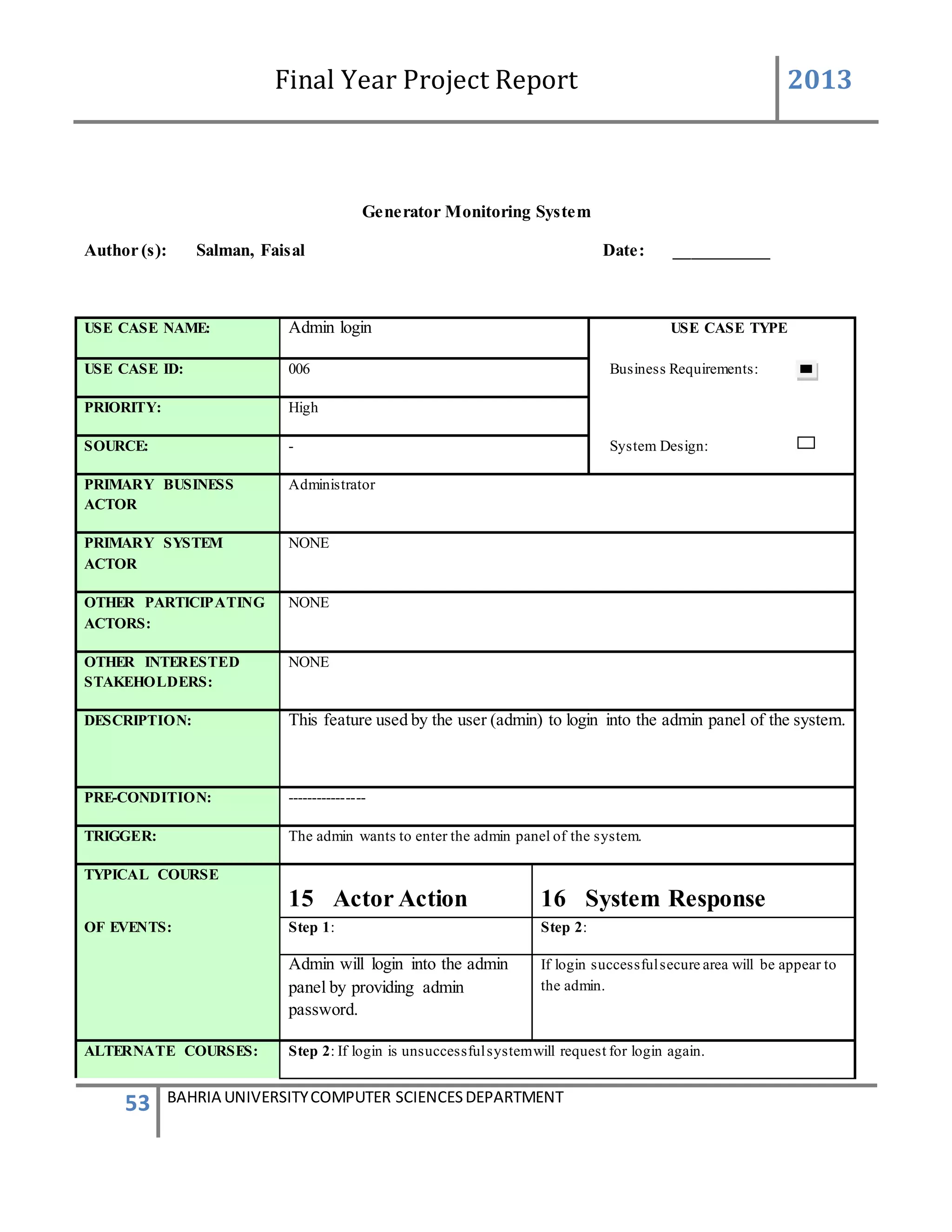
Generator Monitoring System
Author (s): Salman, Faisal Date: ___________
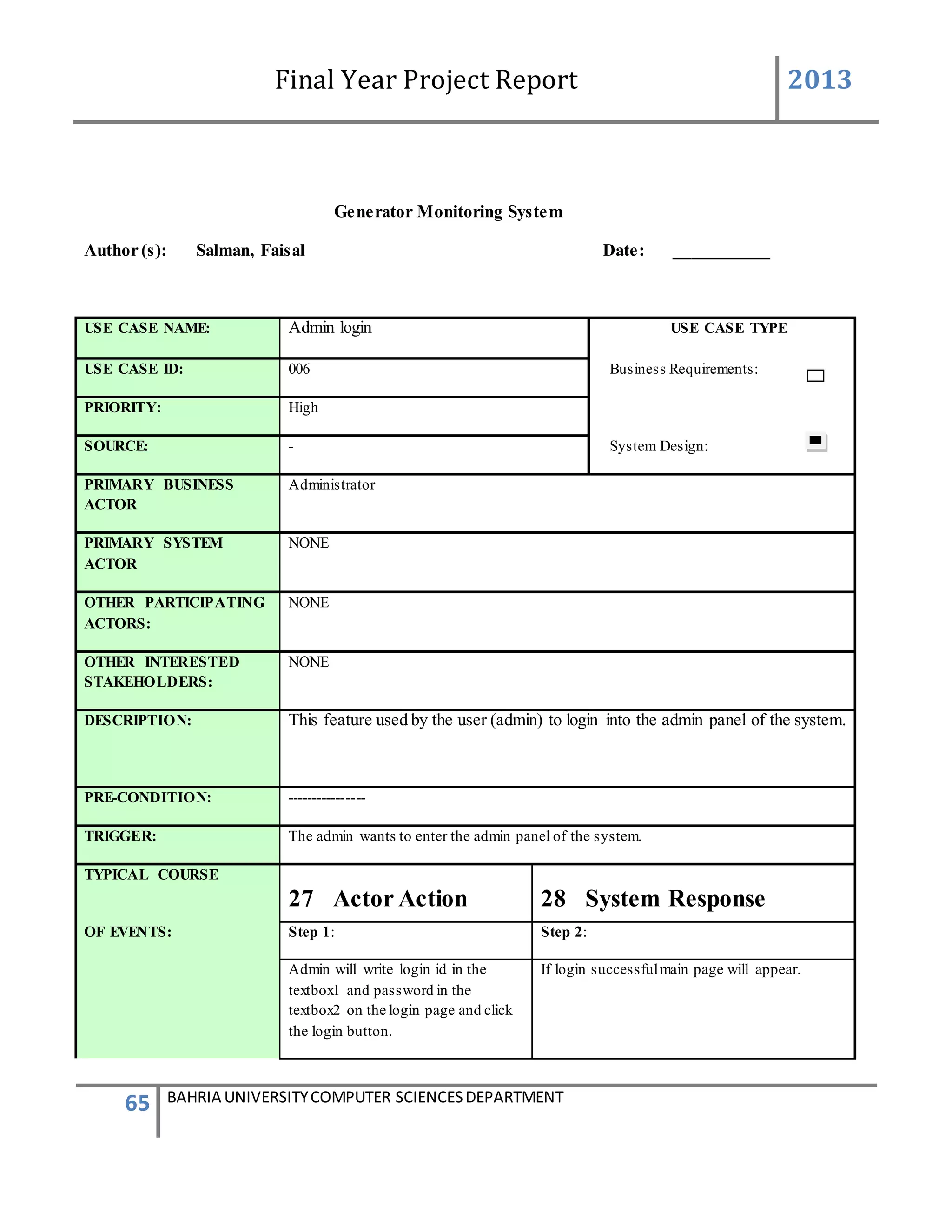
USE CASE NAME: Admin login USE CASE TYPE
USE CASE ID: 006 Business Requirements:
PRIORITY: High
SOURCE: - System Design:
PRIMARY BUSINESS
ACTOR
Administrator
PRIMARY SYSTEM
ACTOR
NONE
OTHER PARTICIPATING
ACTORS:
NONE
OTHER INTERESTED
STAKEHOLDERS:
NONE
DESCRIPTION: This feature used by the user (admin) to login into the admin panel of the system.
PRE-CONDITION: ----------------
TRIGGER: The admin wants to enter the admin panel of the system.
TYPICAL COURSE
15 Actor Action 16 System Response
OF EVENTS: Step 1: Step 2:
Admin will login into the admin
panel by providing admin
password.
If login successfulsecure area will be appear to
the admin.
ALTERNATE COURSES: Step 2: If login is unsuccessfulsystemwill request for login again.
Final Year Project Report 2013
54 BAHRIA UNIVERSITYCOMPUTER SCIENCESDEPARTMENT
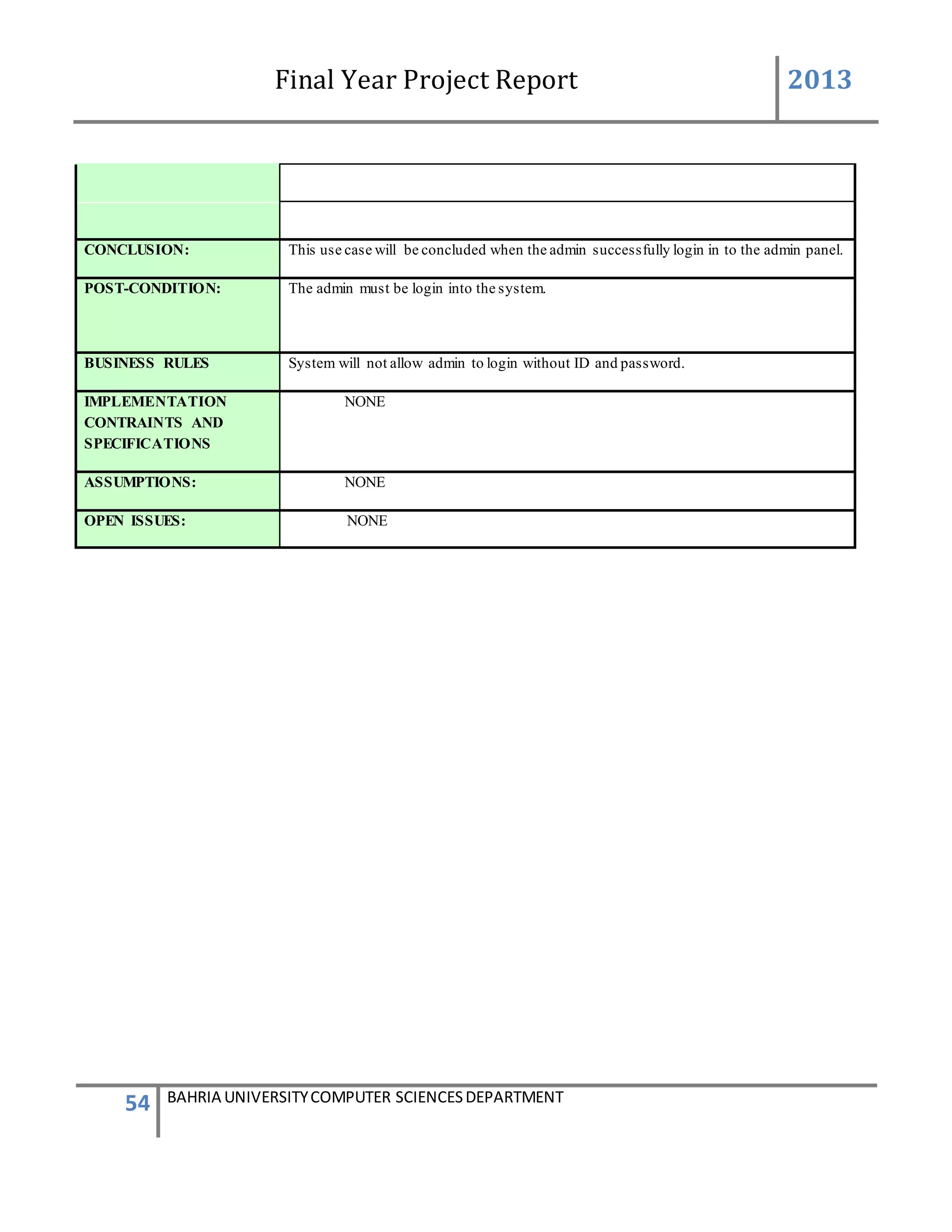
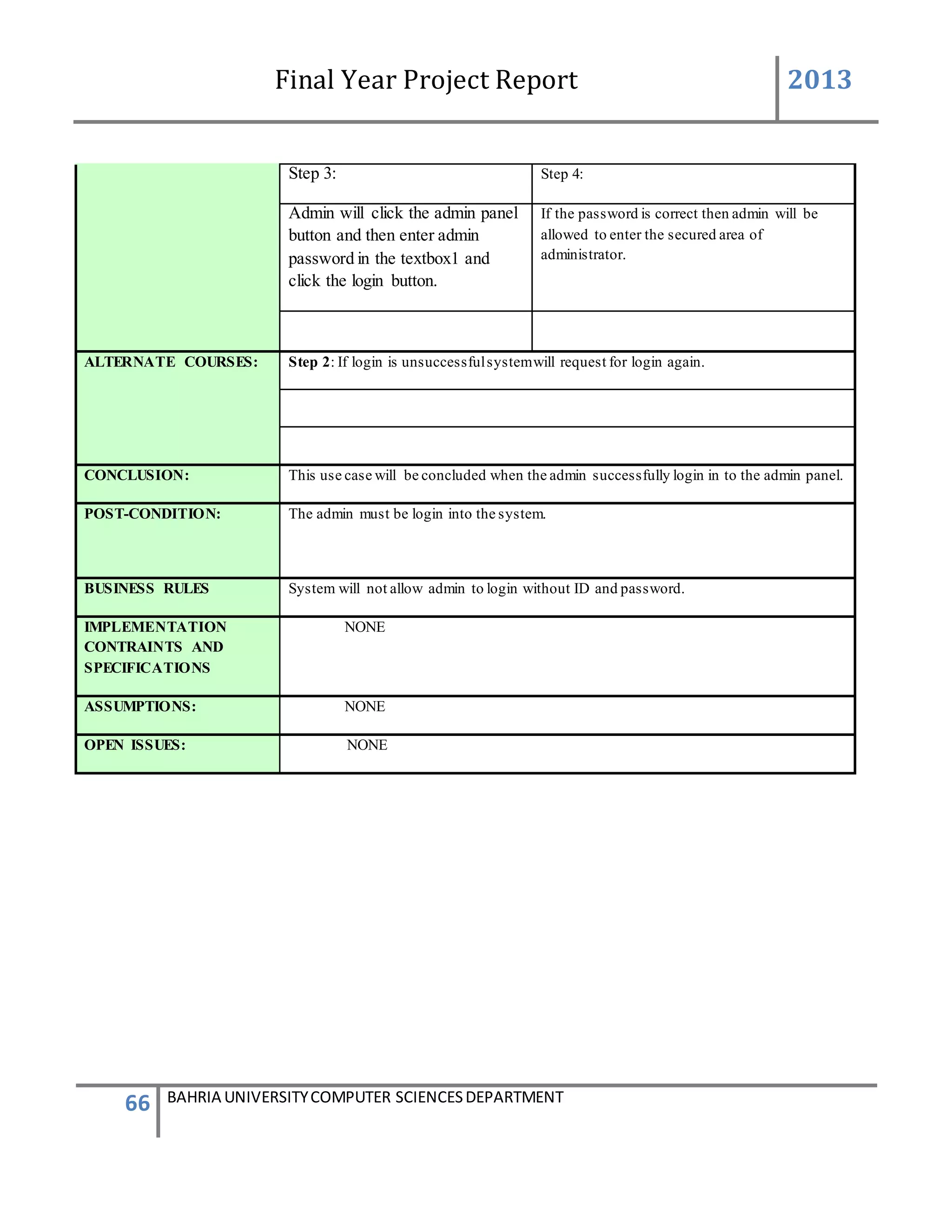
CONCLUSION: This use case will be concluded when the admin successfully login in to the admin panel.
POST-CONDITION: The admin must be login into the system.
BUSINESS RULES System will not allow admin to login without ID and password.
IMPLEMENTATION
CONTRAINTS AND
SPECIFICATIONS
NONE
ASSUMPTIONS: NONE
OPEN ISSUES: NONE
Final Year Project Report 2013
55 BAHRIA UNIVERSITYCOMPUTER SCIENCESDEPARTMENT
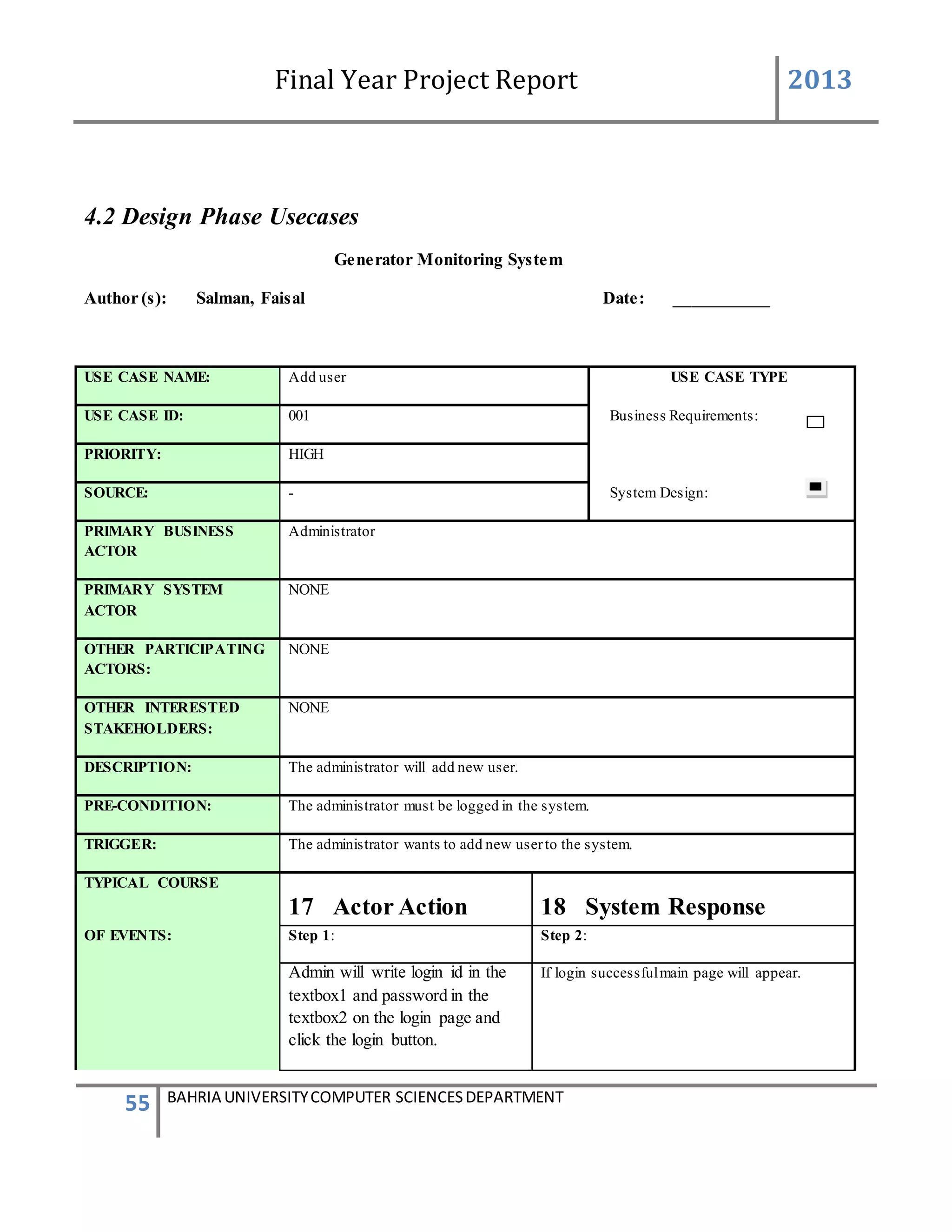
4.2 Design Phase Usecases
Generator Monitoring System
Author (s): Salman, Faisal Date: ___________
USE CASE NAME: Add user USE CASE TYPE
USE CASE ID: 001 Business Requirements:
PRIORITY: HIGH
SOURCE: - System Design:
PRIMARY BUSINESS
ACTOR
Administrator
PRIMARY SYSTEM
ACTOR
NONE
OTHER PARTICIPATING
ACTORS:
NONE
OTHER INTERESTED
STAKEHOLDERS:
NONE
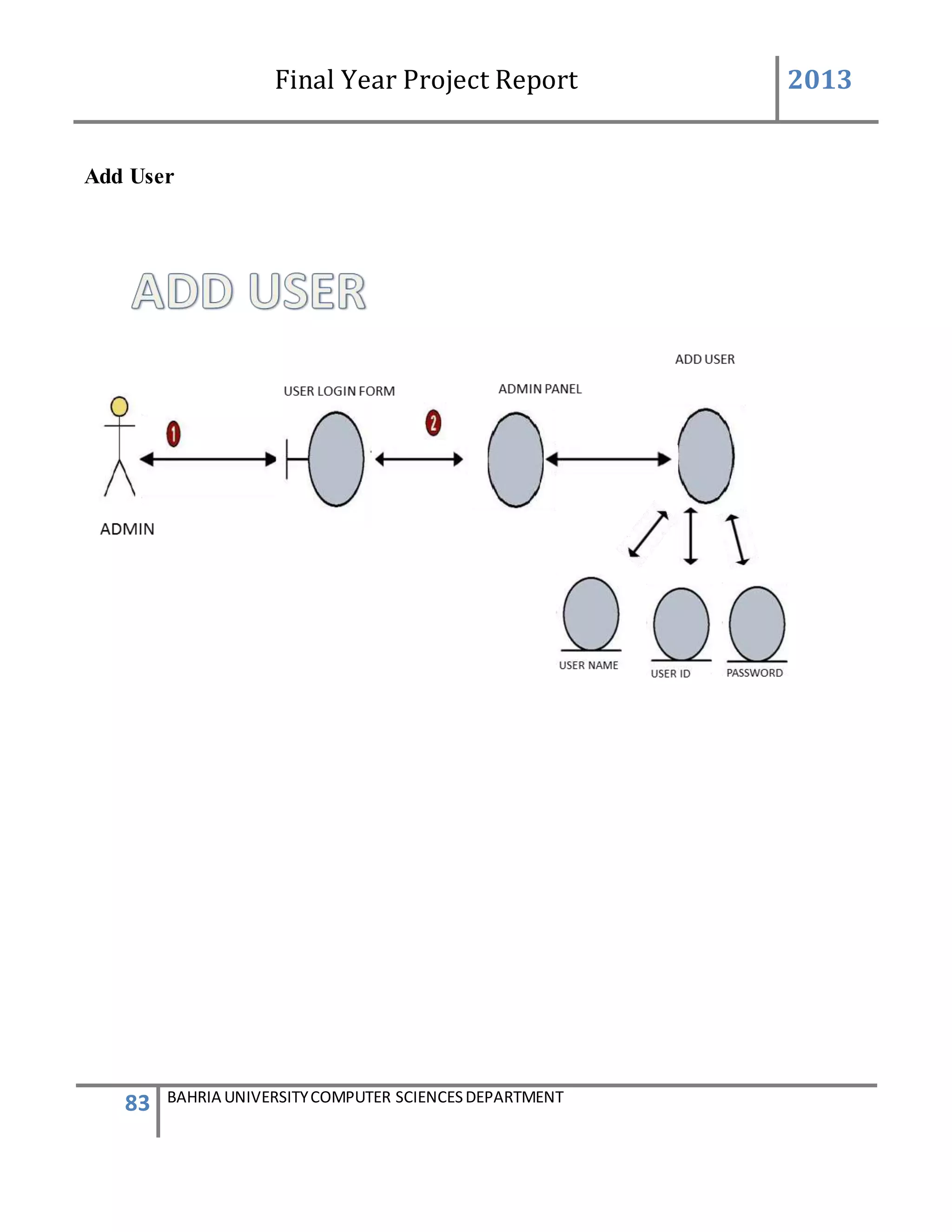
DESCRIPTION: The administrator will add new user.
PRE-CONDITION: The administrator must be logged in the system.
TRIGGER: The administrator wants to add new userto the system.
TYPICAL COURSE
17 Actor Action 18 System Response
OF EVENTS: Step 1: Step 2:
Admin will write login id in the
textbox1 and password in the
textbox2 on the login page and
click the login button.
If login successfulmain page will appear.
Final Year Project Report 2013
56 BAHRIA UNIVERSITYCOMPUTER SCIENCESDEPARTMENT
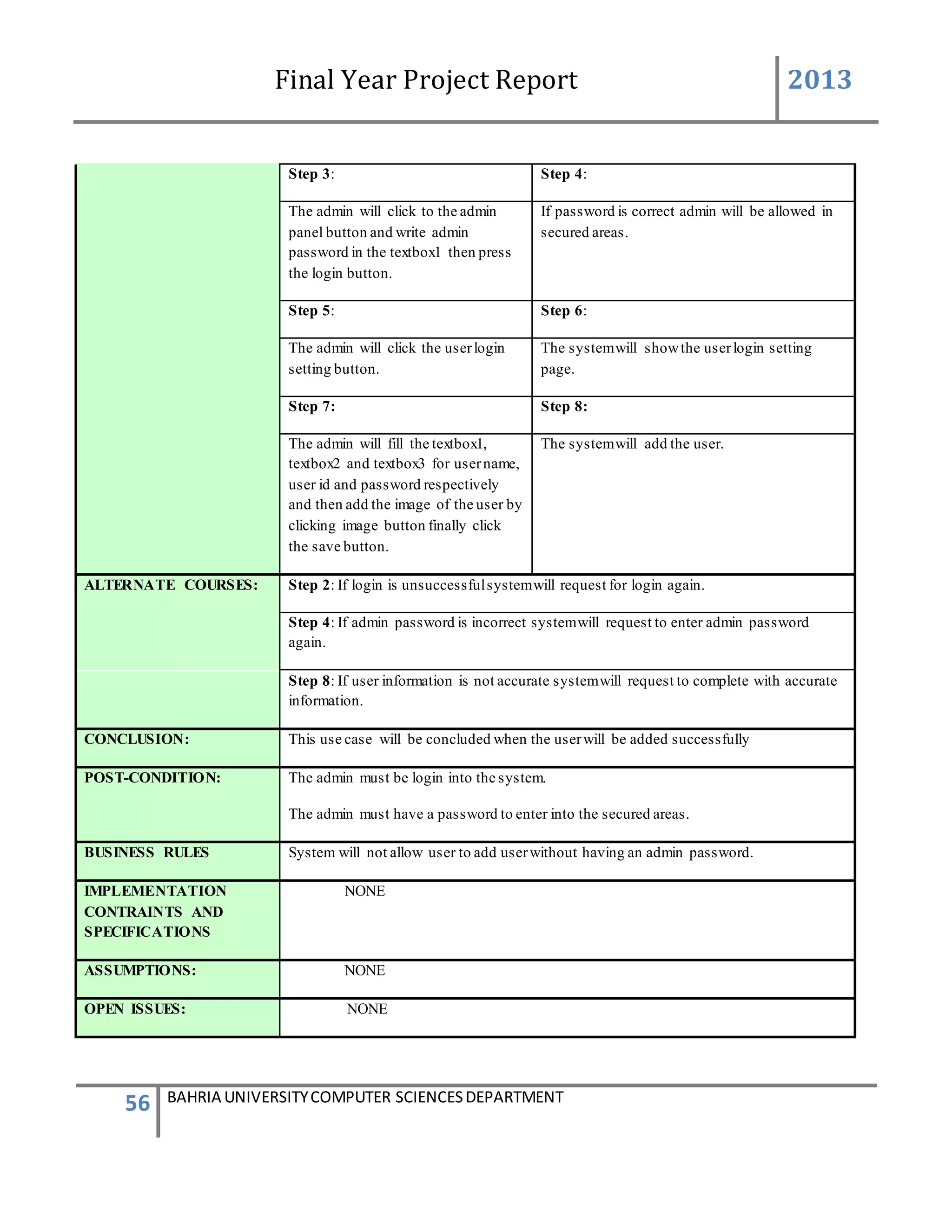
Step 3: Step 4:
The admin will click to the admin
panel button and write admin
password in the textbox1 then press
the login button.
If password is correct admin will be allowed in
secured areas.
Step 5: Step 6:
The admin will click the userlogin
setting button.
The systemwill showthe userlogin setting
page.
Step 7: Step 8:
The admin will fill the textbox1,
textbox2 and textbox3 for username,
user id and password respectively
and then add the image of the user by
clicking image button finally click
the save button.
The systemwill add the user.
ALTERNATE COURSES: Step 2: If login is unsuccessfulsystemwill request for login again.
Step 4: If admin password is incorrect systemwill request to enter admin password
again.
Step 8: If user information is not accurate systemwill request to complete with accurate
information.
CONCLUSION: This use case will be concluded when the userwill be added successfully
POST-CONDITION: The admin must be login into the system.
The admin must have a password to enter into the secured areas.
BUSINESS RULES System will not allow user to add userwithout having an admin password.
IMPLEMENTATION
CONTRAINTS AND
SPECIFICATIONS
NONE
ASSUMPTIONS: NONE
OPEN ISSUES: NONE
Final Year Project Report 2013
57 BAHRIA UNIVERSITYCOMPUTER SCIENCESDEPARTMENT
Generator Monitoring System
Author (s): Salman, Faisal Date: ___________
Version: ___________
USE CASE NAME: Update user. USE CASE TYPE
USE CASE ID: 002 Business Requirements:
PRIORITY: HIGH
SOURCE: - System Design:
PRIMARY BUSINESS
ACTOR
Administrator
PRIMARY SYSTEM
ACTOR
NONE
OTHER PARTICIPATING
ACTORS:
NONE
OTHER INTERESTED
STAKEHOLDERS:
NONE
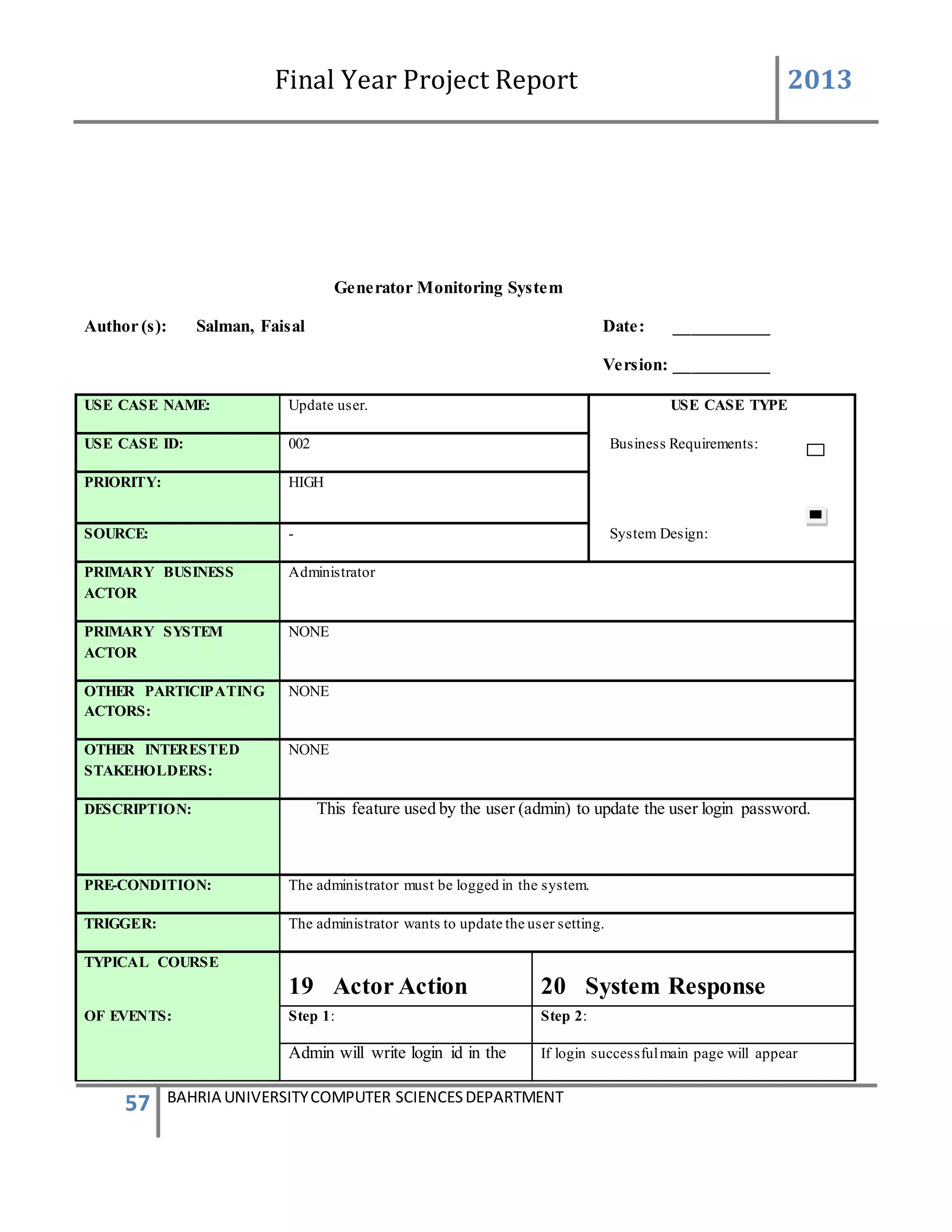
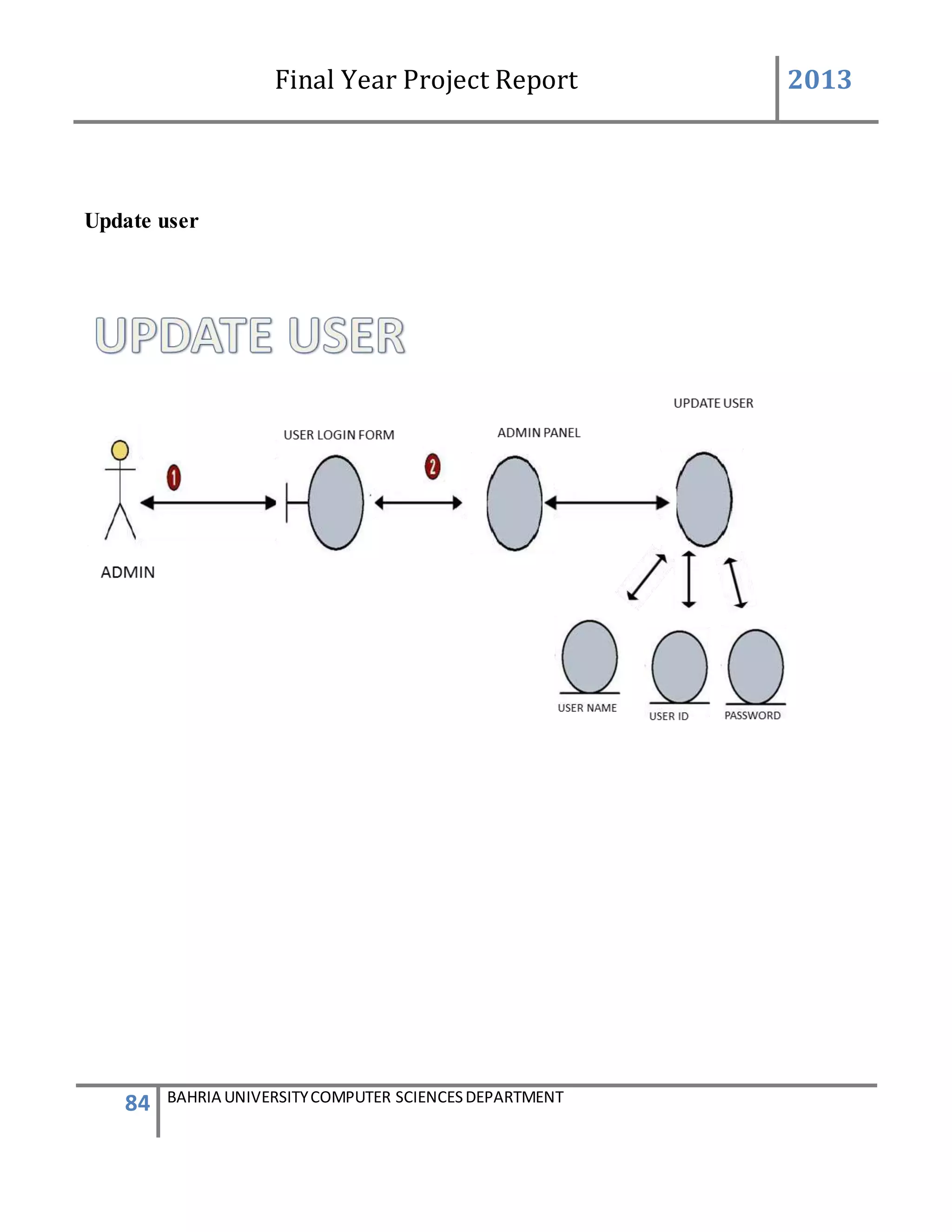
DESCRIPTION: This feature used by the user (admin) to update the user login password.
PRE-CONDITION: The administrator must be logged in the system.
TRIGGER: The administrator wants to update the user setting.
TYPICAL COURSE
19 Actor Action 20 System Response
OF EVENTS: Step 1: Step 2:
Admin will write login id in the If login successfulmain page will appear
Final Year Project Report 2013
58 BAHRIA UNIVERSITYCOMPUTER SCIENCESDEPARTMENT
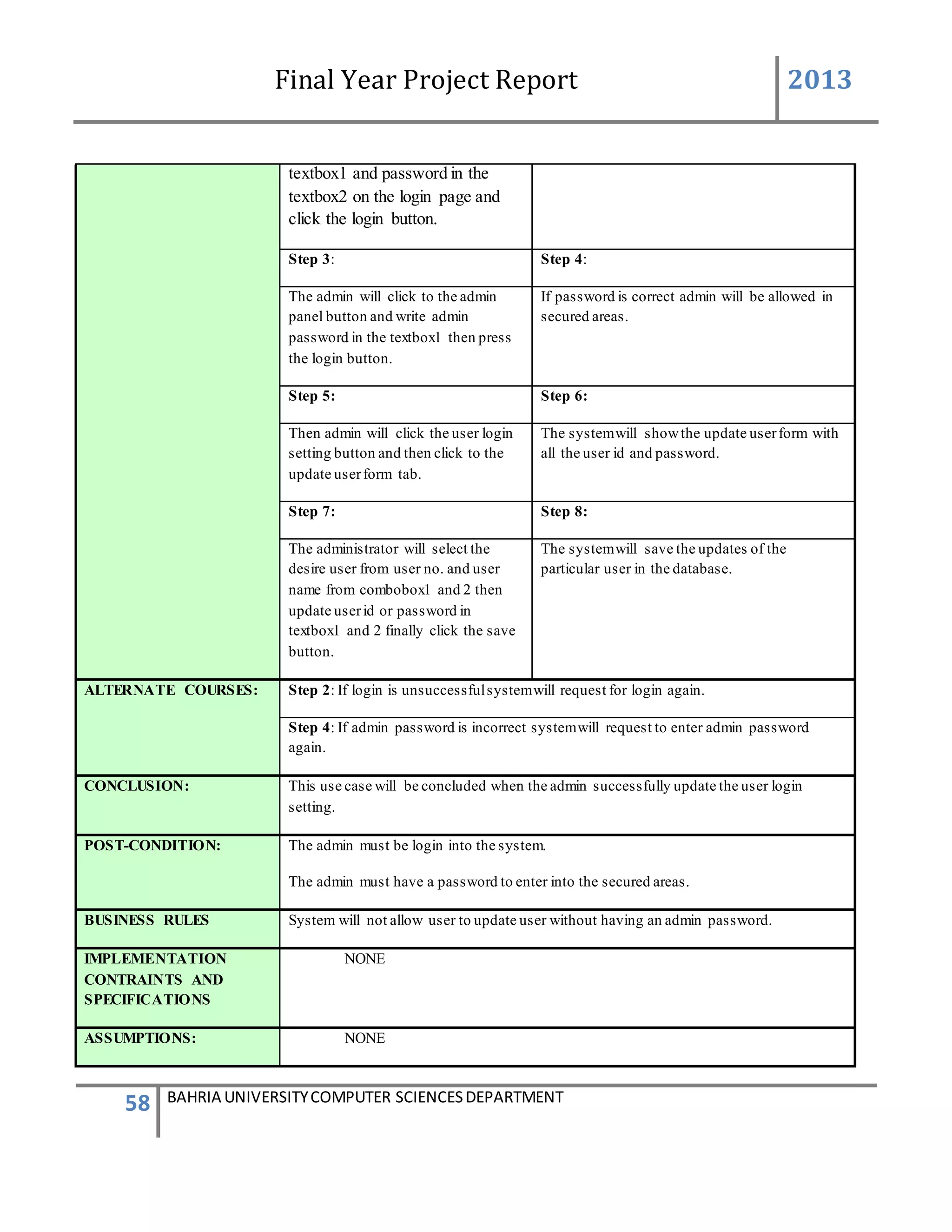
textbox1 and password in the
textbox2 on the login page and
click the login button.
Step 3: Step 4:
The admin will click to the admin
panel button and write admin
password in the textbox1 then press
the login button.
If password is correct admin will be allowed in
secured areas.
Step 5: Step 6:
Then admin will click the user login
setting button and then click to the
update userform tab.
The systemwill showthe update userform with
all the user id and password.
Step 7: Step 8:
The administrator will select the
desire user from user no. and user
name from combobox1 and 2 then
update userid or password in
textbox1 and 2 finally click the save
button.
The systemwill save the updates of the
particular user in the database.
ALTERNATE COURSES: Step 2: If login is unsuccessfulsystemwill request for login again.
Step 4: If admin password is incorrect systemwill request to enter admin password
again.
CONCLUSION: This use case will be concluded when the admin successfully update the user login
setting.
POST-CONDITION: The admin must be login into the system.
The admin must have a password to enter into the secured areas.
BUSINESS RULES System will not allow user to update user without having an admin password.
IMPLEMENTATION
CONTRAINTS AND
SPECIFICATIONS
NONE
ASSUMPTIONS: NONE
Final Year Project Report 2013
59 BAHRIA UNIVERSITYCOMPUTER SCIENCESDEPARTMENT
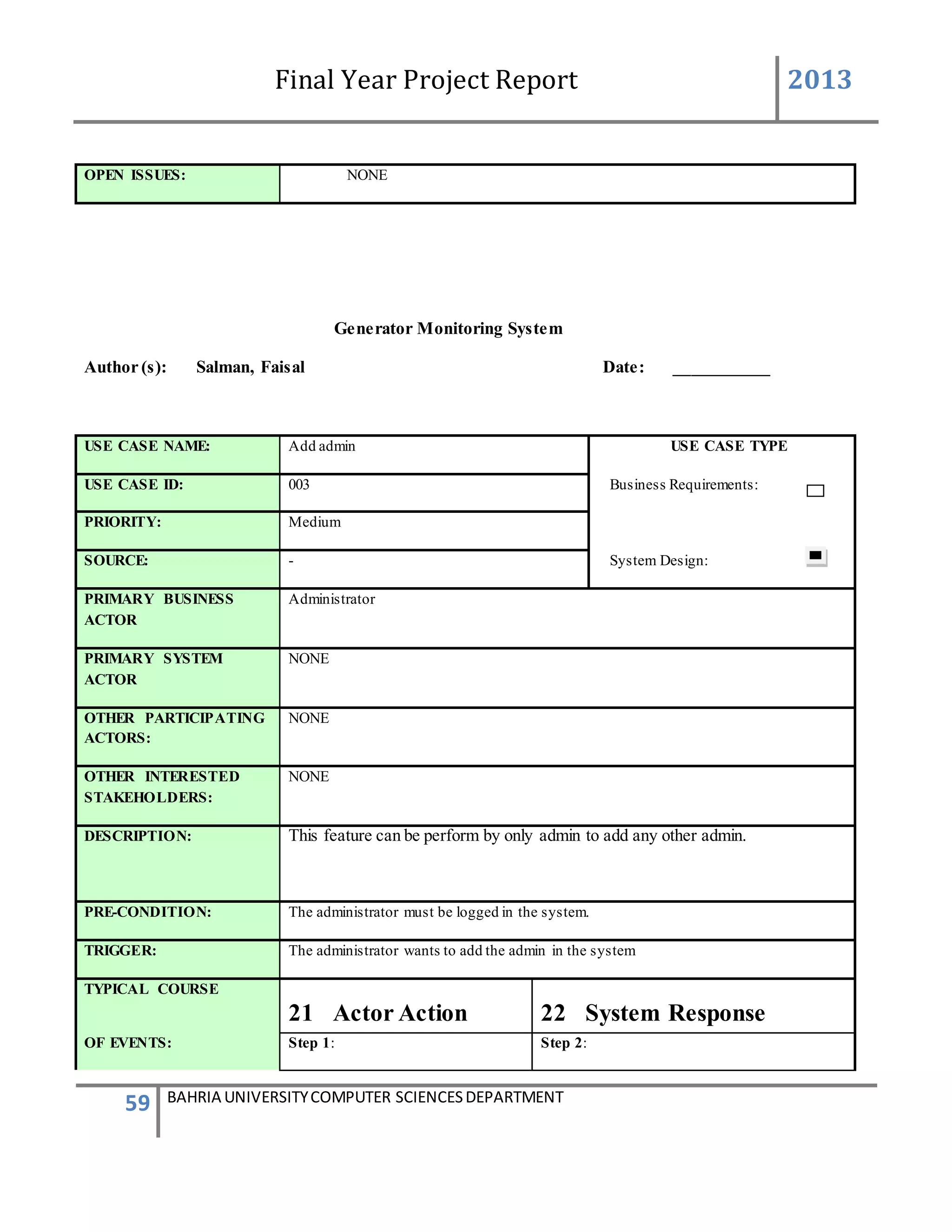
OPEN ISSUES: NONE
Generator Monitoring System
Author (s): Salman, Faisal Date: ___________
USE CASE NAME: Add admin USE CASE TYPE
USE CASE ID: 003 Business Requirements:
PRIORITY: Medium
SOURCE: - System Design:
PRIMARY BUSINESS
ACTOR
Administrator
PRIMARY SYSTEM
ACTOR
NONE
OTHER PARTICIPATING
ACTORS:
NONE
OTHER INTERESTED
STAKEHOLDERS:
NONE
DESCRIPTION: This feature can be perform by only admin to add any other admin.
PRE-CONDITION: The administrator must be logged in the system.
TRIGGER: The administrator wants to add the admin in the system
TYPICAL COURSE
21 Actor Action 22 System Response
OF EVENTS: Step 1: Step 2:
Final Year Project Report 2013
60 BAHRIA UNIVERSITYCOMPUTER SCIENCESDEPARTMENT
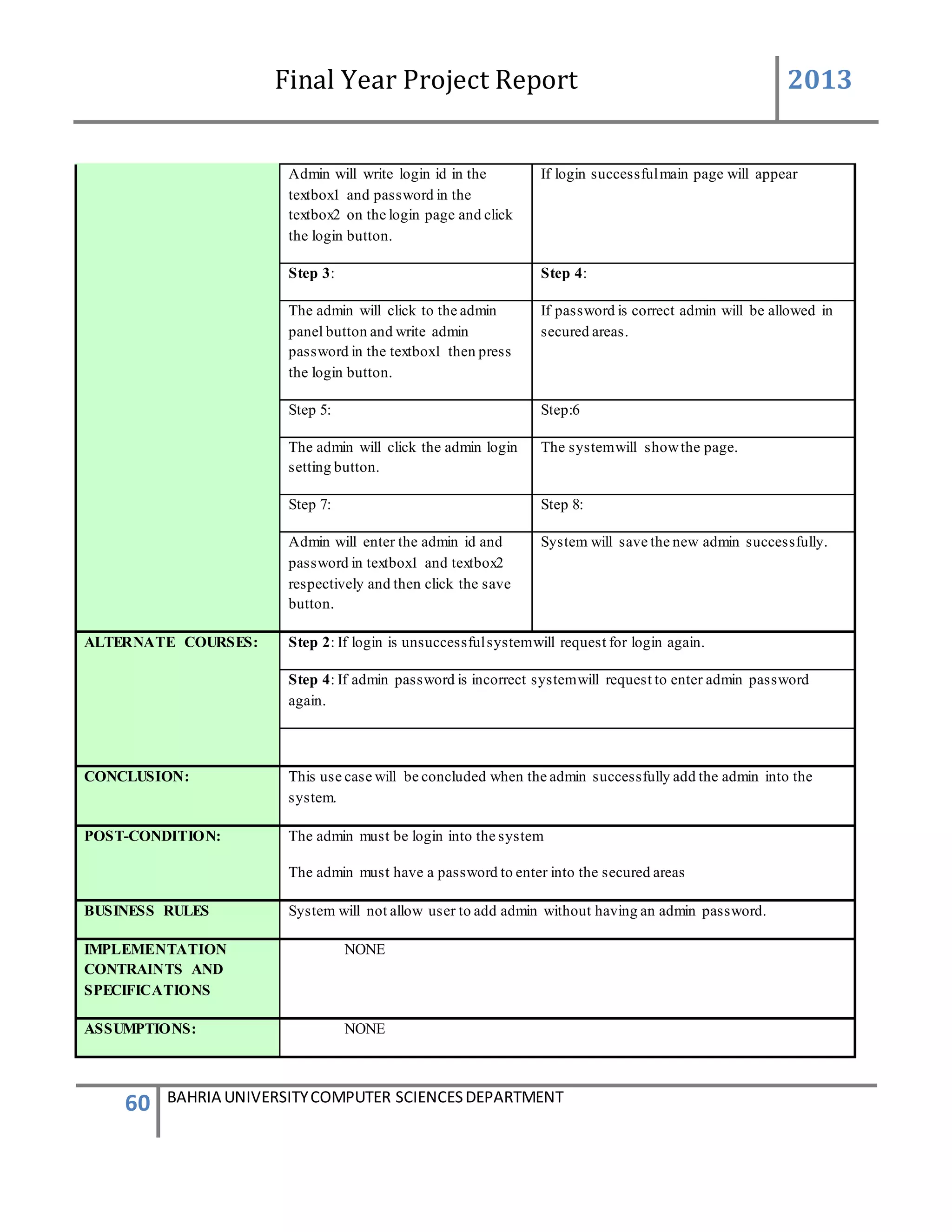
Admin will write login id in the
textbox1 and password in the
textbox2 on the login page and click
the login button.
If login successfulmain page will appear
Step 3: Step 4:
The admin will click to the admin
panel button and write admin
password in the textbox1 then press
the login button.
If password is correct admin will be allowed in
secured areas.
Step 5: Step:6
The admin will click the admin login
setting button.
The systemwill showthe page.
Step 7: Step 8:
Admin will enter the admin id and
password in textbox1 and textbox2
respectively and then click the save
button.
System will save the new admin successfully.
ALTERNATE COURSES: Step 2: If login is unsuccessfulsystemwill request for login again.
Step 4: If admin password is incorrect systemwill request to enter admin password
again.
CONCLUSION: This use case will be concluded when the admin successfully add the admin into the
system.
POST-CONDITION: The admin must be login into the system
The admin must have a password to enter into the secured areas
BUSINESS RULES System will not allow user to add admin without having an admin password.
IMPLEMENTATION
CONTRAINTS AND
SPECIFICATIONS
NONE
ASSUMPTIONS: NONE
Final Year Project Report 2013
61 BAHRIA UNIVERSITYCOMPUTER SCIENCESDEPARTMENT
OPEN ISSUES: NONE
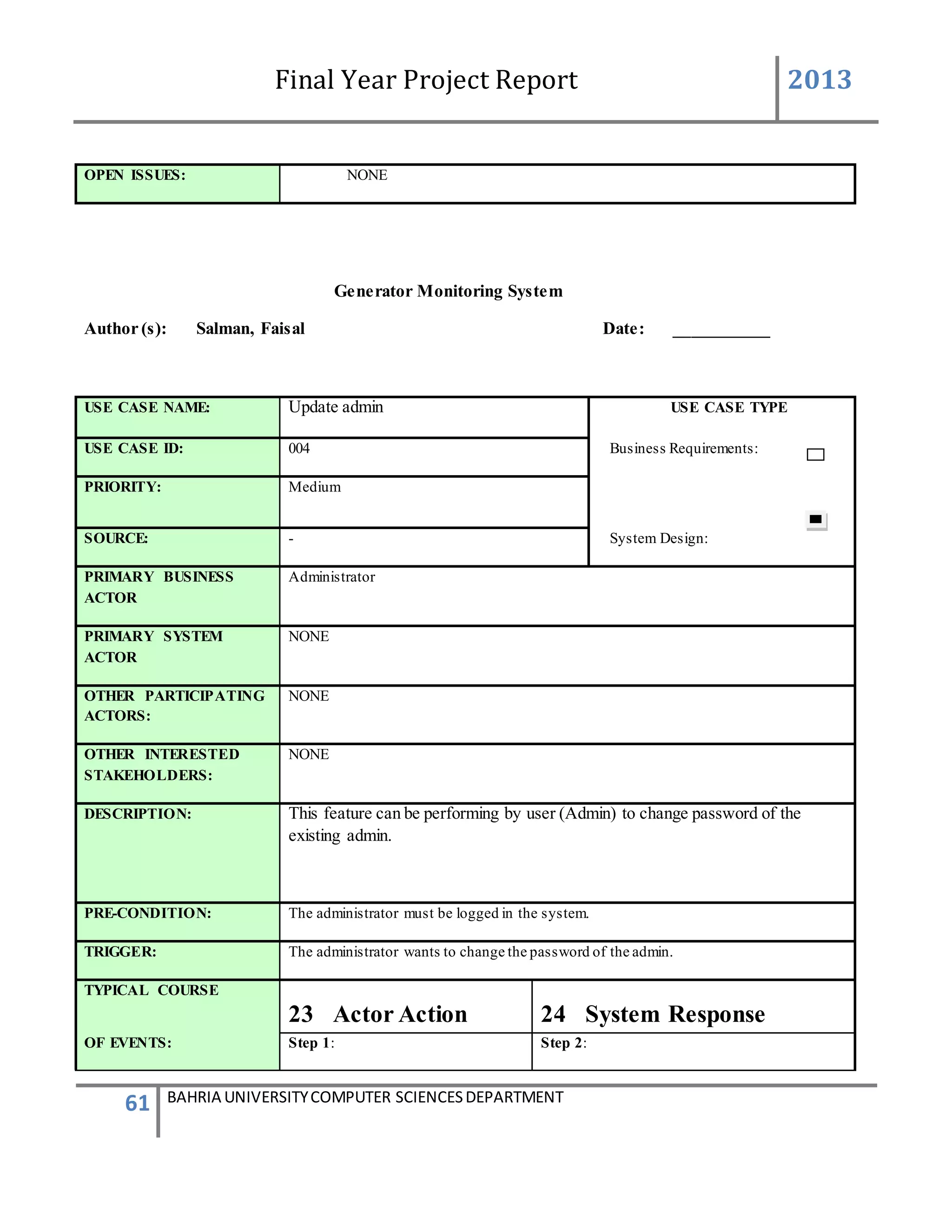
Generator Monitoring System
Author (s): Salman, Faisal Date: ___________
USE CASE NAME: Update admin USE CASE TYPE
USE CASE ID: 004 Business Requirements:
PRIORITY: Medium
SOURCE: - System Design:
PRIMARY BUSINESS
ACTOR
Administrator
PRIMARY SYSTEM
ACTOR
NONE
OTHER PARTICIPATING
ACTORS:
NONE
OTHER INTERESTED
STAKEHOLDERS:
NONE
DESCRIPTION: This feature can be performing by user (Admin) to change password of the
existing admin.
PRE-CONDITION: The administrator must be logged in the system.
TRIGGER: The administrator wants to change the password of the admin.
TYPICAL COURSE
23 Actor Action 24 System Response
OF EVENTS: Step 1: Step 2:
Final Year Project Report 2013
62 BAHRIA UNIVERSITYCOMPUTER SCIENCESDEPARTMENT
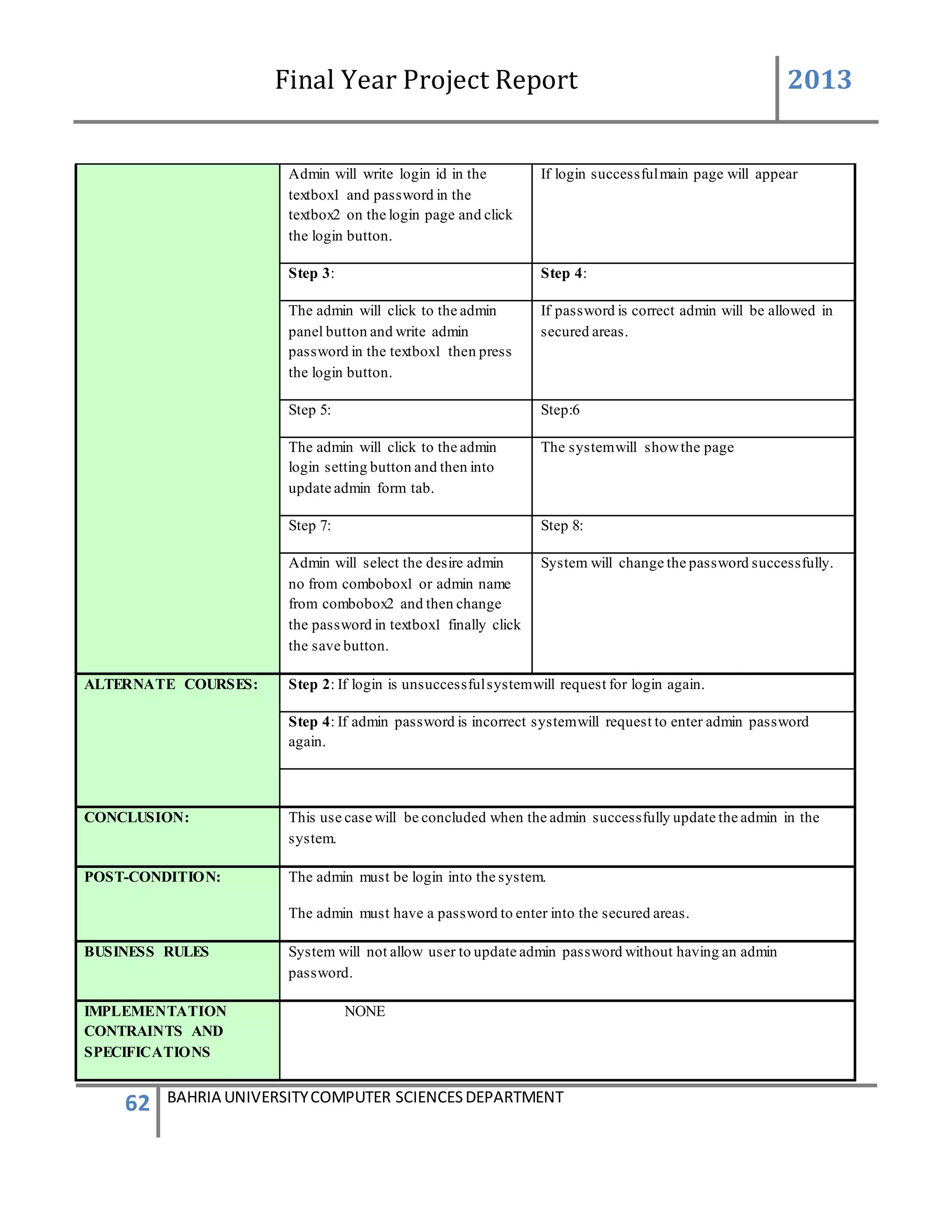
Admin will write login id in the
textbox1 and password in the
textbox2 on the login page and click
the login button.
If login successfulmain page will appear
Step 3: Step 4:
The admin will click to the admin
panel button and write admin
password in the textbox1 then press
the login button.
If password is correct admin will be allowed in
secured areas.
Step 5: Step:6
The admin will click to the admin
login setting button and then into
update admin form tab.
The systemwill showthe page
Step 7: Step 8:
Admin will select the desire admin
no from combobox1 or admin name
from combobox2 and then change
the password in textbox1 finally click
the save button.
System will change the password successfully.
ALTERNATE COURSES: Step 2: If login is unsuccessfulsystemwill request for login again.
Step 4: If admin password is incorrect systemwill request to enter admin password
again.
CONCLUSION: This use case will be concluded when the admin successfully update the admin in the
system.
POST-CONDITION: The admin must be login into the system.
The admin must have a password to enter into the secured areas.
BUSINESS RULES System will not allow user to update admin password without having an admin
password.
IMPLEMENTATION
CONTRAINTS AND
SPECIFICATIONS
NONE
Final Year Project Report 2013
63 BAHRIA UNIVERSITYCOMPUTER SCIENCESDEPARTMENT
ASSUMPTIONS: NONE
OPEN ISSUES: NONE
Generator Monitoring System
Author (s): Salman, Faisal Date: ___________
USE CASE NAME: User login USE CASE TYPE
USE CASE ID: 005 Business Requirements:
PRIORITY: High
SOURCE: - System Design:
PRIMARY BUSINESS
ACTOR
Administrator/User
PRIMARY SYSTEM
ACTOR
NONE
OTHER PARTICIPATING
ACTORS:
NONE
OTHER INTERESTED
STAKEHOLDERS:
NONE
DESCRIPTION: This feature used by the user (admin/normal) to login into the system.
PRE-CONDITION: ----------------
TRIGGER: The admin or the userwants to login into the system
TYPICAL COURSE
25 Actor Action 26 System Response
Final Year Project Report 2013
64 BAHRIA UNIVERSITYCOMPUTER SCIENCESDEPARTMENT
OF EVENTS: Step 1: Step 2:
User or admin will enter the id in the
textbox1 and password in the
textbox2 and then press the login
button.
If login successfulmain page will appear
ALTERNATE COURSES: Step 2: If login is unsuccessfulsystemwill request for login again.
CONCLUSION: This use case will be concluded when the admin successfully login the system
POST-CONDITION: The admin must be login into the system
BUSINESS RULES System will not allow user to login without ID and password.
IMPLEMENTATION
CONTRAINTS AND
SPECIFICATIONS
NONE
ASSUMPTIONS: NONE
OPEN ISSUES: NONE
Final Year Project Report 2013
65 BAHRIA UNIVERSITYCOMPUTER SCIENCESDEPARTMENT
Generator Monitoring System
Author (s): Salman, Faisal Date: ___________
USE CASE NAME: Admin login USE CASE TYPE
USE CASE ID: 006 Business Requirements:
PRIORITY: High
SOURCE: - System Design:
PRIMARY BUSINESS
ACTOR
Administrator
PRIMARY SYSTEM
ACTOR
NONE
OTHER PARTICIPATING
ACTORS:
NONE
OTHER INTERESTED
STAKEHOLDERS:
NONE
DESCRIPTION: This feature used by the user (admin) to login into the admin panel of the system.
PRE-CONDITION: ----------------
TRIGGER: The admin wants to enter the admin panel of the system.
TYPICAL COURSE
27 Actor Action 28 System Response
OF EVENTS: Step 1: Step 2:
Admin will write login id in the
textbox1 and password in the
textbox2 on the login page and click
the login button.
If login successfulmain page will appear.
Final Year Project Report 2013
66 BAHRIA UNIVERSITYCOMPUTER SCIENCESDEPARTMENT
Step 3: Step 4:
Admin will click the admin panel
button and then enter admin
password in the textbox1 and
click the login button.
If the password is correct then admin will be
allowed to enter the secured area of
administrator.
ALTERNATE COURSES: Step 2: If login is unsuccessfulsystemwill request for login again.
CONCLUSION: This use case will be concluded when the admin successfully login in to the admin panel.
POST-CONDITION: The admin must be login into the system.
BUSINESS RULES System will not allow admin to login without ID and password.
IMPLEMENTATION
CONTRAINTS AND
SPECIFICATIONS
NONE
ASSUMPTIONS: NONE
OPEN ISSUES: NONE
Final Year Project Report 2013
67 BAHRIA UNIVERSITYCOMPUTER SCIENCESDEPARTMENT
4.3 Context Diagram
Figure 4.3 Context Diagram
Database GSM Device
Remote user message
Device
acknowledgement
Adddevices
Password
change
Control update
device
Request
report/graph
Device Name
System User
Show Report/Graph
Device Status
Display
Control Updates
VIPsmessages
User Messages
Message
parse
Saveddata
Generator
Monitoring
System
Admin
Final Year Project Report 2013
68 BAHRIA UNIVERSITYCOMPUTER SCIENCESDEPARTMENT
4.4 Data Flow Diagram
Add Device:
Device info
ADMIN
Gen ID of all devices
Device added successfully
2.2
Verify id
2.1
Add
devices
ADD DEVICE3.2
Final Year Project Report 2013
69 BAHRIA UNIVERSITYCOMPUTER SCIENCESDEPARTMENT
Admin Authentication:
ADMIN
SuccessfullyLoginAdminPassword
2.2
ADMIN
PANEL
2.1
ADMIN
LOGIN
ADMIN LOGIN3.2
VerifyAdmin
Password
Final Year Project Report 2013
70 BAHRIA UNIVERSITYCOMPUTER SCIENCESDEPARTMENT
Control:
SYSTEM USER
SendVipmessage to
Vipnumberandreply
to the device
Change Particular
control of Generator
2.2
Gsm
Device
2.1
Devices
Device Status3.2
Update status
Final Year Project Report 2013
71 BAHRIA UNIVERSITYCOMPUTER SCIENCESDEPARTMENT
User Login:
System user
SuccessfullyLoginID and Password
2.2
SYSTEM
2.1
LOGIN
USER LOGIN3.2
VerifyIDand
Password
Final Year Project Report 2013
72 BAHRIA UNIVERSITYCOMPUTER SCIENCESDEPARTMENT
Report/Graphs:
SYSTEM USER
Generated
information
Selectdatesand
parameters
2.2
View
Reports/
Graphs
2.1
Reports/
Graphs
Device Status3.2
Retrieve
information
Final Year Project Report 2013
73 BAHRIA UNIVERSITYCOMPUTER SCIENCESDEPARTMENT
User Settings:
ADMIN
Informationisedited
Selectparticular
personinformation
2.2
Updated
Information
2.1
User Login
Settings
User Login3.2
Retrieve Informationof
the selectedPerson
Final Year Project Report 2013
74 BAHRIA UNIVERSITYCOMPUTER SCIENCESDEPARTMENT
Status
System User
SelectaDevice
2.1
Devices
Device Status3.2
Informationis
retrieved
ViewsDevice
Status
Final Year Project Report 2013
75 BAHRIA UNIVERSITYCOMPUTER SCIENCESDEPARTMENT
Alerts
System User
SelectaDevice
2.1
Devices
Alerts3.2
Informationis
retrievedfor
that device
ViewsDevice
Alerts
Final Year Project Report 2013
76 BAHRIA UNIVERSITYCOMPUTER SCIENCESDEPARTMENT
Internal Communication:
System User
ReadMessage
Message issend
Connectandselect
send/ readmessage 2.2
Gsm Device
2.1
Internal
Commuinication
Device
Me Messages3.2
Final Year Project Report 2013
77 BAHRIA UNIVERSITYCOMPUTER SCIENCESDEPARTMENT
4.5 OBJECT DIAGRAM
Device Status
Final Year Project Report 2013
78 BAHRIA UNIVERSITYCOMPUTER SCIENCESDEPARTMENT
Device Control
Final Year Project Report 2013
79 BAHRIA UNIVERSITYCOMPUTER SCIENCESDEPARTMENT
Graphs and Reports
Final Year Project Report 2013
80 BAHRIA UNIVERSITYCOMPUTER SCIENCESDEPARTMENT
Admin Login
Internal Commuinication
Final Year Project Report 2013
81 BAHRIA UNIVERSITYCOMPUTER SCIENCESDEPARTMENT
Final Year Project Report 2013
82 BAHRIA UNIVERSITYCOMPUTER SCIENCESDEPARTMENT
User Login
Final Year Project Report 2013
83 BAHRIA UNIVERSITYCOMPUTER SCIENCESDEPARTMENT
Add User
Final Year Project Report 2013
84 BAHRIA UNIVERSITYCOMPUTER SCIENCESDEPARTMENT
Update user
Final Year Project Report 2013
85 BAHRIA UNIVERSITYCOMPUTER SCIENCESDEPARTMENT
Alerts
Add Device
Final Year Project Report 2013
86 BAHRIA UNIVERSITYCOMPUTER SCIENCESDEPARTMENT
Final Year Project Report 2013
87 BAHRIA UNIVERSITYCOMPUTER SCIENCESDEPARTMENT
4.6 Sequence Diagram
Internal Commuinication
Final Year Project Report 2013
88 BAHRIA UNIVERSITYCOMPUTER SCIENCESDEPARTMENT
Device Status
Final Year Project Report 2013
89 BAHRIA UNIVERSITYCOMPUTER SCIENCESDEPARTMENT
Device Control
Final Year Project Report 2013
90 BAHRIA UNIVERSITYCOMPUTER SCIENCESDEPARTMENT
Graphs and Reports
Final Year Project Report 2013
91 BAHRIA UNIVERSITYCOMPUTER SCIENCESDEPARTMENT
Admin Login
Final Year Project Report 2013
92 BAHRIA UNIVERSITYCOMPUTER SCIENCESDEPARTMENT
User Login
Final Year Project Report 2013
93 BAHRIA UNIVERSITYCOMPUTER SCIENCESDEPARTMENT
Add User
Final Year Project Report 2013
94 BAHRIA UNIVERSITYCOMPUTER SCIENCESDEPARTMENT
Update user
Final Year Project Report 2013
95 BAHRIA UNIVERSITYCOMPUTER SCIENCESDEPARTMENT
Alerts
Final Year Project Report 2013
96 BAHRIA UNIVERSITYCOMPUTER SCIENCESDEPARTMENT
Add Device
Final Year Project Report 2013
97 BAHRIA UNIVERSITYCOMPUTER SCIENCESDEPARTMENT
4.7 Entity-Relationship Diagram
Generate
Change Controls
Updates
Device Message
Receives
Authenticate
Inserted
Final Year Project Report 2013
98 BAHRIA UNIVERSITYCOMPUTER SCIENCESDEPARTMENT
4.8 Class diagram
1 saves 1
AdminAuthentication
1
Could
n
Userlogin
User no
User name
UserID
User password
Login system()
Admin panel
Admin id
Admin password
Check id
password ()
User setting()
Admin setting()
Add device()
update device()
User setting
User id
User name
Password
Add user()
Update user ()
Delete Messages
Admin name
Admin id
Add admin()
update admin()
Update device
Control 1
Control 2
Control 3
Device id
Update device()
Image store
Original path
Image data
User id
Enter id ()
Enter path ()
Add device
Device id
Generatorid
Generator no
User friendlyname
Save data ()
Final Year Project Report 2013
99 BAHRIA UNIVERSITYCOMPUTER SCIENCESDEPARTMENT
Control
Update
Control
Change
Insert
Device
Device name
Device no
Device control
st1
Device control
st2
Device control
st3
Device status()
Graph()
Report()
Change Status()
Change status()
Vip messeges()
VIP messages
Number
Message
Device name
Send mess ()
Get no ()
Device status
Fuel level
Fuel status
Date and time
Temperature
Fuel value
Diesel
Gas
Split message
Id
Generator id
Longitude
Latitude
Speed
Direction
Altitude
Satellite
Message id
Input status
Output status
Split sting ()
Update status ()
Message device
Sender no
Message time
Message
Status
Id
Get message ()
Delete message
()
Alerts
Id
Generator id
Date time
Alert
Status
viewalert()
Sends
Status Update
Generate
Final Year Project Report 2013
100 BAHRIA UNIVERSITYCOMPUTER SCIENCESDEPARTMENT
4.9 Graphical User Interface
External Interface Requirements
User Interfaces
Generator Monitoring System is used by system user and admin so it just simply designed and
not colorful. The interface is user friendly and easy to use. This can be proving when user can
know what the button’s function is when he/she looks at the button. It is because the button’s text
is clear and easy to understand.
1.ADD DEVICE
Final Year Project Report 2013
101 BAHRIA UNIVERSITYCOMPUTER SCIENCESDEPARTMENT
This form describes that how the device will add to system.
The admin will first login to the system. If the id and password provide by the system is correct
then the main screen appears. The administrator will go to the admin panel and will again
provide a admin password. After entering in the admin panel it contain the information of
administration system. There will be a group box having 4 different buttons. By clicking on the
second button name add device a new form will be appear for adding the device.
In add device form we take text box and labels the label3 and label4 name (add devices to the
system) and (add device). Then we again take a group box and inside the group box we take 4
text boxes 2 button and few labels. The user must enter all the information input in those text
boxes. The text box2 represent the device id and the device id is automatically generated by the
system with the help of data base. The text box 1 represents the generator id which should be
correctly entered. If the generator id already exist in the data base the user enter the same id
again so the message will be appear that plz enter the correct id. {The id cannot be repeated once
it enter} .now in text box 3 the generator number should be enter and in the text box5 the user
friendly name will be enter.
If any box is left empty or the information is in correct the device will not be added when the
button will (save/next)
Below the group box 1 there is another group box which has 3 button in it [clear addmin menu,
admin logoff]
When the user press the button clear all the information in the group box1 is clear when admin
menu button is press admin menu screen will be appear and if log off button is press system will
be log out.
By adding the device the device must be save in the data base or added in the data base all the
knowledge on the screen must be known to the user
Final Year Project Report 2013
102 BAHRIA UNIVERSITYCOMPUTER SCIENCESDEPARTMENT
2.DEVICE CONTROL
The admin will first login to the system .after successfully login the main page will be appear on
the left side of the main page there is a tree view structure which is define to select a device. The
user will select the device from the tree view structure. When the user select the device The new
page will be appear which will have the tab controls the three controls are present on the new
screen. And by clicking the specification will be shown of the particular device that has been
selected.
The changes must be save in the data base .the message sent to the generator or to the VIP
number that have been enter in the system.
Final Year Project Report 2013
103 BAHRIA UNIVERSITYCOMPUTER SCIENCESDEPARTMENT
3.DEVICE STATUS:
This describe the actual status of the device.admin will logon to the system. After login
successfully the main page will be appear on the main page there will be a button of device
status.
After clicking on the device status button a new form open of device status. On that form there is
a combo box which is already populated with the device name that is added in the database. “All
the devices are necessary to add in the data base first”. So the user will select the device name
which is populated in the combo box.
So the device selected by the user all the properties of that device will be shown to the user. It
will tell about the mode, fuel and working of the generator means that either it is working on gas
or diesel. The operator must have complete knowledge about the domain. By this the status of
any device that is added in the data base can be check.
Final Year Project Report 2013
104 BAHRIA UNIVERSITYCOMPUTER SCIENCESDEPARTMENT
4.GRAPH AND REPORTS:-
This will generate graph and report against the particular time duration. The user enters the
system the correct id and password. The system will generate the report against the time period
.the report can be seen on {daily, monthly, weekly} bases. The report will generate according to
the time that have been selected by the user. The system will also show the graph of the
generator status. The value of the graph will change when the change in the generator status
occur. These changes will also save in the data base. These changes can be done and can be
perform on those devices which are added in the data base
Final Year Project Report 2013
105 BAHRIA UNIVERSITYCOMPUTER SCIENCESDEPARTMENT
5.INTERNAL COMMUNICATION:
The internal communication describes the connection of the GSM device to the system
successfully and helping in sending and receiving messages.
The admin will log on to the system. After login successfully the main page of the system will be
appear.
On the main page there is the button number6 name “internal communication” and by clicking
on the button anew screen of internal communication occur this screen consist of the tab control
taken, inside the tab control there are four (4) tabs taken [name, port setting, send SMS, read
SMS and delete SMS] and by clicking on the individual tab individual screen appear and having
different properties. The first tab control name port setting make connection. The port set contain
different properties. The port name is detected by the system automatically and the baud rate is
always (9600) while the other properties remain constant.
There is a button name “connect” also lies in the group box by pressing the button the
connection will be establish between the GSM device and the software system.
Final Year Project Report 2013
106 BAHRIA UNIVERSITYCOMPUTER SCIENCESDEPARTMENT
The second tab control name send SMS is for sending the message user just enter the phone no
and the message that has to be send. By pressing the send button the message will be send to the
particular no that user have enter and the acknowledgement will receive that message sent.
The next tab control name read SMS in which the SMS can be reader. If the user wants to read
the message the user will just press the button read SMS and all the message will see to the user.
The last tab is of deleting messages. The counter count the messages of the SIM. The SIM
message capacity is not more then 30 messages. When the message memory is full the user can
select the 2 options in this case either delete all the messages together or only delete read sms. So
after the user choose the option then there is a button also for deleting the message.so when the
button is press the message will be deleted according to the option selected.
Final Year Project Report 2013
107 BAHRIA UNIVERSITYCOMPUTER SCIENCESDEPARTMENT
6.UPDATE DEVICE:
The device can be updated successfully first the admin will login to the system and the main
page will appear after the successful login.
Now the administrator will go to the admin panel and provide admin password. If login
successful anew form will be open admin menu which contain all the information about the
administration system. On that screen we will see a group box containing 4 different buttons on
it and by clicking on the third button name update device a new form will open for updating the
device. In this form we will have a group box and inside the group box we will have some
textboxes, combo box, button, and few labels.
The system will update only those devices which are already added to the data base.
Final Year Project Report 2013
108 BAHRIA UNIVERSITYCOMPUTER SCIENCESDEPARTMENT
The administrator will select advice name from combo box and the name are already populated
in the combo box. After selecting the particular device that have to be updated all the details will
be shown of the particular device which is selected , the changes will be made and when the
administrator will press the button save all the device information will be up dated in the
database.
Final Year Project Report 2013
109 BAHRIA UNIVERSITYCOMPUTER SCIENCESDEPARTMENT
4.10 Activity Diagram
Device Control:
The user login to the system
The user selects the device
User selectsaparticulardevice
System view list of all the
devices
User selectcontrol 2
User selectcontrol 3User select control
1
Device reply is send and
requiredmessage are sent
to vip number
Final Year Project Report 2013
110 BAHRIA UNIVERSITYCOMPUTER SCIENCESDEPARTMENT
Device Status:
Final Year Project Report 2013
111 BAHRIA UNIVERSITYCOMPUTER SCIENCESDEPARTMENT
Graph and Report:
Internal Communication:
Final Year Project Report 2013
112 BAHRIA UNIVERSITYCOMPUTER SCIENCESDEPARTMENT
Final Year Project Report 2013
113 BAHRIA UNIVERSITYCOMPUTER SCIENCESDEPARTMENT
Chapter 5
Implementation of the Project
5 Implementation
This chapter will discuss about the programming coding of the Generator Monitoring System.
Different logic thinking and coding is required at development of the system. Following would
discuss the sample programming coding of C#.NET.
In our implementation phase the main part was to read an unread message from the gsm device
we implement it by using AT command. After reading this message we saved that message in the
message device. Then we read the message and recognized if it’s a user message or a message
from generator .we implement it by using the split function. The message from the generator will
consist of 15 commas and through this we recognized the generator message after recognizing
we split that message and save in the data base.after splitting there are 16 value retrieve from the
message.there is temperature,generator ID,date/time,input status,output status,analog
input1,analog input 2,RTC,mileage.after processing input status we get the status of generator
that is the mains electricity is ON/Off, the generator is ON/OFF and the ignition is 0/1. Likely
after processing output status we get the generator present fuel status GAS/OIL, the fuel level
HIGH/LOW ,the analog input1 views the generator present current value that can be from
0VOLTS – 25 VOLTS and the analog input 2 views the generator present temperature.
After processing these values we save them in message status with the gen id and it will be
viewed as the device last status.
Next we have to generate alerts that is if the main electricity is ON and the generator is also ON
then an alert should be generated and viewed in the device alerts section.
There are four types of alerts:-
1. Generator is ON and Main electricity is ON
This alert is very important because if the electricity is there and the generator is on
then fuel and gas is being wasted as electricity is present and this wastage will cause the
company loss. Its not a day loss that can be recovered but when we calculate the loss per
year it is very high.
2. Generator is OFF and Main electricity is OFF
This alert is very important because if there is no electricity and generator is also off
then the work is stopped as the machine companies would not be working and there will be
loss of work. It can also indicate that the generator have fault
Final Year Project Report 2013
114 BAHRIA UNIVERSITYCOMPUTER SCIENCESDEPARTMENT
3. Temperature is greater than 50 degree centigrade
This alert is very important because if the generator temperature is normal room
temperature its perfectly working but when the generator is on it becomes hot and its
temperature increases. But if the generator temperature increases so much that it can
cause fire or the generator can become defected so it needs to be shutdown that’s why
this alert is very important.
4. The generator fuel level is low
When the generator is ON its using Gas or Fuel. If the oil is low means the
generator is soon going to be off this indicates two things one that you have to fill more
oil in the generator and you can also convert it into gas if the gas is high level or normal.
Until that more petrol can be planned and filled in the generator. Same is with gas.
5.1Description
Admin Panel:-
This module can be used only by admin.admin can only add a user and authenticate
him/her to admin level. a new system/admin user can be add edit and delete.
Admin can also add a new generator by giving proper information setting their control
and the device initial settings. Admin cal also edit or deactivate a generator
Admin can also delete messages. So the admin would know that no all the message send
from the sim are business purpose and there is no message that is send for personal
purpose. This will allow the admin to keep check on users.
Internal Communication:-
This module can be used by the system user to send messages to user for business
purpose. And to read the message that have arrived on the sim and also the message that
were send by that sim.
For example:- to call someone for meeting a message can be send
Final Year Project Report 2013
115 BAHRIA UNIVERSITYCOMPUTER SCIENCESDEPARTMENT
Devices :-
This module is very important as it tells the device status ,gives controls that will change
device status ,alerts are viewed and report and graphs can be viewed for a device.
5.2Coding
Programming
This chapter will discuss about the programming coding of the Generator MonitoringApplication
SEND MESSAGE
private void pictureBox3_Click(object sender, EventArgs e)
{
if (txtSIM.Text == "")
{
}
else if (txtMessage.Text == "")
{
MessageBox.Show("Blank messages are not allowed");
}
else
{
int n = 0;
int numvalidity = 0;
string num = txtSIM.Text;
txtSIM.Text = "";
int length = num.Length;
if (length != 11)
{
numvalidity = 2;
}
else
{
foreach (char c in num)
{
n = n + 1;
if (n == 1)
{
if (c == '0')
{
txtSIM.Text = "+92";
}
else
{
numvalidity = 1;
}
}
Final Year Project Report 2013
116 BAHRIA UNIVERSITYCOMPUTER SCIENCESDEPARTMENT
READ MESSAGE
if (rbReadAll.Checked)
{
DataTable allDt = new DataTable();
string allQuery = string.Format("select * from messagedevice");
SqlDataAdapter allDa = new SqlDataAdapter(allQuery, con);
allDa.Fill(allDt);
dataGridView1.DataSource = allDt;
}
else if (rbReadStoreSent.Checked)
{
DataTable allDt = new DataTable();
string allQuery = string.Format("select * from SendMessage");
SqlDataAdapter allDa = new SqlDataAdapter(allQuery, con);
allDa.Fill(allDt);
dataGridView1.DataSource = allDt;
}
else
{
statusBar1.Text = "Select any value";
}
Final Year Project Report 2013
117 BAHRIA UNIVERSITYCOMPUTER SCIENCESDEPARTMENT
SPLIT MESSAGE
public void message()
{
int comma = 0;
label7.Visible = false;
foreach (char c in messagetext)
{
if (c == ',')
{
comma = comma + 1;
}
}
if (comma >=14)
{
string[] wordArray = messagetext.Split(',');
textBox3.Text = wordArray[0];
double a = Convert.ToDouble(textBox3.Text);
textBox4.Text = wordArray[2];
decimal longitude = Convert.ToDecimal(textBox4.Text);
textBox5.Text = wordArray[3];
decimal latitude = Convert.ToDecimal(textBox5.Text);
textBox6.Text = wordArray[4];
int speed = Convert.ToInt32(textBox6.Text);
textBox7.Text = wordArray[5];
int direction = Convert.ToInt32(textBox7.Text);
textBox8.Text = wordArray[6];
int altitude = Convert.ToInt32(textBox8.Text);
textBox9.Text = wordArray[7];
int satellites = Convert.ToInt32(textBox9.Text);
textBox10.Text = wordArray[8];
int messageid = Convert.ToInt32(textBox10.Text);
textBox11.Text = wordArray[9];
inputstatus = Convert.ToInt32(textBox11.Text);
textBox12.Text = wordArray[10];
outputstatus = Convert.ToInt32(textBox12.Text);
textBox13.Text = wordArray[11];
analoginput1 = Convert.ToDecimal(textBox13.Text);
textBox14.Text = wordArray[12];
analoginput2 = Convert.ToDecimal(textBox14.Text);
textBox15.Text = wordArray[13];
// int rtc = Convert.ToInt32(textBox15.Text);
textBox16.Text = wordArray[14];
double mileage = Convert.ToDouble(textBox16.Text);
int first = 1;
string username;
DataTable dt1 = new DataTable();
DataTable allDt = new DataTable();
string allQuery = string.Format("select * from AddDevice");
SqlDataAdapter allDa = new SqlDataAdapter(allQuery, con);
allDa.Fill(allDt);
for (int k = 0; k < allDt.Rows.Count; k++)
{
Final Year Project Report 2013
118 BAHRIA UNIVERSITYCOMPUTER SCIENCESDEPARTMENT
ADD DEVICE
string dat = DateTime.Now.ToString();
string query = string.Format("INSERT INTO AddDevice VALUES
('{0}','{1}','{2}','{3}','{4}')", id,textBox2.Text, textBox3.Text,textBox4.Text,1);
SqlDataAdapter da = new SqlDataAdapter(query, con);
DataTable t = new DataTable();
da.Fill(t);
string query1 = string.Format("INSERT INTO ControlSetting VALUES
('{0}','{1}','{2}','{3}','{4}','{5}','{6}','{7}','{8}','{9}')", id, textBox21.Text,
textBox27.Text, textBox33.Text,comboBox2.Text,comboBox4.Text,comboBox6.Text,
textBox20.Text, textBox26.Text, textBox32.Text);
SqlDataAdapter da1 = new SqlDataAdapter(query1, con);
DataTable t1 = new DataTable();
da1.Fill(t1);
string query11 = string.Format("INSERT INTO DeviceStatus VALUES
('{0}','{1}','{2}','{3}','{4}','{5}','{6}','{7}','{8}','{9}','{10}','{11}')", id,
textBox2.Text, comboBox10.Text, comboBox13.Text, comboBox8.Text, comboBox7.Text,
comboBox12.Text, textBox11.Text, dat,
comboBox14.Text,comboBox9.Text,comboBox11.Text);
SqlDataAdapter da11 = new SqlDataAdapter(query11, con);
DataTable t11 = new DataTable();
da11.Fill(t11);
MessageBox.Show("Device is saved");
Final Year Project Report 2013
119 BAHRIA UNIVERSITYCOMPUTER SCIENCESDEPARTMENT
Chapter 6
Testing
6 Testing & Evaluation
This chapter will show the test plan which programmer used to test the system. System
Testing is an important phase in SDLC to ensure the system is bug free. If the system
hasn’t been test properly, user will meet a lot problem when using the system.
6.1 TEST PLAN
Final Year Project Report 2013
120 BAHRIA UNIVERSITYCOMPUTER SCIENCESDEPARTMENT
Final Year Project Report 2013
121 BAHRIA UNIVERSITYCOMPUTER SCIENCESDEPARTMENT
Final Year Project Report 2013
122 BAHRIA UNIVERSITYCOMPUTER SCIENCESDEPARTMENT
Final Year Project Report 2013
123 BAHRIA UNIVERSITYCOMPUTER SCIENCESDEPARTMENT
Chapter 7
Results
7 Conclusions & Future work
7.1 Introduction
In this final chapter, the final evaluation and conclusion will be performed on the testing and
analyzing process that done in previous chapter weakness and future enhancement of the
GENERATOR MONITORING System. In addition, personal reflection also include in final part
of this chapter.
7.2 Evaluation of Project Objectives
Objectives Objectives Function /
Module
Status
Sending and reading messages from
the GSM device
AT commands integrating in
my application
Achieved
Reading message and splitting it in to
its values changing status of the
generator and generating alerts
Split command, sql server for
saving data
Achieved
Creating internal communication Gsm device sends messages Achieved
The sim memory is to small only 30
messages are saved .so there is no
complete history of all the read
messages
Sql server is used to saved
messages from the sim. And
user read message through
database
Achieved
The sim memory should be empty
automatically when near 30 messages
The count command is used to
count messages in the sim if
>25 The delete command is
used to delete messages
Achieved
User and admin authentication Achieved Achie
Table 7.1 Table of Evaluation Project Objectives
Final Year Project Report 2013
124 BAHRIA UNIVERSITYCOMPUTER SCIENCESDEPARTMENT
7.3 Evaluation of Projects Strengths
Strengths
System response is fast after user press a button to perform some actions.
User interface is considered user friendly and ease of use.
Validation has been done to avoid some functional error in later time.
Some important data is generated automatically such as user No, and Device ID to minimize
user input error.
Search features are included in several modules to ease user so that they can filter the data
easily and update information quickly
No additional/unnecessary steps required to perform the task.
Allow user to keep track of generator status
Crystal reports are generated
System is able to check whether the GSM device is connected or not
7.4 Suggestion for Future Enhancement
This can be implemented to automate the electronic devices and reduce the human working. For
eg this system can also be implemented on the air conditioning system the user can get the
information about the gas status level as we are getting the information of the fuel status in our
present system. It can also describe that which air condition is working, what is the present
status of the air condition, either working properly or not .it can also tell that how many ac are in
working condition at one time and can also tell about their running progress by the graph and
reports. So these all things can be manage by the user automatically with the help of the
software.
Final Year Project Report 2013
125 BAHRIA UNIVERSITYCOMPUTER SCIENCESDEPARTMENT
Certain rules are being develop to trigger alarms to see what type of failure occurred in the
system and what is the basic cause of the failure. so we can integrate the air-condition and
generator monitor system. The system after integrating with the air condition can further tell that
which ac is working on generator1 and the ac that is working on the generator 1 what’s its gas
level what’s the current status of the ac and with the ac it will also tell the current status of the
generator that either working on gas ,petrol ,diesel what is the level of the fuel .what is the
progress of the generator while the ac is working. Means for eg if the ac is working on the
generator for 2 hours so how much fuel does it use the performance of both ac and the generator.
If there is any failure the alarm occurs. The performance will be calculated by the time duration
and the graph and report will be generated according to the particular time period.
By implementing the software It is also possible to develop an online monitoring system and can
be used as generator protecting system.
We can also implement this system by doing some modification for the cars and monitoring
system will further improve by on line monitoring over ip, online data , graphs and sd cards will
also be use to improve the monitoring system.
This section should be a concise statement of the conclusions which may be drawn from the
work attempted. The reader needs to be convinced that the design will work. If
Uncertainties remain, they should be pointed out, and alternatives, such as modifying
performance specifications, should be spelled out to deal with foreseeable outcome.
You may propose further work as the future work which may be carried out on the project in
subsequent study projects. Suggestions of this type should be limited to proposals which involve
significant amounts of work such as major modifications of equipment or development of
student practical experiments. Any suggestion is to be given in sufficient detail to provide
adequate information for a future student to be able to fully appraise the proposed.
Final Year Project Report 2013
126 BAHRIA UNIVERSITYCOMPUTER SCIENCESDEPARTMENT
7.5 Personal Reflection
In this project development process, I have learnt a lot of new knowledge and programming code
from this project. Besides that, there are also some problems that appears as biggest challenge
during the development process.
During system design stages, the problem appears on how to construct the Entity-Relationship
diagram and Data Flow Diagram. Assignments and studies materials in previous courses are
referred back. Some sample diagram and researches are
done via Internet for more reference.
The GSM device connectivity and integration is the biggest challenge for me in Programming
Stage. Firstly, I never know how to connect ports and how to integrate with front end software.
After done some research and try the Device Connectivity, I realize that in computing, a serial
port is a serial communication physical interface through which information transfers in or out
one bit at a time (in contrast to a parallel port).
While such interfaces as Ethernet, FireWire, and USB all send data as a serial stream, the term
"serial port" usually identifies hardware more or less compliant to the RS-232 standard, intended
to interface with a modem or with a similar communication device.
Speed
Serial ports use two-level (binary) signaling, so the data rate in bits per second is equal to the
symbol rate in bauds.
Data bits
The number of data bits in each character can be 5 (for Baudot code), 6 (rarely used), 7 (for
true ASCII), 8 (for most kinds of data, as this size matches the size of a byte), or 9 (rarely used).
8 data bits are almost universally used in newer applications. 5 or 7 bits generally only make
sense with older equipment such as teleprinters.
Parity
Parity is a method of detecting errors in transmission. When parity is used with a serial port, an
extra data bit is sent with each data character, arranged so that the number of 1 bits in each
character, including the parity bit, is always odd or always even. If a byte is received with the
wrong number of 1s, then it must have been corrupted. However, an even number of errors can
pass the parity check.
Final Year Project Report 2013
127 BAHRIA UNIVERSITYCOMPUTER SCIENCESDEPARTMENT
In the font finding process, I found that the font type is IDAutomationHC39M.
After get to know the bar code font, the problem is How to generate the barcode label for the
individual signals on a serial port are unidirectional and when connecting two devices the outputs
of one device must be connected to the inputs of the other. Devices are divided into two
categories "data terminal equipment" (DTE) and "data circuit-terminating equipment" (DCE).
Final Year Project Report 2013
128 BAHRIA UNIVERSITYCOMPUTER SCIENCESDEPARTMENT
References
Give all references.
[1] “COCOMO calculation” Available at:
http://img.docstoccdn.com/thumb/orig/116237365.png
[2] Ali A, F.D Allen. “Guidelines for Final Year Project-2010”. Available at:
www.projects.edu.pk. Accessed June 2012.
[3] “AT CommandsFor WirelessGSM/GPRSModemswithIPConnectivity”. Available at:
http://www.embeddedarm.com/documentation/third-party/tsmodem2_developerguide-
gsm-gprs-ip-commands-s000333b.pdf
[4] “GSM CONNECTIVITYATCOMMANDS”. Available at:
http://www.smsiseasy.com/technicalinfo.html
[5] “Check for Serial port modem connection status”. Available at:
http://stackoverflow.com/questions/15803318/check-for-serial-port-gsm-modem-
connection-status
[6] “Monitoring Software Review”. Available at:
http://monitoring-software-review.toptenreviews.com/
[7] “Learn how to write a review of literature”. Available at:
http://writing.wisc.edu/Handbook/ReviewofLiterature.html
[8] “SMS REMOTE CONTROLLER ”. Available at:
www.lamarca.org/flight/GSMproject.pdf
[9] “real time vehicle tracking system using gsm and gps technology- an anti-theft
tracking system.PDF”. Available at:
www.techrepublic.com › ... › Mobile and Wireless
Final Year Project Report 2013
129 BAHRIA UNIVERSITYCOMPUTER SCIENCESDEPARTMENT
[10] “GSM history”. Available at:
http://www.gsmhistory.com/3g/
[11] “The First Gsm Mobile”. Available at:
http://www.gsmhistory.com/the-first-gsm-mobile/
[12] “GSM based control system”. Available at:
hipscity.com/downloads/.../GSM%20based%20Control%20System.pdf
[13] “Learn how to write a review of literature”. Available at:
http://writing.wisc.edu/Handbook/ReviewofLiterature.html
Final Year Project Report 2013
130 BAHRIA UNIVERSITYCOMPUTER SCIENCESDEPARTMENT
Appendices
Setup ProjectEnvironment
To execute this system, user must first setting up some project environment. Firstly, user must
download sql server and the device should be available to be connected to the computer.
Installation Guide
 Double click on a Generator Monitoring SystemSetup.exe
 Click Next
 Select the installation path
 Click Next twice to proceed to installation process.
 After complete installation, click Close to exit the installation.
 The Generator Monitoring system is now available to use at desktop.
Appendix I : ProjectSpecification
A. Company Background
This system is developed for ETS(Exponent Technological Solutions) software house
after this will be given to companies to monitor and maintain generators.
B. Project Objectives
 To eliminate the paper-work in monitoring the generators
 To eliminate the verification of a person to go the field at regular interval of time to
check if the generators are working properly or is no need of more fuel,temperature is
right , the generator is working correctly.
 To implement GSM, device to integrate with our front end software application tochange
controls and to inform about these controls. And to record all the alerts and status change
in the generators
 To design a user friendly graphical user interface which suit the users and also a
o communication environment using the GSM device
Final Year Project Report 2013
131 BAHRIA UNIVERSITYCOMPUTER SCIENCESDEPARTMENT
 To produce admin level authority for add new users or admin to the system to allow
admin to add and update a generator settings and to delete messages if they are not
needed
 To complete the system according to project schedule
 To produce technical report that documents the phases, tasks and deliverables in the
Project.
C. Project Scope
Generators View STATUS
Change CONTROL
View ALERTS

Generator Monitoring System Document

  • 1.
    Final Year ProjectReport 2013 1 BAHRIA UNIVERSITYCOMPUTER SCIENCESDEPARTMENT FINAL YEAR PROJECT REPORT GENERATOR MONITORINGSYSTEM By Salman Ahmed (19393) Faisal Khan (19386) Supervised by:- Sir Azmat khan Bahria University (Karachi Campus) 2013
  • 2.
    Final Year ProjectReport 2013 2 BAHRIA UNIVERSITYCOMPUTER SCIENCESDEPARTMENT GENERATOR MONITORING SYSTEM BY Salman Ahmed 19393 Faisal Khan 19386 Submitted to: Sir Azmat Khan In fulfillment of the requirement for the degree of BS (Computer Science) DEPARTMENT OF COMPUTER SCIENCE BAHRIA UNIVERSITY 2013
  • 3.
    Final Year ProjectReport 2013 3 BAHRIA UNIVERSITYCOMPUTER SCIENCESDEPARTMENT DECLARATION OF AUTHENTICATION We certify that the project presented in this report is to the best of our knowledge our own. All sources used and any help received in the preparation of this dissertation have been acknowledged. We hereby declare that none of us have submitted this material, either in whole or in part, for any other degree at this or any other institution. Names and Signatures of students Date (1)…………………………….. …………………….. (2)……………………………. ……………………. Name and Signature of Supervisor Date …………………………. ……………………….
  • 4.
    Final Year ProjectReport 2013 4 BAHRIA UNIVERSITYCOMPUTER SCIENCESDEPARTMENT Acknowledgment After completing our Final Year Project, We would like to take this chance to express our sincere gratitude to our project supervisor who is Mr. Azmat Khan who has guided us a lot throughout the project development. When we still doing nothing while project due date is getting close, Mr. Azmat Khan give us some pressure to complete the system. Without him, we think we can’t finish the system on time. We would like to thanks Mr. Azmat Khan for one more time because he share his experience with us so that we can get more logic understanding on how to develop a software which suitable for achieving our scope. Last but not at least, we would like to acknowledge our co-coordinator Mam.Asia Samreen as she guided us through the project documentation. Problems occurred and she was always there to help us out. We would also like to thank our Head of Department Ms. Humera Farooq she help us through the project and has assisted us in all the ways. .
  • 5.
    Final Year ProjectReport 2013 5 BAHRIA UNIVERSITYCOMPUTER SCIENCESDEPARTMENT Abstract This project describes the development of Generator monitoring application. It is a computerized system that was developed to monitor generators without the need of somebody to monitor devices manually on regular interval of time. This system will automatically monitor devices, update status, change controls, generate reports and produce alerts for different conditions. This system is mainly used by admin and system user. System user is able to change control, view status and maintain the communication between the organizations by sending message to company personnel and also reading messages from them. Besides that it also allows user to view the alert, device last status, graphs and report module of generators. On the other hand, other high level of user which is admin level is able to add new system user and verify if he’s admin level user or just system user, add a new generator, add generator control setting, add generator initial setting and delete the unwanted messages. The methodology I use to develop the system is waterfall model. Thus the report’s chapter included system planning, requirement analysis, system design, programing, system testing and conclusion of the project. For the system planning, the outcomes are the project objectives and project aims as well as to defined the project scope. Requirement analysis is a stage to gather the user requirement such as functional requirement and Non-functional requirement. Next, the system design is mainly used to design the user interface and database design. The next stage after system design is programming stage. This is the stage for coding. After complete coding part, we proceed to system testing to minimize the system bug. Compare to the existing manual system, our developed system has much strength. In the future, we can enhance the system by implementing this application on more devices like air- conditioner; car tracking .we can also improve by adding a GPRS MODULE with the GSM MODULE.
  • 6.
    Final Year ProjectReport 2013 6 BAHRIA UNIVERSITYCOMPUTER SCIENCESDEPARTMENT Table of contents Chapters 1 INTRODUCTION............................................................................................................... 10 1.1 PURPOSE.......................................................................................................................... 10 1.2 PROBLEM ........................................................................................................................ 11 1.3 SOLUTION........................................................................................................................ 12 1.4 SCOPE OF THE PROJECT.................................................................................................... 13 2 BACKGROUND AND LITERATURE REVIEW .......................................................... 14 2.1 OVERVIEW ...................................................................................................................... 14 2.2 PROJECT REQUIREMENTS................................................................................................. 14 2.3 ISSUES TO BE CONSIDERED .............................................................................................. 15 2.4 WHITE PAPERSUMMARY.................................................................................................. 16 3 REQUIREMENTS.............................................................................................................. 20 3.1 FUNCTIONAL/NON FUNCTIONAL REQUIREMENTS............................................................ 20 3.2 STAKEHOLDERS............................................................................................................... 30 3.3 COSTING.......................................................................................................................... 31 3.4 SCHEDULING................................................................................................................... 34 3.5 FEASIBILITYREPORT ....................................................................................................... 36 4 METHODOLOGY AND DESIGN ................................................................................... 41 4.1 REQUIREMENTS PHASE USECASE ..................................................................................... 41 4.2 DESIGN PHASE USECASE .................................................................................................. 55 4.3 CONTEXT DIAGRAM......................................................................................................... 67 4.4 DATA FLOW DIAGRAM ..................................................................................................... 68 4.5 OBJECT DIAGRAM............................................................................................................ 77 4.6 SEQUENCE DIAGRAM....................................................................................................... 87 4.7 ENTITYRELATIONSHIP DIAGRAM..................................................................................... 97 4.8 CLASS DIAGRAM.............................................................................................................. 98 4.9 GRAPHICAL USER INTERFACE ........................................................................................ 100 4.10 ACTIVITY DIAGRA,........................................................................................................ 109
  • 7.
    Final Year ProjectReport 2013 7 BAHRIA UNIVERSITYCOMPUTER SCIENCESDEPARTMENT 5 IMPLEMENTATION ...................................................................................................... 113 5.1 DESCRIPTION................................................................................................................. 113 5.2 CODING......................................................................................................................... 115 6 TESTING & EVALUATION .......................................................................................... 119 6.1 TESTPLAN........................................................................................................................ 113 7 CONCLUSIONS & FUTURE WORK ......................................................................... 1123 7.1 INTRODUCTION................................................................................................................ 123 7.2 EVALUATION OF PROJECT OBJECTIVES ............................................................................ 123 7.3 EVALUATION OF PROJECT STRENGTHS ............................................................................. 124 7.4 SUGGESTION FOR FUTURE ENHANCEMENT ....................................................................... 124 7.5 PERSONAL REFLECTION ................................................................................................... 126 REFERENCES.......................................................................................................................... 128 APPENDICES ........................................................................................................................... 129 GLOSSARY...................................................................ERROR! BOOKMARK NOT DEFINED.
  • 8.
    Final Year ProjectReport 2013 8 BAHRIA UNIVERSITYCOMPUTER SCIENCESDEPARTMENT List of Figures Figure 3.1: Gantt Chart .....................................................................................................................37 Figure 3.2: WBS...............................................................................................................................38 Figure 3.3: Network Model ...............................................................................................................39 Figure 4.3: Context Diagram .............................................................................................................67 Figure 4.7: Entity Relationship Diagram ............................................................................................97 Figure 4.8: Class Diagram.................................................................................................................98
  • 9.
    Final Year ProjectReport 2013 9 BAHRIA UNIVERSITYCOMPUTER SCIENCESDEPARTMENT Table of Figures Table 1: Basic COCOMO model.......................................................................................................31 Table 2: Value for list of factors ........................................................................................................32 Table 3: Evaluation project objectives.............................................................................................. 123
  • 10.
    Final Year ProjectReport 2013 10 BAHRIA UNIVERSITYCOMPUTER SCIENCESDEPARTMENT Chapter 1 Introduction of the Project 1 Introduction The project aims and objectives that will be achieved after completion of the system were carried out in this sub chapter. The succession of the system also will be evaluated through this sub chapter. 1.1 Purpose  To eliminate the paper-work in monitoring the generators  To eliminate the verification of a person to go the field at regular interval of time to check if the generators are working properly or is no need of more fuel, temperature is right , the generator is working correctly.  To implement GSM, device to integrate with our front end software application to change controls and to inform about these controls. And to record all the alerts and status change in the generators  To design a user friendly graphical user interface which suit the users and also a communication environment using the GSM device  To produce admin level authority for add new users or admin to the system to allow admin to add and update a generator settings and to delete messages if they are not needed  To complete the system according to project schedule  To produce technical report that documents the phases, tasks and deliverables in the Project
  • 11.
    Final Year ProjectReport 2013 11 BAHRIA UNIVERSITYCOMPUTER SCIENCESDEPARTMENT 1.2 Problem  Maintenance of generator statuses and it was difficult to know about different alert that can create problems.  Need a person to visit site where generator are present and growing number of generators at far location lead more people, transport and wastes times.  No higher authority was able to know about the generators records read by workers are correct or not.  No verification if the generator status written manually are correct or not
  • 12.
    Final Year ProjectReport 2013 12 BAHRIA UNIVERSITYCOMPUTER SCIENCESDEPARTMENT 1.3 Solution • The GSM SMS Controller allows you to monitor and control an alarm or remote stations or equipments or machines by SMS. GENERATOR MONITORING SYSTEM. The system in which every generator is connected with a device which will send message through the SIM(present inside the device) to the GSM device which is connected with the system and receiving the message which is useful for the status of the device and updating the system by giving information about the device. • We proposed this system to reduce the problems which is being faced by the companies to maintain their generators. • To maintain generator without going at each site. • To avoid going far to look after each generator on weekly basis. • To reduce the need of manually record the working of the generator. • To maintain a system which is enables higher authorities to keep watch on their site generators. • To built a system which is much scalable to add growing number of generators in one platform
  • 13.
    Final Year ProjectReport 2013 13 BAHRIA UNIVERSITYCOMPUTER SCIENCESDEPARTMENT 1.4 Scope of the project The system in which every generator is connected with a device which will send message through the SIM(present inside the device) to the GSM device which is connected with the system and receiving the message which is useful for the status of the device and updating the system by giving information about the device.  Create an internal communication.  Automatically sending SMS.  Receiving SMS.  Remotely control generator status.  Generate reports and graph.  Handle multiple generators.  Admin panel.  User login setting.  Admin login setting.  Add device setting.
  • 14.
    Final Year ProjectReport 2013 14 BAHRIA UNIVERSITYCOMPUTER SCIENCESDEPARTMENT Chapter 2 Literature Review 2 Background and Literature Review 2.1 OVERVIEW  To overcome the problem faced by the company to look after their generators placed at different sites  The customer of our project is lucky cement Pvt Ltd  The deliver software could operate generators by giving signals through software  It will cost two devices provided by the software house for one generator  It will take 1 year approximately in competition  The companies which are involved is ETS(Exponent Technological Solutions) which will forward it to lucky cement 2.2 Projectgoals Embedded system for monitoring generator status. Application will be connected with GSM device to receive data through GSM and translate the data into human understandable form and send acknowledgement through SMS. The application can received data via sms in digit format which will then be converted to its specific values and store in the database and status will be updated automatically the application can also generate graphs and reports logs on database record in order to monitor the fuel consumption and cost Organization ETS (Exponent Technological Solutions) The software would be implemented at Lucky Cement
  • 15.
    Final Year ProjectReport 2013 15 BAHRIA UNIVERSITYCOMPUTER SCIENCESDEPARTMENT Projectteam Organization : name Availability Comment Salman ahmed ,Faisal Khan Yes Good concept and useful in learning real market work 2.3 Issues to be considered One of the major difficulties the company was facing the supervision of manual work  Maintenance of generator statuses and it was difficult to know about different alert that can create problems.  Need a person to visit site where generator are present and growing number of generators at far location lead more people, transport and wastes times.  No higher authority was able to know about the generators records read by workers are correct or not.  No verification if the generator status written manually are correct or not 2.4 Projectrequirements A GSM based device for sending and receiving messages AT commands for setting the GSM devices Visual studio Sql server Research
  • 16.
    Final Year ProjectReport 2013 16 BAHRIA UNIVERSITYCOMPUTER SCIENCESDEPARTMENT 2.5 WHITE PAPER SUMMARY 1. REAL TIME VEHICLE TRACKING SYSTEM INTRODUCTION The safety of private and public vehicles is a major concern nowadays so having GPS vehicle tracking system ensure their safety while travelling. This vehicle tracking system can be found in consumers vehicles as a theft prevention and retrieval device. Police can follow the signal emitted by the tracking system to locate a stolen vehicle. Generally this system is meant to be installed for the four wheelers but for country like India where majority of the people using two wheelers, here is the cheapest source of an anti-theft tracking system. Vehicle tracking systems are commonly used by fleet operators for fleet management functions such as routing, dispatch, on-board information and security. Other applications include monitoring driving behavior, such as an employer of an employee, or a parent with a teen driver. Vehicle tracking systems are also popular in consumer vehicles as a theft prevention and retrieval device. Police can simply follow the signal emitted by the tracking system and locate the stolen vehicle. METHODODLGY Real Time Vehicle Tracking System using GSM and GPS Technology- An Anti-theft Tracking System and Equipment identity register (EIR) is another important database which holds crucial information regarding mobile equipments. II. The Base Station System (BSS): The base station system have very important role in mobile communication.BSS are responsible for connecting subscribers (MS) to mobile networks. All the communication is made in Radio transmission. The Base station System is further divided in two systems. These two systems, they are BTS and BSC. BTS (Base Transceiver station) handles communication using radio transmission with mobile station and BSC (Base station controller) creates physical link between subscriber (MS) and BTS, then manage and controls functions of it. III. Mobile Station (Subscriber): MS consist of a mobile unit and a smart card which is also referred as a subscriber Identity Module (SIM) card. This card fitted with the GSM Modem and gives the user more personal mobility. The equipment itself is identified by a unique number known as the International Mobile Equipment Identity (IMEI). DESIGN OF TRACKING SYSTEM In this Paper it is proposed to design an embedded system which is used for tracking and positioning of any vehicle by using Global Positioning System (GPS) and Global system for mobile communication (GSM).The current design is an embedded application, which will continuously monitor a moving Vehicle and report the status of the Vehicle on demand.. A GSM modem is used to send the position (Latitude and Longitude) of the vehicle from a remote place.. When the request by user is sent to the number at the modem, the system automatically sends a
  • 17.
    Final Year ProjectReport 2013 17 BAHRIA UNIVERSITYCOMPUTER SCIENCESDEPARTMENT return reply to that mobile indicating the position of the vehicle in terms of latitude and longitude. vehicle positioning and navigation system we can locate the vehicle around the globe with micro controller, GPS receiver, GSM modem. CONCLUSION In this paper we have proposed an anti theft system which can be used to track a vehicle fitted with the proposed device in it. It can also be used in wildlife tracking, asset tracking and in stolen vehicle recovery. In the future we may integrate other related devices in a vehicle such as sensors. We can create a server to see the vehicle route and other information on our computer and we can save the trajectory of it. The sensors installed in our vehicle can report the vehicle information to our server and it can form an intelligent tracking system. There are various reasons why car owners and public vehicle operators prefer to have a GPS. You can determine your location, whether you are travelling locally or in a foreign land, having a GPS is truly an advantage. If you think you are lost, you can use your GPS receiver to know your exact location. Vehicle tracking systems are commonly used by fleet operators for fleet management functions such as routing, dispatch, on-board information and security. Other applications include monitoring driving behavior, such as an employer of an employee, or a parent with a teen driver. 2. GSM BASED CONTROL SYSTEM Introduction The new age of technology has redefined communication. Most people nowadays have access to mobile phones and thus the world indeed has become a global village. At any given moment, any particular individual can be contacted with the mobile phone. But the application of mobile phone cannot just be restricted to sending SMS or starting conversations. New innovations and ideas can be generated from it that can further enhance its capabilities. Technologies such as Infra-red, Bluetooth, etc which has developed in recent years goes to show the very fact that improvements are in fact possible and these improvements have eased our life and the way we live. Remote management of several home and office appliances is a subject of growing interest and in recent years we have seen many systems providing such controls. These days, apart from supporting voice calls a mobile phone can be used to send text messages as well as multimedia messages (that may contain pictures, graphics, animations, etc) Problem Statement Technology has advanced so much in the last decade or two that it has made life more efficient and comfortable. The comfort of being able to take control of devices from one particular location has become imperative as it saves a lot of time and effort. Therefore there arises a need to do so in a systematic manner which we have tried to implement with our system. The system
  • 18.
    Final Year ProjectReport 2013 18 BAHRIA UNIVERSITYCOMPUTER SCIENCESDEPARTMENT we have proposed is an extended approach to automating a control system. With the advancement and breakthroughs in technology over the years, the lives of people have become more complicated and thus they have become busier than before. With the adoption of our system, we can gain control over certain things that required constant attention. The application of our system comes in handy when people who forget to do simple things such as turn ON or OFF devices at their home or in their office, they can now do so without their presence by the transmission of a simple text message from their mobile phone. This development, we believe, will ultimately save a lot of time especially when people don’t have to come back for simple things such as to turn ON/OFF switches at their home or at their office once they set out for their respective work. The objective of this project is to develop a device that allows for a user to remotely control and monitor multiple home/office appliances using a cellular phone. This system will be a powerful and flexible tool that will offer this service at any time, and from anywhere with the constraints of the technologies being applied. Possible target appliances include (but are not limited to) climate control system, security systems, lights; anything with an electrical interface.The proposed approach for designing this system is to implement a microcontroller-based control module that receives its instructions and command from a cellular phone over the GSM network. The microcontroller then will carry out the issued commands and then communicate the status of a given appliance or device back to the cellular phone. CONCLUSION The extensive capabilities of this system are what make it so interesting. From the convenience of a simple cell phone, a user is able to control and monitor virtually any electrical devices. This makes it possible for users to rest assured that their belongings are secure and that the television and other electrical appliances was not left running when they left the house to just list a few of the many uses of this system. The end product will have a simplistic design making it easy for users to interact with. This will be essential because of the wide range of technical knowledge that homeowners have. 3. SMS REMOTE CONTROLLER The goal of this project is to design an embedded device which can control up to 8devices by sending a specific SMS message from a cell-phone. This controller is extremely handy at places where we have to control the ON and OFF switching of the devices but no wired connection to that place is available. To implement this, a GSM modem is connected to a programmed microcontroller which would receive the SMS from a reference cell phone. The control signal part of the received SMS is extracted and is changed to microcontroller-preferred format. In regular intervals, the modem would also send the local temperature We have selected GSM because the ubiquity of its standard makes international roaming very common between mobile phone operators, enabling
  • 19.
    Final Year ProjectReport 2013 19 BAHRIA UNIVERSITYCOMPUTER SCIENCESDEPARTMENT subscribers to use their phones in many parts of the world. A PC which is connected to the micro-controller using a serial communication through RS232 can be used for monitoring and transmission of the control signals to the modem. The monitoring is also done by interfacing a LCD to the microcontroller. AT commands were used for controlling the functionality of modem PROBLEM STATEMENT Initially the SMS is received from the person authorized to use this setup (destination)by the GSM modem & is with the help of a chip. As per the AT commands given by the microcontroller to the modem, the control signal from the SMS is extracted and is used to control the devices connected to it. All this process is necessary to decode the message from SMS. AT commands The AT command set is the fundamental interface with the modem. An AT command is simply a string of characters preceded by the AT prefix that is sent to the modem. The commands typically instruct the modem to perform some action or set some characteristic within the modem. The modem has two states: command state and on-line state. In command state, the modem will accept and respond to AT commands. In the on-line state, the modem will transmit data, but ignore AT commands. Typically the modem is in the on-line state after dialing. AT commands has the following format: The command is prefixed with AT (Attention) the command is terminated by a carriage return <CR> (except the A/ command and escape sequence). The commands can be entered in upper case or lower case. The AT prefix can be in upper case or lower case, but both the A and the T must be the same case. Characters that precede the AT prefix are ignored. Multiple commands can be strung together on a single line and spaces may be included between commands but are not necessary. The command line interpretation begins upon receipt of the carriage return. These commands are used for request information about the current configuration or operational status of the mobile phone/modem and test availability and request the range of valid parameters, when applicable, for an AT command. Conclusion The experimental setup is able to read SMS from the SIM card (inside the modem GM28) andthe modem checks for new SMS from the modem every 1second. The modem is able to send ambient temperature (reading the thermistor value from SKP) as SMS to the user every 15 minutes. As part of security, the SKP first verifies the received number from SMS text and then executes the control signal part of the SMS. The LEDs on the SKP indicate the status of the present ongoing function by the microcontroller.
  • 20.
    Final Year ProjectReport 2013 20 BAHRIA UNIVERSITYCOMPUTER SCIENCESDEPARTMENT Chapter 3 Requirements Analysis 3 Requirements In this chapter, we will discuss and analyse about the developing process of Generator Monitoring System including Software Requirement Specification (SRS) and Data Flow Diagram (DFD).The functional and non-functional requirements is included in SRS part to provide complete description and overview of system requirement before the developing process is carried out. Besides that, DFD provides a view of how the system or business flows that able to increase the efficiency and effectiveness to achieve system objectives. 3.1 SoftwareRequirementSpecification Generator monitoring application is a computerized system which can help user to monitor generator without the need of somebody to monitor devices manually on regular interval of time. This system will automatically monitor devices generate reports and produce alert for different conditions. 3.2 Functional/Non Functionalrequirements 3.2.1 SystemObjectives 1 Improvement in control and performance: The system was developed to overcome the current problems occurred in maintain the status for devices. The system must be able to validate the user, store the record and view the record anytime easily. 2 Proper Data compilation The system is developed to overcome the current problem of incorrect and incomplete information. The system will itself collect all the information. So the accuracy and completeness of data problem is itself solved.
  • 21.
    Final Year ProjectReport 2013 21 BAHRIA UNIVERSITYCOMPUTER SCIENCESDEPARTMENT 3 Save space The system user is also able to view any record easily by pressing only few keys. Compared to the present time before implementing the system., it can also save lots of time as all the data will be received through GSM without need somebody to got the field where the generators are located. 4 Save cost After implement the generator monitoring application .the manager need to only hire one person that knows how to use the software. There is no need for employee to go to the field where generators are there and to get different statuses’ at regular intervals of time. With aids of computerized system the manager can save the cost of hire employees and also save the paper cost. 3.2.2 Nonfunctional requirements Product requirements: 1) Efficiency requirements With the generator monitoring application, the system user should be able to process faster when there are different statuses generated by different generator devices .In addition with the use of GSM device all the data will be received automatically and all the working will be then take place more well-organized and quickly rather than the present system working is not very efficient and helpful. But the system implemented will work more proficiently. 2) Reliability requirements The system must perform accurately towards system user needs. When the system user changes any control of any device then that device change status should be saved and recorded for any more decisions making ahead. Likewise for any control change or any alert message will send to some specific people upon that action take place to ensure that the correct action is being taken. 3) Usability requirements
  • 22.
    Final Year ProjectReport 2013 22 BAHRIA UNIVERSITYCOMPUTER SCIENCESDEPARTMENT The system developed should be trouble free and non complicated for the system. The system working must be straight forward so that it can be used by a non technical person also. The system designed must be user friendly and simple to use by the user so that the user can perform their job nicely. It must have clear instruction to guide user through the system besides that the description of error message should be clear. Organizational requirements: 1) Implementation requirements In implementing the system, it uses the C#.net as the main programming language and tools. Besides that, the SQL language will also be used to maintain the information in the database. On the other hand SQL server 2005 needs to be installed and the software is installed properly and working correctly is verified. And it’s make sure no bugs is present. 2) Delivery requirements The whole system is to be estimate to be down through 4 months time and documentation will be done in 2 months. The full system will be delivers in a soft copy method while the documentation will be delivering in hard copy. External requirements: 1) Legislative requirements The information that use must be acknowledge by the authorized people so that it has no violating the law. This information is copyrighted and protected by the law .Besides that, when visitors want to become the member of the generator monitoring system, he or she must agree with the rules stated in the system. 2) Security Requirements This system must be highly secure in the login part. It is because the significant places can only view by admin level. Staff can perform most of the process except device settings and changing user ID and password.
  • 23.
    Final Year ProjectReport 2013 23 BAHRIA UNIVERSITYCOMPUTER SCIENCESDEPARTMENT 3.2.3 Functional requirements 1. Admin User  Admin Login Description of Feature This feature used by the user (admin) to login into the more secured area. They are required to key in the password only for entering the significant areas. The password will be verified and invalid password is not allowed to enter these areas. USER ACTION / SYSTEM RESPONSE sequences USER ACTION : User selects AdminPanel on the system SYSTEM RESP : System request for Admin password USER ACTION : User enters Admin password at the textbox provided. SYSTEM RES : System verifies the Admin password with the data inside database. If the user Password not matches, message box will be prompt out to notify the user. If valid, user successfully enter the confined areas Functional Requirements  The system must only allow the Admin with password to enter the significant areas of the system.  The system must be able to perform authorization process. Which decides what the user’s level can access to.  The system must ask again for the password when the Admin logout after they completed using the system.  Add New Device
  • 24.
    Final Year ProjectReport 2013 24 BAHRIA UNIVERSITYCOMPUTER SCIENCESDEPARTMENT Description of Feature This feature can be performing by only Admin to add new device. USER ACTION / SYSTEM RESPONSE Sequences USER ACTION : Admin press Add new Device SYSTEM RES : System prompts Add Device form USER ACTION : In the Add Device form Device ID is system generated .Admin enters the user friendly name of the device, generator ID of the device, add user friendly controls name and their defined VIP numbers of person to which the message will be send and defined messages which will be given to that VIP numbers. SYSTEM RES : System will validate the information such as the number is in correct format. If all the information was entered correctly. system will add the device into [Device] table and add[Device Info] table. After ,enter into database, system will prompts a message box stated that the device was enter successfully. Functional Requirements  System must be able to auto generate the Device ID  System must not generate the same Device ID  The system must be able to verify the information  The repeated generator ID should not be allowed into the database.  Device Maintenance Description of Feature This feature can be performing by only admin to edit information of the device or deactivate a device. USER ACTION / SYSTEM RESPONSE Sequences
  • 25.
    Final Year ProjectReport 2013 25 BAHRIA UNIVERSITYCOMPUTER SCIENCESDEPARTMENT USER ACTION : User press Edit Device on the Add device form SYSTEM RES : System prompts Edit Device form USER ACTION : In the Edit Device form User selects the device to be edited. SYSTEM RES : System views the selected device to be edited by the user USER ACTION : User can edit the User friendly name of the device, generator ID of the device, user friendly controls name and their defined VIP numbers of person to which the message will be send and defined messages which will be given to that VIP numbers. SYSTEM RES : System will validate the information such as the number is in correct format . If all the information was entered correctly. System will edit the device into [Device] table and add[Device Info] table. After enter into database, system will prompts a message box stated that the device edited information replaced successfully. Functional Requirements  The system must be able to verify the information  System must enter the correct generator ID into the device specification information  The repeated generator ID should not be allowed into the database  Admin Password Setting Description of Feature This feature can be performing by user(Admin) to change password . USER ACTION / SYSTEM RESPONSE Sequences USER ACTION : User press settings in the Admin Panel SYSTEM RES : System prompts password setting USER ACTION : In the Password Setting user presses change Admin password SYSTEM RES : System will ask for new password to be enter into the textbox USER ACTION : User will enter new password.
  • 26.
    Final Year ProjectReport 2013 26 BAHRIA UNIVERSITYCOMPUTER SCIENCESDEPARTMENT SYSTEM RES : System will show message box that the Admin password is changed successfully Functional Requirements  The system must be able to verify the information  System must replace the admin password successfully 2. NORMAL USER  User Login Description of Feature This feature used by the user (admin/normal ) to login into the system. They are required to key in the user id and password before they are allows entering the system. The user is and password will be verified and invalid id is not allowed to enter the system. USER ACTION / SYSTEM RESPONSE sequences USER ACTION : User runs the system SYSTEM RES : System request for user id and password USER ACTION : User enters user id and password at the textbox provided. SYSTEM RES : System verifies the user id and password with the data inside database. If the user id is invalid or password not matches, message box will be prompt out to notify the user. If valid, user successfully login to the Generator Monitoring System. Functional Requirements  The system must only allow the user with valid id and password to enter the system.  The system must be able to perform authorization process. Which decides what the user’s level can access to.  The user must able to logout after they finished using the system.  Password Setting
  • 27.
    Final Year ProjectReport 2013 27 BAHRIA UNIVERSITYCOMPUTER SCIENCESDEPARTMENT Description of Feature This feature can be performing by all users to change user id and password USER ACTION / SYSTEM RESPONSE Sequences USER ACTION : User press change ID and password SYSTEM RES : System prompts PASSWORD setting USER ACTION : In the Password Setting user presses change USER ID AND PASSWORD SYSTEM RES : System will give a selection of USER ID and PASSWORD USER ACTION : User will select the ID for which editing is to be done. SYSTEM RES : System will view the User ID and Password to be edited by the user USER ACTION :User can change the ID which he wants to keep or the new password can be replace of that particular selected ID. SYSTEM RES : System will show message box that the User ID and Password is changed successfully Functional Requirements  The system must be able to verify the information  System must enter the correct generator ID into the device specification information  The repeated generator ID should not be allowed into the database  Password Recovery Description of Feature This feature used by the user (normal/Admin) whenever they forget their login password. USER ACTION / SYSTEM RESPONSE Sequences USER ACTION : User runs the system SYSTEM RES : System request for user id and password. USER ACTION : User forgets the password and press the “Forget Password”.
  • 28.
    Final Year ProjectReport 2013 28 BAHRIA UNIVERSITYCOMPUTER SCIENCESDEPARTMENT SYSTEM RES : System asks security question USER ACTION : User enters the security question correct it will ask the user to enter new password SYSTEM RES : System will replace this password with the old one Functional Requirements  The system must be able to replace the new password with the old one  Device Status Description of Feature This feature allows the user to view the device last states updated. USER ACTION / SYSTEM RESPONSE Sequences USER ACTION : User selects devices SYSTEM RES : System will prompt all the devices added in the database USER ACTION : User selects the device of which the latest status updates need to be seen SYSTEM RES : System will search the latest statuses of the particular devices USER ACTION : User can view all the latest status of that device Functional Requirements  The system must be able to show the correct information about the latest status of particular device  The device should appear only when the device is selected by that user  System must show all the updates of the controls correctly  History Description of Feature
  • 29.
    Final Year ProjectReport 2013 29 BAHRIA UNIVERSITYCOMPUTER SCIENCESDEPARTMENT This feature allows the user to view the device control log report or graph on a particular day or selected list of days USER ACTION / SYSTEM RESPONSE Sequences USER ACTION : User select a day from datetimePicker as the start date and selects and end date as well as selects the parameter to be viewed. User can select at most 3 parameters at a time and click to view the graph. SYS RESPONSE : System will show graphical view for the user in binary graph. USER ACTION : User can also select a day from datetimePicker as a start date and end date. User will select the parameter to be viewed. Only one parameter can be selected at a time and click view report. SYS RESPONSE : System will search the device controls which happen on that interval of Days USER ACTION : User will view the generated report SYS RESPONSE :System will allow the report to be printed and to be viewed in PDF or excel format USER ACTION : User can close the report or press ‘PRINT’ to generate the report. SYS RESPONSE : System will show the print preview dialog for user Functional Requirements  The system must be able to show the correct graph  System must view the correct log report  The parameter and date selection should be validated by the system  Controls Description of Feature This feature allows the user to change device controls and after changing the control. A defined message is send to the defined number of that control of that particular device
  • 30.
    Final Year ProjectReport 2013 30 BAHRIA UNIVERSITYCOMPUTER SCIENCESDEPARTMENT USER ACTION / SYSTEM RESPONSE Sequences USER ACTION : User select control of particular device tabpage SYSTEM RES : System will prompt control of that particular device. listing the user friendly control buttons of that device USER ACTION : User can press any control that control to be updated for that particular Device SYSTEM RESP : System send a particular message to the particular number of that control of device. All the buttons will be disabled as the progress bar works for the time to send the messages. After the message will be sent successfully status bar will update status and the updated state of that particular device will be saved in the database.And the last five updates of particular control of that device will be updated and viewed in the gridview.And the buttons disable will become enable. Functional Requirements  The system must change the correct controls  System must view the accurate last five updates 3.3 Stakeholders The project we are developing is for ETS(Exponent Technological Solutions) is a technology provider with its core expertise in integrating hardware with software for process automation. Exponent Technological Solutions (ETS) has been providing services in Geographic Information Systems, Traffic Control, Management and Engineering Solutions, Asset Management, Supply Chain Management, Software Development, Business Automation and all other allied fields. We presently were working with an electronic person Mr. Abdul Mueed and Ms.saba .The head of that company is Mr.Ashar Lodhi. .
  • 31.
    Final Year ProjectReport 2013 31 BAHRIA UNIVERSITYCOMPUTER SCIENCESDEPARTMENT 3.4 Costing The Constructive Cost Model (COCOMO) is an algorithmic software cost estimation model developed by Barry Boehm. The model uses a basic regression formula, with parameters that are derived from historical project data and current project characteristics. The Basic COCOMO equations take the form: E = ab KLOC b b D = cb E d b where E is the effort applied in person-months, D is the development time in chronological months and KLOC is the estimated number of delivered lines of code for the project (express in thousands). The coefficients ab and cb and the exponents bb and db are given in Table 1 Software Project ab bb cb db Organic 2.4 1.05 2.5 0.38 Semi-detached 3.0 1.12 2.5 0.35 Embedded 3.6 1.20 2.5 0.32 Table 1. Basic COCOMO Model
  • 32.
    Final Year ProjectReport 2013 32 BAHRIA UNIVERSITYCOMPUTER SCIENCESDEPARTMENT VALUE LIST FOR FACTORS SECTION IDENTIFIER EFFORT ADJUSMTNET FACTORNAME (EAF) Very Low Low Nominal High Very High Extra High Value 1. Product attributes Product RELY a. required software reliability 0.75 0.88 1 1.15 1.4 1.4 0.88 Product DATA b. size of application data base 0.94 0.94 1 1.08 1.16 1.16 1.08 Product CPLX c. complexity of the product 0.75 0.85 1 1.15 1.3 1.65 0.85 2. Hardware attributes Product TIME a. run-time performance constraints 1 1 1 1.11 1.3 1.66 1.11 Product STOR b. memory constraints 1 1 1 1.06 1.21 1.56 1 Product VIRT c. volatility of the virtual machine environment 0.87 0.87 1 1.15 1.3 1.3 1.3 Product TURN d. required turnaround time 0.87 0.87 1 1.07 1.15 1.15 0.87 3. Personnel attributes Product ACAP a. analyst capability 1.46 1.19 1 0.86 0.71 0.71 0.86 Product PCAP b. software engineer capability 1.42 1.17 1 0.86 0.7 0.7 1
  • 33.
    Final Year ProjectReport 2013 33 BAHRIA UNIVERSITYCOMPUTER SCIENCESDEPARTMENT Product AEXP c. applications experience 1.29 1.13 1 0.91 0.82 0.82 1.29 Product VEXP d. virtual machine experience 1.21 1.1 1 0.9 0.9 0.9 1 Product LEXP e. programming language experience 1.14 1.07 1 0.95 0.95 0.95 0.95 4. Project attributes Product TOOL a. use of software tools 1.24 1.1 1 0.95 0.83 0.83 0.95 Product MODP b. application of software engineering methods 1.24 1.1 1 0.91 0.82 0.82 1.1 Product SCED c. requireddevelopment schedule 1.23 1.08 1 1.04 1.04 1.1 1.04 Table 2. Value List for Factors Each of the 15 attributes is rated on a 6 point scale that ranges from "very low" to "extra high" (in importance or value and the product of all effort multipliers results is an effort adjustment factor (EAF). Typical values for EAF range from 0.9 to 1.4. The intermediate COCOMO model takes the form: E = ai KLOC b i x EAF where E is the effort applied in person-months and KLOC is the estimated number of delivered lines of code for the project. Algorithmic models generally provide direct estimates of effort or duration. The main input is usually a prediction of software size. Effort prediction models take the general form : effort = p*S (1/productivity rate)
  • 34.
    Final Year ProjectReport 2013 34 BAHRIA UNIVERSITYCOMPUTER SCIENCESDEPARTMENT where p is a productivity constant and S is the size of the system. Once the value for p is known. E.g. productivity = 450 source lines of code per month, making p = 0.0022 and the size of the system has been estimated at 8500 KLOC. effort = 0.0022 * 8500 effort = 18.7 person months= 1.558 person year
  • 35.
    Final Year ProjectReport 2013 35 BAHRIA UNIVERSITYCOMPUTER SCIENCESDEPARTMENT 3.5 Feasibility Study In feasibility study phase we had undergone through various steps which are describe as under : 1. Identify the origin of the information at different level. 2. Identify the expectation of user from computerized system. 3. Analyze the drawback of existing system (manual) system. WORKING OF PRESENT MANUAL SYSTEM DRAWBACKS OF PRESENT SYSTEM Some of the problems being faced in manual system are as follows:  Maintenance of generator statuses and it was difficult to know about different alert that can create problems.  Need a person to visit site where generator are present and growing number of generators at far location lead more people, transport and wastes times.  No higher authority was able to know about the generators records read by workers are correct or not.  No verification if the generator status written manually are correct or not
  • 36.
    Final Year ProjectReport 2013 36 BAHRIA UNIVERSITYCOMPUTER SCIENCESDEPARTMENT PROPOSED SYSTEM  To eliminate the paper-work in monitoring the generators  To eliminate the verification of a person to go the field at regular interval of time to check if the generators are working properly or is no need of more fuel, temperature is right , the generator is working correctly.  To implement GSM, device to integrate with our front end software application to change controls and to inform about these controls. And to record all the alerts and status change in the generators  To design a user friendly graphical user interface which suit the users and also a communication environment using the GSM device  To produce admin level authority for add new users or admin to the system to allow admin to add and update a generator settings and to delete messages if they are not needed  To complete the system according to project schedule  To produce technical report that documents the phases, tasks and deliverables in the Project
  • 37.
    Final Year ProjectReport 2013 37 BAHRIA UNIVERSITYCOMPUTER SCIENCESDEPARTMENT 3.6 Scheduling 1. GANT CHART Figure 3.1: Gantt chart
  • 38.
    Final Year ProjectReport 2013 38 BAHRIA UNIVERSITYCOMPUTER SCIENCESDEPARTMENT 2. WORK BREAKDOWN STRUCTURE Figure 3.2: WorkBreakDownStructure
  • 39.
    Final Year ProjectReport 2013 39 BAHRIA UNIVERSITYCOMPUTER SCIENCESDEPARTMENT 3. NETWORK MODEL Figure 3.3:Network Model
  • 40.
    Final Year ProjectReport 2013 40 BAHRIA UNIVERSITYCOMPUTER SCIENCESDEPARTMENT Conclusion In this document, I research about system objectives and system requirements. And how the system must work to solve the present implemented physical system problem or to minimize them. I also got the understanding of how the system to be made is going to work and what necessary operations will be in the system..This give me the complete idea about where to start from making the software and which areas will be difficult and will need more time. I understand my customer needs and how their problem will be solved by my product. By communicating and meeting the stakeholders I gather all the requirements detailed, clear and unambiguous.
  • 41.
    Final Year ProjectReport 2013 41 BAHRIA UNIVERSITYCOMPUTER SCIENCESDEPARTMENT Chapter 4 Design of the System 4 Methodology and Design This chapter will discuss about System Design phase which is one of the SDLC phase. The GUI design, database design will be carried out in this chapter. 4.1 Requirement Phase Use Cases Generator Monitoring System Author (s): Salman, Faisal Date: ___________ USE CASE NAME: ADD DEVICES USE CASE TYPE USE CASE ID: 001 Business Requirements: PRIORITY: HIGH SOURCE: - System Design: PRIMARY BUSINESS ACTOR ADMINISTRATOR PRIMARY SYSTEM ACTOR NONE OTHER PARTICIPATING ACTORS: NONE
  • 42.
    Final Year ProjectReport 2013 42 BAHRIA UNIVERSITYCOMPUTER SCIENCESDEPARTMENT OTHER INTERESTED STAKEHOLDERS: NONE DESCRIPTION: THIS USER CASE DESCRIBES THE DEVICES ADDING TO THE SYSTEM SUCCESSFULLY BY THE ADMINISTRATOR PRE-CONDITION: THE ADMINISTRATOR MUST BE LOGIN TO THE SYSTEM. TRIGGER: THE ADMINISTRATOR MUST WANT TO ADD DEVICES TO THE SYSTEM AND THE DEVICES WHICH ARE ADDED MUST BE SAVE IN DATABASE TYPICAL COURSE 5 Actor Action 6 System Response OF EVENTS: Step 1: Step 2: ADMIN WILL FIRST LOG IN TO THE SYSTEM . IF SYSTEM LOG IN THE MAIN PAGE WILL BE APPEAR. Step 3: Step 4: ADMINISTRATOR WILL GO TO THE ADMIN PANEL AND PROVIDE THE ADMIN PASWORD. IF THE PASWORD PROVIDED BY ADMINISTRATOR IS CORRECT THEN THE SYSTEM WILL OPEN A NEW FORM OF ADDMIN MENU WHICH CONTAIN THE IN FORMATION OF ADDMINISTRATION SYSTEM Step 5: Step 6: THEN WE WILL TAKE A TEXT BOX AND TWO LABELS WILL BE PLACE INSIDE THE TEXT BOX1 THE SYSTEM WILL SHOW THE LABEL 1 AS (ADMINISTRATOR SYSTEM) AND LABEL 2 AS (WELLCOME TO ADMIN PANEL) Step 7: Step 8: THEN WE WILL TAKE A GROUP BOX AND WE WILL PLACE 4 DIFFERENT BUTTONS ON IT AND NAME THEM. BY CLICKING ON THE SECOND BUTTON NAME ADD DEVICES A NEW FORM WILL BE OPEN FOR ADDING THE DEVICES.
  • 43.
    Final Year ProjectReport 2013 43 BAHRIA UNIVERSITYCOMPUTER SCIENCESDEPARTMENT Step 9: Step 10: THEN WE TAKE A TEXT BOX IN ADD DEVICE FORM AND 2 LABLES INSIDE THE TEXT BOX THE SYSTEM WILL SHOW THE LABEL 3 AS(THE DEVICE ADD TO THE SYSTEM) AND THE LABEL 4 AS (ADD DEVICES) Step 10: Step 11: THEN A GROUPBOX TAKEN NAME ADD DEVICE INFORMATION AND INSIDE THE GROUP BOX THERE ARE 4 TEXT BOXES 2 BUTTONS AND FEW LABELS. THE SYSTEM WANTS ALL THE INFORMATION AS AN INPUT IN THOES TEXT BOXES. Step 12: Step 13: THE TEXT BOX2 REPRESENT THE DEVICE ID THE DEVICE ID IS AUTOMATICALLY GENERATED IN THE SYSTEM Step 14: Step 15: NOW THE TEXT BOX 1 REPRESENT THE GENERATOR ID WHICH SHOULD BE CORRECTLY ENTER IF THE GENERATOR ID ALREADY SAVES IN DATA BASE AND THE USER GIVE THE SAME ID AGAIN SO THE MESSAGE WILL BE SHOWN THAT PLZ ENTER THE CORRECT ID. BECAUSE (THE ID CAN NOT BE REPEATABLE ONCE IT ENTER) Step 16: Step 17: NOW IN TEXT BOX 3 THE GENERATOR NUMBER SHOULD BE ENTERED AND IN TEXT BOX 5 THE USER FRIENDLY NAME SHOULD BE ENTER. IF ANY TEXT BOX IS LEFT EMPTY OR THE INFORMATION IS INCORRECT THEDEVICE WILL NOT BE ADDED. WHEN (SAVE NEXT) BUTTON WILL BE PRESS.
  • 44.
    Final Year ProjectReport 2013 44 BAHRIA UNIVERSITYCOMPUTER SCIENCESDEPARTMENT Step 18: Step 19: BELOW THE GROUPBOX1 THERE IS AN OTHER GROUP BOX WHICH HAS 3 BUTTONS IN IT CLEAR, ADDMINMENU AND ADMIN LOGOFF. WHEN THE USER PRESS THE BUTTON CLEAR ALL THE INFORMATION IN THE GROUP BOX 1 IS CLEAR. WHEN ADMINMENU BUTTON IS PRESS ADMINMENU SCREEN APPEARS AND IF LOGOFF BUTOON IS PRESS SYSTEM WILL BE LOG OUT. ALTERNATE COURSES: Step 15:IF ANY INFORMATION WHICH IS ALREADY SAVE IN DATA BASE WILL NOT SAVE THAT INFORMATION AGAIN Step 17: IF USER DOES NOT FILL ALL THE REQUIREMENT IT SHOWS A YOU A MESSAGE OF INCOMPLETE REQUIREMENT CONCLUSION: THIS USECASE CONCLUDES WHEN THE DEEVICE IS ADDED SUCCESSFULLY BY THE ADMINISTRATOR POST-CONDITION: THE ADMINISTRATOR MUST SAVE THE DEVICE IN THE DATABASE THE ADMINISTRATOR MUST HAVE ALL THE KNOWLEDGE ABOUT THE INFORMATION PROVIDED ON THE SCREEN BUSINESS RULES NONE IMPLEMENTATION CONTRAINTS AND SPECIFICATIONS NONE ASSUMPTIONS: NONE OPEN ISSUES: NONE
  • 45.
    Final Year ProjectReport 2013 45 BAHRIA UNIVERSITYCOMPUTER SCIENCESDEPARTMENT Generator Monitoring System Author (s): Salman, Faisal Date: ___________ USE CASE NAME: Update user. USE CASE TYPE USE CASE ID: 002 Business Requirements: PRIORITY: HIGH SOURCE: - System Design: PRIMARY BUSINESS ACTOR Administrator PRIMARY SYSTEM ACTOR NONE OTHER PARTICIPATING ACTORS: NONE OTHER INTERESTED STAKEHOLDERS: NONE DESCRIPTION: This feature used by the user (admin) to update the user login password. PRE-CONDITION: The administrator must be logged in the system. TRIGGER: The administrator wants to update the user setting. TYPICAL COURSE 7 Actor Action 8 System Response OF EVENTS: Step 1: Step 2: Admin will login to the system If login successfulmain page will appear Step 3: Step 4: The admin will go to the admin panel If password is correct admin will be allowed in
  • 46.
    Final Year ProjectReport 2013 46 BAHRIA UNIVERSITYCOMPUTER SCIENCESDEPARTMENT and provide admin password. secured areas. Step 5: Step 6: Then admin will go into the user login setting form and then into the update userform. The systemwill showthe update userform with all the user id and password. Step 7: Step 8: The administrator will select the desire user id and then will change the password and save the changes. The systemwill save the updates of the particular user in the database. ALTERNATE COURSES: Step 2: If login is unsuccessfulsystemwill request for login again. Step 4: If admin password is incorrect systemwill request to enter admin password again. CONCLUSION: This use case will be concluded when the admin successfully update the user login setting. POST-CONDITION: The admin must be login into the system. The admin must have a password to enter into the secured areas. BUSINESS RULES System will not allow user to update user without having an admin password. IMPLEMENTATION CONTRAINTS AND SPECIFICATIONS NONE ASSUMPTIONS: NONE OPEN ISSUES: NONE
  • 47.
    Final Year ProjectReport 2013 47 BAHRIA UNIVERSITYCOMPUTER SCIENCESDEPARTMENT Generator Monitoring System Author (s): Salman, Faisal Date: ___________ USE CASE NAME: Add admin USE CASE TYPE USE CASE ID: 003 Business Requirements: PRIORITY: Medium SOURCE: - System Design: PRIMARY BUSINESS ACTOR Administrator PRIMARY SYSTEM ACTOR NONE OTHER PARTICIPATING ACTORS: NONE OTHER INTERESTED STAKEHOLDERS: NONE DESCRIPTION: This feature can be perform by only admin to add any other admin. PRE-CONDITION: The administrator must be logged in the system. TRIGGER: The administrator wants to add the admin in the system TYPICAL COURSE 9 Actor Action 10 System Response OF EVENTS: Step 1: Step 2: Admin will login to the system If login successfulmain page will appear Step 3: Step 4: The admin will go to the admin panel If password is correct admin will be allowed in
  • 48.
    Final Year ProjectReport 2013 48 BAHRIA UNIVERSITYCOMPUTER SCIENCESDEPARTMENT and provide admin password. secured areas. Step 5: Step:6 The admin will move to the admin login setting. The systemwill showthe page. Step 7: Step 8: Admin will enter the admin id and password and save the admin. System will save the new admin successfully. ALTERNATE COURSES: Step 2: If login is unsuccessfulsystemwill request for login again. Step 4: If admin password is incorrect systemwill request to enter admin password again. CONCLUSION: This use case will be concluded when the admin successfully add the admin into the system. POST-CONDITION: The admin must be login into the system The admin must have a password to enter into the secured areas BUSINESS RULES System will not allow user to add admin without having an admin password. IMPLEMENTATION CONTRAINTS AND SPECIFICATIONS NONE ASSUMPTIONS: NONE OPEN ISSUES: NONE s
  • 49.
    Final Year ProjectReport 2013 49 BAHRIA UNIVERSITYCOMPUTER SCIENCESDEPARTMENT Generator Monitoring System Author (s): Salman, Faisal Date: ___________ USE CASE NAME: Update admin USE CASE TYPE USE CASE ID: 004 Business Requirements: PRIORITY: Medium SOURCE: - System Design: PRIMARY BUSINESS ACTOR Administrator PRIMARY SYSTEM ACTOR NONE OTHER PARTICIPATING ACTORS: NONE OTHER INTERESTED STAKEHOLDERS: NONE DESCRIPTION: This feature can be performing by user (Admin) to change password of the existing admin. PRE-CONDITION: The administrator must be logged in the system. TRIGGER: The administrator wants to change the password of the admin. TYPICAL COURSE 11 Actor Action 12 System Response OF EVENTS: Step 1: Step 2: Admin will login to the system If login successfulmain page will appear Step 3: Step 4:
  • 50.
    Final Year ProjectReport 2013 50 BAHRIA UNIVERSITYCOMPUTER SCIENCESDEPARTMENT The admin will go to the admin panel and provide admin password. If password is correct admin will be allowed in secured areas. Step 5: Step:6 The admin will move to the admin login setting and then into update admin. The systemwill showthe page Step 7: Step 8: Admin will enter new password to be replaced by the previous password of the existing admin. System will change the password successfully. ALTERNATE COURSES: Step 2: If login is unsuccessfulsystemwill request for login again. Step 4: If admin password is incorrect systemwill request to enter admin password again. CONCLUSION: This use case will be concluded when the admin successfully update the admin in the system. POST-CONDITION: The admin must be login into the system. The admin must have a password to enter into the secured areas. BUSINESS RULES System will not allow user to update admin password without having an admin password. IMPLEMENTATION CONTRAINTS AND SPECIFICATIONS NONE ASSUMPTIONS: NONE
  • 51.
    Final Year ProjectReport 2013 51 BAHRIA UNIVERSITYCOMPUTER SCIENCESDEPARTMENT OPEN ISSUES: NONE Generator Monitoring System Author (s): Salman, Faisal Date: ___________ USE CASE NAME: User login USE CASE TYPE USE CASE ID: 005 Business Requirements: PRIORITY: High SOURCE: - System Design: PRIMARY BUSINESS ACTOR Administrator/User PRIMARY SYSTEM ACTOR NONE OTHER PARTICIPATING ACTORS: NONE OTHER INTERESTED STAKEHOLDERS: NONE DESCRIPTION: This feature used by the user (admin/normal) to login into the system. PRE-CONDITION: ---------------- TRIGGER: The admin or the userwants to login into the system TYPICAL COURSE 13 Actor Action 14 System Response
  • 52.
    Final Year ProjectReport 2013 52 BAHRIA UNIVERSITYCOMPUTER SCIENCESDEPARTMENT OF EVENTS: Step 1: Step 2: Admin will login to the system If login successfulmain page will appear ALTERNATE COURSES: Step 2: If login is unsuccessfulsystemwill request for login again. CONCLUSION: This use case will be concluded when the admin successfully login the system POST-CONDITION: The admin must be login into the system BUSINESS RULES System will not allow user to login without ID and password. IMPLEMENTATION CONTRAINTS AND SPECIFICATIONS NONE ASSUMPTIONS: NONE OPEN ISSUES: NONE
  • 53.
    Final Year ProjectReport 2013 53 BAHRIA UNIVERSITYCOMPUTER SCIENCESDEPARTMENT Generator Monitoring System Author (s): Salman, Faisal Date: ___________ USE CASE NAME: Admin login USE CASE TYPE USE CASE ID: 006 Business Requirements: PRIORITY: High SOURCE: - System Design: PRIMARY BUSINESS ACTOR Administrator PRIMARY SYSTEM ACTOR NONE OTHER PARTICIPATING ACTORS: NONE OTHER INTERESTED STAKEHOLDERS: NONE DESCRIPTION: This feature used by the user (admin) to login into the admin panel of the system. PRE-CONDITION: ---------------- TRIGGER: The admin wants to enter the admin panel of the system. TYPICAL COURSE 15 Actor Action 16 System Response OF EVENTS: Step 1: Step 2: Admin will login into the admin panel by providing admin password. If login successfulsecure area will be appear to the admin. ALTERNATE COURSES: Step 2: If login is unsuccessfulsystemwill request for login again.
  • 54.
    Final Year ProjectReport 2013 54 BAHRIA UNIVERSITYCOMPUTER SCIENCESDEPARTMENT CONCLUSION: This use case will be concluded when the admin successfully login in to the admin panel. POST-CONDITION: The admin must be login into the system. BUSINESS RULES System will not allow admin to login without ID and password. IMPLEMENTATION CONTRAINTS AND SPECIFICATIONS NONE ASSUMPTIONS: NONE OPEN ISSUES: NONE
  • 55.
    Final Year ProjectReport 2013 55 BAHRIA UNIVERSITYCOMPUTER SCIENCESDEPARTMENT 4.2 Design Phase Usecases Generator Monitoring System Author (s): Salman, Faisal Date: ___________ USE CASE NAME: Add user USE CASE TYPE USE CASE ID: 001 Business Requirements: PRIORITY: HIGH SOURCE: - System Design: PRIMARY BUSINESS ACTOR Administrator PRIMARY SYSTEM ACTOR NONE OTHER PARTICIPATING ACTORS: NONE OTHER INTERESTED STAKEHOLDERS: NONE DESCRIPTION: The administrator will add new user. PRE-CONDITION: The administrator must be logged in the system. TRIGGER: The administrator wants to add new userto the system. TYPICAL COURSE 17 Actor Action 18 System Response OF EVENTS: Step 1: Step 2: Admin will write login id in the textbox1 and password in the textbox2 on the login page and click the login button. If login successfulmain page will appear.
  • 56.
    Final Year ProjectReport 2013 56 BAHRIA UNIVERSITYCOMPUTER SCIENCESDEPARTMENT Step 3: Step 4: The admin will click to the admin panel button and write admin password in the textbox1 then press the login button. If password is correct admin will be allowed in secured areas. Step 5: Step 6: The admin will click the userlogin setting button. The systemwill showthe userlogin setting page. Step 7: Step 8: The admin will fill the textbox1, textbox2 and textbox3 for username, user id and password respectively and then add the image of the user by clicking image button finally click the save button. The systemwill add the user. ALTERNATE COURSES: Step 2: If login is unsuccessfulsystemwill request for login again. Step 4: If admin password is incorrect systemwill request to enter admin password again. Step 8: If user information is not accurate systemwill request to complete with accurate information. CONCLUSION: This use case will be concluded when the userwill be added successfully POST-CONDITION: The admin must be login into the system. The admin must have a password to enter into the secured areas. BUSINESS RULES System will not allow user to add userwithout having an admin password. IMPLEMENTATION CONTRAINTS AND SPECIFICATIONS NONE ASSUMPTIONS: NONE OPEN ISSUES: NONE
  • 57.
    Final Year ProjectReport 2013 57 BAHRIA UNIVERSITYCOMPUTER SCIENCESDEPARTMENT Generator Monitoring System Author (s): Salman, Faisal Date: ___________ Version: ___________ USE CASE NAME: Update user. USE CASE TYPE USE CASE ID: 002 Business Requirements: PRIORITY: HIGH SOURCE: - System Design: PRIMARY BUSINESS ACTOR Administrator PRIMARY SYSTEM ACTOR NONE OTHER PARTICIPATING ACTORS: NONE OTHER INTERESTED STAKEHOLDERS: NONE DESCRIPTION: This feature used by the user (admin) to update the user login password. PRE-CONDITION: The administrator must be logged in the system. TRIGGER: The administrator wants to update the user setting. TYPICAL COURSE 19 Actor Action 20 System Response OF EVENTS: Step 1: Step 2: Admin will write login id in the If login successfulmain page will appear
  • 58.
    Final Year ProjectReport 2013 58 BAHRIA UNIVERSITYCOMPUTER SCIENCESDEPARTMENT textbox1 and password in the textbox2 on the login page and click the login button. Step 3: Step 4: The admin will click to the admin panel button and write admin password in the textbox1 then press the login button. If password is correct admin will be allowed in secured areas. Step 5: Step 6: Then admin will click the user login setting button and then click to the update userform tab. The systemwill showthe update userform with all the user id and password. Step 7: Step 8: The administrator will select the desire user from user no. and user name from combobox1 and 2 then update userid or password in textbox1 and 2 finally click the save button. The systemwill save the updates of the particular user in the database. ALTERNATE COURSES: Step 2: If login is unsuccessfulsystemwill request for login again. Step 4: If admin password is incorrect systemwill request to enter admin password again. CONCLUSION: This use case will be concluded when the admin successfully update the user login setting. POST-CONDITION: The admin must be login into the system. The admin must have a password to enter into the secured areas. BUSINESS RULES System will not allow user to update user without having an admin password. IMPLEMENTATION CONTRAINTS AND SPECIFICATIONS NONE ASSUMPTIONS: NONE
  • 59.
    Final Year ProjectReport 2013 59 BAHRIA UNIVERSITYCOMPUTER SCIENCESDEPARTMENT OPEN ISSUES: NONE Generator Monitoring System Author (s): Salman, Faisal Date: ___________ USE CASE NAME: Add admin USE CASE TYPE USE CASE ID: 003 Business Requirements: PRIORITY: Medium SOURCE: - System Design: PRIMARY BUSINESS ACTOR Administrator PRIMARY SYSTEM ACTOR NONE OTHER PARTICIPATING ACTORS: NONE OTHER INTERESTED STAKEHOLDERS: NONE DESCRIPTION: This feature can be perform by only admin to add any other admin. PRE-CONDITION: The administrator must be logged in the system. TRIGGER: The administrator wants to add the admin in the system TYPICAL COURSE 21 Actor Action 22 System Response OF EVENTS: Step 1: Step 2:
  • 60.
    Final Year ProjectReport 2013 60 BAHRIA UNIVERSITYCOMPUTER SCIENCESDEPARTMENT Admin will write login id in the textbox1 and password in the textbox2 on the login page and click the login button. If login successfulmain page will appear Step 3: Step 4: The admin will click to the admin panel button and write admin password in the textbox1 then press the login button. If password is correct admin will be allowed in secured areas. Step 5: Step:6 The admin will click the admin login setting button. The systemwill showthe page. Step 7: Step 8: Admin will enter the admin id and password in textbox1 and textbox2 respectively and then click the save button. System will save the new admin successfully. ALTERNATE COURSES: Step 2: If login is unsuccessfulsystemwill request for login again. Step 4: If admin password is incorrect systemwill request to enter admin password again. CONCLUSION: This use case will be concluded when the admin successfully add the admin into the system. POST-CONDITION: The admin must be login into the system The admin must have a password to enter into the secured areas BUSINESS RULES System will not allow user to add admin without having an admin password. IMPLEMENTATION CONTRAINTS AND SPECIFICATIONS NONE ASSUMPTIONS: NONE
  • 61.
    Final Year ProjectReport 2013 61 BAHRIA UNIVERSITYCOMPUTER SCIENCESDEPARTMENT OPEN ISSUES: NONE Generator Monitoring System Author (s): Salman, Faisal Date: ___________ USE CASE NAME: Update admin USE CASE TYPE USE CASE ID: 004 Business Requirements: PRIORITY: Medium SOURCE: - System Design: PRIMARY BUSINESS ACTOR Administrator PRIMARY SYSTEM ACTOR NONE OTHER PARTICIPATING ACTORS: NONE OTHER INTERESTED STAKEHOLDERS: NONE DESCRIPTION: This feature can be performing by user (Admin) to change password of the existing admin. PRE-CONDITION: The administrator must be logged in the system. TRIGGER: The administrator wants to change the password of the admin. TYPICAL COURSE 23 Actor Action 24 System Response OF EVENTS: Step 1: Step 2:
  • 62.
    Final Year ProjectReport 2013 62 BAHRIA UNIVERSITYCOMPUTER SCIENCESDEPARTMENT Admin will write login id in the textbox1 and password in the textbox2 on the login page and click the login button. If login successfulmain page will appear Step 3: Step 4: The admin will click to the admin panel button and write admin password in the textbox1 then press the login button. If password is correct admin will be allowed in secured areas. Step 5: Step:6 The admin will click to the admin login setting button and then into update admin form tab. The systemwill showthe page Step 7: Step 8: Admin will select the desire admin no from combobox1 or admin name from combobox2 and then change the password in textbox1 finally click the save button. System will change the password successfully. ALTERNATE COURSES: Step 2: If login is unsuccessfulsystemwill request for login again. Step 4: If admin password is incorrect systemwill request to enter admin password again. CONCLUSION: This use case will be concluded when the admin successfully update the admin in the system. POST-CONDITION: The admin must be login into the system. The admin must have a password to enter into the secured areas. BUSINESS RULES System will not allow user to update admin password without having an admin password. IMPLEMENTATION CONTRAINTS AND SPECIFICATIONS NONE
  • 63.
    Final Year ProjectReport 2013 63 BAHRIA UNIVERSITYCOMPUTER SCIENCESDEPARTMENT ASSUMPTIONS: NONE OPEN ISSUES: NONE Generator Monitoring System Author (s): Salman, Faisal Date: ___________ USE CASE NAME: User login USE CASE TYPE USE CASE ID: 005 Business Requirements: PRIORITY: High SOURCE: - System Design: PRIMARY BUSINESS ACTOR Administrator/User PRIMARY SYSTEM ACTOR NONE OTHER PARTICIPATING ACTORS: NONE OTHER INTERESTED STAKEHOLDERS: NONE DESCRIPTION: This feature used by the user (admin/normal) to login into the system. PRE-CONDITION: ---------------- TRIGGER: The admin or the userwants to login into the system TYPICAL COURSE 25 Actor Action 26 System Response
  • 64.
    Final Year ProjectReport 2013 64 BAHRIA UNIVERSITYCOMPUTER SCIENCESDEPARTMENT OF EVENTS: Step 1: Step 2: User or admin will enter the id in the textbox1 and password in the textbox2 and then press the login button. If login successfulmain page will appear ALTERNATE COURSES: Step 2: If login is unsuccessfulsystemwill request for login again. CONCLUSION: This use case will be concluded when the admin successfully login the system POST-CONDITION: The admin must be login into the system BUSINESS RULES System will not allow user to login without ID and password. IMPLEMENTATION CONTRAINTS AND SPECIFICATIONS NONE ASSUMPTIONS: NONE OPEN ISSUES: NONE
  • 65.
    Final Year ProjectReport 2013 65 BAHRIA UNIVERSITYCOMPUTER SCIENCESDEPARTMENT Generator Monitoring System Author (s): Salman, Faisal Date: ___________ USE CASE NAME: Admin login USE CASE TYPE USE CASE ID: 006 Business Requirements: PRIORITY: High SOURCE: - System Design: PRIMARY BUSINESS ACTOR Administrator PRIMARY SYSTEM ACTOR NONE OTHER PARTICIPATING ACTORS: NONE OTHER INTERESTED STAKEHOLDERS: NONE DESCRIPTION: This feature used by the user (admin) to login into the admin panel of the system. PRE-CONDITION: ---------------- TRIGGER: The admin wants to enter the admin panel of the system. TYPICAL COURSE 27 Actor Action 28 System Response OF EVENTS: Step 1: Step 2: Admin will write login id in the textbox1 and password in the textbox2 on the login page and click the login button. If login successfulmain page will appear.
  • 66.
    Final Year ProjectReport 2013 66 BAHRIA UNIVERSITYCOMPUTER SCIENCESDEPARTMENT Step 3: Step 4: Admin will click the admin panel button and then enter admin password in the textbox1 and click the login button. If the password is correct then admin will be allowed to enter the secured area of administrator. ALTERNATE COURSES: Step 2: If login is unsuccessfulsystemwill request for login again. CONCLUSION: This use case will be concluded when the admin successfully login in to the admin panel. POST-CONDITION: The admin must be login into the system. BUSINESS RULES System will not allow admin to login without ID and password. IMPLEMENTATION CONTRAINTS AND SPECIFICATIONS NONE ASSUMPTIONS: NONE OPEN ISSUES: NONE
  • 67.
    Final Year ProjectReport 2013 67 BAHRIA UNIVERSITYCOMPUTER SCIENCESDEPARTMENT 4.3 Context Diagram Figure 4.3 Context Diagram Database GSM Device Remote user message Device acknowledgement Adddevices Password change Control update device Request report/graph Device Name System User Show Report/Graph Device Status Display Control Updates VIPsmessages User Messages Message parse Saveddata Generator Monitoring System Admin
  • 68.
    Final Year ProjectReport 2013 68 BAHRIA UNIVERSITYCOMPUTER SCIENCESDEPARTMENT 4.4 Data Flow Diagram Add Device: Device info ADMIN Gen ID of all devices Device added successfully 2.2 Verify id 2.1 Add devices ADD DEVICE3.2
  • 69.
    Final Year ProjectReport 2013 69 BAHRIA UNIVERSITYCOMPUTER SCIENCESDEPARTMENT Admin Authentication: ADMIN SuccessfullyLoginAdminPassword 2.2 ADMIN PANEL 2.1 ADMIN LOGIN ADMIN LOGIN3.2 VerifyAdmin Password
  • 70.
    Final Year ProjectReport 2013 70 BAHRIA UNIVERSITYCOMPUTER SCIENCESDEPARTMENT Control: SYSTEM USER SendVipmessage to Vipnumberandreply to the device Change Particular control of Generator 2.2 Gsm Device 2.1 Devices Device Status3.2 Update status
  • 71.
    Final Year ProjectReport 2013 71 BAHRIA UNIVERSITYCOMPUTER SCIENCESDEPARTMENT User Login: System user SuccessfullyLoginID and Password 2.2 SYSTEM 2.1 LOGIN USER LOGIN3.2 VerifyIDand Password
  • 72.
    Final Year ProjectReport 2013 72 BAHRIA UNIVERSITYCOMPUTER SCIENCESDEPARTMENT Report/Graphs: SYSTEM USER Generated information Selectdatesand parameters 2.2 View Reports/ Graphs 2.1 Reports/ Graphs Device Status3.2 Retrieve information
  • 73.
    Final Year ProjectReport 2013 73 BAHRIA UNIVERSITYCOMPUTER SCIENCESDEPARTMENT User Settings: ADMIN Informationisedited Selectparticular personinformation 2.2 Updated Information 2.1 User Login Settings User Login3.2 Retrieve Informationof the selectedPerson
  • 74.
    Final Year ProjectReport 2013 74 BAHRIA UNIVERSITYCOMPUTER SCIENCESDEPARTMENT Status System User SelectaDevice 2.1 Devices Device Status3.2 Informationis retrieved ViewsDevice Status
  • 75.
    Final Year ProjectReport 2013 75 BAHRIA UNIVERSITYCOMPUTER SCIENCESDEPARTMENT Alerts System User SelectaDevice 2.1 Devices Alerts3.2 Informationis retrievedfor that device ViewsDevice Alerts
  • 76.
    Final Year ProjectReport 2013 76 BAHRIA UNIVERSITYCOMPUTER SCIENCESDEPARTMENT Internal Communication: System User ReadMessage Message issend Connectandselect send/ readmessage 2.2 Gsm Device 2.1 Internal Commuinication Device Me Messages3.2
  • 77.
    Final Year ProjectReport 2013 77 BAHRIA UNIVERSITYCOMPUTER SCIENCESDEPARTMENT 4.5 OBJECT DIAGRAM Device Status
  • 78.
    Final Year ProjectReport 2013 78 BAHRIA UNIVERSITYCOMPUTER SCIENCESDEPARTMENT Device Control
  • 79.
    Final Year ProjectReport 2013 79 BAHRIA UNIVERSITYCOMPUTER SCIENCESDEPARTMENT Graphs and Reports
  • 80.
    Final Year ProjectReport 2013 80 BAHRIA UNIVERSITYCOMPUTER SCIENCESDEPARTMENT Admin Login Internal Commuinication
  • 81.
    Final Year ProjectReport 2013 81 BAHRIA UNIVERSITYCOMPUTER SCIENCESDEPARTMENT
  • 82.
    Final Year ProjectReport 2013 82 BAHRIA UNIVERSITYCOMPUTER SCIENCESDEPARTMENT User Login
  • 83.
    Final Year ProjectReport 2013 83 BAHRIA UNIVERSITYCOMPUTER SCIENCESDEPARTMENT Add User
  • 84.
    Final Year ProjectReport 2013 84 BAHRIA UNIVERSITYCOMPUTER SCIENCESDEPARTMENT Update user
  • 85.
    Final Year ProjectReport 2013 85 BAHRIA UNIVERSITYCOMPUTER SCIENCESDEPARTMENT Alerts Add Device
  • 86.
    Final Year ProjectReport 2013 86 BAHRIA UNIVERSITYCOMPUTER SCIENCESDEPARTMENT
  • 87.
    Final Year ProjectReport 2013 87 BAHRIA UNIVERSITYCOMPUTER SCIENCESDEPARTMENT 4.6 Sequence Diagram Internal Commuinication
  • 88.
    Final Year ProjectReport 2013 88 BAHRIA UNIVERSITYCOMPUTER SCIENCESDEPARTMENT Device Status
  • 89.
    Final Year ProjectReport 2013 89 BAHRIA UNIVERSITYCOMPUTER SCIENCESDEPARTMENT Device Control
  • 90.
    Final Year ProjectReport 2013 90 BAHRIA UNIVERSITYCOMPUTER SCIENCESDEPARTMENT Graphs and Reports
  • 91.
    Final Year ProjectReport 2013 91 BAHRIA UNIVERSITYCOMPUTER SCIENCESDEPARTMENT Admin Login
  • 92.
    Final Year ProjectReport 2013 92 BAHRIA UNIVERSITYCOMPUTER SCIENCESDEPARTMENT User Login
  • 93.
    Final Year ProjectReport 2013 93 BAHRIA UNIVERSITYCOMPUTER SCIENCESDEPARTMENT Add User
  • 94.
    Final Year ProjectReport 2013 94 BAHRIA UNIVERSITYCOMPUTER SCIENCESDEPARTMENT Update user
  • 95.
    Final Year ProjectReport 2013 95 BAHRIA UNIVERSITYCOMPUTER SCIENCESDEPARTMENT Alerts
  • 96.
    Final Year ProjectReport 2013 96 BAHRIA UNIVERSITYCOMPUTER SCIENCESDEPARTMENT Add Device
  • 97.
    Final Year ProjectReport 2013 97 BAHRIA UNIVERSITYCOMPUTER SCIENCESDEPARTMENT 4.7 Entity-Relationship Diagram Generate Change Controls Updates Device Message Receives Authenticate Inserted
  • 98.
    Final Year ProjectReport 2013 98 BAHRIA UNIVERSITYCOMPUTER SCIENCESDEPARTMENT 4.8 Class diagram 1 saves 1 AdminAuthentication 1 Could n Userlogin User no User name UserID User password Login system() Admin panel Admin id Admin password Check id password () User setting() Admin setting() Add device() update device() User setting User id User name Password Add user() Update user () Delete Messages Admin name Admin id Add admin() update admin() Update device Control 1 Control 2 Control 3 Device id Update device() Image store Original path Image data User id Enter id () Enter path () Add device Device id Generatorid Generator no User friendlyname Save data ()
  • 99.
    Final Year ProjectReport 2013 99 BAHRIA UNIVERSITYCOMPUTER SCIENCESDEPARTMENT Control Update Control Change Insert Device Device name Device no Device control st1 Device control st2 Device control st3 Device status() Graph() Report() Change Status() Change status() Vip messeges() VIP messages Number Message Device name Send mess () Get no () Device status Fuel level Fuel status Date and time Temperature Fuel value Diesel Gas Split message Id Generator id Longitude Latitude Speed Direction Altitude Satellite Message id Input status Output status Split sting () Update status () Message device Sender no Message time Message Status Id Get message () Delete message () Alerts Id Generator id Date time Alert Status viewalert() Sends Status Update Generate
  • 100.
    Final Year ProjectReport 2013 100 BAHRIA UNIVERSITYCOMPUTER SCIENCESDEPARTMENT 4.9 Graphical User Interface External Interface Requirements User Interfaces Generator Monitoring System is used by system user and admin so it just simply designed and not colorful. The interface is user friendly and easy to use. This can be proving when user can know what the button’s function is when he/she looks at the button. It is because the button’s text is clear and easy to understand. 1.ADD DEVICE
  • 101.
    Final Year ProjectReport 2013 101 BAHRIA UNIVERSITYCOMPUTER SCIENCESDEPARTMENT This form describes that how the device will add to system. The admin will first login to the system. If the id and password provide by the system is correct then the main screen appears. The administrator will go to the admin panel and will again provide a admin password. After entering in the admin panel it contain the information of administration system. There will be a group box having 4 different buttons. By clicking on the second button name add device a new form will be appear for adding the device. In add device form we take text box and labels the label3 and label4 name (add devices to the system) and (add device). Then we again take a group box and inside the group box we take 4 text boxes 2 button and few labels. The user must enter all the information input in those text boxes. The text box2 represent the device id and the device id is automatically generated by the system with the help of data base. The text box 1 represents the generator id which should be correctly entered. If the generator id already exist in the data base the user enter the same id again so the message will be appear that plz enter the correct id. {The id cannot be repeated once it enter} .now in text box 3 the generator number should be enter and in the text box5 the user friendly name will be enter. If any box is left empty or the information is in correct the device will not be added when the button will (save/next) Below the group box 1 there is another group box which has 3 button in it [clear addmin menu, admin logoff] When the user press the button clear all the information in the group box1 is clear when admin menu button is press admin menu screen will be appear and if log off button is press system will be log out. By adding the device the device must be save in the data base or added in the data base all the knowledge on the screen must be known to the user
  • 102.
    Final Year ProjectReport 2013 102 BAHRIA UNIVERSITYCOMPUTER SCIENCESDEPARTMENT 2.DEVICE CONTROL The admin will first login to the system .after successfully login the main page will be appear on the left side of the main page there is a tree view structure which is define to select a device. The user will select the device from the tree view structure. When the user select the device The new page will be appear which will have the tab controls the three controls are present on the new screen. And by clicking the specification will be shown of the particular device that has been selected. The changes must be save in the data base .the message sent to the generator or to the VIP number that have been enter in the system.
  • 103.
    Final Year ProjectReport 2013 103 BAHRIA UNIVERSITYCOMPUTER SCIENCESDEPARTMENT 3.DEVICE STATUS: This describe the actual status of the device.admin will logon to the system. After login successfully the main page will be appear on the main page there will be a button of device status. After clicking on the device status button a new form open of device status. On that form there is a combo box which is already populated with the device name that is added in the database. “All the devices are necessary to add in the data base first”. So the user will select the device name which is populated in the combo box. So the device selected by the user all the properties of that device will be shown to the user. It will tell about the mode, fuel and working of the generator means that either it is working on gas or diesel. The operator must have complete knowledge about the domain. By this the status of any device that is added in the data base can be check.
  • 104.
    Final Year ProjectReport 2013 104 BAHRIA UNIVERSITYCOMPUTER SCIENCESDEPARTMENT 4.GRAPH AND REPORTS:- This will generate graph and report against the particular time duration. The user enters the system the correct id and password. The system will generate the report against the time period .the report can be seen on {daily, monthly, weekly} bases. The report will generate according to the time that have been selected by the user. The system will also show the graph of the generator status. The value of the graph will change when the change in the generator status occur. These changes will also save in the data base. These changes can be done and can be perform on those devices which are added in the data base
  • 105.
    Final Year ProjectReport 2013 105 BAHRIA UNIVERSITYCOMPUTER SCIENCESDEPARTMENT 5.INTERNAL COMMUNICATION: The internal communication describes the connection of the GSM device to the system successfully and helping in sending and receiving messages. The admin will log on to the system. After login successfully the main page of the system will be appear. On the main page there is the button number6 name “internal communication” and by clicking on the button anew screen of internal communication occur this screen consist of the tab control taken, inside the tab control there are four (4) tabs taken [name, port setting, send SMS, read SMS and delete SMS] and by clicking on the individual tab individual screen appear and having different properties. The first tab control name port setting make connection. The port set contain different properties. The port name is detected by the system automatically and the baud rate is always (9600) while the other properties remain constant. There is a button name “connect” also lies in the group box by pressing the button the connection will be establish between the GSM device and the software system.
  • 106.
    Final Year ProjectReport 2013 106 BAHRIA UNIVERSITYCOMPUTER SCIENCESDEPARTMENT The second tab control name send SMS is for sending the message user just enter the phone no and the message that has to be send. By pressing the send button the message will be send to the particular no that user have enter and the acknowledgement will receive that message sent. The next tab control name read SMS in which the SMS can be reader. If the user wants to read the message the user will just press the button read SMS and all the message will see to the user. The last tab is of deleting messages. The counter count the messages of the SIM. The SIM message capacity is not more then 30 messages. When the message memory is full the user can select the 2 options in this case either delete all the messages together or only delete read sms. So after the user choose the option then there is a button also for deleting the message.so when the button is press the message will be deleted according to the option selected.
  • 107.
    Final Year ProjectReport 2013 107 BAHRIA UNIVERSITYCOMPUTER SCIENCESDEPARTMENT 6.UPDATE DEVICE: The device can be updated successfully first the admin will login to the system and the main page will appear after the successful login. Now the administrator will go to the admin panel and provide admin password. If login successful anew form will be open admin menu which contain all the information about the administration system. On that screen we will see a group box containing 4 different buttons on it and by clicking on the third button name update device a new form will open for updating the device. In this form we will have a group box and inside the group box we will have some textboxes, combo box, button, and few labels. The system will update only those devices which are already added to the data base.
  • 108.
    Final Year ProjectReport 2013 108 BAHRIA UNIVERSITYCOMPUTER SCIENCESDEPARTMENT The administrator will select advice name from combo box and the name are already populated in the combo box. After selecting the particular device that have to be updated all the details will be shown of the particular device which is selected , the changes will be made and when the administrator will press the button save all the device information will be up dated in the database.
  • 109.
    Final Year ProjectReport 2013 109 BAHRIA UNIVERSITYCOMPUTER SCIENCESDEPARTMENT 4.10 Activity Diagram Device Control: The user login to the system The user selects the device User selectsaparticulardevice System view list of all the devices User selectcontrol 2 User selectcontrol 3User select control 1 Device reply is send and requiredmessage are sent to vip number
  • 110.
    Final Year ProjectReport 2013 110 BAHRIA UNIVERSITYCOMPUTER SCIENCESDEPARTMENT Device Status:
  • 111.
    Final Year ProjectReport 2013 111 BAHRIA UNIVERSITYCOMPUTER SCIENCESDEPARTMENT Graph and Report: Internal Communication:
  • 112.
    Final Year ProjectReport 2013 112 BAHRIA UNIVERSITYCOMPUTER SCIENCESDEPARTMENT
  • 113.
    Final Year ProjectReport 2013 113 BAHRIA UNIVERSITYCOMPUTER SCIENCESDEPARTMENT Chapter 5 Implementation of the Project 5 Implementation This chapter will discuss about the programming coding of the Generator Monitoring System. Different logic thinking and coding is required at development of the system. Following would discuss the sample programming coding of C#.NET. In our implementation phase the main part was to read an unread message from the gsm device we implement it by using AT command. After reading this message we saved that message in the message device. Then we read the message and recognized if it’s a user message or a message from generator .we implement it by using the split function. The message from the generator will consist of 15 commas and through this we recognized the generator message after recognizing we split that message and save in the data base.after splitting there are 16 value retrieve from the message.there is temperature,generator ID,date/time,input status,output status,analog input1,analog input 2,RTC,mileage.after processing input status we get the status of generator that is the mains electricity is ON/Off, the generator is ON/OFF and the ignition is 0/1. Likely after processing output status we get the generator present fuel status GAS/OIL, the fuel level HIGH/LOW ,the analog input1 views the generator present current value that can be from 0VOLTS – 25 VOLTS and the analog input 2 views the generator present temperature. After processing these values we save them in message status with the gen id and it will be viewed as the device last status. Next we have to generate alerts that is if the main electricity is ON and the generator is also ON then an alert should be generated and viewed in the device alerts section. There are four types of alerts:- 1. Generator is ON and Main electricity is ON This alert is very important because if the electricity is there and the generator is on then fuel and gas is being wasted as electricity is present and this wastage will cause the company loss. Its not a day loss that can be recovered but when we calculate the loss per year it is very high. 2. Generator is OFF and Main electricity is OFF This alert is very important because if there is no electricity and generator is also off then the work is stopped as the machine companies would not be working and there will be loss of work. It can also indicate that the generator have fault
  • 114.
    Final Year ProjectReport 2013 114 BAHRIA UNIVERSITYCOMPUTER SCIENCESDEPARTMENT 3. Temperature is greater than 50 degree centigrade This alert is very important because if the generator temperature is normal room temperature its perfectly working but when the generator is on it becomes hot and its temperature increases. But if the generator temperature increases so much that it can cause fire or the generator can become defected so it needs to be shutdown that’s why this alert is very important. 4. The generator fuel level is low When the generator is ON its using Gas or Fuel. If the oil is low means the generator is soon going to be off this indicates two things one that you have to fill more oil in the generator and you can also convert it into gas if the gas is high level or normal. Until that more petrol can be planned and filled in the generator. Same is with gas. 5.1Description Admin Panel:- This module can be used only by admin.admin can only add a user and authenticate him/her to admin level. a new system/admin user can be add edit and delete. Admin can also add a new generator by giving proper information setting their control and the device initial settings. Admin cal also edit or deactivate a generator Admin can also delete messages. So the admin would know that no all the message send from the sim are business purpose and there is no message that is send for personal purpose. This will allow the admin to keep check on users. Internal Communication:- This module can be used by the system user to send messages to user for business purpose. And to read the message that have arrived on the sim and also the message that were send by that sim. For example:- to call someone for meeting a message can be send
  • 115.
    Final Year ProjectReport 2013 115 BAHRIA UNIVERSITYCOMPUTER SCIENCESDEPARTMENT Devices :- This module is very important as it tells the device status ,gives controls that will change device status ,alerts are viewed and report and graphs can be viewed for a device. 5.2Coding Programming This chapter will discuss about the programming coding of the Generator MonitoringApplication SEND MESSAGE private void pictureBox3_Click(object sender, EventArgs e) { if (txtSIM.Text == "") { } else if (txtMessage.Text == "") { MessageBox.Show("Blank messages are not allowed"); } else { int n = 0; int numvalidity = 0; string num = txtSIM.Text; txtSIM.Text = ""; int length = num.Length; if (length != 11) { numvalidity = 2; } else { foreach (char c in num) { n = n + 1; if (n == 1) { if (c == '0') { txtSIM.Text = "+92"; } else { numvalidity = 1; } }
  • 116.
    Final Year ProjectReport 2013 116 BAHRIA UNIVERSITYCOMPUTER SCIENCESDEPARTMENT READ MESSAGE if (rbReadAll.Checked) { DataTable allDt = new DataTable(); string allQuery = string.Format("select * from messagedevice"); SqlDataAdapter allDa = new SqlDataAdapter(allQuery, con); allDa.Fill(allDt); dataGridView1.DataSource = allDt; } else if (rbReadStoreSent.Checked) { DataTable allDt = new DataTable(); string allQuery = string.Format("select * from SendMessage"); SqlDataAdapter allDa = new SqlDataAdapter(allQuery, con); allDa.Fill(allDt); dataGridView1.DataSource = allDt; } else { statusBar1.Text = "Select any value"; }
  • 117.
    Final Year ProjectReport 2013 117 BAHRIA UNIVERSITYCOMPUTER SCIENCESDEPARTMENT SPLIT MESSAGE public void message() { int comma = 0; label7.Visible = false; foreach (char c in messagetext) { if (c == ',') { comma = comma + 1; } } if (comma >=14) { string[] wordArray = messagetext.Split(','); textBox3.Text = wordArray[0]; double a = Convert.ToDouble(textBox3.Text); textBox4.Text = wordArray[2]; decimal longitude = Convert.ToDecimal(textBox4.Text); textBox5.Text = wordArray[3]; decimal latitude = Convert.ToDecimal(textBox5.Text); textBox6.Text = wordArray[4]; int speed = Convert.ToInt32(textBox6.Text); textBox7.Text = wordArray[5]; int direction = Convert.ToInt32(textBox7.Text); textBox8.Text = wordArray[6]; int altitude = Convert.ToInt32(textBox8.Text); textBox9.Text = wordArray[7]; int satellites = Convert.ToInt32(textBox9.Text); textBox10.Text = wordArray[8]; int messageid = Convert.ToInt32(textBox10.Text); textBox11.Text = wordArray[9]; inputstatus = Convert.ToInt32(textBox11.Text); textBox12.Text = wordArray[10]; outputstatus = Convert.ToInt32(textBox12.Text); textBox13.Text = wordArray[11]; analoginput1 = Convert.ToDecimal(textBox13.Text); textBox14.Text = wordArray[12]; analoginput2 = Convert.ToDecimal(textBox14.Text); textBox15.Text = wordArray[13]; // int rtc = Convert.ToInt32(textBox15.Text); textBox16.Text = wordArray[14]; double mileage = Convert.ToDouble(textBox16.Text); int first = 1; string username; DataTable dt1 = new DataTable(); DataTable allDt = new DataTable(); string allQuery = string.Format("select * from AddDevice"); SqlDataAdapter allDa = new SqlDataAdapter(allQuery, con); allDa.Fill(allDt); for (int k = 0; k < allDt.Rows.Count; k++) {
  • 118.
    Final Year ProjectReport 2013 118 BAHRIA UNIVERSITYCOMPUTER SCIENCESDEPARTMENT ADD DEVICE string dat = DateTime.Now.ToString(); string query = string.Format("INSERT INTO AddDevice VALUES ('{0}','{1}','{2}','{3}','{4}')", id,textBox2.Text, textBox3.Text,textBox4.Text,1); SqlDataAdapter da = new SqlDataAdapter(query, con); DataTable t = new DataTable(); da.Fill(t); string query1 = string.Format("INSERT INTO ControlSetting VALUES ('{0}','{1}','{2}','{3}','{4}','{5}','{6}','{7}','{8}','{9}')", id, textBox21.Text, textBox27.Text, textBox33.Text,comboBox2.Text,comboBox4.Text,comboBox6.Text, textBox20.Text, textBox26.Text, textBox32.Text); SqlDataAdapter da1 = new SqlDataAdapter(query1, con); DataTable t1 = new DataTable(); da1.Fill(t1); string query11 = string.Format("INSERT INTO DeviceStatus VALUES ('{0}','{1}','{2}','{3}','{4}','{5}','{6}','{7}','{8}','{9}','{10}','{11}')", id, textBox2.Text, comboBox10.Text, comboBox13.Text, comboBox8.Text, comboBox7.Text, comboBox12.Text, textBox11.Text, dat, comboBox14.Text,comboBox9.Text,comboBox11.Text); SqlDataAdapter da11 = new SqlDataAdapter(query11, con); DataTable t11 = new DataTable(); da11.Fill(t11); MessageBox.Show("Device is saved");
  • 119.
    Final Year ProjectReport 2013 119 BAHRIA UNIVERSITYCOMPUTER SCIENCESDEPARTMENT Chapter 6 Testing 6 Testing & Evaluation This chapter will show the test plan which programmer used to test the system. System Testing is an important phase in SDLC to ensure the system is bug free. If the system hasn’t been test properly, user will meet a lot problem when using the system. 6.1 TEST PLAN
  • 120.
    Final Year ProjectReport 2013 120 BAHRIA UNIVERSITYCOMPUTER SCIENCESDEPARTMENT
  • 121.
    Final Year ProjectReport 2013 121 BAHRIA UNIVERSITYCOMPUTER SCIENCESDEPARTMENT
  • 122.
    Final Year ProjectReport 2013 122 BAHRIA UNIVERSITYCOMPUTER SCIENCESDEPARTMENT
  • 123.
    Final Year ProjectReport 2013 123 BAHRIA UNIVERSITYCOMPUTER SCIENCESDEPARTMENT Chapter 7 Results 7 Conclusions & Future work 7.1 Introduction In this final chapter, the final evaluation and conclusion will be performed on the testing and analyzing process that done in previous chapter weakness and future enhancement of the GENERATOR MONITORING System. In addition, personal reflection also include in final part of this chapter. 7.2 Evaluation of Project Objectives Objectives Objectives Function / Module Status Sending and reading messages from the GSM device AT commands integrating in my application Achieved Reading message and splitting it in to its values changing status of the generator and generating alerts Split command, sql server for saving data Achieved Creating internal communication Gsm device sends messages Achieved The sim memory is to small only 30 messages are saved .so there is no complete history of all the read messages Sql server is used to saved messages from the sim. And user read message through database Achieved The sim memory should be empty automatically when near 30 messages The count command is used to count messages in the sim if >25 The delete command is used to delete messages Achieved User and admin authentication Achieved Achie Table 7.1 Table of Evaluation Project Objectives
  • 124.
    Final Year ProjectReport 2013 124 BAHRIA UNIVERSITYCOMPUTER SCIENCESDEPARTMENT 7.3 Evaluation of Projects Strengths Strengths System response is fast after user press a button to perform some actions. User interface is considered user friendly and ease of use. Validation has been done to avoid some functional error in later time. Some important data is generated automatically such as user No, and Device ID to minimize user input error. Search features are included in several modules to ease user so that they can filter the data easily and update information quickly No additional/unnecessary steps required to perform the task. Allow user to keep track of generator status Crystal reports are generated System is able to check whether the GSM device is connected or not 7.4 Suggestion for Future Enhancement This can be implemented to automate the electronic devices and reduce the human working. For eg this system can also be implemented on the air conditioning system the user can get the information about the gas status level as we are getting the information of the fuel status in our present system. It can also describe that which air condition is working, what is the present status of the air condition, either working properly or not .it can also tell that how many ac are in working condition at one time and can also tell about their running progress by the graph and reports. So these all things can be manage by the user automatically with the help of the software.
  • 125.
    Final Year ProjectReport 2013 125 BAHRIA UNIVERSITYCOMPUTER SCIENCESDEPARTMENT Certain rules are being develop to trigger alarms to see what type of failure occurred in the system and what is the basic cause of the failure. so we can integrate the air-condition and generator monitor system. The system after integrating with the air condition can further tell that which ac is working on generator1 and the ac that is working on the generator 1 what’s its gas level what’s the current status of the ac and with the ac it will also tell the current status of the generator that either working on gas ,petrol ,diesel what is the level of the fuel .what is the progress of the generator while the ac is working. Means for eg if the ac is working on the generator for 2 hours so how much fuel does it use the performance of both ac and the generator. If there is any failure the alarm occurs. The performance will be calculated by the time duration and the graph and report will be generated according to the particular time period. By implementing the software It is also possible to develop an online monitoring system and can be used as generator protecting system. We can also implement this system by doing some modification for the cars and monitoring system will further improve by on line monitoring over ip, online data , graphs and sd cards will also be use to improve the monitoring system. This section should be a concise statement of the conclusions which may be drawn from the work attempted. The reader needs to be convinced that the design will work. If Uncertainties remain, they should be pointed out, and alternatives, such as modifying performance specifications, should be spelled out to deal with foreseeable outcome. You may propose further work as the future work which may be carried out on the project in subsequent study projects. Suggestions of this type should be limited to proposals which involve significant amounts of work such as major modifications of equipment or development of student practical experiments. Any suggestion is to be given in sufficient detail to provide adequate information for a future student to be able to fully appraise the proposed.
  • 126.
    Final Year ProjectReport 2013 126 BAHRIA UNIVERSITYCOMPUTER SCIENCESDEPARTMENT 7.5 Personal Reflection In this project development process, I have learnt a lot of new knowledge and programming code from this project. Besides that, there are also some problems that appears as biggest challenge during the development process. During system design stages, the problem appears on how to construct the Entity-Relationship diagram and Data Flow Diagram. Assignments and studies materials in previous courses are referred back. Some sample diagram and researches are done via Internet for more reference. The GSM device connectivity and integration is the biggest challenge for me in Programming Stage. Firstly, I never know how to connect ports and how to integrate with front end software. After done some research and try the Device Connectivity, I realize that in computing, a serial port is a serial communication physical interface through which information transfers in or out one bit at a time (in contrast to a parallel port). While such interfaces as Ethernet, FireWire, and USB all send data as a serial stream, the term "serial port" usually identifies hardware more or less compliant to the RS-232 standard, intended to interface with a modem or with a similar communication device. Speed Serial ports use two-level (binary) signaling, so the data rate in bits per second is equal to the symbol rate in bauds. Data bits The number of data bits in each character can be 5 (for Baudot code), 6 (rarely used), 7 (for true ASCII), 8 (for most kinds of data, as this size matches the size of a byte), or 9 (rarely used). 8 data bits are almost universally used in newer applications. 5 or 7 bits generally only make sense with older equipment such as teleprinters. Parity Parity is a method of detecting errors in transmission. When parity is used with a serial port, an extra data bit is sent with each data character, arranged so that the number of 1 bits in each character, including the parity bit, is always odd or always even. If a byte is received with the wrong number of 1s, then it must have been corrupted. However, an even number of errors can pass the parity check.
  • 127.
    Final Year ProjectReport 2013 127 BAHRIA UNIVERSITYCOMPUTER SCIENCESDEPARTMENT In the font finding process, I found that the font type is IDAutomationHC39M. After get to know the bar code font, the problem is How to generate the barcode label for the individual signals on a serial port are unidirectional and when connecting two devices the outputs of one device must be connected to the inputs of the other. Devices are divided into two categories "data terminal equipment" (DTE) and "data circuit-terminating equipment" (DCE).
  • 128.
    Final Year ProjectReport 2013 128 BAHRIA UNIVERSITYCOMPUTER SCIENCESDEPARTMENT References Give all references. [1] “COCOMO calculation” Available at: http://img.docstoccdn.com/thumb/orig/116237365.png [2] Ali A, F.D Allen. “Guidelines for Final Year Project-2010”. Available at: www.projects.edu.pk. Accessed June 2012. [3] “AT CommandsFor WirelessGSM/GPRSModemswithIPConnectivity”. Available at: http://www.embeddedarm.com/documentation/third-party/tsmodem2_developerguide- gsm-gprs-ip-commands-s000333b.pdf [4] “GSM CONNECTIVITYATCOMMANDS”. Available at: http://www.smsiseasy.com/technicalinfo.html [5] “Check for Serial port modem connection status”. Available at: http://stackoverflow.com/questions/15803318/check-for-serial-port-gsm-modem- connection-status [6] “Monitoring Software Review”. Available at: http://monitoring-software-review.toptenreviews.com/ [7] “Learn how to write a review of literature”. Available at: http://writing.wisc.edu/Handbook/ReviewofLiterature.html [8] “SMS REMOTE CONTROLLER ”. Available at: www.lamarca.org/flight/GSMproject.pdf [9] “real time vehicle tracking system using gsm and gps technology- an anti-theft tracking system.PDF”. Available at: www.techrepublic.com › ... › Mobile and Wireless
  • 129.
    Final Year ProjectReport 2013 129 BAHRIA UNIVERSITYCOMPUTER SCIENCESDEPARTMENT [10] “GSM history”. Available at: http://www.gsmhistory.com/3g/ [11] “The First Gsm Mobile”. Available at: http://www.gsmhistory.com/the-first-gsm-mobile/ [12] “GSM based control system”. Available at: hipscity.com/downloads/.../GSM%20based%20Control%20System.pdf [13] “Learn how to write a review of literature”. Available at: http://writing.wisc.edu/Handbook/ReviewofLiterature.html
  • 130.
    Final Year ProjectReport 2013 130 BAHRIA UNIVERSITYCOMPUTER SCIENCESDEPARTMENT Appendices Setup ProjectEnvironment To execute this system, user must first setting up some project environment. Firstly, user must download sql server and the device should be available to be connected to the computer. Installation Guide  Double click on a Generator Monitoring SystemSetup.exe  Click Next  Select the installation path  Click Next twice to proceed to installation process.  After complete installation, click Close to exit the installation.  The Generator Monitoring system is now available to use at desktop. Appendix I : ProjectSpecification A. Company Background This system is developed for ETS(Exponent Technological Solutions) software house after this will be given to companies to monitor and maintain generators. B. Project Objectives  To eliminate the paper-work in monitoring the generators  To eliminate the verification of a person to go the field at regular interval of time to check if the generators are working properly or is no need of more fuel,temperature is right , the generator is working correctly.  To implement GSM, device to integrate with our front end software application tochange controls and to inform about these controls. And to record all the alerts and status change in the generators  To design a user friendly graphical user interface which suit the users and also a o communication environment using the GSM device
  • 131.
    Final Year ProjectReport 2013 131 BAHRIA UNIVERSITYCOMPUTER SCIENCESDEPARTMENT  To produce admin level authority for add new users or admin to the system to allow admin to add and update a generator settings and to delete messages if they are not needed  To complete the system according to project schedule  To produce technical report that documents the phases, tasks and deliverables in the Project. C. Project Scope Generators View STATUS Change CONTROL View ALERTS