Game MakerFurther Information
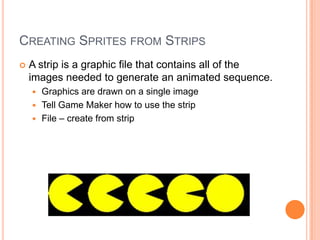
Creating Sprites from StripsA strip is a graphic file that contains all of the images needed to generate an animated sequence.  Graphics are drawn on a single imageTell Game Maker how to use the stripFile – create from strip
Game Maker ResourcesGraphics and Strips available for your gameOther sites?Graphics Editor in Game MakerLimited, similar to Microsoft Paint
Setting Sprite PropertiesCollision CheckingPrecise collision checkingCollisions occur when two objects touchBounded rectangle or actual pixelsSeparate Collision Mask
Sound in Game MakerNormal sound – wave files for sound effectsBackground Music – only played one at a time3D sound – 3D effects can be appliedUse Multimedia Player – will default to the systemGame Maker supports WAVE and MIDIOther file types (ex. MP3) will default to play on the computer system
BackgroundsCreative and colorful backgrounds that help to add an important element of realism or establish an element of excitementAdded using the resources windowWorking with Tile setsUse as tile set option – width and heightFrom the room menu, choose the tiles tab to add the background images
PONG?What would you need to make a pong game?How would you do it?Create the SpritesAdd SoundsAdd BackgroundAdd a Font (Resources, create Font)Define the game’s objects (ball, right paddle, left paddle, wall, rt goal, left goal, controller)Develop program logicCreate a room
Your game?Define the assetsCreate the assetsDefine the objectsDevelop the logicCreate a room

Game maker objects

  • 1.
  • 2.
    Creating Sprites fromStripsA strip is a graphic file that contains all of the images needed to generate an animated sequence. Graphics are drawn on a single imageTell Game Maker how to use the stripFile – create from strip
  • 3.
    Game Maker ResourcesGraphicsand Strips available for your gameOther sites?Graphics Editor in Game MakerLimited, similar to Microsoft Paint
  • 4.
    Setting Sprite PropertiesCollisionCheckingPrecise collision checkingCollisions occur when two objects touchBounded rectangle or actual pixelsSeparate Collision Mask
  • 5.
    Sound in GameMakerNormal sound – wave files for sound effectsBackground Music – only played one at a time3D sound – 3D effects can be appliedUse Multimedia Player – will default to the systemGame Maker supports WAVE and MIDIOther file types (ex. MP3) will default to play on the computer system
  • 6.
    BackgroundsCreative and colorfulbackgrounds that help to add an important element of realism or establish an element of excitementAdded using the resources windowWorking with Tile setsUse as tile set option – width and heightFrom the room menu, choose the tiles tab to add the background images
  • 7.
    PONG?What would youneed to make a pong game?How would you do it?Create the SpritesAdd SoundsAdd BackgroundAdd a Font (Resources, create Font)Define the game’s objects (ball, right paddle, left paddle, wall, rt goal, left goal, controller)Develop program logicCreate a room
  • 8.
    Your game?Define theassetsCreate the assetsDefine the objectsDevelop the logicCreate a room