GAME
DEVELOPMENT
101
A very very very basic
Introduction to making games
TABLE OF CONTENT
Here are the topics that we’ll be going through today:
1. Camera projections
2. Software used in game development
3. Variables and methods
4. Writing code in C#
5. Creating characters
WHAT IS A
GAME DEVELOPER?
Game developers are people like
you with math, computer, or
creative arts skills. They spend
their time programming and
developing games..
PROJECTIONS
Generally, two types of camera
projections are used:
1. Orthographic Projection
2. Perspective Projection
01
PROJECTIONS
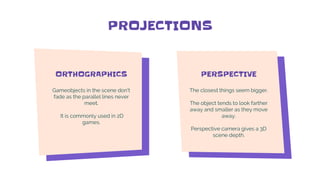
ORTHOGRAPHICS
Gameobjects in the scene don't
fade as the parallel lines never
meet.
It is commonly used in 2D
games.
PERSPECTIVE
The closest things seem bigger.
The object tends to look farther
away and smaller as they move
away.
Perspective camera gives a 3D
scene depth.
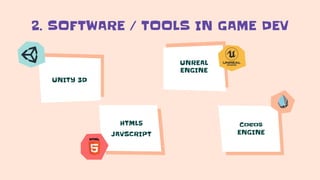
2. SOFTWARE / TOOLS IN GAME DEV
UNITY 3D
HTML5
JAVSCRIPT
UNREAL
ENGINE
Cocos
ENGINE
VARIABLES
METHODS
CLASSES
03
VARIABLES
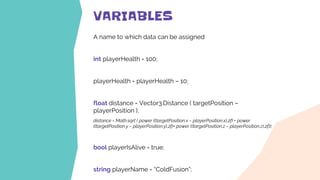
A name to which data can be assigned
int playerHealth = 100;
playerHealth = playerHealth – 10;
float distance = Vector3.Distance ( targetPosition –
playerPosition );
distance = Math.sqrt ( power ((targetPosition.x – playerPosition.x),2f) + power
((targetPosition.y – playerPosition.y),2f)+ power ((targetPosition.z – playerPosition.z),2f));
bool playerIsAlive = true;
string playerName = “ColdFusion”;
METHODS (FUNCTIONS)
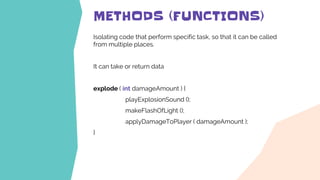
Isolating code that perform specific task, so that it can be called
from multiple places.
It can take or return data
explode ( int damageAmount ) {
playExplosionSound ();
makeFlashOfLight ();
applyDamageToPlayer ( damageAmount );
}
WRITING
CODE IN C#
04
UNITY – C# CODE
using UnityEngine;
public class FootballBehaviour : MonoBehaviour
{
public float thrust = 1.0f;
public Rigidbody rb;
void Start() {
rb = GetComponent<Rigidbody>();
}
void Update() {
rb.AddForce(transform.forward * thrust);
}
}
UNITY – C# CODE
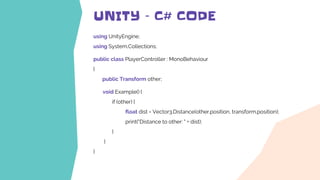
using UnityEngine;
using System.Collections;
public class PlayerController : MonoBehaviour
{
public Transform other;
void Example() {
if (other) {
float dist = Vector3.Distance(other.position, transform.position);
print("Distance to other: " + dist);
}
}
}
CREATING
CHARACTERS
05
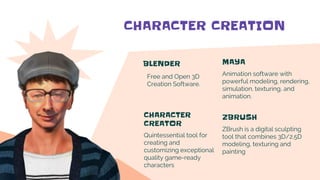
CHARACTER CREATION
BLENDER
Free and Open 3D
Creation Software.
MAYA
Animation software with
powerful modeling, rendering,
simulation, texturing, and
animation.
CHARACTER
CREATOR
Quintessential tool for
creating and
customizing exceptional
quality game-ready
characters
ZBRUSH
ZBrush is a digital sculpting
tool that combines 3D/2.5D
modeling, texturing and
painting
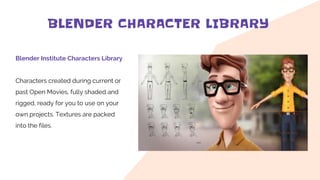
BLENDER CHARACTER LIBRARY
Blender Institute Characters Library
Characters created during current or
past Open Movies, fully shaded and
rigged, ready for you to use on your
own projects. Textures are packed
into the files.
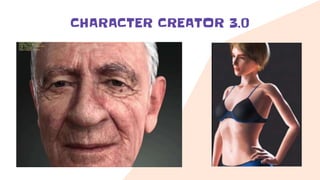
CHARACTER CREATOR 3.0
CREDITS: This presentation template was created
by Slidesgo, including icons by Flaticon, and
infographics & images by Freepik
THANK
YOU
Keep learning new things every
day to feel young at any age,
otherwise you feel tired and old
by your everyday routine.
Please keep this slide for attribution
All vector arts used in this
presentation were downloaded from
www.freepik.com
Big thanks to the artists who helped
to make these slides beautiful.
Saurav Bajracharya
Chief Technology Officer
Semantic Creation
buzzsaurav@gmail.com
9840056397

Game development 101 - A Basic Introduction

  • 1.
    GAME DEVELOPMENT 101 A very veryvery basic Introduction to making games
  • 2.
    TABLE OF CONTENT Hereare the topics that we’ll be going through today: 1. Camera projections 2. Software used in game development 3. Variables and methods 4. Writing code in C# 5. Creating characters
  • 3.
    WHAT IS A GAMEDEVELOPER? Game developers are people like you with math, computer, or creative arts skills. They spend their time programming and developing games..
  • 4.
    PROJECTIONS Generally, two typesof camera projections are used: 1. Orthographic Projection 2. Perspective Projection 01
  • 5.
    PROJECTIONS ORTHOGRAPHICS Gameobjects in thescene don't fade as the parallel lines never meet. It is commonly used in 2D games. PERSPECTIVE The closest things seem bigger. The object tends to look farther away and smaller as they move away. Perspective camera gives a 3D scene depth.
  • 6.
    2. SOFTWARE /TOOLS IN GAME DEV UNITY 3D HTML5 JAVSCRIPT UNREAL ENGINE Cocos ENGINE
  • 7.
  • 8.
    VARIABLES A name towhich data can be assigned int playerHealth = 100; playerHealth = playerHealth – 10; float distance = Vector3.Distance ( targetPosition – playerPosition ); distance = Math.sqrt ( power ((targetPosition.x – playerPosition.x),2f) + power ((targetPosition.y – playerPosition.y),2f)+ power ((targetPosition.z – playerPosition.z),2f)); bool playerIsAlive = true; string playerName = “ColdFusion”;
  • 9.
    METHODS (FUNCTIONS) Isolating codethat perform specific task, so that it can be called from multiple places. It can take or return data explode ( int damageAmount ) { playExplosionSound (); makeFlashOfLight (); applyDamageToPlayer ( damageAmount ); }
  • 10.
  • 11.
    UNITY – C#CODE using UnityEngine; public class FootballBehaviour : MonoBehaviour { public float thrust = 1.0f; public Rigidbody rb; void Start() { rb = GetComponent<Rigidbody>(); } void Update() { rb.AddForce(transform.forward * thrust); } }
  • 12.
    UNITY – C#CODE using UnityEngine; using System.Collections; public class PlayerController : MonoBehaviour { public Transform other; void Example() { if (other) { float dist = Vector3.Distance(other.position, transform.position); print("Distance to other: " + dist); } } }
  • 13.
  • 14.
    CHARACTER CREATION BLENDER Free andOpen 3D Creation Software. MAYA Animation software with powerful modeling, rendering, simulation, texturing, and animation. CHARACTER CREATOR Quintessential tool for creating and customizing exceptional quality game-ready characters ZBRUSH ZBrush is a digital sculpting tool that combines 3D/2.5D modeling, texturing and painting
  • 15.
    BLENDER CHARACTER LIBRARY BlenderInstitute Characters Library Characters created during current or past Open Movies, fully shaded and rigged, ready for you to use on your own projects. Textures are packed into the files.
  • 16.
  • 17.
    CREDITS: This presentationtemplate was created by Slidesgo, including icons by Flaticon, and infographics & images by Freepik THANK YOU Keep learning new things every day to feel young at any age, otherwise you feel tired and old by your everyday routine. Please keep this slide for attribution All vector arts used in this presentation were downloaded from www.freepik.com Big thanks to the artists who helped to make these slides beautiful. Saurav Bajracharya Chief Technology Officer Semantic Creation buzzsaurav@gmail.com 9840056397