Fuzzing Linux Kernel
Fuzzing is a technique for automatically finding bugs. It involves the process of generating
random inputs for programs until it crashes. If the program crashes then we found a bug and if it
does’nt then we continue the process in order to find bugs.
Fuzzing depends on what kind of program we dealing with or running the fuzzer as fuzzing can be
used for programs, library, linux-kernel or firmware to find the bugs.
Now there are a bunch of questions when it comes to fuzzing that,
• How do we execute the program
• How do we inject random inputs
• How do we generate inputs
• How do we detect crashes
• How do we automate the process
Taking “generating random inputs” for the program into consideration it always does’nt works as
sometimes our program needs a lot of guess work depending upon the structure of the program. For
example if a program needs a header or a specific keyword in the starting and we are just generating
random inputs then our fuzzer has to go through a lot of guess work to just pass the start statement
of a program and it becomes way too tidious when we are dealing with nested attributes of a
program which are necessary for a programs to just start executing. In this way this technique
becomes way too lengthy as our fuzzer is spending more of it’s time just to pass the start statement
of a program.
Fuzzing has been a crucial process for testing of a program for a while now and better techniques
evolved in this process. Generating random inputs in the process can be improved by simply taking
better inputs. Now what do we get when we are talking about better inputs here. There are mainly
three ways that people use for generating better inputs
• Structured inputs or Structural fuzzing or Structure-aware fuzzing
• Guided generation (eg. coverage-guided fuzzing)
• Collecting a corpus of sample inputs and mutating(changing) them
Structured inputs:-
In the process of taking random inputs rather just taking random bytes we take random keywords
that fit the grammer of our program. So rather than guessing a lot of bytes for our program we
would be guessing the keywords that fit the grammer our program.
Guided Generation:-
Guided instructions depends on
Types of signals :-
• Code coverage(thus, coverage-guided fuzzing)
• Memory state of a program i.e. we take the value change of a code each time of our
execution.
Combining the structured inputs approach and mutate according as in case of XML code which
requires headers as we can try inserting and removing tags in case of XML.
Whereas taking Coverage-guided generation into consideration we choose a random input from
a corpus of data and change or mutate it accordingly then we try to execute and we see that we get
any new code coverage or not. If it does not perform than the input is rejected and if we get some
relevant results then we just add it to the corpus for future use this way we start getting more
relevant instructions for our program
Collecting Corpus:-
Collecting corpus for fuzzer to work properly we use approaches like,
Collecting a set of sample input for the program to execute
• XML files in case of XML
Mutating them and feeding into the program to get results. If the input works properly gets us closer
to the words then the input is added to the corpus data for future results.
In this collecting corpus approach we can combine the previous two approaches and parse the
samples in order to increase the structural awareness as our fuzzer is now aware or prepared of what
kind of data to parse to the program which reduces the time and increase our efficiency.
Kernel Fuzzing:-
As fuzzing is feeding random inputs until the program crashes, in case of kernel which is a program
itself we apply fuzzing to the kernel. But kernel is not just a simple program which takes simple
inputs and produces outputs it works with different types of inputs. When talking about inputs in
this case two primary questions come into consideration that how do we inject inputs and how do
we generate inputs.
There are two types of inputs that we have when talking about kernels i.e. syscalls and external
inputs. When we are running our userspace applications then we take syscalls into consideration for
fuzzing but kernel is exposed to external inputs such as usb devices, network packets, external
buses and firmware’s external inputs.
In case of Syscalls it’s simple execution of a binary but in case of external inputs it varies as it can
be either from the userspace or through hypervisor/emulator.
Generating inputs:-
Syscalls
In generating random data as input we come under some problems as random data can create a fuzz
and consume more of our time but this could be resolved by using smart inputs as data for fuzzing
the kernel. But only feeding simple data does’nt work with the kernel as our kernel require syscalls
as input data. The concept of fuzzing the kernel using syscalls involve usage of the api. An api can
be used provide a sequence of calls for the kernel. This helps us providing structured arguments and
returns values which can be used as values for subsequent calls. This is something called as API-
aware fuzzing where the inputs are api call sequences which are generated and mutated accordingly.
Whenever we are fuzzing then we are using this api for syscalls in order to fuzzing the kernel.
Not all the syscalls work as API or accept simple structures as arguments. There are clone and
sigaction syscalls that work on the feature of callbacks and if we are fuzzing these syscalls then we
have to take into measure that the execution can be diverted and we need to describe those
diversions.
Similar in the case of other syscalls like eBPF, KVM where we need to generate valid code.
External
Network packets might seem like random data but these are similar to API and must be taken into
consideration. As we can get responses at any point of time.
USB is a type of host driven communication and its not working like any API, it’s like responding
to a call and the inputs or calls can be at any point of time.
So the input structures can be
• API
• API with callbacks
• Scripts
• USB inputs
Running the Kernel
Physical device VM/Emulator
Fuzzing surface Native
(includes device drivers)
Only what the VM support
Management(restarting,debugging
, getting kernel logs)
Hard,
hardware gets bricked
Easy
Scalability Buy more devices Spawn more VMs
Automation
Automation can be used in case of fuzzing as it can be used for monitoring kernel logs for crashes,
restarting crashed VMs, duplicating crashes, generating reproducers and reporting bugs and
tracking fixes and all other things that syzkaller/syzbot do. This can be of a great use as when it
comes to fuzzing and save a lot of time and increase the efficiency.
Syskaller vs Trinity
When it comes to fuzzing, syzkaller and trinity comes into play and they both serve differently in
the process of fuzzing. They both act as a good fuzzer with some differences in their approaches.
Trinity (and similar fuzzers) in essence:
Trinity is a fuzzer that does not produces different inputs but infinite syscalls.
This fuzzer is still API-aware in some sense because it knows about different types of syscalls.
Syscaller
It introduces a notion of test case instead of just infinite stream of syscalls it produces infinite
sequences and executes them. It is coverage guided. Language to describe API/structures is
(syslang) and it provide us with sysbot which help us to take the advantages of automation in
fuzzing. Syzkaller can also be run in standalone mode but a little difficult to set-up.
It goes deeper, finds more bugs and is easier to extend whereas trinity finds less bugs, easier to
deploy as a drop-in binary.
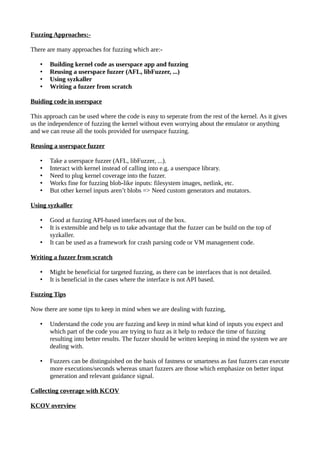
Fuzzing Approaches:-
There are many approaches for fuzzing which are:-
• Building kernel code as userspace app and fuzzing
• Reusing a userspace fuzzer (AFL, libFuzzer, ...)
• Using syzkaller
• Writing a fuzzer from scratch
Buiding code in userspace
This approach can be used where the code is easy to seperate from the rest of the kernel. As it gives
us the independence of fuzzing the kernel without even worrying about the emulator or anything
and we can reuse all the tools provided for userspace fuzzing.
Reusing a userspace fuzzer
• Take a userspace fuzzer (AFL, libFuzzer, ...).
• Interact with kernel instead of calling into e.g. a userspace library.
• Need to plug kernel coverage into the fuzzer.
• Works fine for fuzzing blob-like inputs: filesystem images, netlink, etc.
• But other kernel inputs aren’t blobs => Need custom generators and mutators.
Using syzkaller
• Good at fuzzing API-based interfaces out of the box.
• It is extensible and help us to take advantage that the fuzzer can be build on the top of
syzkaller.
• It can be used as a framework for crash parsing code or VM management code.
Writing a fuzzer from scratch
• Might be beneficial for targeted fuzzing, as there can be interfaces that is not detailed.
• It is beneficial in the cases where the interface is not API based.
Fuzzing Tips
Now there are some tips to keep in mind when we are dealing with fuzzing,
• Understand the code you are fuzzing and keep in mind what kind of inputs you expect and
which part of the code you are trying to fuzz as it help to reduce the time of fuzzing
resulting into better results. The fuzzer should be written keeping in mind the system we are
dealing with.
• Fuzzers can be distinguished on the basis of fastness or smartness as fast fuzzers can execute
more executions/seconds whereas smart fuzzers are those which emphasize on better input
generation and relevant guidance signal.
Collecting coverage with KCOV
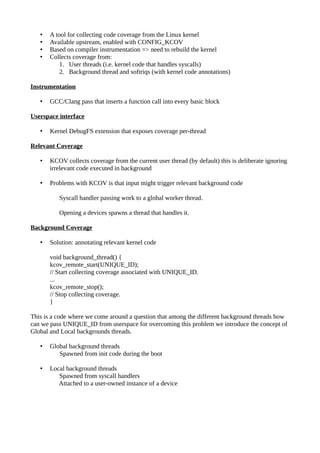
KCOV overview
• A tool for collecting code coverage from the Linux kernel
• Available upstream, enabled with CONFIG_KCOV
• Based on compiler instrumentation => need to rebuild the kernel
• Collects coverage from:
1. User threads (i.e. kernel code that handles syscalls)
2. Background thread and softriqs (with kernel code annotations)
Instrumentation
• GCC/Clang pass that inserts a function call into every basic block
Userspace interface
• Kernel DebugFS extension that exposes coverage per-thread
Relevant Coverage
• KCOV collects coverage from the current user thread (by default) this is deliberate ignoring
irrelevant code executed in background
• Problems with KCOV is that input might trigger relevant background code
Syscall handler passing work to a global worker thread.
Opening a devices spawns a thread that handles it.
Background Coverage
• Solution: annotating relevant kernel code
void background_thread() {
kcov_remote_start(UNIQUE_ID);
// Start collecting coverage associated with UNIQUE_ID.
...
kcov_remote_stop();
// Stop collecting coverage.
}
This is a code where we come around a question that among the different background threads how
can we pass UNIQUE_ID from userspace for overcoming this problem we introduce the concept of
Global and Local backgrounds threads.
• Global background threads
Spawned from init code during the boot
• Local background threads
Spawned from syscall handlers
Attached to a user-owned instance of a device
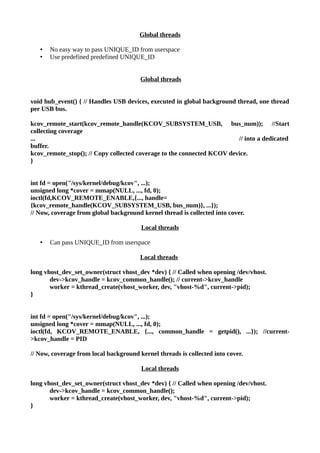
Global threads
• No easy way to pass UNIQUE_ID from userspace
• Use predefined predefined UNIQUE_ID
Global threads
void hub_event() { // Handles USB devices, executed in global background thread, one thread
per USB bus.
kcov_remote_start(kcov_remote_handle(KCOV_SUBSYSTEM_USB, bus_num)); //Start
collecting coverage
... // into a dedicated
buffer.
kcov_remote_stop(); // Copy collected coverage to the connected KCOV device.
}
int fd = open("/sys/kernel/debug/kcov", ...);
unsigned long *cover = mmap(NULL, ..., fd, 0);
ioctl(fd,KCOV_REMOTE_ENABLE,{..., handle=
{kcov_remote_handle(KCOV_SUBSYSTEM_USB, bus_num)}, ...});
// Now, coverage from global background kernel thread is collected into cover.
Local threads
• Can pass UNIQUE_ID from userspace
Local threads
long vhost_dev_set_owner(struct vhost_dev *dev) { // Called when opening /dev/vhost.
dev->kcov_handle = kcov_common_handle(); // current->kcov_handle
worker = kthread_create(vhost_worker, dev, "vhost-%d", current->pid);
}
int fd = open("/sys/kernel/debug/kcov", ...);
unsigned long *cover = mmap(NULL, ..., fd, 0);
ioctl(fd, KCOV_REMOTE_ENABLE, {..., common_handle = getpid(), ...}); //current-
>kcov_handle = PID
// Now, coverage from local background kernel threads is collected into cover.
Local threads
long vhost_dev_set_owner(struct vhost_dev *dev) { // Called when opening /dev/vhost.
dev->kcov_handle = kcov_common_handle();
worker = kthread_create(vhost_worker, dev, "vhost-%d", current->pid);
}
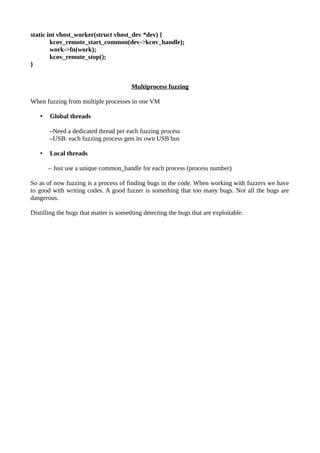
static int vhost_worker(struct vhost_dev *dev) {
kcov_remote_start_common(dev->kcov_handle);
work->fn(work);
kcov_remote_stop();
}
Multiprocess fuzzing
When fuzzing from multiple processes in one VM
• Global threads
–Need a dedicated thread per each fuzzing process
–USB: each fuzzing process gets its own USB bus
• Local threads
– Just use a unique common_handle for each process (process number)
So as of now fuzzing is a process of finding bugs in the code. When working with fuzzers we have
to good with writing codes. A good fuzzer is something that too many bugs. Not all the bugs are
dangerous.
Distilling the bugs that matter is something detecting the bugs that are exploitable.

Fuzzing Linux Kernel

  • 1.
    Fuzzing Linux Kernel Fuzzingis a technique for automatically finding bugs. It involves the process of generating random inputs for programs until it crashes. If the program crashes then we found a bug and if it does’nt then we continue the process in order to find bugs. Fuzzing depends on what kind of program we dealing with or running the fuzzer as fuzzing can be used for programs, library, linux-kernel or firmware to find the bugs. Now there are a bunch of questions when it comes to fuzzing that, • How do we execute the program • How do we inject random inputs • How do we generate inputs • How do we detect crashes • How do we automate the process Taking “generating random inputs” for the program into consideration it always does’nt works as sometimes our program needs a lot of guess work depending upon the structure of the program. For example if a program needs a header or a specific keyword in the starting and we are just generating random inputs then our fuzzer has to go through a lot of guess work to just pass the start statement of a program and it becomes way too tidious when we are dealing with nested attributes of a program which are necessary for a programs to just start executing. In this way this technique becomes way too lengthy as our fuzzer is spending more of it’s time just to pass the start statement of a program. Fuzzing has been a crucial process for testing of a program for a while now and better techniques evolved in this process. Generating random inputs in the process can be improved by simply taking better inputs. Now what do we get when we are talking about better inputs here. There are mainly three ways that people use for generating better inputs • Structured inputs or Structural fuzzing or Structure-aware fuzzing • Guided generation (eg. coverage-guided fuzzing) • Collecting a corpus of sample inputs and mutating(changing) them Structured inputs:- In the process of taking random inputs rather just taking random bytes we take random keywords that fit the grammer of our program. So rather than guessing a lot of bytes for our program we would be guessing the keywords that fit the grammer our program. Guided Generation:- Guided instructions depends on Types of signals :- • Code coverage(thus, coverage-guided fuzzing) • Memory state of a program i.e. we take the value change of a code each time of our execution. Combining the structured inputs approach and mutate according as in case of XML code which requires headers as we can try inserting and removing tags in case of XML. Whereas taking Coverage-guided generation into consideration we choose a random input from a corpus of data and change or mutate it accordingly then we try to execute and we see that we get
  • 2.
    any new codecoverage or not. If it does not perform than the input is rejected and if we get some relevant results then we just add it to the corpus for future use this way we start getting more relevant instructions for our program Collecting Corpus:- Collecting corpus for fuzzer to work properly we use approaches like, Collecting a set of sample input for the program to execute • XML files in case of XML Mutating them and feeding into the program to get results. If the input works properly gets us closer to the words then the input is added to the corpus data for future results. In this collecting corpus approach we can combine the previous two approaches and parse the samples in order to increase the structural awareness as our fuzzer is now aware or prepared of what kind of data to parse to the program which reduces the time and increase our efficiency. Kernel Fuzzing:- As fuzzing is feeding random inputs until the program crashes, in case of kernel which is a program itself we apply fuzzing to the kernel. But kernel is not just a simple program which takes simple inputs and produces outputs it works with different types of inputs. When talking about inputs in this case two primary questions come into consideration that how do we inject inputs and how do we generate inputs. There are two types of inputs that we have when talking about kernels i.e. syscalls and external inputs. When we are running our userspace applications then we take syscalls into consideration for fuzzing but kernel is exposed to external inputs such as usb devices, network packets, external buses and firmware’s external inputs. In case of Syscalls it’s simple execution of a binary but in case of external inputs it varies as it can be either from the userspace or through hypervisor/emulator. Generating inputs:- Syscalls In generating random data as input we come under some problems as random data can create a fuzz and consume more of our time but this could be resolved by using smart inputs as data for fuzzing the kernel. But only feeding simple data does’nt work with the kernel as our kernel require syscalls as input data. The concept of fuzzing the kernel using syscalls involve usage of the api. An api can be used provide a sequence of calls for the kernel. This helps us providing structured arguments and returns values which can be used as values for subsequent calls. This is something called as API- aware fuzzing where the inputs are api call sequences which are generated and mutated accordingly. Whenever we are fuzzing then we are using this api for syscalls in order to fuzzing the kernel. Not all the syscalls work as API or accept simple structures as arguments. There are clone and sigaction syscalls that work on the feature of callbacks and if we are fuzzing these syscalls then we have to take into measure that the execution can be diverted and we need to describe those diversions. Similar in the case of other syscalls like eBPF, KVM where we need to generate valid code.
  • 3.
    External Network packets mightseem like random data but these are similar to API and must be taken into consideration. As we can get responses at any point of time. USB is a type of host driven communication and its not working like any API, it’s like responding to a call and the inputs or calls can be at any point of time. So the input structures can be • API • API with callbacks • Scripts • USB inputs Running the Kernel Physical device VM/Emulator Fuzzing surface Native (includes device drivers) Only what the VM support Management(restarting,debugging , getting kernel logs) Hard, hardware gets bricked Easy Scalability Buy more devices Spawn more VMs Automation Automation can be used in case of fuzzing as it can be used for monitoring kernel logs for crashes, restarting crashed VMs, duplicating crashes, generating reproducers and reporting bugs and tracking fixes and all other things that syzkaller/syzbot do. This can be of a great use as when it comes to fuzzing and save a lot of time and increase the efficiency. Syskaller vs Trinity When it comes to fuzzing, syzkaller and trinity comes into play and they both serve differently in the process of fuzzing. They both act as a good fuzzer with some differences in their approaches. Trinity (and similar fuzzers) in essence: Trinity is a fuzzer that does not produces different inputs but infinite syscalls. This fuzzer is still API-aware in some sense because it knows about different types of syscalls. Syscaller It introduces a notion of test case instead of just infinite stream of syscalls it produces infinite sequences and executes them. It is coverage guided. Language to describe API/structures is (syslang) and it provide us with sysbot which help us to take the advantages of automation in fuzzing. Syzkaller can also be run in standalone mode but a little difficult to set-up. It goes deeper, finds more bugs and is easier to extend whereas trinity finds less bugs, easier to deploy as a drop-in binary.
  • 4.
    Fuzzing Approaches:- There aremany approaches for fuzzing which are:- • Building kernel code as userspace app and fuzzing • Reusing a userspace fuzzer (AFL, libFuzzer, ...) • Using syzkaller • Writing a fuzzer from scratch Buiding code in userspace This approach can be used where the code is easy to seperate from the rest of the kernel. As it gives us the independence of fuzzing the kernel without even worrying about the emulator or anything and we can reuse all the tools provided for userspace fuzzing. Reusing a userspace fuzzer • Take a userspace fuzzer (AFL, libFuzzer, ...). • Interact with kernel instead of calling into e.g. a userspace library. • Need to plug kernel coverage into the fuzzer. • Works fine for fuzzing blob-like inputs: filesystem images, netlink, etc. • But other kernel inputs aren’t blobs => Need custom generators and mutators. Using syzkaller • Good at fuzzing API-based interfaces out of the box. • It is extensible and help us to take advantage that the fuzzer can be build on the top of syzkaller. • It can be used as a framework for crash parsing code or VM management code. Writing a fuzzer from scratch • Might be beneficial for targeted fuzzing, as there can be interfaces that is not detailed. • It is beneficial in the cases where the interface is not API based. Fuzzing Tips Now there are some tips to keep in mind when we are dealing with fuzzing, • Understand the code you are fuzzing and keep in mind what kind of inputs you expect and which part of the code you are trying to fuzz as it help to reduce the time of fuzzing resulting into better results. The fuzzer should be written keeping in mind the system we are dealing with. • Fuzzers can be distinguished on the basis of fastness or smartness as fast fuzzers can execute more executions/seconds whereas smart fuzzers are those which emphasize on better input generation and relevant guidance signal. Collecting coverage with KCOV KCOV overview
  • 5.
    • A toolfor collecting code coverage from the Linux kernel • Available upstream, enabled with CONFIG_KCOV • Based on compiler instrumentation => need to rebuild the kernel • Collects coverage from: 1. User threads (i.e. kernel code that handles syscalls) 2. Background thread and softriqs (with kernel code annotations) Instrumentation • GCC/Clang pass that inserts a function call into every basic block Userspace interface • Kernel DebugFS extension that exposes coverage per-thread Relevant Coverage • KCOV collects coverage from the current user thread (by default) this is deliberate ignoring irrelevant code executed in background • Problems with KCOV is that input might trigger relevant background code Syscall handler passing work to a global worker thread. Opening a devices spawns a thread that handles it. Background Coverage • Solution: annotating relevant kernel code void background_thread() { kcov_remote_start(UNIQUE_ID); // Start collecting coverage associated with UNIQUE_ID. ... kcov_remote_stop(); // Stop collecting coverage. } This is a code where we come around a question that among the different background threads how can we pass UNIQUE_ID from userspace for overcoming this problem we introduce the concept of Global and Local backgrounds threads. • Global background threads Spawned from init code during the boot • Local background threads Spawned from syscall handlers Attached to a user-owned instance of a device
  • 6.
    Global threads • Noeasy way to pass UNIQUE_ID from userspace • Use predefined predefined UNIQUE_ID Global threads void hub_event() { // Handles USB devices, executed in global background thread, one thread per USB bus. kcov_remote_start(kcov_remote_handle(KCOV_SUBSYSTEM_USB, bus_num)); //Start collecting coverage ... // into a dedicated buffer. kcov_remote_stop(); // Copy collected coverage to the connected KCOV device. } int fd = open("/sys/kernel/debug/kcov", ...); unsigned long *cover = mmap(NULL, ..., fd, 0); ioctl(fd,KCOV_REMOTE_ENABLE,{..., handle= {kcov_remote_handle(KCOV_SUBSYSTEM_USB, bus_num)}, ...}); // Now, coverage from global background kernel thread is collected into cover. Local threads • Can pass UNIQUE_ID from userspace Local threads long vhost_dev_set_owner(struct vhost_dev *dev) { // Called when opening /dev/vhost. dev->kcov_handle = kcov_common_handle(); // current->kcov_handle worker = kthread_create(vhost_worker, dev, "vhost-%d", current->pid); } int fd = open("/sys/kernel/debug/kcov", ...); unsigned long *cover = mmap(NULL, ..., fd, 0); ioctl(fd, KCOV_REMOTE_ENABLE, {..., common_handle = getpid(), ...}); //current- >kcov_handle = PID // Now, coverage from local background kernel threads is collected into cover. Local threads long vhost_dev_set_owner(struct vhost_dev *dev) { // Called when opening /dev/vhost. dev->kcov_handle = kcov_common_handle(); worker = kthread_create(vhost_worker, dev, "vhost-%d", current->pid); }
  • 7.
    static int vhost_worker(structvhost_dev *dev) { kcov_remote_start_common(dev->kcov_handle); work->fn(work); kcov_remote_stop(); } Multiprocess fuzzing When fuzzing from multiple processes in one VM • Global threads –Need a dedicated thread per each fuzzing process –USB: each fuzzing process gets its own USB bus • Local threads – Just use a unique common_handle for each process (process number) So as of now fuzzing is a process of finding bugs in the code. When working with fuzzers we have to good with writing codes. A good fuzzer is something that too many bugs. Not all the bugs are dangerous. Distilling the bugs that matter is something detecting the bugs that are exploitable.