Introducing FusionCLOUD
Going way beyond traditional Application Performance Monitors
For more information – please contact sales@fusion-reactor.com
FusionCLOUD Features
• CLOUD Dashboard – very configurable, thresholds, grouping servers
• Bi-directional secure channel (SOCKET) – Ability to send requests down to your
server e.g. Stack Trace / Garbage Collection / Execute script
• Application view – generated from individual or clustered servers
• Application broken down by %Time taken, Average, Slowest, Throughput, #Errors
• Automatic identification of „interesting transactions“
• Ability to SAVE requests, transactions, stack traces, JDBC
• Server Metrics, Transactions, Requests, JDBC
• Alerting Engine for email, PageDuty, HipChat, Email, Slack, OpsGenie , VictorOps,
FLOWDOCK, Twilio, IRCCAT etc.
FusionCLOUD Facts
• Hybrid Solution – FusionReactor on-premise + FusionCLOUD (optional)
• Infrastructure runs on AWS
• Beta has been running for around 12 months – now migrating beta users „soft
rollout“
• Licensing Model
– CLOUD – Server Reservations combined with On-demand (similar to AWS)
• Editions available –
– Enterprise – Multi-Server, Advanced Reporting, Mobile Client, Enterprise Scripting
– Ultimate – Production Debugger, Production Profiler, Production Memory Analyzer (TBA)
• Pricing
– Enterprise - $99 month / $990 year
– Ultimate - $149 month / $1490 year
Copyright Intergral GmbH 2016
FusionCLOUD Dashboard allows servers to
be grouped together. Servers can be
highlighted to show more details, as well as
being placed into „Live“ mode – and being
updated in real time
Different views are available, showing more
and less details. This is the server list view.
CLOUD Dashboard display includes many
options to render your servers exactly as
you want to see them
Copyright Intergral GmbH 2016
CLOUD Dashboard displaying the
STANDARD server view
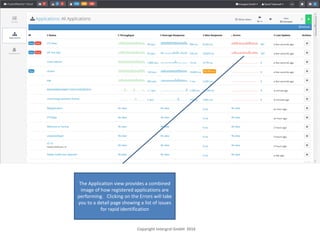
The Application view provides a combined
image of how registered applications are
performing. Clicking on the Errors will take
you to a detail page showing a list of issues
for rapid identification
Copyright Intergral GmbH 2016
Select a date range in order to get
the long term view of activity
Individual CF pages and frameworks are
analyzed to provide an „Application“ view
of activity, rather than just request view.
This enables developers to focus in on slow,
running applications, so that optimized
performance tuning and code refactoring
can take place
Copyright Intergral GmbH 2016
See # of times a page has been called
during a specific period – lets you
focus in on areas of your application
which require optimization
Copyright Intergral GmbH 2016
Get a breakdown of different groups of requests e.g.
Currently Runninf, Slow, Erroneous, Stack Traces etc.
Drill into more details or save a request for later analysis
Copyright Intergral GmbH 2016
Quickly drill into transaction detais e.g. See all Errors
returned from transactions within a specific period of
time.
You can now save transactions for review at a later date.
Copyright Intergral GmbH 2016
Saved requests (Errors) can be reviewed and
shared between colleagues
Copyright Intergral GmbH 2016
Instantly see a breakdown of running threads &
their status. Enables you to instantly track into
blocked threads an view the stack to isolate
errors
Copyright Intergral GmbH 2016
Save Stack Traces which occured in critical
moments, so that you can analyze these at your
leisure
Copyright Intergral GmbH 2016
FusionCLOUD provides comprehensive
reporting and alerting capability
Copyright Intergral GmbH 2016
FusionCLOUD provides comprehensive alerting
capability
Copyright Intergral GmbH 2016
Alert Checks can be setup in seconds and
integrate to a number of service providers –
such as PageDuty, email, HipChat, Twilio, Slack
etc.
Copyright Intergral GmbH 2016

FusionReactor - FusionCLOUD overview

  • 1.
    Introducing FusionCLOUD Going waybeyond traditional Application Performance Monitors For more information – please contact sales@fusion-reactor.com
  • 2.
    FusionCLOUD Features • CLOUDDashboard – very configurable, thresholds, grouping servers • Bi-directional secure channel (SOCKET) – Ability to send requests down to your server e.g. Stack Trace / Garbage Collection / Execute script • Application view – generated from individual or clustered servers • Application broken down by %Time taken, Average, Slowest, Throughput, #Errors • Automatic identification of „interesting transactions“ • Ability to SAVE requests, transactions, stack traces, JDBC • Server Metrics, Transactions, Requests, JDBC • Alerting Engine for email, PageDuty, HipChat, Email, Slack, OpsGenie , VictorOps, FLOWDOCK, Twilio, IRCCAT etc.
  • 3.
    FusionCLOUD Facts • HybridSolution – FusionReactor on-premise + FusionCLOUD (optional) • Infrastructure runs on AWS • Beta has been running for around 12 months – now migrating beta users „soft rollout“ • Licensing Model – CLOUD – Server Reservations combined with On-demand (similar to AWS) • Editions available – – Enterprise – Multi-Server, Advanced Reporting, Mobile Client, Enterprise Scripting – Ultimate – Production Debugger, Production Profiler, Production Memory Analyzer (TBA) • Pricing – Enterprise - $99 month / $990 year – Ultimate - $149 month / $1490 year
  • 4.
    Copyright Intergral GmbH2016 FusionCLOUD Dashboard allows servers to be grouped together. Servers can be highlighted to show more details, as well as being placed into „Live“ mode – and being updated in real time Different views are available, showing more and less details. This is the server list view.
  • 5.
    CLOUD Dashboard displayincludes many options to render your servers exactly as you want to see them Copyright Intergral GmbH 2016
  • 6.
    CLOUD Dashboard displayingthe STANDARD server view
  • 7.
    The Application viewprovides a combined image of how registered applications are performing. Clicking on the Errors will take you to a detail page showing a list of issues for rapid identification Copyright Intergral GmbH 2016
  • 8.
    Select a daterange in order to get the long term view of activity Individual CF pages and frameworks are analyzed to provide an „Application“ view of activity, rather than just request view. This enables developers to focus in on slow, running applications, so that optimized performance tuning and code refactoring can take place Copyright Intergral GmbH 2016
  • 9.
    See # oftimes a page has been called during a specific period – lets you focus in on areas of your application which require optimization Copyright Intergral GmbH 2016
  • 10.
    Get a breakdownof different groups of requests e.g. Currently Runninf, Slow, Erroneous, Stack Traces etc. Drill into more details or save a request for later analysis Copyright Intergral GmbH 2016
  • 11.
    Quickly drill intotransaction detais e.g. See all Errors returned from transactions within a specific period of time. You can now save transactions for review at a later date. Copyright Intergral GmbH 2016
  • 12.
    Saved requests (Errors)can be reviewed and shared between colleagues Copyright Intergral GmbH 2016
  • 13.
    Instantly see abreakdown of running threads & their status. Enables you to instantly track into blocked threads an view the stack to isolate errors Copyright Intergral GmbH 2016
  • 14.
    Save Stack Traceswhich occured in critical moments, so that you can analyze these at your leisure Copyright Intergral GmbH 2016
  • 15.
    FusionCLOUD provides comprehensive reportingand alerting capability Copyright Intergral GmbH 2016
  • 16.
    FusionCLOUD provides comprehensivealerting capability Copyright Intergral GmbH 2016
  • 17.
    Alert Checks canbe setup in seconds and integrate to a number of service providers – such as PageDuty, email, HipChat, Twilio, Slack etc. Copyright Intergral GmbH 2016