FundFlow V3.6
Developed by Mahre Consulting, Inc. & Everest Technologies, Inc.
A Project Fund Monitoring Tool
2Developed by Mahre Consulting, Inc. and Everest Tecnologies, Inc.
FundFlow is a real-time web-based financial
management tool that monitors forecast
estimates, workflow tracking, cost expenditures,
vendor invoices, and budget spending to
enhance project implementation success for
capital expenditure projects.
What is FundFlow?
3Developed by Mahre Consulting, Inc. and Everest Tecnologies, Inc.
Are you responsible for administering projects, or do you wind up
just managing greater numbers of increasingly complex
spreadsheets?
Are you having trouble cost segregating capital projects to take
advantage of accelerated depreciation?
Do you have an application that tracks your initial vendor/partner
budget estimates against actual invoices?
Are your existing central project financial tools easily available via
Intranet with a web interface? (No hard-to-update-and-manage
“thick clients” required)
Is FundFlow for You?
4Developed by Mahre Consulting, Inc. and Everest Tecnologies, Inc.
Are you able to immediately generate an accurate Construction In
Progress (CIP) report and capital spending forecast suitable for
your executive team / board of directors?
Do you have multiple project reports and spreadsheets that
sometimes conflict with each other?
Do you have non-budgeted, non-project-related expenses being
“thrown-in” to your projects?
Do you have timely project closure in order to start project
financial capitalization and depreciation?
Do you need FundFlow?
5Developed by Mahre Consulting, Inc. and Everest Tecnologies, Inc.
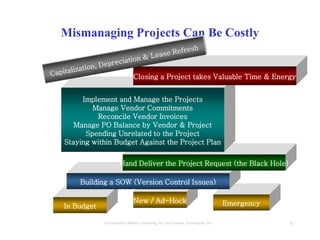
In Budget
New / Ad-Hock Emergency
Mismanaging Projects Can Be Costly
Building a SOW (Version Control Issues)
Hand Deliver the Project Request (the Black Hole)
Implement and Manage the Projects
Manage Vendor Commitments
Reconcile Vendor Invoices
Manage PO Balance by Vendor & Project
Spending Unrelated to the Project
Staying within Budget Against the Project Plan
Closing a Project takes Valuable Time & Energy
6Developed by Mahre Consulting, Inc. and Everest Tecnologies, Inc.
Managing Projects by Spreadsheets
7Developed by Mahre Consulting, Inc. and Everest Tecnologies, Inc.
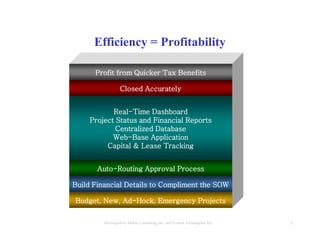
Budget, New, Ad-Hock, Emergency Projects
Efficiency = Profitability
Build Financial Details to Compliment the SOW
Auto-Routing Approval Process
Real-Time Dashboard
Project Status and Financial Reports
Centralized Database
Web-Base Application
Capital & Lease Tracking
Closed Accurately
Profit from Quicker Tax Benefits
8Developed by Mahre Consulting, Inc. and Everest Tecnologies, Inc.
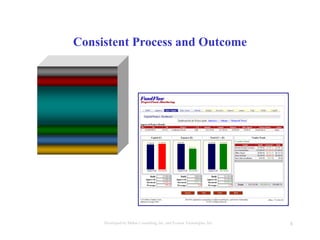
Consistent Process and Outcome
9Developed by Mahre Consulting, Inc. and Everest Tecnologies, Inc.
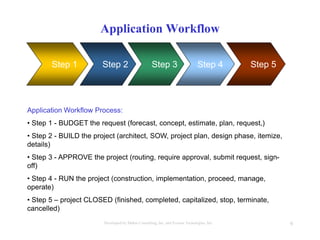
Application Workflow
Step 1 Step 2 Step 4Step 3 Step 5
Application Workflow Process:
• Step 1 - BUDGET the request (forecast, concept, estimate, plan, request,)
• Step 2 - BUILD the project (architect, SOW, project plan, design phase, itemize,
details)
• Step 3 - APPROVE the project (routing, require approval, submit request, sign-
off)
• Step 4 - RUN the project (construction, implementation, proceed, manage,
operate)
• Step 5 – project CLOSED (finished, completed, capitalized, stop, terminate,
cancelled)
10Developed by Mahre Consulting, Inc. and Everest Tecnologies, Inc.
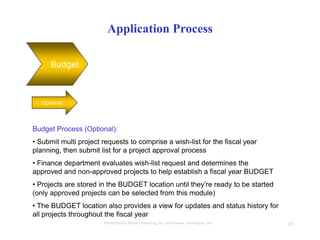
Application Process
Budget
Optional
Budget Process (Optional):
• Submit multi project requests to comprise a wish-list for the fiscal year
planning, then submit list for a project approval process
• Finance department evaluates wish-list request and determines the
approved and non-approved projects to help establish a fiscal year BUDGET
• Projects are stored in the BUDGET location until they’re ready to be started
(only approved projects can be selected from this module)
• The BUDGET location also provides a view for updates and status history for
all projects throughout the fiscal year
11Developed by Mahre Consulting, Inc. and Everest Tecnologies, Inc.
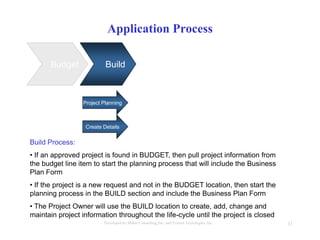
Application Process
Budget Build
Project Planning
Build Process:
• If an approved project is found in BUDGET, then pull project information from
the budget line item to start the planning process that will include the Business
Plan Form
• If the project is a new request and not in the BUDGET location, then start the
planning process in the BUILD section and include the Business Plan Form
• The Project Owner will use the BUILD location to create, add, change and
maintain project information throughout the life-cycle until the project is closed
Create Details
12Developed by Mahre Consulting, Inc. and Everest Tecnologies, Inc.
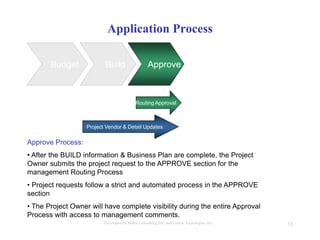
Application Process
Budget Build Approve
Project Vendor & Detail Updates
Routing Approval
Approve Process:
• After the BUILD information & Business Plan are complete, the Project
Owner submits the project request to the APPROVE section for the
management Routing Process
• Project requests follow a strict and automated process in the APPROVE
section
• The Project Owner will have complete visibility during the entire Approval
Process with access to management comments.
13Developed by Mahre Consulting, Inc. and Everest Tecnologies, Inc.
Application Process
Budget Build Approve
Managing the Line Item Details within Build
Construction
Run Process:
• After the project request is Approved, the project will enter the RUN section
for the Construction process tracking and provide invoice reconciliation
• In RUN, the invoices, internal costs and expenses data are entered to
provide the actual spending analysis by tracking capital and expense totals
• Real-time Dashboards and Financial Reports are maintained in the RUN
section until the project is completed
Run
14Developed by Mahre Consulting, Inc. and Everest Tecnologies, Inc.
Application Process
Budget Build RunApprove
Completion
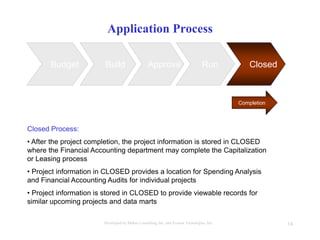
Closed Process:
• After the project completion, the project information is stored in CLOSED
where the Financial Accounting department may complete the Capitalization
or Leasing process
• Project information in CLOSED provides a location for Spending Analysis
and Financial Accounting Audits for individual projects
• Project information is stored in CLOSED to provide viewable records for
similar upcoming projects and data marts
Closed
15Developed by Mahre Consulting, Inc. and Everest Tecnologies, Inc.
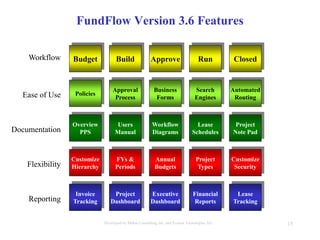
FundFlow Version 3.6 Features
Invoice
Tracking
Project
Dashboard
Executive
Dashboard
Financial
Reports
Lease
TrackingReporting
Customize
Security
Customize
Hierarchy
FYs &
Periods
Annual
Budgets
Project
TypesFlexibility
ClosedBuild Approve RunWorkflow Budget
Overview
PPS
Users
ManualDocumentation
Workflow
Diagrams
Lease
Schedules
Project
Note Pad
Policies
Approval
Process
Business
FormsEase of Use
Search
Engines
Automated
Routing
16Developed by Mahre Consulting, Inc. and Everest Tecnologies, Inc.
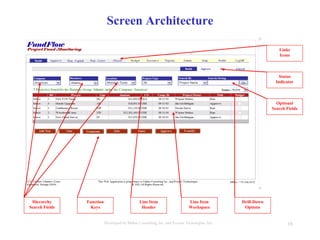
Screen Architecture
Hierarchy
Search Fields
Optional
Search Fields
Line Item
Header
Function
Keys
Links
Icons
Drill-Down
Options
Status
Indicator
Line Item
Workspace
17Developed by Mahre Consulting, Inc. and Everest Tecnologies, Inc.
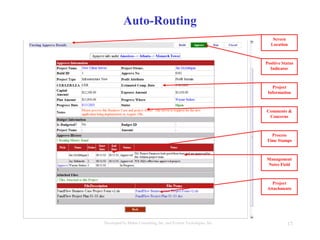
Auto-Routing
Positive Status
Indicator
Management
Notes Field
Project
Attachments
Project
Information
Comments &
Concerns
Screen
Location
Process
Time Stamps
18Developed by Mahre Consulting, Inc. and Everest Tecnologies, Inc.
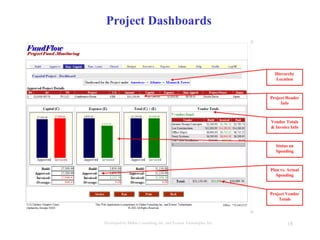
Project Dashboards
Hierarchy
Location
Project Header
Info
Vendor Totals
& Invoice Info
Status on
Spending
Plan vs. Actual
Spending
Project Vendor
Totals
19Developed by Mahre Consulting, Inc. and Everest Tecnologies, Inc.
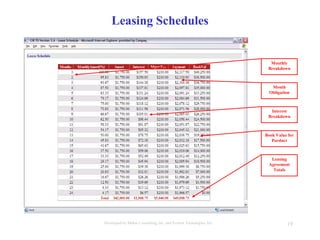
Leasing Schedules
Monthly
Breakdown
Leasing
Agreement
Totals
Month
Obligation
Interest
Breakdown
Book Value for
Porduct
20Developed by Mahre Consulting, Inc. and Everest Tecnologies, Inc.
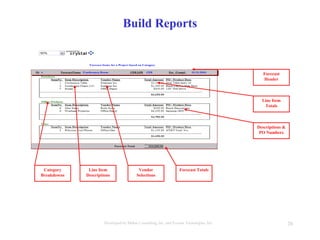
Build Reports
Forecast
Header
Forecast TotalsVendor
Selections
Line Item
Descriptions
Category
Breakdowns
Line Item
Totals
Descriptions &
PO Numbers
21Developed by Mahre Consulting, Inc. and Everest Tecnologies, Inc.
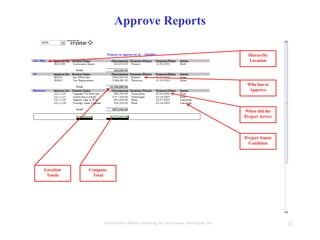
Approve Reports
Hierarchy
Location
Project Status
Condition
Company
Total
Location
Totals
Who has to
Approve
When did the
Project Arrive
22Developed by Mahre Consulting, Inc. and Everest Tecnologies, Inc.
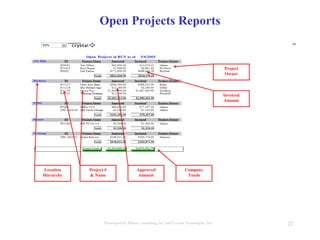
Open Projects Reports
Project
Owner
Company
Totals
Approved
Amount
Project #
& Name
Location
Hierarchy
Invoiced
Amount
23Developed by Mahre Consulting, Inc. and Everest Tecnologies, Inc.
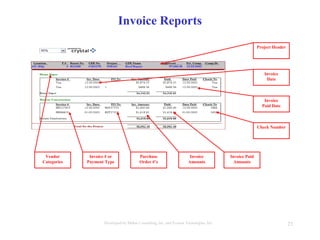
Invoice Reports
Invoice
Date
Invoice
Amounts
Purchase
Order #’s
Invoice # or
Payment Type
Vendor
Categories
Invoice
Paid Date
Check Number
Project Header
Invoice Paid
Amounts
24Developed by Mahre Consulting, Inc. and Everest Tecnologies, Inc.
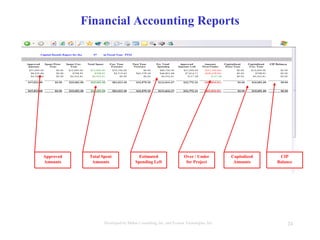
Financial Accounting Reports
Over / Under
for Project
Estimated
Spending Left
Total Spent
Amounts
Approved
Amounts
CIP
Balance
Capitalized
Amounts
25Developed by Mahre Consulting, Inc. and Everest Tecnologies, Inc.
View the
FundFlow Application
Contact
www.mahre.com

FundFlow V3.6 Overview (Printable) 08-18-03

  • 1.
    FundFlow V3.6 Developed byMahre Consulting, Inc. & Everest Technologies, Inc. A Project Fund Monitoring Tool
  • 2.
    2Developed by MahreConsulting, Inc. and Everest Tecnologies, Inc. FundFlow is a real-time web-based financial management tool that monitors forecast estimates, workflow tracking, cost expenditures, vendor invoices, and budget spending to enhance project implementation success for capital expenditure projects. What is FundFlow?
  • 3.
    3Developed by MahreConsulting, Inc. and Everest Tecnologies, Inc. Are you responsible for administering projects, or do you wind up just managing greater numbers of increasingly complex spreadsheets? Are you having trouble cost segregating capital projects to take advantage of accelerated depreciation? Do you have an application that tracks your initial vendor/partner budget estimates against actual invoices? Are your existing central project financial tools easily available via Intranet with a web interface? (No hard-to-update-and-manage “thick clients” required) Is FundFlow for You?
  • 4.
    4Developed by MahreConsulting, Inc. and Everest Tecnologies, Inc. Are you able to immediately generate an accurate Construction In Progress (CIP) report and capital spending forecast suitable for your executive team / board of directors? Do you have multiple project reports and spreadsheets that sometimes conflict with each other? Do you have non-budgeted, non-project-related expenses being “thrown-in” to your projects? Do you have timely project closure in order to start project financial capitalization and depreciation? Do you need FundFlow?
  • 5.
    5Developed by MahreConsulting, Inc. and Everest Tecnologies, Inc. In Budget New / Ad-Hock Emergency Mismanaging Projects Can Be Costly Building a SOW (Version Control Issues) Hand Deliver the Project Request (the Black Hole) Implement and Manage the Projects Manage Vendor Commitments Reconcile Vendor Invoices Manage PO Balance by Vendor & Project Spending Unrelated to the Project Staying within Budget Against the Project Plan Closing a Project takes Valuable Time & Energy
  • 6.
    6Developed by MahreConsulting, Inc. and Everest Tecnologies, Inc. Managing Projects by Spreadsheets
  • 7.
    7Developed by MahreConsulting, Inc. and Everest Tecnologies, Inc. Budget, New, Ad-Hock, Emergency Projects Efficiency = Profitability Build Financial Details to Compliment the SOW Auto-Routing Approval Process Real-Time Dashboard Project Status and Financial Reports Centralized Database Web-Base Application Capital & Lease Tracking Closed Accurately Profit from Quicker Tax Benefits
  • 8.
    8Developed by MahreConsulting, Inc. and Everest Tecnologies, Inc. Consistent Process and Outcome
  • 9.
    9Developed by MahreConsulting, Inc. and Everest Tecnologies, Inc. Application Workflow Step 1 Step 2 Step 4Step 3 Step 5 Application Workflow Process: • Step 1 - BUDGET the request (forecast, concept, estimate, plan, request,) • Step 2 - BUILD the project (architect, SOW, project plan, design phase, itemize, details) • Step 3 - APPROVE the project (routing, require approval, submit request, sign- off) • Step 4 - RUN the project (construction, implementation, proceed, manage, operate) • Step 5 – project CLOSED (finished, completed, capitalized, stop, terminate, cancelled)
  • 10.
    10Developed by MahreConsulting, Inc. and Everest Tecnologies, Inc. Application Process Budget Optional Budget Process (Optional): • Submit multi project requests to comprise a wish-list for the fiscal year planning, then submit list for a project approval process • Finance department evaluates wish-list request and determines the approved and non-approved projects to help establish a fiscal year BUDGET • Projects are stored in the BUDGET location until they’re ready to be started (only approved projects can be selected from this module) • The BUDGET location also provides a view for updates and status history for all projects throughout the fiscal year
  • 11.
    11Developed by MahreConsulting, Inc. and Everest Tecnologies, Inc. Application Process Budget Build Project Planning Build Process: • If an approved project is found in BUDGET, then pull project information from the budget line item to start the planning process that will include the Business Plan Form • If the project is a new request and not in the BUDGET location, then start the planning process in the BUILD section and include the Business Plan Form • The Project Owner will use the BUILD location to create, add, change and maintain project information throughout the life-cycle until the project is closed Create Details
  • 12.
    12Developed by MahreConsulting, Inc. and Everest Tecnologies, Inc. Application Process Budget Build Approve Project Vendor & Detail Updates Routing Approval Approve Process: • After the BUILD information & Business Plan are complete, the Project Owner submits the project request to the APPROVE section for the management Routing Process • Project requests follow a strict and automated process in the APPROVE section • The Project Owner will have complete visibility during the entire Approval Process with access to management comments.
  • 13.
    13Developed by MahreConsulting, Inc. and Everest Tecnologies, Inc. Application Process Budget Build Approve Managing the Line Item Details within Build Construction Run Process: • After the project request is Approved, the project will enter the RUN section for the Construction process tracking and provide invoice reconciliation • In RUN, the invoices, internal costs and expenses data are entered to provide the actual spending analysis by tracking capital and expense totals • Real-time Dashboards and Financial Reports are maintained in the RUN section until the project is completed Run
  • 14.
    14Developed by MahreConsulting, Inc. and Everest Tecnologies, Inc. Application Process Budget Build RunApprove Completion Closed Process: • After the project completion, the project information is stored in CLOSED where the Financial Accounting department may complete the Capitalization or Leasing process • Project information in CLOSED provides a location for Spending Analysis and Financial Accounting Audits for individual projects • Project information is stored in CLOSED to provide viewable records for similar upcoming projects and data marts Closed
  • 15.
    15Developed by MahreConsulting, Inc. and Everest Tecnologies, Inc. FundFlow Version 3.6 Features Invoice Tracking Project Dashboard Executive Dashboard Financial Reports Lease TrackingReporting Customize Security Customize Hierarchy FYs & Periods Annual Budgets Project TypesFlexibility ClosedBuild Approve RunWorkflow Budget Overview PPS Users ManualDocumentation Workflow Diagrams Lease Schedules Project Note Pad Policies Approval Process Business FormsEase of Use Search Engines Automated Routing
  • 16.
    16Developed by MahreConsulting, Inc. and Everest Tecnologies, Inc. Screen Architecture Hierarchy Search Fields Optional Search Fields Line Item Header Function Keys Links Icons Drill-Down Options Status Indicator Line Item Workspace
  • 17.
    17Developed by MahreConsulting, Inc. and Everest Tecnologies, Inc. Auto-Routing Positive Status Indicator Management Notes Field Project Attachments Project Information Comments & Concerns Screen Location Process Time Stamps
  • 18.
    18Developed by MahreConsulting, Inc. and Everest Tecnologies, Inc. Project Dashboards Hierarchy Location Project Header Info Vendor Totals & Invoice Info Status on Spending Plan vs. Actual Spending Project Vendor Totals
  • 19.
    19Developed by MahreConsulting, Inc. and Everest Tecnologies, Inc. Leasing Schedules Monthly Breakdown Leasing Agreement Totals Month Obligation Interest Breakdown Book Value for Porduct
  • 20.
    20Developed by MahreConsulting, Inc. and Everest Tecnologies, Inc. Build Reports Forecast Header Forecast TotalsVendor Selections Line Item Descriptions Category Breakdowns Line Item Totals Descriptions & PO Numbers
  • 21.
    21Developed by MahreConsulting, Inc. and Everest Tecnologies, Inc. Approve Reports Hierarchy Location Project Status Condition Company Total Location Totals Who has to Approve When did the Project Arrive
  • 22.
    22Developed by MahreConsulting, Inc. and Everest Tecnologies, Inc. Open Projects Reports Project Owner Company Totals Approved Amount Project # & Name Location Hierarchy Invoiced Amount
  • 23.
    23Developed by MahreConsulting, Inc. and Everest Tecnologies, Inc. Invoice Reports Invoice Date Invoice Amounts Purchase Order #’s Invoice # or Payment Type Vendor Categories Invoice Paid Date Check Number Project Header Invoice Paid Amounts
  • 24.
    24Developed by MahreConsulting, Inc. and Everest Tecnologies, Inc. Financial Accounting Reports Over / Under for Project Estimated Spending Left Total Spent Amounts Approved Amounts CIP Balance Capitalized Amounts
  • 25.
    25Developed by MahreConsulting, Inc. and Everest Tecnologies, Inc. View the FundFlow Application Contact www.mahre.com