Full Stack Development with
Node.js and NoSQL
Nic Raboy (@nraboy)
Arun Gupta (@arungupta)
©2015 Couchbase Inc. 2
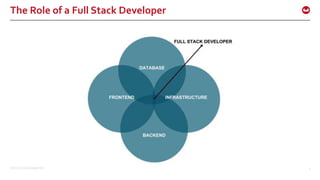
The Role of a Full Stack Developer
©2015 Couchbase Inc. 3
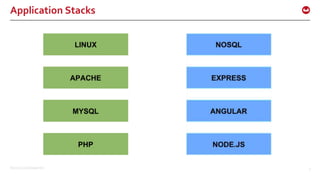
Application Stacks
©2015 Couchbase Inc. 4
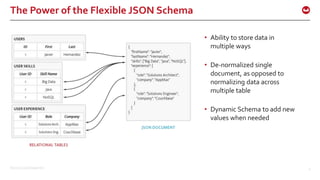
The Power of the Flexible JSON Schema
• Ability to store data in
multiple ways
• De-normalized single
document, as opposed to
normalizing data across
multiple table
• Dynamic Schema to add new
values when needed
©2015 Couchbase Inc. 5
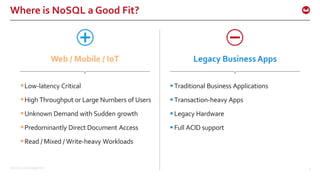
Where is NoSQL a Good Fit?
Low-latency Critical
High Throughput or Large Numbers of Users
Unknown Demand with Sudden growth
Predominantly Direct Document Access
Read / Mixed / Write-heavy Workloads
Traditional Business Applications
Transaction-heavy Apps
Legacy Hardware
Full ACID support
Web / Mobile / IoT Legacy Business Apps
©2015 Couchbase Inc. 6
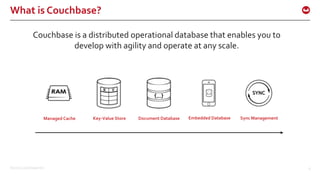
What is Couchbase?
Couchbase is a distributed operational database that enables you to
develop with agility and operate at any scale.
Managed Cache Key-Value Store Document Database Embedded Database Sync Management
©2015 Couchbase Inc. 7
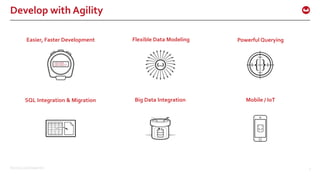
Develop with Agility
Easier, Faster Development Flexible Data Modeling Powerful Querying
SQL Integration & Migration Big Data Integration Mobile / IoT
©2015 Couchbase Inc. 8
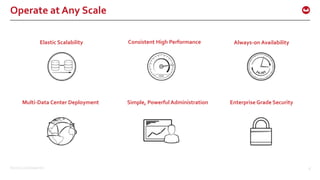
Operate at Any Scale
Elastic Scalability Consistent High Performance Always-on Availability
Multi-Data Center Deployment Simple, Powerful Administration Enterprise Grade Security
©2015 Couchbase Inc. 9
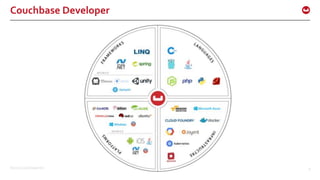
Couchbase Developer
©2015 Couchbase Inc. 10
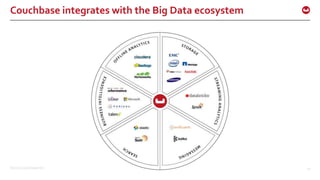
Couchbase integrates with the Big Data ecosystem
©2015 Couchbase Inc. 11
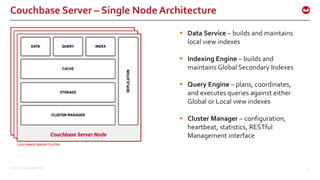
Couchbase Server – Single Node Architecture
 Data Service – builds and maintains
local view indexes
 Indexing Engine – builds and
maintains Global Secondary Indexes
 Query Engine – plans, coordinates,
and executes queries against either
Global or Local view indexes
 Cluster Manager – configuration,
heartbeat, statistics, RESTful
Management interface
©2015 Couchbase Inc. 12
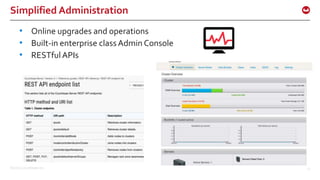
Simplified Administration
• Online upgrades and operations
• Built-in enterprise classAdmin Console
• RESTfulAPIs
©2015 Couchbase Inc. 13
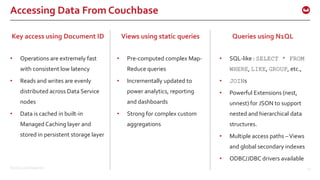
Accessing Data From Couchbase
Key access using Document ID
• Operations are extremely fast
with consistent low latency
• Reads and writes are evenly
distributed across Data Service
nodes
• Data is cached in built-in
Managed Caching layer and
stored in persistent storage layer
Queries using N1QL
• SQL-like : SELECT * FROM
WHERE, LIKE, GROUP, etc.,
• JOINs
• Powerful Extensions (nest,
unnest) for JSON to support
nested and hierarchical data
structures.
• Multiple access paths –Views
and global secondary indexes
• ODBC/JDBC drivers available
Views using static queries
• Pre-computed complex Map-
Reduce queries
• Incrementally updated to
power analytics, reporting
and dashboards
• Strong for complex custom
aggregations
©2015 Couchbase Inc. 14
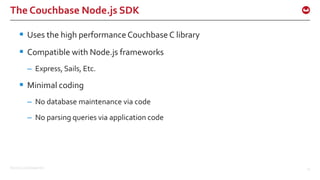
The Couchbase Node.js SDK
 Uses the high performance Couchbase C library
 Compatible with Node.js frameworks
– Express, Sails, Etc.
 Minimal coding
– No database maintenance via code
– No parsing queries via application code
©2015 Couchbase Inc. 15
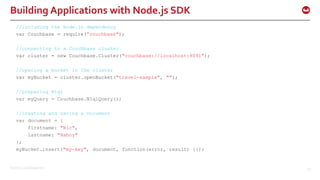
Building Applications with Node.js SDK
//including the Node.js dependency
var Couchbase = require(”couchbase");
//connecting to a Couchbase cluster
var cluster = new Couchbase.Cluster("couchbase://localhost:8091");
//opening a bucket in the cluster
var myBucket = cluster.openBucket("travel-sample", "");
//preparing N1ql
var myQuery = Couchbase.N1qlQuery();
//creating and saving a Document
var document = {
firstname: "Nic",
lastname: "Raboy"
};
myBucket.insert("my-key", document, function(error, result) {});
©2015 Couchbase Inc. 16
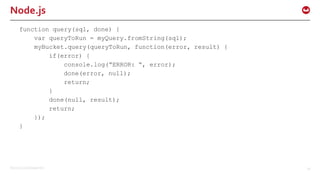
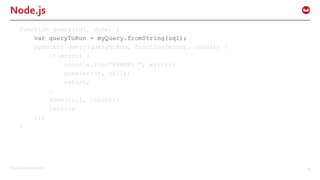
Node.js
function query(sql, done) {
var queryToRun = myQuery.fromString(sql);
myBucket.query(queryToRun, function(error, result) {
if(error) {
console.log(“ERROR: “, error);
done(error, null);
return;
}
done(null, result);
return;
});
}
©2015 Couchbase Inc. 17
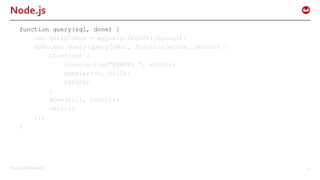
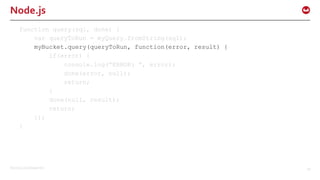
Node.js
function query(sql, done) {
var queryToRun = myQuery.fromString(sql);
myBucket.query(queryToRun, function(error, result) {
if(error) {
console.log(“ERROR: “, error);
done(error, null);
return;
}
done(null, result);
return;
});
}
©2015 Couchbase Inc. 18
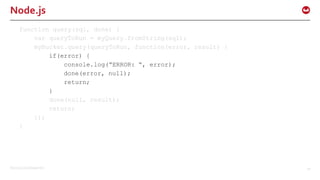
Node.js
function query(sql, done) {
var queryToRun = myQuery.fromString(sql);
myBucket.query(queryToRun, function(error, result) {
if(error) {
console.log(“ERROR: “, error);
done(error, null);
return;
}
done(null, result);
return;
});
}
©2015 Couchbase Inc. 19
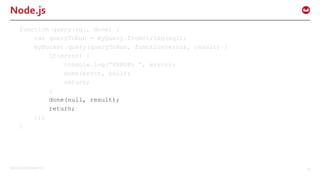
Node.js
function query(sql, done) {
var queryToRun = myQuery.fromString(sql);
myBucket.query(queryToRun, function(error, result) {
if(error) {
console.log(“ERROR: “, error);
done(error, null);
return;
}
done(null, result);
return;
});
}
©2015 Couchbase Inc. 20
Node.js
function query(sql, done) {
var queryToRun = myQuery.fromString(sql);
myBucket.query(queryToRun, function(error, result) {
if(error) {
console.log(“ERROR: “, error);
done(error, null);
return;
}
done(null, result);
return;
});
}
©2015 Couchbase Inc. 21
Node.js
function query(sql, done) {
var queryToRun = myQuery.fromString(sql);
myBucket.query(queryToRun, function(error, result) {
if(error) {
console.log(“ERROR: “, error);
done(error, null);
return;
}
done(null, result);
return;
});
}
DemoTime!
©2015 Couchbase Inc. 23
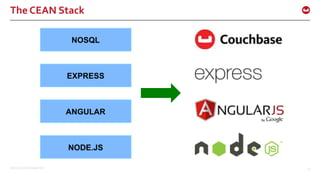
The CEAN Stack
©2015 Couchbase Inc. 24
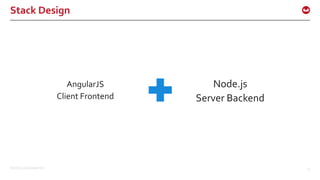
Stack Design
AngularJS
Client Frontend
Node.js
Server Backend
©2015 Couchbase Inc. 25
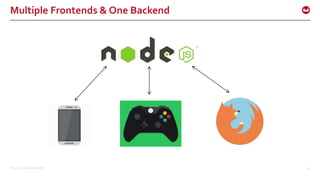
Node.js Separation of Frontend and Backend
 No Jade markup
 API driven
 Less client and server coupling
 The backend can evolve without affecting the frontend
 Frontend can be extended to web as well as mobile
©2015 Couchbase Inc. 26
Multiple Frontends & One Backend
©2015 Couchbase Inc. 27
The Node.js Backend
©2015 Couchbase Inc. 28
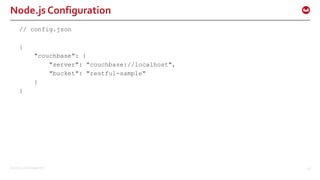
Node.js Configuration
// config.json
{
"couchbase": {
"server": "couchbase://localhost",
"bucket": "restful-sample"
}
}
©2015 Couchbase Inc. 29
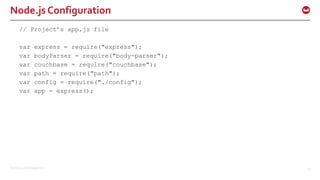
Node.js Configuration
// Project’s app.js file
var express = require("express");
var bodyParser = require("body-parser");
var couchbase = require("couchbase");
var path = require("path");
var config = require("./config");
var app = express();
©2015 Couchbase Inc. 30
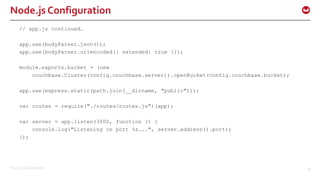
Node.js Configuration
// app.js continued…
app.use(bodyParser.json());
app.use(bodyParser.urlencoded({ extended: true }));
module.exports.bucket = (new
couchbase.Cluster(config.couchbase.server)).openBucket(config.couchbase.bucket);
app.use(express.static(path.join(__dirname, "public")));
var routes = require("./routes/routes.js")(app);
var server = app.listen(3000, function () {
console.log("Listening on port %s...", server.address().port);
});
©2015 Couchbase Inc. 31
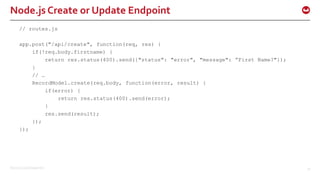
Node.js Create or Update Endpoint
// routes.js
app.post("/api/create", function(req, res) {
if(!req.body.firstname) {
return res.status(400).send({"status": "error", "message": ”First Name?"});
}
// …
RecordModel.create(req.body, function(error, result) {
if(error) {
return res.status(400).send(error);
}
res.send(result);
});
});
©2015 Couchbase Inc. 32
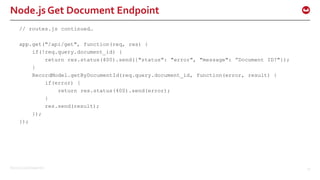
Node.js Get Document Endpoint
// routes.js continued…
app.get("/api/get", function(req, res) {
if(!req.query.document_id) {
return res.status(400).send({"status": "error", "message": ”Document ID?"});
}
RecordModel.getByDocumentId(req.query.document_id, function(error, result) {
if(error) {
return res.status(400).send(error);
}
res.send(result);
});
});
©2015 Couchbase Inc. 33
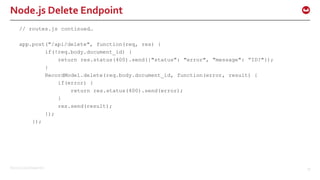
Node.js Delete Endpoint
// routes.js continued…
app.post("/api/delete", function(req, res) {
if(!req.body.document_id) {
return res.status(400).send({"status": "error", "message": ”ID?"});
}
RecordModel.delete(req.body.document_id, function(error, result) {
if(error) {
return res.status(400).send(error);
}
res.send(result);
});
});
©2015 Couchbase Inc. 34
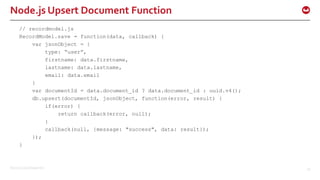
Node.js Upsert Document Function
// recordmodel.js
RecordModel.save = function(data, callback) {
var jsonObject = {
type: “user”,
firstname: data.firstname,
lastname: data.lastname,
email: data.email
}
var documentId = data.document_id ? data.document_id : uuid.v4();
db.upsert(documentId, jsonObject, function(error, result) {
if(error) {
return callback(error, null);
}
callback(null, {message: "success", data: result});
});
}
©2015 Couchbase Inc. 35
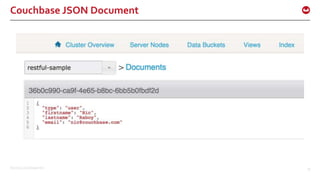
Couchbase JSON Document
©2015 Couchbase Inc. 36
Node.js Get Document with N1QL Function
// recordmodel.js continued…
RecordModel.getByDocumentId = function(documentId, callback) {
var statement = "SELECT firstname, lastname, email " +
"FROM `" + config.couchbase.bucket + "` AS users " +
"WHERE META(users).id = $1";
var query = N1qlQuery.fromString(statement);
db.query(query, [documentId], function(error, result) {
if(error) {
return callback(error, null);
}
callback(null, result);
});
};
©2015 Couchbase Inc. 37
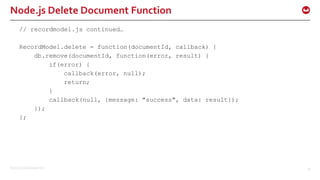
Node.js Delete Document Function
// recordmodel.js continued…
RecordModel.delete = function(documentId, callback) {
db.remove(documentId, function(error, result) {
if(error) {
callback(error, null);
return;
}
callback(null, {message: "success", data: result});
});
};
©2015 Couchbase Inc. 38
The AngularJS Frontend
©2015 Couchbase Inc. 39
Get all documents
// AngularJS app.js
$scope.fetchAll = function() {
$http(
{
method: "GET",
url: "/api/getAll"
}
)
.success(function(result) {
for(var i = 0; i < result.length; i++) {
$scope.items[result[i].id] = result[i];
}
});
}
©2015 Couchbase Inc. 40
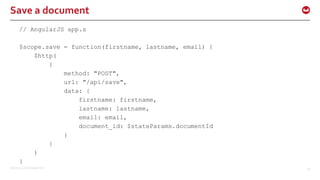
Save a document
// AngularJS app.s
$scope.save = function(firstname, lastname, email) {
$http(
{
method: "POST",
url: "/api/save",
data: {
firstname: firstname,
lastname: lastname,
email: email,
document_id: $stateParams.documentId
}
}
)
}
©2015 Couchbase Inc. 41
More Complex Node.js Queries
©2015 Couchbase Inc. 42
Node.jsTravel Sample
FlightPath.findAll = function(from, to, callback) {
var statement = "SELECT faa AS fromAirport, geo " +
"FROM `" + config.couchbase.bucket + "` r" +
"WHERE airportname = $1 " +
"UNION SELECT faa AS toAirport, geo " +
"FROM `" + config.couchbase.bucket + "` r" +
"WHERE airportname = $2";
var query = N1qlQuery.fromString(statement);
db.query(query, [from, to], function(error, result) {
if(error) {
return callback(error, null);
}
callback(null, result);
});
};
©2015 Couchbase Inc. 43
Node.jsTravel Sample
FlightPath.findAll = function(queryFrom, queryTo, leave, callback) {
var statement = "SELECT r.id, a.name, s.flight, s.utc, r.sourceairport,
r.destinationairport, r.equipment " +
"FROM `" + config.couchbase.bucket + "` r" +
"UNNEST r.schedule s " +
"JOIN `" + config.couchbase.bucket + "` a ON KEYS r.airlineid " +
"WHERE r.sourceairport = $1 AND r.destinationairport = $2 AND s.day = $3
”
"ORDER BY a.name";
var query = N1qlQuery.fromString(statement);
db.query(query, [queryFrom, queryTo, leave], function(error, result) {
if(error) {
return callback(error, null);
}
callback(null, result);
});
};
©2015 Couchbase Inc. 44
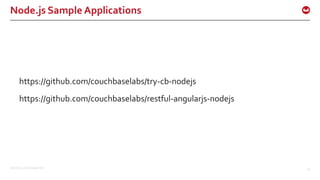
Node.js Sample Applications
https://github.com/couchbaselabs/try-cb-nodejs
https://github.com/couchbaselabs/restful-angularjs-nodejs
©2015 Couchbase Inc. 45
Couchbase N1QLTutorial
http://query.pub.couchbase.com/tutorial/
©2015 Couchbase Inc. 46
Ottoman ODM
©2015 Couchbase Inc. 47
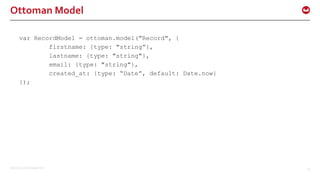
Ottoman Model
var RecordModel = ottoman.model("Record", {
firstname: {type: "string”},
lastname: {type: "string"},
email: {type: "string"},
created_at: {type: “Date”, default: Date.now}
});
©2015 Couchbase Inc. 48
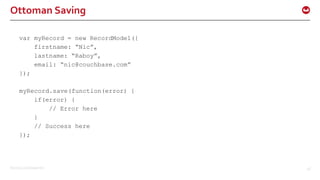
Ottoman Saving
var myRecord = new RecordModel({
firstname: “Nic”,
lastname: “Raboy”,
email: “nic@couchbase.com”
});
myRecord.save(function(error) {
if(error) {
// Error here
}
// Success here
});
©2015 Couchbase Inc. 49
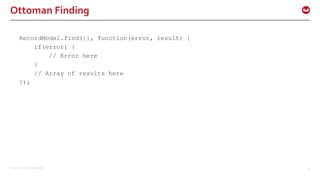
Ottoman Finding
RecordModel.find({}, function(error, result) {
if(error) {
// Error here
}
// Array of results here
});
©2015 Couchbase Inc. 50
Couchbase Mobile
©2015 Couchbase Inc. 51
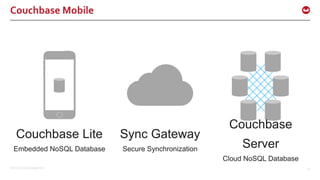
Couchbase Lite
Embedded NoSQL Database
Sync Gateway
Secure Synchronization
Couchbase
Server
Cloud NoSQL Database
Couchbase Mobile
©2015 Couchbase Inc. 52
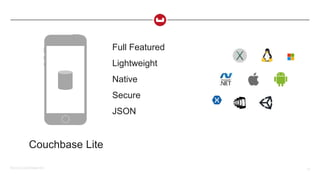
Couchbase Lite
Full Featured
Lightweight
Native
Secure
JSON
©2015 Couchbase Inc. 53
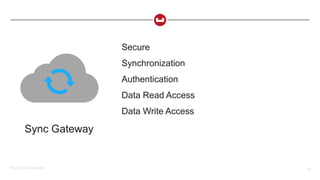
Sync Gateway
Secure
Synchronization
Authentication
Data Read Access
Data Write Access
©2015 Couchbase Inc. 54
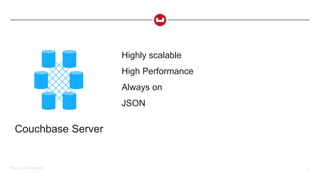
Couchbase Server
Highly scalable
High Performance
Always on
JSON
©2015 Couchbase Inc. 55
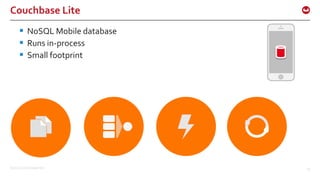
Couchbase Lite
 NoSQL Mobile database
 Runs in-process
 Small footprint
©2015 Couchbase Inc. 56
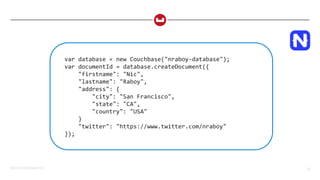
var database = new Couchbase("nraboy-database");
var documentId = database.createDocument({
"firstname": "Nic",
"lastname": "Raboy",
"address": {
"city": "San Francisco",
"state": "CA",
"country": "USA"
}
"twitter": "https://www.twitter.com/nraboy"
});
©2015 Couchbase Inc. 57
Map Reduce Indexes
• Building indexes in your native language
• Results are persisted for fast querying
• Just set breakpoints to debug
©2015 Couchbase Inc. 58
// Create an index
database.createView("people", "1", function(document, emitter) {
if(document.twitter) {
emitter.emit(document._id, document);
}
});
// Now query it
var rows = database.executeQuery("people");
for(var i = 0; i < rows.length; i++) {
// print row[i]
}
©2015 Couchbase Inc. 59
Change Notifications
Change notifications
• Listen for changes
• Cuts down on a ton of cruft code
• Data, queries, replications – even documents
©2015 Couchbase Inc. 60
database.addDatabaseChangeListener(function(changes) {
for(var i = 0; i < changes.length; i++) {
if(!changes[i].isConflict()) {
console.log(changes[i].getDocumentId());
}
}
});
©2015 Couchbase Inc. 61
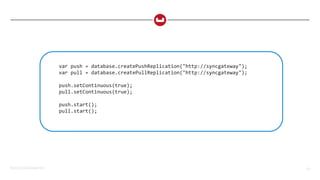
Sync
Sync
• Full multi-master replication
• Ability to minimize battery drain
• Change notifications and conflict detection
©2015 Couchbase Inc. 62
var push = database.createPushReplication("http://syncgateway");
var pull = database.createPullReplication("http://syncgateway");
push.setContinuous(true);
pull.setContinuous(true);
push.start();
pull.start();
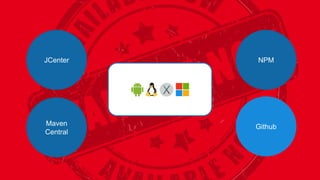
JCenter
Maven
Central
NPM
Github
DemoTime!
©2015 Couchbase Inc. 65
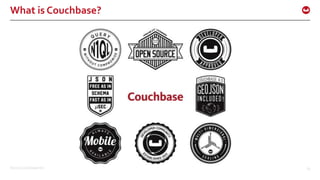
What is Couchbase?
©2015 Couchbase Inc. 66
Where do you find us?
• developer.couchbase.com
• blog.couchbase.com
• @couchbasedev or @couchbase
• forums.couchbase.com
• stackoverflow.com/questions/tagged/couchbase
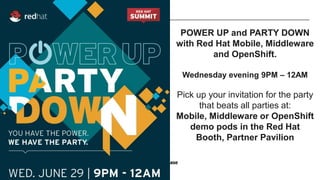
POWER UP and PARTY DOWN
with Red Hat Mobile, Middleware
and OpenShift.
Wednesday evening 9PM – 12AM
Pick up your invitation for the party
that beats all parties at:
Mobile, Middleware or OpenShift
demo pods in the Red Hat
Booth, Partner Pavilion

Full Stack Development With Node.Js And NoSQL (Nic Raboy & Arun Gupta)

  • 1.
    Full Stack Developmentwith Node.js and NoSQL Nic Raboy (@nraboy) Arun Gupta (@arungupta)
  • 2.
    ©2015 Couchbase Inc.2 The Role of a Full Stack Developer
  • 3.
    ©2015 Couchbase Inc.3 Application Stacks
  • 4.
    ©2015 Couchbase Inc.4 The Power of the Flexible JSON Schema • Ability to store data in multiple ways • De-normalized single document, as opposed to normalizing data across multiple table • Dynamic Schema to add new values when needed
  • 5.
    ©2015 Couchbase Inc.5 Where is NoSQL a Good Fit? Low-latency Critical High Throughput or Large Numbers of Users Unknown Demand with Sudden growth Predominantly Direct Document Access Read / Mixed / Write-heavy Workloads Traditional Business Applications Transaction-heavy Apps Legacy Hardware Full ACID support Web / Mobile / IoT Legacy Business Apps
  • 6.
    ©2015 Couchbase Inc.6 What is Couchbase? Couchbase is a distributed operational database that enables you to develop with agility and operate at any scale. Managed Cache Key-Value Store Document Database Embedded Database Sync Management
  • 7.
    ©2015 Couchbase Inc.7 Develop with Agility Easier, Faster Development Flexible Data Modeling Powerful Querying SQL Integration & Migration Big Data Integration Mobile / IoT
  • 8.
    ©2015 Couchbase Inc.8 Operate at Any Scale Elastic Scalability Consistent High Performance Always-on Availability Multi-Data Center Deployment Simple, Powerful Administration Enterprise Grade Security
  • 9.
    ©2015 Couchbase Inc.9 Couchbase Developer
  • 10.
    ©2015 Couchbase Inc.10 Couchbase integrates with the Big Data ecosystem
  • 11.
    ©2015 Couchbase Inc.11 Couchbase Server – Single Node Architecture  Data Service – builds and maintains local view indexes  Indexing Engine – builds and maintains Global Secondary Indexes  Query Engine – plans, coordinates, and executes queries against either Global or Local view indexes  Cluster Manager – configuration, heartbeat, statistics, RESTful Management interface
  • 12.
    ©2015 Couchbase Inc.12 Simplified Administration • Online upgrades and operations • Built-in enterprise classAdmin Console • RESTfulAPIs
  • 13.
    ©2015 Couchbase Inc.13 Accessing Data From Couchbase Key access using Document ID • Operations are extremely fast with consistent low latency • Reads and writes are evenly distributed across Data Service nodes • Data is cached in built-in Managed Caching layer and stored in persistent storage layer Queries using N1QL • SQL-like : SELECT * FROM WHERE, LIKE, GROUP, etc., • JOINs • Powerful Extensions (nest, unnest) for JSON to support nested and hierarchical data structures. • Multiple access paths –Views and global secondary indexes • ODBC/JDBC drivers available Views using static queries • Pre-computed complex Map- Reduce queries • Incrementally updated to power analytics, reporting and dashboards • Strong for complex custom aggregations
  • 14.
    ©2015 Couchbase Inc.14 The Couchbase Node.js SDK  Uses the high performance Couchbase C library  Compatible with Node.js frameworks – Express, Sails, Etc.  Minimal coding – No database maintenance via code – No parsing queries via application code
  • 15.
    ©2015 Couchbase Inc.15 Building Applications with Node.js SDK //including the Node.js dependency var Couchbase = require(”couchbase"); //connecting to a Couchbase cluster var cluster = new Couchbase.Cluster("couchbase://localhost:8091"); //opening a bucket in the cluster var myBucket = cluster.openBucket("travel-sample", ""); //preparing N1ql var myQuery = Couchbase.N1qlQuery(); //creating and saving a Document var document = { firstname: "Nic", lastname: "Raboy" }; myBucket.insert("my-key", document, function(error, result) {});
  • 16.
    ©2015 Couchbase Inc.16 Node.js function query(sql, done) { var queryToRun = myQuery.fromString(sql); myBucket.query(queryToRun, function(error, result) { if(error) { console.log(“ERROR: “, error); done(error, null); return; } done(null, result); return; }); }
  • 17.
    ©2015 Couchbase Inc.17 Node.js function query(sql, done) { var queryToRun = myQuery.fromString(sql); myBucket.query(queryToRun, function(error, result) { if(error) { console.log(“ERROR: “, error); done(error, null); return; } done(null, result); return; }); }
  • 18.
    ©2015 Couchbase Inc.18 Node.js function query(sql, done) { var queryToRun = myQuery.fromString(sql); myBucket.query(queryToRun, function(error, result) { if(error) { console.log(“ERROR: “, error); done(error, null); return; } done(null, result); return; }); }
  • 19.
    ©2015 Couchbase Inc.19 Node.js function query(sql, done) { var queryToRun = myQuery.fromString(sql); myBucket.query(queryToRun, function(error, result) { if(error) { console.log(“ERROR: “, error); done(error, null); return; } done(null, result); return; }); }
  • 20.
    ©2015 Couchbase Inc.20 Node.js function query(sql, done) { var queryToRun = myQuery.fromString(sql); myBucket.query(queryToRun, function(error, result) { if(error) { console.log(“ERROR: “, error); done(error, null); return; } done(null, result); return; }); }
  • 21.
    ©2015 Couchbase Inc.21 Node.js function query(sql, done) { var queryToRun = myQuery.fromString(sql); myBucket.query(queryToRun, function(error, result) { if(error) { console.log(“ERROR: “, error); done(error, null); return; } done(null, result); return; }); }
  • 22.
  • 23.
    ©2015 Couchbase Inc.23 The CEAN Stack
  • 24.
    ©2015 Couchbase Inc.24 Stack Design AngularJS Client Frontend Node.js Server Backend
  • 25.
    ©2015 Couchbase Inc.25 Node.js Separation of Frontend and Backend  No Jade markup  API driven  Less client and server coupling  The backend can evolve without affecting the frontend  Frontend can be extended to web as well as mobile
  • 26.
    ©2015 Couchbase Inc.26 Multiple Frontends & One Backend
  • 27.
    ©2015 Couchbase Inc.27 The Node.js Backend
  • 28.
    ©2015 Couchbase Inc.28 Node.js Configuration // config.json { "couchbase": { "server": "couchbase://localhost", "bucket": "restful-sample" } }
  • 29.
    ©2015 Couchbase Inc.29 Node.js Configuration // Project’s app.js file var express = require("express"); var bodyParser = require("body-parser"); var couchbase = require("couchbase"); var path = require("path"); var config = require("./config"); var app = express();
  • 30.
    ©2015 Couchbase Inc.30 Node.js Configuration // app.js continued… app.use(bodyParser.json()); app.use(bodyParser.urlencoded({ extended: true })); module.exports.bucket = (new couchbase.Cluster(config.couchbase.server)).openBucket(config.couchbase.bucket); app.use(express.static(path.join(__dirname, "public"))); var routes = require("./routes/routes.js")(app); var server = app.listen(3000, function () { console.log("Listening on port %s...", server.address().port); });
  • 31.
    ©2015 Couchbase Inc.31 Node.js Create or Update Endpoint // routes.js app.post("/api/create", function(req, res) { if(!req.body.firstname) { return res.status(400).send({"status": "error", "message": ”First Name?"}); } // … RecordModel.create(req.body, function(error, result) { if(error) { return res.status(400).send(error); } res.send(result); }); });
  • 32.
    ©2015 Couchbase Inc.32 Node.js Get Document Endpoint // routes.js continued… app.get("/api/get", function(req, res) { if(!req.query.document_id) { return res.status(400).send({"status": "error", "message": ”Document ID?"}); } RecordModel.getByDocumentId(req.query.document_id, function(error, result) { if(error) { return res.status(400).send(error); } res.send(result); }); });
  • 33.
    ©2015 Couchbase Inc.33 Node.js Delete Endpoint // routes.js continued… app.post("/api/delete", function(req, res) { if(!req.body.document_id) { return res.status(400).send({"status": "error", "message": ”ID?"}); } RecordModel.delete(req.body.document_id, function(error, result) { if(error) { return res.status(400).send(error); } res.send(result); }); });
  • 34.
    ©2015 Couchbase Inc.34 Node.js Upsert Document Function // recordmodel.js RecordModel.save = function(data, callback) { var jsonObject = { type: “user”, firstname: data.firstname, lastname: data.lastname, email: data.email } var documentId = data.document_id ? data.document_id : uuid.v4(); db.upsert(documentId, jsonObject, function(error, result) { if(error) { return callback(error, null); } callback(null, {message: "success", data: result}); }); }
  • 35.
    ©2015 Couchbase Inc.35 Couchbase JSON Document
  • 36.
    ©2015 Couchbase Inc.36 Node.js Get Document with N1QL Function // recordmodel.js continued… RecordModel.getByDocumentId = function(documentId, callback) { var statement = "SELECT firstname, lastname, email " + "FROM `" + config.couchbase.bucket + "` AS users " + "WHERE META(users).id = $1"; var query = N1qlQuery.fromString(statement); db.query(query, [documentId], function(error, result) { if(error) { return callback(error, null); } callback(null, result); }); };
  • 37.
    ©2015 Couchbase Inc.37 Node.js Delete Document Function // recordmodel.js continued… RecordModel.delete = function(documentId, callback) { db.remove(documentId, function(error, result) { if(error) { callback(error, null); return; } callback(null, {message: "success", data: result}); }); };
  • 38.
    ©2015 Couchbase Inc.38 The AngularJS Frontend
  • 39.
    ©2015 Couchbase Inc.39 Get all documents // AngularJS app.js $scope.fetchAll = function() { $http( { method: "GET", url: "/api/getAll" } ) .success(function(result) { for(var i = 0; i < result.length; i++) { $scope.items[result[i].id] = result[i]; } }); }
  • 40.
    ©2015 Couchbase Inc.40 Save a document // AngularJS app.s $scope.save = function(firstname, lastname, email) { $http( { method: "POST", url: "/api/save", data: { firstname: firstname, lastname: lastname, email: email, document_id: $stateParams.documentId } } ) }
  • 41.
    ©2015 Couchbase Inc.41 More Complex Node.js Queries
  • 42.
    ©2015 Couchbase Inc.42 Node.jsTravel Sample FlightPath.findAll = function(from, to, callback) { var statement = "SELECT faa AS fromAirport, geo " + "FROM `" + config.couchbase.bucket + "` r" + "WHERE airportname = $1 " + "UNION SELECT faa AS toAirport, geo " + "FROM `" + config.couchbase.bucket + "` r" + "WHERE airportname = $2"; var query = N1qlQuery.fromString(statement); db.query(query, [from, to], function(error, result) { if(error) { return callback(error, null); } callback(null, result); }); };
  • 43.
    ©2015 Couchbase Inc.43 Node.jsTravel Sample FlightPath.findAll = function(queryFrom, queryTo, leave, callback) { var statement = "SELECT r.id, a.name, s.flight, s.utc, r.sourceairport, r.destinationairport, r.equipment " + "FROM `" + config.couchbase.bucket + "` r" + "UNNEST r.schedule s " + "JOIN `" + config.couchbase.bucket + "` a ON KEYS r.airlineid " + "WHERE r.sourceairport = $1 AND r.destinationairport = $2 AND s.day = $3 ” "ORDER BY a.name"; var query = N1qlQuery.fromString(statement); db.query(query, [queryFrom, queryTo, leave], function(error, result) { if(error) { return callback(error, null); } callback(null, result); }); };
  • 44.
    ©2015 Couchbase Inc.44 Node.js Sample Applications https://github.com/couchbaselabs/try-cb-nodejs https://github.com/couchbaselabs/restful-angularjs-nodejs
  • 45.
    ©2015 Couchbase Inc.45 Couchbase N1QLTutorial http://query.pub.couchbase.com/tutorial/
  • 46.
    ©2015 Couchbase Inc.46 Ottoman ODM
  • 47.
    ©2015 Couchbase Inc.47 Ottoman Model var RecordModel = ottoman.model("Record", { firstname: {type: "string”}, lastname: {type: "string"}, email: {type: "string"}, created_at: {type: “Date”, default: Date.now} });
  • 48.
    ©2015 Couchbase Inc.48 Ottoman Saving var myRecord = new RecordModel({ firstname: “Nic”, lastname: “Raboy”, email: “nic@couchbase.com” }); myRecord.save(function(error) { if(error) { // Error here } // Success here });
  • 49.
    ©2015 Couchbase Inc.49 Ottoman Finding RecordModel.find({}, function(error, result) { if(error) { // Error here } // Array of results here });
  • 50.
    ©2015 Couchbase Inc.50 Couchbase Mobile
  • 51.
    ©2015 Couchbase Inc.51 Couchbase Lite Embedded NoSQL Database Sync Gateway Secure Synchronization Couchbase Server Cloud NoSQL Database Couchbase Mobile
  • 52.
    ©2015 Couchbase Inc.52 Couchbase Lite Full Featured Lightweight Native Secure JSON
  • 53.
    ©2015 Couchbase Inc.53 Sync Gateway Secure Synchronization Authentication Data Read Access Data Write Access
  • 54.
    ©2015 Couchbase Inc.54 Couchbase Server Highly scalable High Performance Always on JSON
  • 55.
    ©2015 Couchbase Inc.55 Couchbase Lite  NoSQL Mobile database  Runs in-process  Small footprint
  • 56.
    ©2015 Couchbase Inc.56 var database = new Couchbase("nraboy-database"); var documentId = database.createDocument({ "firstname": "Nic", "lastname": "Raboy", "address": { "city": "San Francisco", "state": "CA", "country": "USA" } "twitter": "https://www.twitter.com/nraboy" });
  • 57.
    ©2015 Couchbase Inc.57 Map Reduce Indexes • Building indexes in your native language • Results are persisted for fast querying • Just set breakpoints to debug
  • 58.
    ©2015 Couchbase Inc.58 // Create an index database.createView("people", "1", function(document, emitter) { if(document.twitter) { emitter.emit(document._id, document); } }); // Now query it var rows = database.executeQuery("people"); for(var i = 0; i < rows.length; i++) { // print row[i] }
  • 59.
    ©2015 Couchbase Inc.59 Change Notifications Change notifications • Listen for changes • Cuts down on a ton of cruft code • Data, queries, replications – even documents
  • 60.
    ©2015 Couchbase Inc.60 database.addDatabaseChangeListener(function(changes) { for(var i = 0; i < changes.length; i++) { if(!changes[i].isConflict()) { console.log(changes[i].getDocumentId()); } } });
  • 61.
    ©2015 Couchbase Inc.61 Sync Sync • Full multi-master replication • Ability to minimize battery drain • Change notifications and conflict detection
  • 62.
    ©2015 Couchbase Inc.62 var push = database.createPushReplication("http://syncgateway"); var pull = database.createPullReplication("http://syncgateway"); push.setContinuous(true); pull.setContinuous(true); push.start(); pull.start();
  • 63.
  • 64.
  • 65.
    ©2015 Couchbase Inc.65 What is Couchbase?
  • 66.
    ©2015 Couchbase Inc.66 Where do you find us? • developer.couchbase.com • blog.couchbase.com • @couchbasedev or @couchbase • forums.couchbase.com • stackoverflow.com/questions/tagged/couchbase
  • 67.
    POWER UP andPARTY DOWN with Red Hat Mobile, Middleware and OpenShift. Wednesday evening 9PM – 12AM Pick up your invitation for the party that beats all parties at: Mobile, Middleware or OpenShift demo pods in the Red Hat Booth, Partner Pavilion

Editor's Notes