IT-SIMPLICITY 
SOLUTIONS BV 
. ITS-NetProject™ 
Our FTTH / FTTX network planning & 
project management software is an 
important member of our suite of 
FTTH solutions & planning tools. 
Project phases: 
Preparation/Planning 
Implementation/Execution 
Commissioning/Maintenance 
With: 
Material management 
Contract management 
Project management 
FTTH / FTTX turn-key project planning & management
IT-SIMPLICITY 
FTTH / FTTX planning 
CONTENT 
• Introduction FTTH / FTTX network planning 
• General information 
• Project orientation 
• Job orientation 
• Material management 
• Project management 
• Reporting 
• The FTTH Software Suite
IT-SIMPLICITY 
Introduction, summary 
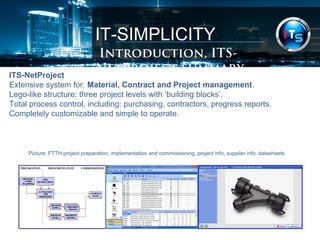
ITS-NetProject 
Extensive system for: Material, Contract and Project management. 
Lego-like structure: three project levels with ‘building blocks’. 
Total process control, including: purchasing, contractors, progress reports. 
Completely customizable and simple to operate. 
Picture: FTTH project preparation, implementation and commissioning, project info, supplier info, datasheets
IT-SIMPLICITY 
Introduction 
ITS-NetProject is made for the complete project- and material management of turn-key 
telecommunication FTTX / FTTH projects. 
It is also used to get a quick estimate of cost and sales prices, material and labour 
quantities for concepts/drafts and detailed network designs. 
ITS-NetProject is the proven product of 30 years of experience in designing, 
engineering, installing, commissioning and maintaining communication networks. 
The software can have added value for anybody who has to deal with network 
engineering & planning, business case calculations and turn-key projects, large and 
small, urban and rural, business areas, FTTX networks and massive FTTH projects.
IT-SIMPLICITY 
Introduction 
ITS-NetProject: our software for FTTH / FTTX project planning & management. 
Turn-key projects. 
The FTTH / FTTX network planning software was originally made by and used 
internally by: NKF (Nokia / Philips) / Draka (Prysmian Group) and their project offices 
with local staff for the planning & building of turn-key OSP Telecom projects. 
Demands: simplified project structure, detailed reporting, clear project management. 
History. 
Since 1983 NKF has been developing pc software for project management. In 1985 
NKF started the creation of Toppics, a successful project management software, 
created specially for very large Out Side Plant turn-key projects. The development of 
NetProject started in 1995 as a replacement for Toppics. Since then the software has 
been renewed every year and has been used intensively in several countries in: 
Africa, Asia, Europe, The Middle-East & The Caribbean for Copper & Optical fibre 
networks. Since 2012 the software is commercially made available by ITS.
IT-SIMPLICITY 
General information 
ITS-NetProject is developed as a multi-user system with a central MySQL database. 
This project planning software offers, per project: 
Material management 
•Product management (Component & Supplier management) 
•Purchasing 
•Store management (store content, incoming and outgoing materials, etc.) 
Contract management 
•Contractor definition 
•Contract definition (scope, labour components, prices, etc.) 
Project management 
•Job / work-order definitions 
•Implementation scheduling with Job release & material issue notes 
•Progress & as-built reporting, billing & payments
IT-SIMPLICITY 
Project orientation 
ITS-NetProject is both project- and job (work-order) oriented. Each project is build up 
in its own project-file, separate from the other projects. 
There is one MASTER project which is accessible for modification by authorized 
personnel only. In the MASTER project all relevant data (for instance price-information) 
is centrally controlled and kept up-to-date. 
From within each individual project, information can be copied or updated from this 
MASTER project and any other project. 
Creating a new project can be done in several ways: 
•Start a new empty project 
•Start a new project with all definitions from another project 
Within a project you can: 
•Define & modify materials & installation units manually 
•Copy certain (or all) materials & installation units definitions from other projects 
•Update material & installation unit definitions with relevant data & prices
IT-SIMPLICITY 
Job orientation 
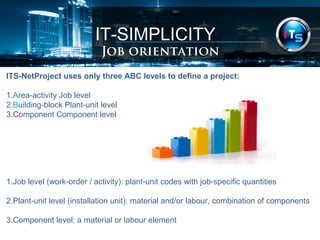
ITS-NetProject uses only three ABC levels to define a project: 
1.Area-activity Job level 
2.Building-block Plant-unit level 
3.Component Component level 
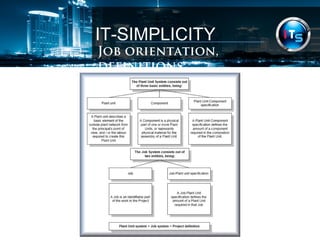
1.Job level (work-order / activity): plant-unit codes with job-specific quantities 
2.Plant-unit level (installation unit): material and/or labour, combination of components 
3.Component level: a material or labour element
IT-SIMPLICITY 
Job orientation, definitions
IT-SIMPLICITY 
Job orientation, design link 
This system is successfully implemented in numerous projects. Plant-units may be 
regarded as multiple component units, whether they are material components, labour 
components or a combination of both. The plant-units were introduced to simplify 
design, project management, purchasing and invoicing procedures. 
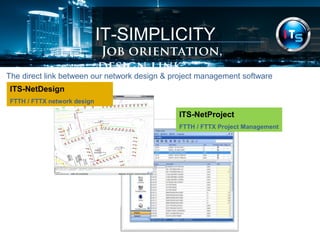
ITS-NetProject is typically used in combination with our network design tool ITS-NetDesign. 
With ITS-NetDesign jobs are created automatically, simply by making 
designs with our drawing FTTH / FTTX objects. To these drawing objects, plant-units 
and quantities are attached automatically. This drawing information can easily be 
imported / updated by ITS-NetProject, within seconds all network designs details, 
quantities and costs can be shown with a variety of standard reports.
IT-SIMPLICITY 
Job orientation, design link 
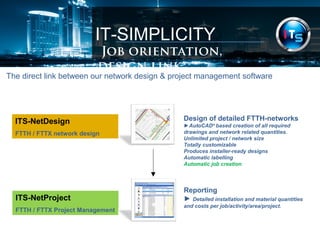
The direct link between our network design & project management software 
ITS-NetDesign 
FTTH / FTTX network design 
Design of detailed FTTH-networks 
►AutoCAD® based creation of all required 
drawings and network related quantities. 
Unlimited project / network size 
Totally customizable 
Produces installer-ready designs 
Automatic labelling 
Automatic job creation 
ITS-NetProject 
FTTH / FTTX Project Management 
Reporting 
► Detailed installation and material quantities 
and costs per job/activity/area/project.
IT-SIMPLICITY 
Job orientation, design link 
The direct link between our network design & project management software 
ITS-NetProject 
FTTH / FTTX Project Management 
ITS-NetDesign 
FTTH / FTTX network design
IT-SIMPLICITY 
Job orientation, design link 
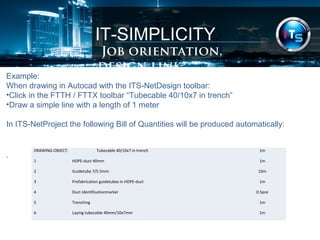
Example: 
When drawing in Autocad with the ITS-NetDesign toolbar: 
•Click in the FTTH / FTTX toolbar “Tubecable 40/10x7 in trench” 
•Draw a simple line with a length of 1 meter 
In ITS-NetProject the following Bill of Quantities will be produced automatically: 
. DRAWING-OBJECT: Tubecable 40/10x7 in trench 1m 
1 HDPE-duct 40mm 1m 
2 Guidetube 7/5.5mm 10m 
3 Prefabrication guidetubes in HDPE-duct 1m 
4 Duct identificationmarker 0.5pce 
5 Trenching 1m 
6 Laying tubecable 40mm/10x7mm 1m
IT-SIMPLICITY 
Material management 
In a project-environment, the material management is of the utmost importance. The 
control over the material locations and material flows has a very high organizational 
and financial impact on the project. 
In ITS-NetProject, therefore the following material management tools are available: 
•Product management 
•Purchasing 
•Store management
IT-SIMPLICITY 
Material management 
Product management 
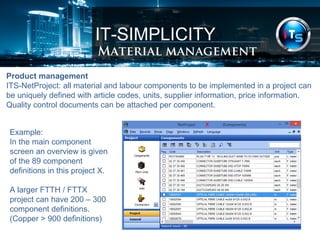
ITS-NetProject: all material and labour components to be implemented in a project can 
be uniquely defined with article codes, units, supplier information, price information. 
Quality control documents can be attached per component. 
Example: 
In the main component 
screen an overview is given 
of the 89 component 
definitions in this project X. 
A larger FTTH / FTTX 
project can have 200 – 300 
component definitions. 
(Copper > 900 definitions)
IT-SIMPLICITY 
Project management 
Project management 
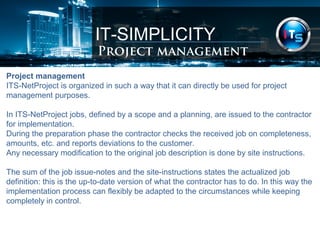
ITS-NetProject is organized in such a way that it can directly be used for project 
management purposes. 
In ITS-NetProject jobs, defined by a scope and a planning, are issued to the contractor 
for implementation. 
During the preparation phase the contractor checks the received job on completeness, 
amounts, etc. and reports deviations to the customer. 
Any necessary modification to the original job description is done by site instructions. 
The sum of the job issue-notes and the site-instructions states the actualized job 
definition: this is the up-to-date version of what the contractor has to do. In this way the 
implementation process can flexibly be adapted to the circumstances while keeping 
completely in control.
IT-SIMPLICITY 
Project management 
Project management 
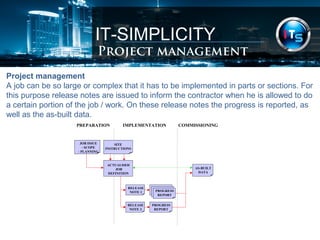
A job can be so large or complex that it has to be implemented in parts or sections. For 
this purpose release notes are issued to inform the contractor when he is allowed to do 
a certain portion of the job / work. On these release notes the progress is reported, as 
well as the as-built data. 
IMPLEMENTATION PREPARATION COMMISSIONING 
SITE 
INSTRUCTIONS 
ACTUALISED 
JOB 
DEFINITION 
JOB ISSUE 
- SCOPE 
- PLANNING 
RELEASE 
NOTE 1 
RELEASE 
NOTE 2 
PROGRESS 
REPORT 
PROGRESS 
REPORT 
AS-BUILT 
DATA
IT-SIMPLICITY 
Project management 
Project management 
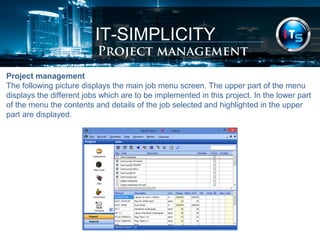
The following picture displays the main job menu screen. The upper part of the menu 
displays the different jobs which are to be implemented in this project. In the lower part 
of the menu the contents and details of the job selected and highlighted in the upper 
part are displayed.
IT-SIMPLICITY 
Project management 
Project management 
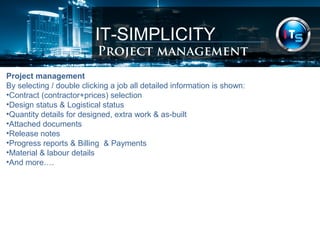
By selecting / double clicking a job all detailed information is shown: 
•Contract (contractor+prices) selection 
•Design status & Logistical status 
•Quantity details for designed, extra work & as-built 
•Attached documents 
•Release notes 
•Progress reports & Billing & Payments 
•Material & labour details 
•And more….
IT-SIMPLICITY 
Reporting 
Reporting 
ITS-NetProject contains a flexible report generator. 
On all levels (jobs, plant-units, components) or items like contractors or suppliers a 
specific report can be generated.. 
There are already more than 80 standard reports, they can be: 
Modified, pre-viewed, printed, exported (pdf, Word, Excel, html, data) 
The lay-out of all reports can be adapted to the project specific wishes 
Some examples: 
•“Bill of Materials” (BOM) per job(s)/area/project 
•“Bill of Quantities” (BOQ) per job(s)/area/project 
•“Bill of Quantities – prices” (BOQ) per job(s)/area/project
IT-SIMPLICITY 
FTTH / FTTX Software Suite 
ITS-Software Suite™, summary: 
FTTH / FTTX ITS-Software Suite™ 
Is a proven software solution to Design, Build & Maintain FTTX networks. 
The ITS-Software Suite™ has designed, registered and installed several 
millions of connections. 
The ITS-Software Suite™: 
•Cost optimized automatic CAD design 
•Dedicated software for FTTH / FTTX Project-Management 
•Simple conversion from pre-registration to As-built network registration 
•Offers full process control over your projects
IT-SIMPLICITY 
FTTH / FTTX Software Suite 
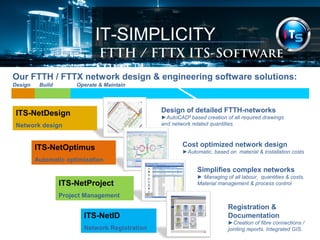
Our FTTH / FTTX network design & engineering software solutions: 
Design Build Operate & Maintain 
ITS-NetDesign 
Network design 
Design of detailed FTTH-networks 
►AutoCAD® based creation of all required drawings 
and network related quantities. 
Cost optimized network design 
►Automatic, based on material & installation costs ITS-NetOptimus 
Automatic optimization 
Simplifies complex networks 
► Managing of all labour, quantities & costs. 
Material management & process control 
Registration & 
Documentation 
►Creation of fibre connections / 
jointing reports. Integrated GIS. 
ITS-NetProject 
Project Management 
ITS-NetID 
Network Registration
IT-SIMPLICITY 
FTTH / FTTX Software Suite 
ITS-Software Suite™, network design: 
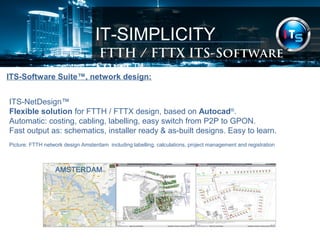
ITS-NetDesign™ 
Flexible solution for FTTH / FTTX design, based on Autocad®. 
Automatic: costing, cabling, labelling, easy switch from P2P to GPON. 
Fast output as: schematics, installer ready & as-built designs. Easy to learn. 
Picture: FTTH network design Amsterdam including labelling, calculations, project management and registration
IT-SIMPLICITY 
FTTH / FTTX Software Suite 
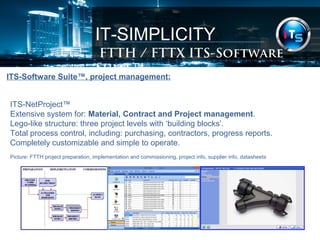
ITS-Software Suite™, project management: 
ITS-NetProject™ 
Extensive system for: Material, Contract and Project management. 
Lego-like structure: three project levels with ‘building blocks’. 
Total process control, including: purchasing, contractors, progress reports. 
Completely customizable and simple to operate. 
Picture: FTTH project preparation, implementation and commissioning, project info, supplier info, datasheets
IT-SIMPLICITY 
FTTH / FTTX Software Suite 
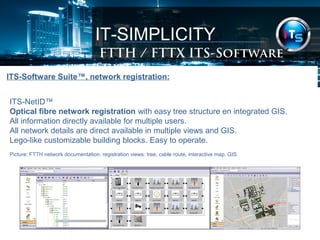
ITS-Software Suite™, network registration: 
ITS-NetID™ 
Optical fibre network registration with easy tree structure en integrated GIS. 
All information directly available for multiple users. 
All network details are direct available in multiple views and GIS. 
Lego-like customizable building blocks. Easy to operate. 
Picture: FTTH network documentation, registration views: tree, cable route, interactive map, GIS
IT-SIMPLICITY 
FTTH / FTTX Software Suite 
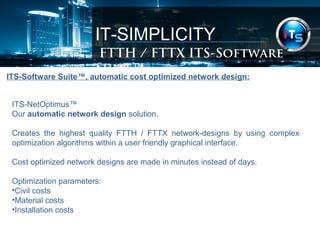
ITS-Software Suite™, automatic cost optimized network design: 
ITS-NetOptimus™ 
Our automatic network design solution. 
Creates the highest quality FTTH / FTTX network-designs by using complex 
optimization algorithms within a user friendly graphical interface. 
Cost optimized network designs are made in minutes instead of days. 
Optimization parameters: 
•Civil costs 
•Material costs 
•Installation costs
IT-SIMPLICITY 
FTTH / FTTX Software Suite 
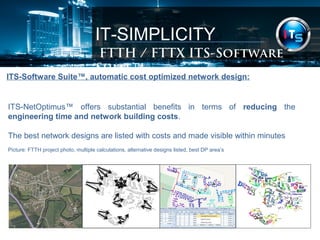
ITS-Software Suite™, automatic cost optimized network design: 
ITS-NetOptimus™ offers substantial benefits in terms of reducing the 
engineering time and network building costs. 
The best network designs are listed with costs and made visible within minutes 
Picture: FTTH project photo, multiple calculations, alternative designs listed, best DP area’s
IT-SIMPLICITY 
FTTH / FTTX Software Suite 
ITS-Software Suite™, automatic cost optimized network design: 
Network designs and costs are directly available per area. 
Multiple levels and network concepts. 
Substantial savings (approx): 
20 % less drop cable by improved grouping homes 
2 % less distribution cable by best DP positioning 
2% less trenching costs by improved routing 
100 times faster than manual / alternative engineering
IT-SIMPLICITY 
ITSimplicity Solutions BV 
info@itsimplicity.nl 
M +31-646430926 
T +31-348552981 
Skype: itsimplicity 
www.itsimplicity.nl 
www.ftthsoftware.com

FTTH planning software for FTTH / FTTX projects

  • 1.
    IT-SIMPLICITY SOLUTIONS BV . ITS-NetProject™ Our FTTH / FTTX network planning & project management software is an important member of our suite of FTTH solutions & planning tools. Project phases: Preparation/Planning Implementation/Execution Commissioning/Maintenance With: Material management Contract management Project management FTTH / FTTX turn-key project planning & management
  • 2.
    IT-SIMPLICITY FTTH /FTTX planning CONTENT • Introduction FTTH / FTTX network planning • General information • Project orientation • Job orientation • Material management • Project management • Reporting • The FTTH Software Suite
  • 3.
    IT-SIMPLICITY Introduction, summary ITS-NetProject Extensive system for: Material, Contract and Project management. Lego-like structure: three project levels with ‘building blocks’. Total process control, including: purchasing, contractors, progress reports. Completely customizable and simple to operate. Picture: FTTH project preparation, implementation and commissioning, project info, supplier info, datasheets
  • 4.
    IT-SIMPLICITY Introduction ITS-NetProjectis made for the complete project- and material management of turn-key telecommunication FTTX / FTTH projects. It is also used to get a quick estimate of cost and sales prices, material and labour quantities for concepts/drafts and detailed network designs. ITS-NetProject is the proven product of 30 years of experience in designing, engineering, installing, commissioning and maintaining communication networks. The software can have added value for anybody who has to deal with network engineering & planning, business case calculations and turn-key projects, large and small, urban and rural, business areas, FTTX networks and massive FTTH projects.
  • 5.
    IT-SIMPLICITY Introduction ITS-NetProject:our software for FTTH / FTTX project planning & management. Turn-key projects. The FTTH / FTTX network planning software was originally made by and used internally by: NKF (Nokia / Philips) / Draka (Prysmian Group) and their project offices with local staff for the planning & building of turn-key OSP Telecom projects. Demands: simplified project structure, detailed reporting, clear project management. History. Since 1983 NKF has been developing pc software for project management. In 1985 NKF started the creation of Toppics, a successful project management software, created specially for very large Out Side Plant turn-key projects. The development of NetProject started in 1995 as a replacement for Toppics. Since then the software has been renewed every year and has been used intensively in several countries in: Africa, Asia, Europe, The Middle-East & The Caribbean for Copper & Optical fibre networks. Since 2012 the software is commercially made available by ITS.
  • 6.
    IT-SIMPLICITY General information ITS-NetProject is developed as a multi-user system with a central MySQL database. This project planning software offers, per project: Material management •Product management (Component & Supplier management) •Purchasing •Store management (store content, incoming and outgoing materials, etc.) Contract management •Contractor definition •Contract definition (scope, labour components, prices, etc.) Project management •Job / work-order definitions •Implementation scheduling with Job release & material issue notes •Progress & as-built reporting, billing & payments
  • 7.
    IT-SIMPLICITY Project orientation ITS-NetProject is both project- and job (work-order) oriented. Each project is build up in its own project-file, separate from the other projects. There is one MASTER project which is accessible for modification by authorized personnel only. In the MASTER project all relevant data (for instance price-information) is centrally controlled and kept up-to-date. From within each individual project, information can be copied or updated from this MASTER project and any other project. Creating a new project can be done in several ways: •Start a new empty project •Start a new project with all definitions from another project Within a project you can: •Define & modify materials & installation units manually •Copy certain (or all) materials & installation units definitions from other projects •Update material & installation unit definitions with relevant data & prices
  • 8.
    IT-SIMPLICITY Job orientation ITS-NetProject uses only three ABC levels to define a project: 1.Area-activity Job level 2.Building-block Plant-unit level 3.Component Component level 1.Job level (work-order / activity): plant-unit codes with job-specific quantities 2.Plant-unit level (installation unit): material and/or labour, combination of components 3.Component level: a material or labour element
  • 9.
  • 10.
    IT-SIMPLICITY Job orientation,design link This system is successfully implemented in numerous projects. Plant-units may be regarded as multiple component units, whether they are material components, labour components or a combination of both. The plant-units were introduced to simplify design, project management, purchasing and invoicing procedures. ITS-NetProject is typically used in combination with our network design tool ITS-NetDesign. With ITS-NetDesign jobs are created automatically, simply by making designs with our drawing FTTH / FTTX objects. To these drawing objects, plant-units and quantities are attached automatically. This drawing information can easily be imported / updated by ITS-NetProject, within seconds all network designs details, quantities and costs can be shown with a variety of standard reports.
  • 11.
    IT-SIMPLICITY Job orientation,design link The direct link between our network design & project management software ITS-NetDesign FTTH / FTTX network design Design of detailed FTTH-networks ►AutoCAD® based creation of all required drawings and network related quantities. Unlimited project / network size Totally customizable Produces installer-ready designs Automatic labelling Automatic job creation ITS-NetProject FTTH / FTTX Project Management Reporting ► Detailed installation and material quantities and costs per job/activity/area/project.
  • 12.
    IT-SIMPLICITY Job orientation,design link The direct link between our network design & project management software ITS-NetProject FTTH / FTTX Project Management ITS-NetDesign FTTH / FTTX network design
  • 13.
    IT-SIMPLICITY Job orientation,design link Example: When drawing in Autocad with the ITS-NetDesign toolbar: •Click in the FTTH / FTTX toolbar “Tubecable 40/10x7 in trench” •Draw a simple line with a length of 1 meter In ITS-NetProject the following Bill of Quantities will be produced automatically: . DRAWING-OBJECT: Tubecable 40/10x7 in trench 1m 1 HDPE-duct 40mm 1m 2 Guidetube 7/5.5mm 10m 3 Prefabrication guidetubes in HDPE-duct 1m 4 Duct identificationmarker 0.5pce 5 Trenching 1m 6 Laying tubecable 40mm/10x7mm 1m
  • 14.
    IT-SIMPLICITY Material management In a project-environment, the material management is of the utmost importance. The control over the material locations and material flows has a very high organizational and financial impact on the project. In ITS-NetProject, therefore the following material management tools are available: •Product management •Purchasing •Store management
  • 15.
    IT-SIMPLICITY Material management Product management ITS-NetProject: all material and labour components to be implemented in a project can be uniquely defined with article codes, units, supplier information, price information. Quality control documents can be attached per component. Example: In the main component screen an overview is given of the 89 component definitions in this project X. A larger FTTH / FTTX project can have 200 – 300 component definitions. (Copper > 900 definitions)
  • 16.
    IT-SIMPLICITY Project management Project management ITS-NetProject is organized in such a way that it can directly be used for project management purposes. In ITS-NetProject jobs, defined by a scope and a planning, are issued to the contractor for implementation. During the preparation phase the contractor checks the received job on completeness, amounts, etc. and reports deviations to the customer. Any necessary modification to the original job description is done by site instructions. The sum of the job issue-notes and the site-instructions states the actualized job definition: this is the up-to-date version of what the contractor has to do. In this way the implementation process can flexibly be adapted to the circumstances while keeping completely in control.
  • 17.
    IT-SIMPLICITY Project management Project management A job can be so large or complex that it has to be implemented in parts or sections. For this purpose release notes are issued to inform the contractor when he is allowed to do a certain portion of the job / work. On these release notes the progress is reported, as well as the as-built data. IMPLEMENTATION PREPARATION COMMISSIONING SITE INSTRUCTIONS ACTUALISED JOB DEFINITION JOB ISSUE - SCOPE - PLANNING RELEASE NOTE 1 RELEASE NOTE 2 PROGRESS REPORT PROGRESS REPORT AS-BUILT DATA
  • 18.
    IT-SIMPLICITY Project management Project management The following picture displays the main job menu screen. The upper part of the menu displays the different jobs which are to be implemented in this project. In the lower part of the menu the contents and details of the job selected and highlighted in the upper part are displayed.
  • 19.
    IT-SIMPLICITY Project management Project management By selecting / double clicking a job all detailed information is shown: •Contract (contractor+prices) selection •Design status & Logistical status •Quantity details for designed, extra work & as-built •Attached documents •Release notes •Progress reports & Billing & Payments •Material & labour details •And more….
  • 20.
    IT-SIMPLICITY Reporting Reporting ITS-NetProject contains a flexible report generator. On all levels (jobs, plant-units, components) or items like contractors or suppliers a specific report can be generated.. There are already more than 80 standard reports, they can be: Modified, pre-viewed, printed, exported (pdf, Word, Excel, html, data) The lay-out of all reports can be adapted to the project specific wishes Some examples: •“Bill of Materials” (BOM) per job(s)/area/project •“Bill of Quantities” (BOQ) per job(s)/area/project •“Bill of Quantities – prices” (BOQ) per job(s)/area/project
  • 21.
    IT-SIMPLICITY FTTH /FTTX Software Suite ITS-Software Suite™, summary: FTTH / FTTX ITS-Software Suite™ Is a proven software solution to Design, Build & Maintain FTTX networks. The ITS-Software Suite™ has designed, registered and installed several millions of connections. The ITS-Software Suite™: •Cost optimized automatic CAD design •Dedicated software for FTTH / FTTX Project-Management •Simple conversion from pre-registration to As-built network registration •Offers full process control over your projects
  • 22.
    IT-SIMPLICITY FTTH /FTTX Software Suite Our FTTH / FTTX network design & engineering software solutions: Design Build Operate & Maintain ITS-NetDesign Network design Design of detailed FTTH-networks ►AutoCAD® based creation of all required drawings and network related quantities. Cost optimized network design ►Automatic, based on material & installation costs ITS-NetOptimus Automatic optimization Simplifies complex networks ► Managing of all labour, quantities & costs. Material management & process control Registration & Documentation ►Creation of fibre connections / jointing reports. Integrated GIS. ITS-NetProject Project Management ITS-NetID Network Registration
  • 23.
    IT-SIMPLICITY FTTH /FTTX Software Suite ITS-Software Suite™, network design: ITS-NetDesign™ Flexible solution for FTTH / FTTX design, based on Autocad®. Automatic: costing, cabling, labelling, easy switch from P2P to GPON. Fast output as: schematics, installer ready & as-built designs. Easy to learn. Picture: FTTH network design Amsterdam including labelling, calculations, project management and registration
  • 24.
    IT-SIMPLICITY FTTH /FTTX Software Suite ITS-Software Suite™, project management: ITS-NetProject™ Extensive system for: Material, Contract and Project management. Lego-like structure: three project levels with ‘building blocks’. Total process control, including: purchasing, contractors, progress reports. Completely customizable and simple to operate. Picture: FTTH project preparation, implementation and commissioning, project info, supplier info, datasheets
  • 25.
    IT-SIMPLICITY FTTH /FTTX Software Suite ITS-Software Suite™, network registration: ITS-NetID™ Optical fibre network registration with easy tree structure en integrated GIS. All information directly available for multiple users. All network details are direct available in multiple views and GIS. Lego-like customizable building blocks. Easy to operate. Picture: FTTH network documentation, registration views: tree, cable route, interactive map, GIS
  • 26.
    IT-SIMPLICITY FTTH /FTTX Software Suite ITS-Software Suite™, automatic cost optimized network design: ITS-NetOptimus™ Our automatic network design solution. Creates the highest quality FTTH / FTTX network-designs by using complex optimization algorithms within a user friendly graphical interface. Cost optimized network designs are made in minutes instead of days. Optimization parameters: •Civil costs •Material costs •Installation costs
  • 27.
    IT-SIMPLICITY FTTH /FTTX Software Suite ITS-Software Suite™, automatic cost optimized network design: ITS-NetOptimus™ offers substantial benefits in terms of reducing the engineering time and network building costs. The best network designs are listed with costs and made visible within minutes Picture: FTTH project photo, multiple calculations, alternative designs listed, best DP area’s
  • 28.
    IT-SIMPLICITY FTTH /FTTX Software Suite ITS-Software Suite™, automatic cost optimized network design: Network designs and costs are directly available per area. Multiple levels and network concepts. Substantial savings (approx): 20 % less drop cable by improved grouping homes 2 % less distribution cable by best DP positioning 2% less trenching costs by improved routing 100 times faster than manual / alternative engineering
  • 29.
    IT-SIMPLICITY ITSimplicity SolutionsBV info@itsimplicity.nl M +31-646430926 T +31-348552981 Skype: itsimplicity www.itsimplicity.nl www.ftthsoftware.com