Tech Tool Thursday:
Quick and free visual tools
Presented by Amy Harris, Michelle Folkman, & Beth Filar Williams

October 31 2013
POLL

What do you think of when you hear
“visual” tools?

Please type thoughts in the chat box.
AGENDA

•
•
•
•
•
•

UDL overview
Infographics (easel.ly)
Jing
Pixlr
Color & fonts & UDL
Questions
UDL
Universal Design for Learning is an instructional design philosophy with a
focus on accessibility for students with learning differences.

UDL has 3 main principles:
● Multiple means of representation
● Multiple means of expression
● Multiple means of engagement
Multiple Means of Representation
● Provide information in a variety of formats
● Online tutorials give students the opportunity to replay as needed (but
please caption them!)
● Illustrations and graphical representations (like infographics) can better
illustrate concepts than text
Multiple Means of Engagement
● Providing students with the option to work in a variety of media
● Focus on composition, not just writing
● Does the media or the message matter more?
POLL
Have you created an infographic?
A. Yes using photoshop or from “scratch”
B. Yes using a free online tool
C. Not yet!
D. I don’t even know what an infographic is?!
Infographics
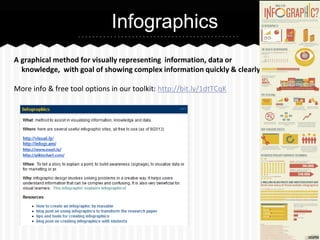
A graphical method for visually representing information, data or
knowledge, with goal of showing complex information quickly & clearly.
More info & free tool options in our toolkit: http://bit.ly/1dtTCqK
easelly

http://vimeo.com/37781587

•
•
•
•
•
•

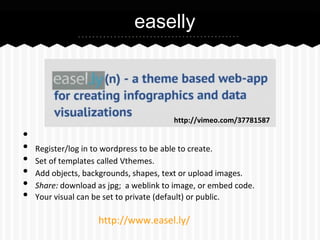
Register/log in to wordpress to be able to create.
Set of templates called Vthemes.
Add objects, backgrounds, shapes, text or upload images.
Share: download as jpg; a weblink to image, or embed code.
Your visual can be set to private (default) or public.

http://www.easel.ly/
easelly

Let’s demo!
Jing
•
•
•
•
•
•
•

FREE download - sits on your computer desktop
Must create account with Screencast.com
Use to capture what you see (a screenshot)
Allows basic markup on screenshot (text, arrows, highlight, colors)
Can also record video up to 5 min
Save on desktop OR on screencast.com (2 GB storage)
Share: email, weblink, embed, download

http://www.techsmith.com/jing-features.html
Jing

Let’s demo!
Pixlr
•
•
•
•
•

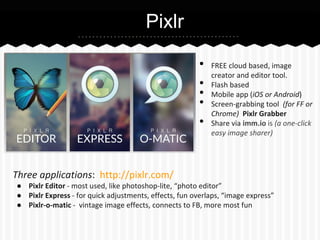
Three applications: http://pixlr.com/

FREE cloud based, image
creator and editor tool.
Flash based
Mobile app (iOS or Android)
Screen-grabbing tool (for FF or
Chrome) Pixlr Grabber
Share via imm.io is (a one-click
easy image sharer)

● Pixlr Editor - most used, like photoshop-lite, “photo editor”
● Pixlr Express - for quick adjustments, effects, fun overlaps, “image express”
● Pixlr-o-matic - vintage image effects, connects to FB, more most fun
Pixlr

Let’s demo!
Color and fonts
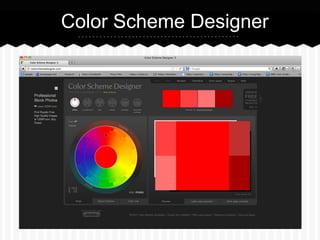
Color Scheme Designer http://colorschemedesigner.com/
create sets of color
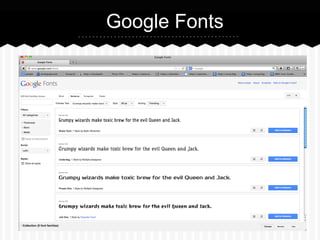
Google Fonts http://www.google.com/fonts
hundreds of open source fonts
Color Scheme Designer
Google Fonts
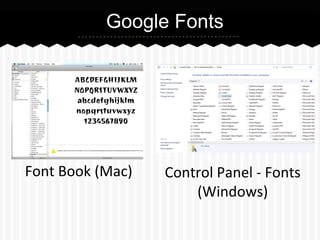
Google Fonts

Font Book (Mac)

Control Panel - Fonts
(Windows)
UDL & Font
Consider students with low vision, colorblindness, and other vision
difficulties when choosing colors for videos or presentations.
● White or light yellow text on a dark background is the most visible
● Also consider space between lines (should be 25-30% of the font size)
If lines are too close together, it is difficult to find the beginning of a new
line
For more information, visit
http://www.lighthouse.org/accessibility/design/accessible-printdesign/making-text-legible/
Questions?

By Tsahi Levent-Levi (CC by 2.0) http://www.flickr.com/photos/86979666@N00/7623744452/

Tech Tool Thursday: Free Visual Tools online workshop

  • 1.
    Tech Tool Thursday: Quickand free visual tools Presented by Amy Harris, Michelle Folkman, & Beth Filar Williams October 31 2013
  • 2.
    POLL What do youthink of when you hear “visual” tools? Please type thoughts in the chat box.
  • 3.
  • 4.
    UDL Universal Design forLearning is an instructional design philosophy with a focus on accessibility for students with learning differences. UDL has 3 main principles: ● Multiple means of representation ● Multiple means of expression ● Multiple means of engagement
  • 5.
    Multiple Means ofRepresentation ● Provide information in a variety of formats ● Online tutorials give students the opportunity to replay as needed (but please caption them!) ● Illustrations and graphical representations (like infographics) can better illustrate concepts than text
  • 6.
    Multiple Means ofEngagement ● Providing students with the option to work in a variety of media ● Focus on composition, not just writing ● Does the media or the message matter more?
  • 7.
    POLL Have you createdan infographic? A. Yes using photoshop or from “scratch” B. Yes using a free online tool C. Not yet! D. I don’t even know what an infographic is?!
  • 8.
    Infographics A graphical methodfor visually representing information, data or knowledge, with goal of showing complex information quickly & clearly. More info & free tool options in our toolkit: http://bit.ly/1dtTCqK
  • 9.
    easelly http://vimeo.com/37781587 • • • • • • Register/log in towordpress to be able to create. Set of templates called Vthemes. Add objects, backgrounds, shapes, text or upload images. Share: download as jpg; a weblink to image, or embed code. Your visual can be set to private (default) or public. http://www.easel.ly/
  • 10.
  • 11.
    Jing • • • • • • • FREE download -sits on your computer desktop Must create account with Screencast.com Use to capture what you see (a screenshot) Allows basic markup on screenshot (text, arrows, highlight, colors) Can also record video up to 5 min Save on desktop OR on screencast.com (2 GB storage) Share: email, weblink, embed, download http://www.techsmith.com/jing-features.html
  • 12.
  • 13.
    Pixlr • • • • • Three applications: http://pixlr.com/ FREEcloud based, image creator and editor tool. Flash based Mobile app (iOS or Android) Screen-grabbing tool (for FF or Chrome) Pixlr Grabber Share via imm.io is (a one-click easy image sharer) ● Pixlr Editor - most used, like photoshop-lite, “photo editor” ● Pixlr Express - for quick adjustments, effects, fun overlaps, “image express” ● Pixlr-o-matic - vintage image effects, connects to FB, more most fun
  • 14.
  • 15.
    Color and fonts ColorScheme Designer http://colorschemedesigner.com/ create sets of color Google Fonts http://www.google.com/fonts hundreds of open source fonts
  • 16.
  • 17.
  • 18.
    Google Fonts Font Book(Mac) Control Panel - Fonts (Windows)
  • 19.
    UDL & Font Considerstudents with low vision, colorblindness, and other vision difficulties when choosing colors for videos or presentations. ● White or light yellow text on a dark background is the most visible ● Also consider space between lines (should be 25-30% of the font size) If lines are too close together, it is difficult to find the beginning of a new line For more information, visit http://www.lighthouse.org/accessibility/design/accessible-printdesign/making-text-legible/
  • 20.
    Questions? By Tsahi Levent-Levi(CC by 2.0) http://www.flickr.com/photos/86979666@N00/7623744452/