FORMATTING
VARIABLES AND
OUTPUT
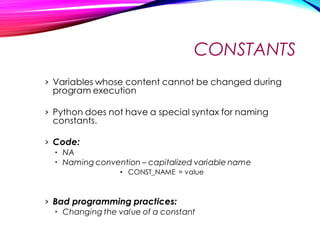
CONSTANTS
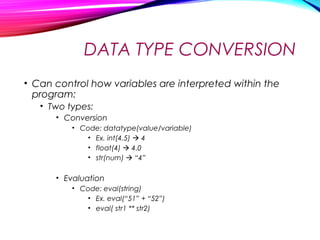
DATA TYPE CONVERSION
• Can control how variables are interpreted within the
program:
• Two types:
• Evaluation
• Code: eval(string)
• Ex. eval(“51” + “52”)
• eval( str1 ** str2)
• test = eval(input(“Enter a num”))
• Conversion
• Code: datatype(value/variable)
• Ex. int(4.5)  4
• float(4)  4.0
• str(num)  “4”
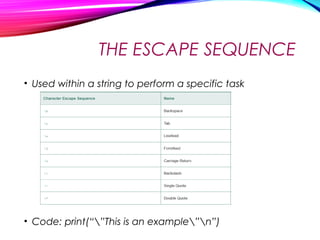
THE ESCAPE SEQUENCE
• Used within a string to perform a specific task
• Code: print(“”This is an example”n”)
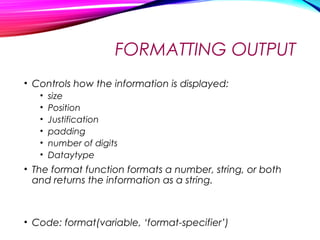
FORMATTING OUTPUT
• Controls how the information is displayed:
• size
• Position
• Justification
• padding
• number of digits
• Dataytype
• The format function formats a number, string, or both
and returns the information as a string.
• Code: format(variable, ‘format-specifier’)
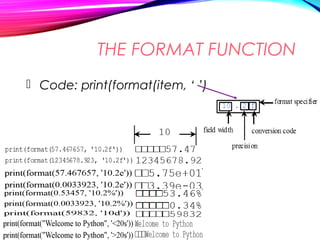
THE FORMAT FUNCTION
 Code: print(format(item, ‘ ’)
 
 
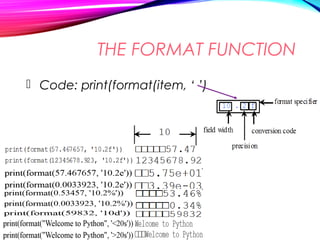
THE FORMAT FUNCTION
 Code: print(format(item, ‘ ’)


Formatting Output

  • 1.
  • 2.
  • 3.
    DATA TYPE CONVERSION •Can control how variables are interpreted within the program: • Two types: • Evaluation • Code: eval(string) • Ex. eval(“51” + “52”) • eval( str1 ** str2) • test = eval(input(“Enter a num”)) • Conversion • Code: datatype(value/variable) • Ex. int(4.5)  4 • float(4)  4.0 • str(num)  “4”
  • 4.
    THE ESCAPE SEQUENCE •Used within a string to perform a specific task • Code: print(“”This is an example”n”)
  • 5.
    FORMATTING OUTPUT • Controlshow the information is displayed: • size • Position • Justification • padding • number of digits • Dataytype • The format function formats a number, string, or both and returns the information as a string. • Code: format(variable, ‘format-specifier’)
  • 6.
    THE FORMAT FUNCTION Code: print(format(item, ‘ ’)    
  • 7.
    THE FORMAT FUNCTION Code: print(format(item, ‘ ’)