
Formal Emails
Practical Guide
Formal Emails: Table of content
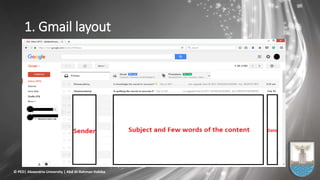
1. Gmail layout
2. Types of Emails
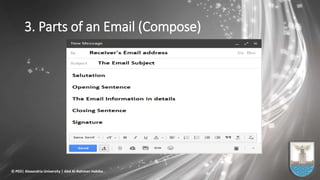
3. Parts of an Email
4. Confidentiality
5. The subject line
6. The Greeting (Salutation)
7. The Opening
8. The Body
9. The Closing
10. The Signature
11. Sample emails
12. References
© PED| Alexandria University | Abd Al-Rahman Habiba
1. Gmail layout
© PED| Alexandria University | Abd Al-Rahman Habiba
2. Four Types of Emails
1. No-Reply Email: Telling Information, Compliment,…etc.
2. Inquiry Emails: Advices or Answers for your questions.
3. Open-Ended Emails: Communication line is open.
4. Action Emails: Not a reply, But an Action is required.
© PED| Alexandria University | Abd Al-Rahman Habiba
3. Parts of an Email (Compose)
© PED| Alexandria University | Abd Al-Rahman Habiba
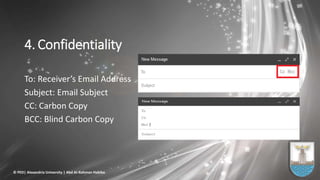
4. Confidentiality
To: Receiver’s Email Address
Subject: Email Subject
CC: Carbon Copy
BCC: Blind Carbon Copy
© PED| Alexandria University | Abd Al-Rahman Habiba
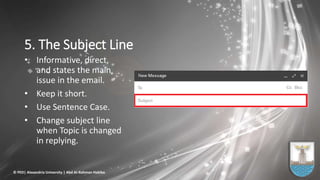
5. The Subject Line
• Informative, direct,
and states the main
issue in the email.
• Keep it short.
• Use Sentence Case.
• Change subject line
when Topic is changed
in replying.
© PED| Alexandria University | Abd Al-Rahman Habiba
The Golden Rule:
Tips Not Steps
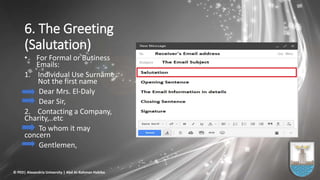
6. The Greeting
(Salutation)
• For Formal or Business
Emails:
1. Individual Use Surname,
Not the first name
Dear Mrs. El-Daly
Dear Sir,
2. Contacting a Company,
Charity,..etc
To whom it may
concern
Gentlemen,
© PED| Alexandria University | Abd Al-Rahman Habiba
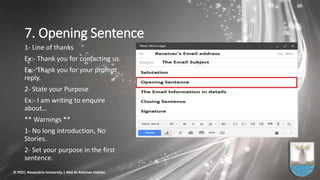
7. Opening Sentence
1- Line of thanks
Ex:- Thank you for contacting us.
Ex:- Thank you for your prompt
reply.
2- State your Purpose
Ex:- I am writing to enquire
about…
** Warnings **
1- No long introduction, No
Stories.
2- Set your purpose in the first
sentence.
© PED| Alexandria University | Abd Al-Rahman Habiba
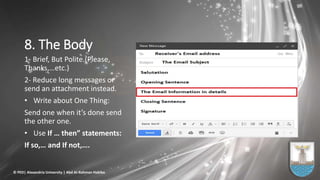
8. The Body
1- Brief, But Polite.(Please,
Thanks,…etc.)
2- Reduce long messages or
send an attachment instead.
• Write about One Thing:
Send one when it’s done send
the other one.
• Use If … then” statements:
If so,… and If not,….
© PED| Alexandria University | Abd Al-Rahman Habiba
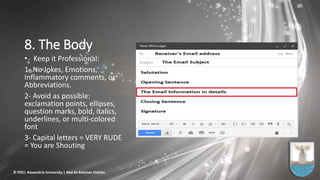
8. The Body
• Keep it Professional:
1- No Jokes, Emotions,
Inflammatory comments, or
Abbreviations.
2- Avoid as possible:
exclamation points, ellipses,
question marks, bold, italics,
underlines, or multi-colored
font
3- Capital letters = VERY RUDE
= You are Shouting
© PED| Alexandria University | Abd Al-Rahman Habiba
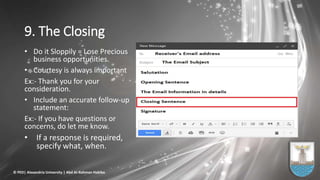
9. The Closing
• Do it Sloppily = Lose Precious
business opportunities.
• Courtesy is always important
Ex:- Thank you for your
consideration.
• Include an accurate follow-up
statement:
Ex:- If you have questions or
concerns, do let me know.
• If a response is required,
specify what, when.
© PED| Alexandria University | Abd Al-Rahman Habiba
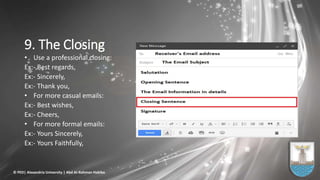
9. The Closing
• Use a professional closing:
Ex:- Best regards,
Ex:- Sincerely,
Ex:- Thank you,
• For more casual emails:
Ex:- Best wishes,
Ex:- Cheers,
• For more formal emails:
Ex:- Yours Sincerely,
Ex:- Yours Faithfully,
© PED| Alexandria University | Abd Al-Rahman Habiba
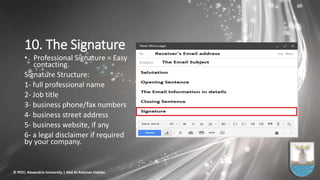
10. The Signature
• Professional Signature = Easy
contacting.
Signature Structure:
1- full professional name
2- Job title
3- business phone/fax numbers
4- business street address
5- business website, if any
6- a legal disclaimer if required
by your company.
© PED| Alexandria University | Abd Al-Rahman Habiba
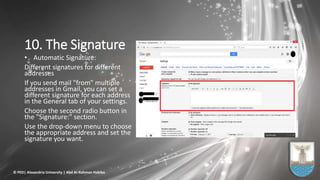
10. The Signature
• Automatic Signature:
Different signatures for different
addresses
If you send mail "from" multiple
addresses in Gmail, you can set a
different signature for each address
in the General tab of your settings.
Choose the second radio button in
the "Signature:" section.
Use the drop-down menu to choose
the appropriate address and set the
signature you want.
© PED| Alexandria University | Abd Al-Rahman Habiba
Revise, Check, And Review
• Before you hit the send button
1- Edit and proofread. You may think you're too busy to do the
small stuff, but your reader may think you're careless,
unqualified, or unprofessional.
2- Review and spell-check your email one more time to make
sure it's truly perfect.
© PED| Alexandria University | Abd Al-Rahman Habiba
Take Care
• Reply promptly to serious messages.
• If you need more than 24 hours to collect information or make a
decision, send a brief note to explain the delay.
• Some replies are delayed by electronic transmission. Explain the
delay.
• Check emails often.
© PED| Alexandria University | Abd Al-Rahman Habiba
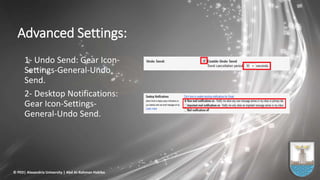
Advanced Settings:
1- Undo Send: Gear Icon-
Settings-General-Undo
Send.
2- Desktop Notifications:
Gear Icon-Settings-
General-Undo Send.
© PED| Alexandria University | Abd Al-Rahman Habiba
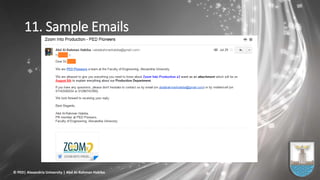
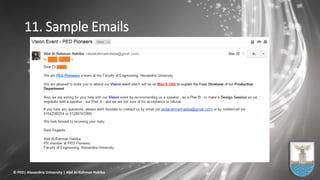
11. Sample Emails
© PED| Alexandria University | Abd Al-Rahman Habiba
11. Sample Emails
© PED| Alexandria University | Abd Al-Rahman Habiba
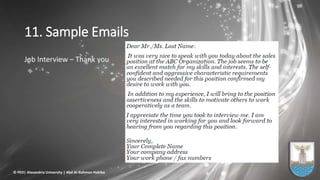
11. Sample Emails
Job Interview – Thank you
© PED| Alexandria University | Abd Al-Rahman Habiba
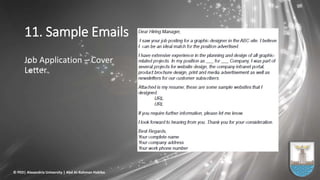
11. Sample Emails
Job Application – Cover
Letter
© PED| Alexandria University | Abd Al-Rahman Habiba
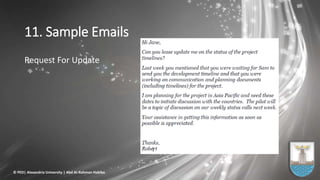
11. Sample Emails
Request For Update
© PED| Alexandria University | Abd Al-Rahman Habiba
12. References
• Compiled by Jaime Cabrera for the scholars of Albukhary International University
• Basic Explanations http:www.englishtown.com/community/channels/article.aspx?articleName=184-email
or www.ehow.com/how_4995393_end-email-professionally.html
• Good Explanations http:grammar.about.com/od/developingessays/a/profemails.htm;
home.comcast.net/~leparcell/email.html
• Practical Explanations http:www.lifehack.org/articles/communication/do-your-emails-suck-how-to-write-
emails-that-get-results.html
• Excellent Explanations (Detailed) http:thinksimplenow.com/productivity/15-tips-for-writing-effective-
email/
• Excellent Explanations (With Examples) http:jerz.setonhill.edu/writing/e-text/email/
• Concise Explanations 1 http:www.ehow.com/how_4679819_write-professional-email.html
• Concise Explanations 2 http:www.ehow.com/how_2159648_write-professional-emails.html
• Practical Explanations http:rarepattern.com/nodes/2008/01/email-etiquette-best-practices-things-avoid
• Not Required But Helpful http:www.techrepublic.com/article/10-e-mail-best-practices-to-share-with-your-
users/6161848
© PED| Alexandria University | Abd Al-Rahman Habiba
12. References
• 8 E-mail Mistakes that Make You Look Bad http:www.lifehack.org/articles/lifehack/8-e-mail-mistakes-that-
make-you-look-bad.html
• How to Know If Your Email Has Been Read http:www.ehow.com/how_5775094_email-read.html
• Why Emails Should be Short Instead of Nice http:gigaom.com/collaboration/why-emails-should-be-short-
instead-of-nice/
• 7 Rules for Communicating Clearly and Concisely http:gigaom.com/collaboration/7-rules-for-
communicating-clearly-and-concisely-in-email/
• Five Things I Learned From 20 Years of Email http:gigaom.com/2012/08/19/five-things-ive-learned-from-
20-years-of-email/
• Two More Killer Tips for Effective E-mail http:blogs.bnet.com/businesstips/?p=4686
• Don't Annoy Your Boss and Co-Workers with E-mail Gaffes http:blogs.bnet.com/businesstips/?p=4262
• Write More Efficient E-mails to Save Time and Frustration http:blogs.bnet.com/businesstips/?p=3204
• Don't Bring Down Your Mail Server with Reply All http:blogs.bnet.com/businesstips/?p=4283
• If you want to know more: CC, BCC, virus, spam, and phishing http:www.techrepublic.com/article/10-e-
mail-best-practices-to-share-with-your-users/6161848
© PED| Alexandria University | Abd Al-Rahman Habiba
Any Questions ?
© PED| Alexandria University | Abd Al-Rahman Habiba
The End
Thank You
Abd Al-Rahman Habiba
© PED| Alexandria University | Abd Al-Rahman Habiba

Formal Professional Emails - By Abd Al-Rahman Habiba

  • 1.
  • 2.
    Formal Emails: Tableof content 1. Gmail layout 2. Types of Emails 3. Parts of an Email 4. Confidentiality 5. The subject line 6. The Greeting (Salutation) 7. The Opening 8. The Body 9. The Closing 10. The Signature 11. Sample emails 12. References © PED| Alexandria University | Abd Al-Rahman Habiba
  • 3.
    1. Gmail layout ©PED| Alexandria University | Abd Al-Rahman Habiba
  • 4.
    2. Four Typesof Emails 1. No-Reply Email: Telling Information, Compliment,…etc. 2. Inquiry Emails: Advices or Answers for your questions. 3. Open-Ended Emails: Communication line is open. 4. Action Emails: Not a reply, But an Action is required. © PED| Alexandria University | Abd Al-Rahman Habiba
  • 5.
    3. Parts ofan Email (Compose) © PED| Alexandria University | Abd Al-Rahman Habiba
  • 6.
    4. Confidentiality To: Receiver’sEmail Address Subject: Email Subject CC: Carbon Copy BCC: Blind Carbon Copy © PED| Alexandria University | Abd Al-Rahman Habiba
  • 7.
    5. The SubjectLine • Informative, direct, and states the main issue in the email. • Keep it short. • Use Sentence Case. • Change subject line when Topic is changed in replying. © PED| Alexandria University | Abd Al-Rahman Habiba
  • 8.
  • 9.
    6. The Greeting (Salutation) •For Formal or Business Emails: 1. Individual Use Surname, Not the first name Dear Mrs. El-Daly Dear Sir, 2. Contacting a Company, Charity,..etc To whom it may concern Gentlemen, © PED| Alexandria University | Abd Al-Rahman Habiba
  • 10.
    7. Opening Sentence 1-Line of thanks Ex:- Thank you for contacting us. Ex:- Thank you for your prompt reply. 2- State your Purpose Ex:- I am writing to enquire about… ** Warnings ** 1- No long introduction, No Stories. 2- Set your purpose in the first sentence. © PED| Alexandria University | Abd Al-Rahman Habiba
  • 11.
    8. The Body 1-Brief, But Polite.(Please, Thanks,…etc.) 2- Reduce long messages or send an attachment instead. • Write about One Thing: Send one when it’s done send the other one. • Use If … then” statements: If so,… and If not,…. © PED| Alexandria University | Abd Al-Rahman Habiba
  • 12.
    8. The Body •Keep it Professional: 1- No Jokes, Emotions, Inflammatory comments, or Abbreviations. 2- Avoid as possible: exclamation points, ellipses, question marks, bold, italics, underlines, or multi-colored font 3- Capital letters = VERY RUDE = You are Shouting © PED| Alexandria University | Abd Al-Rahman Habiba
  • 13.
    9. The Closing •Do it Sloppily = Lose Precious business opportunities. • Courtesy is always important Ex:- Thank you for your consideration. • Include an accurate follow-up statement: Ex:- If you have questions or concerns, do let me know. • If a response is required, specify what, when. © PED| Alexandria University | Abd Al-Rahman Habiba
  • 14.
    9. The Closing •Use a professional closing: Ex:- Best regards, Ex:- Sincerely, Ex:- Thank you, • For more casual emails: Ex:- Best wishes, Ex:- Cheers, • For more formal emails: Ex:- Yours Sincerely, Ex:- Yours Faithfully, © PED| Alexandria University | Abd Al-Rahman Habiba
  • 15.
    10. The Signature •Professional Signature = Easy contacting. Signature Structure: 1- full professional name 2- Job title 3- business phone/fax numbers 4- business street address 5- business website, if any 6- a legal disclaimer if required by your company. © PED| Alexandria University | Abd Al-Rahman Habiba
  • 16.
    10. The Signature •Automatic Signature: Different signatures for different addresses If you send mail "from" multiple addresses in Gmail, you can set a different signature for each address in the General tab of your settings. Choose the second radio button in the "Signature:" section. Use the drop-down menu to choose the appropriate address and set the signature you want. © PED| Alexandria University | Abd Al-Rahman Habiba
  • 17.
    Revise, Check, AndReview • Before you hit the send button 1- Edit and proofread. You may think you're too busy to do the small stuff, but your reader may think you're careless, unqualified, or unprofessional. 2- Review and spell-check your email one more time to make sure it's truly perfect. © PED| Alexandria University | Abd Al-Rahman Habiba
  • 18.
    Take Care • Replypromptly to serious messages. • If you need more than 24 hours to collect information or make a decision, send a brief note to explain the delay. • Some replies are delayed by electronic transmission. Explain the delay. • Check emails often. © PED| Alexandria University | Abd Al-Rahman Habiba
  • 19.
    Advanced Settings: 1- UndoSend: Gear Icon- Settings-General-Undo Send. 2- Desktop Notifications: Gear Icon-Settings- General-Undo Send. © PED| Alexandria University | Abd Al-Rahman Habiba
  • 20.
    11. Sample Emails ©PED| Alexandria University | Abd Al-Rahman Habiba
  • 21.
    © PED| AlexandriaUniversity | Abd Al-Rahman Habiba
  • 22.
    11. Sample Emails ©PED| Alexandria University | Abd Al-Rahman Habiba
  • 23.
    11. Sample Emails JobInterview – Thank you © PED| Alexandria University | Abd Al-Rahman Habiba
  • 24.
    11. Sample Emails JobApplication – Cover Letter © PED| Alexandria University | Abd Al-Rahman Habiba
  • 25.
    11. Sample Emails RequestFor Update © PED| Alexandria University | Abd Al-Rahman Habiba
  • 26.
    12. References • Compiledby Jaime Cabrera for the scholars of Albukhary International University • Basic Explanations http:www.englishtown.com/community/channels/article.aspx?articleName=184-email or www.ehow.com/how_4995393_end-email-professionally.html • Good Explanations http:grammar.about.com/od/developingessays/a/profemails.htm; home.comcast.net/~leparcell/email.html • Practical Explanations http:www.lifehack.org/articles/communication/do-your-emails-suck-how-to-write- emails-that-get-results.html • Excellent Explanations (Detailed) http:thinksimplenow.com/productivity/15-tips-for-writing-effective- email/ • Excellent Explanations (With Examples) http:jerz.setonhill.edu/writing/e-text/email/ • Concise Explanations 1 http:www.ehow.com/how_4679819_write-professional-email.html • Concise Explanations 2 http:www.ehow.com/how_2159648_write-professional-emails.html • Practical Explanations http:rarepattern.com/nodes/2008/01/email-etiquette-best-practices-things-avoid • Not Required But Helpful http:www.techrepublic.com/article/10-e-mail-best-practices-to-share-with-your- users/6161848 © PED| Alexandria University | Abd Al-Rahman Habiba
  • 27.
    12. References • 8E-mail Mistakes that Make You Look Bad http:www.lifehack.org/articles/lifehack/8-e-mail-mistakes-that- make-you-look-bad.html • How to Know If Your Email Has Been Read http:www.ehow.com/how_5775094_email-read.html • Why Emails Should be Short Instead of Nice http:gigaom.com/collaboration/why-emails-should-be-short- instead-of-nice/ • 7 Rules for Communicating Clearly and Concisely http:gigaom.com/collaboration/7-rules-for- communicating-clearly-and-concisely-in-email/ • Five Things I Learned From 20 Years of Email http:gigaom.com/2012/08/19/five-things-ive-learned-from- 20-years-of-email/ • Two More Killer Tips for Effective E-mail http:blogs.bnet.com/businesstips/?p=4686 • Don't Annoy Your Boss and Co-Workers with E-mail Gaffes http:blogs.bnet.com/businesstips/?p=4262 • Write More Efficient E-mails to Save Time and Frustration http:blogs.bnet.com/businesstips/?p=3204 • Don't Bring Down Your Mail Server with Reply All http:blogs.bnet.com/businesstips/?p=4283 • If you want to know more: CC, BCC, virus, spam, and phishing http:www.techrepublic.com/article/10-e- mail-best-practices-to-share-with-your-users/6161848 © PED| Alexandria University | Abd Al-Rahman Habiba
  • 28.
    Any Questions ? ©PED| Alexandria University | Abd Al-Rahman Habiba
  • 29.
    The End Thank You AbdAl-Rahman Habiba © PED| Alexandria University | Abd Al-Rahman Habiba