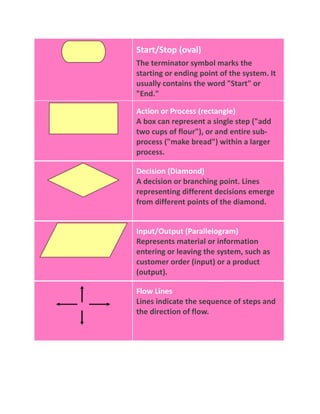
Start/Stop (oval)The terminator symbol marks the starting or ending point of the system. It usually contains the word \"
Start\"
 or \"
End.\"
 Action or Process (rectangle)A box can represent a single step (\"
add two cups of flour\"
), or and entire sub-process (\"
make bread\"
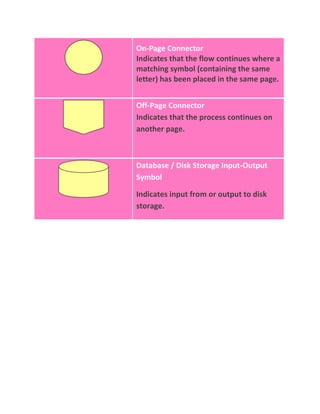
) within a larger process. Decision (Diamond)A decision or branching point. Lines representing different decisions emerge from different points of the diamond. Input/Output (Parallelogram)Represents material or information entering or leaving the system, such as customer order (input) or a product (output). Flow LinesLines indicate the sequence of steps and the direction of flow. On-Page ConnectorIndicates that the flow continues where a matching symbol (containing the same letter) has been placed in the same page.Off-Page ConnectorIndicates that the process continues on another page.Database / Disk Storage Input-Output SymbolIndicates input from or output to disk storage. <br />
Flowchart

Flowchart

  • 1.
    Start/Stop (oval)The terminatorsymbol marks the starting or ending point of the system. It usually contains the word \" Start\" or \" End.\" Action or Process (rectangle)A box can represent a single step (\" add two cups of flour\" ), or and entire sub-process (\" make bread\" ) within a larger process. Decision (Diamond)A decision or branching point. Lines representing different decisions emerge from different points of the diamond. Input/Output (Parallelogram)Represents material or information entering or leaving the system, such as customer order (input) or a product (output). Flow LinesLines indicate the sequence of steps and the direction of flow. On-Page ConnectorIndicates that the flow continues where a matching symbol (containing the same letter) has been placed in the same page.Off-Page ConnectorIndicates that the process continues on another page.Database / Disk Storage Input-Output SymbolIndicates input from or output to disk storage. <br />