Five Things Every Win32
Developer Should Know

Raymond Chen
(raymondc@microsoft.com)
FUN412
Windows User Experience
Microsoft Corporation
Five Topics
 Performance
   What you learned in school is wrong
   Playing friendly with others
 User interface issues
   The many faces of large fonts
   Parent and owner windows (review)
   Asynchronous input and synchronized input
Community Resources At PDC
 Other talks
   FUN319: Power-Aware Applications
   (Thu 5:15pm – note room change)
     An important “tax”
   FUN421: Garbage Collection Inside Out
   (Fri 1pm)
     Memory from the managed perspective
 Fundamentals Track lounge
   I’ll be there all day today
 Ask The Experts: System Internals
Talks You May Have Missed
(watch the DVD)
  FUN405: Programming with
  Concurrency, Part 2
    The dangers of trying too hard
  FUN307: Test Automation and
  Accessibility
Community Resources After PDC
 MSDN dev center:
 http://msdn.microsoft.com/windowsxp/
 Newsgroups:
 microsoft.public.win32.programmer.*
 Forums: forums.microsoft.com/msdn/
   New forum category: Windows Vista Development
 Essays on Win32:
 http://blogs.msdn.com/oldnewthing
Five Topics
 Performance
 What  you learned in school is
   wrong
   Playing friendly with others
 User interface issues
   The many faces of large fonts
   Parent and owner windows (review)
   Asynchronous input and synchronized input
Performance Bottlenecks
 CPU speed is no longer the limiting factor
 Latency is what kills you
 (May not be true but it’s “true enough”)
Typical Latencies
 WAN (1e9-2e9)
 Floppy, CD-ROM (1e9)
 LAN (1e7-1e8)
 Hard drive (1e7)

 Main memory (25-50)
 L2 cache (6-10)
 L1 cache (1-2)
 CPU (1)
Pointers Are Expensive
 Pointers by their nature point elsewhere
 Not in the same cache line
 Usually not even on the same page
 CPUs and OSs don’t predict pointers well
 It’s the page faults, stupid (especially at
 startup)
 The Common Language Runtime (CLR)
 knows this
O(n) Can Beat O(log n)
 How big is n anyway?
 A simple array maximizes value from each
 page fault (every byte is used)
 Also friendlier to cache lines and L2
 Linked lists, binary trees cost the most
 (only a few bytes used)
 A factor of 100 is hard to overcome
 The CLR Base Class Library (BCL) knows
 this
Five Topics
 Performance
   What you learned in school is wrong
 Playing     friendly with others
 User interface issues
   The many faces of large fonts
   Parent and owner windows (review)
   Asynchronous input and synchronized input
What If Two Programs Did This?
 You aren’t the only program running.
 We’re all in this together.
Polling
 Prevents CPU from sleeping, monitor from
 blanking, drive from spinning down, etc.
 Keeps pages present
 Effect is magnified on Terminal Servers
The Thread Pool
 Use WT_EXECUTELONGFUNCTION as
 necessary.
 Clean up behind yourself
   If you create windows, destroy them.
   If you initialize COM, uninitialize it.
 Don’t leave unfinished business
   ShellExecuteEx DDE (use
   SEE_MASK_FLAG_DDEWAIT)
   SendMessageCallback
Remote Desktop /
Terminal Services
 Your video card is very slow
 Disable animations
 (SPI_GETxxxANIMATION)
 Suppress unnecessary background
 operations
 Very similar to power management
Adapt to Hardware Capabilities
 Scale features up or down based on
 hardware
   Don’t need to cater to baseline machine
   Set defaults intelligently
 New for Windows Vista™: IWinsat
 The mechanism Windows uses to decide
 whether to enable visual effects
 To appear in Beta 2
 winsatfb@microsoft.com
Hardware Metrics
 Graphics capability
 Gaming capability
 System memory bandwidth
 Processor throughput
   Based on realistic computations
 Disk sequential read throughput

 Computed on first boot, on hardware
 change, and on demand (e.g. app setup)
 Calibrate against actual hardware
Five Topics
 Performance
   What you learned in school is wrong
   Playing friendly with others
 User interface issues
 The    many faces of large fonts
   Parent and owner windows (review)
   Asynchronous input and synchronized input
The Many Faces Of Large
Fonts
 Large font scheme
 High DPI
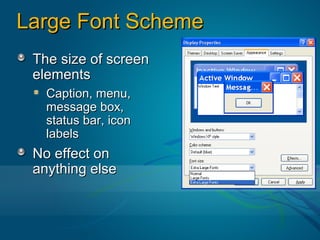
Large Font Scheme
 The size of screen
 elements
   Caption, menu,
   message box,
   status bar, icon
   labels
 No effect on
 anything else
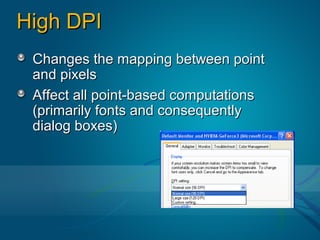
High DPI
 Changes the mapping between point
 and pixels
 Affect all point-based computations
 (primarily fonts and consequently
 dialog boxes)
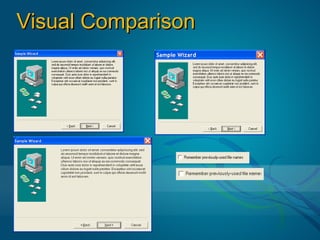
Visual Comparison
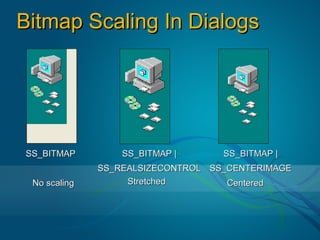
Bitmap Scaling In Dialogs


SS_BITMAP         SS_BITMAP |      SS_BITMAP |
              SS_REALSIZECONTROL SS_CENTERIMAGE
 No scaling        Stretched        Centered
Dealing With High DPI
 Font metrics scale non-linearly
   Visually inspect your dialogs
 Bitmaps need to be adjusted
   Author for common DPI (96, 120, 144, 192)
   Stretch or center static images if no perfect
   match available
   Stretching down is better than stretching up
 “High DPI is the new multimon”
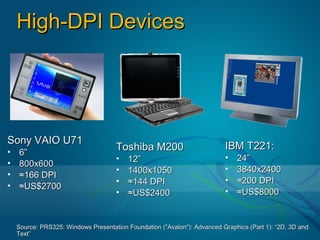
High-DPI Devices


Sony VAIO U71
                                     Toshiba M200                         IBM T221:
•   6”
                                     •   12”                              •   24”
•   800x600
                                     •   1400x1050                        •   3840x2400
•   ≈166 DPI
                                     •   ≈144 DPI                         •   ≈200 DPI
•   ≈US$2700
                                     •   ≈US$2400                         •   ≈US$8000


    Source: PRS325: Windows Presentation Foundation ("Avalon"): Advanced Graphics (Part 1): “2D, 3D and
    Text”
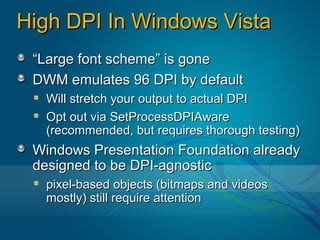
High DPI In Windows Vista
 “Large font scheme” is gone
 DWM emulates 96 DPI by default
  Will stretch your output to actual DPI
  Opt out via SetProcessDPIAware
  (recommended, but requires thorough testing)
 Windows Presentation Foundation already
 designed to be DPI-agnostic
  pixel-based objects (bitmaps and videos
  mostly) still require attention
Guidance for Windows Vista™
PRS319: Building Applications That
 Look Great in Windows Vista™
  In room 152, next!
  New common controls (including Task Dialog)
  Client glass
  The Aero philosophy
  Designing for the new “look”
Five Topics
 Performance
   What you learned in school is wrong
   Playing friendly with others
 User interface issues
   The many faces of large fonts
 Parent  and owner windows
   (review)
   Asynchronous input and synchronized input
Parents And Owners
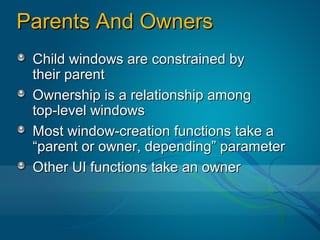
 Child windows are constrained by
 their parent
 Ownership is a relationship among
 top-level windows
 Most window-creation functions take a
 “parent or owner, depending” parameter
 Other UI functions take an owner
Parent/Owner Confusion
 GetParent() returns parent or owner
 GetAncestor() is clearer
 Documentation often casual about
 distinction between parent and owner
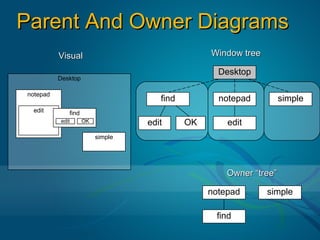
Parent And Owner Diagrams
          Visual                                 Window tree

                                                   Desktop
          Desktop

notepad
                                     find          notepad          simple
 edit        find
          edit      OK            edit      OK       edit
                         simple


                                                     Owner “tree”

                                                 notepad       simple

                                                  find
Reparenting And Orphans
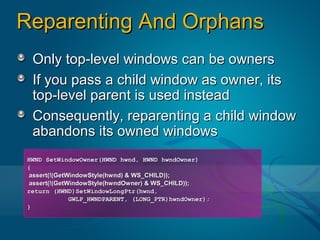
 Only top-level windows can be owners
 If you pass a child window as owner, its
 top-level parent is used instead
 Consequently, reparenting a child window
 abandons its owned windows
HWND SetWindowOwner(HWND hwnd, HWND hwndOwner)
{
assert(!(GetWindowStyle(hwnd) & WS_CHILD));
assert(!(GetWindowStyle(hwndOwner) & WS_CHILD));
return (HWND)SetWindowLongPtr(hwnd,
             GWLP_HWNDPARENT, (LONG_PTR)hwndOwner);
}
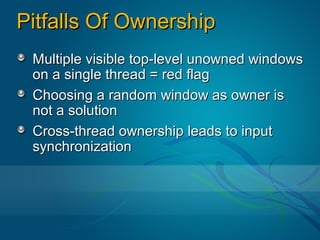
Pitfalls Of Ownership
 Multiple visible top-level unowned windows
 on a single thread = red flag
 Choosing a random window as owner is
 not a solution
 Cross-thread ownership leads to input
 synchronization
Five Topics
 Performance
   What you learned in school is wrong
   Playing friendly with others
 User interface issues
   The many faces of large fonts
   Parent and owner windows (review)
 Asynchronous   input and
   synchronized input
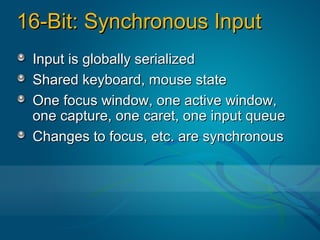
16-Bit: Synchronous Input
 Input is globally serialized
 Shared keyboard, mouse state
 One focus window, one active window,
 one capture, one caret, one input queue
 Changes to focus, etc. are synchronous
32-Bit: Asynchronous Input
  Input is per-thread
  Separate keyboard, mouse state
  Each thread gets its own focus window,
  active window, capture, caret
  Changes to focus are asynchronous with
  respect to windows from other threads
> as if it were the only thread in the system
AttachThreadInput
 Indicates that two threads want to return to
 the old 16-bit style of synchronized input
 Your fates are intertwined
Synchronous Focus
 A has focus, B calls SetFocus(hwndB)
 B must wait for A to release focus since
 input is now synchronous
 If A is hung, then B hangs too
Synchronous Input
 In the queue are two input messages, first
 a message for A, then a message for B.
 B calls GetMessage – sees message for A
 and says “I can’t process my input until A
 processes its input first”
 If A is hung, then B never processes input
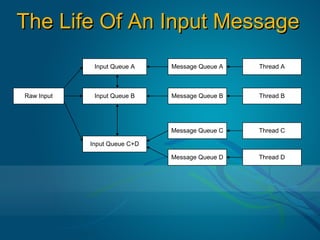
The Life Of An Input Message
             Input Queue A    Message Queue A   Thread A


Raw Input    Input Queue B    Message Queue B   Thread B


                              Message Queue C   Thread C

            Input Queue C+D

                              Message Queue D   Thread D
Behind Your Back
 Owner/owned windows are implicitly
 attached
 Parent/child windows are implicitly
 attached
 Journal hooks are the wildcard
Dealing With Input Synchronization

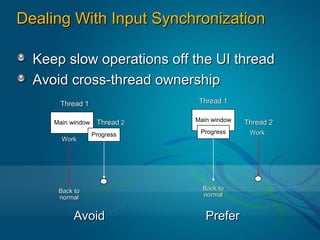
  Keep slow operations off the UI thread
  Avoid cross-thread ownership
      Thread 1                  Thread 1

     Main window    Thread 2   Main window   Thread 2
                   Progress     Progress      Work
       Work


      Back to                    Back to
      normal                     normal


           Avoid                  Prefer
Final Notes
 Evaluation forms
 Fundamentals Track Lounge
 Ask the Experts
 Q&A
© 2005 Microsoft Corporation. All rights reserved.
This presentation is for informational purposes only. Microsoft makes no warranties, express or implied, in this summary.

Five Things Every Win32 Developer Should Know

  • 1.
    Five Things EveryWin32 Developer Should Know Raymond Chen (raymondc@microsoft.com) FUN412 Windows User Experience Microsoft Corporation
  • 2.
    Five Topics Performance What you learned in school is wrong Playing friendly with others User interface issues The many faces of large fonts Parent and owner windows (review) Asynchronous input and synchronized input
  • 3.
    Community Resources AtPDC Other talks FUN319: Power-Aware Applications (Thu 5:15pm – note room change) An important “tax” FUN421: Garbage Collection Inside Out (Fri 1pm) Memory from the managed perspective Fundamentals Track lounge I’ll be there all day today Ask The Experts: System Internals
  • 4.
    Talks You MayHave Missed (watch the DVD) FUN405: Programming with Concurrency, Part 2 The dangers of trying too hard FUN307: Test Automation and Accessibility
  • 5.
    Community Resources AfterPDC MSDN dev center: http://msdn.microsoft.com/windowsxp/ Newsgroups: microsoft.public.win32.programmer.* Forums: forums.microsoft.com/msdn/ New forum category: Windows Vista Development Essays on Win32: http://blogs.msdn.com/oldnewthing
  • 6.
    Five Topics Performance What you learned in school is wrong Playing friendly with others User interface issues The many faces of large fonts Parent and owner windows (review) Asynchronous input and synchronized input
  • 7.
    Performance Bottlenecks CPUspeed is no longer the limiting factor Latency is what kills you (May not be true but it’s “true enough”)
  • 8.
    Typical Latencies WAN(1e9-2e9) Floppy, CD-ROM (1e9) LAN (1e7-1e8) Hard drive (1e7) Main memory (25-50) L2 cache (6-10) L1 cache (1-2) CPU (1)
  • 9.
    Pointers Are Expensive Pointers by their nature point elsewhere Not in the same cache line Usually not even on the same page CPUs and OSs don’t predict pointers well It’s the page faults, stupid (especially at startup) The Common Language Runtime (CLR) knows this
  • 10.
    O(n) Can BeatO(log n) How big is n anyway? A simple array maximizes value from each page fault (every byte is used) Also friendlier to cache lines and L2 Linked lists, binary trees cost the most (only a few bytes used) A factor of 100 is hard to overcome The CLR Base Class Library (BCL) knows this
  • 11.
    Five Topics Performance What you learned in school is wrong Playing friendly with others User interface issues The many faces of large fonts Parent and owner windows (review) Asynchronous input and synchronized input
  • 12.
    What If TwoPrograms Did This? You aren’t the only program running. We’re all in this together.
  • 13.
    Polling Prevents CPUfrom sleeping, monitor from blanking, drive from spinning down, etc. Keeps pages present Effect is magnified on Terminal Servers
  • 14.
    The Thread Pool Use WT_EXECUTELONGFUNCTION as necessary. Clean up behind yourself If you create windows, destroy them. If you initialize COM, uninitialize it. Don’t leave unfinished business ShellExecuteEx DDE (use SEE_MASK_FLAG_DDEWAIT) SendMessageCallback
  • 15.
    Remote Desktop / TerminalServices Your video card is very slow Disable animations (SPI_GETxxxANIMATION) Suppress unnecessary background operations Very similar to power management
  • 16.
    Adapt to HardwareCapabilities Scale features up or down based on hardware Don’t need to cater to baseline machine Set defaults intelligently New for Windows Vista™: IWinsat The mechanism Windows uses to decide whether to enable visual effects To appear in Beta 2 winsatfb@microsoft.com
  • 17.
    Hardware Metrics Graphicscapability Gaming capability System memory bandwidth Processor throughput Based on realistic computations Disk sequential read throughput Computed on first boot, on hardware change, and on demand (e.g. app setup) Calibrate against actual hardware
  • 18.
    Five Topics Performance What you learned in school is wrong Playing friendly with others User interface issues The many faces of large fonts Parent and owner windows (review) Asynchronous input and synchronized input
  • 19.
    The Many FacesOf Large Fonts Large font scheme High DPI
  • 20.
    Large Font Scheme The size of screen elements Caption, menu, message box, status bar, icon labels No effect on anything else
  • 21.
    High DPI Changesthe mapping between point and pixels Affect all point-based computations (primarily fonts and consequently dialog boxes)
  • 22.
  • 23.
    Bitmap Scaling InDialogs SS_BITMAP SS_BITMAP | SS_BITMAP | SS_REALSIZECONTROL SS_CENTERIMAGE No scaling Stretched Centered
  • 24.
    Dealing With HighDPI Font metrics scale non-linearly Visually inspect your dialogs Bitmaps need to be adjusted Author for common DPI (96, 120, 144, 192) Stretch or center static images if no perfect match available Stretching down is better than stretching up “High DPI is the new multimon”
  • 25.
    High-DPI Devices Sony VAIOU71 Toshiba M200 IBM T221: • 6” • 12” • 24” • 800x600 • 1400x1050 • 3840x2400 • ≈166 DPI • ≈144 DPI • ≈200 DPI • ≈US$2700 • ≈US$2400 • ≈US$8000 Source: PRS325: Windows Presentation Foundation ("Avalon"): Advanced Graphics (Part 1): “2D, 3D and Text”
  • 26.
    High DPI InWindows Vista “Large font scheme” is gone DWM emulates 96 DPI by default Will stretch your output to actual DPI Opt out via SetProcessDPIAware (recommended, but requires thorough testing) Windows Presentation Foundation already designed to be DPI-agnostic pixel-based objects (bitmaps and videos mostly) still require attention
  • 27.
    Guidance for WindowsVista™ PRS319: Building Applications That Look Great in Windows Vista™ In room 152, next! New common controls (including Task Dialog) Client glass The Aero philosophy Designing for the new “look”
  • 28.
    Five Topics Performance What you learned in school is wrong Playing friendly with others User interface issues The many faces of large fonts Parent and owner windows (review) Asynchronous input and synchronized input
  • 29.
    Parents And Owners Child windows are constrained by their parent Ownership is a relationship among top-level windows Most window-creation functions take a “parent or owner, depending” parameter Other UI functions take an owner
  • 30.
    Parent/Owner Confusion GetParent()returns parent or owner GetAncestor() is clearer Documentation often casual about distinction between parent and owner
  • 31.
    Parent And OwnerDiagrams Visual Window tree Desktop Desktop notepad find notepad simple edit find edit OK edit OK edit simple Owner “tree” notepad simple find
  • 32.
    Reparenting And Orphans Only top-level windows can be owners If you pass a child window as owner, its top-level parent is used instead Consequently, reparenting a child window abandons its owned windows HWND SetWindowOwner(HWND hwnd, HWND hwndOwner) { assert(!(GetWindowStyle(hwnd) & WS_CHILD)); assert(!(GetWindowStyle(hwndOwner) & WS_CHILD)); return (HWND)SetWindowLongPtr(hwnd, GWLP_HWNDPARENT, (LONG_PTR)hwndOwner); }
  • 33.
    Pitfalls Of Ownership Multiple visible top-level unowned windows on a single thread = red flag Choosing a random window as owner is not a solution Cross-thread ownership leads to input synchronization
  • 34.
    Five Topics Performance What you learned in school is wrong Playing friendly with others User interface issues The many faces of large fonts Parent and owner windows (review) Asynchronous input and synchronized input
  • 35.
    16-Bit: Synchronous Input Input is globally serialized Shared keyboard, mouse state One focus window, one active window, one capture, one caret, one input queue Changes to focus, etc. are synchronous
  • 36.
    32-Bit: Asynchronous Input Input is per-thread Separate keyboard, mouse state Each thread gets its own focus window, active window, capture, caret Changes to focus are asynchronous with respect to windows from other threads > as if it were the only thread in the system
  • 37.
    AttachThreadInput Indicates thattwo threads want to return to the old 16-bit style of synchronized input Your fates are intertwined
  • 38.
    Synchronous Focus Ahas focus, B calls SetFocus(hwndB) B must wait for A to release focus since input is now synchronous If A is hung, then B hangs too
  • 39.
    Synchronous Input Inthe queue are two input messages, first a message for A, then a message for B. B calls GetMessage – sees message for A and says “I can’t process my input until A processes its input first” If A is hung, then B never processes input
  • 40.
    The Life OfAn Input Message Input Queue A Message Queue A Thread A Raw Input Input Queue B Message Queue B Thread B Message Queue C Thread C Input Queue C+D Message Queue D Thread D
  • 41.
    Behind Your Back Owner/owned windows are implicitly attached Parent/child windows are implicitly attached Journal hooks are the wildcard
  • 42.
    Dealing With InputSynchronization Keep slow operations off the UI thread Avoid cross-thread ownership Thread 1 Thread 1 Main window Thread 2 Main window Thread 2 Progress Progress Work Work Back to Back to normal normal Avoid Prefer
  • 43.
    Final Notes Evaluationforms Fundamentals Track Lounge Ask the Experts Q&A
  • 44.
    © 2005 MicrosoftCorporation. All rights reserved. This presentation is for informational purposes only. Microsoft makes no warranties, express or implied, in this summary.