Firefox OS
Lengyel Zsolt
zsolt.lengyel.it@gmail.com
Bringing the Open Web to
Mobile Devices OS
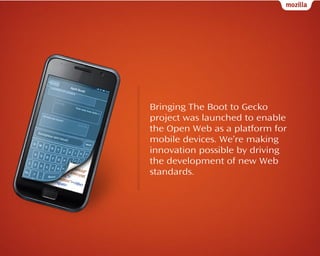
Bringing The Boot to Gecko
project was launched to enable
the Open Web as a platform for
mobile devices. We’re making
innovation possible by driving
the development of new Web
standards.
Operators and developers write apps
and services for one platform and then
rewrite them for others. Users who
want to buy phones, e-readers and
game consoles from different
manufacturers often need to repurchase apps for each device.
Opportunities for
Developers
Using HTML5 and the new Mozillaproposed standard APIs, developers
everywhere will be able to create
amazing experiences and apps.
Developers will no longer need to learn
and develop against platform-specific
native APIs.
Customization for OEMs & Operators
OEMs and operators will be able to
provide content and services across
their entire device portfolio, regardless
of OS. And they will be able to
customize user experiences, manage
app distribution and retain customer
attention, loyalty and billing
relationships.
Consumer Freedom
Consumers who use devices based on the Open
Web platform will be able to easily access and
download their own content regardless of which OS
they use.
New Web Standards
Firefox OS produces an implementation of
these new Web standards to free mobile
platforms from the encumbrances of the
rules and restrictions of existing proprietary
platforms.
Components
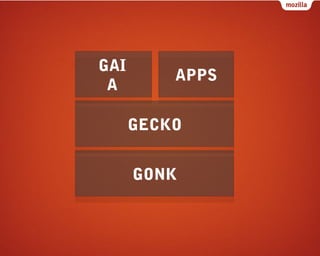
GAI
A

APPS
GECKO
GONK
GONK
Lower level operating system, consisting of a
Linux kernel and HAL
(Hardware Abstraction Layer).
Possibility to expose anything from the
hardware to Gecko.
GECKO
The application runtime.
The rendering engine in Firefox for HTML5,
CSS & JavaScript.
Implements a number of APIs.
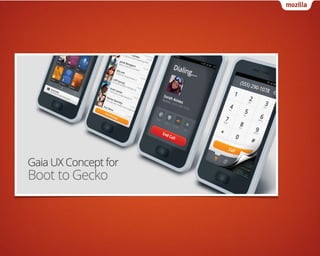
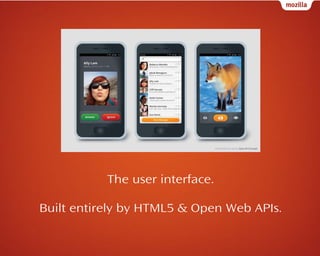
GAIA
The user interface.
Built entirely by HTML5 & Open Web APIs.
Web APIs
The Boot to Gecko project is based entirely
on open standards and the source code is
open and accessible to all.
Where open standards are missing, we're
working with standards bodies and other
vendors to create them.
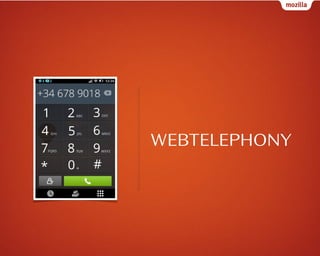
WEBTELEPHONY
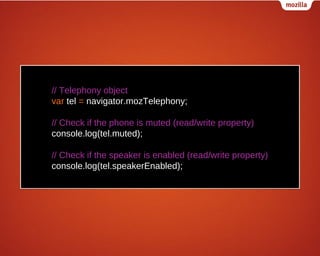
// Telephony object
var tel = navigator.mozTelephony;
// Check if the phone is muted (read/write property)
console.log(tel.muted);
// Check if the speaker is enabled (read/write property)
console.log(tel.speakerEnabled);
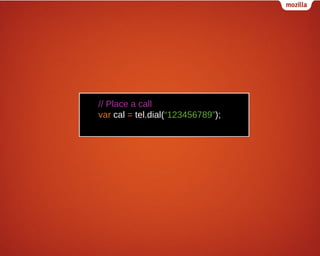
// Place a call
var cal = tel.dial(“123456789”);
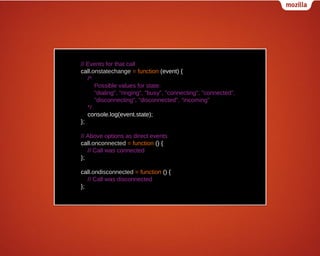
// Events for that call
call.onstatechange = function (event) {
/*
Possible values for state:
"dialing", "ringing", "busy", "connecting", "connected",
"disconnecting", "disconnected", "incoming"
*/
console.log(event.state);
};
// Above options as direct events
call.onconnected = function () {
// Call was connected
};
call.ondisconnected = function () {
// Call was disconnected
};
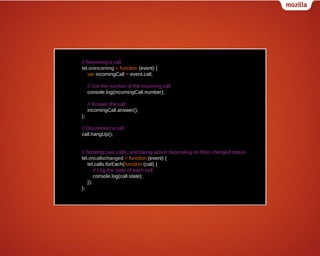
// Receiving a call
tel.onincoming = function (event) {
var incomingCall = event.call;
// Get the number of the incoming call
console.log(incomingCall.number);
// Answer the call
incomingCall.answer();
};
// Disconnect a call
call.hangUp();
// Iterating over calls, and taking action depending on their changed status
tel.oncallschanged = function (event) {
tel.calls.forEach(function (call) {
// Log the state of each call
console.log(call.state);
});
};
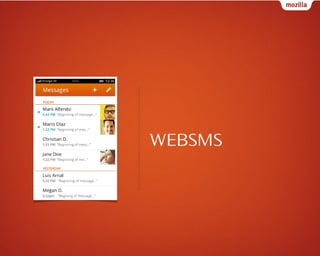
WEBSMS
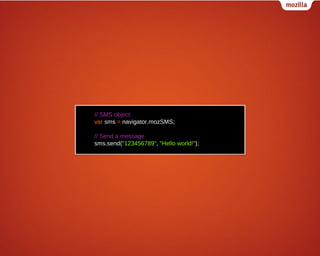
// SMS object
var sms = navigator.mozSMS;
// Send a message
sms.send("123456789", "Hello world!");
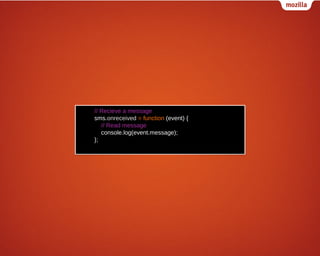
// Recieve a message
sms.onreceived = function (event) {
// Read message
console.log(event.message);
};
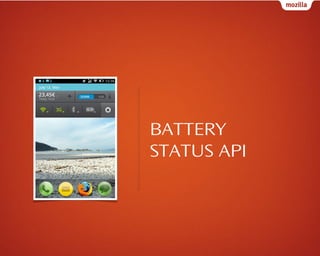
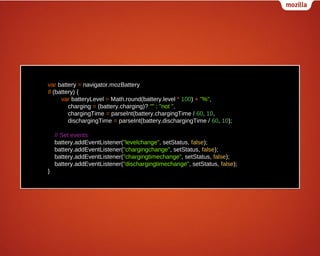
BATTERY
STATUS API
var battery = navigator.mozBattery
if (battery) {
var batteryLevel = Math.round(battery.level * 100) + "%",
charging = (battery.charging)? "" : "not ",
chargingTime = parseInt(battery.chargingTime / 60, 10,
dischargingTime = parseInt(battery.dischargingTime / 60, 10);
// Set events
battery.addEventListener("levelchange", setStatus, false);
battery.addEventListener("chargingchange", setStatus, false);
battery.addEventListener("chargingtimechange", setStatus, false);
battery.addEventListener("dischargingtimechange", setStatus, false);
}
VIBRATION API
// Vibrate for one second
navigator.mozVibrate(1000);
// Vibration pattern [vibrationTime, pause,…]
navigator.mozVibrate([200, 100, 200, 100]);
// Vibrate for 5 seconds
navigator.mozVibrate(5000);
// Turn off vibration
navigator.mozVibrate(0);
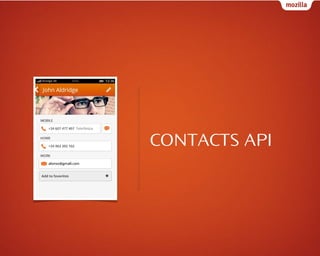
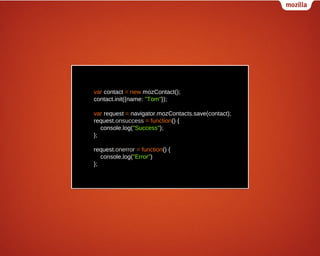
CONTACTS API
var contact = new mozContact();
contact.init({name: "Tom"});
var request = navigator.mozContacts.save(contact);
request.onsuccess = function() {
console.log("Success");
};
request.onerror = function() {
console.log("Error")
};
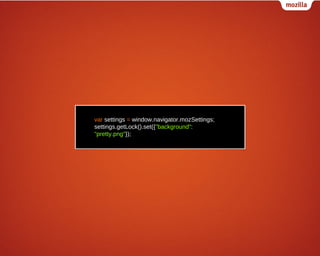
SETTINGS API
var settings = window.navigator.mozSettings;
settings.getLock().set({"background":
"pretty.png"});
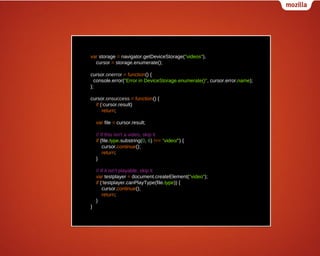
DEVICE
STORAGE API
var storage = navigator.getDeviceStorage("videos"),
cursor = storage.enumerate();
cursor.onerror = function() {
console.error("Error in DeviceStorage.enumerate()", cursor.error.name);
};
cursor.onsuccess = function() {
if (!cursor.result)
return;
var file = cursor.result;
// If this isn't a video, skip it
if (file.type.substring(0, 6) !== "video/") {
cursor.continue();
return;
}
// If it isn't playable, skip it
var testplayer = document.createElement("video");
if (!testplayer.canPlayType(file.type)) {
cursor.continue();
return;
}
}
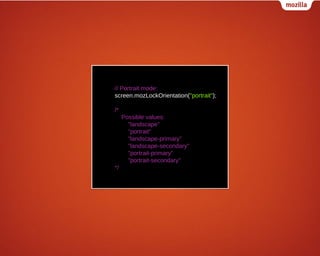
SCREEN
ORIENTATION
API
// Portrait mode:
screen.mozLockOrientation("portrait");
/*
Possible values:
"landscape"
"portrait"
"landscape-primary"
"landscape-secondary"
"portrait-primary"
"portrait-secondary"
*/
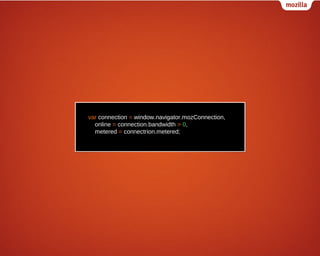
NETWORK
INFORMATION
API
var connection = window.navigator.mozConnection,
online = connection.bandwidth > 0,
metered = connectrion.metered;
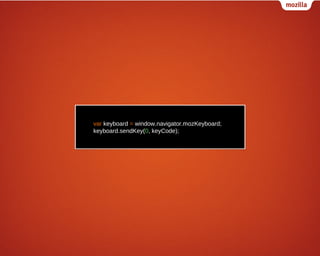
KEYBOARD/IME
API
var keyboard = window.navigator.mozKeyboard;
keyboard.sendKey(0, keyCode);
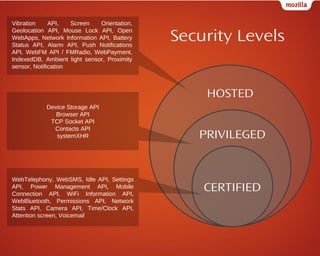
Web Apps from Mozilla
Vibration
API,
Screen
Orientation,
Geolocation API, Mouse Lock API, Open
WebApps, Network Information API, Battery
Status API, Alarm API, Push Notifications
API, WebFM API / FMRadio, WebPayment,
IndexedDB, Ambient light sensor, Proximity
sensor, Notification

Security Levels
HOSTED

Device Storage API
Browser API
TCP Socket API
Contacts API
systemXHR

WebTelephony, WebSMS, Idle API, Settings
API, Power Management API, Mobile
Connection API, WiFi Information API,
WebBluetooth, Permissions API, Network
Stats API, Camera API, Time/Clock API,
Attention screen, Voicemail

PRIVILEGED

CERTIFIED
Writing Apps, Mozilla Marketplace
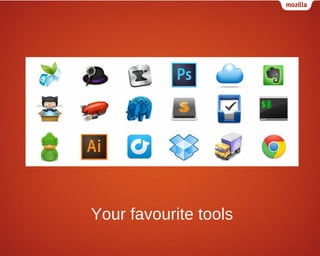
Web apps are apps built using standard Web technologies. They work
in any modern Web browser, and can be developed using your
favorite tools.
The Open Web apps project proposes some small additions to
existing sites to turn them into apps that run in a rich, fun, and
powerful computing environment.
These apps run on desktop browsers and mobile devices, and are
easier for a user to discover and launch than Web sites.
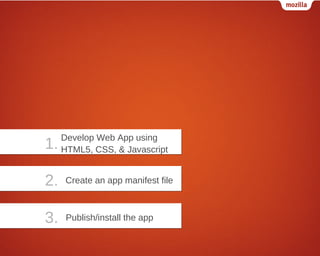
Steps to Take
1.

Develop Web App using
HTML5, CSS, & Javascript

2.

Create an app manifest file

3.

Publish/install the app
Develop Web App using
HTML5, CSS & JavaScript
Reuse any existing web site/app or develop from scratch with open
web standards.
Utilize HTML5 features such as localStorage, offline manifest,
IndexedDB and access Web APIs for more options.
Responsive web design for adapting to varying resolutions and
screen orientation.
Create an app manifest file
Create a file with a .webapp extension
{
"version": "1.0",
"name": "MozillaBall",
"description": "Exciting Open Web development action!",
"icons": {
"16": "/img/icon-16.png",
"48": "/img/icon-48.png",
"128": "/img/icon-128.png"
},
"developer": {
"name": "Mozilla Labs",
"url": "http://mozillalabs.com"
},
"installs_allowed_from": ["*"],
"appcache_path": "/cache.manifest",
"locales": {
"es": {
"description": "¡Acción abierta emocionante del desarrollo del Web!",
"developer": {
"url": "http://es.mozillalabs.com/"
}
},
"it": {
"description": "Azione aperta emozionante di sviluppo di fotoricettore!",
"developer": {
"url": "http://it.mozillalabs.com/"
}
}
},
"default_locale": "en"
}
MANIFEST CHECKER
Publish/install the app
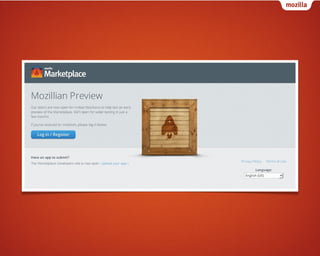
Mozilla Marketplace
Installing/hosting the app
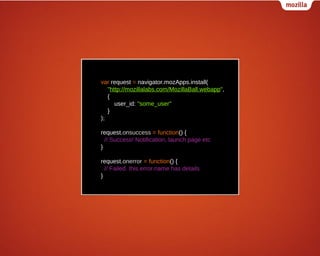
var request = navigator.mozApps.install(
"http://mozillalabs.com/MozillaBall.webapp",
{
user_id: "some_user"
}
);
request.onsuccess = function() {
// Success! Notification, launch page etc
}
request.onerror = function() {
// Failed. this.error.name has details
}
Development tools
Your favourite tools
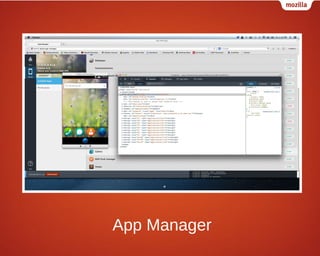
App Manager
Thank you for your attention!

Questions

Firefox os-introduction

  • 1.
  • 2.
    Bringing the OpenWeb to Mobile Devices OS
  • 3.
    Bringing The Bootto Gecko project was launched to enable the Open Web as a platform for mobile devices. We’re making innovation possible by driving the development of new Web standards.
  • 4.
    Operators and developerswrite apps and services for one platform and then rewrite them for others. Users who want to buy phones, e-readers and game consoles from different manufacturers often need to repurchase apps for each device.
  • 5.
  • 6.
    Using HTML5 andthe new Mozillaproposed standard APIs, developers everywhere will be able to create amazing experiences and apps. Developers will no longer need to learn and develop against platform-specific native APIs.
  • 7.
  • 8.
    OEMs and operatorswill be able to provide content and services across their entire device portfolio, regardless of OS. And they will be able to customize user experiences, manage app distribution and retain customer attention, loyalty and billing relationships.
  • 9.
  • 10.
    Consumers who usedevices based on the Open Web platform will be able to easily access and download their own content regardless of which OS they use.
  • 11.
  • 12.
    Firefox OS producesan implementation of these new Web standards to free mobile platforms from the encumbrances of the rules and restrictions of existing proprietary platforms.
  • 13.
  • 14.
  • 15.
  • 16.
    Lower level operatingsystem, consisting of a Linux kernel and HAL (Hardware Abstraction Layer). Possibility to expose anything from the hardware to Gecko.
  • 17.
  • 18.
    The application runtime. Therendering engine in Firefox for HTML5, CSS & JavaScript. Implements a number of APIs.
  • 19.
  • 21.
    The user interface. Builtentirely by HTML5 & Open Web APIs.
  • 22.
  • 23.
    The Boot toGecko project is based entirely on open standards and the source code is open and accessible to all. Where open standards are missing, we're working with standards bodies and other vendors to create them.
  • 24.
  • 25.
    // Telephony object vartel = navigator.mozTelephony; // Check if the phone is muted (read/write property) console.log(tel.muted); // Check if the speaker is enabled (read/write property) console.log(tel.speakerEnabled);
  • 26.
    // Place acall var cal = tel.dial(“123456789”);
  • 27.
    // Events forthat call call.onstatechange = function (event) { /* Possible values for state: "dialing", "ringing", "busy", "connecting", "connected", "disconnecting", "disconnected", "incoming" */ console.log(event.state); }; // Above options as direct events call.onconnected = function () { // Call was connected }; call.ondisconnected = function () { // Call was disconnected };
  • 28.
    // Receiving acall tel.onincoming = function (event) { var incomingCall = event.call; // Get the number of the incoming call console.log(incomingCall.number); // Answer the call incomingCall.answer(); }; // Disconnect a call call.hangUp(); // Iterating over calls, and taking action depending on their changed status tel.oncallschanged = function (event) { tel.calls.forEach(function (call) { // Log the state of each call console.log(call.state); }); };
  • 29.
  • 30.
    // SMS object varsms = navigator.mozSMS; // Send a message sms.send("123456789", "Hello world!");
  • 31.
    // Recieve amessage sms.onreceived = function (event) { // Read message console.log(event.message); };
  • 32.
  • 33.
    var battery =navigator.mozBattery if (battery) { var batteryLevel = Math.round(battery.level * 100) + "%", charging = (battery.charging)? "" : "not ", chargingTime = parseInt(battery.chargingTime / 60, 10, dischargingTime = parseInt(battery.dischargingTime / 60, 10); // Set events battery.addEventListener("levelchange", setStatus, false); battery.addEventListener("chargingchange", setStatus, false); battery.addEventListener("chargingtimechange", setStatus, false); battery.addEventListener("dischargingtimechange", setStatus, false); }
  • 34.
  • 35.
    // Vibrate forone second navigator.mozVibrate(1000); // Vibration pattern [vibrationTime, pause,…] navigator.mozVibrate([200, 100, 200, 100]); // Vibrate for 5 seconds navigator.mozVibrate(5000); // Turn off vibration navigator.mozVibrate(0);
  • 36.
  • 37.
    var contact =new mozContact(); contact.init({name: "Tom"}); var request = navigator.mozContacts.save(contact); request.onsuccess = function() { console.log("Success"); }; request.onerror = function() { console.log("Error") };
  • 38.
  • 39.
    var settings =window.navigator.mozSettings; settings.getLock().set({"background": "pretty.png"});
  • 40.
  • 41.
    var storage =navigator.getDeviceStorage("videos"), cursor = storage.enumerate(); cursor.onerror = function() { console.error("Error in DeviceStorage.enumerate()", cursor.error.name); }; cursor.onsuccess = function() { if (!cursor.result) return; var file = cursor.result; // If this isn't a video, skip it if (file.type.substring(0, 6) !== "video/") { cursor.continue(); return; } // If it isn't playable, skip it var testplayer = document.createElement("video"); if (!testplayer.canPlayType(file.type)) { cursor.continue(); return; } }
  • 42.
  • 43.
    // Portrait mode: screen.mozLockOrientation("portrait"); /* Possiblevalues: "landscape" "portrait" "landscape-primary" "landscape-secondary" "portrait-primary" "portrait-secondary" */
  • 44.
  • 45.
    var connection =window.navigator.mozConnection, online = connection.bandwidth > 0, metered = connectrion.metered;
  • 46.
  • 47.
    var keyboard =window.navigator.mozKeyboard; keyboard.sendKey(0, keyCode);
  • 48.
  • 50.
    Vibration API, Screen Orientation, Geolocation API, MouseLock API, Open WebApps, Network Information API, Battery Status API, Alarm API, Push Notifications API, WebFM API / FMRadio, WebPayment, IndexedDB, Ambient light sensor, Proximity sensor, Notification Security Levels HOSTED Device Storage API Browser API TCP Socket API Contacts API systemXHR WebTelephony, WebSMS, Idle API, Settings API, Power Management API, Mobile Connection API, WiFi Information API, WebBluetooth, Permissions API, Network Stats API, Camera API, Time/Clock API, Attention screen, Voicemail PRIVILEGED CERTIFIED
  • 51.
  • 54.
    Web apps areapps built using standard Web technologies. They work in any modern Web browser, and can be developed using your favorite tools. The Open Web apps project proposes some small additions to existing sites to turn them into apps that run in a rich, fun, and powerful computing environment. These apps run on desktop browsers and mobile devices, and are easier for a user to discover and launch than Web sites.
  • 55.
  • 56.
    1. Develop Web Appusing HTML5, CSS, & Javascript 2. Create an app manifest file 3. Publish/install the app
  • 57.
    Develop Web Appusing HTML5, CSS & JavaScript
  • 58.
    Reuse any existingweb site/app or develop from scratch with open web standards. Utilize HTML5 features such as localStorage, offline manifest, IndexedDB and access Web APIs for more options. Responsive web design for adapting to varying resolutions and screen orientation.
  • 59.
    Create an appmanifest file
  • 60.
    Create a filewith a .webapp extension
  • 61.
    { "version": "1.0", "name": "MozillaBall", "description":"Exciting Open Web development action!", "icons": { "16": "/img/icon-16.png", "48": "/img/icon-48.png", "128": "/img/icon-128.png" }, "developer": { "name": "Mozilla Labs", "url": "http://mozillalabs.com" }, "installs_allowed_from": ["*"], "appcache_path": "/cache.manifest", "locales": { "es": { "description": "¡Acción abierta emocionante del desarrollo del Web!", "developer": { "url": "http://es.mozillalabs.com/" } }, "it": { "description": "Azione aperta emozionante di sviluppo di fotoricettore!", "developer": { "url": "http://it.mozillalabs.com/" } } }, "default_locale": "en" }
  • 62.
  • 63.
  • 64.
  • 66.
  • 67.
    var request =navigator.mozApps.install( "http://mozillalabs.com/MozillaBall.webapp", { user_id: "some_user" } ); request.onsuccess = function() { // Success! Notification, launch page etc } request.onerror = function() { // Failed. this.error.name has details }
  • 68.
  • 69.
  • 70.
  • 71.
    Thank you foryour attention! Questions