Architecture, Deployment
Diagrams, Web Modeling
Elizabeth Bigelow
CS-15499C
October 6, 2000
Today
New schedule
Project next steps
Feedback
Architecture in the object oriented
sense
Deployment diagrams
Event systems
Schedule
Please note that schedule for
presentations and mentoring sessions
has been updated on the web
Teams D, E, F present Wednesday
Mentoring sessions on Friday
Two lectures on Monday
Some thoughts
Why do a particular diagram…
 UML diagrams allow you to look at a
problem from different perspectives
 Keeping the details straight on a big project
is a major problem
 Big advantage in entering data once (if
possible)
 Diagrams are not totally orthagonal, but at
least parts that are can be tracked
Why….
Payoff on modeling
 analysis & cross-checking
 communication
Bicycle for the mind
Combination of modeling and human
analysis can yield much more than
narrow area of model
Trick is to know when to stop
Project Next Steps and
Feedback
First presentations were in general very
good
The primary goal was to convey to the
class what the project was about
Most teams participated evenly
Event systems requested were not
included
Next steps
Refine class association diagrams to show all
attributes and methods
Create behavioral diagrams for key areas
(particularly those that can change state on
the site, as opposed to sheer display)
Create deployment and web models
Analyze diagrams individually and together to
see what has to be changed for
implementation
Presentations
Teams D, E, F should give
presentations much like the previous
ones, but show their diagrams at a
greater level of development
(particularly behavioral)
All teams should create deployment and
web diagrams for mentoring session
and be prepared to show results of
cross diagram analysis
Analysis
Consistency checking (create forms for
yourself to document your checks. Some
people find it helpful to use copies of
diagrams)
Support for major queries and processes
Document potential run time problems
Determine whether implementation object
model should change
 Will your code track exactly to the model? Why or
why not
Architecture and UML
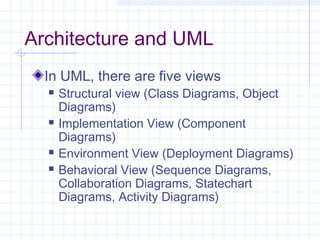
In UML, there are five views
 Structural view (Class Diagrams, Object
Diagrams)
 Implementation View (Component
Diagrams)
 Environment View (Deployment Diagrams)
 Behavioral View (Sequence Diagrams,
Collaboration Diagrams, Statechart
Diagrams, Activity Diagrams)
Component Diagrams
Show relationships and dependencies
among sets of code without respect to
actual physical placement of code
Use only when there is a design issue
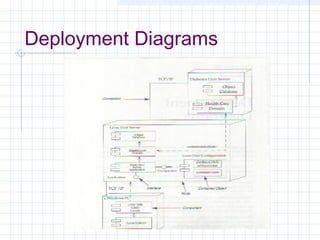
Deployment Diagrams
Called “environment” diagram
Shows actual physical organization of
computation units and connectors
Appropriate to do at this stage--when user
requirements are fairly well articulated
May surface practical problems
Should use for “what if’s” (volume, network
failures, etc.)
Deployment Diagrams
The Web
To date, we’ve looked at application
objects
Now, we need to look at objects and
components in terms of building web
applications
Object oriented?
Fundamental component is the page
Web servers distribute pages of information
to browsers
Browser acts as generalized user interface
container (specifics defined by each page’s
content)
Pages may be a combination of static HTML
and dynamic scripted pages (ASP)
Scripted Pages
Scripted pages contain code executed
by web server (scripting engine or page
filter) ultimately building an HTML
formatted page
Page is sent back to browser that
requests it
Web Client Server
Connection exists only during a page request
(connection is broken once the request is
fulfilled)
Business logic on the server is only activated
by the execution of scripts inside the pages
requested by the browser
Ultimate result is to update the business state
of the server and prepare an HTML formatted
page to the requesting browser
Issues
Business objects are not always
accessible when handling individual
requests
Client Scripting
As opposed to server side (procedural),
are event driven
Have no access to server resources
Forms
Necessary to collect information
Each form associated with an action
page
Web server finds page and executes
the page’s code
Components
Server -- there may be an intermediate
tier with business logic
Client may have components for
execution on clients machine.
In order model these effectively, UML
extensions have to be used
Stereotypes
Special types of classes and relationships for
special, well defined purposes
Use only when necessary
_Really_ necessary for effective web
modeling
See
www.rational.com/products/whitepapers/1004
62jsp

Financial Accounting

  • 1.
    Architecture, Deployment Diagrams, WebModeling Elizabeth Bigelow CS-15499C October 6, 2000
  • 2.
    Today New schedule Project nextsteps Feedback Architecture in the object oriented sense Deployment diagrams Event systems
  • 3.
    Schedule Please note thatschedule for presentations and mentoring sessions has been updated on the web Teams D, E, F present Wednesday Mentoring sessions on Friday Two lectures on Monday
  • 4.
    Some thoughts Why doa particular diagram…  UML diagrams allow you to look at a problem from different perspectives  Keeping the details straight on a big project is a major problem  Big advantage in entering data once (if possible)  Diagrams are not totally orthagonal, but at least parts that are can be tracked
  • 5.
    Why…. Payoff on modeling analysis & cross-checking  communication Bicycle for the mind Combination of modeling and human analysis can yield much more than narrow area of model Trick is to know when to stop
  • 6.
    Project Next Stepsand Feedback First presentations were in general very good The primary goal was to convey to the class what the project was about Most teams participated evenly Event systems requested were not included
  • 7.
    Next steps Refine classassociation diagrams to show all attributes and methods Create behavioral diagrams for key areas (particularly those that can change state on the site, as opposed to sheer display) Create deployment and web models Analyze diagrams individually and together to see what has to be changed for implementation
  • 8.
    Presentations Teams D, E,F should give presentations much like the previous ones, but show their diagrams at a greater level of development (particularly behavioral) All teams should create deployment and web diagrams for mentoring session and be prepared to show results of cross diagram analysis
  • 9.
    Analysis Consistency checking (createforms for yourself to document your checks. Some people find it helpful to use copies of diagrams) Support for major queries and processes Document potential run time problems Determine whether implementation object model should change  Will your code track exactly to the model? Why or why not
  • 10.
    Architecture and UML InUML, there are five views  Structural view (Class Diagrams, Object Diagrams)  Implementation View (Component Diagrams)  Environment View (Deployment Diagrams)  Behavioral View (Sequence Diagrams, Collaboration Diagrams, Statechart Diagrams, Activity Diagrams)
  • 11.
    Component Diagrams Show relationshipsand dependencies among sets of code without respect to actual physical placement of code Use only when there is a design issue
  • 12.
    Deployment Diagrams Called “environment”diagram Shows actual physical organization of computation units and connectors Appropriate to do at this stage--when user requirements are fairly well articulated May surface practical problems Should use for “what if’s” (volume, network failures, etc.)
  • 13.
  • 14.
    The Web To date,we’ve looked at application objects Now, we need to look at objects and components in terms of building web applications
  • 15.
    Object oriented? Fundamental componentis the page Web servers distribute pages of information to browsers Browser acts as generalized user interface container (specifics defined by each page’s content) Pages may be a combination of static HTML and dynamic scripted pages (ASP)
  • 16.
    Scripted Pages Scripted pagescontain code executed by web server (scripting engine or page filter) ultimately building an HTML formatted page Page is sent back to browser that requests it
  • 17.
    Web Client Server Connectionexists only during a page request (connection is broken once the request is fulfilled) Business logic on the server is only activated by the execution of scripts inside the pages requested by the browser Ultimate result is to update the business state of the server and prepare an HTML formatted page to the requesting browser
  • 18.
    Issues Business objects arenot always accessible when handling individual requests
  • 19.
    Client Scripting As opposedto server side (procedural), are event driven Have no access to server resources
  • 20.
    Forms Necessary to collectinformation Each form associated with an action page Web server finds page and executes the page’s code
  • 21.
    Components Server -- theremay be an intermediate tier with business logic Client may have components for execution on clients machine. In order model these effectively, UML extensions have to be used
  • 22.
    Stereotypes Special types ofclasses and relationships for special, well defined purposes Use only when necessary _Really_ necessary for effective web modeling See www.rational.com/products/whitepapers/1004 62jsp