






Models, Sketches and Everything In-Between
Simon Brown 	 Independent

Eoin Woods	 	 Endava
Welcome
• It’s hello from me
• Simon Brown, Independent
• And hello from him
• Eoin Woods, Endava
Our Agenda
• Simon Says …
• Eoin Says …
• Questions and Queries:
	 Q1. Modelling - Why Bother?
	 Q2. Models and Agility
	 Q3. How to Do It?
	 Q4. UML - Worth the Hassle?
	 Q5. Modelling in the Large vs the Small
• Summary and Conclusions
Background
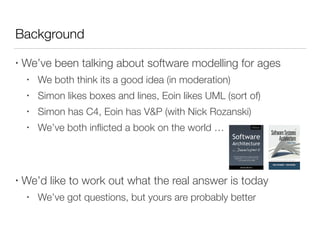
• We’ve been talking about software modelling for ages
• We both think its a good idea (in moderation)
• Simon likes boxes and lines, Eoin likes UML (sort of)
• Simon has C4, Eoin has V&P (with Nick Rozanski)
• We’ve both inflicted a book on the world …
• We’d like to work out what the real answer is today
• We’ve got questions, but yours are probably better
The Point of Modelling
• Simon:
• How do you understand what you’re building?
• How do you explain it to the rest of the team?
• The trick is not getting stuck in analysis paralysis.
• Eoin:
• Main problem with not modelling is lack of intellectual control
• Main problem with modelling is believing that modelling is an
end in itself
Some Opinions
Simon Says …
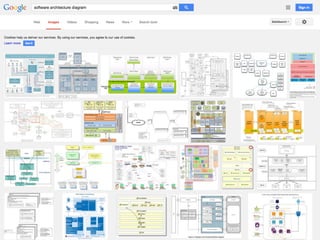
How do we

communicate

software architecture?
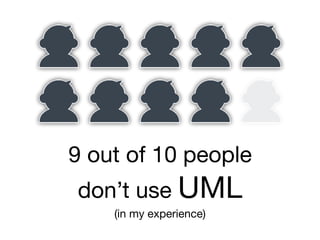
9 out of 10 people

don’t use UML

(in my experience)
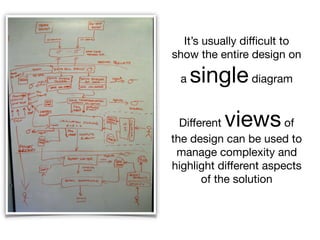
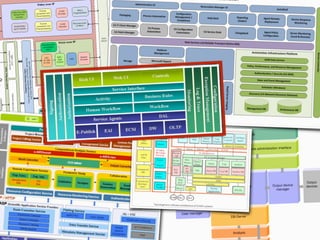
It’s usually difficult to
show the entire design on
a singlediagram
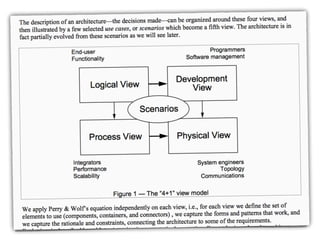
Different viewsof
the design can be used to
manage complexity and
highlight different aspects
of the solution
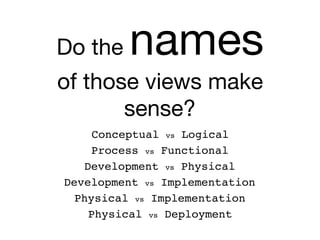
Do the names

of those views make
sense?
Development vs Physical
Process vs Functional
Conceptual vs Logical
Development vs Implementation
Physical vs Implementation
Physical vs Deployment
Logical and
development

views are often

separated
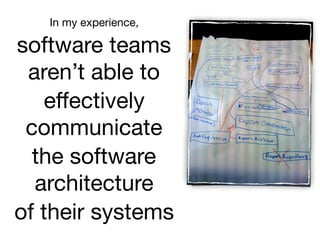
In my experience,

software teams
aren’t able to

effectively
communicate

the software
architecture

of their systems
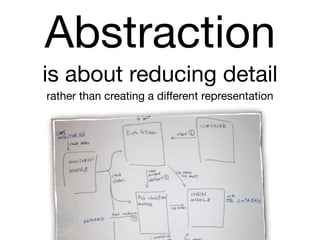
Abstraction

is about reducing detail

rather than creating a different representation
Abstractions help us
reason about

a big and/or complex

software system
A common set of
abstractions

is more important than

a common notation
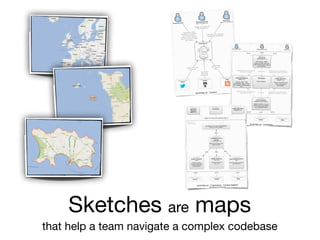
Sketches are maps

that help a team navigate a complex codebase
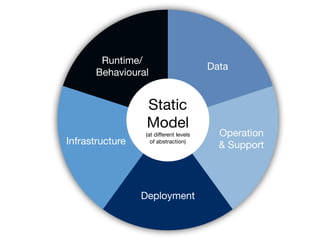
Static

Model

(at different levels

of abstraction)
Runtime/
Behavioural
Deployment
Infrastructure
Operation

& Support
Data
Does your code reflect the

abstractions

that you think about?
My focus is primarily on the

static structure

of software, which is ultimately about
code
Software developers are
the most important
stakeholders
of software architecture
Eoin Says …
The point is that …
• Some models worth creating are worth
preserving
• Models capture things that code can’t
• Sketches the place to start … but limited
• Models communicate, so ground rules are
useful - UML is a good base to work from
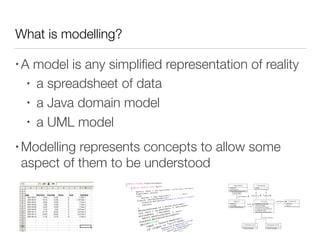
What is modelling?
• A model is any simplified representation of reality
• a spreadsheet of data
• a Java domain model
• a UML model
• Modelling represents concepts to allow some
aspect of them to be understood
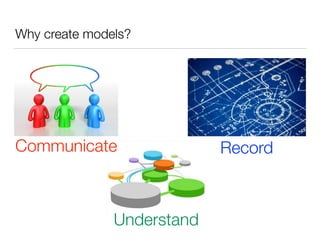
Why create models?
Communicate
Understand
Record
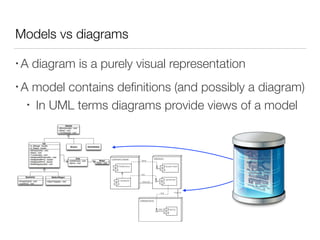
Models vs diagrams
• A diagram is a purely visual representation
• A model contains definitions (and possibly a diagram)
• In UML terms diagrams provide views of a model
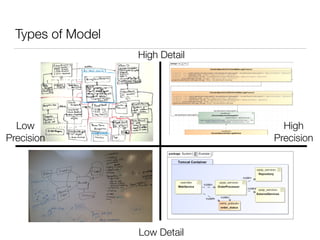
Types of Model
Low Detail
High Detail
High
Precision
Low
Precision
Uses for models
• Consistency
• change once, its changed everywhere
• Reporting
• ask your model a question
• “what is connected to the Flange Modulator Service?”
• Checking and Validation
• do I have a deployment node for every piece of the system?
• how complicated is the system going to be?
• Sharing information
• generate many views of a single model
• Powerpoint, wiki, tables, ...
An Analogy
• Would you use JSON to represent your shopping list?
• I personally use a PostIt™ note
• Would you hold system configuration in free text?
• I personally would rather XML or JSON
• Long lived models are valuable … store them as data
• UML is a practical option for machine readable models
Some Questions and Answers
Q1. Modelling - Why Bother?
• Simon:
• A model makes it easy to step back and see the big picture.
• A model aids communication, inside and outside of the team.
• Modelling provides a ubiquitous language with which to
describe software.
• Eoin:
• Modelling helps you understand what you have and need
• You can’t understand all of the detail anyway
• Code is in fact a model, we just don’t think of it as such
Q2. Modelling and Agility
• Simon:
• Good communication helps you move fast.
• A model provides long-lived documentation.
• A model provides the basis for structure, vision and risks.
• Eoin:
• No fundamental conflict - “model with a purpose” (Daniels)
• Working software over comprehensive documentation
• Agility should be for the long haul, not this sprint
• Can you know all the feed dependencies from your system?
Q3. How to Do It?
• Simon:
• Start with the big picture, and work into the detail.
• Stop when you get to a “sufficient” level of detail.
• Include technology choices!
• Eoin:
• Start small, start with a definite purpose
• Start with a whiteboard or a napkin or an A4 sheet
• Skip Visio and Omnigraffle … get a tool, get a model
Q4. UML - Is It Worth the Hassle?
• Simon:
• No.
• Eoin:
• Maybe … depends what you need
• Would you write a shopping list in JSON? Would you store
configuration settings in a free text file?
• If you have long lived models and want to use the data then
yes, highly tailored UML is worth the effort
Q5. Modelling in the Large vs the Small
• Simon:
• Sketches will quickly become out of date.
• Reverse-engineering tends to lead to cluttered diagrams.
• Many small diagrams are better than one uber-diagram.
• Eoin:
• A large system means you need help from a computer to
understand it
• However large your model, the code is still “the truth”
• Modelling languages scale like programming languages
How We Do It
Simon
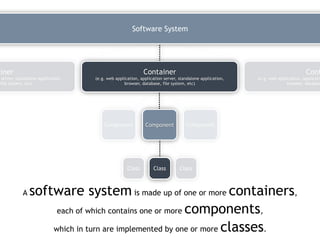
A software system is made up of one or more containers,
each of which contains one or more components,
which in turn are implemented by one or more classes.
Class Class Class
Component Component Component
Container
(e.g. web application, application server, standalone application,
browser, database, file system, etc)
Cont
(e.g. web application, applicatio
browser, databas
ainer
server, standalone application,
file system, etc)
Software System
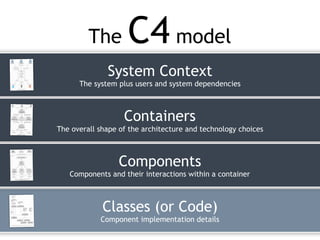
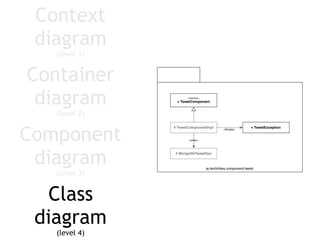
The C4 model
Classes (or Code)
Component implementation details
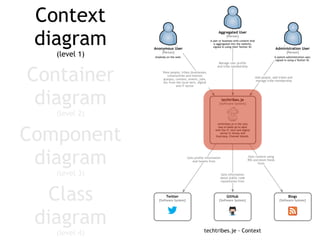
System Context
The system plus users and system dependencies
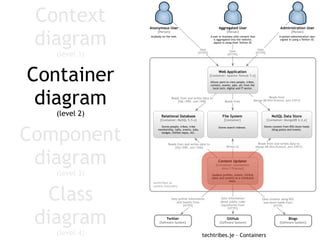
Containers
The overall shape of the architecture and technology choices
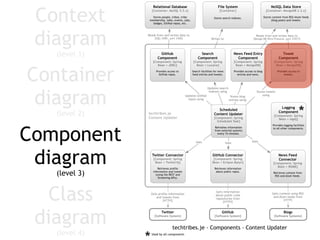
Components
Components and their interactions within a container
Component
diagram
(level 3)
Container
diagram
(level 2)
Context
diagram
(level 1)
Class
diagram
(level 4)
Component
diagram
(level 3)
Container
diagram
(level 2)
Context
diagram
(level 1)
Class
diagram
(level 4)
Component
diagram
(level 3)
Container
diagram
(level 2)
Context
diagram
(level 1)
Class
diagram
(level 4)
Component
diagram
(level 3)
Container
diagram
(level 2)
Context
diagram
(level 1)
Class
diagram
(level 4)
Eoin
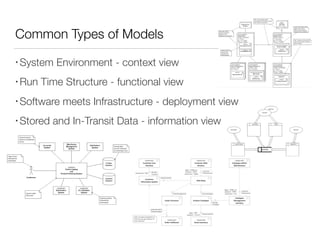
Common Types of Models
• System Environment - context view
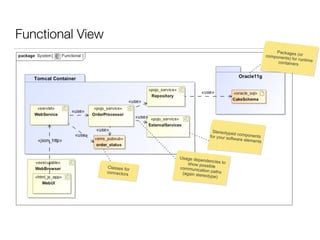
• Run Time Structure - functional view
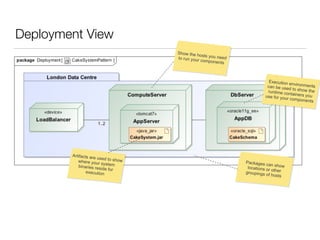
• Software meets Infrastructure - deployment view
• Stored and In-Transit Data - information view
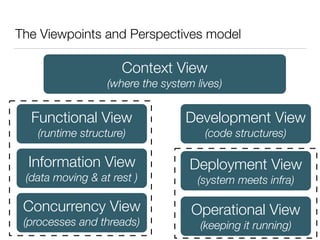
The Viewpoints and Perspectives model
Context View

(where the system lives)
Functional View

(runtime structure)
Information View

(data moving & at rest )
Development View

(code structures)
Concurrency View

(processes and threads)
Deployment View

(system meets infra)
Operational View

(keeping it running)
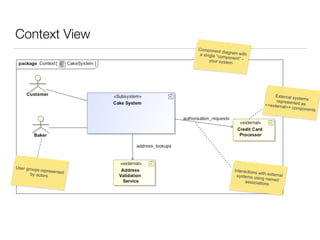
Context View
Component diagram witha single “component” -your system
External systemsrepresented as<<external>> components
Interactions with externalsystems using namedassociations
User groups representedby actors
Functional View
Packages (orcomponents) for runtimecontainers
Stereotyped componentsfor your software elements
Usage dependencies toshow possiblecommunication paths(again stereotype)
Classes for
connectors
Deployment View
Show the hosts you needto run your components
Execution environmentscan be used to show theruntime containers youuse for your components
Packages can showlocations or othergroupings of hosts
Artifacts are used to showwhere your systembinaries reside for
execution
Summary and Conclusions
What We Have Talked About
• Modelling is terrifically useful
• communication
• clarity
• analysis
• Many ways of doing it
• napkins to UML tools
• The key point is to get value from what you do
• don’t get stuck in “analysis paralysis”
Eoin Woods

www.eoinwoods.info

@eoinwoodz
Questions?
Simon Brown

www.codingthearchitecture.com

@simonbrown

Models, Sketches and Everything In Between

  • 1.
    Models, Sketches andEverything In-Between Simon Brown Independent Eoin Woods Endava
  • 2.
    Welcome • It’s hellofrom me • Simon Brown, Independent • And hello from him • Eoin Woods, Endava
  • 3.
    Our Agenda • SimonSays … • Eoin Says … • Questions and Queries: Q1. Modelling - Why Bother? Q2. Models and Agility Q3. How to Do It? Q4. UML - Worth the Hassle? Q5. Modelling in the Large vs the Small • Summary and Conclusions
  • 4.
    Background • We’ve beentalking about software modelling for ages • We both think its a good idea (in moderation) • Simon likes boxes and lines, Eoin likes UML (sort of) • Simon has C4, Eoin has V&P (with Nick Rozanski) • We’ve both inflicted a book on the world … • We’d like to work out what the real answer is today • We’ve got questions, but yours are probably better
  • 5.
    The Point ofModelling • Simon: • How do you understand what you’re building? • How do you explain it to the rest of the team? • The trick is not getting stuck in analysis paralysis. • Eoin: • Main problem with not modelling is lack of intellectual control • Main problem with modelling is believing that modelling is an end in itself
  • 6.
  • 7.
  • 8.
  • 9.
    9 out of10 people don’t use UML (in my experience)
  • 10.
    It’s usually difficultto show the entire design on a singlediagram Different viewsof the design can be used to manage complexity and highlight different aspects of the solution
  • 12.
    Do the names ofthose views make sense? Development vs Physical Process vs Functional Conceptual vs Logical Development vs Implementation Physical vs Implementation Physical vs Deployment
  • 13.
  • 16.
    In my experience, softwareteams aren’t able to effectively communicate the software architecture of their systems
  • 17.
    Abstraction is about reducingdetail rather than creating a different representation
  • 18.
    Abstractions help us reasonabout a big and/or complex software system
  • 19.
    A common setof abstractions is more important than a common notation
  • 20.
    Sketches are maps thathelp a team navigate a complex codebase
  • 21.
    Static Model (at different levels ofabstraction) Runtime/ Behavioural Deployment Infrastructure Operation & Support Data
  • 22.
    Does your codereflect the abstractions that you think about?
  • 23.
    My focus isprimarily on the static structure of software, which is ultimately about code
  • 24.
    Software developers are themost important stakeholders of software architecture
  • 25.
  • 26.
    The point isthat … • Some models worth creating are worth preserving • Models capture things that code can’t • Sketches the place to start … but limited • Models communicate, so ground rules are useful - UML is a good base to work from
  • 27.
    What is modelling? •A model is any simplified representation of reality • a spreadsheet of data • a Java domain model • a UML model • Modelling represents concepts to allow some aspect of them to be understood
  • 28.
  • 29.
    Models vs diagrams •A diagram is a purely visual representation • A model contains definitions (and possibly a diagram) • In UML terms diagrams provide views of a model
  • 30.
    Types of Model LowDetail High Detail High Precision Low Precision
  • 31.
    Uses for models •Consistency • change once, its changed everywhere • Reporting • ask your model a question • “what is connected to the Flange Modulator Service?” • Checking and Validation • do I have a deployment node for every piece of the system? • how complicated is the system going to be? • Sharing information • generate many views of a single model • Powerpoint, wiki, tables, ...
  • 32.
    An Analogy • Wouldyou use JSON to represent your shopping list? • I personally use a PostIt™ note • Would you hold system configuration in free text? • I personally would rather XML or JSON • Long lived models are valuable … store them as data • UML is a practical option for machine readable models
  • 33.
  • 34.
    Q1. Modelling -Why Bother? • Simon: • A model makes it easy to step back and see the big picture. • A model aids communication, inside and outside of the team. • Modelling provides a ubiquitous language with which to describe software. • Eoin: • Modelling helps you understand what you have and need • You can’t understand all of the detail anyway • Code is in fact a model, we just don’t think of it as such
  • 35.
    Q2. Modelling andAgility • Simon: • Good communication helps you move fast. • A model provides long-lived documentation. • A model provides the basis for structure, vision and risks. • Eoin: • No fundamental conflict - “model with a purpose” (Daniels) • Working software over comprehensive documentation • Agility should be for the long haul, not this sprint • Can you know all the feed dependencies from your system?
  • 36.
    Q3. How toDo It? • Simon: • Start with the big picture, and work into the detail. • Stop when you get to a “sufficient” level of detail. • Include technology choices! • Eoin: • Start small, start with a definite purpose • Start with a whiteboard or a napkin or an A4 sheet • Skip Visio and Omnigraffle … get a tool, get a model
  • 37.
    Q4. UML -Is It Worth the Hassle? • Simon: • No. • Eoin: • Maybe … depends what you need • Would you write a shopping list in JSON? Would you store configuration settings in a free text file? • If you have long lived models and want to use the data then yes, highly tailored UML is worth the effort
  • 38.
    Q5. Modelling inthe Large vs the Small • Simon: • Sketches will quickly become out of date. • Reverse-engineering tends to lead to cluttered diagrams. • Many small diagrams are better than one uber-diagram. • Eoin: • A large system means you need help from a computer to understand it • However large your model, the code is still “the truth” • Modelling languages scale like programming languages
  • 39.
  • 40.
  • 41.
    A software systemis made up of one or more containers, each of which contains one or more components, which in turn are implemented by one or more classes. Class Class Class Component Component Component Container (e.g. web application, application server, standalone application, browser, database, file system, etc) Cont (e.g. web application, applicatio browser, databas ainer server, standalone application, file system, etc) Software System
  • 42.
    The C4 model Classes(or Code) Component implementation details System Context The system plus users and system dependencies Containers The overall shape of the architecture and technology choices Components Components and their interactions within a container
  • 43.
  • 44.
  • 45.
  • 46.
  • 47.
  • 48.
    Common Types ofModels • System Environment - context view • Run Time Structure - functional view • Software meets Infrastructure - deployment view • Stored and In-Transit Data - information view
  • 49.
    The Viewpoints andPerspectives model Context View
 (where the system lives) Functional View
 (runtime structure) Information View
 (data moving & at rest ) Development View
 (code structures) Concurrency View
 (processes and threads) Deployment View
 (system meets infra) Operational View
 (keeping it running)
  • 50.
    Context View Component diagramwitha single “component” -your system External systemsrepresented as<<external>> components Interactions with externalsystems using namedassociations User groups representedby actors
  • 51.
    Functional View Packages (orcomponents)for runtimecontainers Stereotyped componentsfor your software elements Usage dependencies toshow possiblecommunication paths(again stereotype) Classes for connectors
  • 52.
    Deployment View Show thehosts you needto run your components Execution environmentscan be used to show theruntime containers youuse for your components Packages can showlocations or othergroupings of hosts Artifacts are used to showwhere your systembinaries reside for execution
  • 53.
  • 54.
    What We HaveTalked About • Modelling is terrifically useful • communication • clarity • analysis • Many ways of doing it • napkins to UML tools • The key point is to get value from what you do • don’t get stuck in “analysis paralysis”
  • 55.