ONLINE ASSESSMENT TOOL
FOR
SAINSBURY’S SUPERMARKET LTD
CS3P22N: PROJECT REPORT ( DOUBLE)
BSc (HONS) COMPUTING
AKINLAWON JOLAOSO (06024337)
PROJECT SUPERVISOR: DR PETER ORIOGUN
DEPARTMENT OF COMPUTING, COMMUNICATIONS TECHNOLOGY AND
MATHEMATICS
Final Year Project Report Online Assessment Tool
London Metropolitan University
- 2 -
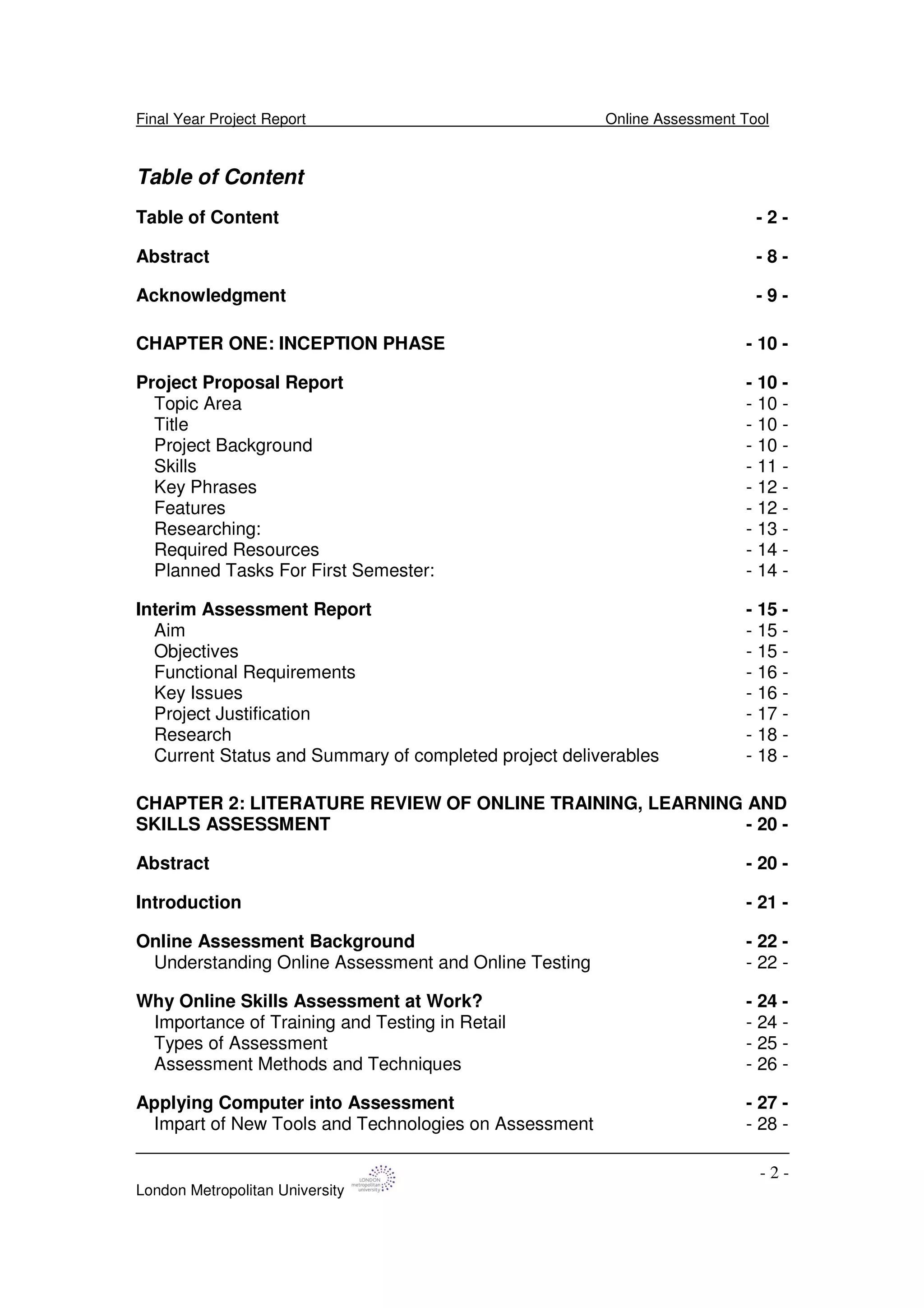
Table of Content
Table of Content - 2 -
Abstract - 8 -
Acknowledgment - 9 -
CHAPTER ONE: INCEPTION PHASE - 10 -
Project Proposal Report - 10 -
Topic Area - 10 -
Title - 10 -
Project Background - 10 -
Skills - 11 -
Key Phrases - 12 -
Features - 12 -
Researching: - 13 -
Required Resources - 14 -
Planned Tasks For First Semester: - 14 -
Interim Assessment Report - 15 -
Aim - 15 -
Objectives - 15 -
Functional Requirements - 16 -
Key Issues - 16 -
Project Justification - 17 -
Research - 18 -
Current Status and Summary of completed project deliverables - 18 -
CHAPTER 2: LITERATURE REVIEW OF ONLINE TRAINING, LEARNING AND
SKILLS ASSESSMENT - 20 -
Abstract - 20 -
Introduction - 21 -
Online Assessment Background - 22 -
Understanding Online Assessment and Online Testing - 22 -
Why Online Skills Assessment at Work? - 24 -
Importance of Training and Testing in Retail - 24 -
Types of Assessment - 25 -
Assessment Methods and Techniques - 26 -
Applying Computer into Assessment - 27 -
Impart of New Tools and Technologies on Assessment - 28 -
Final Year Project Report Online Assessment Tool
London Metropolitan University
- 3 -
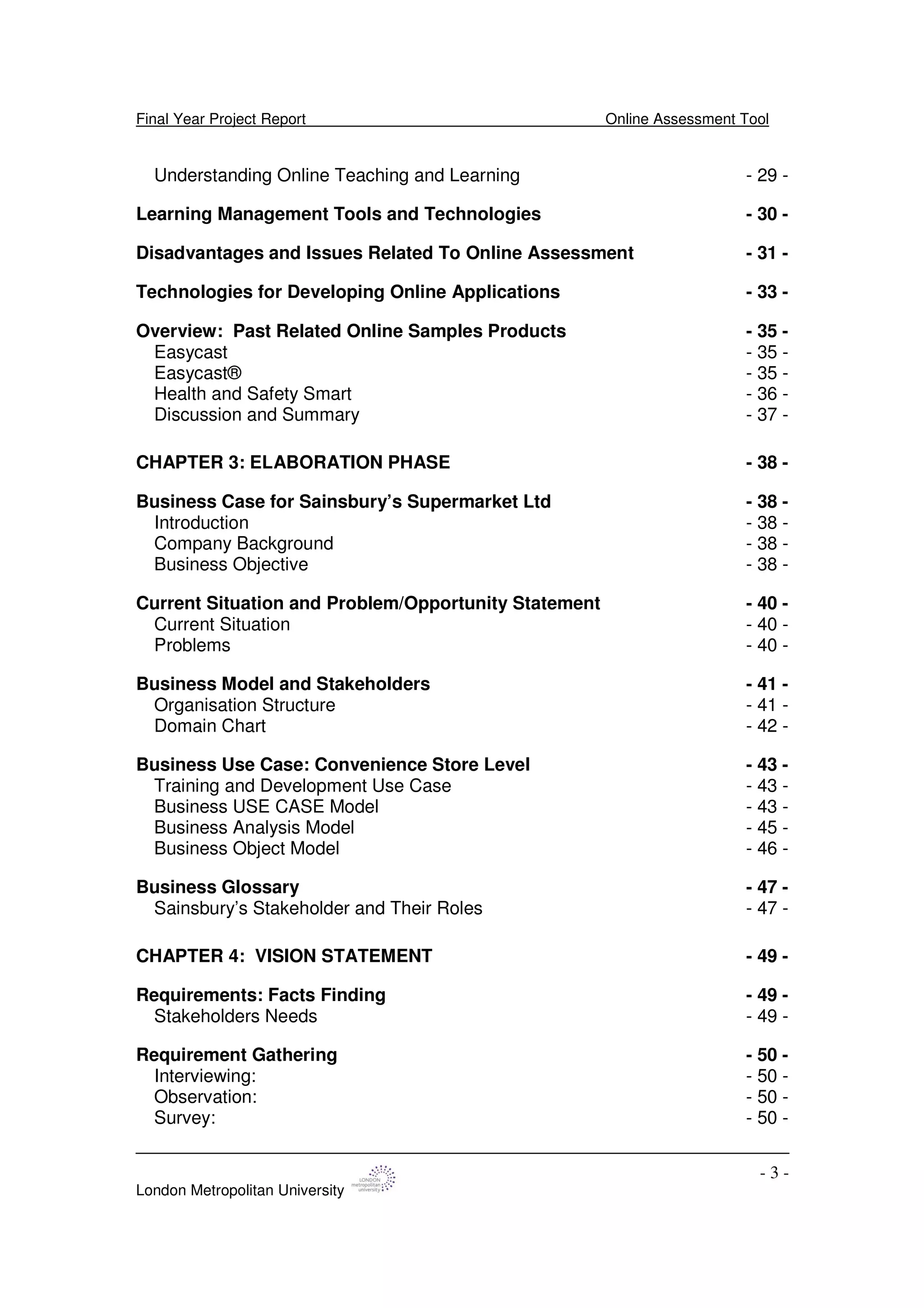
Understanding Online Teaching and Learning - 29 -
Learning Management Tools and Technologies - 30 -
Disadvantages and Issues Related To Online Assessment - 31 -
Technologies for Developing Online Applications - 33 -
Overview: Past Related Online Samples Products - 35 -
Easycast - 35 -
Easycast® - 35 -
Health and Safety Smart - 36 -
Discussion and Summary - 37 -
CHAPTER 3: ELABORATION PHASE - 38 -
Business Case for Sainsbury’s Supermarket Ltd - 38 -
Introduction - 38 -
Company Background - 38 -
Business Objective - 38 -
Current Situation and Problem/Opportunity Statement - 40 -
Current Situation - 40 -
Problems - 40 -
Business Model and Stakeholders - 41 -
Organisation Structure - 41 -
Domain Chart - 42 -
Business Use Case: Convenience Store Level - 43 -
Training and Development Use Case - 43 -
Business USE CASE Model - 43 -
Business Analysis Model - 45 -
Business Object Model - 46 -
Business Glossary - 47 -
Sainsbury’s Stakeholder and Their Roles - 47 -
CHAPTER 4: VISION STATEMENT - 49 -
Requirements: Facts Finding - 49 -
Stakeholders Needs - 49 -
Requirement Gathering - 50 -
Interviewing: - 50 -
Observation: - 50 -
Survey: - 50 -
Final Year Project Report Online Assessment Tool
London Metropolitan University
- 4 -
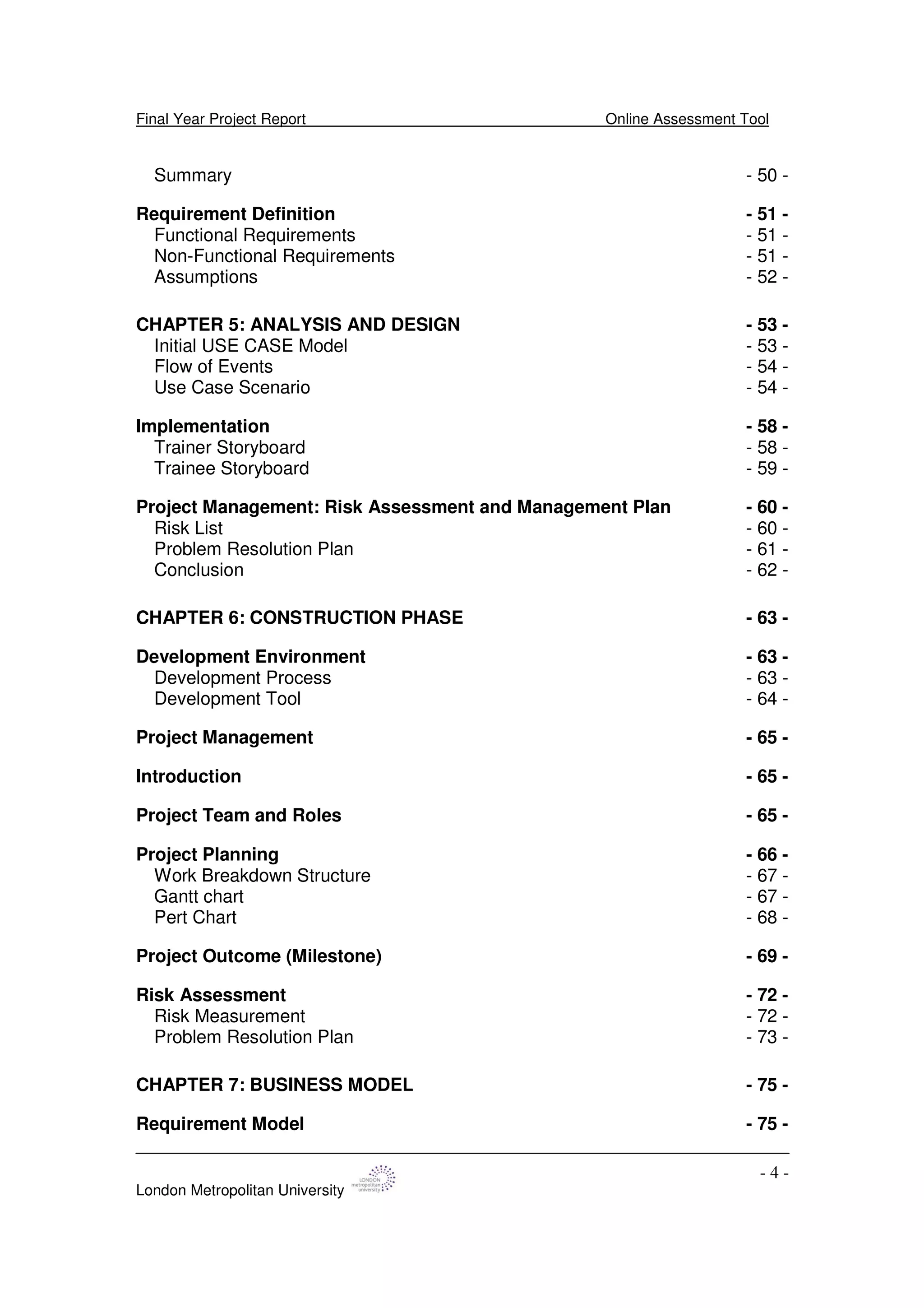
Summary - 50 -
Requirement Definition - 51 -
Functional Requirements - 51 -
Non-Functional Requirements - 51 -
Assumptions - 52 -
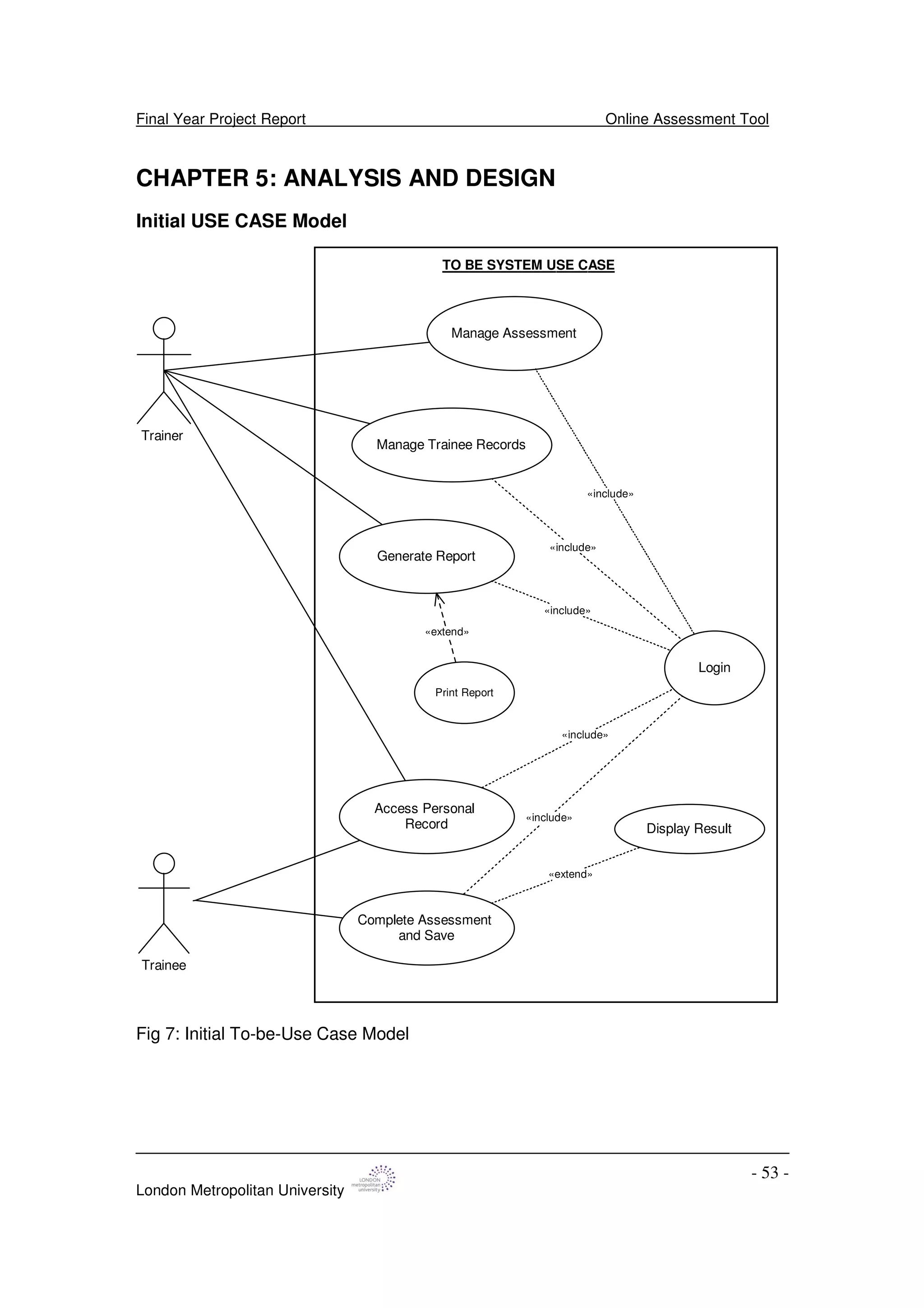
CHAPTER 5: ANALYSIS AND DESIGN - 53 -
Initial USE CASE Model - 53 -
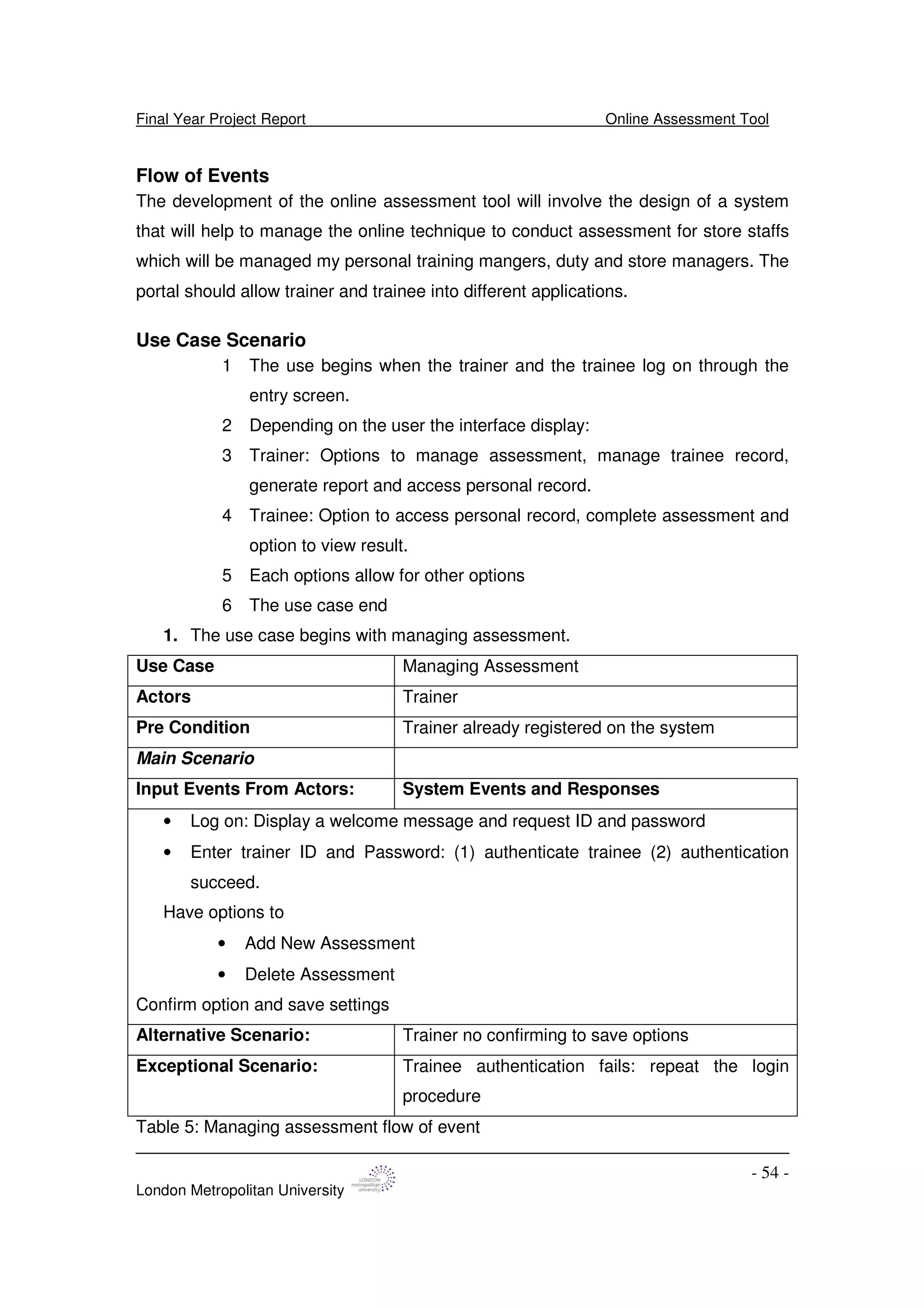
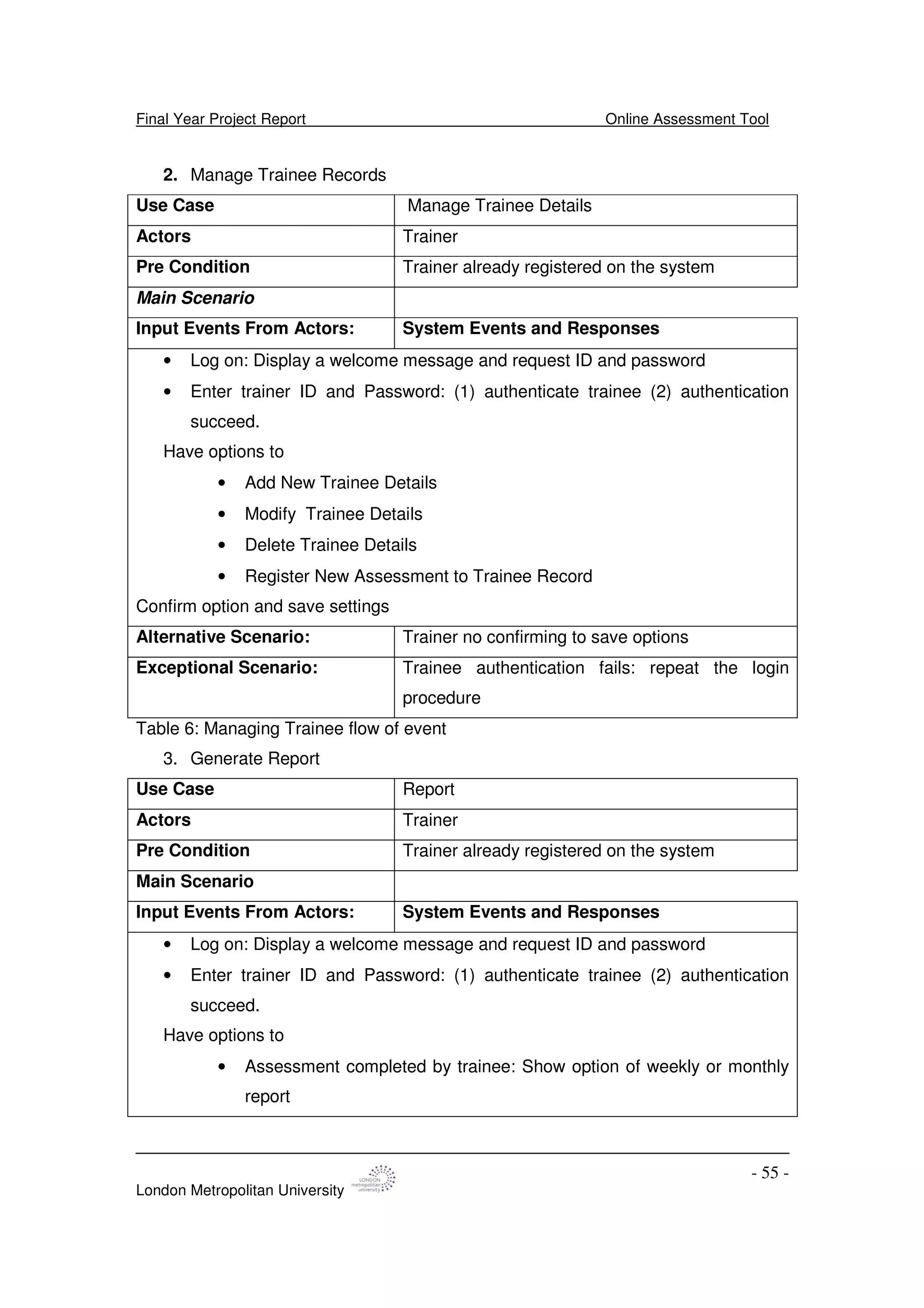
Flow of Events - 54 -
Use Case Scenario - 54 -
Implementation - 58 -
Trainer Storyboard - 58 -
Trainee Storyboard - 59 -
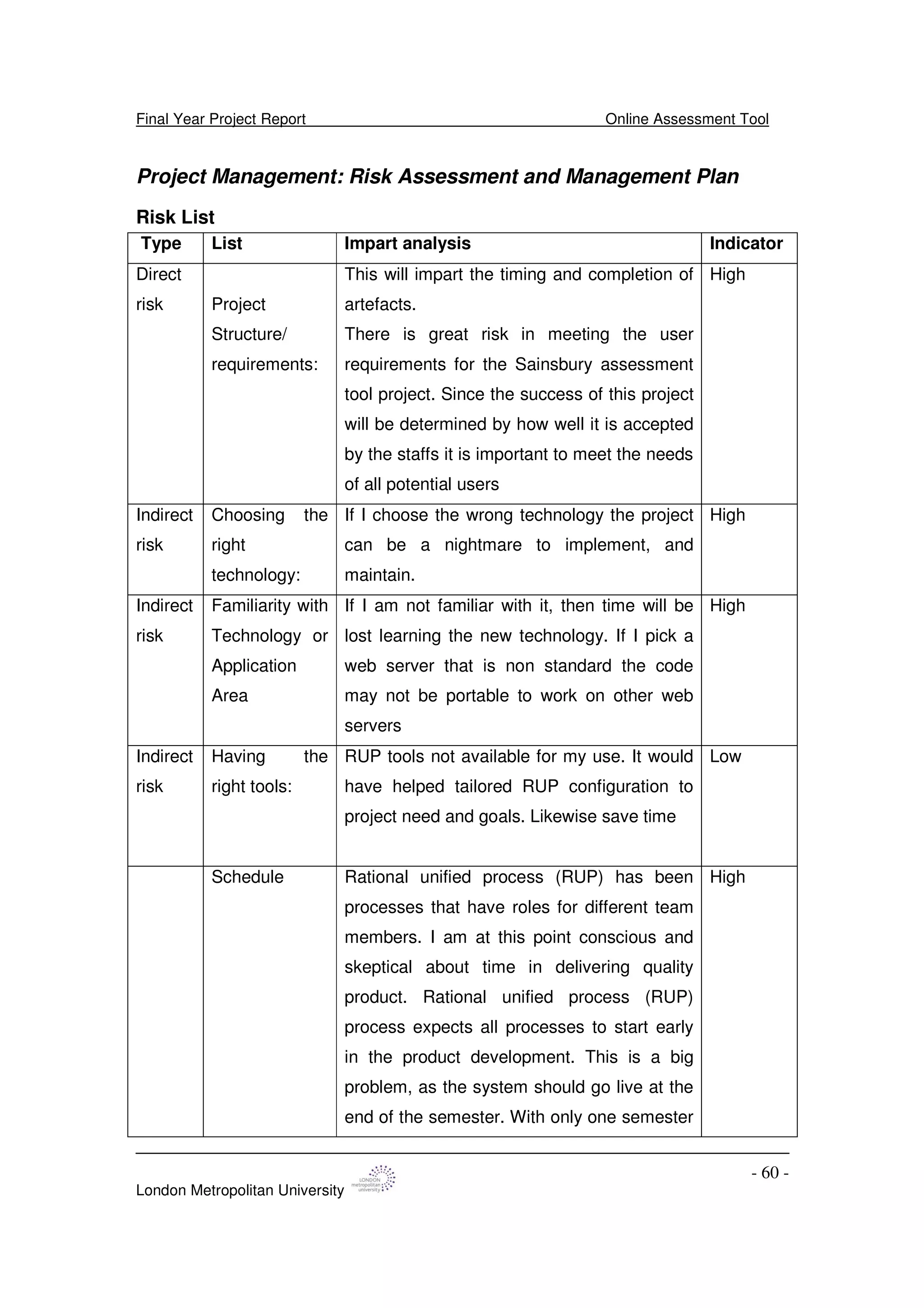
Project Management: Risk Assessment and Management Plan - 60 -
Risk List - 60 -
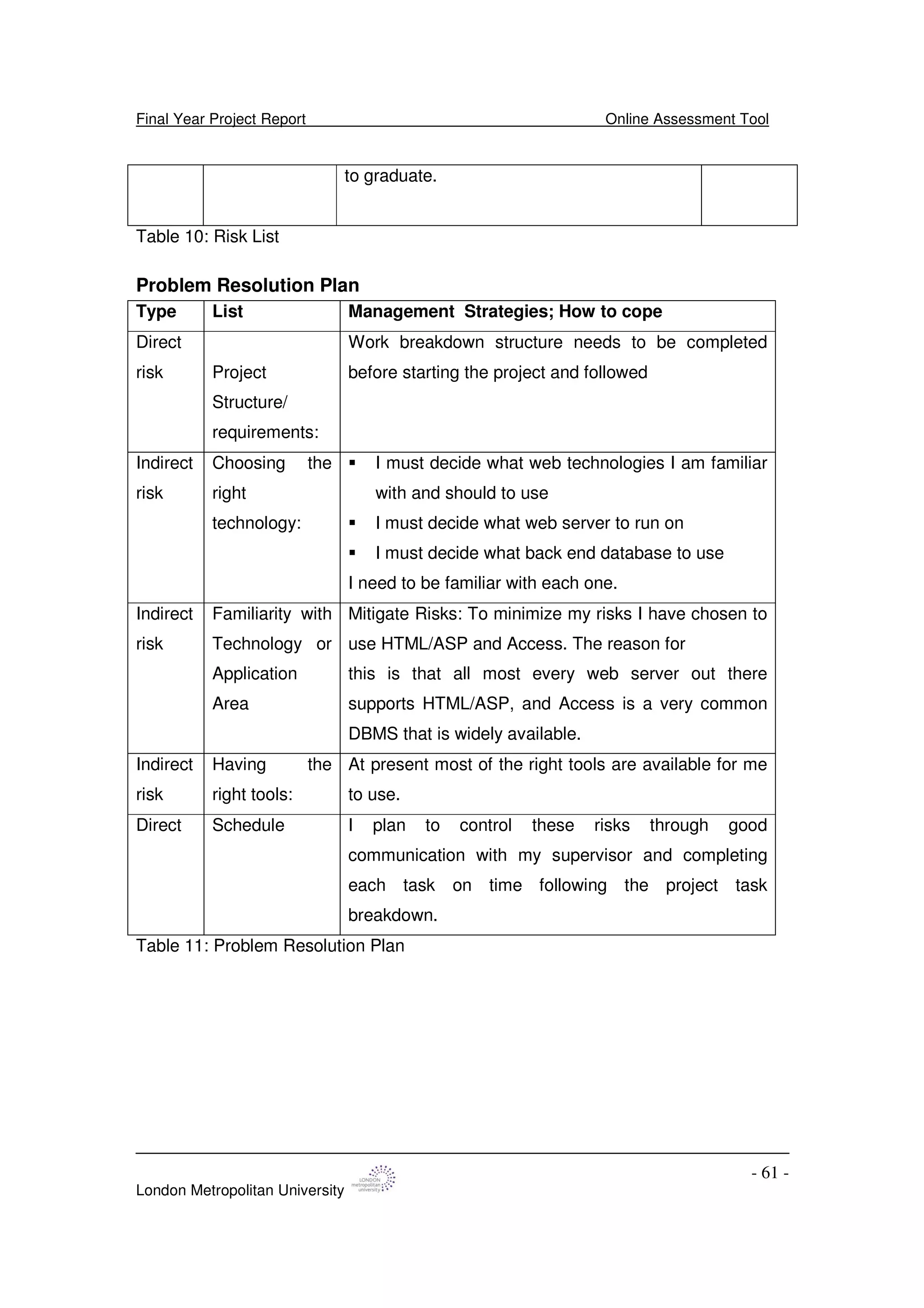
Problem Resolution Plan - 61 -
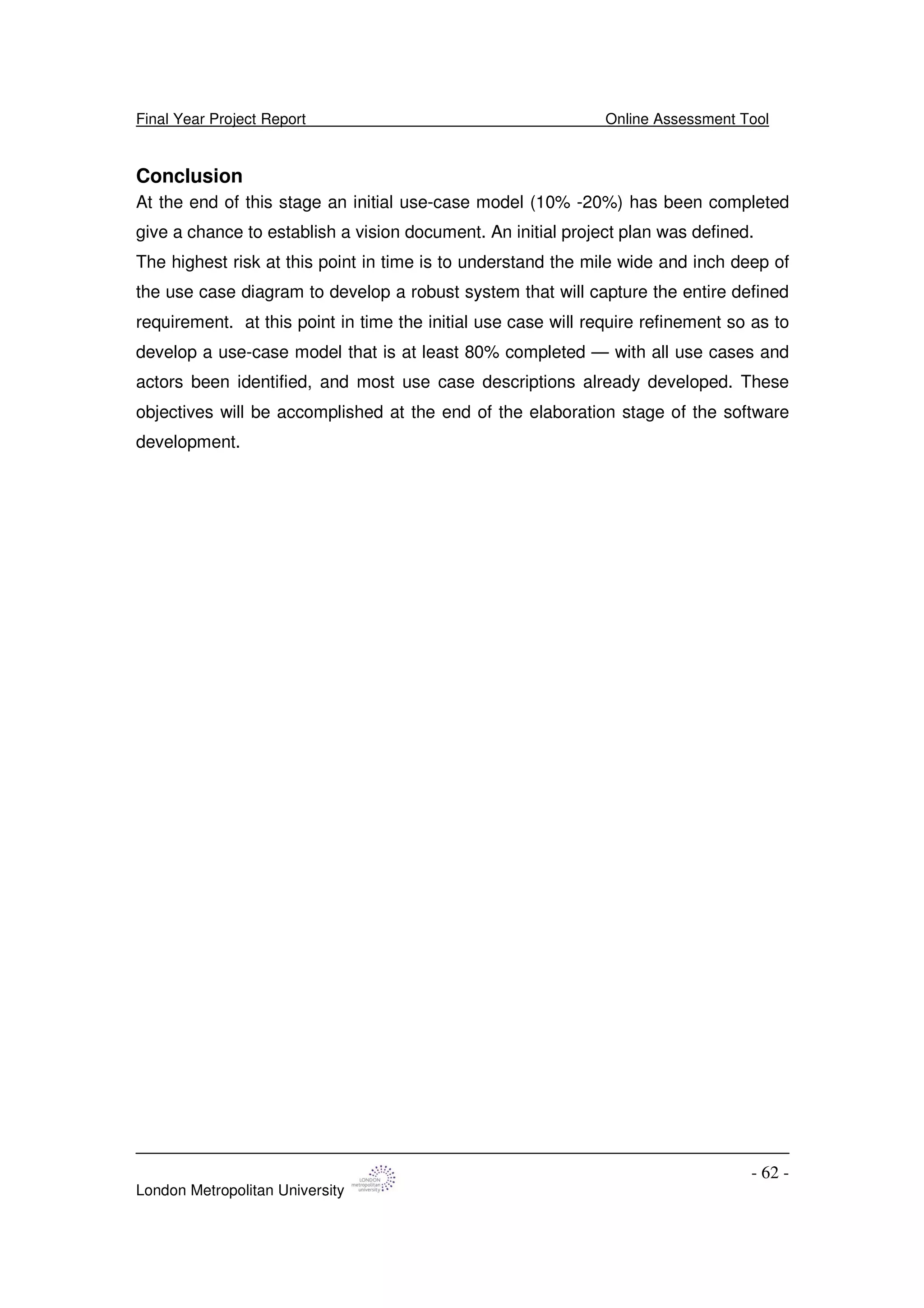
Conclusion - 62 -
CHAPTER 6: CONSTRUCTION PHASE - 63 -
Development Environment - 63 -
Development Process - 63 -
Development Tool - 64 -
Project Management - 65 -
Introduction - 65 -
Project Team and Roles - 65 -
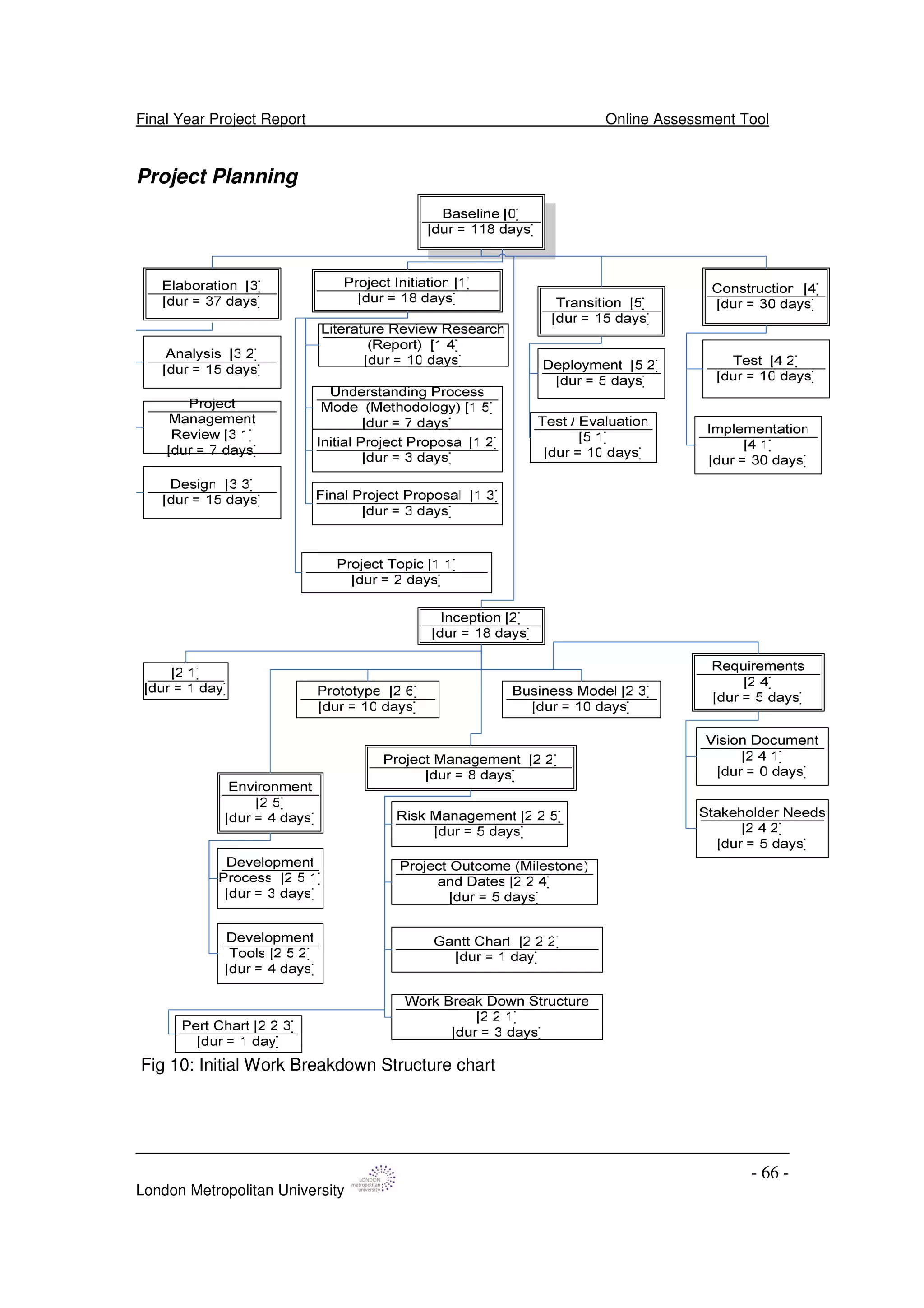
Project Planning - 66 -
Work Breakdown Structure - 67 -
Gantt chart - 67 -
Pert Chart - 68 -
Project Outcome (Milestone) - 69 -
Risk Assessment - 72 -
Risk Measurement - 72 -
Problem Resolution Plan - 73 -
CHAPTER 7: BUSINESS MODEL - 75 -
Requirement Model - 75 -
Final Year Project Report Online Assessment Tool
London Metropolitan University
- 5 -
Detailed and Stable Use case Model - 77 -
Actors and Use Cases Description - 78 -
CHAPTER 8: DESIGN - 80 -
Introduction - 80 -
Web Applications - 80 -
Three-Tier Architecture - 81 -
Architecture Description - 82 -
Session Management - 83 -
Login (Interface) Management - 83 -
Assessment Management - 85 -
Trainee Management - 85 -
Record Management - 85 -
Use Case Realization: Using Collaboration and Sequence Diagrams LOGIN
USECASE - 86 -
FIND TRAINEE DETAILS USECASE - 87 -
ADD NEW ASSESSMENT USECASE - 88 -
DELETE ASSESSMENT USECASE - 89 -
ADD NEW TRAINEE USECASE - 90 -
MODIFY TRAINEE USECASE - 92 -
DELETE TRAINEE USECASE - 93 -
REGISTER NEW ASSESSMENT TO TRAINEE RECORD USECASE - 94 -
VIEW TRAINEE ASSESSMENT RECORD USECASE - 96 -
COMPLETE ASSESSMENT USECASE - 98 -
Initial Class Diagram - 100 -
Initial Prototype Design - 101 -
Developing Storyboard Samples - 101 -
CHAPTER 9: PRODUCT DEVELOPMENT PROCESS - 103 -
Design Model - 103 -
Graphical User Interface (GUI) Technology - 103 -
Web Server Technology - 104 -
Database Technology - 105 -
Organisation - 105 -
Developmental Team - 105 -
Architecture Description - 106 -
Service Package - 106 -
User Interface - 107 -
Web Server - 107 -
Database - 108 -
Final Year Project Report Online Assessment Tool
London Metropolitan University
- 6 -
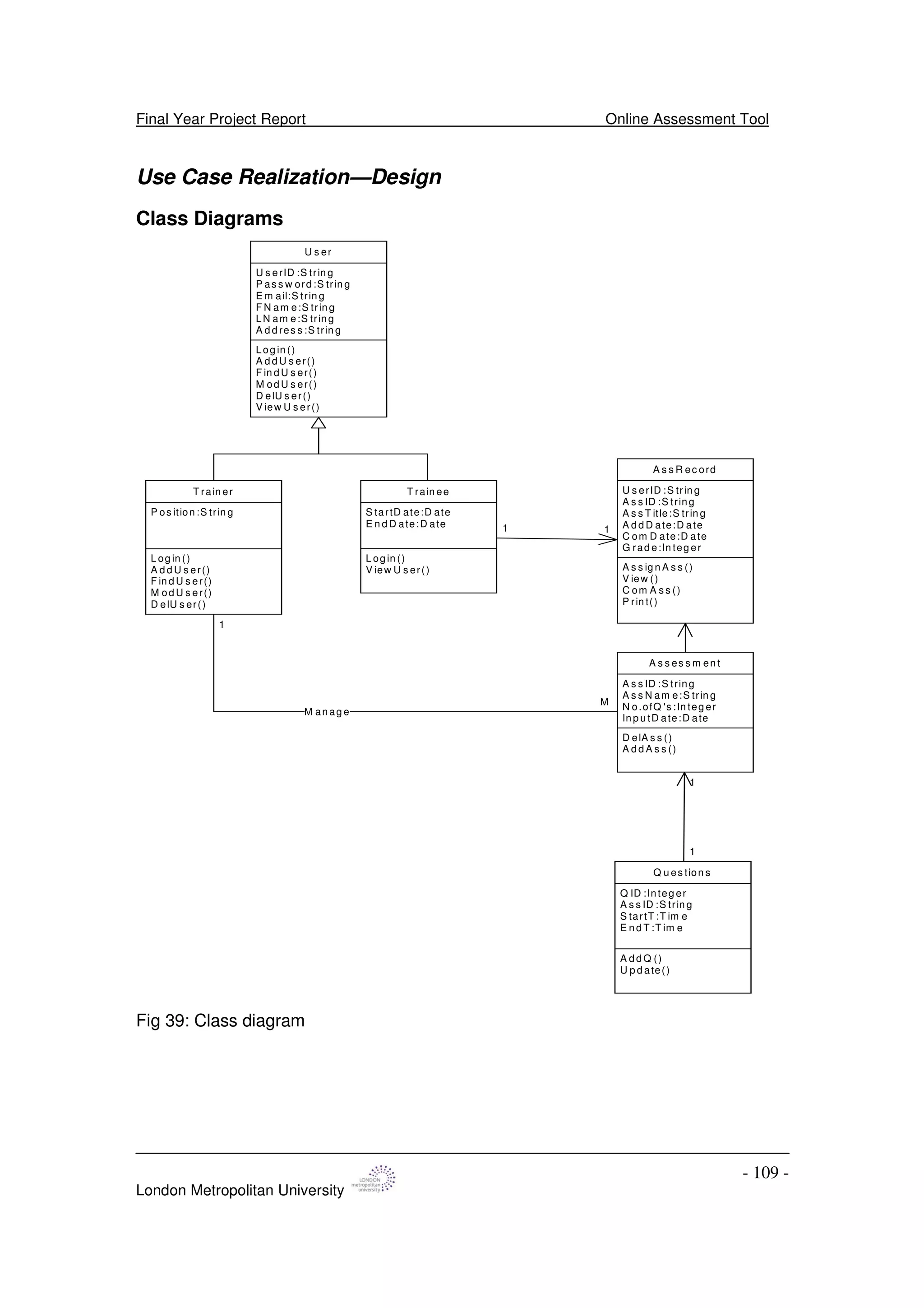
Use Case Realization—Design - 109 -
Class Diagrams - 109 -
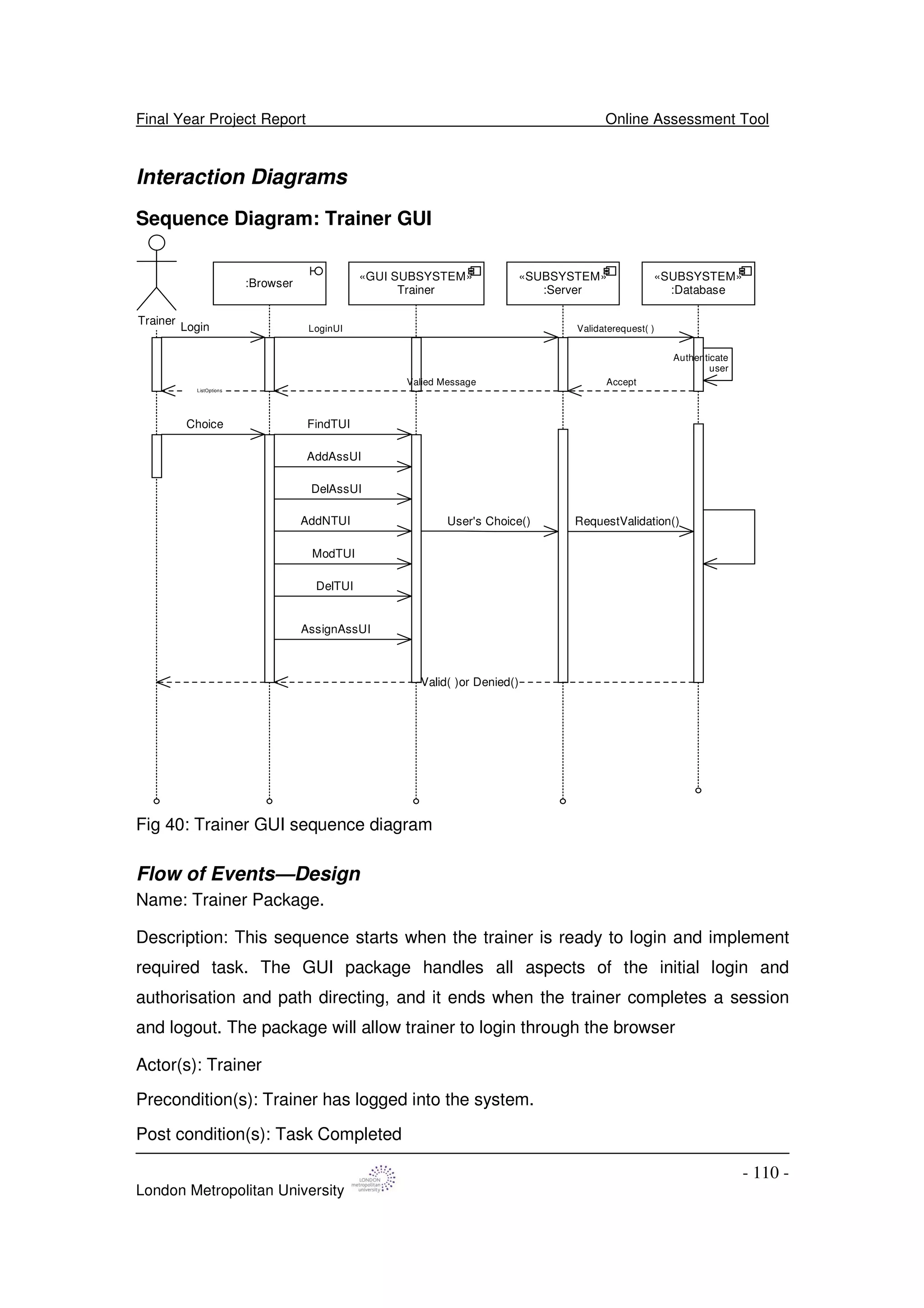
Interaction Diagrams - 110 -
Sequence Diagram: Trainer GUI - 110 -
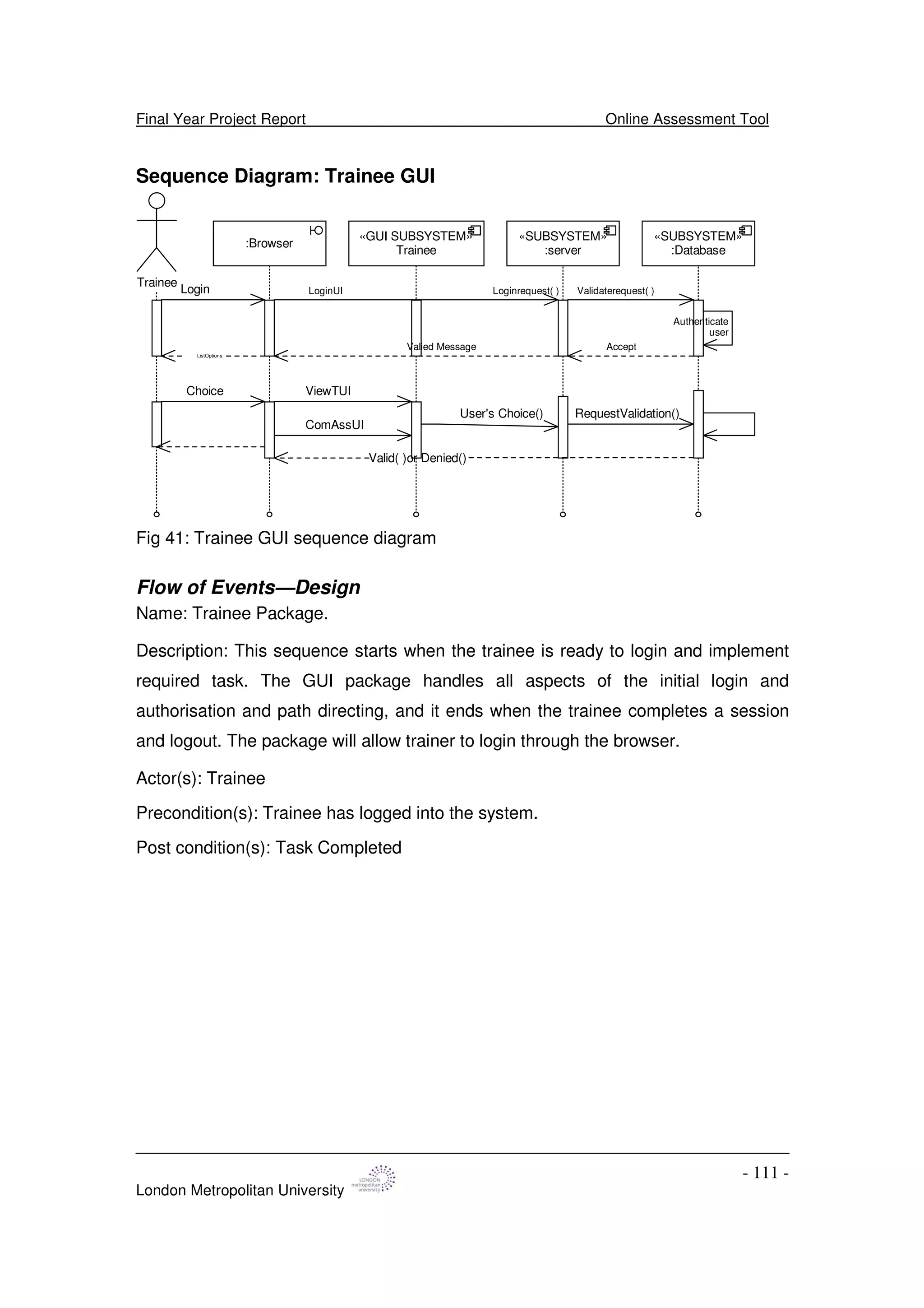
Sequence Diagram: Trainee GUI - 111 -
Implementation Requirements - 112 -
Interface Prototype Design - 112 -
Developing a Site Map - 112 -
Human Computer Interaction and Usability - 113 -
Interface Design Principles - 113 -
Developing Prototype Design - 115 -
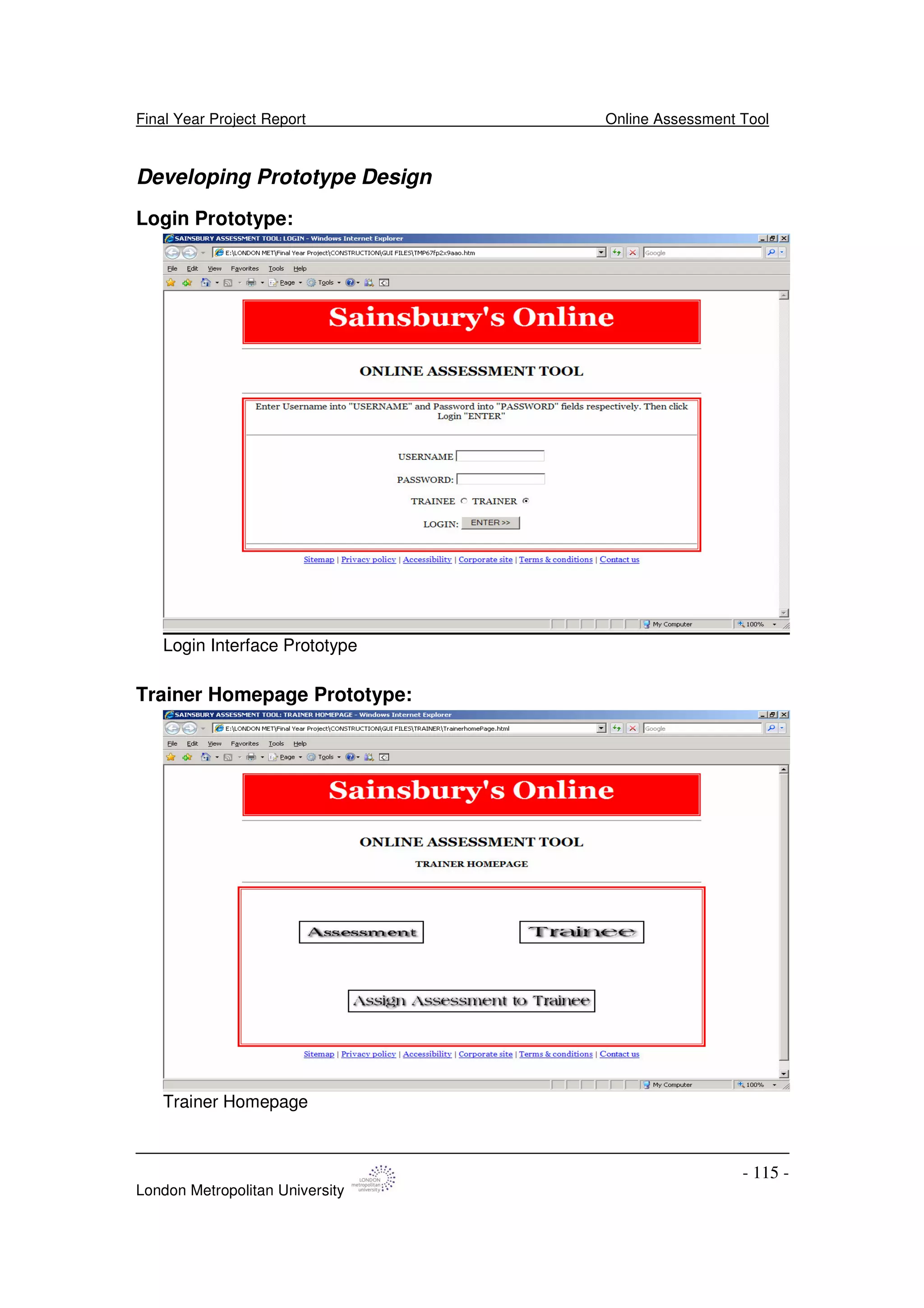
Login Prototype: - 115 -
Trainer Homepage Prototype: - 115 -
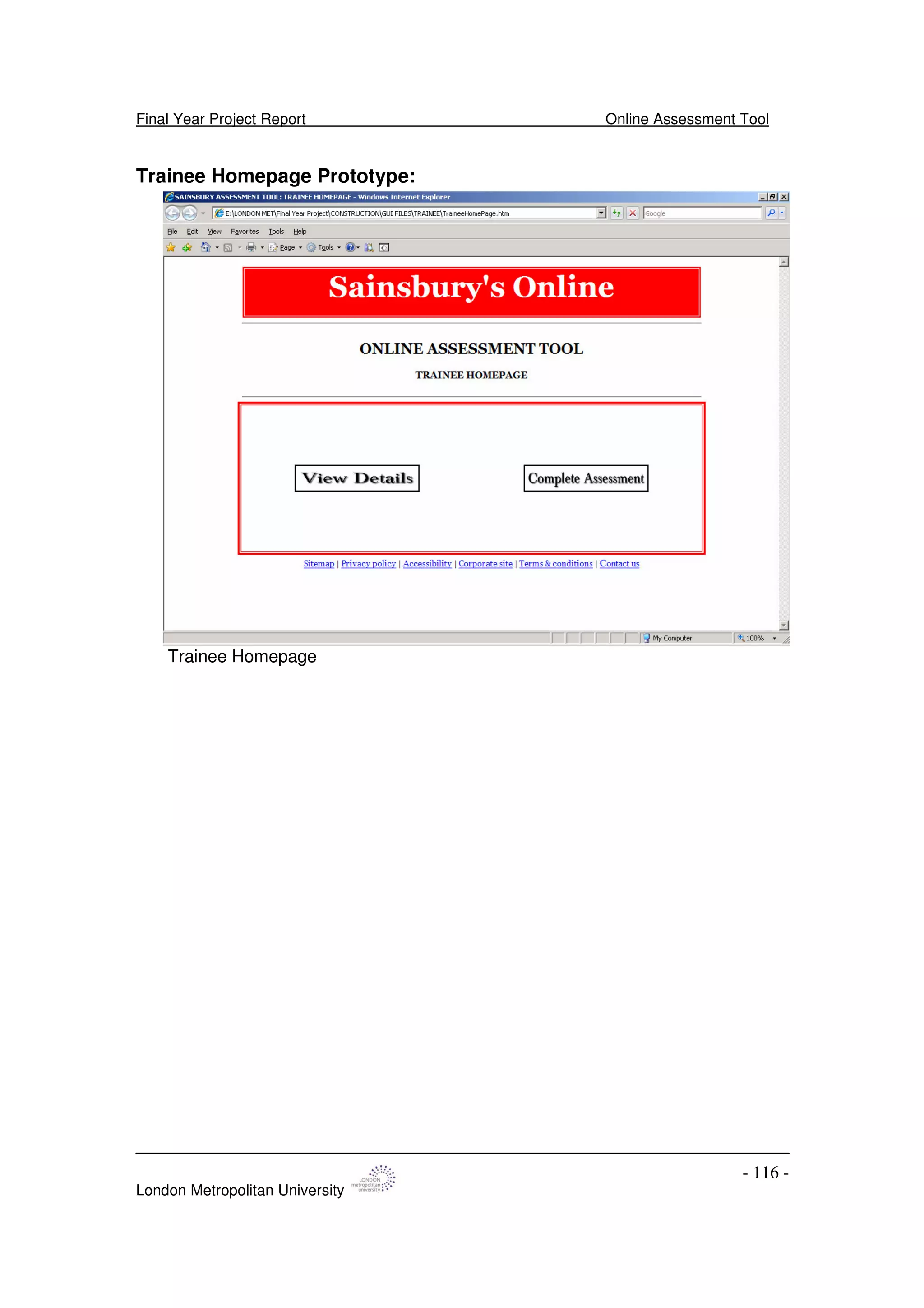
Trainee Homepage Prototype: - 116 -
Database Modelling and Design - 117 -
Types of Database Management System - 117 -
Conceptual Data Model - 118 -
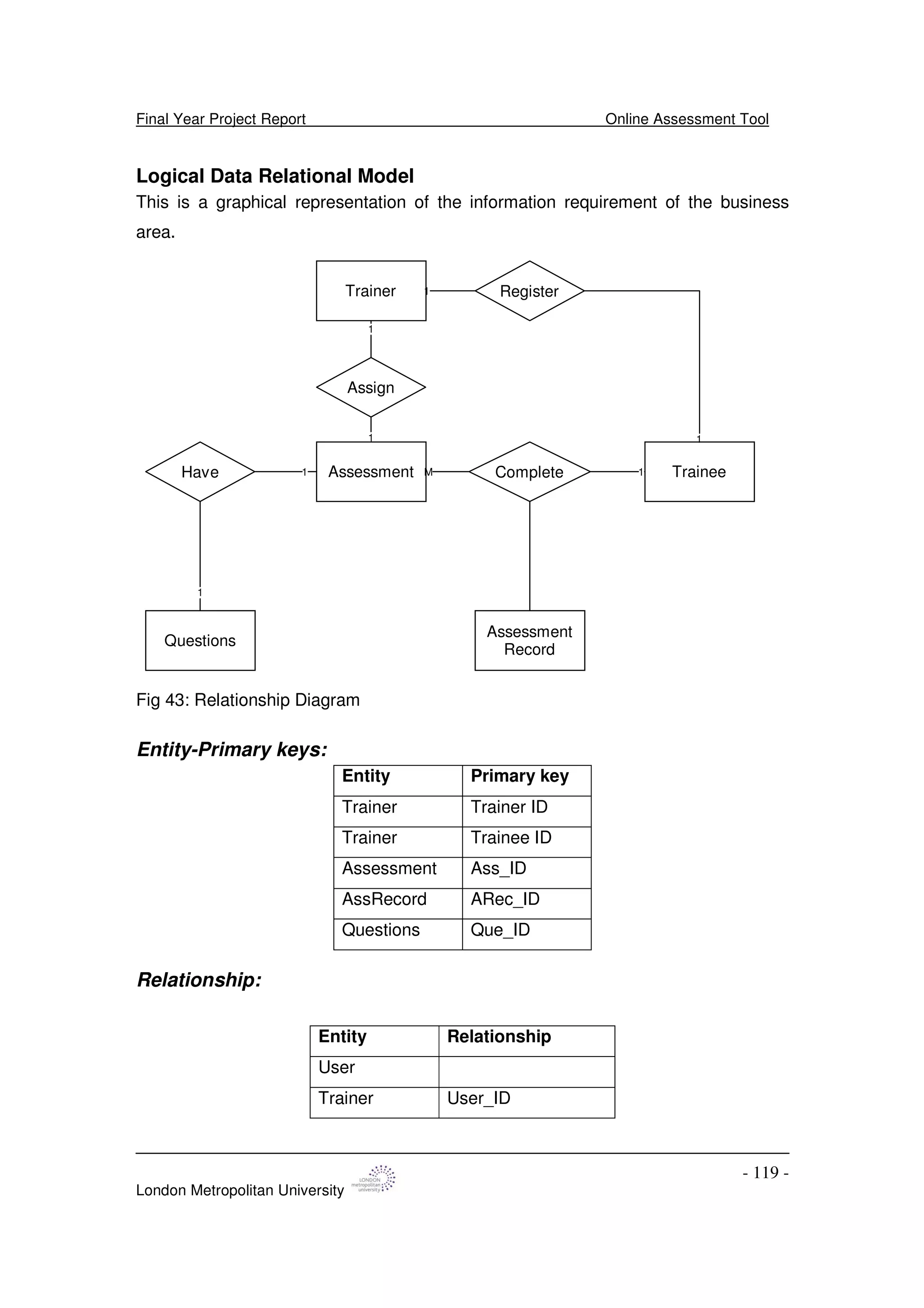
Logical Data Relational Model - 119 -
Physical Data Model - 121 -
Integrity Constraints - 121 -
Physical Storage Objects - 122 -
Normalization - 122 -
Relationship Prototype - 123 -
Deployment Model - 124 -
CHAPTER 10: IMPLEMENTATION - 125 -
Creating Database and Its Connection - 125 -
Users Table: - 125 -
Assessment Table: - 125 -
Question Table: - 126 -
Assessment Record Table: - 126 -
Communicating with database - 127 -
Creating User Interface - 128 -
Main page: - 128 -
Error page: - 128 -
Traînée User Interface - 129 -
Assessment User Record View - 129 -
Personal Record View - 130 -
Trainer User Interface - 132 -
Final Year Project Report Online Assessment Tool
London Metropolitan University
- 7 -
Trainee Management Session - 133 -
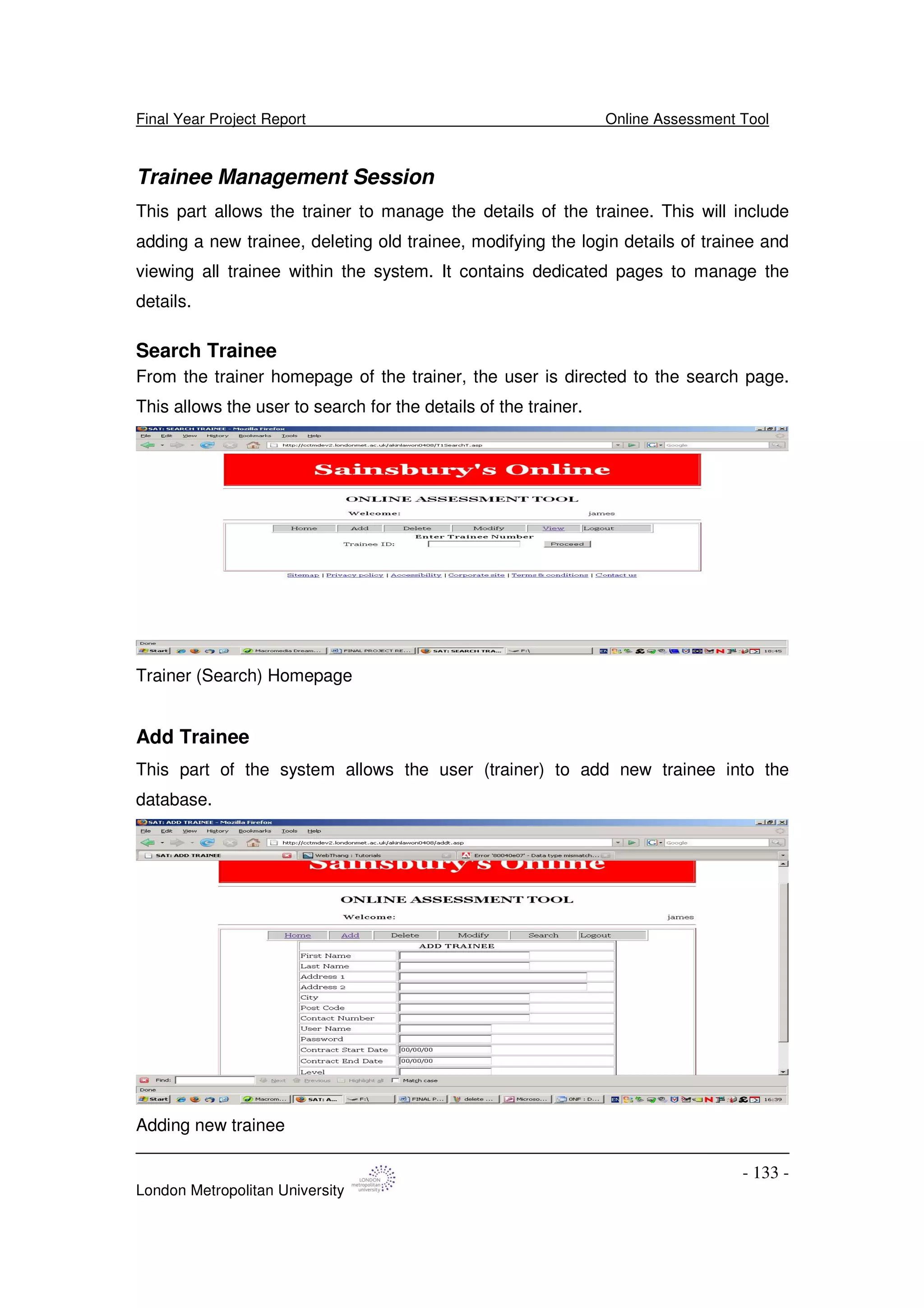
Search Trainee - 133 -
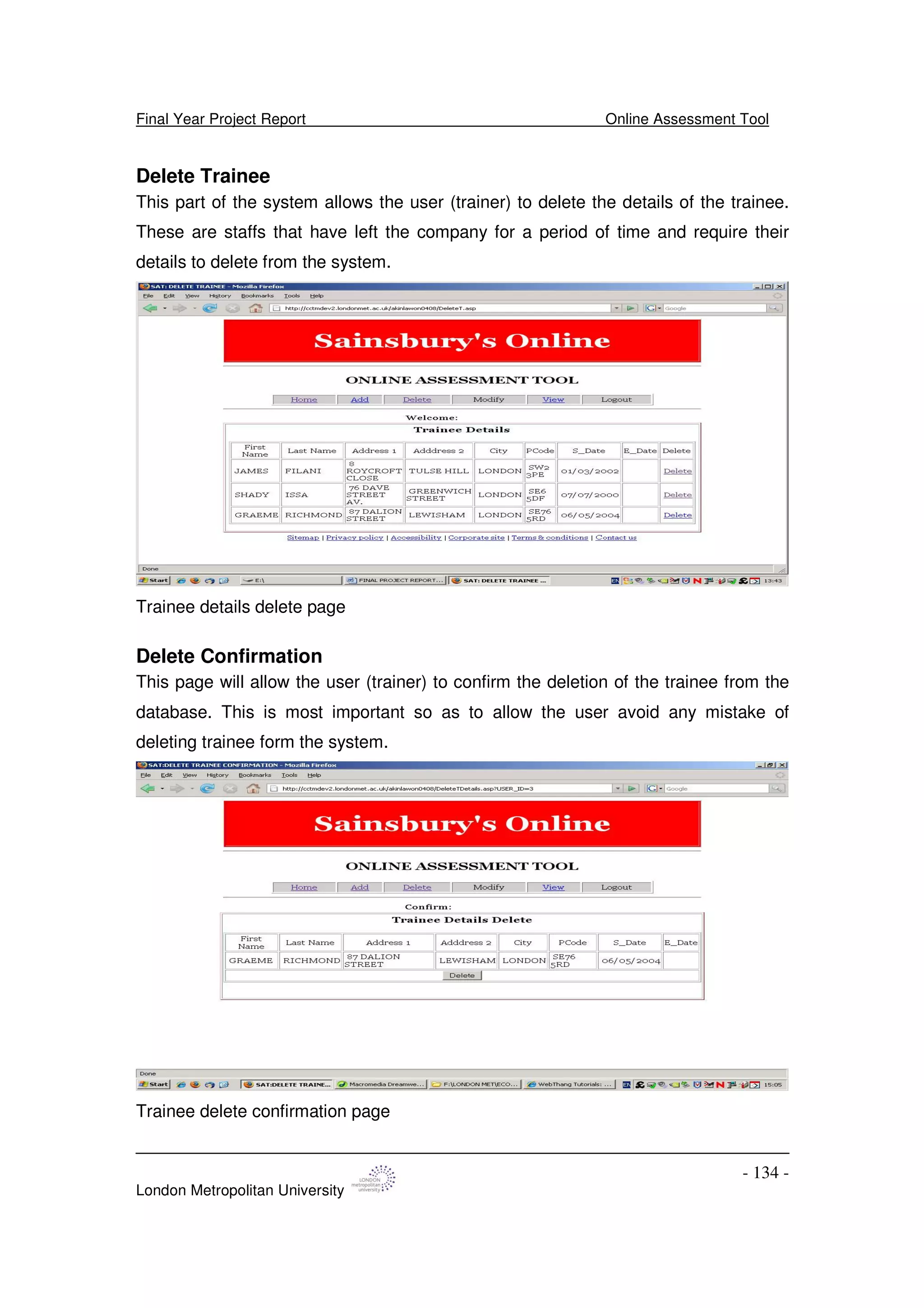
Add Trainee - 133 -
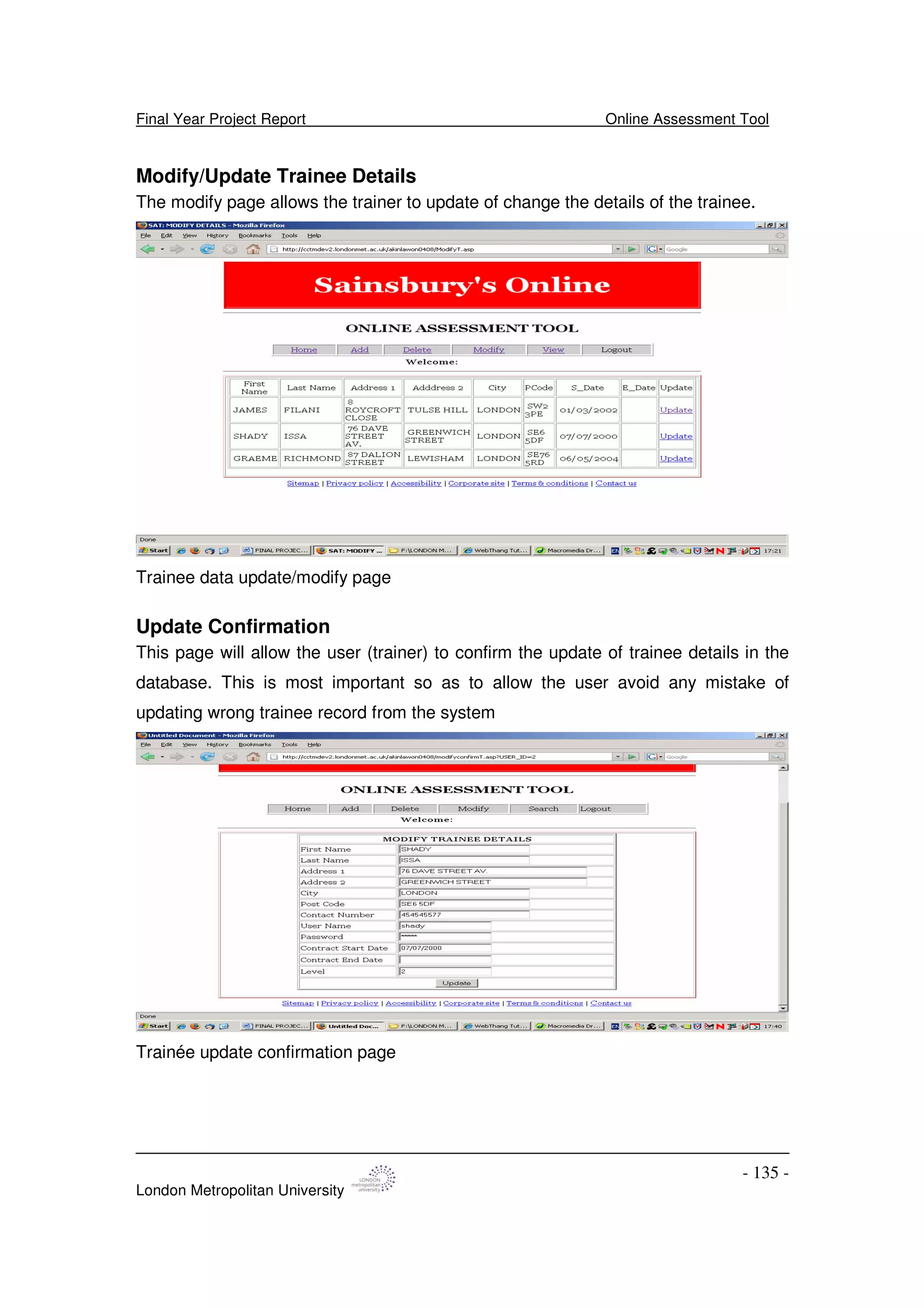
Delete Trainee - 134 -
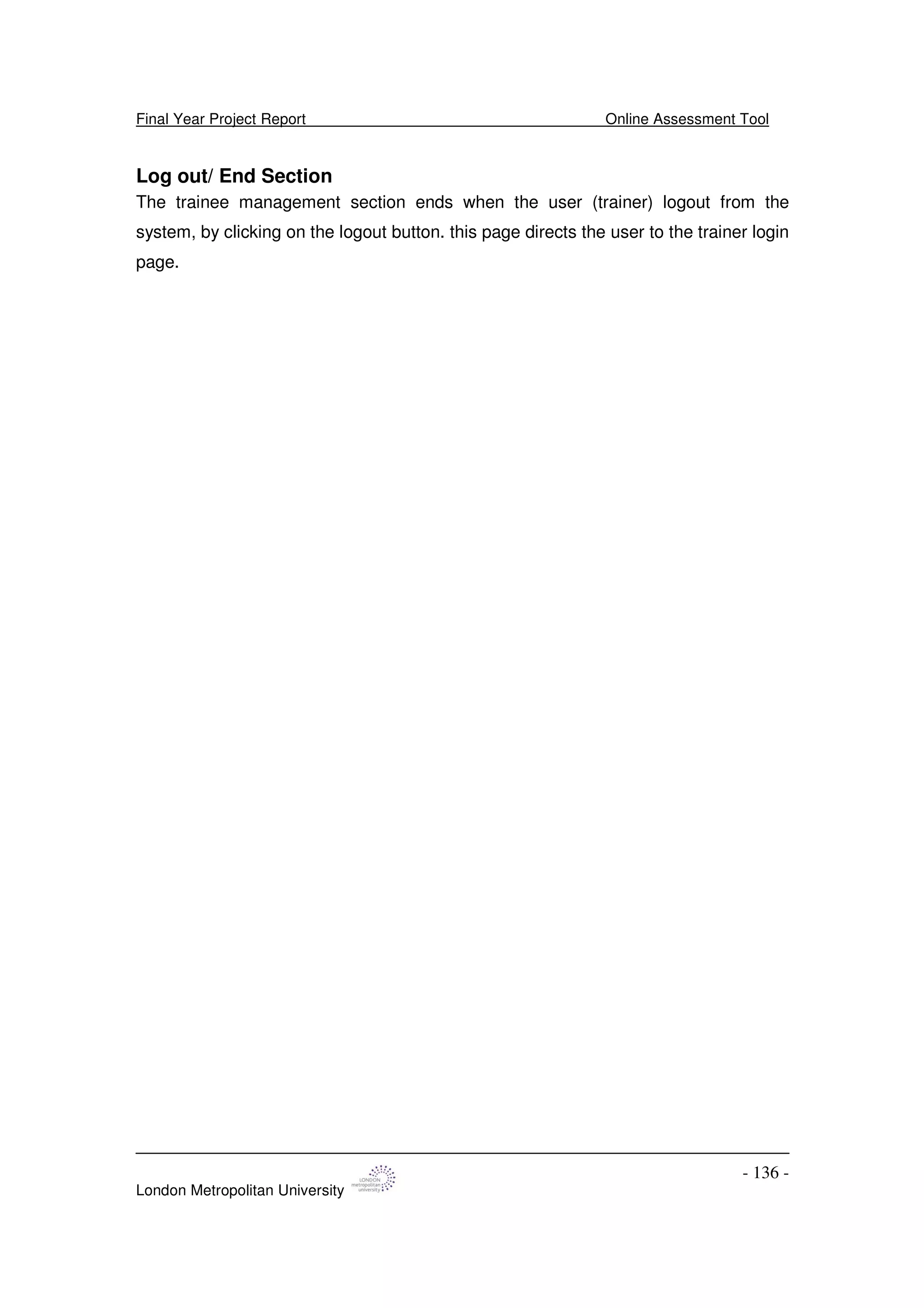
Delete Confirmation - 134 -
Modify/Update Trainee Details - 135 -
Update Confirmation - 135 -
Log out/ End Section - 136 -
Assessment Management Session - 137 -
Display/View Assessment - 137 -
Add Assessment - 137 -
Delete Assessment - 138 -
Logout/ End Section - 139 -
Access Security and Validation - 140 -
CHAPTER 11: TRANSITION PHASE - 141 -
Testing - 141 -
Introduction - 141 -
Creating a test plan - 142 -
Unit Testing - 142 -
System Testing - 143 -
Trainer: Trainee Management Section - 145 -
Trainer: Assessment Management Section - 150 -
White-Box Testing - 156 -
CHAPTER 12: PROJECT OVERVIEW AND CONCLUSION - 158 -
Problems Encountered - 158 -
Experience Gained - 160 -
APPENDIX 1 - 161 -
Installation Guide - 161 -
Requirements - 161 -
Installation Instructions - 161 -
Notes after installing - 161 -
REFERENCES AND BIBLIOGRAPHY - 162 -
Final Year Project Report Online Assessment Tool
London Metropolitan University
- 8 -
Abstract
The project was develop as an online assessment tool for a retail company with
the aim of providing a convenient, effective and better way of assessing skills
competency after training in a working environment like Sainsbury’s
supermarkets.
This report analyse the improvement, impact, success and failures internet
technologies have had in an academic environment to delivering online learning
and assessing students on computer over the years likewise reviewed
technologies in developing one for a working company.
Therefore the project will develop a convenient way to test working skills online
where the users can access their portfolio to complete required assessment
within speculated time, like wise give the management users the ability to
manage the content of users at any time. The project will eliminate the paper
work situation currently used within the company.
The rational unified process (RUP) methodology was applied to structure the
development of the project.
Final Year Project Report Online Assessment Tool
London Metropolitan University
- 9 -
Acknowledgment
I would like to acknowledge and thank my supervisor Dr. Peter Oriogun for his
support and encouragement.
Special thanks also to management and staff of Sainsbury’s supermarket for
their understanding and help during my fact finding mission.
Thanks to all London Metropolitan University friends and classmate who have
one-way or the other been part of this project.
Special thanks also to Adenike Kotun-Jolaoso for your moral support
Thank you all.
Final Year Project Report Online Assessment Tool
London Metropolitan University
- 10 -
CHAPTER ONE: INCEPTION PHASE
Project Proposal Report
Topic Area
Learning Management System
Title
Retail Online Learning, Testing (Assessment) and Training Record Management
Application.
Project Background
Over the years large companies have seen the impart information technology can
have over there daily operation and most organizations are increasingly managing
work, and making decisions using electronic information [1]. This according to [2]
has lead United Kingdom largest companies investing an average of £1.5 m per year
on their staff training, but within Sainsbury’s Supermarket Ltd, staff compliance
training is still manually managed as an in-house program and is delivered in form of
workshop, course, conferencing and meeting. Some of the trainings require the
staffs having a paper test-your-knowledge (TYK) assessment at the end of the
training program for record and due diligence purpose.
This project therefore aim to develop an application that allow Sainsbury’s
Supermarket Ltd automate their staff testing technique after training.
J Sainsbury plc is a leading UK food retailer with interests in financial services. It
consists of Sainsbury's Supermarkets, Sainsbury's Local, Bells Stores, Jackson’s
Stores and JB Beaumont, Sainsbury's Online and Sainsbury's Bank. It employs
148,000 people [3].
With the provision of computer-based training and assessment, it will reduce cost on
training, progress for user can be at his or her pace and convenience, allow for
monitoring, reduce training time and final test will ensure materials have been
understood.
Final Year Project Report Online Assessment Tool
London Metropolitan University
- 11 -
Skills
During the development of this project I will be applying computing, information
technology technical and business skills acquired over the years in the
implementation of a standard final product.
Some of these will include;
Project Management: I will be using past experience and knowledge of project
management tool to organizing and managing resources in such a way that the
project is completed within defined scope, quality, time and cost constraints.
Database: The project will involve the use of database for collection of staff records
or data when required. I have worked and can query on both Oracle and Microsoft
access database system using SQL when need be.
Business and System Analysis: the use of business analysis technique will help to
understand Sainsbury’s’ supermarket need and align the online tool development to
need.
Software Engineering Methodology: With previous skills on software engineering, I
will be able to identify and apply software engineering methodology to the project
development from analysis, specification, design, coding, testing to quality
assurance stage.
Developmental Platform: The platform at which the application will be develop is
most important to allow it to cut across different operating platforms. The application
aims to be distributed along different stores of the company. I will be applying my
java experience in developing the application, based on a java platform using the
Java EE (Enterprise Edition) which as various APIs and useful for multi-tier client-
server enterprise applications.
Web (Script) Programming Language: Been an online package and its distribution
needs. I will need to apply knowledge of web scripting, some of which are, PHP,
Active Server Pages (ASP), hypertext mark-up language (HTML) and JavaScript.
Programming Language: The development of the application interface and backend
connection will involve some programming language skills; over the years I have
gained knowledge and understanding, and can program using Java. For this project I
hope to study and understand more about the programming language.
Others: Object Oriented Design using Unified Modelling Language (UML).
Final Year Project Report Online Assessment Tool
London Metropolitan University
- 12 -
Key Phrases
Project management, Database (Database Management System), Business system
analysis, Software engineering methodology (RUP), Development platform (J2EE
and Microsoft.NET), Web (Script) programming language and Java programming
language
Features
The project is to develop a standard online testing and assessment tool for
Sainsbury’s Supermarket Ltd.
Proposed functionalities will include features like:
Trainee Users Functionalities
1. Members will be able to sign into the system by entering their username and
password
2. Members will be able to view their details
3. Members will be able to search for assessment within the system
4. Members will be able to complete assessment
Trainer Users Functionalities
1. Trainers will be able to sign into the system by providing their username and
password in order to perform tasks
2. Trainers will be able to add new members and their corresponding details into
the system
3. Trainers will be able to delete/update existing member’s records from the
system
4. Trainers will be able to generate reports on the system day-to-day routine
5. Trainers will have unrestricted access to view their own details as well as
trainee details
Application System Functionalities
1. The system will provide multiple functionalities for the users, where they can
login and access different functionalities within their system interface.
2. The system will provide stable, safe and secure environment, in which to
store and retrieve assessment information such as tests and grades.
Final Year Project Report Online Assessment Tool
London Metropolitan University
- 13 -
3. The system will provide security features to control users’ views and
maintenance use’s rights.
4. The system will provide different types of questions -- supporting true-false,
multiple-choice, short-answer, and essay (extended answer) questions.
5. The system will restrict the ability to add, update, or delete certain data to
designated users (Trainer)
6. The system will provide the ability to construct simplified data views by hiding
unused fields
Researching:
• To Review Sainsbury’s business model, understanding and analyse
Sainsbury’s business need
Activities: Research Sainsbury’s business model used by their
training team.
Deliverables: Section for report.
• To review user experience methodology
Activities: Research into methodologies and apply most
suitable
Deliverables: Section for report.
• To investigate and evaluate different application development technologies in
developing a reliable online tool
Activities: Read literature, manuals and surf the Internet for
various platforms for developing distributed application and
storing database.
Deliverables: Section for report.
• To design and implement the application
Activities: Analyse all the information collected and come up
with the requirement specification. Select appropriate method
and design. Implement an online testing and assessment
application.
Deliverables: Requirement specification, justification of the
chosen development technology, featured online service,
programming language, communication protocol, Requirement
Final Year Project Report Online Assessment Tool
London Metropolitan University
- 14 -
Analysis documentation, Evaluation of design following testing
and implementation.
Required Resources
The internet, libraries, Java development text book, Programming language text
books, database text book, Text Pads Editor, Java development kit (jdk1.5),
Database platform. Hardware will include a personal computer storage device
(USB).
Planned Tasks For First Semester:
Table 1: Planned Task
Project Coordinator: Dafna HardBattle...................................................................
Supervisor: Dr Peter Oriogun.........................................................................
Date: 29/10/2007
Week Project items
1 Oct. 07 Task from clients and details
2 Draft of preliminary project/business proposal
3 Research and relevant reading
4 Project proposal and review
5 Specification, literature review
6 Gather data on research and interview
7 User requirement
8 Functional and non-functional requirement review
9 Design and model the system
10 UML Diagram, Database design
11Dec. 07 Site and form design
BREAK Validate and reviewing
12 Jan. 07 Review and presentation (interim)
Final Year Project Report Online Assessment Tool
London Metropolitan University
- 15 -
Interim Assessment Report
Aim
The project aims to automate assessment technique for Sainsbury’s supermarket
Ltd by developing an online tool to improve ways of conducting assessment after
training. The proposed system will be a web-based application tool.
Objectives
The objective of this project is to develop an online assessment tool that allow
• User to complete a training assessment online
• User to create and update a trainee record of assessment
• User to manage a training assessment record
The assessment tool will focus on training assessment. There are three (4) areas of
training and development within Sainsbury’s Supermarket Ltd which are
Training
1.Essentials
Training
2.Legal &
Compliance
Training
3.Role Specific
Training
4.Personal
Development
Training
Fig 1: Sainsbury’s Training Requirements
1. Sainsbury Essentials Training:
2. Legal and Compliance Training:
3. Role specific Training:
4. Personal Development Training:
Not all of these training are assessed at the end of training activities while training
record for a particular staff depends on the position within the company. For example
a supervisor training record will include (1), (2), and more of (3) while an ordinary
colleague just joining the company will have to complete (1) and (2) only.
Final Year Project Report Online Assessment Tool
London Metropolitan University
- 16 -
Functional Requirements
1. This tool should be an on-line application and should be user friendly
2. All trainee and trainer will have to login to the system using their unique
username and password. Should keep the trainee and trainer details secure
and confidential.
3. The portal should allow trainer and trainee into different applications
interface.
4. Trainers should have full access into the system to manage and organize the
question time, add new questions and update existing assessment records
frequently. The system should provide for multiple choice and descriptive
questions.
5. Trainers will be able to manage trainee records this will include adding a new
trainee, modify and delete trainee personal information on their records.
6. Trainers will be able to generate weekly and monthly trainee assessment
reports. This report will be trainee record to be completed (expired) and
records that have been completed.
7. Trainees will be able to access their personal record
8. Trainees will be able to complete an assessment: by displaying the question
and answer the questions in the assessment, save the assessment, should
be able to display the question and answer the questions in the assessment
and display results of assessments.
9. Trainee should see “Displayed” Results immediately
Key Issues
The main issue for this project is to provide a convenient, effective and better way of
assessing (1) Legal and compliance training (2) job specific skills competency after
training in a working environment like Sainsbury’s supermarkets. This process of
training and assessment in the company has always been conducted and still based
on paper technique.
Sainsbury’s is a retail company with around 148,000 staffs across the country; the
company is mandatory to continuously train and retrain newly recruited and existing
staffs on different laws and regulations to conform with government set standard
Final Year Project Report Online Assessment Tool
London Metropolitan University
- 17 -
within the retail industry in UK, likewise it is required to train and assess staffs
competency for job specific roles.
The constant change in government law in the retail business makes it most
important for the retail companies to constantly train, retraining and updating their
staffs training record. Some of this law include age-restricted product, fire training
that need to be completed twice in a year. While managers on their part are required
to undertake specific job training that includes Retail Law, Health and Safety, food
safety, licence to count and code checking. Most of the trainings are legal
requirements therefore they must be available for due diligence purpose and
auditing.
With this application, it will allow personalised training according to individual needs;
it will reduce issue of lost paper and save time and effort, update system as training
is completed and monitor training required by each colleague. Therefore with the
application of information technology process, this project aims to improve ways of
conducting assessment after training by automating the process.
Project Justification
At present the assessment technique in Sainsbury’s is paper based, therefore this
project will develop a tool more efficient than their current assessment technique.
Advantages
With the provision of computer-based training and assessment for Sainsbury’s
supermarket ltd, it will reduce cost and time on training/assessment, progress for
user can be at his or her pace and convenience, allow for monitoring each trainee,
reduce training time and final test will ensure materials have been understood as
required.
Concern
• Considering the level of colleagues’ knowledge and Information Technology
skills and experience. The project aims to make the tool simple, which will
include, support for multiple choice questions and descriptive options where
required.
Final Year Project Report Online Assessment Tool
London Metropolitan University
- 18 -
• Likewise I am at present contemplating on the best technologies to apply in
the development of the application at the implementation stage so as to meet
the core functional requirements of the system.
• Considering the time left for the submission of the final document, I hope I will
be able to complete all stages of the project development.
Research
At present I have researched into the improvement, impact, success and failures in
which the Internet technologies have had in an academic environment to deliver an
online or computer technique in assessing students’ ability over the years.
I have identified specific types of job skills to be assessed after training at work
within Sainsbury’s, the importance of training in retail and how the computer or
Internet assessment techniques in academic environment can be applied into a
working environment. Also I have researched into types of training at work,
technologies in developing online based systems and understanding different
process models with rational unified process (RUP) in particular in developing online
applications. All these have been developed into a literature review report.
I have completed tasks to understanding Process Model (Methodology), Project
Management; Work Breakdown Structure, Gantt Chart, Pert Chart, Project Outcome
(Milestone) and Dates and Risk Management.
I have almost complete inception stage of the project that includes the project
management, requirement gathering (vision document) and business model.
Current Status and Summary of completed project deliverables
Having just started the analysis model of the elaboration stage, I am currently
developing materials for the class diagram, interaction diagrams using the
collaboration and sequence diagram techniques. I have also been looking in the use
case realization at the analysis model. This will lead me to the design stage on
completing the analysis model.
Project management-related deliverables:
• Business Case/Model Report
• Analysis Model and Analysis Architecture Report
• Vision Document
Final Year Project Report Online Assessment Tool
London Metropolitan University
- 19 -
• Resources Management: WBS, Schedule, Gantt chart, Pert chart
• Initial Project Proposal
• Final Project Proposal
• Literature Review Research (Report)
• Understanding Process Model (Methodology)
• Risk Management
Final Year Project Report Online Assessment Tool
London Metropolitan University
- 20 -
CHAPTER 2: LITERATURE REVIEW OF ONLINE
TRAINING, LEARNING AND SKILLS ASSESSMENT
Abstract
In the process of developing an online assessment tool for a retail company with the
aim of providing a convenient, effective and better ways of assessing skills
competency after training in a working environment like Sainsbury’s supermarkets.
The literature review report analyse the improvement, impact, success and failures
internet technologies have had in an academic environment to delivering learning
online and assessing students on computer over the years. At present the
assessment technique in Sainsbury’s is paper based, therefore the literature
reviewed and identified specific types of job skills to be assessed after training at
work, the importance of training in retail and how the computer or internet
assessment techniques in academic environment can be applied into a working
environment. These include types of training at work, technologies in developing
online based systems and understanding different process models with more
emphasis on rational unified process (RUP) in developing online applications.
Final Year Project Report Online Assessment Tool
London Metropolitan University
- 21 -
Introduction
This project literature review aims to define, identify and provide an overview of
different topics and trends related with online skill assessment at work. This will
include terms, benefit, issues and the concept of job specific skills and competency
testing after training at work.
• An overview of online assessment, related terms and it benefit to work place
• Issues on learning and training tools and developmental technologies
involved
• Concept/Impart of electronic learning environment at work; the implications
for company, learners and trainers
These literature will research to understand how skill assessment at work can be
measured and implemented, understanding difference in work skills testing and
academic testing, with the aim of delivering computer based online assessment tool
for Sainsbury supermarket Ltd, a working-learning environment that deals with Job
specific skills.
Final Year Project Report Online Assessment Tool
London Metropolitan University
- 22 -
Online Assessment Background
With the advent of the computer and the Internet, different online learning
technologies have been developed to streamline and speed up learning process.
Some of their uses in education are; online assessing, which is use for testing as it
provides feedback, electronic portfolio; which serve as records of learning, growth,
and change, as well as provide meaningful documentation of students'abilities and
electronic submission of written assignments.
In incorporating the online assessment techniques to a working environment like
Sainsbury’s supermarket Ltd, the company can benefit in using computers in
assessing it staffs by, monitoring staffs response, marking large numbers of test
quickly and accurately, offering assessment in an open access environment, storing
and reusing assessment, randomly selecting assessment questions to provide a
different paper to each staffs and immediately giving back feedback to staffs.
Sainsbury plc is a leading UK food retailer with interests in financial services. It
consists of Sainsbury's Supermarkets, Sainsbury's Local, Bells Stores, Jackson’s
Stores and JB Beaumont, Sainsbury's Online and Sainsbury's Bank. It employs
148,000 people [8].
Job specific skills within a company like Sainsbury’s or any other retail company are
skills necessary to do a specific job e.g. stock control needs to know how to count
and apply his or her numeric skills, code checking to identify products expiry date,
ability to load and unload products, ability merchandise products, checkout and first
aid skills. The skills are often gained from specialised training and education or
experience on the job [2]. This Job specific skill training within Sainsbury does
ensure colleagues know what they need to do to be effective within the job role they
are being asked to perform. This training will indicate an employee’s ability to do a
job, and each reveals different employee qualities. This skills are the skills needed to
some degree in every job—skills such as reading, writing and math [1].
Understanding Online Assessment and Online Testing
Testing and assessment are words that will be interchange within the literature
review, both has a relatively same meaning. Assessment is the process of
documenting, usually in measurable terms, knowledge, skills, attitudes and beliefs
while testing is an examination (or "exam") often administered on paper or on the
Final Year Project Report Online Assessment Tool
London Metropolitan University
- 23 -
computer, intended to measure the test-takers'or respondents'(often a student)
knowledge, skills, aptitudes or many other topics (e.g., beliefs).[4]
Online assessment is the use of information technology for any assessment-related
activity, used primarily to measure abilities, to demonstrate what has been learned
after a particular training event that have occurred at the end of an instructional unit
or chapter or when assessing practical abilities or to demonstrate learning that has
occurred over a longer period of time an online portfolio (or portfolio) is often used [3]
Skill testing has been in existence over a long time, as it has been use at work in
hiring and selection practices in the past such as such as police lieutenants’ exams
[1], while computer have been used to assess candidates for decades too. The
software for assessing candidates’ have been commercially available since the
1990s which was often referred to as computer-assisted assessment (CAA) [6]
Final Year Project Report Online Assessment Tool
London Metropolitan University
- 24 -
Why Online Skills Assessment at Work?
There are more benefits to using an online assessment tool at work than the
traditional paper testing technique that requires vast amounts of administrative time
and loads of paper work. According to Bobby Elliott (2007) assessment practice from
the beginning of the 20th century exhibited the characteristics of mostly paper-
based, within a classroom-setting, which is much formalised (in terms of
administration), likewise is highly synchronised (in terms of time and place) and
highly controlled (in terms of contents and marking). The growth in the Internet over
the last decade has been phenomenal. In the UK it has moved from being the
domain of academics and IT professionals to a medium accessed by over 71 per
cent of the working age population [19].
The move to on-line and computer based assessment in an academic environment
is not only a natural outcome from the increasing use of information and
communication technologies to enhance learning but also to allow for flexibility in the
administration and delivery of assessment to fit with the purpose at which it is
intended for. This for some reasons can be applied to a working environment where
the condition is not always stable, as training and development is a continuous
process thought-out the year round, due to changes in legislations and movement of
staffs (leaving and newly recruited). This can therefore allow online assessment
adapted to target individual need, where the organisation can create personal
records for documentation, decision and any other related activities.
Importance of Training and Testing in Retail
Other area of training and skills assessment that the project aims to cover is the
legal and compliance/mandatory skills that are required within the UK law for all
staffs to be trained and assesses on. According to British Retail Consortium,
requirements of retailers and retail activities can change frequently, and there are
many areas of legislation affecting them. These areas of legislation that frequently
change, requires retailers to ensure they are fully up-to-date with the law, in order to
comply with the retail regulations. Some of these laws are health and safety issues
at work, age restricted sales, as it is illegal to sell certain products to people under a
specified age, dangerous machinery and many more.
Final Year Project Report Online Assessment Tool
London Metropolitan University
- 25 -
The compliance or jobs specific are not taught in the traditional classroom, it involves
training incumbent or new employees into their jobs using different training
techniques. These include Mentoring with another employee, One-on-one with
trainer, workshops and seminars and sometimes Classroom courses, not very
popular because of cost of losing large number of staffs in a day to training. The end
of this training still requires paper testing the staff to show his or her knowledge of
skills training which is quite different from an academic learning environment.
Types of Assessment
In a higher education, examinations and assignments are the two most commonly
used approaches, different methods of assessment provide the means of ensuring
that students are able to demonstrate the range of their abilities in different contexts.
An examination defines the conditions under which students abilities will be tested
while assignments are unsupervised pieces of work that often combine formative
and summative assessment tasks. They usually restrict the time and place where
the assessment task will be performed. Negotiated and computer-based
assessments are emerging approaches that are gaining popularity among some
disciplines. Negotiated assessment involves agreements between staff and students
on issues associated with learning and assessment [7]
There are different methods of assessing; these methods can come in different
forms. Stiggens (2005) groups methods of assessment into 4 main categories:
Selected Response; Essays; Performance Assessment and Personal
Communication. Each category has advantages in assessing different learning
outcomes.
Selected Response
Multiple Choices Questions: Select the correct answers
Short Answer Question: Short, usually descriptive, qualitative, answers of between
words to over a page. Might include diagrams with explanation
Essays
Essays: Written work in which students try out ideas and arguments supported by
evidence
Poster Presentation: Display of results from an investigative project
Final Year Project Report Online Assessment Tool
London Metropolitan University
- 26 -
Written Report: Methodically written account of a project or investigation
Performance Assessment
Case Studies: Describes a scenario and asks students to respond as the scene
changes
Practicum: Assessment of practical skills in an authentic setting
Projects: In-depth exploration of a topic or field
Reflective Journals: Develops an awareness of process
Personal Communication
Class Presentations: Oral reports on projects or other investigative activities
Interview: Verbal interaction between assessor and assessed
Learning Contract: A structured method whereby the student designs and
implements manageable learning activities in consultation with a staff advisor
Assessment Methods and Techniques
They are different assessment method and techniques used within a retail sector
that are used in understanding and assessing skills and knowledge learning
outcome of staffs in different training programmes. The criteria for assessing a
particular learning outcome need to be valid, reliable and impartial of learners and
training program [10]. The two most important methods in the retail industry are
Multiple-Choice Questions (MCQs) this is a subset of what are referred to as
"objective questions". Objective questions are questions, which have a correct
answer (usually only one). The term "objective" here means there is complete
objectivity in marking the test [7] and short answering question, these questions vary
in expected student response from one word or several lines to over a page, and
include forms such as complete the sentence, supply the missing line, problems and
exercises in science-based subjects, short descriptive or qualitative answers, essay
plans, diagrams with explanation, etc [7].
Final Year Project Report Online Assessment Tool
London Metropolitan University
- 27 -
Applying Computer into Assessment
The application of computer into assessment can be positive and negative
depending on how it is implemented. Technology, in the form of computer-based
testing, learning and knowledge management systems, helps by giving learning
professionals quicker analysis of skill gaps and training targets and by managing the
flow of information about company and employee needs, knowledge and
performance over time [1]. Technology offers an added dimension to the link
between testing and training, many companies use computer-based testing use
scores for hiring and selection, but those scores can also be reused to target training
with the help of a learning management system (LMS) or a knowledge management
system (KMS). Computer technology enables the effective use of test data and
efficient implementation of decisions based on the results. Technology tools exist to
help with all components: job analysis and skills profiling; test delivery, scoring and
reporting; and data management. A good job analysis and skills profiling tool can
help manage task lists, coordinate input from remotely located subject-matter
experts and handle the rating and ranking activities needed to establish sound
descriptions of job requirements—the first step in effectively using test results.
In the delivery of tests, automating the presentation of test items may or may not be
desirable depending on the organization’s security needs and logistical constraints.
But automated scoring (which avoids labour commitment and human-introduced
errors in checking answers and recording scores) and speedy reporting of results
are always preferable. Further, management of testing data, associated with
targeted training performance and job assignments, can be leveraged through an
LMS. [1]
From the beginning of this review online assessment and computer-assisted
assessment has been used in different forms. This section of the report will clarify
the difference, if any, in both terms. Online assessment is the use of information
technology for any assessment-related activity, used primarily to measure abilities,
to demonstrate what has been learned after a particular training event that have
occurred at the end of an instructional unit or chapter or when assessing practical
abilities or to demonstrate learning that has occurred over a longer period of time an
online portfolio (or portfolio) is often used [3]. Computer-assisted assessment (CAA)
refers to the use of computers to assess students’ progress. The assessments can
Final Year Project Report Online Assessment Tool
London Metropolitan University
- 28 -
vary in format: either consisting of a pre-printed paper test on to which students mark
their responses, which are then processed automatically using an optical mark
reader; or involving the direct input of students’ responses into a computer terminal
[11]. The definition for both terms shows no difference in their meaning as I think the
words can be interchanged in their use.
Impart of New Tools and Technologies on Assessment
There are other related terms involve in the application of technology in education,
some of these have been successful while some are still growing. With the advent of
web 2, newer technologies is making more products and services available to the
users, which is making education simpler and more assessable to all the people that
may have thought of not studying in there particular situation. Academic institutions,
students, educationist and companies have applied some of these technologies in
their daily management of training, learning and teaching. These technologies are
important in their own ways.
Web 2.0" hints at an improved form of the World Wide Web. Technologies such as
web-logs, social bookmaking, wikis, pod-casts, RSS feeds (and other forms of many-
to-many publishing), social software, web application programming interfaces (APIs),
and online web services such as eBay and Gmail provide a significant enhancement
over read-only websites [12]. The word web2 is still controversial as different people
have different perspectives about the word and the technologies involve. Social
networks tool e.g. blogs and social network sites e.g. my space and face book.
Social network services are primarily web based and provide a collection of various
ways for users to interact, such as chat, messaging, email, video, voice chat, file
sharing, blogging, discussion groups, and so on [13].
In recent years, significant work as been done in area of web 2.0 and its impart on
educational tools and materials. The power of the people where collective
intelligence that can be harnessed from large groups of people that will be using the
system at the same time. its generally not yet fully accepted by all at this point in
time but the future can bring certain themes into the educational world, where there
will be greater focus [18] on global education, emergence of new skills to better fit
Final Year Project Report Online Assessment Tool
London Metropolitan University
- 29 -
the networked information economy, greater role for e-learning (including mobile
learning) and greater recognition of informal learning.
Understanding Online Teaching and Learning
Electronic learning
Electronic learning or e learning is a general term used to refer to computer-
enhanced learning. It is used interchangeably in so many contexts that it is critical to
be clear what one means when one speaks of 'e-learning'. In many respects, it is
commonly associated with the field of advanced learning technology (ALT), which
deals with both the technologies and associated methodologies in learning using
networked and/or multimedia technologies [14]. The most vivid importance is that
learners can access learning without the cost, disruption, transportation and timing
problems involved in attending courses at a particular location.
Distance education
Distance education or distance learning, is a field of education that focuses on the
pedagogy/andragogy, technology, and instructional systems design that aim to
deliver education to students who are not physically "on site". Rather than attending
courses in person, teachers and students may communicate at times of their own
choosing by exchanging printed or electronic media, or through technology that
allows them to communicate in real time [15].
Blend learning
Blend learning is the combination of multiple approaches to learning it can be
accomplished through the use of 'blended'virtual and physical resources. the
process can involve combination of technology-based materials and face-to-face
sessions used together to deliver instruction.[17]
Final Year Project Report Online Assessment Tool
London Metropolitan University
- 30 -
Learning Management Tools and Technologies
Online assessment tool at workplace will require some form of management, where
staff details, records and test data can be monitored, stored and reused. This brings
about the important learning environment that enabling the management, delivery
and tracking of online and blended learning. Learning management systems is a
software package that create virtual school environments, it enables the
management and delivery of online content to learners as most learning
management systems are web-based, it facilitate "anytime, any place, any pace"
access to learning content and administration [16]. There are loads of such platforms
available, ranging from commercial solutions offerings such as Blackboard, WebCT,
Saba Software, Apex Learning and Desire2Learn to open source solutions such as
Moodle, First Class, and Interact. According to Michael Winter, the question of which
LMS software to use has been a complex question to users in the past. In February
2006, Michael Winter report shows that blackboard and moodle share the largest
market which makes them the most popular learning management system in all that
is available. Wikipedia article on blackboard and moodle shows how blackboard is
a licenses software applications use in managing e-learning, processing transaction
and e-commerce, and online communities, it is said to be used by over 2200
education institutions in more than 60 countries while moodle is a free software e-
learning platform, it has a significant user base with 25,281 registered sites with
10,405,167 users in 1,023,914 courses. Moodle is designed to help educators create
online courses with opportunities for rich interaction. Its open source license and
modular design which means people can develop additional functionality and
development is undertaken by a globally diffused network of commercial and non-
commercial users.
Final Year Project Report Online Assessment Tool
London Metropolitan University
- 31 -
Disadvantages and Issues Related To Online Assessment
One of the more pervasive issues in an online assessment tool is the old concern
about ethical practices in assessment which is cheating; the other one is that online
assessment tool cannot mark essay questions. Assessment-driven training can be
very productive when done right [1] Despite the widespread use of computers in
teaching and learning, their use for assessment have only been limited. There is a
tendency to associate computer-based assessment with automated multiple-choice
questions, possibly because it was one of the earliest uses of computer
technologies. Computer-based assessment not only automates routine tasks like
marking multiple-choice questions, but also can enrich student’s learning
experiences [7]. Other issues with online assessment as stipulated by Netskills
Quality Internet Training; are security issues involve with the products on internet,
disadvantaged people without IT skills, having less control of assessment condition,
incurring high development cost and trainers wiliness to develop questions and
computerise them. The content of online assessment will be required to be updated
regularly with a fast moving retail company, because of the rapid change in the law
and legislation. Also staffs can be too more familiar with the test content if standard
needs to be maintained.
The issues with online assessment will be elaborated more in the following
paragraph.
Security is a key concern in an online assessment; the security of test content can
be breached or compromised when it is copied without authorization. Wikipedia
article refers to Internet security as techniques for ensuring that data stored in a
computer cannot be read or compromised by any individuals without
authorization.other issue with security is the authenticity and identity of the individual
taking the assessment. It will require system understanding that the person sitting for
the test is the real person; this brings the discussion close to the control of fraud in
assessment tool. Cheating in online assessment can occur in different form, British
pathology society article shows that candidate can alter time and try to obtain
questions in advance.
Data Protection information held by staffs on the computer will be passed form one
location to another on Internet and will be viewed by the human recourses mangers
Final Year Project Report Online Assessment Tool
London Metropolitan University
- 32 -
or the trainers. This therefore requires the company to protect the information of its
staffs, as the content of online assessment will involve the Internet. It is a legal
requirement in UK which as an act of parliament. The act defines a legal basis for
the handling of information relating to living people; it is the main piece of legislation
that governs protection of personal data in the UK. For the design of the high
security level online tool consideration will be given to develop a secure server, data
encryption and password protection.
Test Consistency: this is where the system guarantees that if the programmer
follows the rules, memory will be consistent and the results of memory operations
will be predictable. This will involve the consistency of data and interface, in
delivering such consistency it will be best to develop the application on a platform
that will allow for it to be consistent. Issues around consistency will include
consideration for hardware and the implementation of the software on different
operating system. Technology support and Interoperability: Microsoft defines
interoperability as systems that work together. Consideration should be given to
developing the application to allow it working with other components to create a
robust system. Issues to consider are that the application should be able to cope
with vast demand, it should be available when needed and required and should
download effectively.
Final Year Project Report Online Assessment Tool
London Metropolitan University
- 33 -
Technologies for Developing Online Applications
Development of online assessment will involve different technologies to allow it meet
up with a standard online application. This will involve its implementation on
computer as basic requirement. Considering wikipideia article on products
development on online assessment related products like learning management
system, electronic portfolio, e-learning and online applications. The technologies
involve are similar and will be analysed for consideration in the implantation of online
assessment application as they can be related to online application.
Considering the number of people to use the application at a time from different
locations, the arithecture design will be of concern. It will involve delivering the
system from a remote or central location using the company Intranet or Internet (web
server). The other concern is the method and technologies required in the
development of the application requirements and the platform. Some of the
requirements to consider are, creating online quiz or questions, database to hold
questions and staff data and interactive interface design. Some of the technologies
that can be use in developing meeting these requirements will be analyse below.
The first part is considering the programming language; the development of the
application interface and backend connection will involve some programming
language skills. There are different programming languages available to use in the
development of applications. These programming languages according to wikipedia
article programming language are artificial language that can be used to control the
behaviours of a machine, particularly a computer. Programming languages, like
natural languages, are defined by syntactic and semantic rules, which describe their
structure and meaning respectively. Many programming languages have some form
of written specification of their syntax and semantics; some are defined only by an
official implementation. Examples of programming language are Java, C, C++,
Fortran, Pascal and Visual basic. Wikipedia article defines Visual Basic (VB) as a
third-generation event driven programming language and associated development
environment from Microsoft for its COM programming model. Visual Basic was
derived from BASIC and enables the rapid application development (RAD) of
graphical user interface (GUI) applications, access to databases using DAO, RDO,
Final Year Project Report Online Assessment Tool
London Metropolitan University
- 34 -
or ADO, and creation of ActiveX controls and objects. Scripting languages such as
VBA and VBScript are syntactically similar to Visual Basic, but perform differently
while C++ is a general-purpose programming language with high-level and low-level
capabilities. It is a statically typed, free form, multi-paradigm, usually compiled
language supporting procedural programming, data abstraction, object-oriented
programming, and generic programming.
Java’s ability to compile to byte-code, which can run on any Java virtual machine
(JVM) regardless of computer architecture, makes it one of the suitable
programming languages in developing web applications. Wikipedia article defines
Java as a programming language originally developed by Sun Microsystems and
released in 1995 as a core component of Sun's Java platform. The language derives
much of its syntax from C and C++ but has a simpler object model and fewer low-
level facilities while JavaScript is a scripting language most often used for client-side
web development. It is a dynamic, weakly typed, prototype-based language with
first-class functions. it does not relate with java programming language but use the
same syntax.
Other Web (Script) programming languages are Active Server Pages, which is a
Microsoft’s server-side script engine, used for dynamically generated web pages.
HTML (hypertext mark-up language) is the predominant mark-up language for web
pages. It provides a means to describe the structure of text-based information in a
document — by denoting certain text as headings, paragraphs, lists, and so on —
and to supplement that text with interactive forms, embedded images, and other
objects.
This part is the graphic application or script that might be required in the
development of parts of the online assessment tool. Wikipedia article refers to
adobe flash, as Shockwave Flash or simply Flash, that means both the Adobe
Flash Player, and to the Adobe Flash Professional multimedia authoring
program. The adobe flash professional is used to create content for the Adobe
Engagement Platform (such as web applications, games and movies, and
content for mobile phones and other embedded devices), which can be important
for the web development of the assessment tool.
Final Year Project Report Online Assessment Tool
London Metropolitan University
- 35 -
Overview: Past Related Online Samples Products
This part of the report investigates the use and suitability of different online
assessment tool that have been developed in the past to support online assessment
activities. The report will create a literature on the features of three online software’s,
namely Easycast, Zoho challenge and Health and Safety Smart, identifying what
makes it most suitable to use for a particular purpose or group of people.
The three (3) tools offered similar features that allow it to be access from anywhere.
Easycast
Easycast® is built on robust web-based cutting edge technology, it is believed to
cuts down heavily on implementation and maintenance time and cost. it has an
intuitive interface and multi-tier reporting which it makes it have rich features that is
easily accessible to students, teachers or administrators. It has a detailed help
section that also provide it with walk-through video tutorials.[20]
Other features include:
• Easy Authoring
• Extensive Reporting
• Instant Feedback
• In-depth Progress Reports
• Summative and Formative Evaluation
Technical features include:
• Manages all the student data remotely through an application service provider
network (ASP.Net)
• Allows teachers and administrators get online authorized access to the data
repository
• Administrators can create their own assessments and control when students
can take them.
• Built to test multiple subjects.
• Robust platform; .NET technology.
Zoho Challenge
Zoho Challenge® is an online testing tool that smoothly tackles test requirements
with smart, friendly interfaces [21].
Features of Challenge include:
Final Year Project Report Online Assessment Tool
London Metropolitan University
- 36 -
• Support for multiple choice questions and descriptive questions.
• Results displayed immediately. This is configurable by the administrator.
• Time limit can be specified for a question paper.
• Difficulty levels calculated automatically
• Online access to candidates'details
• Send emails to candidates
Technical features include:
• Creating multiple exams
• Adding candidates
• Scheduling tests up to years ahead
• Taking a quick peek on your candidates'performance
• Finding out who's cleared the test in just one glance
• Viewing a "report card"
• Viewing graphical representation of the overall results of your tests
Health and Safety Smart
Health and Safety Smart® is a health and safety risk assessment tool, the system is
built using a unique engine that requires the user to respond either yes or no to a
series questions relating to the health and safety a work act 1974.
The system analyses the answers and produces a comprehensive health and safety
report. It generate health and safety action plan, which includes significant findings
relating to each area of the legislation which can be printed off once the user have
completed the online risk assessments [22].
the software website does not really focus on the technology involve in the
development of the application, but from my experience it features some
characteristics of adobe flash technology in its yes or no question development.
The use of the application will cost £349 (plus vat) for a twelve-month licence.
Final Year Project Report Online Assessment Tool
London Metropolitan University
- 37 -
Discussion and Summary
At the end of the research, I have come to the conclusion that the application is
viable as it has been applied in other fields and have serve the required purpose of
simplifying assessment process in an academic environment.
The application of computer into assessment has more of positives than negatives,
which therefore give confidence to apply the technology into a working environment
like Sainsbury supermarket Ltd.
But my concern for now is to understand the organization requirements needs, and
to develop most appropriate web application for the company.
Final Year Project Report Online Assessment Tool
London Metropolitan University
- 38 -
CHAPTER 3: ELABORATION PHASE
Business Case for Sainsbury’s Supermarket Ltd
Introduction
This document expresses the current situation in business language, not technical
terms. It demonstrates that the project team understands the current environment of
the stakeholders and the desired future state. It is important to document this in a
Business Opportunity statement so that members of the project team and all others
involved with the project have the same objectives as they move forward to the
solution design [1].
Company Background
J Sainsbury’s PLC is a leading UK food retailer with interests in financial services
and property. John James and Mary Ann Sainsbury established Sainsbury’s in 1869
and is Britain’s longest standing major food retailing chain. The founders’ principles
and values guide us strongly today as they did at the outset – to be the customer’s
first choice for food shopping by providing high quality products, value for money and
excellent service.
Sainsbury’s Supermarkets employs over 138,000 people. Of these, 70% are part-
time and 30% are full time. 58% of employees are women.
A large Sainsbury’s Supermarket offers 23,000 products – 40% of these are
Sainsbury’s own brand. In addition to a wide range of quality food and grocery
products, many stores offer bread baked on the premises, delicatessen, meat and
fish counters, pharmacies, coffee shops, restaurants and petrol stations. Sainsbury’s
Supermarkets serves over 9.5 million customers a week. Nearly 60% of our stores
are in the town centre or edge of centre locations, many of these built on previously
derelict sites.
Business Objective
The group’s objective is to meet its customers’ needs effectively and thereby provide
the shareholders with good, sustainable financial returns. It aims to ensure all
employees have opportunities to develop their abilities and are well rewarded for
their contribution to the success of the business. Its policy is to work with all of its
suppliers fairly recognizing the mutual benefit of satisfying customers’ needs. It also
Final Year Project Report Online Assessment Tool
London Metropolitan University
- 39 -
aims to fulfil its responsibilities to the communities and environments in which it
operates.
Final Year Project Report Online Assessment Tool
London Metropolitan University
- 40 -
Current Situation and Problem/Opportunity Statement
Current Situation
Training in Sainsbury’s takes many forms and in most cases is not workshop or
classroom based. We recognize that most of our managers learn best from actually
doing the job and from working alongside people with specialist knowledge and
experience. For this reason most of development will be made up of activities and
exercises which will help learner to learn a particular skill or understand a certain
procedure. The result of this will be that you will work with many people, both
managers and colleagues alike and that no two days will ever be the same. At every
stage we will provide you with the support guidance and tools you need.
Problems
At present the assessment technique in Sainsbury’s is paper based, therefore the
online tool will create a fast and efficient way of monitoring and assessing staffs
Final Year Project Report Online Assessment Tool
London Metropolitan University
- 41 -
Business Model and Stakeholders
Organisation Structure
J Sainsbury PLC
Sainsbury's
Supermarkets
Shaw's
Supermarkets
Sainsbury's
Bank
JS
Developments
Sainsbury's
Property
Company
Central Stores Local Stores
Convenience
Stores
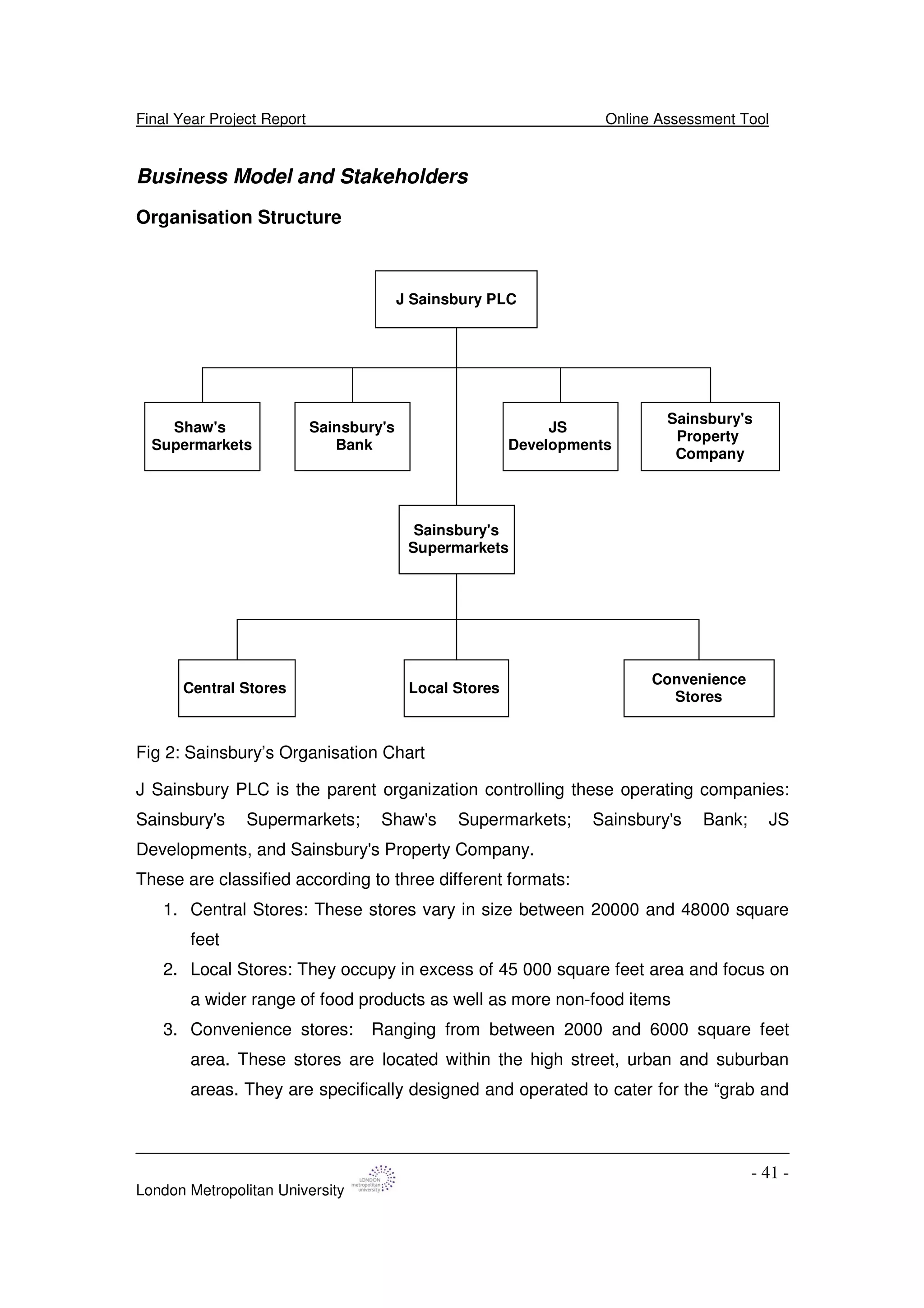
Fig 2: Sainsbury’s Organisation Chart
J Sainsbury PLC is the parent organization controlling these operating companies:
Sainsbury's Supermarkets; Shaw's Supermarkets; Sainsbury's Bank; JS
Developments, and Sainsbury's Property Company.
These are classified according to three different formats:
1. Central Stores: These stores vary in size between 20000 and 48000 square
feet
2. Local Stores: They occupy in excess of 45 000 square feet area and focus on
a wider range of food products as well as more non-food items
3. Convenience stores: Ranging from between 2000 and 6000 square feet
area. These stores are located within the high street, urban and suburban
areas. They are specifically designed and operated to cater for the “grab and
Final Year Project Report Online Assessment Tool
London Metropolitan University
- 42 -
go”, meals solutions, top up, distress and convenience customer. These
stores are typically the smallest in the estate.
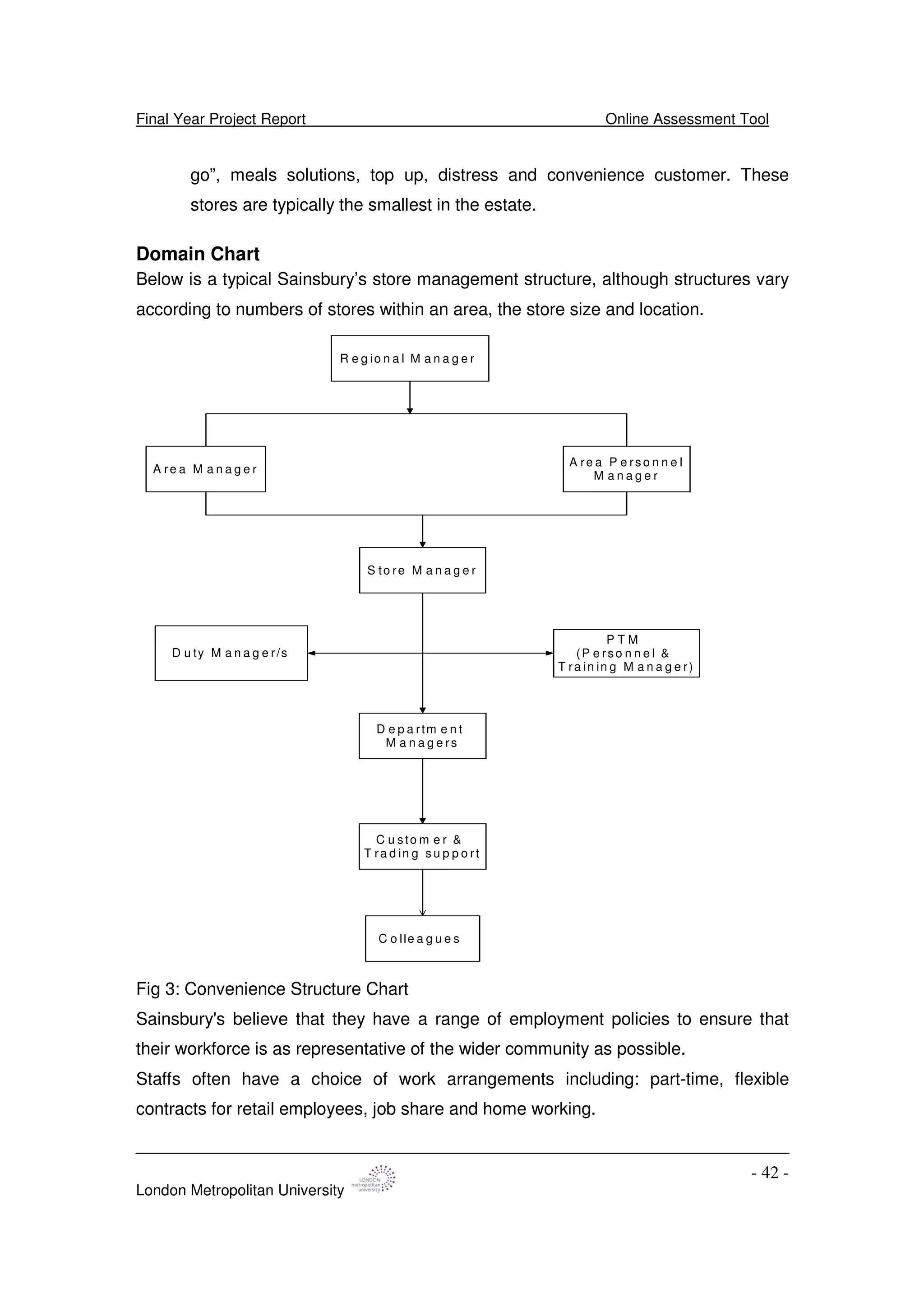
Domain Chart
Below is a typical Sainsbury’s store management structure, although structures vary
according to numbers of stores within an area, the store size and location.
A re a M a n a g e r
A re a P e rs o n n e l
M a n a g e r
S to re M a n a g e r
D u ty M a n a g e r/s
P T M
(P e rso n n e l &
T ra in in g M a n a g e r)
R e g io n a l M a n a g e r
D e p a rtm e n t
M a n a g e rs
C u sto m e r &
T ra d in g s u p p o rt
C o lle a g u e s
Fig 3: Convenience Structure Chart
Sainsbury's believe that they have a range of employment policies to ensure that
their workforce is as representative of the wider community as possible.
Staffs often have a choice of work arrangements including: part-time, flexible
contracts for retail employees, job share and home working.
Final Year Project Report Online Assessment Tool
London Metropolitan University
- 43 -
Business Use Case: Convenience Store Level
Training and Development Use Case
Use cases Training
Assessment
Update records
File record
Actors Managers (Trainer)
PTM (Trainer)
Colleagues (Trainee)
Customer & Trading Support (Trainee)
Table 2: Users Table
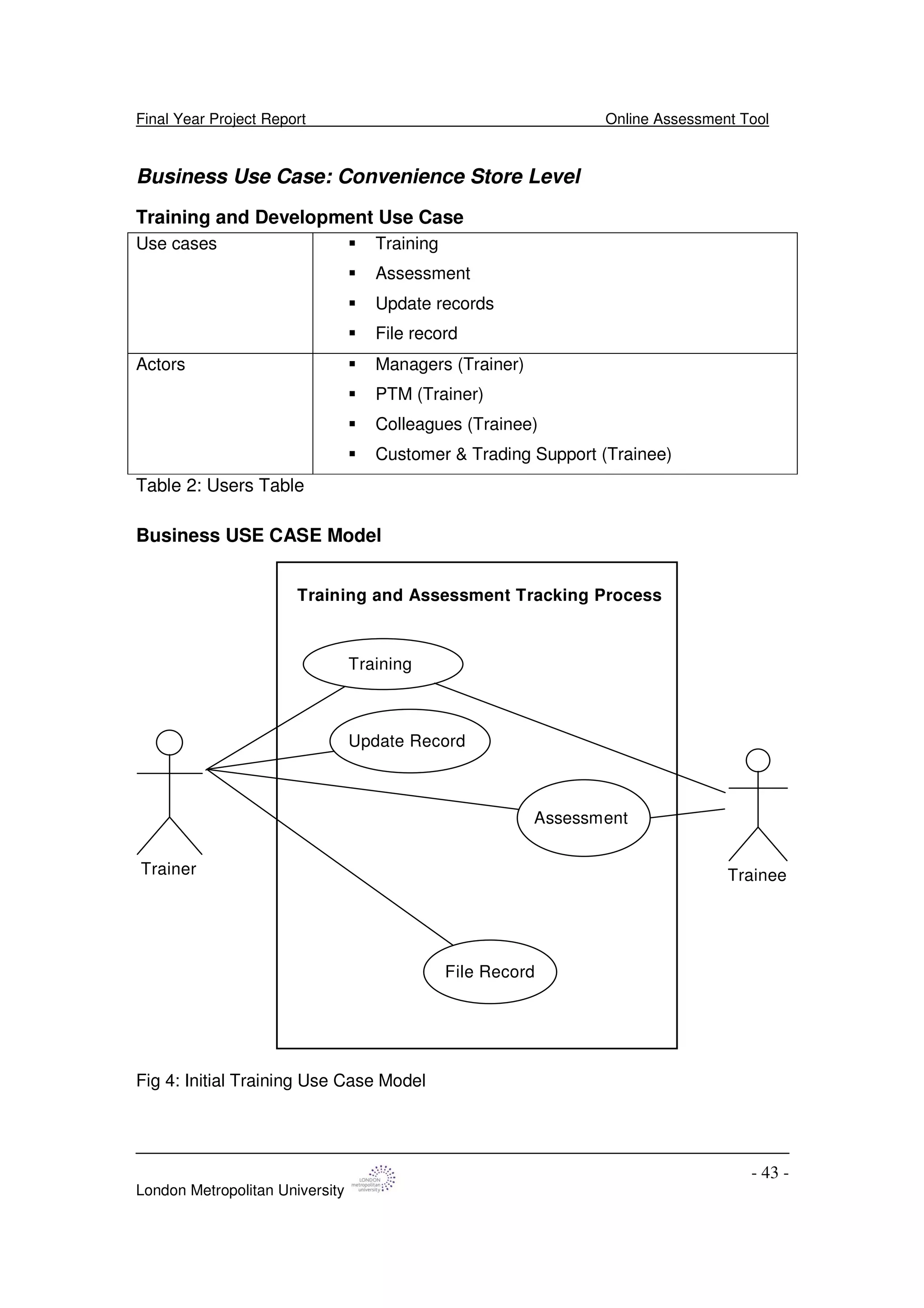
Business USE CASE Model
Training
Assessment
Update Record
File Record
Training and Assessment Tracking Process
Trainer Trainee
Fig 4: Initial Training Use Case Model
Final Year Project Report Online Assessment Tool
London Metropolitan University
- 44 -
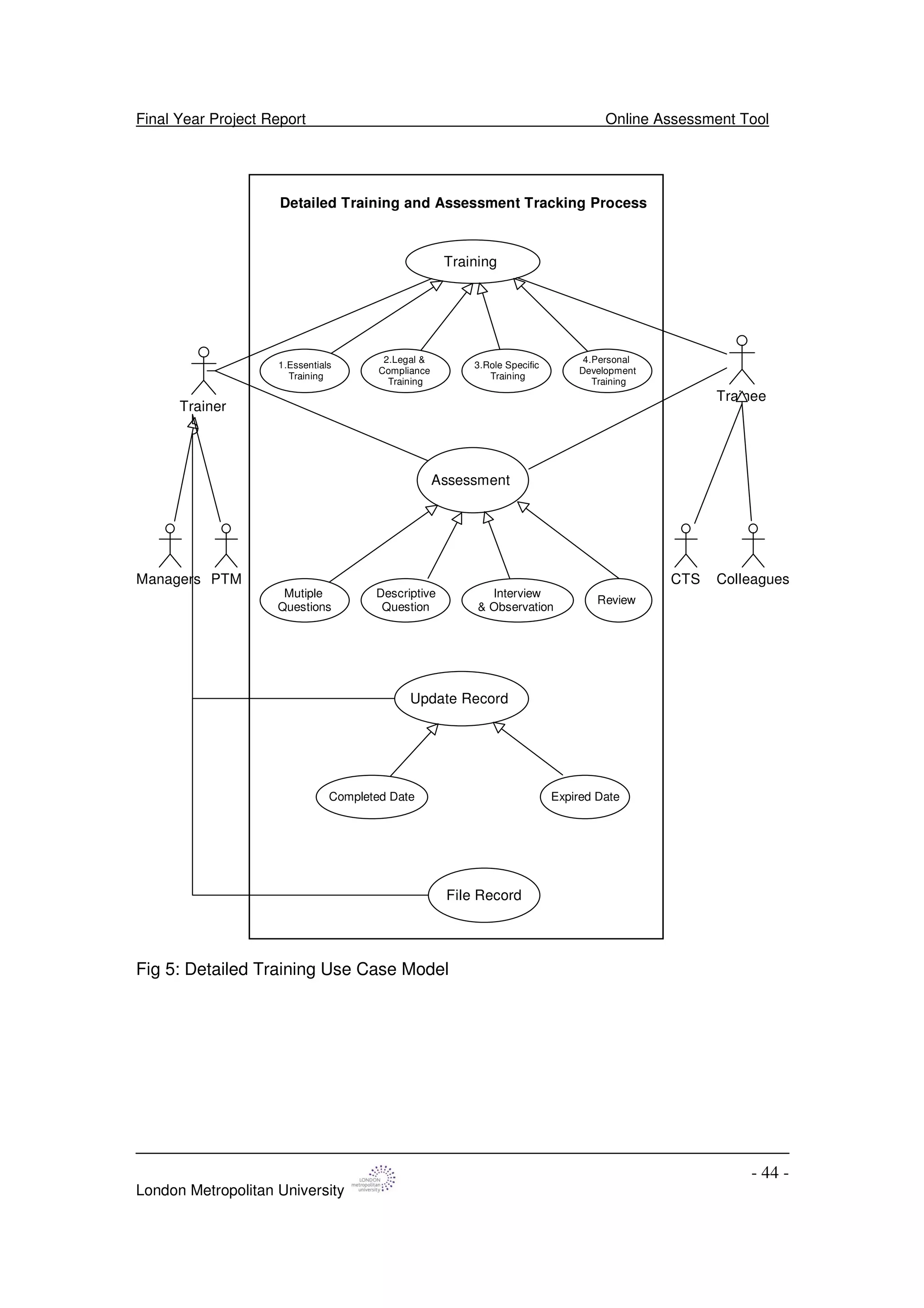
Training
Assessment
File Record
Detailed Training and Assessment Tracking Process
Trainer
Trainee
Managers PTM ColleaguesCTS
1.Essentials
Training
Mutiple
Questions
Descriptive
Question
Interview
& Observation
Review
Completed Date Expired Date
Update Record
2.Legal &
Compliance
Training
3.Role Specific
Training
4.Personal
Development
Training
Fig 5: Detailed Training Use Case Model
Final Year Project Report Online Assessment Tool
London Metropolitan University
- 45 -
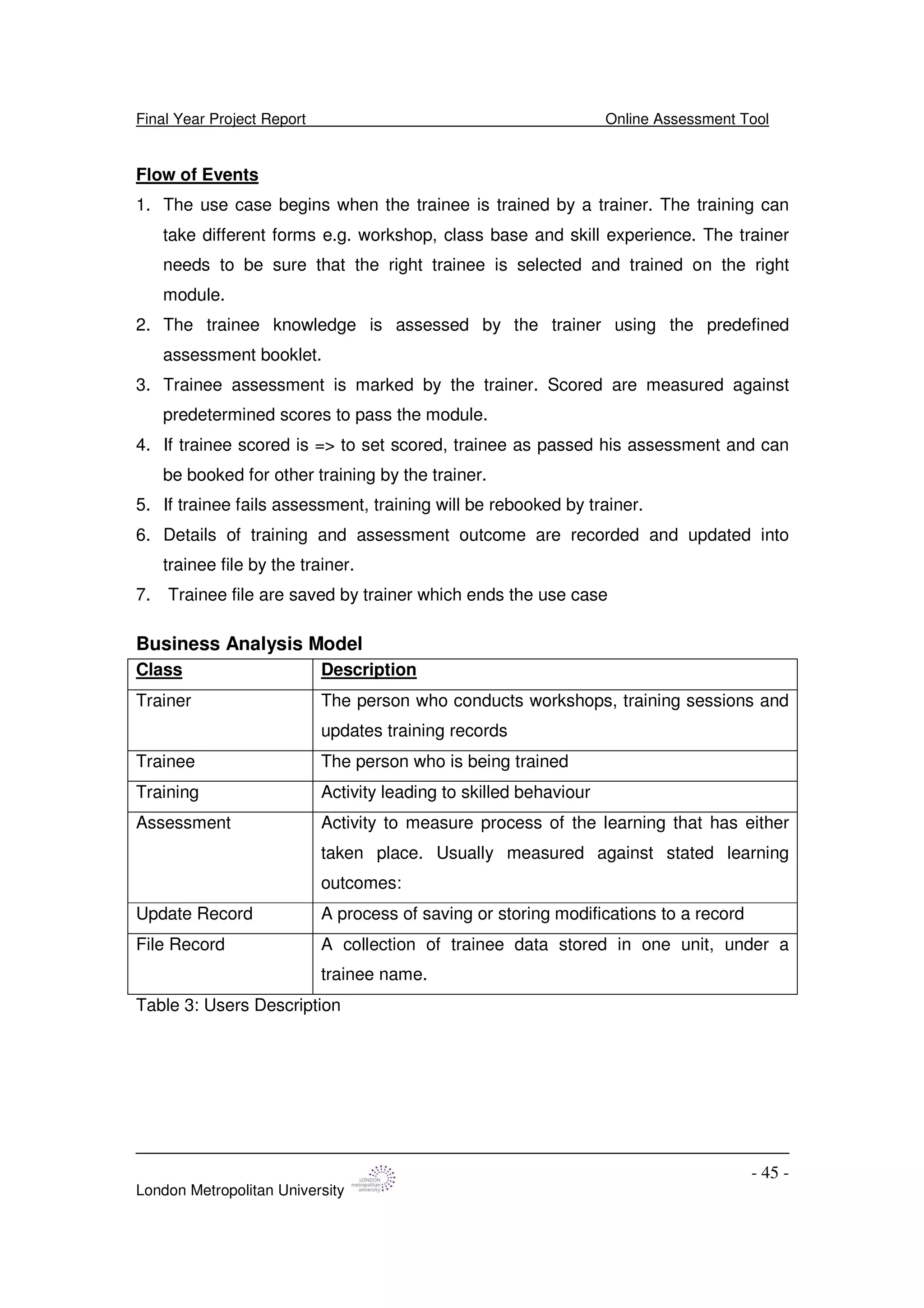
Flow of Events
1. The use case begins when the trainee is trained by a trainer. The training can
take different forms e.g. workshop, class base and skill experience. The trainer
needs to be sure that the right trainee is selected and trained on the right
module.
2. The trainee knowledge is assessed by the trainer using the predefined
assessment booklet.
3. Trainee assessment is marked by the trainer. Scored are measured against
predetermined scores to pass the module.
4. If trainee scored is => to set scored, trainee as passed his assessment and can
be booked for other training by the trainer.
5. If trainee fails assessment, training will be rebooked by trainer.
6. Details of training and assessment outcome are recorded and updated into
trainee file by the trainer.
7. Trainee file are saved by trainer which ends the use case
Business Analysis Model
Class Description
Trainer The person who conducts workshops, training sessions and
updates training records
Trainee The person who is being trained
Training Activity leading to skilled behaviour
Assessment Activity to measure process of the learning that has either
taken place. Usually measured against stated learning
outcomes:
Update Record A process of saving or storing modifications to a record
File Record A collection of trainee data stored in one unit, under a
trainee name.
Table 3: Users Description
Final Year Project Report Online Assessment Tool
London Metropolitan University
- 46 -
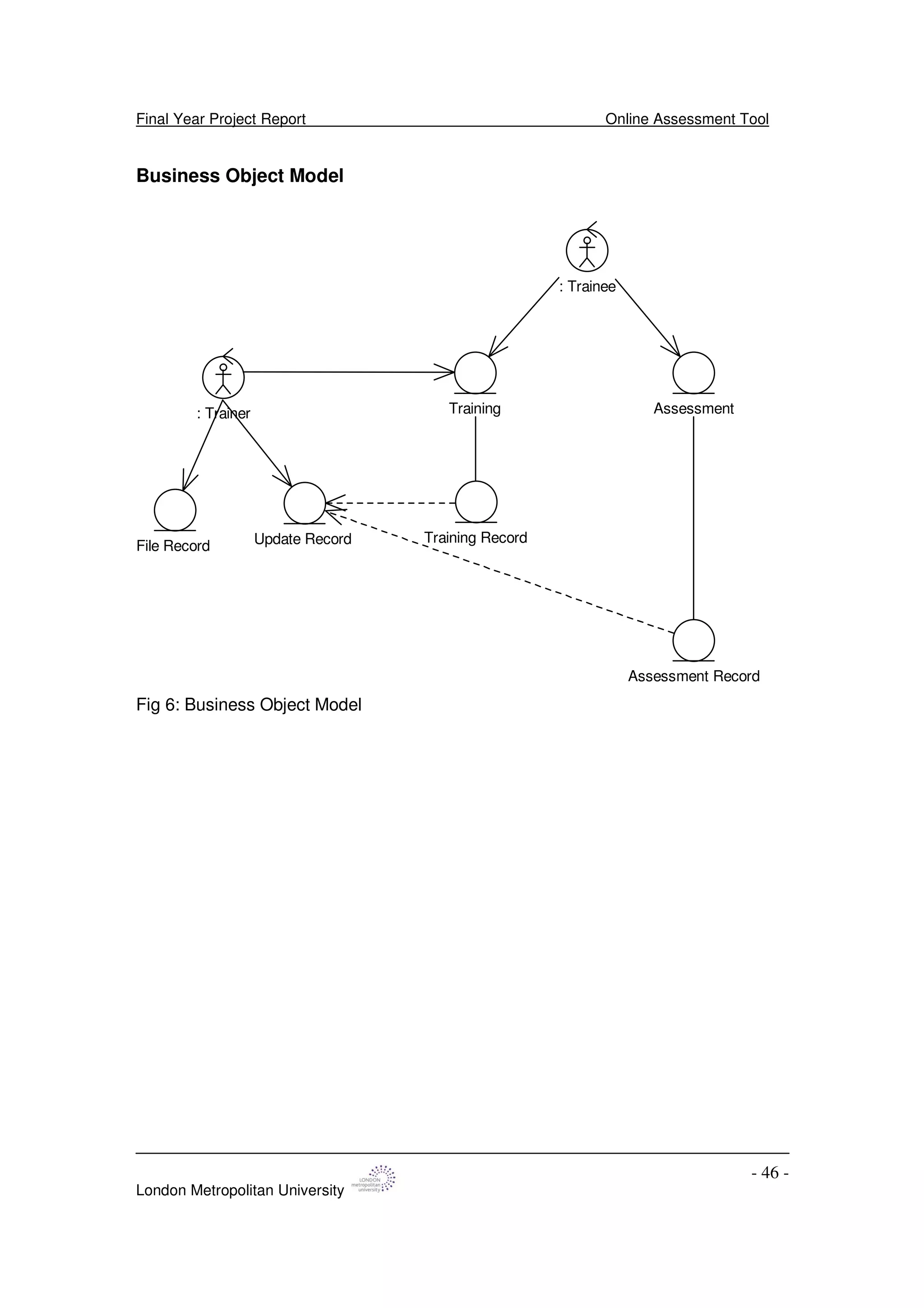
Business Object Model
Training: Trainer
: Trainee
Assessment
Update Record Training Record
Assessment Record
File Record
Fig 6: Business Object Model
Final Year Project Report Online Assessment Tool
London Metropolitan University
- 47 -
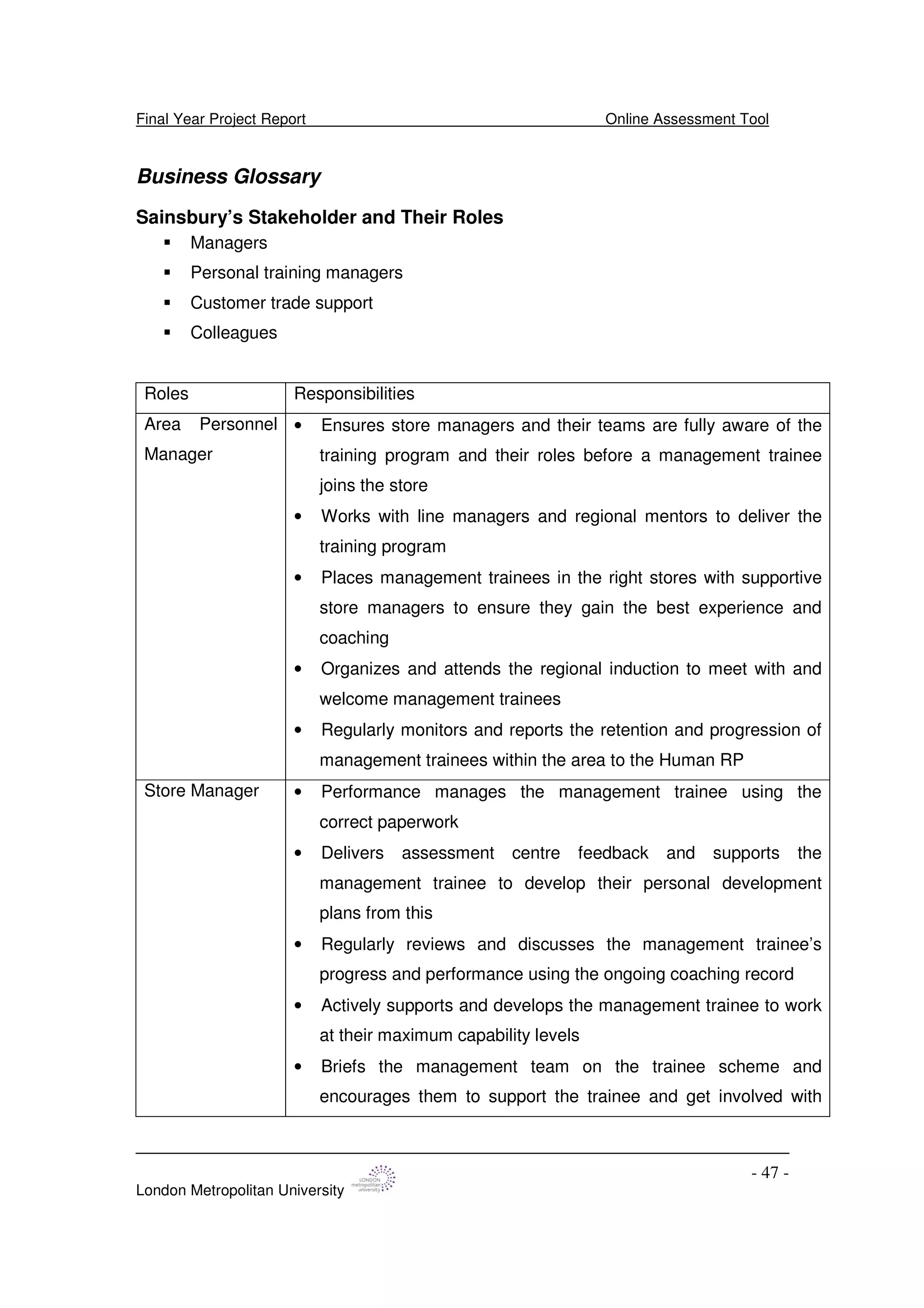
Business Glossary
Sainsbury’s Stakeholder and Their Roles
Managers
Personal training managers
Customer trade support
Colleagues
Roles Responsibilities
Area Personnel
Manager
• Ensures store managers and their teams are fully aware of the
training program and their roles before a management trainee
joins the store
• Works with line managers and regional mentors to deliver the
training program
• Places management trainees in the right stores with supportive
store managers to ensure they gain the best experience and
coaching
• Organizes and attends the regional induction to meet with and
welcome management trainees
• Regularly monitors and reports the retention and progression of
management trainees within the area to the Human RP
Store Manager • Performance manages the management trainee using the
correct paperwork
• Delivers assessment centre feedback and supports the
management trainee to develop their personal development
plans from this
• Regularly reviews and discusses the management trainee’s
progress and performance using the ongoing coaching record
• Actively supports and develops the management trainee to work
at their maximum capability levels
• Briefs the management team on the trainee scheme and
encourages them to support the trainee and get involved with
Final Year Project Report Online Assessment Tool
London Metropolitan University
- 48 -
their training program where appropriate
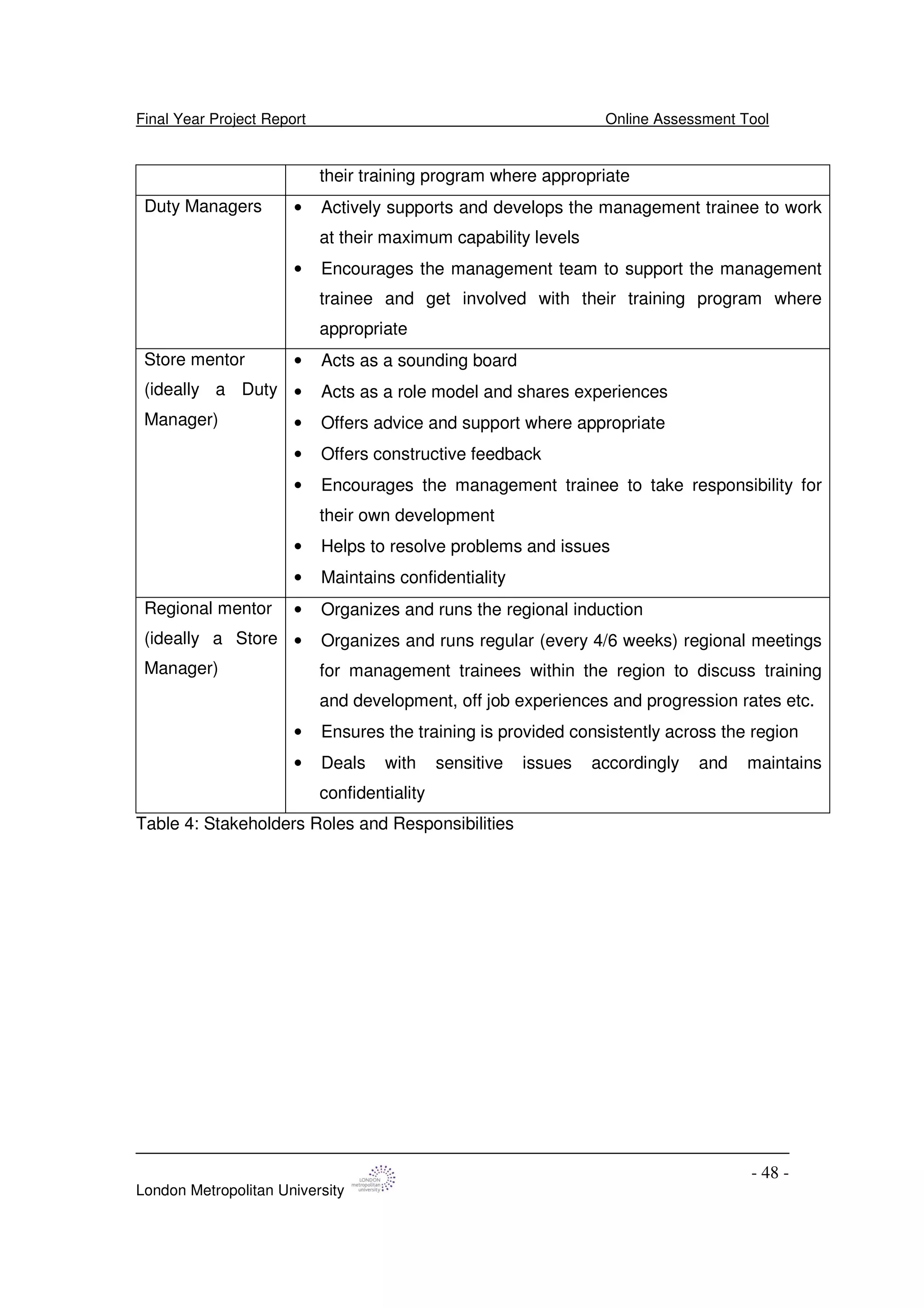
Duty Managers • Actively supports and develops the management trainee to work
at their maximum capability levels
• Encourages the management team to support the management
trainee and get involved with their training program where
appropriate
Store mentor
(ideally a Duty
Manager)
• Acts as a sounding board
• Acts as a role model and shares experiences
• Offers advice and support where appropriate
• Offers constructive feedback
• Encourages the management trainee to take responsibility for
their own development
• Helps to resolve problems and issues
• Maintains confidentiality
Regional mentor
(ideally a Store
Manager)
• Organizes and runs the regional induction
• Organizes and runs regular (every 4/6 weeks) regional meetings
for management trainees within the region to discuss training
and development, off job experiences and progression rates etc.
• Ensures the training is provided consistently across the region
• Deals with sensitive issues accordingly and maintains
confidentiality
Table 4: Stakeholders Roles and Responsibilities
Final Year Project Report Online Assessment Tool
London Metropolitan University
- 49 -
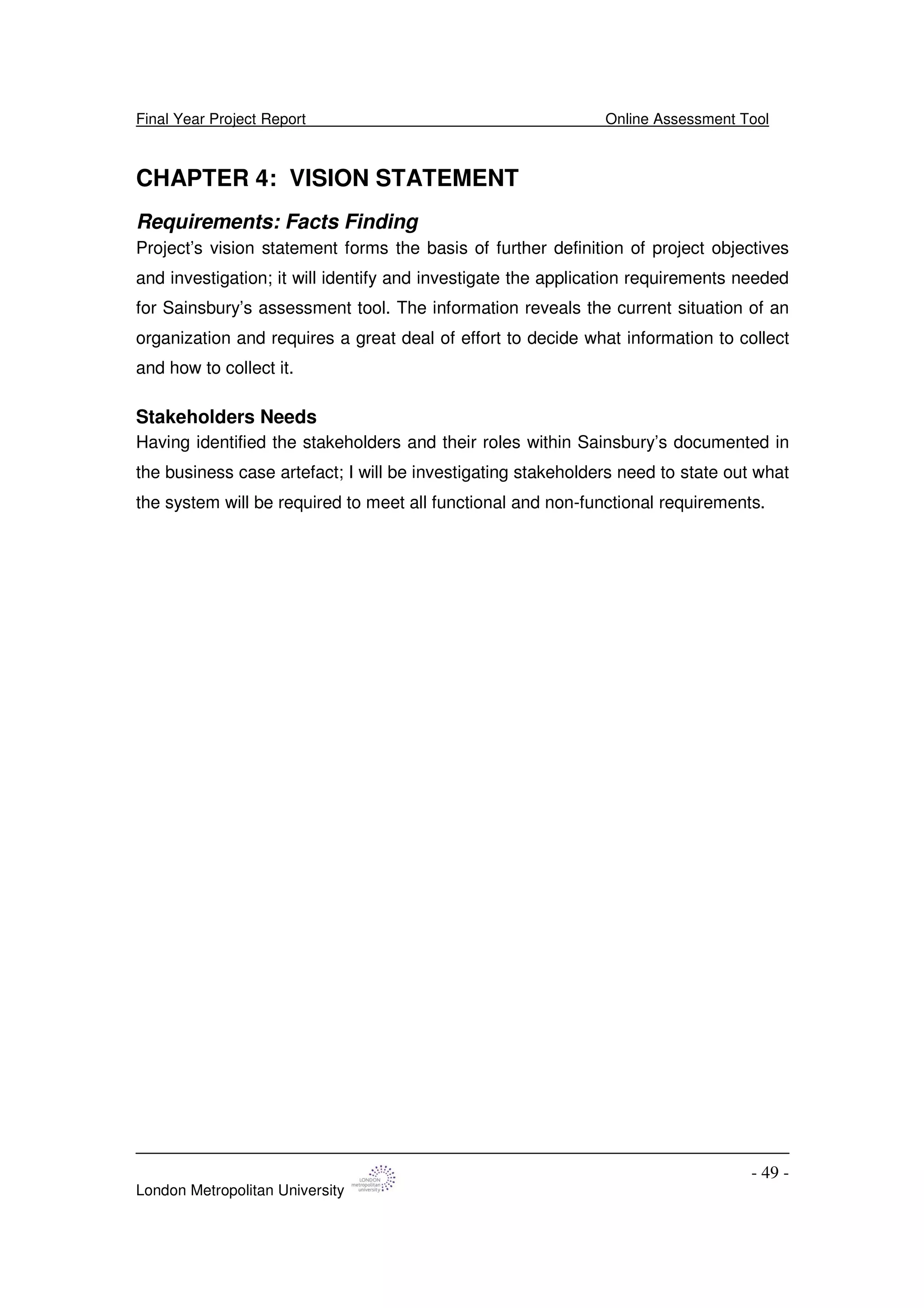
CHAPTER 4: VISION STATEMENT
Requirements: Facts Finding
Project’s vision statement forms the basis of further definition of project objectives
and investigation; it will identify and investigate the application requirements needed
for Sainsbury’s assessment tool. The information reveals the current situation of an
organization and requires a great deal of effort to decide what information to collect
and how to collect it.
Stakeholders Needs
Having identified the stakeholders and their roles within Sainsbury’s documented in
the business case artefact; I will be investigating stakeholders need to state out what
the system will be required to meet all functional and non-functional requirements.
Final Year Project Report Online Assessment Tool
London Metropolitan University
- 50 -
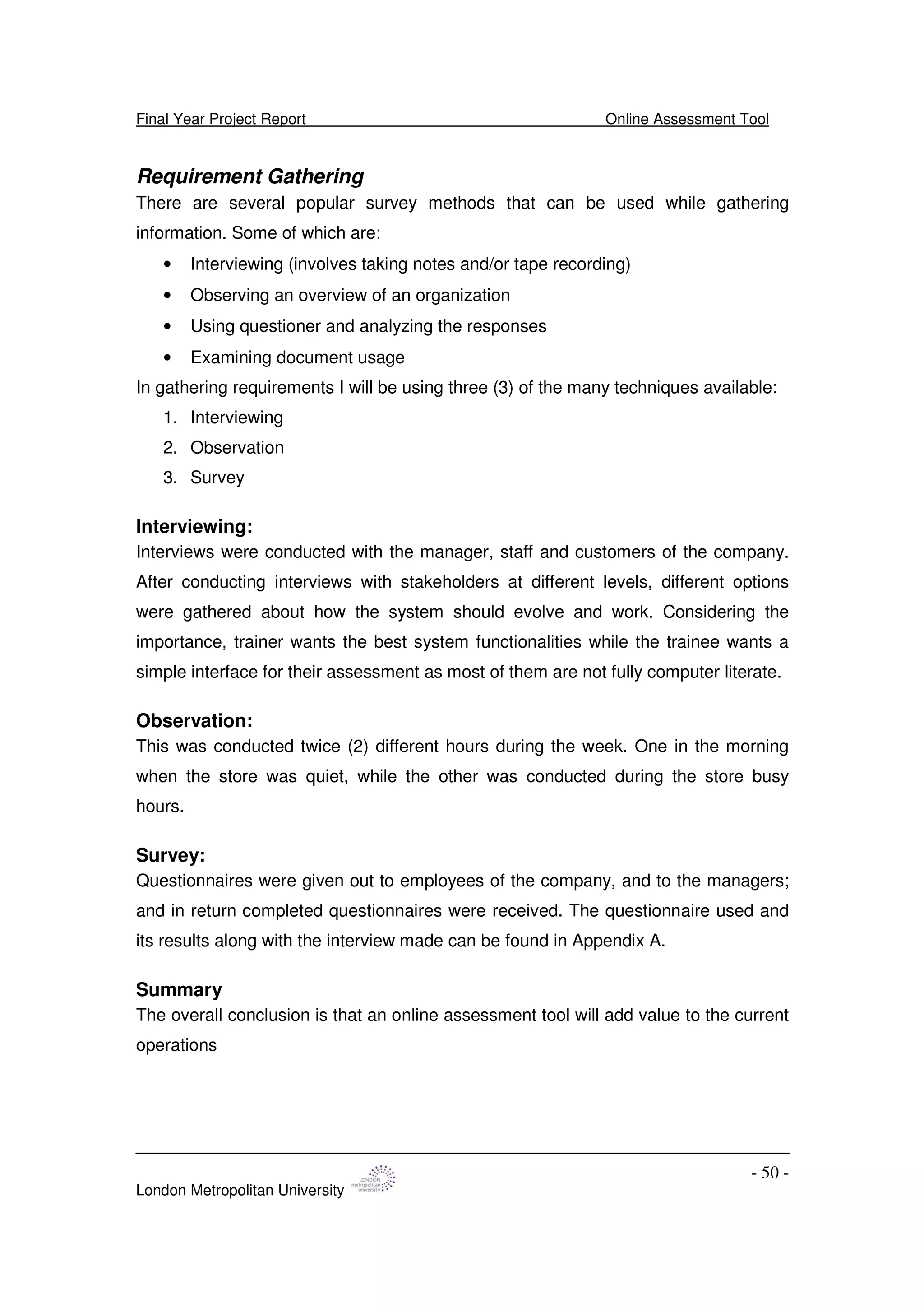
Requirement Gathering
There are several popular survey methods that can be used while gathering
information. Some of which are:
• Interviewing (involves taking notes and/or tape recording)
• Observing an overview of an organization
• Using questioner and analyzing the responses
• Examining document usage
In gathering requirements I will be using three (3) of the many techniques available:
1. Interviewing
2. Observation
3. Survey
Interviewing:
Interviews were conducted with the manager, staff and customers of the company.
After conducting interviews with stakeholders at different levels, different options
were gathered about how the system should evolve and work. Considering the
importance, trainer wants the best system functionalities while the trainee wants a
simple interface for their assessment as most of them are not fully computer literate.
Observation:
This was conducted twice (2) different hours during the week. One in the morning
when the store was quiet, while the other was conducted during the store busy
hours.
Survey:
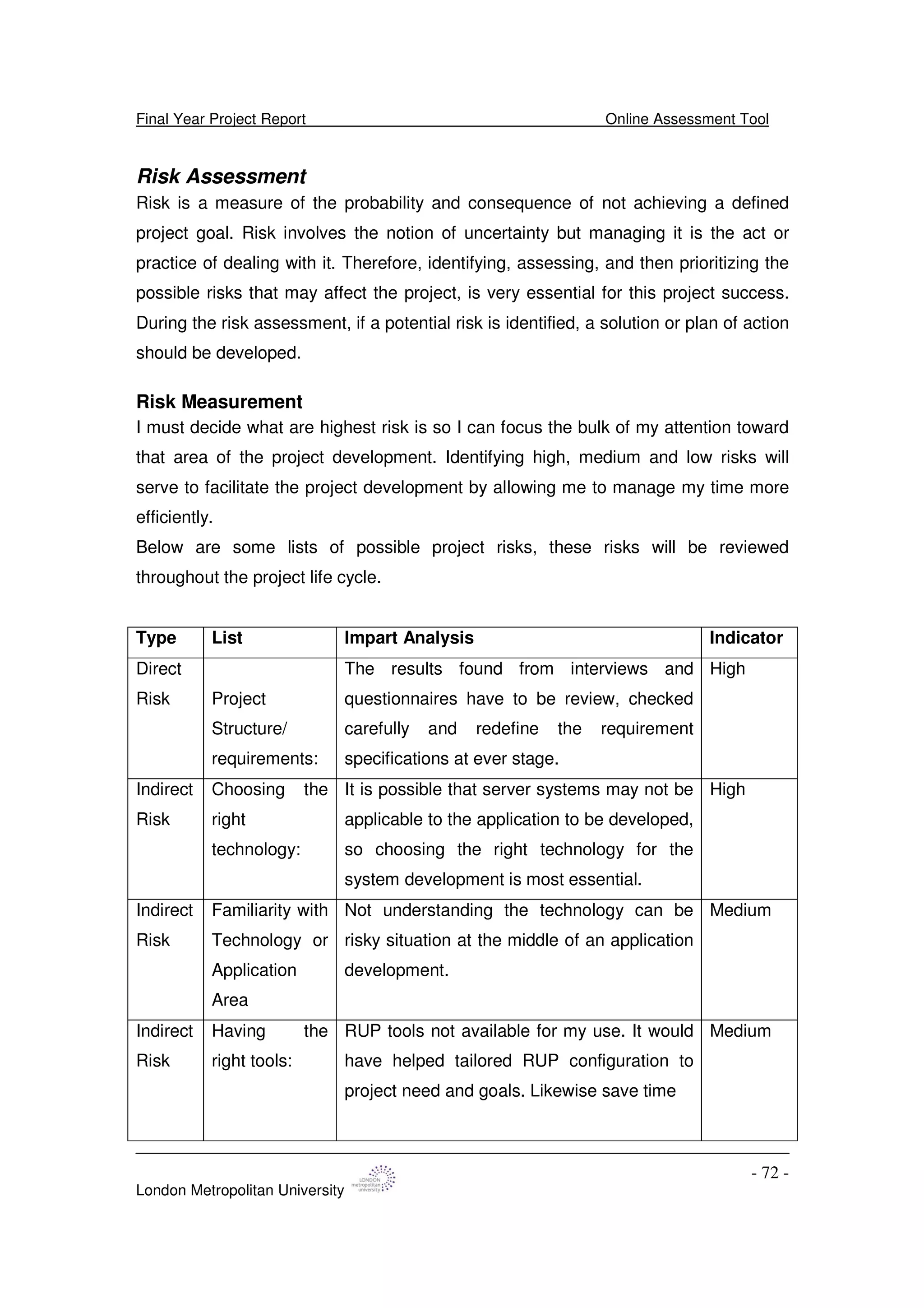
Questionnaires were given out to employees of the company, and to the managers;
and in return completed questionnaires were received. The questionnaire used and
its results along with the interview made can be found in Appendix A.
Summary
The overall conclusion is that an online assessment tool will add value to the current
operations
Final Year Project Report Online Assessment Tool
London Metropolitan University
- 51 -
Requirement Definition
Functional Requirements
The core requirements of the system are to:
1. This tool should be an on-line application and should be user friendly
2. All trainee and trainer will have to login to the system using their unique
username and password. Should keep the trainee and trainer details
secure and confidential.
3. The portal should allow trainer and trainee into different applications
interface.
4. Trainers should have full access into the system to manage and organize
the question time, add new questions and update existing assessment
records frequently. The system should provide for multiple choice and
descriptive questions.
5. Trainers will be able to manage trainee records this will include adding a
new trainee, modify and delete trainee personal information on their
records.
6. Trainers will be able to generate weekly and monthly trainee assessment
reports. This report will be trainee record to be completed (expired) and
records that have been completed.
7. Trainees will be able to access their personal record
8. Trainees will be able to complete an assessment: by displaying the
question and answer the questions in the assessment, save the
assessment, should be able to display the question and answer the
questions in the assessment and display results of assessments.
10. Trainee should see “Displayed” Results immediately
Non-Functional Requirements
1. The system design pattern should be compatible with the company current
systems and can integrate into the company network. This integration will
includes hardware platform and operating system.
o Microsoft 2000 at least
o Microsoft Windows NT
o Internet Explorer Browser
Final Year Project Report Online Assessment Tool
London Metropolitan University
- 52 -
o CPU :Intel Pentium 4 processor
o RAM: 512 megabytes
o HARD DISK : 5-10 gigabytes for database
2. Flexible at the time of use to allow multiple users at a time.
3. Enable local and remote management of system administration
4. The system should be available all times and work high performance.
Assumptions
• An assessment is made up of multiple questions.
• Each question should consist 2 parts the question and the answer.
• Different type of questions can be specified, i.e. Multiple choice, short answer
question and so on.
• Exam questions can be stored into persistent data.
• Exam questions could be displayed one at time.
• A student should be able to go back and forth through the exam questions.
• The answer of each question can be stored into persistent data.
Final Year Project Report Online Assessment Tool
London Metropolitan University
- 53 -
CHAPTER 5: ANALYSIS AND DESIGN
Initial USE CASE Model
Trainer
Trainee
Login
Complete Assessment
and Save
Manage Assessment
Display Result
Generate Report
«include»
«include»
«include»
«include»
«include»
TO BE SYSTEM USE CASE
Access Personal
Record
Manage Trainee Records
«extend»
Print Report
«extend»
Fig 7: Initial To-be-Use Case Model
Final Year Project Report Online Assessment Tool
London Metropolitan University
- 54 -
Flow of Events
The development of the online assessment tool will involve the design of a system
that will help to manage the online technique to conduct assessment for store staffs
which will be managed my personal training mangers, duty and store managers. The
portal should allow trainer and trainee into different applications.
Use Case Scenario
1 The use begins when the trainer and the trainee log on through the
entry screen.
2 Depending on the user the interface display:
3 Trainer: Options to manage assessment, manage trainee record,
generate report and access personal record.
4 Trainee: Option to access personal record, complete assessment and
option to view result.
5 Each options allow for other options
6 The use case end
1. The use case begins with managing assessment.
Use Case Managing Assessment
Actors Trainer
Pre Condition Trainer already registered on the system
Main Scenario
Input Events From Actors: System Events and Responses
• Log on: Display a welcome message and request ID and password
• Enter trainer ID and Password: (1) authenticate trainee (2) authentication
succeed.
Have options to
• Add New Assessment
• Delete Assessment
Confirm option and save settings
Alternative Scenario: Trainer no confirming to save options
Exceptional Scenario: Trainee authentication fails: repeat the login
procedure
Table 5: Managing assessment flow of event
Final Year Project Report Online Assessment Tool
London Metropolitan University
- 55 -
2. Manage Trainee Records
Use Case Manage Trainee Details
Actors Trainer
Pre Condition Trainer already registered on the system
Main Scenario
Input Events From Actors: System Events and Responses
• Log on: Display a welcome message and request ID and password
• Enter trainer ID and Password: (1) authenticate trainee (2) authentication
succeed.
Have options to
• Add New Trainee Details
• Modify Trainee Details
• Delete Trainee Details
• Register New Assessment to Trainee Record
Confirm option and save settings
Alternative Scenario: Trainer no confirming to save options
Exceptional Scenario: Trainee authentication fails: repeat the login
procedure
Table 6: Managing Trainee flow of event
3. Generate Report
Use Case Report
Actors Trainer
Pre Condition Trainer already registered on the system
Main Scenario
Input Events From Actors: System Events and Responses
• Log on: Display a welcome message and request ID and password
• Enter trainer ID and Password: (1) authenticate trainee (2) authentication
succeed.
Have options to
• Assessment completed by trainee: Show option of weekly or monthly
report
Final Year Project Report Online Assessment Tool
London Metropolitan University
- 56 -
• Assessment to be completed (expired) by trainee : Show option of
weekly or monthly report
Print Option
Alternative Scenario:
Exceptional Scenario: Trainee authentication fails: repeat the login
procedure
Table 7: Generate report flow of event
4. Access personal record
Use Case Access personal record
Actors Trainer and Trainee
Pre Condition Trainer and trainee already registered on the
system
Main Scenario
Input Events From Actors: System Events and Responses
• Log on: Display a welcome message and request ID and password
• Enter trainer ID and Password: (1) authenticate trainee and trainer (2)
authentication succeed.
Have options to
• View trainee record: this will include name, address, etc.
Print Option
Alternative Scenario:
Exceptional Scenario: Trainee authentication fails: repeat the login
procedure
Table 8: Access personal record flow of event
5. Complete Assessment
Use Case Complete Assessment
Final Year Project Report Online Assessment Tool
London Metropolitan University
- 57 -
Actors Trainee
Pre Condition Trainee already registered on the system
Main Scenario
Input Events From Actors: System Events and Responses
• Log on: Display a welcome message and request ID and password
• Enter Trainee ID and Password: (1) authenticate trainee (2) authentication
succeed.
Have options to
• Complete an assessment: this option allows trainee to complete an
assessment after training as set by the trainer.
• Save: this allows the trainee to save the assessment after completion.
• Display result: the system will allow for the past and current result be
displayed after assessment.
Print Option
Alternative Scenario:
Exceptional Scenario: Trainee authentication fails: repeat the login
procedure
Table 9: Complete assessment flow of event
Final Year Project Report Online Assessment Tool
London Metropolitan University
- 58 -
Implementation
Trainer Storyboard
1.Entry screen:
Display
-Enter Username
-Enter Password
Trainer
Trainer Storyboard
2. Interface:
Display
+Manage assessment
+Manage trainee record
+Generate report
+Access personal record
2.4 Access Personal
Record
Display
-View Trainee
Record
2.3 Generate Report
Display
-Assessment
Completed
-Assessment to be
completed (expired)
2.1 Manage
Assessment
Display
-Add New
Assessment
-Format
Assessment Time
-Update
Assessment
2.2 Manage Trainee
Record
Display
-Add New Trainee
-Modify New Trainee
-Delete New Trainee
Fig 8: Trainer Storyboard
Final Year Project Report Online Assessment Tool
London Metropolitan University
- 59 -
Trainee Storyboard
1.Entry screen:
Display
-Enter Username
-Enter Password
Trainee
Trainee Storyboard
2.1 Access Personal
Record
Display
-View Trainee
Record
2.2 Complete Assessment
Display
+Assessment
-Display Result
2. Interface:
Display
+Access Personal Record
+Complete Assessment
2.2.1 Assessment
Display
-Save
-Submit
-Display Result
Fig 9:Trainee Storyboard
Final Year Project Report Online Assessment Tool
London Metropolitan University
- 60 -
Project Management: Risk Assessment and Management Plan
Risk List
Type List Impart analysis Indicator
Direct
risk Project
Structure/
requirements:
This will impart the timing and completion of
artefacts.
There is great risk in meeting the user
requirements for the Sainsbury assessment
tool project. Since the success of this project
will be determined by how well it is accepted
by the staffs it is important to meet the needs
of all potential users
High
Indirect
risk
Choosing the
right
technology:
If I choose the wrong technology the project
can be a nightmare to implement, and
maintain.
High
Indirect
risk
Familiarity with
Technology or
Application
Area
If I am not familiar with it, then time will be
lost learning the new technology. If I pick a
web server that is non standard the code
may not be portable to work on other web
servers
High
Indirect
risk
Having the
right tools:
RUP tools not available for my use. It would
have helped tailored RUP configuration to
project need and goals. Likewise save time
Low
Schedule Rational unified process (RUP) has been
processes that have roles for different team
members. I am at this point conscious and
skeptical about time in delivering quality
product. Rational unified process (RUP)
process expects all processes to start early
in the product development. This is a big
problem, as the system should go live at the
end of the semester. With only one semester
High
Final Year Project Report Online Assessment Tool
London Metropolitan University
- 61 -
to graduate.
Table 10: Risk List
Problem Resolution Plan
Type List Management Strategies; How to cope
Direct
risk Project
Structure/
requirements:
Work breakdown structure needs to be completed
before starting the project and followed
Indirect
risk
Choosing the
right
technology:
I must decide what web technologies I am familiar
with and should to use
I must decide what web server to run on
I must decide what back end database to use
I need to be familiar with each one.
Indirect
risk
Familiarity with
Technology or
Application
Area
Mitigate Risks: To minimize my risks I have chosen to
use HTML/ASP and Access. The reason for
this is that all most every web server out there
supports HTML/ASP, and Access is a very common
DBMS that is widely available.
Indirect
risk
Having the
right tools:
At present most of the right tools are available for me
to use.
Direct Schedule I plan to control these risks through good
communication with my supervisor and completing
each task on time following the project task
breakdown.
Table 11: Problem Resolution Plan
Final Year Project Report Online Assessment Tool
London Metropolitan University
- 62 -
Conclusion
At the end of this stage an initial use-case model (10% -20%) has been completed
give a chance to establish a vision document. An initial project plan was defined.
The highest risk at this point in time is to understand the mile wide and inch deep of
the use case diagram to develop a robust system that will capture the entire defined
requirement. at this point in time the initial use case will require refinement so as to
develop a use-case model that is at least 80% completed — with all use cases and
actors been identified, and most use case descriptions already developed. These
objectives will be accomplished at the end of the elaboration stage of the software
development.
Final Year Project Report Online Assessment Tool
London Metropolitan University
- 63 -
CHAPTER 6: CONSTRUCTION PHASE
Development Environment
Development Process
The development process aim to focus on the processes, techniques, tools and
methods that were required to support the activities and content of the project.
The use of Rational Unified Process (RUP), Unified Modeling Language (UML),
iterative techniques and Architecture Patterns to develop a web application tool will
best describe the development environment that are needed to support the
development team.
Rational Unified Process (RUP) as a software methodology was used in guiding the
project development activities from iteratively to creating artifacts that model system
requirements, analysis, designs, and implementations.
Essential structures were developed from the architectural design to create a clear
picture of the system.
Unified Modeling Language (UML) is the industry-standard language for the
specification, visualization, construction, and documentation of the components of
software systems. UML helps to simplify the process of software design, making a
model for construction with a number of different views. One of the great merits of
UML is the way it helps open up the development process with what are called use
cases. These serve to identify principal roles (actors) in the system, boundaries,
actions, and so on [1]. Pacestar UML diagrammer® was used as the development
Kit that will provide UML templates and tools necessary to customize and develop
the graphical process.
Iteration process in rational unified process involves the breaking down of phase into
different development loop, resulting in a release of an executable artifact, which is
subset of the final product to be developed, which grows incrementally from iteration
to iteration to become the final system [2].
Final Year Project Report Online Assessment Tool
London Metropolitan University
- 64 -
Development Tool
Range of software and development tools have been used from the initial stage to
the implementation stage of this project. Some key software and development tools
that have been used and necessary to implement the online assessment tool are:
1. Pacestar ® UML diagrammer - Pacestar UML Diagrammer, according to the
company that developed the product is a tool used for creating and maintaining
Unified Modeling Language diagrams. Create all kinds of UML diagrams
including Activity Diagrams, Class and Object Diagrams, Use-Case Diagrams,
Sequence Diagrams, State Charts, Package Diagrams, and Deployment
Diagrams, plus custom design diagrams [3].
2. Microsoft ® Word - It is a word processing application which is part of Microsoft
Office developed my Microsoft Corporation since 1981. It is use in creating
documents by combining a comprehensive set of writing tools with an easy-to-
use interface [4].
3. Microsoft ® Project Management – Microsoft Project (or MSP) is a project
management software program developed and sold by Microsoft which is
designed to assist project managers in developing plans, assigning resources to
tasks, tracking progress, managing budgets and analyzing workloads [5].
4. Microsoft ® Visio – It is diagramming software for Microsoft Windows. It uses
vector graphics to create diagrams, in visualizing, explore and communicate
complex information, systems and processes [6].
5. Macromedia ® Dreamweaver- This is a web editor which is an environment for
designing web applications that combines the power of dynamic sites with the
dreamweaver point-and-click interface [7].
6. Microsoft Access -- Microsoft Access is a relational database management
system available for purchase as a stand-alone product or as part of Microsoft
Office. Its inclusion in Office and its presence everywhere has made it one of the
most popular database development tools in use by organizations today.
Final Year Project Report Online Assessment Tool
London Metropolitan University
- 65 -
Project Management
Introduction
Project management has come a long way from its origins in engineering and
construction; it is now used for a wide range of applications and is one of the most
highly valued management tools [1]. The project management aim at this stage to
prioritize task schedule and manage risk.
Project Team and Roles
Akinlawon Jolaoso
Roles:
• My role will be to develop and execute tasks to produce deliverables as
outlined in work break down structure (WBS) in the project management.
• This will require acting all required role for each process of RUP. This will
include analyst, designer, developer , tester roles
While
Dr. Peter Oriogun will act on a supporting role to will include:
• Supervising and make sure everything is done well
• Coordinator and monitor the project progress.
Final Year Project Report Online Assessment Tool
London Metropolitan University
- 66 -
Project Planning
Fig 10: Initial Work Breakdown Structure chart
Final Year Project Report Online Assessment Tool
London Metropolitan University
- 67 -
Work Breakdown Structure
Table 12: Work Breakdown Structure
Gantt chart
Table 13: Gantt Chart
Final Year Project Report Online Assessment Tool
London Metropolitan University
- 68 -
Pert Chart
Fig 11: Pert Chart
Final Year Project Report Online Assessment Tool
London Metropolitan University
- 69 -
Project Outcome (Milestone)
In the development of the project task, this part represents the static part of the
process in terms of workflow, activities, outcome and artefacts.
Workflow Activities Artefacts Outcome
Inception
Project
Management
Plan work
break down
structure
and set
baseline on
Microsoft
project
• WBS
• Gant chart
• Pert chart
• Risk
management
• Project plan
Business model Find actors
and develop
use case
• Company profile,
goals e.t.c.
• Use case model
• Business
case
Requirement Find actors
and develop
use case
• Scope statement
• Statement of
work
• Stakeholder
identification
• Vision
documen
t
Environment Review
different
applicable
technology
• Software and
hardware
components
• Develop
ment tool
Elaboration
Project
management
Review initial
project plan
• Detailed project
plan
Detailed
Software
Final Year Project Report Online Assessment Tool
London Metropolitan University
- 70 -
review Developmental
plan
Analysis Identify use
case and
actors
• Use case model
• Use case
description
• Non-function
requirements
Software
Architecture
Document
Design Review and
Develop
design model
• Class model
• Subsystem
model
• Objects of design
classes
(collaborate
diagram)
• Interface
Prototype
• Architect
ural
prototype
and
description
• Design
model
• User
manual
Construction
Implementation To implement
classes and
objects
• Source code Product
development
report
Test Execute,
Verify
integration,
interactions
and
requirements
are meets
• Quality dimensions
reliability
• Application
performance and
system performance
Product test
report
Transition
Final Year Project Report Online Assessment Tool
London Metropolitan University
- 71 -
Test Execute to
Identify and
resolve
defects
• Functionality Beta testing
Deployment Defend
product
• Deployment plan Viva
Table 14: Project Milestone
Final Year Project Report Online Assessment Tool
London Metropolitan University
- 72 -
Risk Assessment
Risk is a measure of the probability and consequence of not achieving a defined
project goal. Risk involves the notion of uncertainty but managing it is the act or
practice of dealing with it. Therefore, identifying, assessing, and then prioritizing the
possible risks that may affect the project, is very essential for this project success.
During the risk assessment, if a potential risk is identified, a solution or plan of action
should be developed.
Risk Measurement
I must decide what are highest risk is so I can focus the bulk of my attention toward
that area of the project development. Identifying high, medium and low risks will
serve to facilitate the project development by allowing me to manage my time more
efficiently.
Below are some lists of possible project risks, these risks will be reviewed
throughout the project life cycle.
Type List Impart Analysis Indicator
Direct
Risk Project
Structure/
requirements:
The results found from interviews and
questionnaires have to be review, checked
carefully and redefine the requirement
specifications at ever stage.
High
Indirect
Risk
Choosing the
right
technology:
It is possible that server systems may not be
applicable to the application to be developed,
so choosing the right technology for the
system development is most essential.
High
Indirect
Risk
Familiarity with
Technology or
Application
Area
Not understanding the technology can be
risky situation at the middle of an application
development.
Medium
Indirect
Risk
Having the
right tools:
RUP tools not available for my use. It would
have helped tailored RUP configuration to
project need and goals. Likewise save time
Medium
Final Year Project Report Online Assessment Tool
London Metropolitan University
- 73 -
Direct
Risk
Schedule Rational Unified Process (RUP) has
processes that have roles for different team
members. I am at this point conscious and
sceptical about time in delivering quality
product. Rational Unified Process (RUP)
process expects all processes to start early
in the product development. This is a big
problem, as the system should go live at the
end of the semester. With only one semester
to graduate.
High
Table 15: Risk Assessment
Problem Resolution Plan
The probability on indicator occurrence of each possible project risks have been
analysed in terms of Low, Medium, or High risk, where Low applies for unlikely that
the type of risk will occur during the life of the software, Medium represents for a risk
where there is a 50% chance that the risk will occur, and High is for a risk that will be
a great deal of chance that it will occur. Each risk that receives a High score will
have a corresponding plan to manage and control of that risk.
Here is break down of how I am going to attack each risk.
Type List Management Strategies; How to cope
Direct
Risk Project
Structure/
requirements:
Flexible architecture. Analyse before adding the new
requirements if it is very important to change the
architecture.
Indirect
Risk
Choosing the
right
technology:
Careful research and consideration of possible
technologies, during design stage.
Indirect
Risk
Schedule and
having the right
tools:
Follow the project plan and use the right software
modelling process to complete project on time.
Final Year Project Report Online Assessment Tool
London Metropolitan University
- 74 -
Direct
Risk
Insufficient
testing
Use thorough testing plan to satisfy requirements
measurement.
Table 16: Problem Resolution Plan
Final Year Project Report Online Assessment Tool
London Metropolitan University
- 75 -
CHAPTER 7: BUSINESS MODEL
Requirement Model
This part of the system development aim to analyse, design and describe various
aspects of the business needs according to the company training strategy and
process.
Add New
Assessment
Delete
Assessment
Manage Assessment
Fig 12: Decomposed Manage Assessment Use case
Add New Trainee
Details
Modify Trainee
Details
Register New
Assessment to
Trainee Record
Manage Trainee
Details
Delete Trainee
Details
Fig 13: Decomposed Manage Trainee Use case
Final Year Project Report Online Assessment Tool
London Metropolitan University
- 76 -
Print
Generated
Report
View Trainee
Assessment
Record
Generate Trainees'
Assessment
Record
«extend»
«extend»
Fig 14: Redefined Check Trainee Record Use case
Final Year Project Report Online Assessment Tool
London Metropolitan University
- 77 -
Detailed and Stable Use case Model
Trainer
Trainee
Complete Assessment
and Save
Add New
Assessment
«extend»
Delete
Assessment
Add New
Trainee
Display
Result
Print
Generated
Report
RegisterNew
Assessment
to Trainee Record
Modify Trainee
Details
DeleteTrainee
Details
View Trainee
Assessment
Record
Generate Trainees'
Assessment
Record
«extend»
«extend»
Find Trainee
Details
«include»
«include»
Login
Fig 15: Detailed Use-case Model
Final Year Project Report Online Assessment Tool
London Metropolitan University
- 78 -
Actors and Use Cases Description
Actors Description
Trainer The trainer can be the store manger or
human resources managers, who are
responsible for the day-to-day
management of training and
development within a particular store.
Trainee These are any member of staff within
Sainsbury’s supermarket limited
Table 17: Users use case description
Use cases Description
Login This will allow any the system users to
login using there username and
password.
Find Trainee Details Allows the user to search for trainee
details.
Add New Assessment There will be occasions where all or
some staffs will need to be assessed
on some new training. This new
assessment will be required to be
available on the system. This will also
include the completion set time.
Delete Assessment This will allow the trainer to delete an
assessment.
Add New Trainee When new staffs join Sainsbury’s, his
or her details will require to be recorded
on the system. These will include
unique ID and start date. Later the
assessment assigned to the staff will
be added it his record.
Final Year Project Report Online Assessment Tool
London Metropolitan University
- 79 -
Modify Trainee Occasionally the position of a staff
might change and will require to be
changed on the system. This will be
related to promotion (position), new
promotion date is included.
Delete Trainee This allow the trainer to delete staffs
that are no more working for the
company and will be required to take
them off the system.
Register New Assessment to Trainee
Record
Trainer will be able to add assessment
to a trainee’s record. This assessment
would have not been completed by the
trainee in the past.
View Trainee Assessment Record This use case allows the trainee to
view the current state of his/her
assessment record. This can be printed
by the trainee.
Generate Trainee Assessment Record This use case allows the trainer to view
list of trainee assessment records and
allow the trainer to print the generated
information
Complete Assessment This will include date assessment
completed and the scores.
Table 18: Process Use case Description
Final Year Project Report Online Assessment Tool
London Metropolitan University
- 80 -
CHAPTER 8: DESIGN
Introduction
This artefact aim to document the concept of three-tie architecture view that will be
applied in the development of this web application tool, the approach is to divide the
use cases between the packages of the proposed three (3) tier architecture. The
package will reflect similar grouping to elaborate the system use case and place it in
a logical architectural view.
The architecture aims to meet the requirement and realize the business use case
model of the web application. This part will provide the terminologies of web
applications and three-tie architecture as it will still be applied later in the chapters.
Web Applications
Web application was describe as an application that is accessed via Web over a
network such as the Internet or an intranet [1]. They are dynamic websites that use
the browser as a user interface to a server-resident application, useful for internet-
based applications. Most popular web application is the e-commerce sites. It allows
the most minimal client configuration, all business logics are executed on the server
during the fulfilment of page request for the client browser [2].
The development of this type of application requires most appropriate technologies
to make the application content dynamic. There are different enabling technologies
that can be applied but most varied by the developer. The most important factor to
consider is to have a dynamic system that can respond to users input.
The user input in a web application system is managed by a standard protocol
(Common Gateway Interface) for interfacing external application software with an
information server, commonly a web server [3].
A server is a free standing computer program that is typically multi-user and in its
most simplistic definition, accepts one or more inputs and produces one or more
outputs. This capability could be implemented completely by software on the server
machine or require access to one or more (super)computers, databases or other
information resources such (seismic) instruments [4].
Final Year Project Report Online Assessment Tool
London Metropolitan University
- 81 -
Three-Tier Architecture
As the name suggest, three-(3)-tier architecture is a design pattern that allows the
modelling of a system onto three (3) different layers or views. These three views are:
Fig 16: Three (3) Tier Architecture. Source [4]
Client View
This represents the top part as the presentation layer of the system and it serve
the purpose of the user interface, where the user can input to communicate and
request functions from the system. The interface will also act to display results
from the system applications. It includes the desktop hardware which display the
graphical user interface (screen layout and navigation) of the system application.
Business Logic Tier
This part of the system represent the dynamics of core system operations, it is
the linking point between itself and other layers of the system, as it controls all
application’s functionality by performing detailed processing. Some of its
functions include performing queries against a Database, and calculating the
business process.
Database Layer
This part represents the data storage logic layer where information can be stored
and retrieved.
Final Year Project Report Online Assessment Tool
London Metropolitan University
- 82 -
Architecture Description
Service Packages
Assessment
Delete
Assessment
Add New
Assessment
Record
Register New
Assessment
to Trainee
Record
View Trainee
Assessment
Record
Generate
Trainees'
Assessment
Record
Trainee
Modify
Trainee
Details
Delete
Trainee
Details
Add New
Trainee
Details
Find
Trainee
Details
Complete
Assessment
Interface
Login
Trainee
Login
Trainer
Login
Fig. 17: Architecture Diagram
Final Year Project Report Online Assessment Tool
London Metropolitan University
- 83 -
Session Management
Login (Interface) Management
This package represents the client view of the system to be developed, the graphical
user interface (GUI) will handle login to get input from the user into the system and
display the login results. The package does not concern itself with how the
information will be obtained where it is coming from.
The package development will require building to standard a forms-capable
Hypertext Mark-up Language capable (HTML) interface that will be rendered on a
browser. The system interface uses the browser to request Hypertext Mark-up
Language capable (HTML) and web server pages.
Content Diagram
Username:
Password:
Login as:
Trainee
Enter
Enter
Trainer
TRAINEE HOMEPAGE
Ccomplete
AssessmentUI
ComAssUI
View Trainee
Assessment
RecordUI
VTAssUI
TRAINER HOMEPAGE
Add New
AssessmentUI
Label
Delete
AssessmentUI
Genrate
Trainee
Assessment
Record UI
Modify Trainee
DetailsUI
Register New
Assessment
to Trainee
RecordUI
Delete
Trainee
DetailsUI
Add New
Trainee
DetailsUI
Final Year Project Report Online Assessment Tool
London Metropolitan University
- 84 -
Fig 18: Login Diagram
Package Flow of Event
The package will allow users to login as users (trainer or trainee) on the same
webpage
This login will lead to two different interface, one for the trainer webpage
while the other will leads to the trainee webpage
Final Year Project Report Online Assessment Tool
London Metropolitan University
- 85 -
Assessment Management
This package handles assessment to include “Adding New Assessment” and
“Deleting Assessment” from the system database. This package interfaces with the
record, it mostly represent the business logic of the assessment part of the system
as it models the data and behaviour behind the business process of adding new
staffs and deleting staffs that are no more working for the company: AddAssHandler
and: DelAssHandler.
Trainee Management
This package handles the trainee to include “Adding New Trainee”, “Deleting
Trainee” from the database, “Modify Trainee Details”, and “Register New
Assessment to Trainee Record”. This package interfaces with the assessment and
record, it mostly represent the business logic of the assessment part of the system
as it models the data and behaviour behind the business process of adding new
trainee, deleting trainee, modifying trainee and registering assessment to trainee
details.
Record Management
This package contains data that need to be stored for the system; it will interface
with the assessment and trainee packages. This will hold trainer and trainee record
for login purposes, trainee record for assessment scores and other purposes,
assessment record for the trainee completion. Data in the database will be available
to the users of the system. Users will be able to view trainee records and generate
trainee records for printing.
Final Year Project Report Online Assessment Tool
London Metropolitan University
- 86 -
Use Case Realization: Using Collaboration and Sequence
Diagrams
LOGIN USECASE
User
Loginhandler
Logon (Username and Password)
Valid Message
Authenticate
(Username and Password)
Fig 19: Login Sequence Diagram
Use Case Login
Brief Description User log onto the system
Actors (1) Trainee and (2)Trainer
Pre Condition User not already logged in onto the system
Main Scenario
Input Events From Actors: System Events and Responses
1. Use case starts when user aims to use the system for any purpose
2. The system asks user for username and password
3. User enters a username and password
4. The system accept the username and password as valid
Post Condition: The user is logged onto the system
Alternative Scenario: 1. Invalid username and password
2. User already logged on.
Table 19: Login Use Case Description
Final Year Project Report Online Assessment Tool
London Metropolitan University
- 87 -
FIND TRAINEE DETAILS USECASE
Trainer
:Trainee
TraineeID( )
TraineeDetails( )
Fig 20: Sequence diagram for the use case find Trainee
Use Case Find Trainee Details
Brief Description The trainer finds trainee details
Actors Trainer
Pre Condition The trainer is logged on to the system
Main Scenario
Input Events From Actors: System Events and Responses
1. The trainer enters trainee ID
2. The system find the trainee details
Post Condition: The system found the trainee details
Alternative Scenario: None
Table 20: Search Use Case Description
Final Year Project Report Online Assessment Tool
London Metropolitan University
- 88 -
ADD NEW ASSESSMENT USECASE
Trainer
AddAssUI
AddAss
Handler
Assessment
Fig 21: Collaboration diagram for the use case Add New Assessment
Trainer
:AddassUI :AddAssHandler
:Assessment
ClickAddAss( )
AddAss( )
Create( )
Confirmed( )
DisplayConfirmation( )
Fig 22: Sequence diagram for the use case Add New Assessment
Use Case Add New Assessment
Brief Description Add details of new assessment to the system
Actors Trainer
Pre Condition Trainer have logged on to the system
Main Scenario
Input Events From Actors: System Events and Responses
1. The trainer select ‘Add Assessment’
2. Trainer enters details of new assessment
3. System creates new assessment
Post Condition: New assessment have been added to the system
Alternative Scenario: Assessment already exist
Final Year Project Report Online Assessment Tool
London Metropolitan University
- 89 -
DELETE ASSESSMENT USECASE
Trainer
DelAUI
DelA
Handler
Assessment
Fig 23: Collaboration diagram for the use case Delete Assessment
Trainer
:DelAUI :DelAHandler :Assessment
ClickDelAss( )
Confirmed( )
DisplayConfirmation( )
ListAssessment( )
«destroy»
DeleteAss()
Fig 24: Sequence diagram for the use case Delete Assessment
Use Case Delete Assessment
Brief Description Trainer deletes assessment from the system
Actors Trainer
Pre Condition Trainer already logged in on the system
Main Scenario
Input Events From Actors: System Events and Responses
1. The trainer select ‘Delete Assessment’
2. System list assessments on record
3. Trainer click to delete appropriate assessment record
4. System delete assessment from record
Post Condition: Assessment have been deleted from the system
Alternative Scenario: None
Final Year Project Report Online Assessment Tool
London Metropolitan University
- 90 -
ADD NEW TRAINEE USECASE
Trainer
AddNTUI
AddNT
Handler
Trainee
Fig 25: Collaboration diagram for the use case Add New Trainee
Trainer
:AddNTUI :AddNTHandler
:Trainee
ClickAddNT( )
AddNT( )
Create( )
Confirmed( )
DisplayConfirmation( )
Fig 26: Sequence diagram for the use case Add New Trainee
Use Case Add New Trainee
Brief Description A system create a new account for trainee
Actors (1) Trainer and (2) Trainee
Pre Condition Trainer already logged in
Main Scenario
Input Events From Actors: System Events and Responses
1. The user begins when trainer select ‘Add Trainer’
2. The system requires trainee to enter his or her details: name, email, password
and password for confirmation.
3. System validates trainee details
4. System add trainee and create an account.
Post Condition: A new trainee account is created
Final Year Project Report Online Assessment Tool
London Metropolitan University
- 91 -
Alternative Scenario: 1. Invalid email address
2. Invalid password
3. Cancel
Use Case Add New Trainee: Invalid email address
Brief Description System informs the trainee that he/she enters an
invalid email address
Actors (1) Trainer and (2) Trainee
Pre Condition 1. Trainer already logged in
2. Trainee has enter an invalid email address
Main Scenario
Input Events From Actors: System Events and Responses
Post Condition: A new trainee account is created
Alternative Scenario: Alternative flow begins at step 2 of the main flow.
Table 23: Add New Trainer Use Case Description
Final Year Project Report Online Assessment Tool
London Metropolitan University
- 92 -
MODIFY TRAINEE USECASE
Trainer
ModTUI
ModT
Handler
Trainee
Fig 27: Collaboration diagram for the use case Modify Trainee
Trainer
:ModTUI :ModTHandler :Trainee
ClickModTUI( )
DisplayTraineeDetails( )
FindTraineeDetails( )
GetTraineeDetails( )
ConfirnChanges( )
Fig 28: Sequence diagram for the use case Modify Trainee
Use Case Modify Trainee
Brief Description Trainer changes trainee details
Actors Trainer
Pre Condition Trainer already logged in on the system
Main Scenario
Input Events From Actors: System Events and Responses
1. Include (Find Trainee Details)
2. The system displays the employee details
3. Trainer changes trainee details
4. ---------
Post Condition: Trainee details have been changed
Alternative Scenario: None
Table 24: Modify Trainee Use Case Description
Final Year Project Report Online Assessment Tool
London Metropolitan University
- 93 -
DELETE TRAINEE USECASE
Trainer
DelTUI
DelT
Handler
Trainee
Fig 29: Collaboration diagram for the use case Delete Trainee
Trainer
:DelTUI :DelTHandler :Trainee
ClickDelTUI( )
DisplayTraineeDetails( )
FindTraineeDetails( )
GetTraineeDetails( )
ConfirnDelete( )
Fig 30: Sequence diagram for the use case Delete Trainee
Use Case Delete Trainee
Brief Description Trainer delete trainee details
Actors Trainer
Pre Condition Trainer already logged in on the system
Main Scenario
Input Events From Actors: System Events and Responses
1. Include (Find Trainee Details)
2. The system displays the trainee details
3. Trainer delete trainee details
4. ---------
Post Condition: Trainee details have been deleted
Alternative Scenario: None
Table 25: Delete Trainee Use Case Description
Final Year Project Report Online Assessment Tool
London Metropolitan University
- 94 -
REGISTER NEW ASSESSMENT TO TRAINEE RECORD USECASE
AssignAssUI
Trainer
AssignAss
Trainee Assessment AssRecord
Fig 31: Collaboration diagram for the use case Register New Assessment to Trainee
Trainer
:AssignAssUI :AssignAssHandler :AssRecord
ClickAssAss( )
FindTrainee( )
FindAssessment( )
RegistrationConfirmed( )
:Trainee :Assessment
ClickRegister( )
SaveRegistration( )
Register( )
Fig 32: sequence diagram for the use case Register New Assessment to Trainee
Use Case Register New Assessment to Trainee
Brief Description Trainer add new assessment to trainee record
Actors Trainer
Pre Condition Trainer already logged in on the system
Main Scenario
Input Events From Actors: System Events and Responses
1. Include (Find Trainee Details)
Final Year Project Report Online Assessment Tool
London Metropolitan University
- 95 -
2. Include (Find Assessment)
3. The system displays the trainee assessment details
4. Trainer input assessment name into trainee details
5. ---------
Post Condition: Trainee has been assigned a new assessment to
complete.
Alternative Scenario: None
Table 26: Assign Trainee Use Case Description
Final Year Project Report Online Assessment Tool
London Metropolitan University
- 96 -
VIEW TRAINEE ASSESSMENT RECORD USECASE
Trainee
ViewTRUI
AssRecord
ViewTR
Trainee
ViewTRP
Fig 33: Collaboration diagram for the use case View Trainee Assessment Record
Trainee
:ViewTUI :ViewTHandler :AssRecord
ClickViewTUI( )
DisplayTraineeAssDetails( )
FindTraineeAssDetails( )
GetTraineeAssDetails( )
Print( )
Fig 34: Sequence diagram for the use case Check Trainee Record
Use Case View Trainee Assessment Record
Brief Description Trainee retrieves assessment record form the
system to view his or her record and print the
details.
Actors Trainee
Pre Condition Trainee already logged in on the system
Final Year Project Report Online Assessment Tool
London Metropolitan University
- 97 -
Main Scenario
Input Events From Actors: System Events and Responses
1. The trainee select ‘View Assessment Record’
2. System display trainee details
3. System list assessments completed
4. System list assessment to be completed
5. Trainer click to print record
Post Condition: System display trainee assessment record.
Alternative Scenario: Cancel print
Table 27: View Trainee Use Case Description
Final Year Project Report Online Assessment Tool
London Metropolitan University
- 98 -
COMPLETE ASSESSMENT USECASE
Trainee
Interface
AssRecordAssessment
Complete
Assessment
Fig 35: Collaboration diagram for the use case Complete Assessment
Trainee
:ComAssUI :ComAssHandler :AssRecord
ClickComAss( )
ListAss( )
GetQ( )
DisplayResult( )
:Assessment
ClickSave( )
SaveAssGrade( )
Save( )
ClickOpenQ( )
GetAss( )
Fig 36: Sequence diagram for the use case Complete Assessment
Use Case Complete Assessment
Brief Description This use case allows the trainee to complete an
outstanding assessment
Actors Trainee
Pre Condition Trainee already logged in on the system
Main Scenario
Input Events From Actors: System Events and Responses
1. The trainee select ‘Complete Assessment’
Final Year Project Report Online Assessment Tool
London Metropolitan University
- 99 -
2. System list assessments to complete
3. Trainee select required assessment to complete
4. System display questions for trainee to complete.
5. Trainee click save after completion
6. System display assessment grade.
Post Condition: System display assessment grade
Alternative Scenario: None
Table 28: Complete Assessment Use Case Description
Final Year Project Report Online Assessment Tool
London Metropolitan University
- 100 -
Initial Class Diagram
Staff
StaffID
StaffName
Position
Assessment
AssID
AssTitile
InputDate
UpdateDate
AssStartDate
AssExpDate
Question
Trainer Trainee
TraineeStartDate
TraineEndDate
AssRecord
AssAddDate
AssComDate
Grade
Fig 37: Initial Assignment of Class Attributes
Final Year Project Report Online Assessment Tool
London Metropolitan University
- 101 -
Initial Prototype Design
This part of the project elaboration aims to develop web page storyboard samples.
Developing Storyboard Samples
Trainer Storyboard Draft 1:
Trainee Draft Homepage
Trainee Storyboard Draft 2:
Trainee Draft Homepage
Final Year Project Report Online Assessment Tool
London Metropolitan University
- 102 -
Final Year Project Report Online Assessment Tool
London Metropolitan University
- 103 -
CHAPTER 9: PRODUCT DEVELOPMENT PROCESS
Design Model
This part of the design stage aims to document the technologies that are
available to implement the users’ requirements.
In any software application development there are currently vast numbers of
technologies that can be applied in the development of a web application
depending on the type of application to be developed or the
experience/preference of the application developers towards a particular
technology, other consideration is the organisation needs.
Considering the type of application from the architectural analysis, it will require
technologies for a three (3) tier architectural platform of development. These will
include client interface development using graphical user interface (GUI)
technologies for client- system interaction e.g. Hyper Text Mark-up Language,
(HTML) and visual basic, web server technologies e.g. Java Server Pages, code
fusion, Active Server Page, PHP (Hypertext Pre-processor) and Active Server
Page.NET. The third tier in the development of the application will require the
storage of records and data; this will be made possible by the database technology
e.g. Microsoft Access and Oracle.
Graphical User Interface (GUI) Technology
Hyper Text Mark-up Language (HTML) – The document content of
any web or internet is managed by the browser, HTML is the web standard
that used in developing the document and visual content of the internet. It
define the how text is to de formatted and display by the browser, this will
include the web page background colour, font size, colour and many more.
HTML can include embedded scripting language code which can affect the
behaviour of web browsers and other HTML processors, this property allows
it to include other technologies into it usability e.g. JavaScript can be
embedded into HTML to make its functionality and presentation more
dynamic. HTML defines a set of tags that can be used either to tell the
browser how to render something or to define a link to another web pages [1].
Final Year Project Report Online Assessment Tool
London Metropolitan University
- 104 -
Java Script – It is a scripting language that is often used for user interaction
in a dynamic web page.
Visual Basic (VB) – Is a tool for productively building type-safe and object-
oriented applications. It allows developers to create a wide range of Windows,
Web, mobile, and Office applications built on the .NET Framework [2]. It is a
third-generation event driven programming language developed by Microsoft
Corporation. The name was derived from its old programming language
version “BASIC” and enables the rapid development of graphical user
interface (GUI) applications, prototypes; it can access databases using
different technologies e.g. DAO, RDO, or ADO, and creation of ActiveX
controls and objects [3].
Web Server Technology
Active Server Pages (ASP) – These are pages files located on the web
servers with the extension ASP [4]. Active Server Pages (ASP) is Microsoft's
first server-side script engine for dynamically-generated web pages. It is
marketed as an add-on to Internet Information Services (IIS). Programming
ASP websites is made easier by various built-in objects. Each object
corresponds to a group of frequently-used functionality useful for creating
dynamic web pages. In ASP 2.0 there are six such built-in objects:
Application, ASPError, Request, Response, Server, and Session. Session, for
example, is a cookie-based session object that maintains variables from page
to page [5].
Java Server Pages (JSP) – This is a Java technology that enables Web
developers and designers to rapidly develop dynamic web pages, generate
HTML, XML or other types of documents in response to a Web client request.
The technology allows Java code and certain pre-defined actions to be
embedded into static content. As part of the Java technology family, JSP
technology enables rapid development of Web-based applications that are
platform independent [6].
Hypertext Pre-processor (PHP) –It is used mainly in server-side
scripting, but can be used from a command line interface or in standalone
Final Year Project Report Online Assessment Tool
London Metropolitan University
- 105 -
graphical applications. PHP is a widely-used general-purpose scripting
language that is especially suited for Web development and can be
embedded into HTML.[7]
Database Technology
Access Database – This is a database product that was developed by
Microsoft Corporation. According to the manufacturer access database will
allow more effectively tracking of stored data and order information [4]. It is a
desktop database, most suitable for low traffic website or prototyping unlike
the SQL Server which can handle more traffic and concurrent users.
Microsoft SQL Server – This is another database by Microsoft
Corporation. The features of the database allow it to support more concurrent
users compared to the access database. It is a terabyte size database that is
most applicable to very large sizes of online applications [4].
Oracle Database – This is a relational database management system
(RDBMS) software product released by Oracle Corporation. Oracle Database
have different versions of the database with the oracle 11g being the latest
with more ability to deliver the benefits of grid computing including more self-
management and automation [8].
Organisation
Sainsbury’s as the main organisation in focus, developed its intranet application
using Java Server Pages.
Developmental Team
Counting on my personal experience as the developer and the resources available
for the project development, at the moment, applying past experience of HTML and
ASP in the development of the application will be most appropriate considering the
time to learn new and other technologies.
Final Year Project Report Online Assessment Tool
London Metropolitan University
- 106 -
Architecture Description
Service Package
This artefact aims to document the separation of services into different parts of the
three (3) tier architecture and describing the ways the system as a whole is divided
into sub system and how they communicate with one another.
« s u b s y s tem »
D A T A B A S E
T rain er R ec ord
A s s es s m en t R ec ord L og in R ec ord
S taff R ec ord
T rain ee R ec ord
« s u b s ys tem »
W E B S E R V E R
A s s es s m en t S erver
D elA s s H an d ler
A d d A s s H an d ler
L og in S erv er
L og in H an d ler
T rain ee S erv er
V iew A s s H an d ler
C om A s s H an d ler
T rain er S erv er
M od T H an d ler
D elT H an d ler
A d d N T H an d ler
F in d T H an d ler
A s s ig n A s s H an d ler
G H an d ler
« s u b s y s tem »
G U I
L og in G U I
L og in U I
T rain er G U I
F in d T U I
A d d A s s U I
D elA s s U I
A d d N T U I
M od T U I
D elT U I
A s s ig n A s s U I
T rain ee G U I
V iew T U I
C om A s s U I
Fig 38: Architecture package
Final Year Project Report Online Assessment Tool
London Metropolitan University
- 107 -
User Interface
This package represents the client tier of the system. It will allow users interact with
the system in some way either by pressing a button or entering details using forms.
Typical input fields include: Selection list, Text input, Checkbox, Submit input. The
form is a part of the web page that accepts user input, it can be rendered by clicking
buttons. When a button is clicked by the user, the content will be submitted to the
web server to execute it or updating it in a way appropriate to the user’s action and
return a result to the browser. I hope the interface will provide services, such as
authentication, authorization, login, error handling, will act as a state machine or an
event dispatcher to decide upon the appropriate logic to handle the user’s request.
In summary, it client will handle the following
It creates database requests and transmits them to server
Accepts and checks syntax of user input
Handles request from the user interface
Deliver response back to the user
Is in charge of processing the application logic
Web Server
This part of the system act to manage specific actions related to authenticate data,
communicate with database and logical connection between the user's interaction
and the business services, calculation and any code specific to the user
requirements of the system.
In summary, server will handle the following
Maintains system questions
Performs query/update processing and transmits response to client.
Checks for authorization
Accepts and processes database requests from clients
Provides recovery control
Ensures integrity constraints not violated
Provides concurrent database access
Final Year Project Report Online Assessment Tool
London Metropolitan University
- 108 -
Database
This part of the system will hold information regarding the login details of the users of
the system. It will archive the assessment details of the trainers; scores after
training, date of assessment etc, and also store the assessment details. This will
determine how the requirements of storage will be met by the system
Final Year Project Report Online Assessment Tool
London Metropolitan University
- 109 -
Use Case Realization—Design
Class Diagrams
U s er
U s erID :S trin g
P as s w ord :S trin g
E m ail:S trin g
F N am e:S trin g
LN am e:S trin g
A d d res s :S trin g
Log in ()
A d d U s er()
F in d U s er()
M od U s er()
D elU s er()
V iew U s er()
T rain er
P os ition :S trin g
L og in ()
A d d U s er()
F in d U s er()
M od U s er()
D elU s er()
T rain ee
S tartD ate:D ate
E n d D ate:D ate
L ogin ()
V iew U s er()
A s s es s m en t
A s s ID :S tring
A s s N am e:S trin g
N o.ofQ 's :In teg er
In p u tD ate:D ate
D elA s s ()
A d d A s s ()
A s s R ec ord
U s erID :S trin g
A s s ID :S tring
A s s T itle:S trin g
A d d D ate:D ate
C om D ate:D ate
G rad e:In teg er
A s s ig n A s s ()
V iew ()
C om A s s ()
P rin t()
Q u es tion s
Q ID :Integ er
A s s ID :S trin g
S tartT :T im e
E n d T :T im e
A d d Q ()
U p d ate()
M an ag e
M
1
11
1
1
Fig 39: Class diagram
Final Year Project Report Online Assessment Tool
London Metropolitan University
- 110 -
Interaction Diagrams
Sequence Diagram: Trainer GUI
«GUI SUBSYSTEM»
Trainer
Trainer
:Browser
Login
FindTUI
LoginUI Validaterequest( )
Valied Message
Authenticate
user
Accept
AddAssUI
ListOptions
DelAssUI
AddNTUI
ModTUI
DelTUI
AssignAssUI
Choice
User's Choice() RequestValidation()
Valid( )or Denied()
«SUBSYSTEM»
:Server
«SUBSYSTEM»
:Database
Fig 40: Trainer GUI sequence diagram
Flow of Events—Design
Name: Trainer Package.
Description: This sequence starts when the trainer is ready to login and implement
required task. The GUI package handles all aspects of the initial login and
authorisation and path directing, and it ends when the trainer completes a session
and logout. The package will allow trainer to login through the browser
Actor(s): Trainer
Precondition(s): Trainer has logged into the system.
Post condition(s): Task Completed
Final Year Project Report Online Assessment Tool
London Metropolitan University
- 111 -
Sequence Diagram: Trainee GUI
«GUI SUBSYSTEM»
Trainee
Trainee
:Browser
Login
ViewTUI
LoginUI Loginrequest( ) Validaterequest( )
Valied Message
Authenticate
user
Accept
ComAssUI
ListOptions
Choice
User's Choice() RequestValidation()
Valid( )or Denied()
«SUBSYSTEM»
:server
«SUBSYSTEM»
:Database
Fig 41: Trainee GUI sequence diagram
Flow of Events—Design
Name: Trainee Package.
Description: This sequence starts when the trainee is ready to login and implement
required task. The GUI package handles all aspects of the initial login and
authorisation and path directing, and it ends when the trainee completes a session
and logout. The package will allow trainer to login through the browser.
Actor(s): Trainee
Precondition(s): Trainee has logged into the system.
Post condition(s): Task Completed
Final Year Project Report Online Assessment Tool
London Metropolitan University
- 112 -
Implementation Requirements
Interface Prototype Design
This part of the project implementation requires developing site map and web page
prototypes samples, also the database been designed and provided with a partly
functioning prototype which has all the possible functions in mind.
Developing a Site Map
This online assessment tool site map will consist of links to the home page and
users pages that will include direct links to detail pages. This will assist in planning
Web page navigation control. Navigation control refers to the application of access
policy to the users of the system [9]. The access will dictate the possible navigation
path for specific users, which will prevent the malicious use of restricted web pages
by unauthorised users. E.g. trainee will never have an access to the trainer web
pages.
Login
H om ePage
Trainee
(H om epage)
S earch
Trainee
M odify
Trainee
D etails
Add
Trainee
D elete
Trainee
D etails
D elete
A ssessm ent
A dd
Assessm ent
Assign
Assessm ent
To Trainee
C om plete
A ssessm ent
View
Assessm ent
Trainer
(H om epage)
Fig 42: Site Map
Final Year Project Report Online Assessment Tool
London Metropolitan University
- 113 -
Human Computer Interaction and Usability
HCI is a socio-technological discipline that brings the power of computers and
communications systems to people in ways that are both accessible and useful in
our day-to-day lives. HCI is socio-technological because it concerns on how people
use and are affected by computers and communication systems. Therefore, HCI
draws actions to make computer and communication systems ever more usable in
carrying out tasks.
HCI can also be defined as “a discipline that is concerned with the design,
implementation, and evaluation of interactive computing systems for human use and
with the study of major phenomena surrounding them [11].
Interface Design Principles
These rules for interface principles are: -
1. Strive for consistency: - Consistent colour, layout, text fonts, and so on should be
used throughout the application and consistent sequences of actions should be
required in similar situations. In addition to these, identical endings should be used in
menus, prompts, and help screens. This will reduce user learning time.
2. Enable frequent users to use shortcuts: - Using abbreviations, special keys,
hidden commands, and macros helps to increase the pace of interaction.
3. Offer informative feedback: - For user action, the system should respond in some
way.
4. Design dialogs to yield closure: - Sequences of actions should be organized into
groups with a beginning, middle, and end. The informative feedback at the
completion of a group of actions shows the user their activity has completed
successfully.
5. Offer error prevention and simple error handling: - The form should be designed
as the users cannot make a serious error; and if they do, simple and specific error
messages should be provided in order to recover from the error.
6. Permit easy reversal of actions: - It relieves anxiety, since the user knows that
errors can be undone; it thus encourages exploration of unfamiliar options. The units
of reversibility may be a single action, a data entry, or a complete group of actions.
7. Support internal focus of control: - In most cases, users with experienced
knowledge wants to be in charge. Tedious sequences of data entries, difficulty in
Final Year Project Report Online Assessment Tool
London Metropolitan University
- 114 -
obtaining necessary information, and inability to produce the action desired all leads
to anxiety and dissatisfaction.
8. Reduce short term memory load: - Physical and mental limitations of humans who
use the system must be taken into account at the designing stage of the system. The
limitation of human information processing in short-term memory requires that
displays be kept simple by designing the system screens where options are clearly
visible using pull down menus and icons [13].
Final Year Project Report Online Assessment Tool
London Metropolitan University
- 115 -
Developing Prototype Design
Login Prototype:
Login Interface Prototype
Trainer Homepage Prototype:
Trainer Homepage
Final Year Project Report Online Assessment Tool
London Metropolitan University
- 116 -
Trainee Homepage Prototype:
Trainee Homepage
Final Year Project Report Online Assessment Tool
London Metropolitan University
- 117 -
Database Modelling and Design
Data analysis activities need to be undertaken to understand the data required to
support business activities and form the data model. Developing the data model is
an integral part of the wider database design process and helps confirm the
information requirements for the system to be developed. Whereas process models
describe the functional requirements of a system, the data model is used to
represent the information required by the system to carry out its functions [14]
To produce a system application that is acceptable by the end-users and that will
satisfy the client’s objectives needs a good database design. A poorly designed
database will generate errors that may lead to bad decisions being made, which may
have serious consequences for the client. On the other hand, a well-designed
database produces a system that provides the correct data in an efficient way.
The major aims of database design are to: -
Represent the data and the relationships between data required by all major
application areas and user groups.
Provide a data model that supports any transactions required on the data.
Specify a minimal design that is appropriately structured to achieve the stated
performance requirements for the system.
Types of Database Management System
There are over four (4) different types of database management system, namely File
system-based, Hierarchical, Network, Relational and Object-oriented. Each one of
the DBMS has their advantages and disadvantages, but this project will be concern
itself with the file system-based, relational and object-oriented.
File system-based DBMS: This type of database are simple, inefficient
and have few capabilities to support this type of project. some of the features
of a file system-based is that it is Hard to control redundancy, Not fast
enough, Data consistency issues, Security, Disk crashes and many more
Relational DBMS: It is most widely-used, mature, table-oriented, restricted
range of structures. Relational DBMS arose from theoretical considerations of
data structures in IBM by Dr Codd. True Relational DBMS use the Structured
Query Language (SQL) to extract and update data and conform as closely as
Final Year Project Report Online Assessment Tool
London Metropolitan University
- 118 -
possible to the theoretical relational rules of normalization. Oracle, Sybase,
Informix etc are examples of Relational DBMS. Relational DBMS (RDBMS)
work best when the data structures have already been normalized in order to
remove data and field duplication. SQL is now the industry standard for data
querying and updating of databases [15]
Object-Oriented DBMS: It is developing with few commercial
implementations, diverse structures, extensible. The object orientation means
the capability of storing and retrieving objects in addition to simple data.
Objects are complex and not well handled by standard RDBMS. Object
Oriented DBMS have been emerging over the last few years and established
products like Oracle.
Conceptual Data Model
A conceptual schema or conceptual data model is a map of concepts and their
relationships. This describes the semantics of an organization and represents a
series of assertions about its nature. Specifically, it describes the things of
significance to an organization (entity classes), about which it is inclined to collect
information, and characteristics of (attributes) and associations between pairs of
those things of significance (relationships) [10]. Its aim is to establish the main
objects about which data need to be captured and stored.
Entities:
A trainee can register in different assessment made available by the trainer. Each
assessment contains multiple questions which are handled by the trainer. The main
entities in Online Assessment Tool are Trainee, Assessment, Assessment Record,
Questions and Trainer. The main attributes are Trainee Number, Trainee Name,
Address and Date-of-Entry. Similarly, Trainers have attributes like Trainer Name and
Trainer ID. Entity Assessment Record contains the Unique Number of the Trainee
and Unique ID of Assessment completed or to be completed. Assessment statues
and Grades are the other attributes. Entity Assessment is recognized by a unique ID,
Title and contains the list of the questions.
Final Year Project Report Online Assessment Tool
London Metropolitan University
- 119 -
Logical Data Relational Model
This is a graphical representation of the information requirement of the business
area.
Trainer
Trainee
Assign
Have CompleteAssessment
Register
1
1
1M
Questions
1
1
Assessment
Record
1
1
Fig 43: Relationship Diagram
Entity-Primary keys:
Entity Primary key
Trainer Trainer ID
Trainer Trainee ID
Assessment Ass_ID
AssRecord ARec_ID
Questions Que_ID
Relationship:
Entity Relationship
User
Trainer User_ID
Final Year Project Report Online Assessment Tool
London Metropolitan University
- 120 -
Trainer User_ID
Assessment
AssRecord Trainee_ID, Ass_ID,
Que_ID
Questions Ass_ID, Que_ID
Entity Attributes:
The attributes for each entity are listed in the following table. The primary keys
(unique identifiers) of each entity are asterisked whereas the foreign keys are
underlined.
Entity Attributes
User User_ID, FirstName, LastName, Address, City, Post Code,
Contact Phone, Email_ID
Trainer Trainer_ID, Position, User_ID
Trainee Trainee_ID, StartDate,EndDate, User_ID
Assessment Ass_ID, Ass_Name (Category)
AssRecord ARec_ID, D_Planned, D_Completed, Grade, Statues,
Que_ID, Ass_ID, Trainee_ID
Questions Que_ID, No_Q, Q_Name, Input_Date, Questions, Ass_ID
Table 30: Entity-Attributes
Final Year Project Report Online Assessment Tool
London Metropolitan University
- 121 -
Physical Data Model
This part specify the actual physical implementation of the database management
system, it will take account of the type of database software and the database
structure.
Integrity Constraints
Entity integrity:
Trainer:
A trainer should have a trainer ID which is unique and not null.
Trainee:
Searching for Trainee Information, there should be a registered trainee in the
database.
Trainee has a Unique ID to identify and avoid duplicate values.
Assessment Record:
Grades and date completed should be available for assessment completed.
Status should indicate completed and uncompleted assessment.
Create an answer key database that will grade the answers submitted by a
user and gather all completed assessments in a database.
Referential Integrity:
1. Entity “Assessment” contains a “Ass_ID” as primary key
2. Unique ID “Trainee_ID” is created as the Primary Key of the Entity “Trainee”.
3. Note: Assessments for a Trainee exist only if the Trainee exists.
Final Year Project Report Online Assessment Tool
London Metropolitan University
- 122 -
Physical Storage Objects
This project will require the following database to be developed for the system.
1. Login Database: This will hold information regarding the names of users that
will be allowed to access the system e.g. username and password.
2. User (Trainee and Trainer) Database: This will hold information on all
registered users of the system. Mainly the trainee and the trainer details e.g.
First and Last Names, Address and Email information.
3. Trainee Assessment Record Database: This will hold information of
assessment record of the trainees. These will include Trainee ID, Questions
and their Assessment ID likewise showing the Assessment status and Grade
when completed.
4. Assessment Database: This will hold information of assessment that the
trainee needs to complete. Information will include question ID, completed
date, input date and more. It will act as the category in which questions will be
attached to.
5. Questions Database: This will hold questions to an assessment record. Each
Question is associated with one assessment. Any quantity of questions
maybe added to the categories already available
Normalization
• Unique ID in trainee table, ID in assessment, questions and in trainers table
acts as unique key thereby avoiding the repeating groups.
Second Normal Form:
• Table Assessment is in Second Normal Form (2NF) since none of its non-
prime attributes are functionally dependent on a part (proper subset) of a
candidate key.
• Assessment Record Table contain list of Trainees recognized by their unique
ID and also contain a list of Assessment list in which the Trainees are
assigned in.
• Given any candidate key (Trainee unique ID) and any attribute that is not a
constituent of a candidate key; the non-key attribute depends upon the whole
of the candidate key rather than just a part of it.
Final Year Project Report Online Assessment Tool
London Metropolitan University
- 123 -
Relationship Prototype
Access relationship diagram
Final Year Project Report Online Assessment Tool
London Metropolitan University
- 124 -
Deployment Model
1. Hardware, Software and Server Requirements
Dreamweaver (MX & 8)
Windows server 2003 running Microsoft Internet Information Server (IIS 6)
Active server pages (ASP)
Microsoft Access 2003 (recommended), or
Microsoft Access 2002
2. Processor with more than 400 MHz 256 MB RAM Giga Hard Disk Space.
3. Operating system with a web browser
Final Year Project Report Online Assessment Tool
London Metropolitan University
- 125 -
CHAPTER 10: IMPLEMENTATION
Creating Database and Its Connection
At this stage of the implementation is creating a data in access database based on
the Entity-Relationship and class diagrams. The following tables were created in
database system used in the project backend. Here’s what data looks like in
Microsoft Access.
Users Table:
Table 31: Access User Table
Assessment Table:
Final Year Project Report Online Assessment Tool
London Metropolitan University
- 126 -
Question Table:
Table 33: Access Question Table
The question field will contain links to the question folder; this folder is where all
assessment will be held.
Assessment Record Table:
Table 34: Access Assessment Record Table
Final Year Project Report Online Assessment Tool
London Metropolitan University
- 127 -
Communicating with database
For the application to communicates with access database, it does so through the
Open Database Connectivity (ODBC) which creates a common communication
interface that let the application link with databases using data source names
(DSNs) for the Active Serverpages (ASP) connections (DSN=akinlawon0408).
The content of the connection
This data source names (DSN) connection can only run perfectly well on the
university computer, reason been that it was created on the school machine.
Final Year Project Report Online Assessment Tool
London Metropolitan University
- 128 -
Creating User Interface
This development will act as a manual for the users which will also provide an
overview of the online application system and requirement of the users at ever stage
of the development.
Main page:
Main page
The tool main page is the first page of contact in the application. It acts as the index
page on the server. the trainee and the trainer links allow the type of user to their
respective main page.
Error page:
This page will allow the user the opportunity to link back to the login in screen where
they can try again. Depending on the type of user, the application allows for the
trainee to re-login without any warning while the trainee error page displays access
restriction messages.
Trainer Error Page
Final Year Project Report Online Assessment Tool
London Metropolitan University
- 129 -
Traînée User Interface
This page allows for the trainee to login using a registered username and password.
Trainee Login Page
Assessment User Record View
The next page if login is successful displays the users assessment completed
details. This page shows all assessment completed by the current login user
(trainee).
Assessment Record View
Final Year Project Report Online Assessment Tool
London Metropolitan University
- 130 -
Personal Record View
This is made possible with the application of session variable technique. Session
variables are used to store information about one single user, and are available to all
pages in one application [1]. Some of the information stored in session variables are
name and ID.
Personal View
Recordset
Structured Query Language (SQL) was used to define recordsets, the recordset is a
subset of records extracted from a database. This allows for data to be transferred
into web pages.
Complete Assessment Interface
Final Year Project Report Online Assessment Tool
London Metropolitan University
- 131 -
Clicking on the link in the assessment name would open a new question window for
the completion on the assessment.
Question Page
Final Year Project Report Online Assessment Tool
London Metropolitan University
- 132 -
Trainer User Interface
This part of the development is divided into two parts for better management
1. The trainee management
2. The assessment management
Trainee Homepage
Final Year Project Report Online Assessment Tool
London Metropolitan University
- 133 -
Trainee Management Session
This part allows the trainer to manage the details of the trainee. This will include
adding a new trainee, deleting old trainee, modifying the login details of trainee and
viewing all trainee within the system. It contains dedicated pages to manage the
details.
Search Trainee
From the trainer homepage of the trainer, the user is directed to the search page.
This allows the user to search for the details of the trainer.
Trainer (Search) Homepage
Add Trainee
This part of the system allows the user (trainer) to add new trainee into the
database.
Adding new trainee
Final Year Project Report Online Assessment Tool
London Metropolitan University
- 134 -
Delete Trainee
This part of the system allows the user (trainer) to delete the details of the trainee.
These are staffs that have left the company for a period of time and require their
details to delete from the system.
Trainee details delete page
Delete Confirmation
This page will allow the user (trainer) to confirm the deletion of the trainee from the
database. This is most important so as to allow the user avoid any mistake of
deleting trainee form the system.
Trainee delete confirmation page
Final Year Project Report Online Assessment Tool
London Metropolitan University
- 135 -
Modify/Update Trainee Details
The modify page allows the trainer to update of change the details of the trainee.
Trainee data update/modify page
Update Confirmation
This page will allow the user (trainer) to confirm the update of trainee details in the
database. This is most important so as to allow the user avoid any mistake of
updating wrong trainee record from the system
Trainée update confirmation page
Final Year Project Report Online Assessment Tool
London Metropolitan University
- 136 -
Log out/ End Section
The trainee management section ends when the user (trainer) logout from the
system, by clicking on the logout button. this page directs the user to the trainer login
page.
Final Year Project Report Online Assessment Tool
London Metropolitan University
- 137 -
Assessment Management Session
This page allows for the trainer to manage details regarding the assessment and
questions within the system. This will include adding assessment and deleting
assessment.
Display/View Assessment
From the trainer home page the assessment link directs the user to the view all
assessments within the system.
Trainer Assessment View Homepage
Add Assessment
This page allows the trainer to add more assessment details into the system, on
completion of the task the page directs the user to add minimum of four (4)
questions to the assessment.
Add Assessment Page
Final Year Project Report Online Assessment Tool
London Metropolitan University
- 138 -
Inserting questions for assessment into database
Delete Assessment
This page allows the trainer to delete assessment details from the database. The
building process involves the system displaying all the assessment details within the
database. Final delete operation will be completed when the user press the deleted
button for a particular assessment.
Delete Assessment from Database
Final Year Project Report Online Assessment Tool
London Metropolitan University
- 139 -
Delete Confirmation Page
Logout/ End Section
The assessment management section ends when the user (trainer) logout from the
system, by clicking on the logout button. This page directs the user to the trainer
login page.
Final Year Project Report Online Assessment Tool
London Metropolitan University
- 140 -
Access Security and Validation
The online application tool requires high level of security to achieve part of its
requirements of restricting the level of users into the system.
• Using user-level security for database access: This involves the
use of password and permissions to restrict the access of individuals, or
groups of individuals, to the objects. This permission is a set of attributes that
specifies what kind of access a user has to data or objects in a database.
Some of the features included within the project implementation is the use of
login page, where the user will be required for their username and password.
Trainee and Trainer Required Login
• Using form validation technique: As the system requires the users to
enter information at one point or the other, the application was developed to
meet up with required data type and need of the database. This include using
the right signs e.g. @ in email address, numbers for telephone numbers and
required data for some important fields or columns. The form setup allows for
the collection of information and trimming the information and setting the
length required using the ASP code trim() and len() respectively.
Final Year Project Report Online Assessment Tool
London Metropolitan University
- 141 -
CHAPTER 11: TRANSITION PHASE
Testing
Introduction
According to Rational Unified Process, testing is an important part of system
development. The principal states that all development activities and artefacts
need to be checked for quality through continuous testing and review [1]. This
implies that testing isn't merely a phase after software building, it is part of
software development. The Rational Unified Process acknowledges four levels
of testing which are unit testing, integration testing, system testing, and
acceptance testing.
This process will help to identify the defects of the application while giving room
to correct the major task during the testing phase. Testing will be conducted
around security, quality and functionalities.
Final Year Project Report Online Assessment Tool
London Metropolitan University
- 142 -
Creating a test plan
This activity will allow planning and document the test result from the test
activities conducted during this stage of application development. Testing will be
conducted using the USE CASES form the design stage. The objectives will
include testing for functionalities, quality, security and interface.
Unit Testing
This will be completed as link testing expected to display the appropriate page.
Result will be based on the functionality of each links from one page to another.
Link Functionality Test
User Test
Description
Page Link Result
General
user
Display
Main page
http://cctmdev2.londonmet.ac.uk/akinlawon0
408/index.asp
As Expected
General
user
Display
Trainee
Login page
http://cctmdev2.londonmet.ac.uk/akinlawon0
408/Traineeindex.asp
As Expected
General
user
Display
Trainer
login page
http://cctmdev2.londonmet.ac.uk/akinlawon0
408/Trainerindex.asp
As Expected
Final Year Project Report Online Assessment Tool
London Metropolitan University
- 143 -
System Testing
This part of testing is to understand the functionalities of the whole system
as a package. If it meets up with the user requirements, it will based on
black-box testing. Black-Box testing is testing an application without having
the prior knowledge of the internal data requirement of the system. It will
involve testing forms for validation and verification.
Login / Logout
Test
ID
User Test Description Flow: As
expected
Result
Log1 Trainee Allow user to test the
trainee section using
the right username
and password
key in username
and password.
If login
successful, page
to display first
name and last
name of the user,
and all user
assessment
record.
As
expected,
but
assessment
content
where
repeating
for the user
as at the
time of this
text.
Log 2 Trainer Allow the user to test
the trainer section
using the right
username and
password.
To key in
username and
password. if login
successful,
system to display
trainer homepage
where the user
can have the
option of
As
Expected
Final Year Project Report Online Assessment Tool
London Metropolitan University
- 144 -
managing
assessment
record of trainee
record.
Log 3 Trainee/Trainer Using wrong
username and
password.
Redirect user to
try again
As
expected
Log1 (Trainee Login Test Page)
Log1 Test Result
Final Year Project Report Online Assessment Tool
London Metropolitan University
- 145 -
Log 2 (Trainer Login Test Page)
Log 2 Test Result
Log 3 Test Result
Trainer: Trainee Management Section
Search Trainee
Final Year Project Report Online Assessment Tool
London Metropolitan University
- 146 -
Test ID User Test Description Flow: As
expected
Result
Search1 Trainer Allow the trainer
to search trainee
record
The system
gets the user
from system
and display
the result if
available.
As Expected
Search 1 Search Page
Search 1 Search Result
Final Year Project Report Online Assessment Tool
London Metropolitan University
- 147 -
The search page returns information if it is available on the system.
Update Trainee
Test ID User Test Description Flow: As
expected
Result
UpdT 1 Trainer Allow the trainer
to update trainee
record details.
User clicking
on update
button,
system
displaying
trainers
details, and
user make
changes and
update the
record
As Expected
UpdT 1 (Trainee Update Test Page)
Final Year Project Report Online Assessment Tool
London Metropolitan University
- 148 -
UpdT 1 Test Result
The confirmation of the update redirects the user to the view the all trainee
details including the one updated
Add Trainee
Test ID User Test Description Flow: As
expected
Result
AddT1 Trainer Allow the trainer
to add trainee
record into the
system.
User clicking
on add button,
system
displaying
trainers
details field for
user to input,
user click on
add button to
add user
Not As
Expected.
currently the
system is
displaying
data type
mismatch
error
message.
Final Year Project Report Online Assessment Tool
London Metropolitan University
- 149 -
AddT 1 Test Result
Delete Trainee
Test ID User Test Description Flow: As
expected
Result
DelT 1 Trainer Allow the trainer
to delete trainee
record details.
User clicking
on delete
button,
system
displaying
trainers
details, and
user can
delete trainee
record from a
confirmation
page.
As Expected
Final Year Project Report Online Assessment Tool
London Metropolitan University
- 150 -
DelT 1 (Trainee Delete Test Page)
DelT 1 Test Result
Trainer: Assessment Management Section
Delete Assessment
Test ID User Test Description Flow: As Result
Final Year Project Report Online Assessment Tool
London Metropolitan University
- 151 -
expected
DelAss 1 Trainer Allow the trainer
to delete
assessment
record details.
User clicking
on delete
button,
system
displaying
assessment
details, and
user can
delete
assessment
record from a
confirmation
page.
As Expected
DelAss1 Test Page
Final Year Project Report Online Assessment Tool
London Metropolitan University
- 152 -
DelAss1 Test Confirmation Page
The delete confirmation button delete the assessment from the database and
redirects the user to view all remaining assessment.
DelAss1 Test View Page
Final Year Project Report Online Assessment Tool
London Metropolitan University
- 153 -
Add Assessment
Test ID User Test Description Flow: As
expected
Result
AddAss1 Trainer Allow the trainer
to add
assessment
record into the
system.
User clicking
on add button,
system to
display
details field for
user to input,
user click on
add button to
add
assessment
while the page
redirects to
the question
add page
As Expected
Addass1 Test Page
The success of the adding assessment leads to the question page , where the
user is expected to add questions the assessment details just included.
Final Year Project Report Online Assessment Tool
London Metropolitan University
- 154 -
Addass1 Test Result
Add Question
Test ID User Test Description Flow: As
expected
Result
AddQue1 Trainer Allow the trainer
to add question
record after
assessment into
the system.
The system
redirects the
user to the
question page
to add
questions into
details field,
user click on
add button to
add question
while the page
continue until
user leaves
the page
As Expected
Final Year Project Report Online Assessment Tool
London Metropolitan University
- 155 -
AddQue1 Test Page
Final Year Project Report Online Assessment Tool
London Metropolitan University
- 156 -
White-Box Testing
This test based on my knowledge of the system and will be used mainly to
validate some input operations
Search Box
Search box validation test
Search Box Validation Result
At present the validation process is functional only if the required details are
entered into the text field. Inputting any other charter will show the dialogue box
and the error message that is displayed which is not acceptable for the
requirements.
Final Year Project Report Online Assessment Tool
London Metropolitan University
- 157 -
Add Assessment Form Test
Add Assessment Validation Result
This page will not work only if the required field is completed, therefore the validation
process is working.
Add Trainee Form Test
Add Trainee Validation Result
Final Year Project Report Online Assessment Tool
London Metropolitan University
- 158 -
CHAPTER 12: PROJECT OVERVIEW AND CONCLUSION
Problems Encountered
During the months of my project development, from the inception stage to the
transition stage. I had encountered one problem or the other in meeting up with
the artefact requirement of the process methodology (RUP).
Firstly is the issue of tools, RUP as a methodology developed by IBM requires
some specialised tools in the development of their process specification. some of
this have already discuss in chapter 8 (development area), I believe the project
would have been more robust if all process tool kit are available for use. my
constrain come from the fact that the component is very expensive and would
have been more cost effective if is for a more bigger project.
Second issue of constrain was time. The project plan and development went
according to plan but the main issue was the implementation and testing of the
application system. At the later stage of development, the project requirements
where no completely meet. This is as a result my limited time during
implementation stage.
Thirdly is the technical problems encountered during the implementation stage,
these are problems that are resulting from the malfunctioning of the code
generated from development.
Some of the technical problems are:
Overdue Assessment
The trainer should complete an assessment within a deadline. The system at this
point does not provide for sanctions against trainees that does not complete
assessment within the speculated time frame. Hopefully the trainee details will then
be recorded into the “late completion file” for future reference.
Complete Assessment
This occurred in the assessment section for the trainer. the required data were not
updating in the user area. I was able to resolving the issue before the submission of
the project.
Final Year Project Report Online Assessment Tool
London Metropolitan University
- 159 -
Complete Assessment Problem
Question
The question completion part of the project is at an intermediate stage of its
development. the user can .
Final Year Project Report Online Assessment Tool
London Metropolitan University
- 160 -
Experience Gained
The project experience most cherished during this project development is the
project management task, learning the fundamentals of RUP project
development and improving on my contact and communication skills.
The project management allowed time to schedules tasks into sections where
and assigning a completion date. though I lost track at some stage but I was able
to go back to reanalyse each task.
The fundamentals of RUP and its goal of using graphical representation in the
development of artefacts as greatly helped in the understanding the requirements
of the project from the initial stage to the latter stage. Different tool were applied
and learnt some of which have been mentioned in chapter 8 (developmental
tools).
Communication with my supervisor was an opportunity to learn ways of problem
solving using different communication media. I had the opportunity of verbally
defending my project during the interim assessment report, emailing of current
and outstanding task to complete and many more.
I hope to apply all the good I have learnt to a more wider user and likewise
improve on my shortcomings.
Final Year Project Report Online Assessment Tool
London Metropolitan University
- 161 -
Appendix 1
Installation Guide
How to install online assessment tool and notes after installation
Requirements
• A properly configured web server (Windows Server 2003 with ASP.NET
framework version 2.0 and running IIS 6 supporting ASP ASP.NET and PHP-
(http://www.windows-server.com )
• ASP classic (http://www.asp.net)
• Access database server (http://www.microsftaccess.com)
Installation Instructions
1. Unzip all files to a folder you want. (The default initial page is index.asp
leading to the login page)
2. You can copy your files over into your account using a FTP program such as
Exceed or Dreamweaver.
3. Follow the instructions step by step.
4. After setup, go to the admin page and make sure that the password you've
set is working properly, and start managing the system
Notes after installing
Issues can occur with the database connection from the server. This can be resolve
by installing extension BEFORE creating a connection file. This will be done using
Macromedia Extension Manager (SP2DBFix1.0.2.mxp and click 'Install')
Final Year Project Report Online Assessment Tool
London Metropolitan University
- 162 -
References and Bibliography
1. Practical Tools for Electronic Records Management and Preservation<
http://www.ctg.albany.edu/publications/guides/practical_tools_for_ermp> viewed
25th October 2007.
2. Margaret, A, Harry B & Mary B.,2006. Human Resource Development. 7th
edition. London: Chartered Institute of Personnel and Development.
3. Company Overview <http://www.jsainsburys.co.uk/?pageid=12> Viewed 26th of
October, 2007.
Chapter Two (2) References:
1. Targeting Training Through Skills Testing [online] <
http://www.clomedia.com/content/templates/clo_article.asp?articleid=492&zo
neid=34 > viewed 1st
of December 2007.
2. Identifying your skills [online] <http://www.avjobs.com/self-assessment/self-
assessment-identify-your-skills.asp> viewed 1st of December, 2007
3. Online assessment <http://en.wikipedia.org/wiki/Online_assessment> viewed
2nd of December, 2007.
4. Test (student assessment)
<http://en.wikipedia.org/wiki/Test_%28student_assessment%29 > viewed 2nd
of December, 2007.
5. British Retail Consortium (BRC). A Retailer's Guide to Legal Compliance
<http://www.tsoshop.co.uk/bookstore.asp?FO=1162898&DI=584905> viewed
3rd
of December, 2007.
6. SQA guidelines for online assessment for further education, Scottish
publications authority, 2003.Glasgow.
7. Online assessment. Institute for interactive media and learning
http://www.iml.uts.edu.au/assessment/online/ viewed 28th
of October 2007.
8. JS Sainsbury plc. Company Overview http://www.j-
sainsbury.co.uk/?pageid=12 viewed 2 of October 2007.
9. Stiggins, R. (2005). Student-involved assessment for learning. Upper Saddle
River, N.J.: Prentice Hall
10. http://www.medev.ac.uk/resources/features/AMEE_summaries/AMEE25.pdf
Final Year Project Report Online Assessment Tool
London Metropolitan University
- 163 -
11. The handbook for economics lecturer. Economics network
<http://www.economicsnetwork.ac.uk/handbook/caa/11.htm> viewed 2nd
od
December, 2007.
12. Web 2 <http://en.wikipedia.org/wiki/Web_2#Defining_.22Web_2.0.22> viewed
2nd
of December 2007.
13. Social networking service <http://en.wikipedia.org/wiki/Social_networking>
viewed 2nd
of December 2007.
14. Electronic learning <http://en.wikipedia.org/wiki/E-learning> viewed 2nd
of
December, 2007
15. Distance learning <http://en.wikipedia.org/wiki/Distance_education>viewed
2nd of December, 2007.
16. Learning management system <en.wikipedia.org/wiki/Learning management
system> viewed 3rd of December, 2007
17. Blend learning <http://en.wikipedia.org/wiki/Blended_learning> viewed 3 of
December, 2007
18. Bobby Elliott. Assessment 2.0, Assessment in the age of Web 2.0. Scottish
qualification authority. 2007
19. The British Psychological Society. Using online assessment tools for
recruitment. (2006). the Psychological Testing Centre. Leicester.
20. Edtech System. easycast. <http://www.edtechsystems.com/products.html>>
viewed 4th of December 2007.
21. Zoho Challenge. Conducting Test Online.
<http://zohochallenge.com/OnlineTest/Candidate.do> Viewed 4th of
December, 2007
22. Health and Safety Smart. <http://www.healthandsafetysmart.co.uk/> viewed
4th of December 2007.
Chapter Four (4) References
1. Microsoft net. Create the Project Vision and Define Scope
<http://technet2.microsoft.com/ILM/en/library/3f0bb9ef-6fbb-4638-84e5-
a6437e887b181033.mspx?mfr=true> viewed 21st
of December, 2007
2. http://www.highlatitude.com/bizmodel/sld026.htm
Chapter Seven (7) References
Final Year Project Report Online Assessment Tool
London Metropolitan University
- 164 -
1. Solution beyond the book. Author supplement.
<http://authors.phptr.com/morris/glossary.html> viewed on 7th
of February
2008.
2. Rational Unified Process. Best Practices for Software Development Teams.
Rational Software White Paper. Rational, the software development
company.
3. Diagramming Product. < http://www.pacestar.com/pindex.htm> viewed 4th
of
February 2008.
4. Microsoft office online. Microsoft word. < http://office.microsoft.com/en-
gb/word/default.aspx> viewed February, 2007.
5. Microsoft office online. Microsoft office project 2007<
http://office.microsoft.com/en-gb/project/default.aspx> viewed 7th
of February,
2008.
6. Microsoft office online. Microsoft office Visio 2007<
http://office.microsoft.com/en-gb/visio/default.aspx> viewed 7th
of February,
2008.
7. John Ray. SAMS Teach Yourself. Dreamwearver MX Application
development in 21 days. Sams publishing, Indianapolis. 2004.
Chapter Nine (9) References
1. Wikipedia [Online]. Web application.
<http://en.wikipedia.org/wiki/Web_application>. Viewed 31st of January,
2008.
2. Jim Conallen. Building web application with UML.2000. Addison Wesley. New
Jersey.ISBN 0-201-61577-0
3. Wikipedia [Online]. Common Gateway Interface.
<http://en.wikipedia.org/wiki/Common_Gateway_Interface > viewed 31st of
January, 2008.
4. Geoffrey C Fox. Portals and Frameworks for Web Based Education and
Computational Science<http://www.new-
npac.org/users/fox/documents/pajavaapril00/ > viewed 31st
of January, 2008.
Chapter Ten (10) References
1. Jim Conallen. Building web application with UML. Addison-Wesley. New
Jersey. 2000.
Final Year Project Report Online Assessment Tool
London Metropolitan University
- 165 -
2. Visual Basic Developer Centre. Visual Basic. <
http://msdn2.microsoft.com/en-gb/vbasic/default.aspx > viewed 7th of
February 2008.
3. Wikipedia [Online]. Visual Basic. < http://en.wikipedia.org/wiki/Visual_Basic >
viewed 7th of February, 2008.
4. Walther S. and Levine J.SAMS Teach Yourself. E-Commerce programming
with ASP in 21 days. Sams Publishing. 2000.
5. Wikipedia [Online]. Active Server Pages. <
http://en.wikipedia.org/wiki/Active_Server_Pages> viewed 7th
of February,
2008.
6. Wikipedia [Online]. Java Server Pages. <
http://en.wikipedia.org/wiki/JavaServer_Pages > viewed 7th of February,
2008.
7. PHP. What is PHP? < http://www.php.net/ > Viewed 7th
of February, 2008.
8. Oracle Database. Why oracle? < http://www.oracle.com/database/index.html
> viewed 8th of February, 2008.
9. Build Extra Secure Web applications. <http://www-
128.ibm.com/developerworks/web/library/wa-wapprotect/> viewed 22nd of
February, 2008.
10. Wikipedia [Online]. Conceptual Schema <
http://en.wikipedia.org/wiki/Conceptual_schema> viewed 4th of March, 2008.
11. Hewett and Co. Human-Computer Interaction. <
(http://sigchi.org/cdg/cdg2.html#2_1> viewed 4th
of March, 2008
12. Human-Computer Interface Design
<http://www.usask.ca/education/coursework/skaalid/theory/interface.htm>
viewed 5th
of march, 2008
13. Connolly, Thomas; Begg, Carolyn (2005) Database Systems A Practical
Approach to Design, Implementation, and Management, 3rd Edition, Addison-
Wesley
14. Object-Oriented Database Management Systems
<http://www.cs.cmu.edu/People/clamen/OODBMS/ > viewed 5th
of March,
2008.
Chapter Ten (11) References
Final Year Project Report Online Assessment Tool
London Metropolitan University
- 166 -
1. ASP Variables < http://www.w3schools.com/asp/asp_variables.asp >
viewed 30th of April, 2008
2. Tim koomen
<http://www.ibm.com/developerworks/rational/library/dec04/koomen/index.
html> viewed 2nd
of may, 2008.

FINAL PROJECT REPORT.PDF

  • 1.
    ONLINE ASSESSMENT TOOL FOR SAINSBURY’SSUPERMARKET LTD CS3P22N: PROJECT REPORT ( DOUBLE) BSc (HONS) COMPUTING AKINLAWON JOLAOSO (06024337) PROJECT SUPERVISOR: DR PETER ORIOGUN DEPARTMENT OF COMPUTING, COMMUNICATIONS TECHNOLOGY AND MATHEMATICS
  • 2.
    Final Year ProjectReport Online Assessment Tool London Metropolitan University - 2 - Table of Content Table of Content - 2 - Abstract - 8 - Acknowledgment - 9 - CHAPTER ONE: INCEPTION PHASE - 10 - Project Proposal Report - 10 - Topic Area - 10 - Title - 10 - Project Background - 10 - Skills - 11 - Key Phrases - 12 - Features - 12 - Researching: - 13 - Required Resources - 14 - Planned Tasks For First Semester: - 14 - Interim Assessment Report - 15 - Aim - 15 - Objectives - 15 - Functional Requirements - 16 - Key Issues - 16 - Project Justification - 17 - Research - 18 - Current Status and Summary of completed project deliverables - 18 - CHAPTER 2: LITERATURE REVIEW OF ONLINE TRAINING, LEARNING AND SKILLS ASSESSMENT - 20 - Abstract - 20 - Introduction - 21 - Online Assessment Background - 22 - Understanding Online Assessment and Online Testing - 22 - Why Online Skills Assessment at Work? - 24 - Importance of Training and Testing in Retail - 24 - Types of Assessment - 25 - Assessment Methods and Techniques - 26 - Applying Computer into Assessment - 27 - Impart of New Tools and Technologies on Assessment - 28 -
  • 3.
    Final Year ProjectReport Online Assessment Tool London Metropolitan University - 3 - Understanding Online Teaching and Learning - 29 - Learning Management Tools and Technologies - 30 - Disadvantages and Issues Related To Online Assessment - 31 - Technologies for Developing Online Applications - 33 - Overview: Past Related Online Samples Products - 35 - Easycast - 35 - Easycast® - 35 - Health and Safety Smart - 36 - Discussion and Summary - 37 - CHAPTER 3: ELABORATION PHASE - 38 - Business Case for Sainsbury’s Supermarket Ltd - 38 - Introduction - 38 - Company Background - 38 - Business Objective - 38 - Current Situation and Problem/Opportunity Statement - 40 - Current Situation - 40 - Problems - 40 - Business Model and Stakeholders - 41 - Organisation Structure - 41 - Domain Chart - 42 - Business Use Case: Convenience Store Level - 43 - Training and Development Use Case - 43 - Business USE CASE Model - 43 - Business Analysis Model - 45 - Business Object Model - 46 - Business Glossary - 47 - Sainsbury’s Stakeholder and Their Roles - 47 - CHAPTER 4: VISION STATEMENT - 49 - Requirements: Facts Finding - 49 - Stakeholders Needs - 49 - Requirement Gathering - 50 - Interviewing: - 50 - Observation: - 50 - Survey: - 50 -
  • 4.
    Final Year ProjectReport Online Assessment Tool London Metropolitan University - 4 - Summary - 50 - Requirement Definition - 51 - Functional Requirements - 51 - Non-Functional Requirements - 51 - Assumptions - 52 - CHAPTER 5: ANALYSIS AND DESIGN - 53 - Initial USE CASE Model - 53 - Flow of Events - 54 - Use Case Scenario - 54 - Implementation - 58 - Trainer Storyboard - 58 - Trainee Storyboard - 59 - Project Management: Risk Assessment and Management Plan - 60 - Risk List - 60 - Problem Resolution Plan - 61 - Conclusion - 62 - CHAPTER 6: CONSTRUCTION PHASE - 63 - Development Environment - 63 - Development Process - 63 - Development Tool - 64 - Project Management - 65 - Introduction - 65 - Project Team and Roles - 65 - Project Planning - 66 - Work Breakdown Structure - 67 - Gantt chart - 67 - Pert Chart - 68 - Project Outcome (Milestone) - 69 - Risk Assessment - 72 - Risk Measurement - 72 - Problem Resolution Plan - 73 - CHAPTER 7: BUSINESS MODEL - 75 - Requirement Model - 75 -
  • 5.
    Final Year ProjectReport Online Assessment Tool London Metropolitan University - 5 - Detailed and Stable Use case Model - 77 - Actors and Use Cases Description - 78 - CHAPTER 8: DESIGN - 80 - Introduction - 80 - Web Applications - 80 - Three-Tier Architecture - 81 - Architecture Description - 82 - Session Management - 83 - Login (Interface) Management - 83 - Assessment Management - 85 - Trainee Management - 85 - Record Management - 85 - Use Case Realization: Using Collaboration and Sequence Diagrams LOGIN USECASE - 86 - FIND TRAINEE DETAILS USECASE - 87 - ADD NEW ASSESSMENT USECASE - 88 - DELETE ASSESSMENT USECASE - 89 - ADD NEW TRAINEE USECASE - 90 - MODIFY TRAINEE USECASE - 92 - DELETE TRAINEE USECASE - 93 - REGISTER NEW ASSESSMENT TO TRAINEE RECORD USECASE - 94 - VIEW TRAINEE ASSESSMENT RECORD USECASE - 96 - COMPLETE ASSESSMENT USECASE - 98 - Initial Class Diagram - 100 - Initial Prototype Design - 101 - Developing Storyboard Samples - 101 - CHAPTER 9: PRODUCT DEVELOPMENT PROCESS - 103 - Design Model - 103 - Graphical User Interface (GUI) Technology - 103 - Web Server Technology - 104 - Database Technology - 105 - Organisation - 105 - Developmental Team - 105 - Architecture Description - 106 - Service Package - 106 - User Interface - 107 - Web Server - 107 - Database - 108 -
  • 6.
    Final Year ProjectReport Online Assessment Tool London Metropolitan University - 6 - Use Case Realization—Design - 109 - Class Diagrams - 109 - Interaction Diagrams - 110 - Sequence Diagram: Trainer GUI - 110 - Sequence Diagram: Trainee GUI - 111 - Implementation Requirements - 112 - Interface Prototype Design - 112 - Developing a Site Map - 112 - Human Computer Interaction and Usability - 113 - Interface Design Principles - 113 - Developing Prototype Design - 115 - Login Prototype: - 115 - Trainer Homepage Prototype: - 115 - Trainee Homepage Prototype: - 116 - Database Modelling and Design - 117 - Types of Database Management System - 117 - Conceptual Data Model - 118 - Logical Data Relational Model - 119 - Physical Data Model - 121 - Integrity Constraints - 121 - Physical Storage Objects - 122 - Normalization - 122 - Relationship Prototype - 123 - Deployment Model - 124 - CHAPTER 10: IMPLEMENTATION - 125 - Creating Database and Its Connection - 125 - Users Table: - 125 - Assessment Table: - 125 - Question Table: - 126 - Assessment Record Table: - 126 - Communicating with database - 127 - Creating User Interface - 128 - Main page: - 128 - Error page: - 128 - Traînée User Interface - 129 - Assessment User Record View - 129 - Personal Record View - 130 - Trainer User Interface - 132 -
  • 7.
    Final Year ProjectReport Online Assessment Tool London Metropolitan University - 7 - Trainee Management Session - 133 - Search Trainee - 133 - Add Trainee - 133 - Delete Trainee - 134 - Delete Confirmation - 134 - Modify/Update Trainee Details - 135 - Update Confirmation - 135 - Log out/ End Section - 136 - Assessment Management Session - 137 - Display/View Assessment - 137 - Add Assessment - 137 - Delete Assessment - 138 - Logout/ End Section - 139 - Access Security and Validation - 140 - CHAPTER 11: TRANSITION PHASE - 141 - Testing - 141 - Introduction - 141 - Creating a test plan - 142 - Unit Testing - 142 - System Testing - 143 - Trainer: Trainee Management Section - 145 - Trainer: Assessment Management Section - 150 - White-Box Testing - 156 - CHAPTER 12: PROJECT OVERVIEW AND CONCLUSION - 158 - Problems Encountered - 158 - Experience Gained - 160 - APPENDIX 1 - 161 - Installation Guide - 161 - Requirements - 161 - Installation Instructions - 161 - Notes after installing - 161 - REFERENCES AND BIBLIOGRAPHY - 162 -
  • 8.
    Final Year ProjectReport Online Assessment Tool London Metropolitan University - 8 - Abstract The project was develop as an online assessment tool for a retail company with the aim of providing a convenient, effective and better way of assessing skills competency after training in a working environment like Sainsbury’s supermarkets. This report analyse the improvement, impact, success and failures internet technologies have had in an academic environment to delivering online learning and assessing students on computer over the years likewise reviewed technologies in developing one for a working company. Therefore the project will develop a convenient way to test working skills online where the users can access their portfolio to complete required assessment within speculated time, like wise give the management users the ability to manage the content of users at any time. The project will eliminate the paper work situation currently used within the company. The rational unified process (RUP) methodology was applied to structure the development of the project.
  • 9.
    Final Year ProjectReport Online Assessment Tool London Metropolitan University - 9 - Acknowledgment I would like to acknowledge and thank my supervisor Dr. Peter Oriogun for his support and encouragement. Special thanks also to management and staff of Sainsbury’s supermarket for their understanding and help during my fact finding mission. Thanks to all London Metropolitan University friends and classmate who have one-way or the other been part of this project. Special thanks also to Adenike Kotun-Jolaoso for your moral support Thank you all.
  • 10.
    Final Year ProjectReport Online Assessment Tool London Metropolitan University - 10 - CHAPTER ONE: INCEPTION PHASE Project Proposal Report Topic Area Learning Management System Title Retail Online Learning, Testing (Assessment) and Training Record Management Application. Project Background Over the years large companies have seen the impart information technology can have over there daily operation and most organizations are increasingly managing work, and making decisions using electronic information [1]. This according to [2] has lead United Kingdom largest companies investing an average of £1.5 m per year on their staff training, but within Sainsbury’s Supermarket Ltd, staff compliance training is still manually managed as an in-house program and is delivered in form of workshop, course, conferencing and meeting. Some of the trainings require the staffs having a paper test-your-knowledge (TYK) assessment at the end of the training program for record and due diligence purpose. This project therefore aim to develop an application that allow Sainsbury’s Supermarket Ltd automate their staff testing technique after training. J Sainsbury plc is a leading UK food retailer with interests in financial services. It consists of Sainsbury's Supermarkets, Sainsbury's Local, Bells Stores, Jackson’s Stores and JB Beaumont, Sainsbury's Online and Sainsbury's Bank. It employs 148,000 people [3]. With the provision of computer-based training and assessment, it will reduce cost on training, progress for user can be at his or her pace and convenience, allow for monitoring, reduce training time and final test will ensure materials have been understood.
  • 11.
    Final Year ProjectReport Online Assessment Tool London Metropolitan University - 11 - Skills During the development of this project I will be applying computing, information technology technical and business skills acquired over the years in the implementation of a standard final product. Some of these will include; Project Management: I will be using past experience and knowledge of project management tool to organizing and managing resources in such a way that the project is completed within defined scope, quality, time and cost constraints. Database: The project will involve the use of database for collection of staff records or data when required. I have worked and can query on both Oracle and Microsoft access database system using SQL when need be. Business and System Analysis: the use of business analysis technique will help to understand Sainsbury’s’ supermarket need and align the online tool development to need. Software Engineering Methodology: With previous skills on software engineering, I will be able to identify and apply software engineering methodology to the project development from analysis, specification, design, coding, testing to quality assurance stage. Developmental Platform: The platform at which the application will be develop is most important to allow it to cut across different operating platforms. The application aims to be distributed along different stores of the company. I will be applying my java experience in developing the application, based on a java platform using the Java EE (Enterprise Edition) which as various APIs and useful for multi-tier client- server enterprise applications. Web (Script) Programming Language: Been an online package and its distribution needs. I will need to apply knowledge of web scripting, some of which are, PHP, Active Server Pages (ASP), hypertext mark-up language (HTML) and JavaScript. Programming Language: The development of the application interface and backend connection will involve some programming language skills; over the years I have gained knowledge and understanding, and can program using Java. For this project I hope to study and understand more about the programming language. Others: Object Oriented Design using Unified Modelling Language (UML).
  • 12.
    Final Year ProjectReport Online Assessment Tool London Metropolitan University - 12 - Key Phrases Project management, Database (Database Management System), Business system analysis, Software engineering methodology (RUP), Development platform (J2EE and Microsoft.NET), Web (Script) programming language and Java programming language Features The project is to develop a standard online testing and assessment tool for Sainsbury’s Supermarket Ltd. Proposed functionalities will include features like: Trainee Users Functionalities 1. Members will be able to sign into the system by entering their username and password 2. Members will be able to view their details 3. Members will be able to search for assessment within the system 4. Members will be able to complete assessment Trainer Users Functionalities 1. Trainers will be able to sign into the system by providing their username and password in order to perform tasks 2. Trainers will be able to add new members and their corresponding details into the system 3. Trainers will be able to delete/update existing member’s records from the system 4. Trainers will be able to generate reports on the system day-to-day routine 5. Trainers will have unrestricted access to view their own details as well as trainee details Application System Functionalities 1. The system will provide multiple functionalities for the users, where they can login and access different functionalities within their system interface. 2. The system will provide stable, safe and secure environment, in which to store and retrieve assessment information such as tests and grades.
  • 13.
    Final Year ProjectReport Online Assessment Tool London Metropolitan University - 13 - 3. The system will provide security features to control users’ views and maintenance use’s rights. 4. The system will provide different types of questions -- supporting true-false, multiple-choice, short-answer, and essay (extended answer) questions. 5. The system will restrict the ability to add, update, or delete certain data to designated users (Trainer) 6. The system will provide the ability to construct simplified data views by hiding unused fields Researching: • To Review Sainsbury’s business model, understanding and analyse Sainsbury’s business need Activities: Research Sainsbury’s business model used by their training team. Deliverables: Section for report. • To review user experience methodology Activities: Research into methodologies and apply most suitable Deliverables: Section for report. • To investigate and evaluate different application development technologies in developing a reliable online tool Activities: Read literature, manuals and surf the Internet for various platforms for developing distributed application and storing database. Deliverables: Section for report. • To design and implement the application Activities: Analyse all the information collected and come up with the requirement specification. Select appropriate method and design. Implement an online testing and assessment application. Deliverables: Requirement specification, justification of the chosen development technology, featured online service, programming language, communication protocol, Requirement
  • 14.
    Final Year ProjectReport Online Assessment Tool London Metropolitan University - 14 - Analysis documentation, Evaluation of design following testing and implementation. Required Resources The internet, libraries, Java development text book, Programming language text books, database text book, Text Pads Editor, Java development kit (jdk1.5), Database platform. Hardware will include a personal computer storage device (USB). Planned Tasks For First Semester: Table 1: Planned Task Project Coordinator: Dafna HardBattle................................................................... Supervisor: Dr Peter Oriogun......................................................................... Date: 29/10/2007 Week Project items 1 Oct. 07 Task from clients and details 2 Draft of preliminary project/business proposal 3 Research and relevant reading 4 Project proposal and review 5 Specification, literature review 6 Gather data on research and interview 7 User requirement 8 Functional and non-functional requirement review 9 Design and model the system 10 UML Diagram, Database design 11Dec. 07 Site and form design BREAK Validate and reviewing 12 Jan. 07 Review and presentation (interim)
  • 15.
    Final Year ProjectReport Online Assessment Tool London Metropolitan University - 15 - Interim Assessment Report Aim The project aims to automate assessment technique for Sainsbury’s supermarket Ltd by developing an online tool to improve ways of conducting assessment after training. The proposed system will be a web-based application tool. Objectives The objective of this project is to develop an online assessment tool that allow • User to complete a training assessment online • User to create and update a trainee record of assessment • User to manage a training assessment record The assessment tool will focus on training assessment. There are three (4) areas of training and development within Sainsbury’s Supermarket Ltd which are Training 1.Essentials Training 2.Legal & Compliance Training 3.Role Specific Training 4.Personal Development Training Fig 1: Sainsbury’s Training Requirements 1. Sainsbury Essentials Training: 2. Legal and Compliance Training: 3. Role specific Training: 4. Personal Development Training: Not all of these training are assessed at the end of training activities while training record for a particular staff depends on the position within the company. For example a supervisor training record will include (1), (2), and more of (3) while an ordinary colleague just joining the company will have to complete (1) and (2) only.
  • 16.
    Final Year ProjectReport Online Assessment Tool London Metropolitan University - 16 - Functional Requirements 1. This tool should be an on-line application and should be user friendly 2. All trainee and trainer will have to login to the system using their unique username and password. Should keep the trainee and trainer details secure and confidential. 3. The portal should allow trainer and trainee into different applications interface. 4. Trainers should have full access into the system to manage and organize the question time, add new questions and update existing assessment records frequently. The system should provide for multiple choice and descriptive questions. 5. Trainers will be able to manage trainee records this will include adding a new trainee, modify and delete trainee personal information on their records. 6. Trainers will be able to generate weekly and monthly trainee assessment reports. This report will be trainee record to be completed (expired) and records that have been completed. 7. Trainees will be able to access their personal record 8. Trainees will be able to complete an assessment: by displaying the question and answer the questions in the assessment, save the assessment, should be able to display the question and answer the questions in the assessment and display results of assessments. 9. Trainee should see “Displayed” Results immediately Key Issues The main issue for this project is to provide a convenient, effective and better way of assessing (1) Legal and compliance training (2) job specific skills competency after training in a working environment like Sainsbury’s supermarkets. This process of training and assessment in the company has always been conducted and still based on paper technique. Sainsbury’s is a retail company with around 148,000 staffs across the country; the company is mandatory to continuously train and retrain newly recruited and existing staffs on different laws and regulations to conform with government set standard
  • 17.
    Final Year ProjectReport Online Assessment Tool London Metropolitan University - 17 - within the retail industry in UK, likewise it is required to train and assess staffs competency for job specific roles. The constant change in government law in the retail business makes it most important for the retail companies to constantly train, retraining and updating their staffs training record. Some of this law include age-restricted product, fire training that need to be completed twice in a year. While managers on their part are required to undertake specific job training that includes Retail Law, Health and Safety, food safety, licence to count and code checking. Most of the trainings are legal requirements therefore they must be available for due diligence purpose and auditing. With this application, it will allow personalised training according to individual needs; it will reduce issue of lost paper and save time and effort, update system as training is completed and monitor training required by each colleague. Therefore with the application of information technology process, this project aims to improve ways of conducting assessment after training by automating the process. Project Justification At present the assessment technique in Sainsbury’s is paper based, therefore this project will develop a tool more efficient than their current assessment technique. Advantages With the provision of computer-based training and assessment for Sainsbury’s supermarket ltd, it will reduce cost and time on training/assessment, progress for user can be at his or her pace and convenience, allow for monitoring each trainee, reduce training time and final test will ensure materials have been understood as required. Concern • Considering the level of colleagues’ knowledge and Information Technology skills and experience. The project aims to make the tool simple, which will include, support for multiple choice questions and descriptive options where required.
  • 18.
    Final Year ProjectReport Online Assessment Tool London Metropolitan University - 18 - • Likewise I am at present contemplating on the best technologies to apply in the development of the application at the implementation stage so as to meet the core functional requirements of the system. • Considering the time left for the submission of the final document, I hope I will be able to complete all stages of the project development. Research At present I have researched into the improvement, impact, success and failures in which the Internet technologies have had in an academic environment to deliver an online or computer technique in assessing students’ ability over the years. I have identified specific types of job skills to be assessed after training at work within Sainsbury’s, the importance of training in retail and how the computer or Internet assessment techniques in academic environment can be applied into a working environment. Also I have researched into types of training at work, technologies in developing online based systems and understanding different process models with rational unified process (RUP) in particular in developing online applications. All these have been developed into a literature review report. I have completed tasks to understanding Process Model (Methodology), Project Management; Work Breakdown Structure, Gantt Chart, Pert Chart, Project Outcome (Milestone) and Dates and Risk Management. I have almost complete inception stage of the project that includes the project management, requirement gathering (vision document) and business model. Current Status and Summary of completed project deliverables Having just started the analysis model of the elaboration stage, I am currently developing materials for the class diagram, interaction diagrams using the collaboration and sequence diagram techniques. I have also been looking in the use case realization at the analysis model. This will lead me to the design stage on completing the analysis model. Project management-related deliverables: • Business Case/Model Report • Analysis Model and Analysis Architecture Report • Vision Document
  • 19.
    Final Year ProjectReport Online Assessment Tool London Metropolitan University - 19 - • Resources Management: WBS, Schedule, Gantt chart, Pert chart • Initial Project Proposal • Final Project Proposal • Literature Review Research (Report) • Understanding Process Model (Methodology) • Risk Management
  • 20.
    Final Year ProjectReport Online Assessment Tool London Metropolitan University - 20 - CHAPTER 2: LITERATURE REVIEW OF ONLINE TRAINING, LEARNING AND SKILLS ASSESSMENT Abstract In the process of developing an online assessment tool for a retail company with the aim of providing a convenient, effective and better ways of assessing skills competency after training in a working environment like Sainsbury’s supermarkets. The literature review report analyse the improvement, impact, success and failures internet technologies have had in an academic environment to delivering learning online and assessing students on computer over the years. At present the assessment technique in Sainsbury’s is paper based, therefore the literature reviewed and identified specific types of job skills to be assessed after training at work, the importance of training in retail and how the computer or internet assessment techniques in academic environment can be applied into a working environment. These include types of training at work, technologies in developing online based systems and understanding different process models with more emphasis on rational unified process (RUP) in developing online applications.
  • 21.
    Final Year ProjectReport Online Assessment Tool London Metropolitan University - 21 - Introduction This project literature review aims to define, identify and provide an overview of different topics and trends related with online skill assessment at work. This will include terms, benefit, issues and the concept of job specific skills and competency testing after training at work. • An overview of online assessment, related terms and it benefit to work place • Issues on learning and training tools and developmental technologies involved • Concept/Impart of electronic learning environment at work; the implications for company, learners and trainers These literature will research to understand how skill assessment at work can be measured and implemented, understanding difference in work skills testing and academic testing, with the aim of delivering computer based online assessment tool for Sainsbury supermarket Ltd, a working-learning environment that deals with Job specific skills.
  • 22.
    Final Year ProjectReport Online Assessment Tool London Metropolitan University - 22 - Online Assessment Background With the advent of the computer and the Internet, different online learning technologies have been developed to streamline and speed up learning process. Some of their uses in education are; online assessing, which is use for testing as it provides feedback, electronic portfolio; which serve as records of learning, growth, and change, as well as provide meaningful documentation of students'abilities and electronic submission of written assignments. In incorporating the online assessment techniques to a working environment like Sainsbury’s supermarket Ltd, the company can benefit in using computers in assessing it staffs by, monitoring staffs response, marking large numbers of test quickly and accurately, offering assessment in an open access environment, storing and reusing assessment, randomly selecting assessment questions to provide a different paper to each staffs and immediately giving back feedback to staffs. Sainsbury plc is a leading UK food retailer with interests in financial services. It consists of Sainsbury's Supermarkets, Sainsbury's Local, Bells Stores, Jackson’s Stores and JB Beaumont, Sainsbury's Online and Sainsbury's Bank. It employs 148,000 people [8]. Job specific skills within a company like Sainsbury’s or any other retail company are skills necessary to do a specific job e.g. stock control needs to know how to count and apply his or her numeric skills, code checking to identify products expiry date, ability to load and unload products, ability merchandise products, checkout and first aid skills. The skills are often gained from specialised training and education or experience on the job [2]. This Job specific skill training within Sainsbury does ensure colleagues know what they need to do to be effective within the job role they are being asked to perform. This training will indicate an employee’s ability to do a job, and each reveals different employee qualities. This skills are the skills needed to some degree in every job—skills such as reading, writing and math [1]. Understanding Online Assessment and Online Testing Testing and assessment are words that will be interchange within the literature review, both has a relatively same meaning. Assessment is the process of documenting, usually in measurable terms, knowledge, skills, attitudes and beliefs while testing is an examination (or "exam") often administered on paper or on the
  • 23.
    Final Year ProjectReport Online Assessment Tool London Metropolitan University - 23 - computer, intended to measure the test-takers'or respondents'(often a student) knowledge, skills, aptitudes or many other topics (e.g., beliefs).[4] Online assessment is the use of information technology for any assessment-related activity, used primarily to measure abilities, to demonstrate what has been learned after a particular training event that have occurred at the end of an instructional unit or chapter or when assessing practical abilities or to demonstrate learning that has occurred over a longer period of time an online portfolio (or portfolio) is often used [3] Skill testing has been in existence over a long time, as it has been use at work in hiring and selection practices in the past such as such as police lieutenants’ exams [1], while computer have been used to assess candidates for decades too. The software for assessing candidates’ have been commercially available since the 1990s which was often referred to as computer-assisted assessment (CAA) [6]
  • 24.
    Final Year ProjectReport Online Assessment Tool London Metropolitan University - 24 - Why Online Skills Assessment at Work? There are more benefits to using an online assessment tool at work than the traditional paper testing technique that requires vast amounts of administrative time and loads of paper work. According to Bobby Elliott (2007) assessment practice from the beginning of the 20th century exhibited the characteristics of mostly paper- based, within a classroom-setting, which is much formalised (in terms of administration), likewise is highly synchronised (in terms of time and place) and highly controlled (in terms of contents and marking). The growth in the Internet over the last decade has been phenomenal. In the UK it has moved from being the domain of academics and IT professionals to a medium accessed by over 71 per cent of the working age population [19]. The move to on-line and computer based assessment in an academic environment is not only a natural outcome from the increasing use of information and communication technologies to enhance learning but also to allow for flexibility in the administration and delivery of assessment to fit with the purpose at which it is intended for. This for some reasons can be applied to a working environment where the condition is not always stable, as training and development is a continuous process thought-out the year round, due to changes in legislations and movement of staffs (leaving and newly recruited). This can therefore allow online assessment adapted to target individual need, where the organisation can create personal records for documentation, decision and any other related activities. Importance of Training and Testing in Retail Other area of training and skills assessment that the project aims to cover is the legal and compliance/mandatory skills that are required within the UK law for all staffs to be trained and assesses on. According to British Retail Consortium, requirements of retailers and retail activities can change frequently, and there are many areas of legislation affecting them. These areas of legislation that frequently change, requires retailers to ensure they are fully up-to-date with the law, in order to comply with the retail regulations. Some of these laws are health and safety issues at work, age restricted sales, as it is illegal to sell certain products to people under a specified age, dangerous machinery and many more.
  • 25.
    Final Year ProjectReport Online Assessment Tool London Metropolitan University - 25 - The compliance or jobs specific are not taught in the traditional classroom, it involves training incumbent or new employees into their jobs using different training techniques. These include Mentoring with another employee, One-on-one with trainer, workshops and seminars and sometimes Classroom courses, not very popular because of cost of losing large number of staffs in a day to training. The end of this training still requires paper testing the staff to show his or her knowledge of skills training which is quite different from an academic learning environment. Types of Assessment In a higher education, examinations and assignments are the two most commonly used approaches, different methods of assessment provide the means of ensuring that students are able to demonstrate the range of their abilities in different contexts. An examination defines the conditions under which students abilities will be tested while assignments are unsupervised pieces of work that often combine formative and summative assessment tasks. They usually restrict the time and place where the assessment task will be performed. Negotiated and computer-based assessments are emerging approaches that are gaining popularity among some disciplines. Negotiated assessment involves agreements between staff and students on issues associated with learning and assessment [7] There are different methods of assessing; these methods can come in different forms. Stiggens (2005) groups methods of assessment into 4 main categories: Selected Response; Essays; Performance Assessment and Personal Communication. Each category has advantages in assessing different learning outcomes. Selected Response Multiple Choices Questions: Select the correct answers Short Answer Question: Short, usually descriptive, qualitative, answers of between words to over a page. Might include diagrams with explanation Essays Essays: Written work in which students try out ideas and arguments supported by evidence Poster Presentation: Display of results from an investigative project
  • 26.
    Final Year ProjectReport Online Assessment Tool London Metropolitan University - 26 - Written Report: Methodically written account of a project or investigation Performance Assessment Case Studies: Describes a scenario and asks students to respond as the scene changes Practicum: Assessment of practical skills in an authentic setting Projects: In-depth exploration of a topic or field Reflective Journals: Develops an awareness of process Personal Communication Class Presentations: Oral reports on projects or other investigative activities Interview: Verbal interaction between assessor and assessed Learning Contract: A structured method whereby the student designs and implements manageable learning activities in consultation with a staff advisor Assessment Methods and Techniques They are different assessment method and techniques used within a retail sector that are used in understanding and assessing skills and knowledge learning outcome of staffs in different training programmes. The criteria for assessing a particular learning outcome need to be valid, reliable and impartial of learners and training program [10]. The two most important methods in the retail industry are Multiple-Choice Questions (MCQs) this is a subset of what are referred to as "objective questions". Objective questions are questions, which have a correct answer (usually only one). The term "objective" here means there is complete objectivity in marking the test [7] and short answering question, these questions vary in expected student response from one word or several lines to over a page, and include forms such as complete the sentence, supply the missing line, problems and exercises in science-based subjects, short descriptive or qualitative answers, essay plans, diagrams with explanation, etc [7].
  • 27.
    Final Year ProjectReport Online Assessment Tool London Metropolitan University - 27 - Applying Computer into Assessment The application of computer into assessment can be positive and negative depending on how it is implemented. Technology, in the form of computer-based testing, learning and knowledge management systems, helps by giving learning professionals quicker analysis of skill gaps and training targets and by managing the flow of information about company and employee needs, knowledge and performance over time [1]. Technology offers an added dimension to the link between testing and training, many companies use computer-based testing use scores for hiring and selection, but those scores can also be reused to target training with the help of a learning management system (LMS) or a knowledge management system (KMS). Computer technology enables the effective use of test data and efficient implementation of decisions based on the results. Technology tools exist to help with all components: job analysis and skills profiling; test delivery, scoring and reporting; and data management. A good job analysis and skills profiling tool can help manage task lists, coordinate input from remotely located subject-matter experts and handle the rating and ranking activities needed to establish sound descriptions of job requirements—the first step in effectively using test results. In the delivery of tests, automating the presentation of test items may or may not be desirable depending on the organization’s security needs and logistical constraints. But automated scoring (which avoids labour commitment and human-introduced errors in checking answers and recording scores) and speedy reporting of results are always preferable. Further, management of testing data, associated with targeted training performance and job assignments, can be leveraged through an LMS. [1] From the beginning of this review online assessment and computer-assisted assessment has been used in different forms. This section of the report will clarify the difference, if any, in both terms. Online assessment is the use of information technology for any assessment-related activity, used primarily to measure abilities, to demonstrate what has been learned after a particular training event that have occurred at the end of an instructional unit or chapter or when assessing practical abilities or to demonstrate learning that has occurred over a longer period of time an online portfolio (or portfolio) is often used [3]. Computer-assisted assessment (CAA) refers to the use of computers to assess students’ progress. The assessments can
  • 28.
    Final Year ProjectReport Online Assessment Tool London Metropolitan University - 28 - vary in format: either consisting of a pre-printed paper test on to which students mark their responses, which are then processed automatically using an optical mark reader; or involving the direct input of students’ responses into a computer terminal [11]. The definition for both terms shows no difference in their meaning as I think the words can be interchanged in their use. Impart of New Tools and Technologies on Assessment There are other related terms involve in the application of technology in education, some of these have been successful while some are still growing. With the advent of web 2, newer technologies is making more products and services available to the users, which is making education simpler and more assessable to all the people that may have thought of not studying in there particular situation. Academic institutions, students, educationist and companies have applied some of these technologies in their daily management of training, learning and teaching. These technologies are important in their own ways. Web 2.0" hints at an improved form of the World Wide Web. Technologies such as web-logs, social bookmaking, wikis, pod-casts, RSS feeds (and other forms of many- to-many publishing), social software, web application programming interfaces (APIs), and online web services such as eBay and Gmail provide a significant enhancement over read-only websites [12]. The word web2 is still controversial as different people have different perspectives about the word and the technologies involve. Social networks tool e.g. blogs and social network sites e.g. my space and face book. Social network services are primarily web based and provide a collection of various ways for users to interact, such as chat, messaging, email, video, voice chat, file sharing, blogging, discussion groups, and so on [13]. In recent years, significant work as been done in area of web 2.0 and its impart on educational tools and materials. The power of the people where collective intelligence that can be harnessed from large groups of people that will be using the system at the same time. its generally not yet fully accepted by all at this point in time but the future can bring certain themes into the educational world, where there will be greater focus [18] on global education, emergence of new skills to better fit
  • 29.
    Final Year ProjectReport Online Assessment Tool London Metropolitan University - 29 - the networked information economy, greater role for e-learning (including mobile learning) and greater recognition of informal learning. Understanding Online Teaching and Learning Electronic learning Electronic learning or e learning is a general term used to refer to computer- enhanced learning. It is used interchangeably in so many contexts that it is critical to be clear what one means when one speaks of 'e-learning'. In many respects, it is commonly associated with the field of advanced learning technology (ALT), which deals with both the technologies and associated methodologies in learning using networked and/or multimedia technologies [14]. The most vivid importance is that learners can access learning without the cost, disruption, transportation and timing problems involved in attending courses at a particular location. Distance education Distance education or distance learning, is a field of education that focuses on the pedagogy/andragogy, technology, and instructional systems design that aim to deliver education to students who are not physically "on site". Rather than attending courses in person, teachers and students may communicate at times of their own choosing by exchanging printed or electronic media, or through technology that allows them to communicate in real time [15]. Blend learning Blend learning is the combination of multiple approaches to learning it can be accomplished through the use of 'blended'virtual and physical resources. the process can involve combination of technology-based materials and face-to-face sessions used together to deliver instruction.[17]
  • 30.
    Final Year ProjectReport Online Assessment Tool London Metropolitan University - 30 - Learning Management Tools and Technologies Online assessment tool at workplace will require some form of management, where staff details, records and test data can be monitored, stored and reused. This brings about the important learning environment that enabling the management, delivery and tracking of online and blended learning. Learning management systems is a software package that create virtual school environments, it enables the management and delivery of online content to learners as most learning management systems are web-based, it facilitate "anytime, any place, any pace" access to learning content and administration [16]. There are loads of such platforms available, ranging from commercial solutions offerings such as Blackboard, WebCT, Saba Software, Apex Learning and Desire2Learn to open source solutions such as Moodle, First Class, and Interact. According to Michael Winter, the question of which LMS software to use has been a complex question to users in the past. In February 2006, Michael Winter report shows that blackboard and moodle share the largest market which makes them the most popular learning management system in all that is available. Wikipedia article on blackboard and moodle shows how blackboard is a licenses software applications use in managing e-learning, processing transaction and e-commerce, and online communities, it is said to be used by over 2200 education institutions in more than 60 countries while moodle is a free software e- learning platform, it has a significant user base with 25,281 registered sites with 10,405,167 users in 1,023,914 courses. Moodle is designed to help educators create online courses with opportunities for rich interaction. Its open source license and modular design which means people can develop additional functionality and development is undertaken by a globally diffused network of commercial and non- commercial users.
  • 31.
    Final Year ProjectReport Online Assessment Tool London Metropolitan University - 31 - Disadvantages and Issues Related To Online Assessment One of the more pervasive issues in an online assessment tool is the old concern about ethical practices in assessment which is cheating; the other one is that online assessment tool cannot mark essay questions. Assessment-driven training can be very productive when done right [1] Despite the widespread use of computers in teaching and learning, their use for assessment have only been limited. There is a tendency to associate computer-based assessment with automated multiple-choice questions, possibly because it was one of the earliest uses of computer technologies. Computer-based assessment not only automates routine tasks like marking multiple-choice questions, but also can enrich student’s learning experiences [7]. Other issues with online assessment as stipulated by Netskills Quality Internet Training; are security issues involve with the products on internet, disadvantaged people without IT skills, having less control of assessment condition, incurring high development cost and trainers wiliness to develop questions and computerise them. The content of online assessment will be required to be updated regularly with a fast moving retail company, because of the rapid change in the law and legislation. Also staffs can be too more familiar with the test content if standard needs to be maintained. The issues with online assessment will be elaborated more in the following paragraph. Security is a key concern in an online assessment; the security of test content can be breached or compromised when it is copied without authorization. Wikipedia article refers to Internet security as techniques for ensuring that data stored in a computer cannot be read or compromised by any individuals without authorization.other issue with security is the authenticity and identity of the individual taking the assessment. It will require system understanding that the person sitting for the test is the real person; this brings the discussion close to the control of fraud in assessment tool. Cheating in online assessment can occur in different form, British pathology society article shows that candidate can alter time and try to obtain questions in advance. Data Protection information held by staffs on the computer will be passed form one location to another on Internet and will be viewed by the human recourses mangers
  • 32.
    Final Year ProjectReport Online Assessment Tool London Metropolitan University - 32 - or the trainers. This therefore requires the company to protect the information of its staffs, as the content of online assessment will involve the Internet. It is a legal requirement in UK which as an act of parliament. The act defines a legal basis for the handling of information relating to living people; it is the main piece of legislation that governs protection of personal data in the UK. For the design of the high security level online tool consideration will be given to develop a secure server, data encryption and password protection. Test Consistency: this is where the system guarantees that if the programmer follows the rules, memory will be consistent and the results of memory operations will be predictable. This will involve the consistency of data and interface, in delivering such consistency it will be best to develop the application on a platform that will allow for it to be consistent. Issues around consistency will include consideration for hardware and the implementation of the software on different operating system. Technology support and Interoperability: Microsoft defines interoperability as systems that work together. Consideration should be given to developing the application to allow it working with other components to create a robust system. Issues to consider are that the application should be able to cope with vast demand, it should be available when needed and required and should download effectively.
  • 33.
    Final Year ProjectReport Online Assessment Tool London Metropolitan University - 33 - Technologies for Developing Online Applications Development of online assessment will involve different technologies to allow it meet up with a standard online application. This will involve its implementation on computer as basic requirement. Considering wikipideia article on products development on online assessment related products like learning management system, electronic portfolio, e-learning and online applications. The technologies involve are similar and will be analysed for consideration in the implantation of online assessment application as they can be related to online application. Considering the number of people to use the application at a time from different locations, the arithecture design will be of concern. It will involve delivering the system from a remote or central location using the company Intranet or Internet (web server). The other concern is the method and technologies required in the development of the application requirements and the platform. Some of the requirements to consider are, creating online quiz or questions, database to hold questions and staff data and interactive interface design. Some of the technologies that can be use in developing meeting these requirements will be analyse below. The first part is considering the programming language; the development of the application interface and backend connection will involve some programming language skills. There are different programming languages available to use in the development of applications. These programming languages according to wikipedia article programming language are artificial language that can be used to control the behaviours of a machine, particularly a computer. Programming languages, like natural languages, are defined by syntactic and semantic rules, which describe their structure and meaning respectively. Many programming languages have some form of written specification of their syntax and semantics; some are defined only by an official implementation. Examples of programming language are Java, C, C++, Fortran, Pascal and Visual basic. Wikipedia article defines Visual Basic (VB) as a third-generation event driven programming language and associated development environment from Microsoft for its COM programming model. Visual Basic was derived from BASIC and enables the rapid application development (RAD) of graphical user interface (GUI) applications, access to databases using DAO, RDO,
  • 34.
    Final Year ProjectReport Online Assessment Tool London Metropolitan University - 34 - or ADO, and creation of ActiveX controls and objects. Scripting languages such as VBA and VBScript are syntactically similar to Visual Basic, but perform differently while C++ is a general-purpose programming language with high-level and low-level capabilities. It is a statically typed, free form, multi-paradigm, usually compiled language supporting procedural programming, data abstraction, object-oriented programming, and generic programming. Java’s ability to compile to byte-code, which can run on any Java virtual machine (JVM) regardless of computer architecture, makes it one of the suitable programming languages in developing web applications. Wikipedia article defines Java as a programming language originally developed by Sun Microsystems and released in 1995 as a core component of Sun's Java platform. The language derives much of its syntax from C and C++ but has a simpler object model and fewer low- level facilities while JavaScript is a scripting language most often used for client-side web development. It is a dynamic, weakly typed, prototype-based language with first-class functions. it does not relate with java programming language but use the same syntax. Other Web (Script) programming languages are Active Server Pages, which is a Microsoft’s server-side script engine, used for dynamically generated web pages. HTML (hypertext mark-up language) is the predominant mark-up language for web pages. It provides a means to describe the structure of text-based information in a document — by denoting certain text as headings, paragraphs, lists, and so on — and to supplement that text with interactive forms, embedded images, and other objects. This part is the graphic application or script that might be required in the development of parts of the online assessment tool. Wikipedia article refers to adobe flash, as Shockwave Flash or simply Flash, that means both the Adobe Flash Player, and to the Adobe Flash Professional multimedia authoring program. The adobe flash professional is used to create content for the Adobe Engagement Platform (such as web applications, games and movies, and content for mobile phones and other embedded devices), which can be important for the web development of the assessment tool.
  • 35.
    Final Year ProjectReport Online Assessment Tool London Metropolitan University - 35 - Overview: Past Related Online Samples Products This part of the report investigates the use and suitability of different online assessment tool that have been developed in the past to support online assessment activities. The report will create a literature on the features of three online software’s, namely Easycast, Zoho challenge and Health and Safety Smart, identifying what makes it most suitable to use for a particular purpose or group of people. The three (3) tools offered similar features that allow it to be access from anywhere. Easycast Easycast® is built on robust web-based cutting edge technology, it is believed to cuts down heavily on implementation and maintenance time and cost. it has an intuitive interface and multi-tier reporting which it makes it have rich features that is easily accessible to students, teachers or administrators. It has a detailed help section that also provide it with walk-through video tutorials.[20] Other features include: • Easy Authoring • Extensive Reporting • Instant Feedback • In-depth Progress Reports • Summative and Formative Evaluation Technical features include: • Manages all the student data remotely through an application service provider network (ASP.Net) • Allows teachers and administrators get online authorized access to the data repository • Administrators can create their own assessments and control when students can take them. • Built to test multiple subjects. • Robust platform; .NET technology. Zoho Challenge Zoho Challenge® is an online testing tool that smoothly tackles test requirements with smart, friendly interfaces [21]. Features of Challenge include:
  • 36.
    Final Year ProjectReport Online Assessment Tool London Metropolitan University - 36 - • Support for multiple choice questions and descriptive questions. • Results displayed immediately. This is configurable by the administrator. • Time limit can be specified for a question paper. • Difficulty levels calculated automatically • Online access to candidates'details • Send emails to candidates Technical features include: • Creating multiple exams • Adding candidates • Scheduling tests up to years ahead • Taking a quick peek on your candidates'performance • Finding out who's cleared the test in just one glance • Viewing a "report card" • Viewing graphical representation of the overall results of your tests Health and Safety Smart Health and Safety Smart® is a health and safety risk assessment tool, the system is built using a unique engine that requires the user to respond either yes or no to a series questions relating to the health and safety a work act 1974. The system analyses the answers and produces a comprehensive health and safety report. It generate health and safety action plan, which includes significant findings relating to each area of the legislation which can be printed off once the user have completed the online risk assessments [22]. the software website does not really focus on the technology involve in the development of the application, but from my experience it features some characteristics of adobe flash technology in its yes or no question development. The use of the application will cost £349 (plus vat) for a twelve-month licence.
  • 37.
    Final Year ProjectReport Online Assessment Tool London Metropolitan University - 37 - Discussion and Summary At the end of the research, I have come to the conclusion that the application is viable as it has been applied in other fields and have serve the required purpose of simplifying assessment process in an academic environment. The application of computer into assessment has more of positives than negatives, which therefore give confidence to apply the technology into a working environment like Sainsbury supermarket Ltd. But my concern for now is to understand the organization requirements needs, and to develop most appropriate web application for the company.
  • 38.
    Final Year ProjectReport Online Assessment Tool London Metropolitan University - 38 - CHAPTER 3: ELABORATION PHASE Business Case for Sainsbury’s Supermarket Ltd Introduction This document expresses the current situation in business language, not technical terms. It demonstrates that the project team understands the current environment of the stakeholders and the desired future state. It is important to document this in a Business Opportunity statement so that members of the project team and all others involved with the project have the same objectives as they move forward to the solution design [1]. Company Background J Sainsbury’s PLC is a leading UK food retailer with interests in financial services and property. John James and Mary Ann Sainsbury established Sainsbury’s in 1869 and is Britain’s longest standing major food retailing chain. The founders’ principles and values guide us strongly today as they did at the outset – to be the customer’s first choice for food shopping by providing high quality products, value for money and excellent service. Sainsbury’s Supermarkets employs over 138,000 people. Of these, 70% are part- time and 30% are full time. 58% of employees are women. A large Sainsbury’s Supermarket offers 23,000 products – 40% of these are Sainsbury’s own brand. In addition to a wide range of quality food and grocery products, many stores offer bread baked on the premises, delicatessen, meat and fish counters, pharmacies, coffee shops, restaurants and petrol stations. Sainsbury’s Supermarkets serves over 9.5 million customers a week. Nearly 60% of our stores are in the town centre or edge of centre locations, many of these built on previously derelict sites. Business Objective The group’s objective is to meet its customers’ needs effectively and thereby provide the shareholders with good, sustainable financial returns. It aims to ensure all employees have opportunities to develop their abilities and are well rewarded for their contribution to the success of the business. Its policy is to work with all of its suppliers fairly recognizing the mutual benefit of satisfying customers’ needs. It also
  • 39.
    Final Year ProjectReport Online Assessment Tool London Metropolitan University - 39 - aims to fulfil its responsibilities to the communities and environments in which it operates.
  • 40.
    Final Year ProjectReport Online Assessment Tool London Metropolitan University - 40 - Current Situation and Problem/Opportunity Statement Current Situation Training in Sainsbury’s takes many forms and in most cases is not workshop or classroom based. We recognize that most of our managers learn best from actually doing the job and from working alongside people with specialist knowledge and experience. For this reason most of development will be made up of activities and exercises which will help learner to learn a particular skill or understand a certain procedure. The result of this will be that you will work with many people, both managers and colleagues alike and that no two days will ever be the same. At every stage we will provide you with the support guidance and tools you need. Problems At present the assessment technique in Sainsbury’s is paper based, therefore the online tool will create a fast and efficient way of monitoring and assessing staffs
  • 41.
    Final Year ProjectReport Online Assessment Tool London Metropolitan University - 41 - Business Model and Stakeholders Organisation Structure J Sainsbury PLC Sainsbury's Supermarkets Shaw's Supermarkets Sainsbury's Bank JS Developments Sainsbury's Property Company Central Stores Local Stores Convenience Stores Fig 2: Sainsbury’s Organisation Chart J Sainsbury PLC is the parent organization controlling these operating companies: Sainsbury's Supermarkets; Shaw's Supermarkets; Sainsbury's Bank; JS Developments, and Sainsbury's Property Company. These are classified according to three different formats: 1. Central Stores: These stores vary in size between 20000 and 48000 square feet 2. Local Stores: They occupy in excess of 45 000 square feet area and focus on a wider range of food products as well as more non-food items 3. Convenience stores: Ranging from between 2000 and 6000 square feet area. These stores are located within the high street, urban and suburban areas. They are specifically designed and operated to cater for the “grab and
  • 42.
    Final Year ProjectReport Online Assessment Tool London Metropolitan University - 42 - go”, meals solutions, top up, distress and convenience customer. These stores are typically the smallest in the estate. Domain Chart Below is a typical Sainsbury’s store management structure, although structures vary according to numbers of stores within an area, the store size and location. A re a M a n a g e r A re a P e rs o n n e l M a n a g e r S to re M a n a g e r D u ty M a n a g e r/s P T M (P e rso n n e l & T ra in in g M a n a g e r) R e g io n a l M a n a g e r D e p a rtm e n t M a n a g e rs C u sto m e r & T ra d in g s u p p o rt C o lle a g u e s Fig 3: Convenience Structure Chart Sainsbury's believe that they have a range of employment policies to ensure that their workforce is as representative of the wider community as possible. Staffs often have a choice of work arrangements including: part-time, flexible contracts for retail employees, job share and home working.
  • 43.
    Final Year ProjectReport Online Assessment Tool London Metropolitan University - 43 - Business Use Case: Convenience Store Level Training and Development Use Case Use cases Training Assessment Update records File record Actors Managers (Trainer) PTM (Trainer) Colleagues (Trainee) Customer & Trading Support (Trainee) Table 2: Users Table Business USE CASE Model Training Assessment Update Record File Record Training and Assessment Tracking Process Trainer Trainee Fig 4: Initial Training Use Case Model
  • 44.
    Final Year ProjectReport Online Assessment Tool London Metropolitan University - 44 - Training Assessment File Record Detailed Training and Assessment Tracking Process Trainer Trainee Managers PTM ColleaguesCTS 1.Essentials Training Mutiple Questions Descriptive Question Interview & Observation Review Completed Date Expired Date Update Record 2.Legal & Compliance Training 3.Role Specific Training 4.Personal Development Training Fig 5: Detailed Training Use Case Model
  • 45.
    Final Year ProjectReport Online Assessment Tool London Metropolitan University - 45 - Flow of Events 1. The use case begins when the trainee is trained by a trainer. The training can take different forms e.g. workshop, class base and skill experience. The trainer needs to be sure that the right trainee is selected and trained on the right module. 2. The trainee knowledge is assessed by the trainer using the predefined assessment booklet. 3. Trainee assessment is marked by the trainer. Scored are measured against predetermined scores to pass the module. 4. If trainee scored is => to set scored, trainee as passed his assessment and can be booked for other training by the trainer. 5. If trainee fails assessment, training will be rebooked by trainer. 6. Details of training and assessment outcome are recorded and updated into trainee file by the trainer. 7. Trainee file are saved by trainer which ends the use case Business Analysis Model Class Description Trainer The person who conducts workshops, training sessions and updates training records Trainee The person who is being trained Training Activity leading to skilled behaviour Assessment Activity to measure process of the learning that has either taken place. Usually measured against stated learning outcomes: Update Record A process of saving or storing modifications to a record File Record A collection of trainee data stored in one unit, under a trainee name. Table 3: Users Description
  • 46.
    Final Year ProjectReport Online Assessment Tool London Metropolitan University - 46 - Business Object Model Training: Trainer : Trainee Assessment Update Record Training Record Assessment Record File Record Fig 6: Business Object Model
  • 47.
    Final Year ProjectReport Online Assessment Tool London Metropolitan University - 47 - Business Glossary Sainsbury’s Stakeholder and Their Roles Managers Personal training managers Customer trade support Colleagues Roles Responsibilities Area Personnel Manager • Ensures store managers and their teams are fully aware of the training program and their roles before a management trainee joins the store • Works with line managers and regional mentors to deliver the training program • Places management trainees in the right stores with supportive store managers to ensure they gain the best experience and coaching • Organizes and attends the regional induction to meet with and welcome management trainees • Regularly monitors and reports the retention and progression of management trainees within the area to the Human RP Store Manager • Performance manages the management trainee using the correct paperwork • Delivers assessment centre feedback and supports the management trainee to develop their personal development plans from this • Regularly reviews and discusses the management trainee’s progress and performance using the ongoing coaching record • Actively supports and develops the management trainee to work at their maximum capability levels • Briefs the management team on the trainee scheme and encourages them to support the trainee and get involved with
  • 48.
    Final Year ProjectReport Online Assessment Tool London Metropolitan University - 48 - their training program where appropriate Duty Managers • Actively supports and develops the management trainee to work at their maximum capability levels • Encourages the management team to support the management trainee and get involved with their training program where appropriate Store mentor (ideally a Duty Manager) • Acts as a sounding board • Acts as a role model and shares experiences • Offers advice and support where appropriate • Offers constructive feedback • Encourages the management trainee to take responsibility for their own development • Helps to resolve problems and issues • Maintains confidentiality Regional mentor (ideally a Store Manager) • Organizes and runs the regional induction • Organizes and runs regular (every 4/6 weeks) regional meetings for management trainees within the region to discuss training and development, off job experiences and progression rates etc. • Ensures the training is provided consistently across the region • Deals with sensitive issues accordingly and maintains confidentiality Table 4: Stakeholders Roles and Responsibilities
  • 49.
    Final Year ProjectReport Online Assessment Tool London Metropolitan University - 49 - CHAPTER 4: VISION STATEMENT Requirements: Facts Finding Project’s vision statement forms the basis of further definition of project objectives and investigation; it will identify and investigate the application requirements needed for Sainsbury’s assessment tool. The information reveals the current situation of an organization and requires a great deal of effort to decide what information to collect and how to collect it. Stakeholders Needs Having identified the stakeholders and their roles within Sainsbury’s documented in the business case artefact; I will be investigating stakeholders need to state out what the system will be required to meet all functional and non-functional requirements.
  • 50.
    Final Year ProjectReport Online Assessment Tool London Metropolitan University - 50 - Requirement Gathering There are several popular survey methods that can be used while gathering information. Some of which are: • Interviewing (involves taking notes and/or tape recording) • Observing an overview of an organization • Using questioner and analyzing the responses • Examining document usage In gathering requirements I will be using three (3) of the many techniques available: 1. Interviewing 2. Observation 3. Survey Interviewing: Interviews were conducted with the manager, staff and customers of the company. After conducting interviews with stakeholders at different levels, different options were gathered about how the system should evolve and work. Considering the importance, trainer wants the best system functionalities while the trainee wants a simple interface for their assessment as most of them are not fully computer literate. Observation: This was conducted twice (2) different hours during the week. One in the morning when the store was quiet, while the other was conducted during the store busy hours. Survey: Questionnaires were given out to employees of the company, and to the managers; and in return completed questionnaires were received. The questionnaire used and its results along with the interview made can be found in Appendix A. Summary The overall conclusion is that an online assessment tool will add value to the current operations
  • 51.
    Final Year ProjectReport Online Assessment Tool London Metropolitan University - 51 - Requirement Definition Functional Requirements The core requirements of the system are to: 1. This tool should be an on-line application and should be user friendly 2. All trainee and trainer will have to login to the system using their unique username and password. Should keep the trainee and trainer details secure and confidential. 3. The portal should allow trainer and trainee into different applications interface. 4. Trainers should have full access into the system to manage and organize the question time, add new questions and update existing assessment records frequently. The system should provide for multiple choice and descriptive questions. 5. Trainers will be able to manage trainee records this will include adding a new trainee, modify and delete trainee personal information on their records. 6. Trainers will be able to generate weekly and monthly trainee assessment reports. This report will be trainee record to be completed (expired) and records that have been completed. 7. Trainees will be able to access their personal record 8. Trainees will be able to complete an assessment: by displaying the question and answer the questions in the assessment, save the assessment, should be able to display the question and answer the questions in the assessment and display results of assessments. 10. Trainee should see “Displayed” Results immediately Non-Functional Requirements 1. The system design pattern should be compatible with the company current systems and can integrate into the company network. This integration will includes hardware platform and operating system. o Microsoft 2000 at least o Microsoft Windows NT o Internet Explorer Browser
  • 52.
    Final Year ProjectReport Online Assessment Tool London Metropolitan University - 52 - o CPU :Intel Pentium 4 processor o RAM: 512 megabytes o HARD DISK : 5-10 gigabytes for database 2. Flexible at the time of use to allow multiple users at a time. 3. Enable local and remote management of system administration 4. The system should be available all times and work high performance. Assumptions • An assessment is made up of multiple questions. • Each question should consist 2 parts the question and the answer. • Different type of questions can be specified, i.e. Multiple choice, short answer question and so on. • Exam questions can be stored into persistent data. • Exam questions could be displayed one at time. • A student should be able to go back and forth through the exam questions. • The answer of each question can be stored into persistent data.
  • 53.
    Final Year ProjectReport Online Assessment Tool London Metropolitan University - 53 - CHAPTER 5: ANALYSIS AND DESIGN Initial USE CASE Model Trainer Trainee Login Complete Assessment and Save Manage Assessment Display Result Generate Report «include» «include» «include» «include» «include» TO BE SYSTEM USE CASE Access Personal Record Manage Trainee Records «extend» Print Report «extend» Fig 7: Initial To-be-Use Case Model
  • 54.
    Final Year ProjectReport Online Assessment Tool London Metropolitan University - 54 - Flow of Events The development of the online assessment tool will involve the design of a system that will help to manage the online technique to conduct assessment for store staffs which will be managed my personal training mangers, duty and store managers. The portal should allow trainer and trainee into different applications. Use Case Scenario 1 The use begins when the trainer and the trainee log on through the entry screen. 2 Depending on the user the interface display: 3 Trainer: Options to manage assessment, manage trainee record, generate report and access personal record. 4 Trainee: Option to access personal record, complete assessment and option to view result. 5 Each options allow for other options 6 The use case end 1. The use case begins with managing assessment. Use Case Managing Assessment Actors Trainer Pre Condition Trainer already registered on the system Main Scenario Input Events From Actors: System Events and Responses • Log on: Display a welcome message and request ID and password • Enter trainer ID and Password: (1) authenticate trainee (2) authentication succeed. Have options to • Add New Assessment • Delete Assessment Confirm option and save settings Alternative Scenario: Trainer no confirming to save options Exceptional Scenario: Trainee authentication fails: repeat the login procedure Table 5: Managing assessment flow of event
  • 55.
    Final Year ProjectReport Online Assessment Tool London Metropolitan University - 55 - 2. Manage Trainee Records Use Case Manage Trainee Details Actors Trainer Pre Condition Trainer already registered on the system Main Scenario Input Events From Actors: System Events and Responses • Log on: Display a welcome message and request ID and password • Enter trainer ID and Password: (1) authenticate trainee (2) authentication succeed. Have options to • Add New Trainee Details • Modify Trainee Details • Delete Trainee Details • Register New Assessment to Trainee Record Confirm option and save settings Alternative Scenario: Trainer no confirming to save options Exceptional Scenario: Trainee authentication fails: repeat the login procedure Table 6: Managing Trainee flow of event 3. Generate Report Use Case Report Actors Trainer Pre Condition Trainer already registered on the system Main Scenario Input Events From Actors: System Events and Responses • Log on: Display a welcome message and request ID and password • Enter trainer ID and Password: (1) authenticate trainee (2) authentication succeed. Have options to • Assessment completed by trainee: Show option of weekly or monthly report
  • 56.
    Final Year ProjectReport Online Assessment Tool London Metropolitan University - 56 - • Assessment to be completed (expired) by trainee : Show option of weekly or monthly report Print Option Alternative Scenario: Exceptional Scenario: Trainee authentication fails: repeat the login procedure Table 7: Generate report flow of event 4. Access personal record Use Case Access personal record Actors Trainer and Trainee Pre Condition Trainer and trainee already registered on the system Main Scenario Input Events From Actors: System Events and Responses • Log on: Display a welcome message and request ID and password • Enter trainer ID and Password: (1) authenticate trainee and trainer (2) authentication succeed. Have options to • View trainee record: this will include name, address, etc. Print Option Alternative Scenario: Exceptional Scenario: Trainee authentication fails: repeat the login procedure Table 8: Access personal record flow of event 5. Complete Assessment Use Case Complete Assessment
  • 57.
    Final Year ProjectReport Online Assessment Tool London Metropolitan University - 57 - Actors Trainee Pre Condition Trainee already registered on the system Main Scenario Input Events From Actors: System Events and Responses • Log on: Display a welcome message and request ID and password • Enter Trainee ID and Password: (1) authenticate trainee (2) authentication succeed. Have options to • Complete an assessment: this option allows trainee to complete an assessment after training as set by the trainer. • Save: this allows the trainee to save the assessment after completion. • Display result: the system will allow for the past and current result be displayed after assessment. Print Option Alternative Scenario: Exceptional Scenario: Trainee authentication fails: repeat the login procedure Table 9: Complete assessment flow of event
  • 58.
    Final Year ProjectReport Online Assessment Tool London Metropolitan University - 58 - Implementation Trainer Storyboard 1.Entry screen: Display -Enter Username -Enter Password Trainer Trainer Storyboard 2. Interface: Display +Manage assessment +Manage trainee record +Generate report +Access personal record 2.4 Access Personal Record Display -View Trainee Record 2.3 Generate Report Display -Assessment Completed -Assessment to be completed (expired) 2.1 Manage Assessment Display -Add New Assessment -Format Assessment Time -Update Assessment 2.2 Manage Trainee Record Display -Add New Trainee -Modify New Trainee -Delete New Trainee Fig 8: Trainer Storyboard
  • 59.
    Final Year ProjectReport Online Assessment Tool London Metropolitan University - 59 - Trainee Storyboard 1.Entry screen: Display -Enter Username -Enter Password Trainee Trainee Storyboard 2.1 Access Personal Record Display -View Trainee Record 2.2 Complete Assessment Display +Assessment -Display Result 2. Interface: Display +Access Personal Record +Complete Assessment 2.2.1 Assessment Display -Save -Submit -Display Result Fig 9:Trainee Storyboard
  • 60.
    Final Year ProjectReport Online Assessment Tool London Metropolitan University - 60 - Project Management: Risk Assessment and Management Plan Risk List Type List Impart analysis Indicator Direct risk Project Structure/ requirements: This will impart the timing and completion of artefacts. There is great risk in meeting the user requirements for the Sainsbury assessment tool project. Since the success of this project will be determined by how well it is accepted by the staffs it is important to meet the needs of all potential users High Indirect risk Choosing the right technology: If I choose the wrong technology the project can be a nightmare to implement, and maintain. High Indirect risk Familiarity with Technology or Application Area If I am not familiar with it, then time will be lost learning the new technology. If I pick a web server that is non standard the code may not be portable to work on other web servers High Indirect risk Having the right tools: RUP tools not available for my use. It would have helped tailored RUP configuration to project need and goals. Likewise save time Low Schedule Rational unified process (RUP) has been processes that have roles for different team members. I am at this point conscious and skeptical about time in delivering quality product. Rational unified process (RUP) process expects all processes to start early in the product development. This is a big problem, as the system should go live at the end of the semester. With only one semester High
  • 61.
    Final Year ProjectReport Online Assessment Tool London Metropolitan University - 61 - to graduate. Table 10: Risk List Problem Resolution Plan Type List Management Strategies; How to cope Direct risk Project Structure/ requirements: Work breakdown structure needs to be completed before starting the project and followed Indirect risk Choosing the right technology: I must decide what web technologies I am familiar with and should to use I must decide what web server to run on I must decide what back end database to use I need to be familiar with each one. Indirect risk Familiarity with Technology or Application Area Mitigate Risks: To minimize my risks I have chosen to use HTML/ASP and Access. The reason for this is that all most every web server out there supports HTML/ASP, and Access is a very common DBMS that is widely available. Indirect risk Having the right tools: At present most of the right tools are available for me to use. Direct Schedule I plan to control these risks through good communication with my supervisor and completing each task on time following the project task breakdown. Table 11: Problem Resolution Plan
  • 62.
    Final Year ProjectReport Online Assessment Tool London Metropolitan University - 62 - Conclusion At the end of this stage an initial use-case model (10% -20%) has been completed give a chance to establish a vision document. An initial project plan was defined. The highest risk at this point in time is to understand the mile wide and inch deep of the use case diagram to develop a robust system that will capture the entire defined requirement. at this point in time the initial use case will require refinement so as to develop a use-case model that is at least 80% completed — with all use cases and actors been identified, and most use case descriptions already developed. These objectives will be accomplished at the end of the elaboration stage of the software development.
  • 63.
    Final Year ProjectReport Online Assessment Tool London Metropolitan University - 63 - CHAPTER 6: CONSTRUCTION PHASE Development Environment Development Process The development process aim to focus on the processes, techniques, tools and methods that were required to support the activities and content of the project. The use of Rational Unified Process (RUP), Unified Modeling Language (UML), iterative techniques and Architecture Patterns to develop a web application tool will best describe the development environment that are needed to support the development team. Rational Unified Process (RUP) as a software methodology was used in guiding the project development activities from iteratively to creating artifacts that model system requirements, analysis, designs, and implementations. Essential structures were developed from the architectural design to create a clear picture of the system. Unified Modeling Language (UML) is the industry-standard language for the specification, visualization, construction, and documentation of the components of software systems. UML helps to simplify the process of software design, making a model for construction with a number of different views. One of the great merits of UML is the way it helps open up the development process with what are called use cases. These serve to identify principal roles (actors) in the system, boundaries, actions, and so on [1]. Pacestar UML diagrammer® was used as the development Kit that will provide UML templates and tools necessary to customize and develop the graphical process. Iteration process in rational unified process involves the breaking down of phase into different development loop, resulting in a release of an executable artifact, which is subset of the final product to be developed, which grows incrementally from iteration to iteration to become the final system [2].
  • 64.
    Final Year ProjectReport Online Assessment Tool London Metropolitan University - 64 - Development Tool Range of software and development tools have been used from the initial stage to the implementation stage of this project. Some key software and development tools that have been used and necessary to implement the online assessment tool are: 1. Pacestar ® UML diagrammer - Pacestar UML Diagrammer, according to the company that developed the product is a tool used for creating and maintaining Unified Modeling Language diagrams. Create all kinds of UML diagrams including Activity Diagrams, Class and Object Diagrams, Use-Case Diagrams, Sequence Diagrams, State Charts, Package Diagrams, and Deployment Diagrams, plus custom design diagrams [3]. 2. Microsoft ® Word - It is a word processing application which is part of Microsoft Office developed my Microsoft Corporation since 1981. It is use in creating documents by combining a comprehensive set of writing tools with an easy-to- use interface [4]. 3. Microsoft ® Project Management – Microsoft Project (or MSP) is a project management software program developed and sold by Microsoft which is designed to assist project managers in developing plans, assigning resources to tasks, tracking progress, managing budgets and analyzing workloads [5]. 4. Microsoft ® Visio – It is diagramming software for Microsoft Windows. It uses vector graphics to create diagrams, in visualizing, explore and communicate complex information, systems and processes [6]. 5. Macromedia ® Dreamweaver- This is a web editor which is an environment for designing web applications that combines the power of dynamic sites with the dreamweaver point-and-click interface [7]. 6. Microsoft Access -- Microsoft Access is a relational database management system available for purchase as a stand-alone product or as part of Microsoft Office. Its inclusion in Office and its presence everywhere has made it one of the most popular database development tools in use by organizations today.
  • 65.
    Final Year ProjectReport Online Assessment Tool London Metropolitan University - 65 - Project Management Introduction Project management has come a long way from its origins in engineering and construction; it is now used for a wide range of applications and is one of the most highly valued management tools [1]. The project management aim at this stage to prioritize task schedule and manage risk. Project Team and Roles Akinlawon Jolaoso Roles: • My role will be to develop and execute tasks to produce deliverables as outlined in work break down structure (WBS) in the project management. • This will require acting all required role for each process of RUP. This will include analyst, designer, developer , tester roles While Dr. Peter Oriogun will act on a supporting role to will include: • Supervising and make sure everything is done well • Coordinator and monitor the project progress.
  • 66.
    Final Year ProjectReport Online Assessment Tool London Metropolitan University - 66 - Project Planning Fig 10: Initial Work Breakdown Structure chart
  • 67.
    Final Year ProjectReport Online Assessment Tool London Metropolitan University - 67 - Work Breakdown Structure Table 12: Work Breakdown Structure Gantt chart Table 13: Gantt Chart
  • 68.
    Final Year ProjectReport Online Assessment Tool London Metropolitan University - 68 - Pert Chart Fig 11: Pert Chart
  • 69.
    Final Year ProjectReport Online Assessment Tool London Metropolitan University - 69 - Project Outcome (Milestone) In the development of the project task, this part represents the static part of the process in terms of workflow, activities, outcome and artefacts. Workflow Activities Artefacts Outcome Inception Project Management Plan work break down structure and set baseline on Microsoft project • WBS • Gant chart • Pert chart • Risk management • Project plan Business model Find actors and develop use case • Company profile, goals e.t.c. • Use case model • Business case Requirement Find actors and develop use case • Scope statement • Statement of work • Stakeholder identification • Vision documen t Environment Review different applicable technology • Software and hardware components • Develop ment tool Elaboration Project management Review initial project plan • Detailed project plan Detailed Software
  • 70.
    Final Year ProjectReport Online Assessment Tool London Metropolitan University - 70 - review Developmental plan Analysis Identify use case and actors • Use case model • Use case description • Non-function requirements Software Architecture Document Design Review and Develop design model • Class model • Subsystem model • Objects of design classes (collaborate diagram) • Interface Prototype • Architect ural prototype and description • Design model • User manual Construction Implementation To implement classes and objects • Source code Product development report Test Execute, Verify integration, interactions and requirements are meets • Quality dimensions reliability • Application performance and system performance Product test report Transition
  • 71.
    Final Year ProjectReport Online Assessment Tool London Metropolitan University - 71 - Test Execute to Identify and resolve defects • Functionality Beta testing Deployment Defend product • Deployment plan Viva Table 14: Project Milestone
  • 72.
    Final Year ProjectReport Online Assessment Tool London Metropolitan University - 72 - Risk Assessment Risk is a measure of the probability and consequence of not achieving a defined project goal. Risk involves the notion of uncertainty but managing it is the act or practice of dealing with it. Therefore, identifying, assessing, and then prioritizing the possible risks that may affect the project, is very essential for this project success. During the risk assessment, if a potential risk is identified, a solution or plan of action should be developed. Risk Measurement I must decide what are highest risk is so I can focus the bulk of my attention toward that area of the project development. Identifying high, medium and low risks will serve to facilitate the project development by allowing me to manage my time more efficiently. Below are some lists of possible project risks, these risks will be reviewed throughout the project life cycle. Type List Impart Analysis Indicator Direct Risk Project Structure/ requirements: The results found from interviews and questionnaires have to be review, checked carefully and redefine the requirement specifications at ever stage. High Indirect Risk Choosing the right technology: It is possible that server systems may not be applicable to the application to be developed, so choosing the right technology for the system development is most essential. High Indirect Risk Familiarity with Technology or Application Area Not understanding the technology can be risky situation at the middle of an application development. Medium Indirect Risk Having the right tools: RUP tools not available for my use. It would have helped tailored RUP configuration to project need and goals. Likewise save time Medium
  • 73.
    Final Year ProjectReport Online Assessment Tool London Metropolitan University - 73 - Direct Risk Schedule Rational Unified Process (RUP) has processes that have roles for different team members. I am at this point conscious and sceptical about time in delivering quality product. Rational Unified Process (RUP) process expects all processes to start early in the product development. This is a big problem, as the system should go live at the end of the semester. With only one semester to graduate. High Table 15: Risk Assessment Problem Resolution Plan The probability on indicator occurrence of each possible project risks have been analysed in terms of Low, Medium, or High risk, where Low applies for unlikely that the type of risk will occur during the life of the software, Medium represents for a risk where there is a 50% chance that the risk will occur, and High is for a risk that will be a great deal of chance that it will occur. Each risk that receives a High score will have a corresponding plan to manage and control of that risk. Here is break down of how I am going to attack each risk. Type List Management Strategies; How to cope Direct Risk Project Structure/ requirements: Flexible architecture. Analyse before adding the new requirements if it is very important to change the architecture. Indirect Risk Choosing the right technology: Careful research and consideration of possible technologies, during design stage. Indirect Risk Schedule and having the right tools: Follow the project plan and use the right software modelling process to complete project on time.
  • 74.
    Final Year ProjectReport Online Assessment Tool London Metropolitan University - 74 - Direct Risk Insufficient testing Use thorough testing plan to satisfy requirements measurement. Table 16: Problem Resolution Plan
  • 75.
    Final Year ProjectReport Online Assessment Tool London Metropolitan University - 75 - CHAPTER 7: BUSINESS MODEL Requirement Model This part of the system development aim to analyse, design and describe various aspects of the business needs according to the company training strategy and process. Add New Assessment Delete Assessment Manage Assessment Fig 12: Decomposed Manage Assessment Use case Add New Trainee Details Modify Trainee Details Register New Assessment to Trainee Record Manage Trainee Details Delete Trainee Details Fig 13: Decomposed Manage Trainee Use case
  • 76.
    Final Year ProjectReport Online Assessment Tool London Metropolitan University - 76 - Print Generated Report View Trainee Assessment Record Generate Trainees' Assessment Record «extend» «extend» Fig 14: Redefined Check Trainee Record Use case
  • 77.
    Final Year ProjectReport Online Assessment Tool London Metropolitan University - 77 - Detailed and Stable Use case Model Trainer Trainee Complete Assessment and Save Add New Assessment «extend» Delete Assessment Add New Trainee Display Result Print Generated Report RegisterNew Assessment to Trainee Record Modify Trainee Details DeleteTrainee Details View Trainee Assessment Record Generate Trainees' Assessment Record «extend» «extend» Find Trainee Details «include» «include» Login Fig 15: Detailed Use-case Model
  • 78.
    Final Year ProjectReport Online Assessment Tool London Metropolitan University - 78 - Actors and Use Cases Description Actors Description Trainer The trainer can be the store manger or human resources managers, who are responsible for the day-to-day management of training and development within a particular store. Trainee These are any member of staff within Sainsbury’s supermarket limited Table 17: Users use case description Use cases Description Login This will allow any the system users to login using there username and password. Find Trainee Details Allows the user to search for trainee details. Add New Assessment There will be occasions where all or some staffs will need to be assessed on some new training. This new assessment will be required to be available on the system. This will also include the completion set time. Delete Assessment This will allow the trainer to delete an assessment. Add New Trainee When new staffs join Sainsbury’s, his or her details will require to be recorded on the system. These will include unique ID and start date. Later the assessment assigned to the staff will be added it his record.
  • 79.
    Final Year ProjectReport Online Assessment Tool London Metropolitan University - 79 - Modify Trainee Occasionally the position of a staff might change and will require to be changed on the system. This will be related to promotion (position), new promotion date is included. Delete Trainee This allow the trainer to delete staffs that are no more working for the company and will be required to take them off the system. Register New Assessment to Trainee Record Trainer will be able to add assessment to a trainee’s record. This assessment would have not been completed by the trainee in the past. View Trainee Assessment Record This use case allows the trainee to view the current state of his/her assessment record. This can be printed by the trainee. Generate Trainee Assessment Record This use case allows the trainer to view list of trainee assessment records and allow the trainer to print the generated information Complete Assessment This will include date assessment completed and the scores. Table 18: Process Use case Description
  • 80.
    Final Year ProjectReport Online Assessment Tool London Metropolitan University - 80 - CHAPTER 8: DESIGN Introduction This artefact aim to document the concept of three-tie architecture view that will be applied in the development of this web application tool, the approach is to divide the use cases between the packages of the proposed three (3) tier architecture. The package will reflect similar grouping to elaborate the system use case and place it in a logical architectural view. The architecture aims to meet the requirement and realize the business use case model of the web application. This part will provide the terminologies of web applications and three-tie architecture as it will still be applied later in the chapters. Web Applications Web application was describe as an application that is accessed via Web over a network such as the Internet or an intranet [1]. They are dynamic websites that use the browser as a user interface to a server-resident application, useful for internet- based applications. Most popular web application is the e-commerce sites. It allows the most minimal client configuration, all business logics are executed on the server during the fulfilment of page request for the client browser [2]. The development of this type of application requires most appropriate technologies to make the application content dynamic. There are different enabling technologies that can be applied but most varied by the developer. The most important factor to consider is to have a dynamic system that can respond to users input. The user input in a web application system is managed by a standard protocol (Common Gateway Interface) for interfacing external application software with an information server, commonly a web server [3]. A server is a free standing computer program that is typically multi-user and in its most simplistic definition, accepts one or more inputs and produces one or more outputs. This capability could be implemented completely by software on the server machine or require access to one or more (super)computers, databases or other information resources such (seismic) instruments [4].
  • 81.
    Final Year ProjectReport Online Assessment Tool London Metropolitan University - 81 - Three-Tier Architecture As the name suggest, three-(3)-tier architecture is a design pattern that allows the modelling of a system onto three (3) different layers or views. These three views are: Fig 16: Three (3) Tier Architecture. Source [4] Client View This represents the top part as the presentation layer of the system and it serve the purpose of the user interface, where the user can input to communicate and request functions from the system. The interface will also act to display results from the system applications. It includes the desktop hardware which display the graphical user interface (screen layout and navigation) of the system application. Business Logic Tier This part of the system represent the dynamics of core system operations, it is the linking point between itself and other layers of the system, as it controls all application’s functionality by performing detailed processing. Some of its functions include performing queries against a Database, and calculating the business process. Database Layer This part represents the data storage logic layer where information can be stored and retrieved.
  • 82.
    Final Year ProjectReport Online Assessment Tool London Metropolitan University - 82 - Architecture Description Service Packages Assessment Delete Assessment Add New Assessment Record Register New Assessment to Trainee Record View Trainee Assessment Record Generate Trainees' Assessment Record Trainee Modify Trainee Details Delete Trainee Details Add New Trainee Details Find Trainee Details Complete Assessment Interface Login Trainee Login Trainer Login Fig. 17: Architecture Diagram
  • 83.
    Final Year ProjectReport Online Assessment Tool London Metropolitan University - 83 - Session Management Login (Interface) Management This package represents the client view of the system to be developed, the graphical user interface (GUI) will handle login to get input from the user into the system and display the login results. The package does not concern itself with how the information will be obtained where it is coming from. The package development will require building to standard a forms-capable Hypertext Mark-up Language capable (HTML) interface that will be rendered on a browser. The system interface uses the browser to request Hypertext Mark-up Language capable (HTML) and web server pages. Content Diagram Username: Password: Login as: Trainee Enter Enter Trainer TRAINEE HOMEPAGE Ccomplete AssessmentUI ComAssUI View Trainee Assessment RecordUI VTAssUI TRAINER HOMEPAGE Add New AssessmentUI Label Delete AssessmentUI Genrate Trainee Assessment Record UI Modify Trainee DetailsUI Register New Assessment to Trainee RecordUI Delete Trainee DetailsUI Add New Trainee DetailsUI
  • 84.
    Final Year ProjectReport Online Assessment Tool London Metropolitan University - 84 - Fig 18: Login Diagram Package Flow of Event The package will allow users to login as users (trainer or trainee) on the same webpage This login will lead to two different interface, one for the trainer webpage while the other will leads to the trainee webpage
  • 85.
    Final Year ProjectReport Online Assessment Tool London Metropolitan University - 85 - Assessment Management This package handles assessment to include “Adding New Assessment” and “Deleting Assessment” from the system database. This package interfaces with the record, it mostly represent the business logic of the assessment part of the system as it models the data and behaviour behind the business process of adding new staffs and deleting staffs that are no more working for the company: AddAssHandler and: DelAssHandler. Trainee Management This package handles the trainee to include “Adding New Trainee”, “Deleting Trainee” from the database, “Modify Trainee Details”, and “Register New Assessment to Trainee Record”. This package interfaces with the assessment and record, it mostly represent the business logic of the assessment part of the system as it models the data and behaviour behind the business process of adding new trainee, deleting trainee, modifying trainee and registering assessment to trainee details. Record Management This package contains data that need to be stored for the system; it will interface with the assessment and trainee packages. This will hold trainer and trainee record for login purposes, trainee record for assessment scores and other purposes, assessment record for the trainee completion. Data in the database will be available to the users of the system. Users will be able to view trainee records and generate trainee records for printing.
  • 86.
    Final Year ProjectReport Online Assessment Tool London Metropolitan University - 86 - Use Case Realization: Using Collaboration and Sequence Diagrams LOGIN USECASE User Loginhandler Logon (Username and Password) Valid Message Authenticate (Username and Password) Fig 19: Login Sequence Diagram Use Case Login Brief Description User log onto the system Actors (1) Trainee and (2)Trainer Pre Condition User not already logged in onto the system Main Scenario Input Events From Actors: System Events and Responses 1. Use case starts when user aims to use the system for any purpose 2. The system asks user for username and password 3. User enters a username and password 4. The system accept the username and password as valid Post Condition: The user is logged onto the system Alternative Scenario: 1. Invalid username and password 2. User already logged on. Table 19: Login Use Case Description
  • 87.
    Final Year ProjectReport Online Assessment Tool London Metropolitan University - 87 - FIND TRAINEE DETAILS USECASE Trainer :Trainee TraineeID( ) TraineeDetails( ) Fig 20: Sequence diagram for the use case find Trainee Use Case Find Trainee Details Brief Description The trainer finds trainee details Actors Trainer Pre Condition The trainer is logged on to the system Main Scenario Input Events From Actors: System Events and Responses 1. The trainer enters trainee ID 2. The system find the trainee details Post Condition: The system found the trainee details Alternative Scenario: None Table 20: Search Use Case Description
  • 88.
    Final Year ProjectReport Online Assessment Tool London Metropolitan University - 88 - ADD NEW ASSESSMENT USECASE Trainer AddAssUI AddAss Handler Assessment Fig 21: Collaboration diagram for the use case Add New Assessment Trainer :AddassUI :AddAssHandler :Assessment ClickAddAss( ) AddAss( ) Create( ) Confirmed( ) DisplayConfirmation( ) Fig 22: Sequence diagram for the use case Add New Assessment Use Case Add New Assessment Brief Description Add details of new assessment to the system Actors Trainer Pre Condition Trainer have logged on to the system Main Scenario Input Events From Actors: System Events and Responses 1. The trainer select ‘Add Assessment’ 2. Trainer enters details of new assessment 3. System creates new assessment Post Condition: New assessment have been added to the system Alternative Scenario: Assessment already exist
  • 89.
    Final Year ProjectReport Online Assessment Tool London Metropolitan University - 89 - DELETE ASSESSMENT USECASE Trainer DelAUI DelA Handler Assessment Fig 23: Collaboration diagram for the use case Delete Assessment Trainer :DelAUI :DelAHandler :Assessment ClickDelAss( ) Confirmed( ) DisplayConfirmation( ) ListAssessment( ) «destroy» DeleteAss() Fig 24: Sequence diagram for the use case Delete Assessment Use Case Delete Assessment Brief Description Trainer deletes assessment from the system Actors Trainer Pre Condition Trainer already logged in on the system Main Scenario Input Events From Actors: System Events and Responses 1. The trainer select ‘Delete Assessment’ 2. System list assessments on record 3. Trainer click to delete appropriate assessment record 4. System delete assessment from record Post Condition: Assessment have been deleted from the system Alternative Scenario: None
  • 90.
    Final Year ProjectReport Online Assessment Tool London Metropolitan University - 90 - ADD NEW TRAINEE USECASE Trainer AddNTUI AddNT Handler Trainee Fig 25: Collaboration diagram for the use case Add New Trainee Trainer :AddNTUI :AddNTHandler :Trainee ClickAddNT( ) AddNT( ) Create( ) Confirmed( ) DisplayConfirmation( ) Fig 26: Sequence diagram for the use case Add New Trainee Use Case Add New Trainee Brief Description A system create a new account for trainee Actors (1) Trainer and (2) Trainee Pre Condition Trainer already logged in Main Scenario Input Events From Actors: System Events and Responses 1. The user begins when trainer select ‘Add Trainer’ 2. The system requires trainee to enter his or her details: name, email, password and password for confirmation. 3. System validates trainee details 4. System add trainee and create an account. Post Condition: A new trainee account is created
  • 91.
    Final Year ProjectReport Online Assessment Tool London Metropolitan University - 91 - Alternative Scenario: 1. Invalid email address 2. Invalid password 3. Cancel Use Case Add New Trainee: Invalid email address Brief Description System informs the trainee that he/she enters an invalid email address Actors (1) Trainer and (2) Trainee Pre Condition 1. Trainer already logged in 2. Trainee has enter an invalid email address Main Scenario Input Events From Actors: System Events and Responses Post Condition: A new trainee account is created Alternative Scenario: Alternative flow begins at step 2 of the main flow. Table 23: Add New Trainer Use Case Description
  • 92.
    Final Year ProjectReport Online Assessment Tool London Metropolitan University - 92 - MODIFY TRAINEE USECASE Trainer ModTUI ModT Handler Trainee Fig 27: Collaboration diagram for the use case Modify Trainee Trainer :ModTUI :ModTHandler :Trainee ClickModTUI( ) DisplayTraineeDetails( ) FindTraineeDetails( ) GetTraineeDetails( ) ConfirnChanges( ) Fig 28: Sequence diagram for the use case Modify Trainee Use Case Modify Trainee Brief Description Trainer changes trainee details Actors Trainer Pre Condition Trainer already logged in on the system Main Scenario Input Events From Actors: System Events and Responses 1. Include (Find Trainee Details) 2. The system displays the employee details 3. Trainer changes trainee details 4. --------- Post Condition: Trainee details have been changed Alternative Scenario: None Table 24: Modify Trainee Use Case Description
  • 93.
    Final Year ProjectReport Online Assessment Tool London Metropolitan University - 93 - DELETE TRAINEE USECASE Trainer DelTUI DelT Handler Trainee Fig 29: Collaboration diagram for the use case Delete Trainee Trainer :DelTUI :DelTHandler :Trainee ClickDelTUI( ) DisplayTraineeDetails( ) FindTraineeDetails( ) GetTraineeDetails( ) ConfirnDelete( ) Fig 30: Sequence diagram for the use case Delete Trainee Use Case Delete Trainee Brief Description Trainer delete trainee details Actors Trainer Pre Condition Trainer already logged in on the system Main Scenario Input Events From Actors: System Events and Responses 1. Include (Find Trainee Details) 2. The system displays the trainee details 3. Trainer delete trainee details 4. --------- Post Condition: Trainee details have been deleted Alternative Scenario: None Table 25: Delete Trainee Use Case Description
  • 94.
    Final Year ProjectReport Online Assessment Tool London Metropolitan University - 94 - REGISTER NEW ASSESSMENT TO TRAINEE RECORD USECASE AssignAssUI Trainer AssignAss Trainee Assessment AssRecord Fig 31: Collaboration diagram for the use case Register New Assessment to Trainee Trainer :AssignAssUI :AssignAssHandler :AssRecord ClickAssAss( ) FindTrainee( ) FindAssessment( ) RegistrationConfirmed( ) :Trainee :Assessment ClickRegister( ) SaveRegistration( ) Register( ) Fig 32: sequence diagram for the use case Register New Assessment to Trainee Use Case Register New Assessment to Trainee Brief Description Trainer add new assessment to trainee record Actors Trainer Pre Condition Trainer already logged in on the system Main Scenario Input Events From Actors: System Events and Responses 1. Include (Find Trainee Details)
  • 95.
    Final Year ProjectReport Online Assessment Tool London Metropolitan University - 95 - 2. Include (Find Assessment) 3. The system displays the trainee assessment details 4. Trainer input assessment name into trainee details 5. --------- Post Condition: Trainee has been assigned a new assessment to complete. Alternative Scenario: None Table 26: Assign Trainee Use Case Description
  • 96.
    Final Year ProjectReport Online Assessment Tool London Metropolitan University - 96 - VIEW TRAINEE ASSESSMENT RECORD USECASE Trainee ViewTRUI AssRecord ViewTR Trainee ViewTRP Fig 33: Collaboration diagram for the use case View Trainee Assessment Record Trainee :ViewTUI :ViewTHandler :AssRecord ClickViewTUI( ) DisplayTraineeAssDetails( ) FindTraineeAssDetails( ) GetTraineeAssDetails( ) Print( ) Fig 34: Sequence diagram for the use case Check Trainee Record Use Case View Trainee Assessment Record Brief Description Trainee retrieves assessment record form the system to view his or her record and print the details. Actors Trainee Pre Condition Trainee already logged in on the system
  • 97.
    Final Year ProjectReport Online Assessment Tool London Metropolitan University - 97 - Main Scenario Input Events From Actors: System Events and Responses 1. The trainee select ‘View Assessment Record’ 2. System display trainee details 3. System list assessments completed 4. System list assessment to be completed 5. Trainer click to print record Post Condition: System display trainee assessment record. Alternative Scenario: Cancel print Table 27: View Trainee Use Case Description
  • 98.
    Final Year ProjectReport Online Assessment Tool London Metropolitan University - 98 - COMPLETE ASSESSMENT USECASE Trainee Interface AssRecordAssessment Complete Assessment Fig 35: Collaboration diagram for the use case Complete Assessment Trainee :ComAssUI :ComAssHandler :AssRecord ClickComAss( ) ListAss( ) GetQ( ) DisplayResult( ) :Assessment ClickSave( ) SaveAssGrade( ) Save( ) ClickOpenQ( ) GetAss( ) Fig 36: Sequence diagram for the use case Complete Assessment Use Case Complete Assessment Brief Description This use case allows the trainee to complete an outstanding assessment Actors Trainee Pre Condition Trainee already logged in on the system Main Scenario Input Events From Actors: System Events and Responses 1. The trainee select ‘Complete Assessment’
  • 99.
    Final Year ProjectReport Online Assessment Tool London Metropolitan University - 99 - 2. System list assessments to complete 3. Trainee select required assessment to complete 4. System display questions for trainee to complete. 5. Trainee click save after completion 6. System display assessment grade. Post Condition: System display assessment grade Alternative Scenario: None Table 28: Complete Assessment Use Case Description
  • 100.
    Final Year ProjectReport Online Assessment Tool London Metropolitan University - 100 - Initial Class Diagram Staff StaffID StaffName Position Assessment AssID AssTitile InputDate UpdateDate AssStartDate AssExpDate Question Trainer Trainee TraineeStartDate TraineEndDate AssRecord AssAddDate AssComDate Grade Fig 37: Initial Assignment of Class Attributes
  • 101.
    Final Year ProjectReport Online Assessment Tool London Metropolitan University - 101 - Initial Prototype Design This part of the project elaboration aims to develop web page storyboard samples. Developing Storyboard Samples Trainer Storyboard Draft 1: Trainee Draft Homepage Trainee Storyboard Draft 2: Trainee Draft Homepage
  • 102.
    Final Year ProjectReport Online Assessment Tool London Metropolitan University - 102 -
  • 103.
    Final Year ProjectReport Online Assessment Tool London Metropolitan University - 103 - CHAPTER 9: PRODUCT DEVELOPMENT PROCESS Design Model This part of the design stage aims to document the technologies that are available to implement the users’ requirements. In any software application development there are currently vast numbers of technologies that can be applied in the development of a web application depending on the type of application to be developed or the experience/preference of the application developers towards a particular technology, other consideration is the organisation needs. Considering the type of application from the architectural analysis, it will require technologies for a three (3) tier architectural platform of development. These will include client interface development using graphical user interface (GUI) technologies for client- system interaction e.g. Hyper Text Mark-up Language, (HTML) and visual basic, web server technologies e.g. Java Server Pages, code fusion, Active Server Page, PHP (Hypertext Pre-processor) and Active Server Page.NET. The third tier in the development of the application will require the storage of records and data; this will be made possible by the database technology e.g. Microsoft Access and Oracle. Graphical User Interface (GUI) Technology Hyper Text Mark-up Language (HTML) – The document content of any web or internet is managed by the browser, HTML is the web standard that used in developing the document and visual content of the internet. It define the how text is to de formatted and display by the browser, this will include the web page background colour, font size, colour and many more. HTML can include embedded scripting language code which can affect the behaviour of web browsers and other HTML processors, this property allows it to include other technologies into it usability e.g. JavaScript can be embedded into HTML to make its functionality and presentation more dynamic. HTML defines a set of tags that can be used either to tell the browser how to render something or to define a link to another web pages [1].
  • 104.
    Final Year ProjectReport Online Assessment Tool London Metropolitan University - 104 - Java Script – It is a scripting language that is often used for user interaction in a dynamic web page. Visual Basic (VB) – Is a tool for productively building type-safe and object- oriented applications. It allows developers to create a wide range of Windows, Web, mobile, and Office applications built on the .NET Framework [2]. It is a third-generation event driven programming language developed by Microsoft Corporation. The name was derived from its old programming language version “BASIC” and enables the rapid development of graphical user interface (GUI) applications, prototypes; it can access databases using different technologies e.g. DAO, RDO, or ADO, and creation of ActiveX controls and objects [3]. Web Server Technology Active Server Pages (ASP) – These are pages files located on the web servers with the extension ASP [4]. Active Server Pages (ASP) is Microsoft's first server-side script engine for dynamically-generated web pages. It is marketed as an add-on to Internet Information Services (IIS). Programming ASP websites is made easier by various built-in objects. Each object corresponds to a group of frequently-used functionality useful for creating dynamic web pages. In ASP 2.0 there are six such built-in objects: Application, ASPError, Request, Response, Server, and Session. Session, for example, is a cookie-based session object that maintains variables from page to page [5]. Java Server Pages (JSP) – This is a Java technology that enables Web developers and designers to rapidly develop dynamic web pages, generate HTML, XML or other types of documents in response to a Web client request. The technology allows Java code and certain pre-defined actions to be embedded into static content. As part of the Java technology family, JSP technology enables rapid development of Web-based applications that are platform independent [6]. Hypertext Pre-processor (PHP) –It is used mainly in server-side scripting, but can be used from a command line interface or in standalone
  • 105.
    Final Year ProjectReport Online Assessment Tool London Metropolitan University - 105 - graphical applications. PHP is a widely-used general-purpose scripting language that is especially suited for Web development and can be embedded into HTML.[7] Database Technology Access Database – This is a database product that was developed by Microsoft Corporation. According to the manufacturer access database will allow more effectively tracking of stored data and order information [4]. It is a desktop database, most suitable for low traffic website or prototyping unlike the SQL Server which can handle more traffic and concurrent users. Microsoft SQL Server – This is another database by Microsoft Corporation. The features of the database allow it to support more concurrent users compared to the access database. It is a terabyte size database that is most applicable to very large sizes of online applications [4]. Oracle Database – This is a relational database management system (RDBMS) software product released by Oracle Corporation. Oracle Database have different versions of the database with the oracle 11g being the latest with more ability to deliver the benefits of grid computing including more self- management and automation [8]. Organisation Sainsbury’s as the main organisation in focus, developed its intranet application using Java Server Pages. Developmental Team Counting on my personal experience as the developer and the resources available for the project development, at the moment, applying past experience of HTML and ASP in the development of the application will be most appropriate considering the time to learn new and other technologies.
  • 106.
    Final Year ProjectReport Online Assessment Tool London Metropolitan University - 106 - Architecture Description Service Package This artefact aims to document the separation of services into different parts of the three (3) tier architecture and describing the ways the system as a whole is divided into sub system and how they communicate with one another. « s u b s y s tem » D A T A B A S E T rain er R ec ord A s s es s m en t R ec ord L og in R ec ord S taff R ec ord T rain ee R ec ord « s u b s ys tem » W E B S E R V E R A s s es s m en t S erver D elA s s H an d ler A d d A s s H an d ler L og in S erv er L og in H an d ler T rain ee S erv er V iew A s s H an d ler C om A s s H an d ler T rain er S erv er M od T H an d ler D elT H an d ler A d d N T H an d ler F in d T H an d ler A s s ig n A s s H an d ler G H an d ler « s u b s y s tem » G U I L og in G U I L og in U I T rain er G U I F in d T U I A d d A s s U I D elA s s U I A d d N T U I M od T U I D elT U I A s s ig n A s s U I T rain ee G U I V iew T U I C om A s s U I Fig 38: Architecture package
  • 107.
    Final Year ProjectReport Online Assessment Tool London Metropolitan University - 107 - User Interface This package represents the client tier of the system. It will allow users interact with the system in some way either by pressing a button or entering details using forms. Typical input fields include: Selection list, Text input, Checkbox, Submit input. The form is a part of the web page that accepts user input, it can be rendered by clicking buttons. When a button is clicked by the user, the content will be submitted to the web server to execute it or updating it in a way appropriate to the user’s action and return a result to the browser. I hope the interface will provide services, such as authentication, authorization, login, error handling, will act as a state machine or an event dispatcher to decide upon the appropriate logic to handle the user’s request. In summary, it client will handle the following It creates database requests and transmits them to server Accepts and checks syntax of user input Handles request from the user interface Deliver response back to the user Is in charge of processing the application logic Web Server This part of the system act to manage specific actions related to authenticate data, communicate with database and logical connection between the user's interaction and the business services, calculation and any code specific to the user requirements of the system. In summary, server will handle the following Maintains system questions Performs query/update processing and transmits response to client. Checks for authorization Accepts and processes database requests from clients Provides recovery control Ensures integrity constraints not violated Provides concurrent database access
  • 108.
    Final Year ProjectReport Online Assessment Tool London Metropolitan University - 108 - Database This part of the system will hold information regarding the login details of the users of the system. It will archive the assessment details of the trainers; scores after training, date of assessment etc, and also store the assessment details. This will determine how the requirements of storage will be met by the system
  • 109.
    Final Year ProjectReport Online Assessment Tool London Metropolitan University - 109 - Use Case Realization—Design Class Diagrams U s er U s erID :S trin g P as s w ord :S trin g E m ail:S trin g F N am e:S trin g LN am e:S trin g A d d res s :S trin g Log in () A d d U s er() F in d U s er() M od U s er() D elU s er() V iew U s er() T rain er P os ition :S trin g L og in () A d d U s er() F in d U s er() M od U s er() D elU s er() T rain ee S tartD ate:D ate E n d D ate:D ate L ogin () V iew U s er() A s s es s m en t A s s ID :S tring A s s N am e:S trin g N o.ofQ 's :In teg er In p u tD ate:D ate D elA s s () A d d A s s () A s s R ec ord U s erID :S trin g A s s ID :S tring A s s T itle:S trin g A d d D ate:D ate C om D ate:D ate G rad e:In teg er A s s ig n A s s () V iew () C om A s s () P rin t() Q u es tion s Q ID :Integ er A s s ID :S trin g S tartT :T im e E n d T :T im e A d d Q () U p d ate() M an ag e M 1 11 1 1 Fig 39: Class diagram
  • 110.
    Final Year ProjectReport Online Assessment Tool London Metropolitan University - 110 - Interaction Diagrams Sequence Diagram: Trainer GUI «GUI SUBSYSTEM» Trainer Trainer :Browser Login FindTUI LoginUI Validaterequest( ) Valied Message Authenticate user Accept AddAssUI ListOptions DelAssUI AddNTUI ModTUI DelTUI AssignAssUI Choice User's Choice() RequestValidation() Valid( )or Denied() «SUBSYSTEM» :Server «SUBSYSTEM» :Database Fig 40: Trainer GUI sequence diagram Flow of Events—Design Name: Trainer Package. Description: This sequence starts when the trainer is ready to login and implement required task. The GUI package handles all aspects of the initial login and authorisation and path directing, and it ends when the trainer completes a session and logout. The package will allow trainer to login through the browser Actor(s): Trainer Precondition(s): Trainer has logged into the system. Post condition(s): Task Completed
  • 111.
    Final Year ProjectReport Online Assessment Tool London Metropolitan University - 111 - Sequence Diagram: Trainee GUI «GUI SUBSYSTEM» Trainee Trainee :Browser Login ViewTUI LoginUI Loginrequest( ) Validaterequest( ) Valied Message Authenticate user Accept ComAssUI ListOptions Choice User's Choice() RequestValidation() Valid( )or Denied() «SUBSYSTEM» :server «SUBSYSTEM» :Database Fig 41: Trainee GUI sequence diagram Flow of Events—Design Name: Trainee Package. Description: This sequence starts when the trainee is ready to login and implement required task. The GUI package handles all aspects of the initial login and authorisation and path directing, and it ends when the trainee completes a session and logout. The package will allow trainer to login through the browser. Actor(s): Trainee Precondition(s): Trainee has logged into the system. Post condition(s): Task Completed
  • 112.
    Final Year ProjectReport Online Assessment Tool London Metropolitan University - 112 - Implementation Requirements Interface Prototype Design This part of the project implementation requires developing site map and web page prototypes samples, also the database been designed and provided with a partly functioning prototype which has all the possible functions in mind. Developing a Site Map This online assessment tool site map will consist of links to the home page and users pages that will include direct links to detail pages. This will assist in planning Web page navigation control. Navigation control refers to the application of access policy to the users of the system [9]. The access will dictate the possible navigation path for specific users, which will prevent the malicious use of restricted web pages by unauthorised users. E.g. trainee will never have an access to the trainer web pages. Login H om ePage Trainee (H om epage) S earch Trainee M odify Trainee D etails Add Trainee D elete Trainee D etails D elete A ssessm ent A dd Assessm ent Assign Assessm ent To Trainee C om plete A ssessm ent View Assessm ent Trainer (H om epage) Fig 42: Site Map
  • 113.
    Final Year ProjectReport Online Assessment Tool London Metropolitan University - 113 - Human Computer Interaction and Usability HCI is a socio-technological discipline that brings the power of computers and communications systems to people in ways that are both accessible and useful in our day-to-day lives. HCI is socio-technological because it concerns on how people use and are affected by computers and communication systems. Therefore, HCI draws actions to make computer and communication systems ever more usable in carrying out tasks. HCI can also be defined as “a discipline that is concerned with the design, implementation, and evaluation of interactive computing systems for human use and with the study of major phenomena surrounding them [11]. Interface Design Principles These rules for interface principles are: - 1. Strive for consistency: - Consistent colour, layout, text fonts, and so on should be used throughout the application and consistent sequences of actions should be required in similar situations. In addition to these, identical endings should be used in menus, prompts, and help screens. This will reduce user learning time. 2. Enable frequent users to use shortcuts: - Using abbreviations, special keys, hidden commands, and macros helps to increase the pace of interaction. 3. Offer informative feedback: - For user action, the system should respond in some way. 4. Design dialogs to yield closure: - Sequences of actions should be organized into groups with a beginning, middle, and end. The informative feedback at the completion of a group of actions shows the user their activity has completed successfully. 5. Offer error prevention and simple error handling: - The form should be designed as the users cannot make a serious error; and if they do, simple and specific error messages should be provided in order to recover from the error. 6. Permit easy reversal of actions: - It relieves anxiety, since the user knows that errors can be undone; it thus encourages exploration of unfamiliar options. The units of reversibility may be a single action, a data entry, or a complete group of actions. 7. Support internal focus of control: - In most cases, users with experienced knowledge wants to be in charge. Tedious sequences of data entries, difficulty in
  • 114.
    Final Year ProjectReport Online Assessment Tool London Metropolitan University - 114 - obtaining necessary information, and inability to produce the action desired all leads to anxiety and dissatisfaction. 8. Reduce short term memory load: - Physical and mental limitations of humans who use the system must be taken into account at the designing stage of the system. The limitation of human information processing in short-term memory requires that displays be kept simple by designing the system screens where options are clearly visible using pull down menus and icons [13].
  • 115.
    Final Year ProjectReport Online Assessment Tool London Metropolitan University - 115 - Developing Prototype Design Login Prototype: Login Interface Prototype Trainer Homepage Prototype: Trainer Homepage
  • 116.
    Final Year ProjectReport Online Assessment Tool London Metropolitan University - 116 - Trainee Homepage Prototype: Trainee Homepage
  • 117.
    Final Year ProjectReport Online Assessment Tool London Metropolitan University - 117 - Database Modelling and Design Data analysis activities need to be undertaken to understand the data required to support business activities and form the data model. Developing the data model is an integral part of the wider database design process and helps confirm the information requirements for the system to be developed. Whereas process models describe the functional requirements of a system, the data model is used to represent the information required by the system to carry out its functions [14] To produce a system application that is acceptable by the end-users and that will satisfy the client’s objectives needs a good database design. A poorly designed database will generate errors that may lead to bad decisions being made, which may have serious consequences for the client. On the other hand, a well-designed database produces a system that provides the correct data in an efficient way. The major aims of database design are to: - Represent the data and the relationships between data required by all major application areas and user groups. Provide a data model that supports any transactions required on the data. Specify a minimal design that is appropriately structured to achieve the stated performance requirements for the system. Types of Database Management System There are over four (4) different types of database management system, namely File system-based, Hierarchical, Network, Relational and Object-oriented. Each one of the DBMS has their advantages and disadvantages, but this project will be concern itself with the file system-based, relational and object-oriented. File system-based DBMS: This type of database are simple, inefficient and have few capabilities to support this type of project. some of the features of a file system-based is that it is Hard to control redundancy, Not fast enough, Data consistency issues, Security, Disk crashes and many more Relational DBMS: It is most widely-used, mature, table-oriented, restricted range of structures. Relational DBMS arose from theoretical considerations of data structures in IBM by Dr Codd. True Relational DBMS use the Structured Query Language (SQL) to extract and update data and conform as closely as
  • 118.
    Final Year ProjectReport Online Assessment Tool London Metropolitan University - 118 - possible to the theoretical relational rules of normalization. Oracle, Sybase, Informix etc are examples of Relational DBMS. Relational DBMS (RDBMS) work best when the data structures have already been normalized in order to remove data and field duplication. SQL is now the industry standard for data querying and updating of databases [15] Object-Oriented DBMS: It is developing with few commercial implementations, diverse structures, extensible. The object orientation means the capability of storing and retrieving objects in addition to simple data. Objects are complex and not well handled by standard RDBMS. Object Oriented DBMS have been emerging over the last few years and established products like Oracle. Conceptual Data Model A conceptual schema or conceptual data model is a map of concepts and their relationships. This describes the semantics of an organization and represents a series of assertions about its nature. Specifically, it describes the things of significance to an organization (entity classes), about which it is inclined to collect information, and characteristics of (attributes) and associations between pairs of those things of significance (relationships) [10]. Its aim is to establish the main objects about which data need to be captured and stored. Entities: A trainee can register in different assessment made available by the trainer. Each assessment contains multiple questions which are handled by the trainer. The main entities in Online Assessment Tool are Trainee, Assessment, Assessment Record, Questions and Trainer. The main attributes are Trainee Number, Trainee Name, Address and Date-of-Entry. Similarly, Trainers have attributes like Trainer Name and Trainer ID. Entity Assessment Record contains the Unique Number of the Trainee and Unique ID of Assessment completed or to be completed. Assessment statues and Grades are the other attributes. Entity Assessment is recognized by a unique ID, Title and contains the list of the questions.
  • 119.
    Final Year ProjectReport Online Assessment Tool London Metropolitan University - 119 - Logical Data Relational Model This is a graphical representation of the information requirement of the business area. Trainer Trainee Assign Have CompleteAssessment Register 1 1 1M Questions 1 1 Assessment Record 1 1 Fig 43: Relationship Diagram Entity-Primary keys: Entity Primary key Trainer Trainer ID Trainer Trainee ID Assessment Ass_ID AssRecord ARec_ID Questions Que_ID Relationship: Entity Relationship User Trainer User_ID
  • 120.
    Final Year ProjectReport Online Assessment Tool London Metropolitan University - 120 - Trainer User_ID Assessment AssRecord Trainee_ID, Ass_ID, Que_ID Questions Ass_ID, Que_ID Entity Attributes: The attributes for each entity are listed in the following table. The primary keys (unique identifiers) of each entity are asterisked whereas the foreign keys are underlined. Entity Attributes User User_ID, FirstName, LastName, Address, City, Post Code, Contact Phone, Email_ID Trainer Trainer_ID, Position, User_ID Trainee Trainee_ID, StartDate,EndDate, User_ID Assessment Ass_ID, Ass_Name (Category) AssRecord ARec_ID, D_Planned, D_Completed, Grade, Statues, Que_ID, Ass_ID, Trainee_ID Questions Que_ID, No_Q, Q_Name, Input_Date, Questions, Ass_ID Table 30: Entity-Attributes
  • 121.
    Final Year ProjectReport Online Assessment Tool London Metropolitan University - 121 - Physical Data Model This part specify the actual physical implementation of the database management system, it will take account of the type of database software and the database structure. Integrity Constraints Entity integrity: Trainer: A trainer should have a trainer ID which is unique and not null. Trainee: Searching for Trainee Information, there should be a registered trainee in the database. Trainee has a Unique ID to identify and avoid duplicate values. Assessment Record: Grades and date completed should be available for assessment completed. Status should indicate completed and uncompleted assessment. Create an answer key database that will grade the answers submitted by a user and gather all completed assessments in a database. Referential Integrity: 1. Entity “Assessment” contains a “Ass_ID” as primary key 2. Unique ID “Trainee_ID” is created as the Primary Key of the Entity “Trainee”. 3. Note: Assessments for a Trainee exist only if the Trainee exists.
  • 122.
    Final Year ProjectReport Online Assessment Tool London Metropolitan University - 122 - Physical Storage Objects This project will require the following database to be developed for the system. 1. Login Database: This will hold information regarding the names of users that will be allowed to access the system e.g. username and password. 2. User (Trainee and Trainer) Database: This will hold information on all registered users of the system. Mainly the trainee and the trainer details e.g. First and Last Names, Address and Email information. 3. Trainee Assessment Record Database: This will hold information of assessment record of the trainees. These will include Trainee ID, Questions and their Assessment ID likewise showing the Assessment status and Grade when completed. 4. Assessment Database: This will hold information of assessment that the trainee needs to complete. Information will include question ID, completed date, input date and more. It will act as the category in which questions will be attached to. 5. Questions Database: This will hold questions to an assessment record. Each Question is associated with one assessment. Any quantity of questions maybe added to the categories already available Normalization • Unique ID in trainee table, ID in assessment, questions and in trainers table acts as unique key thereby avoiding the repeating groups. Second Normal Form: • Table Assessment is in Second Normal Form (2NF) since none of its non- prime attributes are functionally dependent on a part (proper subset) of a candidate key. • Assessment Record Table contain list of Trainees recognized by their unique ID and also contain a list of Assessment list in which the Trainees are assigned in. • Given any candidate key (Trainee unique ID) and any attribute that is not a constituent of a candidate key; the non-key attribute depends upon the whole of the candidate key rather than just a part of it.
  • 123.
    Final Year ProjectReport Online Assessment Tool London Metropolitan University - 123 - Relationship Prototype Access relationship diagram
  • 124.
    Final Year ProjectReport Online Assessment Tool London Metropolitan University - 124 - Deployment Model 1. Hardware, Software and Server Requirements Dreamweaver (MX & 8) Windows server 2003 running Microsoft Internet Information Server (IIS 6) Active server pages (ASP) Microsoft Access 2003 (recommended), or Microsoft Access 2002 2. Processor with more than 400 MHz 256 MB RAM Giga Hard Disk Space. 3. Operating system with a web browser
  • 125.
    Final Year ProjectReport Online Assessment Tool London Metropolitan University - 125 - CHAPTER 10: IMPLEMENTATION Creating Database and Its Connection At this stage of the implementation is creating a data in access database based on the Entity-Relationship and class diagrams. The following tables were created in database system used in the project backend. Here’s what data looks like in Microsoft Access. Users Table: Table 31: Access User Table Assessment Table:
  • 126.
    Final Year ProjectReport Online Assessment Tool London Metropolitan University - 126 - Question Table: Table 33: Access Question Table The question field will contain links to the question folder; this folder is where all assessment will be held. Assessment Record Table: Table 34: Access Assessment Record Table
  • 127.
    Final Year ProjectReport Online Assessment Tool London Metropolitan University - 127 - Communicating with database For the application to communicates with access database, it does so through the Open Database Connectivity (ODBC) which creates a common communication interface that let the application link with databases using data source names (DSNs) for the Active Serverpages (ASP) connections (DSN=akinlawon0408). The content of the connection This data source names (DSN) connection can only run perfectly well on the university computer, reason been that it was created on the school machine.
  • 128.
    Final Year ProjectReport Online Assessment Tool London Metropolitan University - 128 - Creating User Interface This development will act as a manual for the users which will also provide an overview of the online application system and requirement of the users at ever stage of the development. Main page: Main page The tool main page is the first page of contact in the application. It acts as the index page on the server. the trainee and the trainer links allow the type of user to their respective main page. Error page: This page will allow the user the opportunity to link back to the login in screen where they can try again. Depending on the type of user, the application allows for the trainee to re-login without any warning while the trainee error page displays access restriction messages. Trainer Error Page
  • 129.
    Final Year ProjectReport Online Assessment Tool London Metropolitan University - 129 - Traînée User Interface This page allows for the trainee to login using a registered username and password. Trainee Login Page Assessment User Record View The next page if login is successful displays the users assessment completed details. This page shows all assessment completed by the current login user (trainee). Assessment Record View
  • 130.
    Final Year ProjectReport Online Assessment Tool London Metropolitan University - 130 - Personal Record View This is made possible with the application of session variable technique. Session variables are used to store information about one single user, and are available to all pages in one application [1]. Some of the information stored in session variables are name and ID. Personal View Recordset Structured Query Language (SQL) was used to define recordsets, the recordset is a subset of records extracted from a database. This allows for data to be transferred into web pages. Complete Assessment Interface
  • 131.
    Final Year ProjectReport Online Assessment Tool London Metropolitan University - 131 - Clicking on the link in the assessment name would open a new question window for the completion on the assessment. Question Page
  • 132.
    Final Year ProjectReport Online Assessment Tool London Metropolitan University - 132 - Trainer User Interface This part of the development is divided into two parts for better management 1. The trainee management 2. The assessment management Trainee Homepage
  • 133.
    Final Year ProjectReport Online Assessment Tool London Metropolitan University - 133 - Trainee Management Session This part allows the trainer to manage the details of the trainee. This will include adding a new trainee, deleting old trainee, modifying the login details of trainee and viewing all trainee within the system. It contains dedicated pages to manage the details. Search Trainee From the trainer homepage of the trainer, the user is directed to the search page. This allows the user to search for the details of the trainer. Trainer (Search) Homepage Add Trainee This part of the system allows the user (trainer) to add new trainee into the database. Adding new trainee
  • 134.
    Final Year ProjectReport Online Assessment Tool London Metropolitan University - 134 - Delete Trainee This part of the system allows the user (trainer) to delete the details of the trainee. These are staffs that have left the company for a period of time and require their details to delete from the system. Trainee details delete page Delete Confirmation This page will allow the user (trainer) to confirm the deletion of the trainee from the database. This is most important so as to allow the user avoid any mistake of deleting trainee form the system. Trainee delete confirmation page
  • 135.
    Final Year ProjectReport Online Assessment Tool London Metropolitan University - 135 - Modify/Update Trainee Details The modify page allows the trainer to update of change the details of the trainee. Trainee data update/modify page Update Confirmation This page will allow the user (trainer) to confirm the update of trainee details in the database. This is most important so as to allow the user avoid any mistake of updating wrong trainee record from the system Trainée update confirmation page
  • 136.
    Final Year ProjectReport Online Assessment Tool London Metropolitan University - 136 - Log out/ End Section The trainee management section ends when the user (trainer) logout from the system, by clicking on the logout button. this page directs the user to the trainer login page.
  • 137.
    Final Year ProjectReport Online Assessment Tool London Metropolitan University - 137 - Assessment Management Session This page allows for the trainer to manage details regarding the assessment and questions within the system. This will include adding assessment and deleting assessment. Display/View Assessment From the trainer home page the assessment link directs the user to the view all assessments within the system. Trainer Assessment View Homepage Add Assessment This page allows the trainer to add more assessment details into the system, on completion of the task the page directs the user to add minimum of four (4) questions to the assessment. Add Assessment Page
  • 138.
    Final Year ProjectReport Online Assessment Tool London Metropolitan University - 138 - Inserting questions for assessment into database Delete Assessment This page allows the trainer to delete assessment details from the database. The building process involves the system displaying all the assessment details within the database. Final delete operation will be completed when the user press the deleted button for a particular assessment. Delete Assessment from Database
  • 139.
    Final Year ProjectReport Online Assessment Tool London Metropolitan University - 139 - Delete Confirmation Page Logout/ End Section The assessment management section ends when the user (trainer) logout from the system, by clicking on the logout button. This page directs the user to the trainer login page.
  • 140.
    Final Year ProjectReport Online Assessment Tool London Metropolitan University - 140 - Access Security and Validation The online application tool requires high level of security to achieve part of its requirements of restricting the level of users into the system. • Using user-level security for database access: This involves the use of password and permissions to restrict the access of individuals, or groups of individuals, to the objects. This permission is a set of attributes that specifies what kind of access a user has to data or objects in a database. Some of the features included within the project implementation is the use of login page, where the user will be required for their username and password. Trainee and Trainer Required Login • Using form validation technique: As the system requires the users to enter information at one point or the other, the application was developed to meet up with required data type and need of the database. This include using the right signs e.g. @ in email address, numbers for telephone numbers and required data for some important fields or columns. The form setup allows for the collection of information and trimming the information and setting the length required using the ASP code trim() and len() respectively.
  • 141.
    Final Year ProjectReport Online Assessment Tool London Metropolitan University - 141 - CHAPTER 11: TRANSITION PHASE Testing Introduction According to Rational Unified Process, testing is an important part of system development. The principal states that all development activities and artefacts need to be checked for quality through continuous testing and review [1]. This implies that testing isn't merely a phase after software building, it is part of software development. The Rational Unified Process acknowledges four levels of testing which are unit testing, integration testing, system testing, and acceptance testing. This process will help to identify the defects of the application while giving room to correct the major task during the testing phase. Testing will be conducted around security, quality and functionalities.
  • 142.
    Final Year ProjectReport Online Assessment Tool London Metropolitan University - 142 - Creating a test plan This activity will allow planning and document the test result from the test activities conducted during this stage of application development. Testing will be conducted using the USE CASES form the design stage. The objectives will include testing for functionalities, quality, security and interface. Unit Testing This will be completed as link testing expected to display the appropriate page. Result will be based on the functionality of each links from one page to another. Link Functionality Test User Test Description Page Link Result General user Display Main page http://cctmdev2.londonmet.ac.uk/akinlawon0 408/index.asp As Expected General user Display Trainee Login page http://cctmdev2.londonmet.ac.uk/akinlawon0 408/Traineeindex.asp As Expected General user Display Trainer login page http://cctmdev2.londonmet.ac.uk/akinlawon0 408/Trainerindex.asp As Expected
  • 143.
    Final Year ProjectReport Online Assessment Tool London Metropolitan University - 143 - System Testing This part of testing is to understand the functionalities of the whole system as a package. If it meets up with the user requirements, it will based on black-box testing. Black-Box testing is testing an application without having the prior knowledge of the internal data requirement of the system. It will involve testing forms for validation and verification. Login / Logout Test ID User Test Description Flow: As expected Result Log1 Trainee Allow user to test the trainee section using the right username and password key in username and password. If login successful, page to display first name and last name of the user, and all user assessment record. As expected, but assessment content where repeating for the user as at the time of this text. Log 2 Trainer Allow the user to test the trainer section using the right username and password. To key in username and password. if login successful, system to display trainer homepage where the user can have the option of As Expected
  • 144.
    Final Year ProjectReport Online Assessment Tool London Metropolitan University - 144 - managing assessment record of trainee record. Log 3 Trainee/Trainer Using wrong username and password. Redirect user to try again As expected Log1 (Trainee Login Test Page) Log1 Test Result
  • 145.
    Final Year ProjectReport Online Assessment Tool London Metropolitan University - 145 - Log 2 (Trainer Login Test Page) Log 2 Test Result Log 3 Test Result Trainer: Trainee Management Section Search Trainee
  • 146.
    Final Year ProjectReport Online Assessment Tool London Metropolitan University - 146 - Test ID User Test Description Flow: As expected Result Search1 Trainer Allow the trainer to search trainee record The system gets the user from system and display the result if available. As Expected Search 1 Search Page Search 1 Search Result
  • 147.
    Final Year ProjectReport Online Assessment Tool London Metropolitan University - 147 - The search page returns information if it is available on the system. Update Trainee Test ID User Test Description Flow: As expected Result UpdT 1 Trainer Allow the trainer to update trainee record details. User clicking on update button, system displaying trainers details, and user make changes and update the record As Expected UpdT 1 (Trainee Update Test Page)
  • 148.
    Final Year ProjectReport Online Assessment Tool London Metropolitan University - 148 - UpdT 1 Test Result The confirmation of the update redirects the user to the view the all trainee details including the one updated Add Trainee Test ID User Test Description Flow: As expected Result AddT1 Trainer Allow the trainer to add trainee record into the system. User clicking on add button, system displaying trainers details field for user to input, user click on add button to add user Not As Expected. currently the system is displaying data type mismatch error message.
  • 149.
    Final Year ProjectReport Online Assessment Tool London Metropolitan University - 149 - AddT 1 Test Result Delete Trainee Test ID User Test Description Flow: As expected Result DelT 1 Trainer Allow the trainer to delete trainee record details. User clicking on delete button, system displaying trainers details, and user can delete trainee record from a confirmation page. As Expected
  • 150.
    Final Year ProjectReport Online Assessment Tool London Metropolitan University - 150 - DelT 1 (Trainee Delete Test Page) DelT 1 Test Result Trainer: Assessment Management Section Delete Assessment Test ID User Test Description Flow: As Result
  • 151.
    Final Year ProjectReport Online Assessment Tool London Metropolitan University - 151 - expected DelAss 1 Trainer Allow the trainer to delete assessment record details. User clicking on delete button, system displaying assessment details, and user can delete assessment record from a confirmation page. As Expected DelAss1 Test Page
  • 152.
    Final Year ProjectReport Online Assessment Tool London Metropolitan University - 152 - DelAss1 Test Confirmation Page The delete confirmation button delete the assessment from the database and redirects the user to view all remaining assessment. DelAss1 Test View Page
  • 153.
    Final Year ProjectReport Online Assessment Tool London Metropolitan University - 153 - Add Assessment Test ID User Test Description Flow: As expected Result AddAss1 Trainer Allow the trainer to add assessment record into the system. User clicking on add button, system to display details field for user to input, user click on add button to add assessment while the page redirects to the question add page As Expected Addass1 Test Page The success of the adding assessment leads to the question page , where the user is expected to add questions the assessment details just included.
  • 154.
    Final Year ProjectReport Online Assessment Tool London Metropolitan University - 154 - Addass1 Test Result Add Question Test ID User Test Description Flow: As expected Result AddQue1 Trainer Allow the trainer to add question record after assessment into the system. The system redirects the user to the question page to add questions into details field, user click on add button to add question while the page continue until user leaves the page As Expected
  • 155.
    Final Year ProjectReport Online Assessment Tool London Metropolitan University - 155 - AddQue1 Test Page
  • 156.
    Final Year ProjectReport Online Assessment Tool London Metropolitan University - 156 - White-Box Testing This test based on my knowledge of the system and will be used mainly to validate some input operations Search Box Search box validation test Search Box Validation Result At present the validation process is functional only if the required details are entered into the text field. Inputting any other charter will show the dialogue box and the error message that is displayed which is not acceptable for the requirements.
  • 157.
    Final Year ProjectReport Online Assessment Tool London Metropolitan University - 157 - Add Assessment Form Test Add Assessment Validation Result This page will not work only if the required field is completed, therefore the validation process is working. Add Trainee Form Test Add Trainee Validation Result
  • 158.
    Final Year ProjectReport Online Assessment Tool London Metropolitan University - 158 - CHAPTER 12: PROJECT OVERVIEW AND CONCLUSION Problems Encountered During the months of my project development, from the inception stage to the transition stage. I had encountered one problem or the other in meeting up with the artefact requirement of the process methodology (RUP). Firstly is the issue of tools, RUP as a methodology developed by IBM requires some specialised tools in the development of their process specification. some of this have already discuss in chapter 8 (development area), I believe the project would have been more robust if all process tool kit are available for use. my constrain come from the fact that the component is very expensive and would have been more cost effective if is for a more bigger project. Second issue of constrain was time. The project plan and development went according to plan but the main issue was the implementation and testing of the application system. At the later stage of development, the project requirements where no completely meet. This is as a result my limited time during implementation stage. Thirdly is the technical problems encountered during the implementation stage, these are problems that are resulting from the malfunctioning of the code generated from development. Some of the technical problems are: Overdue Assessment The trainer should complete an assessment within a deadline. The system at this point does not provide for sanctions against trainees that does not complete assessment within the speculated time frame. Hopefully the trainee details will then be recorded into the “late completion file” for future reference. Complete Assessment This occurred in the assessment section for the trainer. the required data were not updating in the user area. I was able to resolving the issue before the submission of the project.
  • 159.
    Final Year ProjectReport Online Assessment Tool London Metropolitan University - 159 - Complete Assessment Problem Question The question completion part of the project is at an intermediate stage of its development. the user can .
  • 160.
    Final Year ProjectReport Online Assessment Tool London Metropolitan University - 160 - Experience Gained The project experience most cherished during this project development is the project management task, learning the fundamentals of RUP project development and improving on my contact and communication skills. The project management allowed time to schedules tasks into sections where and assigning a completion date. though I lost track at some stage but I was able to go back to reanalyse each task. The fundamentals of RUP and its goal of using graphical representation in the development of artefacts as greatly helped in the understanding the requirements of the project from the initial stage to the latter stage. Different tool were applied and learnt some of which have been mentioned in chapter 8 (developmental tools). Communication with my supervisor was an opportunity to learn ways of problem solving using different communication media. I had the opportunity of verbally defending my project during the interim assessment report, emailing of current and outstanding task to complete and many more. I hope to apply all the good I have learnt to a more wider user and likewise improve on my shortcomings.
  • 161.
    Final Year ProjectReport Online Assessment Tool London Metropolitan University - 161 - Appendix 1 Installation Guide How to install online assessment tool and notes after installation Requirements • A properly configured web server (Windows Server 2003 with ASP.NET framework version 2.0 and running IIS 6 supporting ASP ASP.NET and PHP- (http://www.windows-server.com ) • ASP classic (http://www.asp.net) • Access database server (http://www.microsftaccess.com) Installation Instructions 1. Unzip all files to a folder you want. (The default initial page is index.asp leading to the login page) 2. You can copy your files over into your account using a FTP program such as Exceed or Dreamweaver. 3. Follow the instructions step by step. 4. After setup, go to the admin page and make sure that the password you've set is working properly, and start managing the system Notes after installing Issues can occur with the database connection from the server. This can be resolve by installing extension BEFORE creating a connection file. This will be done using Macromedia Extension Manager (SP2DBFix1.0.2.mxp and click 'Install')
  • 162.
    Final Year ProjectReport Online Assessment Tool London Metropolitan University - 162 - References and Bibliography 1. Practical Tools for Electronic Records Management and Preservation< http://www.ctg.albany.edu/publications/guides/practical_tools_for_ermp> viewed 25th October 2007. 2. Margaret, A, Harry B & Mary B.,2006. Human Resource Development. 7th edition. London: Chartered Institute of Personnel and Development. 3. Company Overview <http://www.jsainsburys.co.uk/?pageid=12> Viewed 26th of October, 2007. Chapter Two (2) References: 1. Targeting Training Through Skills Testing [online] < http://www.clomedia.com/content/templates/clo_article.asp?articleid=492&zo neid=34 > viewed 1st of December 2007. 2. Identifying your skills [online] <http://www.avjobs.com/self-assessment/self- assessment-identify-your-skills.asp> viewed 1st of December, 2007 3. Online assessment <http://en.wikipedia.org/wiki/Online_assessment> viewed 2nd of December, 2007. 4. Test (student assessment) <http://en.wikipedia.org/wiki/Test_%28student_assessment%29 > viewed 2nd of December, 2007. 5. British Retail Consortium (BRC). A Retailer's Guide to Legal Compliance <http://www.tsoshop.co.uk/bookstore.asp?FO=1162898&DI=584905> viewed 3rd of December, 2007. 6. SQA guidelines for online assessment for further education, Scottish publications authority, 2003.Glasgow. 7. Online assessment. Institute for interactive media and learning http://www.iml.uts.edu.au/assessment/online/ viewed 28th of October 2007. 8. JS Sainsbury plc. Company Overview http://www.j- sainsbury.co.uk/?pageid=12 viewed 2 of October 2007. 9. Stiggins, R. (2005). Student-involved assessment for learning. Upper Saddle River, N.J.: Prentice Hall 10. http://www.medev.ac.uk/resources/features/AMEE_summaries/AMEE25.pdf
  • 163.
    Final Year ProjectReport Online Assessment Tool London Metropolitan University - 163 - 11. The handbook for economics lecturer. Economics network <http://www.economicsnetwork.ac.uk/handbook/caa/11.htm> viewed 2nd od December, 2007. 12. Web 2 <http://en.wikipedia.org/wiki/Web_2#Defining_.22Web_2.0.22> viewed 2nd of December 2007. 13. Social networking service <http://en.wikipedia.org/wiki/Social_networking> viewed 2nd of December 2007. 14. Electronic learning <http://en.wikipedia.org/wiki/E-learning> viewed 2nd of December, 2007 15. Distance learning <http://en.wikipedia.org/wiki/Distance_education>viewed 2nd of December, 2007. 16. Learning management system <en.wikipedia.org/wiki/Learning management system> viewed 3rd of December, 2007 17. Blend learning <http://en.wikipedia.org/wiki/Blended_learning> viewed 3 of December, 2007 18. Bobby Elliott. Assessment 2.0, Assessment in the age of Web 2.0. Scottish qualification authority. 2007 19. The British Psychological Society. Using online assessment tools for recruitment. (2006). the Psychological Testing Centre. Leicester. 20. Edtech System. easycast. <http://www.edtechsystems.com/products.html>> viewed 4th of December 2007. 21. Zoho Challenge. Conducting Test Online. <http://zohochallenge.com/OnlineTest/Candidate.do> Viewed 4th of December, 2007 22. Health and Safety Smart. <http://www.healthandsafetysmart.co.uk/> viewed 4th of December 2007. Chapter Four (4) References 1. Microsoft net. Create the Project Vision and Define Scope <http://technet2.microsoft.com/ILM/en/library/3f0bb9ef-6fbb-4638-84e5- a6437e887b181033.mspx?mfr=true> viewed 21st of December, 2007 2. http://www.highlatitude.com/bizmodel/sld026.htm Chapter Seven (7) References
  • 164.
    Final Year ProjectReport Online Assessment Tool London Metropolitan University - 164 - 1. Solution beyond the book. Author supplement. <http://authors.phptr.com/morris/glossary.html> viewed on 7th of February 2008. 2. Rational Unified Process. Best Practices for Software Development Teams. Rational Software White Paper. Rational, the software development company. 3. Diagramming Product. < http://www.pacestar.com/pindex.htm> viewed 4th of February 2008. 4. Microsoft office online. Microsoft word. < http://office.microsoft.com/en- gb/word/default.aspx> viewed February, 2007. 5. Microsoft office online. Microsoft office project 2007< http://office.microsoft.com/en-gb/project/default.aspx> viewed 7th of February, 2008. 6. Microsoft office online. Microsoft office Visio 2007< http://office.microsoft.com/en-gb/visio/default.aspx> viewed 7th of February, 2008. 7. John Ray. SAMS Teach Yourself. Dreamwearver MX Application development in 21 days. Sams publishing, Indianapolis. 2004. Chapter Nine (9) References 1. Wikipedia [Online]. Web application. <http://en.wikipedia.org/wiki/Web_application>. Viewed 31st of January, 2008. 2. Jim Conallen. Building web application with UML.2000. Addison Wesley. New Jersey.ISBN 0-201-61577-0 3. Wikipedia [Online]. Common Gateway Interface. <http://en.wikipedia.org/wiki/Common_Gateway_Interface > viewed 31st of January, 2008. 4. Geoffrey C Fox. Portals and Frameworks for Web Based Education and Computational Science<http://www.new- npac.org/users/fox/documents/pajavaapril00/ > viewed 31st of January, 2008. Chapter Ten (10) References 1. Jim Conallen. Building web application with UML. Addison-Wesley. New Jersey. 2000.
  • 165.
    Final Year ProjectReport Online Assessment Tool London Metropolitan University - 165 - 2. Visual Basic Developer Centre. Visual Basic. < http://msdn2.microsoft.com/en-gb/vbasic/default.aspx > viewed 7th of February 2008. 3. Wikipedia [Online]. Visual Basic. < http://en.wikipedia.org/wiki/Visual_Basic > viewed 7th of February, 2008. 4. Walther S. and Levine J.SAMS Teach Yourself. E-Commerce programming with ASP in 21 days. Sams Publishing. 2000. 5. Wikipedia [Online]. Active Server Pages. < http://en.wikipedia.org/wiki/Active_Server_Pages> viewed 7th of February, 2008. 6. Wikipedia [Online]. Java Server Pages. < http://en.wikipedia.org/wiki/JavaServer_Pages > viewed 7th of February, 2008. 7. PHP. What is PHP? < http://www.php.net/ > Viewed 7th of February, 2008. 8. Oracle Database. Why oracle? < http://www.oracle.com/database/index.html > viewed 8th of February, 2008. 9. Build Extra Secure Web applications. <http://www- 128.ibm.com/developerworks/web/library/wa-wapprotect/> viewed 22nd of February, 2008. 10. Wikipedia [Online]. Conceptual Schema < http://en.wikipedia.org/wiki/Conceptual_schema> viewed 4th of March, 2008. 11. Hewett and Co. Human-Computer Interaction. < (http://sigchi.org/cdg/cdg2.html#2_1> viewed 4th of March, 2008 12. Human-Computer Interface Design <http://www.usask.ca/education/coursework/skaalid/theory/interface.htm> viewed 5th of march, 2008 13. Connolly, Thomas; Begg, Carolyn (2005) Database Systems A Practical Approach to Design, Implementation, and Management, 3rd Edition, Addison- Wesley 14. Object-Oriented Database Management Systems <http://www.cs.cmu.edu/People/clamen/OODBMS/ > viewed 5th of March, 2008. Chapter Ten (11) References
  • 166.
    Final Year ProjectReport Online Assessment Tool London Metropolitan University - 166 - 1. ASP Variables < http://www.w3schools.com/asp/asp_variables.asp > viewed 30th of April, 2008 2. Tim koomen <http://www.ibm.com/developerworks/rational/library/dec04/koomen/index. html> viewed 2nd of may, 2008.