UNIVERSIDAD CAPITAN GENERAL GERARDO BARRIOS
SCHOOL OF ARTS AND SCIENCES
FOREIGN LANGUAGE DEPARTMENT
MODULE IV
TECH IN EDUCATION
CARLOS LUIS MARTINEZ MARQUEZ
DUE DATE: JULY 5TH, 2014
FINAL PAPER
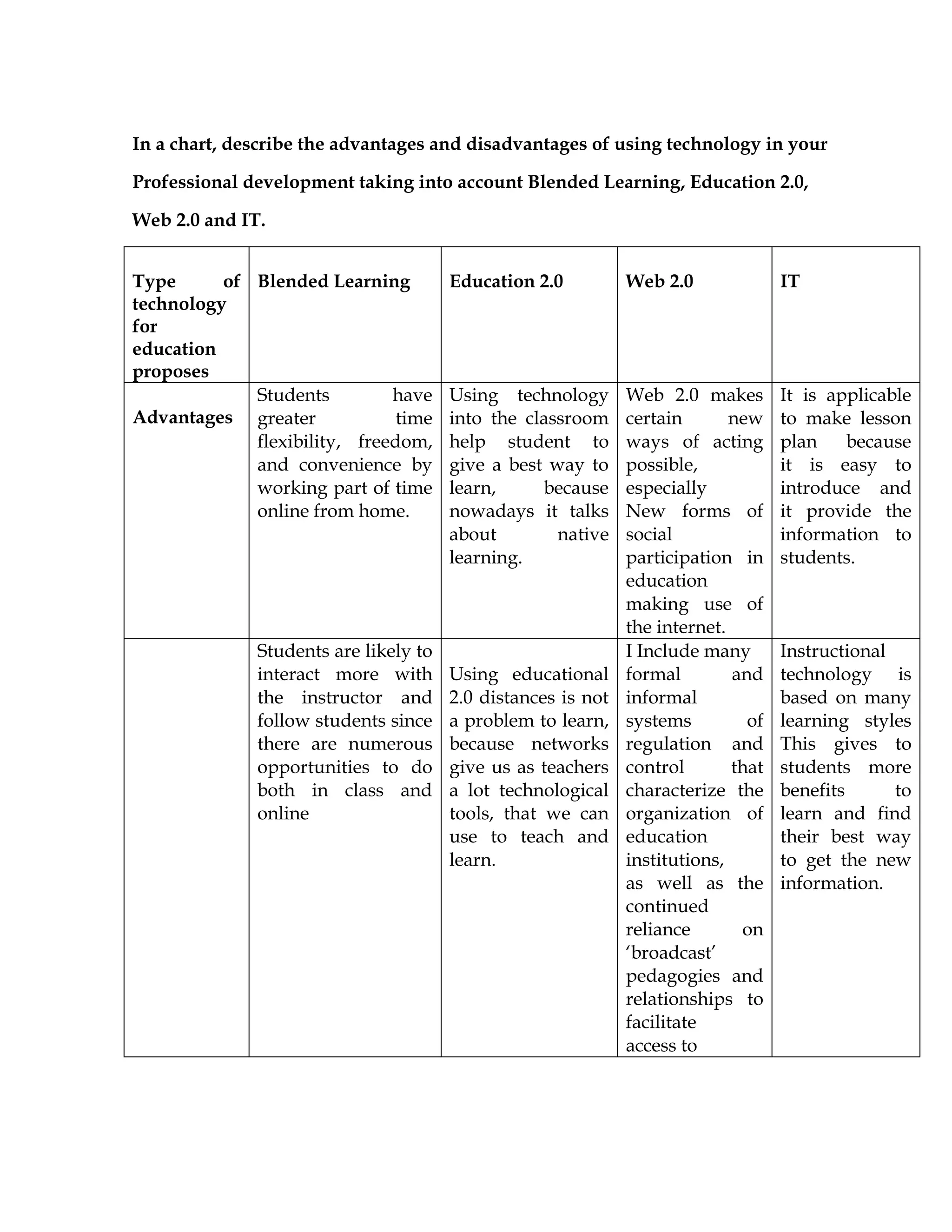
In a chart, describe the advantages and disadvantages of using technology in your
Professional development taking into account Blended Learning, Education 2.0,
Web 2.0 and IT.
Type of
technology
for
education
proposes
Blended Learning Education 2.0 Web 2.0 IT
Advantages
Students have
greater time
flexibility, freedom,
and convenience by
working part of time
online from home.
Using technology
into the classroom
help student to
give a best way to
learn, because
nowadays it talks
about native
learning.
Web 2.0 makes
certain new
ways of acting
possible,
especially
New forms of
social
participation in
education
making use of
the internet.
It is applicable
to make lesson
plan because
it is easy to
introduce and
it provide the
information to
students.
Students are likely to
interact more with
the instructor and
follow students since
there are numerous
opportunities to do
both in class and
online
Using educational
2.0 distances is not
a problem to learn,
because networks
give us as teachers
a lot technological
tools, that we can
use to teach and
learn.
I Include many
formal and
informal
systems of
regulation and
control that
characterize the
organization of
education
institutions,
as well as the
continued
reliance on
‘broadcast’
pedagogies and
relationships to
facilitate
access to
Instructional
technology is
based on many
learning styles
This gives to
students more
benefits to
learn and find
their best way
to get the new
information.
Students can
participate more in
class discussion
since they can
choose environment
online or face to face,
in which they feel
more comfortable.
https://sites.google.
com/a/idahopd.org
/blended-
learning/advantages
-and-challenges
Teachers and
students can make
a group in order to
keep in touch each
others; teachers
can post a task or
homework in the
group.
Digital natives
have more
success if
teachers use
educational 2.0,
because they
can learn
making use of
the technology
into the
classroom
The lesson plan
can be based on
use the
different
technological
tools, in order
to improve the
learning and
practice new
technology.
Disadvantag
es
Blended learning has
a strong dependence
on the technical
resources with
which the blended
learning experience
is delivered---these
tools need to be
reliable, easy to use,
and up to date in
order for the use of
the Internet to have
a meaningful impact
on the learning
experience.
Students need to
follow instructions
face to face in
order to
understand clearly
what the task is
about.
Web 2.0
applications
such as social
networking as
exciting
educational
tools, some
critics think
they may
distract learners
from their
studies.
Do not practice
in activities
into the
classroom.
IT literacy can serve
as a significant
barrier for students
attempting to get
access to the course
materials.
http://en.wikipedia.
org/wiki/Blended_l
earning#Advantages
.2Fdisadvantages
Students depend
completely of the
internet access.
Education 2.0
could be an enemy
of students,
because they have
freedom to do
whatever they
want.
Students have the
control on their
learning.
Web 2.0 tools
makes a
distance
between
Students and
formal
education.
web
2.0 tools whilst
physically on
campus could
be seen as a
potential misuse
of
resources, with
the education
institution
assisting
students to
disengage with
their studies:
Students who
don’t have
access to
internet could
have problems
to learn.
2. Explain how you are going to design a lesson plan online by using Web Quest
and what are the real propose using this kind of technology in your professional
development.
First of all I going to apply my Web Quest to children, this helped me to
looking for the adequate topic relating to the ages of my students. The name of the
topic is Traveling around the World. This topic is based on know some places around
the world. The WebQuets consists in six parts or steps, which involve, welcome,
introduction, task, process, evaluation and conclusion. All of these steps guided me to
create my WebQuest.
The first step is welcome, which consists on describe the topic, the description
on what is going to based the activity, the grade or level, the curriculum in this case is
English Language Art. The keyword which includes vocabulary related with the topic
and the Author.
The second step is introduction which consists on explain how I am going to
introduce the topic to my students, in this case I presented a video which include
different countries and cities around the world, in order to students can knowing new
places.
The step number three is Task which is focused on present activities that
students are going to do, in this case I presented a big picture, which includes a lot of
countries names and nationalities around the world, in order to know new
vocabulary related to the topic. The four step is the Process. This includes make some
activities into the classroom such as make groups to talking about the topic.
The step number four is The Evaluation to this part I am going to make a
rubric based on some criteria about the topic. The evaluation is going to be on an oral
presentation and it is going to grade what students have learned about the topic, and
they need to apply their creativity.
The last step is the conclusion; in this part I going to relate the importance of
speak English, because people who speak English can travel around the world
without problems to communicate which others.
I use this kind of tools in order to implement technology into the classroom,
nowadays it talks about native learners this means that as teachers should break
down the traditional methodology, because we have a new generation which
involves technology, because there are a lot of devices and technological tools that
allow us to make more easy and attractive the education.
3. Explain how you are going to deal if you want to use technology in a
school or place of work but there is not Tech in the classroom. What are you going
to do? How are you going to solve the problem? Provide resources that you will use
and the procedures
The first class as a teacher I am going to use my computer, and I am going to
allow to my students use their Smartphone into the classroom in order to create a
Google Gmail Account. I consider that Gmail Account is a powerful tool that allow
create documents and share with my students. Then I am going to create a group on
Facebook that it is going to allow us keep in touch outside and inside the classroom.
If there are students who don’t have Smartphone they are going to work with a
classmate who has one.
Nowadays the 90% about students have a Smartphone, this allow to teachers
apply technology into the classroom it doesn’t matter if there is not technology at the
school. I am going to use my computer in order to guide my students to create some
important web account, such as twitter, linked, YouTube, and blogs. Each student
should come to my desk and create all this kind of network account in order to
receive the next class from their Smartphone.
Lets practice to this activity I going to create my lesson plan focused on apply
technology into the classroom, first of all, I going to create a Web Quest based on a
specific topic, in which I am going to present: Big pictures related with the topic, in
order to learn new vocabulary, also I will present some videos that contain
information about the topic. Then I going to post my webquest on Facebook group, in
order to my students can see it and can receive the class from their Smartphone.
The propose will be that I am going to give the class from my laptop, and
students area going to receive it from their Smartphone simultaneously. The activity
will consist on each instruction about the class will be present on the webquest and
they are going to participate on each activities into the classroom.
The resources that I going to use are: internet, laptop, Smartphone, Gmail
account. Google drive, YouTube, webquest, facebook and procedures based on the
unit.
4. Choose digital resources you will include and describe how those digital
resources you are going to improve your PLE and PLN.
PLE
(Personal Learning Environment)
The PLE is the environment in which we learn efficiently using technology.
Today we live in a world where information has become fragmented and dispersed
in multiple spaces per share technologies, almost anyone can be a creator and
provider of information and knowledge advances at breakneck speeds. In this
context, define, learn, manage and enrich the PLE is a strategy to learn efficiently.
In this sense and to the abundant flow of information they provide new
electronic media, it is important to note that this way of learning (and thinking about
learning) requires a trained apprentice, someone who set their own learning goals. In
this process there is no evaluation, ie circulating learning moved by other interests.
An essential part of a PLE is personal learning network through which learners
exchange information in different ways and with different digital objects. For
example, a blog, a presentation on Slideshare, are shared by the resident’s digital web
objects. The way to understand learning proposed by the PLE involves addressing
and includes digital communication.
The experiences of an apprentice PLE active agent that is involved in the
process, that is, than a mere consumer of resources and sources that provides the
network but to provide products to the same network that actively nurtures. As Jordi
Adell says, "A PLE develops over time." They are very useful for residents of internet;
those are People living and are active on the web.
http://en.wikipedia.org/wiki/Personal_learning_environment
The personal learning environment is a powerful series of tools that allow me
learn using technology, it is personal because I decide how I can apply in order to
improve my learning style.
Facebook
I use facebook to keep in touch with relatives and close friends in order to
learn about specific information that they post. Actually I use it for education.
LinkedIn
I use LinkedIn to present my professional resume in which I present my
professional abilities, in order to get a good job.
Twitter
I use twitter to follow interesting people around the word in order to learn
about important information and share ideas.
Skype
This is a powerful tool that allow us to receive classes online, in which it is not
necessary to be face to face, this platform allow us save time and money.
YouTube
This is a wonderful tool, because it allows us to watch, listen and do. It helpful
to find tutorial about whatever you looking for. Also it is use to apply into the
classroom, in order to give using technology.
Blogger
Blogger is a useful tool that helps us as students improve or get different to
learn, through technology. Blogger help us to publish information or interesting topic
in order to others can see it and learn.
Drive
Google drive is a tool that allows creating documents and posting it on the
blogs in order to collaborate with my classmates in a group.
PLN
(Personal Learning Environment)
A personal learning network is an informal learning network that consists of
the people a learner interacts with and derives knowledge from in a personal learning
environment. In a PLN, a person makes a connection with another person with the
specific intent that some type of learning will occur because of that connection.
An important part of this concept is the theory of connectivism developed
by George Siemens and Stephen Downes. Learners create connections and develop a
network that contributes to their professional development and knowledge. The
learner does not have to know these people personally or ever meet them in person.
http://en.wikipedia.org/wiki/Personal_learning_network
My PLN consists in four specific areas: Social Network, Get Information, Share,
and Mail.
Share Information
In this area I use pages such as facebook, twitter, LinkedIn and Google apps, in
order to share and receive information with my professors, classmates and friends.
Social Network
To this area I use facebook and twitter in order to share information and ideas with
my all contacts.
Get Information
To this area I use YouTube, Google, and Wikipedia, and Bing. I use these all website
to search or get information.
Mail
To this area I use two kind of personal account Gmail and Hot Mail, in order to send
and receive information from my professors and classmates.

Final paper

  • 1.
    UNIVERSIDAD CAPITAN GENERALGERARDO BARRIOS SCHOOL OF ARTS AND SCIENCES FOREIGN LANGUAGE DEPARTMENT MODULE IV TECH IN EDUCATION CARLOS LUIS MARTINEZ MARQUEZ DUE DATE: JULY 5TH, 2014 FINAL PAPER
  • 2.
    In a chart,describe the advantages and disadvantages of using technology in your Professional development taking into account Blended Learning, Education 2.0, Web 2.0 and IT. Type of technology for education proposes Blended Learning Education 2.0 Web 2.0 IT Advantages Students have greater time flexibility, freedom, and convenience by working part of time online from home. Using technology into the classroom help student to give a best way to learn, because nowadays it talks about native learning. Web 2.0 makes certain new ways of acting possible, especially New forms of social participation in education making use of the internet. It is applicable to make lesson plan because it is easy to introduce and it provide the information to students. Students are likely to interact more with the instructor and follow students since there are numerous opportunities to do both in class and online Using educational 2.0 distances is not a problem to learn, because networks give us as teachers a lot technological tools, that we can use to teach and learn. I Include many formal and informal systems of regulation and control that characterize the organization of education institutions, as well as the continued reliance on ‘broadcast’ pedagogies and relationships to facilitate access to Instructional technology is based on many learning styles This gives to students more benefits to learn and find their best way to get the new information.
  • 3.
    Students can participate morein class discussion since they can choose environment online or face to face, in which they feel more comfortable. https://sites.google. com/a/idahopd.org /blended- learning/advantages -and-challenges Teachers and students can make a group in order to keep in touch each others; teachers can post a task or homework in the group. Digital natives have more success if teachers use educational 2.0, because they can learn making use of the technology into the classroom The lesson plan can be based on use the different technological tools, in order to improve the learning and practice new technology. Disadvantag es Blended learning has a strong dependence on the technical resources with which the blended learning experience is delivered---these tools need to be reliable, easy to use, and up to date in order for the use of the Internet to have a meaningful impact on the learning experience. Students need to follow instructions face to face in order to understand clearly what the task is about. Web 2.0 applications such as social networking as exciting educational tools, some critics think they may distract learners from their studies. Do not practice in activities into the classroom.
  • 4.
    IT literacy canserve as a significant barrier for students attempting to get access to the course materials. http://en.wikipedia. org/wiki/Blended_l earning#Advantages .2Fdisadvantages Students depend completely of the internet access. Education 2.0 could be an enemy of students, because they have freedom to do whatever they want. Students have the control on their learning. Web 2.0 tools makes a distance between Students and formal education. web 2.0 tools whilst physically on campus could be seen as a potential misuse of resources, with the education institution assisting students to disengage with their studies: Students who don’t have access to internet could have problems to learn.
  • 5.
    2. Explain howyou are going to design a lesson plan online by using Web Quest and what are the real propose using this kind of technology in your professional development. First of all I going to apply my Web Quest to children, this helped me to looking for the adequate topic relating to the ages of my students. The name of the topic is Traveling around the World. This topic is based on know some places around the world. The WebQuets consists in six parts or steps, which involve, welcome, introduction, task, process, evaluation and conclusion. All of these steps guided me to create my WebQuest. The first step is welcome, which consists on describe the topic, the description on what is going to based the activity, the grade or level, the curriculum in this case is English Language Art. The keyword which includes vocabulary related with the topic and the Author. The second step is introduction which consists on explain how I am going to introduce the topic to my students, in this case I presented a video which include different countries and cities around the world, in order to students can knowing new places. The step number three is Task which is focused on present activities that students are going to do, in this case I presented a big picture, which includes a lot of countries names and nationalities around the world, in order to know new vocabulary related to the topic. The four step is the Process. This includes make some activities into the classroom such as make groups to talking about the topic. The step number four is The Evaluation to this part I am going to make a rubric based on some criteria about the topic. The evaluation is going to be on an oral presentation and it is going to grade what students have learned about the topic, and they need to apply their creativity. The last step is the conclusion; in this part I going to relate the importance of speak English, because people who speak English can travel around the world without problems to communicate which others. I use this kind of tools in order to implement technology into the classroom, nowadays it talks about native learners this means that as teachers should break down the traditional methodology, because we have a new generation which involves technology, because there are a lot of devices and technological tools that allow us to make more easy and attractive the education.
  • 6.
    3. Explain howyou are going to deal if you want to use technology in a school or place of work but there is not Tech in the classroom. What are you going to do? How are you going to solve the problem? Provide resources that you will use and the procedures The first class as a teacher I am going to use my computer, and I am going to allow to my students use their Smartphone into the classroom in order to create a Google Gmail Account. I consider that Gmail Account is a powerful tool that allow create documents and share with my students. Then I am going to create a group on Facebook that it is going to allow us keep in touch outside and inside the classroom. If there are students who don’t have Smartphone they are going to work with a classmate who has one. Nowadays the 90% about students have a Smartphone, this allow to teachers apply technology into the classroom it doesn’t matter if there is not technology at the school. I am going to use my computer in order to guide my students to create some important web account, such as twitter, linked, YouTube, and blogs. Each student should come to my desk and create all this kind of network account in order to receive the next class from their Smartphone. Lets practice to this activity I going to create my lesson plan focused on apply technology into the classroom, first of all, I going to create a Web Quest based on a specific topic, in which I am going to present: Big pictures related with the topic, in order to learn new vocabulary, also I will present some videos that contain information about the topic. Then I going to post my webquest on Facebook group, in order to my students can see it and can receive the class from their Smartphone. The propose will be that I am going to give the class from my laptop, and students area going to receive it from their Smartphone simultaneously. The activity will consist on each instruction about the class will be present on the webquest and they are going to participate on each activities into the classroom. The resources that I going to use are: internet, laptop, Smartphone, Gmail account. Google drive, YouTube, webquest, facebook and procedures based on the unit.
  • 7.
    4. Choose digitalresources you will include and describe how those digital resources you are going to improve your PLE and PLN. PLE (Personal Learning Environment) The PLE is the environment in which we learn efficiently using technology. Today we live in a world where information has become fragmented and dispersed in multiple spaces per share technologies, almost anyone can be a creator and provider of information and knowledge advances at breakneck speeds. In this context, define, learn, manage and enrich the PLE is a strategy to learn efficiently. In this sense and to the abundant flow of information they provide new electronic media, it is important to note that this way of learning (and thinking about learning) requires a trained apprentice, someone who set their own learning goals. In this process there is no evaluation, ie circulating learning moved by other interests. An essential part of a PLE is personal learning network through which learners exchange information in different ways and with different digital objects. For example, a blog, a presentation on Slideshare, are shared by the resident’s digital web objects. The way to understand learning proposed by the PLE involves addressing and includes digital communication. The experiences of an apprentice PLE active agent that is involved in the process, that is, than a mere consumer of resources and sources that provides the network but to provide products to the same network that actively nurtures. As Jordi Adell says, "A PLE develops over time." They are very useful for residents of internet; those are People living and are active on the web. http://en.wikipedia.org/wiki/Personal_learning_environment The personal learning environment is a powerful series of tools that allow me learn using technology, it is personal because I decide how I can apply in order to improve my learning style. Facebook I use facebook to keep in touch with relatives and close friends in order to learn about specific information that they post. Actually I use it for education.
  • 8.
    LinkedIn I use LinkedInto present my professional resume in which I present my professional abilities, in order to get a good job. Twitter I use twitter to follow interesting people around the word in order to learn about important information and share ideas. Skype This is a powerful tool that allow us to receive classes online, in which it is not necessary to be face to face, this platform allow us save time and money. YouTube This is a wonderful tool, because it allows us to watch, listen and do. It helpful to find tutorial about whatever you looking for. Also it is use to apply into the classroom, in order to give using technology. Blogger Blogger is a useful tool that helps us as students improve or get different to learn, through technology. Blogger help us to publish information or interesting topic in order to others can see it and learn. Drive Google drive is a tool that allows creating documents and posting it on the blogs in order to collaborate with my classmates in a group. PLN (Personal Learning Environment) A personal learning network is an informal learning network that consists of the people a learner interacts with and derives knowledge from in a personal learning environment. In a PLN, a person makes a connection with another person with the specific intent that some type of learning will occur because of that connection. An important part of this concept is the theory of connectivism developed by George Siemens and Stephen Downes. Learners create connections and develop a network that contributes to their professional development and knowledge. The learner does not have to know these people personally or ever meet them in person. http://en.wikipedia.org/wiki/Personal_learning_network
  • 9.
    My PLN consistsin four specific areas: Social Network, Get Information, Share, and Mail. Share Information In this area I use pages such as facebook, twitter, LinkedIn and Google apps, in order to share and receive information with my professors, classmates and friends. Social Network To this area I use facebook and twitter in order to share information and ideas with my all contacts. Get Information To this area I use YouTube, Google, and Wikipedia, and Bing. I use these all website to search or get information. Mail To this area I use two kind of personal account Gmail and Hot Mail, in order to send and receive information from my professors and classmates.