Digital Graphics
File Formats
Ellie Ibbotson
Raster Graphics
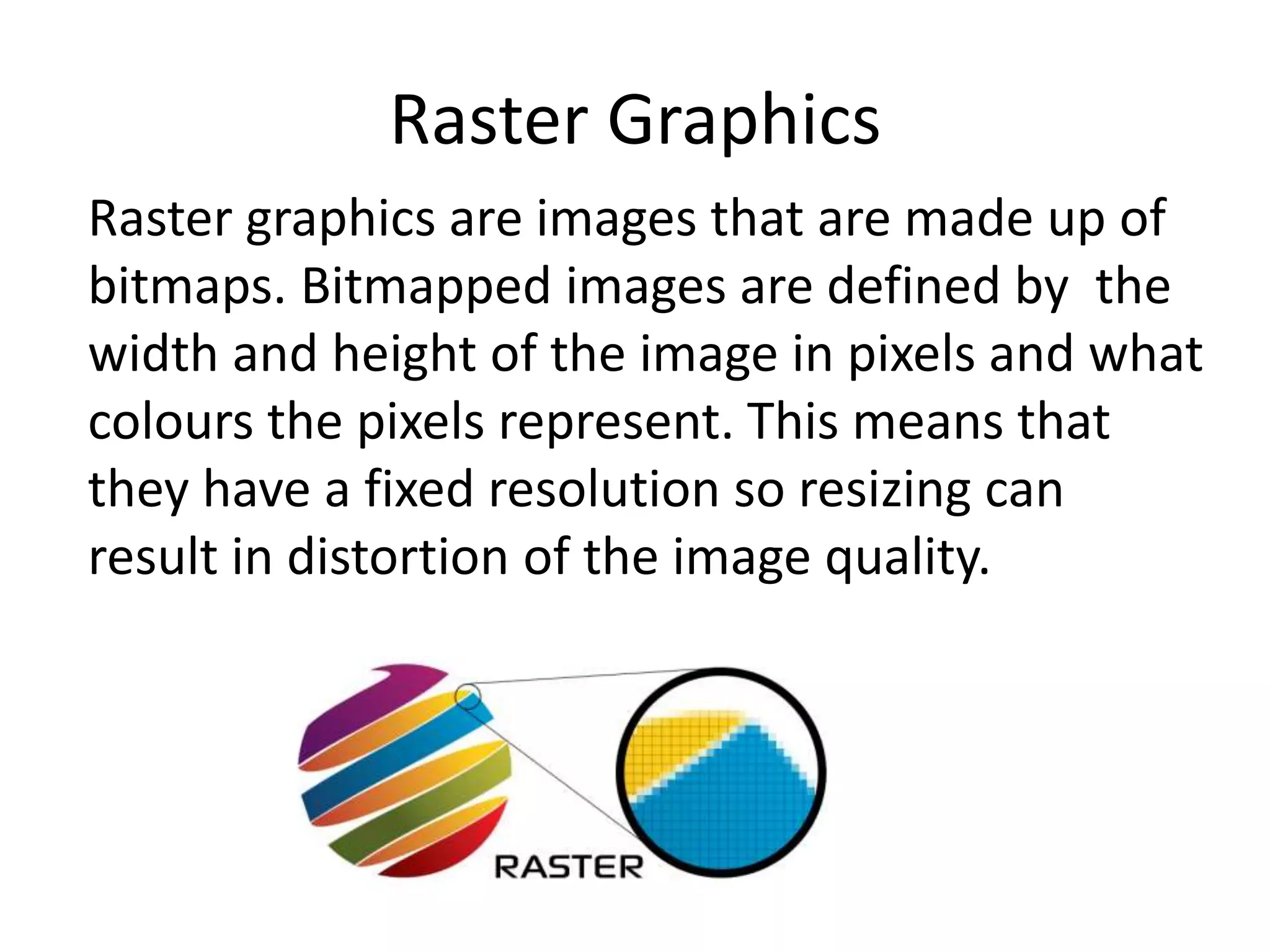
Raster graphics are images that are made up of
bitmaps. Bitmapped images are defined by the
width and height of the image in pixels and what
colours the pixels represent. This means that
they have a fixed resolution so resizing can
result in distortion of the image quality.
Vector Graphics
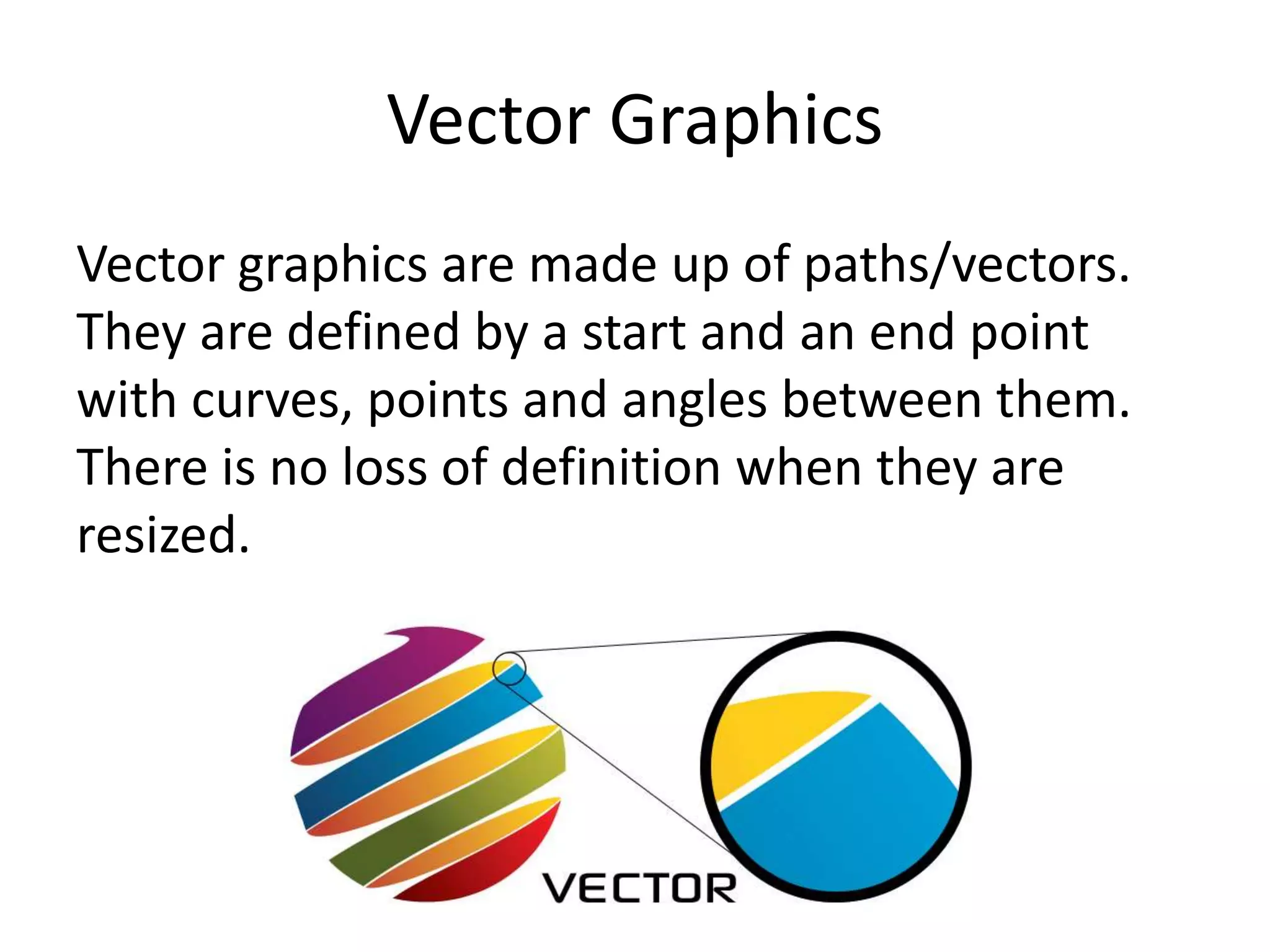
Vector graphics are made up of paths/vectors.
They are defined by a start and an end point
with curves, points and angles between them.
There is no loss of definition when they are
resized.
Raster Graphics
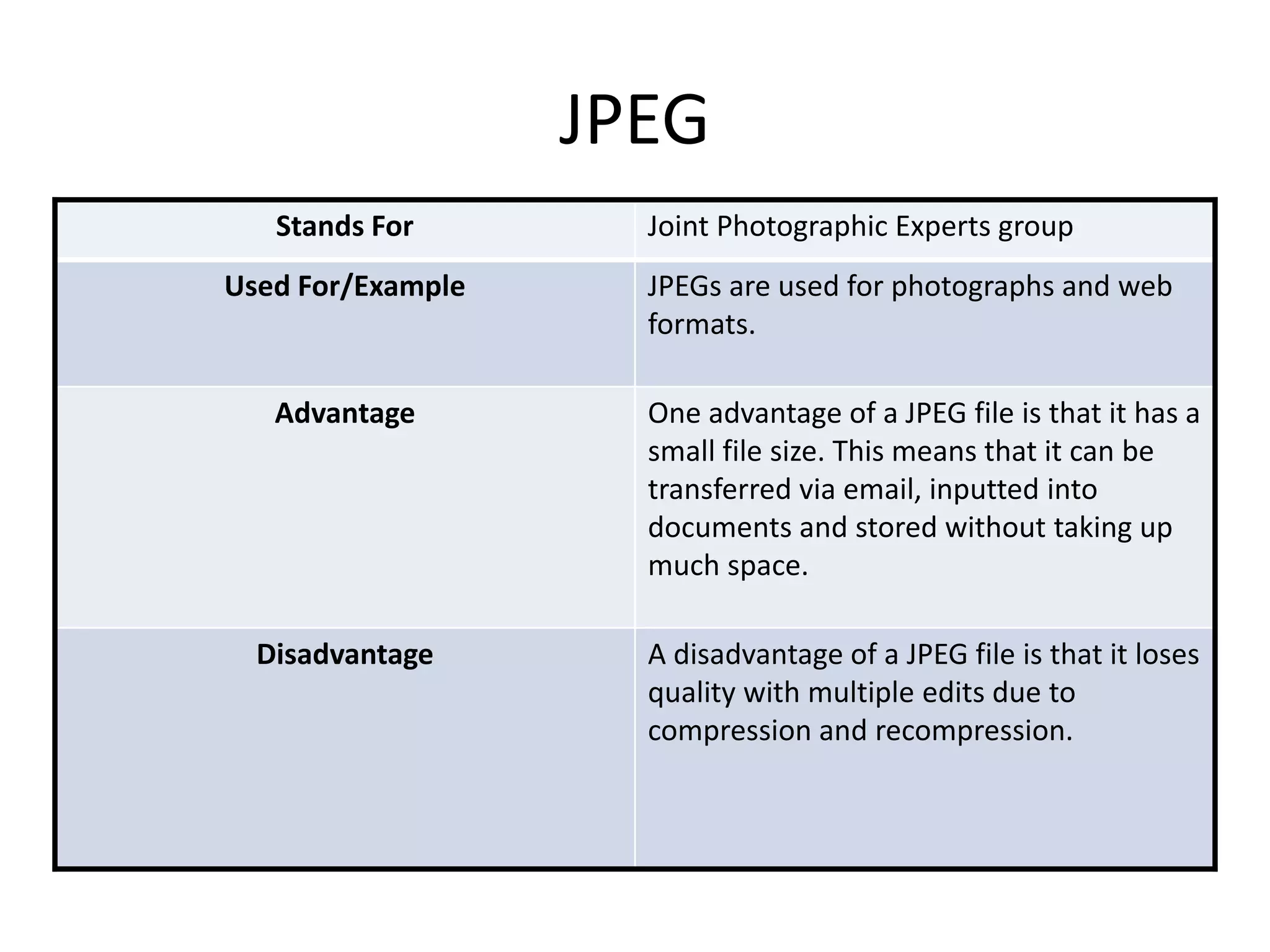
JPEG
Stands For Joint Photographic Experts group
Used For/Example JPEGs are used for photographs and web
formats.
Advantage One advantage of a JPEG file is that it has a
small file size. This means that it can be
transferred via email, inputted into
documents and stored without taking up
much space.
Disadvantage A disadvantage of a JPEG file is that it loses
quality with multiple edits due to
compression and recompression.
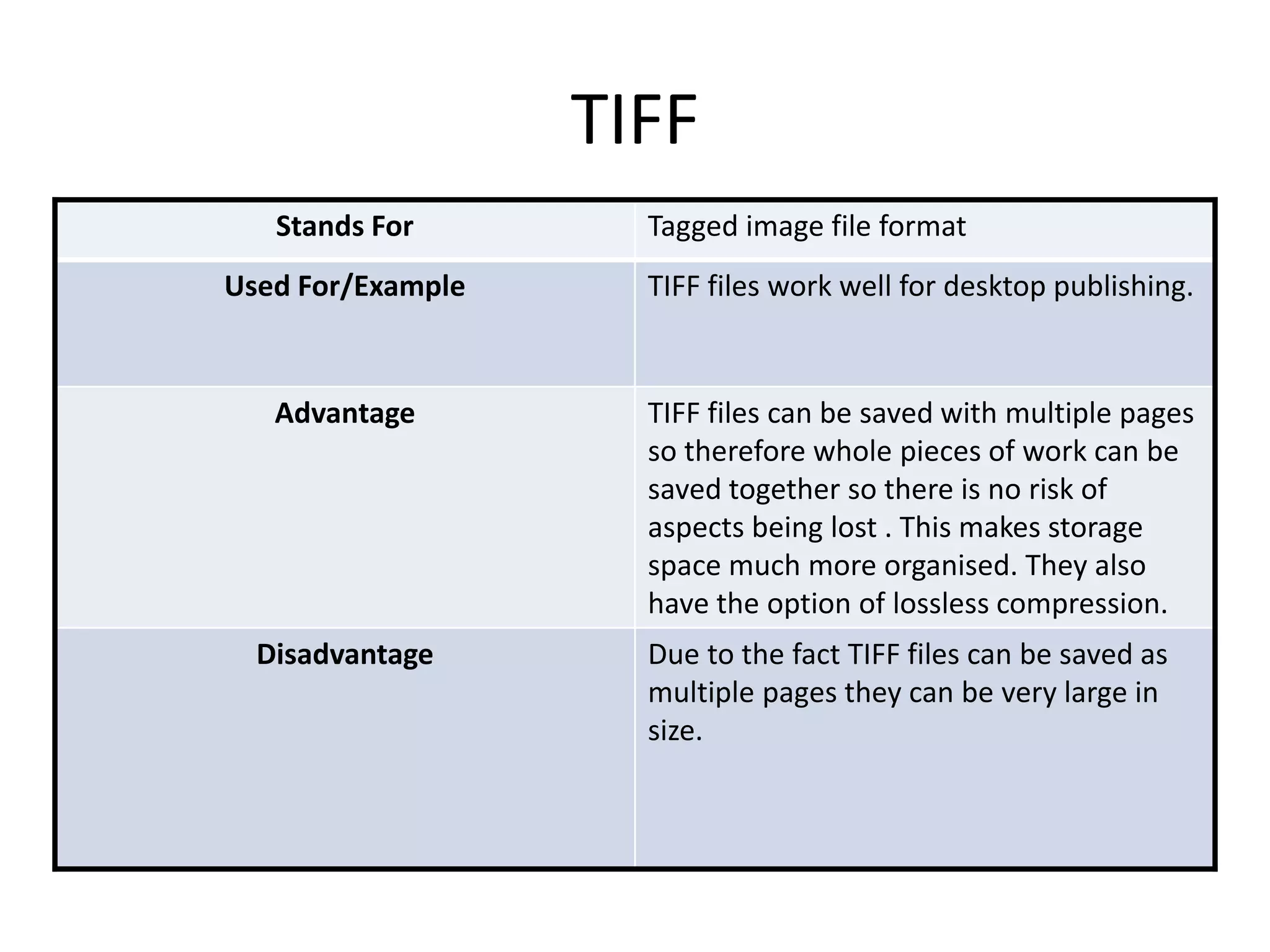
TIFF
Stands For Tagged image file format
Used For/Example TIFF files work well for desktop publishing.
Advantage TIFF files can be saved with multiple pages
so therefore whole pieces of work can be
saved together so there is no risk of
aspects being lost . This makes storage
space much more organised. They also
have the option of lossless compression.
Disadvantage Due to the fact TIFF files can be saved as
multiple pages they can be very large in
size.
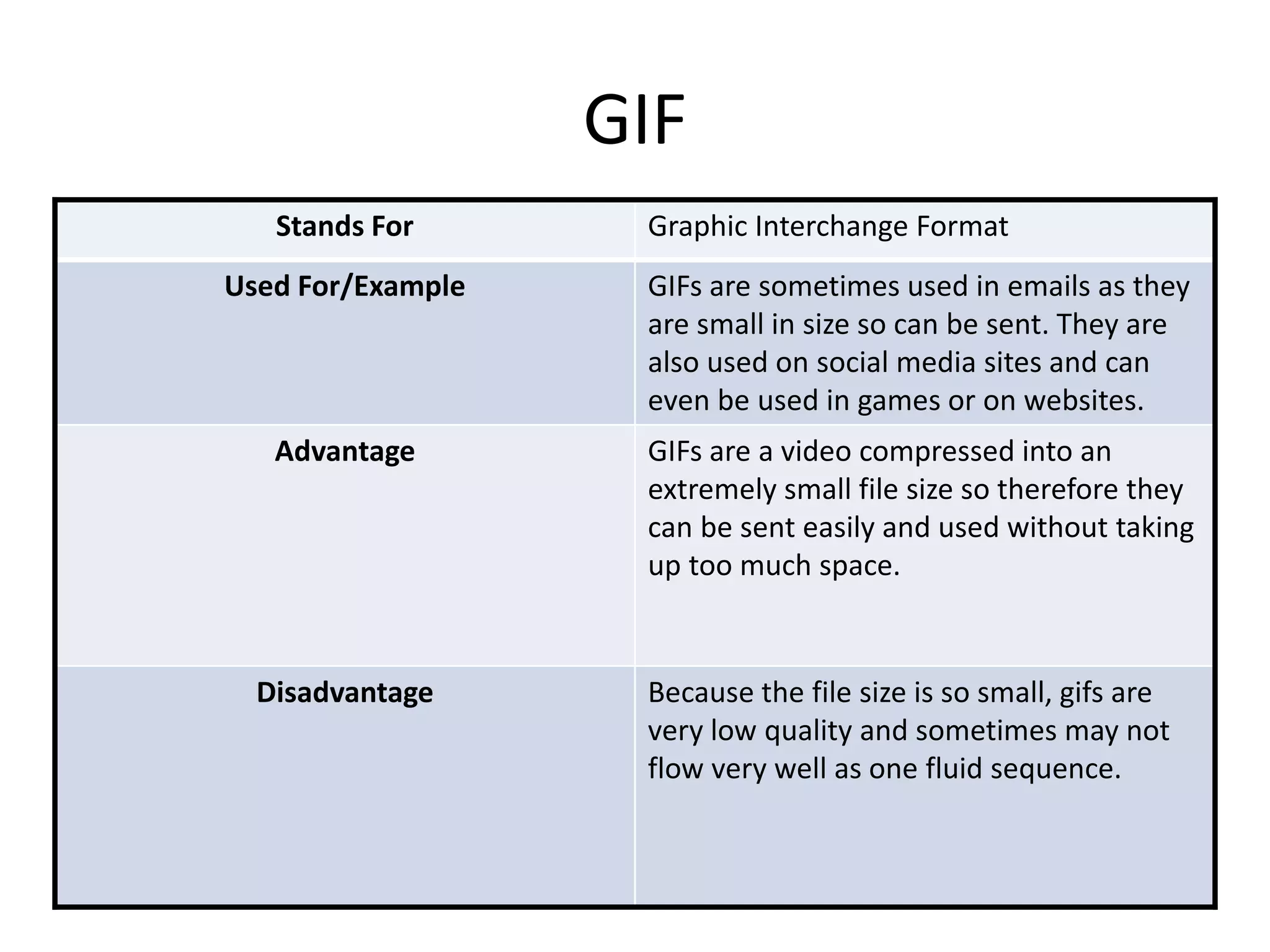
GIF
Stands For Graphic Interchange Format
Used For/Example GIFs are sometimes used in emails as they
are small in size so can be sent. They are
also used on social media sites and can
even be used in games or on websites.
Advantage GIFs are a video compressed into an
extremely small file size so therefore they
can be sent easily and used without taking
up too much space.
Disadvantage Because the file size is so small, gifs are
very low quality and sometimes may not
flow very well as one fluid sequence.
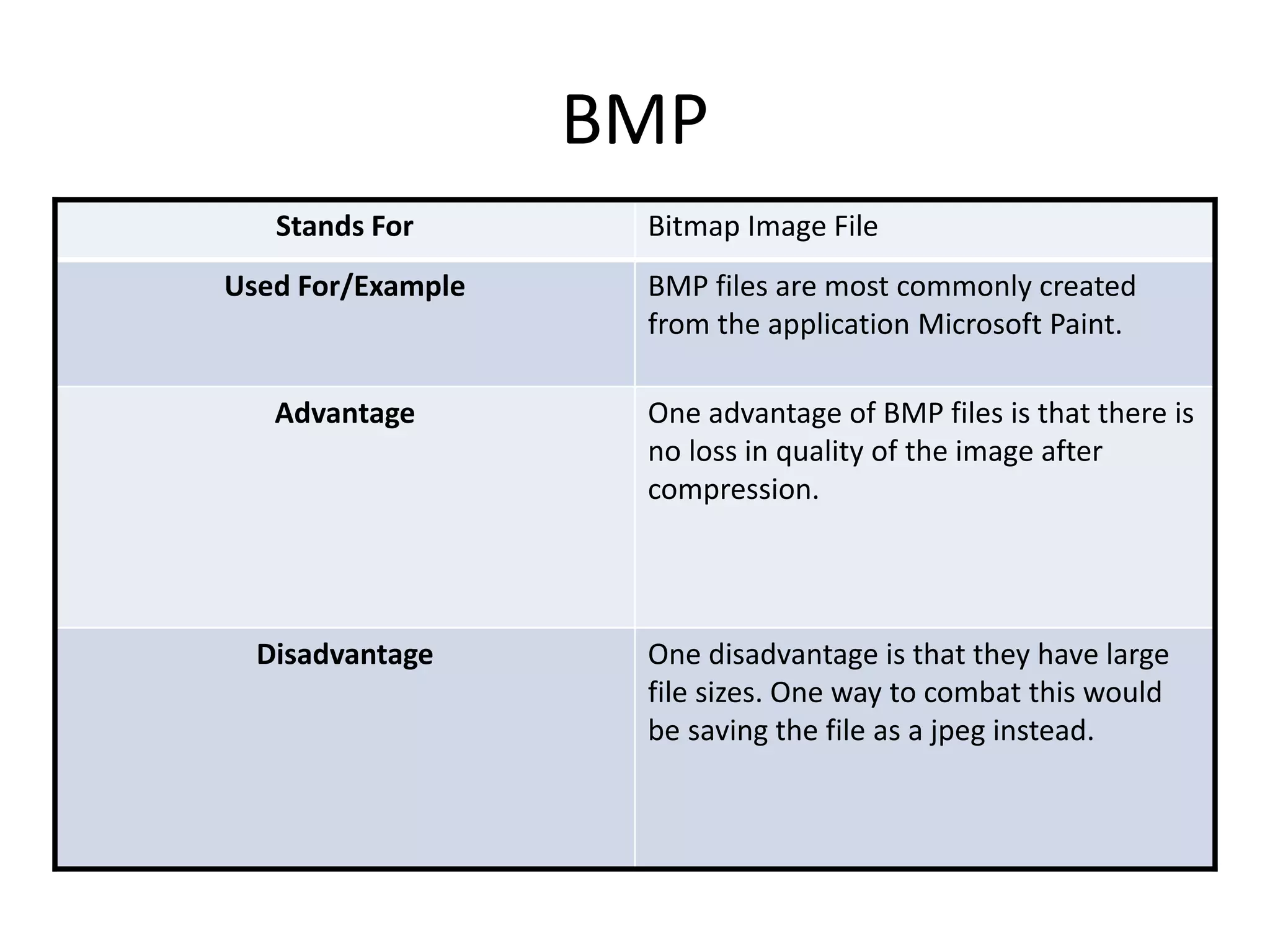
BMP
Stands For Bitmap Image File
Used For/Example BMP files are most commonly created
from the application Microsoft Paint.
Advantage One advantage of BMP files is that there is
no loss in quality of the image after
compression.
Disadvantage One disadvantage is that they have large
file sizes. One way to combat this would
be saving the file as a jpeg instead.
Vector Graphics
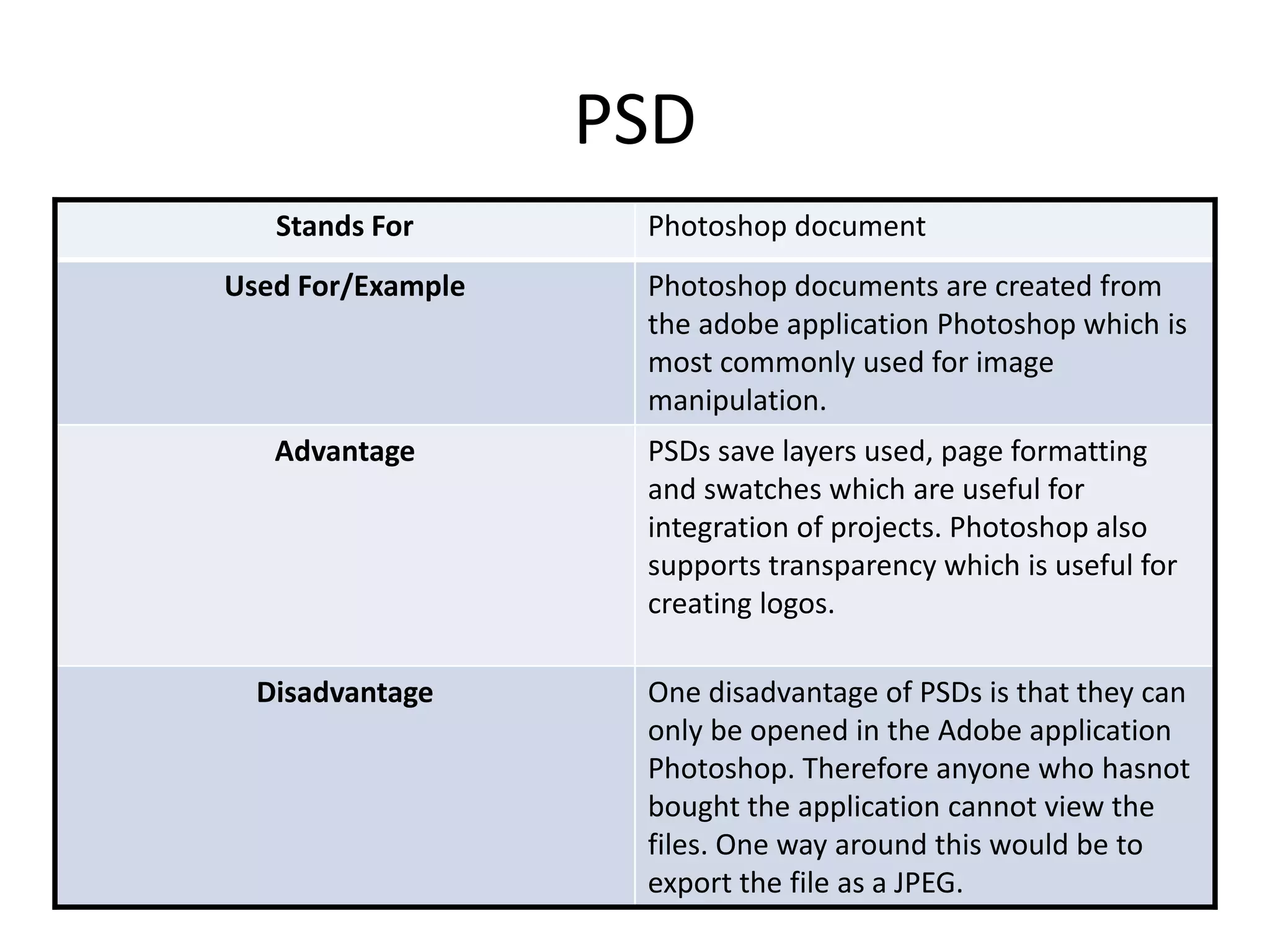
PSD
Stands For Photoshop document
Used For/Example Photoshop documents are created from
the adobe application Photoshop which is
most commonly used for image
manipulation.
Advantage PSDs save layers used, page formatting
and swatches which are useful for
integration of projects. Photoshop also
supports transparency which is useful for
creating logos.
Disadvantage One disadvantage of PSDs is that they can
only be opened in the Adobe application
Photoshop. Therefore anyone who hasnot
bought the application cannot view the
files. One way around this would be to
export the file as a JPEG.
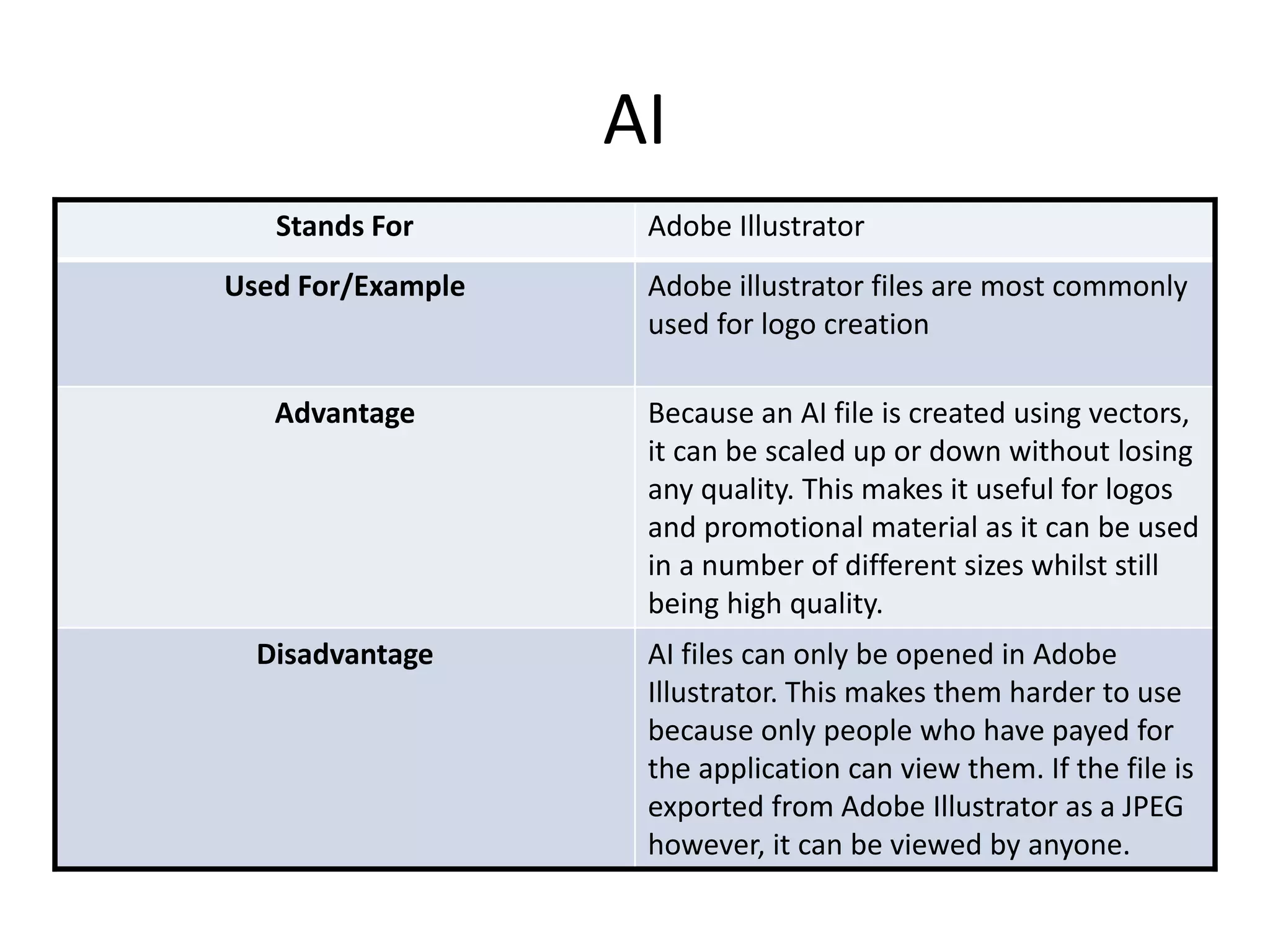
AI
Stands For Adobe Illustrator
Used For/Example Adobe illustrator files are most commonly
used for logo creation
Advantage Because an AI file is created using vectors,
it can be scaled up or down without losing
any quality. This makes it useful for logos
and promotional material as it can be used
in a number of different sizes whilst still
being high quality.
Disadvantage AI files can only be opened in Adobe
Illustrator. This makes them harder to use
because only people who have payed for
the application can view them. If the file is
exported from Adobe Illustrator as a JPEG
however, it can be viewed by anyone.
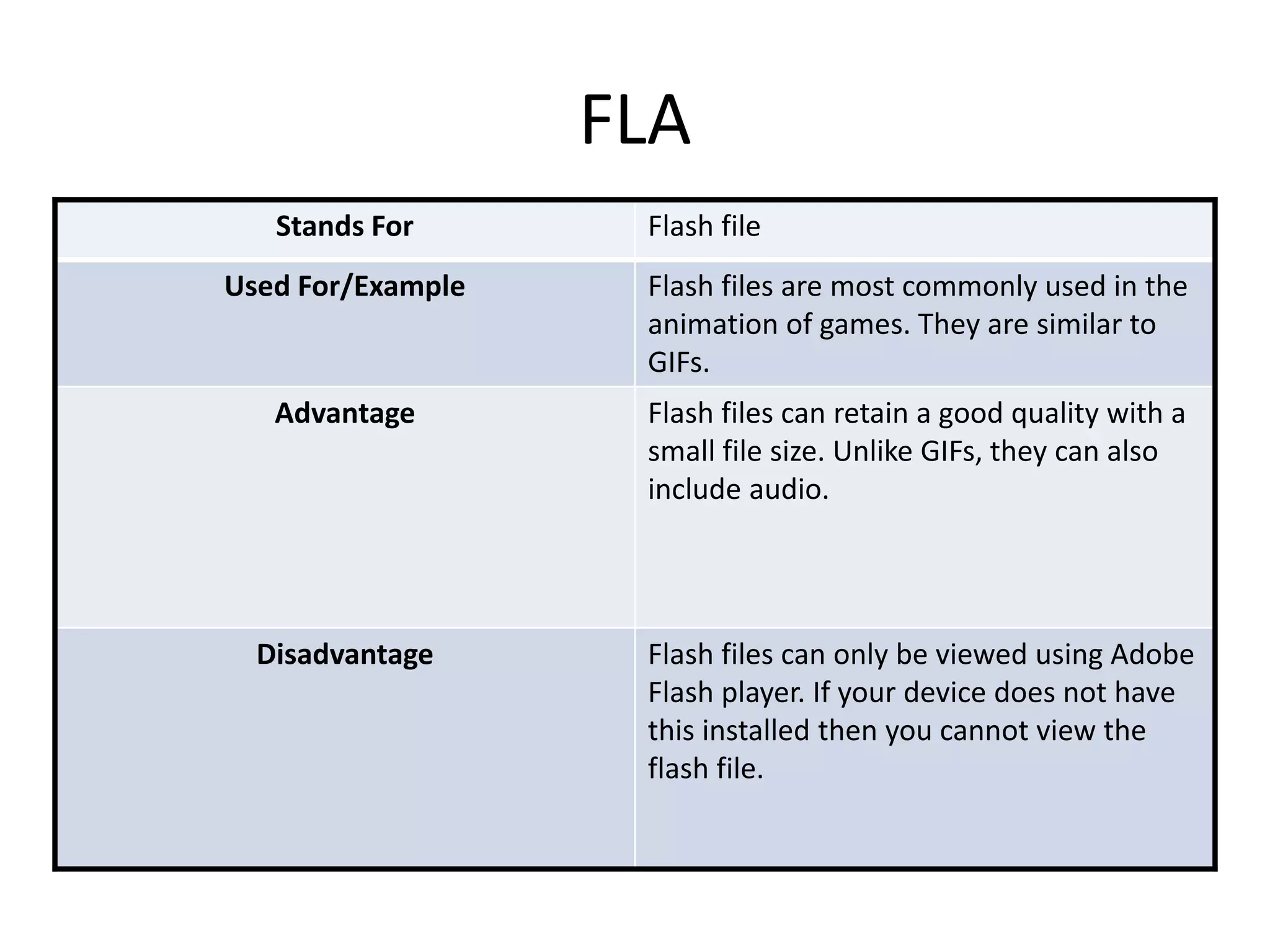
FLA
Stands For Flash file
Used For/Example Flash files are most commonly used in the
animation of games. They are similar to
GIFs.
Advantage Flash files can retain a good quality with a
small file size. Unlike GIFs, they can also
include audio.
Disadvantage Flash files can only be viewed using Adobe
Flash player. If your device does not have
this installed then you cannot view the
flash file.
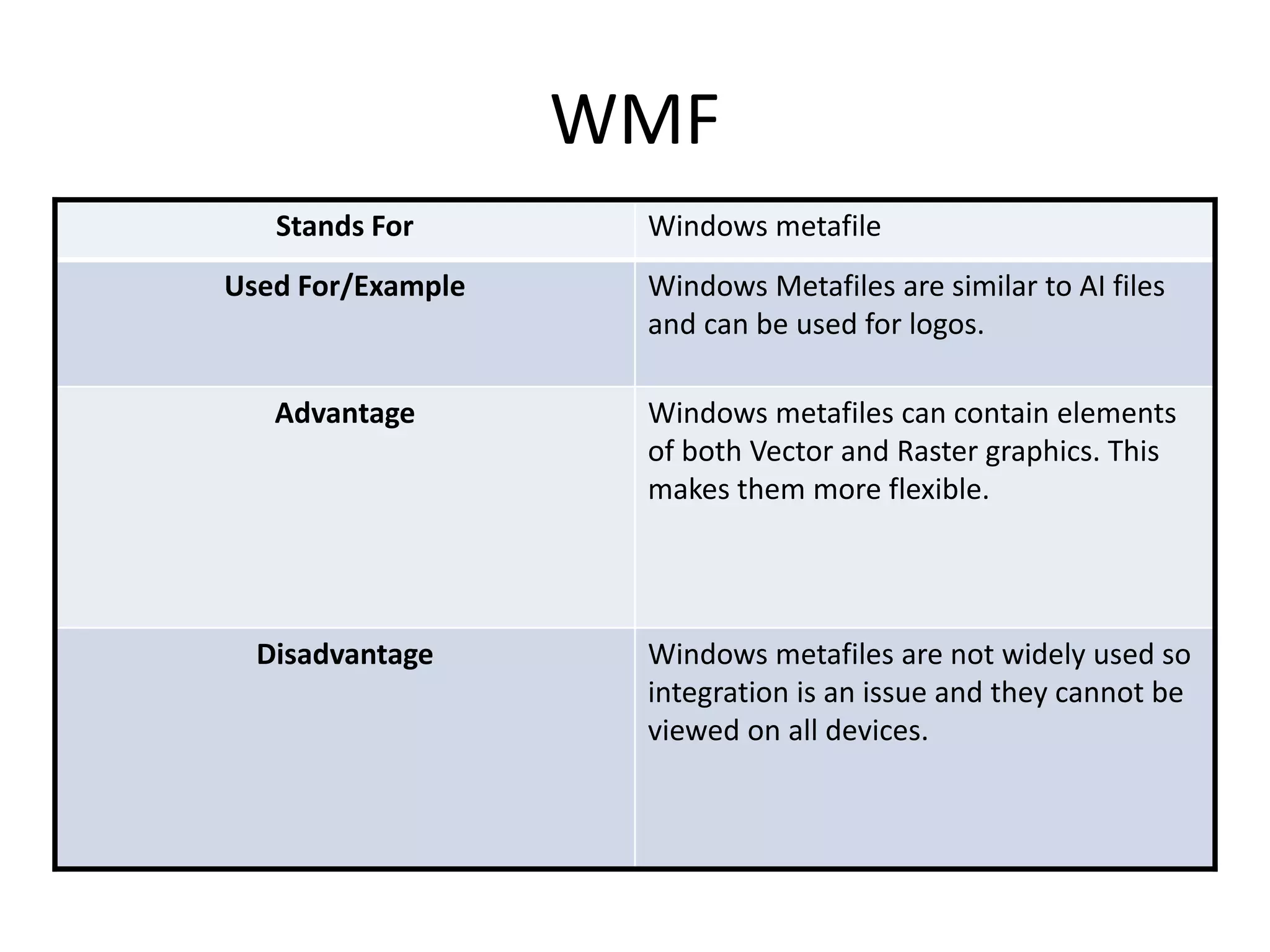
WMF
Stands For Windows metafile
Used For/Example Windows Metafiles are similar to AI files
and can be used for logos.
Advantage Windows metafiles can contain elements
of both Vector and Raster graphics. This
makes them more flexible.
Disadvantage Windows metafiles are not widely used so
integration is an issue and they cannot be
viewed on all devices.
File Format Capture
and Optimising
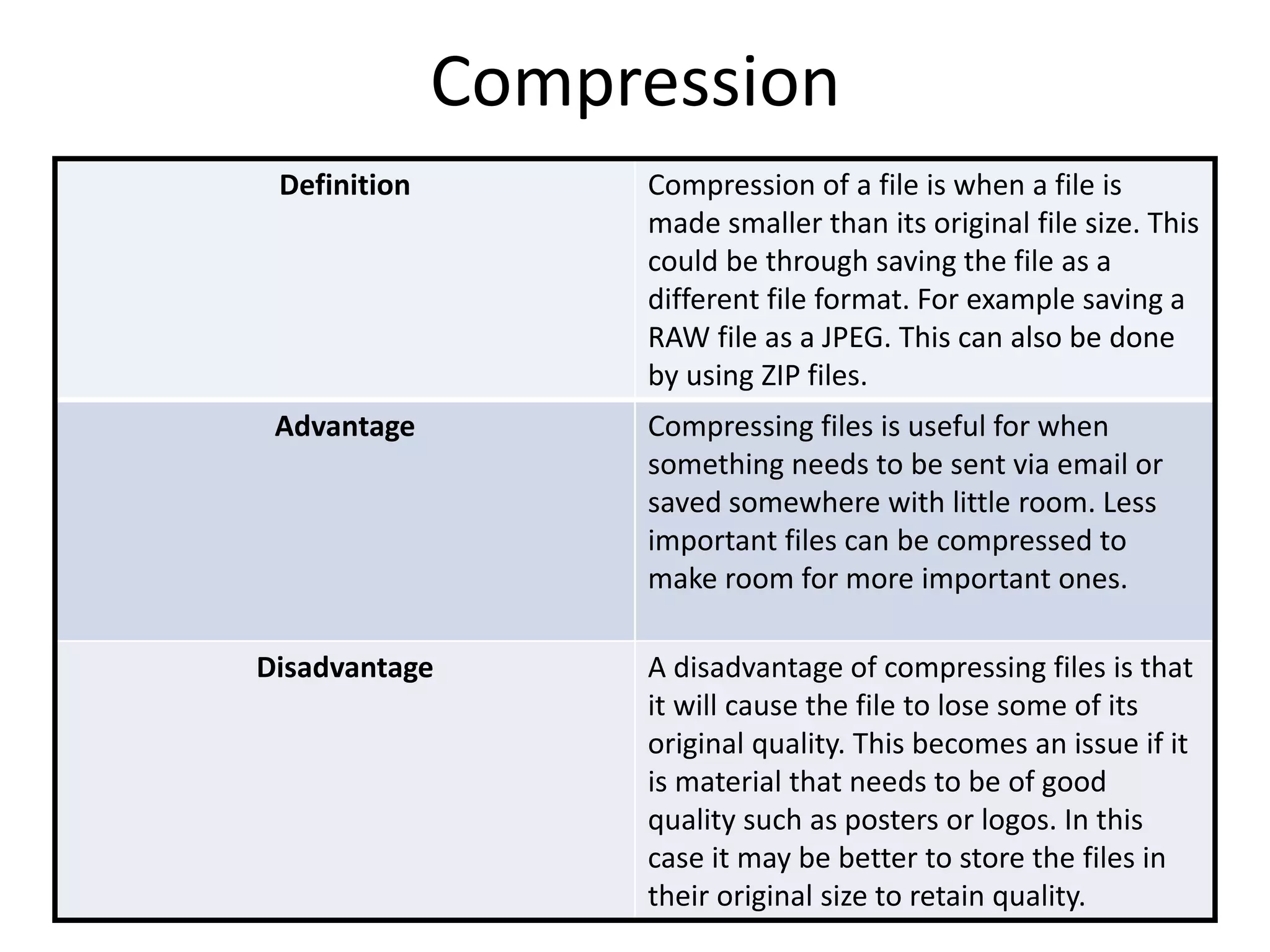
Compression
Definition Compression of a file is when a file is
made smaller than its original file size. This
could be through saving the file as a
different file format. For example saving a
RAW file as a JPEG. This can also be done
by using ZIP files.
Advantage Compressing files is useful for when
something needs to be sent via email or
saved somewhere with little room. Less
important files can be compressed to
make room for more important ones.
Disadvantage A disadvantage of compressing files is that
it will cause the file to lose some of its
original quality. This becomes an issue if it
is material that needs to be of good
quality such as posters or logos. In this
case it may be better to store the files in
their original size to retain quality.
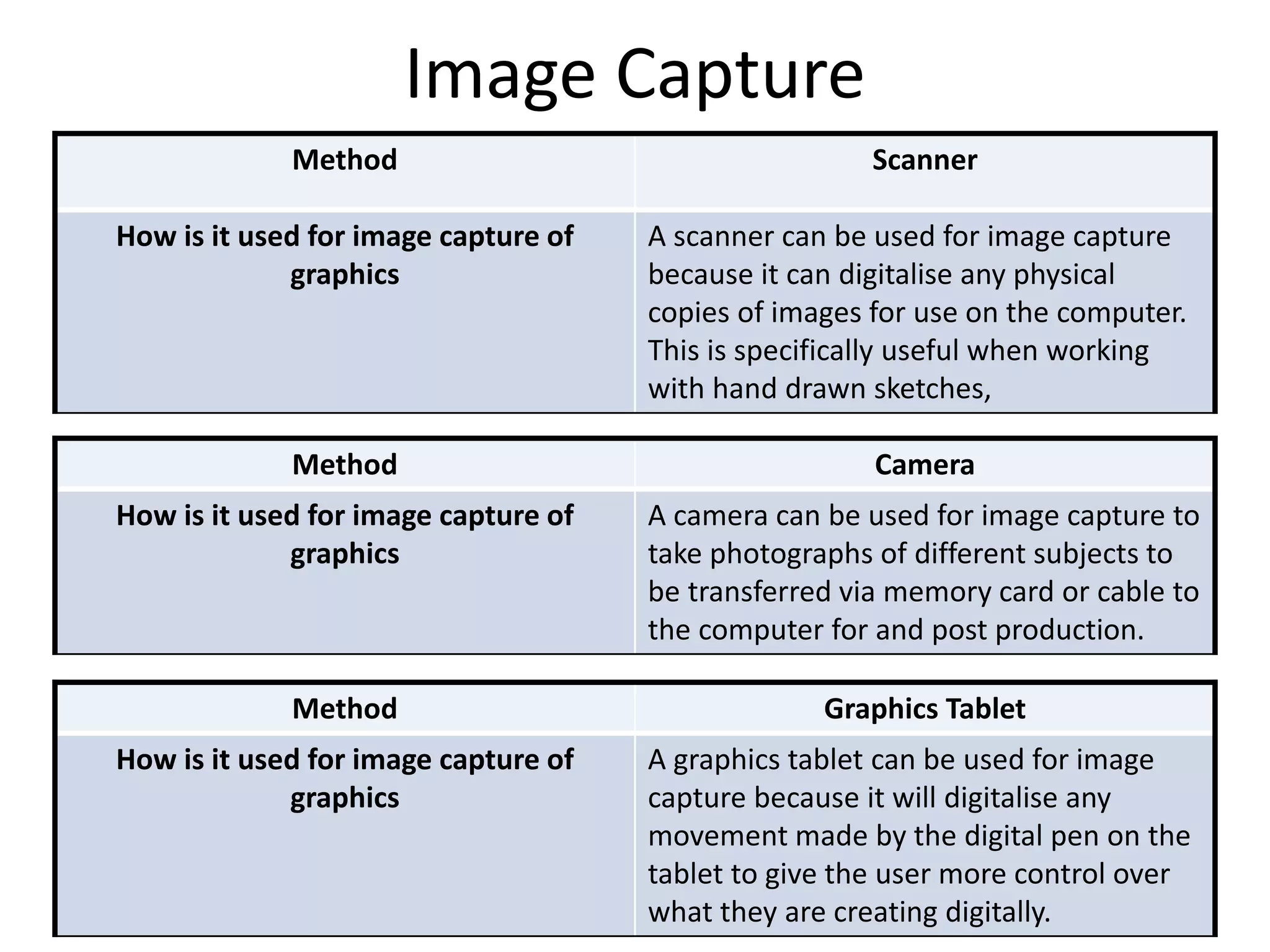
Image Capture
Method Scanner
How is it used for image capture of
graphics
A scanner can be used for image capture
because it can digitalise any physical
copies of images for use on the computer.
This is specifically useful when working
with hand drawn sketches,
Method Camera
How is it used for image capture of
graphics
A camera can be used for image capture to
take photographs of different subjects to
be transferred via memory card or cable to
the computer for and post production.
Method Graphics Tablet
How is it used for image capture of
graphics
A graphics tablet can be used for image
capture because it will digitalise any
movement made by the digital pen on the
tablet to give the user more control over
what they are creating digitally.
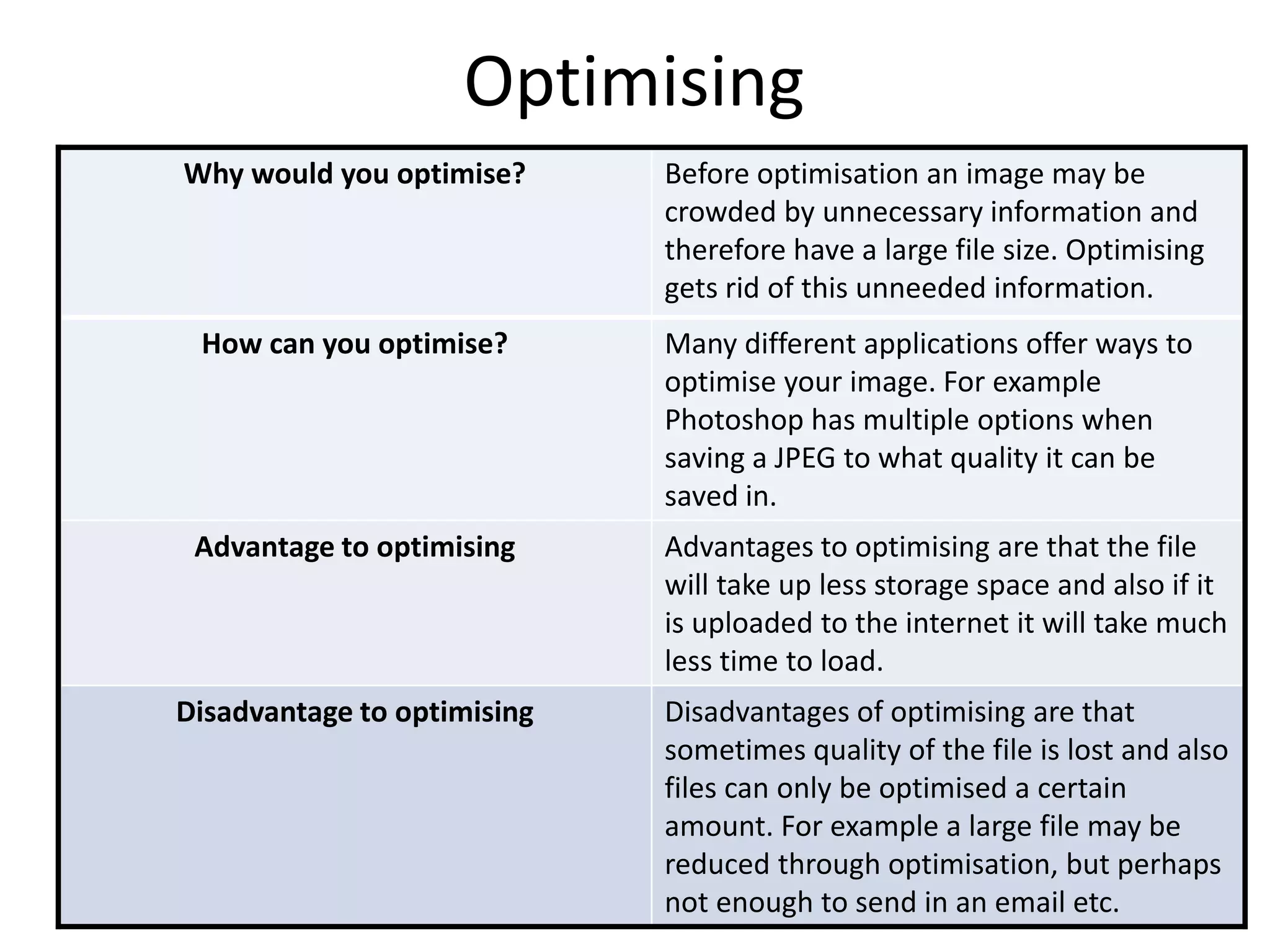
Optimising
Why would you optimise? Before optimisation an image may be
crowded by unnecessary information and
therefore have a large file size. Optimising
gets rid of this unneeded information.
How can you optimise? Many different applications offer ways to
optimise your image. For example
Photoshop has multiple options when
saving a JPEG to what quality it can be
saved in.
Advantage to optimising Advantages to optimising are that the file
will take up less storage space and also if it
is uploaded to the internet it will take much
less time to load.
Disadvantage to optimising Disadvantages of optimising are that
sometimes quality of the file is lost and also
files can only be optimised a certain
amount. For example a large file may be
reduced through optimisation, but perhaps
not enough to send in an email etc.
Storage
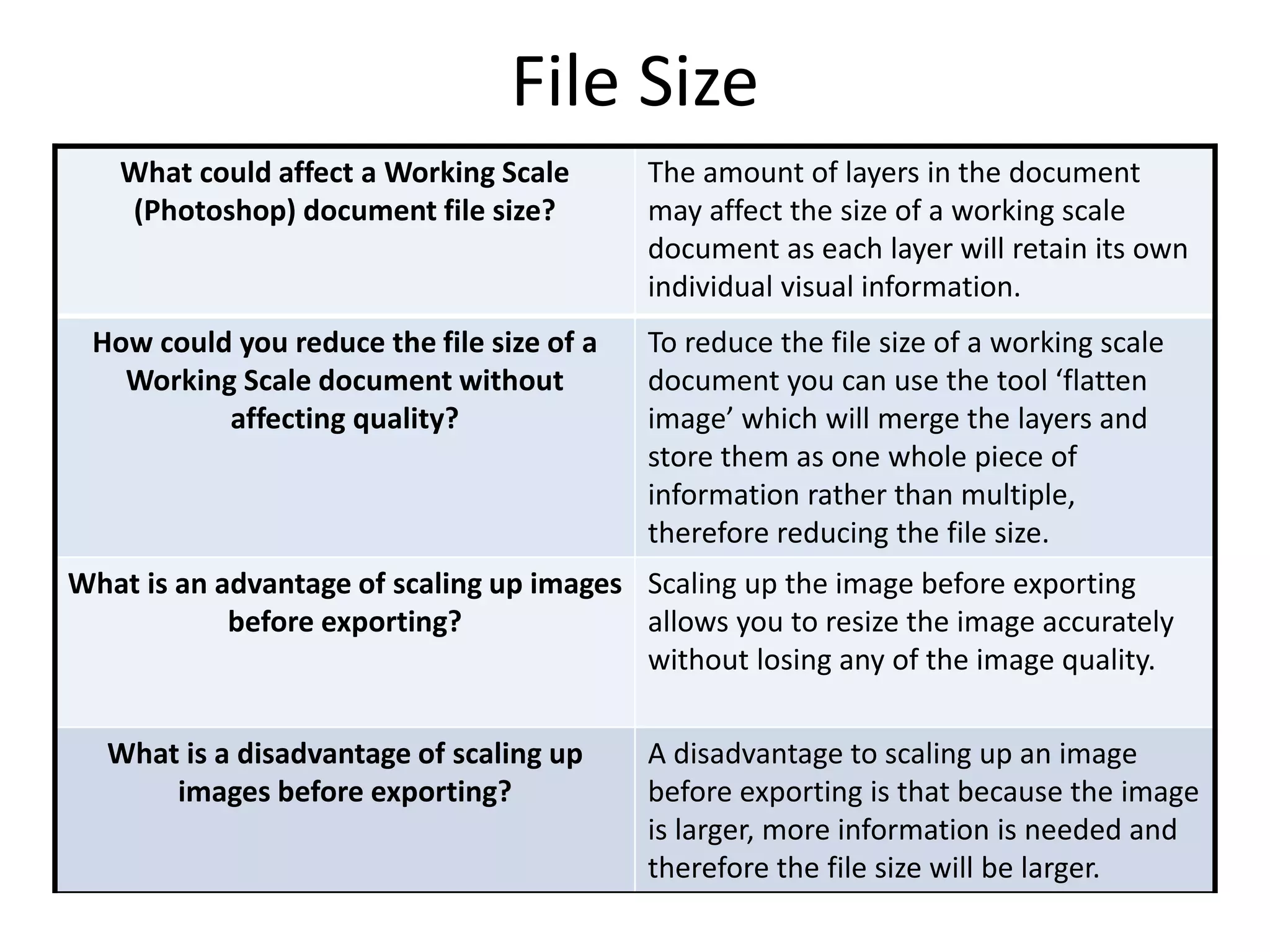
File Size
What could affect a Working Scale
(Photoshop) document file size?
The amount of layers in the document
may affect the size of a working scale
document as each layer will retain its own
individual visual information.
How could you reduce the file size of a
Working Scale document without
affecting quality?
To reduce the file size of a working scale
document you can use the tool ‘flatten
image’ which will merge the layers and
store them as one whole piece of
information rather than multiple,
therefore reducing the file size.
What is an advantage of scaling up images
before exporting?
Scaling up the image before exporting
allows you to resize the image accurately
without losing any of the image quality.
What is a disadvantage of scaling up
images before exporting?
A disadvantage to scaling up an image
before exporting is that because the image
is larger, more information is needed and
therefore the file size will be larger.
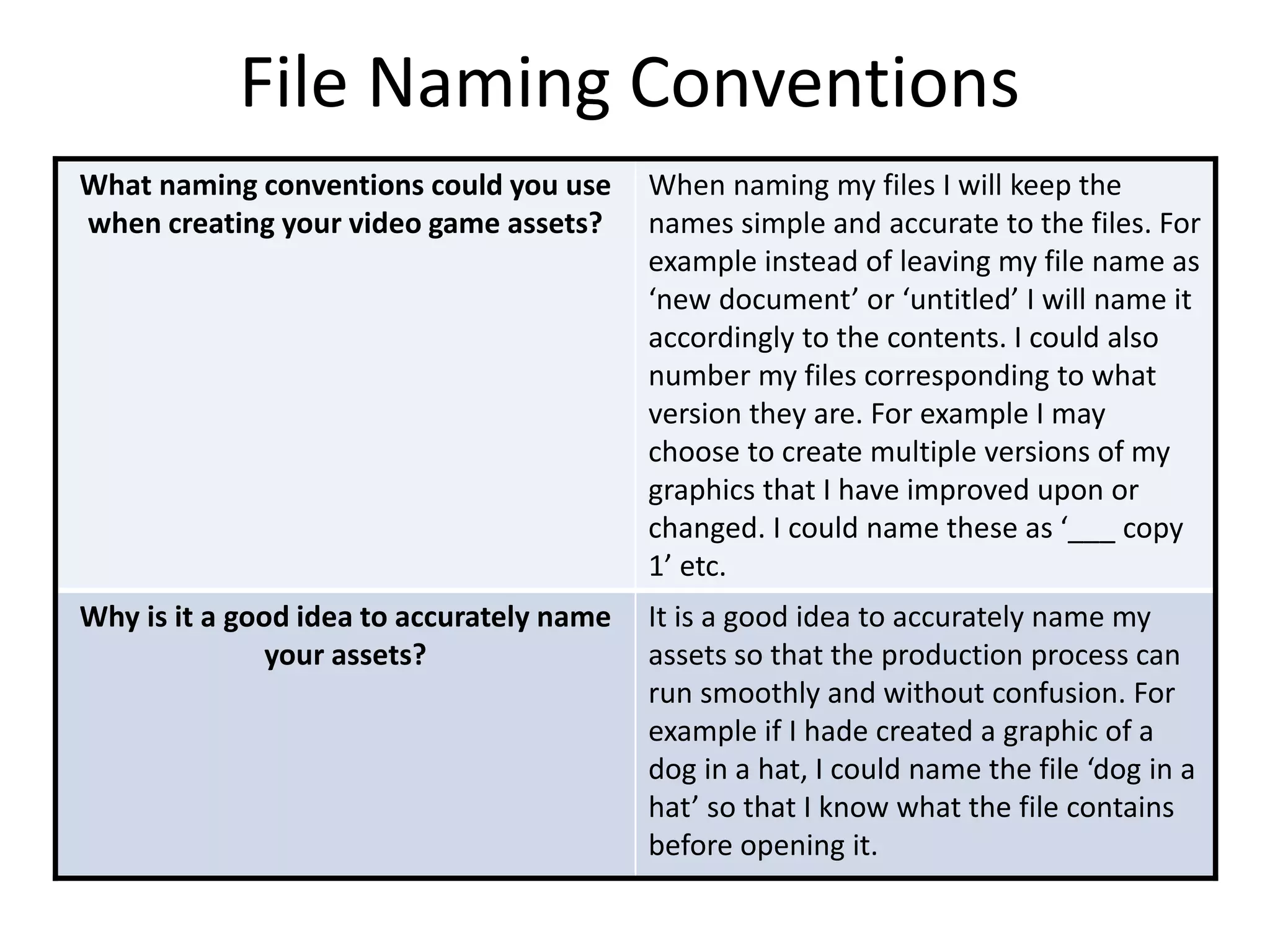
File Naming Conventions
What naming conventions could you use
when creating your video game assets?
When naming my files I will keep the
names simple and accurate to the files. For
example instead of leaving my file name as
‘new document’ or ‘untitled’ I will name it
accordingly to the contents. I could also
number my files corresponding to what
version they are. For example I may
choose to create multiple versions of my
graphics that I have improved upon or
changed. I could name these as ‘___ copy
1’ etc.
Why is it a good idea to accurately name
your assets?
It is a good idea to accurately name my
assets so that the production process can
run smoothly and without confusion. For
example if I hade created a graphic of a
dog in a hat, I could name the file ‘dog in a
hat’ so that I know what the file contains
before opening it.
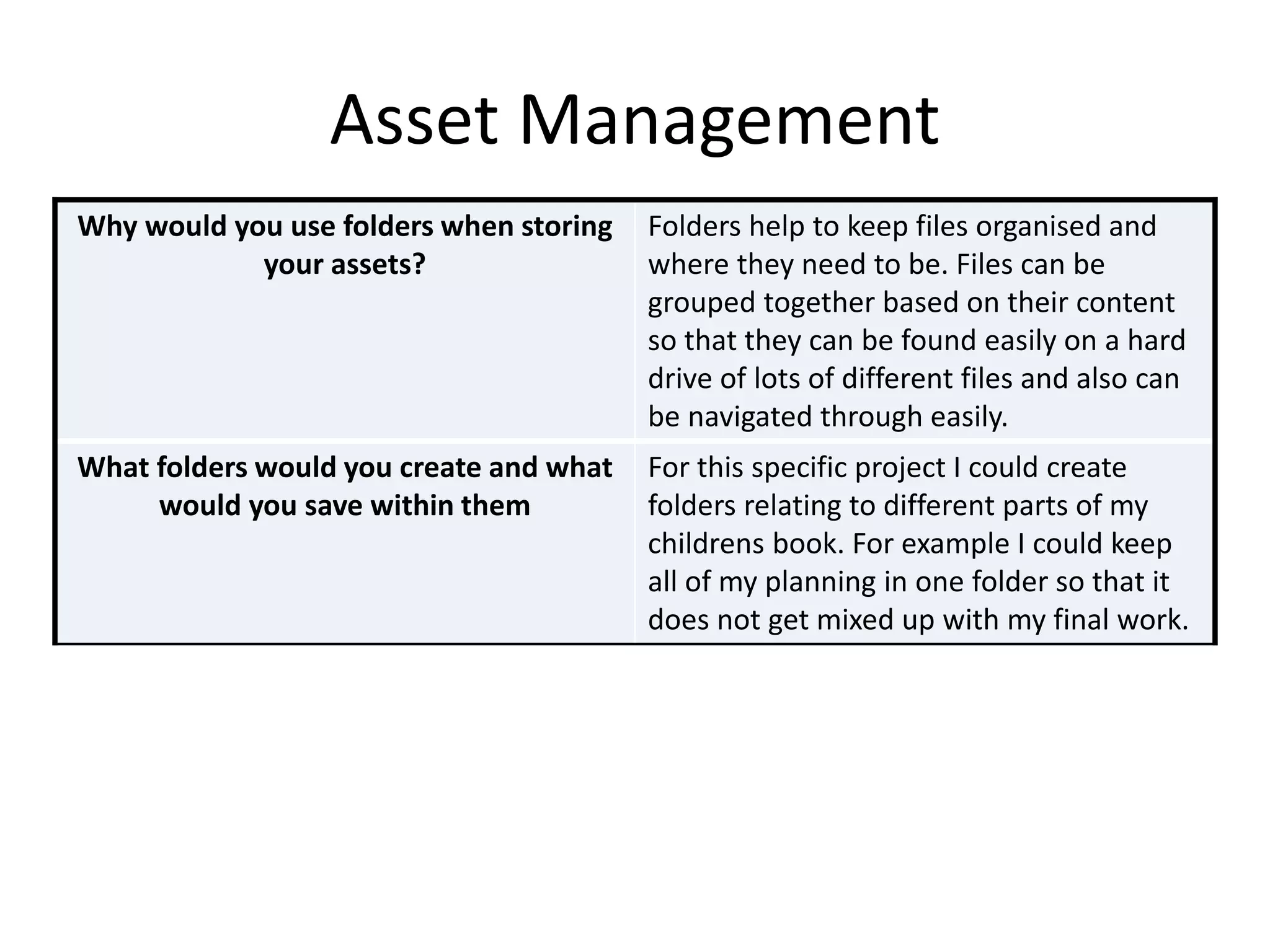
Asset Management
Why would you use folders when storing
your assets?
Folders help to keep files organised and
where they need to be. Files can be
grouped together based on their content
so that they can be found easily on a hard
drive of lots of different files and also can
be navigated through easily.
What folders would you create and what
would you save within them
For this specific project I could create
folders relating to different parts of my
childrens book. For example I could keep
all of my planning in one folder so that it
does not get mixed up with my final work.

File types

  • 1.
  • 2.
    Raster Graphics Raster graphicsare images that are made up of bitmaps. Bitmapped images are defined by the width and height of the image in pixels and what colours the pixels represent. This means that they have a fixed resolution so resizing can result in distortion of the image quality.
  • 3.
    Vector Graphics Vector graphicsare made up of paths/vectors. They are defined by a start and an end point with curves, points and angles between them. There is no loss of definition when they are resized.
  • 4.
  • 5.
    JPEG Stands For JointPhotographic Experts group Used For/Example JPEGs are used for photographs and web formats. Advantage One advantage of a JPEG file is that it has a small file size. This means that it can be transferred via email, inputted into documents and stored without taking up much space. Disadvantage A disadvantage of a JPEG file is that it loses quality with multiple edits due to compression and recompression.
  • 6.
    TIFF Stands For Taggedimage file format Used For/Example TIFF files work well for desktop publishing. Advantage TIFF files can be saved with multiple pages so therefore whole pieces of work can be saved together so there is no risk of aspects being lost . This makes storage space much more organised. They also have the option of lossless compression. Disadvantage Due to the fact TIFF files can be saved as multiple pages they can be very large in size.
  • 7.
    GIF Stands For GraphicInterchange Format Used For/Example GIFs are sometimes used in emails as they are small in size so can be sent. They are also used on social media sites and can even be used in games or on websites. Advantage GIFs are a video compressed into an extremely small file size so therefore they can be sent easily and used without taking up too much space. Disadvantage Because the file size is so small, gifs are very low quality and sometimes may not flow very well as one fluid sequence.
  • 8.
    BMP Stands For BitmapImage File Used For/Example BMP files are most commonly created from the application Microsoft Paint. Advantage One advantage of BMP files is that there is no loss in quality of the image after compression. Disadvantage One disadvantage is that they have large file sizes. One way to combat this would be saving the file as a jpeg instead.
  • 9.
  • 10.
    PSD Stands For Photoshopdocument Used For/Example Photoshop documents are created from the adobe application Photoshop which is most commonly used for image manipulation. Advantage PSDs save layers used, page formatting and swatches which are useful for integration of projects. Photoshop also supports transparency which is useful for creating logos. Disadvantage One disadvantage of PSDs is that they can only be opened in the Adobe application Photoshop. Therefore anyone who hasnot bought the application cannot view the files. One way around this would be to export the file as a JPEG.
  • 11.
    AI Stands For AdobeIllustrator Used For/Example Adobe illustrator files are most commonly used for logo creation Advantage Because an AI file is created using vectors, it can be scaled up or down without losing any quality. This makes it useful for logos and promotional material as it can be used in a number of different sizes whilst still being high quality. Disadvantage AI files can only be opened in Adobe Illustrator. This makes them harder to use because only people who have payed for the application can view them. If the file is exported from Adobe Illustrator as a JPEG however, it can be viewed by anyone.
  • 12.
    FLA Stands For Flashfile Used For/Example Flash files are most commonly used in the animation of games. They are similar to GIFs. Advantage Flash files can retain a good quality with a small file size. Unlike GIFs, they can also include audio. Disadvantage Flash files can only be viewed using Adobe Flash player. If your device does not have this installed then you cannot view the flash file.
  • 13.
    WMF Stands For Windowsmetafile Used For/Example Windows Metafiles are similar to AI files and can be used for logos. Advantage Windows metafiles can contain elements of both Vector and Raster graphics. This makes them more flexible. Disadvantage Windows metafiles are not widely used so integration is an issue and they cannot be viewed on all devices.
  • 14.
  • 15.
    Compression Definition Compression ofa file is when a file is made smaller than its original file size. This could be through saving the file as a different file format. For example saving a RAW file as a JPEG. This can also be done by using ZIP files. Advantage Compressing files is useful for when something needs to be sent via email or saved somewhere with little room. Less important files can be compressed to make room for more important ones. Disadvantage A disadvantage of compressing files is that it will cause the file to lose some of its original quality. This becomes an issue if it is material that needs to be of good quality such as posters or logos. In this case it may be better to store the files in their original size to retain quality.
  • 16.
    Image Capture Method Scanner Howis it used for image capture of graphics A scanner can be used for image capture because it can digitalise any physical copies of images for use on the computer. This is specifically useful when working with hand drawn sketches, Method Camera How is it used for image capture of graphics A camera can be used for image capture to take photographs of different subjects to be transferred via memory card or cable to the computer for and post production. Method Graphics Tablet How is it used for image capture of graphics A graphics tablet can be used for image capture because it will digitalise any movement made by the digital pen on the tablet to give the user more control over what they are creating digitally.
  • 17.
    Optimising Why would youoptimise? Before optimisation an image may be crowded by unnecessary information and therefore have a large file size. Optimising gets rid of this unneeded information. How can you optimise? Many different applications offer ways to optimise your image. For example Photoshop has multiple options when saving a JPEG to what quality it can be saved in. Advantage to optimising Advantages to optimising are that the file will take up less storage space and also if it is uploaded to the internet it will take much less time to load. Disadvantage to optimising Disadvantages of optimising are that sometimes quality of the file is lost and also files can only be optimised a certain amount. For example a large file may be reduced through optimisation, but perhaps not enough to send in an email etc.
  • 18.
  • 19.
    File Size What couldaffect a Working Scale (Photoshop) document file size? The amount of layers in the document may affect the size of a working scale document as each layer will retain its own individual visual information. How could you reduce the file size of a Working Scale document without affecting quality? To reduce the file size of a working scale document you can use the tool ‘flatten image’ which will merge the layers and store them as one whole piece of information rather than multiple, therefore reducing the file size. What is an advantage of scaling up images before exporting? Scaling up the image before exporting allows you to resize the image accurately without losing any of the image quality. What is a disadvantage of scaling up images before exporting? A disadvantage to scaling up an image before exporting is that because the image is larger, more information is needed and therefore the file size will be larger.
  • 20.
    File Naming Conventions Whatnaming conventions could you use when creating your video game assets? When naming my files I will keep the names simple and accurate to the files. For example instead of leaving my file name as ‘new document’ or ‘untitled’ I will name it accordingly to the contents. I could also number my files corresponding to what version they are. For example I may choose to create multiple versions of my graphics that I have improved upon or changed. I could name these as ‘___ copy 1’ etc. Why is it a good idea to accurately name your assets? It is a good idea to accurately name my assets so that the production process can run smoothly and without confusion. For example if I hade created a graphic of a dog in a hat, I could name the file ‘dog in a hat’ so that I know what the file contains before opening it.
  • 21.
    Asset Management Why wouldyou use folders when storing your assets? Folders help to keep files organised and where they need to be. Files can be grouped together based on their content so that they can be found easily on a hard drive of lots of different files and also can be navigated through easily. What folders would you create and what would you save within them For this specific project I could create folders relating to different parts of my childrens book. For example I could keep all of my planning in one folder so that it does not get mixed up with my final work.