Introduction
to
Digital Electronics
K.INDRAGANDHI
AP,Sr.GR/ECE
Suplementary Reading
• Digital Design
by - John F. Wakerly
– www.ddpp.com - you will find some solutions at this site.
– www.xilinx.com - Xlinix Web site
• Logic and Computer Design Fundamentals
by - M. Morris Mano & Charles R. Kime
• Digital Design
by - M. Morris Mano
• Digital Logic Circuit Analysis and Design
by - Victor P. Nelson, H. Troy Nagle, J. David Irwin & Bill D. Carrol
Digital Electronics
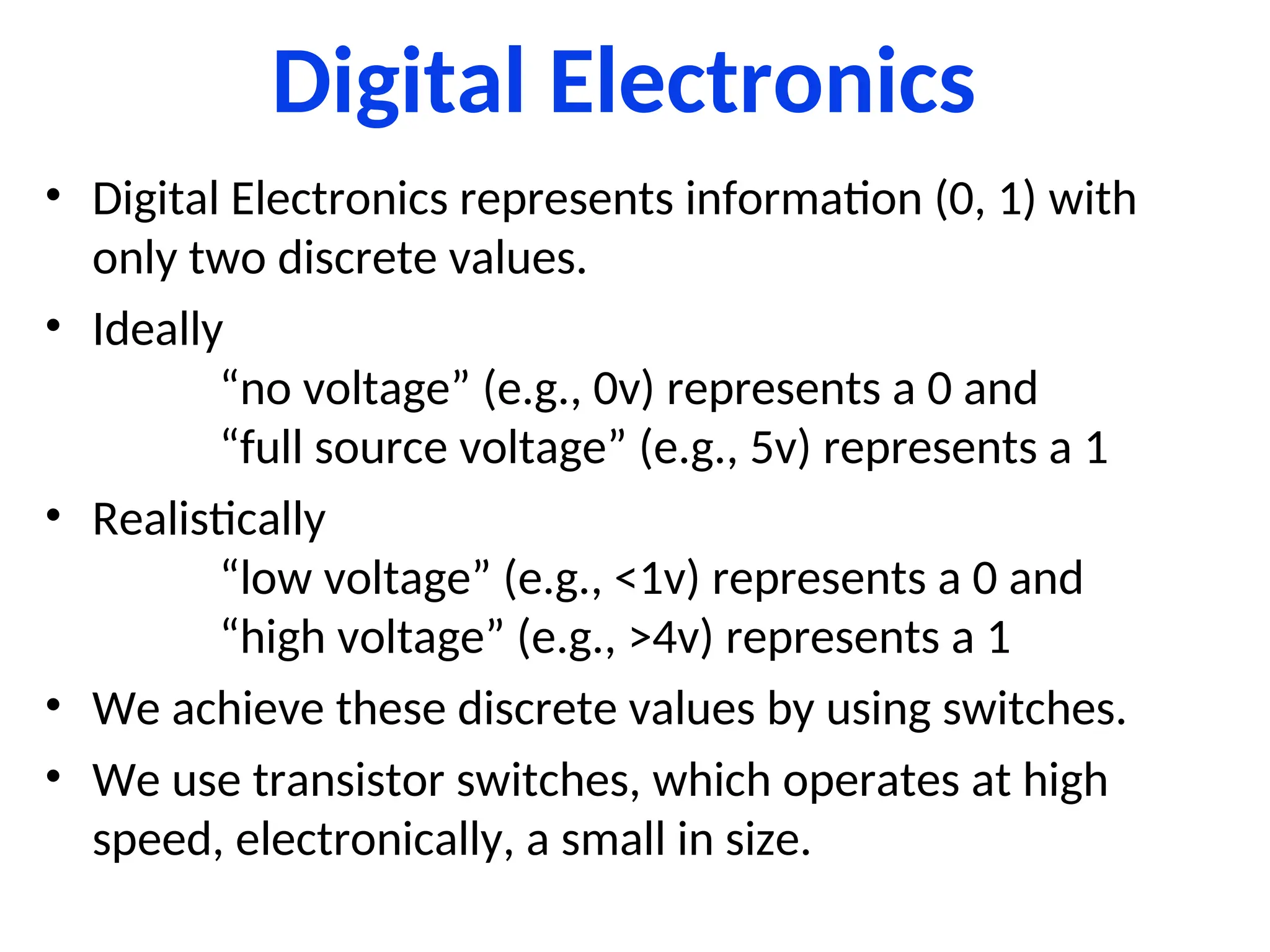
• Digital Electronics represents information (0, 1) with
only two discrete values.
• Ideally
“no voltage” (e.g., 0v) represents a 0 and
“full source voltage” (e.g., 5v) represents a 1
• Realistically
“low voltage” (e.g., <1v) represents a 0 and
“high voltage” (e.g., >4v) represents a 1
• We achieve these discrete values by using switches.
• We use transistor switches, which operates at high
speed, electronically, a small in size.
Analog versus Digital
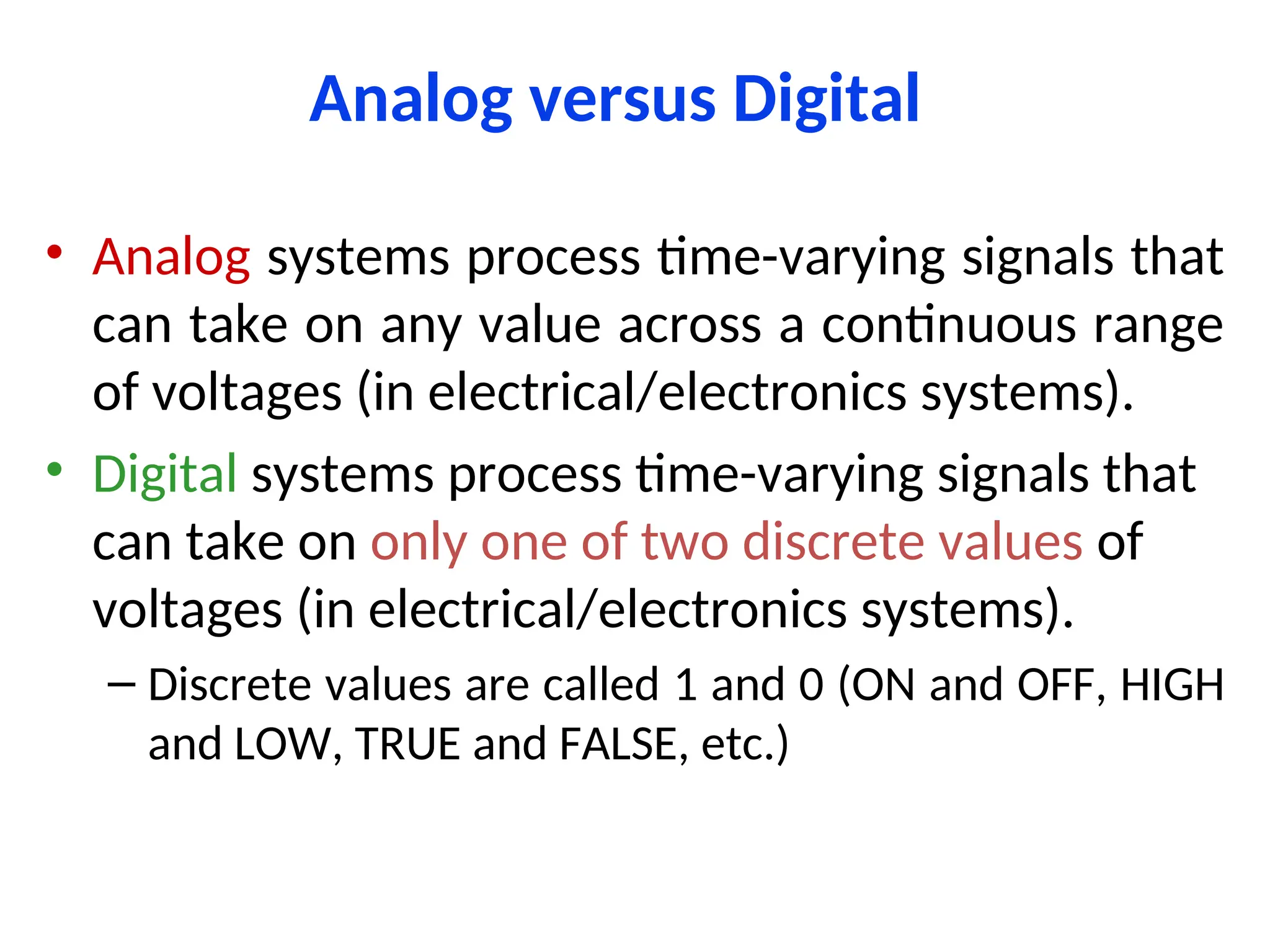
• Analog systems process time-varying signals that
can take on any value across a continuous range
of voltages (in electrical/electronics systems).
• Digital systems process time-varying signals that
can take on only one of two discrete values of
voltages (in electrical/electronics systems).
– Discrete values are called 1 and 0 (ON and OFF, HIGH
and LOW, TRUE and FALSE, etc.)
Representing Information Electronically
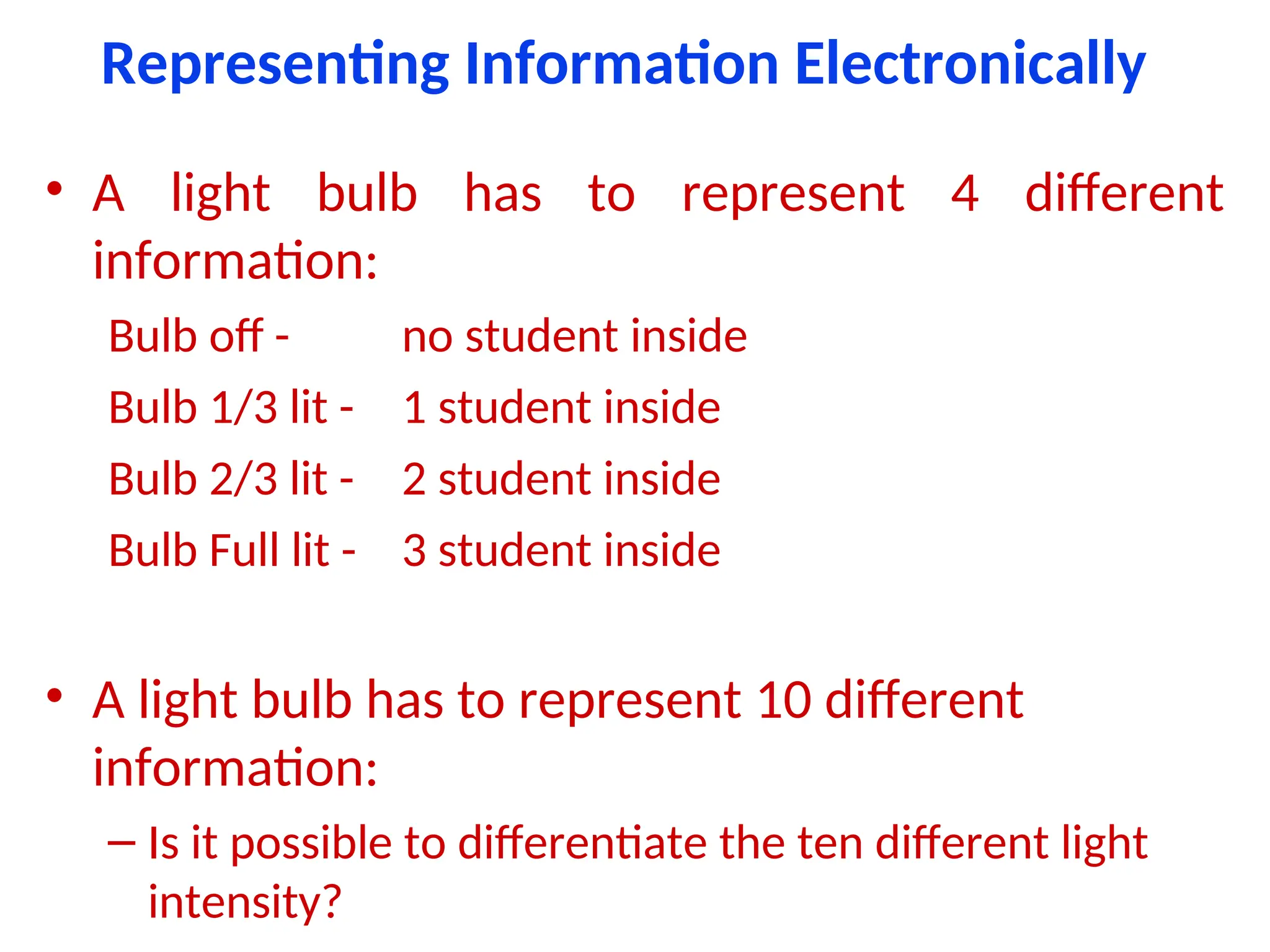
• A light bulb has to represent 4 different
information:
Bulb off - no student inside
Bulb 1/3 lit - 1 student inside
Bulb 2/3 lit - 2 student inside
Bulb Full lit - 3 student inside
• A light bulb has to represent 10 different
information:
– Is it possible to differentiate the ten different light
intensity?
Representing Information Electronically
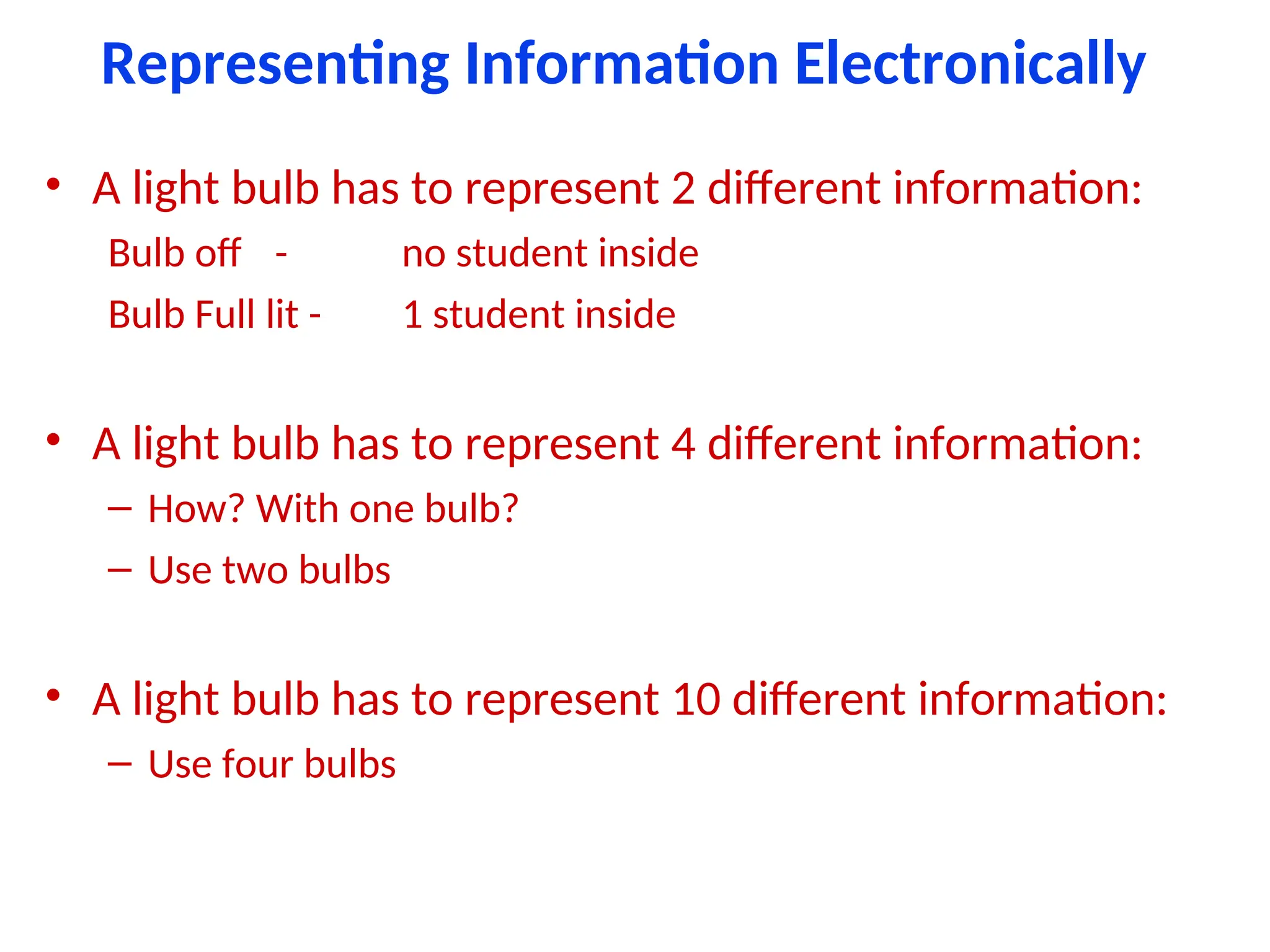
• A light bulb has to represent 2 different information:
Bulb off - no student inside
Bulb Full lit - 1 student inside
• A light bulb has to represent 4 different information:
– How? With one bulb?
– Use two bulbs
• A light bulb has to represent 10 different information:
– Use four bulbs
Representing Information Electronically
• “Analog electronics” deals with non-discrete values
• “Digital electronics” deals with discrete values
Benefits of Digital over Analog
• Reproducibility
• Not effected by noise means quality
• Ease of design
• Data protection
• Programmable
• Speed
• Economy
Digital Revolution
• Digital systems started back in 1940s.
• Digital systems cover all areas of life:
– still pictures
– digital video
– digital audio
– telephone
– traffic lights
– Animation
Digital Devices
•Gates
•Flip-Flops
•PLDs
•FPGAs
Gates
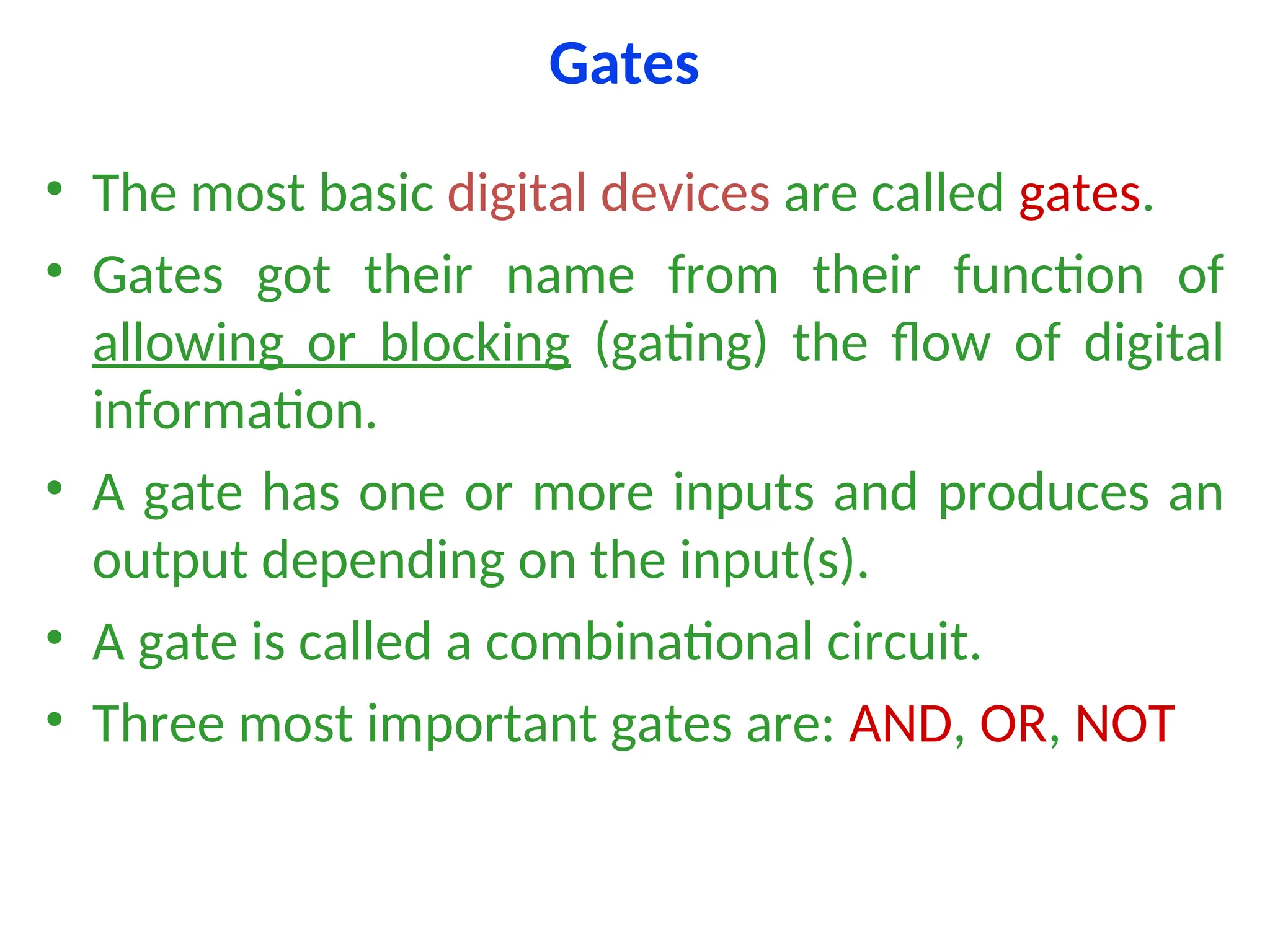
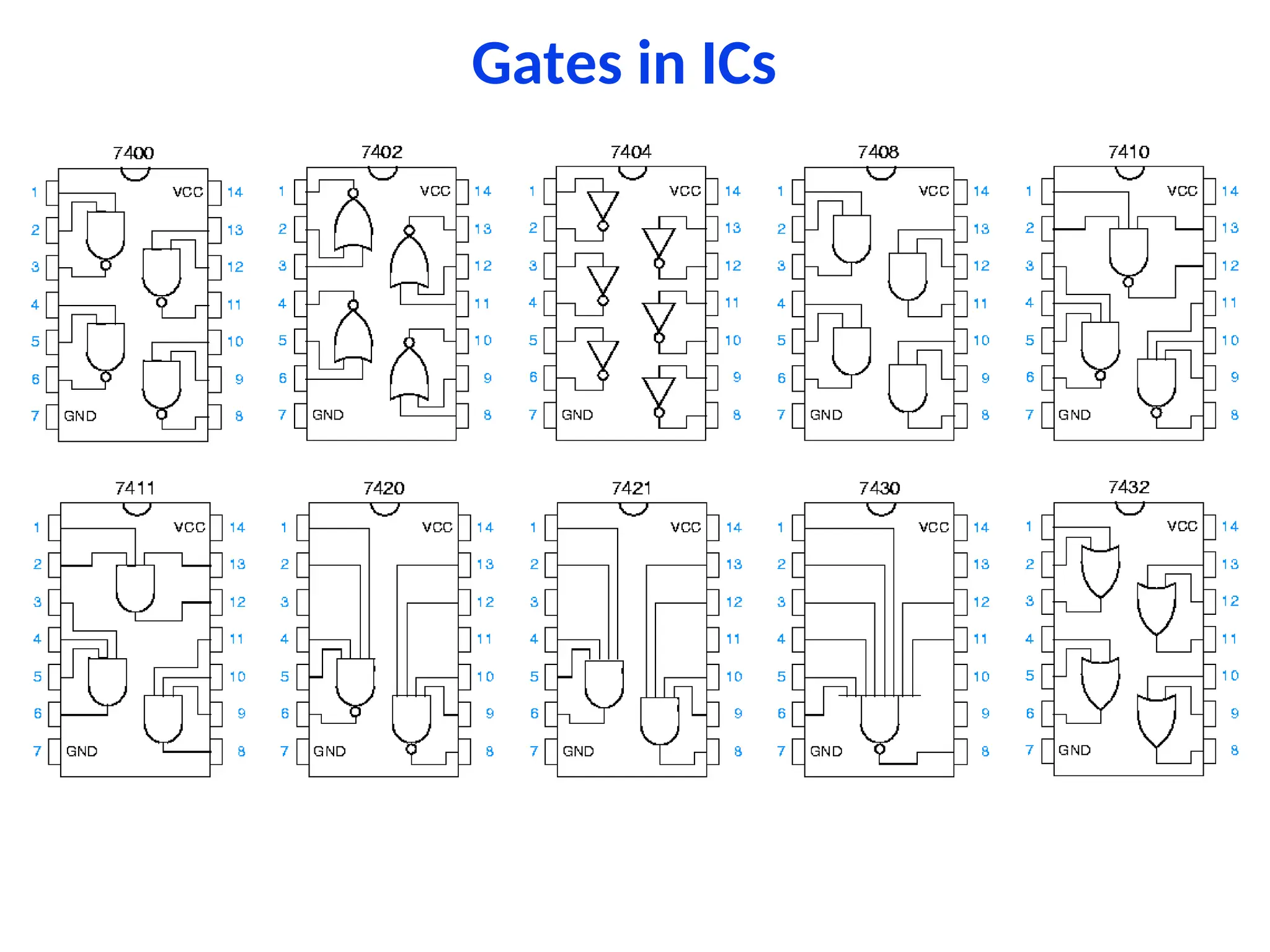
• The most basic digital devices are called gates.
• Gates got their name from their function of
allowing or blocking (gating) the flow of digital
information.
• A gate has one or more inputs and produces an
output depending on the input(s).
• A gate is called a combinational circuit.
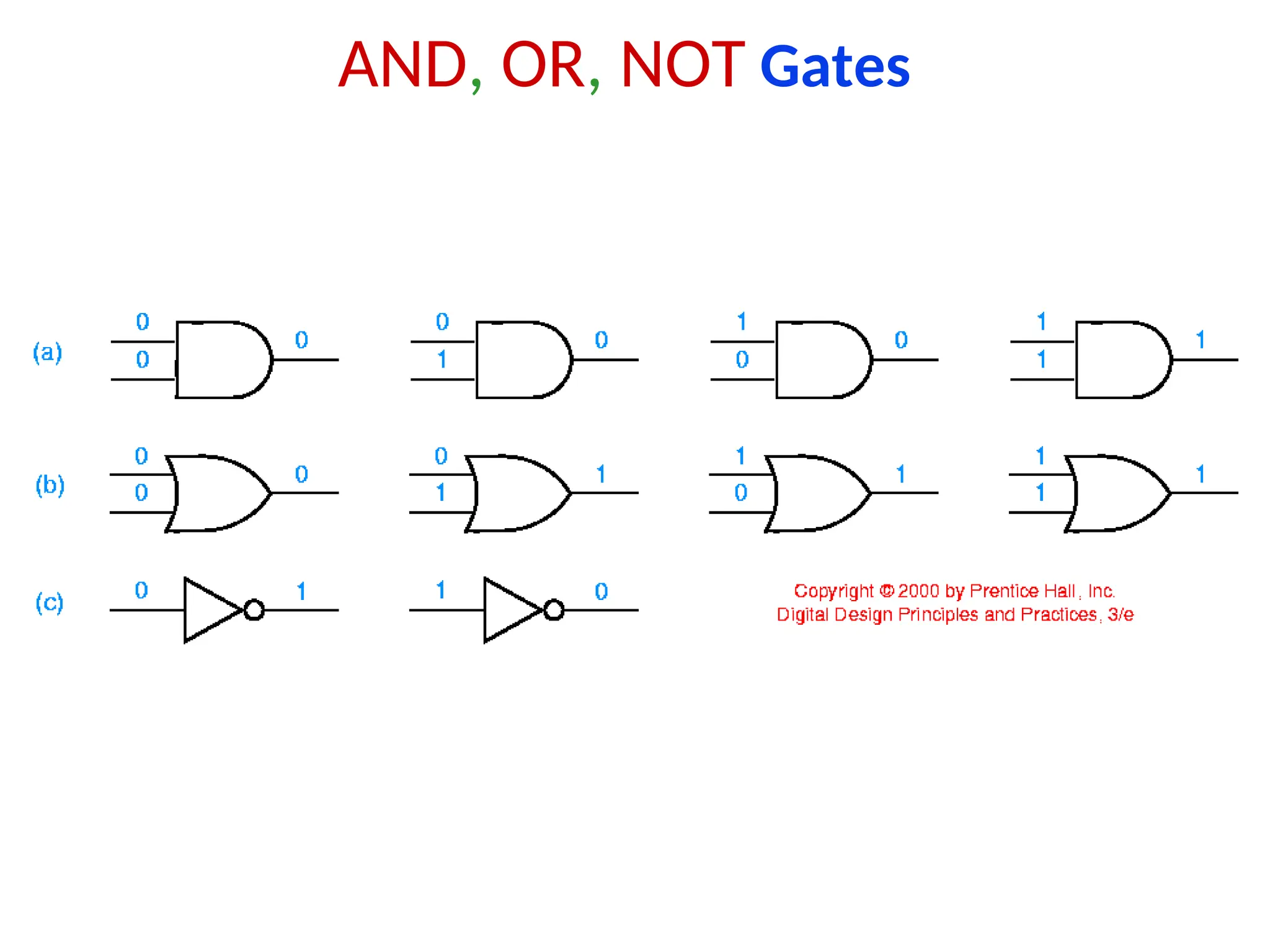
• Three most important gates are: AND, OR, NOT
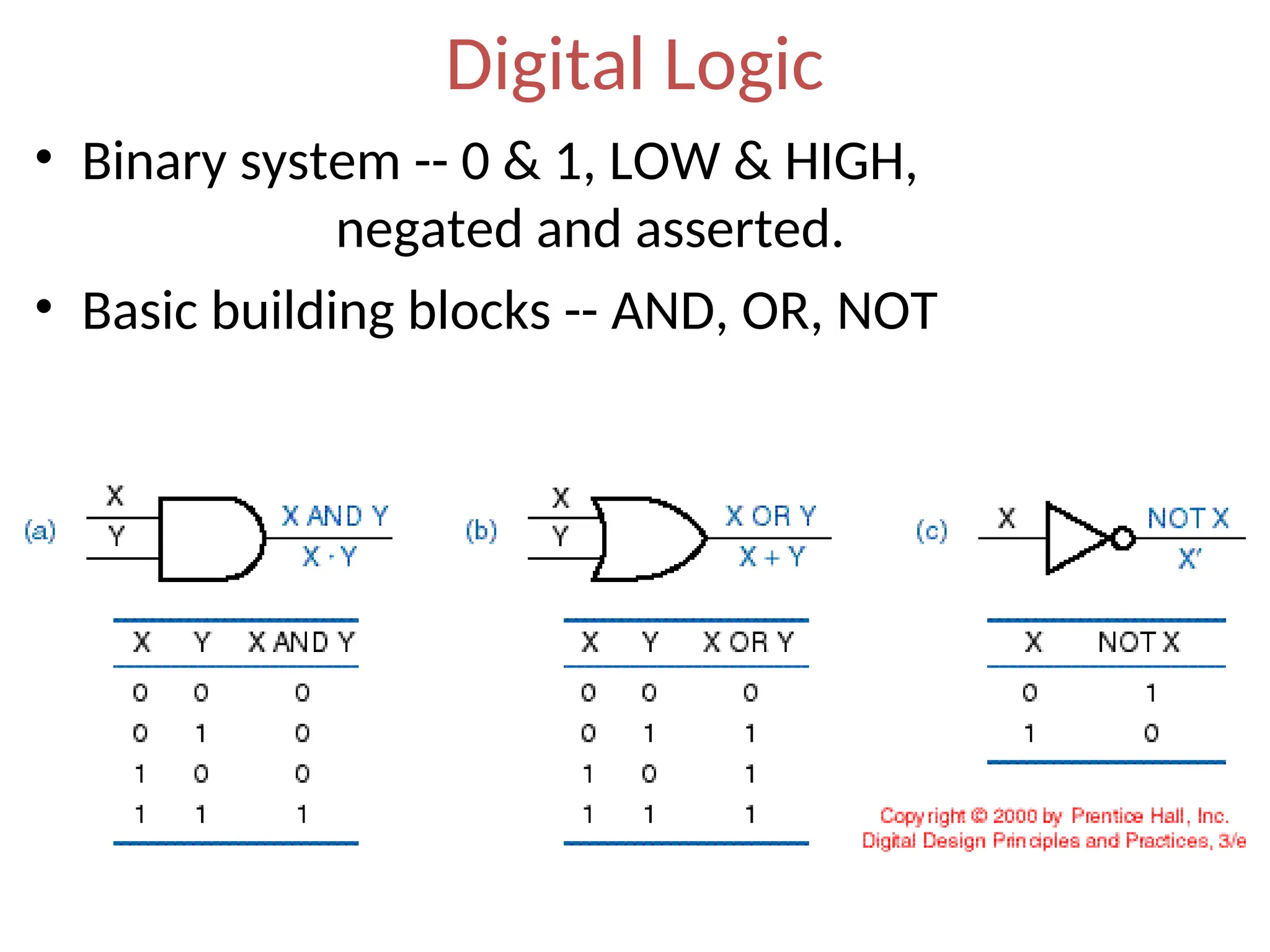
Digital Logic
• Binary system -- 0 & 1, LOW & HIGH,
negated and asserted.
• Basic building blocks -- AND, OR, NOT
AND, OR, NOT Gates
Electronic Aspects of Digital Design
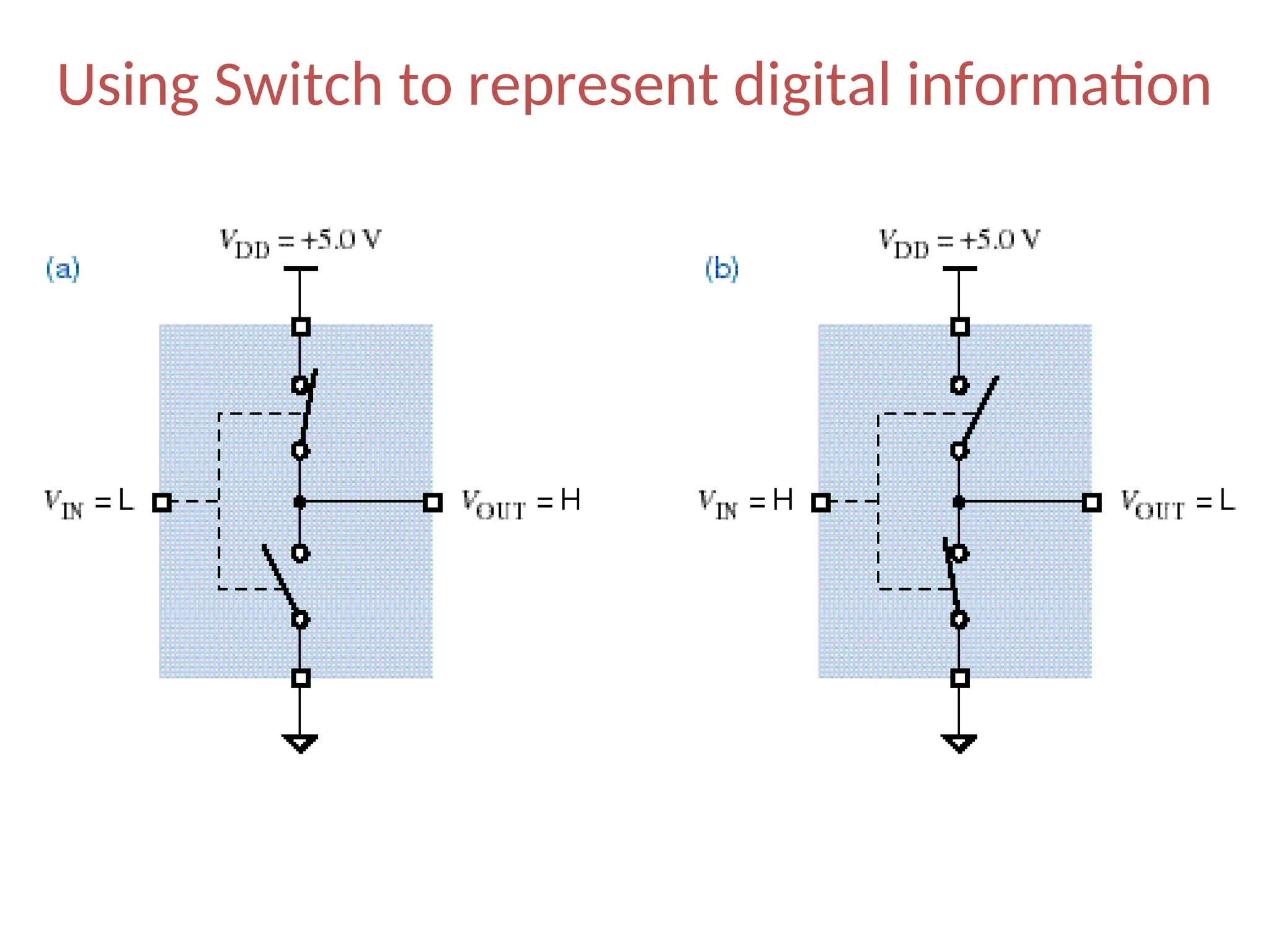
• How we represent digital information in electronic devices?
• By discrete voltages.
What is the
Basic Digital Element
in Electronics
?
a Switch
Using Switch to represent digital information
Digital Abstraction
• It is difficult to make ideal switches means a
switch is completely ON or completely OFF.
• So, we impose some rules that allow analog
behavior to be ignored in most cases, so circuits
can be modeled as if they really did process 0s
and 1s, known as digital abstraction.
• Digital abstraction allows us to associate a noise
margin with each logic values (0 and 1).
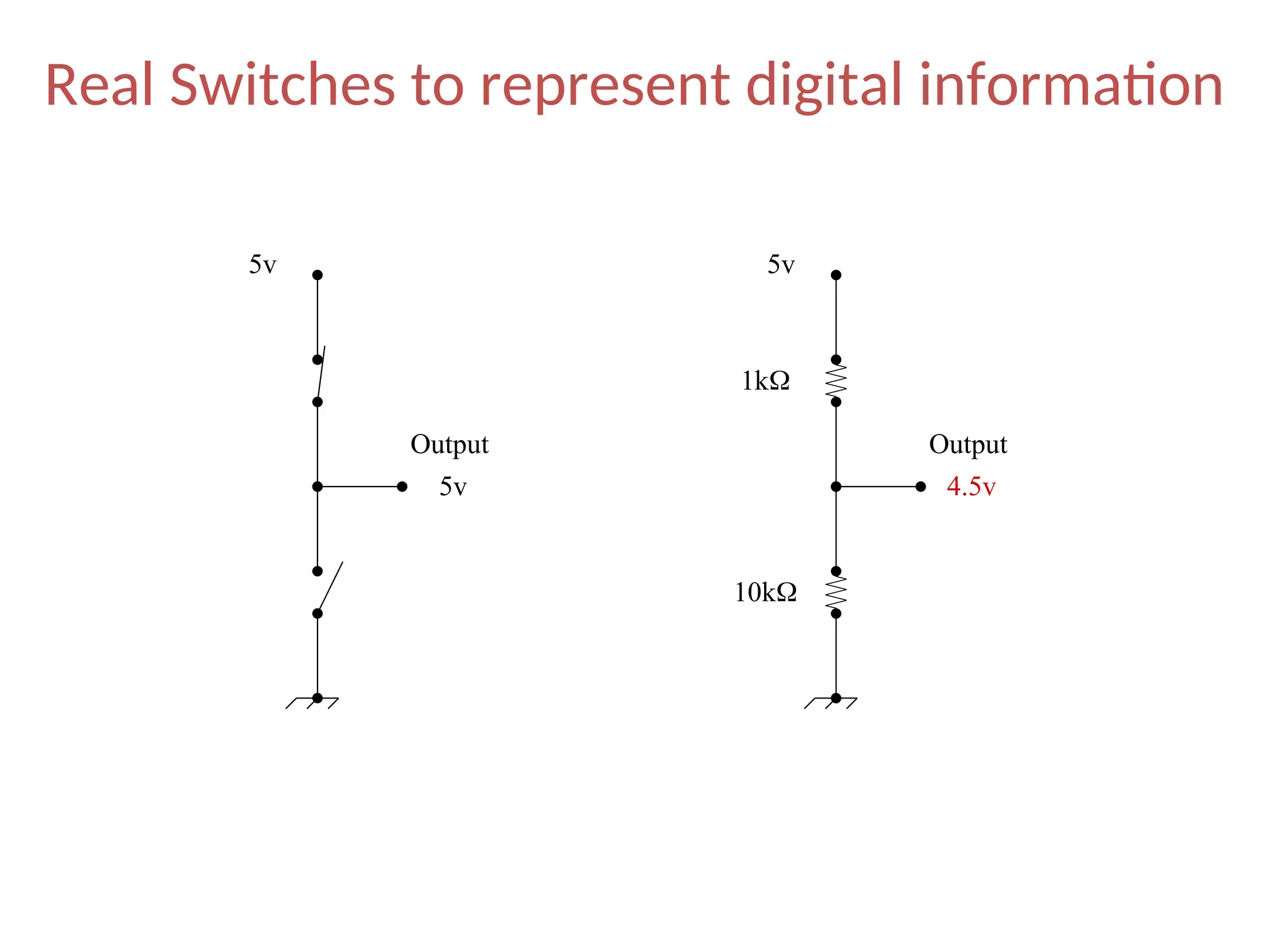
Real Switches to represent digital information
5v 5v
1k
10k
5v 4.5v
Output Output
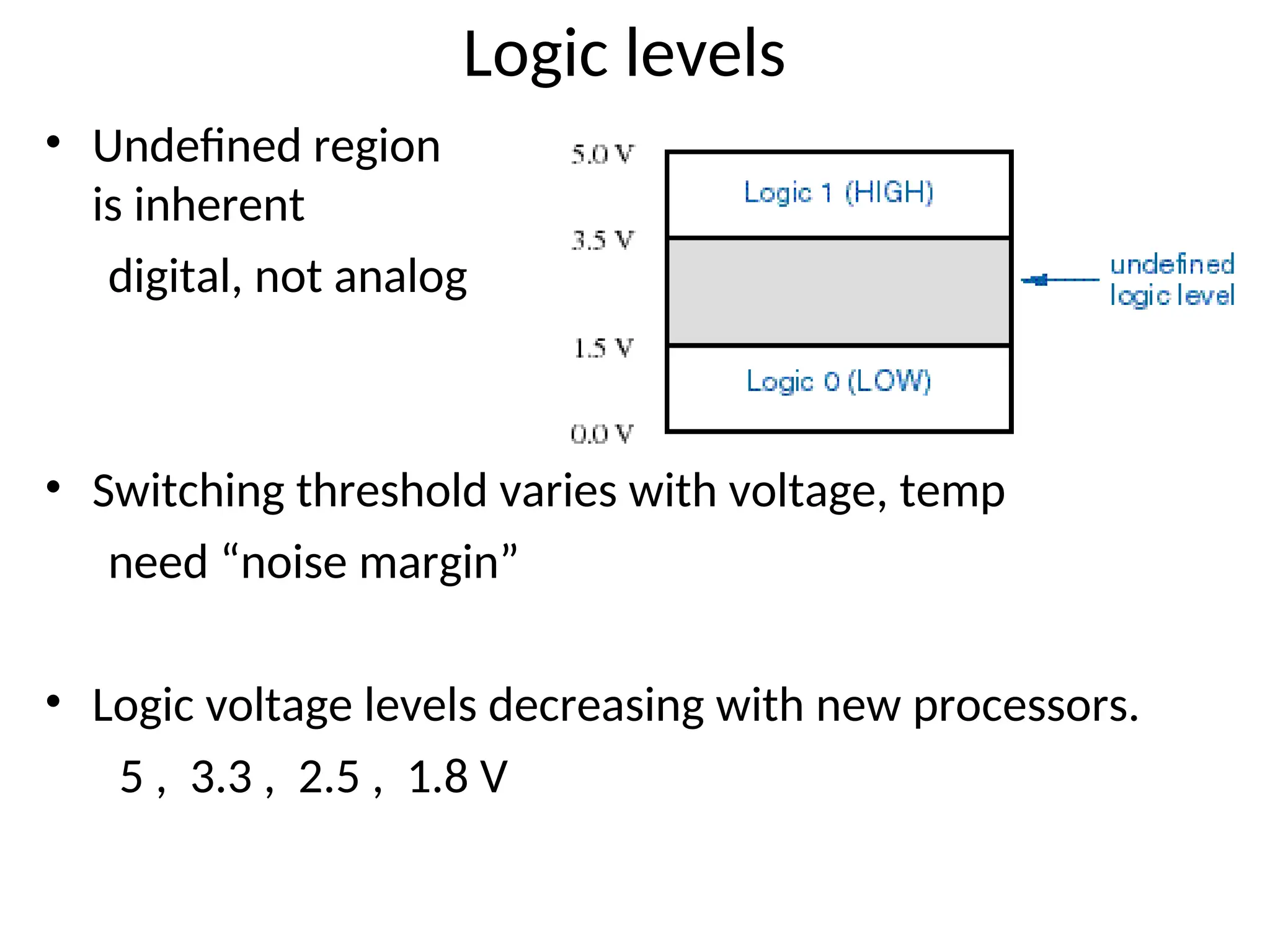
Logic levels
• Undefined region
is inherent
digital, not analog
• Switching threshold varies with voltage, temp
need “noise margin”
• Logic voltage levels decreasing with new processors.
5 , 3.3 , 2.5 , 1.8 V
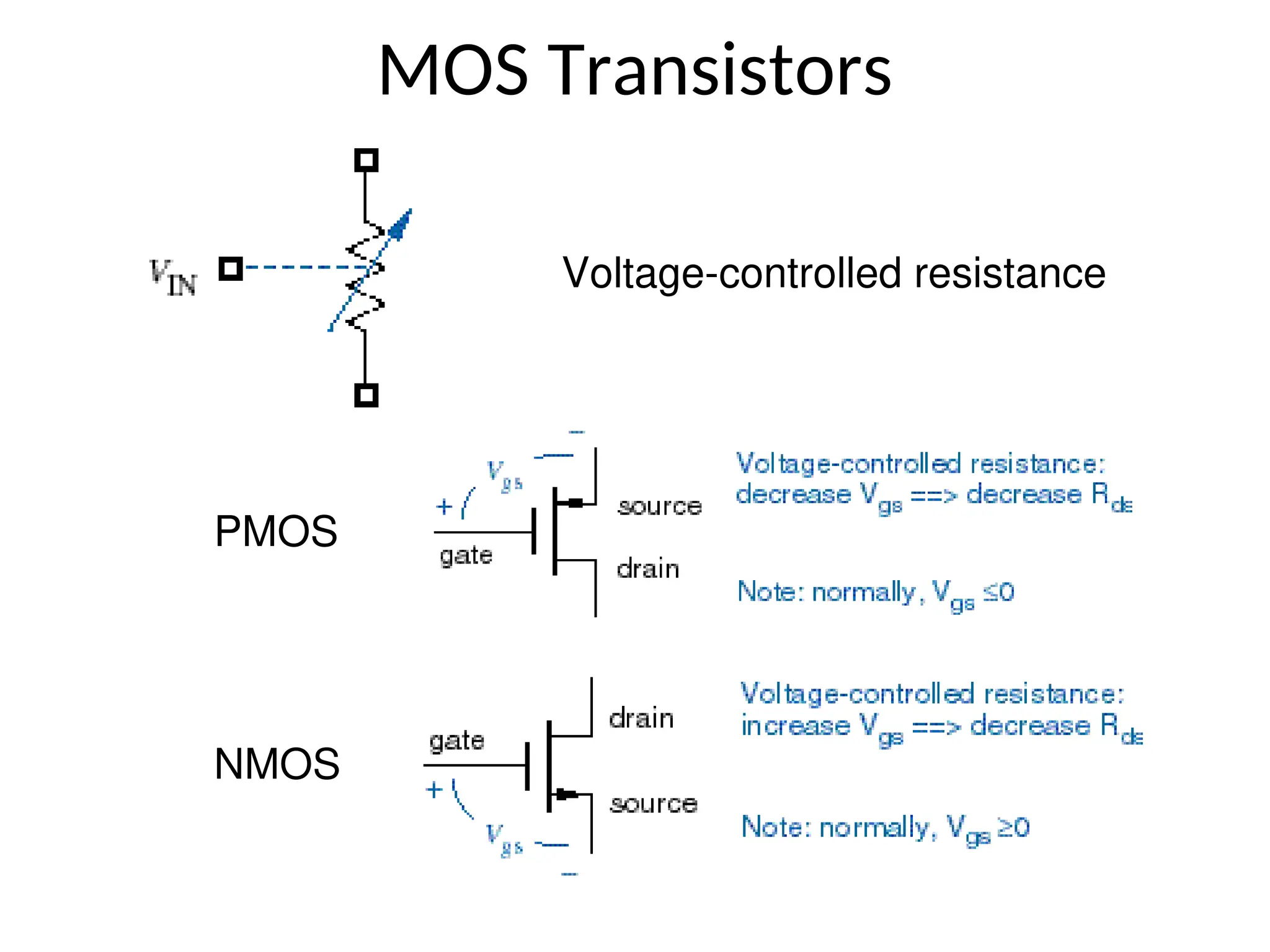
MOS Transistors
NMOS
PMOS
Voltage-controlled resistance
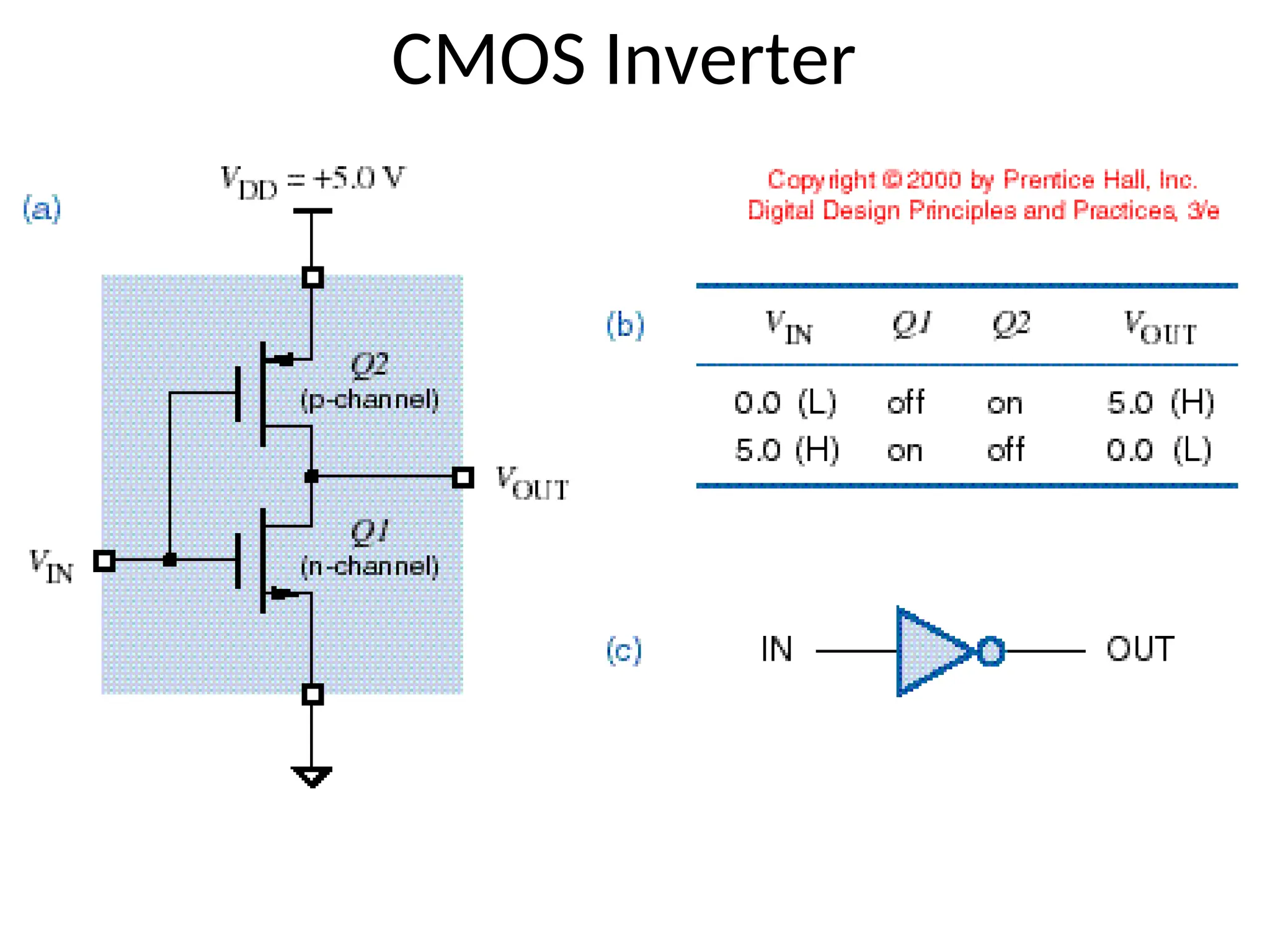
CMOS Inverter
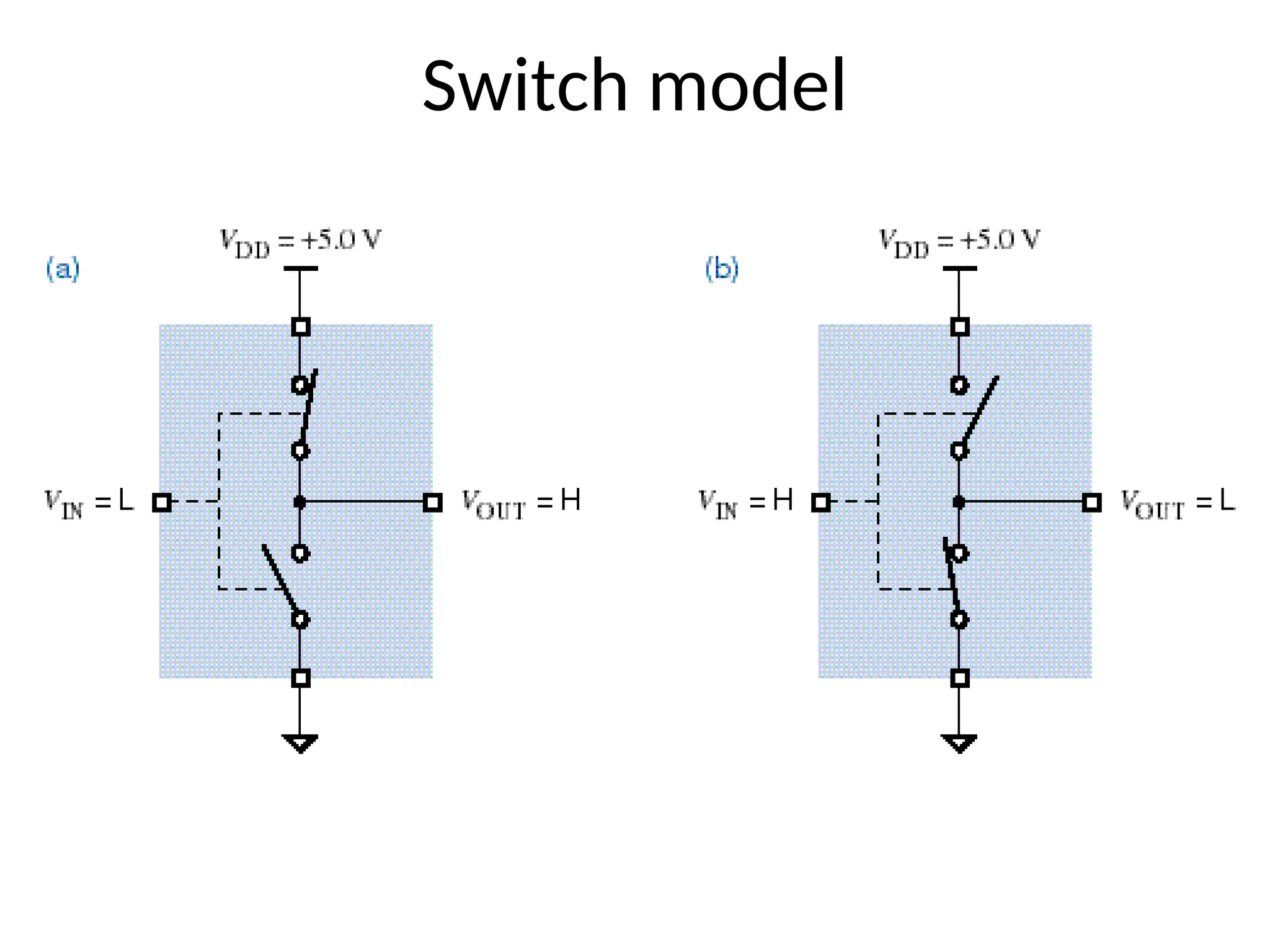
Switch model
Flip-flops
• A device that stores either a 0 or 1.
• Stored value can be changed only at certain
times determined by a clock input.
• New value depend on the current state and it’s
control inputs
• A digital circuit that contains filp-flops is called a
sequential circuit
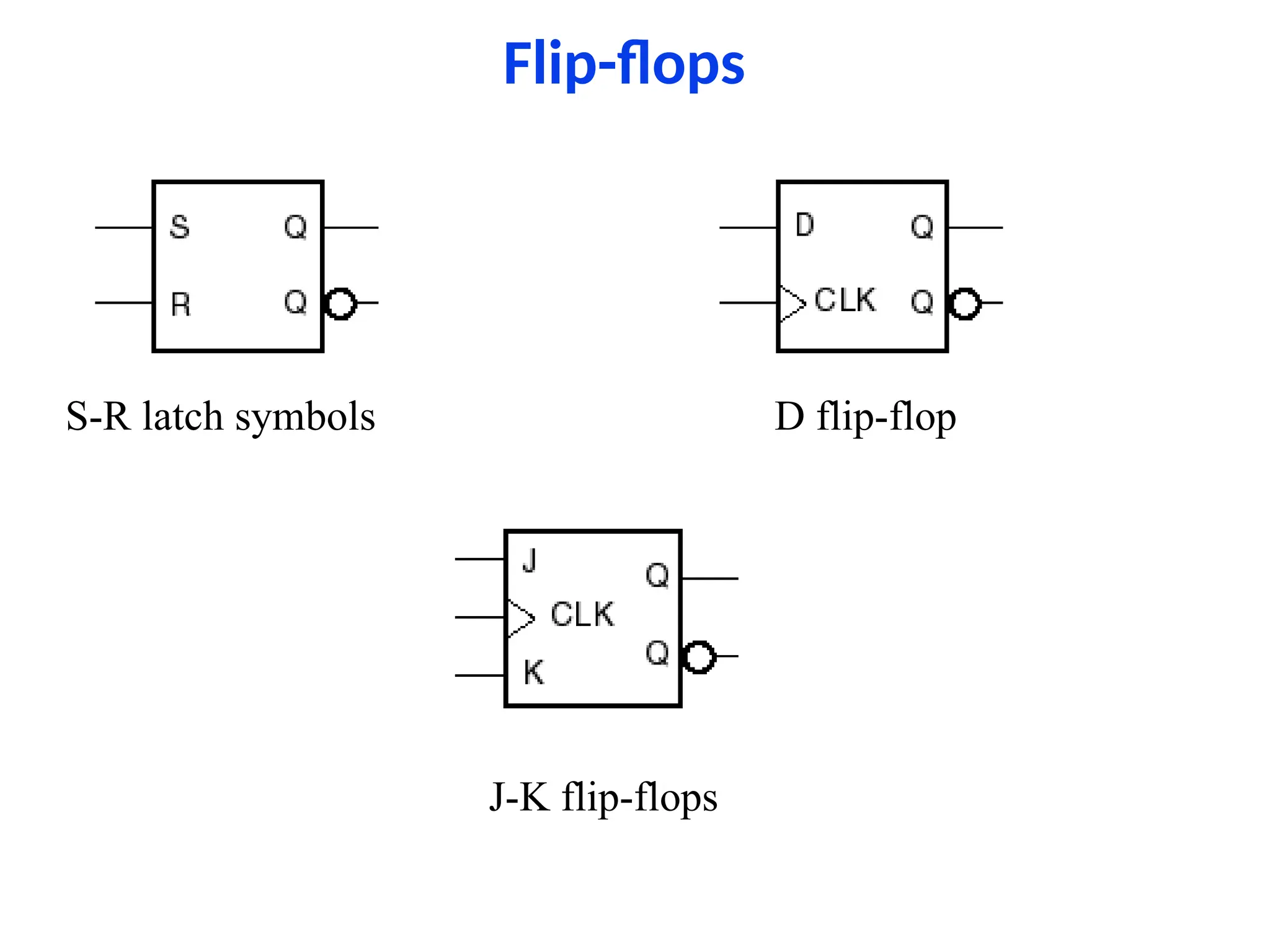
Flip-flops
S-R latch symbols D flip-flop
J-K flip-flops
Integrated Circuits
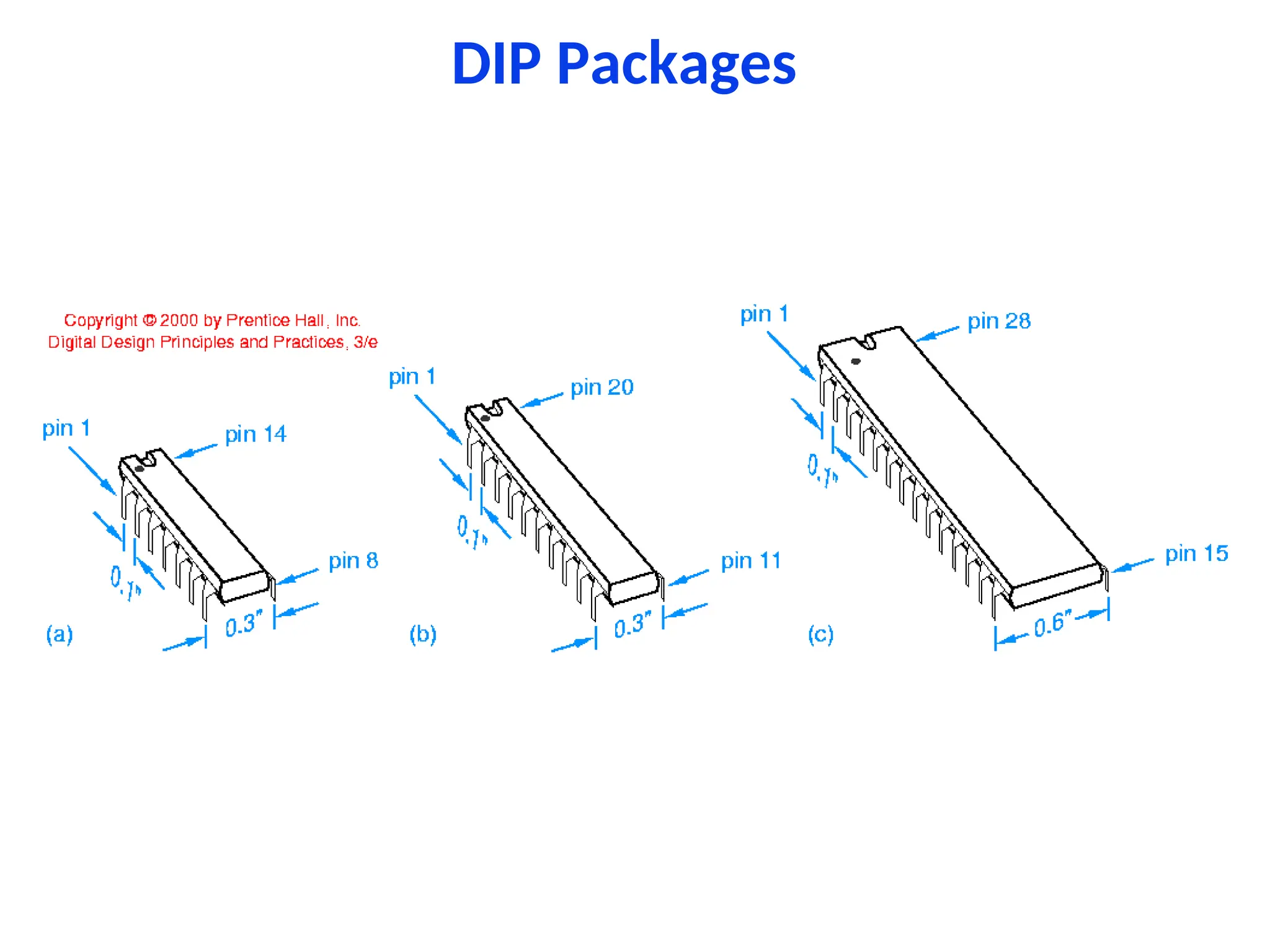
• A collection of one or more gates fabricated on a
single silicon chip is called an integrated circuit
(IC).
• ICs were classified by size:
– SSI - small scale integration - 1~20 gates
– MSI - medium scale integration - 20~200 gates
– LSI - large scale integration - 200~200,000 gates
– VLSI - very large scale integration - over 1M
transistors
• Pentium-III - 40 million transistors
DIP Packages
Gates in ICs
Programmable Logic Devices
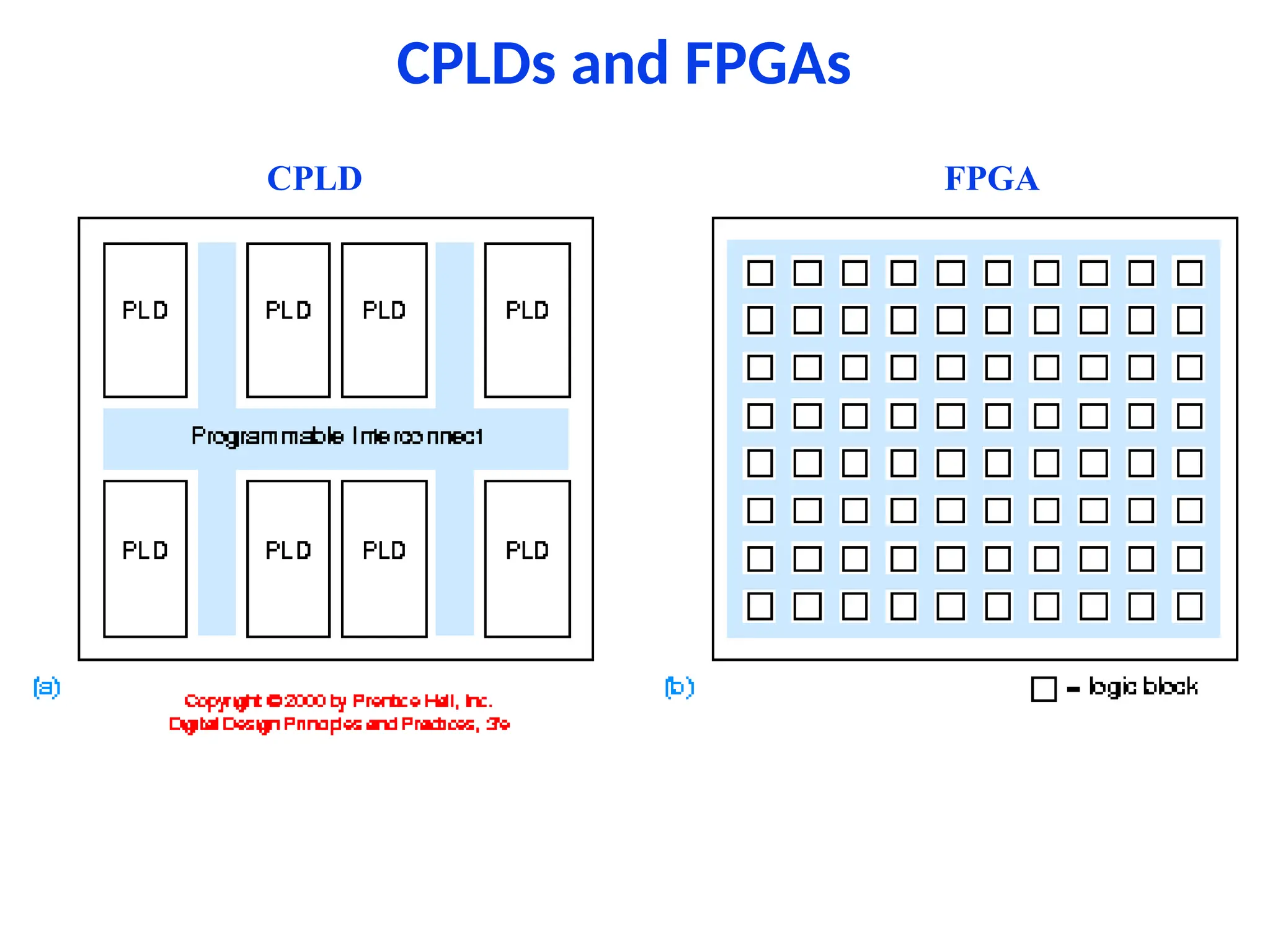
• PLDs allow the function to be programmed into
them after they are manufactured.
• Complex PLDs (CPLD) are a collection of PLDs on
the same chip.
• Another programmable logic chip is FPGA - field-
programmable gate arrays.
CPLDs and FPGAs
FPGA
CPLD
Application Specific ICs (ASICs)
• Chips designed for a particular application are
called semicustom ICs or application-specific ICs
(ASICs).
• ASICs generally reduce the total component and
manufacturing cost of a product by reducing chip
count, physical size, and power consumption,
and they often provide higher performance.
• But costly if not produced in bulk.
Printed-Circuit Boards
• An IC is normally mounted on a printed-circuit
board (PCB) that connects it to other ICs in a
system.
• Individual wire connection or traces can be as
narrow as 4 mils with 4 mils spacing (one-
thousandth of an inch)
• Now a days, most of the components use surface
mount technology.
• They are normally layered.
Software Aspects of Digital Design
• Today software tools are an essential part of digital
design.
• Software tools improve productivity, correctness and
quality of designs
• Software tools are:
– Schematic entry
– HDL (Hardware Description Language) Editors
– Simulators - to verify the behaviour of the design
– Synthesis tools - circuit design
– Timing analyzers and verifiers
Digital Design Levels
• the lowest level of design is device physics and IC
manufacturing processes.
• design at the transistor level
• level of functional building blocks
• level of logic design using HDLs
• computer design and overall system design.
Different Design Levels
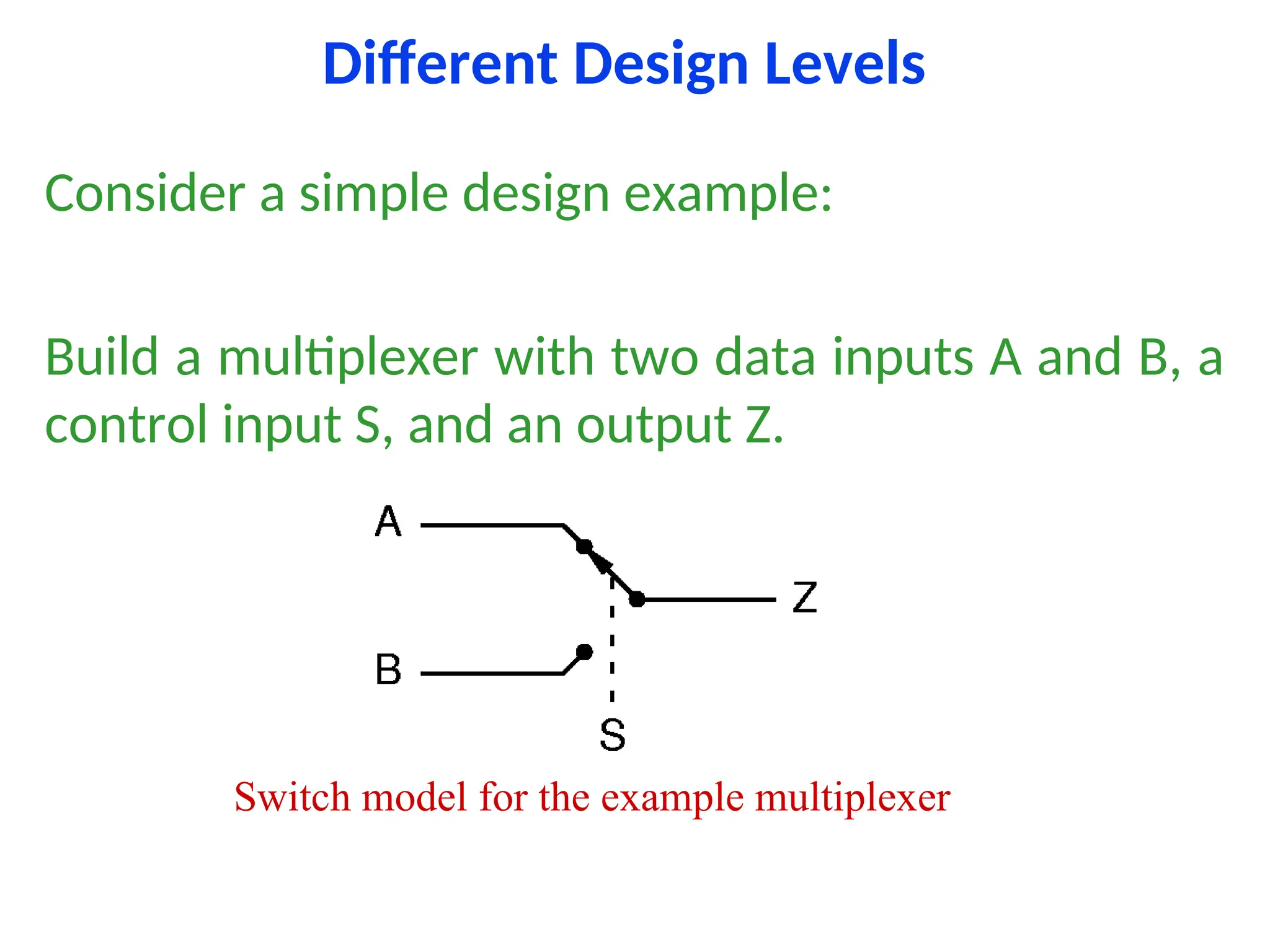
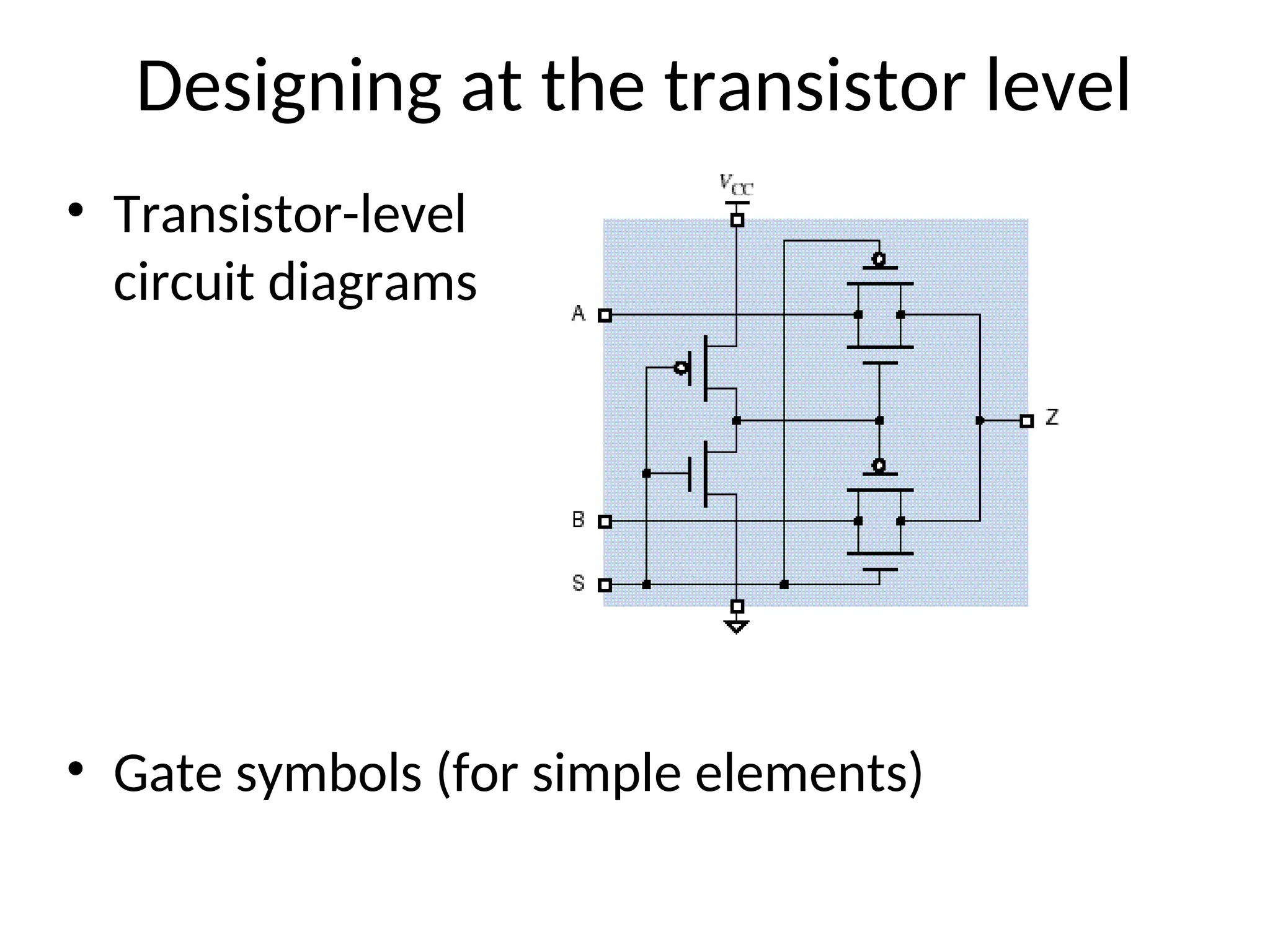
Consider a simple design example:
Build a multiplexer with two data inputs A and B, a
control input S, and an output Z.
Switch model for the example multiplexer
Designing at the transistor level
• Transistor-level
circuit diagrams
• Gate symbols (for simple elements)
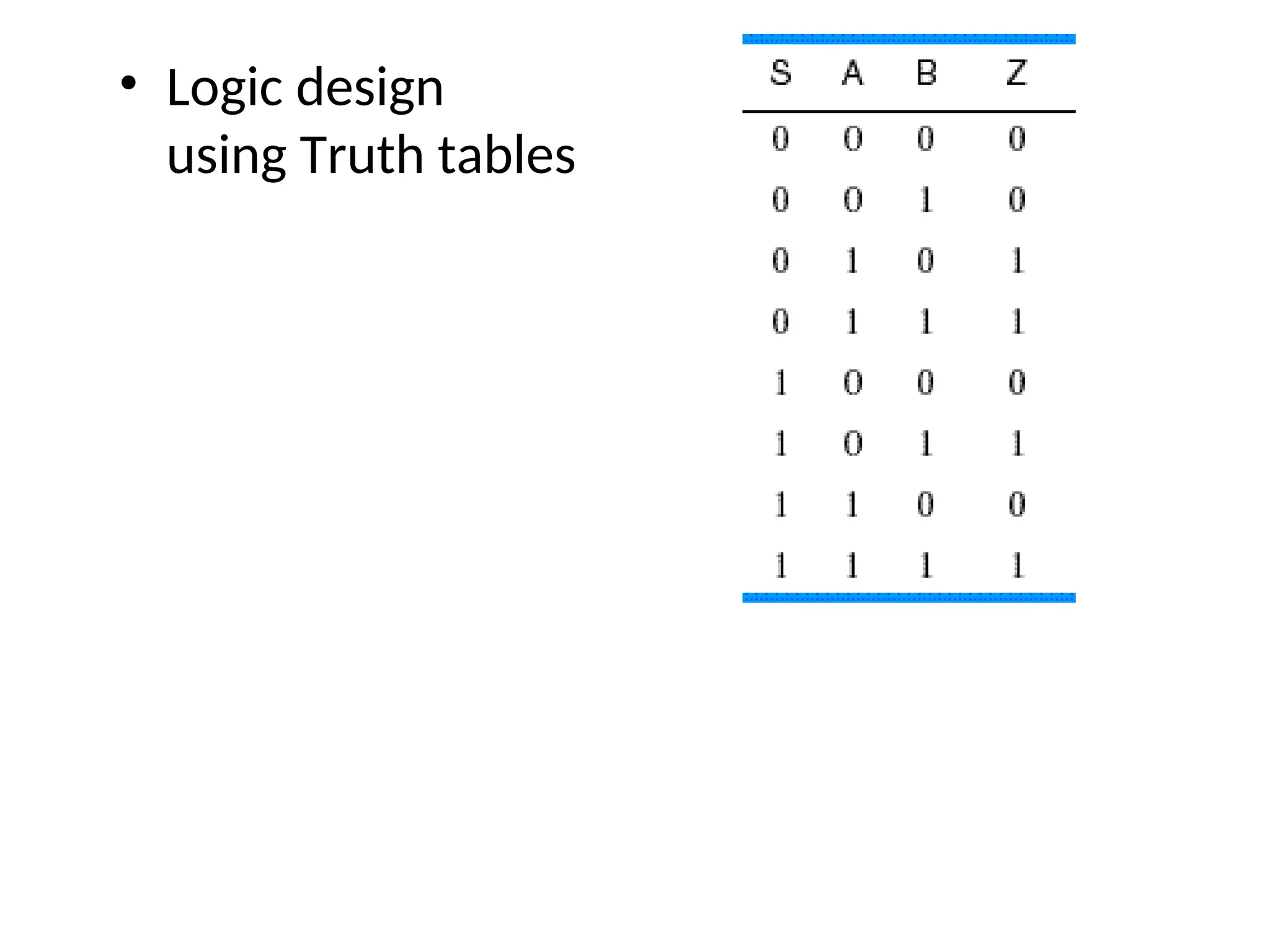
• Logic design
using Truth tables
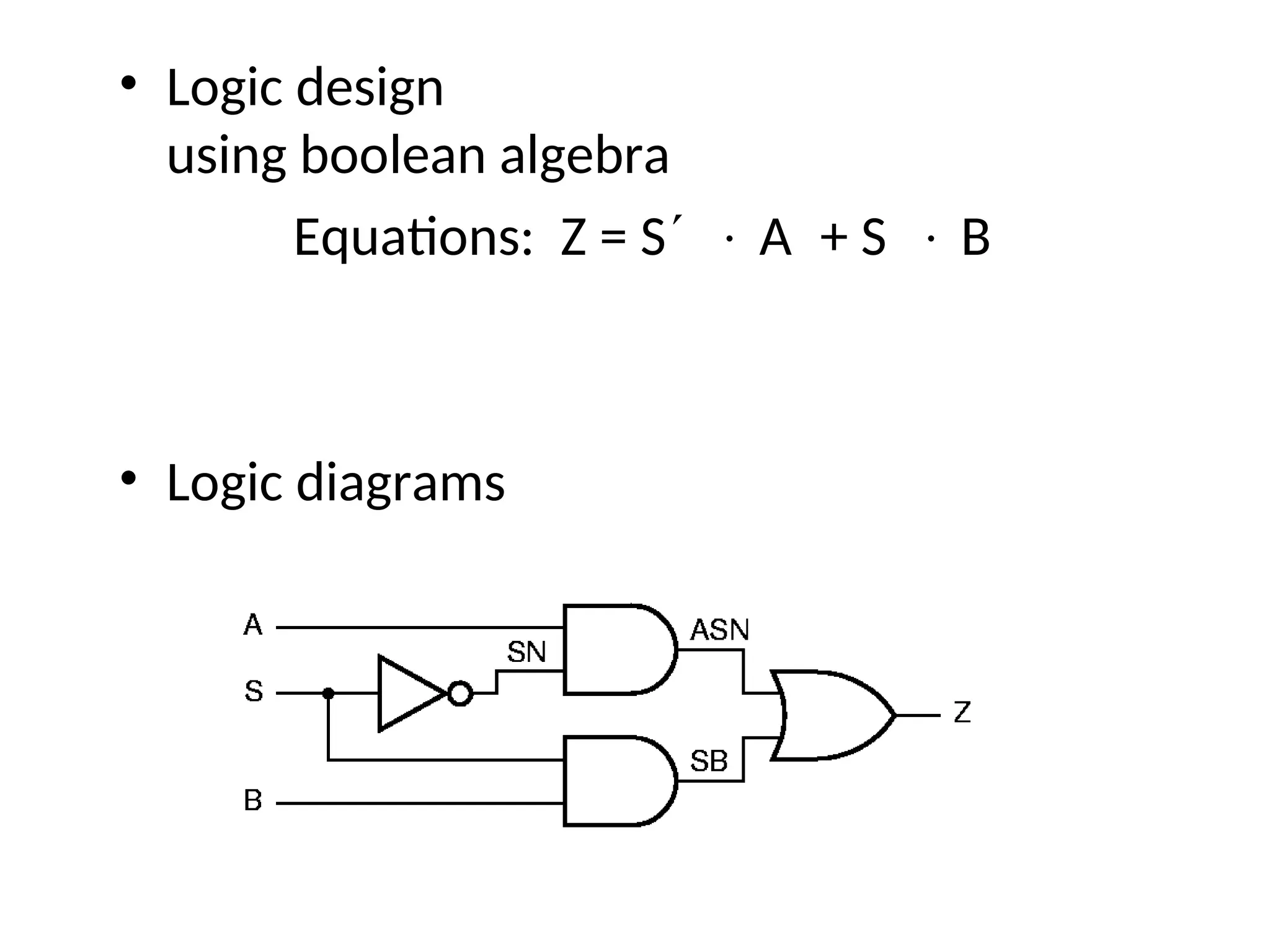
• Logic design
using boolean algebra
Equations: Z = S A+ S B
• Logic diagrams
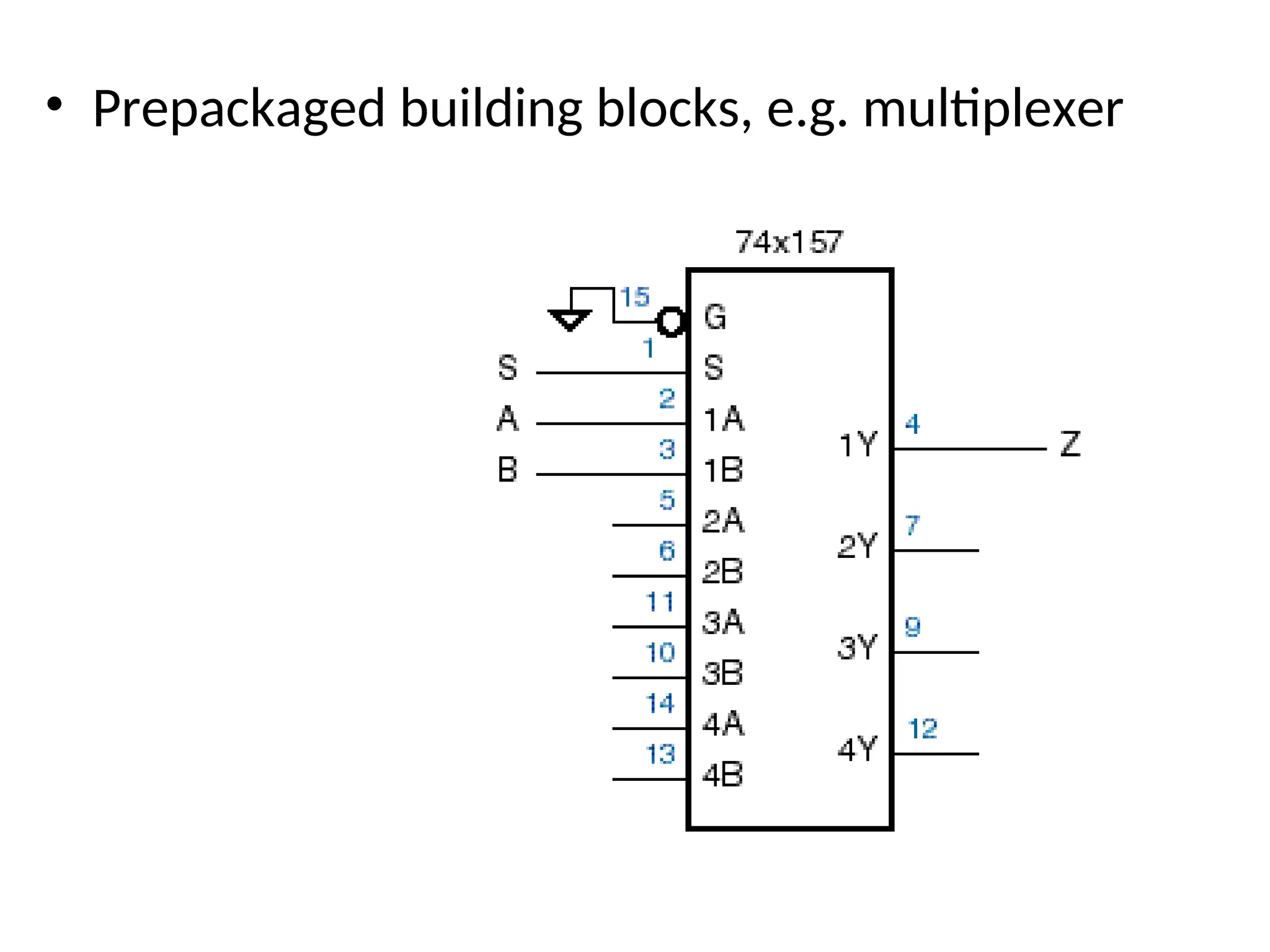
• Prepackaged building blocks, e.g. multiplexer
• Various hardware
description
languages
– ABEL
– VHDL
• We’ll start with
gates and work
our way up
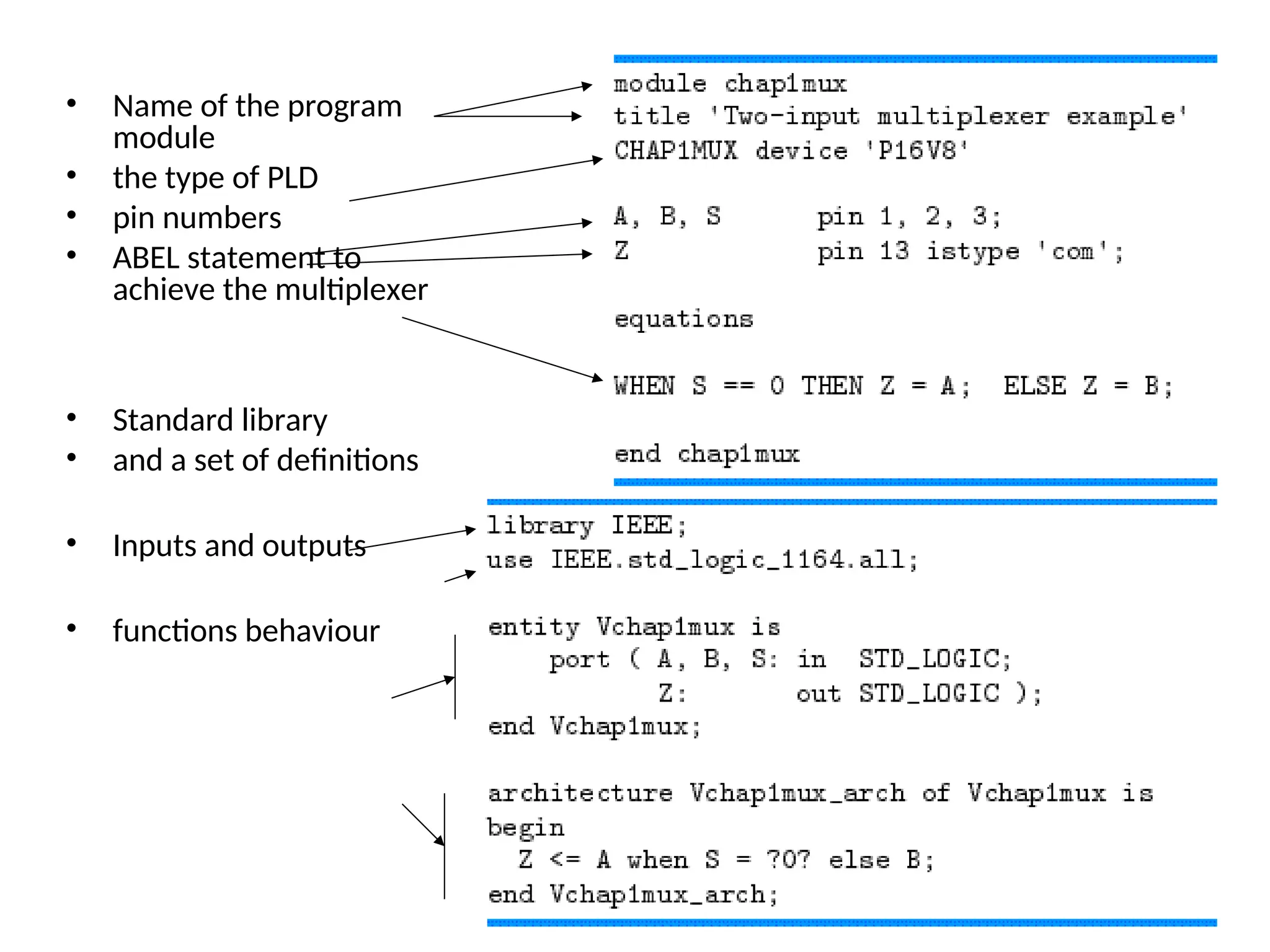
• Name of the program
module
• the type of PLD
• pin numbers
• ABEL statement to
achieve the multiplexer
• Standard library
• and a set of definitions
• Inputs and outputs
• functions behaviour
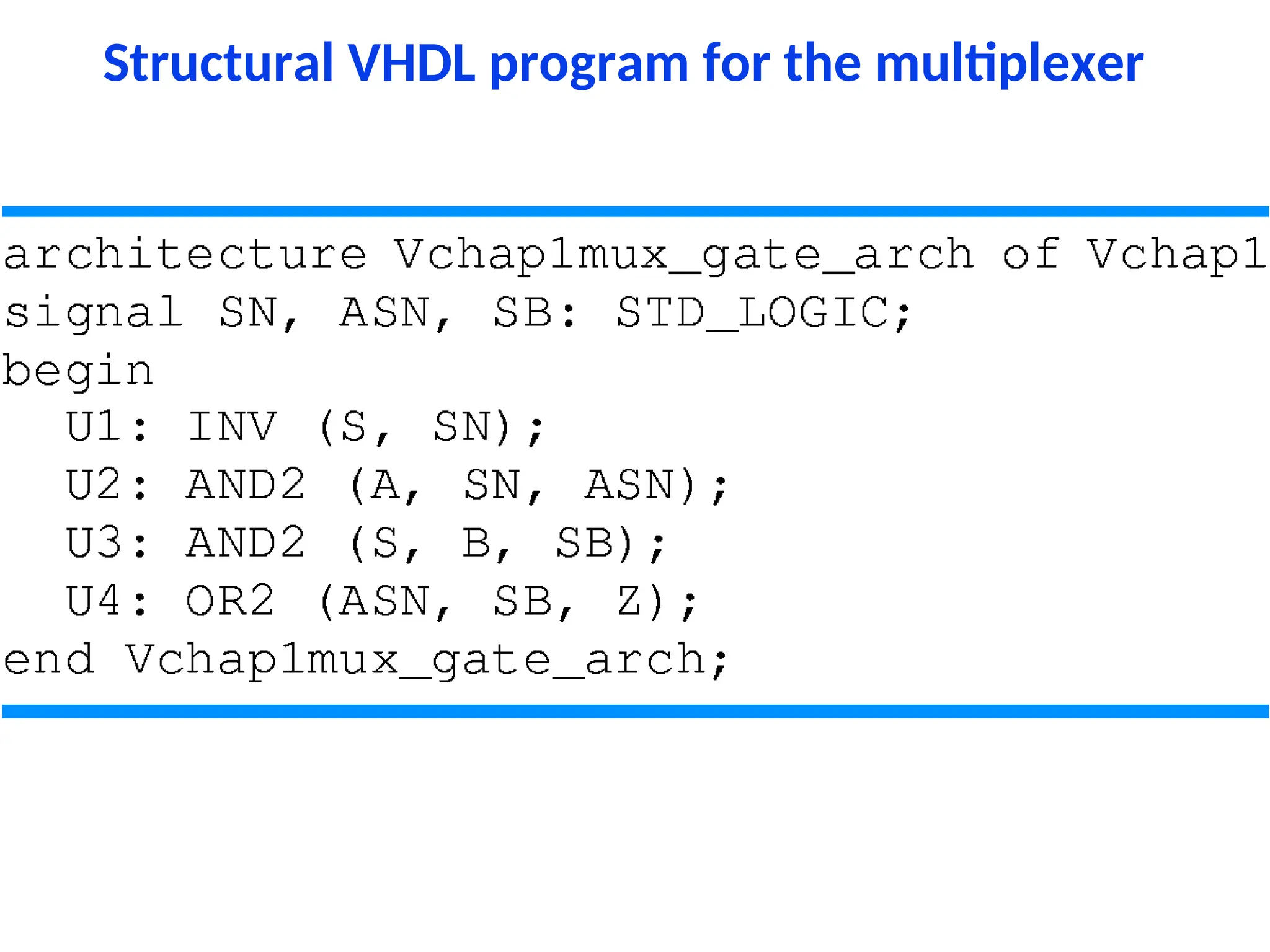
Structural VHDL program for the multiplexer
Summery
• Design to minimize cost.
• Rule of thumb is to minimize the number of ICs.
• Though PLDs costs more but uses less PCB area.
• Unless mass production avoid ASIC design.
• Design to solve real life problems.
fffggggggggggggggggggggghhhhhhhhhhhhhhhhhh.ppt

  • 1.
  • 2.
    Suplementary Reading • DigitalDesign by - John F. Wakerly – www.ddpp.com - you will find some solutions at this site. – www.xilinx.com - Xlinix Web site • Logic and Computer Design Fundamentals by - M. Morris Mano & Charles R. Kime • Digital Design by - M. Morris Mano • Digital Logic Circuit Analysis and Design by - Victor P. Nelson, H. Troy Nagle, J. David Irwin & Bill D. Carrol
  • 3.
    Digital Electronics • DigitalElectronics represents information (0, 1) with only two discrete values. • Ideally “no voltage” (e.g., 0v) represents a 0 and “full source voltage” (e.g., 5v) represents a 1 • Realistically “low voltage” (e.g., <1v) represents a 0 and “high voltage” (e.g., >4v) represents a 1 • We achieve these discrete values by using switches. • We use transistor switches, which operates at high speed, electronically, a small in size.
  • 4.
    Analog versus Digital •Analog systems process time-varying signals that can take on any value across a continuous range of voltages (in electrical/electronics systems). • Digital systems process time-varying signals that can take on only one of two discrete values of voltages (in electrical/electronics systems). – Discrete values are called 1 and 0 (ON and OFF, HIGH and LOW, TRUE and FALSE, etc.)
  • 5.
    Representing Information Electronically •A light bulb has to represent 4 different information: Bulb off - no student inside Bulb 1/3 lit - 1 student inside Bulb 2/3 lit - 2 student inside Bulb Full lit - 3 student inside • A light bulb has to represent 10 different information: – Is it possible to differentiate the ten different light intensity?
  • 6.
    Representing Information Electronically •A light bulb has to represent 2 different information: Bulb off - no student inside Bulb Full lit - 1 student inside • A light bulb has to represent 4 different information: – How? With one bulb? – Use two bulbs • A light bulb has to represent 10 different information: – Use four bulbs
  • 7.
    Representing Information Electronically •“Analog electronics” deals with non-discrete values • “Digital electronics” deals with discrete values
  • 8.
    Benefits of Digitalover Analog • Reproducibility • Not effected by noise means quality • Ease of design • Data protection • Programmable • Speed • Economy
  • 9.
    Digital Revolution • Digitalsystems started back in 1940s. • Digital systems cover all areas of life: – still pictures – digital video – digital audio – telephone – traffic lights – Animation
  • 10.
  • 11.
    Gates • The mostbasic digital devices are called gates. • Gates got their name from their function of allowing or blocking (gating) the flow of digital information. • A gate has one or more inputs and produces an output depending on the input(s). • A gate is called a combinational circuit. • Three most important gates are: AND, OR, NOT
  • 12.
    Digital Logic • Binarysystem -- 0 & 1, LOW & HIGH, negated and asserted. • Basic building blocks -- AND, OR, NOT
  • 13.
  • 15.
    Electronic Aspects ofDigital Design • How we represent digital information in electronic devices? • By discrete voltages.
  • 16.
    What is the BasicDigital Element in Electronics ? a Switch
  • 17.
    Using Switch torepresent digital information
  • 18.
    Digital Abstraction • Itis difficult to make ideal switches means a switch is completely ON or completely OFF. • So, we impose some rules that allow analog behavior to be ignored in most cases, so circuits can be modeled as if they really did process 0s and 1s, known as digital abstraction. • Digital abstraction allows us to associate a noise margin with each logic values (0 and 1).
  • 19.
    Real Switches torepresent digital information 5v 5v 1k 10k 5v 4.5v Output Output
  • 20.
    Logic levels • Undefinedregion is inherent digital, not analog • Switching threshold varies with voltage, temp need “noise margin” • Logic voltage levels decreasing with new processors. 5 , 3.3 , 2.5 , 1.8 V
  • 21.
  • 22.
  • 23.
  • 24.
    Flip-flops • A devicethat stores either a 0 or 1. • Stored value can be changed only at certain times determined by a clock input. • New value depend on the current state and it’s control inputs • A digital circuit that contains filp-flops is called a sequential circuit
  • 25.
    Flip-flops S-R latch symbolsD flip-flop J-K flip-flops
  • 26.
    Integrated Circuits • Acollection of one or more gates fabricated on a single silicon chip is called an integrated circuit (IC). • ICs were classified by size: – SSI - small scale integration - 1~20 gates – MSI - medium scale integration - 20~200 gates – LSI - large scale integration - 200~200,000 gates – VLSI - very large scale integration - over 1M transistors • Pentium-III - 40 million transistors
  • 27.
  • 28.
  • 29.
    Programmable Logic Devices •PLDs allow the function to be programmed into them after they are manufactured. • Complex PLDs (CPLD) are a collection of PLDs on the same chip. • Another programmable logic chip is FPGA - field- programmable gate arrays.
  • 30.
  • 31.
    Application Specific ICs(ASICs) • Chips designed for a particular application are called semicustom ICs or application-specific ICs (ASICs). • ASICs generally reduce the total component and manufacturing cost of a product by reducing chip count, physical size, and power consumption, and they often provide higher performance. • But costly if not produced in bulk.
  • 32.
    Printed-Circuit Boards • AnIC is normally mounted on a printed-circuit board (PCB) that connects it to other ICs in a system. • Individual wire connection or traces can be as narrow as 4 mils with 4 mils spacing (one- thousandth of an inch) • Now a days, most of the components use surface mount technology. • They are normally layered.
  • 33.
    Software Aspects ofDigital Design • Today software tools are an essential part of digital design. • Software tools improve productivity, correctness and quality of designs • Software tools are: – Schematic entry – HDL (Hardware Description Language) Editors – Simulators - to verify the behaviour of the design – Synthesis tools - circuit design – Timing analyzers and verifiers
  • 34.
    Digital Design Levels •the lowest level of design is device physics and IC manufacturing processes. • design at the transistor level • level of functional building blocks • level of logic design using HDLs • computer design and overall system design.
  • 35.
    Different Design Levels Considera simple design example: Build a multiplexer with two data inputs A and B, a control input S, and an output Z. Switch model for the example multiplexer
  • 36.
    Designing at thetransistor level • Transistor-level circuit diagrams • Gate symbols (for simple elements)
  • 37.
  • 38.
    • Logic design usingboolean algebra Equations: Z = S A+ S B • Logic diagrams
  • 39.
    • Prepackaged buildingblocks, e.g. multiplexer
  • 40.
    • Various hardware description languages –ABEL – VHDL • We’ll start with gates and work our way up
  • 41.
    • Name ofthe program module • the type of PLD • pin numbers • ABEL statement to achieve the multiplexer • Standard library • and a set of definitions • Inputs and outputs • functions behaviour
  • 42.
    Structural VHDL programfor the multiplexer
  • 43.
    Summery • Design tominimize cost. • Rule of thumb is to minimize the number of ICs. • Though PLDs costs more but uses less PCB area. • Unless mass production avoid ASIC design. • Design to solve real life problems.