Making PowerPoint Slides

            Presentation Slide
                  Tips
Slide Structure – Good

   Use 5 - 6 slides or about one slide per minute
    of your presentation
    –   be sure to include a title slide, at least three visual
        aid slides, and a conclusion slide


   Use key words and phrases only

   Write in point form, not complete sentences
Slide Structure - Bad

   Do not use distracting animation

   Do not use too much animation

   Be consistent with the animation that you use
Fonts - Good

   Use different size fonts for main points and
    secondary points
    –   this font is 24-point, the main point font is 28-point,
        and the title font is 36-point


   Use a standard font like Times New Roman or
    Arial
Fonts - Bad
   If you use a small font, your audience won’t be able to read what you have written


   CAPITALIZE ONLY WHEN NECESSARY. IT
    IS DIFFICULT TO READ


Don’t   use a
    complicated font
Color - Good

   Use a color of font that contrasts sharply with
    the background
    –   Ex: blue font on white background


   Use color to emphasize a point
    –   But only use this occasionally
Color - Bad

   Using a font color that does not contrast with
    the background color is hard to read

   Using color for decoration is distracting and
    annoying.

   Trying to be creative can also be bad
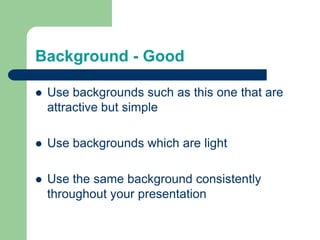
Background - Good

   Use backgrounds such as this one that are
    attractive but simple

   Use backgrounds which are light

   Use the same background consistently
    throughout your presentation
Background – Bad

   Avoid backgrounds that are distracting or
    difficult to read from
   Always be consistent with the background that
    you use
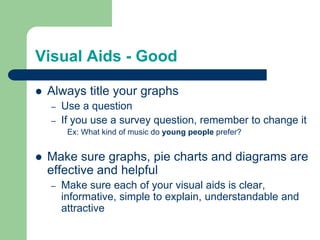
Visual Aids - Good

   Always title your graphs
    –   Use a question
    –   If you use a survey question, remember to change it
         Ex: What kind of music do you prefer?


   Make sure graphs, pie charts and diagrams are
    effective and helpful
    –   Make sure each of your visual aids is clear,
        informative, simple to explain, understandable and
        attractive
Visual Aids - Good

   Always title your graphs
    –   Use a question
    –   If you use a survey question, remember to change it
         Ex: What kind of music do young people prefer?


   Make sure graphs, pie charts and diagrams are
    effective and helpful
    –   Make sure each of your visual aids is clear,
        informative, simple to explain, understandable and
        attractive
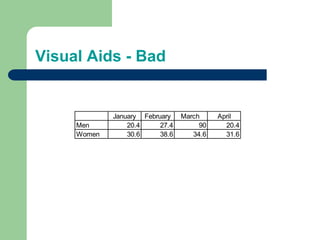
Visual Aids - Bad


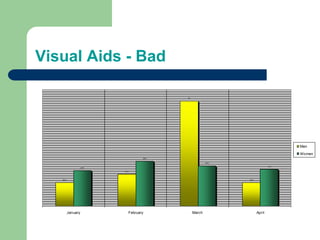
             January February    March     April
     Men         20.4     27.4        90     20.4
     Women       30.6     38.6      34.6     31.6
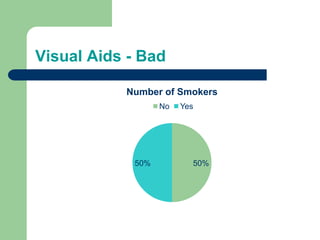
Visual Aids - Bad

           Number of Smokers
                  No   Yes


            50%          50%
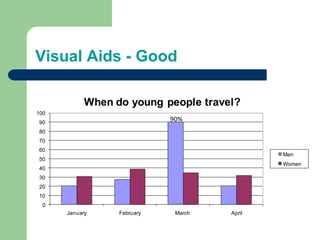
Visual Aids - Good

            When do young people travel?
100
90
                             90%
80
70
60
                                              Men
50
                                              Women
40
30
20
10
  0
      January     February    March   April
Visual Aids - Bad

                                            90


                                                                                      Men

                                                                                      Women
                                     38.6

                                                         34.6

                                                                               31.6
                    30.6

                           27.4


   20.4                                                         20.4


          January             February           March                 April
Visual Aids - Bad

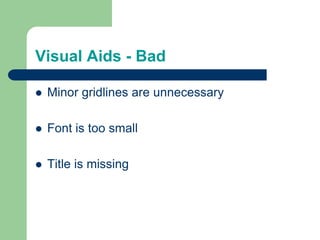
   Minor gridlines are unnecessary

   Font is too small

   Title is missing
Spelling and Grammar

   Edit your slides for:
    –   speling mistakes
    –   the use of of of repeated words
    –   grammatical errors you might have make


   Have someone else check your slides before
    you do your presentation!
Conclusion

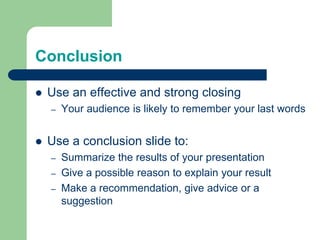
   Use an effective and strong closing
    –   Your audience is likely to remember your last words


   Use a conclusion slide to:
    –   Summarize the results of your presentation
    –   Give a possible reason to explain your result
    –   Make a recommendation, give advice or a
        suggestion
Good Luck!

   Final Tips
    –   Be prepared
    –   Know your information
    –   Rehearse and practice thoroughly
    –   Above all, relax and have fun

Presentation Tips - Visual Aids

  • 1.
    Making PowerPoint Slides Presentation Slide Tips
  • 2.
    Slide Structure –Good  Use 5 - 6 slides or about one slide per minute of your presentation – be sure to include a title slide, at least three visual aid slides, and a conclusion slide  Use key words and phrases only  Write in point form, not complete sentences
  • 3.
    Slide Structure -Bad  Do not use distracting animation  Do not use too much animation  Be consistent with the animation that you use
  • 4.
    Fonts - Good  Use different size fonts for main points and secondary points – this font is 24-point, the main point font is 28-point, and the title font is 36-point  Use a standard font like Times New Roman or Arial
  • 5.
    Fonts - Bad  If you use a small font, your audience won’t be able to read what you have written  CAPITALIZE ONLY WHEN NECESSARY. IT IS DIFFICULT TO READ Don’t use a complicated font
  • 6.
    Color - Good  Use a color of font that contrasts sharply with the background – Ex: blue font on white background  Use color to emphasize a point – But only use this occasionally
  • 7.
    Color - Bad  Using a font color that does not contrast with the background color is hard to read  Using color for decoration is distracting and annoying.  Trying to be creative can also be bad
  • 8.
    Background - Good  Use backgrounds such as this one that are attractive but simple  Use backgrounds which are light  Use the same background consistently throughout your presentation
  • 9.
    Background – Bad  Avoid backgrounds that are distracting or difficult to read from  Always be consistent with the background that you use
  • 10.
    Visual Aids -Good  Always title your graphs – Use a question – If you use a survey question, remember to change it Ex: What kind of music do you prefer?  Make sure graphs, pie charts and diagrams are effective and helpful – Make sure each of your visual aids is clear, informative, simple to explain, understandable and attractive
  • 11.
    Visual Aids -Good  Always title your graphs – Use a question – If you use a survey question, remember to change it Ex: What kind of music do young people prefer?  Make sure graphs, pie charts and diagrams are effective and helpful – Make sure each of your visual aids is clear, informative, simple to explain, understandable and attractive
  • 12.
    Visual Aids -Bad January February March April Men 20.4 27.4 90 20.4 Women 30.6 38.6 34.6 31.6
  • 13.
    Visual Aids -Bad Number of Smokers No Yes 50% 50%
  • 14.
    Visual Aids -Good When do young people travel? 100 90 90% 80 70 60 Men 50 Women 40 30 20 10 0 January February March April
  • 15.
    Visual Aids -Bad 90 Men Women 38.6 34.6 31.6 30.6 27.4 20.4 20.4 January February March April
  • 16.
    Visual Aids -Bad  Minor gridlines are unnecessary  Font is too small  Title is missing
  • 17.
    Spelling and Grammar  Edit your slides for: – speling mistakes – the use of of of repeated words – grammatical errors you might have make  Have someone else check your slides before you do your presentation!
  • 18.
    Conclusion  Use an effective and strong closing – Your audience is likely to remember your last words  Use a conclusion slide to: – Summarize the results of your presentation – Give a possible reason to explain your result – Make a recommendation, give advice or a suggestion
  • 19.
    Good Luck!  Final Tips – Be prepared – Know your information – Rehearse and practice thoroughly – Above all, relax and have fun

Editor's Notes

  • #11 See page 28 in your textbook
  • #12 See page 28 in your textbook