Anton Els
Session ID:
Prepared by:
F3
Docker and the Oracle Database –
How to get started
Sep 2019
Anton Els
CTO
Dbvisit Software Limited
@aelsnz
Anton Els
2
Anton Els
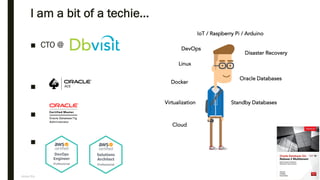
I am a bit of a techie…
■ CTO @
■
■
■
3
Linux
Docker
Disaster Recovery
Oracle Databases
Standby DatabasesVirtualization
IoT / Raspberry Pi / Arduino
Cloud
DevOps
Anton Els
Dbvisit Software Limited
■ Unique offering: DR solutions for Oracle SE/SE1/SE2
■ In the Cloud | Hybrid | On-Premise
■ New Zealand-Based, Office in US and EU (Prague)
■ Software is used in 110+ countries!
■ Product Engineers with “real world” DBA Experience
■ Passionate about Oracle Technology
4
Anton ElsAnton Els @aelsnz
Agenda
■ Getting Started
■ What is Docker?
– Images
– Containers
– Volumes
■ Running a Container
■ Oracle Database and Docker
■ Summary
5
Anton ElsAnton Els @aelsnz
Why Talk About Docker…
Anton ElsAnton Els @aelsnz
Demo Time
DEMO
Anton ElsAnton Els @aelsnz
What is Monolithic?
8
Anton ElsAnton Els @aelsnz
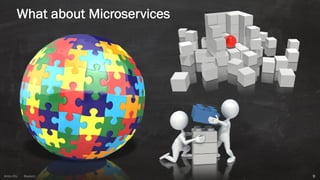
What about Microservices
9
Anton ElsAnton Els @aelsnz
Virtual Machines (VM)
10
Anton ElsAnton Els @aelsnz
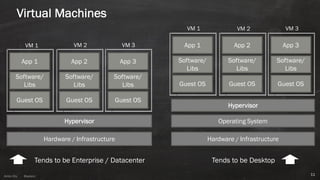
Virtual Machines
11
Hardware / Infrastructure
Hypervisor
Guest OS
Software/
Libs
App 1
Guest OS
Software/
Libs
App 2
Guest OS
Software/
Libs
App 3
Hardware / Infrastructure
Hypervisor
Guest OS
Software/
Libs
App 1
Guest OS
Software/
Libs
App 2
Guest OS
Software/
Libs
App 3
Operating System
VM 1 VM 2 VM 3
VM 1 VM 2 VM 3
Tends to be Enterprise / Datacenter Tends to be Desktop
Anton ElsAnton Els @aelsnz
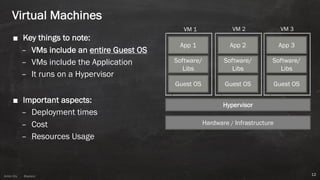
■ Key things to note:
– VMs include an entire Guest OS
– VMs include the Application
– It runs on a Hypervisor
■ Important aspects:
– Deployment times
– Cost
– Resources Usage
12
Hardware / Infrastructure
Hypervisor
Guest OS
Software/
Libs
App 1
Guest OS
Software/
Libs
App 2
Guest OS
Software/
Libs
App 3
VM 1 VM 2 VM 3
Virtual Machines
Anton ElsAnton Els @aelsnz
Basics of Containers
13
Anton ElsAnton Els @aelsnz
What is a container ?
14
Anton ElsAnton Els @aelsnz
At first, see a container as “a kind of VM”…
it makes it easier
BUT
it is not a VM!
15
Anton ElsAnton Els @aelsnz
Think about this:
■ You can install software on it
■ You can get access to a shell (even via SSH if you want)
■ You can be “root” or a user
■ It is isolated
■ There is networking enabled
16
Anton ElsAnton Els @aelsnz
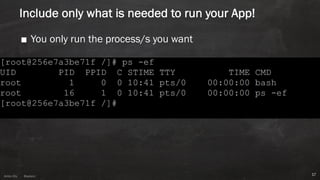
Include only what is needed to run your App!
■ You only run the process/s you want
17
Anton Els
18
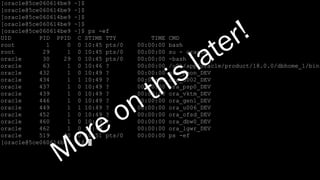
More on this later!
Anton ElsAnton Els @aelsnz
3 Important Building Blocks
19
Anton ElsAnton Els @aelsnz
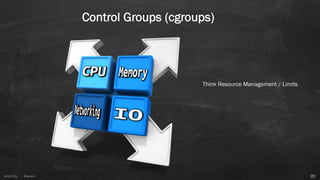
Control Groups (cgroups)
20
Think Resource Management / Limits
Anton Els
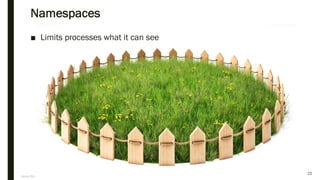
Namespaces
■ Limits processes what it can see
21
Anton ElsAnton Els @aelsnz
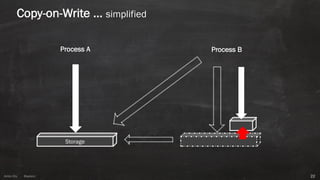
Copy-on-Write … simplified
22
Storage
Process A Process B
Anton ElsAnton Els @aelsnz
Time to talk about Docker
23
Anton ElsAnton Els @aelsnz
24
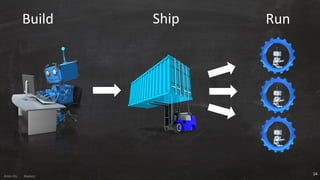
Build Ship Run
Anton ElsAnton Els @aelsnz
Something to think about:
■ It is FAST!– no operating system boot
■ Portable
■ Efficient use of resources
■ Easy to deploy
■ Helps enable/create a microservice architecture
■ Great for packaging software
■ Can replace Virtual Machines…
Anton ElsAnton Els @aelsnz
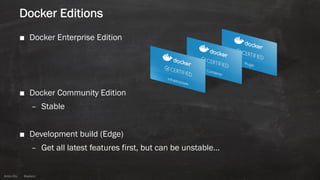
Docker Editions
■ Docker Enterprise Edition
■ Docker Community Edition
– Stable
■ Development build (Edge)
– Get all latest features first, but can be unstable…
Anton ElsAnton Els @aelsnz
How do we start?
■ Install Docker CE
■ Operating System Support:
– Linux
– Mac
– Windows
■ Create a Docker Hub account
– It is free!
Anton ElsAnton Els @aelsnz
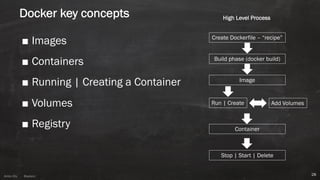
Docker key concepts
■ Images
■ Containers
■ Running | Creating a Container
■ Volumes
■ Registry
28
Create Dockerfile – “recipe”
Build phase (docker build)
Image
Run | Create Add Volumes
Container
Stop | Start | Delete
High Level Process
Anton ElsAnton Els @aelsnz
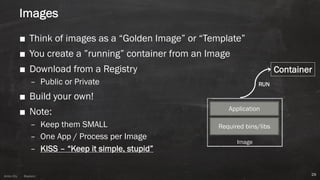
Images
■ Think of images as a “Golden Image” or “Template”
■ You create a ”running” container from an Image
■ Download from a Registry
– Public or Private
■ Build your own!
■ Note:
– Keep them SMALL
– One App / Process per Image
– KISS – “Keep it simple, stupid”
29
Required bins/libs
Application
Image
Container
RUN
Anton ElsAnton Els @aelsnz
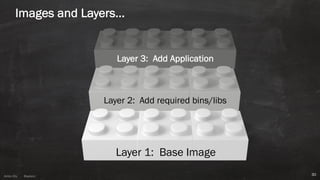
Images and Layers…
30
Layer 2: Add required bins/libs
Layer 3: Add Application
Layer 1: Base Image
Anton ElsAnton Els @aelsnz
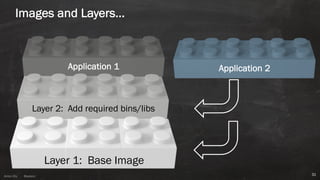
Images and Layers…
31
Layer 2: Add required bins/libs
Application 1
Layer 1: Base Image
Application 2
Anton ElsAnton Els @aelsnz
Creation an Image
■ Create a recipe / cookbook – called a “Dockerfile”
■ Key points to note:
– Each instruction = new layer
– You want to keep images small
– Reduce layers
– Decouple applications (keep it simple)
■ Read
– https://docs.docker.com/develop/develop-images/dockerfile_best-practices/
Dockerfile reference: https://docs.docker.com/engine/reference/builder/
Anton ElsAnton Els @aelsnz
Basic example: Building an Image
33
FROM oraclelinux:7.5
MAINTAINER anton.els@orcon.net.nz
RUN rpm --rebuilddb 
&& yum -y install httpd 
&& yum clean all 
&& rm -rf /var/cache/yum/*
EXPOSE 80
CMD ["/sbin/httpd","-DFOREGROUND"]
Anton ElsAnton Els @aelsnz
Creating an Image
■ Using the ”docker build” command:
Usage: docker build [OPTIONS] PATH | URL | -
■ Most Common Options:
docker build –f <yourdockerfile> –t <your-image-tag> .
■ Example:
docker build -t demohttpd -f Dockerfile .
Anton ElsAnton Els @aelsnz
Listing image and layers
35
■ Listing the Image:
# docker images aelsnz/httpd
REPOSITORY TAG IMAGE ID CREATED SIZE
aelsnz/httpd tag1 7dec963f783d 31 minutes ago 251MB
■ Show Layers:
# docker history aelsnz/httpd:tag1
IMAGE CREATED CREATED BY SIZE COMMENT
7dec963f783d 33 minutes ago /bin/sh -c #(nop) CMD ["/sbin/httpd" "-DF... 0B
cbcb79fcd3ce 33 minutes ago /bin/sh -c #(nop) EXPOSE 80/tcp 0B
174074f41010 33 minutes ago /bin/sh -c rpm --rebuilddb && yum -y ins... 17.3MB
4fe51b065704 34 minutes ago /bin/sh -c #(nop) MAINTAINER anton.els@or... 0B
bd622f029d9d 10 days ago /bin/sh -c #(nop) CMD ["/bin/bash"] 0B
<missing> 10 days ago /bin/sh -c #(nop) ADD file:caddac8b31709fd... 234MB
<missing> 7 months ago /bin/sh -c #(nop) MAINTAINER Oracle Linux... 0B
Anton ElsAnton Els @aelsnz
The Dockerfile
36
Anton ElsAnton Els @aelsnz
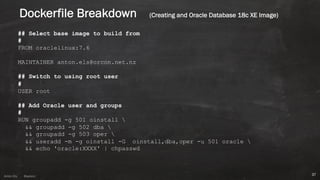
Dockerfile Breakdown (Creating and Oracle Database 18c XE Image)
## Select base image to build from
#
FROM oraclelinux:7.6
MAINTAINER anton.els@orcon.net.nz
## Switch to using root user
#
USER root
## Add Oracle user and groups
#
RUN groupadd -g 501 oinstall 
&& groupadd -g 502 dba 
&& groupadd -g 503 oper 
&& useradd -m -g oinstall -G oinstall,dba,oper -u 501 oracle 
&& echo 'oracle:XXXX' | chpasswd
37
Anton ElsAnton Els @aelsnz
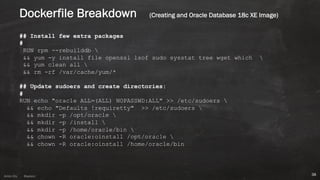
## Install few extra packages
#
RUN rpm --rebuilddb 
&& yum -y install file openssl lsof sudo sysstat tree wget which 
&& yum clean all 
&& rm -rf /var/cache/yum/*
## Update sudoers and create directories:
#
RUN echo "oracle ALL=(ALL) NOPASSWD:ALL" >> /etc/sudoers 
&& echo "Defaults !requiretty" >> /etc/sudoers 
&& mkdir -p /opt/oracle 
&& mkdir -p /install 
&& mkdir -p /home/oracle/bin 
&& chown -R oracle:oinstall /opt/oracle 
&& chown -R oracle:oinstall /home/oracle/bin
38
Dockerfile Breakdown (Creating and Oracle Database 18c XE Image)
Anton ElsAnton Els @aelsnz
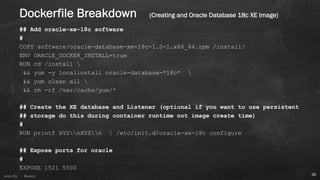
## Add oracle-xe-18c software
#
COPY software/oracle-database-xe-18c-1.0-1.x86_64.rpm /install/
ENV ORACLE_DOCKER_INSTALL=true
RUN cd /install 
&& yum -y localinstall oracle-database-*18c* 
&& yum clean all 
&& rm -rf /var/cache/yum/*
## Create the XE database and Listener (optional if you want to use persistent
## storage do this during container runtime not image create time)
#
RUN printf XYZnXYZn | /etc/init.d/oracle-xe-18c configure
## Expose ports for oracle
#
EXPOSE 1521 5500
39
Dockerfile Breakdown (Creating and Oracle Database 18c XE Image)
Anton ElsAnton Els @aelsnz
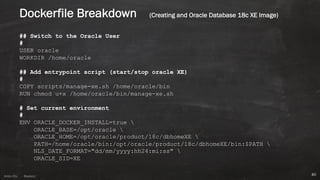
## Switch to the Oracle User
#
USER oracle
WORKDIR /home/oracle
## Add entrypoint script (start/stop oracle XE)
#
COPY scripts/manage-xe.sh /home/oracle/bin
RUN chmod u+x /home/oracle/bin/manage-xe.sh
# Set current environment
#
ENV ORACLE_DOCKER_INSTALL=true 
ORACLE_BASE=/opt/oracle 
ORACLE_HOME=/opt/oracle/product/18c/dbhomeXE 
PATH=/home/oracle/bin:/opt/oracle/product/18c/dbhomeXE/bin:$PATH 
NLS_DATE_FORMAT="dd/mm/yyyy:hh24:mi:ss" 
ORACLE_SID=XE
40
Dockerfile Breakdown (Creating and Oracle Database 18c XE Image)
Anton ElsAnton Els @aelsnz
## default command to run – can be entrypoint script or even bash shell
#
CMD ["/home/oracle/bin/manage-xe.sh", -o, "start"]
# CMD ["/bin/bash"]
41
Dockerfile Breakdown (Creating and Oracle Database 18c XE Image)
Anton ElsAnton Els @aelsnz
[aelsnz:../oracle-xe-18c-minimum]:tree .
.
├── build.sh
├── dockerfiles
│ └── Dockerfile
├── scripts
│ └── manage-xe.sh
└── software
├── oracle-database-preinstall-18c-1.0-1.el7.x86_64.rpm
└── oracle-database-xe-18c-1.0-1.x86_64.rpm
BUID COMMAND
docker build -f dockerfiles/Dockerfile -t aelsnz/oracle-xe:18c .
42
Dockerfile Breakdown (Creating and Oracle Database 18c XE Image)
Anton ElsAnton Els @aelsnz
We now have an image, lets use it!
Creating (Running) a Container
43
Anton ElsAnton Els @aelsnz
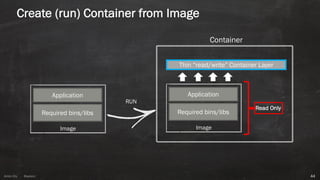
Create (run) Container from Image
44
Required bins/libs
Application
Image
Required bins/libs
Application
Image
Container
Thin “read/write” Container Layer
Read Only
RUN
Anton ElsAnton Els @aelsnz
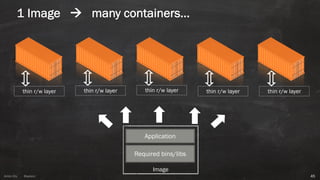
1 Image à many containers…
45
Required bins/libs
Application
Image
thin r/w layer thin r/w layer thin r/w layer thin r/w layer thin r/w layer
Anton ElsAnton Els @aelsnz
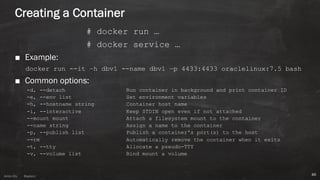
Creating a Container
# docker run …
# docker service …
■ Example:
docker run --it –h dbv1 --name dbv1 –p 4433:4433 oraclelinux:7.5 bash
■ Common options:
-d, --detach Run container in background and print container ID
-e, --env list Set environment variables
-h, --hostname string Container host name
-i, --interactive Keep STDIN open even if not attached
--mount mount Attach a filesystem mount to the container
--name string Assign a name to the container
-p, --publish list Publish a container's port(s) to the host
--rm Automatically remove the container when it exits
-t, --tty Allocate a pseudo-TTY
-v, --volume list Bind mount a volume
46
Anton ElsAnton Els @aelsnz
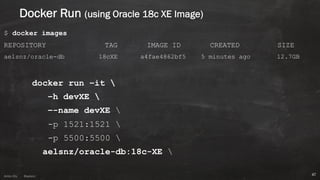
Docker Run (using Oracle 18c XE Image)
$ docker images
REPOSITORY TAG IMAGE ID CREATED SIZE
aelsnz/oracle-db 18cXE a4fae4862bf5 5 minutes ago 12.7GB
docker run –it 
–h devXE 
–-name devXE 
-p 1521:1521 
-p 5500:5500 
aelsnz/oracle-db:18c-XE 
47
Anton ElsAnton Els @aelsnz
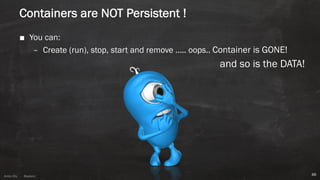
Containers are NOT Persistent !
■ You can:
– Create (run), stop, start and remove ….. oops.. Container is GONE!
and so is the DATA!
48
Anton ElsAnton Els @aelsnz
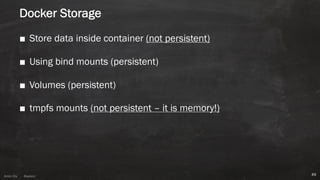
Docker Storage
■ Store data inside container (not persistent)
■ Using bind mounts (persistent)
■ Volumes (persistent)
■ tmpfs mounts (not persistent – it is memory!)
49
Anton ElsAnton Els @aelsnz
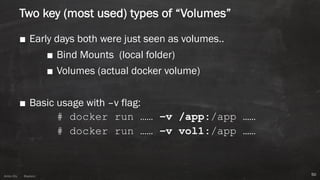
Two key (most used) types of “Volumes”
■ Early days both were just seen as volumes..
■ Bind Mounts (local folder)
■ Volumes (actual docker volume)
■ Basic usage with –v flag:
# docker run …… –v /app:/app ……
# docker run …… –v vol1:/app ……
50
Anton ElsAnton Els @aelsnz
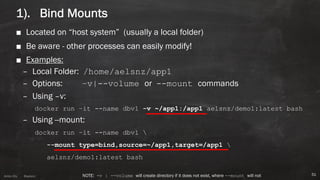
1). Bind Mounts
■ Located on “host system” (usually a local folder)
■ Be aware - other processes can easily modify!
■ Examples:
– Local Folder: /home/aelsnz/app1
– Options: –v|--volume or --mount commands
– Using –v:
docker run –it --name dbv1 -v ~/app1:/app1 aelsnz/demo1:latest bash
– Using --mount:
docker run –it --name dbv1 
--mount type=bind,source=~/app1,target=/app1 
aelsnz/demo1:latest bash
51NOTE: -v | --volume will create directory if it does not exist, where --mount will not
Anton ElsAnton Els @aelsnz
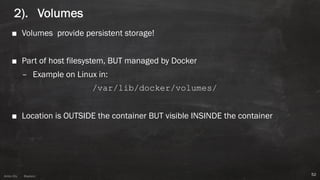
2). Volumes
■ Volumes provide persistent storage!
■ Part of host filesystem, BUT managed by Docker
– Example on Linux in:
/var/lib/docker/volumes/
■ Location is OUTSIDE the container BUT visible INSINDE the container
52
Anton ElsAnton Els @aelsnz
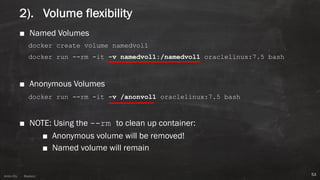
2). Volume flexibility
■ Named Volumes
docker create volume namedvol1
docker run --rm -it -v namedvol1:/namedvol1 oraclelinux:7.5 bash
■ Anonymous Volumes
docker run --rm -it -v /anonvol1 oraclelinux:7.5 bash
■ NOTE: Using the --rm to clean up container:
■ Anonymous volume will be removed!
■ Named volume will remain
53
Anton ElsAnton Els @aelsnz
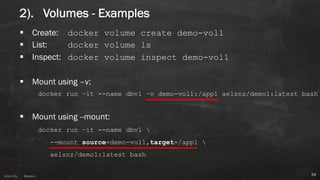
2). Volumes - Examples
§ Create: docker volume create demo-vol1
§ List: docker volume ls
§ Inspect: docker volume inspect demo-vol1
§ Mount using –v:
docker run –it --name dbv1 –v demo-vol1:/app1 aelsnz/demo1:latest bash
§ Mount using --mount:
docker run –it --name dbv1 
--mount source=demo-vol1,target=/app1 
aelsnz/demo1:latest bash
54
Anton ElsAnton Els @aelsnz
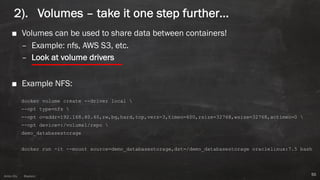
2). Volumes – take it one step further…
■ Volumes can be used to share data between containers!
– Example: nfs, AWS S3, etc.
– Look at volume drivers
■ Example NFS:
docker volume create --driver local 
--opt type=nfs 
--opt o=addr=192.168.40.40,rw,bg,hard,tcp,vers=3,timeo=600,rsize=32768,wsize=32768,actimeo=0 
--opt device=:/volume1/repo 
demo_databasestorage
docker run -it --mount source=demo_databasestorage,dst=/demo_databasestorage oraclelinux:7.5 bash
55
Anton ElsAnton Els @aelsnz
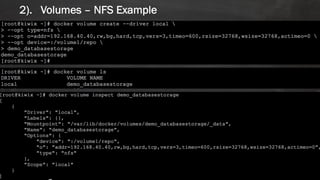
2). Volumes – NFS Example
56
Anton ElsAnton Els @aelsnz
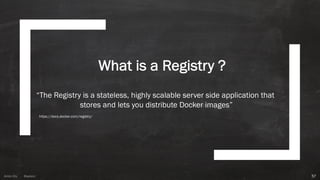
What is a Registry ?
57
“The Registry is a stateless, highly scalable server side application that
stores and lets you distribute Docker images”
https://docs.docker.com/registry/
Anton ElsAnton Els @aelsnz
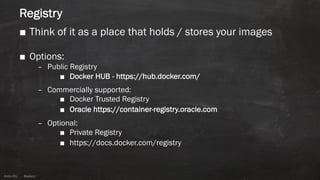
Registry
■ Think of it as a place that holds / stores your images
■ Options:
– Public Registry
■ Docker HUB - https://hub.docker.com/
– Commercially supported:
■ Docker Trusted Registry
■ Oracle https://container-registry.oracle.com
– Optional:
■ Private Registry
■ https://docs.docker.com/registry
Anton ElsAnton Els @aelsnz
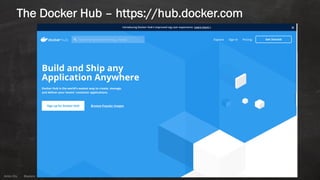
The Docker Hub – https://hub.docker.com
Anton ElsAnton Els @aelsnz
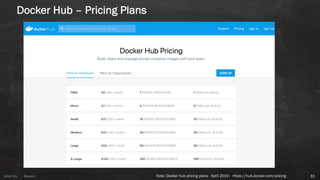
Docker Hub – Pricing Plans
61Note: Docker hub pricing plans - April 2019 - https://hub.docker.com/pricing
Anton ElsAnton Els @aelsnz
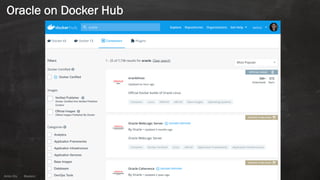
Oracle on Docker Hub
Anton ElsAnton Els @aelsnz
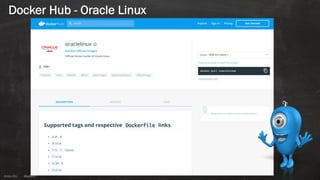
Docker Hub - Oracle Linux
Anton ElsAnton Els @aelsnz
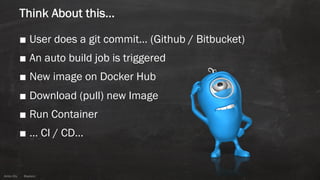
Think About this…
■ User does a git commit… (Github / Bitbucket)
■ An auto build job is triggered
■ New image on Docker Hub
■ Download (pull) new Image
■ Run Container
■ … CI / CD…
Anton ElsAnton Els @aelsnz
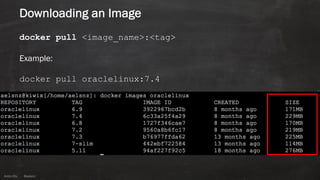
Downloading an Image
docker pull <image_name>:<tag>
Example:
docker pull oraclelinux:7.4
66
Anton ElsAnton Els @aelsnz
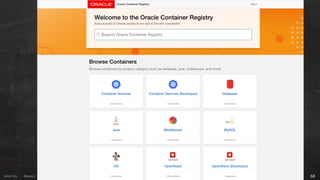
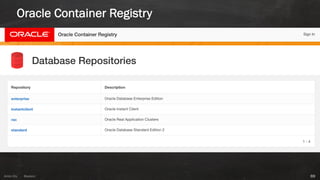
The Oracle Container Registry
■ Looking for an Image with Oracle software built by Oracle?
■ https://container-registry.oracle.com
67
Anton ElsAnton Els @aelsnz 68
Anton ElsAnton Els @aelsnz
Oracle Container Registry
69
Anton ElsAnton Els @aelsnz
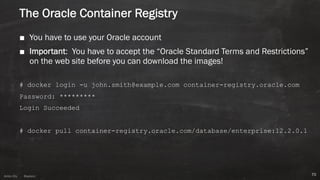
The Oracle Container Registry
■ You have to use your Oracle account
■ Important: You have to accept the “Oracle Standard Terms and Restrictions”
on the web site before you can download the images!
# docker login -u john.smith@example.com container-registry.oracle.com
Password: *********
Login Succeeded
# docker pull container-registry.oracle.com/database/enterprise:12.2.0.1
70
Anton ElsAnton Els @aelsnz
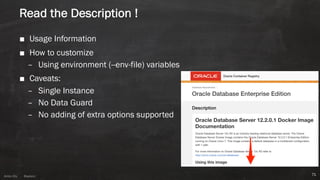
Read the Description !
■ Usage Information
■ How to customize
– Using environment (--env-file) variables
■ Caveats:
– Single Instance
– No Data Guard
– No adding of extra options supported
71
Anton ElsAnton Els @aelsnz
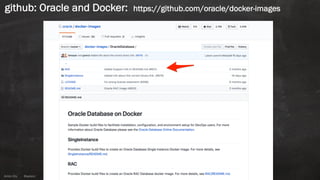
github: Oracle and Docker: https://github.com/oracle/docker-images
Anton ElsAnton Els @aelsnz
What Next?
■ Download images
■ Test them
■ Create containers with volumes and some without
■ Learn how-to remove old containers/images (docker rm … / docker rmi …)
■ Try and build your own image!
– Best way to learn!
■ Next Steps:
– Look at Docker Compose!
73
Anton ElsAnton Els @aelsnz
Why use Docker
74
Anton ElsAnton Els @aelsnz
Reasons
■ FAST!– no operating system boot
■ Portable
■ Efficient use of Resources
■ Easy to create, customize, build and deploy
■ Helps enable/create a Microservice Architecture
■ Great for packaging software
■ Can replace Virtual Machines…
Anton ElsAnton Els @aelsnz
Tips
■ Start with the basics!
■ Try and keep your images small!
■ Do not try and do everything in one image
■ Do not make things to complex!
■ Use volumes for persistent storage
■ Remember Oracle needs memory…
Anton ElsAnton Els @aelsnz
Docker and Cloud
It is supported by most cloud providers:
■ Oracle Cloud – Docker Container Service
■ Amazon – EC2 Container Service
■ Google – Google Container Engine
■ Microsoft – Azure Container Services
■ …
And they are all adding more and more services!
Anton ElsAnton Els @aelsnz
But most important!
■ Change Control is there for a reason!
■ Document your Backup and Recovery procedures!!!
78
Anton Els
Session ID:
F3
THANK YOU
Presented By: Anton Els
Email: anton.els@dbvisit.com
Twitter: @aelsnz

Docker and the Oracle Database

  • 1.
    Anton Els Session ID: Preparedby: F3 Docker and the Oracle Database – How to get started Sep 2019 Anton Els CTO Dbvisit Software Limited @aelsnz
  • 2.
  • 3.
    Anton Els I ama bit of a techie… ■ CTO @ ■ ■ ■ 3 Linux Docker Disaster Recovery Oracle Databases Standby DatabasesVirtualization IoT / Raspberry Pi / Arduino Cloud DevOps
  • 4.
    Anton Els Dbvisit SoftwareLimited ■ Unique offering: DR solutions for Oracle SE/SE1/SE2 ■ In the Cloud | Hybrid | On-Premise ■ New Zealand-Based, Office in US and EU (Prague) ■ Software is used in 110+ countries! ■ Product Engineers with “real world” DBA Experience ■ Passionate about Oracle Technology 4
  • 5.
    Anton ElsAnton Els@aelsnz Agenda ■ Getting Started ■ What is Docker? – Images – Containers – Volumes ■ Running a Container ■ Oracle Database and Docker ■ Summary 5
  • 6.
    Anton ElsAnton Els@aelsnz Why Talk About Docker…
  • 7.
    Anton ElsAnton Els@aelsnz Demo Time DEMO
  • 8.
    Anton ElsAnton Els@aelsnz What is Monolithic? 8
  • 9.
    Anton ElsAnton Els@aelsnz What about Microservices 9
  • 10.
    Anton ElsAnton Els@aelsnz Virtual Machines (VM) 10
  • 11.
    Anton ElsAnton Els@aelsnz Virtual Machines 11 Hardware / Infrastructure Hypervisor Guest OS Software/ Libs App 1 Guest OS Software/ Libs App 2 Guest OS Software/ Libs App 3 Hardware / Infrastructure Hypervisor Guest OS Software/ Libs App 1 Guest OS Software/ Libs App 2 Guest OS Software/ Libs App 3 Operating System VM 1 VM 2 VM 3 VM 1 VM 2 VM 3 Tends to be Enterprise / Datacenter Tends to be Desktop
  • 12.
    Anton ElsAnton Els@aelsnz ■ Key things to note: – VMs include an entire Guest OS – VMs include the Application – It runs on a Hypervisor ■ Important aspects: – Deployment times – Cost – Resources Usage 12 Hardware / Infrastructure Hypervisor Guest OS Software/ Libs App 1 Guest OS Software/ Libs App 2 Guest OS Software/ Libs App 3 VM 1 VM 2 VM 3 Virtual Machines
  • 13.
    Anton ElsAnton Els@aelsnz Basics of Containers 13
  • 14.
    Anton ElsAnton Els@aelsnz What is a container ? 14
  • 15.
    Anton ElsAnton Els@aelsnz At first, see a container as “a kind of VM”… it makes it easier BUT it is not a VM! 15
  • 16.
    Anton ElsAnton Els@aelsnz Think about this: ■ You can install software on it ■ You can get access to a shell (even via SSH if you want) ■ You can be “root” or a user ■ It is isolated ■ There is networking enabled 16
  • 17.
    Anton ElsAnton Els@aelsnz Include only what is needed to run your App! ■ You only run the process/s you want 17
  • 18.
  • 19.
    Anton ElsAnton Els@aelsnz 3 Important Building Blocks 19
  • 20.
    Anton ElsAnton Els@aelsnz Control Groups (cgroups) 20 Think Resource Management / Limits
  • 21.
    Anton Els Namespaces ■ Limitsprocesses what it can see 21
  • 22.
    Anton ElsAnton Els@aelsnz Copy-on-Write … simplified 22 Storage Process A Process B
  • 23.
    Anton ElsAnton Els@aelsnz Time to talk about Docker 23
  • 24.
    Anton ElsAnton Els@aelsnz 24 Build Ship Run
  • 25.
    Anton ElsAnton Els@aelsnz Something to think about: ■ It is FAST!– no operating system boot ■ Portable ■ Efficient use of resources ■ Easy to deploy ■ Helps enable/create a microservice architecture ■ Great for packaging software ■ Can replace Virtual Machines…
  • 26.
    Anton ElsAnton Els@aelsnz Docker Editions ■ Docker Enterprise Edition ■ Docker Community Edition – Stable ■ Development build (Edge) – Get all latest features first, but can be unstable…
  • 27.
    Anton ElsAnton Els@aelsnz How do we start? ■ Install Docker CE ■ Operating System Support: – Linux – Mac – Windows ■ Create a Docker Hub account – It is free!
  • 28.
    Anton ElsAnton Els@aelsnz Docker key concepts ■ Images ■ Containers ■ Running | Creating a Container ■ Volumes ■ Registry 28 Create Dockerfile – “recipe” Build phase (docker build) Image Run | Create Add Volumes Container Stop | Start | Delete High Level Process
  • 29.
    Anton ElsAnton Els@aelsnz Images ■ Think of images as a “Golden Image” or “Template” ■ You create a ”running” container from an Image ■ Download from a Registry – Public or Private ■ Build your own! ■ Note: – Keep them SMALL – One App / Process per Image – KISS – “Keep it simple, stupid” 29 Required bins/libs Application Image Container RUN
  • 30.
    Anton ElsAnton Els@aelsnz Images and Layers… 30 Layer 2: Add required bins/libs Layer 3: Add Application Layer 1: Base Image
  • 31.
    Anton ElsAnton Els@aelsnz Images and Layers… 31 Layer 2: Add required bins/libs Application 1 Layer 1: Base Image Application 2
  • 32.
    Anton ElsAnton Els@aelsnz Creation an Image ■ Create a recipe / cookbook – called a “Dockerfile” ■ Key points to note: – Each instruction = new layer – You want to keep images small – Reduce layers – Decouple applications (keep it simple) ■ Read – https://docs.docker.com/develop/develop-images/dockerfile_best-practices/ Dockerfile reference: https://docs.docker.com/engine/reference/builder/
  • 33.
    Anton ElsAnton Els@aelsnz Basic example: Building an Image 33 FROM oraclelinux:7.5 MAINTAINER anton.els@orcon.net.nz RUN rpm --rebuilddb && yum -y install httpd && yum clean all && rm -rf /var/cache/yum/* EXPOSE 80 CMD ["/sbin/httpd","-DFOREGROUND"]
  • 34.
    Anton ElsAnton Els@aelsnz Creating an Image ■ Using the ”docker build” command: Usage: docker build [OPTIONS] PATH | URL | - ■ Most Common Options: docker build –f <yourdockerfile> –t <your-image-tag> . ■ Example: docker build -t demohttpd -f Dockerfile .
  • 35.
    Anton ElsAnton Els@aelsnz Listing image and layers 35 ■ Listing the Image: # docker images aelsnz/httpd REPOSITORY TAG IMAGE ID CREATED SIZE aelsnz/httpd tag1 7dec963f783d 31 minutes ago 251MB ■ Show Layers: # docker history aelsnz/httpd:tag1 IMAGE CREATED CREATED BY SIZE COMMENT 7dec963f783d 33 minutes ago /bin/sh -c #(nop) CMD ["/sbin/httpd" "-DF... 0B cbcb79fcd3ce 33 minutes ago /bin/sh -c #(nop) EXPOSE 80/tcp 0B 174074f41010 33 minutes ago /bin/sh -c rpm --rebuilddb && yum -y ins... 17.3MB 4fe51b065704 34 minutes ago /bin/sh -c #(nop) MAINTAINER anton.els@or... 0B bd622f029d9d 10 days ago /bin/sh -c #(nop) CMD ["/bin/bash"] 0B <missing> 10 days ago /bin/sh -c #(nop) ADD file:caddac8b31709fd... 234MB <missing> 7 months ago /bin/sh -c #(nop) MAINTAINER Oracle Linux... 0B
  • 36.
    Anton ElsAnton Els@aelsnz The Dockerfile 36
  • 37.
    Anton ElsAnton Els@aelsnz Dockerfile Breakdown (Creating and Oracle Database 18c XE Image) ## Select base image to build from # FROM oraclelinux:7.6 MAINTAINER anton.els@orcon.net.nz ## Switch to using root user # USER root ## Add Oracle user and groups # RUN groupadd -g 501 oinstall && groupadd -g 502 dba && groupadd -g 503 oper && useradd -m -g oinstall -G oinstall,dba,oper -u 501 oracle && echo 'oracle:XXXX' | chpasswd 37
  • 38.
    Anton ElsAnton Els@aelsnz ## Install few extra packages # RUN rpm --rebuilddb && yum -y install file openssl lsof sudo sysstat tree wget which && yum clean all && rm -rf /var/cache/yum/* ## Update sudoers and create directories: # RUN echo "oracle ALL=(ALL) NOPASSWD:ALL" >> /etc/sudoers && echo "Defaults !requiretty" >> /etc/sudoers && mkdir -p /opt/oracle && mkdir -p /install && mkdir -p /home/oracle/bin && chown -R oracle:oinstall /opt/oracle && chown -R oracle:oinstall /home/oracle/bin 38 Dockerfile Breakdown (Creating and Oracle Database 18c XE Image)
  • 39.
    Anton ElsAnton Els@aelsnz ## Add oracle-xe-18c software # COPY software/oracle-database-xe-18c-1.0-1.x86_64.rpm /install/ ENV ORACLE_DOCKER_INSTALL=true RUN cd /install && yum -y localinstall oracle-database-*18c* && yum clean all && rm -rf /var/cache/yum/* ## Create the XE database and Listener (optional if you want to use persistent ## storage do this during container runtime not image create time) # RUN printf XYZnXYZn | /etc/init.d/oracle-xe-18c configure ## Expose ports for oracle # EXPOSE 1521 5500 39 Dockerfile Breakdown (Creating and Oracle Database 18c XE Image)
  • 40.
    Anton ElsAnton Els@aelsnz ## Switch to the Oracle User # USER oracle WORKDIR /home/oracle ## Add entrypoint script (start/stop oracle XE) # COPY scripts/manage-xe.sh /home/oracle/bin RUN chmod u+x /home/oracle/bin/manage-xe.sh # Set current environment # ENV ORACLE_DOCKER_INSTALL=true ORACLE_BASE=/opt/oracle ORACLE_HOME=/opt/oracle/product/18c/dbhomeXE PATH=/home/oracle/bin:/opt/oracle/product/18c/dbhomeXE/bin:$PATH NLS_DATE_FORMAT="dd/mm/yyyy:hh24:mi:ss" ORACLE_SID=XE 40 Dockerfile Breakdown (Creating and Oracle Database 18c XE Image)
  • 41.
    Anton ElsAnton Els@aelsnz ## default command to run – can be entrypoint script or even bash shell # CMD ["/home/oracle/bin/manage-xe.sh", -o, "start"] # CMD ["/bin/bash"] 41 Dockerfile Breakdown (Creating and Oracle Database 18c XE Image)
  • 42.
    Anton ElsAnton Els@aelsnz [aelsnz:../oracle-xe-18c-minimum]:tree . . ├── build.sh ├── dockerfiles │ └── Dockerfile ├── scripts │ └── manage-xe.sh └── software ├── oracle-database-preinstall-18c-1.0-1.el7.x86_64.rpm └── oracle-database-xe-18c-1.0-1.x86_64.rpm BUID COMMAND docker build -f dockerfiles/Dockerfile -t aelsnz/oracle-xe:18c . 42 Dockerfile Breakdown (Creating and Oracle Database 18c XE Image)
  • 43.
    Anton ElsAnton Els@aelsnz We now have an image, lets use it! Creating (Running) a Container 43
  • 44.
    Anton ElsAnton Els@aelsnz Create (run) Container from Image 44 Required bins/libs Application Image Required bins/libs Application Image Container Thin “read/write” Container Layer Read Only RUN
  • 45.
    Anton ElsAnton Els@aelsnz 1 Image à many containers… 45 Required bins/libs Application Image thin r/w layer thin r/w layer thin r/w layer thin r/w layer thin r/w layer
  • 46.
    Anton ElsAnton Els@aelsnz Creating a Container # docker run … # docker service … ■ Example: docker run --it –h dbv1 --name dbv1 –p 4433:4433 oraclelinux:7.5 bash ■ Common options: -d, --detach Run container in background and print container ID -e, --env list Set environment variables -h, --hostname string Container host name -i, --interactive Keep STDIN open even if not attached --mount mount Attach a filesystem mount to the container --name string Assign a name to the container -p, --publish list Publish a container's port(s) to the host --rm Automatically remove the container when it exits -t, --tty Allocate a pseudo-TTY -v, --volume list Bind mount a volume 46
  • 47.
    Anton ElsAnton Els@aelsnz Docker Run (using Oracle 18c XE Image) $ docker images REPOSITORY TAG IMAGE ID CREATED SIZE aelsnz/oracle-db 18cXE a4fae4862bf5 5 minutes ago 12.7GB docker run –it –h devXE –-name devXE -p 1521:1521 -p 5500:5500 aelsnz/oracle-db:18c-XE 47
  • 48.
    Anton ElsAnton Els@aelsnz Containers are NOT Persistent ! ■ You can: – Create (run), stop, start and remove ….. oops.. Container is GONE! and so is the DATA! 48
  • 49.
    Anton ElsAnton Els@aelsnz Docker Storage ■ Store data inside container (not persistent) ■ Using bind mounts (persistent) ■ Volumes (persistent) ■ tmpfs mounts (not persistent – it is memory!) 49
  • 50.
    Anton ElsAnton Els@aelsnz Two key (most used) types of “Volumes” ■ Early days both were just seen as volumes.. ■ Bind Mounts (local folder) ■ Volumes (actual docker volume) ■ Basic usage with –v flag: # docker run …… –v /app:/app …… # docker run …… –v vol1:/app …… 50
  • 51.
    Anton ElsAnton Els@aelsnz 1). Bind Mounts ■ Located on “host system” (usually a local folder) ■ Be aware - other processes can easily modify! ■ Examples: – Local Folder: /home/aelsnz/app1 – Options: –v|--volume or --mount commands – Using –v: docker run –it --name dbv1 -v ~/app1:/app1 aelsnz/demo1:latest bash – Using --mount: docker run –it --name dbv1 --mount type=bind,source=~/app1,target=/app1 aelsnz/demo1:latest bash 51NOTE: -v | --volume will create directory if it does not exist, where --mount will not
  • 52.
    Anton ElsAnton Els@aelsnz 2). Volumes ■ Volumes provide persistent storage! ■ Part of host filesystem, BUT managed by Docker – Example on Linux in: /var/lib/docker/volumes/ ■ Location is OUTSIDE the container BUT visible INSINDE the container 52
  • 53.
    Anton ElsAnton Els@aelsnz 2). Volume flexibility ■ Named Volumes docker create volume namedvol1 docker run --rm -it -v namedvol1:/namedvol1 oraclelinux:7.5 bash ■ Anonymous Volumes docker run --rm -it -v /anonvol1 oraclelinux:7.5 bash ■ NOTE: Using the --rm to clean up container: ■ Anonymous volume will be removed! ■ Named volume will remain 53
  • 54.
    Anton ElsAnton Els@aelsnz 2). Volumes - Examples § Create: docker volume create demo-vol1 § List: docker volume ls § Inspect: docker volume inspect demo-vol1 § Mount using –v: docker run –it --name dbv1 –v demo-vol1:/app1 aelsnz/demo1:latest bash § Mount using --mount: docker run –it --name dbv1 --mount source=demo-vol1,target=/app1 aelsnz/demo1:latest bash 54
  • 55.
    Anton ElsAnton Els@aelsnz 2). Volumes – take it one step further… ■ Volumes can be used to share data between containers! – Example: nfs, AWS S3, etc. – Look at volume drivers ■ Example NFS: docker volume create --driver local --opt type=nfs --opt o=addr=192.168.40.40,rw,bg,hard,tcp,vers=3,timeo=600,rsize=32768,wsize=32768,actimeo=0 --opt device=:/volume1/repo demo_databasestorage docker run -it --mount source=demo_databasestorage,dst=/demo_databasestorage oraclelinux:7.5 bash 55
  • 56.
    Anton ElsAnton Els@aelsnz 2). Volumes – NFS Example 56
  • 57.
    Anton ElsAnton Els@aelsnz What is a Registry ? 57 “The Registry is a stateless, highly scalable server side application that stores and lets you distribute Docker images” https://docs.docker.com/registry/
  • 58.
    Anton ElsAnton Els@aelsnz Registry ■ Think of it as a place that holds / stores your images ■ Options: – Public Registry ■ Docker HUB - https://hub.docker.com/ – Commercially supported: ■ Docker Trusted Registry ■ Oracle https://container-registry.oracle.com – Optional: ■ Private Registry ■ https://docs.docker.com/registry
  • 59.
    Anton ElsAnton Els@aelsnz The Docker Hub – https://hub.docker.com
  • 60.
    Anton ElsAnton Els@aelsnz Docker Hub – Pricing Plans 61Note: Docker hub pricing plans - April 2019 - https://hub.docker.com/pricing
  • 61.
    Anton ElsAnton Els@aelsnz Oracle on Docker Hub
  • 62.
    Anton ElsAnton Els@aelsnz Docker Hub - Oracle Linux
  • 63.
    Anton ElsAnton Els@aelsnz Think About this… ■ User does a git commit… (Github / Bitbucket) ■ An auto build job is triggered ■ New image on Docker Hub ■ Download (pull) new Image ■ Run Container ■ … CI / CD…
  • 64.
    Anton ElsAnton Els@aelsnz Downloading an Image docker pull <image_name>:<tag> Example: docker pull oraclelinux:7.4 66
  • 65.
    Anton ElsAnton Els@aelsnz The Oracle Container Registry ■ Looking for an Image with Oracle software built by Oracle? ■ https://container-registry.oracle.com 67
  • 66.
  • 67.
    Anton ElsAnton Els@aelsnz Oracle Container Registry 69
  • 68.
    Anton ElsAnton Els@aelsnz The Oracle Container Registry ■ You have to use your Oracle account ■ Important: You have to accept the “Oracle Standard Terms and Restrictions” on the web site before you can download the images! # docker login -u john.smith@example.com container-registry.oracle.com Password: ********* Login Succeeded # docker pull container-registry.oracle.com/database/enterprise:12.2.0.1 70
  • 69.
    Anton ElsAnton Els@aelsnz Read the Description ! ■ Usage Information ■ How to customize – Using environment (--env-file) variables ■ Caveats: – Single Instance – No Data Guard – No adding of extra options supported 71
  • 70.
    Anton ElsAnton Els@aelsnz github: Oracle and Docker: https://github.com/oracle/docker-images
  • 71.
    Anton ElsAnton Els@aelsnz What Next? ■ Download images ■ Test them ■ Create containers with volumes and some without ■ Learn how-to remove old containers/images (docker rm … / docker rmi …) ■ Try and build your own image! – Best way to learn! ■ Next Steps: – Look at Docker Compose! 73
  • 72.
    Anton ElsAnton Els@aelsnz Why use Docker 74
  • 73.
    Anton ElsAnton Els@aelsnz Reasons ■ FAST!– no operating system boot ■ Portable ■ Efficient use of Resources ■ Easy to create, customize, build and deploy ■ Helps enable/create a Microservice Architecture ■ Great for packaging software ■ Can replace Virtual Machines…
  • 74.
    Anton ElsAnton Els@aelsnz Tips ■ Start with the basics! ■ Try and keep your images small! ■ Do not try and do everything in one image ■ Do not make things to complex! ■ Use volumes for persistent storage ■ Remember Oracle needs memory…
  • 75.
    Anton ElsAnton Els@aelsnz Docker and Cloud It is supported by most cloud providers: ■ Oracle Cloud – Docker Container Service ■ Amazon – EC2 Container Service ■ Google – Google Container Engine ■ Microsoft – Azure Container Services ■ … And they are all adding more and more services!
  • 76.
    Anton ElsAnton Els@aelsnz But most important! ■ Change Control is there for a reason! ■ Document your Backup and Recovery procedures!!! 78
  • 77.
    Anton Els Session ID: F3 THANKYOU Presented By: Anton Els Email: anton.els@dbvisit.com Twitter: @aelsnz