

Oracle Online Training Materials – Usage Agreement

    Use of the information, documents and online training courses (collectively, “Materials”) found on this area of the Site
    constitutes agreement with the following terms and conditions (as well as those set forth in the Purpose and Disclaimer
    sections below):

    1. Oracle is pleased to allow its business partner (“Partner”) to download and copy the Materials found on this area of the
    Site. The Materials are proprietary information of Oracle. Partner or other third party at no time has any right to resell,
    redistribute or create derivative works from the Materials. The use of the Materials is restricted to the non-commercial,
    internal training of the Partner’s employees only. The Materials may not be used for training, promotion, or sales to
    customers or other partners or third parties.

    2. Oracle is a registered trademark of Oracle Corporation and/or its affiliates. Other names may be trademarks of their
    respective owners.

    3. Oracle disclaims any warranties or representations as to the accuracy or completeness of any Materials. Materials are
    provided "as is" without warranty of any kind, either express, implied or statutory, including without limitation the implied
    warranties of merchantability, satisfactory quality, fitness for a particular purpose, accuracy, timeliness and non-
    infringement of third-party rights. The information contained herein is subject to change without notice.

    4. Under no circumstances shall Oracle be liable for any loss, damage, liability or expense incurred or suffered which is
    claimed to have resulted from use of these Materials. As a condition of use of the Materials, Partner agrees to indemnify
    Oracle from and against any and all actions, claims, losses, damages, liabilities and expenses (including reasonable
    attorneys' fees) arising out of Partner’s use of the Materials.


1                   Copyright © 2010, Oracle and/or its affiliates. All rights reserved. Oracle Proprietary and Confidential.
Purpose:
    This document provides an overview of features and enhancements included in Oracle Agile PLM ECAD Connectors
    Release 2.3.1. It is intended solely to help you assess the business benefits of upgrading your existing Oracle
    Products to ECAD Connectors Release 2.3.1, or implementing completely new Oracle developed products, and
    planning your I.T. Projects.

    Disclaimer:
    This document in any form, software or printed matter, contains proprietary information that is the exclusive property of
    Oracle. Your access to and use of this confidential material is subject to the terms and conditions of your Oracle Software
    License and Service Agreement or other applicable contract with Oracle, with which you agree to comply. This document
    and information contained herein may not be disclosed, copied, reproduced or distributed to anyone outside Oracle without
    Oracle’s prior written consent. This document is not part of your license agreement nor can it be incorporated into any
    contractual agreement with Oracle or its subsidiaries or affiliates.

    This document is intended to outline our general product direction. It is intended for informational purposes only and solely
    to assist you in planning for the implementation and upgrade of the product features described. Release information
    contained in this document is not a firm development plan. This is not a commitment to deliver any material, code, or
    functionality, and should not be relied upon in making purchasing decisions. The development, release, and timing of any
    features or functionality, and inclusion or not thereof in the commercially available version of the Software, if any, is subject
    to change at any time and is always at Oracle’s sole discretion. This document is not considered part of the applicable
    program documentation.

    Due to the nature of the product architecture, it may not be possible to safely include all features described in this
    document without risking significant destabilization of the code.


2                 Copyright © 2010, Oracle and/or its affiliates. All rights reserved. Oracle Proprietary and Confidential.
<Insert Picture Here>


Oracle Agile PLM Transfer of Information
ECAD Connector Release 2.3.1 Functional Overview
Objectives

    This session will prepare you to:

      •   Introduce the basic functionality of ECAD integration
      •   Learn how the new features address business needs
      •   Understand any dependencies or interactions
      •   Find additional release information and resources


4             Copyright © 2010, Oracle and/or its affiliates. All rights reserved. Oracle Proprietary and Confidential.
Agenda

    •   Functional Overview
    •   Platform & Connector Support
    •   Releasing Design Data
    •   Retrieving Design Data
    •   Customer Part Creation
    •   Templates and Scripting
    •   AVI demonstrations


5            Copyright © 2010, Oracle and/or its affiliates. All rights reserved. Oracle Proprietary and Confidential.
Functional Overview
    •   Task Based wizards launched directly from ECAD tools
    •   Document BOM Structure Creation
    •   Change Order Creation
    •   BOM Extraction, Preview, and Publish
    •   File Extraction, Preview and Archive to Agile
    •   Checkout of Design Related Data
    •   New Part Requests
    •   Template Rules and Event Scripting


6            Copyright © 2010, Oracle and/or its affiliates. All rights reserved. Oracle Proprietary and Confidential.
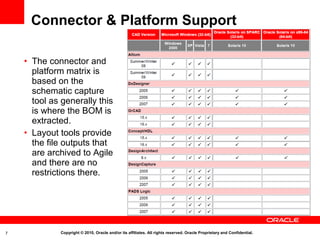
Connector & Platform Support

    • The connector and
      platform matrix is
      based on the
      schematic capture
      tool as generally this
      is where the BOM is
      extracted.
    • Layout tools provide
      the file outputs that
      are archived to Agile
      and there are no
      restrictions there.


7            Copyright © 2010, Oracle and/or its affiliates. All rights reserved. Oracle Proprietary and Confidential.
<Insert Picture Here>


    Releasing Design
    Data


8      Copyright © 2010, Oracle and/or its affiliates. All rights reserved. Oracle Proprietary and Confidential.
Launching integration wizards
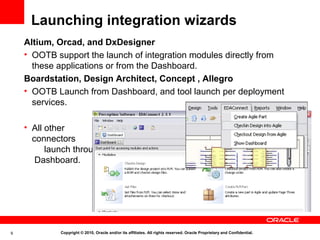
    Altium, Orcad, and DxDesigner
    • OOTB support the launch of integration modules directly from
      these applications or from the Dashboard.
    Boardstation, Design Architect, Concept , Allegro
    • OOTB Launch from Dashboard, and tool launch per deployment
      services.

    • All other
      connectors
          launch through
       Dashboard.


9            Copyright © 2010, Oracle and/or its affiliates. All rights reserved. Oracle Proprietary and Confidential.
Projects

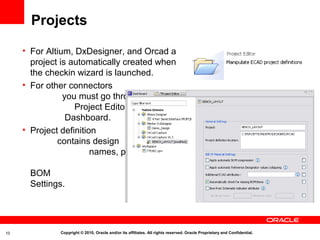
     • For Altium, DxDesigner, and Orcad a
       project is automatically created when
       the checkin wizard is launched.
     • For other connectors
                you must go through
                   Project Editor in the
                 Dashboard.
     • Project definition
              contains design
                        names, path to project
                                      folder, and
       BOM
       Settings.


10             Copyright © 2010, Oracle and/or its affiliates. All rights reserved. Oracle Proprietary and Confidential.
Checkin Options
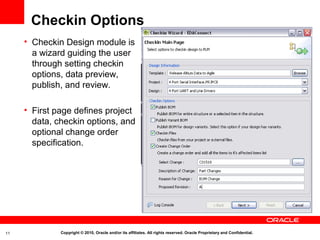
     • Checkin Design module is
       a wizard guiding the user
       through setting checkin
       options, data preview,
       publish, and review.

     • First page defines project
       data, checkin options, and
       optional change order
       specification.


11            Copyright © 2010, Oracle and/or its affiliates. All rights reserved. Oracle Proprietary and Confidential.
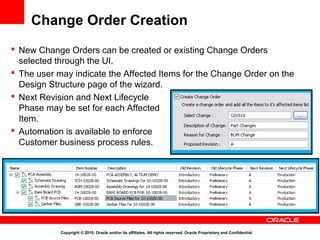
Change Order Creation
 New Change Orders can be created or existing Change Orders
  selected through the UI.
 The user may indicate the Affected Items for the Change Order on the
  Design Structure page of the wizard.
 Next Revision and Next Lifecycle
  Phase may be set for each Affected
  Item.
 Automation is available to enforce
  Customer business process rules.


            Copyright © 2010, Oracle and/or its affiliates. All rights reserved. Oracle Proprietary and Confidential.
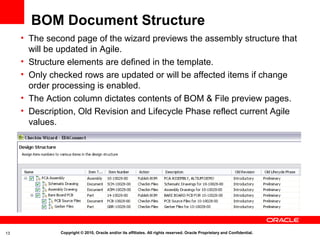
BOM Document Structure
     • The second page of the wizard previews the assembly structure that
       will be updated in Agile.
     • Structure elements are defined in the template.
     • Only checked rows are updated or will be affected items if change
       order processing is enabled.
     • The Action column dictates contents of BOM & File preview pages.
     • Description, Old Revision and Lifecycle Phase reflect current Agile
       values.


13             Copyright © 2010, Oracle and/or its affiliates. All rights reserved. Oracle Proprietary and Confidential.
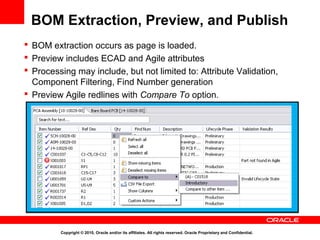
BOM Extraction, Preview, and Publish
 BOM extraction occurs as page is loaded.
 Preview includes ECAD and Agile attributes
 Processing may include, but not limited to: Attribute Validation,
  Component Filtering, Find Number generation
 Preview Agile redlines with Compare To option.


         Copyright © 2010, Oracle and/or its affiliates. All rights reserved. Oracle Proprietary and Confidential.
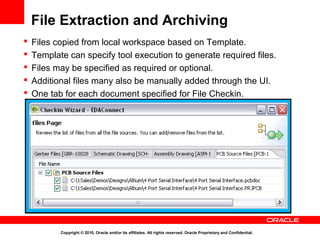
File Extraction and Archiving
   Files copied from local workspace based on Template.
   Template can specify tool execution to generate required files.
   Files may be specified as required or optional.
   Additional files many also be manually added through the UI.
   One tab for each document specified for File Checkin.


           Copyright © 2010, Oracle and/or its affiliates. All rights reserved. Oracle Proprietary and Confidential.
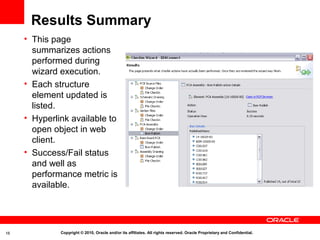
Results Summary
     • This page
       summarizes actions
       performed during
       wizard execution.
     • Each structure
       element updated is
       listed.
     • Hyperlink available to
       open object in web
       client.
     • Success/Fail status
       and well as
       performance metric is
       available.


16            Copyright © 2010, Oracle and/or its affiliates. All rights reserved. Oracle Proprietary and Confidential.
<Insert Picture Here>


     Retrieving Design
     Data


17      Copyright © 2010, Oracle and/or its affiliates. All rights reserved. Oracle Proprietary and Confidential.
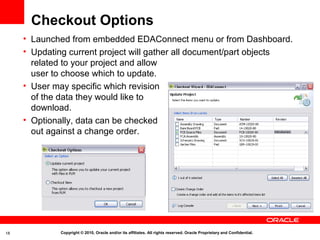
Checkout Options
     • Launched from embedded EDAConnect menu or from Dashboard.
     • Updating current project will gather all document/part objects
       related to your project and allow
       user to choose which to update.
     • User may specific which revision
       of the data they would like to
       download.
     • Optionally, data can be checked
       out against a change order.


18           Copyright © 2010, Oracle and/or its affiliates. All rights reserved. Oracle Proprietary and Confidential.
<Insert Picture Here>


     Customer Part
     Creation


19      Copyright © 2010, Oracle and/or its affiliates. All rights reserved. Oracle Proprietary and Confidential.
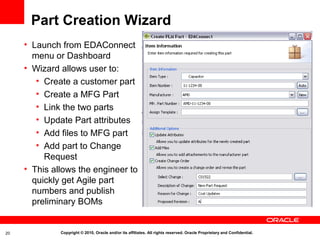
Part Creation Wizard
     • Launch from EDAConnect
       menu or Dashboard
     • Wizard allows user to:
        • Create a customer part
        • Create a MFG Part
        • Link the two parts
        • Update Part attributes
        • Add files to MFG part
        • Add part to Change
          Request
     • This allows the engineer to
       quickly get Agile part
       numbers and publish
       preliminary BOMs


20            Copyright © 2010, Oracle and/or its affiliates. All rights reserved. Oracle Proprietary and Confidential.
<Insert Picture Here>


     Templates and
     Scripting


21      Copyright © 2010, Oracle and/or its affiliates. All rights reserved. Oracle Proprietary and Confidential.
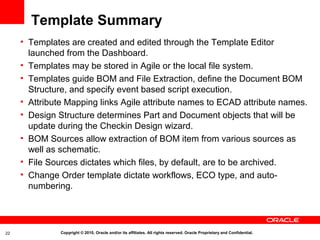
Template Summary
     • Templates are created and edited through the Template Editor
       launched from the Dashboard.
     • Templates may be stored in Agile or the local file system.
     • Templates guide BOM and File Extraction, define the Document BOM
       Structure, and specify event based script execution.
     • Attribute Mapping links Agile attribute names to ECAD attribute names.
     • Design Structure determines Part and Document objects that will be
       update during the Checkin Design wizard.
     • BOM Sources allow extraction of BOM item from various sources as
       well as schematic.
     • File Sources dictates which files, by default, are to be archived.
     • Change Order template dictate workflows, ECO type, and auto-
       numbering.


22             Copyright © 2010, Oracle and/or its affiliates. All rights reserved. Oracle Proprietary and Confidential.
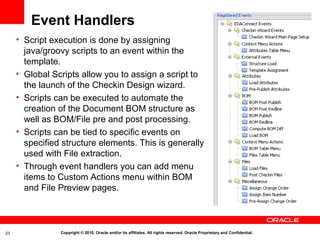
Event Handlers
     • Script execution is done by assigning
       java/groovy scripts to an event within the
       template.
     • Global Scripts allow you to assign a script to
       the launch of the Checkin Design wizard.
     • Scripts can be executed to automate the
       creation of the Document BOM structure as
       well as BOM/File pre and post processing.
     • Scripts can be tied to specific events on
       specified structure elements. This is generally
       used with File extraction.
     • Through event handlers you can add menu
       items to Custom Actions menu within BOM
       and File Preview pages.


23              Copyright © 2010, Oracle and/or its affiliates. All rights reserved. Oracle Proprietary and Confidential.
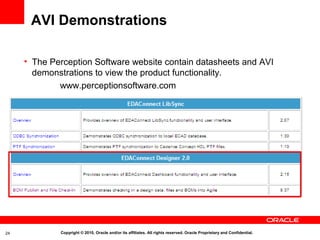
AVI Demonstrations

     • The Perception Software website contain datasheets and AVI
       demonstrations to view the product functionality.
             www.perceptionsoftware.com


24           Copyright © 2010, Oracle and/or its affiliates. All rights reserved. Oracle Proprietary and Confidential.
25   Copyright © 2010, Oracle and/or its affiliates. All rights reserved. Oracle Proprietary and Confidential.
26   Copyright © 2010, Oracle and/or its affiliates. All rights reserved. Oracle Proprietary and Confidential.

ECAD 231 Functional Overview

  • 1.
    Oracle Online TrainingMaterials – Usage Agreement Use of the information, documents and online training courses (collectively, “Materials”) found on this area of the Site constitutes agreement with the following terms and conditions (as well as those set forth in the Purpose and Disclaimer sections below): 1. Oracle is pleased to allow its business partner (“Partner”) to download and copy the Materials found on this area of the Site. The Materials are proprietary information of Oracle. Partner or other third party at no time has any right to resell, redistribute or create derivative works from the Materials. The use of the Materials is restricted to the non-commercial, internal training of the Partner’s employees only. The Materials may not be used for training, promotion, or sales to customers or other partners or third parties. 2. Oracle is a registered trademark of Oracle Corporation and/or its affiliates. Other names may be trademarks of their respective owners. 3. Oracle disclaims any warranties or representations as to the accuracy or completeness of any Materials. Materials are provided "as is" without warranty of any kind, either express, implied or statutory, including without limitation the implied warranties of merchantability, satisfactory quality, fitness for a particular purpose, accuracy, timeliness and non- infringement of third-party rights. The information contained herein is subject to change without notice. 4. Under no circumstances shall Oracle be liable for any loss, damage, liability or expense incurred or suffered which is claimed to have resulted from use of these Materials. As a condition of use of the Materials, Partner agrees to indemnify Oracle from and against any and all actions, claims, losses, damages, liabilities and expenses (including reasonable attorneys' fees) arising out of Partner’s use of the Materials. 1 Copyright © 2010, Oracle and/or its affiliates. All rights reserved. Oracle Proprietary and Confidential.
  • 2.
    Purpose: This document provides an overview of features and enhancements included in Oracle Agile PLM ECAD Connectors Release 2.3.1. It is intended solely to help you assess the business benefits of upgrading your existing Oracle Products to ECAD Connectors Release 2.3.1, or implementing completely new Oracle developed products, and planning your I.T. Projects. Disclaimer: This document in any form, software or printed matter, contains proprietary information that is the exclusive property of Oracle. Your access to and use of this confidential material is subject to the terms and conditions of your Oracle Software License and Service Agreement or other applicable contract with Oracle, with which you agree to comply. This document and information contained herein may not be disclosed, copied, reproduced or distributed to anyone outside Oracle without Oracle’s prior written consent. This document is not part of your license agreement nor can it be incorporated into any contractual agreement with Oracle or its subsidiaries or affiliates. This document is intended to outline our general product direction. It is intended for informational purposes only and solely to assist you in planning for the implementation and upgrade of the product features described. Release information contained in this document is not a firm development plan. This is not a commitment to deliver any material, code, or functionality, and should not be relied upon in making purchasing decisions. The development, release, and timing of any features or functionality, and inclusion or not thereof in the commercially available version of the Software, if any, is subject to change at any time and is always at Oracle’s sole discretion. This document is not considered part of the applicable program documentation. Due to the nature of the product architecture, it may not be possible to safely include all features described in this document without risking significant destabilization of the code. 2 Copyright © 2010, Oracle and/or its affiliates. All rights reserved. Oracle Proprietary and Confidential.
  • 3.
    <Insert Picture Here> OracleAgile PLM Transfer of Information ECAD Connector Release 2.3.1 Functional Overview
  • 4.
    Objectives This session will prepare you to: • Introduce the basic functionality of ECAD integration • Learn how the new features address business needs • Understand any dependencies or interactions • Find additional release information and resources 4 Copyright © 2010, Oracle and/or its affiliates. All rights reserved. Oracle Proprietary and Confidential.
  • 5.
    Agenda • Functional Overview • Platform & Connector Support • Releasing Design Data • Retrieving Design Data • Customer Part Creation • Templates and Scripting • AVI demonstrations 5 Copyright © 2010, Oracle and/or its affiliates. All rights reserved. Oracle Proprietary and Confidential.
  • 6.
    Functional Overview • Task Based wizards launched directly from ECAD tools • Document BOM Structure Creation • Change Order Creation • BOM Extraction, Preview, and Publish • File Extraction, Preview and Archive to Agile • Checkout of Design Related Data • New Part Requests • Template Rules and Event Scripting 6 Copyright © 2010, Oracle and/or its affiliates. All rights reserved. Oracle Proprietary and Confidential.
  • 7.
    Connector & PlatformSupport • The connector and platform matrix is based on the schematic capture tool as generally this is where the BOM is extracted. • Layout tools provide the file outputs that are archived to Agile and there are no restrictions there. 7 Copyright © 2010, Oracle and/or its affiliates. All rights reserved. Oracle Proprietary and Confidential.
  • 8.
    <Insert Picture Here> Releasing Design Data 8 Copyright © 2010, Oracle and/or its affiliates. All rights reserved. Oracle Proprietary and Confidential.
  • 9.
    Launching integration wizards Altium, Orcad, and DxDesigner • OOTB support the launch of integration modules directly from these applications or from the Dashboard. Boardstation, Design Architect, Concept , Allegro • OOTB Launch from Dashboard, and tool launch per deployment services. • All other connectors launch through Dashboard. 9 Copyright © 2010, Oracle and/or its affiliates. All rights reserved. Oracle Proprietary and Confidential.
  • 10.
    Projects • For Altium, DxDesigner, and Orcad a project is automatically created when the checkin wizard is launched. • For other connectors you must go through Project Editor in the Dashboard. • Project definition contains design names, path to project folder, and BOM Settings. 10 Copyright © 2010, Oracle and/or its affiliates. All rights reserved. Oracle Proprietary and Confidential.
  • 11.
    Checkin Options • Checkin Design module is a wizard guiding the user through setting checkin options, data preview, publish, and review. • First page defines project data, checkin options, and optional change order specification. 11 Copyright © 2010, Oracle and/or its affiliates. All rights reserved. Oracle Proprietary and Confidential.
  • 12.
    Change Order Creation New Change Orders can be created or existing Change Orders selected through the UI.  The user may indicate the Affected Items for the Change Order on the Design Structure page of the wizard.  Next Revision and Next Lifecycle Phase may be set for each Affected Item.  Automation is available to enforce Customer business process rules. Copyright © 2010, Oracle and/or its affiliates. All rights reserved. Oracle Proprietary and Confidential.
  • 13.
    BOM Document Structure • The second page of the wizard previews the assembly structure that will be updated in Agile. • Structure elements are defined in the template. • Only checked rows are updated or will be affected items if change order processing is enabled. • The Action column dictates contents of BOM & File preview pages. • Description, Old Revision and Lifecycle Phase reflect current Agile values. 13 Copyright © 2010, Oracle and/or its affiliates. All rights reserved. Oracle Proprietary and Confidential.
  • 14.
    BOM Extraction, Preview,and Publish  BOM extraction occurs as page is loaded.  Preview includes ECAD and Agile attributes  Processing may include, but not limited to: Attribute Validation, Component Filtering, Find Number generation  Preview Agile redlines with Compare To option. Copyright © 2010, Oracle and/or its affiliates. All rights reserved. Oracle Proprietary and Confidential.
  • 15.
    File Extraction andArchiving  Files copied from local workspace based on Template.  Template can specify tool execution to generate required files.  Files may be specified as required or optional.  Additional files many also be manually added through the UI.  One tab for each document specified for File Checkin. Copyright © 2010, Oracle and/or its affiliates. All rights reserved. Oracle Proprietary and Confidential.
  • 16.
    Results Summary • This page summarizes actions performed during wizard execution. • Each structure element updated is listed. • Hyperlink available to open object in web client. • Success/Fail status and well as performance metric is available. 16 Copyright © 2010, Oracle and/or its affiliates. All rights reserved. Oracle Proprietary and Confidential.
  • 17.
    <Insert Picture Here> Retrieving Design Data 17 Copyright © 2010, Oracle and/or its affiliates. All rights reserved. Oracle Proprietary and Confidential.
  • 18.
    Checkout Options • Launched from embedded EDAConnect menu or from Dashboard. • Updating current project will gather all document/part objects related to your project and allow user to choose which to update. • User may specific which revision of the data they would like to download. • Optionally, data can be checked out against a change order. 18 Copyright © 2010, Oracle and/or its affiliates. All rights reserved. Oracle Proprietary and Confidential.
  • 19.
    <Insert Picture Here> Customer Part Creation 19 Copyright © 2010, Oracle and/or its affiliates. All rights reserved. Oracle Proprietary and Confidential.
  • 20.
    Part Creation Wizard • Launch from EDAConnect menu or Dashboard • Wizard allows user to: • Create a customer part • Create a MFG Part • Link the two parts • Update Part attributes • Add files to MFG part • Add part to Change Request • This allows the engineer to quickly get Agile part numbers and publish preliminary BOMs 20 Copyright © 2010, Oracle and/or its affiliates. All rights reserved. Oracle Proprietary and Confidential.
  • 21.
    <Insert Picture Here> Templates and Scripting 21 Copyright © 2010, Oracle and/or its affiliates. All rights reserved. Oracle Proprietary and Confidential.
  • 22.
    Template Summary • Templates are created and edited through the Template Editor launched from the Dashboard. • Templates may be stored in Agile or the local file system. • Templates guide BOM and File Extraction, define the Document BOM Structure, and specify event based script execution. • Attribute Mapping links Agile attribute names to ECAD attribute names. • Design Structure determines Part and Document objects that will be update during the Checkin Design wizard. • BOM Sources allow extraction of BOM item from various sources as well as schematic. • File Sources dictates which files, by default, are to be archived. • Change Order template dictate workflows, ECO type, and auto- numbering. 22 Copyright © 2010, Oracle and/or its affiliates. All rights reserved. Oracle Proprietary and Confidential.
  • 23.
    Event Handlers • Script execution is done by assigning java/groovy scripts to an event within the template. • Global Scripts allow you to assign a script to the launch of the Checkin Design wizard. • Scripts can be executed to automate the creation of the Document BOM structure as well as BOM/File pre and post processing. • Scripts can be tied to specific events on specified structure elements. This is generally used with File extraction. • Through event handlers you can add menu items to Custom Actions menu within BOM and File Preview pages. 23 Copyright © 2010, Oracle and/or its affiliates. All rights reserved. Oracle Proprietary and Confidential.
  • 24.
    AVI Demonstrations • The Perception Software website contain datasheets and AVI demonstrations to view the product functionality. www.perceptionsoftware.com 24 Copyright © 2010, Oracle and/or its affiliates. All rights reserved. Oracle Proprietary and Confidential.
  • 25.
    25 Copyright © 2010, Oracle and/or its affiliates. All rights reserved. Oracle Proprietary and Confidential.
  • 26.
    26 Copyright © 2010, Oracle and/or its affiliates. All rights reserved. Oracle Proprietary and Confidential.