









Implementing SharePoint on Azure.
Lessons Learnt from a Real World
Project
K Mohamad Faizal,
Microsoft Azure MVP
www.zquad.in @kmdfaizal
66thth
March 2015- 11AMMarch 2015- 11AM
Implementing SharePoint on
Azure.
Lessons Learnt from a Real World Project
K Mohamad Faizal,
Microsoft Azure MVP
www.zquad.in / @kmdfaizal
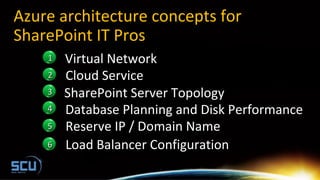
Azure architecture concepts for
SharePoint IT Pros
11 Virtual Network
22 Cloud Service
44
Reserve IP / Domain Name55
Database Planning and Disk Performance
Load Balancer Configuration66
33 SharePoint Server Topology
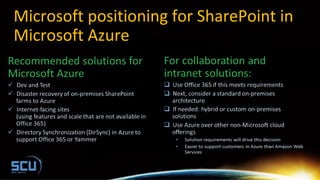
Microsoft positioning for SharePoint in
Microsoft Azure
Azure architecture
concepts for
SharePoint IT Pros
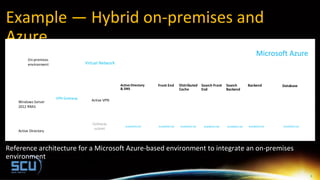
Example — Hybrid on-premises and
Azure
Reference architecture for a Microsoft Azure-based environment to integrate an on-premises
environment
Virtual Network
Windows Azure
VPN Gateway
Gateway
subnet
Active VPN
Cloud Service
Availability Set
Active Directory
& DNS
Cloud Service Cloud Service
Active Directory
Windows Server
2012 RRAS
Availability Set
Front End
Availability Set
Distributed
Cache
Availability Set
Search Front
End
Availability Set
Search
Backend
Availability Set
Backend
On-premises
environment
Availability Set
Database
B
Microsoft Azure
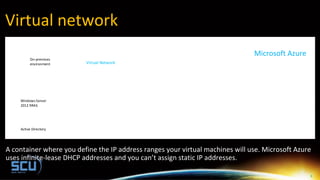
Virtual network
A container where you define the IP address ranges your virtual machines will use. Microsoft Azure
uses infinite-lease DHCP addresses and you can’t assign static IP addresses.
Virtual Network
Windows Azure
Active Directory
Windows Server
2012 RRAS
On-premises
environment
B
Microsoft Azure
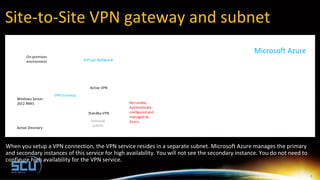
Site-to-Site VPN gateway and subnet
When you setup a VPN connection, the VPN service resides in a separate subnet. Microsoft Azure manages the primary
and secondary instances of this service for high availability. You will not see the secondary instance. You do not need to
configure high availability for the VPN service.
Virtual Network
Windows Azure
VPN Gateway
Gateway
subnet
Active VPN
Active Directory
Windows Server
2012 RRAS
On-premises
environment
Standby VPN
Not visible.
Automatically
configured and
managed by
Azure.
B
Microsoft Azure
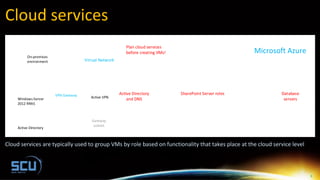
Cloud services
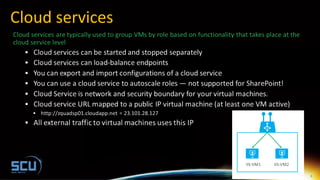
Cloud services are typically used to group VMs by role based on functionality that takes place at the cloud service level
Virtual Network
Windows Azure
VPN Gateway
Gateway
subnet
Active VPN
Cloud Service Cloud Service Cloud Service
Active Directory
Windows Server
2012 RRAS
On-premises
environment
Active Directory
and DNS
SharePoint Server roles Database
servers
Plan cloud services
before creating VMs!
B
Microsoft Azure
10
Cloud services
B
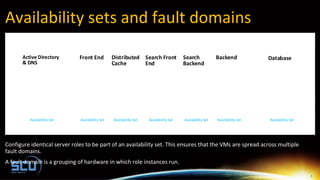
Availability sets and fault domains
Configure identical server roles to be part of an availability set. This ensures that the VMs are spread across multiple
fault domains.
A fault domain is a grouping of hardware in which role instances run.
Cloud Service
Availability Set
Active Directory
& DNS
Cloud Service Cloud Service
Availability Set
Front End
Availability Set
Distributed
Cache
Availability Set
Search Front
End
Availability Set
Search
Backend
Availability Set
Backend
Availability Set
Database
B
12
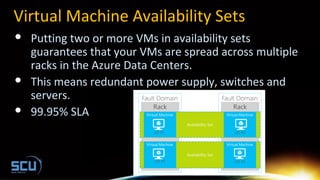
Virtual Machine Availability Sets
 Putting two or more VMs in availability sets
guarantees that your VMs are spread across multiple
racks in the Azure Data Centers.
 This means redundant power supply, switches and
servers.
 99.95% SLA
SharePoint
Server Topology
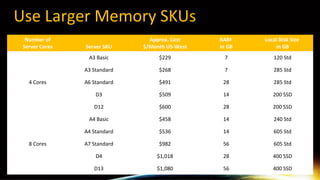
Use Larger Memory SKUs
Number of
Server Cores Server SKU
Approx. Cost
$/Month US-West
RAM
in GB
Local Disk Size
in GB
4 Cores
A3 Basic $229 7 120 Std
A3 Standard $268 7 285 Std
A6 Standard $491 28 285 Std
D3 $509 14 200 SSD
D12 $600 28 200 SSD
8 Cores
A4 Basic $458 14 240 Std
A4 Standard $536 14 605 Std
A7 Standard $982 56 605 Std
D4 $1,018 28 400 SSD
D13 $1,080 56 400 SSD
Use Larger Memory SKUs
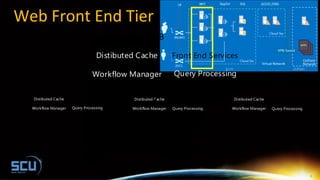
Web Front End Tier
Availability Set #1
Front End ServicesDistibuted Cache
Workflow Manager Query Processing
Front End ServicesDistibuted Cache
Workflow Manager Query Processing
Index Partion #0 Index Partion #0Replica
Front End ServicesDistibuted Cache
Workflow Manager Query Processing
ReplicaReplica
XL - 8 cores / 14GB
C: (System) 127GB
D: (Page File, Blob Cache) 604GB
E: (Log) 40GB
F: (Index) 500GB
C: (System) 127GB
D: (Page File, Blob Cache) 604GB
E: (Log) 40GB
F: (Index) 500GB
C: (System) 127GB
D: (Page File, Blob Cache) 604GB
E: (Log) 40GB
F: (Index) 500GB
XL - 8 cores / 14GB XL - 8 cores / 14GB
Replica
Front End ServicesDistibuted Cache
Workflow Manager Query Processing
XL - 8 cores / 14GB
C: (System) 127GB
D: (Page File, Blob Cache) 604GB
E: (Log) 40GB
F: (Index) 500GB
K
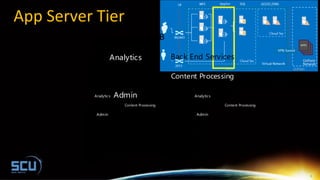
App Server Tier
Availability Set #2
Content Processing
Admin
Crawl
Analytics Back End Services
Content Processing
Admin
Crawl
Analytics Back End Services
C: (System) 127GB
D: (Page File) 604GB
E: (Log) 40GB
F: (Analytics) 300GB
C: (System) 127GB
D: (Page File) 604GB
E: (Log) 40GB
F: (Analytics) 300GB
XL - 8 cores / 14GB XL - 8 cores / 14GB
Content Processing
Admin
Crawl
Analytics Back End Services
C: (System) 127GB
D: (Page File) 604GB
E: (Log) 40GB
F: (Analytics) 300GB
XL - 8 cores / 14GB
K
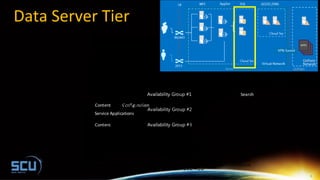
Data Server Tier
Availability Set #3
Availability Group #1
Availability Group #2
Availability Group #3
Search
Content
Content
Configuration
Service Applications
C: (System) 127GB
D: (Page File) 604GB
E:, F:, G:, H: (TempDB Files) 500GB
I: (TempDB Logs) 500GB
L: (Transaction Logs) 500GB
J:, K:, M:, N: (Content Data) 1024GB
O: (Search Databases) 1024GB
XL - 8 cores / 14GB XL - 8 cores / 14GB
C: (System) 127GB
D: (Page File) 604GB
E:, F:, G:, H: (TempDB Files) 500GB
I: (TempDB Logs) 500GB
L: (Transaction Logs) 500GB
J:, K:, M:, N: (Content Data) 1024GB
O: (Search Databases) 1024GB
Content
Content
Configuration
Service Applications
C: (System) 127GB
D: (Page File) 604GB
E:, F:, G:, H: (TempDB Files) 500GB
I: (TempDB Logs) 500GB
L: (Transaction Logs) 500GB
J:, K:, M:, N: (Content Data) 1024GB
O: (Search Databases) 1024GB
XL - 8 cores / 14GB
K
Database Planning
and Disk
Performance
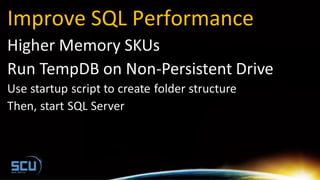
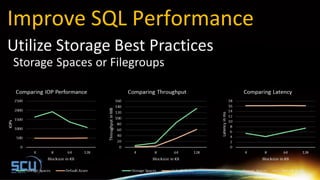
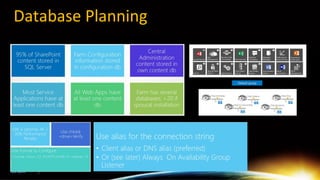
Improve SQL Performance
New Azure Capabilities
Database Planning
25
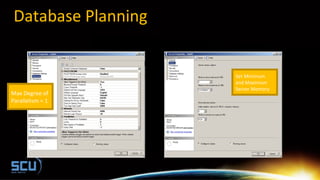
Database Planning
Set Minimum
and Maximum
Server Memory
Max Degree of
Parallelism = 1
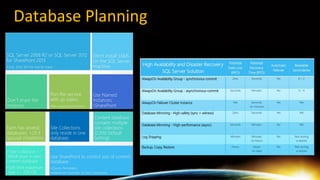
Database Planning
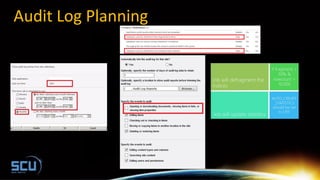
Audit Log Planning
Resaved IP and
Load Balancer
Configuration
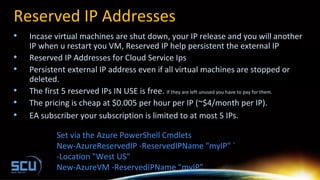
Reserved IP Addresses
• Incase virtual machines are shut down, your IP release and you will another
IP when u restart you VM, Reserved IP help persistent the external IP
• Reserved IP Addresses for Cloud Service Ips
• Persistent external IP address even if all virtual machines are stopped or
deleted.
• The first 5 reserved IPs IN USE is free. If they are left unused you have to pay for them.
• The pricing is cheap at $0.005 per hour per IP (~$4/month per IP).
• EA subscriber your subscription is limited to at most 5 IPs.
Set via the Azure PowerShell Cmdlets
New-AzureReservedIP -ReservedIPName "myIP" `
-Location "West US"
New-AzureVM -ReservedIPName "myIP" ...
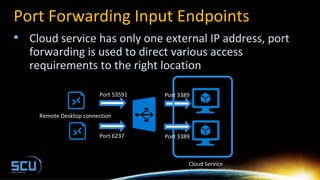
Port Forwarding Input Endpoints
• Cloud service has only one external IP address, port
forwarding is used to direct various access
requirements to the right location
Port 3389
Port 3389
Port 53591
Port 6237
Remote Desktop connection
Cloud Service
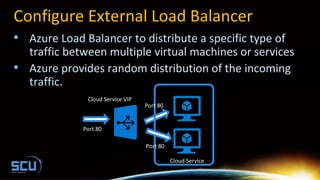
Configure External Load Balancer
• Azure Load Balancer to distribute a specific type of
traffic between multiple virtual machines or services
• Azure provides random distribution of the incoming
traffic.
Port 80
Port 80
Port 80
Cloud Service
Cloud Service VIP
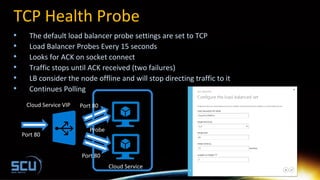
TCP Health Probe
• The default load balancer probe settings are set to TCP
• Load Balancer Probes Every 15 seconds
• Looks for ACK on socket connect
• Traffic stops until ACK received (two failures)
• LB consider the node offline and will stop directing traffic to it
• Continues Polling
Port 80
Port 80
Port 80
Cloud Service
Cloud Service VIP
Probe
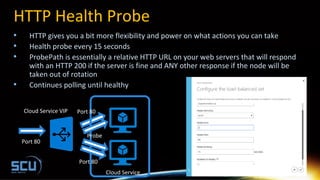
HTTP Health Probe
• HTTP gives you a bit more flexibility and power on what actions you can take
• Health probe every 15 seconds
• ProbePath is essentially a relative HTTP URL on your web servers that will respond
with an HTTP 200 if the server is fine and ANY other response if the node will be
taken out of rotation
• Continues polling until healthy
Port 80
Port 80
Port 80
Cloud Service
Cloud Service VIP
Probe
Internet sites — lessons learned
Global Azure Bootcamp in Singapore
• 25th
April 2015
• http://globalazurebootcampsg.azurewebsites.net
• http://azuresgbootcamp.eventbrite.sg
• http://www.meetup.com/mssgug/
Related Content
Introduction to SharePoint and Windows Azure IaaS, By Kirk EvansIntroduction to SharePoint and Windows Azure IaaS, By Kirk Evans
Architect, Azure Modern Apps COEArchitect, Azure Modern Apps COE
SPC3992- SharePoint Solutions and Architectures on Windows Azure, By Kirk EvansSPC3992- SharePoint Solutions and Architectures on Windows Azure, By Kirk Evans
Architect, Azure Modern Apps COEArchitect, Azure Modern Apps COE
Architecting SharePoint for the Cloud, Jared Shockley, Sr. IT Service Engineer, MicrosoftArchitecting SharePoint for the Cloud, Jared Shockley, Sr. IT Service Engineer, Microsoft
ITIT
Michael Washam,Michael Washam, CEO – Opsgility – Microsoft Azure and DevOps TrainingCEO – Opsgility – Microsoft Azure and DevOps Training
38
FILL IN YOUR
EVALS
FEEDBACK TO USFEEDBACK TO US
++
LUCKY DRAW PRIZESLUCKY DRAW PRIZES
FOR YOU!FOR YOU!
=
Thank You
www.systemcenteruniverse.asia
…for updated content and NEWS

Implementing SharePoint on Azure, Lessons Learnt from a Real World Project

  • 1.
    Implementing SharePoint onAzure. Lessons Learnt from a Real World Project K Mohamad Faizal, Microsoft Azure MVP www.zquad.in @kmdfaizal 66thth March 2015- 11AMMarch 2015- 11AM
  • 2.
    Implementing SharePoint on Azure. LessonsLearnt from a Real World Project K Mohamad Faizal, Microsoft Azure MVP www.zquad.in / @kmdfaizal
  • 3.
    Azure architecture conceptsfor SharePoint IT Pros 11 Virtual Network 22 Cloud Service 44 Reserve IP / Domain Name55 Database Planning and Disk Performance Load Balancer Configuration66 33 SharePoint Server Topology
  • 4.
    Microsoft positioning forSharePoint in Microsoft Azure
  • 5.
  • 6.
    Example — Hybridon-premises and Azure Reference architecture for a Microsoft Azure-based environment to integrate an on-premises environment Virtual Network Windows Azure VPN Gateway Gateway subnet Active VPN Cloud Service Availability Set Active Directory & DNS Cloud Service Cloud Service Active Directory Windows Server 2012 RRAS Availability Set Front End Availability Set Distributed Cache Availability Set Search Front End Availability Set Search Backend Availability Set Backend On-premises environment Availability Set Database B Microsoft Azure
  • 7.
    Virtual network A containerwhere you define the IP address ranges your virtual machines will use. Microsoft Azure uses infinite-lease DHCP addresses and you can’t assign static IP addresses. Virtual Network Windows Azure Active Directory Windows Server 2012 RRAS On-premises environment B Microsoft Azure
  • 8.
    Site-to-Site VPN gatewayand subnet When you setup a VPN connection, the VPN service resides in a separate subnet. Microsoft Azure manages the primary and secondary instances of this service for high availability. You will not see the secondary instance. You do not need to configure high availability for the VPN service. Virtual Network Windows Azure VPN Gateway Gateway subnet Active VPN Active Directory Windows Server 2012 RRAS On-premises environment Standby VPN Not visible. Automatically configured and managed by Azure. B Microsoft Azure
  • 9.
    Cloud services Cloud servicesare typically used to group VMs by role based on functionality that takes place at the cloud service level Virtual Network Windows Azure VPN Gateway Gateway subnet Active VPN Cloud Service Cloud Service Cloud Service Active Directory Windows Server 2012 RRAS On-premises environment Active Directory and DNS SharePoint Server roles Database servers Plan cloud services before creating VMs! B Microsoft Azure
  • 10.
  • 11.
    Availability sets andfault domains Configure identical server roles to be part of an availability set. This ensures that the VMs are spread across multiple fault domains. A fault domain is a grouping of hardware in which role instances run. Cloud Service Availability Set Active Directory & DNS Cloud Service Cloud Service Availability Set Front End Availability Set Distributed Cache Availability Set Search Front End Availability Set Search Backend Availability Set Backend Availability Set Database B
  • 12.
    12 Virtual Machine AvailabilitySets  Putting two or more VMs in availability sets guarantees that your VMs are spread across multiple racks in the Azure Data Centers.  This means redundant power supply, switches and servers.  99.95% SLA
  • 13.
  • 14.
    Use Larger MemorySKUs Number of Server Cores Server SKU Approx. Cost $/Month US-West RAM in GB Local Disk Size in GB 4 Cores A3 Basic $229 7 120 Std A3 Standard $268 7 285 Std A6 Standard $491 28 285 Std D3 $509 14 200 SSD D12 $600 28 200 SSD 8 Cores A4 Basic $458 14 240 Std A4 Standard $536 14 605 Std A7 Standard $982 56 605 Std D4 $1,018 28 400 SSD D13 $1,080 56 400 SSD
  • 15.
  • 16.
    Web Front EndTier Availability Set #1 Front End ServicesDistibuted Cache Workflow Manager Query Processing Front End ServicesDistibuted Cache Workflow Manager Query Processing Index Partion #0 Index Partion #0Replica Front End ServicesDistibuted Cache Workflow Manager Query Processing ReplicaReplica XL - 8 cores / 14GB C: (System) 127GB D: (Page File, Blob Cache) 604GB E: (Log) 40GB F: (Index) 500GB C: (System) 127GB D: (Page File, Blob Cache) 604GB E: (Log) 40GB F: (Index) 500GB C: (System) 127GB D: (Page File, Blob Cache) 604GB E: (Log) 40GB F: (Index) 500GB XL - 8 cores / 14GB XL - 8 cores / 14GB Replica Front End ServicesDistibuted Cache Workflow Manager Query Processing XL - 8 cores / 14GB C: (System) 127GB D: (Page File, Blob Cache) 604GB E: (Log) 40GB F: (Index) 500GB K
  • 17.
    App Server Tier AvailabilitySet #2 Content Processing Admin Crawl Analytics Back End Services Content Processing Admin Crawl Analytics Back End Services C: (System) 127GB D: (Page File) 604GB E: (Log) 40GB F: (Analytics) 300GB C: (System) 127GB D: (Page File) 604GB E: (Log) 40GB F: (Analytics) 300GB XL - 8 cores / 14GB XL - 8 cores / 14GB Content Processing Admin Crawl Analytics Back End Services C: (System) 127GB D: (Page File) 604GB E: (Log) 40GB F: (Analytics) 300GB XL - 8 cores / 14GB K
  • 18.
    Data Server Tier AvailabilitySet #3 Availability Group #1 Availability Group #2 Availability Group #3 Search Content Content Configuration Service Applications C: (System) 127GB D: (Page File) 604GB E:, F:, G:, H: (TempDB Files) 500GB I: (TempDB Logs) 500GB L: (Transaction Logs) 500GB J:, K:, M:, N: (Content Data) 1024GB O: (Search Databases) 1024GB XL - 8 cores / 14GB XL - 8 cores / 14GB C: (System) 127GB D: (Page File) 604GB E:, F:, G:, H: (TempDB Files) 500GB I: (TempDB Logs) 500GB L: (Transaction Logs) 500GB J:, K:, M:, N: (Content Data) 1024GB O: (Search Databases) 1024GB Content Content Configuration Service Applications C: (System) 127GB D: (Page File) 604GB E:, F:, G:, H: (TempDB Files) 500GB I: (TempDB Logs) 500GB L: (Transaction Logs) 500GB J:, K:, M:, N: (Content Data) 1024GB O: (Search Databases) 1024GB XL - 8 cores / 14GB K
  • 19.
  • 20.
  • 21.
  • 22.
  • 23.
  • 24.
    25 Database Planning Set Minimum andMaximum Server Memory Max Degree of Parallelism = 1
  • 25.
  • 26.
  • 27.
    Resaved IP and LoadBalancer Configuration
  • 28.
    Reserved IP Addresses •Incase virtual machines are shut down, your IP release and you will another IP when u restart you VM, Reserved IP help persistent the external IP • Reserved IP Addresses for Cloud Service Ips • Persistent external IP address even if all virtual machines are stopped or deleted. • The first 5 reserved IPs IN USE is free. If they are left unused you have to pay for them. • The pricing is cheap at $0.005 per hour per IP (~$4/month per IP). • EA subscriber your subscription is limited to at most 5 IPs. Set via the Azure PowerShell Cmdlets New-AzureReservedIP -ReservedIPName "myIP" ` -Location "West US" New-AzureVM -ReservedIPName "myIP" ...
  • 29.
    Port Forwarding InputEndpoints • Cloud service has only one external IP address, port forwarding is used to direct various access requirements to the right location Port 3389 Port 3389 Port 53591 Port 6237 Remote Desktop connection Cloud Service
  • 30.
    Configure External LoadBalancer • Azure Load Balancer to distribute a specific type of traffic between multiple virtual machines or services • Azure provides random distribution of the incoming traffic. Port 80 Port 80 Port 80 Cloud Service Cloud Service VIP
  • 31.
    TCP Health Probe •The default load balancer probe settings are set to TCP • Load Balancer Probes Every 15 seconds • Looks for ACK on socket connect • Traffic stops until ACK received (two failures) • LB consider the node offline and will stop directing traffic to it • Continues Polling Port 80 Port 80 Port 80 Cloud Service Cloud Service VIP Probe
  • 32.
    HTTP Health Probe •HTTP gives you a bit more flexibility and power on what actions you can take • Health probe every 15 seconds • ProbePath is essentially a relative HTTP URL on your web servers that will respond with an HTTP 200 if the server is fine and ANY other response if the node will be taken out of rotation • Continues polling until healthy Port 80 Port 80 Port 80 Cloud Service Cloud Service VIP Probe
  • 33.
    Internet sites —lessons learned
  • 34.
    Global Azure Bootcampin Singapore • 25th April 2015 • http://globalazurebootcampsg.azurewebsites.net • http://azuresgbootcamp.eventbrite.sg • http://www.meetup.com/mssgug/
  • 35.
    Related Content Introduction toSharePoint and Windows Azure IaaS, By Kirk EvansIntroduction to SharePoint and Windows Azure IaaS, By Kirk Evans Architect, Azure Modern Apps COEArchitect, Azure Modern Apps COE SPC3992- SharePoint Solutions and Architectures on Windows Azure, By Kirk EvansSPC3992- SharePoint Solutions and Architectures on Windows Azure, By Kirk Evans Architect, Azure Modern Apps COEArchitect, Azure Modern Apps COE Architecting SharePoint for the Cloud, Jared Shockley, Sr. IT Service Engineer, MicrosoftArchitecting SharePoint for the Cloud, Jared Shockley, Sr. IT Service Engineer, Microsoft ITIT Michael Washam,Michael Washam, CEO – Opsgility – Microsoft Azure and DevOps TrainingCEO – Opsgility – Microsoft Azure and DevOps Training
  • 36.
    38 FILL IN YOUR EVALS FEEDBACKTO USFEEDBACK TO US ++ LUCKY DRAW PRIZESLUCKY DRAW PRIZES FOR YOU!FOR YOU! =
  • 37.

Editor's Notes

  • #39 Please remind the audience to fill in their evaluation and submit them at the end of Day 2. They will be eligible for a Lucky Draw from the Sponsors.