Transformations: Smart Application Migration to XPages
Tweet about this event
And mention us: @Teamstudio @TLCCLTD
@zeromancer1972
Apr. 21, 2015
@Teamstudio
teamstudio.com
@TLCCLTD
tlcc.com
Courtney Carter
Inbound Marketing Specialist
Teamstudio
Who We Are
• Teamstudio’s background is in creating tools for
collaborative computing in mid-size and large
enterprises, primarily for IBM Notes
• Easy-to-use tools for developers and administrators
• 1600+ active customers, 53 countries
• Offices in US, UK, and Japan
• Entered mobile space in 2010 with Unplugged: easy
mobilization of Notes apps to Blackberry, Android
and iOS
Teamstudio Unplugged
• Your mobile Domino server: take your IBM Notes
apps with you!
• End-users access Notes applications from mobile
devices whether online or offline
• Leverages the powerful technology of XPages
Unplugged Templates
• Continuity – Mobile offline access to
BCM programs
• OneView Approvals – Expense
approvals; anywhere, anytime
• CustomerView – lightweight CRM
framework for field sales and field
service teams
• Contacts – customer information database
• Activities – customer activity log
• Media – mobile offline file storage and access
XControls
• Set of Controls for IBM Domino XPages developers
working on new XPages apps and on app
modernization projects
• Re-write of the Teamstudio Unplugged Controls
project, but adds full support for PC browser-based
user interfaces as well as mobile interfaces
• Enables XPages developers to create controls that
are responsive
• Learn more: teamstudio.com/solutions/xfoundations
Teamstudio Services
• Professional services for modernization, web
enablement, project management, development,
and administration
o Modernization Services
o Unplugged Developer Assistance Program
o Application Upgrade Analysis
o Application Complexity Analysis
o Application Usage Auditing
• http://www.teamstudio.com/solutions/services/
• Teamstudio Blog promotion:
o Subscribe to Teamstudio’s blog before May 31, 2015 and you’ll be automatically
entered to win an iPhone 6!
• DNUG: Jun. 10-11, 2015
o Come see us in Dortmund, Germany
1
#XPages
Your Hosts Today:
Howard Greenberg
TLCC
@TLCCLtd
Transformations - Smart
Application Migration to XPages
Paul DellaNebbia
TLCC
@PaulDN
How can TLCC Help YOU!
2
• Private classes at
your location or
virtual
•XPages Development
•Support Existing Apps
•Administration
• Let us help you
become an expert
XPages developer!
• Delivered via Notes
• XPages
• Development
• Admin
• User
Self-
Paced
Courses
Mentoring
Instructor-
Led
Classes
Application
Development
and
Consulting
Free
Demo
Courses!
Try a FREE XPages Course!!!
3
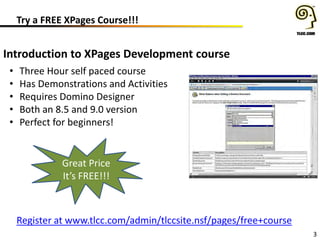
Introduction to XPages Development course
• Three Hour self paced course
• Has Demonstrations and Activities
• Requires Domino Designer
• Both an 8.5 and 9.0 version
• Perfect for beginners!
Register at www.tlcc.com/admin/tlccsite.nsf/pages/free+course
Great Price
It’s FREE!!!
Upcoming and Recorded Webinars
4
• May 14th App.Next - The Future of Domino App. Development
• www.tlcc.com/xpages-webinar
View Previous Webinars
(use url above)
New Extension Library Release
• New xe:mapValuePicker and xe:collectionValuePicker tags for the Value
Picker Control
– There are two new data providers for the Value Picker
• New inPlaceForm Simple Action
– allows for displaying or hiding an inPlaceForm control
• New Responsive Web Design Functionality
– There are three new controls to be used with the bootstrap theme.
• Carousel Control
• Dashboard Control
• Navbar Control
– New Application Layout configuration focused on a responsive design
• Responsive Design Demonstration Application: ToDo.nsf
• New xsp.properties “suppress” option for dataView control
• New URL Parameters in the REST Calendar Service
5
Download the Extension Library at OpenNTF.org
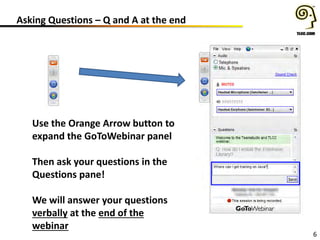
Asking Questions – Q and A at the end
6
Use the Orange Arrow button to
expand the GoToWebinar panel
Then ask your questions in the
Questions pane!
We will answer your questions
verbally at the end of the
webinar
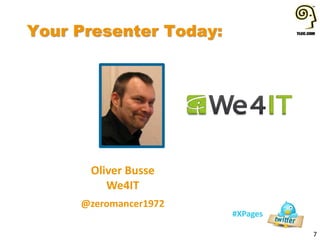
Your Presenter Today:
7
#XPages
Oliver Busse
We4IT
@zeromancer1972
Transformations
Smart Application Migration
A presentation of Oliver Busse @ Engage.UG in March 2015
Broadcasted in the TLCC & Teamstudio Webinar April 21, 2015
Agenda
•About me
•Overview
•Preamble
•Migrate database and user profiles
• Legacy profile documents vs. Java Beans
• Value lists made available over the whole application
•User and environment information
• What can a user see and use?
•Extending Fulltext search to a facetted search
• Filtering your data with meta tags
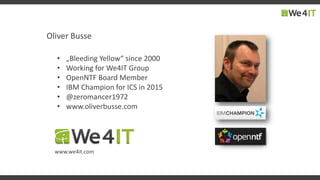
Oliver Busse
• „Bleeding Yellow“ since 2000
• Working for We4IT Group
• OpenNTF Board Member
• IBM Champion for ICS in 2015
• @zeromancer1972
• www.oliverbusse.com
www.we4it.com
Overview
•What‘s this?
• Transforming & re-using commonly used legacy patterns in
XPages
• Don‘t fear Java 
• Avoid @Formulas in SSJS
• Ideas for best practices
•What‘s it not?
• An XPages Introduction
• A Java beginner‘s guide
• A complete application migration strategy
Preamble
•Why not to use SSJS „excessively“?
• SSJS is interpreted at runtime
• SSJS is compiled at runtime (every time you call it!)
• Compiled SSJS is hard to debug while executed
6#engageug
Migrating database and user profiles
What we find in legacy apps: profile documents
Disadvantages
• You cannot see them without
using tools
• You can edit and create them
only programmatically
• Sometimes replication issues
• Unwanted Caching ;-)
Advantages
• Quick access without using
lookup views
• Caching
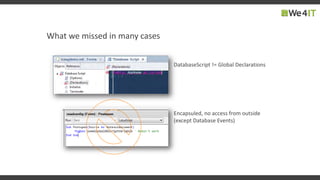
What we missed in many cases
DatabaseScript != Global Declarations
Encapsuled, no access from outside
(except Database Events)
Performance-Killer
Numerous usage of those formulas slow down the app
one of many...
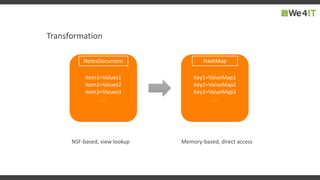
Transformation
Item1=Values1
Item2=Values2
Item3=Values3
...
NotesDocument
Key1=ValueMap1
Key2=ValueMap2
Key3=ValueMap3
...
HashMap
NSF-based, view lookup Memory-based, direct access
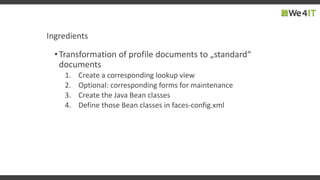
Ingredients
•Transformation of profile documents to „standard“
documents
1. Create a corresponding lookup view
2. Optional: corresponding forms for maintenance
3. Create the Java Bean classes
4. Define those Bean classes in faces-config.xml
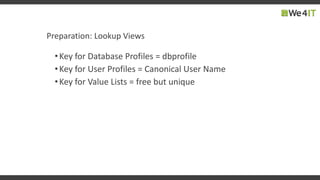
Preparation: Lookup Views
•Key for Database Profiles = dbprofile
•Key for User Profiles = Canonical User Name
•Key for Value Lists = free but unique
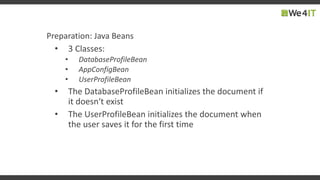
Preparation: Java Beans
• 3 Classes:
• DatabaseProfileBean
• AppConfigBean
• UserProfileBean
• The DatabaseProfileBean initializes the document if
it doesn‘t exist
• The UserProfileBean initializes the document when
the user saves it for the first time
faces-config.xml
<faces-config>
<!-- Database Profile Bean -->
<managed-bean>
<managed-bean-name>dbprofile</managed-bean-name>
<managed-bean-class>com.icsug.DatabaseProfileBean
</managed-bean-class>
<managed-bean-scope>application</managed-bean-scope>
</managed-bean>
<!-- User Profile Bean -->
<managed-bean>
<managed-bean-name>userprofile</managed-bean-name>
<managed-bean-class>com.icsug.UserProfileBean
</managed-bean-class>
<managed-bean-scope>session</managed-bean-scope>
</managed-bean>
<!-- Application Configuration -->
<managed-bean>
<managed-bean-name>application</managed-bean-name>
<managed-bean-class>com.icsug.AppConfigBean
</managed-bean-class>
<managed-bean-scope>application</managed-bean-scope>
</managed-bean>
</faces-config>
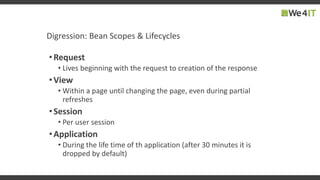
Digression: Bean Scopes & Lifecycles
•Request
• Lives beginning with the request to creation of the response
•View
• Within a page until changing the page, even during partial
refreshes
•Session
• Per user session
•Application
• During the life time of th application (after 30 minutes it is
dropped by default)
DEMO
17#engageug
User and Environment Information
Name variations
Access Level
ACL Options notes.ini variables
Environment
Bean
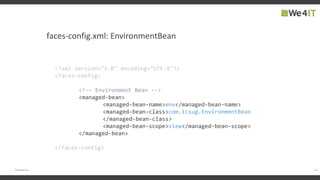
faces-config.xml: EnvironmentBean
19#engageug
<?xml version="1.0" encoding="UTF-8"?>
<faces-config>
<!-- Environment Bean -->
<managed-bean>
<managed-bean-name>env</managed-bean-name>
<managed-bean-class>com.icsug.EnvironmentBean
</managed-bean-class>
<managed-bean-scope>view</managed-bean-scope>
</managed-bean>
</faces-config>
Example: Username Variations
<p>
<xp:label
value="#{javascript:env.userName}"
id="label1">
</xp:label>
</p>
<p>
<xp:label
value="#{javascript:env.commonUserName}"
id="label2">
</xp:label>
</p>
<p>
<xp:label
value="#{javascript:env.abbreviatedUserName}"
id="label3">
</xp:label>
</p>
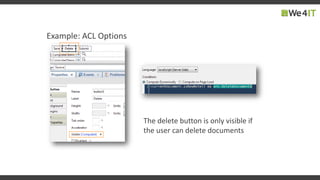
Example: ACL Options
The delete button is only visible if
the user can delete documents
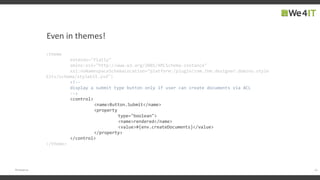
Even in themes!
22#engageug
<theme
extends="flatly"
xmlns:xsi="http://www.w3.org/2001/XMLSchema-instance"
xsi:noNamespaceSchemaLocation="platform:/plugin/com.ibm.designer.domino.style
kits/schema/stylekit.xsd">
<!--
display a submit type button only if user can create documents via ACL
-->
<control>
<name>Button.Submit</name>
<property
type="boolean">
<name>rendered</name>
<value>#{env.createDocuments}</value>
</property>
</control>
</theme>
DEMO
24#engageug
Extending Fulltext-Search to a Facetted Search
Facetted Search
„Faceted search, also called faceted navigation or faceted browsing,
is a technique for accessing information organized according to a
faceted classification system, allowing users to explore a collection of
information by applying multiple filters.“
http://en.wikipedia.org/wiki/Faceted_search
Facetted Search
„Well-known“ Examples
amazing.com cyberharbor
muse
Facetted Search with Domino?
1. Fulltext Search
2. Filtering result from extra meta data
1. Meta data search with facet selection
2. Fulltext Search in results
FacettedSearchBean (Session scoped)
FacetsSearch Term
FacettedSearch
Bean
DocumentCollection
(ArrayList<SearchResultEntry>)
30#engageug
DEMO
Facetted Search: Outlook & Alternatives
•Using OpenNTF API‘s Graph-DB functions
•Using a 3rd party Graph-DB like Apache Solr
31#engageug
Want to get the DEMO?
Grab it from my Bitbucket repo (also contains an NTF):
https://bitbucket.org/zeromancer1972/icsug-2015-demo
It uses the following plugins available on OpenNTF:
XPages Extension Library (9.0.1.07+):
http://extlib.openntf.org/
Bootstrap 4 Xpages:
http://www.openntf.org/main.nsf/project.xsp?r=project/Bootstrap4XPages
OpenNTF Domino API:
http://www.openntf.org/main.nsf/project.xsp?r=project/OpenNTF%20Domino%20
API
32#engageug
Other Resources
http://en.wikipedia.org/wiki/Faceted_search
http://lucene.apache.org/solr/
https://www.focul.net/focul-best-practice-faceted-filtering-xpages-using-java-beans/
Questions????
8
Use the Orange Arrow button to
expand the GoToWebinar panel
Then ask your questions in the
Questions panel!
Remember, we will answer your
questions verbally
#XPages
@zeromancer1972
@TLCCLtd
@Teamstudio
@PaulDN
Upcoming Events:
MWLug User Group Meeting, Aug. 19-21, Atlanta
Question and Answer Time!
9
Teamstudio Questions?
contactus@teamstudio.com
978-712-0924
TLCC Questions?
howardg@tlcc.com paul@tlcc.com
888-241-8522 or 561-953-0095
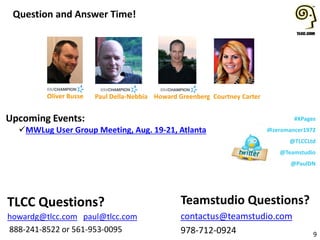
Howard GreenbergPaul Della-Nebbia Courtney CarterOliver Busse

Transformations: Smart Application Migration to XPages

  • 1.
    Transformations: Smart ApplicationMigration to XPages Tweet about this event And mention us: @Teamstudio @TLCCLTD @zeromancer1972 Apr. 21, 2015
  • 2.
  • 3.
    Who We Are •Teamstudio’s background is in creating tools for collaborative computing in mid-size and large enterprises, primarily for IBM Notes • Easy-to-use tools for developers and administrators • 1600+ active customers, 53 countries • Offices in US, UK, and Japan • Entered mobile space in 2010 with Unplugged: easy mobilization of Notes apps to Blackberry, Android and iOS
  • 4.
    Teamstudio Unplugged • Yourmobile Domino server: take your IBM Notes apps with you! • End-users access Notes applications from mobile devices whether online or offline • Leverages the powerful technology of XPages
  • 5.
    Unplugged Templates • Continuity– Mobile offline access to BCM programs • OneView Approvals – Expense approvals; anywhere, anytime • CustomerView – lightweight CRM framework for field sales and field service teams • Contacts – customer information database • Activities – customer activity log • Media – mobile offline file storage and access
  • 6.
    XControls • Set ofControls for IBM Domino XPages developers working on new XPages apps and on app modernization projects • Re-write of the Teamstudio Unplugged Controls project, but adds full support for PC browser-based user interfaces as well as mobile interfaces • Enables XPages developers to create controls that are responsive • Learn more: teamstudio.com/solutions/xfoundations
  • 7.
    Teamstudio Services • Professionalservices for modernization, web enablement, project management, development, and administration o Modernization Services o Unplugged Developer Assistance Program o Application Upgrade Analysis o Application Complexity Analysis o Application Usage Auditing • http://www.teamstudio.com/solutions/services/
  • 8.
    • Teamstudio Blogpromotion: o Subscribe to Teamstudio’s blog before May 31, 2015 and you’ll be automatically entered to win an iPhone 6! • DNUG: Jun. 10-11, 2015 o Come see us in Dortmund, Germany
  • 9.
    1 #XPages Your Hosts Today: HowardGreenberg TLCC @TLCCLtd Transformations - Smart Application Migration to XPages Paul DellaNebbia TLCC @PaulDN
  • 10.
    How can TLCCHelp YOU! 2 • Private classes at your location or virtual •XPages Development •Support Existing Apps •Administration • Let us help you become an expert XPages developer! • Delivered via Notes • XPages • Development • Admin • User Self- Paced Courses Mentoring Instructor- Led Classes Application Development and Consulting Free Demo Courses!
  • 11.
    Try a FREEXPages Course!!! 3 Introduction to XPages Development course • Three Hour self paced course • Has Demonstrations and Activities • Requires Domino Designer • Both an 8.5 and 9.0 version • Perfect for beginners! Register at www.tlcc.com/admin/tlccsite.nsf/pages/free+course Great Price It’s FREE!!!
  • 12.
    Upcoming and RecordedWebinars 4 • May 14th App.Next - The Future of Domino App. Development • www.tlcc.com/xpages-webinar View Previous Webinars (use url above)
  • 13.
    New Extension LibraryRelease • New xe:mapValuePicker and xe:collectionValuePicker tags for the Value Picker Control – There are two new data providers for the Value Picker • New inPlaceForm Simple Action – allows for displaying or hiding an inPlaceForm control • New Responsive Web Design Functionality – There are three new controls to be used with the bootstrap theme. • Carousel Control • Dashboard Control • Navbar Control – New Application Layout configuration focused on a responsive design • Responsive Design Demonstration Application: ToDo.nsf • New xsp.properties “suppress” option for dataView control • New URL Parameters in the REST Calendar Service 5 Download the Extension Library at OpenNTF.org
  • 14.
    Asking Questions –Q and A at the end 6 Use the Orange Arrow button to expand the GoToWebinar panel Then ask your questions in the Questions pane! We will answer your questions verbally at the end of the webinar
  • 15.
    Your Presenter Today: 7 #XPages OliverBusse We4IT @zeromancer1972
  • 16.
    Transformations Smart Application Migration Apresentation of Oliver Busse @ Engage.UG in March 2015 Broadcasted in the TLCC & Teamstudio Webinar April 21, 2015
  • 17.
    Agenda •About me •Overview •Preamble •Migrate databaseand user profiles • Legacy profile documents vs. Java Beans • Value lists made available over the whole application •User and environment information • What can a user see and use? •Extending Fulltext search to a facetted search • Filtering your data with meta tags
  • 18.
    Oliver Busse • „BleedingYellow“ since 2000 • Working for We4IT Group • OpenNTF Board Member • IBM Champion for ICS in 2015 • @zeromancer1972 • www.oliverbusse.com www.we4it.com
  • 19.
    Overview •What‘s this? • Transforming& re-using commonly used legacy patterns in XPages • Don‘t fear Java  • Avoid @Formulas in SSJS • Ideas for best practices •What‘s it not? • An XPages Introduction • A Java beginner‘s guide • A complete application migration strategy
  • 20.
    Preamble •Why not touse SSJS „excessively“? • SSJS is interpreted at runtime • SSJS is compiled at runtime (every time you call it!) • Compiled SSJS is hard to debug while executed
  • 21.
  • 22.
    What we findin legacy apps: profile documents Disadvantages • You cannot see them without using tools • You can edit and create them only programmatically • Sometimes replication issues • Unwanted Caching ;-) Advantages • Quick access without using lookup views • Caching
  • 23.
    What we missedin many cases DatabaseScript != Global Declarations Encapsuled, no access from outside (except Database Events)
  • 24.
    Performance-Killer Numerous usage ofthose formulas slow down the app one of many...
  • 25.
  • 26.
    Ingredients •Transformation of profiledocuments to „standard“ documents 1. Create a corresponding lookup view 2. Optional: corresponding forms for maintenance 3. Create the Java Bean classes 4. Define those Bean classes in faces-config.xml
  • 27.
    Preparation: Lookup Views •Keyfor Database Profiles = dbprofile •Key for User Profiles = Canonical User Name •Key for Value Lists = free but unique
  • 28.
    Preparation: Java Beans •3 Classes: • DatabaseProfileBean • AppConfigBean • UserProfileBean • The DatabaseProfileBean initializes the document if it doesn‘t exist • The UserProfileBean initializes the document when the user saves it for the first time
  • 29.
    faces-config.xml <faces-config> <!-- Database ProfileBean --> <managed-bean> <managed-bean-name>dbprofile</managed-bean-name> <managed-bean-class>com.icsug.DatabaseProfileBean </managed-bean-class> <managed-bean-scope>application</managed-bean-scope> </managed-bean> <!-- User Profile Bean --> <managed-bean> <managed-bean-name>userprofile</managed-bean-name> <managed-bean-class>com.icsug.UserProfileBean </managed-bean-class> <managed-bean-scope>session</managed-bean-scope> </managed-bean> <!-- Application Configuration --> <managed-bean> <managed-bean-name>application</managed-bean-name> <managed-bean-class>com.icsug.AppConfigBean </managed-bean-class> <managed-bean-scope>application</managed-bean-scope> </managed-bean> </faces-config>
  • 30.
    Digression: Bean Scopes& Lifecycles •Request • Lives beginning with the request to creation of the response •View • Within a page until changing the page, even during partial refreshes •Session • Per user session •Application • During the life time of th application (after 30 minutes it is dropped by default)
  • 31.
  • 32.
  • 33.
    User and EnvironmentInformation Name variations Access Level ACL Options notes.ini variables Environment Bean
  • 34.
    faces-config.xml: EnvironmentBean 19#engageug <?xml version="1.0"encoding="UTF-8"?> <faces-config> <!-- Environment Bean --> <managed-bean> <managed-bean-name>env</managed-bean-name> <managed-bean-class>com.icsug.EnvironmentBean </managed-bean-class> <managed-bean-scope>view</managed-bean-scope> </managed-bean> </faces-config>
  • 35.
  • 36.
    Example: ACL Options Thedelete button is only visible if the user can delete documents
  • 37.
    Even in themes! 22#engageug <theme extends="flatly" xmlns:xsi="http://www.w3.org/2001/XMLSchema-instance" xsi:noNamespaceSchemaLocation="platform:/plugin/com.ibm.designer.domino.style kits/schema/stylekit.xsd"> <!-- displaya submit type button only if user can create documents via ACL --> <control> <name>Button.Submit</name> <property type="boolean"> <name>rendered</name> <value>#{env.createDocuments}</value> </property> </control> </theme>
  • 38.
  • 39.
  • 40.
    Facetted Search „Faceted search,also called faceted navigation or faceted browsing, is a technique for accessing information organized according to a faceted classification system, allowing users to explore a collection of information by applying multiple filters.“ http://en.wikipedia.org/wiki/Faceted_search
  • 41.
  • 42.
  • 43.
    Facetted Search withDomino? 1. Fulltext Search 2. Filtering result from extra meta data 1. Meta data search with facet selection 2. Fulltext Search in results
  • 44.
    FacettedSearchBean (Session scoped) FacetsSearchTerm FacettedSearch Bean DocumentCollection (ArrayList<SearchResultEntry>)
  • 45.
  • 46.
    Facetted Search: Outlook& Alternatives •Using OpenNTF API‘s Graph-DB functions •Using a 3rd party Graph-DB like Apache Solr 31#engageug
  • 47.
    Want to getthe DEMO? Grab it from my Bitbucket repo (also contains an NTF): https://bitbucket.org/zeromancer1972/icsug-2015-demo It uses the following plugins available on OpenNTF: XPages Extension Library (9.0.1.07+): http://extlib.openntf.org/ Bootstrap 4 Xpages: http://www.openntf.org/main.nsf/project.xsp?r=project/Bootstrap4XPages OpenNTF Domino API: http://www.openntf.org/main.nsf/project.xsp?r=project/OpenNTF%20Domino%20 API 32#engageug
  • 48.
  • 49.
    Questions???? 8 Use the OrangeArrow button to expand the GoToWebinar panel Then ask your questions in the Questions panel! Remember, we will answer your questions verbally
  • 50.
    #XPages @zeromancer1972 @TLCCLtd @Teamstudio @PaulDN Upcoming Events: MWLug UserGroup Meeting, Aug. 19-21, Atlanta Question and Answer Time! 9 Teamstudio Questions? contactus@teamstudio.com 978-712-0924 TLCC Questions? howardg@tlcc.com paul@tlcc.com 888-241-8522 or 561-953-0095 Howard GreenbergPaul Della-Nebbia Courtney CarterOliver Busse