YOU, ME, AND
DOCKER
MAKES THREE
The Ins and Outs of the Docker Ecosystem
INTRODUCTION
Talk
Roadmap
• What is Docker?
• The Docker Ecosystem
– Docker Engine
– Docker Registry
– Docker Machine
– Docker Compose
– Docker Swarm
• Demonstration
• Docker Pitfalls
• Security Considerations for Deploying Docker
• AdditionalThoughts
• Q&A
WHOAMI • ChristopherGrayson
– OSCE
– Former consultant at Bishop Fox
– MSCS, BSCM from GeorgiaTech
– Currently founder of Web Sight.IO
WHAT IS
DOCKER?
Docker 101
• Virtualization platform
• Virtualizes at the process level
• Runs in Linux
• Uses Linux kernel isolation primitives
Ok, But
Why?
• Consider traditional application of virtualization
• Significant overhead (single virtual host -> single virtual
application)
• Why virtualize at the OS level?
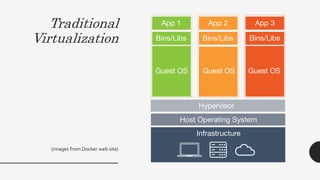
Traditional
Virtualization
(images from Docker web site)
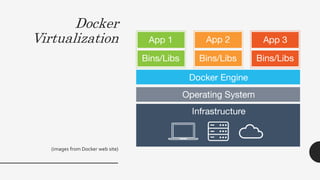
Docker
Virtualization
(images from Docker web site)
…Still Not
Convinced?
• When virtualization occurs at the process level, new
possibilities emerge
• Docker is not the first attempt, but has gotten a lot
right with their attempt
THE DOCKER
ECOSYSTEM
Docker
Engine
• Daemon that listens onTCP 2376 (3376 for swarm)
• Functionality invoked through API
• Command line interface provided by Docker
• Takes in images and settings, spins up “containers”
(processes)
Docker
Images
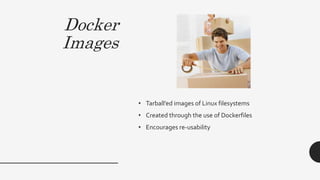
• Tarball’ed images of Linux filesystems
• Created through the use of Dockerfiles
• Encourages re-usability
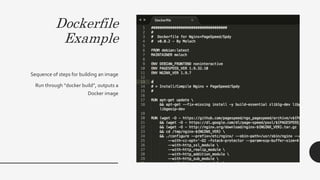
Dockerfile
Example
Sequence of steps for building an image
Run through “docker build”, outputs a
Docker image
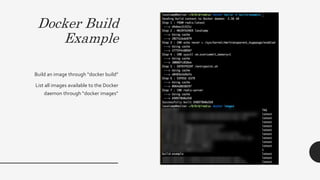
Docker Build
Example
Build an image through “docker build”
List all images available to the Docker
daemon through “docker images”
Docker
Engine

Steps
1. Create image
2. Ensure target docker daemon has access to image
3. Tell the daemon to run the image, and pass
arguments as necessary
4. ???
5. Profit
Docker
Engine
Perks
• Hierarchical organization of Docker images works well
with standard DevOps practices
• If an image runs in one location through a Docker
daemon, it is guaranteed to work on all other same-
version Docker daemons
• Rid yourself of dealing with dependency headaches
Docker
Registry
• Where Git has GitHub, Docker has Docker Registry
• Version control-esque endpoint for storing Docker
images
• Docker officially offers Docker Hub
• Can (and should) create and run your own Docker
registry
Docker
Registry
Example
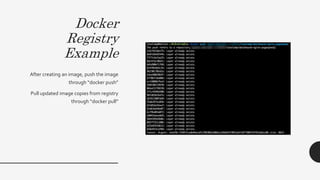
After creating an image, push the image
through “docker push”
Pull updated image copies from registry
through “docker pull”
Docker
Registry
Perks
• Single, authoritative location to store your Docker
images
• Follows the central repository model of Git, SVN, other
version control systems
• …my least favorite part of Docker
Docker
Machine
• Create new Docker daemons on local or remote hosts
• Remote hosts supported across all major hosting and
cloud providers
• Commands to create machines mostly the same – only
changes reflect API differences between providers
• Spins up host, installs docker, installs cryptographic
artifacts for secure communication
Docker
Machine
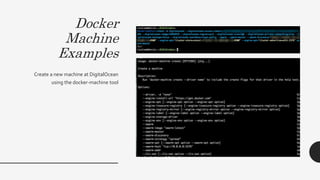
Examples
Create a new machine at DigitalOcean
using the docker-machine tool
Docker
Machine
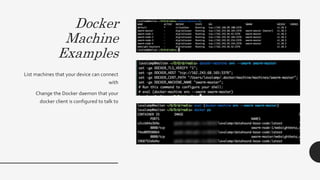
Examples
List machines that your device can connect
with
Change the Docker daemon that your
docker client is configured to talk to
Docker
Machine
Cont’d
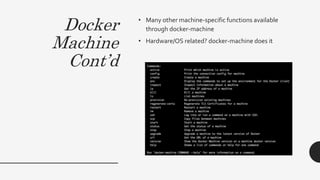
• Many other machine-specific functions available
through docker-machine
• Hardware/OS related? docker-machine does it
Docker
Machine
Perks
• Provider agnostic, and very easy to switch between
hosting providers (change a few command line
arguments)
• Go from no infrastructure to full infrastructure in <5
minutes
• Go from full infrastructure to no infrastructure in <30
seconds
Docker
Compose
• The “orchestration” tool of the Docker ecosystem
• Enables spinning up N-tier applications in one fell
swoop
• Can spin up N-tier applications locally
• Only requires a docker-compose.yml file to spin up
complicated N-tier applications
Docker
Compose File
Example
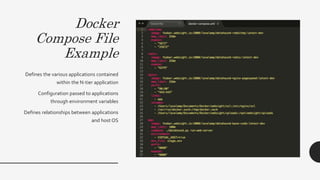
Defines the various applications contained
within the N-tier application
Configuration passed to applications
through environment variables
Defines relationships between applications
and host OS
Docker
Compose
Example
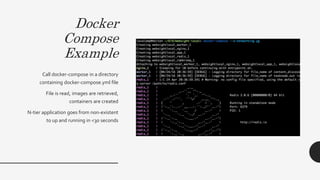
Call docker-compose in a directory
containing docker-compose.yml file
File is read, images are retrieved,
containers are created
N-tier application goes from non-existent
to up and running in <30 seconds
Docker
Compose
Cont’d
• Reduces configuration management complexity to a
single config file
• Spin up overlay networks across disparate hosting
providers on the fly
• View logs across N-tier application in real time
Docker
Compose
Perks
• Can configure entire environment with one
configuration file
• Reduces the complexity of N-tier application
deployment and debugging
• Go from 0->60 and 60->0 faster than all traditional
approaches
Docker
Swarm
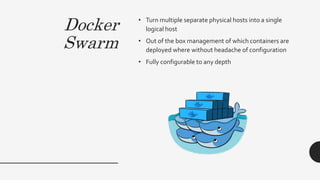
• Turn multiple separate physical hosts into a single
logical host
• Out of the box management of which containers are
deployed where without headache of configuration
• Fully configurable to any depth
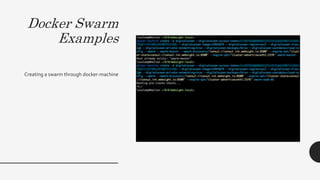
Docker Swarm
Examples
Creating a swarm through docker-machine
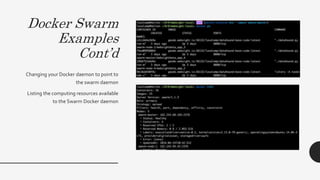
Docker Swarm
Examples
Cont’d
Changing your Docker daemon to point to
the swarm daemon
Listing the computing resources available
to the Swarm Docker daemon
Docker
Swarm
Perks
• Difference between deploying to a single host and
deploying to 100 hosts is minimal – code does not
change between the two
• Transparently increase / decrease the power of your
distributed applications on the fly
• Single logical host across disparate hosts – even if
those hosts are in completely differeny physical
locations
Docker
Ecosystem
Review
• Docker Engine
– The core “runtime” of the Docker ecosystem – takes in
Docker images and spins up isolated “containers.”
• Docker Registry
– Enables the storage of Docker images in centralized fashion
• Docker Machine
– Create and/or destroy Docker daemons on local or remote
computing resources, automatically configure access to
these daemons
• Docker Compose
– Spin up/down N-tier applications in rapid fashion, drill down
into N-tier deployment options as necessary
• Docker Swarm
– Turn multiple physical or virtual hosts into a single logical
host as far as Docker daemon is concerned
DEMONSTRATION
Putting it
All Together
• Docker is a core component ofWeb Sight.IO
• One of the main reasons I’ve been able to stay a one-
man shop
• Reduced my need for DevOps assistance to nearly
nothing
DOCKER
PITFALLS
Nothing is
Perfect
• Various Docker offerings written in different languages
• Terminology has not been consolidated across
offerings
• Still very much in development – breaking bugs
introduced in even minor version updates
• Docker networking not particularly robust (userland
UDP proxy?)
• Documentation could use work
• Standard ways of working with virtualization platforms
don’t necessarily translate to working with Docker
(learning curve)
• Not sure what the business plan is for Docker
enterprise
• Isolation is not as strong as traditionalVM isolation
SECURITY
CONSIDERATIONS
The Good • Docker’s security team is top-notch
• Traditional security flaws in Docker have been rapidly
addressed, and their respective fixes have been either
industry-leading or industry-standard
• Enterprise business depends heavily on building secure
software, so large incentives to continue improving
• Logical abstraction of N-tier application -> single
application reduces complexity
• New defenses possible when set up and tear down of
environments takes seconds
The Bad
• Docker containers designed to run as root out-of-the-
box, require additional configuration and headaches to
change
• Intra-container communication may be restricted, but
otherwise Docker containers have same network
access as host machine
• Lots of code written by lots of people in different
languages doing complex things at all levels of the OS –
plenty of places for things to go wrong
The Ugly • Biggest dangers of using Docker are architectural
• If you thought losing your source code was bad, what
happens when you lose all of your images?
• Documentation for setting up your own Registry is very
poor
• Docker Registry has two levels of authentication – auth’ed
and not auth’ed
• Docker daemons, if compromised, would allow malicious
third-parties to spin up arbitrary software without dealing
with dependencies behind your firewall
ADDITIONAL
THOUGHTS
On Docker
Ecosystem
• Throw out what you think you know about
virtualization when first wrapping your head around
the Docker ecosystem
• Docker’s individual offerings are impressive, but their
utility pales in comparison to what all of their offerings
taken as a complete whole can accomplish
On Docker
Security
• For the most part, Docker security is good
• Traditional security flaws will still be present within
Docker and the applications built upon it, and the
speed of operations with Docker gives Docker the leg
up when compared to traditional approaches
• The biggest security concern organizations should
have when deploying with Docker should revolve
around architectural implications of their Docker
deployment and considerations around the possibility
of compromised Docker assets
Q&A
THANK YOU

You, and Me, and Docker Makes Three

  • 1.
    YOU, ME, AND DOCKER MAKESTHREE The Ins and Outs of the Docker Ecosystem
  • 2.
  • 3.
    Talk Roadmap • What isDocker? • The Docker Ecosystem – Docker Engine – Docker Registry – Docker Machine – Docker Compose – Docker Swarm • Demonstration • Docker Pitfalls • Security Considerations for Deploying Docker • AdditionalThoughts • Q&A
  • 4.
    WHOAMI • ChristopherGrayson –OSCE – Former consultant at Bishop Fox – MSCS, BSCM from GeorgiaTech – Currently founder of Web Sight.IO
  • 5.
  • 6.
    Docker 101 • Virtualizationplatform • Virtualizes at the process level • Runs in Linux • Uses Linux kernel isolation primitives
  • 7.
    Ok, But Why? • Considertraditional application of virtualization • Significant overhead (single virtual host -> single virtual application) • Why virtualize at the OS level?
  • 8.
  • 9.
  • 10.
    …Still Not Convinced? • Whenvirtualization occurs at the process level, new possibilities emerge • Docker is not the first attempt, but has gotten a lot right with their attempt
  • 11.
  • 12.
    Docker Engine • Daemon thatlistens onTCP 2376 (3376 for swarm) • Functionality invoked through API • Command line interface provided by Docker • Takes in images and settings, spins up “containers” (processes)
  • 13.
    Docker Images • Tarball’ed imagesof Linux filesystems • Created through the use of Dockerfiles • Encourages re-usability
  • 14.
    Dockerfile Example Sequence of stepsfor building an image Run through “docker build”, outputs a Docker image
  • 15.
    Docker Build Example Build animage through “docker build” List all images available to the Docker daemon through “docker images”
  • 16.
    Docker Engine Steps 1. Create image 2.Ensure target docker daemon has access to image 3. Tell the daemon to run the image, and pass arguments as necessary 4. ??? 5. Profit
  • 17.
    Docker Engine Perks • Hierarchical organizationof Docker images works well with standard DevOps practices • If an image runs in one location through a Docker daemon, it is guaranteed to work on all other same- version Docker daemons • Rid yourself of dealing with dependency headaches
  • 18.
    Docker Registry • Where Githas GitHub, Docker has Docker Registry • Version control-esque endpoint for storing Docker images • Docker officially offers Docker Hub • Can (and should) create and run your own Docker registry
  • 19.
    Docker Registry Example After creating animage, push the image through “docker push” Pull updated image copies from registry through “docker pull”
  • 20.
    Docker Registry Perks • Single, authoritativelocation to store your Docker images • Follows the central repository model of Git, SVN, other version control systems • …my least favorite part of Docker
  • 21.
    Docker Machine • Create newDocker daemons on local or remote hosts • Remote hosts supported across all major hosting and cloud providers • Commands to create machines mostly the same – only changes reflect API differences between providers • Spins up host, installs docker, installs cryptographic artifacts for secure communication
  • 22.
    Docker Machine Examples Create a newmachine at DigitalOcean using the docker-machine tool
  • 23.
    Docker Machine Examples List machines thatyour device can connect with Change the Docker daemon that your docker client is configured to talk to
  • 24.
    Docker Machine Cont’d • Many othermachine-specific functions available through docker-machine • Hardware/OS related? docker-machine does it
  • 25.
    Docker Machine Perks • Provider agnostic,and very easy to switch between hosting providers (change a few command line arguments) • Go from no infrastructure to full infrastructure in <5 minutes • Go from full infrastructure to no infrastructure in <30 seconds
  • 26.
    Docker Compose • The “orchestration”tool of the Docker ecosystem • Enables spinning up N-tier applications in one fell swoop • Can spin up N-tier applications locally • Only requires a docker-compose.yml file to spin up complicated N-tier applications
  • 27.
    Docker Compose File Example Defines thevarious applications contained within the N-tier application Configuration passed to applications through environment variables Defines relationships between applications and host OS
  • 28.
    Docker Compose Example Call docker-compose ina directory containing docker-compose.yml file File is read, images are retrieved, containers are created N-tier application goes from non-existent to up and running in <30 seconds
  • 29.
    Docker Compose Cont’d • Reduces configurationmanagement complexity to a single config file • Spin up overlay networks across disparate hosting providers on the fly • View logs across N-tier application in real time
  • 30.
    Docker Compose Perks • Can configureentire environment with one configuration file • Reduces the complexity of N-tier application deployment and debugging • Go from 0->60 and 60->0 faster than all traditional approaches
  • 31.
    Docker Swarm • Turn multipleseparate physical hosts into a single logical host • Out of the box management of which containers are deployed where without headache of configuration • Fully configurable to any depth
  • 32.
    Docker Swarm Examples Creating aswarm through docker-machine
  • 33.
    Docker Swarm Examples Cont’d Changing yourDocker daemon to point to the swarm daemon Listing the computing resources available to the Swarm Docker daemon
  • 34.
    Docker Swarm Perks • Difference betweendeploying to a single host and deploying to 100 hosts is minimal – code does not change between the two • Transparently increase / decrease the power of your distributed applications on the fly • Single logical host across disparate hosts – even if those hosts are in completely differeny physical locations
  • 35.
    Docker Ecosystem Review • Docker Engine –The core “runtime” of the Docker ecosystem – takes in Docker images and spins up isolated “containers.” • Docker Registry – Enables the storage of Docker images in centralized fashion • Docker Machine – Create and/or destroy Docker daemons on local or remote computing resources, automatically configure access to these daemons • Docker Compose – Spin up/down N-tier applications in rapid fashion, drill down into N-tier deployment options as necessary • Docker Swarm – Turn multiple physical or virtual hosts into a single logical host as far as Docker daemon is concerned
  • 36.
  • 37.
    Putting it All Together •Docker is a core component ofWeb Sight.IO • One of the main reasons I’ve been able to stay a one- man shop • Reduced my need for DevOps assistance to nearly nothing
  • 38.
  • 39.
    Nothing is Perfect • VariousDocker offerings written in different languages • Terminology has not been consolidated across offerings • Still very much in development – breaking bugs introduced in even minor version updates • Docker networking not particularly robust (userland UDP proxy?) • Documentation could use work • Standard ways of working with virtualization platforms don’t necessarily translate to working with Docker (learning curve) • Not sure what the business plan is for Docker enterprise • Isolation is not as strong as traditionalVM isolation
  • 40.
  • 41.
    The Good •Docker’s security team is top-notch • Traditional security flaws in Docker have been rapidly addressed, and their respective fixes have been either industry-leading or industry-standard • Enterprise business depends heavily on building secure software, so large incentives to continue improving • Logical abstraction of N-tier application -> single application reduces complexity • New defenses possible when set up and tear down of environments takes seconds
  • 42.
    The Bad • Dockercontainers designed to run as root out-of-the- box, require additional configuration and headaches to change • Intra-container communication may be restricted, but otherwise Docker containers have same network access as host machine • Lots of code written by lots of people in different languages doing complex things at all levels of the OS – plenty of places for things to go wrong
  • 43.
    The Ugly •Biggest dangers of using Docker are architectural • If you thought losing your source code was bad, what happens when you lose all of your images? • Documentation for setting up your own Registry is very poor • Docker Registry has two levels of authentication – auth’ed and not auth’ed • Docker daemons, if compromised, would allow malicious third-parties to spin up arbitrary software without dealing with dependencies behind your firewall
  • 44.
  • 45.
    On Docker Ecosystem • Throwout what you think you know about virtualization when first wrapping your head around the Docker ecosystem • Docker’s individual offerings are impressive, but their utility pales in comparison to what all of their offerings taken as a complete whole can accomplish
  • 46.
    On Docker Security • Forthe most part, Docker security is good • Traditional security flaws will still be present within Docker and the applications built upon it, and the speed of operations with Docker gives Docker the leg up when compared to traditional approaches • The biggest security concern organizations should have when deploying with Docker should revolve around architectural implications of their Docker deployment and considerations around the possibility of compromised Docker assets
  • 47.
  • 48.