Everything You Need to Know
      About Google +1
Welcome
  David Mynatt - Host
  Web Solutions Consultant
  Dealerskins

  Aileen Ott - Facilitator
  Marketing Director
  Dealerskins
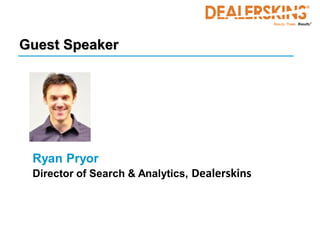
Guest Speaker


 Ryan Pryor
 Director of Search & Analytics, Dealerskins
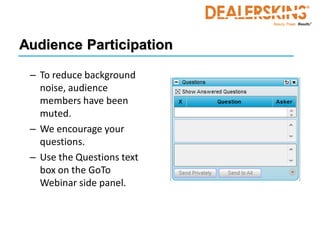
Audience Participation

 – To reduce background
   noise, audience
   members have been
   muted.
 – We encourage your
   questions.
 – Use the Questions text
   box on the GoTo
   Webinar side panel.
Housekeeping

• All questions will be answered during
  webinar or offline
• PowerPoint will be distributed after the
  webinar
• Available anytime for additional
  information
  – Contact information will be posted at the end
    of the webinar
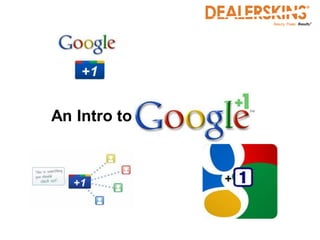
An Intro to
Overview


•   Quick Look: “Google +1” vs. “Google+”
•   Understanding the Google +1 World
•   Quick Look: Google “+1” vs. Facebook “Like”
•   Ok, so what do I DO with “Google +1”?
•   Watch out for “+1 Predators”
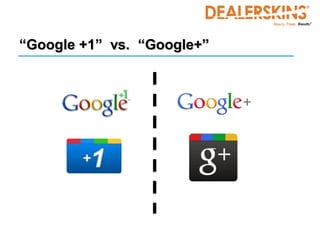
“Google +1” vs. “Google+”

Biggest Mistake Google’s Made in
     this whole “Plus” thing:

  Poor naming of Products!
         (what were they thinking?!)
“Google +1”


     Audience Poll
“Google +1” vs. “Google+”
 • Google +1
   • Button displayed on the SERPs and now websites
   • Shows preference for your website / webpages
 • Google+
   • Google’s new social network (Facebook rival)
   • Create friend / contact groupings – “circles” - and
     send messages to the “circles” of friends you choose
   • Start chat groups and watch “news feeds”
   • NOT for businesses…. Yet…
“Google+”
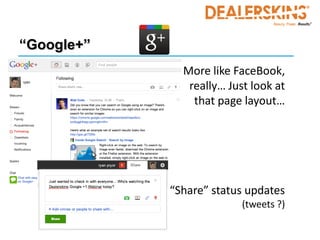
            • More like FaceBook,
               really… Just look at
                that page layout…


            “Share” status updates
                          (tweets ?)
“Google+”


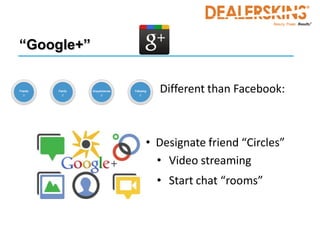
              Different than Facebook:


            • Designate friend “Circles”
              • Video streaming
              • Start chat “rooms”
What is Google +1?


 Let’s figure this thing out…
“Google +1”
 • Shows preference of your website (and pages)

 • +1 Button appears on SERPs and websites
    • Released for SERPs in early April
    • Released for websites on 6/1
    • And now rolling toward mobile devices and
      YouTube, etc… although not there just yet.

 • Only appears on SERPs if you are logged into
   your Google account
“Google +1”


 • Repeat: Only appears on SERPs if you’re logged
   into your Google account: Gmail, AdWords,
   Analytics, etc.

 • Easy to “+1” then, just click and confirm!

 • Note: Google designed this to be very easy
“Google +1”


 • But WHY must you use your Google Account?!

 • The value of “+1” is entirely in the relationships
   it can show between you, your contacts, and
   your common interests (via search results)
“Google +1”


 • This may eventually enable Google to increase
   the relevance of your site to your contacts when
   it appears in the search listings by:
    • Increasing Click Through Rates (CTR) for your Paid
      and Organic listings
    • Increasing trust, interest, and engagement of your
      potential customers
“Google +1”
“Google +1”


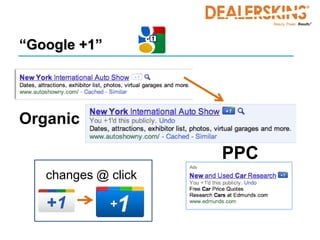
Organic

                     PPC
   changes @ click
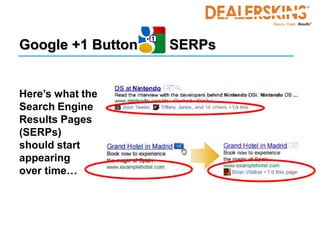
Google +1 Button   SERPs


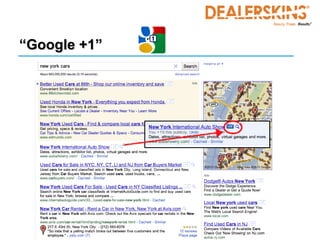
Here’s what the
Search Engine
Results Pages
(SERPs)
should start
appearing
over time…
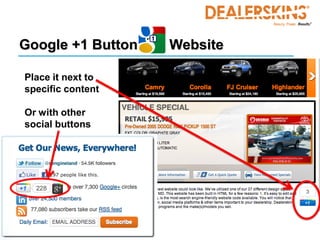
Google +1 Button   Website

Place it next to
specific content

Or with other
social buttons
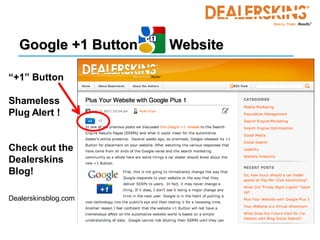
Google +1 Button   Website

“+1” Button

Shameless
Plug Alert !


Check out the
Dealerskins
Blog!

Dealerskinsblog.com
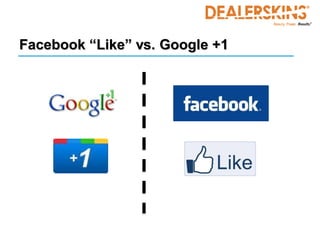
Facebook “Like” vs. Google +1
• Similarities
   – Both show preference of something
       • Google = site; Facebook = anything
   – Both are attached to an individual person / profile

• Differences (search or not)
   – Google +1 affects only the Google world (maybe)
   – Facebook “Likes” influence the Facebook world
     (well… maybe in the Bing world too)
Facebook “Like” vs. Google +1
 • “The ‘Like’ button has allowed Facebook to spread
   its reach across the internet – but there’s a
   difference between simple site exposure and site
   ranking.” --Rimm-Kaufman Group

 Meaning:
 • Facebook promotes itself via others’ websites
 • Google promotes everything across itself and its
   other properties
“Google +1”


     Audience Poll
What Now…?

 • If you don’t have it on your site... Put it there!
    • Pretty quick and easy code
    • A few button styles available

 • Place it with any other social signal buttons

 • Is your site experience a good one? Make it
   better!
What Now…?


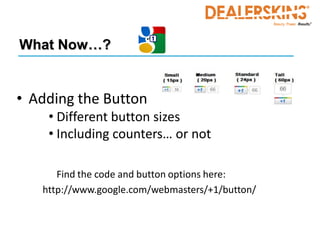
• Adding the Button
    • Different button sizes
    • Including counters… or not

      Find the code and button options here:
   http://www.google.com/webmasters/+1/button/
What Now…?
 • Don’t get carried away (yet)!
    • Not going to change the world this week 
    • Timothy Jordan, Google Developer, “Yes, +1’s may be a
      signal we use in ranking… and it would be among over
      250 other signals we use in ranking.”

 • Not affecting actual ranking yet

 • Make sure you have Google Webmaster Tools
   setup on your site (Analytics)
“+1” and “+” Sharks
“+1” and “+” Sharks

 • Businesses offering to provide # of “+1’s” for a fee
    • Snake Oil !!

 • The same will happen soon with Google+
    • Note: Google+ is currently NOT available to businesses

 • Similar to the companies that will provide you
   with # of FB “likes”
“+1” and “+” Sharks

 • If you want to spend money on Reputation
   Management there are places for doing that… but
   this is NOT one of them

 • If you have questions about such “businesses”
   check with your site providers first!
?                       ?
                     ?
         ?   ?

     ? Questions             ?
         ?               ?
                         ?
         ?       ?
34
Contact Information
Ryan Pryor                     Aileen Ott
Dealerskins                    Dealerskins

615-627-9767                   615-627-9794
ryan.pryor@dealerskins.com     aileen.ott@dealerskins.com


David Mynatt
Dealerskins

713-494-5389
david.mynatt@dealerskins.com

Everything You Need to Know About Google +1

  • 1.
    Everything You Needto Know About Google +1
  • 2.
    Welcome DavidMynatt - Host Web Solutions Consultant Dealerskins Aileen Ott - Facilitator Marketing Director Dealerskins
  • 3.
    Guest Speaker RyanPryor Director of Search & Analytics, Dealerskins
  • 4.
    Audience Participation –To reduce background noise, audience members have been muted. – We encourage your questions. – Use the Questions text box on the GoTo Webinar side panel.
  • 5.
    Housekeeping • All questionswill be answered during webinar or offline • PowerPoint will be distributed after the webinar • Available anytime for additional information – Contact information will be posted at the end of the webinar
  • 6.
  • 7.
    Overview • Quick Look: “Google +1” vs. “Google+” • Understanding the Google +1 World • Quick Look: Google “+1” vs. Facebook “Like” • Ok, so what do I DO with “Google +1”? • Watch out for “+1 Predators”
  • 8.
    “Google +1” vs.“Google+”
  • 9.
    “Google +1” vs.“Google+” Biggest Mistake Google’s Made in this whole “Plus” thing: Poor naming of Products! (what were they thinking?!)
  • 10.
    “Google +1” Audience Poll
  • 11.
    “Google +1” vs.“Google+” • Google +1 • Button displayed on the SERPs and now websites • Shows preference for your website / webpages • Google+ • Google’s new social network (Facebook rival) • Create friend / contact groupings – “circles” - and send messages to the “circles” of friends you choose • Start chat groups and watch “news feeds” • NOT for businesses…. Yet…
  • 12.
    “Google+” • More like FaceBook, really… Just look at that page layout… “Share” status updates (tweets ?)
  • 13.
    “Google+” Different than Facebook: • Designate friend “Circles” • Video streaming • Start chat “rooms”
  • 14.
    What is Google+1? Let’s figure this thing out…
  • 15.
    “Google +1” •Shows preference of your website (and pages) • +1 Button appears on SERPs and websites • Released for SERPs in early April • Released for websites on 6/1 • And now rolling toward mobile devices and YouTube, etc… although not there just yet. • Only appears on SERPs if you are logged into your Google account
  • 16.
    “Google +1” •Repeat: Only appears on SERPs if you’re logged into your Google account: Gmail, AdWords, Analytics, etc. • Easy to “+1” then, just click and confirm! • Note: Google designed this to be very easy
  • 17.
    “Google +1” •But WHY must you use your Google Account?! • The value of “+1” is entirely in the relationships it can show between you, your contacts, and your common interests (via search results)
  • 18.
    “Google +1” •This may eventually enable Google to increase the relevance of your site to your contacts when it appears in the search listings by: • Increasing Click Through Rates (CTR) for your Paid and Organic listings • Increasing trust, interest, and engagement of your potential customers
  • 19.
  • 20.
    “Google +1” Organic PPC changes @ click
  • 21.
    Google +1 Button SERPs Here’s what the Search Engine Results Pages (SERPs) should start appearing over time…
  • 22.
    Google +1 Button Website Place it next to specific content Or with other social buttons
  • 23.
    Google +1 Button Website “+1” Button Shameless Plug Alert ! Check out the Dealerskins Blog! Dealerskinsblog.com
  • 24.
  • 25.
    Facebook “Like” vs.Google +1 • Similarities – Both show preference of something • Google = site; Facebook = anything – Both are attached to an individual person / profile • Differences (search or not) – Google +1 affects only the Google world (maybe) – Facebook “Likes” influence the Facebook world (well… maybe in the Bing world too)
  • 26.
    Facebook “Like” vs.Google +1 • “The ‘Like’ button has allowed Facebook to spread its reach across the internet – but there’s a difference between simple site exposure and site ranking.” --Rimm-Kaufman Group Meaning: • Facebook promotes itself via others’ websites • Google promotes everything across itself and its other properties
  • 27.
    “Google +1” Audience Poll
  • 28.
    What Now…? •If you don’t have it on your site... Put it there! • Pretty quick and easy code • A few button styles available • Place it with any other social signal buttons • Is your site experience a good one? Make it better!
  • 29.
    What Now…? • Addingthe Button • Different button sizes • Including counters… or not Find the code and button options here: http://www.google.com/webmasters/+1/button/
  • 30.
    What Now…? •Don’t get carried away (yet)! • Not going to change the world this week  • Timothy Jordan, Google Developer, “Yes, +1’s may be a signal we use in ranking… and it would be among over 250 other signals we use in ranking.” • Not affecting actual ranking yet • Make sure you have Google Webmaster Tools setup on your site (Analytics)
  • 31.
  • 32.
    “+1” and “+”Sharks • Businesses offering to provide # of “+1’s” for a fee • Snake Oil !! • The same will happen soon with Google+ • Note: Google+ is currently NOT available to businesses • Similar to the companies that will provide you with # of FB “likes”
  • 33.
    “+1” and “+”Sharks • If you want to spend money on Reputation Management there are places for doing that… but this is NOT one of them • If you have questions about such “businesses” check with your site providers first!
  • 34.
    ? ? ? ? ? ? Questions ? ? ? ? ? ? 34
  • 35.
    Contact Information Ryan Pryor Aileen Ott Dealerskins Dealerskins 615-627-9767 615-627-9794 ryan.pryor@dealerskins.com aileen.ott@dealerskins.com David Mynatt Dealerskins 713-494-5389 david.mynatt@dealerskins.com