Top 10 MUST Do’s
                                  in the
     Ever-Changing World of SEO

                               Martin Laetsch
                             September 13, 2012


Proprietary & Confidential
Today’s Agenda

   SEO Overview
   Write For Your Audience
   Speak the Searchers Language
   Optimize Site Content
   Get Quality Links
   Custom 404 page
   Set a Canonical URL
   Navigation
   Sitemaps
   Microdata/Schema
   Responsive Design

Proprietary & Confidential   2
What is Search Engine Marketing?

 “Putting content in front of people who overtly and
 explicitly express a desire, via keywords, for a
 particular product, service or piece of information.”

 – Search Engine Optimization (SEO): the process of
   making a site and its content highly relevant for both search
   engines and searchers. Successful search marketing helps a
   site gain top positioning for relevant words and phrases.

 – Paid Search Marketing (PPC): a type of search
   marketing where advertisers pay a set amount every time
   their ad is clicked by a prospect.


Search Engine Marketing (SEM) is the combination of
                       both
                                3
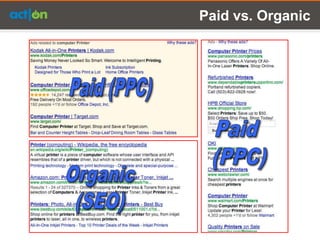
Paid vs. Organic
#1
Write For Your Audience!


           5
Write For Your Audience

• You are creating content for your customers and prospects.
• Search engines make money by recommending the best
  content for any given search.
• If you base your marketing decisions on what is best for your
  customers, you will likely rank well in the search engines.
• If you try and game the system to rank, you will eventually fail.


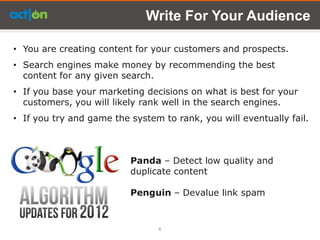
                          Panda – Detect low quality and
                          duplicate content

                          Penguin – Devalue link spam


                                6
#2
Speak the Searchers Language


             7
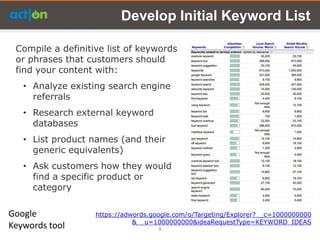
Develop Initial Keyword List

 Compile a definitive list of keywords
 or phrases that customers should
 find your content with:
   • Analyze existing search engine
     referrals
   • Research external keyword
     databases
   • List product names (and their
     generic equivalents)
   • Ask customers how they would
     find a specific product or
     category

Google             https://adwords.google.com/o/Targeting/Explorer?__c=1000000000
                              &__u=1000000000&ideaRequestType=KEYWORD_IDEAS
Keywords tool                        8
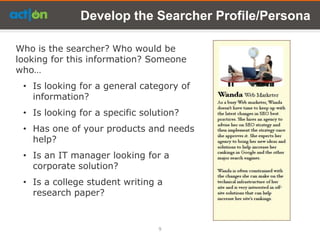
Develop the Searcher Profile/Persona

Who is the searcher? Who would be
looking for this information? Someone
who…
 • Is looking for a general category of
   information?
 • Is looking for a specific solution?
 • Has one of your products and needs
   help?
 • Is an IT manager looking for a
   corporate solution?
 • Is a college student writing a
   research paper?


                                 9
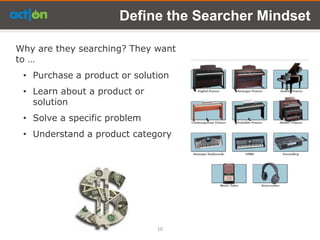
Define the Searcher Mindset

Why are they searching? They want
to …
 • Purchase a product or solution
 • Learn about a product or
   solution
 • Solve a specific problem
 • Understand a product category


                              10
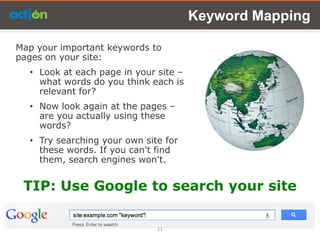
Keyword Mapping

Map your important keywords to
pages on your site:
  • Look at each page in your site –
    what words do you think each is
    relevant for?
  • Now look again at the pages –
    are you actually using these
    words?
  • Try searching your own site for
    these words. If you can't find
    them, search engines won't.


 TIP: Use Google to search your site

                              11
#3
Optimize site content


          12
Writing for SEO

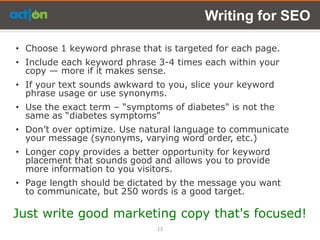
• Choose 1 keyword phrase that is targeted for each page.
• Include each keyword phrase 3-4 times each within your
  copy — more if it makes sense.
• If your text sounds awkward to you, slice your keyword
  phrase usage or use synonyms.
• Use the exact term – ―symptoms of diabetes" is not the
  same as ―diabetes symptoms"
• Don’t over optimize. Use natural language to communicate
  your message (synonyms, varying word order, etc.)
• Longer copy provides a better opportunity for keyword
  placement that sounds good and allows you to provide
  more information to you visitors.
• Page length should be dictated by the message you want
  to communicate, but 250 words is a good target.

Just write good marketing copy that's focused!
                              13
Put Keywords in…

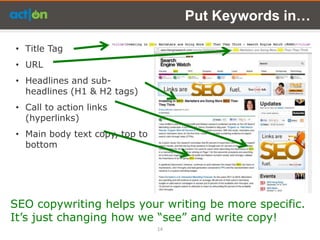
• Title Tag
• URL
• Headlines and sub-
  headlines (H1 & H2 tags)
• Call to action links
  (hyperlinks)
• Main body text copy, top to
  bottom


SEO copywriting helps your writing be more specific.
It’s just changing how we ―see‖ and write copy!
                                14
#4
Get Quality Links


        15
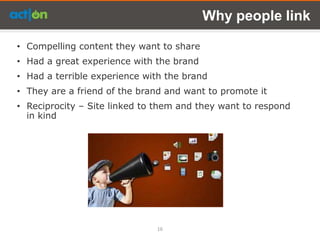
Why people link

• Compelling content they want to share
• Had a great experience with the brand
• Had a terrible experience with the brand
• They are a friend of the brand and want to promote it
• Reciprocity – Site linked to them and they want to respond
  in kind


                              16
How to get links

• Write great content
• Provide helpful information
• Article marketing – Share your content
• Guest posts – providing and receiving
• Constructively contribute to other blogs
• Network – people are more likely to link
  to people they know
• Speakerships, sponsorships, events, etc.
• Social media


Create compelling content and let people know
it exists
                                17
Create Content People Want to Share

People like to share interesting information
   • Builds their own credibility (they are in the know)
   • Consistently sharing good information increases their
     audience
   • Helps their visitors


   • White papers             • Research results
   • Case studies             • Thought provoking blog
   • Fun facts                  posts
   • Educational material • How to articles
                          • Top 10 lists


                                18
#5
Custom 404 page


       19
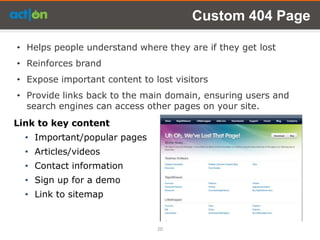
Custom 404 Page

• Helps people understand where they are if they get lost
• Reinforces brand
• Expose important content to lost visitors
• Provide links back to the main domain, ensuring users and
  search engines can access other pages on your site.
Link to key content
  • Important/popular pages
  • Articles/videos
  • Contact information
  • Sign up for a demo
  • Link to sitemap


                               20
#6
Set a Canonical URL


         21
URL’s - Canonical

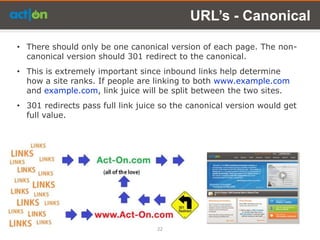
• There should only be one canonical version of each page. The non-
  canonical version should 301 redirect to the canonical.
• This is extremely important since inbound links help determine
  how a site ranks. If people are linking to both www.example.com
  and example.com, link juice will be split between the two sites.
• 301 redirects pass full link juice so the canonical version would get
  full value.


                                   22
#7
Navigation


    23
URL’s – URL Hacking

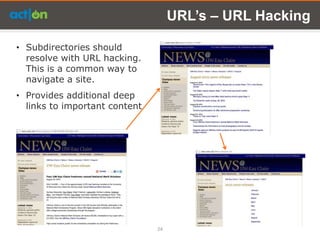
• Subdirectories should
  resolve with URL hacking.
  This is a common way to
  navigate a site.
• Provides additional deep
  links to important content


                               24
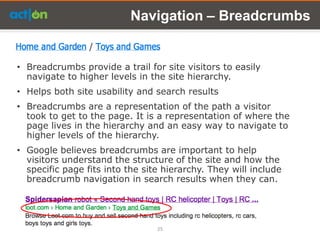
Navigation – Breadcrumbs


• Breadcrumbs provide a trail for site visitors to easily
  navigate to higher levels in the site hierarchy.
• Helps both site usability and search results
• Breadcrumbs are a representation of the path a visitor
  took to get to the page. It is a representation of where the
  page lives in the hierarchy and an easy way to navigate to
  higher levels of the hierarchy.
• Google believes breadcrumbs are important to help
  visitors understand the structure of the site and how the
  specific page fits into the site hierarchy. They will include
  breadcrumb navigation in search results when they can.


                                 25
#8
Sitemaps


   26
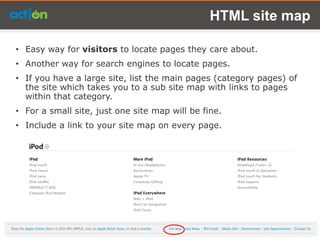
HTML site map

• Easy way for visitors to locate pages they care about.
• Another way for search engines to locate pages.
• If you have a large site, list the main pages (category pages) of
  the site which takes you to a sub site map with links to pages
  within that category.
• For a small site, just one site map will be fine.
• Include a link to your site map on every page.
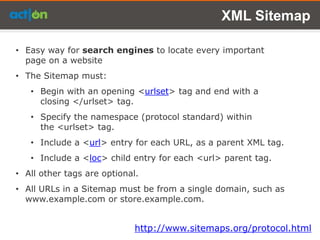
XML Sitemap

• Easy way for search engines to locate every important
  page on a website
• The Sitemap must:
   • Begin with an opening <urlset> tag and end with a
     closing </urlset> tag.
   • Specify the namespace (protocol standard) within
     the <urlset> tag.
   • Include a <url> entry for each URL, as a parent XML tag.
   • Include a <loc> child entry for each <url> parent tag.
• All other tags are optional.
• All URLs in a Sitemap must be from a single domain, such as
  www.example.com or store.example.com.


                             http://www.sitemaps.org/protocol.html
Image Search

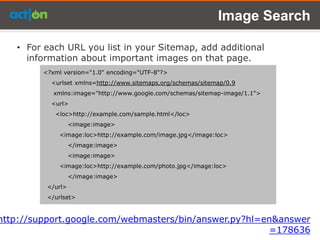
   • For each URL you list in your Sitemap, add additional
     information about important images on that page.
         <?xml version="1.0" encoding="UTF-8"?>
           <urlset xmlns=http://www.sitemaps.org/schemas/sitemap/0.9
            xmlns:image="http://www.google.com/schemas/sitemap-image/1.1">
           <url>
            <loc>http://example.com/sample.html</loc>
                   <image:image>
             <image:loc>http://example.com/image.jpg</image:loc>
                   </image:image>
                   <image:image>
             <image:loc>http://example.com/photo.jpg</image:loc>
                   </image:image>
          </url>
          </urlset>


http://support.google.com/webmasters/bin/answer.py?hl=en&answer
                                                       =178636
Video Sitemap

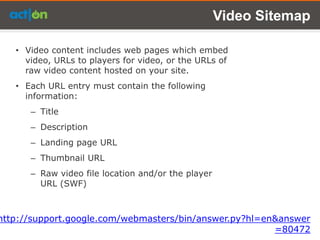
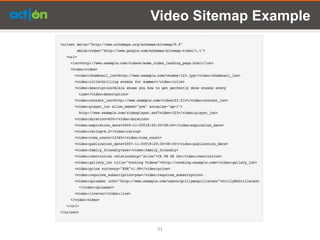
   • Video content includes web pages which embed
     video, URLs to players for video, or the URLs of
     raw video content hosted on your site.
   • Each URL entry must contain the following
     information:
      – Title
      – Description
      – Landing page URL
      – Thumbnail URL
      – Raw video file location and/or the player
        URL (SWF)


http://support.google.com/webmasters/bin/answer.py?hl=en&answer
                                                        =80472
Video Sitemap Example


31
#9
Microdata


    32
Schema Markup

•   HTML tags that webmasters can use to markup their pages in
    ways recognized by major search engines.
•   Used to help search engines and other applications identify
    structured data and understand what it means.
•   Makes it easier for people to find the content they are looking
    for by providing richer search results.
•   For example, <h1>Avatar</h1> tells the browser to display
    the text string "Avatar" in a heading 1 format. However, the
    HTML tag doesn't give any information about what that text
    string means—"Avatar" could refer to the hugely successful 3D
    movie, or it could refer to a type of profile picture—and this
    can make it more difficult for search engines to intelligently
    display relevant content to a user.


                                     http://schema.org/docs/gs.html
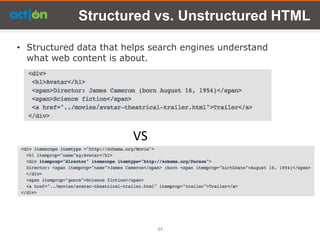
Structured vs. Unstructured HTML

• Structured data that helps search engines understand
  what web content is about.


                        VS


                              34
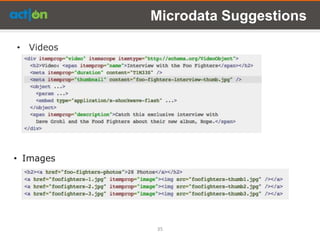
Microdata Suggestions

• Videos


• Images


           35
Microdata Suggestions

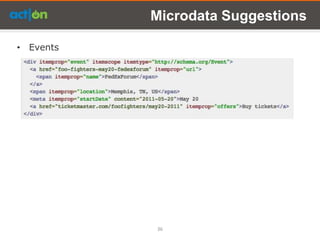
• Events


           36
#10
Responsive Design


        37
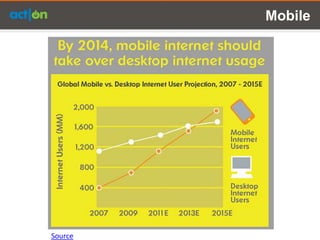
Mobile


Source
Responsive Web Design

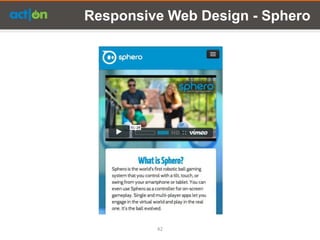
• Responsive web design is a technique to build web pages
  that alter how they look using CSS3 media queries. There
  is one HTML code for the page regardless of the device
  accessing it, but its presentation changes using CSS
  media queries to specify which CSS rules apply for the
  browser displaying the page.
• It keeps desktop and mobile content on a single URL,
  which is easier for users to interact with, share, and link
  to and for Google’s algorithms to assign the indexing
  properties to your content.
• Google can discover your content more efficiently.


This is Google’s recommended way to code for mobile sites

 http://googlewebmastercentral.blogspot.com/2012/06/recomme
                        ndations-for-building-smartphone.html
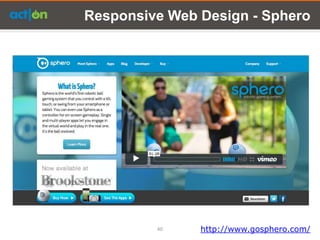
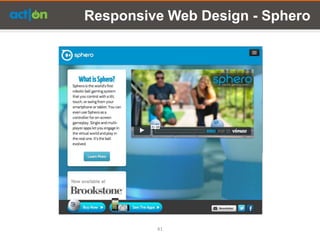
Responsive Web Design - Sphero


         40    http://www.gosphero.com/
Responsive Web Design - Sphero


         41
Responsive Web Design - Sphero


         42
Q&A
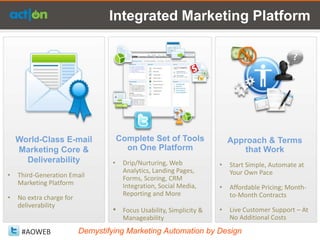
Integrated Marketing Platform


    World-Class E-mail                 Complete Set of Tools                Approach & Terms
    Marketing Core &                     on One Platform                        that Work
      Deliverability               •    Drip/Nurturing, Web             •   Start Simple, Automate at
                                        Analytics, Landing Pages,           Your Own Pace
•   Third-Generation Email              Forms, Scoring, CRM
    Marketing Platform                  Integration, Social Media,      •   Affordable Pricing; Month-
                                        Reporting and More                  to-Month Contracts
•   No extra charge for
    deliverability
                                   •    Focus Usability, Simplicity &   •   Live Customer Support – At
                                        Manageability                       No Additional Costs

     #AOWEB               Demystifying Marketing Automation by Design
Ready to Learn More?
    Sign up for a demo:
           act-on.com

  blog.actonsoftware.com

          Can’t Wait?
Call our hotline at: 1 (877) 530-1555
    Email us: sales@act-on.net

Top 10 Must Do&rsquo;s in the Ever-changing World of SEO

  • 1.
    Top 10 MUSTDo’s in the Ever-Changing World of SEO Martin Laetsch September 13, 2012 Proprietary & Confidential
  • 2.
    Today’s Agenda  SEO Overview  Write For Your Audience  Speak the Searchers Language  Optimize Site Content  Get Quality Links  Custom 404 page  Set a Canonical URL  Navigation  Sitemaps  Microdata/Schema  Responsive Design Proprietary & Confidential 2
  • 3.
    What is SearchEngine Marketing? “Putting content in front of people who overtly and explicitly express a desire, via keywords, for a particular product, service or piece of information.” – Search Engine Optimization (SEO): the process of making a site and its content highly relevant for both search engines and searchers. Successful search marketing helps a site gain top positioning for relevant words and phrases. – Paid Search Marketing (PPC): a type of search marketing where advertisers pay a set amount every time their ad is clicked by a prospect. Search Engine Marketing (SEM) is the combination of both 3
  • 4.
  • 5.
    #1 Write For YourAudience! 5
  • 6.
    Write For YourAudience • You are creating content for your customers and prospects. • Search engines make money by recommending the best content for any given search. • If you base your marketing decisions on what is best for your customers, you will likely rank well in the search engines. • If you try and game the system to rank, you will eventually fail. Panda – Detect low quality and duplicate content Penguin – Devalue link spam 6
  • 7.
  • 8.
    Develop Initial KeywordList Compile a definitive list of keywords or phrases that customers should find your content with: • Analyze existing search engine referrals • Research external keyword databases • List product names (and their generic equivalents) • Ask customers how they would find a specific product or category Google https://adwords.google.com/o/Targeting/Explorer?__c=1000000000 &__u=1000000000&ideaRequestType=KEYWORD_IDEAS Keywords tool 8
  • 9.
    Develop the SearcherProfile/Persona Who is the searcher? Who would be looking for this information? Someone who… • Is looking for a general category of information? • Is looking for a specific solution? • Has one of your products and needs help? • Is an IT manager looking for a corporate solution? • Is a college student writing a research paper? 9
  • 10.
    Define the SearcherMindset Why are they searching? They want to … • Purchase a product or solution • Learn about a product or solution • Solve a specific problem • Understand a product category 10
  • 11.
    Keyword Mapping Map yourimportant keywords to pages on your site: • Look at each page in your site – what words do you think each is relevant for? • Now look again at the pages – are you actually using these words? • Try searching your own site for these words. If you can't find them, search engines won't. TIP: Use Google to search your site 11
  • 12.
  • 13.
    Writing for SEO •Choose 1 keyword phrase that is targeted for each page. • Include each keyword phrase 3-4 times each within your copy — more if it makes sense. • If your text sounds awkward to you, slice your keyword phrase usage or use synonyms. • Use the exact term – ―symptoms of diabetes" is not the same as ―diabetes symptoms" • Don’t over optimize. Use natural language to communicate your message (synonyms, varying word order, etc.) • Longer copy provides a better opportunity for keyword placement that sounds good and allows you to provide more information to you visitors. • Page length should be dictated by the message you want to communicate, but 250 words is a good target. Just write good marketing copy that's focused! 13
  • 14.
    Put Keywords in… •Title Tag • URL • Headlines and sub- headlines (H1 & H2 tags) • Call to action links (hyperlinks) • Main body text copy, top to bottom SEO copywriting helps your writing be more specific. It’s just changing how we ―see‖ and write copy! 14
  • 15.
  • 16.
    Why people link •Compelling content they want to share • Had a great experience with the brand • Had a terrible experience with the brand • They are a friend of the brand and want to promote it • Reciprocity – Site linked to them and they want to respond in kind 16
  • 17.
    How to getlinks • Write great content • Provide helpful information • Article marketing – Share your content • Guest posts – providing and receiving • Constructively contribute to other blogs • Network – people are more likely to link to people they know • Speakerships, sponsorships, events, etc. • Social media Create compelling content and let people know it exists 17
  • 18.
    Create Content PeopleWant to Share People like to share interesting information • Builds their own credibility (they are in the know) • Consistently sharing good information increases their audience • Helps their visitors • White papers • Research results • Case studies • Thought provoking blog • Fun facts posts • Educational material • How to articles • Top 10 lists 18
  • 19.
  • 20.
    Custom 404 Page •Helps people understand where they are if they get lost • Reinforces brand • Expose important content to lost visitors • Provide links back to the main domain, ensuring users and search engines can access other pages on your site. Link to key content • Important/popular pages • Articles/videos • Contact information • Sign up for a demo • Link to sitemap 20
  • 21.
  • 22.
    URL’s - Canonical •There should only be one canonical version of each page. The non- canonical version should 301 redirect to the canonical. • This is extremely important since inbound links help determine how a site ranks. If people are linking to both www.example.com and example.com, link juice will be split between the two sites. • 301 redirects pass full link juice so the canonical version would get full value. 22
  • 23.
  • 24.
    URL’s – URLHacking • Subdirectories should resolve with URL hacking. This is a common way to navigate a site. • Provides additional deep links to important content 24
  • 25.
    Navigation – Breadcrumbs •Breadcrumbs provide a trail for site visitors to easily navigate to higher levels in the site hierarchy. • Helps both site usability and search results • Breadcrumbs are a representation of the path a visitor took to get to the page. It is a representation of where the page lives in the hierarchy and an easy way to navigate to higher levels of the hierarchy. • Google believes breadcrumbs are important to help visitors understand the structure of the site and how the specific page fits into the site hierarchy. They will include breadcrumb navigation in search results when they can. 25
  • 26.
  • 27.
    HTML site map •Easy way for visitors to locate pages they care about. • Another way for search engines to locate pages. • If you have a large site, list the main pages (category pages) of the site which takes you to a sub site map with links to pages within that category. • For a small site, just one site map will be fine. • Include a link to your site map on every page.
  • 28.
    XML Sitemap • Easyway for search engines to locate every important page on a website • The Sitemap must: • Begin with an opening <urlset> tag and end with a closing </urlset> tag. • Specify the namespace (protocol standard) within the <urlset> tag. • Include a <url> entry for each URL, as a parent XML tag. • Include a <loc> child entry for each <url> parent tag. • All other tags are optional. • All URLs in a Sitemap must be from a single domain, such as www.example.com or store.example.com. http://www.sitemaps.org/protocol.html
  • 29.
    Image Search • For each URL you list in your Sitemap, add additional information about important images on that page. <?xml version="1.0" encoding="UTF-8"?> <urlset xmlns=http://www.sitemaps.org/schemas/sitemap/0.9 xmlns:image="http://www.google.com/schemas/sitemap-image/1.1"> <url> <loc>http://example.com/sample.html</loc> <image:image> <image:loc>http://example.com/image.jpg</image:loc> </image:image> <image:image> <image:loc>http://example.com/photo.jpg</image:loc> </image:image> </url> </urlset> http://support.google.com/webmasters/bin/answer.py?hl=en&answer =178636
  • 30.
    Video Sitemap • Video content includes web pages which embed video, URLs to players for video, or the URLs of raw video content hosted on your site. • Each URL entry must contain the following information: – Title – Description – Landing page URL – Thumbnail URL – Raw video file location and/or the player URL (SWF) http://support.google.com/webmasters/bin/answer.py?hl=en&answer =80472
  • 31.
  • 32.
  • 33.
    Schema Markup • HTML tags that webmasters can use to markup their pages in ways recognized by major search engines. • Used to help search engines and other applications identify structured data and understand what it means. • Makes it easier for people to find the content they are looking for by providing richer search results. • For example, <h1>Avatar</h1> tells the browser to display the text string "Avatar" in a heading 1 format. However, the HTML tag doesn't give any information about what that text string means—"Avatar" could refer to the hugely successful 3D movie, or it could refer to a type of profile picture—and this can make it more difficult for search engines to intelligently display relevant content to a user. http://schema.org/docs/gs.html
  • 34.
    Structured vs. UnstructuredHTML • Structured data that helps search engines understand what web content is about. VS 34
  • 35.
  • 36.
  • 37.
  • 38.
  • 39.
    Responsive Web Design •Responsive web design is a technique to build web pages that alter how they look using CSS3 media queries. There is one HTML code for the page regardless of the device accessing it, but its presentation changes using CSS media queries to specify which CSS rules apply for the browser displaying the page. • It keeps desktop and mobile content on a single URL, which is easier for users to interact with, share, and link to and for Google’s algorithms to assign the indexing properties to your content. • Google can discover your content more efficiently. This is Google’s recommended way to code for mobile sites http://googlewebmastercentral.blogspot.com/2012/06/recomme ndations-for-building-smartphone.html
  • 40.
    Responsive Web Design- Sphero 40 http://www.gosphero.com/
  • 41.
  • 42.
  • 43.
  • 44.
    Integrated Marketing Platform World-Class E-mail Complete Set of Tools Approach & Terms Marketing Core & on One Platform that Work Deliverability • Drip/Nurturing, Web • Start Simple, Automate at Analytics, Landing Pages, Your Own Pace • Third-Generation Email Forms, Scoring, CRM Marketing Platform Integration, Social Media, • Affordable Pricing; Month- Reporting and More to-Month Contracts • No extra charge for deliverability • Focus Usability, Simplicity & • Live Customer Support – At Manageability No Additional Costs #AOWEB Demystifying Marketing Automation by Design
  • 45.
    Ready to LearnMore? Sign up for a demo: act-on.com blog.actonsoftware.com Can’t Wait? Call our hotline at: 1 (877) 530-1555 Email us: sales@act-on.net

Editor's Notes

  • #45 AtriSEO is only one part of a bigger piece. Act-On has made it extremely easy – removing the complexity to Marketing AutomationStarting with word class EMAIL – then we give a rich set of tools - all in a single platformThis combination has proven to be very successful in giving back time to the marketer to focus on Increasing Revenue. Next step.
  • #46 AtriThank you for your time today. I invite you to visit Act-On.com to learn more about how we can help you achieve your marketing goals.