EVENT MANAGEMENT IN MICROSOFT DYNAMICS CRM 2011

 Microsoft Dynamics CRM 2011 includes an Event Management module that allows you to seamlessly plan,
   manage and optimise your events through a ready-to-use website template. Details are published to the
client portal, where selected customers and prospects register their attendance. All responses and leads from
           those events are then tracked in CRM and converted to maximise business opportunities.

Event Management & Promotion
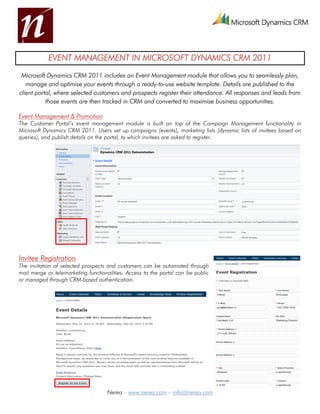
The Customer Portal’s event management module is built on top of the Campaign Management functionality in
Microsoft Dynamics CRM 2011. Users set up campaigns (events), marketing lists (dynamic lists of invitees based on
queries), and publish details on the portal, to which invitees are asked to register.


Invitee Registration
The invitation of selected prospects and customers can be automated through
mail merge or telemarketing functionalities. Access to the portal can be public
or managed through CRM-based authentication.


                                    Nerea – www.nerea.com – info@nerea.com
Response and Lead Capture
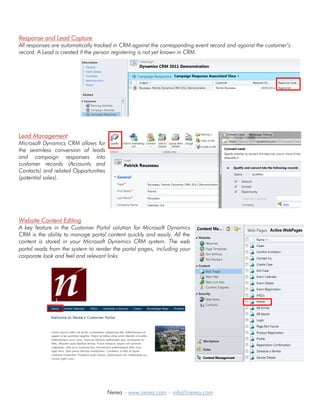
All responses are automatically tracked in CRM against the corresponding event record and against the customer’s
record. A Lead is created if the person registering is not yet known in CRM.


Lead Management
Microsoft Dynamics CRM allows for
the seamless conversion of leads
and campaign responses into
customer records (Accounts and
Contacts) and related Opportunities
(potential sales).


Website Content Editing
A key feature in the Customer Portal solution for Microsoft Dynamics
CRM is the ability to manage portal content quickly and easily. All the
content is stored in your Microsoft Dynamics CRM system. The web
portal reads from the system to render the portal pages, including your
corporate look and feel and relevant links


                                      Nerea – www.nerea.com – info@nerea.com

Event management in Microsoft Dynamics CRM 2011

  • 1.
    EVENT MANAGEMENT INMICROSOFT DYNAMICS CRM 2011 Microsoft Dynamics CRM 2011 includes an Event Management module that allows you to seamlessly plan, manage and optimise your events through a ready-to-use website template. Details are published to the client portal, where selected customers and prospects register their attendance. All responses and leads from those events are then tracked in CRM and converted to maximise business opportunities. Event Management & Promotion The Customer Portal’s event management module is built on top of the Campaign Management functionality in Microsoft Dynamics CRM 2011. Users set up campaigns (events), marketing lists (dynamic lists of invitees based on queries), and publish details on the portal, to which invitees are asked to register. Invitee Registration The invitation of selected prospects and customers can be automated through mail merge or telemarketing functionalities. Access to the portal can be public or managed through CRM-based authentication. Nerea – www.nerea.com – info@nerea.com
  • 2.
    Response and LeadCapture All responses are automatically tracked in CRM against the corresponding event record and against the customer’s record. A Lead is created if the person registering is not yet known in CRM. Lead Management Microsoft Dynamics CRM allows for the seamless conversion of leads and campaign responses into customer records (Accounts and Contacts) and related Opportunities (potential sales). Website Content Editing A key feature in the Customer Portal solution for Microsoft Dynamics CRM is the ability to manage portal content quickly and easily. All the content is stored in your Microsoft Dynamics CRM system. The web portal reads from the system to render the portal pages, including your corporate look and feel and relevant links Nerea – www.nerea.com – info@nerea.com