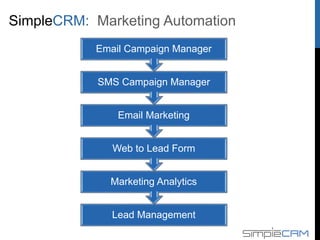
Marketing Automation
Lead Management
Marketing Analytics
Web to Lead Form
Email Marketing
SMS Campaign Manager
Email Campaign Manager
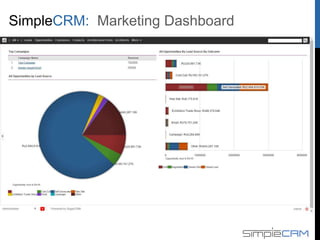
Marketing Dashboard
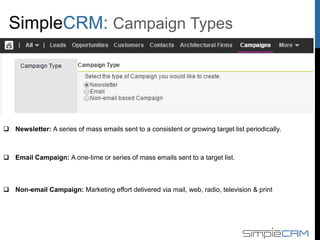
 Newsletter: A series of mass emails sent to a consistent or growing target list periodically.
 Email Campaign: A one-time or series of mass emails sent to a target list.
 Non-email Campaign: Marketing effort delivered via mail, web, radio, television & print
Campaign Types
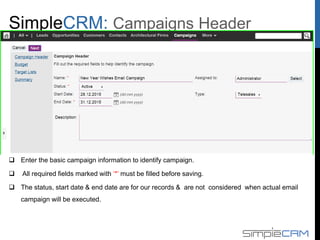
 Enter the basic campaign information to identify campaign.
 All required fields marked with ‘*’ must be filled before saving.
 The status, start date & end date are for our records & are not considered when actual email
campaign will be executed.
Campaign Header
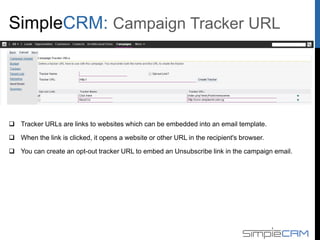
 Tracker URLs are links to websites which can be embedded into an email template.
 When the link is clicked, it opens a website or other URL in the recipient's browser.
 You can create an opt-out tracker URL to embed an Unsubscribe link in the campaign email.
Campaign Tracker URL
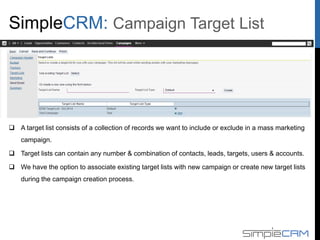
 A target list consists of a collection of records we want to include or exclude in a mass marketing
campaign.
 Target lists can contain any number & combination of contacts, leads, targets, users & accounts.
 We have the option to associate existing target lists with new campaign or create new target lists
during the campaign creation process.
Campaign Target List
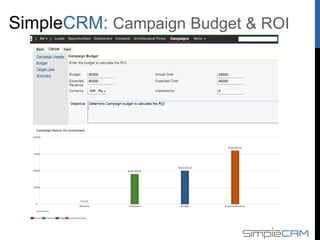
Campaign Budget & ROI
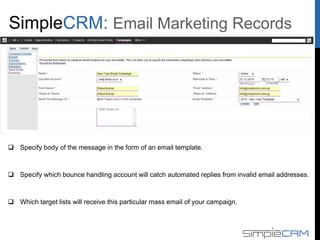
 Specify body of the message in the form of an email template.
 Specify which bounce handling account will catch automated replies from invalid email addresses.
 Which target lists will receive this particular mass email of your campaign.
Email Marketing Records
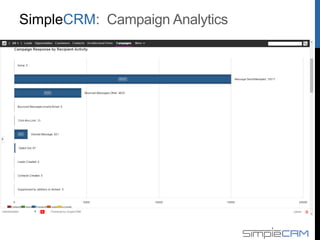
Campaign Analytics
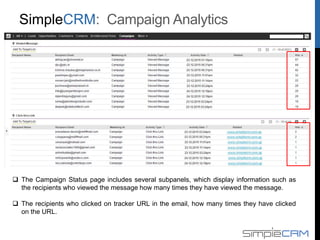
 The Campaign Status page includes several subpanels, which display information such as
the recipients who viewed the message how many times they have viewed the message.
 The recipients who clicked on tracker URL in the email, how many times they have clicked
on the URL.
Campaign Analytics
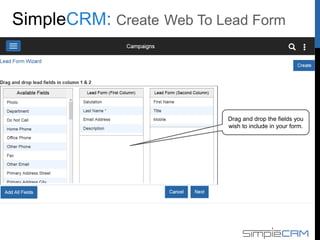
Drag and drop the fields you
wish to include in your form.
Create Web-to-Lead Form
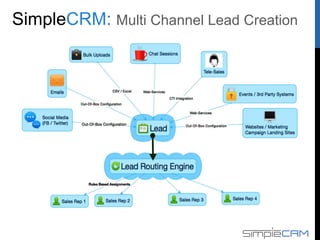
Multi Channel Lead Creation
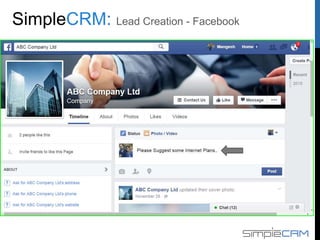
Lead Creation - Facebook
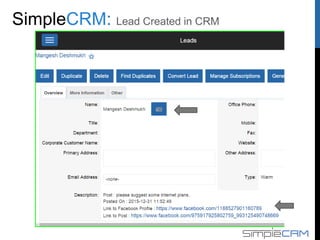
Lead Created in CRM
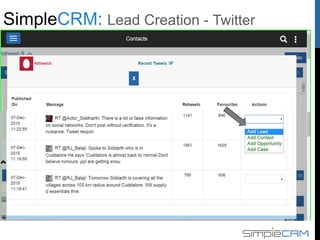
Lead Creation - Twitter
Marketing Automation
Email Campaign
manager
SMS Campaign
Manager
Email marketing
Web-to-lead forms
Lead management
Marketing analytics
Customer Support
Self-service portal
Case management
Inbound email
Knowledge Base
Bug tracking
SMS Alerts
Survey Module
Reporting
Business Intelligence
Sales trends
Case reports
Dashboards
Customer profiles
Lead Management
Opportunity
management
Contact management
Account management
Funnel Management
Mobility Solution –
Android Platform
Products, Quotes &
Orders
Product Catalogue
Quotes Builder
Order Management
Enterprise Scalability
Team Hierarchy
Performance Tuning
ISO-8583 Support
Workflows
Quote Approval
Case Escalation
Misc Components
Asterisk Integration
Partner Portal
Subscriptions Mgmt
Sales Automation
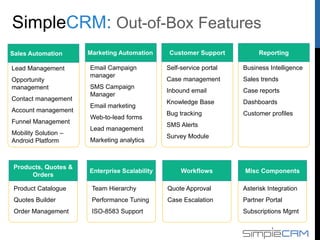
Out-of-Box Features
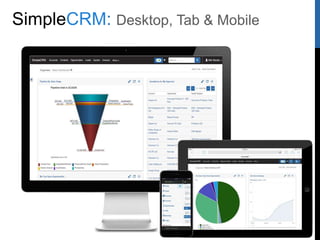
Desktop, Tab & Mobile
Thanks for your time!
>> Schedule Demo

SimpleCRM: Marketing Automation

  • 2.
    Marketing Automation Lead Management MarketingAnalytics Web to Lead Form Email Marketing SMS Campaign Manager Email Campaign Manager
  • 3.
  • 4.
     Newsletter: Aseries of mass emails sent to a consistent or growing target list periodically.  Email Campaign: A one-time or series of mass emails sent to a target list.  Non-email Campaign: Marketing effort delivered via mail, web, radio, television & print Campaign Types
  • 5.
     Enter thebasic campaign information to identify campaign.  All required fields marked with ‘*’ must be filled before saving.  The status, start date & end date are for our records & are not considered when actual email campaign will be executed. Campaign Header
  • 6.
     Tracker URLsare links to websites which can be embedded into an email template.  When the link is clicked, it opens a website or other URL in the recipient's browser.  You can create an opt-out tracker URL to embed an Unsubscribe link in the campaign email. Campaign Tracker URL
  • 7.
     A targetlist consists of a collection of records we want to include or exclude in a mass marketing campaign.  Target lists can contain any number & combination of contacts, leads, targets, users & accounts.  We have the option to associate existing target lists with new campaign or create new target lists during the campaign creation process. Campaign Target List
  • 8.
  • 9.
     Specify bodyof the message in the form of an email template.  Specify which bounce handling account will catch automated replies from invalid email addresses.  Which target lists will receive this particular mass email of your campaign. Email Marketing Records
  • 10.
  • 11.
     The CampaignStatus page includes several subpanels, which display information such as the recipients who viewed the message how many times they have viewed the message.  The recipients who clicked on tracker URL in the email, how many times they have clicked on the URL. Campaign Analytics
  • 12.
    Drag and dropthe fields you wish to include in your form. Create Web-to-Lead Form
  • 13.
  • 14.
  • 15.
  • 16.
  • 17.
    Marketing Automation Email Campaign manager SMSCampaign Manager Email marketing Web-to-lead forms Lead management Marketing analytics Customer Support Self-service portal Case management Inbound email Knowledge Base Bug tracking SMS Alerts Survey Module Reporting Business Intelligence Sales trends Case reports Dashboards Customer profiles Lead Management Opportunity management Contact management Account management Funnel Management Mobility Solution – Android Platform Products, Quotes & Orders Product Catalogue Quotes Builder Order Management Enterprise Scalability Team Hierarchy Performance Tuning ISO-8583 Support Workflows Quote Approval Case Escalation Misc Components Asterisk Integration Partner Portal Subscriptions Mgmt Sales Automation Out-of-Box Features
  • 18.
  • 19.
    Thanks for yourtime! >> Schedule Demo

Editor's Notes

  • #18 We offer a comprehensive CRM solution that allows you to automate all your customer facing functions