Business Productivity at Its Best
Microsoft Office, Microsoft SharePoint, Microsoft Exchange,
and Microsoft Office Communications Server


                                                     White Paper
                                                      April 2010
DISCLAIMER
The information contained in this document represents the current plans of Microsoft Corporation on the issues presented at the date
of publication. Because Microsoft must respond to changing market conditions, it should not be interpreted to be a commitment on
the part of Microsoft, and Microsoft cannot guarantee the accuracy of any information presented after the date of publication.
Schedules and features contained in this document are subject to change.

Unless otherwise noted, the companies, organizations, products, domain names, e-mail addresses, logos, people, places, and events
depicted in examples herein are fictitious. No association with any real company, organization, product, domain name, e-mail
address, logo, person, place, or event is intended or should be inferred.
Complying with all applicable copyright laws is the responsibility of the user. Without limiting the rights under copyright, no part of
this document may be reproduced, stored in or introduced into a retrieval system, or transmitted in any form or by any means
(electronic, mechanical, photocopying, recording, or otherwise), or for any purpose, without the expressed written permission of
Microsoft Corporation.
Microsoft may have patents, patent applications, trademarks, copyrights, or other intellectual property rights covering subject matter
in this document. Except as expressly provided in any written license agreement from Microsoft, the furnishing of this document does
not give any license or rights to these patents, trademarks, copyrights, or other intellectual property.
© 2010 Microsoft Corporation. All rights reserved.
Microsoft, the Microsoft logo, Backstage, Excel, Excel Services, FrontPage, Groove, InfoPath, OneNote, Outlook, PivotTable,
PowerPivot, PowerPoint, SharePoint, Visio, and Windows are either registered trademarks or trademarks of Microsoft Corporation in
the United States and/or other countries.
All other trademarks are property of their respective owners.
Abstract
                                          ®                                      ®
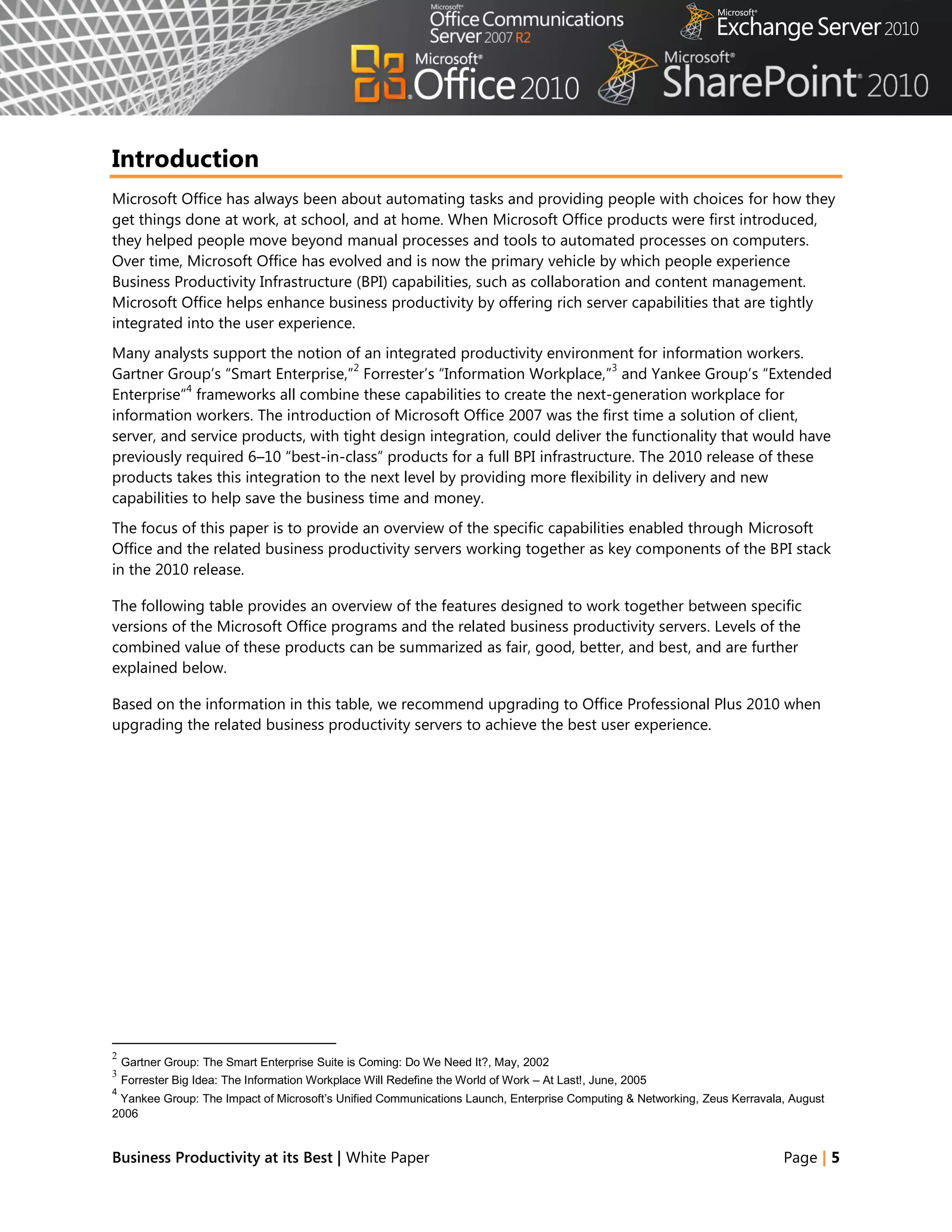
This paper shows how Microsoft Office, Microsoft SharePoint , Microsoft Exchange, and Microsoft Office
Communications Server contribute to the powerful architectural design of the Microsoft Business
Productivity Infrastructure (BPI). The BPI stack approach suggests that only by thinking at a capability level
(for example, “What do users want to do?‖), and then adding the right aspects of capability in each place
(client, server, and services), can we create desktop applications that also deliver rich server and services
capabilities to information workers.
This paper describes how the 2010 and 2007 versions of Office work together with the related business
productivity servers: SharePoint 2010, Exchange 2010 and Office Communications Server 2007 R2.
The scenarios outlined in this paper show examples of how the power of the business productivity servers
can be combined with capabilities of one or more Microsoft Office 2010 applications to deliver rich,
intuitive, and easy-to-use capabilities directly into the hands of desktop users. The scenarios cover the
following BPIO capabilities and value areas:
     Best Productivity Experience                         Enterprise Content Management
      across PC, Phone, Browser                            Collaboration
     Unified Communications                               Unified Business Platform
     Business Intelligence


The paper concludes that to realize the best user experience with Office and the business productivity
servers, organizations should upgrade client programs to Office Professional Plus 2010 and server
                                                                                              1
technologies to SharePoint 2010, Exchange 2010, and Office Communications Server 2007 R2.


1 This whitepaper was published prior to the release of Microsoft Communications Server 2010 and includes descriptions of features from
Office Communications Server 2007 R2


Business Productivity at its Best | White Paper                                                                                Page | 3
Contents
Abstract ......................................................................................................................................................3
Introduction ..............................................................................................................................................5
Best Productivity Experience across PC, Phone, Browser ..........................................................7
Unified Communications ................................................................................................................... 17
Business Intelligence ........................................................................................................................... 24
Enterprise Content Management ................................................................................................... 27
Collaboration ......................................................................................................................................... 31
Unified Business Platform ................................................................................................................. 39
Conclusion .............................................................................................................................................. 42
Appendix: Capability Comparison Tables .................................................................................... 43


Business Productivity at its Best | White Paper                                                                                                    Page | 4
Introduction
Microsoft Office has always been about automating tasks and providing people with choices for how they
get things done at work, at school, and at home. When Microsoft Office products were first introduced,
they helped people move beyond manual processes and tools to automated processes on computers.
Over time, Microsoft Office has evolved and is now the primary vehicle by which people experience
Business Productivity Infrastructure (BPI) capabilities, such as collaboration and content management.
Microsoft Office helps enhance business productivity by offering rich server capabilities that are tightly
integrated into the user experience.
Many analysts support the notion of an integrated productivity environment for information workers.
                                     2                                      3
Gartner Group‘s ―Smart Enterprise,‖ Forrester‘s ―Information Workplace,‖ and Yankee Group‘s ―Extended
            4
Enterprise‖ frameworks all combine these capabilities to create the next-generation workplace for
information workers. The introduction of Microsoft Office 2007 was the first time a solution of client,
server, and service products, with tight design integration, could deliver the functionality that would have
previously required 6–10 ―best-in-class‖ products for a full BPI infrastructure. The 2010 release of these
products takes this integration to the next level by providing more flexibility in delivery and new
capabilities to help save the business time and money.
The focus of this paper is to provide an overview of the specific capabilities enabled through Microsoft
Office and the related business productivity servers working together as key components of the BPI stack
in the 2010 release.

The following table provides an overview of the features designed to work together between specific
versions of the Microsoft Office programs and the related business productivity servers. Levels of the
combined value of these products can be summarized as fair, good, better, and best, and are further
explained below.

Based on the information in this table, we recommend upgrading to Office Professional Plus 2010 when
upgrading the related business productivity servers to achieve the best user experience.


2
    Gartner Group: The Smart Enterprise Suite is Coming: Do We Need It?, May, 2002
3
    Forrester Big Idea: The Information Workplace Will Redefine the World of Work – At Last!, June, 2005
4
 Yankee Group: The Impact of Microsoft’s Unified Communications Launch, Enterprise Computing & Networking, Zeus Kerravala, August
2006


Business Productivity at its Best | White Paper                                                                          Page | 5
Combined                                                              Description
      Value
                                                ®
    Fair             Microsoft SharePoint Portal Server was released in 2001 along with Microsoft Office XP. It
                     introduced the first interactions with Office and also worked with Microsoft Office 2000. It included
                     Web Parts and document libraries with check in/check out functionality and alerts.
                     Exchange Server 2000 enables people to send mail directly from any Office 2000 application. It
                     provides built-in indexing and search across a diverse set of information types, including Office
                     documents. Outlook Web Access lets people access email and calendars with a web browser.
    Good             Microsoft Office 2003 provides a good level of integration with Microsoft SharePoint Portal Server
                     2003, which introduced MySites. It was the first time the products co-shipped, and the integration
                     allows users to create documents, organize team meetings and activities, work with SharePoint lists in
                                           ®                                      ®
                     Microsoft Office Excel , and use Microsoft Office FrontPage 2003 to customize lists or Web Parts on
                     SharePoint sites.
                     Exchange Server 2003 with Office 2003 helps people plan for and organize meetings by storing and
                     sharing agendas, visuals, document links, attendee lists, and other documentation in a location
                     everyone can access. This release also provided a cached Exchange mode and introduced RPC over
                                                                                             ®
                     HTTP for improved online/offline syncing with Microsoft Office Outlook .
                                                                                                                ®
    Better           Microsoft Office 2007 provides contextual integration with Microsoft Office SharePoint Server
                     2007, which allows people to interact with SharePoint sites without leaving their Microsoft Office
                     programs, and provides online/offline access with two-way synchronization for select information
                                                                   ®
                     through Outlook and Microsoft Office Groove . The Business Data Catalog (BDC) was introduced,
                     enabling line-of-business (LOB) data to be surfaced through SharePoint and Office.
                     Exchange Server 2007 with Office 2007 provides people with rich access to e-mail, calendars,
                     attachments, and contacts from more locations and devices. Unified messaging capabilities let users
                     receive voice mail, e-mail and faxes in their Outlook inbox.
                     The first release of Office Communications Server 2007 enables people to communicate and
                     collaborate easily with others in different locations using a variety of options, including instant
                     messaging (IM), voice, audio and video conferencing, with rich presence indicators integrated in Office
                     2007 applications.
    Best             Microsoft Office 2010 with SharePoint 2010 gives people the ability to seamlessly view and edit
                                                                         5                       ®
                     information from a PC, browser, and smartphone . Microsoft SharePoint Workspace 2010 (formerly
                     Groove) makes it easier for people to take information online and offline and Business Connectivity
                     Services (BCS) makes it easier to enable users to work with LOB information from within familiar Office
                     applications. The new Microsoft Office Backstage™ view helps to surface SharePoint 2010 capabilities
                     in the context of Office applications, including greater automation of metadata capture and
                     streamlined access to document libraries and SharePoint sites. Also, integration between these two
                     products provides the ability to co-author documents, presentations, worksheets and notebooks.
                     Exchange 2010 with Office 2010 provides a more powerful user experience for staying up-to-date on
                     the go through a PC, phone or browser. New capabilities provide IT Pros with simplified administration
                     tools and users with new inbox management tools that boost productivity and calendaring capabilities
                     that simplifying scheduling. MailTips is a new feature to help prevent information leakages and
                     embarrassing e-mail mistakes.
                     Office Communications Server 2007 R2 surfaces presence information with contact cards and
                     provides the ability to initiate voice or IM conversations from directly within Office 2010 applications—
                     through Backstage view author information, Outlook contacts and co-authoring indicators. Desktop-
                     sharing capabilities allow users to collaborate with one another while they talk to each other using
                     enhanced audio conferencing features.

5
    Some mobile functionality requires Office Mobile 2010 which is not included in Office 2010 applications, suites, or Web Apps


Business Productivity at its Best | White Paper                                                                                    Page | 6
Best Productivity Experience across PC, Phone, Browser
Mobile work is no longer just about the sales force. More than ever, employees in a variety of roles are
expected to be ―always on and always connected,‖ even when they are away from the office. To enable
the fast response they want to provide, these workers need the ability to access information from more
places and on more devices. Taking action on the go can be difficult, especially if workers cannot connect
to the business network or access the right information for their jobs. And while telecommuting and
working on the go can reduce costs and increase productivity, it potentially opens up access and security
concerns.
Microsoft Office 2010 and related server capabilities are helping people access Office applications,
documents and their inboxes (IM, e-mail, and voice mail) across a range of devices, virtually regardless of
location.


Office 2010 with Related Business Productivity Servers
Enable people to access and respond to information from virtually anywhere, with confidence
that content changes and fidelity are highly maintained across locations and devices.
With Microsoft Office 2010 and related server capabilities, information access is extended to enable
people to work from more places and on more devices with a browser, and to keep everyone more
productive, even on the go. New mobile access enhancements offer a familiar experience tailored to
mobile devices, so co-workers in different locations can share, edit, and comment on documents or
presentations from their mobile devices. Whether they view or edit documents, spreadsheets, or
presentations on a PC, browser, or mobile device, they can experience high fidelity across all devices.


Scenario
Enable people who travel without a PC to comment on a press release.
Let‘s consider an example in which the Finance Director, Robert Lyon, is heading out for a long weekend
in the country. He leaves his PC behind but brings his mobile device. While he is away, some late-breaking
company news requires him to review and edit a press release.


Business Productivity at its Best | White Paper                                                     Page | 7
FEATURES
                                 Mobile Access Enhancements
     Viewing and Editing Documents, Spreadsheets, Presentations, and Notebooks in a Browser

      Microsoft Office 2010 with 2010 Servers                            Microsoft Office 2007 with 2010 Servers

   Before Robert revises the press release document to                Before Robert revises the press release document to
    announce fourth-quarter earnings, he needs to update                announce fourth-quarter earnings, he needs to
    the regional revenue in the quarterly earnings report in            update the regional revenue in the quarterly earnings
    Excel.                                                              report in Excel.
                                                  6
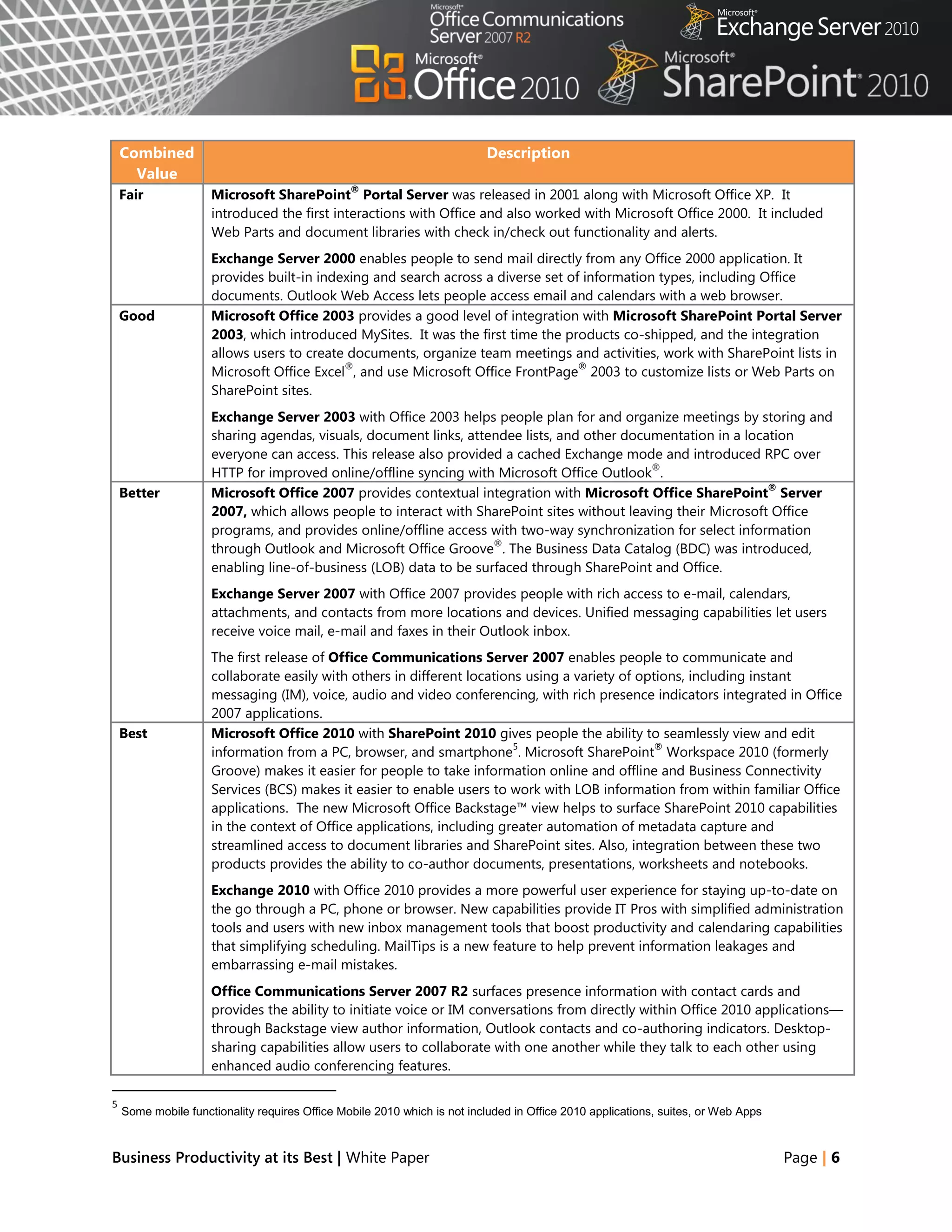
   Robert uses the browser on his mobile device to                    Robert sends an e-mail to his colleague, David
    navigate to the SharePoint 2010 library and opens the               Bradley, to forward the revenue report in Excel 2007,
    revenue report in the Excel Web App (running in the                 as it is hosted in SharePoint 2010 and he does not
    browser), confident that changes he makes on his                    have access to it.
    mobile device will not change the quality or format of             The next day, David sends the document to Robert as
    the spreadsheet‘s appearance.                                       an e-mail attachment.


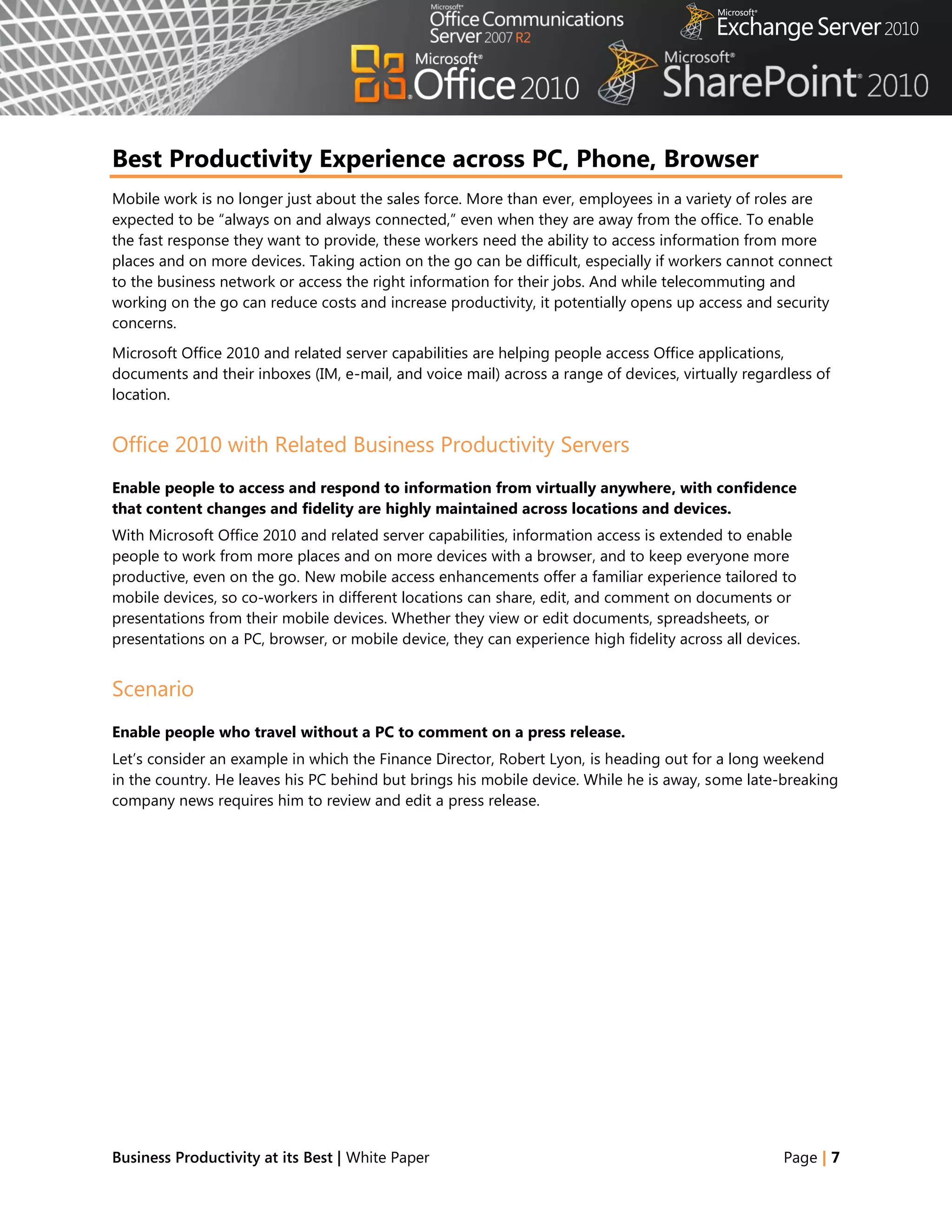
                                                                       Robert receives the revenue report as an e-mail
                                                                        attachment and updates the revenue figures in the
                                                                        Excel 2007 report by using Microsoft Office Mobile.


   Robert updates the revenue figures with the
    confidence that the changes are saved as he intends
    and the whole team will stay up-to-date.
   Using Microsoft Office Communicator Mobile 2007 R2,
    he finds that his colleague, David Bradley, is available.
    Robert quickly sends an instant message asking David
    to update the press release and saying that he will
    review it once he gets back to the hotel.
   The team takes Robert‘s figures and rebuilds the
    quarterly earnings section of the press release.
   Meanwhile, Robert needs to add executive
    commentary to support the new data. When he arrives


6
 Given mobile connectivity to corporate resources, most Smartphones using the microbrowser standard (iPhone, RIM, Symbian and
Windows Mobile) can access documents stored on a server via their Smartphone browser.


Business Productivity at its Best | White Paper                                                                           Page | 8
Microsoft Office 2010 with 2010 Servers                         Microsoft Office 2007 with 2010 Servers

    at his vacation destination, he finds that the hotel has a      Robert sends the e-mail with the updated Excel
    small business center with a PC and Internet access.             report attached.
   The PC does not have Microsoft Office installed, but            Using Office Communicator Mobile 2007 R2, he finds
    Robert can use Web Apps to view the documents—just               that his colleague, David Bradley, is available. Robert
    as he is used to seeing them on his PC—and make the              quickly sends an instant message asking David to
    necessary edits.                                                 update the press release and saying that he will
   Using the PC‘s browser, Robert navigates to a                    review it once he gets back to the hotel.
    document library within his company‘s SharePoint sites          The team takes Robert‘s figures and rebuilds the
    and opens the draft press release in the Word Web                quarterly earnings section of the press release.
    App.                                                            Meanwhile, Robert also needs to add executive
   From within the browser, Robert views the press                  commentary to support the new data. When he
    release document, just as he would see it on his PC,             arrives at his vacation destination, he finds that the
    and makes minor edits.                                           hotel has a small business center with a PC and
                                                                     Internet access.
                                                                    The PC does not have Microsoft Office installed, so he
                                                                     cannot get access to the file.
                                                                    Robert heads out to find a local Internet café where
                                                                     the PCs have Office 2003 installed.
                                                                    At the café, he signs in to his e-mail through the
                                                                     Outlook Web App, where he can get the press release
                                                                     document and presentation from an e-mail
                                                                     attachment.
                                                                    Robert downloads the document and presentation to
                                                                     the PC. Fortunately, the computer has the Office file
                                                                     converter pack installed since the files were originally
                                                                     created with Office 2007.
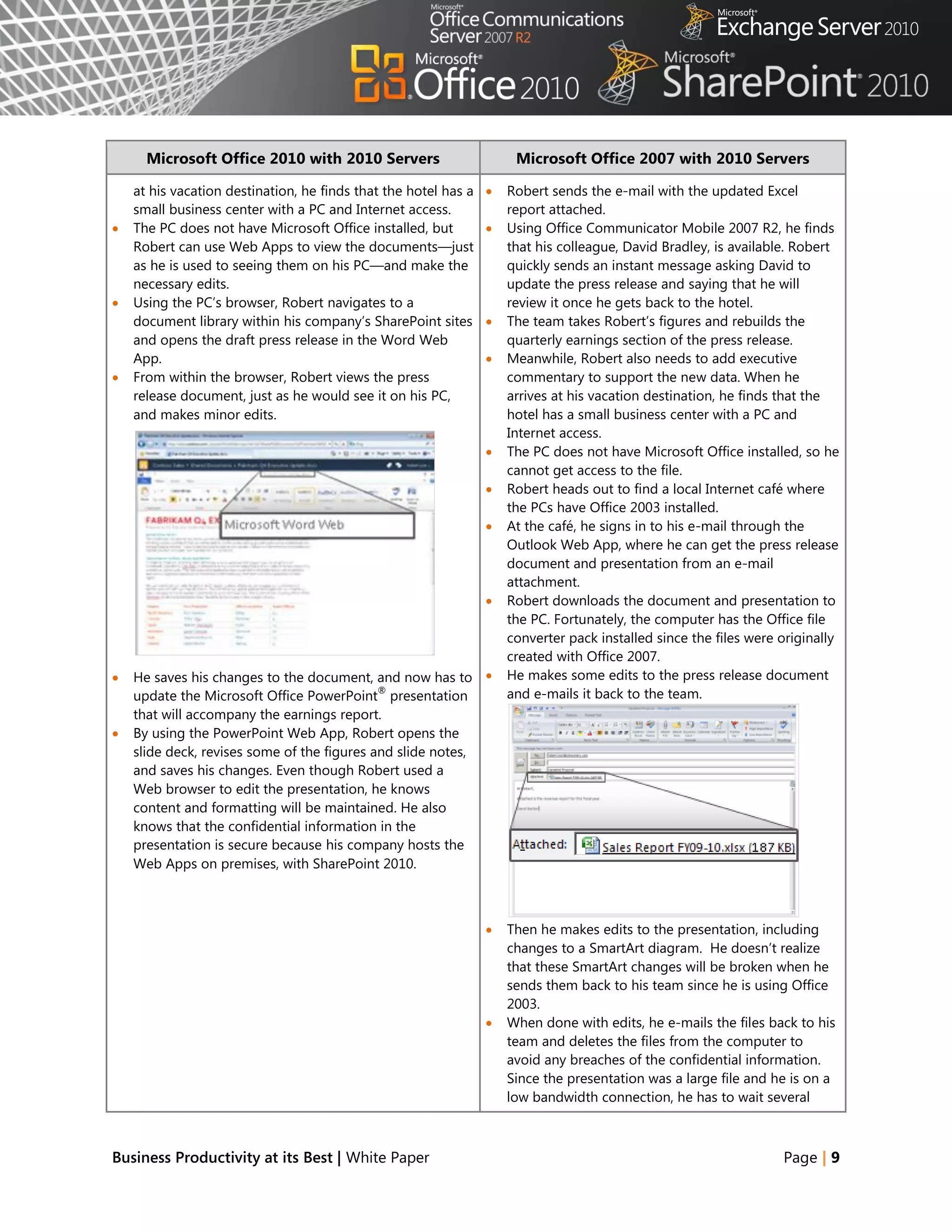
   He saves his changes to the document, and now has to            He makes some edits to the press release document
                                             ®
    update the Microsoft Office PowerPoint presentation              and e-mails it back to the team.
    that will accompany the earnings report.
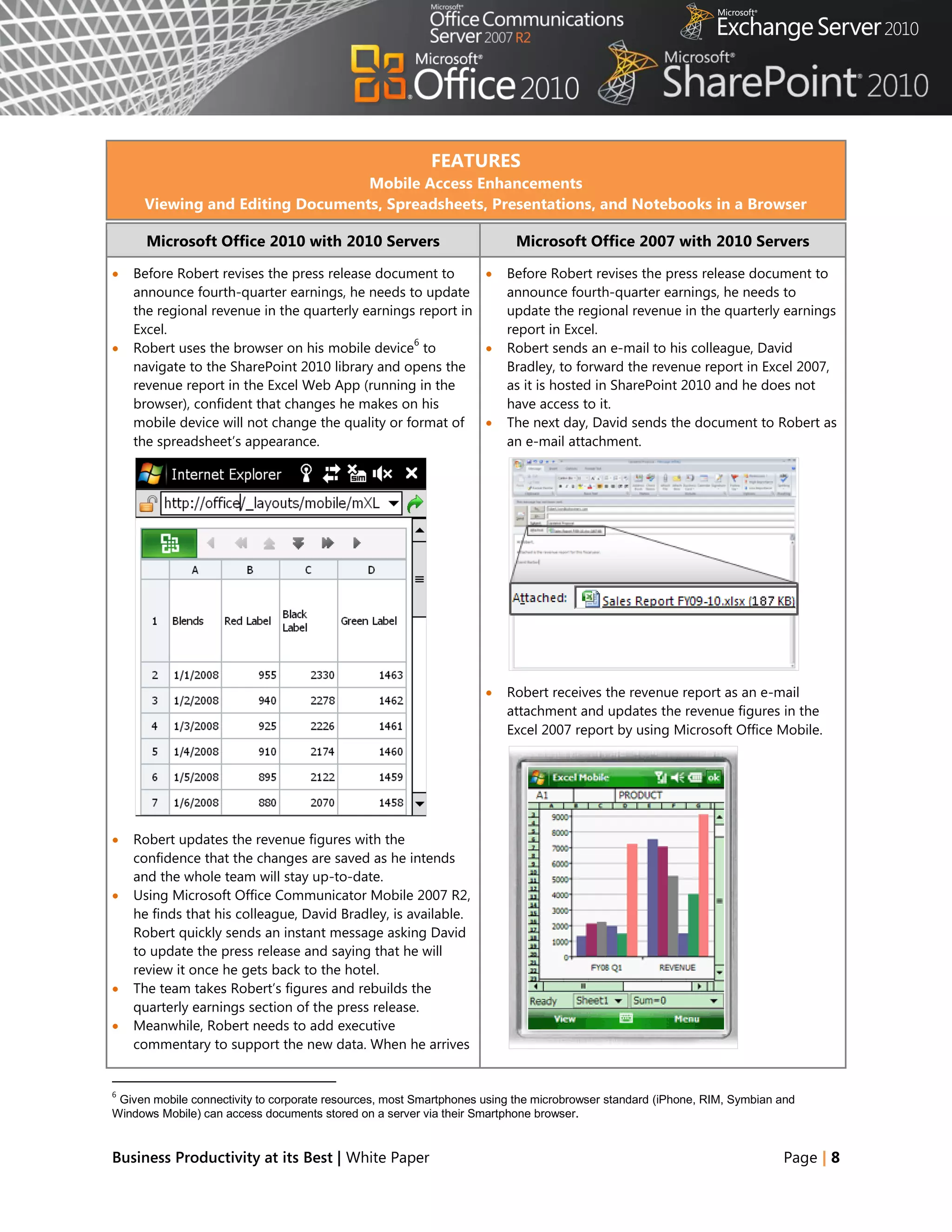
   By using the PowerPoint Web App, Robert opens the
    slide deck, revises some of the figures and slide notes,
    and saves his changes. Even though Robert used a
    Web browser to edit the presentation, he knows
    content and formatting will be maintained. He also
    knows that the confidential information in the
    presentation is secure because his company hosts the
    Web Apps on premises, with SharePoint 2010.


                                                                    Then he makes edits to the presentation, including
                                                                     changes to a SmartArt diagram. He doesn‘t realize
                                                                     that these SmartArt changes will be broken when he
                                                                     sends them back to his team since he is using Office
                                                                     2003.
                                                                    When done with edits, he e-mails the files back to his
                                                                     team and deletes the files from the computer to
                                                                     avoid any breaches of the confidential information.
                                                                     Since the presentation was a large file and he is on a
                                                                     low bandwidth connection, he has to wait several


Business Productivity at its Best | White Paper                                                                    Page | 9
Microsoft Office 2010 with 2010 Servers                       Microsoft Office 2007 with 2010 Servers

                                                                   minutes to ensure that the file has been sent.
                                                                  The rest of his team collects Robert‘s changes and
                                                                   updates the press release.
                                                                  Robert finds a meeting request for a conference call
                                                                   from David through the Outlook Web App. Since
                                                                   using a shared machine, he clicks on the link to ―Join
                                                                   using a Web browser‖ and has the call sent to his
                                                                   mobile phone.


   Robert is finished with the last-minute changes. The
    rest of his team collects Robert‘s changes from
    SharePoint 2010, updates the press release, and sends
    Robert an instant message to his mobile device, asking
    for a final review. Robert responds that he can attend a
    Web conference to review.
   Robert returns to the hotel‘s PC, opens the Outlook
    Web App, and finds the conference call appointment
    from David. Since he is using a shared machine, he
    clicks on the link to ―Join using a Web browser‖ and
    has the server call his mobile phone.


Benefit: Productivity for all Workstyles and Mobile Situations
     ◦ Save time and resolve issues faster
     ◦ Support telecommuting which can save on overhead costs of real estate and facilities


Business Productivity at its Best | White Paper                                                                Page | 10
Office 2010
Manage your Inbox and create more compelling presentations.
With increasing e-mail volume, people can fall victim to ―information overload.‖ Out-of-the-box
capabilities in Microsoft Office 2010 help you cut through the ever-increasing information that you
receive daily. New e-mail management capabilities remove duplicate information and help you process e-
mails faster. You can also quickly create, format, and deliver more compelling documents and
presentations.


Scenario
Quickly organize e-mail and create a presentation.
Consider the example below where Judy Lew, a manager at a franchise of national sporting goods store
Adventure Works, returns from her honeymoon and finds that she must quickly create a compelling sales
presentation for an executive visiting her store.


Business Productivity at its Best | White Paper                                              Page | 11
FEATURES
                                   Outlook Conversation View, Clean Up, Ignore
                                                Excel Sparklines
                                             Paste with Live Preview
                                              Photo/Video Editing

                Microsoft Office 2010                                         Microsoft Office 2007

   Judy has just returned from her honeymoon. When              Judy must remember to change her automatic out-of-
    she opens Outlook 2010, the information bar                   office reply. She has a small Out of Office indicator at
    immediately reminds her to turn off her automatic             the very bottom of Outlook 2007. She clicks Out of
    out of office reply, so that co-workers will know she         Office to turn off Out of Office auto-replies.
    is back in the store.


   In her Inbox she finds hundreds of unread e-mails
    that arrived while she was on vacation. The updated         Judy has hundreds of unread e-mails organized by
    ribbon toolbar in Outlook 2010 provides a highly             date. She starts by going through the earliest e-mails of
    visual layout of commands. She clicks Show as                hundreds she has received.
    Conversation to change the e-mail organization from
    Date to Date (Conversations). Now multiple e-mails
    are condensed into discussions reducing hundreds
    of emails to just a few conversations.


                                                                She reviews updates to one e-mail conversation
                                                                 multiple times.


                                                                As Judy sees e-mails that are not relevant she deletes
                                                                 them individually, which means she must individually
   As Judy reviews her Inbox, she sees several irrelevant
                                                                 delete 10 responses to the ‗Remember to empty the
    e-mail threads such as unimportant e-mail messages
                                                                 break room refrigerator‘ e-mail.
    to a mass distribution list (‘Remember to empty the
    break room refrigerator’) She clicks Ignore, which
    sends those messages and related items to her
    Deleted Items.


Business Productivity at its Best | White Paper                                                                Page | 12
Microsoft Office 2010                                          Microsoft Office 2007


   She sees an e-mail thread from Derek Snyder, the             Judy finds an e-mail from Derek Snyder that she
    National Sales Director. Judy clicks Clean Up                 believes is important. From one e-mail message it
    Conversation which removes all redundant e-mails              appears that he is coming to visit the store. Judy is
    and allows her to identify the last e-mail from the           unsure which e-mails from Derek and his assistant
    cleaned up thread. She sees that Mr. Snyder is                contain new information. There are also split
    visiting her store the next day and is requesting a           conversations where someone responded to a different
    presentation on how Judy‘s store has effectively              e-mail thread, which means she can‘t just review the
    increased the sales of bicycle helmets.                       last e-mail to see message history. She must review
                                                                  dozens of e-mails from Derek and his assistant, reading
                                                                  messages multiple times before understanding that he
                                                                  is visiting her store the next day and is requesting a
                                                                  presentation on sales of bicycle helmets.


   Judy opens her monthly sales spreadsheet in Excel
    2010 and applies conditional formatting to better
    show actual sales versus sales goals. She confirms
    that the data shows a television commercial and
    promotion helped increase sales of bicycle helmets
    in June. Judy also wants to show Mr. Snyder the
    store‘s monthly sales, which she can do visually
    within a single cell for each product using Sparklines.      Judy opens her monthly sales spreadsheet in Excel
                                                                  2007. To show the monthly sales trend, she must create
                                                                  a separate graph. She spends several minutes
                                                                  formatting the chart which is difficult to read and also
                                                                  takes up much of the worksheet.


Business Productivity at its Best | White Paper                                                                Page | 13
Microsoft Office 2010                                         Microsoft Office 2007


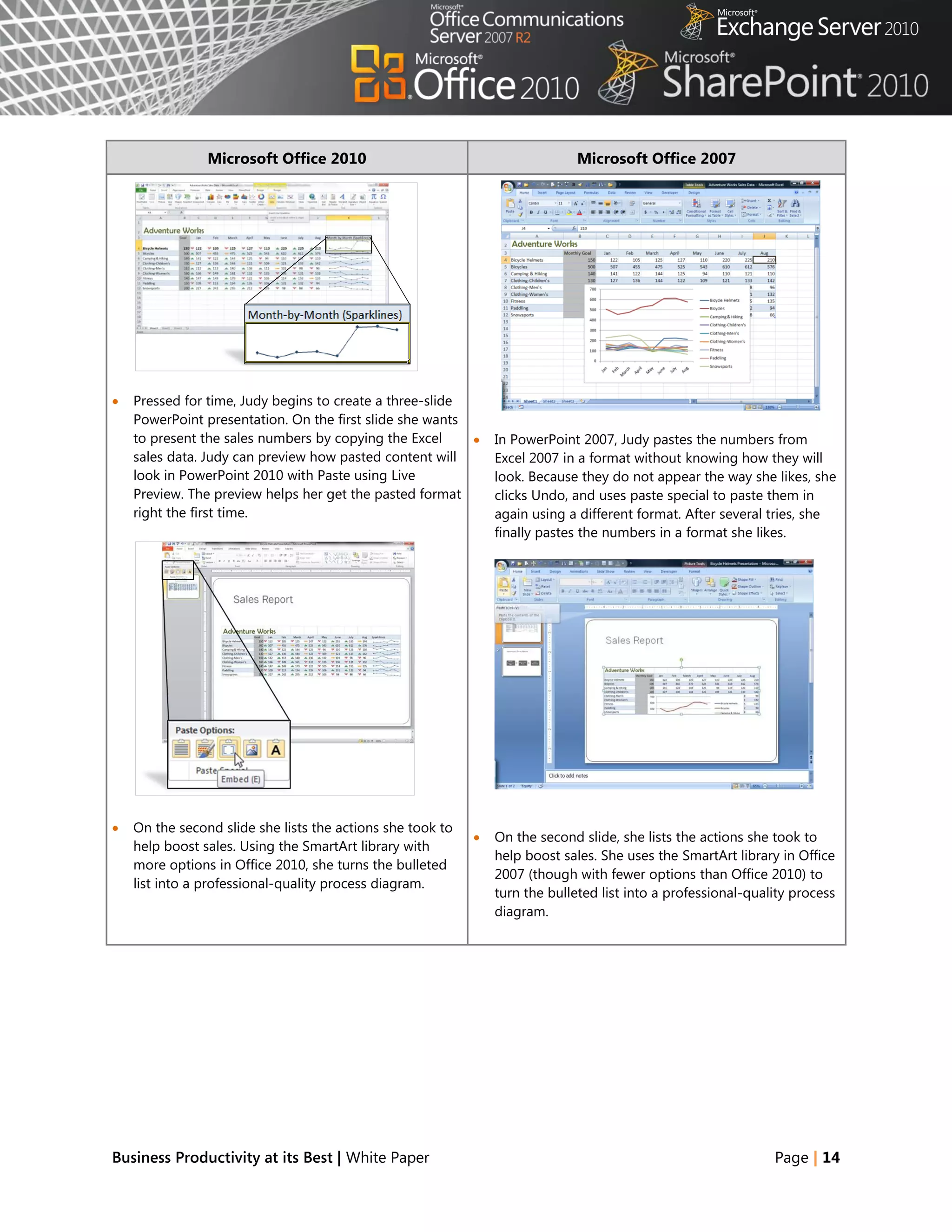
   Pressed for time, Judy begins to create a three-slide
    PowerPoint presentation. On the first slide she wants
    to present the sales numbers by copying the Excel          In PowerPoint 2007, Judy pastes the numbers from
    sales data. Judy can preview how pasted content will        Excel 2007 in a format without knowing how they will
    look in PowerPoint 2010 with Paste using Live               look. Because they do not appear the way she likes, she
    Preview. The preview helps her get the pasted format        clicks Undo, and uses paste special to paste them in
    right the first time.                                       again using a different format. After several tries, she
                                                                finally pastes the numbers in a format she likes.


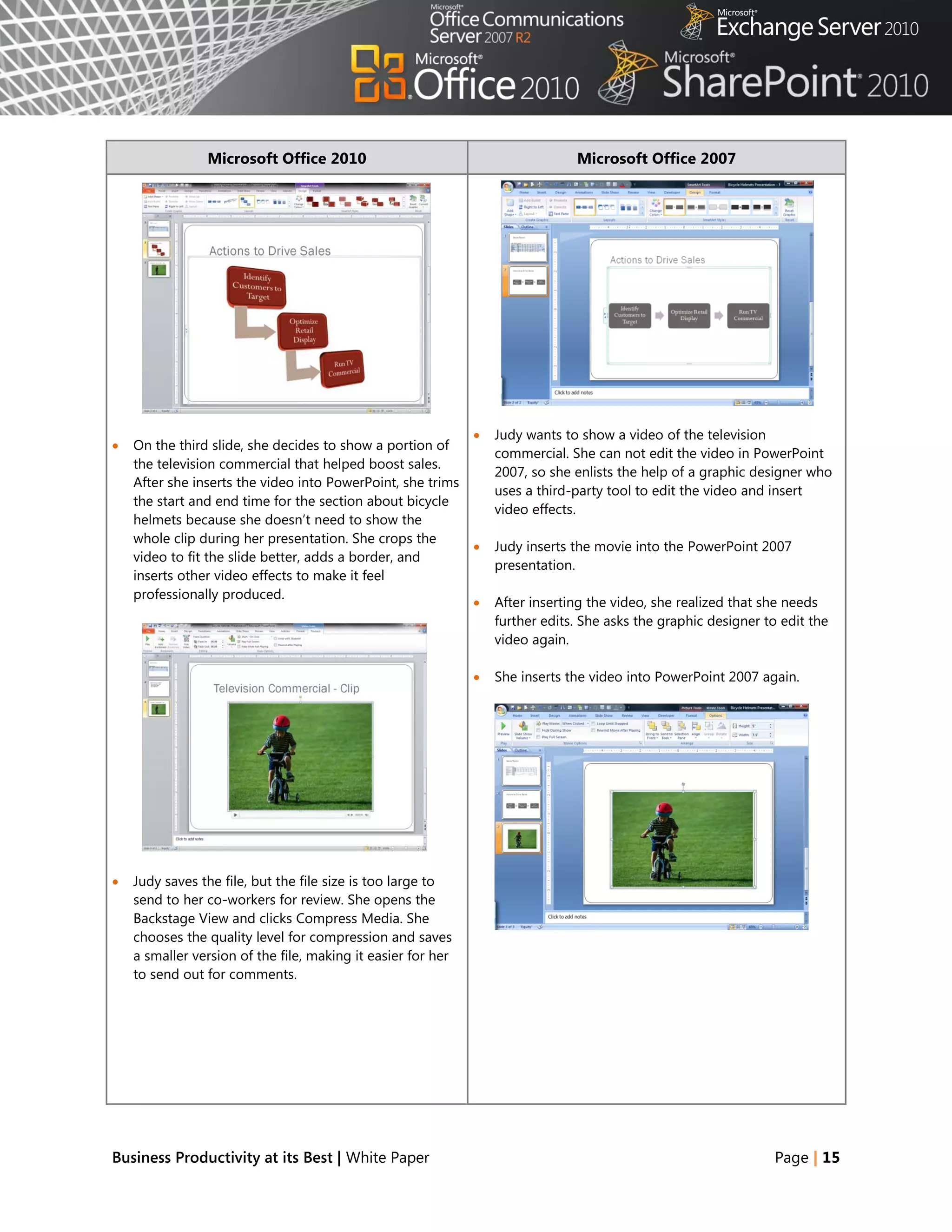
   On the second slide she lists the actions she took to
                                                               On the second slide, she lists the actions she took to
    help boost sales. Using the SmartArt library with
                                                                help boost sales. She uses the SmartArt library in Office
    more options in Office 2010, she turns the bulleted
                                                                2007 (though with fewer options than Office 2010) to
    list into a professional-quality process diagram.
                                                                turn the bulleted list into a professional-quality process
                                                                diagram.


Business Productivity at its Best | White Paper                                                                Page | 14
Microsoft Office 2010                                          Microsoft Office 2007


                                                                 Judy wants to show a video of the television
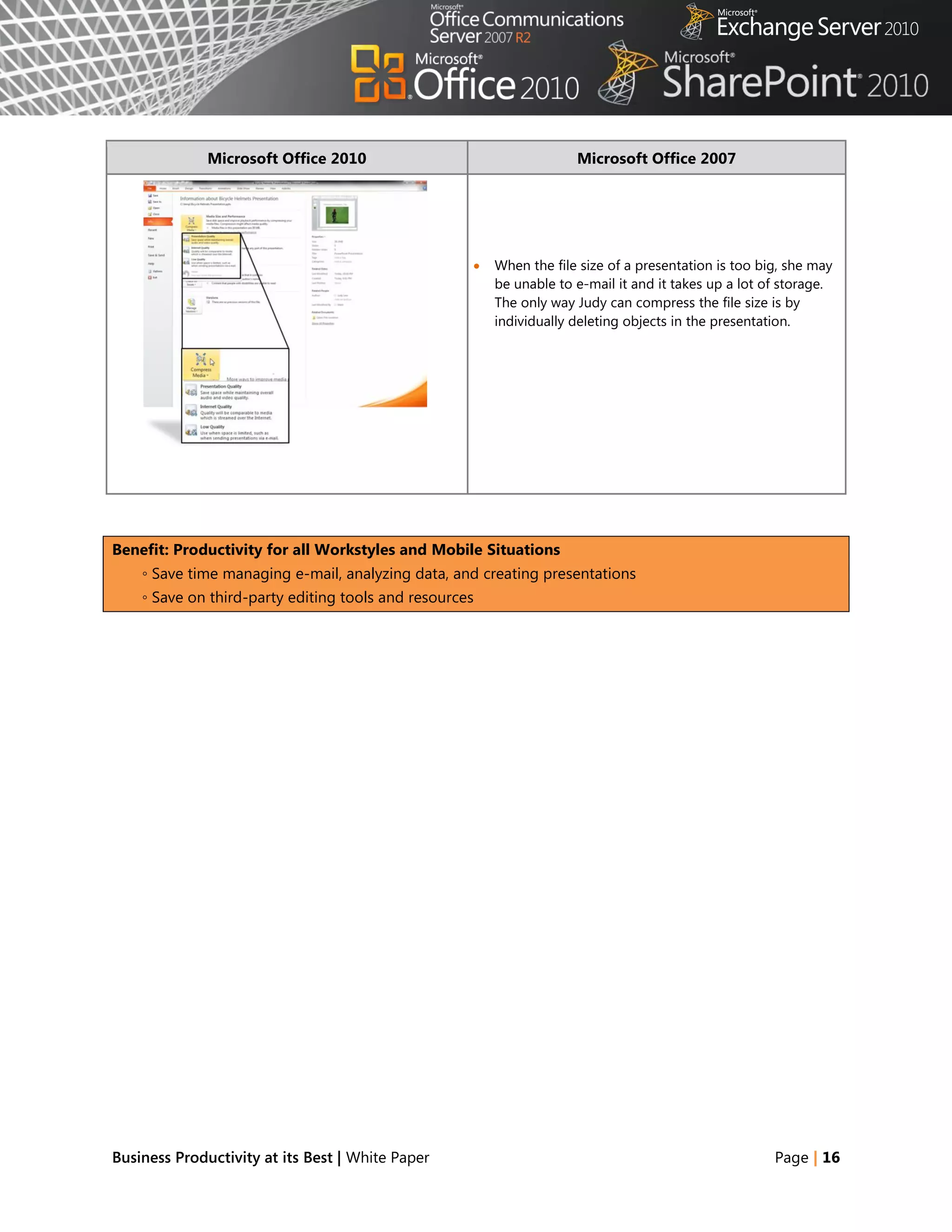
   On the third slide, she decides to show a portion of
                                                                  commercial. She can not edit the video in PowerPoint
    the television commercial that helped boost sales.
                                                                  2007, so she enlists the help of a graphic designer who
    After she inserts the video into PowerPoint, she trims
                                                                  uses a third-party tool to edit the video and insert
    the start and end time for the section about bicycle
                                                                  video effects.
    helmets because she doesn‘t need to show the
    whole clip during her presentation. She crops the
                                                                 Judy inserts the movie into the PowerPoint 2007
    video to fit the slide better, adds a border, and
                                                                  presentation.
    inserts other video effects to make it feel
    professionally produced.
                                                                 After inserting the video, she realized that she needs
                                                                  further edits. She asks the graphic designer to edit the
                                                                  video again.

                                                                 She inserts the video into PowerPoint 2007 again.


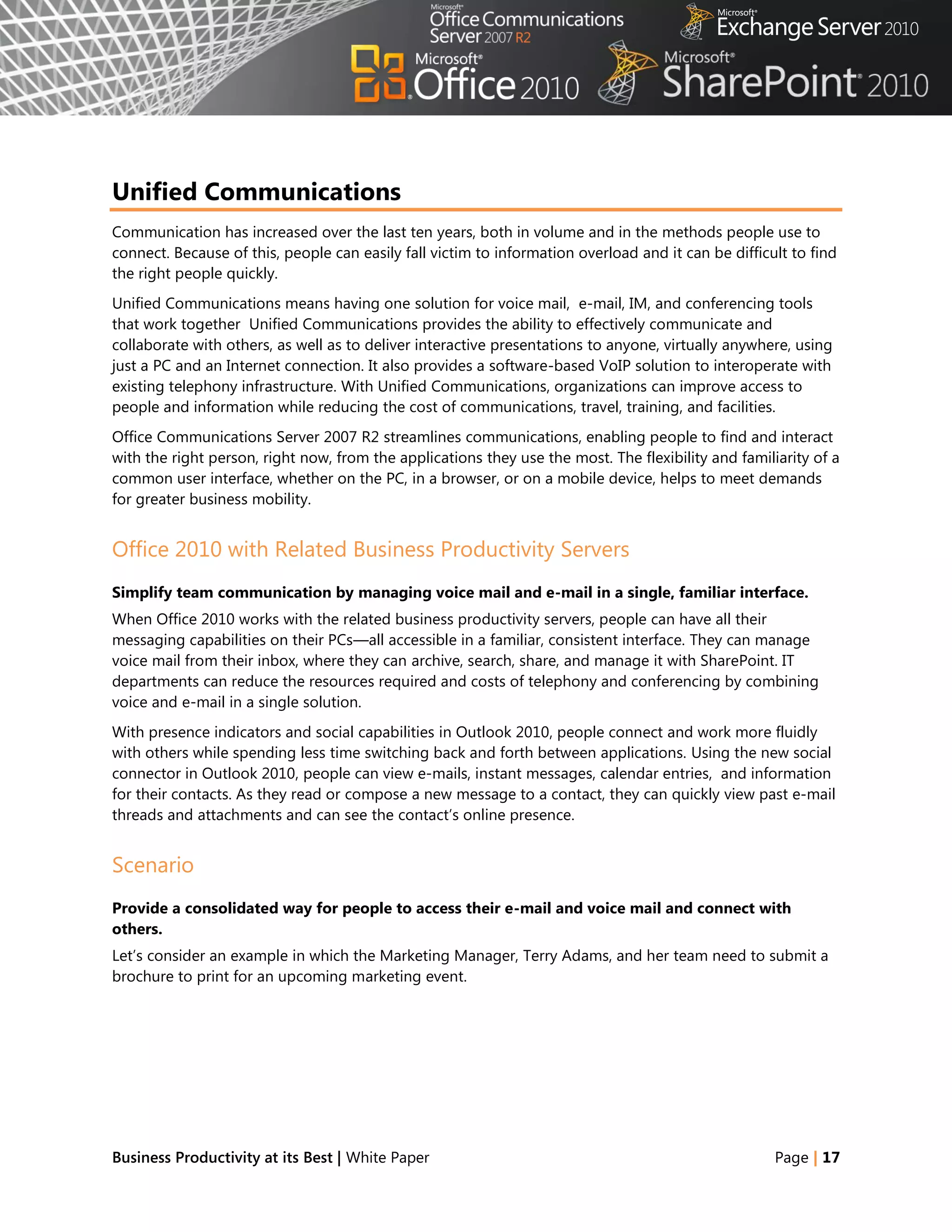
   Judy saves the file, but the file size is too large to
    send to her co-workers for review. She opens the
    Backstage View and clicks Compress Media. She
    chooses the quality level for compression and saves
    a smaller version of the file, making it easier for her
    to send out for comments.


Business Productivity at its Best | White Paper                                                                  Page | 15
Microsoft Office 2010                                  Microsoft Office 2007


                                                       When the file size of a presentation is too big, she may
                                                        be unable to e-mail it and it takes up a lot of storage.
                                                        The only way Judy can compress the file size is by
                                                        individually deleting objects in the presentation.


Benefit: Productivity for all Workstyles and Mobile Situations
    ◦ Save time managing e-mail, analyzing data, and creating presentations
    ◦ Save on third-party editing tools and resources


Business Productivity at its Best | White Paper                                                       Page | 16
Unified Communications
Communication has increased over the last ten years, both in volume and in the methods people use to
connect. Because of this, people can easily fall victim to information overload and it can be difficult to find
the right people quickly.
Unified Communications means having one solution for voice mail, e-mail, IM, and conferencing tools
that work together Unified Communications provides the ability to effectively communicate and
collaborate with others, as well as to deliver interactive presentations to anyone, virtually anywhere, using
just a PC and an Internet connection. It also provides a software-based VoIP solution to interoperate with
existing telephony infrastructure. With Unified Communications, organizations can improve access to
people and information while reducing the cost of communications, travel, training, and facilities.
Office Communications Server 2007 R2 streamlines communications, enabling people to find and interact
with the right person, right now, from the applications they use the most. The flexibility and familiarity of a
common user interface, whether on the PC, in a browser, or on a mobile device, helps to meet demands
for greater business mobility.


Office 2010 with Related Business Productivity Servers
Simplify team communication by managing voice mail and e-mail in a single, familiar interface.
When Office 2010 works with the related business productivity servers, people can have all their
messaging capabilities on their PCs—all accessible in a familiar, consistent interface. They can manage
voice mail from their inbox, where they can archive, search, share, and manage it with SharePoint. IT
departments can reduce the resources required and costs of telephony and conferencing by combining
voice and e-mail in a single solution.
With presence indicators and social capabilities in Outlook 2010, people connect and work more fluidly
with others while spending less time switching back and forth between applications. Using the new social
connector in Outlook 2010, people can view e-mails, instant messages, calendar entries, and information
for their contacts. As they read or compose a new message to a contact, they can quickly view past e-mail
threads and attachments and can see the contact‘s online presence.


Scenario
Provide a consolidated way for people to access their e-mail and voice mail and connect with
others.
Let‘s consider an example in which the Marketing Manager, Terry Adams, and her team need to submit a
brochure to print for an upcoming marketing event.


Business Productivity at its Best | White Paper                                                      Page | 17
FEATURES
                                                   Voice mail
                                             Transcribing voice mail
                                            Outlook Social Connector
                                                 Find a contact

     Microsoft Office 2010 with 2010 Servers                     Microsoft Office 2007 with 2010 Servers

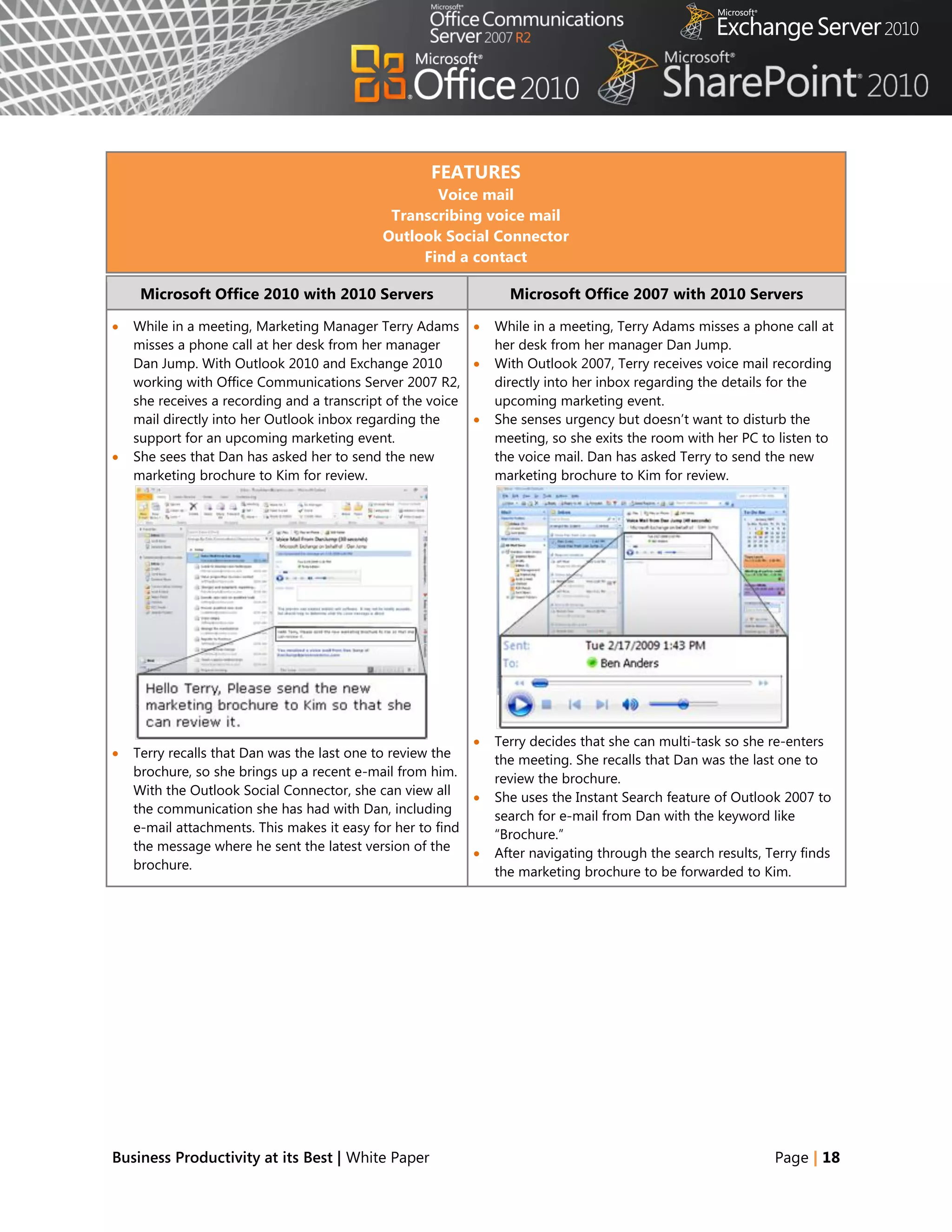
   While in a meeting, Marketing Manager Terry Adams         While in a meeting, Terry Adams misses a phone call at
    misses a phone call at her desk from her manager           her desk from her manager Dan Jump.
    Dan Jump. With Outlook 2010 and Exchange 2010             With Outlook 2007, Terry receives voice mail recording
    working with Office Communications Server 2007 R2,         directly into her inbox regarding the details for the
    she receives a recording and a transcript of the voice     upcoming marketing event.
    mail directly into her Outlook inbox regarding the        She senses urgency but doesn‘t want to disturb the
    support for an upcoming marketing event.                   meeting, so she exits the room with her PC to listen to
   She sees that Dan has asked her to send the new            the voice mail. Dan has asked Terry to send the new
    marketing brochure to Kim for review.                      marketing brochure to Kim for review.


                                                              Terry decides that she can multi-task so she re-enters
   Terry recalls that Dan was the last one to review the      the meeting. She recalls that Dan was the last one to
    brochure, so she brings up a recent e-mail from him.       review the brochure.
    With the Outlook Social Connector, she can view all       She uses the Instant Search feature of Outlook 2007 to
    the communication she has had with Dan, including
                                                               search for e-mail from Dan with the keyword like
    e-mail attachments. This makes it easy for her to find     ―Brochure.‖
    the message where he sent the latest version of the       After navigating through the search results, Terry finds
    brochure.                                                  the marketing brochure to be forwarded to Kim.


Business Productivity at its Best | White Paper                                                              Page | 18
Microsoft Office 2010 with 2010 Servers                        Microsoft Office 2007 with 2010 Servers


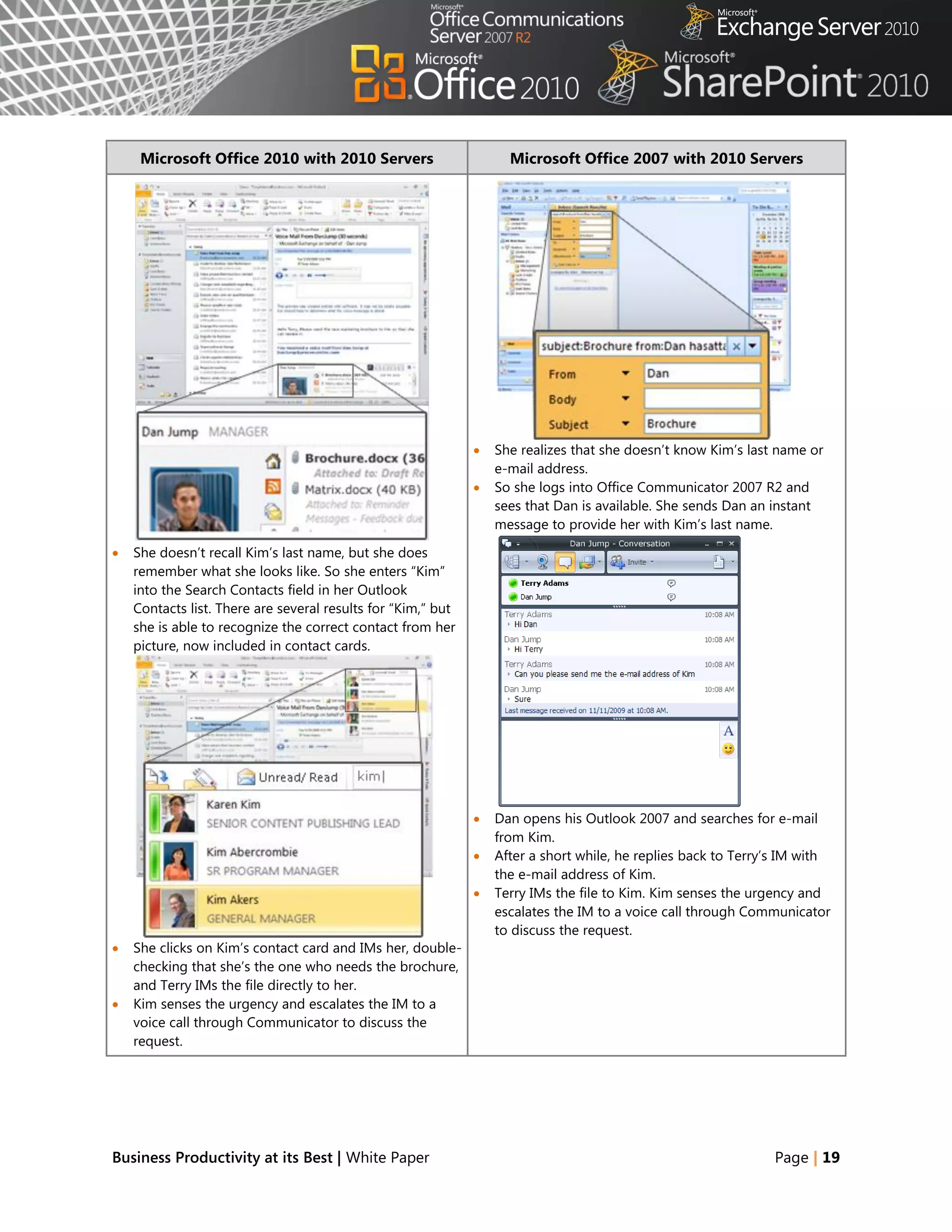
                                                                 She realizes that she doesn‘t know Kim‘s last name or
                                                                  e-mail address.
                                                                 So she logs into Office Communicator 2007 R2 and
                                                                  sees that Dan is available. She sends Dan an instant
                                                                  message to provide her with Kim‘s last name.

   She doesn‘t recall Kim‘s last name, but she does
    remember what she looks like. So she enters ―Kim‖
    into the Search Contacts field in her Outlook
    Contacts list. There are several results for ―Kim,‖ but
    she is able to recognize the correct contact from her
    picture, now included in contact cards.


                                                                 Dan opens his Outlook 2007 and searches for e-mail
                                                                  from Kim.
                                                                 After a short while, he replies back to Terry‘s IM with
                                                                  the e-mail address of Kim.
                                                                 Terry IMs the file to Kim. Kim senses the urgency and
                                                                  escalates the IM to a voice call through Communicator
                                                                  to discuss the request.
   She clicks on Kim‘s contact card and IMs her, double-
    checking that she‘s the one who needs the brochure,
    and Terry IMs the file directly to her.
   Kim senses the urgency and escalates the IM to a
    voice call through Communicator to discuss the
    request.


Business Productivity at its Best | White Paper                                                                Page | 19
Microsoft Office 2010 with 2010 Servers                    Microsoft Office 2007 with 2010 Servers


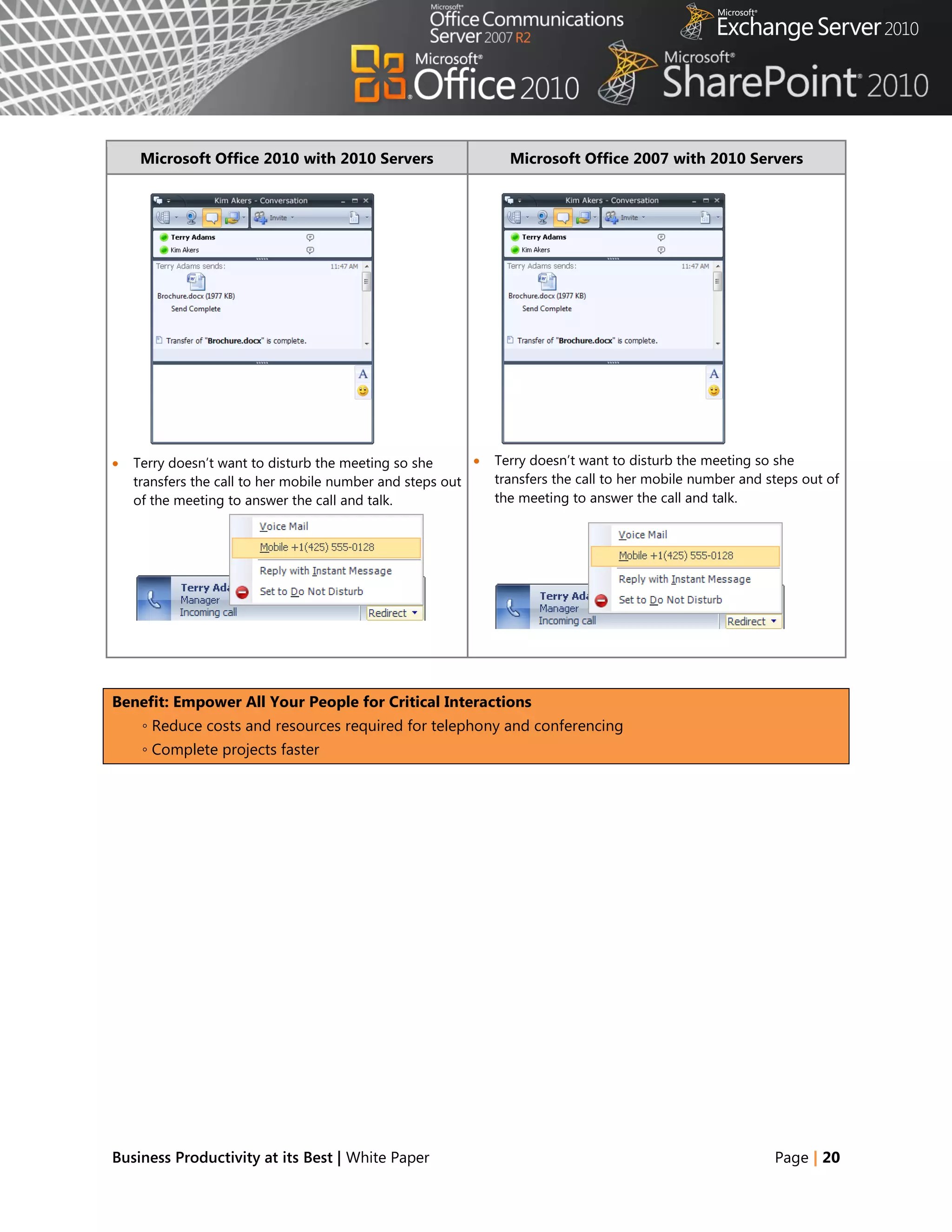
   Terry doesn‘t want to disturb the meeting so she         Terry doesn‘t want to disturb the meeting so she
    transfers the call to her mobile number and steps out     transfers the call to her mobile number and steps out of
    of the meeting to answer the call and talk.               the meeting to answer the call and talk.


Benefit: Empower All Your People for Critical Interactions
     ◦ Reduce costs and resources required for telephony and conferencing
     ◦ Complete projects faster


Business Productivity at its Best | White Paper                                                            Page | 20
Office 2010 with Related Business Productivity Servers
Streamline real-time communications by connecting participants with meetings and events.
With Office 2010 and the related business productivity servers, people can conveniently and efficiently
schedule appointments, share calendars and availability, and better manage their work schedules.
Presence integrated within Office 2010 applications enables the real-time status of employees—based on
calendar information, login, activity status, and user preference—to be displayed across the organization
and to selected outside colleagues. This information enables people to contact the right person the first
time, using the best method to communicate. Besides using the telephone or e-mail, they can conduct
audio and video conferences and share applications and desktops in real time.


Scenario
Provide people the ability to work together, both internally and externally and in real time.
Let‘s consider an example in which the Proseware, Inc., CEO, Jonathan Mollerup, must work with the Head
of Legal, Sean Chai, the Finance Manager, Jim Kim, and their lead technical writer, Mike Miller, to quickly
put together a venture capital proposal.


Business Productivity at its Best | White Paper                                                   Page | 21
FEATURES
                                             Scheduling Meetings
                           Federation to Collaborate across Different Organizations
                                              Group Scheduling
                                             Federated Calendars
                            Out-of-Office Notifications when Scheduling Meetings
                                        Sharing Files and Applications

     Microsoft Office 2010 with 2010 Servers                    Microsoft Office 2007 with 2010 Servers

   Jonathan, Mike, Sean, and Jim are seeking venture        Jonathan, Mike, Sean, and Jim are seeking venture
    capital to expand their business overseas.                capital to expand their business overseas.
   While reviewing the numbers in the proposal,             While reviewing the numbers in the proposal, Jonathan
    Jonathan notices that the interest rate has changed,      notices that the interest rate has changed, invalidating
    invalidating the financial model.                         the financial model.
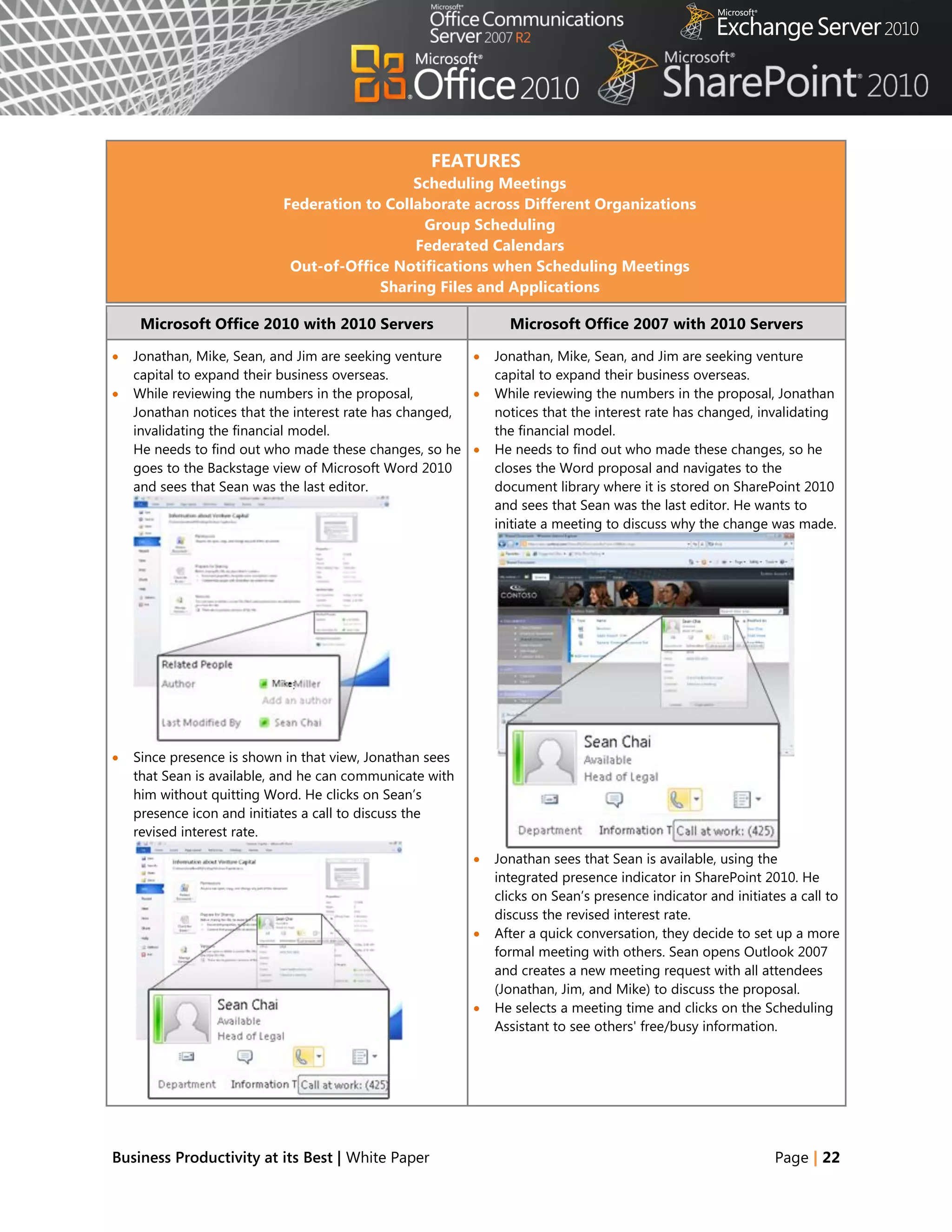
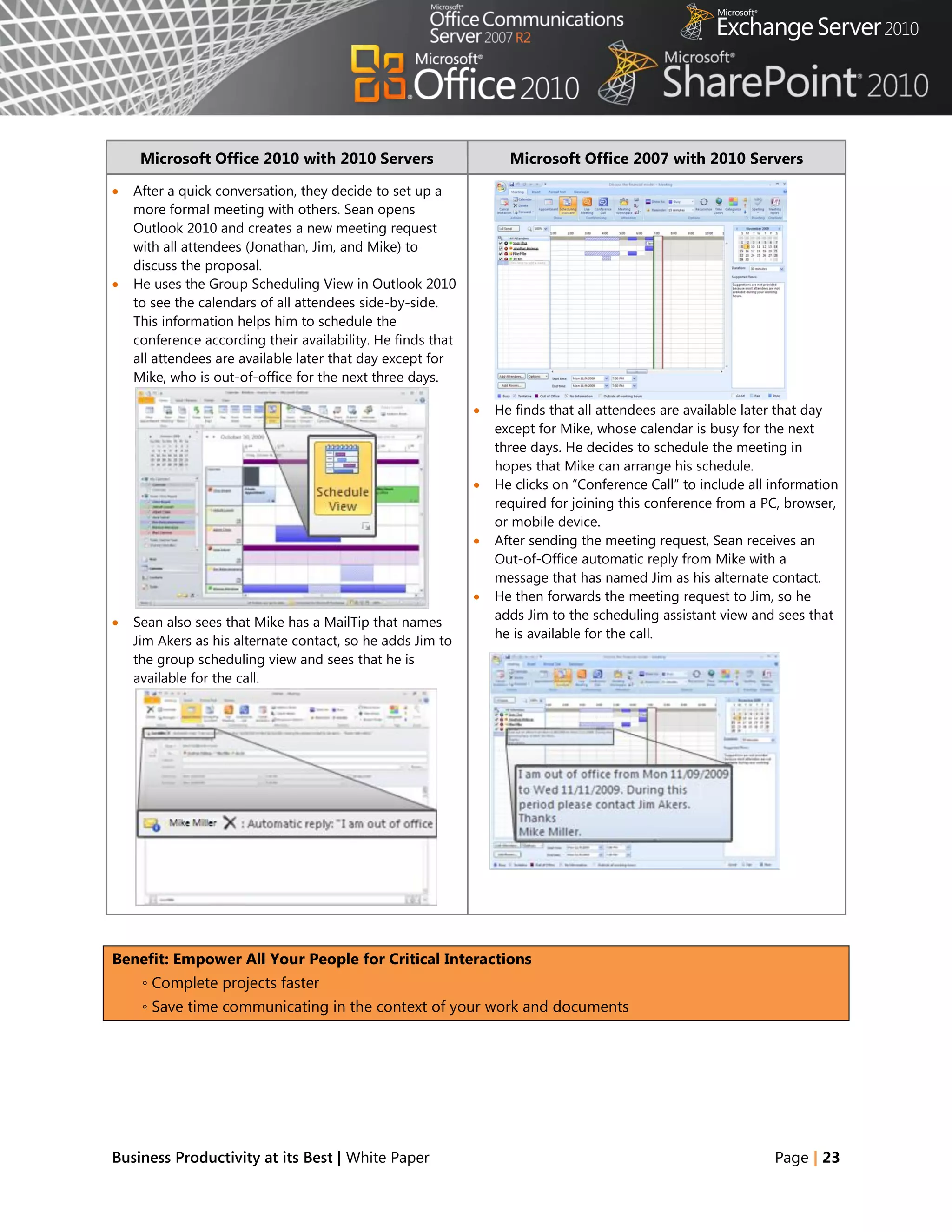
    He needs to find out who made these changes, so he       He needs to find out who made these changes, so he
    goes to the Backstage view of Microsoft Word 2010         closes the Word proposal and navigates to the
    and sees that Sean was the last editor.                   document library where it is stored on SharePoint 2010
                                                              and sees that Sean was the last editor. He wants to
                                                              initiate a meeting to discuss why the change was made.


   Since presence is shown in that view, Jonathan sees
    that Sean is available, and he can communicate with
    him without quitting Word. He clicks on Sean‘s
    presence icon and initiates a call to discuss the
    revised interest rate.
                                                             Jonathan sees that Sean is available, using the
                                                              integrated presence indicator in SharePoint 2010. He
                                                              clicks on Sean‘s presence indicator and initiates a call to
                                                              discuss the revised interest rate.
                                                             After a quick conversation, they decide to set up a more
                                                              formal meeting with others. Sean opens Outlook 2007
                                                              and creates a new meeting request with all attendees
                                                              (Jonathan, Jim, and Mike) to discuss the proposal.
                                                             He selects a meeting time and clicks on the Scheduling
                                                              Assistant to see others' free/busy information.


Business Productivity at its Best | White Paper                                                              Page | 22
Microsoft Office 2010 with 2010 Servers                       Microsoft Office 2007 with 2010 Servers

   After a quick conversation, they decide to set up a
    more formal meeting with others. Sean opens
    Outlook 2010 and creates a new meeting request
    with all attendees (Jonathan, Jim, and Mike) to
    discuss the proposal.
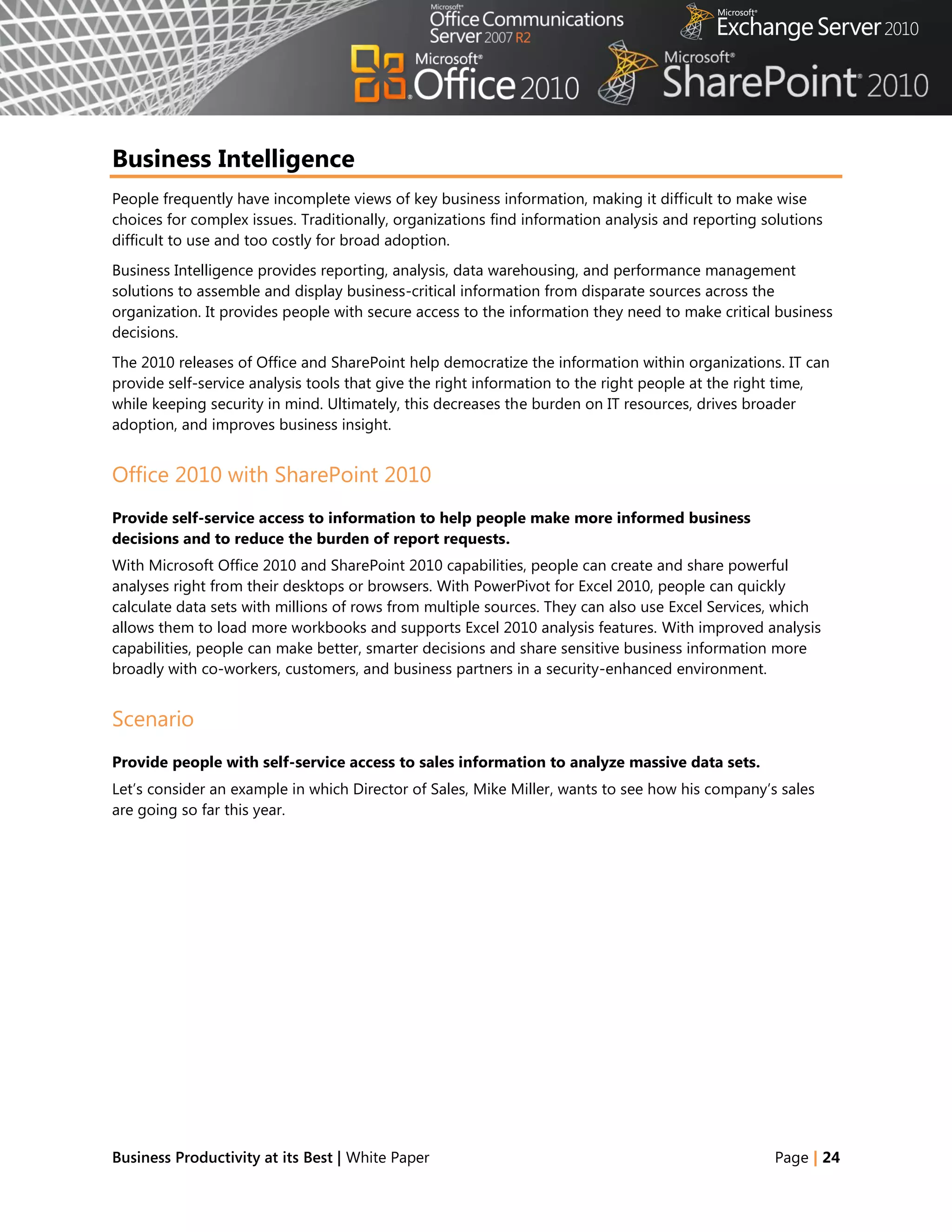
   He uses the Group Scheduling View in Outlook 2010
    to see the calendars of all attendees side-by-side.
    This information helps him to schedule the
    conference according their availability. He finds that
    all attendees are available later that day except for
    Mike, who is out-of-office for the next three days.

                                                                He finds that all attendees are available later that day
                                                                 except for Mike, whose calendar is busy for the next
                                                                 three days. He decides to schedule the meeting in
                                                                 hopes that Mike can arrange his schedule.
                                                                He clicks on ―Conference Call‖ to include all information
                                                                 required for joining this conference from a PC, browser,
                                                                 or mobile device.
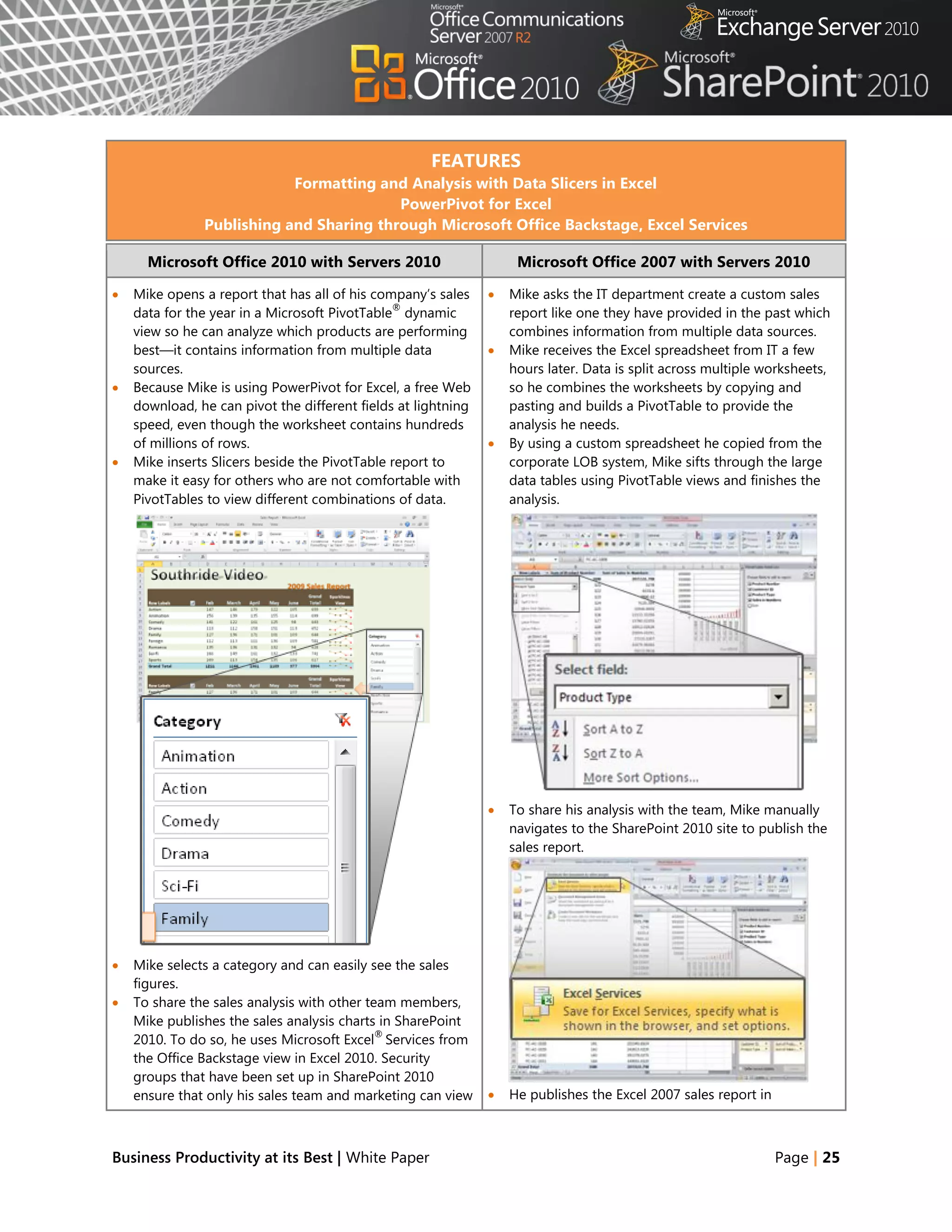
                                                                After sending the meeting request, Sean receives an
                                                                 Out-of-Office automatic reply from Mike with a
                                                                 message that has named Jim as his alternate contact.
                                                                He then forwards the meeting request to Jim, so he
                                                                 adds Jim to the scheduling assistant view and sees that
   Sean also sees that Mike has a MailTip that names
                                                                 he is available for the call.
    Jim Akers as his alternate contact, so he adds Jim to
    the group scheduling view and sees that he is
    available for the call.


Benefit: Empower All Your People for Critical Interactions
     ◦ Complete projects faster
     ◦ Save time communicating in the context of your work and documents


Business Productivity at its Best | White Paper                                                                Page | 23
Business Intelligence
People frequently have incomplete views of key business information, making it difficult to make wise
choices for complex issues. Traditionally, organizations find information analysis and reporting solutions
difficult to use and too costly for broad adoption.
Business Intelligence provides reporting, analysis, data warehousing, and performance management
solutions to assemble and display business-critical information from disparate sources across the
organization. It provides people with secure access to the information they need to make critical business
decisions.
The 2010 releases of Office and SharePoint help democratize the information within organizations. IT can
provide self-service analysis tools that give the right information to the right people at the right time,
while keeping security in mind. Ultimately, this decreases the burden on IT resources, drives broader
adoption, and improves business insight.


Office 2010 with SharePoint 2010
Provide self-service access to information to help people make more informed business
decisions and to reduce the burden of report requests.
With Microsoft Office 2010 and SharePoint 2010 capabilities, people can create and share powerful
analyses right from their desktops or browsers. With PowerPivot for Excel 2010, people can quickly
calculate data sets with millions of rows from multiple sources. They can also use Excel Services, which
allows them to load more workbooks and supports Excel 2010 analysis features. With improved analysis
capabilities, people can make better, smarter decisions and share sensitive business information more
broadly with co-workers, customers, and business partners in a security-enhanced environment.


Scenario
Provide people with self-service access to sales information to analyze massive data sets.
Let‘s consider an example in which Director of Sales, Mike Miller, wants to see how his company‘s sales
are going so far this year.


Business Productivity at its Best | White Paper                                                   Page | 24
FEATURES
                           Formatting and Analysis with Data Slicers in Excel
                                         PowerPivot for Excel
               Publishing and Sharing through Microsoft Office Backstage, Excel Services

      Microsoft Office 2010 with Servers 2010                       Microsoft Office 2007 with Servers 2010

   Mike opens a report that has all of his company‘s sales       Mike asks the IT department create a custom sales
                                               ®
    data for the year in a Microsoft PivotTable dynamic            report like one they have provided in the past which
    view so he can analyze which products are performing           combines information from multiple data sources.
    best—it contains information from multiple data               Mike receives the Excel spreadsheet from IT a few
    sources.                                                       hours later. Data is split across multiple worksheets,
   Because Mike is using PowerPivot for Excel, a free Web         so he combines the worksheets by copying and
    download, he can pivot the different fields at lightning       pasting and builds a PivotTable to provide the
    speed, even though the worksheet contains hundreds             analysis he needs.
    of millions of rows.                                          By using a custom spreadsheet he copied from the
   Mike inserts Slicers beside the PivotTable report to           corporate LOB system, Mike sifts through the large
    make it easy for others who are not comfortable with           data tables using PivotTable views and finishes the
    PivotTables to view different combinations of data.            analysis.


                                                                  To share his analysis with the team, Mike manually
                                                                   navigates to the SharePoint 2010 site to publish the
                                                                   sales report.


   Mike selects a category and can easily see the sales
    figures.
   To share the sales analysis with other team members,
    Mike publishes the sales analysis charts in SharePoint
                                             ®
    2010. To do so, he uses Microsoft Excel Services from
    the Office Backstage view in Excel 2010. Security
    groups that have been set up in SharePoint 2010
    ensure that only his sales team and marketing can view        He publishes the Excel 2007 sales report in


Business Productivity at its Best | White Paper                                                                  Page | 25
Microsoft Office 2010 with Servers 2010                     Microsoft Office 2007 with Servers 2010

    or edit the analysis.                                        SharePoint 2010 and specifies which components of
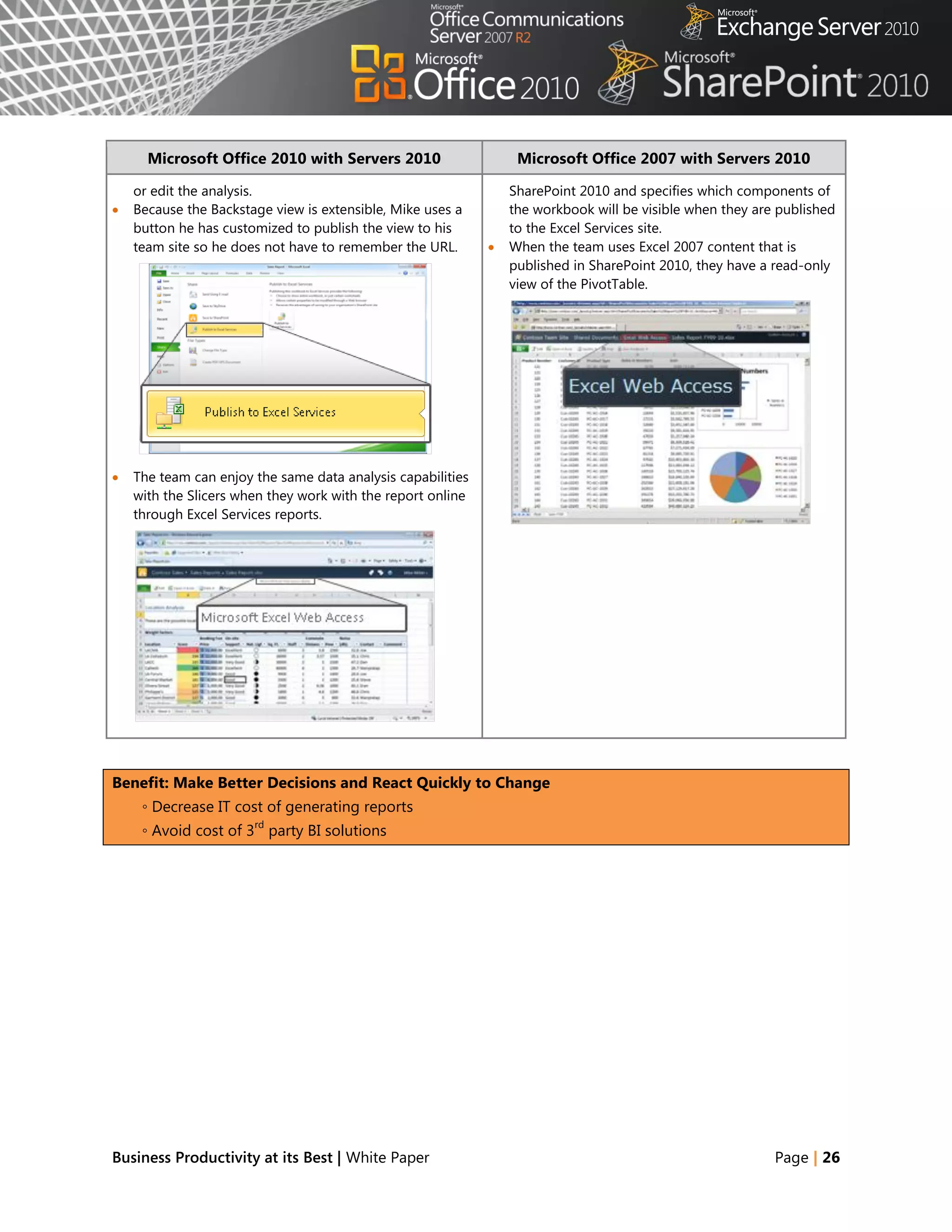
   Because the Backstage view is extensible, Mike uses a        the workbook will be visible when they are published
    button he has customized to publish the view to his          to the Excel Services site.
    team site so he does not have to remember the URL.          When the team uses Excel 2007 content that is
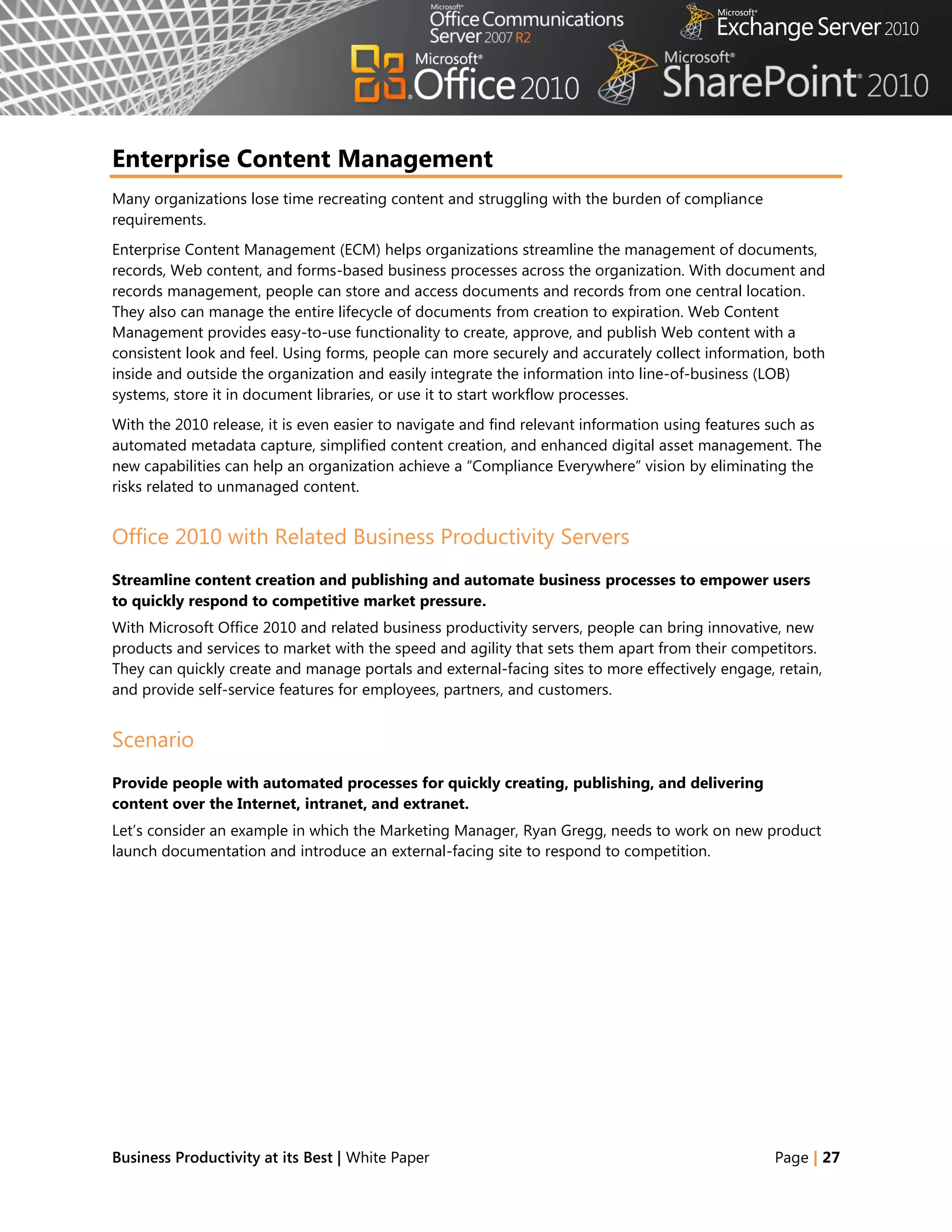
                                                                 published in SharePoint 2010, they have a read-only
                                                                 view of the PivotTable.


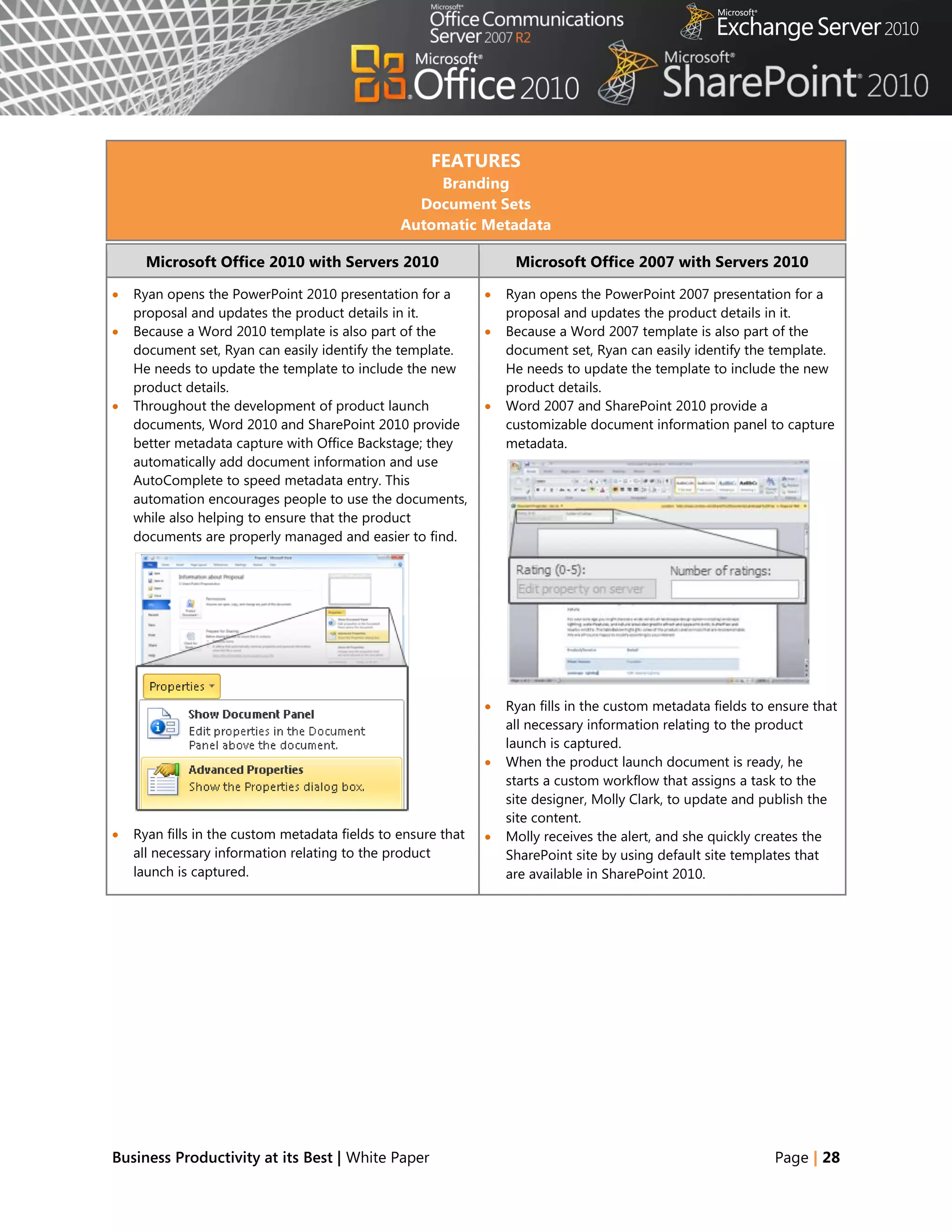
   The team can enjoy the same data analysis capabilities
    with the Slicers when they work with the report online
    through Excel Services reports.


Benefit: Make Better Decisions and React Quickly to Change
     ◦ Decrease IT cost of generating reports
                       rd
     ◦ Avoid cost of 3 party BI solutions


Business Productivity at its Best | White Paper                                                            Page | 26
Enterprise Content Management
Many organizations lose time recreating content and struggling with the burden of compliance
requirements.
Enterprise Content Management (ECM) helps organizations streamline the management of documents,
records, Web content, and forms-based business processes across the organization. With document and
records management, people can store and access documents and records from one central location.
They also can manage the entire lifecycle of documents from creation to expiration. Web Content
Management provides easy-to-use functionality to create, approve, and publish Web content with a
consistent look and feel. Using forms, people can more securely and accurately collect information, both
inside and outside the organization and easily integrate the information into line-of-business (LOB)
systems, store it in document libraries, or use it to start workflow processes.
With the 2010 release, it is even easier to navigate and find relevant information using features such as
automated metadata capture, simplified content creation, and enhanced digital asset management. The
new capabilities can help an organization achieve a ―Compliance Everywhere‖ vision by eliminating the
risks related to unmanaged content.


Office 2010 with Related Business Productivity Servers
Streamline content creation and publishing and automate business processes to empower users
to quickly respond to competitive market pressure.
With Microsoft Office 2010 and related business productivity servers, people can bring innovative, new
products and services to market with the speed and agility that sets them apart from their competitors.
They can quickly create and manage portals and external-facing sites to more effectively engage, retain,
and provide self-service features for employees, partners, and customers.


Scenario
Provide people with automated processes for quickly creating, publishing, and delivering
content over the Internet, intranet, and extranet.
Let‘s consider an example in which the Marketing Manager, Ryan Gregg, needs to work on new product
launch documentation and introduce an external-facing site to respond to competition.


Business Productivity at its Best | White Paper                                                   Page | 27
FEATURES
                                                    Branding
                                                  Document Sets
                                                Automatic Metadata

      Microsoft Office 2010 with Servers 2010                      Microsoft Office 2007 with Servers 2010

   Ryan opens the PowerPoint 2010 presentation for a            Ryan opens the PowerPoint 2007 presentation for a
    proposal and updates the product details in it.               proposal and updates the product details in it.
   Because a Word 2010 template is also part of the             Because a Word 2007 template is also part of the
    document set, Ryan can easily identify the template.          document set, Ryan can easily identify the template.
    He needs to update the template to include the new            He needs to update the template to include the new
    product details.                                              product details.
   Throughout the development of product launch                 Word 2007 and SharePoint 2010 provide a
    documents, Word 2010 and SharePoint 2010 provide              customizable document information panel to capture
    better metadata capture with Office Backstage; they           metadata.
    automatically add document information and use
    AutoComplete to speed metadata entry. This
    automation encourages people to use the documents,
    while also helping to ensure that the product
    documents are properly managed and easier to find.


                                                                 Ryan fills in the custom metadata fields to ensure that
                                                                  all necessary information relating to the product
                                                                  launch is captured.
                                                                 When the product launch document is ready, he
                                                                  starts a custom workflow that assigns a task to the
                                                                  site designer, Molly Clark, to update and publish the
                                                                  site content.
   Ryan fills in the custom metadata fields to ensure that      Molly receives the alert, and she quickly creates the
    all necessary information relating to the product             SharePoint site by using default site templates that
    launch is captured.                                           are available in SharePoint 2010.


Business Productivity at its Best | White Paper                                                               Page | 28
Microsoft Office 2010 with Servers 2010                     Microsoft Office 2007 with Servers 2010


   When the product launch document is ready, he starts
    a custom workflow that assigns a task to the site
    designer, Molly Clark, to update and publish site
    content.
   Molly receives the alert, and she quickly creates the
                                                     ®
    SharePoint site directly in Microsoft SharePoint
    Designer 2010 by using Site Templates.
                                                               While Molly is updating the site, she needs to confirm
                                                                with Ryan if the product logo is approved and ready
                                                                to be published. She also needs to discuss some other
                                                                modifications to be made in the product launch
                                                                document.
                                                               Molly creates a new meeting request. She attaches an
                                                                e-mail he had sent to her to provide more context,
                                                                and then adds the subject, location, and time for the
                                                                meeting, and forwards it to Ryan.


   While Molly is updating the site, she needs to confirm
    with Ryan if the product logo is approved and ready to
    be published. She also needs to discuss some other
    modifications to be made in the product launch
    document.
   Molly replies to an e-mail message from Ryan with a
    meeting request. The subject of the e-mail becomes         After the meeting, Molly creates the site content
    the subject of the meeting. All she needs to add is the     according to the product launch document and
    location and time.                                          applies branding by using default SharePoint 2010
                                                                themes and master pages.


Business Productivity at its Best | White Paper                                                            Page | 29
Microsoft Office 2010 with Servers 2010                 Microsoft Office 2007 with Servers 2010


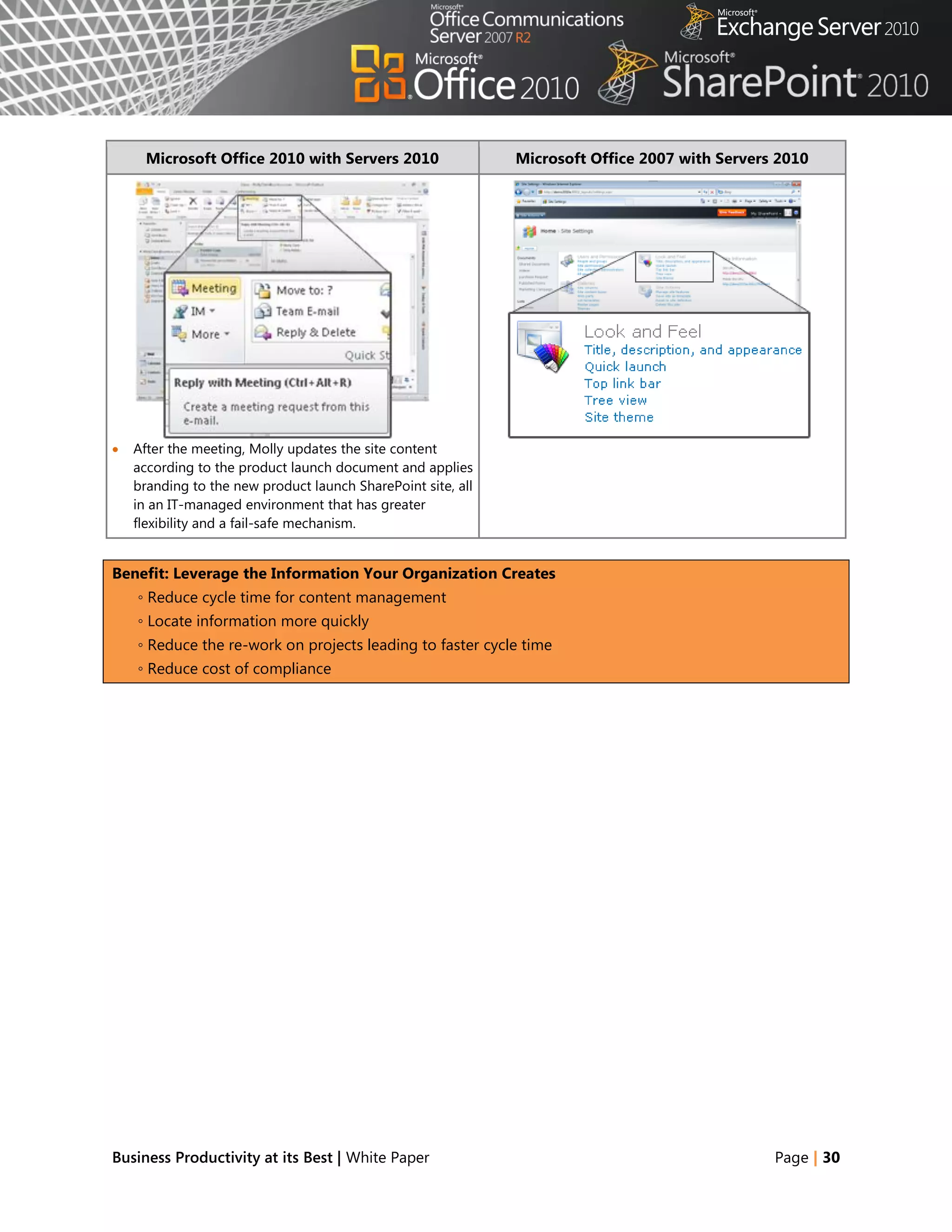
   After the meeting, Molly updates the site content
    according to the product launch document and applies
    branding to the new product launch SharePoint site, all
    in an IT-managed environment that has greater
    flexibility and a fail-safe mechanism.


Benefit: Leverage the Information Your Organization Creates
    ◦ Reduce cycle time for content management
    ◦ Locate information more quickly
    ◦ Reduce the re-work on projects leading to faster cycle time
    ◦ Reduce cost of compliance


Business Productivity at its Best | White Paper                                                 Page | 30
Collaboration
Teamwork is critical to the workplace, but technology and travel expenses create challenges when teams
are distributed across geographies. Versioning and coordination can delay response time.
Collaboration describes how people share information and expertise across organizations, such as
through the use of shared workspaces, a robust portal framework, and social computing tools.
Organizations that collaborate well can gain improvements in productivity and benefit from cost savings
and faster time to market, while also consolidating resources.
Office 2010 and related business productivity servers introduce collaboration capabilities that enhance
organizational agility with a modern, dynamic information workplace in a single infrastructure that
enables IT to maintain control. This release adds a number of social features that are the perfect
complement to traditional team and document collaboration tools, allowing people to share knowledge
and connect with each other easily and effectively.


Office 2010 with Related Business Productivity Servers
Enable people to respond faster by offering document collaboration with IT control.
With Microsoft Office 2010 and collaboration capabilities, people can craft accurate and quick responses
and meet deadlines with information that is compiled from experts across the organization. People in
various roles and departments need to combine information in a variety of ways every day—from creating
formal documents such as a press release, annual report, or legal contract, to gathering information about
a potential client, detailing product specs, or creating onboarding materials for new employees.


Scenario
Craft request for proposal (RFP) documents with greater speed, effectiveness, and quality to
remain competitive.
Let‘s consider an example in which the Director of Sales, Jonathan Mollerup, must work with the Head of
Legal, Sean Chai, and the Finance Manager, Jim Kim, to quickly put together an accurate and up-to-date
RFP document.


Business Productivity at its Best | White Paper                                                 Page | 31
FEATURES
                                     Coauthoring Documents and Presentations
                                      Author Highlights in a Shared Notebook

      Microsoft Office 2010 with Servers 2010                          Microsoft Office 2007 with Servers 2010

   The team has been contributing ideas on how to best             The team has been contributing ideas on how to best
                                                     ®
    respond to the RFP by using a Microsoft OneNote                  respond to the RFP by using a OneNote 2007 shared
    2010 shared notebook hosted on SharePoint 2010. As               notebook hosted on SharePoint 2010.
    changes are made, OneNote tracks each person‘s notes
    and edits.
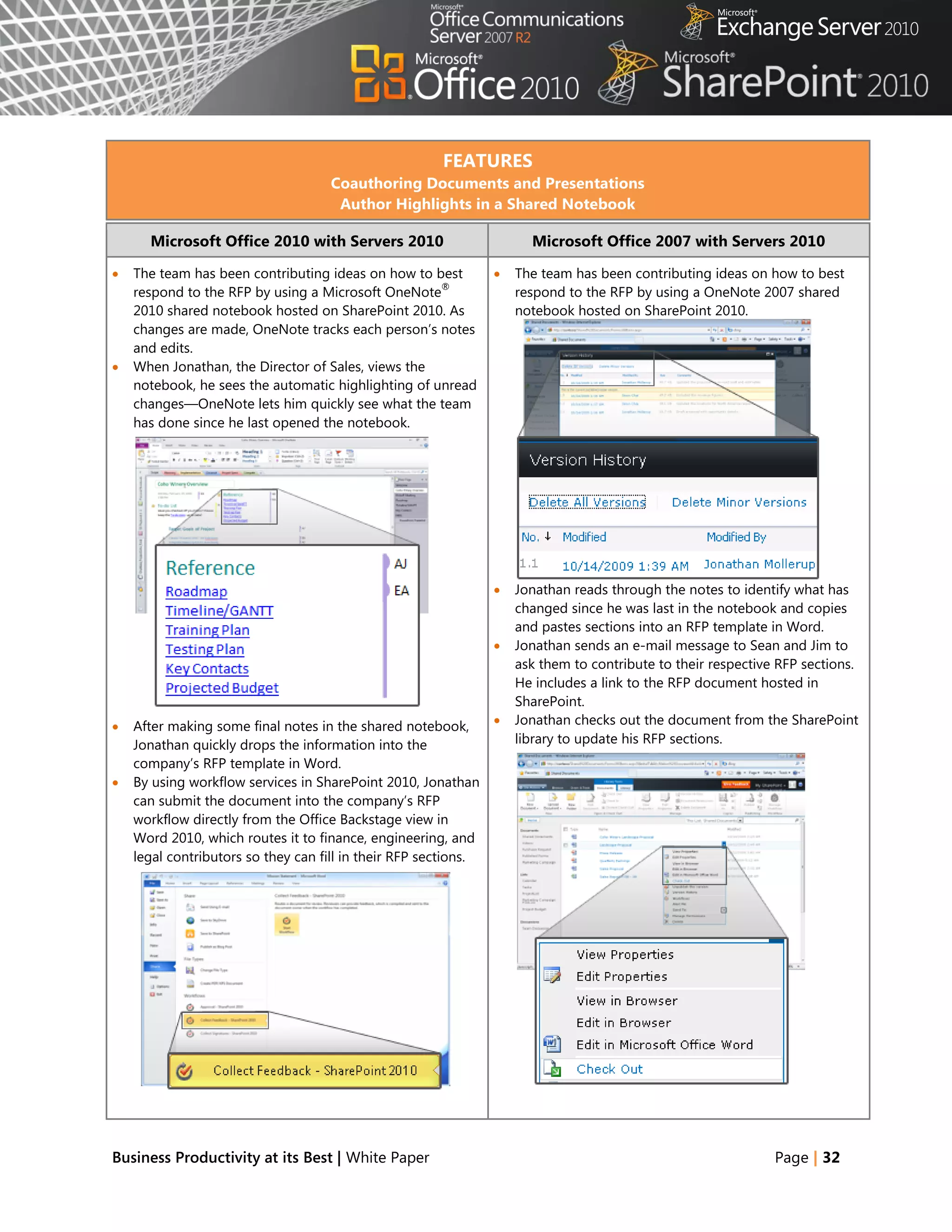
   When Jonathan, the Director of Sales, views the
    notebook, he sees the automatic highlighting of unread
    changes—OneNote lets him quickly see what the team
    has done since he last opened the notebook.


                                                                    Jonathan reads through the notes to identify what has
                                                                     changed since he was last in the notebook and copies
                                                                     and pastes sections into an RFP template in Word.
                                                                    Jonathan sends an e-mail message to Sean and Jim to
                                                                     ask them to contribute to their respective RFP sections.
                                                                     He includes a link to the RFP document hosted in
                                                                     SharePoint.
   After making some final notes in the shared notebook,           Jonathan checks out the document from the SharePoint
    Jonathan quickly drops the information into the                  library to update his RFP sections.
    company‘s RFP template in Word.
   By using workflow services in SharePoint 2010, Jonathan
    can submit the document into the company‘s RFP
    workflow directly from the Office Backstage view in
    Word 2010, which routes it to finance, engineering, and
    legal contributors so they can fill in their RFP sections.


Business Productivity at its Best | White Paper                                                                Page | 32
Microsoft Office 2010 with Servers 2010                       Microsoft Office 2007 with Servers 2010

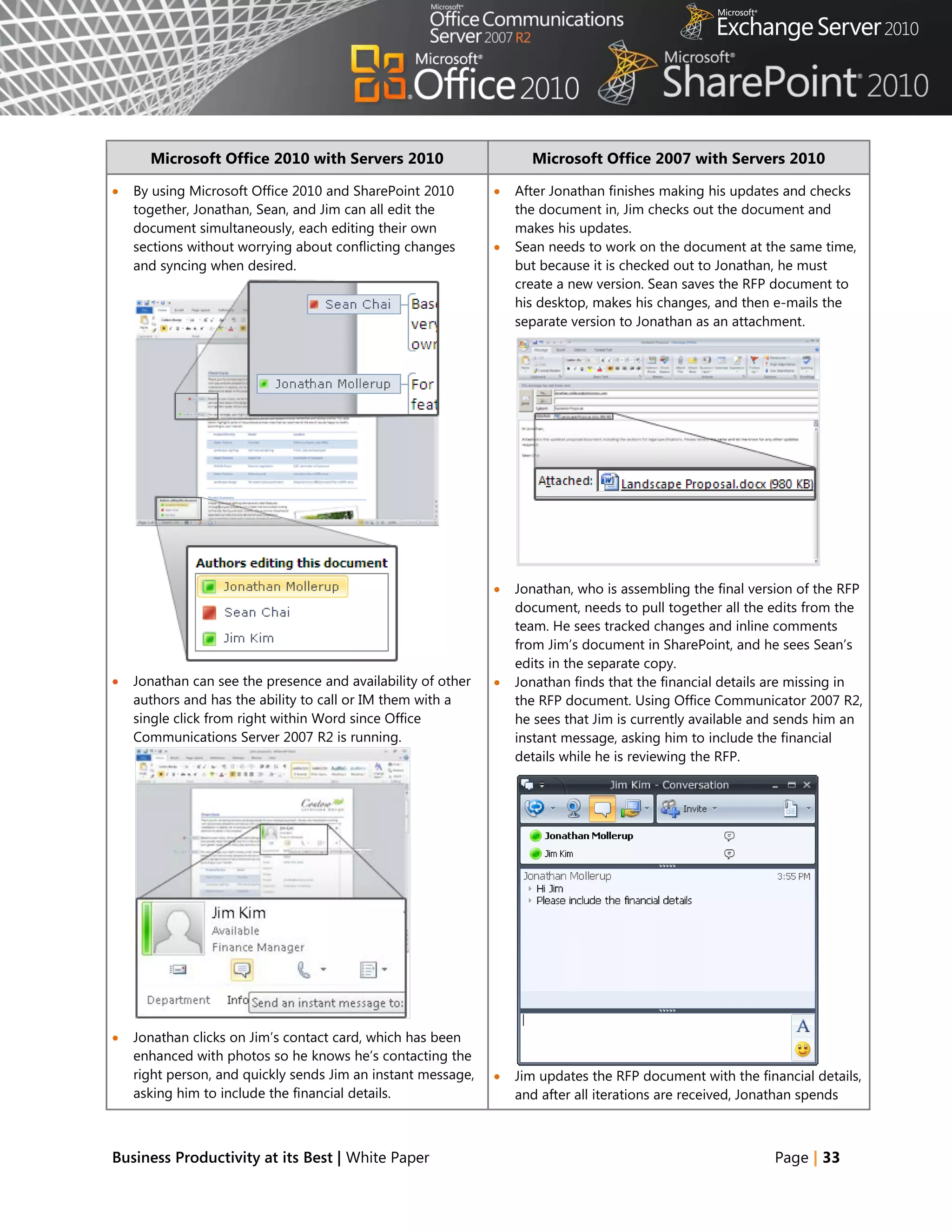
   By using Microsoft Office 2010 and SharePoint 2010           After Jonathan finishes making his updates and checks
    together, Jonathan, Sean, and Jim can all edit the            the document in, Jim checks out the document and
    document simultaneously, each editing their own               makes his updates.
    sections without worrying about conflicting changes          Sean needs to work on the document at the same time,
    and syncing when desired.                                     but because it is checked out to Jonathan, he must
                                                                  create a new version. Sean saves the RFP document to
                                                                  his desktop, makes his changes, and then e-mails the
                                                                  separate version to Jonathan as an attachment.


                                                                 Jonathan, who is assembling the final version of the RFP
                                                                  document, needs to pull together all the edits from the
                                                                  team. He sees tracked changes and inline comments
                                                                  from Jim‘s document in SharePoint, and he sees Sean‘s
                                                                  edits in the separate copy.
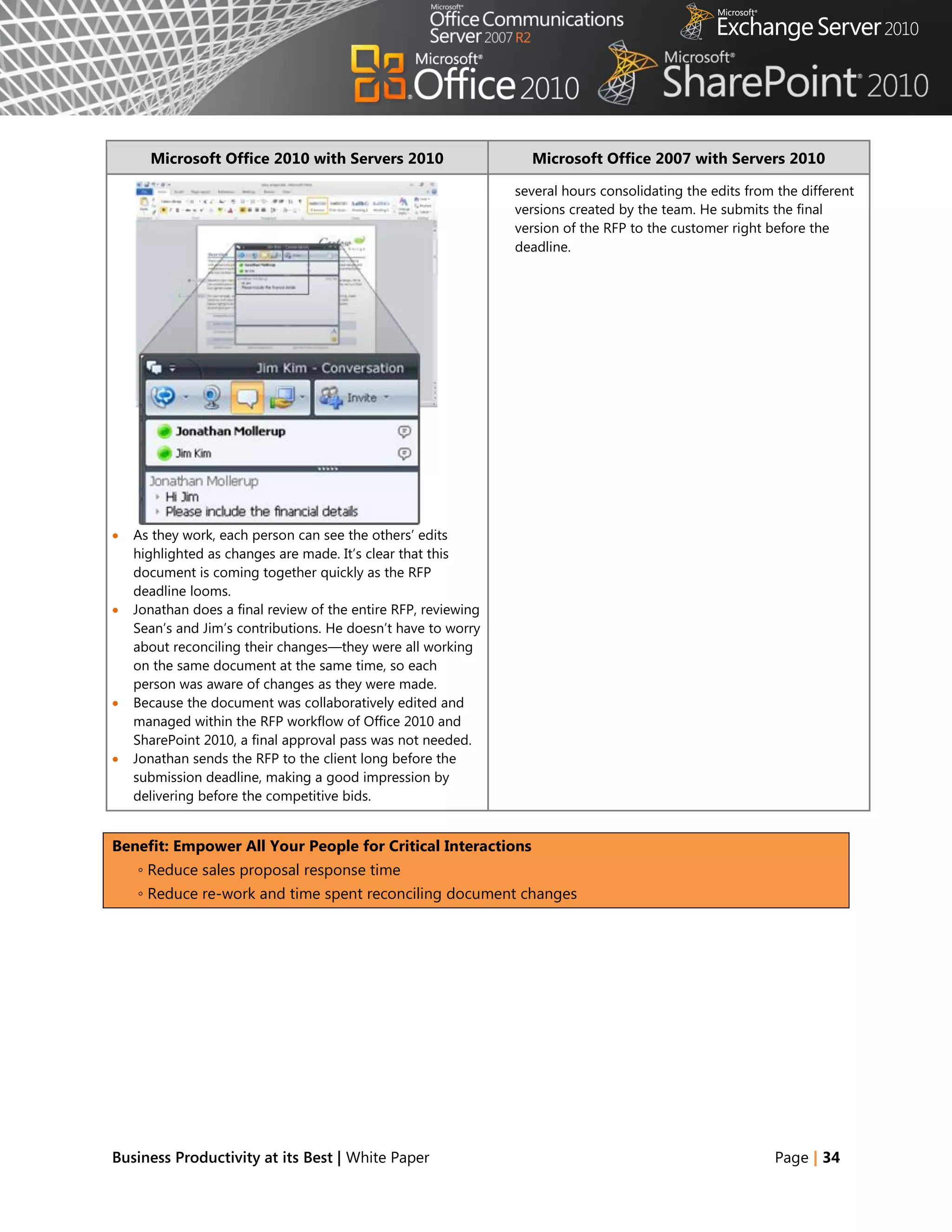
   Jonathan can see the presence and availability of other      Jonathan finds that the financial details are missing in
    authors and has the ability to call or IM them with a         the RFP document. Using Office Communicator 2007 R2,
    single click from right within Word since Office              he sees that Jim is currently available and sends him an
    Communications Server 2007 R2 is running.                     instant message, asking him to include the financial
                                                                  details while he is reviewing the RFP.


   Jonathan clicks on Jim‘s contact card, which has been
    enhanced with photos so he knows he‘s contacting the
    right person, and quickly sends Jim an instant message,      Jim updates the RFP document with the financial details,
    asking him to include the financial details.                  and after all iterations are received, Jonathan spends


Business Productivity at its Best | White Paper                                                            Page | 33
Microsoft Office 2010 with Servers 2010                     Microsoft Office 2007 with Servers 2010

                                                                several hours consolidating the edits from the different
                                                                versions created by the team. He submits the final
                                                                version of the RFP to the customer right before the
                                                                deadline.


   As they work, each person can see the others‘ edits
    highlighted as changes are made. It‘s clear that this
    document is coming together quickly as the RFP
    deadline looms.
   Jonathan does a final review of the entire RFP, reviewing
    Sean‘s and Jim‘s contributions. He doesn‘t have to worry
    about reconciling their changes—they were all working
    on the same document at the same time, so each
    person was aware of changes as they were made.
   Because the document was collaboratively edited and
    managed within the RFP workflow of Office 2010 and
    SharePoint 2010, a final approval pass was not needed.
   Jonathan sends the RFP to the client long before the
    submission deadline, making a good impression by
    delivering before the competitive bids.


Benefit: Empower All Your People for Critical Interactions
    ◦ Reduce sales proposal response time
    ◦ Reduce re-work and time spent reconciling document changes


Business Productivity at its Best | White Paper                                                           Page | 34
Office 2010 with Related Business Productivity Servers
Help people stay productive wherever they are with the tools that seamlessly synchronize online
and offline changes.
With Microsoft Office 2010 and SharePoint 2010, Exchange 2010, and Office Communications Server 2007
R2, people can enjoy a seamless online and offline experience and stay productive, even when they are
away from the office. These solutions enable people to work from more locations, stay up-to-date, and
respond effectively to information—regardless of whether they are at home, at work, or on the move.


Scenario
Enable people to stay productive anywhere—online or offline—and update team information at
the office, at a customer site, on the road, or from home.
Let‘s consider an example in which the Marketing Director, Jeff Phillips, is traveling from the United States
to Asia for several customer visits. He wants to update a presentation for a product launch while he is on
the plane or in the hotel.


Business Productivity at its Best | White Paper                                                    Page | 35
FEATURES
                                        Offline and Online Collaboration
                                      Working Offline with Improved Access
      Microsoft Office 2010 with Servers 2010                         Microsoft Office 2007 with Servers 2010

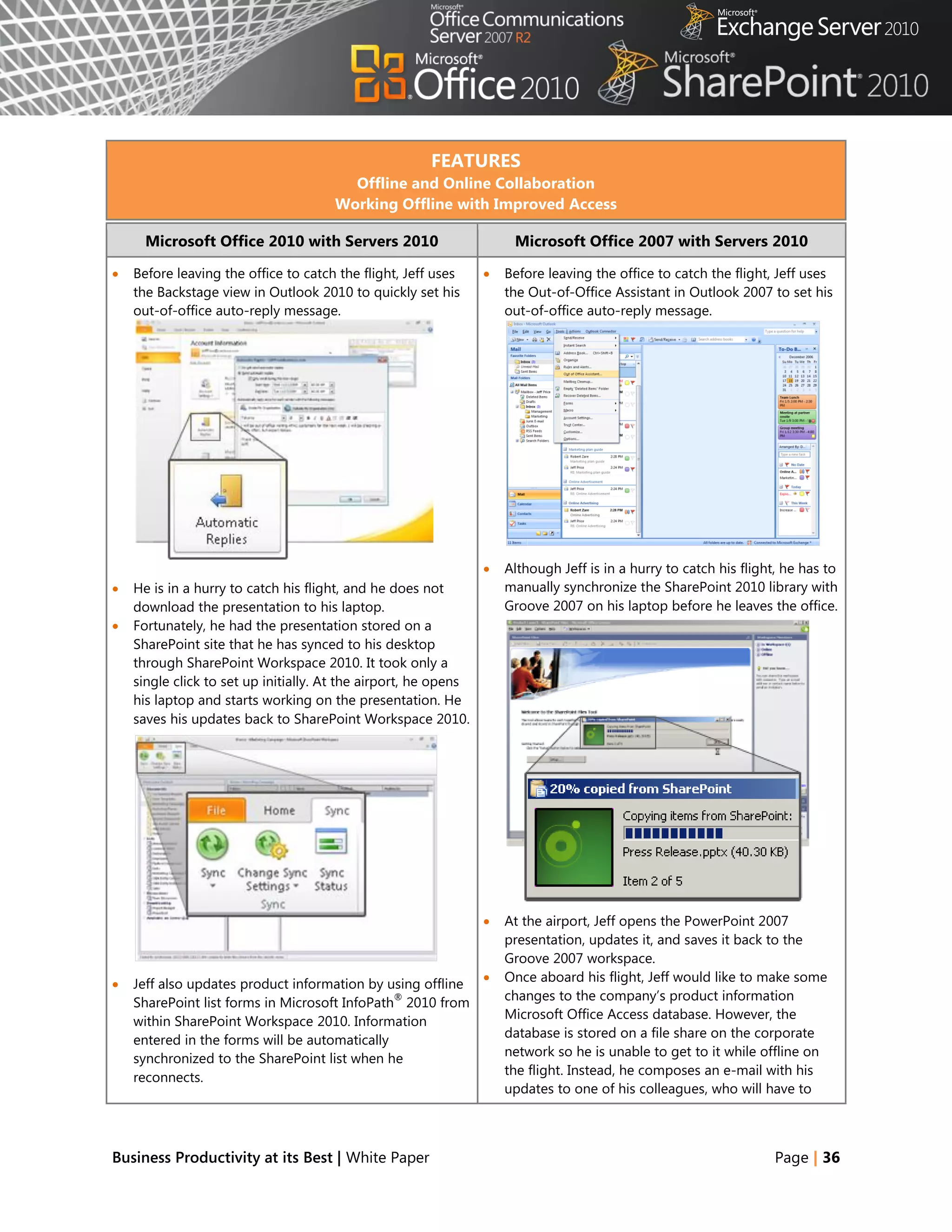
   Before leaving the office to catch the flight, Jeff uses        Before leaving the office to catch the flight, Jeff uses
    the Backstage view in Outlook 2010 to quickly set his            the Out-of-Office Assistant in Outlook 2007 to set his
    out-of-office auto-reply message.                                out-of-office auto-reply message.


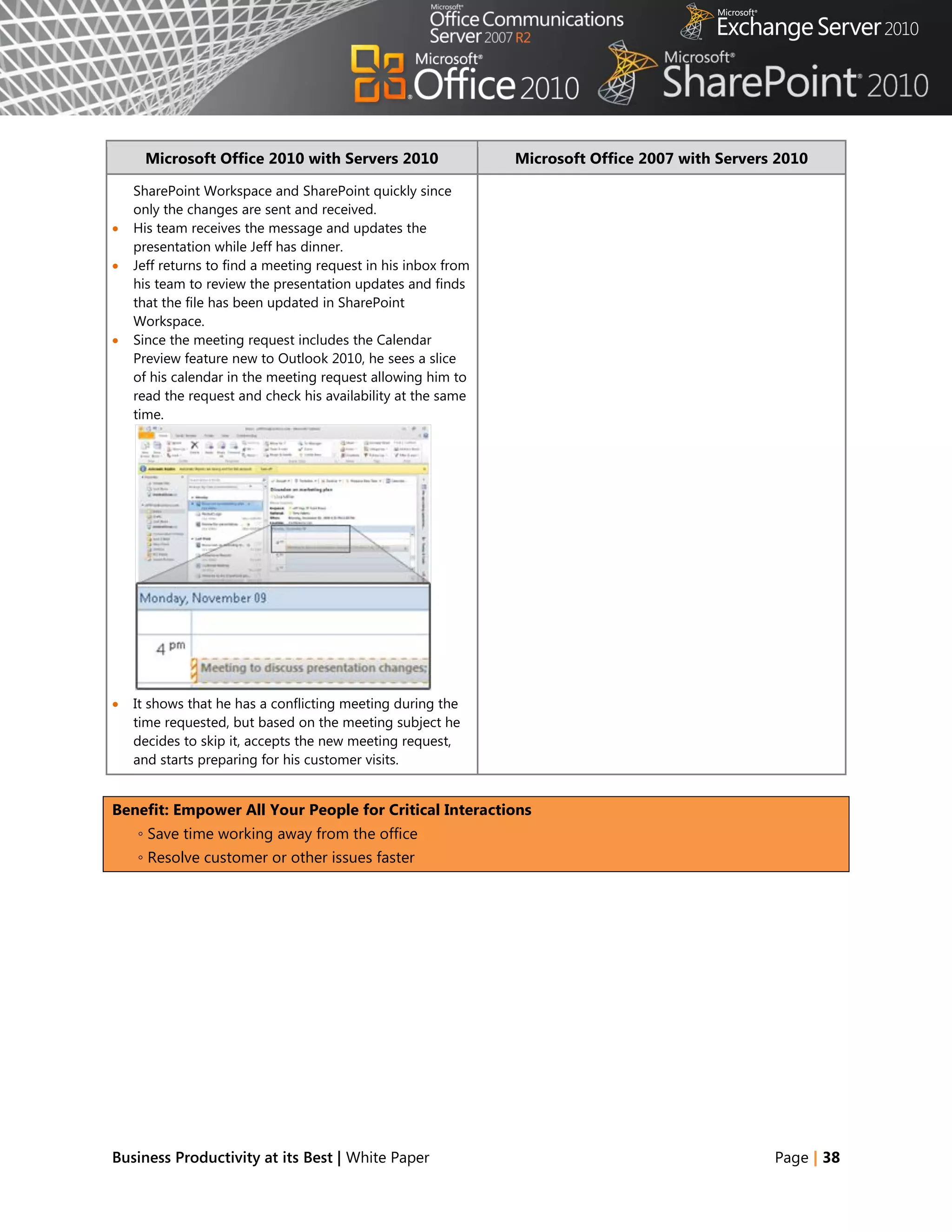
                                                                    Although Jeff is in a hurry to catch his flight, he has to
   He is in a hurry to catch his flight, and he does not            manually synchronize the SharePoint 2010 library with
    download the presentation to his laptop.                         Groove 2007 on his laptop before he leaves the office.
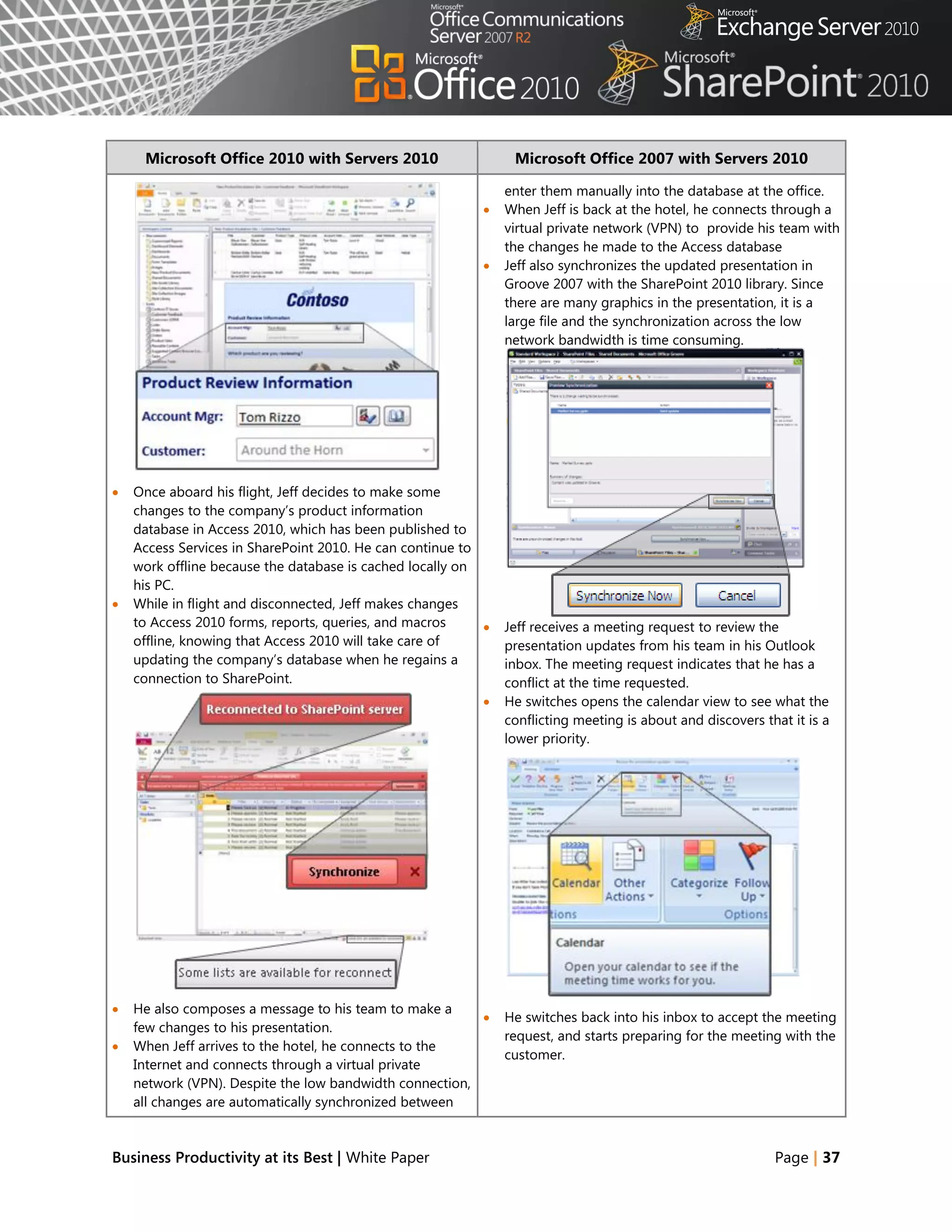
   Fortunately, he had the presentation stored on a
    SharePoint site that he has synced to his desktop
    through SharePoint Workspace 2010. It took only a
    single click to set up initially. At the airport, he opens
    his laptop and starts working on the presentation. He
    saves his updates back to SharePoint Workspace 2010.


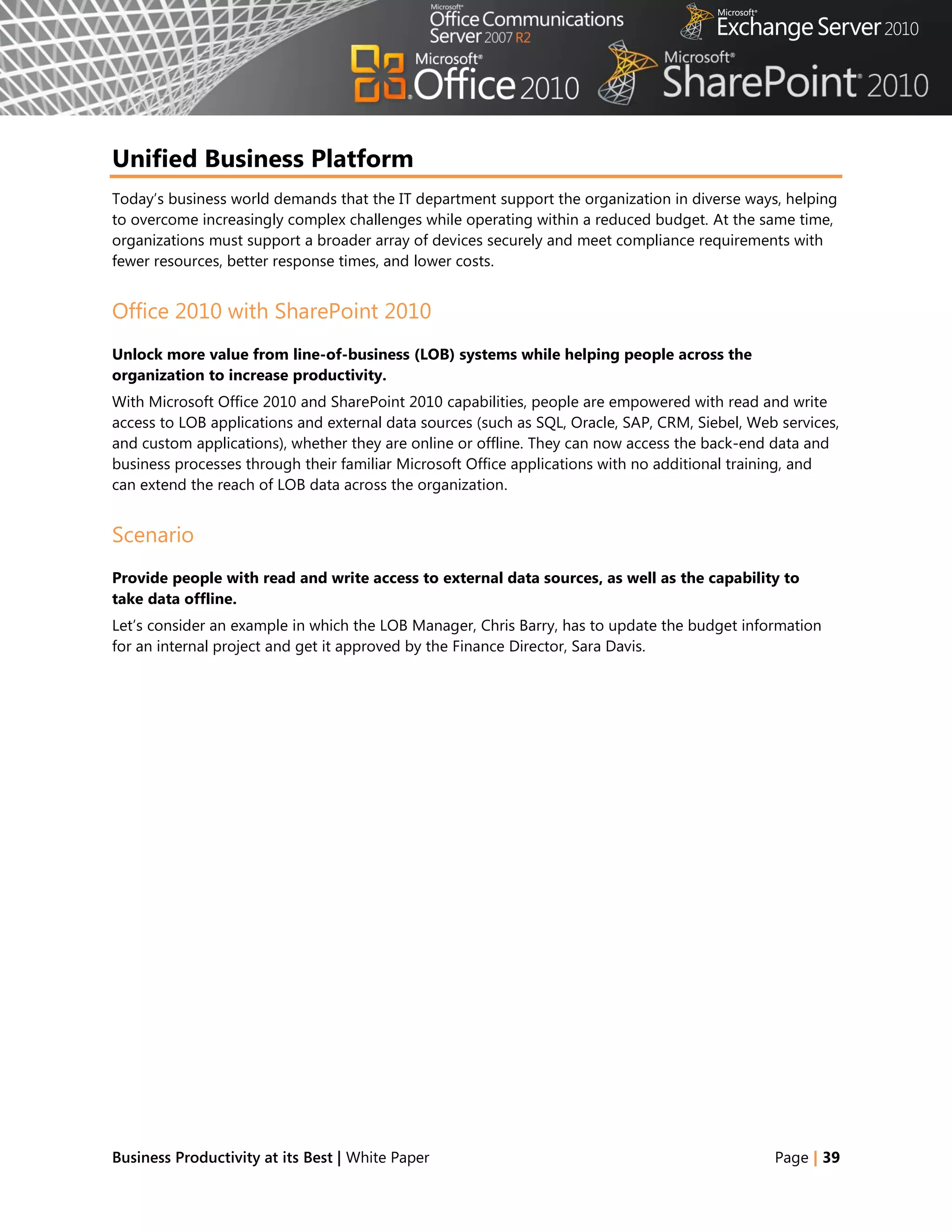
                                                                    At the airport, Jeff opens the PowerPoint 2007
                                                                     presentation, updates it, and saves it back to the
                                                                     Groove 2007 workspace.
   Jeff also updates product information by using offline          Once aboard his flight, Jeff would like to make some
                                               ®
    SharePoint list forms in Microsoft InfoPath 2010 from            changes to the company‘s product information
                                                                     Microsoft Office Access database. However, the
    within SharePoint Workspace 2010. Information
                                                                     database is stored on a file share on the corporate
    entered in the forms will be automatically
    synchronized to the SharePoint list when he                      network so he is unable to get to it while offline on
                                                                     the flight. Instead, he composes an e-mail with his
    reconnects.
                                                                     updates to one of his colleagues, who will have to


Business Productivity at its Best | White Paper                                                                     Page | 36
Microsoft Office 2010 with Servers 2010                    Microsoft Office 2007 with Servers 2010

                                                               enter them manually into the database at the office.
                                                              When Jeff is back at the hotel, he connects through a
                                                               virtual private network (VPN) to provide his team with
                                                               the changes he made to the Access database
                                                              Jeff also synchronizes the updated presentation in
                                                               Groove 2007 with the SharePoint 2010 library. Since
                                                               there are many graphics in the presentation, it is a
                                                               large file and the synchronization across the low
                                                               network bandwidth is time consuming.


   Once aboard his flight, Jeff decides to make some
    changes to the company‘s product information
    database in Access 2010, which has been published to
    Access Services in SharePoint 2010. He can continue to
    work offline because the database is cached locally on
    his PC.
   While in flight and disconnected, Jeff makes changes
    to Access 2010 forms, reports, queries, and macros        Jeff receives a meeting request to review the
    offline, knowing that Access 2010 will take care of        presentation updates from his team in his Outlook
    updating the company‘s database when he regains a          inbox. The meeting request indicates that he has a
    connection to SharePoint.                                  conflict at the time requested.
                                                              He switches opens the calendar view to see what the
                                                               conflicting meeting is about and discovers that it is a
                                                               lower priority.


   He also composes a message to his team to make a
                                                              He switches back into his inbox to accept the meeting
    few changes to his presentation.
                                                               request, and starts preparing for the meeting with the
   When Jeff arrives to the hotel, he connects to the
                                                               customer.
    Internet and connects through a virtual private
    network (VPN). Despite the low bandwidth connection,
    all changes are automatically synchronized between


Business Productivity at its Best | White Paper                                                             Page | 37
Microsoft Office 2010 with Servers 2010                   Microsoft Office 2007 with Servers 2010

    SharePoint Workspace and SharePoint quickly since
    only the changes are sent and received.
   His team receives the message and updates the
    presentation while Jeff has dinner.
   Jeff returns to find a meeting request in his inbox from
    his team to review the presentation updates and finds
    that the file has been updated in SharePoint
    Workspace.
   Since the meeting request includes the Calendar
    Preview feature new to Outlook 2010, he sees a slice
    of his calendar in the meeting request allowing him to
    read the request and check his availability at the same
    time.


   It shows that he has a conflicting meeting during the
    time requested, but based on the meeting subject he
    decides to skip it, accepts the new meeting request,
    and starts preparing for his customer visits.


Benefit: Empower All Your People for Critical Interactions
    ◦ Save time working away from the office
    ◦ Resolve customer or other issues faster


Business Productivity at its Best | White Paper                                                  Page | 38
Unified Business Platform
Today‘s business world demands that the IT department support the organization in diverse ways, helping
to overcome increasingly complex challenges while operating within a reduced budget. At the same time,
organizations must support a broader array of devices securely and meet compliance requirements with
fewer resources, better response times, and lower costs.


Office 2010 with SharePoint 2010
Unlock more value from line-of-business (LOB) systems while helping people across the
organization to increase productivity.
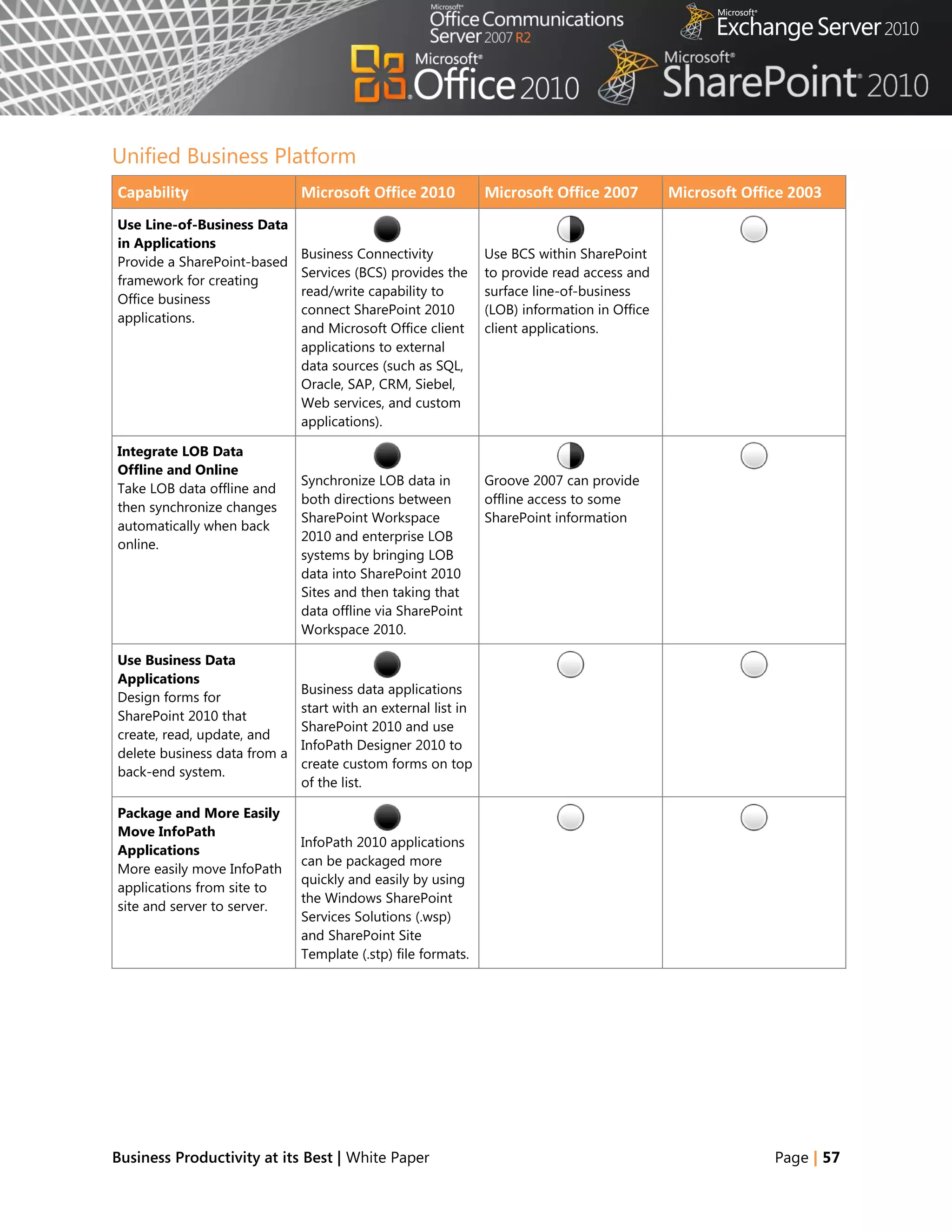
With Microsoft Office 2010 and SharePoint 2010 capabilities, people are empowered with read and write
access to LOB applications and external data sources (such as SQL, Oracle, SAP, CRM, Siebel, Web services,
and custom applications), whether they are online or offline. They can now access the back-end data and
business processes through their familiar Microsoft Office applications with no additional training, and
can extend the reach of LOB data across the organization.


Scenario
Provide people with read and write access to external data sources, as well as the capability to
take data offline.
Let‘s consider an example in which the LOB Manager, Chris Barry, has to update the budget information
for an internal project and get it approved by the Finance Director, Sara Davis.


Business Productivity at its Best | White Paper                                                 Page | 39
FEATURES
                                         Business Connectivity Services
                                    Offline and Online LOB Data Integration

    Microsoft Office 2010 with Servers 2010                       Microsoft Office 2007 with Servers 2010

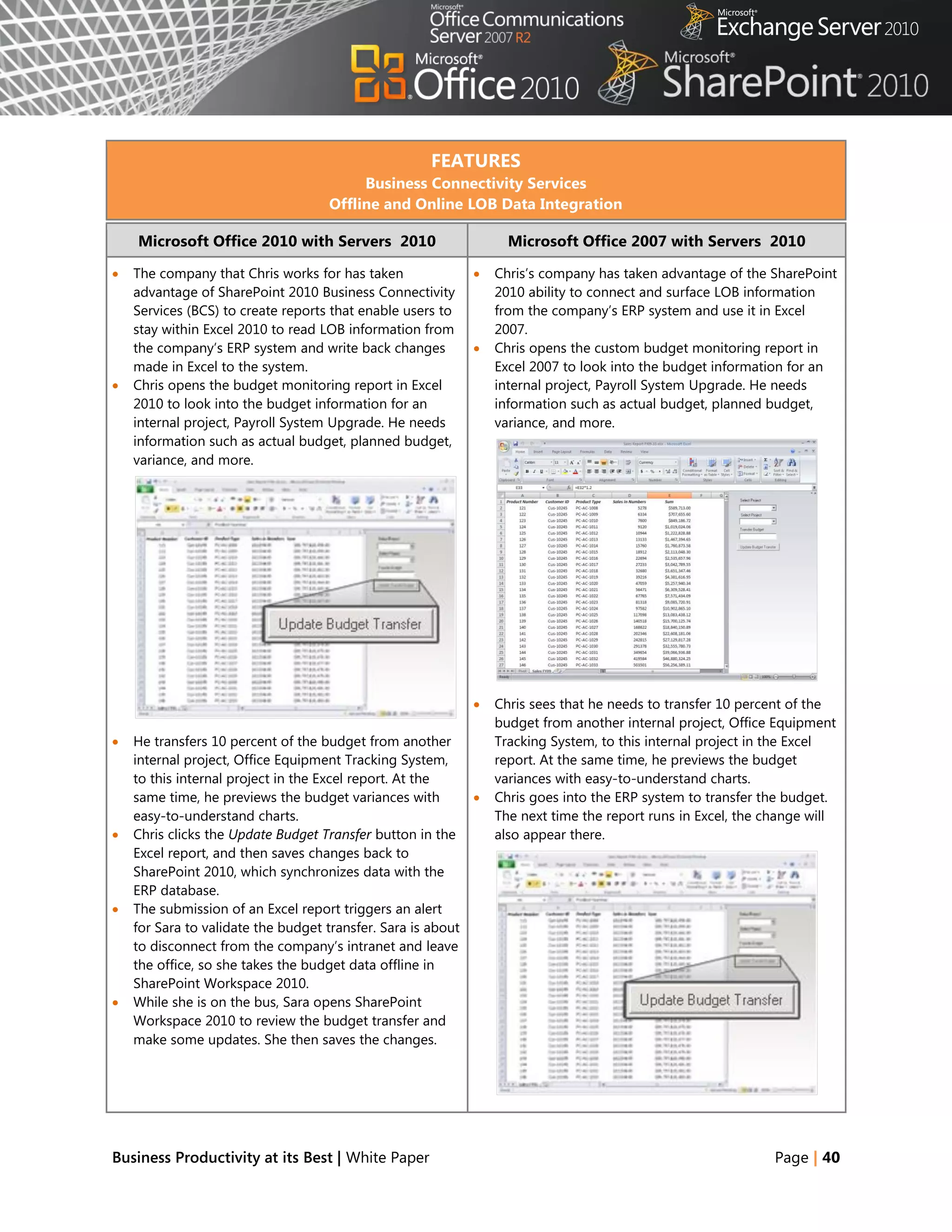
   The company that Chris works for has taken                 Chris‘s company has taken advantage of the SharePoint
    advantage of SharePoint 2010 Business Connectivity          2010 ability to connect and surface LOB information
    Services (BCS) to create reports that enable users to       from the company‘s ERP system and use it in Excel
    stay within Excel 2010 to read LOB information from         2007.
    the company‘s ERP system and write back changes            Chris opens the custom budget monitoring report in
    made in Excel to the system.                                Excel 2007 to look into the budget information for an
   Chris opens the budget monitoring report in Excel           internal project, Payroll System Upgrade. He needs
    2010 to look into the budget information for an             information such as actual budget, planned budget,
    internal project, Payroll System Upgrade. He needs          variance, and more.
    information such as actual budget, planned budget,
    variance, and more.


                                                               Chris sees that he needs to transfer 10 percent of the
                                                                budget from another internal project, Office Equipment
   He transfers 10 percent of the budget from another          Tracking System, to this internal project in the Excel
    internal project, Office Equipment Tracking System,         report. At the same time, he previews the budget
    to this internal project in the Excel report. At the        variances with easy-to-understand charts.
    same time, he previews the budget variances with           Chris goes into the ERP system to transfer the budget.
    easy-to-understand charts.                                  The next time the report runs in Excel, the change will
   Chris clicks the Update Budget Transfer button in the       also appear there.
    Excel report, and then saves changes back to
    SharePoint 2010, which synchronizes data with the
    ERP database.
   The submission of an Excel report triggers an alert
    for Sara to validate the budget transfer. Sara is about
    to disconnect from the company‘s intranet and leave
    the office, so she takes the budget data offline in
    SharePoint Workspace 2010.
   While she is on the bus, Sara opens SharePoint
    Workspace 2010 to review the budget transfer and
    make some updates. She then saves the changes.


Business Productivity at its Best | White Paper                                                              Page | 40
Microsoft Office 2010 with Servers 2010                  Microsoft Office 2007 with Servers 2010

                                                          Sara is about to disconnect from the company‘s
                                                           intranet and leave the office. Before she does so, she
                                                           requests that Chris send her a copy of the Excel 2007
                                                           report he has been using.
                                                          While on the bus, Sara reviews the budget transfer,
                                                           makes some updates in her copy, and saves the
                                                           changes.
                                                          After she reconnects to the network at home that
                                                           evening, she puts these same new figures in the ERP
                                                           system manually, and they are accessible by Chris and
                                                           the rest of the finance team.


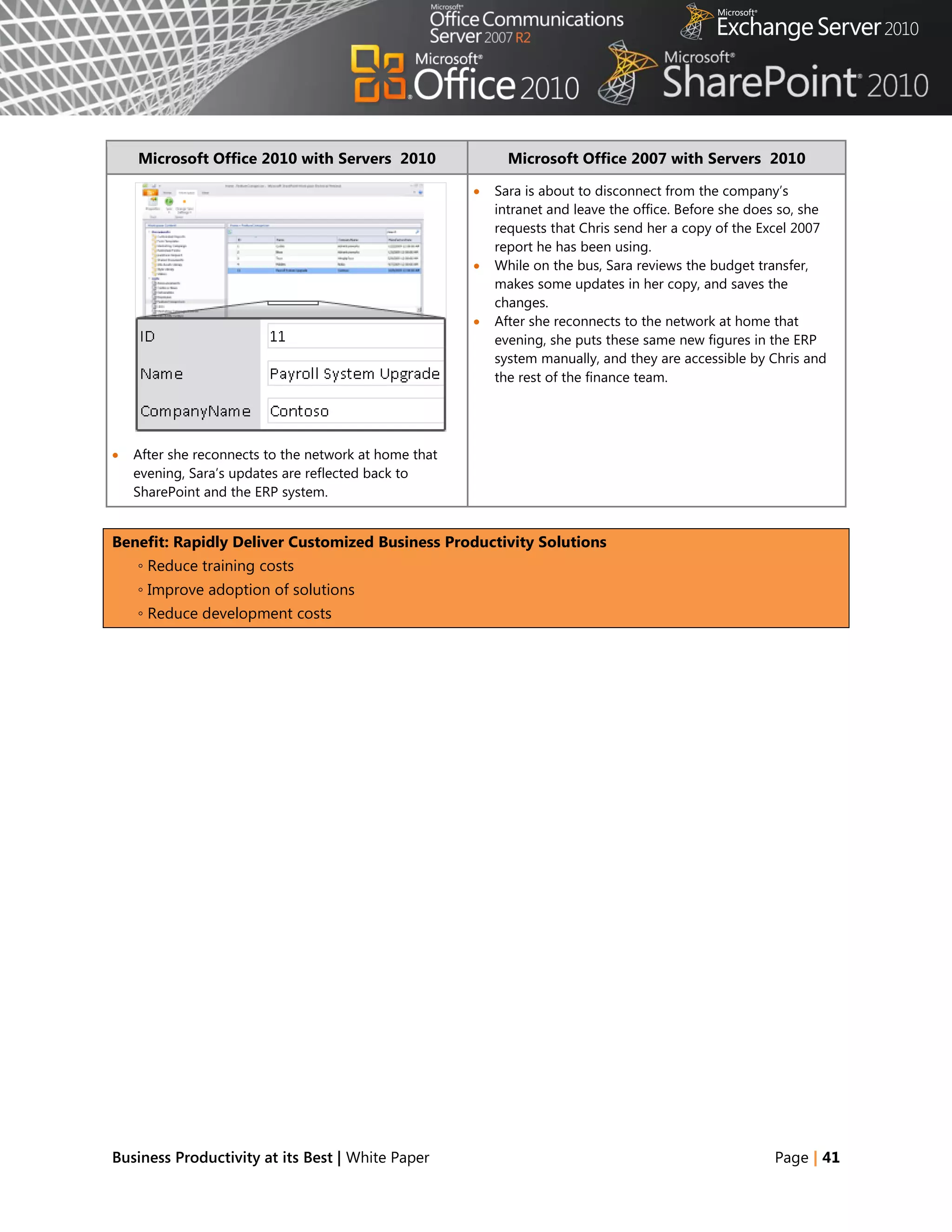
   After she reconnects to the network at home that
    evening, Sara‘s updates are reflected back to
    SharePoint and the ERP system.


Benefit: Rapidly Deliver Customized Business Productivity Solutions
    ◦ Reduce training costs
    ◦ Improve adoption of solutions
    ◦ Reduce development costs


Business Productivity at its Best | White Paper                                                         Page | 41
Conclusion
When used together, Microsoft Office 2010, SharePoint 2010, Exchange 2010, and Office Communications
Server 2007 R2 help maximize existing investments by extending server and services capabilities to
people‘s desktops, mobile devices, and browsers through familiar and intuitive applications. The latest
versions of these products were developed together for maximum performance integration, with the
expressed purpose of delivering a wealth of server and services capabilities to information workers and
enabling the most powerful user experience possible. While these tools provide much new and improved
functionality compared to their previous versions, the combined deployment of the latest client programs
and server technologies is necessary to achieve the best capabilities, performance, and benefits for your
business.


Business Productivity at its Best | White Paper                                                 Page | 42
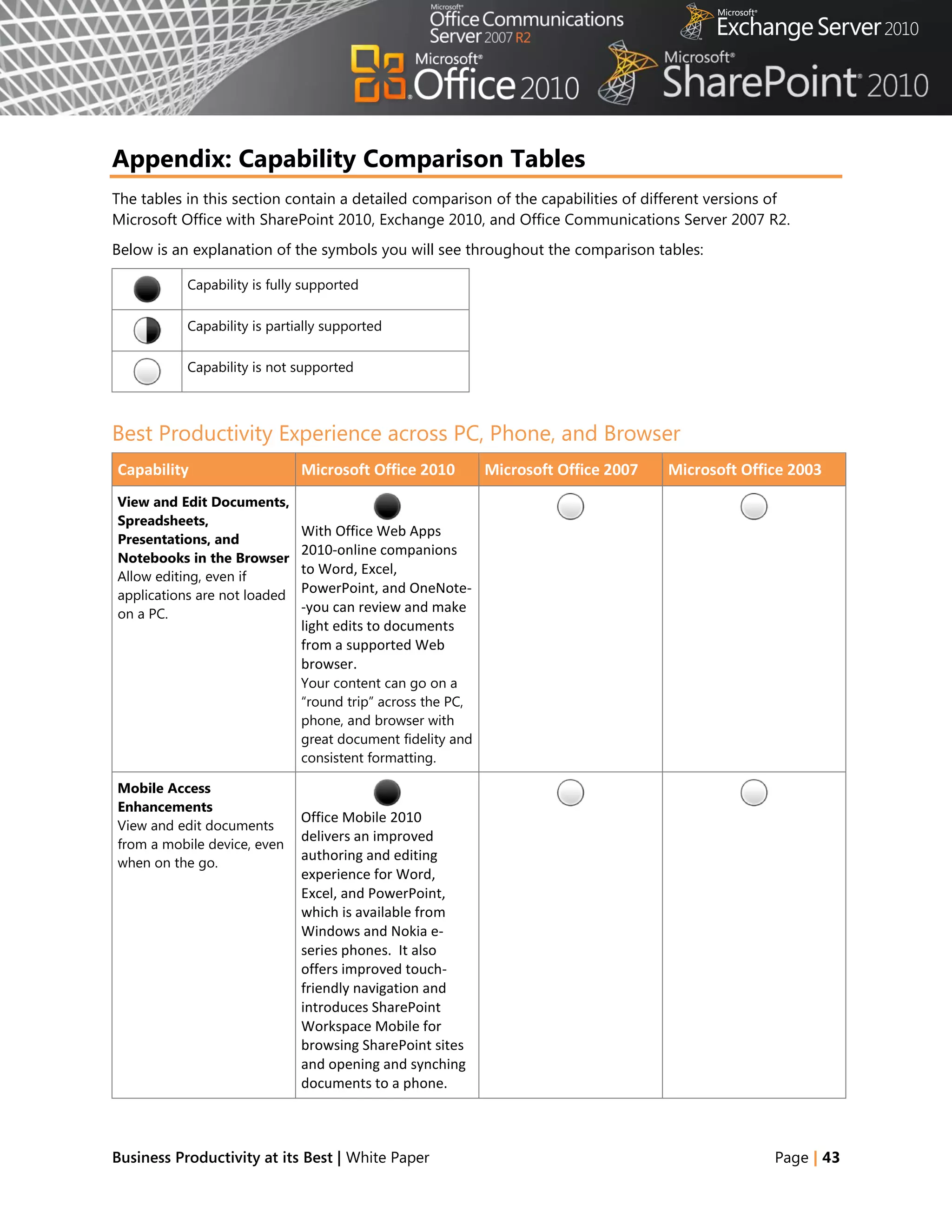
Appendix: Capability Comparison Tables
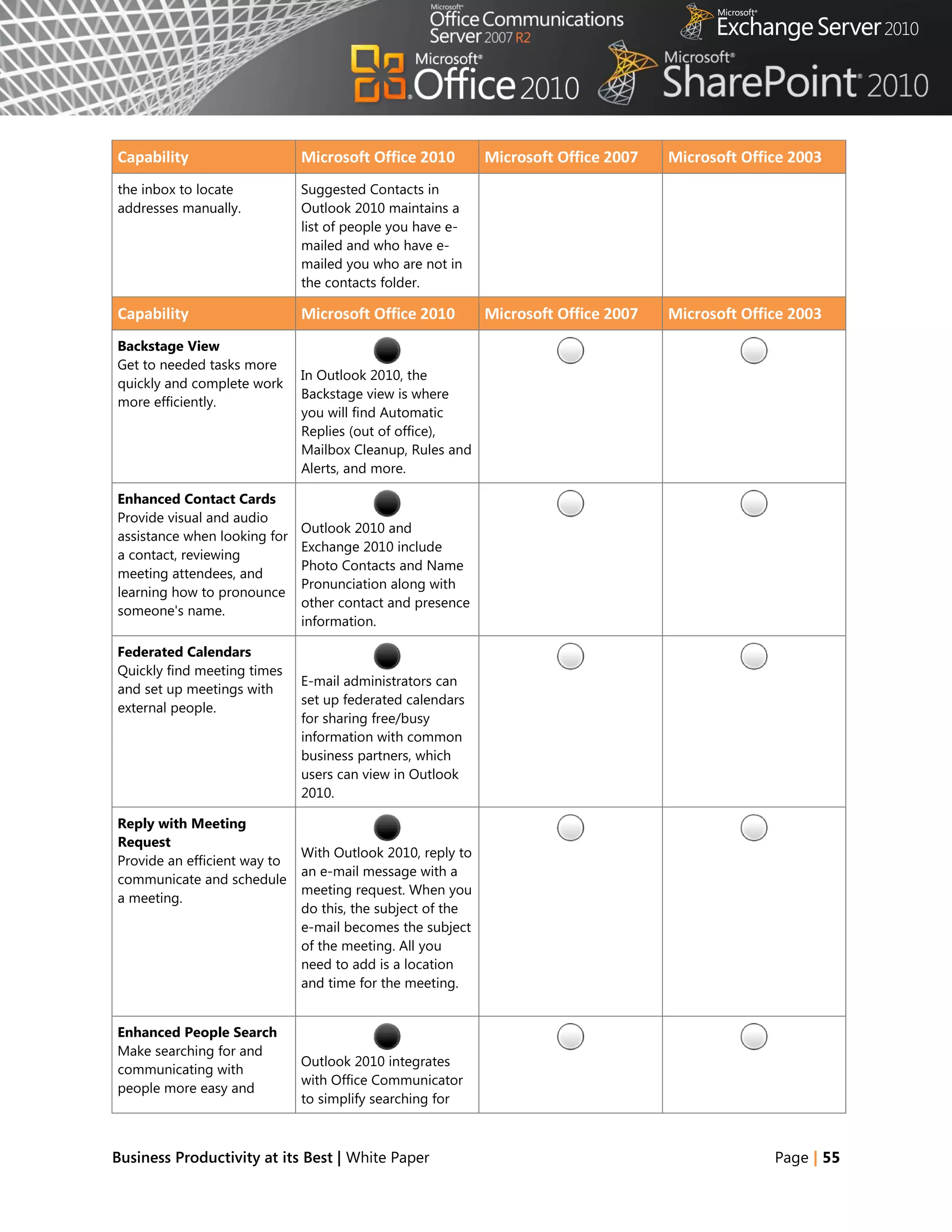
The tables in this section contain a detailed comparison of the capabilities of different versions of
Microsoft Office with SharePoint 2010, Exchange 2010, and Office Communications Server 2007 R2.
Below is an explanation of the symbols you will see throughout the comparison tables:

           Capability is fully supported

           Capability is partially supported

           Capability is not supported


Best Productivity Experience across PC, Phone, and Browser
Capability                    Microsoft Office 2010         Microsoft Office 2007   Microsoft Office 2003
View and Edit Documents,
Spreadsheets,
                              With Office Web Apps
Presentations, and
                              2010-online companions
Notebooks in the Browser
Allow editing, even if
                              to Word, Excel,
applications are not loaded
                              PowerPoint, and OneNote-
on a PC.                      -you can review and make
                              light edits to documents
                              from a supported Web
                              browser.
                              Your content can go on a
                              ―round trip‖ across the PC,
                              phone, and browser with
                              great document fidelity and
                              consistent formatting.

Mobile Access
Enhancements
                              Office Mobile 2010
View and edit documents
                              delivers an improved
from a mobile device, even
when on the go.
                              authoring and editing
                              experience for Word,
                              Excel, and PowerPoint,
                              which is available from
                              Windows and Nokia e-
                              series phones. It also
                              offers improved touch-
                              friendly navigation and
                              introduces SharePoint
                              Workspace Mobile for
                              browsing SharePoint sites
                              and opening and synching
                              documents to a phone.


Business Productivity at its Best | White Paper                                                   Page | 43
Capability                  Microsoft Office 2010      Microsoft Office 2007   Microsoft Office 2003
Broadcast Slide Shows in
PowerPoint
                            Instantly broadcast your
Share a PowerPoint
                            slides to a remote
presentation over the Web
for remote or networked
                            audience who can view
viewers.
                            them online even if they
                            don’t have PowerPoint
                            installed.


Business Productivity at its Best | White Paper                                              Page | 44
Capability                   Microsoft Office 2010           Microsoft Office 2007        Microsoft Office 2003
Publish Access Databases
to the Web
                             While publishing data,          While publishing data from
Securely publish database
                             Access 2010 checks for          Access 2007, people must
applications to the Web so
                             incompatible objects and        manually check whether
IT managers can meet
                             builds a report of any          objects created in Access
requirements for data
                             runtime differences             can be supported in the
compliance, backup, and
                             between the client and          server or not.
audits.
                             server.
                             Access Services is a new
                             SharePoint 2010 feature
                             that gives you the ability to
                             create Web databases in
                             Access, host them on a
                             SharePoint site, and make
                             them fully accessible
                             through a Web browser.
                             As a result, organizations
                             can save time and reduce
                             development and
                             maintenance costs.


Collaboration
Capability                   Microsoft Office 2010           Microsoft Office 2007        Microsoft Office 2003
Coauthor Documents and
Presentations
                             Simultaneously edit a
Share ideas with other
                             Word 2010 document or
people simultaneously and
see what areas of a
                             PowerPoint 2010
document have changed.
                             presentation for
                             documents hosted on
                             SharePoint 2010.

Simultaneously Edit
Spreadsheets and
                             Use Excel Web App to edit
Notebooks
                             the same workbook at the
Work together on content
using a Web browser.
                             same time or
                             simultaneously edit the
                             same shared notebook
                             with others through the
                             OneNote Web App.

Share a Team Notebook
Enable multiple people to
                             Shared OneNote 2010             Share OneNote 2007
add to and change the
                             notebooks provide a clear       notebooks with other
same shared notebook;
                             trail of what other authors     people, but without a
author names appear in
                             have changed since the          complete audit trail.
near real time as authors


Business Productivity at its Best | White Paper                                                         Page | 45
Capability                    Microsoft Office 2010        Microsoft Office 2007         Microsoft Office 2003
make changes.                 user last opened the
                              notebook.

Save Documents and
Presentations Directly to
SharePoint from Office        People can save Office       Save documents to
Automatically discover the    2010 documents directly to   SharePoint, but without the
SharePoint document           the SharePoint 2010          simplicity of the Backstage
library to make saving the    document library from        view
content easy and intuitive.   Office Backstage view.


Business Productivity at its Best | White Paper                                                        Page | 46
Capability                   Microsoft Office 2010         Microsoft Office 2007         Microsoft Office 2003
Collaborate Offline and
Online
                             With SharePoint Workspace     Microsoft Office Groove
Work offline with
                             2010, you can take            2007 (new to Office 2007)
SharePoint 2010 content,
                             SharePoint lists and          includes a SharePoint Files
and when reconnected to
                             document libraries offline.   Tool, so you can take
the network, changes are
                             After completing offline      SharePoint document
synchronized.
                             work and reconnecting,        libraries offline.
                             only the changes are
                             synched, so updates are
                             faster.

Work Offline with an
Improved Experience in
                            Data in SharePoint 2010        Before working offline with
Microsoft Office Access
                            lists is cached in Access      data from SharePoint sites,
Edit Access forms, reports,
                            2010 by default.               people must manually
queries, and macros offline
                                                           create links between Access
and synchronize changes in
                                                           2007 tables and SharePoint
SharePoint when
                                                           2010 lists.
reconnected to the
network.


Enterprise Content Management
Capability                   Microsoft Office 2010         Microsoft Office 2007         Microsoft Office 2003
Automate Metadata
Capture
                             Use Word 2010 to provide      Use the document
Make information more
                             better and more automated     information panel to
findable, perceptible,
                             metadata capture from         manually capture metadata
discoverable, navigable,
                             Backstage view, including     from within Microsoft
manageable, and reusable.
                             document information          Office 2007.
                             either added automatically
                             or typed quickly in
                             AutoComplete fields.

Use Office Backstage
View
                             The new Microsoft Office
Seamlessly connect
                             Backstage view gives
Microsoft Office
                             everyone quick access to
applications with
                             important operations such
SharePoint 2010 to provide
                             as viewing document
workflow integration, the
                             information, saving,
ability to enter metadata,
                             printing, and sharing.
and social context.


Business Productivity at its Best | White Paper                                                        Page | 47
Capability                    Microsoft Office 2010        Microsoft Office 2007   Microsoft Office 2003
Access SharePoint
Templates
                              People can access
Access document
                              document templates stored
templates stored on
                              in SharePoint 2010 via the
SharePoint 2010 more
                              New Document Wizard in
quickly and easily.
                              Microsoft Office
                              applications.

Apply PowerPoint
Themes to SharePoint
                              People can theme
Sites
                              SharePoint 2010 sites by
Make customization of
                              using the same themes as
SharePoint 2010 sites more
                              in PowerPoint 2010.
flexible with themes that
are also used in
presentation decks.

Use Reusable Workflows
Support workflows that can
                              SharePoint Designer 2010
be used multiple times, and
                              supports reusable
provide workflow templates
                              workflows and workflows
for later use in SharePoint
                              attached to content types.
2010.

Visualize Workflow
Allow a workflow designer
                              Workflows developed as
to see the steps in a
                              drawings and exported
SharePoint 2010 workflow
                              from Microsoft Office
in a visual format.                ®
                              Visio 2010 can be
                              imported into SharePoint
                              Designer 2010 for
                              modification and
                              deployment.

Use Forms-Based
Applications
                              Integrate InfoPath 2010
Forms-based applications
                              forms with back-end data
connect with back-end data
                              by using external lists in
and include workflow,
                              SharePoint 2010, and
reporting, custom Web
                              include custom sandboxed
pages, and other
                              solution code.
components.


Business Productivity at its Best | White Paper                                                  Page | 48
Capability                      Microsoft Office 2010         Microsoft Office 2007      Microsoft Office 2003
Enhance Information
Security and Integrity
                                InfoPath 2010 and
with Digital Signatures
                                SharePoint 2010 support
Help ensure the integrity of
                                cryptography next-
information contained in
                                generation (CNG) digitally
forms with the controls
                                signed content.
necessary to enable single,
co-sign, and counter-sign
scenarios for the full form
or portions of the form.

Publish Forms in a Single
Click
                                Use ―quick‖ publish           Publish data from forms
Avoid clicking through the
                                functionality in InfoPath     through the Publishing
Publishing Wizard every
                                2010 to publish forms to      Wizard.
time you update forms
                                SharePoint 2010 in a single
published in SharePoint
                                click.
2010.

Manage Forms More
Easily
                                Automate template version
More easily manage form
                                management with
versions, updates, and
                                SharePoint 2010 and
upgrades in SharePoint
                                InfoPath 2010 to provide
2010 to ensure that team
                                an improved process for
members are working on
                                checking for template
the correct version of a
                                updates.
form.

Fill In Forms Offline
SharePoint list forms are
                                SharePoint 2010 list items
synchronized with the
                                open in an InfoPath 2010
workspace so people can
                                form that is hosted in
work offline.
                                SharePoint for edit in
                                display mode.

Extend the Reach of
Forms
                                The InfoPath 2010 forms      Limited InfoPath 2007
Fill in InfoPath forms from a
                                solution offers embedded     controls work on Web-
Web browser, while online
                                solutions using InfoPath     enabled and mobile forms.
or offline, and from a
                                controls that can be hosted.
mobile device.


Business Productivity at its Best | White Paper                                                        Page | 49
Business Intelligence
Capability                       Microsoft Office 2010          Microsoft Office 2007         Microsoft Office 2003
PowerPivot for Excel
PowerPivot for Excel 2010
                                 PowerPoint for Excel 2010,
provides streamlined
                                 a free add-in available for
integration and Web-based
                                 download provides
analysis in SharePoint 2010.
                                 calculations of sets of
Use data from many sources
                                 hundreds of millions of
and manipulate data sets
                                 rows of data from multiple
that have up to hundreds of
                                 sources at lightning speed.
millions of rows.

Publish and Share Through
Excel Services
                                 Use Office Backstage view      Manually navigate to
Share analysis and results
                                 in Excel 2010 to selectively   SharePoint sites and
across the organization by
                                 publish parts of a             specify which components
publishing Excel
                                 worksheet, hide formulas,      of the workbook will be
spreadsheets to the Web or
                                 and stage data to              visible when published to
other SharePoint site
                                 SharePoint 2010. Publish       the Excel Services site.
(intranet or extranet).
                                 and share analysis with less
                                 effort and enable others to
                                 enjoy the same Data Slicers
                                 and fast-query capabilities,
                                 even when they work in
                                 Excel Services reports.

Microsoft Office Access
Design for the Web
                                 Use Access 2010 to publish
Access applications
                                 data, forms, logic/macros,
developed in Design for
                                 and reports with nearly the
Web mode can be designed
                                 same look and feel in the
and edited for publishing to
                                 browser as Access 2010 on
SharePoint 2010, so people
                                 a PC.
can share, collect, and report
on data.


Unified Communications
Capability                       Microsoft Office 2010          Microsoft Office 2007         Microsoft Office 2003
Integrated Presence in
Office Applications
                                 Using the integrated           Microsoft Office
Eliminate the need to
                                 presence indicator in Office   Communicator 2007
switch between
                                 2010, see the status of        makes it easier to stay in
applications to IM or call
                                 other authors and call or IM   touch with colleagues.
another author while
                                 them with a single click,      Instant messaging (IM) and
working together.
                                 even from within Word,         audio or video
                                 Excel, and PowerPoint.         conferencing are accessible


Business Productivity at its Best | White Paper                                                             Page | 50
Capability                  Microsoft Office 2010       Microsoft Office 2007         Microsoft Office 2003
                            Buddy list in Outlook shows from a single screen. With
                            recent and group contacts. presence technology, start
                                                        a conversation simply by
                                                        clicking a person‘s name in
                                                        a Word document or
                                                        Outlook e-mail message.


Business Productivity at its Best | White Paper                                                     Page | 51
Capability                     Microsoft Office 2010           Microsoft Office 2007         Microsoft Office 2003
Contact Card
A consolidated view of a
                               Click to communicate with
person‘s contact details,
                               others via IM, phone,
including presence
                               mobile, and see their
                               status, calendar summary,
                               location, department, title,
                               and other details.

Group Scheduling
Conveniently and efficiently
                               When you receive a              Meeting Scheduling
schedule appointments,
                               meeting request in Outlook      Assistant helps you view
share calendar availability,
                               2010, get a preview of your     multiple calendars to
and manage work
                               calendar to see how             simplify organizing a
schedules.
                               the request affects other       meeting
                               calendar items—without
                               leaving your inbox.
                               Schedule View, Group
                               Scheduling Tools, and
                               Team Calendar make it
                               easy to see what everyone
                               on the team is scheduled to
                               do.

MailTips
Help people to avoid
                               MailTips give important
accidentally replying to a
                               information before you
large distribution list,
                               click Send to avoid the
sending unnecessary e-mail
                               distribution of unnecessary
messages to out-of-office
                               embarrassing or even
contacts, and distributing
                               potentially damaging e-
confidential information
                               mail.
outside the company.

Voice Mail Preview
Gain a good sense of the
                               By the time a voice mail
recorded content by
                               arrives in the inbox, Unified
looking at the voice mail
                               Messaging inserts a voice
transcription.
                               mail preview, which is
                               machine-generated text
                               derived from the voice
                               recording. Text in the
                               preview is indexed, so you
                               can search for voice
                               messages without Audio
                               Notes.

Ribbon Interface
Easily use commands that
                               The Ribbon toolbar is now       The results-oriented Office
are arranged logically
                               part of all Office              Fluent user interface is


Business Productivity at its Best | White Paper                                                            Page | 52
Capability                   Microsoft Office 2010        Microsoft Office 2007       Microsoft Office 2003
rather than scattered across applications, improving      introduced to most
several different dialog     discoverability across the   applications with the
boxes with multiple tabs.    suite. Outlook 2010 has      Ribbon toolbar, making it
                             multiple Home tabs—one       easier to find the
                             each for Mail, Calendar,     commands that are needed
                             Contacts, Tasks, and         most and to reveal new
                             Notes—along with the         ones.
                             Send/Receive, Folder, and
                             View tabs.


Business Productivity at its Best | White Paper                                                     Page | 53
Capability                    Microsoft Office 2010          Microsoft Office 2007         Microsoft Office 2003
Conversation View
Improve the tracking and
                              In Outlook 2010,
management of e-mail
                              Conversation View
conversations while saving
                              combines message threads,
valuable inbox space.
                              Clean Up removes
                              duplicate information, and
                              Ignore lets you delete
                              current and future
                              irrelevant messages with
                              one click.

Enhanced Search
Quickly find and manage
                              Outlook 2010 offers            Outlook 2007 offers instant
large quantities of e-mail,
                              improved search                search to help find
calendar items, and contact
                              capabilities with Saved        messages faster
files.
                              Searches, which allows you
                              to create custom searches
                              that can be repeated with a
                              single click, so you spend
                              less time finding the
                              information you need.

Web and Mobile Access
Stay connected to work
                              Enjoy all the new features     Outlook Web Access 2007       Outlook Web Access 2003
and personal connections
                              and benefits of Outlook        gives you improved            gives you basic
using the new Outlook
                              2010 on a Microsoft            browser-based access to e-    functionality through a
experience.                                    ®
                              Windows Mobile -based          mail, calendar, and           browser
                              smartphone or the Web by       contacts.
                              using Outlook Web App.

Quick Steps
Save time by creating and
                            With Quick Steps in
defining multistep tasks
                            Outlook 2010, reply with a
that can be executed with a
                            meeting, move to a specific
single click.
                            folder, create a new e-mail
                            to assigned groups, and
                            more with a single click.

Meeting Requests
Efficiently handle meeting
                              With Calendar Preview in
requests with a simplified
                              Outlook 2010, see a slice of
preview of calendars.
                              calendar in the meeting
                              request, which allows
                              reading the request and
                              checking that date on
                              calendar at the same time.

Suggested Contacts
Avoid searching through


Business Productivity at its Best | White Paper                                                           Page | 54
Capability                    Microsoft Office 2010         Microsoft Office 2007   Microsoft Office 2003
the inbox to locate           Suggested Contacts in
addresses manually.           Outlook 2010 maintains a
                              list of people you have e-
                              mailed and who have e-
                              mailed you who are not in
                              the contacts folder.

Capability                    Microsoft Office 2010         Microsoft Office 2007   Microsoft Office 2003
Backstage View
Get to needed tasks more
                              In Outlook 2010, the
quickly and complete work
                              Backstage view is where
more efficiently.
                              you will find Automatic
                              Replies (out of office),
                              Mailbox Cleanup, Rules and
                              Alerts, and more.

Enhanced Contact Cards
Provide visual and audio
                              Outlook 2010 and
assistance when looking for
                              Exchange 2010 include
a contact, reviewing
                              Photo Contacts and Name
meeting attendees, and
                              Pronunciation along with
learning how to pronounce
                              other contact and presence
someone's name.
                              information.

Federated Calendars
Quickly find meeting times
                              E-mail administrators can
and set up meetings with
                              set up federated calendars
external people.
                              for sharing free/busy
                              information with common
                              business partners, which
                              users can view in Outlook
                              2010.

Reply with Meeting
Request
                              With Outlook 2010, reply to
Provide an efficient way to
                              an e-mail message with a
communicate and schedule
                              meeting request. When you
a meeting.
                              do this, the subject of the
                              e-mail becomes the subject
                              of the meeting. All you
                              need to add is a location
                              and time for the meeting.


Enhanced People Search
Make searching for and
                              Outlook 2010 integrates
communicating with
                              with Office Communicator
people more easy and
                              to simplify searching for


Business Productivity at its Best | White Paper                                                   Page | 55
Capability                  Microsoft Office 2010        Microsoft Office 2007   Microsoft Office 2003
effective.                  and communicating with
                            people through IM, e-mail,
                            or phone.


Business Productivity at its Best | White Paper                                                Page | 56
Unified Business Platform
Capability                    Microsoft Office 2010            Microsoft Office 2007         Microsoft Office 2003
Use Line-of-Business Data
in Applications
                              Business Connectivity            Use BCS within SharePoint
Provide a SharePoint-based
                              Services (BCS) provides the      to provide read access and
framework for creating
                              read/write capability to         surface line-of-business
Office business
                              connect SharePoint 2010          (LOB) information in Office
applications.
                              and Microsoft Office client      client applications.
                              applications to external
                              data sources (such as SQL,
                              Oracle, SAP, CRM, Siebel,
                              Web services, and custom
                              applications).

Integrate LOB Data
Offline and Online
                              Synchronize LOB data in          Groove 2007 can provide
Take LOB data offline and
                              both directions between          offline access to some
then synchronize changes
                              SharePoint Workspace             SharePoint information
automatically when back
                              2010 and enterprise LOB
online.
                              systems by bringing LOB
                              data into SharePoint 2010
                              Sites and then taking that
                              data offline via SharePoint
                              Workspace 2010.

Use Business Data
Applications
                              Business data applications
Design forms for
                              start with an external list in
SharePoint 2010 that
                              SharePoint 2010 and use
create, read, update, and
                              InfoPath Designer 2010 to
delete business data from a
                              create custom forms on top
back-end system.
                              of the list.

Package and More Easily
Move InfoPath
                              InfoPath 2010 applications
Applications
                              can be packaged more
More easily move InfoPath
                              quickly and easily by using
applications from site to
                              the Windows SharePoint
site and server to server.
                              Services Solutions (.wsp)
                              and SharePoint Site
                              Template (.stp) file formats.


Business Productivity at its Best | White Paper                                                            Page | 57

2010 Client and Server Integration

  • 1.
    Business Productivity atIts Best Microsoft Office, Microsoft SharePoint, Microsoft Exchange, and Microsoft Office Communications Server White Paper April 2010
  • 2.
    DISCLAIMER The information containedin this document represents the current plans of Microsoft Corporation on the issues presented at the date of publication. Because Microsoft must respond to changing market conditions, it should not be interpreted to be a commitment on the part of Microsoft, and Microsoft cannot guarantee the accuracy of any information presented after the date of publication. Schedules and features contained in this document are subject to change. Unless otherwise noted, the companies, organizations, products, domain names, e-mail addresses, logos, people, places, and events depicted in examples herein are fictitious. No association with any real company, organization, product, domain name, e-mail address, logo, person, place, or event is intended or should be inferred. Complying with all applicable copyright laws is the responsibility of the user. Without limiting the rights under copyright, no part of this document may be reproduced, stored in or introduced into a retrieval system, or transmitted in any form or by any means (electronic, mechanical, photocopying, recording, or otherwise), or for any purpose, without the expressed written permission of Microsoft Corporation. Microsoft may have patents, patent applications, trademarks, copyrights, or other intellectual property rights covering subject matter in this document. Except as expressly provided in any written license agreement from Microsoft, the furnishing of this document does not give any license or rights to these patents, trademarks, copyrights, or other intellectual property. © 2010 Microsoft Corporation. All rights reserved. Microsoft, the Microsoft logo, Backstage, Excel, Excel Services, FrontPage, Groove, InfoPath, OneNote, Outlook, PivotTable, PowerPivot, PowerPoint, SharePoint, Visio, and Windows are either registered trademarks or trademarks of Microsoft Corporation in the United States and/or other countries. All other trademarks are property of their respective owners.
  • 3.
    Abstract ® ® This paper shows how Microsoft Office, Microsoft SharePoint , Microsoft Exchange, and Microsoft Office Communications Server contribute to the powerful architectural design of the Microsoft Business Productivity Infrastructure (BPI). The BPI stack approach suggests that only by thinking at a capability level (for example, “What do users want to do?‖), and then adding the right aspects of capability in each place (client, server, and services), can we create desktop applications that also deliver rich server and services capabilities to information workers. This paper describes how the 2010 and 2007 versions of Office work together with the related business productivity servers: SharePoint 2010, Exchange 2010 and Office Communications Server 2007 R2. The scenarios outlined in this paper show examples of how the power of the business productivity servers can be combined with capabilities of one or more Microsoft Office 2010 applications to deliver rich, intuitive, and easy-to-use capabilities directly into the hands of desktop users. The scenarios cover the following BPIO capabilities and value areas:  Best Productivity Experience  Enterprise Content Management across PC, Phone, Browser  Collaboration  Unified Communications  Unified Business Platform  Business Intelligence The paper concludes that to realize the best user experience with Office and the business productivity servers, organizations should upgrade client programs to Office Professional Plus 2010 and server 1 technologies to SharePoint 2010, Exchange 2010, and Office Communications Server 2007 R2. 1 This whitepaper was published prior to the release of Microsoft Communications Server 2010 and includes descriptions of features from Office Communications Server 2007 R2 Business Productivity at its Best | White Paper Page | 3
  • 4.
    Contents Abstract ......................................................................................................................................................3 Introduction ..............................................................................................................................................5 BestProductivity Experience across PC, Phone, Browser ..........................................................7 Unified Communications ................................................................................................................... 17 Business Intelligence ........................................................................................................................... 24 Enterprise Content Management ................................................................................................... 27 Collaboration ......................................................................................................................................... 31 Unified Business Platform ................................................................................................................. 39 Conclusion .............................................................................................................................................. 42 Appendix: Capability Comparison Tables .................................................................................... 43 Business Productivity at its Best | White Paper Page | 4
  • 5.
    Introduction Microsoft Office hasalways been about automating tasks and providing people with choices for how they get things done at work, at school, and at home. When Microsoft Office products were first introduced, they helped people move beyond manual processes and tools to automated processes on computers. Over time, Microsoft Office has evolved and is now the primary vehicle by which people experience Business Productivity Infrastructure (BPI) capabilities, such as collaboration and content management. Microsoft Office helps enhance business productivity by offering rich server capabilities that are tightly integrated into the user experience. Many analysts support the notion of an integrated productivity environment for information workers. 2 3 Gartner Group‘s ―Smart Enterprise,‖ Forrester‘s ―Information Workplace,‖ and Yankee Group‘s ―Extended 4 Enterprise‖ frameworks all combine these capabilities to create the next-generation workplace for information workers. The introduction of Microsoft Office 2007 was the first time a solution of client, server, and service products, with tight design integration, could deliver the functionality that would have previously required 6–10 ―best-in-class‖ products for a full BPI infrastructure. The 2010 release of these products takes this integration to the next level by providing more flexibility in delivery and new capabilities to help save the business time and money. The focus of this paper is to provide an overview of the specific capabilities enabled through Microsoft Office and the related business productivity servers working together as key components of the BPI stack in the 2010 release. The following table provides an overview of the features designed to work together between specific versions of the Microsoft Office programs and the related business productivity servers. Levels of the combined value of these products can be summarized as fair, good, better, and best, and are further explained below. Based on the information in this table, we recommend upgrading to Office Professional Plus 2010 when upgrading the related business productivity servers to achieve the best user experience. 2 Gartner Group: The Smart Enterprise Suite is Coming: Do We Need It?, May, 2002 3 Forrester Big Idea: The Information Workplace Will Redefine the World of Work – At Last!, June, 2005 4 Yankee Group: The Impact of Microsoft’s Unified Communications Launch, Enterprise Computing & Networking, Zeus Kerravala, August 2006 Business Productivity at its Best | White Paper Page | 5
  • 6.
    Combined Description Value ® Fair Microsoft SharePoint Portal Server was released in 2001 along with Microsoft Office XP. It introduced the first interactions with Office and also worked with Microsoft Office 2000. It included Web Parts and document libraries with check in/check out functionality and alerts. Exchange Server 2000 enables people to send mail directly from any Office 2000 application. It provides built-in indexing and search across a diverse set of information types, including Office documents. Outlook Web Access lets people access email and calendars with a web browser. Good Microsoft Office 2003 provides a good level of integration with Microsoft SharePoint Portal Server 2003, which introduced MySites. It was the first time the products co-shipped, and the integration allows users to create documents, organize team meetings and activities, work with SharePoint lists in ® ® Microsoft Office Excel , and use Microsoft Office FrontPage 2003 to customize lists or Web Parts on SharePoint sites. Exchange Server 2003 with Office 2003 helps people plan for and organize meetings by storing and sharing agendas, visuals, document links, attendee lists, and other documentation in a location everyone can access. This release also provided a cached Exchange mode and introduced RPC over ® HTTP for improved online/offline syncing with Microsoft Office Outlook . ® Better Microsoft Office 2007 provides contextual integration with Microsoft Office SharePoint Server 2007, which allows people to interact with SharePoint sites without leaving their Microsoft Office programs, and provides online/offline access with two-way synchronization for select information ® through Outlook and Microsoft Office Groove . The Business Data Catalog (BDC) was introduced, enabling line-of-business (LOB) data to be surfaced through SharePoint and Office. Exchange Server 2007 with Office 2007 provides people with rich access to e-mail, calendars, attachments, and contacts from more locations and devices. Unified messaging capabilities let users receive voice mail, e-mail and faxes in their Outlook inbox. The first release of Office Communications Server 2007 enables people to communicate and collaborate easily with others in different locations using a variety of options, including instant messaging (IM), voice, audio and video conferencing, with rich presence indicators integrated in Office 2007 applications. Best Microsoft Office 2010 with SharePoint 2010 gives people the ability to seamlessly view and edit 5 ® information from a PC, browser, and smartphone . Microsoft SharePoint Workspace 2010 (formerly Groove) makes it easier for people to take information online and offline and Business Connectivity Services (BCS) makes it easier to enable users to work with LOB information from within familiar Office applications. The new Microsoft Office Backstage™ view helps to surface SharePoint 2010 capabilities in the context of Office applications, including greater automation of metadata capture and streamlined access to document libraries and SharePoint sites. Also, integration between these two products provides the ability to co-author documents, presentations, worksheets and notebooks. Exchange 2010 with Office 2010 provides a more powerful user experience for staying up-to-date on the go through a PC, phone or browser. New capabilities provide IT Pros with simplified administration tools and users with new inbox management tools that boost productivity and calendaring capabilities that simplifying scheduling. MailTips is a new feature to help prevent information leakages and embarrassing e-mail mistakes. Office Communications Server 2007 R2 surfaces presence information with contact cards and provides the ability to initiate voice or IM conversations from directly within Office 2010 applications— through Backstage view author information, Outlook contacts and co-authoring indicators. Desktop- sharing capabilities allow users to collaborate with one another while they talk to each other using enhanced audio conferencing features. 5 Some mobile functionality requires Office Mobile 2010 which is not included in Office 2010 applications, suites, or Web Apps Business Productivity at its Best | White Paper Page | 6
  • 7.
    Best Productivity Experienceacross PC, Phone, Browser Mobile work is no longer just about the sales force. More than ever, employees in a variety of roles are expected to be ―always on and always connected,‖ even when they are away from the office. To enable the fast response they want to provide, these workers need the ability to access information from more places and on more devices. Taking action on the go can be difficult, especially if workers cannot connect to the business network or access the right information for their jobs. And while telecommuting and working on the go can reduce costs and increase productivity, it potentially opens up access and security concerns. Microsoft Office 2010 and related server capabilities are helping people access Office applications, documents and their inboxes (IM, e-mail, and voice mail) across a range of devices, virtually regardless of location. Office 2010 with Related Business Productivity Servers Enable people to access and respond to information from virtually anywhere, with confidence that content changes and fidelity are highly maintained across locations and devices. With Microsoft Office 2010 and related server capabilities, information access is extended to enable people to work from more places and on more devices with a browser, and to keep everyone more productive, even on the go. New mobile access enhancements offer a familiar experience tailored to mobile devices, so co-workers in different locations can share, edit, and comment on documents or presentations from their mobile devices. Whether they view or edit documents, spreadsheets, or presentations on a PC, browser, or mobile device, they can experience high fidelity across all devices. Scenario Enable people who travel without a PC to comment on a press release. Let‘s consider an example in which the Finance Director, Robert Lyon, is heading out for a long weekend in the country. He leaves his PC behind but brings his mobile device. While he is away, some late-breaking company news requires him to review and edit a press release. Business Productivity at its Best | White Paper Page | 7
  • 8.
    FEATURES Mobile Access Enhancements Viewing and Editing Documents, Spreadsheets, Presentations, and Notebooks in a Browser Microsoft Office 2010 with 2010 Servers Microsoft Office 2007 with 2010 Servers  Before Robert revises the press release document to  Before Robert revises the press release document to announce fourth-quarter earnings, he needs to update announce fourth-quarter earnings, he needs to the regional revenue in the quarterly earnings report in update the regional revenue in the quarterly earnings Excel. report in Excel. 6  Robert uses the browser on his mobile device to  Robert sends an e-mail to his colleague, David navigate to the SharePoint 2010 library and opens the Bradley, to forward the revenue report in Excel 2007, revenue report in the Excel Web App (running in the as it is hosted in SharePoint 2010 and he does not browser), confident that changes he makes on his have access to it. mobile device will not change the quality or format of  The next day, David sends the document to Robert as the spreadsheet‘s appearance. an e-mail attachment.  Robert receives the revenue report as an e-mail attachment and updates the revenue figures in the Excel 2007 report by using Microsoft Office Mobile.  Robert updates the revenue figures with the confidence that the changes are saved as he intends and the whole team will stay up-to-date.  Using Microsoft Office Communicator Mobile 2007 R2, he finds that his colleague, David Bradley, is available. Robert quickly sends an instant message asking David to update the press release and saying that he will review it once he gets back to the hotel.  The team takes Robert‘s figures and rebuilds the quarterly earnings section of the press release.  Meanwhile, Robert needs to add executive commentary to support the new data. When he arrives 6 Given mobile connectivity to corporate resources, most Smartphones using the microbrowser standard (iPhone, RIM, Symbian and Windows Mobile) can access documents stored on a server via their Smartphone browser. Business Productivity at its Best | White Paper Page | 8
  • 9.
    Microsoft Office 2010with 2010 Servers Microsoft Office 2007 with 2010 Servers at his vacation destination, he finds that the hotel has a  Robert sends the e-mail with the updated Excel small business center with a PC and Internet access. report attached.  The PC does not have Microsoft Office installed, but  Using Office Communicator Mobile 2007 R2, he finds Robert can use Web Apps to view the documents—just that his colleague, David Bradley, is available. Robert as he is used to seeing them on his PC—and make the quickly sends an instant message asking David to necessary edits. update the press release and saying that he will  Using the PC‘s browser, Robert navigates to a review it once he gets back to the hotel. document library within his company‘s SharePoint sites  The team takes Robert‘s figures and rebuilds the and opens the draft press release in the Word Web quarterly earnings section of the press release. App.  Meanwhile, Robert also needs to add executive  From within the browser, Robert views the press commentary to support the new data. When he release document, just as he would see it on his PC, arrives at his vacation destination, he finds that the and makes minor edits. hotel has a small business center with a PC and Internet access.  The PC does not have Microsoft Office installed, so he cannot get access to the file.  Robert heads out to find a local Internet café where the PCs have Office 2003 installed.  At the café, he signs in to his e-mail through the Outlook Web App, where he can get the press release document and presentation from an e-mail attachment.  Robert downloads the document and presentation to the PC. Fortunately, the computer has the Office file converter pack installed since the files were originally created with Office 2007.  He saves his changes to the document, and now has to  He makes some edits to the press release document ® update the Microsoft Office PowerPoint presentation and e-mails it back to the team. that will accompany the earnings report.  By using the PowerPoint Web App, Robert opens the slide deck, revises some of the figures and slide notes, and saves his changes. Even though Robert used a Web browser to edit the presentation, he knows content and formatting will be maintained. He also knows that the confidential information in the presentation is secure because his company hosts the Web Apps on premises, with SharePoint 2010.  Then he makes edits to the presentation, including changes to a SmartArt diagram. He doesn‘t realize that these SmartArt changes will be broken when he sends them back to his team since he is using Office 2003.  When done with edits, he e-mails the files back to his team and deletes the files from the computer to avoid any breaches of the confidential information. Since the presentation was a large file and he is on a low bandwidth connection, he has to wait several Business Productivity at its Best | White Paper Page | 9
  • 10.
    Microsoft Office 2010with 2010 Servers Microsoft Office 2007 with 2010 Servers minutes to ensure that the file has been sent.  The rest of his team collects Robert‘s changes and updates the press release.  Robert finds a meeting request for a conference call from David through the Outlook Web App. Since using a shared machine, he clicks on the link to ―Join using a Web browser‖ and has the call sent to his mobile phone.  Robert is finished with the last-minute changes. The rest of his team collects Robert‘s changes from SharePoint 2010, updates the press release, and sends Robert an instant message to his mobile device, asking for a final review. Robert responds that he can attend a Web conference to review.  Robert returns to the hotel‘s PC, opens the Outlook Web App, and finds the conference call appointment from David. Since he is using a shared machine, he clicks on the link to ―Join using a Web browser‖ and has the server call his mobile phone. Benefit: Productivity for all Workstyles and Mobile Situations ◦ Save time and resolve issues faster ◦ Support telecommuting which can save on overhead costs of real estate and facilities Business Productivity at its Best | White Paper Page | 10
  • 11.
    Office 2010 Manage yourInbox and create more compelling presentations. With increasing e-mail volume, people can fall victim to ―information overload.‖ Out-of-the-box capabilities in Microsoft Office 2010 help you cut through the ever-increasing information that you receive daily. New e-mail management capabilities remove duplicate information and help you process e- mails faster. You can also quickly create, format, and deliver more compelling documents and presentations. Scenario Quickly organize e-mail and create a presentation. Consider the example below where Judy Lew, a manager at a franchise of national sporting goods store Adventure Works, returns from her honeymoon and finds that she must quickly create a compelling sales presentation for an executive visiting her store. Business Productivity at its Best | White Paper Page | 11
  • 12.
    FEATURES Outlook Conversation View, Clean Up, Ignore Excel Sparklines Paste with Live Preview Photo/Video Editing Microsoft Office 2010 Microsoft Office 2007  Judy has just returned from her honeymoon. When  Judy must remember to change her automatic out-of- she opens Outlook 2010, the information bar office reply. She has a small Out of Office indicator at immediately reminds her to turn off her automatic the very bottom of Outlook 2007. She clicks Out of out of office reply, so that co-workers will know she Office to turn off Out of Office auto-replies. is back in the store.  In her Inbox she finds hundreds of unread e-mails that arrived while she was on vacation. The updated  Judy has hundreds of unread e-mails organized by ribbon toolbar in Outlook 2010 provides a highly date. She starts by going through the earliest e-mails of visual layout of commands. She clicks Show as hundreds she has received. Conversation to change the e-mail organization from Date to Date (Conversations). Now multiple e-mails are condensed into discussions reducing hundreds of emails to just a few conversations.  She reviews updates to one e-mail conversation multiple times.  As Judy sees e-mails that are not relevant she deletes them individually, which means she must individually  As Judy reviews her Inbox, she sees several irrelevant delete 10 responses to the ‗Remember to empty the e-mail threads such as unimportant e-mail messages break room refrigerator‘ e-mail. to a mass distribution list (‘Remember to empty the break room refrigerator’) She clicks Ignore, which sends those messages and related items to her Deleted Items. Business Productivity at its Best | White Paper Page | 12
  • 13.
    Microsoft Office 2010 Microsoft Office 2007  She sees an e-mail thread from Derek Snyder, the  Judy finds an e-mail from Derek Snyder that she National Sales Director. Judy clicks Clean Up believes is important. From one e-mail message it Conversation which removes all redundant e-mails appears that he is coming to visit the store. Judy is and allows her to identify the last e-mail from the unsure which e-mails from Derek and his assistant cleaned up thread. She sees that Mr. Snyder is contain new information. There are also split visiting her store the next day and is requesting a conversations where someone responded to a different presentation on how Judy‘s store has effectively e-mail thread, which means she can‘t just review the increased the sales of bicycle helmets. last e-mail to see message history. She must review dozens of e-mails from Derek and his assistant, reading messages multiple times before understanding that he is visiting her store the next day and is requesting a presentation on sales of bicycle helmets.  Judy opens her monthly sales spreadsheet in Excel 2010 and applies conditional formatting to better show actual sales versus sales goals. She confirms that the data shows a television commercial and promotion helped increase sales of bicycle helmets in June. Judy also wants to show Mr. Snyder the store‘s monthly sales, which she can do visually within a single cell for each product using Sparklines.  Judy opens her monthly sales spreadsheet in Excel 2007. To show the monthly sales trend, she must create a separate graph. She spends several minutes formatting the chart which is difficult to read and also takes up much of the worksheet. Business Productivity at its Best | White Paper Page | 13
  • 14.
    Microsoft Office 2010 Microsoft Office 2007  Pressed for time, Judy begins to create a three-slide PowerPoint presentation. On the first slide she wants to present the sales numbers by copying the Excel  In PowerPoint 2007, Judy pastes the numbers from sales data. Judy can preview how pasted content will Excel 2007 in a format without knowing how they will look in PowerPoint 2010 with Paste using Live look. Because they do not appear the way she likes, she Preview. The preview helps her get the pasted format clicks Undo, and uses paste special to paste them in right the first time. again using a different format. After several tries, she finally pastes the numbers in a format she likes.  On the second slide she lists the actions she took to  On the second slide, she lists the actions she took to help boost sales. Using the SmartArt library with help boost sales. She uses the SmartArt library in Office more options in Office 2010, she turns the bulleted 2007 (though with fewer options than Office 2010) to list into a professional-quality process diagram. turn the bulleted list into a professional-quality process diagram. Business Productivity at its Best | White Paper Page | 14
  • 15.
    Microsoft Office 2010 Microsoft Office 2007  Judy wants to show a video of the television  On the third slide, she decides to show a portion of commercial. She can not edit the video in PowerPoint the television commercial that helped boost sales. 2007, so she enlists the help of a graphic designer who After she inserts the video into PowerPoint, she trims uses a third-party tool to edit the video and insert the start and end time for the section about bicycle video effects. helmets because she doesn‘t need to show the whole clip during her presentation. She crops the  Judy inserts the movie into the PowerPoint 2007 video to fit the slide better, adds a border, and presentation. inserts other video effects to make it feel professionally produced.  After inserting the video, she realized that she needs further edits. She asks the graphic designer to edit the video again.  She inserts the video into PowerPoint 2007 again.  Judy saves the file, but the file size is too large to send to her co-workers for review. She opens the Backstage View and clicks Compress Media. She chooses the quality level for compression and saves a smaller version of the file, making it easier for her to send out for comments. Business Productivity at its Best | White Paper Page | 15
  • 16.
    Microsoft Office 2010 Microsoft Office 2007  When the file size of a presentation is too big, she may be unable to e-mail it and it takes up a lot of storage. The only way Judy can compress the file size is by individually deleting objects in the presentation. Benefit: Productivity for all Workstyles and Mobile Situations ◦ Save time managing e-mail, analyzing data, and creating presentations ◦ Save on third-party editing tools and resources Business Productivity at its Best | White Paper Page | 16
  • 17.
    Unified Communications Communication hasincreased over the last ten years, both in volume and in the methods people use to connect. Because of this, people can easily fall victim to information overload and it can be difficult to find the right people quickly. Unified Communications means having one solution for voice mail, e-mail, IM, and conferencing tools that work together Unified Communications provides the ability to effectively communicate and collaborate with others, as well as to deliver interactive presentations to anyone, virtually anywhere, using just a PC and an Internet connection. It also provides a software-based VoIP solution to interoperate with existing telephony infrastructure. With Unified Communications, organizations can improve access to people and information while reducing the cost of communications, travel, training, and facilities. Office Communications Server 2007 R2 streamlines communications, enabling people to find and interact with the right person, right now, from the applications they use the most. The flexibility and familiarity of a common user interface, whether on the PC, in a browser, or on a mobile device, helps to meet demands for greater business mobility. Office 2010 with Related Business Productivity Servers Simplify team communication by managing voice mail and e-mail in a single, familiar interface. When Office 2010 works with the related business productivity servers, people can have all their messaging capabilities on their PCs—all accessible in a familiar, consistent interface. They can manage voice mail from their inbox, where they can archive, search, share, and manage it with SharePoint. IT departments can reduce the resources required and costs of telephony and conferencing by combining voice and e-mail in a single solution. With presence indicators and social capabilities in Outlook 2010, people connect and work more fluidly with others while spending less time switching back and forth between applications. Using the new social connector in Outlook 2010, people can view e-mails, instant messages, calendar entries, and information for their contacts. As they read or compose a new message to a contact, they can quickly view past e-mail threads and attachments and can see the contact‘s online presence. Scenario Provide a consolidated way for people to access their e-mail and voice mail and connect with others. Let‘s consider an example in which the Marketing Manager, Terry Adams, and her team need to submit a brochure to print for an upcoming marketing event. Business Productivity at its Best | White Paper Page | 17
  • 18.
    FEATURES Voice mail Transcribing voice mail Outlook Social Connector Find a contact Microsoft Office 2010 with 2010 Servers Microsoft Office 2007 with 2010 Servers  While in a meeting, Marketing Manager Terry Adams  While in a meeting, Terry Adams misses a phone call at misses a phone call at her desk from her manager her desk from her manager Dan Jump. Dan Jump. With Outlook 2010 and Exchange 2010  With Outlook 2007, Terry receives voice mail recording working with Office Communications Server 2007 R2, directly into her inbox regarding the details for the she receives a recording and a transcript of the voice upcoming marketing event. mail directly into her Outlook inbox regarding the  She senses urgency but doesn‘t want to disturb the support for an upcoming marketing event. meeting, so she exits the room with her PC to listen to  She sees that Dan has asked her to send the new the voice mail. Dan has asked Terry to send the new marketing brochure to Kim for review. marketing brochure to Kim for review.  Terry decides that she can multi-task so she re-enters  Terry recalls that Dan was the last one to review the the meeting. She recalls that Dan was the last one to brochure, so she brings up a recent e-mail from him. review the brochure. With the Outlook Social Connector, she can view all  She uses the Instant Search feature of Outlook 2007 to the communication she has had with Dan, including search for e-mail from Dan with the keyword like e-mail attachments. This makes it easy for her to find ―Brochure.‖ the message where he sent the latest version of the  After navigating through the search results, Terry finds brochure. the marketing brochure to be forwarded to Kim. Business Productivity at its Best | White Paper Page | 18
  • 19.
    Microsoft Office 2010with 2010 Servers Microsoft Office 2007 with 2010 Servers  She realizes that she doesn‘t know Kim‘s last name or e-mail address.  So she logs into Office Communicator 2007 R2 and sees that Dan is available. She sends Dan an instant message to provide her with Kim‘s last name.  She doesn‘t recall Kim‘s last name, but she does remember what she looks like. So she enters ―Kim‖ into the Search Contacts field in her Outlook Contacts list. There are several results for ―Kim,‖ but she is able to recognize the correct contact from her picture, now included in contact cards.  Dan opens his Outlook 2007 and searches for e-mail from Kim.  After a short while, he replies back to Terry‘s IM with the e-mail address of Kim.  Terry IMs the file to Kim. Kim senses the urgency and escalates the IM to a voice call through Communicator to discuss the request.  She clicks on Kim‘s contact card and IMs her, double- checking that she‘s the one who needs the brochure, and Terry IMs the file directly to her.  Kim senses the urgency and escalates the IM to a voice call through Communicator to discuss the request. Business Productivity at its Best | White Paper Page | 19
  • 20.
    Microsoft Office 2010with 2010 Servers Microsoft Office 2007 with 2010 Servers  Terry doesn‘t want to disturb the meeting so she  Terry doesn‘t want to disturb the meeting so she transfers the call to her mobile number and steps out transfers the call to her mobile number and steps out of of the meeting to answer the call and talk. the meeting to answer the call and talk. Benefit: Empower All Your People for Critical Interactions ◦ Reduce costs and resources required for telephony and conferencing ◦ Complete projects faster Business Productivity at its Best | White Paper Page | 20
  • 21.
    Office 2010 withRelated Business Productivity Servers Streamline real-time communications by connecting participants with meetings and events. With Office 2010 and the related business productivity servers, people can conveniently and efficiently schedule appointments, share calendars and availability, and better manage their work schedules. Presence integrated within Office 2010 applications enables the real-time status of employees—based on calendar information, login, activity status, and user preference—to be displayed across the organization and to selected outside colleagues. This information enables people to contact the right person the first time, using the best method to communicate. Besides using the telephone or e-mail, they can conduct audio and video conferences and share applications and desktops in real time. Scenario Provide people the ability to work together, both internally and externally and in real time. Let‘s consider an example in which the Proseware, Inc., CEO, Jonathan Mollerup, must work with the Head of Legal, Sean Chai, the Finance Manager, Jim Kim, and their lead technical writer, Mike Miller, to quickly put together a venture capital proposal. Business Productivity at its Best | White Paper Page | 21
  • 22.
    FEATURES Scheduling Meetings Federation to Collaborate across Different Organizations Group Scheduling Federated Calendars Out-of-Office Notifications when Scheduling Meetings Sharing Files and Applications Microsoft Office 2010 with 2010 Servers Microsoft Office 2007 with 2010 Servers  Jonathan, Mike, Sean, and Jim are seeking venture  Jonathan, Mike, Sean, and Jim are seeking venture capital to expand their business overseas. capital to expand their business overseas.  While reviewing the numbers in the proposal,  While reviewing the numbers in the proposal, Jonathan Jonathan notices that the interest rate has changed, notices that the interest rate has changed, invalidating invalidating the financial model. the financial model. He needs to find out who made these changes, so he  He needs to find out who made these changes, so he goes to the Backstage view of Microsoft Word 2010 closes the Word proposal and navigates to the and sees that Sean was the last editor. document library where it is stored on SharePoint 2010 and sees that Sean was the last editor. He wants to initiate a meeting to discuss why the change was made.  Since presence is shown in that view, Jonathan sees that Sean is available, and he can communicate with him without quitting Word. He clicks on Sean‘s presence icon and initiates a call to discuss the revised interest rate.  Jonathan sees that Sean is available, using the integrated presence indicator in SharePoint 2010. He clicks on Sean‘s presence indicator and initiates a call to discuss the revised interest rate.  After a quick conversation, they decide to set up a more formal meeting with others. Sean opens Outlook 2007 and creates a new meeting request with all attendees (Jonathan, Jim, and Mike) to discuss the proposal.  He selects a meeting time and clicks on the Scheduling Assistant to see others' free/busy information. Business Productivity at its Best | White Paper Page | 22
  • 23.
    Microsoft Office 2010with 2010 Servers Microsoft Office 2007 with 2010 Servers  After a quick conversation, they decide to set up a more formal meeting with others. Sean opens Outlook 2010 and creates a new meeting request with all attendees (Jonathan, Jim, and Mike) to discuss the proposal.  He uses the Group Scheduling View in Outlook 2010 to see the calendars of all attendees side-by-side. This information helps him to schedule the conference according their availability. He finds that all attendees are available later that day except for Mike, who is out-of-office for the next three days.  He finds that all attendees are available later that day except for Mike, whose calendar is busy for the next three days. He decides to schedule the meeting in hopes that Mike can arrange his schedule.  He clicks on ―Conference Call‖ to include all information required for joining this conference from a PC, browser, or mobile device.  After sending the meeting request, Sean receives an Out-of-Office automatic reply from Mike with a message that has named Jim as his alternate contact.  He then forwards the meeting request to Jim, so he adds Jim to the scheduling assistant view and sees that  Sean also sees that Mike has a MailTip that names he is available for the call. Jim Akers as his alternate contact, so he adds Jim to the group scheduling view and sees that he is available for the call. Benefit: Empower All Your People for Critical Interactions ◦ Complete projects faster ◦ Save time communicating in the context of your work and documents Business Productivity at its Best | White Paper Page | 23
  • 24.
    Business Intelligence People frequentlyhave incomplete views of key business information, making it difficult to make wise choices for complex issues. Traditionally, organizations find information analysis and reporting solutions difficult to use and too costly for broad adoption. Business Intelligence provides reporting, analysis, data warehousing, and performance management solutions to assemble and display business-critical information from disparate sources across the organization. It provides people with secure access to the information they need to make critical business decisions. The 2010 releases of Office and SharePoint help democratize the information within organizations. IT can provide self-service analysis tools that give the right information to the right people at the right time, while keeping security in mind. Ultimately, this decreases the burden on IT resources, drives broader adoption, and improves business insight. Office 2010 with SharePoint 2010 Provide self-service access to information to help people make more informed business decisions and to reduce the burden of report requests. With Microsoft Office 2010 and SharePoint 2010 capabilities, people can create and share powerful analyses right from their desktops or browsers. With PowerPivot for Excel 2010, people can quickly calculate data sets with millions of rows from multiple sources. They can also use Excel Services, which allows them to load more workbooks and supports Excel 2010 analysis features. With improved analysis capabilities, people can make better, smarter decisions and share sensitive business information more broadly with co-workers, customers, and business partners in a security-enhanced environment. Scenario Provide people with self-service access to sales information to analyze massive data sets. Let‘s consider an example in which Director of Sales, Mike Miller, wants to see how his company‘s sales are going so far this year. Business Productivity at its Best | White Paper Page | 24
  • 25.
    FEATURES Formatting and Analysis with Data Slicers in Excel PowerPivot for Excel Publishing and Sharing through Microsoft Office Backstage, Excel Services Microsoft Office 2010 with Servers 2010 Microsoft Office 2007 with Servers 2010  Mike opens a report that has all of his company‘s sales  Mike asks the IT department create a custom sales ® data for the year in a Microsoft PivotTable dynamic report like one they have provided in the past which view so he can analyze which products are performing combines information from multiple data sources. best—it contains information from multiple data  Mike receives the Excel spreadsheet from IT a few sources. hours later. Data is split across multiple worksheets,  Because Mike is using PowerPivot for Excel, a free Web so he combines the worksheets by copying and download, he can pivot the different fields at lightning pasting and builds a PivotTable to provide the speed, even though the worksheet contains hundreds analysis he needs. of millions of rows.  By using a custom spreadsheet he copied from the  Mike inserts Slicers beside the PivotTable report to corporate LOB system, Mike sifts through the large make it easy for others who are not comfortable with data tables using PivotTable views and finishes the PivotTables to view different combinations of data. analysis.  To share his analysis with the team, Mike manually navigates to the SharePoint 2010 site to publish the sales report.  Mike selects a category and can easily see the sales figures.  To share the sales analysis with other team members, Mike publishes the sales analysis charts in SharePoint ® 2010. To do so, he uses Microsoft Excel Services from the Office Backstage view in Excel 2010. Security groups that have been set up in SharePoint 2010 ensure that only his sales team and marketing can view  He publishes the Excel 2007 sales report in Business Productivity at its Best | White Paper Page | 25
  • 26.
    Microsoft Office 2010with Servers 2010 Microsoft Office 2007 with Servers 2010 or edit the analysis. SharePoint 2010 and specifies which components of  Because the Backstage view is extensible, Mike uses a the workbook will be visible when they are published button he has customized to publish the view to his to the Excel Services site. team site so he does not have to remember the URL.  When the team uses Excel 2007 content that is published in SharePoint 2010, they have a read-only view of the PivotTable.  The team can enjoy the same data analysis capabilities with the Slicers when they work with the report online through Excel Services reports. Benefit: Make Better Decisions and React Quickly to Change ◦ Decrease IT cost of generating reports rd ◦ Avoid cost of 3 party BI solutions Business Productivity at its Best | White Paper Page | 26
  • 27.
    Enterprise Content Management Manyorganizations lose time recreating content and struggling with the burden of compliance requirements. Enterprise Content Management (ECM) helps organizations streamline the management of documents, records, Web content, and forms-based business processes across the organization. With document and records management, people can store and access documents and records from one central location. They also can manage the entire lifecycle of documents from creation to expiration. Web Content Management provides easy-to-use functionality to create, approve, and publish Web content with a consistent look and feel. Using forms, people can more securely and accurately collect information, both inside and outside the organization and easily integrate the information into line-of-business (LOB) systems, store it in document libraries, or use it to start workflow processes. With the 2010 release, it is even easier to navigate and find relevant information using features such as automated metadata capture, simplified content creation, and enhanced digital asset management. The new capabilities can help an organization achieve a ―Compliance Everywhere‖ vision by eliminating the risks related to unmanaged content. Office 2010 with Related Business Productivity Servers Streamline content creation and publishing and automate business processes to empower users to quickly respond to competitive market pressure. With Microsoft Office 2010 and related business productivity servers, people can bring innovative, new products and services to market with the speed and agility that sets them apart from their competitors. They can quickly create and manage portals and external-facing sites to more effectively engage, retain, and provide self-service features for employees, partners, and customers. Scenario Provide people with automated processes for quickly creating, publishing, and delivering content over the Internet, intranet, and extranet. Let‘s consider an example in which the Marketing Manager, Ryan Gregg, needs to work on new product launch documentation and introduce an external-facing site to respond to competition. Business Productivity at its Best | White Paper Page | 27
  • 28.
    FEATURES Branding Document Sets Automatic Metadata Microsoft Office 2010 with Servers 2010 Microsoft Office 2007 with Servers 2010  Ryan opens the PowerPoint 2010 presentation for a  Ryan opens the PowerPoint 2007 presentation for a proposal and updates the product details in it. proposal and updates the product details in it.  Because a Word 2010 template is also part of the  Because a Word 2007 template is also part of the document set, Ryan can easily identify the template. document set, Ryan can easily identify the template. He needs to update the template to include the new He needs to update the template to include the new product details. product details.  Throughout the development of product launch  Word 2007 and SharePoint 2010 provide a documents, Word 2010 and SharePoint 2010 provide customizable document information panel to capture better metadata capture with Office Backstage; they metadata. automatically add document information and use AutoComplete to speed metadata entry. This automation encourages people to use the documents, while also helping to ensure that the product documents are properly managed and easier to find.  Ryan fills in the custom metadata fields to ensure that all necessary information relating to the product launch is captured.  When the product launch document is ready, he starts a custom workflow that assigns a task to the site designer, Molly Clark, to update and publish the site content.  Ryan fills in the custom metadata fields to ensure that  Molly receives the alert, and she quickly creates the all necessary information relating to the product SharePoint site by using default site templates that launch is captured. are available in SharePoint 2010. Business Productivity at its Best | White Paper Page | 28
  • 29.
    Microsoft Office 2010with Servers 2010 Microsoft Office 2007 with Servers 2010  When the product launch document is ready, he starts a custom workflow that assigns a task to the site designer, Molly Clark, to update and publish site content.  Molly receives the alert, and she quickly creates the ® SharePoint site directly in Microsoft SharePoint Designer 2010 by using Site Templates.  While Molly is updating the site, she needs to confirm with Ryan if the product logo is approved and ready to be published. She also needs to discuss some other modifications to be made in the product launch document.  Molly creates a new meeting request. She attaches an e-mail he had sent to her to provide more context, and then adds the subject, location, and time for the meeting, and forwards it to Ryan.  While Molly is updating the site, she needs to confirm with Ryan if the product logo is approved and ready to be published. She also needs to discuss some other modifications to be made in the product launch document.  Molly replies to an e-mail message from Ryan with a meeting request. The subject of the e-mail becomes  After the meeting, Molly creates the site content the subject of the meeting. All she needs to add is the according to the product launch document and location and time. applies branding by using default SharePoint 2010 themes and master pages. Business Productivity at its Best | White Paper Page | 29
  • 30.
    Microsoft Office 2010with Servers 2010 Microsoft Office 2007 with Servers 2010  After the meeting, Molly updates the site content according to the product launch document and applies branding to the new product launch SharePoint site, all in an IT-managed environment that has greater flexibility and a fail-safe mechanism. Benefit: Leverage the Information Your Organization Creates ◦ Reduce cycle time for content management ◦ Locate information more quickly ◦ Reduce the re-work on projects leading to faster cycle time ◦ Reduce cost of compliance Business Productivity at its Best | White Paper Page | 30
  • 31.
    Collaboration Teamwork is criticalto the workplace, but technology and travel expenses create challenges when teams are distributed across geographies. Versioning and coordination can delay response time. Collaboration describes how people share information and expertise across organizations, such as through the use of shared workspaces, a robust portal framework, and social computing tools. Organizations that collaborate well can gain improvements in productivity and benefit from cost savings and faster time to market, while also consolidating resources. Office 2010 and related business productivity servers introduce collaboration capabilities that enhance organizational agility with a modern, dynamic information workplace in a single infrastructure that enables IT to maintain control. This release adds a number of social features that are the perfect complement to traditional team and document collaboration tools, allowing people to share knowledge and connect with each other easily and effectively. Office 2010 with Related Business Productivity Servers Enable people to respond faster by offering document collaboration with IT control. With Microsoft Office 2010 and collaboration capabilities, people can craft accurate and quick responses and meet deadlines with information that is compiled from experts across the organization. People in various roles and departments need to combine information in a variety of ways every day—from creating formal documents such as a press release, annual report, or legal contract, to gathering information about a potential client, detailing product specs, or creating onboarding materials for new employees. Scenario Craft request for proposal (RFP) documents with greater speed, effectiveness, and quality to remain competitive. Let‘s consider an example in which the Director of Sales, Jonathan Mollerup, must work with the Head of Legal, Sean Chai, and the Finance Manager, Jim Kim, to quickly put together an accurate and up-to-date RFP document. Business Productivity at its Best | White Paper Page | 31
  • 32.
    FEATURES Coauthoring Documents and Presentations Author Highlights in a Shared Notebook Microsoft Office 2010 with Servers 2010 Microsoft Office 2007 with Servers 2010  The team has been contributing ideas on how to best  The team has been contributing ideas on how to best ® respond to the RFP by using a Microsoft OneNote respond to the RFP by using a OneNote 2007 shared 2010 shared notebook hosted on SharePoint 2010. As notebook hosted on SharePoint 2010. changes are made, OneNote tracks each person‘s notes and edits.  When Jonathan, the Director of Sales, views the notebook, he sees the automatic highlighting of unread changes—OneNote lets him quickly see what the team has done since he last opened the notebook.  Jonathan reads through the notes to identify what has changed since he was last in the notebook and copies and pastes sections into an RFP template in Word.  Jonathan sends an e-mail message to Sean and Jim to ask them to contribute to their respective RFP sections. He includes a link to the RFP document hosted in SharePoint.  After making some final notes in the shared notebook,  Jonathan checks out the document from the SharePoint Jonathan quickly drops the information into the library to update his RFP sections. company‘s RFP template in Word.  By using workflow services in SharePoint 2010, Jonathan can submit the document into the company‘s RFP workflow directly from the Office Backstage view in Word 2010, which routes it to finance, engineering, and legal contributors so they can fill in their RFP sections. Business Productivity at its Best | White Paper Page | 32
  • 33.
    Microsoft Office 2010with Servers 2010 Microsoft Office 2007 with Servers 2010  By using Microsoft Office 2010 and SharePoint 2010  After Jonathan finishes making his updates and checks together, Jonathan, Sean, and Jim can all edit the the document in, Jim checks out the document and document simultaneously, each editing their own makes his updates. sections without worrying about conflicting changes  Sean needs to work on the document at the same time, and syncing when desired. but because it is checked out to Jonathan, he must create a new version. Sean saves the RFP document to his desktop, makes his changes, and then e-mails the separate version to Jonathan as an attachment.  Jonathan, who is assembling the final version of the RFP document, needs to pull together all the edits from the team. He sees tracked changes and inline comments from Jim‘s document in SharePoint, and he sees Sean‘s edits in the separate copy.  Jonathan can see the presence and availability of other  Jonathan finds that the financial details are missing in authors and has the ability to call or IM them with a the RFP document. Using Office Communicator 2007 R2, single click from right within Word since Office he sees that Jim is currently available and sends him an Communications Server 2007 R2 is running. instant message, asking him to include the financial details while he is reviewing the RFP.  Jonathan clicks on Jim‘s contact card, which has been enhanced with photos so he knows he‘s contacting the right person, and quickly sends Jim an instant message,  Jim updates the RFP document with the financial details, asking him to include the financial details. and after all iterations are received, Jonathan spends Business Productivity at its Best | White Paper Page | 33
  • 34.
    Microsoft Office 2010with Servers 2010 Microsoft Office 2007 with Servers 2010 several hours consolidating the edits from the different versions created by the team. He submits the final version of the RFP to the customer right before the deadline.  As they work, each person can see the others‘ edits highlighted as changes are made. It‘s clear that this document is coming together quickly as the RFP deadline looms.  Jonathan does a final review of the entire RFP, reviewing Sean‘s and Jim‘s contributions. He doesn‘t have to worry about reconciling their changes—they were all working on the same document at the same time, so each person was aware of changes as they were made.  Because the document was collaboratively edited and managed within the RFP workflow of Office 2010 and SharePoint 2010, a final approval pass was not needed.  Jonathan sends the RFP to the client long before the submission deadline, making a good impression by delivering before the competitive bids. Benefit: Empower All Your People for Critical Interactions ◦ Reduce sales proposal response time ◦ Reduce re-work and time spent reconciling document changes Business Productivity at its Best | White Paper Page | 34
  • 35.
    Office 2010 withRelated Business Productivity Servers Help people stay productive wherever they are with the tools that seamlessly synchronize online and offline changes. With Microsoft Office 2010 and SharePoint 2010, Exchange 2010, and Office Communications Server 2007 R2, people can enjoy a seamless online and offline experience and stay productive, even when they are away from the office. These solutions enable people to work from more locations, stay up-to-date, and respond effectively to information—regardless of whether they are at home, at work, or on the move. Scenario Enable people to stay productive anywhere—online or offline—and update team information at the office, at a customer site, on the road, or from home. Let‘s consider an example in which the Marketing Director, Jeff Phillips, is traveling from the United States to Asia for several customer visits. He wants to update a presentation for a product launch while he is on the plane or in the hotel. Business Productivity at its Best | White Paper Page | 35
  • 36.
    FEATURES Offline and Online Collaboration Working Offline with Improved Access Microsoft Office 2010 with Servers 2010 Microsoft Office 2007 with Servers 2010  Before leaving the office to catch the flight, Jeff uses  Before leaving the office to catch the flight, Jeff uses the Backstage view in Outlook 2010 to quickly set his the Out-of-Office Assistant in Outlook 2007 to set his out-of-office auto-reply message. out-of-office auto-reply message.  Although Jeff is in a hurry to catch his flight, he has to  He is in a hurry to catch his flight, and he does not manually synchronize the SharePoint 2010 library with download the presentation to his laptop. Groove 2007 on his laptop before he leaves the office.  Fortunately, he had the presentation stored on a SharePoint site that he has synced to his desktop through SharePoint Workspace 2010. It took only a single click to set up initially. At the airport, he opens his laptop and starts working on the presentation. He saves his updates back to SharePoint Workspace 2010.  At the airport, Jeff opens the PowerPoint 2007 presentation, updates it, and saves it back to the Groove 2007 workspace.  Jeff also updates product information by using offline  Once aboard his flight, Jeff would like to make some ® SharePoint list forms in Microsoft InfoPath 2010 from changes to the company‘s product information Microsoft Office Access database. However, the within SharePoint Workspace 2010. Information database is stored on a file share on the corporate entered in the forms will be automatically synchronized to the SharePoint list when he network so he is unable to get to it while offline on the flight. Instead, he composes an e-mail with his reconnects. updates to one of his colleagues, who will have to Business Productivity at its Best | White Paper Page | 36
  • 37.
    Microsoft Office 2010with Servers 2010 Microsoft Office 2007 with Servers 2010 enter them manually into the database at the office.  When Jeff is back at the hotel, he connects through a virtual private network (VPN) to provide his team with the changes he made to the Access database  Jeff also synchronizes the updated presentation in Groove 2007 with the SharePoint 2010 library. Since there are many graphics in the presentation, it is a large file and the synchronization across the low network bandwidth is time consuming.  Once aboard his flight, Jeff decides to make some changes to the company‘s product information database in Access 2010, which has been published to Access Services in SharePoint 2010. He can continue to work offline because the database is cached locally on his PC.  While in flight and disconnected, Jeff makes changes to Access 2010 forms, reports, queries, and macros  Jeff receives a meeting request to review the offline, knowing that Access 2010 will take care of presentation updates from his team in his Outlook updating the company‘s database when he regains a inbox. The meeting request indicates that he has a connection to SharePoint. conflict at the time requested.  He switches opens the calendar view to see what the conflicting meeting is about and discovers that it is a lower priority.  He also composes a message to his team to make a  He switches back into his inbox to accept the meeting few changes to his presentation. request, and starts preparing for the meeting with the  When Jeff arrives to the hotel, he connects to the customer. Internet and connects through a virtual private network (VPN). Despite the low bandwidth connection, all changes are automatically synchronized between Business Productivity at its Best | White Paper Page | 37
  • 38.
    Microsoft Office 2010with Servers 2010 Microsoft Office 2007 with Servers 2010 SharePoint Workspace and SharePoint quickly since only the changes are sent and received.  His team receives the message and updates the presentation while Jeff has dinner.  Jeff returns to find a meeting request in his inbox from his team to review the presentation updates and finds that the file has been updated in SharePoint Workspace.  Since the meeting request includes the Calendar Preview feature new to Outlook 2010, he sees a slice of his calendar in the meeting request allowing him to read the request and check his availability at the same time.  It shows that he has a conflicting meeting during the time requested, but based on the meeting subject he decides to skip it, accepts the new meeting request, and starts preparing for his customer visits. Benefit: Empower All Your People for Critical Interactions ◦ Save time working away from the office ◦ Resolve customer or other issues faster Business Productivity at its Best | White Paper Page | 38
  • 39.
    Unified Business Platform Today‘sbusiness world demands that the IT department support the organization in diverse ways, helping to overcome increasingly complex challenges while operating within a reduced budget. At the same time, organizations must support a broader array of devices securely and meet compliance requirements with fewer resources, better response times, and lower costs. Office 2010 with SharePoint 2010 Unlock more value from line-of-business (LOB) systems while helping people across the organization to increase productivity. With Microsoft Office 2010 and SharePoint 2010 capabilities, people are empowered with read and write access to LOB applications and external data sources (such as SQL, Oracle, SAP, CRM, Siebel, Web services, and custom applications), whether they are online or offline. They can now access the back-end data and business processes through their familiar Microsoft Office applications with no additional training, and can extend the reach of LOB data across the organization. Scenario Provide people with read and write access to external data sources, as well as the capability to take data offline. Let‘s consider an example in which the LOB Manager, Chris Barry, has to update the budget information for an internal project and get it approved by the Finance Director, Sara Davis. Business Productivity at its Best | White Paper Page | 39
  • 40.
    FEATURES Business Connectivity Services Offline and Online LOB Data Integration Microsoft Office 2010 with Servers 2010 Microsoft Office 2007 with Servers 2010  The company that Chris works for has taken  Chris‘s company has taken advantage of the SharePoint advantage of SharePoint 2010 Business Connectivity 2010 ability to connect and surface LOB information Services (BCS) to create reports that enable users to from the company‘s ERP system and use it in Excel stay within Excel 2010 to read LOB information from 2007. the company‘s ERP system and write back changes  Chris opens the custom budget monitoring report in made in Excel to the system. Excel 2007 to look into the budget information for an  Chris opens the budget monitoring report in Excel internal project, Payroll System Upgrade. He needs 2010 to look into the budget information for an information such as actual budget, planned budget, internal project, Payroll System Upgrade. He needs variance, and more. information such as actual budget, planned budget, variance, and more.  Chris sees that he needs to transfer 10 percent of the budget from another internal project, Office Equipment  He transfers 10 percent of the budget from another Tracking System, to this internal project in the Excel internal project, Office Equipment Tracking System, report. At the same time, he previews the budget to this internal project in the Excel report. At the variances with easy-to-understand charts. same time, he previews the budget variances with  Chris goes into the ERP system to transfer the budget. easy-to-understand charts. The next time the report runs in Excel, the change will  Chris clicks the Update Budget Transfer button in the also appear there. Excel report, and then saves changes back to SharePoint 2010, which synchronizes data with the ERP database.  The submission of an Excel report triggers an alert for Sara to validate the budget transfer. Sara is about to disconnect from the company‘s intranet and leave the office, so she takes the budget data offline in SharePoint Workspace 2010.  While she is on the bus, Sara opens SharePoint Workspace 2010 to review the budget transfer and make some updates. She then saves the changes. Business Productivity at its Best | White Paper Page | 40
  • 41.
    Microsoft Office 2010with Servers 2010 Microsoft Office 2007 with Servers 2010  Sara is about to disconnect from the company‘s intranet and leave the office. Before she does so, she requests that Chris send her a copy of the Excel 2007 report he has been using.  While on the bus, Sara reviews the budget transfer, makes some updates in her copy, and saves the changes.  After she reconnects to the network at home that evening, she puts these same new figures in the ERP system manually, and they are accessible by Chris and the rest of the finance team.  After she reconnects to the network at home that evening, Sara‘s updates are reflected back to SharePoint and the ERP system. Benefit: Rapidly Deliver Customized Business Productivity Solutions ◦ Reduce training costs ◦ Improve adoption of solutions ◦ Reduce development costs Business Productivity at its Best | White Paper Page | 41
  • 42.
    Conclusion When used together,Microsoft Office 2010, SharePoint 2010, Exchange 2010, and Office Communications Server 2007 R2 help maximize existing investments by extending server and services capabilities to people‘s desktops, mobile devices, and browsers through familiar and intuitive applications. The latest versions of these products were developed together for maximum performance integration, with the expressed purpose of delivering a wealth of server and services capabilities to information workers and enabling the most powerful user experience possible. While these tools provide much new and improved functionality compared to their previous versions, the combined deployment of the latest client programs and server technologies is necessary to achieve the best capabilities, performance, and benefits for your business. Business Productivity at its Best | White Paper Page | 42
  • 43.
    Appendix: Capability ComparisonTables The tables in this section contain a detailed comparison of the capabilities of different versions of Microsoft Office with SharePoint 2010, Exchange 2010, and Office Communications Server 2007 R2. Below is an explanation of the symbols you will see throughout the comparison tables: Capability is fully supported Capability is partially supported Capability is not supported Best Productivity Experience across PC, Phone, and Browser Capability Microsoft Office 2010 Microsoft Office 2007 Microsoft Office 2003 View and Edit Documents, Spreadsheets, With Office Web Apps Presentations, and 2010-online companions Notebooks in the Browser Allow editing, even if to Word, Excel, applications are not loaded PowerPoint, and OneNote- on a PC. -you can review and make light edits to documents from a supported Web browser. Your content can go on a ―round trip‖ across the PC, phone, and browser with great document fidelity and consistent formatting. Mobile Access Enhancements Office Mobile 2010 View and edit documents delivers an improved from a mobile device, even when on the go. authoring and editing experience for Word, Excel, and PowerPoint, which is available from Windows and Nokia e- series phones. It also offers improved touch- friendly navigation and introduces SharePoint Workspace Mobile for browsing SharePoint sites and opening and synching documents to a phone. Business Productivity at its Best | White Paper Page | 43
  • 44.
    Capability Microsoft Office 2010 Microsoft Office 2007 Microsoft Office 2003 Broadcast Slide Shows in PowerPoint Instantly broadcast your Share a PowerPoint slides to a remote presentation over the Web for remote or networked audience who can view viewers. them online even if they don’t have PowerPoint installed. Business Productivity at its Best | White Paper Page | 44
  • 45.
    Capability Microsoft Office 2010 Microsoft Office 2007 Microsoft Office 2003 Publish Access Databases to the Web While publishing data, While publishing data from Securely publish database Access 2010 checks for Access 2007, people must applications to the Web so incompatible objects and manually check whether IT managers can meet builds a report of any objects created in Access requirements for data runtime differences can be supported in the compliance, backup, and between the client and server or not. audits. server. Access Services is a new SharePoint 2010 feature that gives you the ability to create Web databases in Access, host them on a SharePoint site, and make them fully accessible through a Web browser. As a result, organizations can save time and reduce development and maintenance costs. Collaboration Capability Microsoft Office 2010 Microsoft Office 2007 Microsoft Office 2003 Coauthor Documents and Presentations Simultaneously edit a Share ideas with other Word 2010 document or people simultaneously and see what areas of a PowerPoint 2010 document have changed. presentation for documents hosted on SharePoint 2010. Simultaneously Edit Spreadsheets and Use Excel Web App to edit Notebooks the same workbook at the Work together on content using a Web browser. same time or simultaneously edit the same shared notebook with others through the OneNote Web App. Share a Team Notebook Enable multiple people to Shared OneNote 2010 Share OneNote 2007 add to and change the notebooks provide a clear notebooks with other same shared notebook; trail of what other authors people, but without a author names appear in have changed since the complete audit trail. near real time as authors Business Productivity at its Best | White Paper Page | 45
  • 46.
    Capability Microsoft Office 2010 Microsoft Office 2007 Microsoft Office 2003 make changes. user last opened the notebook. Save Documents and Presentations Directly to SharePoint from Office People can save Office Save documents to Automatically discover the 2010 documents directly to SharePoint, but without the SharePoint document the SharePoint 2010 simplicity of the Backstage library to make saving the document library from view content easy and intuitive. Office Backstage view. Business Productivity at its Best | White Paper Page | 46
  • 47.
    Capability Microsoft Office 2010 Microsoft Office 2007 Microsoft Office 2003 Collaborate Offline and Online With SharePoint Workspace Microsoft Office Groove Work offline with 2010, you can take 2007 (new to Office 2007) SharePoint 2010 content, SharePoint lists and includes a SharePoint Files and when reconnected to document libraries offline. Tool, so you can take the network, changes are After completing offline SharePoint document synchronized. work and reconnecting, libraries offline. only the changes are synched, so updates are faster. Work Offline with an Improved Experience in Data in SharePoint 2010 Before working offline with Microsoft Office Access lists is cached in Access data from SharePoint sites, Edit Access forms, reports, 2010 by default. people must manually queries, and macros offline create links between Access and synchronize changes in 2007 tables and SharePoint SharePoint when 2010 lists. reconnected to the network. Enterprise Content Management Capability Microsoft Office 2010 Microsoft Office 2007 Microsoft Office 2003 Automate Metadata Capture Use Word 2010 to provide Use the document Make information more better and more automated information panel to findable, perceptible, metadata capture from manually capture metadata discoverable, navigable, Backstage view, including from within Microsoft manageable, and reusable. document information Office 2007. either added automatically or typed quickly in AutoComplete fields. Use Office Backstage View The new Microsoft Office Seamlessly connect Backstage view gives Microsoft Office everyone quick access to applications with important operations such SharePoint 2010 to provide as viewing document workflow integration, the information, saving, ability to enter metadata, printing, and sharing. and social context. Business Productivity at its Best | White Paper Page | 47
  • 48.
    Capability Microsoft Office 2010 Microsoft Office 2007 Microsoft Office 2003 Access SharePoint Templates People can access Access document document templates stored templates stored on in SharePoint 2010 via the SharePoint 2010 more New Document Wizard in quickly and easily. Microsoft Office applications. Apply PowerPoint Themes to SharePoint People can theme Sites SharePoint 2010 sites by Make customization of using the same themes as SharePoint 2010 sites more in PowerPoint 2010. flexible with themes that are also used in presentation decks. Use Reusable Workflows Support workflows that can SharePoint Designer 2010 be used multiple times, and supports reusable provide workflow templates workflows and workflows for later use in SharePoint attached to content types. 2010. Visualize Workflow Allow a workflow designer Workflows developed as to see the steps in a drawings and exported SharePoint 2010 workflow from Microsoft Office in a visual format. ® Visio 2010 can be imported into SharePoint Designer 2010 for modification and deployment. Use Forms-Based Applications Integrate InfoPath 2010 Forms-based applications forms with back-end data connect with back-end data by using external lists in and include workflow, SharePoint 2010, and reporting, custom Web include custom sandboxed pages, and other solution code. components. Business Productivity at its Best | White Paper Page | 48
  • 49.
    Capability Microsoft Office 2010 Microsoft Office 2007 Microsoft Office 2003 Enhance Information Security and Integrity InfoPath 2010 and with Digital Signatures SharePoint 2010 support Help ensure the integrity of cryptography next- information contained in generation (CNG) digitally forms with the controls signed content. necessary to enable single, co-sign, and counter-sign scenarios for the full form or portions of the form. Publish Forms in a Single Click Use ―quick‖ publish Publish data from forms Avoid clicking through the functionality in InfoPath through the Publishing Publishing Wizard every 2010 to publish forms to Wizard. time you update forms SharePoint 2010 in a single published in SharePoint click. 2010. Manage Forms More Easily Automate template version More easily manage form management with versions, updates, and SharePoint 2010 and upgrades in SharePoint InfoPath 2010 to provide 2010 to ensure that team an improved process for members are working on checking for template the correct version of a updates. form. Fill In Forms Offline SharePoint list forms are SharePoint 2010 list items synchronized with the open in an InfoPath 2010 workspace so people can form that is hosted in work offline. SharePoint for edit in display mode. Extend the Reach of Forms The InfoPath 2010 forms Limited InfoPath 2007 Fill in InfoPath forms from a solution offers embedded controls work on Web- Web browser, while online solutions using InfoPath enabled and mobile forms. or offline, and from a controls that can be hosted. mobile device. Business Productivity at its Best | White Paper Page | 49
  • 50.
    Business Intelligence Capability Microsoft Office 2010 Microsoft Office 2007 Microsoft Office 2003 PowerPivot for Excel PowerPivot for Excel 2010 PowerPoint for Excel 2010, provides streamlined a free add-in available for integration and Web-based download provides analysis in SharePoint 2010. calculations of sets of Use data from many sources hundreds of millions of and manipulate data sets rows of data from multiple that have up to hundreds of sources at lightning speed. millions of rows. Publish and Share Through Excel Services Use Office Backstage view Manually navigate to Share analysis and results in Excel 2010 to selectively SharePoint sites and across the organization by publish parts of a specify which components publishing Excel worksheet, hide formulas, of the workbook will be spreadsheets to the Web or and stage data to visible when published to other SharePoint site SharePoint 2010. Publish the Excel Services site. (intranet or extranet). and share analysis with less effort and enable others to enjoy the same Data Slicers and fast-query capabilities, even when they work in Excel Services reports. Microsoft Office Access Design for the Web Use Access 2010 to publish Access applications data, forms, logic/macros, developed in Design for and reports with nearly the Web mode can be designed same look and feel in the and edited for publishing to browser as Access 2010 on SharePoint 2010, so people a PC. can share, collect, and report on data. Unified Communications Capability Microsoft Office 2010 Microsoft Office 2007 Microsoft Office 2003 Integrated Presence in Office Applications Using the integrated Microsoft Office Eliminate the need to presence indicator in Office Communicator 2007 switch between 2010, see the status of makes it easier to stay in applications to IM or call other authors and call or IM touch with colleagues. another author while them with a single click, Instant messaging (IM) and working together. even from within Word, audio or video Excel, and PowerPoint. conferencing are accessible Business Productivity at its Best | White Paper Page | 50
  • 51.
    Capability Microsoft Office 2010 Microsoft Office 2007 Microsoft Office 2003 Buddy list in Outlook shows from a single screen. With recent and group contacts. presence technology, start a conversation simply by clicking a person‘s name in a Word document or Outlook e-mail message. Business Productivity at its Best | White Paper Page | 51
  • 52.
    Capability Microsoft Office 2010 Microsoft Office 2007 Microsoft Office 2003 Contact Card A consolidated view of a Click to communicate with person‘s contact details, others via IM, phone, including presence mobile, and see their status, calendar summary, location, department, title, and other details. Group Scheduling Conveniently and efficiently When you receive a Meeting Scheduling schedule appointments, meeting request in Outlook Assistant helps you view share calendar availability, 2010, get a preview of your multiple calendars to and manage work calendar to see how simplify organizing a schedules. the request affects other meeting calendar items—without leaving your inbox. Schedule View, Group Scheduling Tools, and Team Calendar make it easy to see what everyone on the team is scheduled to do. MailTips Help people to avoid MailTips give important accidentally replying to a information before you large distribution list, click Send to avoid the sending unnecessary e-mail distribution of unnecessary messages to out-of-office embarrassing or even contacts, and distributing potentially damaging e- confidential information mail. outside the company. Voice Mail Preview Gain a good sense of the By the time a voice mail recorded content by arrives in the inbox, Unified looking at the voice mail Messaging inserts a voice transcription. mail preview, which is machine-generated text derived from the voice recording. Text in the preview is indexed, so you can search for voice messages without Audio Notes. Ribbon Interface Easily use commands that The Ribbon toolbar is now The results-oriented Office are arranged logically part of all Office Fluent user interface is Business Productivity at its Best | White Paper Page | 52
  • 53.
    Capability Microsoft Office 2010 Microsoft Office 2007 Microsoft Office 2003 rather than scattered across applications, improving introduced to most several different dialog discoverability across the applications with the boxes with multiple tabs. suite. Outlook 2010 has Ribbon toolbar, making it multiple Home tabs—one easier to find the each for Mail, Calendar, commands that are needed Contacts, Tasks, and most and to reveal new Notes—along with the ones. Send/Receive, Folder, and View tabs. Business Productivity at its Best | White Paper Page | 53
  • 54.
    Capability Microsoft Office 2010 Microsoft Office 2007 Microsoft Office 2003 Conversation View Improve the tracking and In Outlook 2010, management of e-mail Conversation View conversations while saving combines message threads, valuable inbox space. Clean Up removes duplicate information, and Ignore lets you delete current and future irrelevant messages with one click. Enhanced Search Quickly find and manage Outlook 2010 offers Outlook 2007 offers instant large quantities of e-mail, improved search search to help find calendar items, and contact capabilities with Saved messages faster files. Searches, which allows you to create custom searches that can be repeated with a single click, so you spend less time finding the information you need. Web and Mobile Access Stay connected to work Enjoy all the new features Outlook Web Access 2007 Outlook Web Access 2003 and personal connections and benefits of Outlook gives you improved gives you basic using the new Outlook 2010 on a Microsoft browser-based access to e- functionality through a experience. ® Windows Mobile -based mail, calendar, and browser smartphone or the Web by contacts. using Outlook Web App. Quick Steps Save time by creating and With Quick Steps in defining multistep tasks Outlook 2010, reply with a that can be executed with a meeting, move to a specific single click. folder, create a new e-mail to assigned groups, and more with a single click. Meeting Requests Efficiently handle meeting With Calendar Preview in requests with a simplified Outlook 2010, see a slice of preview of calendars. calendar in the meeting request, which allows reading the request and checking that date on calendar at the same time. Suggested Contacts Avoid searching through Business Productivity at its Best | White Paper Page | 54
  • 55.
    Capability Microsoft Office 2010 Microsoft Office 2007 Microsoft Office 2003 the inbox to locate Suggested Contacts in addresses manually. Outlook 2010 maintains a list of people you have e- mailed and who have e- mailed you who are not in the contacts folder. Capability Microsoft Office 2010 Microsoft Office 2007 Microsoft Office 2003 Backstage View Get to needed tasks more In Outlook 2010, the quickly and complete work Backstage view is where more efficiently. you will find Automatic Replies (out of office), Mailbox Cleanup, Rules and Alerts, and more. Enhanced Contact Cards Provide visual and audio Outlook 2010 and assistance when looking for Exchange 2010 include a contact, reviewing Photo Contacts and Name meeting attendees, and Pronunciation along with learning how to pronounce other contact and presence someone's name. information. Federated Calendars Quickly find meeting times E-mail administrators can and set up meetings with set up federated calendars external people. for sharing free/busy information with common business partners, which users can view in Outlook 2010. Reply with Meeting Request With Outlook 2010, reply to Provide an efficient way to an e-mail message with a communicate and schedule meeting request. When you a meeting. do this, the subject of the e-mail becomes the subject of the meeting. All you need to add is a location and time for the meeting. Enhanced People Search Make searching for and Outlook 2010 integrates communicating with with Office Communicator people more easy and to simplify searching for Business Productivity at its Best | White Paper Page | 55
  • 56.
    Capability Microsoft Office 2010 Microsoft Office 2007 Microsoft Office 2003 effective. and communicating with people through IM, e-mail, or phone. Business Productivity at its Best | White Paper Page | 56
  • 57.
    Unified Business Platform Capability Microsoft Office 2010 Microsoft Office 2007 Microsoft Office 2003 Use Line-of-Business Data in Applications Business Connectivity Use BCS within SharePoint Provide a SharePoint-based Services (BCS) provides the to provide read access and framework for creating read/write capability to surface line-of-business Office business connect SharePoint 2010 (LOB) information in Office applications. and Microsoft Office client client applications. applications to external data sources (such as SQL, Oracle, SAP, CRM, Siebel, Web services, and custom applications). Integrate LOB Data Offline and Online Synchronize LOB data in Groove 2007 can provide Take LOB data offline and both directions between offline access to some then synchronize changes SharePoint Workspace SharePoint information automatically when back 2010 and enterprise LOB online. systems by bringing LOB data into SharePoint 2010 Sites and then taking that data offline via SharePoint Workspace 2010. Use Business Data Applications Business data applications Design forms for start with an external list in SharePoint 2010 that SharePoint 2010 and use create, read, update, and InfoPath Designer 2010 to delete business data from a create custom forms on top back-end system. of the list. Package and More Easily Move InfoPath InfoPath 2010 applications Applications can be packaged more More easily move InfoPath quickly and easily by using applications from site to the Windows SharePoint site and server to server. Services Solutions (.wsp) and SharePoint Site Template (.stp) file formats. Business Productivity at its Best | White Paper Page | 57