What have you learn about
  technologies from the
process of constructing this
         product?
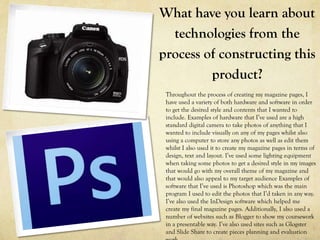
 Throughout the process of creating my magazine pages, I
 have used a variety of both hardware and software in order
 to get the desired style and contents that I wanted to
 include. Examples of hardware that I’ve used are a high
 standard digital camera to take photos of anything that I
 wanted to include visually on any of my pages whilst also
 using a computer to store any photos as well as edit them
 whilst I also used it to create my magazine pages in terms of
 design, text and layout. I’ve used some lighting equipment
 when taking some photos to get a desired style in my images
 that would go with my overall theme of my magazine and
 that would also appeal to my target audience Examples of
 software that I’ve used is Photoshop which was the main
 program I used to edit the photos that I’d taken in any way.
 I’ve also used the InDesign software which helped me
 create my final magazine pages. Additionally, I also used a
 number of websites such as Blogger to show my coursework
 in a presentable way. I’ve also used sites such as Glogster
 and Slide Share to create pieces planning and evaluation
Blogger
By using Blogger, I’m able to
present my completed pieces of
coursework in a clean and
professional way so that I can show
off the work I’ve done but also go
back and look back at things that I
may wish to improve on or review.
InDesign
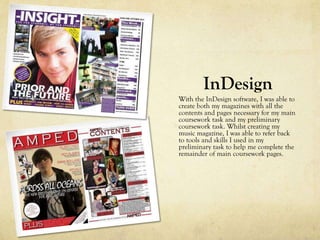
With the InDesign software, I was able to
create both my magazines with all the
contents and pages necessary for my main
coursework task and my preliminary
coursework task. Whilst creating my
music magazine, I was able to refer back
to tools and skills I used in my
preliminary task to help me complete the
remainder of main coursework pages.
Photoshop Tools
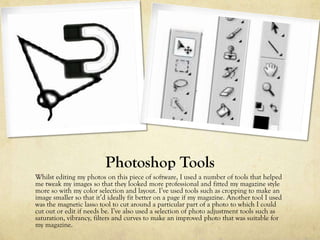
Whilst editing my photos on this piece of software, I used a number of tools that helped
me tweak my images so that they looked more professional and fitted my magazine style
more so with my color selection and layout. I’ve used tools such as cropping to make an
image smaller so that it’d ideally fit better on a page if my magazine. Another tool I used
was the magnetic lasso tool to cut around a particular part of a photo to which I could
cut out or edit if needs be. I’ve also used a selection of photo adjustment tools such as
saturation, vibrancy, filters and curves to make an improved photo that was suitable for
my magazine.
Magnetic Lasso
    Tool
From the original image, I cut
around the person I wanted to
include on the page shown on the
image below. Using the magnetic
lasso tool allowed me to cut that part
of the image out more smoothly and
make my image seem more
professional when placed on my final
double-page spread. Also, this tool
allowed me to smooth out the edges
of the image so it looked as if it had
been professional placed rather than
just quickly being cut out and placed.
Crop Tool
The crop tool allows me to make a particular image smaller so that I
fits better on a page to cut out and undesired part of an image. With
this example, I’ve cropped both sides to highlight the person in the
center and dispose of the extra person and the black space on either
side of her.
Vibrancy and
   Saturation
     Tools
The vibrancy tool enhances the
lighting in the images to create
much more natural and clearer
looking image on my page. The
saturation tool brings out the
color in the image and adjusts it
to more a suitable standard that
will suit the style of my page
more.

Evaluation Question 6

  • 1.
    What have youlearn about technologies from the process of constructing this product? Throughout the process of creating my magazine pages, I have used a variety of both hardware and software in order to get the desired style and contents that I wanted to include. Examples of hardware that I’ve used are a high standard digital camera to take photos of anything that I wanted to include visually on any of my pages whilst also using a computer to store any photos as well as edit them whilst I also used it to create my magazine pages in terms of design, text and layout. I’ve used some lighting equipment when taking some photos to get a desired style in my images that would go with my overall theme of my magazine and that would also appeal to my target audience Examples of software that I’ve used is Photoshop which was the main program I used to edit the photos that I’d taken in any way. I’ve also used the InDesign software which helped me create my final magazine pages. Additionally, I also used a number of websites such as Blogger to show my coursework in a presentable way. I’ve also used sites such as Glogster and Slide Share to create pieces planning and evaluation
  • 2.
    Blogger By using Blogger,I’m able to present my completed pieces of coursework in a clean and professional way so that I can show off the work I’ve done but also go back and look back at things that I may wish to improve on or review.
  • 3.
    InDesign With the InDesignsoftware, I was able to create both my magazines with all the contents and pages necessary for my main coursework task and my preliminary coursework task. Whilst creating my music magazine, I was able to refer back to tools and skills I used in my preliminary task to help me complete the remainder of main coursework pages.
  • 4.
    Photoshop Tools Whilst editingmy photos on this piece of software, I used a number of tools that helped me tweak my images so that they looked more professional and fitted my magazine style more so with my color selection and layout. I’ve used tools such as cropping to make an image smaller so that it’d ideally fit better on a page if my magazine. Another tool I used was the magnetic lasso tool to cut around a particular part of a photo to which I could cut out or edit if needs be. I’ve also used a selection of photo adjustment tools such as saturation, vibrancy, filters and curves to make an improved photo that was suitable for my magazine.
  • 5.
    Magnetic Lasso Tool From the original image, I cut around the person I wanted to include on the page shown on the image below. Using the magnetic lasso tool allowed me to cut that part of the image out more smoothly and make my image seem more professional when placed on my final double-page spread. Also, this tool allowed me to smooth out the edges of the image so it looked as if it had been professional placed rather than just quickly being cut out and placed.
  • 6.
    Crop Tool The croptool allows me to make a particular image smaller so that I fits better on a page to cut out and undesired part of an image. With this example, I’ve cropped both sides to highlight the person in the center and dispose of the extra person and the black space on either side of her.
  • 7.
    Vibrancy and Saturation Tools The vibrancy tool enhances the lighting in the images to create much more natural and clearer looking image on my page. The saturation tool brings out the color in the image and adjusts it to more a suitable standard that will suit the style of my page more.